Skip to content
  • Home
  • Aktuell
  • Tags
  • 0 Ungelesen 0
  • Kategorien
  • Unreplied
  • Beliebt
  • GitHub
  • Docu
  • Hilfe
Skins
  • Light
  • Brite
  • Cerulean
  • Cosmo
  • Flatly
  • Journal
  • Litera
  • Lumen
  • Lux
  • Materia
  • Minty
  • Morph
  • Pulse
  • Sandstone
  • Simplex
  • Sketchy
  • Spacelab
  • United
  • Yeti
  • Zephyr
  • Dark
  • Cyborg
  • Darkly
  • Quartz
  • Slate
  • Solar
  • Superhero
  • Vapor

  • Standard: (Kein Skin)
  • Kein Skin
Einklappen
ioBroker Logo

Community Forum

donate donate
  1. ioBroker Community Home
  2. Deutsch
  3. ioBroker Allgemein
  4. Anfänger sucht Hilfe bei Install. proxmox auf INTELNUC8i3BEK
NEWS

  • Neuer Blogbeitrag: Monatsrückblick - Dezember 2025 🎄
    BluefoxB
    Bluefox
    11
    1
    343

  • Weihnachtsangebot 2025! 🎄
    BluefoxB
    Bluefox
    24
    1
    1.6k

  • UPDATE 31.10.: Amazon Alexa - ioBroker Skill läuft aus ?
    apollon77A
    apollon77
    48
    3
    9.5k

Anfänger sucht Hilfe bei Install. proxmox auf INTELNUC8i3BEK

Geplant Angeheftet Gesperrt Verschoben ioBroker Allgemein
1.0k Beiträge 16 Kommentatoren 249.3k Aufrufe 15 Watching
  • Älteste zuerst
  • Neuste zuerst
  • Meiste Stimmen
Antworten
  • In einem neuen Thema antworten
Anmelden zum Antworten
Dieses Thema wurde gelöscht. Nur Nutzer mit entsprechenden Rechten können es sehen.
  • crunchipC crunchip

    @4-7kohm stimmt, kann man sich generelle Notizen eintragen, dafür war das selbst erstellte template gedacht, das man an solche sachen nicht mehr denken bzw machen muss
    aber für links, persönliche Notizen, etc ist das manchmal goldwert

    Kalle BlomquistK Offline
    Kalle BlomquistK Offline
    Kalle Blomquist
    schrieb am zuletzt editiert von
    #299

    @crunchip :+1:

    1 Antwort Letzte Antwort
    0
    • Kalle BlomquistK Kalle Blomquist

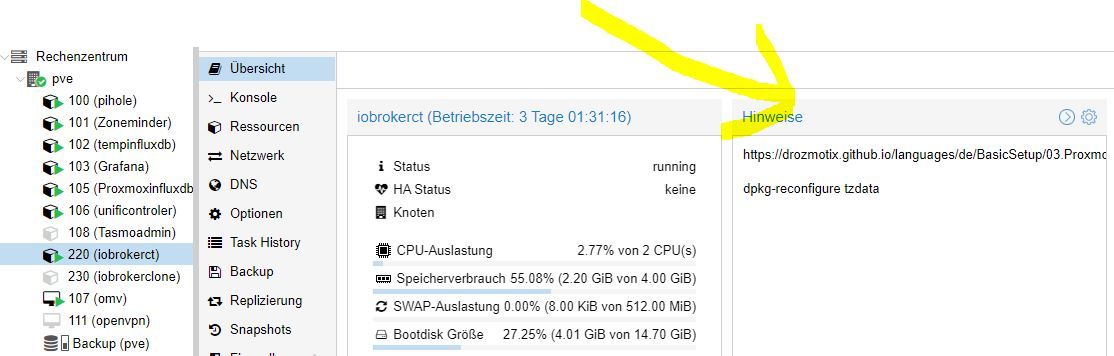
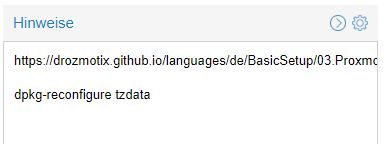
      @goetschhofer kleiner Hinweis von mir.
      Du kannst in Proxmox unter "Hinweis" Notizen schreiben, oder Befehle wie "dpkg-reconfigure tzdata".
      Hat den Vorteil, dass du dir die ganzen Befehle nicht immer neu suchen oder merken mußt, zumindest für den Anfang.
      Ich bin jetzt nicht den ganzen Faden durchgegeangen, ob es schon jemand geschrieben hat.
      Vielleicht hilft´s
      proxmox.JPG

      Gruß Kalle

      G Offline
      G Offline
      GOETSCHHOFER
      schrieb am zuletzt editiert von
      #300

      @4-7kohm

      Hallo kalle,

      ich finde den Punkt Hinweise nicht.
      Unter backup habe ich den Punkt Hinweise bearbeiten ?

      Danke

      Kalle BlomquistK 1 Antwort Letzte Antwort
      0
      • G GOETSCHHOFER

        @4-7kohm

        Hallo kalle,

        ich finde den Punkt Hinweise nicht.
        Unter backup habe ich den Punkt Hinweise bearbeiten ?

        Danke

        Kalle BlomquistK Offline
        Kalle BlomquistK Offline
        Kalle Blomquist
        schrieb am zuletzt editiert von Kalle Blomquist
        #301

        @goetschhofer !proxmox1.JPG

        Rechts auf das Zahnrad gehen, dann bearbeiten, äh und speichern

        G 1 Antwort Letzte Antwort
        1
        • Kalle BlomquistK Kalle Blomquist

          @goetschhofer !proxmox1.JPG

          Rechts auf das Zahnrad gehen, dann bearbeiten, äh und speichern

          G Offline
          G Offline
          GOETSCHHOFER
          schrieb am zuletzt editiert von
          #302

          @4-7kohm
          Das Gute liegt so nah ! :+1:

          1 Antwort Letzte Antwort
          0
          • crunchipC crunchip

            @goetschhofer ja jetzt siehst du
            is already the newest, ein post weiter oben hatte es noch gefehlt, also hat schon seine richtigkeit

            G Offline
            G Offline
            GOETSCHHOFER
            schrieb am zuletzt editiert von
            #303

            @crunchip

            Es will und will offenbar nicht ? Fehlermeldung beim Installieren InfluxDB ?

             karl@INFLUXDB:~$ login as: karl
            > the exact distribution terms for each program are described in the
            > individual files in /usr/share/doc/*/copyright.
            >
            > Debian GNU/Linux comes with ABSOLUTELY NO WARRANTY, to the extent
            > permitted by applicable law.
            > Last login: Sat May  8 17:39:53 2021 from 192.168.1.3
            > karl@INFLUXDB:~$ wget -qO- https://repos.influxdata.com/influxdb.key | sudo ap           t-key add -
            > [sudo] password for karl:
            > E: gnupg, gnupg2 and gnupg1 do not seem to be installed, but one of them is re           quired for this operation
            > karl@INFLUXDB:~$ source /etc/os-release
            > karl@INFLUXDB:~$ echo "deb https://repos.influxdata.com/debian $(lsb_release -           cs) stable" | sudo tee /etc/apt/sources.list.d/influxdb.list
            > -bash: lsb_release: command not found
            
            
            Kalle BlomquistK 1 Antwort Letzte Antwort
            0
            • G GOETSCHHOFER

              @crunchip

              Es will und will offenbar nicht ? Fehlermeldung beim Installieren InfluxDB ?

               karl@INFLUXDB:~$ login as: karl
              > the exact distribution terms for each program are described in the
              > individual files in /usr/share/doc/*/copyright.
              >
              > Debian GNU/Linux comes with ABSOLUTELY NO WARRANTY, to the extent
              > permitted by applicable law.
              > Last login: Sat May  8 17:39:53 2021 from 192.168.1.3
              > karl@INFLUXDB:~$ wget -qO- https://repos.influxdata.com/influxdb.key | sudo ap           t-key add -
              > [sudo] password for karl:
              > E: gnupg, gnupg2 and gnupg1 do not seem to be installed, but one of them is re           quired for this operation
              > karl@INFLUXDB:~$ source /etc/os-release
              > karl@INFLUXDB:~$ echo "deb https://repos.influxdata.com/debian $(lsb_release -           cs) stable" | sudo tee /etc/apt/sources.list.d/influxdb.list
              > -bash: lsb_release: command not found
              
              
              Kalle BlomquistK Offline
              Kalle BlomquistK Offline
              Kalle Blomquist
              schrieb am zuletzt editiert von Kalle Blomquist
              #304

              @goetschhofer sagte in Anfänger sucht Hilfe bei Install. proxmox auf INTELNUC8i3BEK:

              Könnte sein, dass dies fehlt?

              E: gnupg, gnupg2 and gnupg1 do not seem to be installed, but one of them is required for this operation
              
              sudo apt install gnupg2
              
              G 2 Antworten Letzte Antwort
              1
              • Kalle BlomquistK Kalle Blomquist

                @goetschhofer sagte in Anfänger sucht Hilfe bei Install. proxmox auf INTELNUC8i3BEK:

                Könnte sein, dass dies fehlt?

                E: gnupg, gnupg2 and gnupg1 do not seem to be installed, but one of them is required for this operation
                
                sudo apt install gnupg2
                
                G Offline
                G Offline
                GOETSCHHOFER
                schrieb am zuletzt editiert von
                #305

                @4-7kohm said in Anfänger sucht Hilfe bei Install. proxmox auf INTELNUC8i3BEK:

                sudo apt install gnupg2

                karl@INFLUXDB:~$ sudo apt install gnupg2
                E: Malformed entry 1 in list file /etc/apt/sources.list.d/influxdb.list (Component)
                E: The list of sources could not be read.
                E: Malformed entry 1 in list file /etc/apt/sources.list.d/influxdb.list (Component)
                E: The list of sources could not be read.
                
                
                Kalle BlomquistK 1 Antwort Letzte Antwort
                0
                • G GOETSCHHOFER

                  @4-7kohm said in Anfänger sucht Hilfe bei Install. proxmox auf INTELNUC8i3BEK:

                  sudo apt install gnupg2

                  karl@INFLUXDB:~$ sudo apt install gnupg2
                  E: Malformed entry 1 in list file /etc/apt/sources.list.d/influxdb.list (Component)
                  E: The list of sources could not be read.
                  E: Malformed entry 1 in list file /etc/apt/sources.list.d/influxdb.list (Component)
                  E: The list of sources could not be read.
                  
                  
                  Kalle BlomquistK Offline
                  Kalle BlomquistK Offline
                  Kalle Blomquist
                  schrieb am zuletzt editiert von
                  #306

                  @goetschhofer Sorry, habe Influx schon lange nicht mehr installiert. 2 mal installiert und seit dem läuft und läuft .......

                  Ich kann dir diese Doku empfehlen:

                  Link Text

                  Soweit ich mich erinnere, klappte es danach ohne Probleme. Es ist immer besser, sich auf die Doku´s vom Hersteller zu beziehen (keine Youtube) und diese ab arbeiten.
                  Leider bin ich mit meinem doch recht hohen Alter auch zu spät in Linux eingestiegen um dir bei diesem Thema bessere Hilfe geben zu können, ohne Quatsch zu erzählen.
                  Aber ich würde mal tippen, das mit deiner sources.list etwas nicht stimmt. Lesbar?

                  Gruß Kalle

                  G 1 Antwort Letzte Antwort
                  1
                  • Kalle BlomquistK Kalle Blomquist

                    @goetschhofer Sorry, habe Influx schon lange nicht mehr installiert. 2 mal installiert und seit dem läuft und läuft .......

                    Ich kann dir diese Doku empfehlen:

                    Link Text

                    Soweit ich mich erinnere, klappte es danach ohne Probleme. Es ist immer besser, sich auf die Doku´s vom Hersteller zu beziehen (keine Youtube) und diese ab arbeiten.
                    Leider bin ich mit meinem doch recht hohen Alter auch zu spät in Linux eingestiegen um dir bei diesem Thema bessere Hilfe geben zu können, ohne Quatsch zu erzählen.
                    Aber ich würde mal tippen, das mit deiner sources.list etwas nicht stimmt. Lesbar?

                    Gruß Kalle

                    G Offline
                    G Offline
                    GOETSCHHOFER
                    schrieb am zuletzt editiert von
                    #307

                    @4-7kohm

                    Danke für den Hinweis.
                    Beim RSP Pi3+ hat es auch relativ rasch geklappt.
                    Ich plane ja vom RSP auf IntelNUC umzusiedeln.

                    Kalle BlomquistK Thomas BraunT 2 Antworten Letzte Antwort
                    0
                    • G GOETSCHHOFER

                      @4-7kohm

                      Danke für den Hinweis.
                      Beim RSP Pi3+ hat es auch relativ rasch geklappt.
                      Ich plane ja vom RSP auf IntelNUC umzusiedeln.

                      Kalle BlomquistK Offline
                      Kalle BlomquistK Offline
                      Kalle Blomquist
                      schrieb am zuletzt editiert von Kalle Blomquist
                      #308

                      @goetschhofer Der Link bezieht sich auf die 1.8 Influx.

                      Hier mal die aktuelle Doku für 2.0

                      Link Text

                      1 Antwort Letzte Antwort
                      1
                      • G GOETSCHHOFER

                        @4-7kohm

                        Danke für den Hinweis.
                        Beim RSP Pi3+ hat es auch relativ rasch geklappt.
                        Ich plane ja vom RSP auf IntelNUC umzusiedeln.

                        Thomas BraunT Online
                        Thomas BraunT Online
                        Thomas Braun
                        Most Active
                        schrieb am zuletzt editiert von
                        #309

                        @goetschhofer

                        Was steht denn da nun drin?

                        cat /etc/apt/sources.list.d/influxdb.list
                        

                        Linux-Werkzeugkasten:
                        https://forum.iobroker.net/topic/42952/der-kleine-iobroker-linux-werkzeugkasten
                        NodeJS Fixer Skript:
                        https://forum.iobroker.net/topic/68035/iob-node-fix-skript
                        iob_diag: curl -sLf -o diag.sh https://iobroker.net/diag.sh && bash diag.sh

                        G 1 Antwort Letzte Antwort
                        1
                        • Thomas BraunT Thomas Braun

                          @goetschhofer

                          Was steht denn da nun drin?

                          cat /etc/apt/sources.list.d/influxdb.list
                          
                          G Offline
                          G Offline
                          GOETSCHHOFER
                          schrieb am zuletzt editiert von GOETSCHHOFER
                          #310

                          @thomas-braun said in Anfänger sucht Hilfe bei Install. proxmox auf INTELNUC8i3BEK:

                          cat /etc/apt/sources.list.d/influxdb.list

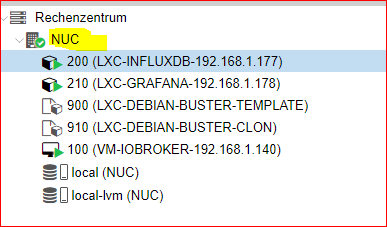
                          Ich habe anstatt pve NUC stehen, könnte dies ein Problem sein ?

                          login as: karl
                          karl@192.168.1.177's password:
                          Linux INFLUXDB 5.4.106-1-pve #1 SMP PVE 5.4.106-1 (Fri, 19 Mar 2021 11:08:47 +0100) x86_64
                          
                          The programs included with the Debian GNU/Linux system are free software;
                          the exact distribution terms for each program are described in the
                          individual files in /usr/share/doc/*/copyright.
                          
                          Debian GNU/Linux comes with ABSOLUTELY NO WARRANTY, to the extent
                          permitted by applicable law.
                          Last login: Sat May  8 18:25:12 2021 from 192.168.1.3
                          karl@INFLUXDB:~$ cat /etc/apt/sources.list.d/influxdb.list
                          deb https://repos.influxdata.com/debian  stable
                          karl@INFLUXDB:~$


                          ce1c816a-c6b6-4fdf-9ad0-7b48d189729d-image.png

                          crunchipC 1 Antwort Letzte Antwort
                          0
                          • G GOETSCHHOFER

                            @thomas-braun said in Anfänger sucht Hilfe bei Install. proxmox auf INTELNUC8i3BEK:

                            cat /etc/apt/sources.list.d/influxdb.list

                            Ich habe anstatt pve NUC stehen, könnte dies ein Problem sein ?

                            login as: karl
                            karl@192.168.1.177's password:
                            Linux INFLUXDB 5.4.106-1-pve #1 SMP PVE 5.4.106-1 (Fri, 19 Mar 2021 11:08:47 +0100) x86_64
                            
                            The programs included with the Debian GNU/Linux system are free software;
                            the exact distribution terms for each program are described in the
                            individual files in /usr/share/doc/*/copyright.
                            
                            Debian GNU/Linux comes with ABSOLUTELY NO WARRANTY, to the extent
                            permitted by applicable law.
                            Last login: Sat May  8 18:25:12 2021 from 192.168.1.3
                            karl@INFLUXDB:~$ cat /etc/apt/sources.list.d/influxdb.list
                            deb https://repos.influxdata.com/debian  stable
                            karl@INFLUXDB:~$


                            ce1c816a-c6b6-4fdf-9ad0-7b48d189729d-image.png

                            crunchipC Abwesend
                            crunchipC Abwesend
                            crunchip
                            Forum Testing Most Active
                            schrieb am zuletzt editiert von crunchip
                            #311

                            @goetschhofer ggf die

                            cat /etc/apt/sources.list.d/influxdb.list


                            editieren
                            und ersetzen mit

                            "deb https://repos.influxdata.com/debian buster stable"
                            

                            bzw machs so

                            sudo apt update
                            sudo apt install -y gnupg2  wget
                            wget -qO- https://repos.influxdata.com/influxdb.key | sudo apt-key add -
                            echo "deb https://repos.influxdata.com/debian buster stable" | sudo tee /etc/apt/sources.list.d/influxdb.list
                            

                            installieren

                            sudo apt update
                            sudo apt install -y influxdb
                            

                            Dienst aktivieren

                            sudo systemctl enable --now influxdb
                            

                            Status prüfen

                            systemctl status influxdb
                            

                            umgestiegen von Proxmox auf Unraid

                            G 1 Antwort Letzte Antwort
                            1
                            • crunchipC crunchip

                              @goetschhofer ggf die

                              cat /etc/apt/sources.list.d/influxdb.list


                              editieren
                              und ersetzen mit

                              "deb https://repos.influxdata.com/debian buster stable"
                              

                              bzw machs so

                              sudo apt update
                              sudo apt install -y gnupg2  wget
                              wget -qO- https://repos.influxdata.com/influxdb.key | sudo apt-key add -
                              echo "deb https://repos.influxdata.com/debian buster stable" | sudo tee /etc/apt/sources.list.d/influxdb.list
                              

                              installieren

                              sudo apt update
                              sudo apt install -y influxdb
                              

                              Dienst aktivieren

                              sudo systemctl enable --now influxdb
                              

                              Status prüfen

                              systemctl status influxdb
                              
                              G Offline
                              G Offline
                              GOETSCHHOFER
                              schrieb am zuletzt editiert von
                              #312

                              @crunchip said in Anfänger sucht Hilfe bei Install. proxmox auf INTELNUC8i3BEK:

                              sudo apt update

                              Wie kann ich dies editieren und ersetzen ?
                              Ich bekomme bei sudo apt update bereits eine Fehlermeldung ?

                              karl@INFLUXDB:~$ cat /etc/apt/sources.list.d/influxdb.list
                              deb https://repos.influxdata.com/debian  stable
                              karl@INFLUXDB:~$ cat /etc/apt/sources.list.d/influxdb.list
                              deb https://repos.influxdata.com/debian  stable
                              karl@INFLUXDB:~$ sudo apt update
                              [sudo] password for karl:
                              E: Malformed entry 1 in list file /etc/apt/sources.list.d/influxdb.list (Compone                                                                                                                                                             nt)
                              E: The list of sources could not be read.
                              karl@INFLUXDB:~$
                              
                              
                              Thomas BraunT 1 Antwort Letzte Antwort
                              0
                              • G GOETSCHHOFER

                                @crunchip said in Anfänger sucht Hilfe bei Install. proxmox auf INTELNUC8i3BEK:

                                sudo apt update

                                Wie kann ich dies editieren und ersetzen ?
                                Ich bekomme bei sudo apt update bereits eine Fehlermeldung ?

                                karl@INFLUXDB:~$ cat /etc/apt/sources.list.d/influxdb.list
                                deb https://repos.influxdata.com/debian  stable
                                karl@INFLUXDB:~$ cat /etc/apt/sources.list.d/influxdb.list
                                deb https://repos.influxdata.com/debian  stable
                                karl@INFLUXDB:~$ sudo apt update
                                [sudo] password for karl:
                                E: Malformed entry 1 in list file /etc/apt/sources.list.d/influxdb.list (Compone                                                                                                                                                             nt)
                                E: The list of sources could not be read.
                                karl@INFLUXDB:~$
                                
                                
                                Thomas BraunT Online
                                Thomas BraunT Online
                                Thomas Braun
                                Most Active
                                schrieb am zuletzt editiert von
                                #313

                                @goetschhofer

                                Die Zeile muss so aussehen:

                                deb https://repos.influxdata.com/debian buster stable
                                

                                Kannst du mit

                                sudo nano /etc/apt/sources.list.d/influxdb.list
                                

                                editieren.

                                Linux-Werkzeugkasten:
                                https://forum.iobroker.net/topic/42952/der-kleine-iobroker-linux-werkzeugkasten
                                NodeJS Fixer Skript:
                                https://forum.iobroker.net/topic/68035/iob-node-fix-skript
                                iob_diag: curl -sLf -o diag.sh https://iobroker.net/diag.sh && bash diag.sh

                                G crunchipC 2 Antworten Letzte Antwort
                                1
                                • Thomas BraunT Thomas Braun

                                  @goetschhofer

                                  Die Zeile muss so aussehen:

                                  deb https://repos.influxdata.com/debian buster stable
                                  

                                  Kannst du mit

                                  sudo nano /etc/apt/sources.list.d/influxdb.list
                                  

                                  editieren.

                                  G Offline
                                  G Offline
                                  GOETSCHHOFER
                                  schrieb am zuletzt editiert von
                                  #314

                                  @thomas-braun @crunchip

                                  Ich denke dies war die Lösung des Problems, vielen Dank an Euch beide. :+1: :+1:

                                  Oder seht ihr hier noch ein Problem ?

                                  Da ich ein neugieriger Mensch bin und auch dazulernen möchte, würde mich interessieren, warum gerade das Wort buster die Lösung war ?

                                  karl@INFLUXDB:~$ wget -qO- https://repos.influxdata.com/influxdb.key | sudo apt-key add -
                                  OK
                                  karl@INFLUXDB:~$ echo "deb https://repos.influxdata.com/debian buster stable" | sudo tee /etc/apt/sources.list.d/influxdb.list
                                  deb https://repos.influxdata.com/debian buster stable
                                  karl@INFLUXDB:~$ sudo apt update
                                  Hit:1 http://ftp.debian.org/debian buster InRelease
                                  Hit:2 http://security.debian.org buster/updates InRelease
                                  Hit:3 http://ftp.debian.org/debian buster-updates InRelease
                                  Get:4 https://repos.influxdata.com/debian buster InRelease [4737 B]
                                  Get:5 https://repos.influxdata.com/debian buster/stable amd64 Packages [1067 B]
                                  Fetched 5804 B in 0s (13.7 kB/s)
                                  Reading package lists... Done
                                  Building dependency tree
                                  Reading state information... Done
                                  All packages are up to date.
                                  karl@INFLUXDB:~$ sudo apt install -y influxdb
                                  Reading package lists... Done
                                  Building dependency tree
                                  Reading state information... Done
                                  The following NEW packages will be installed:
                                    influxdb
                                  0 upgraded, 1 newly installed, 0 to remove and 0 not upgraded.
                                  Need to get 64.5 MB of archives.
                                  After this operation, 175 MB of additional disk space will be used.
                                  Get:1 https://repos.influxdata.com/debian buster/stable amd64 influxdb amd64 1.8.5-1 [64.5 MB]
                                  Fetched 64.5 MB in 14s (4579 kB/s)
                                  Selecting previously unselected package influxdb.
                                  (Reading database ... 20916 files and directories currently installed.)
                                  Preparing to unpack .../influxdb_1.8.5-1_amd64.deb ...
                                  Unpacking influxdb (1.8.5-1) ...
                                  Setting up influxdb (1.8.5-1) ...
                                  Created symlink /etc/systemd/system/influxd.service -> /lib/systemd/system/influxdb.service.
                                  Created symlink /etc/systemd/system/multi-user.target.wants/influxdb.service -> /lib/systemd/system/influxdb.service.
                                  Processing triggers for man-db (2.8.5-2) ...
                                  karl@INFLUXDB:~$ sudo systemctl enable --now influxdb
                                  karl@INFLUXDB:~$ systemctl status influxdb
                                  * influxdb.service - InfluxDB is an open-source, distributed, time series database
                                     Loaded: loaded (/lib/systemd/system/influxdb.service; enabled; vendor preset: enabled)
                                     Active: active (running) since Sat 2021-05-08 19:25:25 CEST; 14s ago
                                       Docs: https://docs.influxdata.com/influxdb/
                                   Main PID: 3046 (influxd)
                                      Tasks: 10 (limit: 4915)
                                     Memory: 10.5M
                                     CGroup: /system.slice/influxdb.service
                                             `-3046 /usr/bin/influxd -config /etc/influxdb/influxdb.conf
                                  karl@INFLUXDB:~$
                                  
                                  
                                  crunchipC 1 Antwort Letzte Antwort
                                  0
                                  • Thomas BraunT Thomas Braun

                                    @goetschhofer

                                    Die Zeile muss so aussehen:

                                    deb https://repos.influxdata.com/debian buster stable
                                    

                                    Kannst du mit

                                    sudo nano /etc/apt/sources.list.d/influxdb.list
                                    

                                    editieren.

                                    crunchipC Abwesend
                                    crunchipC Abwesend
                                    crunchip
                                    Forum Testing Most Active
                                    schrieb am zuletzt editiert von
                                    #315

                                    @thomas-braun kleine verständnisfrage meinerseits, wenn die Datei editiert ist, fällt doch eigentlich die Zeile weg, da nicht mehr benötigt

                                    echo "deb https://repos.influxdata.com/debian buster stable" | sudo tee /etc/apt/sources.list.d/influxdb.list
                                    

                                    wenn der echo Befehl trotzdem abgesetzt wird, passiert dann nichts, weil schon vorhanden, oder wird die Zeile ein zweites mal eingetragen?

                                    umgestiegen von Proxmox auf Unraid

                                    Thomas BraunT 1 Antwort Letzte Antwort
                                    1
                                    • G GOETSCHHOFER

                                      @thomas-braun @crunchip

                                      Ich denke dies war die Lösung des Problems, vielen Dank an Euch beide. :+1: :+1:

                                      Oder seht ihr hier noch ein Problem ?

                                      Da ich ein neugieriger Mensch bin und auch dazulernen möchte, würde mich interessieren, warum gerade das Wort buster die Lösung war ?

                                      karl@INFLUXDB:~$ wget -qO- https://repos.influxdata.com/influxdb.key | sudo apt-key add -
                                      OK
                                      karl@INFLUXDB:~$ echo "deb https://repos.influxdata.com/debian buster stable" | sudo tee /etc/apt/sources.list.d/influxdb.list
                                      deb https://repos.influxdata.com/debian buster stable
                                      karl@INFLUXDB:~$ sudo apt update
                                      Hit:1 http://ftp.debian.org/debian buster InRelease
                                      Hit:2 http://security.debian.org buster/updates InRelease
                                      Hit:3 http://ftp.debian.org/debian buster-updates InRelease
                                      Get:4 https://repos.influxdata.com/debian buster InRelease [4737 B]
                                      Get:5 https://repos.influxdata.com/debian buster/stable amd64 Packages [1067 B]
                                      Fetched 5804 B in 0s (13.7 kB/s)
                                      Reading package lists... Done
                                      Building dependency tree
                                      Reading state information... Done
                                      All packages are up to date.
                                      karl@INFLUXDB:~$ sudo apt install -y influxdb
                                      Reading package lists... Done
                                      Building dependency tree
                                      Reading state information... Done
                                      The following NEW packages will be installed:
                                        influxdb
                                      0 upgraded, 1 newly installed, 0 to remove and 0 not upgraded.
                                      Need to get 64.5 MB of archives.
                                      After this operation, 175 MB of additional disk space will be used.
                                      Get:1 https://repos.influxdata.com/debian buster/stable amd64 influxdb amd64 1.8.5-1 [64.5 MB]
                                      Fetched 64.5 MB in 14s (4579 kB/s)
                                      Selecting previously unselected package influxdb.
                                      (Reading database ... 20916 files and directories currently installed.)
                                      Preparing to unpack .../influxdb_1.8.5-1_amd64.deb ...
                                      Unpacking influxdb (1.8.5-1) ...
                                      Setting up influxdb (1.8.5-1) ...
                                      Created symlink /etc/systemd/system/influxd.service -> /lib/systemd/system/influxdb.service.
                                      Created symlink /etc/systemd/system/multi-user.target.wants/influxdb.service -> /lib/systemd/system/influxdb.service.
                                      Processing triggers for man-db (2.8.5-2) ...
                                      karl@INFLUXDB:~$ sudo systemctl enable --now influxdb
                                      karl@INFLUXDB:~$ systemctl status influxdb
                                      * influxdb.service - InfluxDB is an open-source, distributed, time series database
                                         Loaded: loaded (/lib/systemd/system/influxdb.service; enabled; vendor preset: enabled)
                                         Active: active (running) since Sat 2021-05-08 19:25:25 CEST; 14s ago
                                           Docs: https://docs.influxdata.com/influxdb/
                                       Main PID: 3046 (influxd)
                                          Tasks: 10 (limit: 4915)
                                         Memory: 10.5M
                                         CGroup: /system.slice/influxdb.service
                                                 `-3046 /usr/bin/influxd -config /etc/influxdb/influxdb.conf
                                      karl@INFLUXDB:~$
                                      
                                      
                                      crunchipC Abwesend
                                      crunchipC Abwesend
                                      crunchip
                                      Forum Testing Most Active
                                      schrieb am zuletzt editiert von
                                      #316

                                      @goetschhofer passt jetzt und läuft.
                                      jetzt sind wir wieder so weit, hehe, dein backup muss da ja jetzt rein

                                      umgestiegen von Proxmox auf Unraid

                                      G 2 Antworten Letzte Antwort
                                      1
                                      • crunchipC crunchip

                                        @thomas-braun kleine verständnisfrage meinerseits, wenn die Datei editiert ist, fällt doch eigentlich die Zeile weg, da nicht mehr benötigt

                                        echo "deb https://repos.influxdata.com/debian buster stable" | sudo tee /etc/apt/sources.list.d/influxdb.list
                                        

                                        wenn der echo Befehl trotzdem abgesetzt wird, passiert dann nichts, weil schon vorhanden, oder wird die Zeile ein zweites mal eingetragen?

                                        Thomas BraunT Online
                                        Thomas BraunT Online
                                        Thomas Braun
                                        Most Active
                                        schrieb am zuletzt editiert von Thomas Braun
                                        #317

                                        @crunchip sagte in Anfänger sucht Hilfe bei Install. proxmox auf INTELNUC8i3BEK:

                                        wenn der echo Befehl trotzdem abgesetzt wird, passiert dann nichts, weil schon vorhanden, oder wird die Zeile ein zweites mal eingetragen?

                                        Weder noch. Die Zieldatei wird mit dem Inhalt vom echo neugefüllt, vorherige Einträge werden überschrieben.
                                        Mit -a würde allerdings in der Datei 'angehängt'

                                        Linux-Werkzeugkasten:
                                        https://forum.iobroker.net/topic/42952/der-kleine-iobroker-linux-werkzeugkasten
                                        NodeJS Fixer Skript:
                                        https://forum.iobroker.net/topic/68035/iob-node-fix-skript
                                        iob_diag: curl -sLf -o diag.sh https://iobroker.net/diag.sh && bash diag.sh

                                        1 Antwort Letzte Antwort
                                        1
                                        • crunchipC crunchip

                                          @goetschhofer passt jetzt und läuft.
                                          jetzt sind wir wieder so weit, hehe, dein backup muss da ja jetzt rein

                                          G Offline
                                          G Offline
                                          GOETSCHHOFER
                                          schrieb am zuletzt editiert von GOETSCHHOFER
                                          #318

                                          @crunchip

                                          Ja, jetzt ist meine Nase wieder über dem Wasser ! :grinning:
                                          Wieder ein Punkt erledigt.

                                          Warum musste ich das alte backup vorher löschen, damit ich ein neues erstellen konnte ?
                                          Ist zwar egal, da es sowieso nicht aktuell war.
                                          Bei der Fehlermeldung habe ich irgendwas gelesen von erhöhen Anzahl möglicher backups.

                                          Reicht eine einfache externe Festplatte als backup oder muss dies eine SSD sein ?
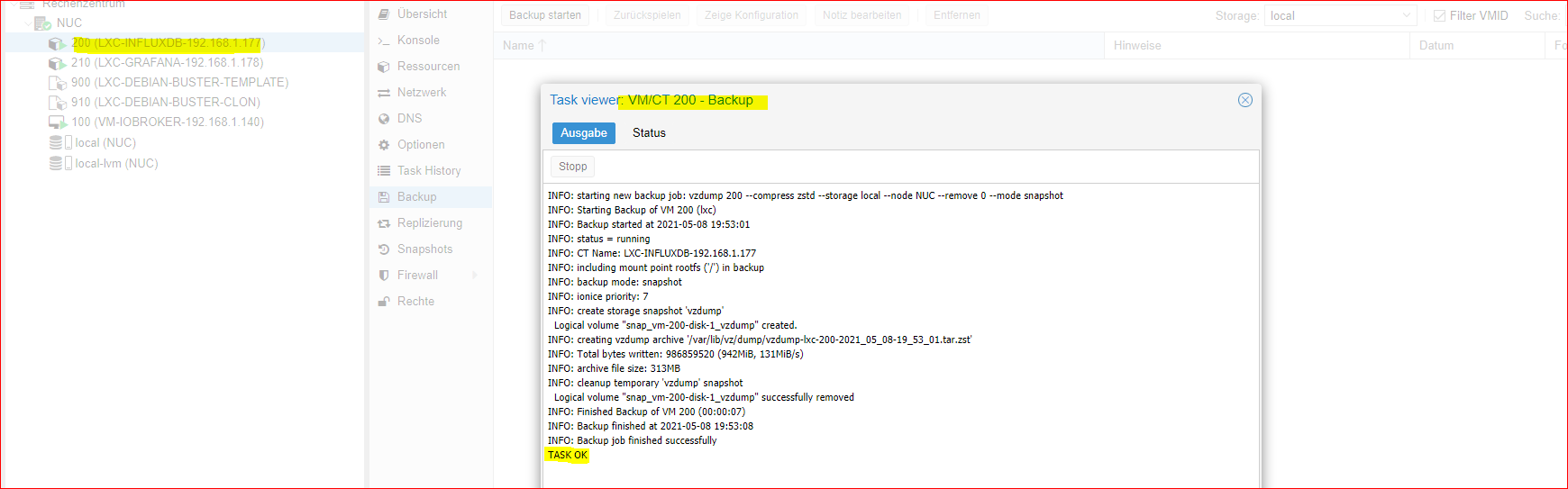
                                          08facc2c-5b04-4986-87e9-294940b92c69-image.png

                                          crunchipC 1 Antwort Letzte Antwort
                                          0
                                          Antworten
                                          • In einem neuen Thema antworten
                                          Anmelden zum Antworten
                                          • Älteste zuerst
                                          • Neuste zuerst
                                          • Meiste Stimmen


                                          Support us

                                          ioBroker
                                          Community Adapters
                                          Donate
                                          FAQ Cloud / IOT
                                          HowTo: Node.js-Update
                                          HowTo: Backup/Restore
                                          Downloads
                                          BLOG

                                          757

                                          Online

                                          32.5k

                                          Benutzer

                                          81.7k

                                          Themen

                                          1.3m

                                          Beiträge
                                          Community
                                          Impressum | Datenschutz-Bestimmungen | Nutzungsbedingungen | Einwilligungseinstellungen
                                          ioBroker Community 2014-2025
                                          logo
                                          • Anmelden

                                          • Du hast noch kein Konto? Registrieren

                                          • Anmelden oder registrieren, um zu suchen
                                          • Erster Beitrag
                                            Letzter Beitrag
                                          0
                                          • Home
                                          • Aktuell
                                          • Tags
                                          • Ungelesen 0
                                          • Kategorien
                                          • Unreplied
                                          • Beliebt
                                          • GitHub
                                          • Docu
                                          • Hilfe