




Zwave läuft nicht iobroker als Raspberrymatic addon
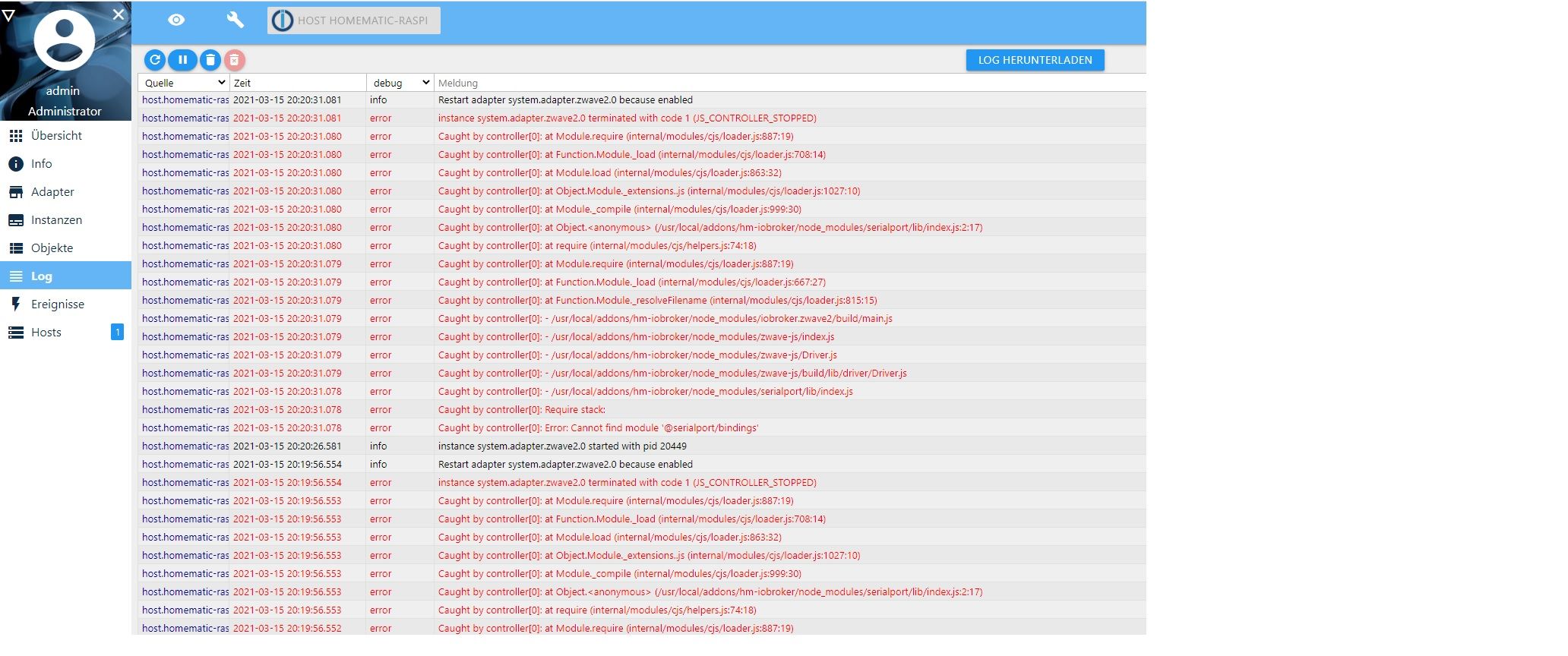
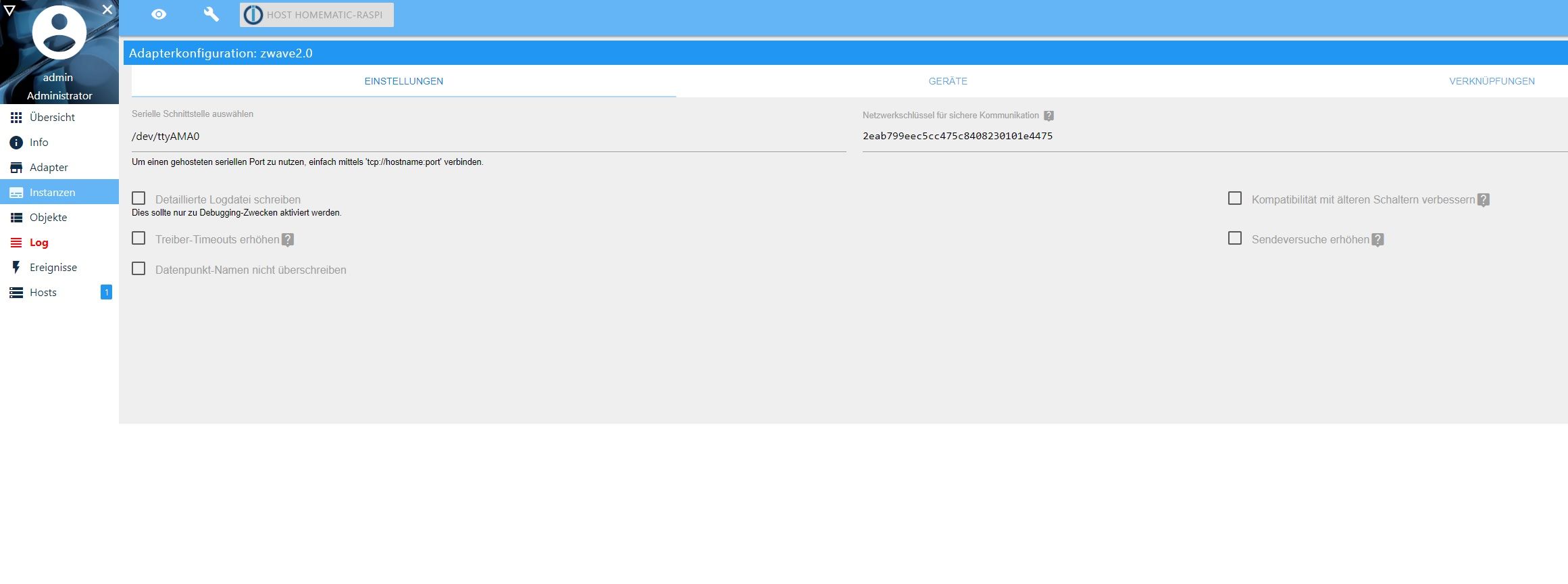
-
@rhartmann76 Kannst du das logfile bitte als Text in Code Tags </> posten. Dann ist das besser zu lesen.
Verstehe ich das richtig:
Pi4 mit iobroker Master
Pi3 mit Zwave läuft irgendwo im Netz oder als iobroker slave ?@wendy2702 da fehlt der serialport... der wurde nicht mit installiert
zigbee hab ich, zwave auch, nuc's genauso und HA auch
-
@rhartmann76 Kannst du das logfile bitte als Text in Code Tags </> posten. Dann ist das besser zu lesen.
Verstehe ich das richtig:
Pi4 mit iobroker Master
Pi3 mit Zwave läuft irgendwo im Netz oder als iobroker slave ?@wendy2702 Danke, ja auf dem Pi4 ist die Homematic und der ioBroker und auf der Pi3 zwave (im gleichen Netzwerk).
2021-03-15 18:46:40.007 - info: host.homematic-raspi iobroker add zwave2 --host homematic-raspi 2021-03-15 18:46:47.754 - info: host.homematic-raspi iobroker NPM version: 6.14.10 2021-03-15 18:46:47.756 - info: host.homematic-raspi iobroker npm install iobroker.zwave2@1.8.11 --loglevel error --unsafe-perm --prefix "/usr/local/addons/hm-iobroker" (System call) 2021-03-15 18:47:20.332 - info: host.homematic-raspi iobroker gyp 2021-03-15 18:47:20.334 - info: host.homematic-raspi iobroker ERR! find Python gyp ERR! find Python Python is not set from command line or npm configurationgyp ERR! find Python Python is not set from environment variable PYTHONgyp ERR! find Python checking if "python" can be usedgyp ERR! find Python - "python" is not in PATH or produced an errorgyp ERR! find Python checking if "python2" can be usedgyp ERR! find Python - "python2" is not in PATH or produced an errorgyp ERR! find Python checking if "python3" can be usedgyp 2021-03-15 18:47:20.335 - info: host.homematic-raspi iobroker ERR! 2021-03-15 18:47:20.337 - info: host.homematic-raspi iobroker find Python - "python3" is not in PATH or produced an errorgyp ERR! find Python gyp 2021-03-15 18:47:20.339 - info: host.homematic-raspi iobroker ERR! 2021-03-15 18:47:20.340 - info: host.homematic-raspi iobroker find Python **********************************************************gyp 2021-03-15 18:47:20.342 - info: host.homematic-raspi iobroker 2021-03-15 18:47:20.343 - info: host.homematic-raspi iobroker ERR! find Python You need to install the latest version of Python.gyp ERR! find Python Node-gyp should be able to find and use Python. If not,gyp ERR! find Python you can try one of the following options:gyp ERR! find Python - Use the switch --python="/path/to/pythonexecutable"gyp ERR! find Python (accepted by both node-gyp and npm)gyp ERR! find Python - Set the environment variable PYTHONgyp ERR! find Python - Set the npm configuration variable python:gyp ERR! find Python npm config set python "/path/to/pythonexecutable"gyp ERR! find Python For more information consult the documentation at:gyp ERR! find Python https://github.com/nodejs/node-gyp#installationgyp ERR! find Python **********************************************************gyp ERR! find Python 2021-03-15 18:47:20.347 - info: host.homematic-raspi iobroker gyp ERR! configure error gyp ERR! stack Error: Could not find any Python installation to usegyp ERR! stack at PythonFinder.fail (/usr/lib/node_modules/npm/node_modules/node-gyp/lib/find-python.js:307:47)gyp ERR! stack at PythonFinder.runChecks (/usr/lib/node_modules/npm/node_modules/node-gyp/lib/find-python.js:136:21) 2021-03-15 18:47:20.349 - info: host.homematic-raspi iobroker gyp ERR! stack at PythonFinder. (/usr/lib/node_modules/npm/node_modules/node-gyp/lib/find-python.js:179:16)gyp ERR! stack at PythonFinder.execFileCallback (/usr/lib/node_modules/npm/node_modules/node-gyp/lib/find-python.js:271:16)gyp ERR! stack at exithandler (child_process.js:315:5)gyp ERR! stack at ChildProcess.errorhandler (child_process.js:327:5)gyp ERR! stack at ChildProcess.emit (events.js:314:20)gyp ERR! 2021-03-15 18:47:20.351 - info: host.homematic-raspi iobroker stack at Process.ChildProcess._handle.onexit (internal/child_process.js:274:12)gyp ERR! stack at onErrorNT (internal/child_process.js:470:16)gyp ERR! stack at processTicksAndRejections (internal/process/task_queues.js:84:21)gyp ERR! System Linux 5.4.83gyp ERR! command "/usr/bin/node" "/usr/lib/node_modules/npm/node_modules/node-gyp/bin/node-gyp.js" "rebuild"gyp ERR! cwd /usr/local/addons/hm-iobroker/node_modules/@zwave-js/serial/node_modules/@serialport/bindingsgyp ERR! node -v v12.20.1gyp ERR! node-gyp -v v5.1.0gyp ERR! not ok 2021-03-15 18:47:22.246 - info: host.homematic-raspi iobroker npm 2021-03-15 18:47:22.248 - info: host.homematic-raspi iobroker ERR! code ELIFECYCLEnpm ERR! errno 1 2021-03-15 18:47:22.258 - info: host.homematic-raspi iobroker npm 2021-03-15 18:47:22.261 - info: host.homematic-raspi iobroker ERR! @serialport/bindings@9.0.7 install: `prebuild-install --tag-prefix @serialport/bindings@ || node-gyp rebuild`npm ERR! Exit status 1npm ERR! npm ERR! Failed at the @serialport/bindings@9.0.7 install script.npm ERR! This is probably not a problem with npm. There is likely additional logging output above. 2021-03-15 18:47:22.297 - info: host.homematic-raspi iobroker 2021-03-15 18:47:22.302 - info: host.homematic-raspi iobroker npm ERR! A complete log of this run can be found in:npm ERR! /usr/local/addons/hm-iobroker/npm_io/.npm/_logs/2021-03-15T17_47_22_270Z-debug.log 2021-03-15 18:47:22.338 - error: host.homematic-raspi iobroker host.homematic-raspi Cannot install iobroker.zwave2@1.8.11: 1 2021-03-15 18:47:23.362 - info: host.homematic-raspi iobroker exit 25 2021-03-15 18:53:07.954 - info: host.homematic-raspi Update repository "default" under "http://download.iobroker.net/sources-dist.json" 2021-03-15 18:53:42.349 - info: host.homematic-raspi iobroker upgrade admin 2021-03-15 18:53:47.060 - info: host.homematic-raspi iobroker Update admin from @4.1.10 to @4.2.1 2021-03-15 18:53:47.087 - info: host.homematic-raspi iobroker host.homematic-raspi Adapter "system.adapter.admin.0" is stopped. 2021-03-15 18:53:47.105 - info: host.homematic-raspi "system.adapter.admin.0" disabled 2021-03-15 18:53:47.100 - info: admin.0 (1111) Adapter is disabled => stop 2021-03-15 18:53:47.107 - info: host.homematic-raspi stopInstance system.adapter.admin.0 (force=false, process=true) 2021-03-15 18:53:47.110 - info: admin.0 (1111) terminating http server on port 8081 2021-03-15 18:53:47.110 - info: host.homematic-raspi stopInstance system.adapter.admin.0 send kill signal 2021-03-15 18:53:47.122 - info: admin.0 (1111) Got terminate signal TERMINATE_YOURSELF 2021-03-15 18:53:47.127 - info: admin.0 (1111) terminating 2021-03-15 18:53:47.130 - info: admin.0 (1111) Terminated (NO_ERROR): Without reason 2021-03-15 18:53:47.685 - info: host.homematic-raspi instance system.adapter.admin.0 terminated with code 0 (NO_ERROR) 2021-03-15 18:53:50.351 - info: host.homematic-raspi iobroker NPM version: 6.14.10 2021-03-15 18:53:50.352 - info: host.homematic-raspi iobroker npm install iobroker.admin@4.2.1 --loglevel error --unsafe-perm --prefix "/usr/local/addons/hm-iobroker" (System call) 2021-03-15 18:54:26.836 - info: host.homematic-raspi iobroker ┌──────────────────────────────────────────────┐│ npm update check failed ││ Try running with sudo or get access ││ to the local update config store via ││ sudo chown -R $USER:$(id -gn $USER) /.config │└──────────────────────────────────────────────┘ 2021-03-15 18:54:26.915 - info: host.homematic-raspi iobroker upload [3] admin.admin /usr/local/addons/hm-iobroker/node_modules/iobroker.admin/admin/words.js words.js application/javascript 2021-03-15 18:54:26.967 - info: host.homematic-raspi iobroker Update "system.adapter.admin.0" 2021-03-15 18:54:27.088 - info: host.homematic-raspi iobroker upload [2] admin.admin /usr/local/addons/hm-iobroker/node_modules/iobroker.admin/admin/index_m.html index_m.html text/html 2021-03-15 18:54:27.152 - info: host.homematic-raspi iobroker upload [1] admin.admin /usr/local/addons/hm-iobroker/node_modules/iobroker.admin/admin/index.html index.html text/html 2021-03-15 18:54:27.215 - info: host.homematic-raspi iobroker upload [0] admin.admin /usr/local/addons/hm-iobroker/node_modules/iobroker.admin/admin/admin.png admin.png image/png 2021-03-15 18:54:27.279 - info: host.homematic-raspi iobroker Adapter "admin" updated 2021-03-15 18:54:27.281 - info: host.homematic-raspi iobroker host.homematic-raspi Adapter "system.adapter.admin.0" is started 2021-03-15 18:54:27.296 - info: host.homematic-raspi "system.adapter.admin.0" enabled 2021-03-15 18:54:27.336 - info: host.homematic-raspi instance system.adapter.admin.0 started with pid 4336 2021-03-15 18:54:28.314 - info: host.homematic-raspi iobroker exit 0 2021-03-15 18:54:31.887 - info: admin.0 (4336) starting. Version 4.2.1 in /usr/local/addons/hm-iobroker/node_modules/iobroker.admin, node: v12.20.1, js-controller: 3.1.6 2021-03-15 18:54:32.153 - info: admin.0 (4336) requesting all states 2021-03-15 18:54:32.154 - info: admin.0 (4336) requesting all objects 2021-03-15 18:54:32.918 - info: admin.0 (4336) received all objects 2021-03-15 18:54:32.987 - info: admin.0 (4336) http server listening on port 8081 2021-03-15 18:54:32.988 - info: admin.0 (4336) Use link "http://localhost:8081" to configure. 2021-03-15 18:56:01.772 - info: host.homematic-raspi iobroker restart 2021-03-15 18:56:05.007 - info: host.homematic-raspi iobroker iobroker controller daemon is not running 2021-03-15 18:56:05.011 - info: host.homematic-raspi iobroker Starting iobroker controller daemon... 2021-03-15 18:56:08.431 - info: host.homematic-raspi iobroker.js-controller version 3.1.6 js-controller starting 2021-03-15 18:56:08.782 - info: host.homematic-raspi iobroker iobroker controller daemon started. PID: 4617 2021-03-15 18:56:08.799 - info: host.homematic-raspi iobroker exit 0 2021-03-15 18:56:08.436 - info: host.homematic-raspi Copyright (c) 2014-2020 bluefox, 2014 hobbyquaker 2021-03-15 18:56:08.437 - info: host.homematic-raspi hostname: homematic-raspi, node: v12.20.1 2021-03-15 18:56:08.439 - info: host.homematic-raspi ip addresses: 192.168.178.94 fd00::dea6:32ff:fefb:9ff3 fe80::dea6:32ff:fefb:9ff3 2021-03-15 18:56:08.681 - info: host.homematic-raspi Error inMem-objects listening on port 9001 2021-03-15 18:56:08.719 - info: host.homematic-raspi Error inMem-states listening on port 9000 2021-03-15 18:56:08.772 - info: host.homematic-raspi connected to Objects and States 2021-03-15 18:56:09.170 - info: host.homematic-raspi 10 instances found 2021-03-15 18:56:09.200 - info: host.homematic-raspi starting 10 instances 2021-03-15 18:56:09.244 - info: host.homematic-raspi instance system.adapter.admin.0 started with pid 4660 2021-03-15 18:56:13.220 - info: host.homematic-raspi instance system.adapter.discovery.0 started with pid 4677 2021-03-15 18:56:13.494 - error: admin.0 (4660) admin.0 invalid process id scenario 4336 vs. own ID 4660. Stopping 2021-03-15 18:56:13.499 - info: admin.0 (4660) Terminated (ADAPTER_REQUESTED_TERMINATION): Without reason 2021-03-15 18:56:14.061 - error: host.homematic-raspi instance system.adapter.admin.0 terminated by request of the instance itself and will not be restarted, before user restarts it. 2021-03-15 18:56:14.063 - info: host.homematic-raspi Do not restart adapter system.adapter.admin.0 because desired by instance 2021-03-15 18:56:16.968 - error: discovery.0 (4677) discovery.0 invalid process id scenario 1119 vs. own ID 4677. Stopping 2021-03-15 18:56:16.972 - info: discovery.0 (4677) Terminated (ADAPTER_REQUESTED_TERMINATION): Without reason 2021-03-15 18:56:17.248 - info: host.homematic-raspi instance system.adapter.info.0 started with pid 4690 2021-03-15 18:56:17.502 - error: host.homematic-raspi instance system.adapter.discovery.0 terminated by request of the instance itself and will not be restarted, before user restarts it. 2021-03-15 18:56:17.503 - info: host.homematic-raspi Do not restart adapter system.adapter.discovery.0 because desired by instance 2021-03-15 18:56:21.229 - info: host.homematic-raspi instance system.adapter.alexa2.0 started with pid 4707 2021-03-15 18:56:24.909 - error: info.0 (4690) info.0 invalid process id scenario 1136 vs. own ID 4690. Stopping 2021-03-15 18:56:24.914 - info: info.0 (4690) Terminated (ADAPTER_REQUESTED_TERMINATION): Without reason 2021-03-15 18:56:25.241 - info: host.homematic-raspi instance system.adapter.hue.0 started with pid 4750 2021-03-15 18:56:25.454 - error: host.homematic-raspi instance system.adapter.info.0 terminated by request of the instance itself and will not be restarted, before user restarts it. 2021-03-15 18:56:25.455 - info: host.homematic-raspi Do not restart adapter system.adapter.info.0 because desired by instance 2021-03-15 18:56:25.820 - error: alexa2.0 (4707) alexa2.0 invalid process id scenario 1160 vs. own ID 4707. Stopping 2021-03-15 18:56:25.826 - info: alexa2.0 (4707) Terminated (ADAPTER_REQUESTED_TERMINATION): Without reason 2021-03-15 18:56:26.372 - error: host.homematic-raspi instance system.adapter.alexa2.0 terminated by request of the instance itself and will not be restarted, before user restarts it. 2021-03-15 18:56:26.383 - info: host.homematic-raspi Do not restart adapter system.adapter.alexa2.0 because desired by instance 2021-03-15 18:56:29.225 - info: host.homematic-raspi instance system.adapter.web.0 started with pid 4768 2021-03-15 18:56:29.303 - error: hue.0 (4750) hue.0 invalid process id scenario 1201 vs. own ID 4750. Stopping 2021-03-15 18:56:29.307 - info: hue.0 (4750) Terminated (ADAPTER_REQUESTED_TERMINATION): Without reason -
@wendy2702 da fehlt der serialport... der wurde nicht mit installiert
@arteck Das habe ich auch gesehen, allerdings ist mir sein Netzwerk Setup auch nicht klar.
Wenn das Zwave doch auf einem anderen PI läuft als der iobroker, wie kann/soll der Adapter das dann finden?
Muss dazu sagen ich habe kein Zwave und kenne den Adapter nicht, aber kann man den den so konfigurieren das er ein Zwave auf einem anderen System erkennt und nutzen kann?
EDIT: HABE MIR DIE ADAPTER BESCHREIBUNG DURCH GELESEN, JETZT WEIß ICH WIE ES FUNKTIONIERT
-
@wendy2702 da fehlt der serialport... der wurde nicht mit installiert
@arteck ok, wie installiere ich diesen nach? (bitte für mega Anfänger ;-) )
-
@wendy2702 ich bin im iobroker auf Adapter gegangen und habe dann nach z-wave gesucht und über + habe ich z-Wave 2 installiert.
Dann habe ich in der Instanz/Konfiguration eben /dev/ttyAMA0 eingegeben und einen Netzwerkschlüssen erzeugen lassen - bis dahin bin ich bisher gekommen ;-(
-
@wendy2702 ich bin im iobroker auf Adapter gegangen und habe dann nach z-wave gesucht und über + habe ich z-Wave 2 installiert.
Dann habe ich in der Instanz/Konfiguration eben /dev/ttyAMA0 eingegeben und einen Netzwerkschlüssen erzeugen lassen - bis dahin bin ich bisher gekommen ;-(
@rhartmann76 Kannst du mal bitte die Ausgabe davon Posten:
which nodejs && nodejs -v && which node && node -v && which npm && npm -v && apt policy nodejs iobroker list instances iobroker list adapters iobroker -v -
@rhartmann76 Kannst du mal bitte die Ausgabe davon Posten:
which nodejs && nodejs -v && which node && node -v && which npm && npm -v && apt policy nodejs iobroker list instances iobroker list adapters iobroker -v@wendy2702 vielen Dank - nun sind wir aber gerade an einer Stelle wo ich nicht weis, was ich tun soll ;-) sorry
-
@wendy2702 vielen Dank - nun sind wir aber gerade an einer Stelle wo ich nicht weis, was ich tun soll ;-) sorry
@rhartmann76 Kennst du das Tool Putty bzw. Hast du schonmal auf der „Command Line“ gearbeitet also dich per SSH mit dem PI verbunden?
-
@rhartmann76 Kennst du das Tool Putty bzw. Hast du schonmal auf der „Command Line“ gearbeitet also dich per SSH mit dem PI verbunden?
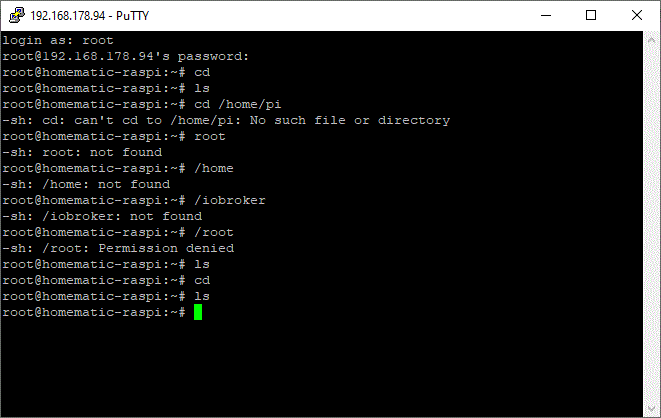
@wendy2702 ja, ich bin mit dem Putty auch schon mit der Pi4 verbunden. Nur ist als Hauptsystem ja Raspberrymatic installiert - daher wird die Ordnerstruktur etwas anders sein. Wie kommt man in den ioBroker Bereich/Ordner? ;-)
-
@wendy2702 ja, ich bin mit dem Putty auch schon mit der Pi4 verbunden. Nur ist als Hauptsystem ja Raspberrymatic installiert - daher wird die Ordnerstruktur etwas anders sein. Wie kommt man in den ioBroker Bereich/Ordner? ;-)
@rhartmann76 Läuft ioBroker das in einem Container oder nach welcher Anleitung wurde das installiert?
Ist das wirklich „Raspberrymatic“ oder doch „PiVCCU“ ?
Sonst SSH auf die IP von iobroker.
-
@rhartmann76 Läuft ioBroker das in einem Container oder nach welcher Anleitung wurde das installiert?
Ist das wirklich „Raspberrymatic“ oder doch „PiVCCU“ ?
Sonst SSH auf die IP von iobroker.
und hier noch das Bild von der Rasp-Matic. Ich hoffe dies hilft.
ioBroker konnte man ja dann über den Admin-Bereich von Rasp-Matic einbinden (installationsdatei über Zusatzsoftware, hochladen und installieren)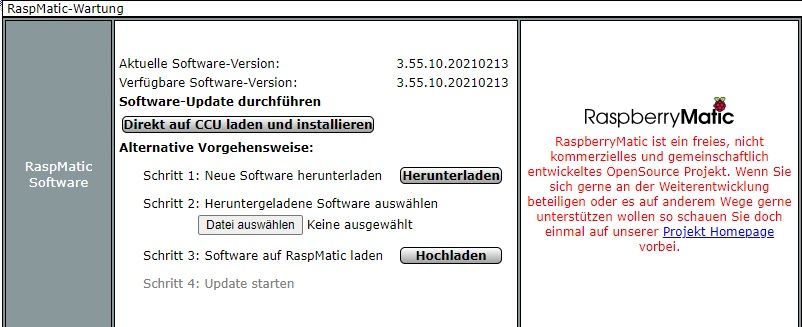
-
@rhartmann76 Läuft ioBroker das in einem Container oder nach welcher Anleitung wurde das installiert?
Ist das wirklich „Raspberrymatic“ oder doch „PiVCCU“ ?
Sonst SSH auf die IP von iobroker.
@wendy2702 Nachtrag, der ioBroker hat die gleiche IP wie die Homematic - nur eben mit der Port :8081
-
@wendy2702 Nachtrag, der ioBroker hat die gleiche IP wie die Homematic - nur eben mit der Port :8081
-
@wendy2702 said in zwave läuft nicht:
cd /opt/iobroker
leider nein. Ich habe zwischenzeitlich nochmal folgende Anleitung gefunden https://github.com/zautrix/hm-iobroker/pull/10/commits/3f0b196467dade0f1cf089638b72fd2cde557f92
Da ist zubindest beschrieben wie man in den iobroker Laufwerk-Bereich kommt. cd /usr/local/addons/hm-iobroker -
@wendy2702 said in zwave läuft nicht:
cd /opt/iobroker
leider nein. Ich habe zwischenzeitlich nochmal folgende Anleitung gefunden https://github.com/zautrix/hm-iobroker/pull/10/commits/3f0b196467dade0f1cf089638b72fd2cde557f92
Da ist zubindest beschrieben wie man in den iobroker Laufwerk-Bereich kommt. cd /usr/local/addons/hm-iobroker@rhartmann76 Bei der Installation mit diesem Addon klinke ich mich lieber aus. Das erfordert wahrscheinlich irgendwelche speziellen Sachen.
Einzige möglichkeit die du noch probieren kann die mir einfällt:
Instanz und Adapter löschen
In der JavaScript Instanz unter zusätzliche Module: serialport eintragen
Bischen zeit geben damit er das Modul, wenn er es denn macht auch installieren kann
Dann Zwave Adapter und Instanz nochmal installieren.Zur Info: Ich trenne das hier ab da es sich um einen Spezial Fall handelt.
-
@wendy2702 da fehlt der serialport... der wurde nicht mit installiert
@arteck kannst Du mir ggf. kurz beschreiben, wie ich den serialport installiere?
Danke
-
Hallo,
hat sonst niemand einen Vorschlag? Der Gedanke mit der Seriel könnte passen, leider finde ich dazu keine Anleitung, die ich verstehe ;-)Hilfe bitte.
Danke
René
-
Hallo,
hat sonst niemand einen Vorschlag? Der Gedanke mit der Seriel könnte passen, leider finde ich dazu keine Anleitung, die ich verstehe ;-)Hilfe bitte.
Danke
René
-
@arteck mit einer leichten Anpassung kommt jetzt was...
@arteck said in Zwave läuft nicht iobroker als Raspberrymatic addon:
cd /opt/iobroker
Ich habe den Befehl nun auf den hm-iobroker angepasst.. Wie gesagt, ich habe den https://github.com/zautrix/hm-iobroker installiert.
Damit bekomme ich dann folgende Infos.
root@homematic-raspi:~# cd /usr/local/addons/hm-iobroker
root@homematic-raspi:/usr/local/addons/hm-iobroker# ./iobroker fix
Commands:
iobroker setup [--objects <host>] [--states <host>] [custom]
iobroker start - starts the js-controller
iobroker stop - stops the js-controller
iobroker start <adapter>[.instance] - starts a specified adapter instance
iobroker stop <adapter>.[instance] - stops a specified adapter instance
iobroker start all - starts js-controller and all adapters
iobroker restart - restarts the js-controller
iobroker restart <adapter>[.instance] - restarts a specified adapter
iobroker debug <adapter> [--ip=<ip>] [--port=<port>] [--wait] - Starts a Node.js debugging session for the adapter
    --wait stops the execution until the debugger is attached.
    --ip and --port can be used to change the listen IP and port. Use IP 0.0.0.0 for remote debugging.
iobroker info - shows the host info
iobroker logs [adapter] [--watch] [--lines=1000]
iobroker add <adapter> [desiredNumber] [--enabled] [--host <host>] [--port <port>]
iobroker install <adapter> - installs a specified adapter
iobroker rebuild <adapter>|self [--install]
iobroker url <url> [<name>] - install adapter from specified url, e.g. GitHub
iobroker del <adapter> - remove adapter from system
iobroker del <adapter>.<instance> - remove adapter instance
iobroker update [repository url] [--updatable/--u] [--installed/--i] [--force/--f] - update repository and optionally filter installed/updateable adapters, use --force to bypass hash check
iobroker upgrade [repository url]
iobroker upgrade self [repository url] - upgrade js-controller and all adapters, optionally you can specify the repository url
iobroker upgrade <adapter> [repository url] - upgrade specified adapter, optionally you can specify the repository url
iobroker upload <pathToLocalFile> <pathIniobroker>
iobroker upload all - upload all adapter files to make them available for instances
iobroker upload <adapter> - upload specified adapter files to make them available for instances
iobroker object get <id> - get object specified by id
iobroker object set <id> <json-value> - set object with the given id by providing a new json object
iobroker object set <id> propertyname=<value or json-value> - update part of the object by providing a new value or partial object
iobroker object extend <id> <json-value> - extend object with the given id by providing a new json object
iobroker object del <id|pattern> [--yes]
iobroker object chmod <object-mode> [state-mode] <id>
iobroker object chown <user> <group> <id>
iobroker object list <id>
iobroker state get <id> - get state, specified by id
iobroker state getplain <id> [--pretty]
iobroker state getvalue <id>
iobroker state set <id> <value> [ack]
iobroker state del <id>
iobroker message <adapter>[.instance] <command> [<message>]
iobroker list <type> [filter]
iobroker chmod <mode> <file>
iobroker chown <user> <group> <file>
iobroker touch <file>
iobroker rm <file>
iobroker file read <iobroker-path-to-read> [<filesystem-path-to-write>]
iobroker file write <filesystem-path-to-read> <iobroker-path-to-write>
iobroker file rm <iobroker-path-to-delete>
iobroker file sync
iobroker user add <user> [--ingroup group] [--password pass]
iobroker user del <user>
iobroker user passwd <user> [--password pass]
iobroker user enable <user>
iobroker user disable <user>
iobroker user get <user>
iobroker user check <user> [--password pass]
iobroker group add <group>
iobroker group del <group>
iobroker group list <group>
iobroker group enable <group>
iobroker group disable <group>
iobroker group get <group>
iobroker group adduser <group> <user>
iobroker group deluser <group> <user>
iobroker host this
iobroker host <hostname>
iobroker host set <hostname>
iobroker host remove <hostname>
iobroker set <adapter>.<instance> [--port port] [--ip address] [--ssl true|false]
iobroker license <license.file or license.text>
iobroker cert create
iobroker cert view [<certificate name>]
iobroker clean
iobroker backup
iobroker restore <backup name or path> - restore a specified backup
iobroker validate <backup name or path> - validate a specified backup
iobroker <command> --timeout 5000
iobroker status [all|<adapter>.<instance>]
iobroker repo [name]
iobroker repo add <name> <path or url>
iobroker repo set <name>
iobroker repo del <name>
iobroker uuid
iobroker unsetup
iobroker fix - execute the installation fixer script, this updates your ioBroker installation
iobroker multihost <enable|disable> [--secure true|false]
iobroker multihost browse
iobroker multihost connect
iobroker compact status - show if compact mode is enabled in general
iobroker compact <enable|on|disable|off> - enable or disable compact mode in general
iobroker compact <adapter>.<instance> status - show if compact mode is enabled for a specific instance
iobroker compact <adapter>.<instance> group <group-id> - define compact group of a specific adapter
iobroker compact <adapter>.<instance> <disable|off> - enable or disable compact mode for specified adapter instance
iobroker compact <adapter>.<instance> <enable|on> [group-id] - enable or disable compact mode for specified adapter instance and set comapct group optionally
iobroker plugin enable <pluginname> [--host <hostname>] - enables a plugin for the specified host. If no host is specified, the current one is used
iobroker plugin disable <pluginname> [--host <hostname>] - disables a plugin for the specified host. If no host is specified, the current one is used
iobroker plugin status <pluginname> [--host <hostname>] - checks if a plugin is enabled for the specified host. If no host is specified, the current one is used
iobroker plugin enable <pluginname> --instance <adapter>[.<nr>] - enables a plugin for the specified adapter instance (defaults to instance 0)
iobroker plugin disable <pluginname> --instance <adapter>[.<nr>] - disables a plugin for the specified adapter instance (defaults to instance 0)
iobroker plugin status <pluginname> --instance <adapter>[.<nr>] - checks if a plugin is enabled for the specified adapter instance (defaults to instance 0)
iobroker version [adapter] - show version of js-controller or specified adapter
iobroker [adapter] -v - show version of js-controller or specified adapter


Hey! Du scheinst an dieser Unterhaltung interessiert zu sein, hast aber noch kein Konto.
Hast du es satt, bei jedem Besuch durch die gleichen Beiträge zu scrollen? Wenn du dich für ein Konto anmeldest, kommst du immer genau dorthin zurück, wo du zuvor warst, und kannst dich über neue Antworten benachrichtigen lassen (entweder per E-Mail oder Push-Benachrichtigung). Du kannst auch Lesezeichen speichern und Beiträge positiv bewerten, um anderen Community-Mitgliedern deine Wertschätzung zu zeigen.
Mit deinem Input könnte dieser Beitrag noch besser werden 💗
Registrieren Anmelden157
Online33.0k
Benutzende83.7k
Themen1.3m
Beiträge