




Update von Adaptern funktioniert nicht mehr
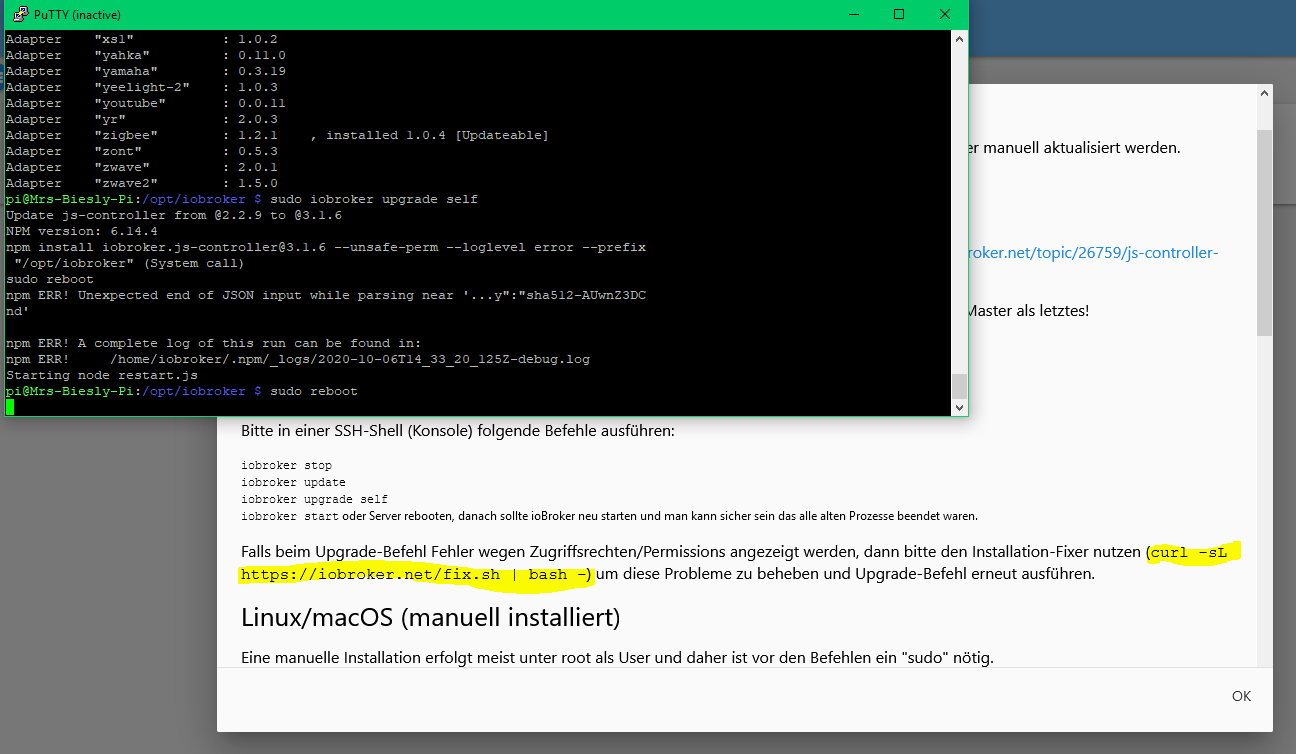
-
und jetzt ein Update von einem Adapter machen , ob die Fehlermeldung noch kommt !?
Habe jetzt den iobroker mit nem anderen Browser auf meinem Windows geöffnet und auch hier versucht den Alexa Adapter zu aktualisieren...
$ ./iobroker upgrade alexa2 Update alexa2 from @3.3.0 to @3.3.1 NPM version: 6.14.8 npm install iobroker.alexa2@3.3.1 --loglevel error --prefix "/opt/iobroker" (System call) Package pixman-1 was not found in the pkg-config search path.Perhaps you should add the directory containing `pixman-1.pc'to the PKG_CONFIG_PATH environment variableNo package 'pixman-1' found gyp: Call to 'pkg-config pixman-1 --libs' returned exit status 1 while in binding.gyp. while trying to load binding.gyp gyp ERR! configure error gyp ERR! stack Error: `gyp` failed with exit code: 1gyp ERR! stack at ChildProcess.onCpExit (/usr/lib/node_modules/npm/node_modules/node-gyp/lib/configure.js:351:16)gyp ERR! stack at ChildProcess.emit (events.js:314:20)gyp ERR! stack at Process.ChildProcess._handle.onexit (internal/child_process.js:275:12)gyp ERR! System Linux 5.4.51-v7l+gyp ERR! command "/usr/bin/node" "/usr/lib/node_modules/npm/node_modules/node-gyp/bin/node-gyp.js" "configure" "--fallback-to-build" "--module=/opt/iobroker/node_modules/canvas/build/Release/canvas.node" "--module_name=canvas" "--module_path=/opt/iobroker/node_modules/canvas/build/Release" "--napi_version=7" "--node_abi_napi=napi" "--napi_build_version=0" "--node_napi_label=node-v72"gyp ERR! cwd /opt/iobroker/node_modules/canvas gyp ERR! node -v v12.19.0gyp ERR! node-gyp -v v5.1.0gyp ERR! not ok node-pre-gyp ERR! build error node-pre-gyp ERR! stack Error: Failed to execute '/usr/bin/node /usr/lib/node_modules/npm/node_modules/node-gyp/bin/node-gyp.js configure --fallback-to-build --module=/opt/iobroker/node_modules/canvas/build/Release/canvas.node --module_name=canvas --module_path=/opt/iobroker/node_modules/canvas/build/Release --napi_version=7 --node_abi_napi=napi --napi_build_version=0 --node_napi_label=node-v72' (1)node-pre-gyp ERR! stack at ChildProcess.<anonymous> (/opt/iobroker/node_modules/node-pre-gyp/lib/util/compile.js:83:29)node-pre-gyp ERR! stack at ChildProcess.emit (events.js:314:20)node-pre-gyp ERR! stack at maybeClose (internal/child_process.js:1021:16)node-pre-gyp ERR! stack at Process.ChildProcess._handle.onexit (internal/child_process.js:286:5)node-pre-gyp ERR! System Linux 5.4.51-v7l+node-pre-gyp ERR! command "/usr/bin/node" "/opt/iobroker/node_modules/.bin/node-pre-gyp" "install" "--fallback-to-build"node-pre-gyp ERR! cwd /opt/iobroker/node_modules/canvasnode-pre-gyp ERR! node -v v12.19.0node-pre-gyp ERR! node-pre-gyp -v v0.11.0node-pre-gyp ERR! not ok ╭─────────────────────────────────────────────────────────╮│ ││ Manual installation of ioBroker is no longer supported ││ on Linux, OSX and FreeBSD! ││ Please refer to the documentation on how to install it! ││ https://github.com/ioBroker/ioBroker/wiki/Installation ││ │╰─────────────────────────────────────────────────────────╯ npm ERR! code ELIFECYCLEnpm ERR! errno 100 npm ERR! iobroker@2.0.3 postinstall: `node lib/install.js` npm ERR! Exit status 100npm ERR! npm ERR! Failed at the iobroker@2.0.3 postinstall script.npm ERR! This is probably not a problem with npm. There is likely additional logging output above. npm ERR! A complete log of this run can be found in:npm ERR! /home/iobroker/.npm/_logs/2020-10-07T15_37_44_009Z-debug.log ERROR: host.Mrs-Biesly-Pi Cannot install iobroker.alexa2@3.3.1: 100 ERROR: process exited with code 25 -
Habe jetzt den iobroker mit nem anderen Browser auf meinem Windows geöffnet und auch hier versucht den Alexa Adapter zu aktualisieren...
$ ./iobroker upgrade alexa2 Update alexa2 from @3.3.0 to @3.3.1 NPM version: 6.14.8 npm install iobroker.alexa2@3.3.1 --loglevel error --prefix "/opt/iobroker" (System call) Package pixman-1 was not found in the pkg-config search path.Perhaps you should add the directory containing `pixman-1.pc'to the PKG_CONFIG_PATH environment variableNo package 'pixman-1' found gyp: Call to 'pkg-config pixman-1 --libs' returned exit status 1 while in binding.gyp. while trying to load binding.gyp gyp ERR! configure error gyp ERR! stack Error: `gyp` failed with exit code: 1gyp ERR! stack at ChildProcess.onCpExit (/usr/lib/node_modules/npm/node_modules/node-gyp/lib/configure.js:351:16)gyp ERR! stack at ChildProcess.emit (events.js:314:20)gyp ERR! stack at Process.ChildProcess._handle.onexit (internal/child_process.js:275:12)gyp ERR! System Linux 5.4.51-v7l+gyp ERR! command "/usr/bin/node" "/usr/lib/node_modules/npm/node_modules/node-gyp/bin/node-gyp.js" "configure" "--fallback-to-build" "--module=/opt/iobroker/node_modules/canvas/build/Release/canvas.node" "--module_name=canvas" "--module_path=/opt/iobroker/node_modules/canvas/build/Release" "--napi_version=7" "--node_abi_napi=napi" "--napi_build_version=0" "--node_napi_label=node-v72"gyp ERR! cwd /opt/iobroker/node_modules/canvas gyp ERR! node -v v12.19.0gyp ERR! node-gyp -v v5.1.0gyp ERR! not ok node-pre-gyp ERR! build error node-pre-gyp ERR! stack Error: Failed to execute '/usr/bin/node /usr/lib/node_modules/npm/node_modules/node-gyp/bin/node-gyp.js configure --fallback-to-build --module=/opt/iobroker/node_modules/canvas/build/Release/canvas.node --module_name=canvas --module_path=/opt/iobroker/node_modules/canvas/build/Release --napi_version=7 --node_abi_napi=napi --napi_build_version=0 --node_napi_label=node-v72' (1)node-pre-gyp ERR! stack at ChildProcess.<anonymous> (/opt/iobroker/node_modules/node-pre-gyp/lib/util/compile.js:83:29)node-pre-gyp ERR! stack at ChildProcess.emit (events.js:314:20)node-pre-gyp ERR! stack at maybeClose (internal/child_process.js:1021:16)node-pre-gyp ERR! stack at Process.ChildProcess._handle.onexit (internal/child_process.js:286:5)node-pre-gyp ERR! System Linux 5.4.51-v7l+node-pre-gyp ERR! command "/usr/bin/node" "/opt/iobroker/node_modules/.bin/node-pre-gyp" "install" "--fallback-to-build"node-pre-gyp ERR! cwd /opt/iobroker/node_modules/canvasnode-pre-gyp ERR! node -v v12.19.0node-pre-gyp ERR! node-pre-gyp -v v0.11.0node-pre-gyp ERR! not ok ╭─────────────────────────────────────────────────────────╮│ ││ Manual installation of ioBroker is no longer supported ││ on Linux, OSX and FreeBSD! ││ Please refer to the documentation on how to install it! ││ https://github.com/ioBroker/ioBroker/wiki/Installation ││ │╰─────────────────────────────────────────────────────────╯ npm ERR! code ELIFECYCLEnpm ERR! errno 100 npm ERR! iobroker@2.0.3 postinstall: `node lib/install.js` npm ERR! Exit status 100npm ERR! npm ERR! Failed at the iobroker@2.0.3 postinstall script.npm ERR! This is probably not a problem with npm. There is likely additional logging output above. npm ERR! A complete log of this run can be found in:npm ERR! /home/iobroker/.npm/_logs/2020-10-07T15_37_44_009Z-debug.log ERROR: host.Mrs-Biesly-Pi Cannot install iobroker.alexa2@3.3.1: 100 ERROR: process exited with code 25 -
Habe jetzt den iobroker mit nem anderen Browser auf meinem Windows geöffnet und auch hier versucht den Alexa Adapter zu aktualisieren...
$ ./iobroker upgrade alexa2 Update alexa2 from @3.3.0 to @3.3.1 NPM version: 6.14.8 npm install iobroker.alexa2@3.3.1 --loglevel error --prefix "/opt/iobroker" (System call) Package pixman-1 was not found in the pkg-config search path.Perhaps you should add the directory containing `pixman-1.pc'to the PKG_CONFIG_PATH environment variableNo package 'pixman-1' found gyp: Call to 'pkg-config pixman-1 --libs' returned exit status 1 while in binding.gyp. while trying to load binding.gyp gyp ERR! configure error gyp ERR! stack Error: `gyp` failed with exit code: 1gyp ERR! stack at ChildProcess.onCpExit (/usr/lib/node_modules/npm/node_modules/node-gyp/lib/configure.js:351:16)gyp ERR! stack at ChildProcess.emit (events.js:314:20)gyp ERR! stack at Process.ChildProcess._handle.onexit (internal/child_process.js:275:12)gyp ERR! System Linux 5.4.51-v7l+gyp ERR! command "/usr/bin/node" "/usr/lib/node_modules/npm/node_modules/node-gyp/bin/node-gyp.js" "configure" "--fallback-to-build" "--module=/opt/iobroker/node_modules/canvas/build/Release/canvas.node" "--module_name=canvas" "--module_path=/opt/iobroker/node_modules/canvas/build/Release" "--napi_version=7" "--node_abi_napi=napi" "--napi_build_version=0" "--node_napi_label=node-v72"gyp ERR! cwd /opt/iobroker/node_modules/canvas gyp ERR! node -v v12.19.0gyp ERR! node-gyp -v v5.1.0gyp ERR! not ok node-pre-gyp ERR! build error node-pre-gyp ERR! stack Error: Failed to execute '/usr/bin/node /usr/lib/node_modules/npm/node_modules/node-gyp/bin/node-gyp.js configure --fallback-to-build --module=/opt/iobroker/node_modules/canvas/build/Release/canvas.node --module_name=canvas --module_path=/opt/iobroker/node_modules/canvas/build/Release --napi_version=7 --node_abi_napi=napi --napi_build_version=0 --node_napi_label=node-v72' (1)node-pre-gyp ERR! stack at ChildProcess.<anonymous> (/opt/iobroker/node_modules/node-pre-gyp/lib/util/compile.js:83:29)node-pre-gyp ERR! stack at ChildProcess.emit (events.js:314:20)node-pre-gyp ERR! stack at maybeClose (internal/child_process.js:1021:16)node-pre-gyp ERR! stack at Process.ChildProcess._handle.onexit (internal/child_process.js:286:5)node-pre-gyp ERR! System Linux 5.4.51-v7l+node-pre-gyp ERR! command "/usr/bin/node" "/opt/iobroker/node_modules/.bin/node-pre-gyp" "install" "--fallback-to-build"node-pre-gyp ERR! cwd /opt/iobroker/node_modules/canvasnode-pre-gyp ERR! node -v v12.19.0node-pre-gyp ERR! node-pre-gyp -v v0.11.0node-pre-gyp ERR! not ok ╭─────────────────────────────────────────────────────────╮│ ││ Manual installation of ioBroker is no longer supported ││ on Linux, OSX and FreeBSD! ││ Please refer to the documentation on how to install it! ││ https://github.com/ioBroker/ioBroker/wiki/Installation ││ │╰─────────────────────────────────────────────────────────╯ npm ERR! code ELIFECYCLEnpm ERR! errno 100 npm ERR! iobroker@2.0.3 postinstall: `node lib/install.js` npm ERR! Exit status 100npm ERR! npm ERR! Failed at the iobroker@2.0.3 postinstall script.npm ERR! This is probably not a problem with npm. There is likely additional logging output above. npm ERR! A complete log of this run can be found in:npm ERR! /home/iobroker/.npm/_logs/2020-10-07T15_37_44_009Z-debug.log ERROR: host.Mrs-Biesly-Pi Cannot install iobroker.alexa2@3.3.1: 100 ERROR: process exited with code 25 -
@Mrs-B
Jetzt werden allerdings nur noch 11 zu aktualisierende Adapter angezeigt.. (auch im 1. Browser)Ich versuche jetzt mal die anderen Adapter...
Stopp
erst dass:
sudo apt-get install build-essential libcairo2-dev libpango1.0-dev libjpeg-dev libgif-dev librsvg2-dev libpixman-1-0 libpixman-1-dev

cd /opt/iobroker
npm install canvas
Synology 918+ 16GB - ioBroker in Docker v9 , VISO auf Trekstor Primebook C13 13,3" , Hikvision Domkameras mit Surveillance Station .. CCU RaspberryMatic in Synology VM .. Zigbee CC2538+CC2592 .. Sonoff .. KNX .. Modbus ..
-
Stopp
erst dass:
sudo apt-get install build-essential libcairo2-dev libpango1.0-dev libjpeg-dev libgif-dev librsvg2-dev libpixman-1-0 libpixman-1-dev cd /opt/iobroker npm install canvas@Glasfaser said in Update von Adaptern funktioniert nicht mehr:
npm install canvas
Hab ich so gemacht.
Jetzt werden mir aber wieder 12 Adapter zur Aktualisierung angezeigt :(
npm WARN ajv-keywords@2.1.1 requires a peer of ajv@^5.0.0 but none is installed. You must install peer dependencies yourself. npm WARN optional SKIPPING OPTIONAL DEPENDENCY: fsevents@2.1.2 (node_modules/fsevents): npm WARN notsup SKIPPING OPTIONAL DEPENDENCY: Unsupported platform for fsevents@2.1.2: wanted {"os":"darwin","arch":"any"} (current: {"os":"linux","arch":"arm"}) npm WARN optional SKIPPING OPTIONAL DEPENDENCY: osx-temperature-sensor@1.0.5 (node_modules/osx-temperature-sensor): npm WARN notsup SKIPPING OPTIONAL DEPENDENCY: Unsupported platform for osx-temperature-sensor@1.0.5: wanted {"os":"darwin","arch":"any"} (current: {"os":"linux","arch":"arm"}) npm WARN optional SKIPPING OPTIONAL DEPENDENCY: fsevents@2.1.2 (node_modules/zigbee-herdsman-converters/node_modules/fsevents): npm WARN notsup SKIPPING OPTIONAL DEPENDENCY: Unsupported platform for fsevents@2.1.2: wanted {"os":"darwin","arch":"any"} (current: {"os":"linux","arch":"arm"}) npm WARN optional SKIPPING OPTIONAL DEPENDENCY: fsevents@2.1.2 (node_modules/zigbee-herdsman/node_modules/jest-haste-map/node_modules/fsevents): npm WARN notsup SKIPPING OPTIONAL DEPENDENCY: Unsupported platform for fsevents@2.1.2: wanted {"os":"darwin","arch":"any"} (current: {"os":"linux","arch":"arm"}) npm WARN optional SKIPPING OPTIONAL DEPENDENCY: fsevents@1.2.11 (node_modules/zigbee-herdsman/node_modules/fsevents): npm WARN notsup SKIPPING OPTIONAL DEPENDENCY: Unsupported platform for fsevents@1.2.11: wanted {"os":"darwin","arch":"any"} (current: {"os":"linux","arch":"arm"}) npm ERR! code ELIFECYCLE npm ERR! errno 100 npm ERR! iobroker@2.0.3 postinstall: `node lib/install.js` npm ERR! Exit status 100 npm ERR! npm ERR! Failed at the iobroker@2.0.3 postinstall script. npm ERR! This is probably not a problem with npm. There is likely additional logging output above. npm ERR! A complete log of this run can be found in: npm ERR! /home/iobroker/.npm/_logs/2020-10-07T15_45_41_794Z-debug.log -
@Glasfaser said in Update von Adaptern funktioniert nicht mehr:
npm install canvas
Hab ich so gemacht.
Jetzt werden mir aber wieder 12 Adapter zur Aktualisierung angezeigt :(
npm WARN ajv-keywords@2.1.1 requires a peer of ajv@^5.0.0 but none is installed. You must install peer dependencies yourself. npm WARN optional SKIPPING OPTIONAL DEPENDENCY: fsevents@2.1.2 (node_modules/fsevents): npm WARN notsup SKIPPING OPTIONAL DEPENDENCY: Unsupported platform for fsevents@2.1.2: wanted {"os":"darwin","arch":"any"} (current: {"os":"linux","arch":"arm"}) npm WARN optional SKIPPING OPTIONAL DEPENDENCY: osx-temperature-sensor@1.0.5 (node_modules/osx-temperature-sensor): npm WARN notsup SKIPPING OPTIONAL DEPENDENCY: Unsupported platform for osx-temperature-sensor@1.0.5: wanted {"os":"darwin","arch":"any"} (current: {"os":"linux","arch":"arm"}) npm WARN optional SKIPPING OPTIONAL DEPENDENCY: fsevents@2.1.2 (node_modules/zigbee-herdsman-converters/node_modules/fsevents): npm WARN notsup SKIPPING OPTIONAL DEPENDENCY: Unsupported platform for fsevents@2.1.2: wanted {"os":"darwin","arch":"any"} (current: {"os":"linux","arch":"arm"}) npm WARN optional SKIPPING OPTIONAL DEPENDENCY: fsevents@2.1.2 (node_modules/zigbee-herdsman/node_modules/jest-haste-map/node_modules/fsevents): npm WARN notsup SKIPPING OPTIONAL DEPENDENCY: Unsupported platform for fsevents@2.1.2: wanted {"os":"darwin","arch":"any"} (current: {"os":"linux","arch":"arm"}) npm WARN optional SKIPPING OPTIONAL DEPENDENCY: fsevents@1.2.11 (node_modules/zigbee-herdsman/node_modules/fsevents): npm WARN notsup SKIPPING OPTIONAL DEPENDENCY: Unsupported platform for fsevents@1.2.11: wanted {"os":"darwin","arch":"any"} (current: {"os":"linux","arch":"arm"}) npm ERR! code ELIFECYCLE npm ERR! errno 100 npm ERR! iobroker@2.0.3 postinstall: `node lib/install.js` npm ERR! Exit status 100 npm ERR! npm ERR! Failed at the iobroker@2.0.3 postinstall script. npm ERR! This is probably not a problem with npm. There is likely additional logging output above. npm ERR! A complete log of this run can be found in: npm ERR! /home/iobroker/.npm/_logs/2020-10-07T15_45_41_794Z-debug.log -
Hab ich gemacht. Wieder alle Adapter zur Aktualisierung... Dann nochmal versucht den Alexa Adapter zu aktualisieren..
Wieder Error ..
$ ./iobroker upgrade alexa2 Update alexa2 from @3.3.0 to @3.3.1 NPM version: 6.14.8 npm install iobroker.alexa2@3.3.1 --loglevel error --prefix "/opt/iobroker" (System call) ╭─────────────────────────────────────────────────────────╮│ ││ Manual installation of ioBroker is no longer supported ││ on Linux, OSX and FreeBSD! ││ Please refer to the documentation on how to install it! ││ https://github.com/ioBroker/ioBroker/wiki/Installation ││ │╰─────────────────────────────────────────────────────────╯ npm ERR! code ELIFECYCLEnpm ERR! errno 100 npm ERR! iobroker@2.0.3 postinstall: `node lib/install.js`npm ERR! Exit status 100npm ERR! npm ERR! Failed at the iobroker@2.0.3 postinstall script.npm ERR! This is probably not a problem with npm. There is likely additional logging output above. npm ERR! A complete log of this run can be found in:npm ERR! /home/iobroker/.npm/_logs/2020-10-07T15_50_44_829Z-debug.log ERROR: host.Mrs-Biesly-Pi Cannot install iobroker.alexa2@3.3.1: 100 ERROR: process exited with code 25 -
Hab ich gemacht. Wieder alle Adapter zur Aktualisierung... Dann nochmal versucht den Alexa Adapter zu aktualisieren..
Wieder Error ..
$ ./iobroker upgrade alexa2 Update alexa2 from @3.3.0 to @3.3.1 NPM version: 6.14.8 npm install iobroker.alexa2@3.3.1 --loglevel error --prefix "/opt/iobroker" (System call) ╭─────────────────────────────────────────────────────────╮│ ││ Manual installation of ioBroker is no longer supported ││ on Linux, OSX and FreeBSD! ││ Please refer to the documentation on how to install it! ││ https://github.com/ioBroker/ioBroker/wiki/Installation ││ │╰─────────────────────────────────────────────────────────╯ npm ERR! code ELIFECYCLEnpm ERR! errno 100 npm ERR! iobroker@2.0.3 postinstall: `node lib/install.js`npm ERR! Exit status 100npm ERR! npm ERR! Failed at the iobroker@2.0.3 postinstall script.npm ERR! This is probably not a problem with npm. There is likely additional logging output above. npm ERR! A complete log of this run can be found in:npm ERR! /home/iobroker/.npm/_logs/2020-10-07T15_50_44_829Z-debug.log ERROR: host.Mrs-Biesly-Pi Cannot install iobroker.alexa2@3.3.1: 100 ERROR: process exited with code 25 -
Hab ich gemacht. Wieder alle Adapter zur Aktualisierung... Dann nochmal versucht den Alexa Adapter zu aktualisieren..
Wieder Error ..
$ ./iobroker upgrade alexa2 Update alexa2 from @3.3.0 to @3.3.1 NPM version: 6.14.8 npm install iobroker.alexa2@3.3.1 --loglevel error --prefix "/opt/iobroker" (System call) ╭─────────────────────────────────────────────────────────╮│ ││ Manual installation of ioBroker is no longer supported ││ on Linux, OSX and FreeBSD! ││ Please refer to the documentation on how to install it! ││ https://github.com/ioBroker/ioBroker/wiki/Installation ││ │╰─────────────────────────────────────────────────────────╯ npm ERR! code ELIFECYCLEnpm ERR! errno 100 npm ERR! iobroker@2.0.3 postinstall: `node lib/install.js`npm ERR! Exit status 100npm ERR! npm ERR! Failed at the iobroker@2.0.3 postinstall script.npm ERR! This is probably not a problem with npm. There is likely additional logging output above. npm ERR! A complete log of this run can be found in:npm ERR! /home/iobroker/.npm/_logs/2020-10-07T15_50_44_829Z-debug.log ERROR: host.Mrs-Biesly-Pi Cannot install iobroker.alexa2@3.3.1: 100 ERROR: process exited with code 25@Mrs-B sagte in Update von Adaptern funktioniert nicht mehr:
Manual installation of ioBroker is no longer supported
das hatten wir doch zuletzt erst, dass irgendwo eine dependency auf ioBroker drin stand
kein Support per PN! - Fragen im Forum stellen - Benutzt das Voting rechts unten im Beitrag wenn er euch geholfen hat.
Das Forum freut sich über eine Spende. Benutzt dazu den Spendenbutton oben rechts. Danke!
der Installationsfixer: curl -fsL https://iobroker.net/fix.sh | bash - -
@Mrs-B sagte in Update von Adaptern funktioniert nicht mehr:
Manual installation of ioBroker is no longer supported
das hatten wir doch zuletzt erst, dass irgendwo eine dependency auf ioBroker drin stand
-
Oder ist es am Ende das Beste wenn ich den Rasperry komplett neu mit iobroker aufsetze??
Ich habe den Backup-Adapter im Einsatz ... Dieser sichert auf nen USB-Stick im PI
ioBroker blockt jetzt .
Zeige mal :
which nodejs && nodejs -v && which node && node -v && which npm && npm -v && apt policy nodejsIch komme gerade nicht drauf , was es letztens mal war ....
Synology 918+ 16GB - ioBroker in Docker v9 , VISO auf Trekstor Primebook C13 13,3" , Hikvision Domkameras mit Surveillance Station .. CCU RaspberryMatic in Synology VM .. Zigbee CC2538+CC2592 .. Sonoff .. KNX .. Modbus ..
-
Wie gewünscht...
pi@Mrs-Biesly-Pi:~ $ which nodejs && nodejs -v && which node && node -v && which npm && npm -v && apt policy nodejs /usr/bin/nodejs v12.19.0 /usr/bin/node v12.19.0 /usr/bin/npm 6.14.8 nodejs: Installiert: 12.19.0-1nodesource1 Installationskandidat: 12.19.0-1nodesource1 Versionstabelle: *** 12.19.0-1nodesource1 100 100 /var/lib/dpkg/status 10.22.1-1nodesource1 500 500 https://deb.nodesource.com/node_10.x buster/main armhf Packages 10.21.0~dfsg-1~deb10u1+rpi1 500 500 http://raspbian.raspberrypi.org/raspbian buster/main armhf Packages pi@Mrs-Biesly-Pi:~ $ -
Wie gewünscht...
pi@Mrs-Biesly-Pi:~ $ which nodejs && nodejs -v && which node && node -v && which npm && npm -v && apt policy nodejs /usr/bin/nodejs v12.19.0 /usr/bin/node v12.19.0 /usr/bin/npm 6.14.8 nodejs: Installiert: 12.19.0-1nodesource1 Installationskandidat: 12.19.0-1nodesource1 Versionstabelle: *** 12.19.0-1nodesource1 100 100 /var/lib/dpkg/status 10.22.1-1nodesource1 500 500 https://deb.nodesource.com/node_10.x buster/main armhf Packages 10.21.0~dfsg-1~deb10u1+rpi1 500 500 http://raspbian.raspberrypi.org/raspbian buster/main armhf Packages pi@Mrs-Biesly-Pi:~ $das war es :
https://forum.iobroker.net/topic/37142/merkwürdige-fehler-bei-adapterupdate/26?lang=en-GB&page=2
Das mußt du jetzt wissen , ob noch mehr an deinem System rumgeschraubt wird !
Wenn nicht dann nimm das Backup und setzte dein Rasperry und dann ioBroker neu aufSynology 918+ 16GB - ioBroker in Docker v9 , VISO auf Trekstor Primebook C13 13,3" , Hikvision Domkameras mit Surveillance Station .. CCU RaspberryMatic in Synology VM .. Zigbee CC2538+CC2592 .. Sonoff .. KNX .. Modbus ..
-
das war es :
https://forum.iobroker.net/topic/37142/merkwürdige-fehler-bei-adapterupdate/26?lang=en-GB&page=2
Das mußt du jetzt wissen , ob noch mehr an deinem System rumgeschraubt wird !
Wenn nicht dann nimm das Backup und setzte dein Rasperry und dann ioBroker neu aufDanke für deine Hilfe!!
Tendiere ja fast schon dazu den PI neu aufzusetzten...
Welches Image soll ich denn dann dafür nehmen? Finde das alles sehr unübersichtlich...
Der verlinkte Thread hat mich jetzt so auf die schnelle nicht weiter gebracht.. Geht schon los mit "Zunächst mal den root abmelden. Dann den Server in Runlevel 3 laufen lassen. Dann den fixer ausführen."
Wie gesagt, bin ein absoluter Windows-Mensch (MCSE) ... Mit Linux & Co hab ich sonst nix am Hut und finde es auch nicht gerade übersichtlich beschrieben wie das ganze hier so funktioniert...Hab meinem PI vor Monaten über ein Image hier von iobroker aufgesetzt...
-
Danke für deine Hilfe!!
Tendiere ja fast schon dazu den PI neu aufzusetzten...
Welches Image soll ich denn dann dafür nehmen? Finde das alles sehr unübersichtlich...
Der verlinkte Thread hat mich jetzt so auf die schnelle nicht weiter gebracht.. Geht schon los mit "Zunächst mal den root abmelden. Dann den Server in Runlevel 3 laufen lassen. Dann den fixer ausführen."
Wie gesagt, bin ein absoluter Windows-Mensch (MCSE) ... Mit Linux & Co hab ich sonst nix am Hut und finde es auch nicht gerade übersichtlich beschrieben wie das ganze hier so funktioniert...Hab meinem PI vor Monaten über ein Image hier von iobroker aufgesetzt...
@Mrs-B sagte in Update von Adaptern funktioniert nicht mehr:
Welches Image
Mache es händlisch .....
passendes Raspberry OS auf Karte
sudo raspi-config
... allgemeine Einstellungen durchführen ....und dann das ... siehe oben links
https://www.iobroker.net/#de/downloadSynology 918+ 16GB - ioBroker in Docker v9 , VISO auf Trekstor Primebook C13 13,3" , Hikvision Domkameras mit Surveillance Station .. CCU RaspberryMatic in Synology VM .. Zigbee CC2538+CC2592 .. Sonoff .. KNX .. Modbus ..
-
@Mrs-B sagte in Update von Adaptern funktioniert nicht mehr:
Welches Image
Mache es händlisch .....
passendes Raspberry OS auf Karte
sudo raspi-config
... allgemeine Einstellungen durchführen ....und dann das ... siehe oben links
https://www.iobroker.net/#de/downloadDa weiss ich mit meinem Urlaub morgen ja was anzufangen...
Noch ne blöde Frage .. Woher weiss ich welches Raspberry OS ich benötige? Da gibt es gefühlt 100....
-
Da weiss ich mit meinem Urlaub morgen ja was anzufangen...
Noch ne blöde Frage .. Woher weiss ich welches Raspberry OS ich benötige? Da gibt es gefühlt 100....
@Mrs-B sagte in Update von Adaptern funktioniert nicht mehr:
Da gibt es gefühlt 100....
nee, nur eins
raspberry os lite
-
Da weiss ich mit meinem Urlaub morgen ja was anzufangen...
Noch ne blöde Frage .. Woher weiss ich welches Raspberry OS ich benötige? Da gibt es gefühlt 100....
@Mrs-B sagte in Update von Adaptern funktioniert nicht mehr:
Raspberry
Es gibt eigentlich nur eins.
Raspberry Pi OS (32-bit) Lite -
Da weiss ich mit meinem Urlaub morgen ja was anzufangen...
Noch ne blöde Frage .. Woher weiss ich welches Raspberry OS ich benötige? Da gibt es gefühlt 100....
-
@Mrs-B sagte in Update von Adaptern funktioniert nicht mehr:
Welches Image
Mache es händlisch .....
passendes Raspberry OS auf Karte
sudo raspi-config
... allgemeine Einstellungen durchführen ....und dann das ... siehe oben links
https://www.iobroker.net/#de/download@Glasfaser sagte in Update von Adaptern funktioniert nicht mehr:
passendes Raspberry OS auf Karte
sudo raspi-config
... allgemeine Einstellungen durchführen ....
und dann das ...curl -sLf https://iobroker.net/install.sh | bash -der Befehl erschlägt auf einem neuen System alles
kein Support per PN! - Fragen im Forum stellen - Benutzt das Voting rechts unten im Beitrag wenn er euch geholfen hat.
Das Forum freut sich über eine Spende. Benutzt dazu den Spendenbutton oben rechts. Danke!
der Installationsfixer: curl -fsL https://iobroker.net/fix.sh | bash -




Hey! Du scheinst an dieser Unterhaltung interessiert zu sein, hast aber noch kein Konto.
Hast du es satt, bei jedem Besuch durch die gleichen Beiträge zu scrollen? Wenn du dich für ein Konto anmeldest, kommst du immer genau dorthin zurück, wo du zuvor warst, und kannst dich über neue Antworten benachrichtigen lassen (entweder per E-Mail oder Push-Benachrichtigung). Du kannst auch Lesezeichen speichern und Beiträge positiv bewerten, um anderen Community-Mitgliedern deine Wertschätzung zu zeigen.
Mit deinem Input könnte dieser Beitrag noch besser werden 💗
Registrieren Anmelden375
Online33.0k
Benutzende83.7k
Themen1.3m
Beiträge