




ioBroker funktioniert zwar, aber Admin ist sehr langsam
-
Hallo zusammen,
seit einigen Tagen funktioniert mein ioBroker nur noch eingeschränkt. Skripte etc. scheinen zu funktionieren (Lichtschaltung bei Dämmerung, Telegram Nachrichten etc.), aber ich kann mich nicht an der Admin Oberfläche anmelden. Der Login Screen kommt sofort und nach Anmeldung passiert nichts weiter. Ich kann nichts durchs Menü gehen etc. Auch wenn ich per Telegram Nachrichten an den ioBroker schicke, dauert es teilweise 1 Minute und länger bis die Antwort kommt.
An Ressourcen kann es nicht liegen. ioBroker läuft bei mir auf einem Proxmox Host und hat 6 GB RAM und 4 vCPUs zur Verfügung. Die werden noch nichtmal im Ansatz ausgereizt.
Ich habe auch schon eine weitere Admin Instanz hinzugefügt, aber das Problem bleibt weiter bestehen.
Interessanter Weise zeigt mir der Status, das garkeine ioBroker Instanz läuft.
iobroker@iobroker:/opt/iobroker$ iobroker status
iobroker is not running on this host.

No iobroker host is running.

Objects type: file
States  type: file
Jemand eine Idee? Das letzte was ich gemacht habe, ist vor einigen Tagen alle Adapter per Admin (da hat es noch funktioniert) auf den aktuellen Stand gebracht.
-
Hallo zusammen,
seit einigen Tagen funktioniert mein ioBroker nur noch eingeschränkt. Skripte etc. scheinen zu funktionieren (Lichtschaltung bei Dämmerung, Telegram Nachrichten etc.), aber ich kann mich nicht an der Admin Oberfläche anmelden. Der Login Screen kommt sofort und nach Anmeldung passiert nichts weiter. Ich kann nichts durchs Menü gehen etc. Auch wenn ich per Telegram Nachrichten an den ioBroker schicke, dauert es teilweise 1 Minute und länger bis die Antwort kommt.
An Ressourcen kann es nicht liegen. ioBroker läuft bei mir auf einem Proxmox Host und hat 6 GB RAM und 4 vCPUs zur Verfügung. Die werden noch nichtmal im Ansatz ausgereizt.
Ich habe auch schon eine weitere Admin Instanz hinzugefügt, aber das Problem bleibt weiter bestehen.
Interessanter Weise zeigt mir der Status, das garkeine ioBroker Instanz läuft.
iobroker@iobroker:/opt/iobroker$ iobroker status
iobroker is not running on this host.

No iobroker host is running.

Objects type: file
States  type: file
Jemand eine Idee? Das letzte was ich gemacht habe, ist vor einigen Tagen alle Adapter per Admin (da hat es noch funktioniert) auf den aktuellen Stand gebracht.
iobroker update iobroker upgrade -
iobroker update iobroker upgradeIst fehlerfrei durchgelaufen. Das Problem besteht leider weiterhin. Hier noch ein paar zusätzliche Infos:
iobroker@iobroker:/opt/iobroker$ ps -A | grep iobroker
21969 ?        00:05:49 iobroker.js-con
iobroker@iobroker:/opt/iobroker$ iobroker list instances system.adapter.admin.0 : admin - enabled, port: 8081, bind: 0.0.0.0, run as: admin system.adapter.alexa2.0 : alexa2 - enabled system.adapter.backitup.0 : backitup - enabled system.adapter.discovery.0 : discovery - disabled system.adapter.flot.0 : flot - disabled system.adapter.info.0 : info - enabled system.adapter.javascript.0 : javascript - enabled system.adapter.lightify.0 : lightify - enabled system.adapter.mqtt.0 : mqtt - enabled, port: 1883, bind: 0.0.0.0 system.adapter.sonoff.0 : sonoff - enabled, port: 1884, bind: 0.0.0.0 system.adapter.sql.0 : sql - enabled, port: 3306 system.adapter.tankerkoenig.0 : tankerkoenig - enabled system.adapter.telegram.0 : telegram - enabled, port: 8443, bind: 0.0.0.0 system.adapter.text2command.0 : text2command - enabled system.adapter.vis.0 : vis - disabled system.adapter.web.0 : web - disabled, port: 8082, bind: 0.0.0.0, run as: admin + instance is aliveiobroker@iobroker:/opt/iobroker$ iobroker status iobroker is not running on this host. No iobroker host is running. Objects type: file States type: fileiobroker@iobroker:/opt/iobroker$ systemctl status iobroker ● iobroker.service - ioBroker Server Loaded: loaded (/lib/systemd/system/iobroker.service; enabled; vendor preset: enabled) Active: active (running) since Tue 2020-08-25 13:47:01 CEST; 4min 43s ago Docs: http://iobroker.net Main PID: 21969 (iobroker.js-con) Tasks: 165 (limit: 4915) Memory: 3.4G CGroup: /system.slice/iobroker.service ├─21969 iobroker.js-controller ├─22000 io.admin.0 ├─22015 io.admin.1 ├─22038 io.sql.0 ├─22063 io.lightify.0 ├─22078 io.alexa2.0 ├─22089 io.javascript.0 ├─22100 io.text2command.0 ├─22111 /usr/bin/node /opt/iobroker/node_modules/iobroker.telegram/main.js 0 info ├─22122 io.mqtt.0 ├─22133 /usr/bin/node /opt/iobroker/node_modules/iobroker.tankerkoenig/main.js 0 info ├─22144 /usr/bin/node /opt/iobroker/node_modules/iobroker.backitup/main.js 0 info ├─22155 /usr/bin/node /opt/iobroker/node_modules/iobroker.info/main.js 0 info └─22174 io.sonoff.0 Aug 25 13:47:03 iobroker bash[21969]: host.iobroker check instance "system.adapter.telegram.0" for host "iobroker" Aug 25 13:47:03 iobroker bash[21969]: host.iobroker check instance "system.adapter.web.0" for host "iobroker" Aug 25 13:47:03 iobroker bash[21969]: host.iobroker check instance "system.adapter.vis.0" for host "iobroker" Aug 25 13:47:03 iobroker bash[21969]: host.iobroker check instance "system.adapter.mqtt.0" for host "iobroker" Aug 25 13:47:03 iobroker bash[21969]: host.iobroker check instance "system.adapter.tankerkoenig.0" for host "iobroker" Aug 25 13:47:03 iobroker bash[21969]: host.iobroker check instance "system.adapter.backitup.0" for host "iobroker" Aug 25 13:47:03 iobroker bash[21969]: host.iobroker check instance "system.adapter.info.0" for host "iobroker" Aug 25 13:47:03 iobroker bash[21969]: host.iobroker check instance "system.adapter.sonoff.0" for host "iobroker" Aug 25 13:47:03 iobroker bash[21969]: host.iobroker check instance "system.adapter.admin.1" for host "iobroker"iobroker@iobroker:/opt/iobroker$ node -v v10.22.0 iobroker@iobroker:/opt/iobroker$ nodejs -v v10.22.0 iobroker@iobroker:/opt/iobroker$ npm -v 6.14.8 -
Ist fehlerfrei durchgelaufen. Das Problem besteht leider weiterhin. Hier noch ein paar zusätzliche Infos:
iobroker@iobroker:/opt/iobroker$ ps -A | grep iobroker
21969 ?        00:05:49 iobroker.js-con
iobroker@iobroker:/opt/iobroker$ iobroker list instances system.adapter.admin.0 : admin - enabled, port: 8081, bind: 0.0.0.0, run as: admin system.adapter.alexa2.0 : alexa2 - enabled system.adapter.backitup.0 : backitup - enabled system.adapter.discovery.0 : discovery - disabled system.adapter.flot.0 : flot - disabled system.adapter.info.0 : info - enabled system.adapter.javascript.0 : javascript - enabled system.adapter.lightify.0 : lightify - enabled system.adapter.mqtt.0 : mqtt - enabled, port: 1883, bind: 0.0.0.0 system.adapter.sonoff.0 : sonoff - enabled, port: 1884, bind: 0.0.0.0 system.adapter.sql.0 : sql - enabled, port: 3306 system.adapter.tankerkoenig.0 : tankerkoenig - enabled system.adapter.telegram.0 : telegram - enabled, port: 8443, bind: 0.0.0.0 system.adapter.text2command.0 : text2command - enabled system.adapter.vis.0 : vis - disabled system.adapter.web.0 : web - disabled, port: 8082, bind: 0.0.0.0, run as: admin + instance is aliveiobroker@iobroker:/opt/iobroker$ iobroker status iobroker is not running on this host. No iobroker host is running. Objects type: file States type: fileiobroker@iobroker:/opt/iobroker$ systemctl status iobroker ● iobroker.service - ioBroker Server Loaded: loaded (/lib/systemd/system/iobroker.service; enabled; vendor preset: enabled) Active: active (running) since Tue 2020-08-25 13:47:01 CEST; 4min 43s ago Docs: http://iobroker.net Main PID: 21969 (iobroker.js-con) Tasks: 165 (limit: 4915) Memory: 3.4G CGroup: /system.slice/iobroker.service ├─21969 iobroker.js-controller ├─22000 io.admin.0 ├─22015 io.admin.1 ├─22038 io.sql.0 ├─22063 io.lightify.0 ├─22078 io.alexa2.0 ├─22089 io.javascript.0 ├─22100 io.text2command.0 ├─22111 /usr/bin/node /opt/iobroker/node_modules/iobroker.telegram/main.js 0 info ├─22122 io.mqtt.0 ├─22133 /usr/bin/node /opt/iobroker/node_modules/iobroker.tankerkoenig/main.js 0 info ├─22144 /usr/bin/node /opt/iobroker/node_modules/iobroker.backitup/main.js 0 info ├─22155 /usr/bin/node /opt/iobroker/node_modules/iobroker.info/main.js 0 info └─22174 io.sonoff.0 Aug 25 13:47:03 iobroker bash[21969]: host.iobroker check instance "system.adapter.telegram.0" for host "iobroker" Aug 25 13:47:03 iobroker bash[21969]: host.iobroker check instance "system.adapter.web.0" for host "iobroker" Aug 25 13:47:03 iobroker bash[21969]: host.iobroker check instance "system.adapter.vis.0" for host "iobroker" Aug 25 13:47:03 iobroker bash[21969]: host.iobroker check instance "system.adapter.mqtt.0" for host "iobroker" Aug 25 13:47:03 iobroker bash[21969]: host.iobroker check instance "system.adapter.tankerkoenig.0" for host "iobroker" Aug 25 13:47:03 iobroker bash[21969]: host.iobroker check instance "system.adapter.backitup.0" for host "iobroker" Aug 25 13:47:03 iobroker bash[21969]: host.iobroker check instance "system.adapter.info.0" for host "iobroker" Aug 25 13:47:03 iobroker bash[21969]: host.iobroker check instance "system.adapter.sonoff.0" for host "iobroker" Aug 25 13:47:03 iobroker bash[21969]: host.iobroker check instance "system.adapter.admin.1" for host "iobroker"iobroker@iobroker:/opt/iobroker$ node -v v10.22.0 iobroker@iobroker:/opt/iobroker$ nodejs -v v10.22.0 iobroker@iobroker:/opt/iobroker$ npm -v 6.14.8 -
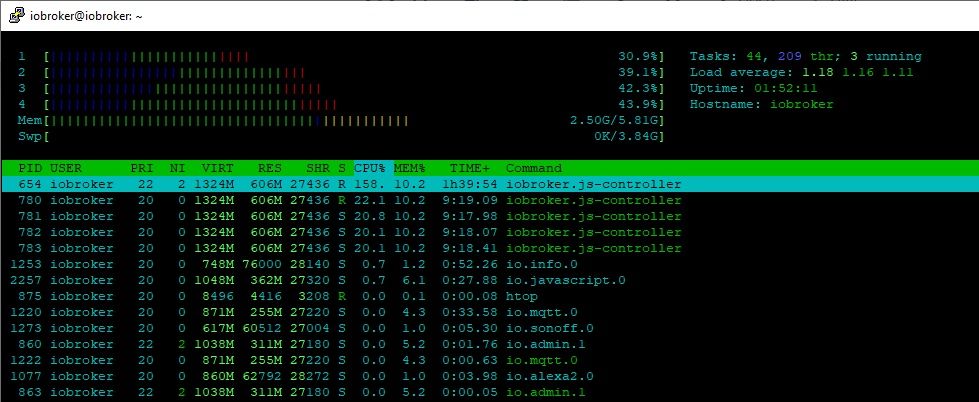
Ja habe ich. Ich habe auch schon ioBroker und den ganzen Proxmox Host neu gestartet. htop sieht gut aus.
-
Ja habe ich. Ich habe auch schon ioBroker und den ganzen Proxmox Host neu gestartet. htop sieht gut aus.
-
Ja habe ich. Ich habe auch schon ioBroker und den ganzen Proxmox Host neu gestartet. htop sieht gut aus.
Sieht sehr merwuerdig aus vor allem das der controller so überlastet ist.
Meine Empfehlung :- alle adapter ausschalten (ausser admin)
- neu starten
- schauen was passiert
- nach und nach adapter aktivieren und den Übertäter finden
WEn der JS-Controller so hoch schiest, heist das eigentlich das sehr viele events im Hintergrund stattfinden ?
Eventueel sind es auch Symptome einer sterbende Harddisk wodurch daten nicht mehr schnell genug geladen werden ?
Alles andere auf dem system läuft reibungslos ? -
Ja habe ich. Ich habe auch schon ioBroker und den ganzen Proxmox Host neu gestartet. htop sieht gut aus.
Kannst du bitte mal alle Adapterinstanzen stoppen und schauen, was die js-controller Auslastung macht? Sukzessive wieder starten und beobachten.
Wenn der admin nicht geht, dann über Kommandozeile.
-
Ja habe ich. Ich habe auch schon ioBroker und den ganzen Proxmox Host neu gestartet. htop sieht gut aus.
@h1ob schalte mal die einzelnen Adapter einem
Nach dem anderen aus und schau ob controller Last runtergeht. Geht auch per iobroker kommandozeile „iobroker stop Adapter.X“ (bzw start zum starten.Alternativ alles aus außer admin und dann nach einander wieder einschalten.
-
Ja habe ich. Ich habe auch schon ioBroker und den ganzen Proxmox Host neu gestartet. htop sieht gut aus.
-
@h1ob ps: und wenn Admin tut achte beim Start der anderen Adapter im der Instanzansicht im expertenmodus was bei den Events in/out steht.
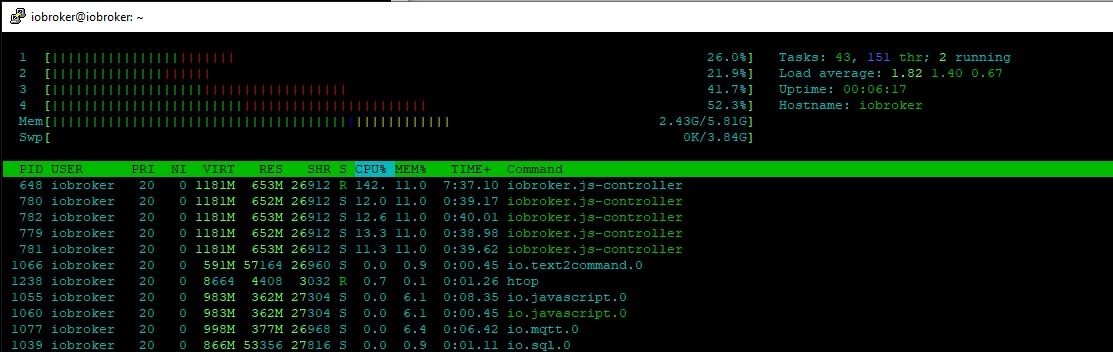
Warum lassen sich einige Instanzen nicht stoppen? Trotz Erfolgsmeldung laufen sie weiter und lassen sich nicht zum Stoppen bewegen.
root@iobroker:~# iobroker list instances
+ system.adapter.admin.0                 : admin                 -  enabled, port: 8081, bind: 0.0.0.0, run as: admin
  system.adapter.alexa2.0                : alexa2                - disabled
  system.adapter.backitup.0              : backitup              - disabled
  system.adapter.discovery.0             : discovery             - disabled
  system.adapter.flot.0                  : flot                  - disabled
  system.adapter.info.0                  : info                  - disabled
+ system.adapter.javascript.0            : javascript            -  enabled
  system.adapter.lightify.0              : lightify              - disabled
+ system.adapter.mqtt.0                  : mqtt                  -  enabled, port: 1883, bind: 0.0.0.0
+ system.adapter.sonoff.0                : sonoff                -  enabled, port: 1884, bind: 0.0.0.0
+ system.adapter.sql.0                   : sql                   -  enabled, port: 3306
  system.adapter.tankerkoenig.0          : tankerkoenig          - disabled
  system.adapter.telegram.0              : telegram              - disabled, port: 8443, bind: 0.0.0.0
+ system.adapter.text2command.0          : text2command          -  enabled
  system.adapter.vis.0                   : vis                   - disabled
  system.adapter.web.0                   : web                   - disabled, port: 8082, bind: 0.0.0.0, run as: admin
Zumindest im aktuellen Stand funktioniert der Admin immernoch nicht. Anmeldung dauert ca. 10 Minuten.
-
Warum lassen sich einige Instanzen nicht stoppen? Trotz Erfolgsmeldung laufen sie weiter und lassen sich nicht zum Stoppen bewegen.
root@iobroker:~# iobroker list instances
+ system.adapter.admin.0                 : admin                 -  enabled, port: 8081, bind: 0.0.0.0, run as: admin
  system.adapter.alexa2.0                : alexa2                - disabled
  system.adapter.backitup.0              : backitup              - disabled
  system.adapter.discovery.0             : discovery             - disabled
  system.adapter.flot.0                  : flot                  - disabled
  system.adapter.info.0                  : info                  - disabled
+ system.adapter.javascript.0            : javascript            -  enabled
  system.adapter.lightify.0              : lightify              - disabled
+ system.adapter.mqtt.0                  : mqtt                  -  enabled, port: 1883, bind: 0.0.0.0
+ system.adapter.sonoff.0                : sonoff                -  enabled, port: 1884, bind: 0.0.0.0
+ system.adapter.sql.0                   : sql                   -  enabled, port: 3306
  system.adapter.tankerkoenig.0          : tankerkoenig          - disabled
  system.adapter.telegram.0              : telegram              - disabled, port: 8443, bind: 0.0.0.0
+ system.adapter.text2command.0          : text2command          -  enabled
  system.adapter.vis.0                   : vis                   - disabled
  system.adapter.web.0                   : web                   - disabled, port: 8082, bind: 0.0.0.0, run as: admin
Zumindest im aktuellen Stand funktioniert der Admin immernoch nicht. Anmeldung dauert ca. 10 Minuten.
@h1ob warum hast du 5 js Controller prozess ids? Da ist irgendwas komisch. Ja ich weiß stop zeigt einiges manchmal doppelt an aber sollte keine eigenen Prozess ids haben. Was zeigt ein normales „top“ an?
Am besten schaffe null Punkt. Iobroker stoppen. Dann alle relevanten Prozesse killen die ggf noch laufen. Dann „iobroker list instances“ und dann alles außer Admin mit „iobroker stop Adapter.X“ disablen. Dann iobroker starten. Dann schauen das das tut. Auch iobroker logfile schauen auf Platte unter /opt/iobroker/log/... schauen das es korrekt ist und nur einmal startet. Dann wie gesagt nacheinander Adapter neu starten und immer beobachten.
Sucherin Blick in /var/log/syslog ist vllt interessant. Ist da irgendwas komisches?
Beitrag hat geholfen? Votet rechts unten im Beitrag :-) https://paypal.me/Apollon77 / https://github.com/sponsors/Apollon77
- Debug-Log für Instanz einschalten? Admin -> Instanzen -> Expertenmodus -> Instanz aufklappen - Loglevel ändern
- Logfiles auf Platte /opt/iobroker/log/… nutzen, Admin schneidet Zeilen ab
-
@h1ob warum hast du 5 js Controller prozess ids? Da ist irgendwas komisch. Ja ich weiß stop zeigt einiges manchmal doppelt an aber sollte keine eigenen Prozess ids haben. Was zeigt ein normales „top“ an?
Am besten schaffe null Punkt. Iobroker stoppen. Dann alle relevanten Prozesse killen die ggf noch laufen. Dann „iobroker list instances“ und dann alles außer Admin mit „iobroker stop Adapter.X“ disablen. Dann iobroker starten. Dann schauen das das tut. Auch iobroker logfile schauen auf Platte unter /opt/iobroker/log/... schauen das es korrekt ist und nur einmal startet. Dann wie gesagt nacheinander Adapter neu starten und immer beobachten.
Sucherin Blick in /var/log/syslog ist vllt interessant. Ist da irgendwas komisches?
@apollon77 sagte in ioBroker funktioniert zwar, aber Admin ist sehr langsam:
ich weiß stop zeigt einiges manchmal doppelt an
Ist bei mir aber auch so, wenn ich die Threads nicht verstecke.
Warum `sudo` böse ist: https://forum.iobroker.net/post/17109
-
@apollon77 sagte in ioBroker funktioniert zwar, aber Admin ist sehr langsam:
ich weiß stop zeigt einiges manchmal doppelt an
Ist bei mir aber auch so, wenn ich die Threads nicht verstecke.
@AlCalzone Aahh ok. Ich nutze kein htop ;-)
-
@AlCalzone Aahh ok. Ich nutze kein htop ;-)
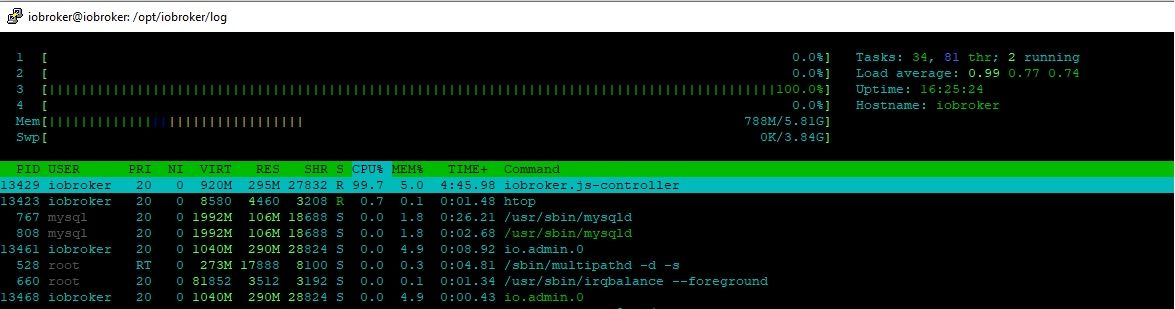
So jetzt wird es ganz seltsam. Alle Adapter bis auf Admin sind gestoppt. Nach Start von ioBroker keine Auslastung auf dem System.
Der Anmeldebildschirm erscheint nach wie vor sofort. Nach Eingabe von Benutzer + Passwort nur noch die Eieruhr.
Nicht, dass genau Admin das Problem ist? Würde es Sinn machen Admin downzugraden?iobroker@iobroker:~$ iobroker list instances system.adapter.admin.0 : admin - enabled, port: 8081, bind: 0.0.0.0, run as: admin system.adapter.alexa2.0 : alexa2 - disabled system.adapter.backitup.0 : backitup - disabled system.adapter.discovery.0 : discovery - disabled system.adapter.flot.0 : flot - disabled system.adapter.info.0 : info - disabled system.adapter.javascript.0 : javascript - disabled system.adapter.lightify.0 : lightify - disabled system.adapter.mqtt.0 : mqtt - disabled, port: 1883, bind: 0.0.0.0 system.adapter.sonoff.0 : sonoff - disabled, port: 1884, bind: 0.0.0.0 system.adapter.sql.0 : sql - disabled, port: 3306 system.adapter.tankerkoenig.0 : tankerkoenig - disabled system.adapter.telegram.0 : telegram - disabled, port: 8443, bind: 0.0.0.0 system.adapter.text2command.0 : text2command - disabled system.adapter.vis.0 : vis - disabled system.adapter.web.0 : web - disabled, port: 8082, bind: 0.0.0.0, run as: adminSo sieht htop aus während ich die Eieruhr sehe (nach Eingabe von Benutzer + Passwort im Admin).
-
So jetzt wird es ganz seltsam. Alle Adapter bis auf Admin sind gestoppt. Nach Start von ioBroker keine Auslastung auf dem System.
Der Anmeldebildschirm erscheint nach wie vor sofort. Nach Eingabe von Benutzer + Passwort nur noch die Eieruhr.
Nicht, dass genau Admin das Problem ist? Würde es Sinn machen Admin downzugraden?iobroker@iobroker:~$ iobroker list instances system.adapter.admin.0 : admin - enabled, port: 8081, bind: 0.0.0.0, run as: admin system.adapter.alexa2.0 : alexa2 - disabled system.adapter.backitup.0 : backitup - disabled system.adapter.discovery.0 : discovery - disabled system.adapter.flot.0 : flot - disabled system.adapter.info.0 : info - disabled system.adapter.javascript.0 : javascript - disabled system.adapter.lightify.0 : lightify - disabled system.adapter.mqtt.0 : mqtt - disabled, port: 1883, bind: 0.0.0.0 system.adapter.sonoff.0 : sonoff - disabled, port: 1884, bind: 0.0.0.0 system.adapter.sql.0 : sql - disabled, port: 3306 system.adapter.tankerkoenig.0 : tankerkoenig - disabled system.adapter.telegram.0 : telegram - disabled, port: 8443, bind: 0.0.0.0 system.adapter.text2command.0 : text2command - disabled system.adapter.vis.0 : vis - disabled system.adapter.web.0 : web - disabled, port: 8082, bind: 0.0.0.0, run as: adminSo sieht htop aus während ich die Eieruhr sehe (nach Eingabe von Benutzer + Passwort im Admin).
-
So jetzt wird es ganz seltsam. Alle Adapter bis auf Admin sind gestoppt. Nach Start von ioBroker keine Auslastung auf dem System.
Der Anmeldebildschirm erscheint nach wie vor sofort. Nach Eingabe von Benutzer + Passwort nur noch die Eieruhr.
Nicht, dass genau Admin das Problem ist? Würde es Sinn machen Admin downzugraden?iobroker@iobroker:~$ iobroker list instances system.adapter.admin.0 : admin - enabled, port: 8081, bind: 0.0.0.0, run as: admin system.adapter.alexa2.0 : alexa2 - disabled system.adapter.backitup.0 : backitup - disabled system.adapter.discovery.0 : discovery - disabled system.adapter.flot.0 : flot - disabled system.adapter.info.0 : info - disabled system.adapter.javascript.0 : javascript - disabled system.adapter.lightify.0 : lightify - disabled system.adapter.mqtt.0 : mqtt - disabled, port: 1883, bind: 0.0.0.0 system.adapter.sonoff.0 : sonoff - disabled, port: 1884, bind: 0.0.0.0 system.adapter.sql.0 : sql - disabled, port: 3306 system.adapter.tankerkoenig.0 : tankerkoenig - disabled system.adapter.telegram.0 : telegram - disabled, port: 8443, bind: 0.0.0.0 system.adapter.text2command.0 : text2command - disabled system.adapter.vis.0 : vis - disabled system.adapter.web.0 : web - disabled, port: 8082, bind: 0.0.0.0, run as: adminSo sieht htop aus während ich die Eieruhr sehe (nach Eingabe von Benutzer + Passwort im Admin).
@h1ob und warum überhaupt Eingabe username und Passwort wenn „run as Admin“ Gesetzt ist?
Beitrag hat geholfen? Votet rechts unten im Beitrag :-) https://paypal.me/Apollon77 / https://github.com/sponsors/Apollon77
- Debug-Log für Instanz einschalten? Admin -> Instanzen -> Expertenmodus -> Instanz aufklappen - Loglevel ändern
- Logfiles auf Platte /opt/iobroker/log/… nutzen, Admin schneidet Zeilen ab
-
@h1ob und warum überhaupt Eingabe username und Passwort wenn „run as Admin“ Gesetzt ist?
-
@h1ob und warum überhaupt Eingabe username und Passwort wenn „run as Admin“ Gesetzt ist?
Das habe ich zu Beginn im Admin Adapter eingestellt, dass eine Anmeldung erforderlich ist. Die Version ist 4.0.10.
Ich habe in der Zwischenzeit noch weitere Tests gemacht. Der Lightify Adapter hat ein paar Probleme gemacht. Den habe ich deinstalliert. Wenn ich bis auf den Admin Adapter alles starte, sieht die Auslastung gut aus und alles funktioniert wunderbar (MQTT, Telegram etc.). Sobald ich den Admin starte, steigt die Auslastung dramatisch und der Admin selbst ist kaum zu bedienen. Insbesondere komme ich nicht in die Objekte und Instanzen Ansicht. Alles andere funktioniert, wenn auch sehr träge.
Ich habe heute morgen noch Node.js auf v12x und js-controller auf 3.1 aktualisiert.
Folgendes ist mir beim Starten der einzelnen Adapter im Log aufgefallen:
2020-08-26 10:56:16.393  - info: javascript.0 (14367) requesting all states
2020-08-26 10:56:16.394  - info: javascript.0 (14367) requesting all objects
2020-08-26 10:56:20.251  - info: host.iobroker instance system.adapter.telegram.0 started with pid 14397
2020-08-26 10:56:26.748  - warn: telegram.0 (14397) slow connection to objects DB. Still waiting ...
2020-08-26 10:56:30.014  - info: host.iobroker instance system.adapter.web.0 started with pid 14408
2020-08-26 10:56:33.098  - info: host.iobroker instance system.adapter.mqtt.0 started with pid 14430
2020-08-26 10:56:36.282  - warn: vis.0 (14415) slow connection to objects DB. Still waiting ...
2020-08-26 10:56:36.364  - warn: web.0 (14408) slow connection to objects DB. Still waiting ...
2020-08-26 10:56:37.229  - info: host.iobroker instance system.adapter.tankerkoenig.0 started with pid 14441
2020-08-26 10:56:39.192  - warn: telegram.0 (14397) slow connection to states DB. Still waiting ...
2020-08-26 10:56:39.366  - warn: mqtt.0 (14430) slow connection to objects DB. Still waiting ...
2020-08-26 10:56:41.533  - info: host.iobroker instance system.adapter.backitup.0 started with pid 14452
2020-08-26 10:56:42.155  - warn: web.0 (14408) slow connection to states DB. Still waiting ...
2020-08-26 10:56:42.155  - warn: vis.0 (14415) slow connection to states DB. Still waiting ...
2020-08-26 10:56:43.579  - warn: tankerkoenig.0 (14441) slow connection to objects DB. Still waiting ...
2020-08-26 10:56:48.340  - warn: backitup.0 (14452) slow connection to objects DB. Still waiting ...
2020-08-26 10:56:48.901  - warn: mqtt.0 (14430) slow connection to states DB. Still waiting ...
2020-08-26 10:56:49.083  - info: host.iobroker instance system.adapter.info.0 started with pid 14463
2020-08-26 10:56:51.301  - info: host.iobroker instance system.adapter.sonoff.0 started with pid 14482
2020-08-26 10:56:55.560  - warn: info.0 (14463) slow connection to objects DB. Still waiting ...
2020-08-26 10:56:57.548  - warn: sonoff.0 (14482) slow connection to objects DB. Still waiting ...
2020-08-26 10:57:05.233  - warn: tankerkoenig.0 (14441) slow connection to states DB. Still waiting ...
2020-08-26 10:57:07.820  - warn: backitup.0 (14452) slow connection to states DB. Still waiting ...
2020-08-26 10:57:19.117  - warn: info.0 (14463) slow connection to states DB. Still waiting ...
2020-08-26 10:57:19.118  - warn: sonoff.0 (14482) slow connection to states DB. Still waiting ...
2020-08-26 10:57:56.483  - info: javascript.0 (14367) received all objects
2020-08-26 10:58:04.034  - info: javascript.0 (14367) received all states
Aktuell schreibe ich ja alles in Dateien. Wenn ich per dd die Festplatten Geschwindigkeit in /opt/iobroker messe, komme ich auf etwa 50 MB/s, was mMn ok sein sollte.
Ich habe dazu auch folgenden Thread gefunden: Admin seite nicht erreichbar.
Hier hat Redis Abhilfe geschaffen. Ist es ohne weiteres möglich, von Dateien nach Redis zu migrieren? -
Das habe ich zu Beginn im Admin Adapter eingestellt, dass eine Anmeldung erforderlich ist. Die Version ist 4.0.10.
Ich habe in der Zwischenzeit noch weitere Tests gemacht. Der Lightify Adapter hat ein paar Probleme gemacht. Den habe ich deinstalliert. Wenn ich bis auf den Admin Adapter alles starte, sieht die Auslastung gut aus und alles funktioniert wunderbar (MQTT, Telegram etc.). Sobald ich den Admin starte, steigt die Auslastung dramatisch und der Admin selbst ist kaum zu bedienen. Insbesondere komme ich nicht in die Objekte und Instanzen Ansicht. Alles andere funktioniert, wenn auch sehr träge.
Ich habe heute morgen noch Node.js auf v12x und js-controller auf 3.1 aktualisiert.
Folgendes ist mir beim Starten der einzelnen Adapter im Log aufgefallen:
2020-08-26 10:56:16.393  - info: javascript.0 (14367) requesting all states
2020-08-26 10:56:16.394  - info: javascript.0 (14367) requesting all objects
2020-08-26 10:56:20.251  - info: host.iobroker instance system.adapter.telegram.0 started with pid 14397
2020-08-26 10:56:26.748  - warn: telegram.0 (14397) slow connection to objects DB. Still waiting ...
2020-08-26 10:56:30.014  - info: host.iobroker instance system.adapter.web.0 started with pid 14408
2020-08-26 10:56:33.098  - info: host.iobroker instance system.adapter.mqtt.0 started with pid 14430
2020-08-26 10:56:36.282  - warn: vis.0 (14415) slow connection to objects DB. Still waiting ...
2020-08-26 10:56:36.364  - warn: web.0 (14408) slow connection to objects DB. Still waiting ...
2020-08-26 10:56:37.229  - info: host.iobroker instance system.adapter.tankerkoenig.0 started with pid 14441
2020-08-26 10:56:39.192  - warn: telegram.0 (14397) slow connection to states DB. Still waiting ...
2020-08-26 10:56:39.366  - warn: mqtt.0 (14430) slow connection to objects DB. Still waiting ...
2020-08-26 10:56:41.533  - info: host.iobroker instance system.adapter.backitup.0 started with pid 14452
2020-08-26 10:56:42.155  - warn: web.0 (14408) slow connection to states DB. Still waiting ...
2020-08-26 10:56:42.155  - warn: vis.0 (14415) slow connection to states DB. Still waiting ...
2020-08-26 10:56:43.579  - warn: tankerkoenig.0 (14441) slow connection to objects DB. Still waiting ...
2020-08-26 10:56:48.340  - warn: backitup.0 (14452) slow connection to objects DB. Still waiting ...
2020-08-26 10:56:48.901  - warn: mqtt.0 (14430) slow connection to states DB. Still waiting ...
2020-08-26 10:56:49.083  - info: host.iobroker instance system.adapter.info.0 started with pid 14463
2020-08-26 10:56:51.301  - info: host.iobroker instance system.adapter.sonoff.0 started with pid 14482
2020-08-26 10:56:55.560  - warn: info.0 (14463) slow connection to objects DB. Still waiting ...
2020-08-26 10:56:57.548  - warn: sonoff.0 (14482) slow connection to objects DB. Still waiting ...
2020-08-26 10:57:05.233  - warn: tankerkoenig.0 (14441) slow connection to states DB. Still waiting ...
2020-08-26 10:57:07.820  - warn: backitup.0 (14452) slow connection to states DB. Still waiting ...
2020-08-26 10:57:19.117  - warn: info.0 (14463) slow connection to states DB. Still waiting ...
2020-08-26 10:57:19.118  - warn: sonoff.0 (14482) slow connection to states DB. Still waiting ...
2020-08-26 10:57:56.483  - info: javascript.0 (14367) received all objects
2020-08-26 10:58:04.034  - info: javascript.0 (14367) received all states
Aktuell schreibe ich ja alles in Dateien. Wenn ich per dd die Festplatten Geschwindigkeit in /opt/iobroker messe, komme ich auf etwa 50 MB/s, was mMn ok sein sollte.
Ich habe dazu auch folgenden Thread gefunden: Admin seite nicht erreichbar.
Hier hat Redis Abhilfe geschaffen. Ist es ohne weiteres möglich, von Dateien nach Redis zu migrieren?@h1ob sagte in ioBroker funktioniert zwar, aber Admin ist sehr langsam:
2020-08-26 10:56:26.748 - warn: telegram.0 (14397) slow connection to objects DB. Still waiting ...
Im Admin ... die "Instanzen" Ansicht tut?
Mach mal expertenmodus an und zeig mal was in den Spalten mit Events in/out steht





Hey! Du scheinst an dieser Unterhaltung interessiert zu sein, hast aber noch kein Konto.
Hast du es satt, bei jedem Besuch durch die gleichen Beiträge zu scrollen? Wenn du dich für ein Konto anmeldest, kommst du immer genau dorthin zurück, wo du zuvor warst, und kannst dich über neue Antworten benachrichtigen lassen (entweder per E-Mail oder Push-Benachrichtigung). Du kannst auch Lesezeichen speichern und Beiträge positiv bewerten, um anderen Community-Mitgliedern deine Wertschätzung zu zeigen.
Mit deinem Input könnte dieser Beitrag noch besser werden 💗
Registrieren Anmelden449
Online33.0k
Benutzer83.5k
Themen1.3m
Beiträge