



Skip to content
  • Home
  • Aktuell
  • Tags
  • 0 Ungelesen 0
  • Kategorien
  • Unreplied
  • Beliebt
  • GitHub
  • Docu
  • Hilfe
Skins
  • Light
  • Brite
  • Cerulean
  • Cosmo
  • Flatly
  • Journal
  • Litera
  • Lumen
  • Lux
  • Materia
  • Minty
  • Morph
  • Pulse
  • Sandstone
  • Simplex
  • Sketchy
  • Spacelab
  • United
  • Yeti
  • Zephyr
  • Dark
  • Cyborg
  • Darkly
  • Quartz
  • Slate
  • Solar
  • Superhero
  • Vapor

  • Standard: (Kein Skin)
  • Kein Skin
Einklappen
ioBroker Logo

Community Forum

donate donate
  1. ioBroker Community Home
  2. Deutsch
  3. ioBroker Allgemein
  4. [gelöst] Fehler Adapter tr-064 - Startet nicht

NEWS

  • Neuer Blogbeitrag: Monatsrückblick - Dezember 2025 🎄
    BluefoxB
    Bluefox
    11
    1
    509

  • Weihnachtsangebot 2025! 🎄
    BluefoxB
    Bluefox
    24
    1
    1.7k

  • UPDATE 31.10.: Amazon Alexa - ioBroker Skill läuft aus ?
    apollon77A
    apollon77
    48
    3
    9.6k

[gelöst] Fehler Adapter tr-064 - Startet nicht

Geplant Angeheftet Gesperrt Verschoben Gelöst ioBroker Allgemein
tr-064
82 Beiträge 14 Kommentatoren 14.3k Aufrufe 9 Watching
  • Älteste zuerst
  • Neuste zuerst
  • Meiste Stimmen
Antworten
  • In einem neuen Thema antworten
Anmelden zum Antworten
Dieses Thema wurde gelöscht. Nur Nutzer mit entsprechenden Rechten können es sehen.
  • KusselinK Kusselin

    @loverz sagte in [gelöst] Fehler Adapter tr-064 - Startet nicht:

    @Jan1 nur zur Info, falls noch mehr newbees wie ich rumeiern:

    Man muss den Community Adapter über diesen Link installieren:
    https://github.com/iobroker-community-adapters/ioBroker.tr-064-community

    Man kommt auf diese Seite/Link, wenn man den Link von Jan1 anklickt und dann auf den Überschriftslink "ioBroker.tr-064-community" geht.

    Der Commuinity Adapter scheint deutlich stabiler zu laufen als soef's Version, welche bei mir nach dem Umzug vom Raspberry 3B+ auf Raspberry 4B nicht mehr lief.
    Hallo Zusammen,

    ich wollte eben den tr-064 adapter installieren und zwar den über gihub wie hier im post verlinkt und dann kommt ne Fehlermeldung ich glaube das hängt mit dem npm zusammen.....könnt ihr mir bitte weiterhelfen was ich hier machen muss um das der adapter installiert werden kann....im Voraus besten Dank.
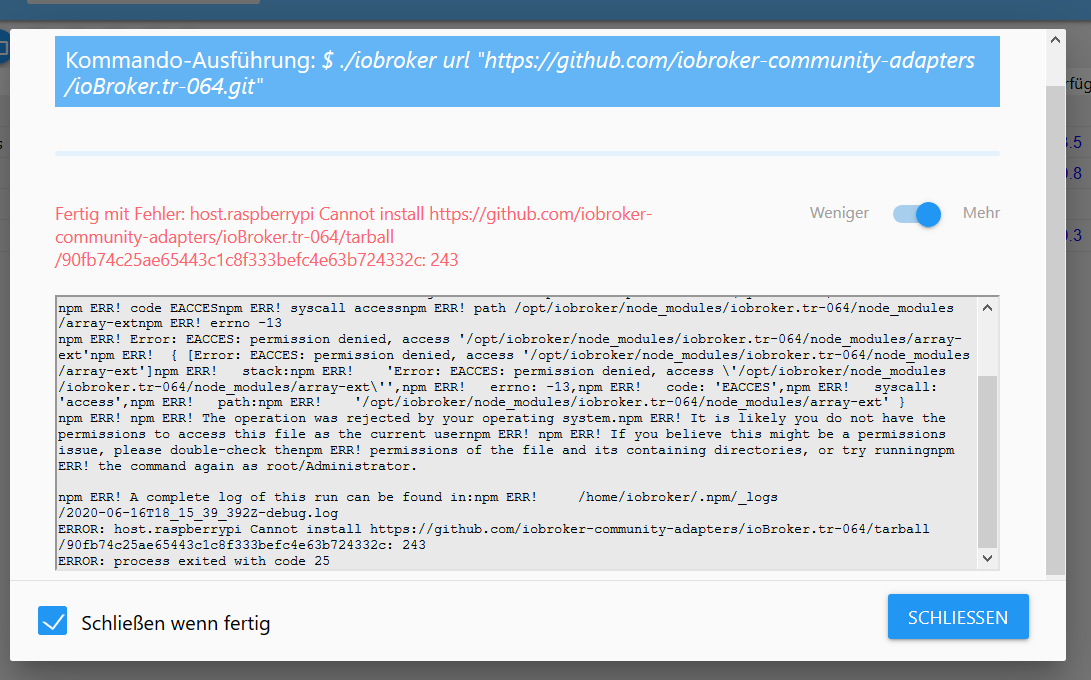
    Zwischenablage01.png

    GlasfaserG Online
    GlasfaserG Online
    Glasfaser
    schrieb am zuletzt editiert von
    #35

    @Kusselin

    Laut Screenshot , sagt er ... du hast keine Rechte .

    Lass den Fixer drüberlaufen .... und dann nochmal

    Kenn dein System nicht :

    iobroker fix
    
    oder 
    
    curl -sL https://iobroker.net/fix.sh | bash -
    

    Synology 918+ 16GB - ioBroker in Docker v9 , VISO auf Trekstor Primebook C13 13,3" , Hikvision Domkameras mit Surveillance Station .. CCU RaspberryMatic in Synology VM .. Zigbee CC2538+CC2592 .. Sonoff .. KNX .. Modbus ..

    1 Antwort Letzte Antwort
    0
    • KusselinK Offline
      KusselinK Offline
      Kusselin
      schrieb am zuletzt editiert von
      #36

      Hi glasfaser...danke für die schnelle info.....iobroker läuft bei mir aufm raspi3

      dann die curl variante richtig?
      Gruss

      GlasfaserG J 2 Antworten Letzte Antwort
      0
      • KusselinK Kusselin

        Hi glasfaser...danke für die schnelle info.....iobroker läuft bei mir aufm raspi3

        dann die curl variante richtig?
        Gruss

        GlasfaserG Online
        GlasfaserG Online
        Glasfaser
        schrieb am zuletzt editiert von
        #37

        @Kusselin

        Nee ... JS Version ;)

        
        Bei Fehlern:
        Wenn bei der Installation Fehler wegen fehlender Zugriffsrechte auftreten, am besten den Installation-Fixer (iobroker fix wer schon einen js-controller 2.x hat, alternativ weiterhin manuell via curl -sL https://iobroker.net/fix.sh | bash -) nutzen und die Installation wiederholen.
        

        Synology 918+ 16GB - ioBroker in Docker v9 , VISO auf Trekstor Primebook C13 13,3" , Hikvision Domkameras mit Surveillance Station .. CCU RaspberryMatic in Synology VM .. Zigbee CC2538+CC2592 .. Sonoff .. KNX .. Modbus ..

        1 Antwort Letzte Antwort
        0
        • KusselinK Offline
          KusselinK Offline
          Kusselin
          schrieb am zuletzt editiert von
          #38

          nee klappt nicht :-(

          pi@raspberrypi:~ $ iobroker fix
          Commands:
          iobroker setup [--objects <host>] [--states <host>] [custom]
          iobroker start - starts the js-controller
          iobroker stop - stops the js-controller
          iobroker start <adapter>[.instance] - starts a specified adapter instance
          iobroker stop <adapter>.[instance] - stops a specified adapter instance
          iobroker start all - starts js-controller and all adapters
          iobroker restart - restarts the js-controller
          iobroker restart <adapter>[.instance] - restarts a specified adapter
          iobroker debug <adapter> [--ip=<ip>] [--port=<port>] [--wait] - Starts a Node.js debugging session for the adapter
              --wait stops the execution until the debugger is attached.
              --ip and --port can be used to change the listen IP and port. Use IP 0.0.0.0 for remote debugging.
          iobroker info - shows the host info
          iobroker logs [adapter] [--watch] [--lines=1000]
          iobroker add <adapter> [desiredNumber] [--enabled] [--host <host>] [--port <port>]
          iobroker install <adapter> - installs a specified adapter
          iobroker rebuild <adapter>|self [--install]
          iobroker url <url> [<name>] - install adapter from specified url, e.g. GitHub
          iobroker del <adapter> - remove adapter from system
          iobroker del <adapter>.<instance> - remove adapter instance
          iobroker update [repository url] [--updatable/--u] [--installed/--i] [--force/--f] - update repository and optionally filter installed/updateable adapters, use --force to bypass hash check
          iobroker upgrade [repository url]
          iobroker upgrade self [repository url] - upgrade js-controller and all adapters, optionally you can specify the repository url
          iobroker upgrade <adapter> [repository url] - upgrade specified adapter, optionally you can specify the repository url
          iobroker upload <pathToLocalFile> <pathIniobroker>
          iobroker upload all - upload all adapter files to make them available for instances
          iobroker upload <adapter> - upload specified adapter files to make them available for instances
          iobroker object get <id> - get object specified by id
          iobroker object set <id> <json-value> - set object with the given id by providing a new json object
          iobroker object set <id> propertyname=<value or json-value> - update part of the object by providing a new value or partial object
          iobroker object extend <id> <json-value> - extend object with the given id by providing a new json object
          iobroker object del <id|pattern> [--yes]
          iobroker object chmod <object-mode> [state-mode] <id>
          iobroker object chown <user> <group> <id>
          iobroker object list <id>
          iobroker state get <id> - get state, specified by id
          iobroker state getplain <id> [--pretty]
          iobroker state getvalue <id>
          iobroker state set <id> <value> [ack]
          iobroker state del <id>
          iobroker message <adapter>[.instance] <command> [<message>]
          iobroker list <type> [filter]
          iobroker chmod <mode> <file>
          iobroker chown <user> <group> <file>
          iobroker touch <file>
          iobroker rm <file>
          iobroker file read <iobroker-path-to-read> [<filesystem-path-to-write>]
          iobroker file write <filesystem-path-to-read> <iobroker-path-to-write>
          iobroker file rm <iobroker-path-to-delete>
          iobroker file sync
          iobroker user add <user> [--ingroup group] [--password pass]
          iobroker user del <user>
          iobroker user passwd <user> [--password pass]
          iobroker user enable <user>
          iobroker user disable <user>
          iobroker user get <user>
          iobroker user check <user> [--password pass]
          iobroker group add <group>
          iobroker group del <group>
          iobroker group list <group>
          iobroker group enable <group>
          iobroker group disable <group>
          iobroker group get <group>
          iobroker group adduser <group> <user>
          iobroker group deluser <group> <user>
          iobroker host this
          iobroker host <hostname>
          iobroker host set <hostname>
          iobroker host remove <hostname>
          iobroker set <adapter>.<instance> [--port port] [--ip address] [--ssl true|false]
          iobroker license <license.file or license.text>
          iobroker cert create
          iobroker cert view [<certificate name>]
          iobroker clean
          iobroker backup
          iobroker restore <backup name or path> - restore a specified backup
          iobroker validate <backup name or path> - validate a specified backup
          iobroker <command> --timeout 5000
          iobroker status [all|<adapter>.<instance>]
          iobroker repo [name]
          iobroker repo add <name> <path or url>
          iobroker repo set <name>
          iobroker repo del <name>
          iobroker uuid
          iobroker unsetup
          iobroker fix - execute the installation fixer script, this updates your ioBroker installation
          iobroker multihost <enable|disable> [--secure true|false]
          iobroker multihost browse
          iobroker multihost connect
          iobroker compact status - show if compact mode is enabled in general
          iobroker compact <enable|on|disable|off> - enable or disable compact mode in general
          iobroker compact <adapter>.<instance> status - show if compact mode is enabled for a specific instance
          iobroker compact <adapter>.<instance> group <group-id> - define compact group of a specific adapter
          iobroker compact <adapter>.<instance> <disable|off> - enable or disable compact mode for specified adapter instance
          iobroker compact <adapter>.<instance> <enable|on> [group-id] - enable or disable compact mode for specified adapter instance and set comapct group optionally
          iobroker plugin enable <pluginname> [--host <hostname>] - enables a plugin for the specified host. If no host is specified, the current one is used
          iobroker plugin disable <pluginname> [--host <hostname>] - disables a plugin for the specified host. If no host is specified, the current one is used
          iobroker plugin status <pluginname> [--host <hostname>] - checks if a plugin is enabled for the specified host. If no host is specified, the current one is used
          iobroker plugin enable <pluginname> --instance <adapter>[.<nr>] - enables a plugin for the specified adapter instance (defaults to instance 0)
          iobroker plugin disable <pluginname> --instance <adapter>[.<nr>] - disables a plugin for the specified adapter instance (defaults to instance 0)
          iobroker plugin status <pluginname> --instance <adapter>[.<nr>] - checks if a plugin is enabled for the specified adapter instance (defaults to instance 0)
          iobroker version [adapter] - show version of js-controller or specified adapter
          iobroker [adapter] -v - show version of js-controller or specified adapter
          
          
          Options:
            --help     Hilfe anzeigen  [boolean]
            --version  Version anzeigen  [boolean]
          

          und danach noch über putty:

          pi@raspberrypi:~ $ curl -sL https://iobroker.net/fix.sh | bash -
          library: loaded
          Library version=2020-06-12
          ioBroker or some processes are still running:
           io.discovery.0
           io.fritzbox.0
           io.terminal.0
           io.zigbee.0
           io.alexa2.0
           io.shelly.0
           io.fhem.0
           io.info.0
           io.iot.0
           io.web.0
           io.yahka.0
           io.admin.0
          Please stop them first and try again!
          

          dann kommt aber wieder die Meldung...und was komisch ist....im Log erscheint noch die Meldung:

          fritzbox.0	2020-06-16 17:53:29.314	warn	(780) restartConnection: 192.168.200.1
          

          ich hatte den tr-064 deinstalliert...aber anscheined nicht richtig oder?

          1 Antwort Letzte Antwort
          0
          • KusselinK Kusselin

            Hi glasfaser...danke für die schnelle info.....iobroker läuft bei mir aufm raspi3

            dann die curl variante richtig?
            Gruss

            J Offline
            J Offline
            Jan1
            schrieb am zuletzt editiert von
            #39

            @Kusselin
            Es ist auch immer bisschen blöd wenn man sich auf alte Posts verlässt, da der Adapter mittlerweile ganz normal über Admin installiert wird.

            1 Antwort Letzte Antwort
            0
            • KusselinK Offline
              KusselinK Offline
              Kusselin
              schrieb am zuletzt editiert von
              #40

              ich sehe aber gerade das der tr-064 adapter läuft...aber er nicht sichtbar ist unter den adaptern....wie kann ich den jetzt erst komplett deinstallieren??

              J 1 Antwort Letzte Antwort
              0
              • KusselinK Kusselin

                ich sehe aber gerade das der tr-064 adapter läuft...aber er nicht sichtbar ist unter den adaptern....wie kann ich den jetzt erst komplett deinstallieren??

                J Offline
                J Offline
                Jan1
                schrieb am zuletzt editiert von
                #41

                @Kusselin
                Deinstallieren und über Admin installieren. Dir fehlt die Instanz, was klar ist wenn man von Git was rein ballert und nicht weiß was man tut. Hast den roten Warnhinweis nicht gelesen?

                1 Antwort Letzte Antwort
                0
                • KusselinK Offline
                  KusselinK Offline
                  Kusselin
                  schrieb am zuletzt editiert von Kusselin
                  #42

                  wie deinstallieren wenn ich den adapter nicht sehe???

                  wie sieht der code aus über putty....ich bin nicht so der Linux freak

                  Thomas BraunT J 2 Antworten Letzte Antwort
                  0
                  • KusselinK Kusselin

                    wie deinstallieren wenn ich den adapter nicht sehe???

                    wie sieht der code aus über putty....ich bin nicht so der Linux freak

                    Thomas BraunT Online
                    Thomas BraunT Online
                    Thomas Braun
                    Most Active
                    schrieb am zuletzt editiert von
                    #43

                    @Kusselin sagte in [gelöst] Fehler Adapter tr-064 - Startet nicht:

                    wie deinstallieren wenn ich den adapter nicht sehe???

                    wie sieht der code aus über putty....ich bin nicht so der Linux freak

                    Hat mit Linux nix zu tun:

                    iobroker del ADAPTERNAME
                    

                    Linux-Werkzeugkasten:
                    https://forum.iobroker.net/topic/42952/der-kleine-iobroker-linux-werkzeugkasten
                    NodeJS Fixer Skript:
                    https://forum.iobroker.net/topic/68035/iob-node-fix-skript
                    iob_diag: curl -sLf -o diag.sh https://iobroker.net/diag.sh && bash diag.sh

                    1 Antwort Letzte Antwort
                    0
                    • KusselinK Kusselin

                      wie deinstallieren wenn ich den adapter nicht sehe???

                      wie sieht der code aus über putty....ich bin nicht so der Linux freak

                      J Offline
                      J Offline
                      Jan1
                      schrieb am zuletzt editiert von
                      #44

                      @Kusselin
                      und wie kommst überhaupt drauf dass der noch da ist?

                      1 Antwort Letzte Antwort
                      0
                      • KusselinK Offline
                        KusselinK Offline
                        Kusselin
                        schrieb am zuletzt editiert von Kusselin
                        #45

                        @Kusselin sagte in [gelöst] Fehler Adapter tr-064 - Startet nicht:

                        pi@raspberrypi:~ $ curl -sL https://iobroker.net/fix.sh | bash -

                        pi@raspberrypi:~ $ curl -sL https://iobroker.net/fix.sh | bash -
                        
                        library: loaded
                        
                        Library version=2020-06-12
                        
                        ioBroker or some processes are still running:
                        
                         io.discovery.0
                        
                         io.fritzbox.0
                        
                         io.terminal.0
                        
                         io.zigbee.0
                        
                         io.alexa2.0
                        
                         io.shelly.0
                        
                         io.fhem.0
                        
                         io.info.0
                        
                         io.iot.0
                        
                         io.web.0
                        
                         io.yahka.0
                        
                         io.admin.0
                        
                        Please stop them first and try again!
                        code_text
                        
                        Thomas BraunT J 3 Antworten Letzte Antwort
                        0
                        • KusselinK Kusselin

                          @Kusselin sagte in [gelöst] Fehler Adapter tr-064 - Startet nicht:

                          pi@raspberrypi:~ $ curl -sL https://iobroker.net/fix.sh | bash -

                          pi@raspberrypi:~ $ curl -sL https://iobroker.net/fix.sh | bash -
                          
                          library: loaded
                          
                          Library version=2020-06-12
                          
                          ioBroker or some processes are still running:
                          
                           io.discovery.0
                          
                           io.fritzbox.0
                          
                           io.terminal.0
                          
                           io.zigbee.0
                          
                           io.alexa2.0
                          
                           io.shelly.0
                          
                           io.fhem.0
                          
                           io.info.0
                          
                           io.iot.0
                          
                           io.web.0
                          
                           io.yahka.0
                          
                           io.admin.0
                          
                          Please stop them first and try again!
                          code_text
                          
                          Thomas BraunT Online
                          Thomas BraunT Online
                          Thomas Braun
                          Most Active
                          schrieb am zuletzt editiert von
                          #46

                          @Kusselin sagte in [gelöst] Fehler Adapter tr-064 - Startet nicht:

                          Please stop them first and try again!

                          iobroker stop
                          

                          Linux-Werkzeugkasten:
                          https://forum.iobroker.net/topic/42952/der-kleine-iobroker-linux-werkzeugkasten
                          NodeJS Fixer Skript:
                          https://forum.iobroker.net/topic/68035/iob-node-fix-skript
                          iob_diag: curl -sLf -o diag.sh https://iobroker.net/diag.sh && bash diag.sh

                          1 Antwort Letzte Antwort
                          0
                          • KusselinK Kusselin

                            @Kusselin sagte in [gelöst] Fehler Adapter tr-064 - Startet nicht:

                            pi@raspberrypi:~ $ curl -sL https://iobroker.net/fix.sh | bash -

                            pi@raspberrypi:~ $ curl -sL https://iobroker.net/fix.sh | bash -
                            
                            library: loaded
                            
                            Library version=2020-06-12
                            
                            ioBroker or some processes are still running:
                            
                             io.discovery.0
                            
                             io.fritzbox.0
                            
                             io.terminal.0
                            
                             io.zigbee.0
                            
                             io.alexa2.0
                            
                             io.shelly.0
                            
                             io.fhem.0
                            
                             io.info.0
                            
                             io.iot.0
                            
                             io.web.0
                            
                             io.yahka.0
                            
                             io.admin.0
                            
                            Please stop them first and try again!
                            code_text
                            
                            J Offline
                            J Offline
                            Jan1
                            schrieb am zuletzt editiert von
                            #47

                            @Kusselin
                            Was willst denn eigentlich mit dem Fixer? Du hast doch ein Problem mit dem TR0-64 Adapter?

                            1 Antwort Letzte Antwort
                            0
                            • KusselinK Offline
                              KusselinK Offline
                              Kusselin
                              schrieb am zuletzt editiert von
                              #48

                              genau...das hat mir glasfaser gesagt siehst doch im post oben

                              GlasfaserG 1 Antwort Letzte Antwort
                              0
                              • KusselinK Kusselin

                                genau...das hat mir glasfaser gesagt siehst doch im post oben

                                GlasfaserG Online
                                GlasfaserG Online
                                Glasfaser
                                schrieb am zuletzt editiert von
                                #49

                                @Jan1

                                Im Log stand ... keine Berechtigung ...

                                Synology 918+ 16GB - ioBroker in Docker v9 , VISO auf Trekstor Primebook C13 13,3" , Hikvision Domkameras mit Surveillance Station .. CCU RaspberryMatic in Synology VM .. Zigbee CC2538+CC2592 .. Sonoff .. KNX .. Modbus ..

                                1 Antwort Letzte Antwort
                                0
                                • KusselinK Offline
                                  KusselinK Offline
                                  Kusselin
                                  schrieb am zuletzt editiert von
                                  #50

                                  sorry, so komm ich nicht weiter......

                                  1 Antwort Letzte Antwort
                                  0
                                  • KusselinK Kusselin

                                    @Kusselin sagte in [gelöst] Fehler Adapter tr-064 - Startet nicht:

                                    pi@raspberrypi:~ $ curl -sL https://iobroker.net/fix.sh | bash -

                                    pi@raspberrypi:~ $ curl -sL https://iobroker.net/fix.sh | bash -
                                    
                                    library: loaded
                                    
                                    Library version=2020-06-12
                                    
                                    ioBroker or some processes are still running:
                                    
                                     io.discovery.0
                                    
                                     io.fritzbox.0
                                    
                                     io.terminal.0
                                    
                                     io.zigbee.0
                                    
                                     io.alexa2.0
                                    
                                     io.shelly.0
                                    
                                     io.fhem.0
                                    
                                     io.info.0
                                    
                                     io.iot.0
                                    
                                     io.web.0
                                    
                                     io.yahka.0
                                    
                                     io.admin.0
                                    
                                    Please stop them first and try again!
                                    code_text
                                    
                                    Thomas BraunT Online
                                    Thomas BraunT Online
                                    Thomas Braun
                                    Most Active
                                    schrieb am zuletzt editiert von
                                    #51

                                    @Kusselin Ich glaube, du fummelst da irgendwie etwas planlos herum...

                                    which nodejs && nodejs -v && which node && node -v && which npm && npm -v && apt policy nodejs
                                    

                                    Und wenn das sauber ist, dann würde ich mal den ioBroker in Gänze aktualisieren.

                                    Linux-Werkzeugkasten:
                                    https://forum.iobroker.net/topic/42952/der-kleine-iobroker-linux-werkzeugkasten
                                    NodeJS Fixer Skript:
                                    https://forum.iobroker.net/topic/68035/iob-node-fix-skript
                                    iob_diag: curl -sLf -o diag.sh https://iobroker.net/diag.sh && bash diag.sh

                                    1 Antwort Letzte Antwort
                                    0
                                    • KusselinK Offline
                                      KusselinK Offline
                                      Kusselin
                                      schrieb am zuletzt editiert von
                                      #52

                                      @thomas....gleich....
                                      hab das net noch gemacht...was sagt mir das??

                                      pi@raspberrypi:~ $ iobroker del tr-064
                                      Delete adapter "tr-064"
                                      npm uninstall iobroker.tr-064 --error --prefix "/opt/iobroker" (System call)
                                      npm WARN checkPermissions Missing write access to /opt/iobroker/node_modules/iobroker.tr-064/node_modules/array-ext
                                      npm WARN checkPermissions Missing write access to /opt/iobroker/node_modules/iobroker.tr-064/node_modules/dgram
                                      npm WARN checkPermissions Missing write access to /opt/iobroker/node_modules/iobroker.tr-064/node_modules/ip
                                      npm WARN checkPermissions Missing write access to /opt/iobroker/node_modules/iobroker.tr-064/node_modules/safe-buffer
                                      npm WARN checkPermissions Missing write access to /opt/iobroker/node_modules/iobroker.tr-064/node_modules/dns-packet
                                      npm WARN checkPermissions Missing write access to /opt/iobroker/node_modules/iobroker.tr-064/node_modules/sprintf-js
                                      npm WARN optional SKIPPING OPTIONAL DEPENDENCY: osx-temperature-sensor@^1.0.5 (node_modules/iobroker.info/node_modules/osx-temperature-sensor):
                                      npm WARN notsup SKIPPING OPTIONAL DEPENDENCY: Unsupported platform for osx-temperature-sensor@1.0.7: wanted {"os":"darwin","arch":"any"} (current: {"os":"linux","arch":"arm"})
                                      npm WARN enoent ENOENT: no such file or directory, open '/opt/iobroker/node_modules/serialport/package.json'
                                      
                                      npm ERR! code EACCES
                                      npm ERR! syscall access
                                      npm ERR! path /opt/iobroker/node_modules/iobroker.tr-064/node_modules/array-ext
                                      npm ERR! errno -13
                                      npm ERR! Error: EACCES: permission denied, access '/opt/iobroker/node_modules/iobroker.tr-064/node_modules/array-ext'
                                      npm ERR!  { [Error: EACCES: permission denied, access '/opt/iobroker/node_modules/iobroker.tr-064/node_modules/array-ext']
                                      npm ERR!   stack:
                                      npm ERR!    'Error: EACCES: permission denied, access \'/opt/iobroker/node_modules/iobroker.tr-064/node_modules/array-ext\'',
                                      npm ERR!   errno: -13,
                                      npm ERR!   code: 'EACCES',
                                      npm ERR!   syscall: 'access',
                                      npm ERR!   path:
                                      npm ERR!    '/opt/iobroker/node_modules/iobroker.tr-064/node_modules/array-ext' }
                                      npm ERR!
                                      npm ERR! The operation was rejected by your operating system.
                                      npm ERR! It is likely you do not have the permissions to access this file as the current user
                                      npm ERR!
                                      npm ERR! If you believe this might be a permissions issue, please double-check the
                                      npm ERR! permissions of the file and its containing directories, or try running
                                      npm ERR! the command again as root/Administrator.
                                      
                                      npm ERR! A complete log of this run can be found in:
                                      npm ERR!     /home/iobroker/.npm/_logs/2020-06-16T19_12_04_255Z-debug.log
                                      Error deleting adapter tr-064 from disk: Error: host.raspberrypi: Cannot uninstall iobroker.tr-064: 243
                                      You might have to delete it yourself!

                                      
                                      
                                      Thomas BraunT GlasfaserG 2 Antworten Letzte Antwort
                                      0
                                      • KusselinK Kusselin

                                        @thomas....gleich....
                                        hab das net noch gemacht...was sagt mir das??

                                        pi@raspberrypi:~ $ iobroker del tr-064
                                        Delete adapter "tr-064"
                                        npm uninstall iobroker.tr-064 --error --prefix "/opt/iobroker" (System call)
                                        npm WARN checkPermissions Missing write access to /opt/iobroker/node_modules/iobroker.tr-064/node_modules/array-ext
                                        npm WARN checkPermissions Missing write access to /opt/iobroker/node_modules/iobroker.tr-064/node_modules/dgram
                                        npm WARN checkPermissions Missing write access to /opt/iobroker/node_modules/iobroker.tr-064/node_modules/ip
                                        npm WARN checkPermissions Missing write access to /opt/iobroker/node_modules/iobroker.tr-064/node_modules/safe-buffer
                                        npm WARN checkPermissions Missing write access to /opt/iobroker/node_modules/iobroker.tr-064/node_modules/dns-packet
                                        npm WARN checkPermissions Missing write access to /opt/iobroker/node_modules/iobroker.tr-064/node_modules/sprintf-js
                                        npm WARN optional SKIPPING OPTIONAL DEPENDENCY: osx-temperature-sensor@^1.0.5 (node_modules/iobroker.info/node_modules/osx-temperature-sensor):
                                        npm WARN notsup SKIPPING OPTIONAL DEPENDENCY: Unsupported platform for osx-temperature-sensor@1.0.7: wanted {"os":"darwin","arch":"any"} (current: {"os":"linux","arch":"arm"})
                                        npm WARN enoent ENOENT: no such file or directory, open '/opt/iobroker/node_modules/serialport/package.json'
                                        
                                        npm ERR! code EACCES
                                        npm ERR! syscall access
                                        npm ERR! path /opt/iobroker/node_modules/iobroker.tr-064/node_modules/array-ext
                                        npm ERR! errno -13
                                        npm ERR! Error: EACCES: permission denied, access '/opt/iobroker/node_modules/iobroker.tr-064/node_modules/array-ext'
                                        npm ERR!  { [Error: EACCES: permission denied, access '/opt/iobroker/node_modules/iobroker.tr-064/node_modules/array-ext']
                                        npm ERR!   stack:
                                        npm ERR!    'Error: EACCES: permission denied, access \'/opt/iobroker/node_modules/iobroker.tr-064/node_modules/array-ext\'',
                                        npm ERR!   errno: -13,
                                        npm ERR!   code: 'EACCES',
                                        npm ERR!   syscall: 'access',
                                        npm ERR!   path:
                                        npm ERR!    '/opt/iobroker/node_modules/iobroker.tr-064/node_modules/array-ext' }
                                        npm ERR!
                                        npm ERR! The operation was rejected by your operating system.
                                        npm ERR! It is likely you do not have the permissions to access this file as the current user
                                        npm ERR!
                                        npm ERR! If you believe this might be a permissions issue, please double-check the
                                        npm ERR! permissions of the file and its containing directories, or try running
                                        npm ERR! the command again as root/Administrator.
                                        
                                        npm ERR! A complete log of this run can be found in:
                                        npm ERR!     /home/iobroker/.npm/_logs/2020-06-16T19_12_04_255Z-debug.log
                                        Error deleting adapter tr-064 from disk: Error: host.raspberrypi: Cannot uninstall iobroker.tr-064: 243
                                        You might have to delete it yourself!

                                        
                                        
                                        Thomas BraunT Online
                                        Thomas BraunT Online
                                        Thomas Braun
                                        Most Active
                                        schrieb am zuletzt editiert von
                                        #53

                                        @Kusselin
                                        Das sagt mir, dass du entweder die Rechte verfummelt hast, keine richtigen user hast oder deine SD-Karte die Grätsche macht.

                                        Linux-Werkzeugkasten:
                                        https://forum.iobroker.net/topic/42952/der-kleine-iobroker-linux-werkzeugkasten
                                        NodeJS Fixer Skript:
                                        https://forum.iobroker.net/topic/68035/iob-node-fix-skript
                                        iob_diag: curl -sLf -o diag.sh https://iobroker.net/diag.sh && bash diag.sh

                                        1 Antwort Letzte Antwort
                                        1
                                        • KusselinK Kusselin

                                          @thomas....gleich....
                                          hab das net noch gemacht...was sagt mir das??

                                          pi@raspberrypi:~ $ iobroker del tr-064
                                          Delete adapter "tr-064"
                                          npm uninstall iobroker.tr-064 --error --prefix "/opt/iobroker" (System call)
                                          npm WARN checkPermissions Missing write access to /opt/iobroker/node_modules/iobroker.tr-064/node_modules/array-ext
                                          npm WARN checkPermissions Missing write access to /opt/iobroker/node_modules/iobroker.tr-064/node_modules/dgram
                                          npm WARN checkPermissions Missing write access to /opt/iobroker/node_modules/iobroker.tr-064/node_modules/ip
                                          npm WARN checkPermissions Missing write access to /opt/iobroker/node_modules/iobroker.tr-064/node_modules/safe-buffer
                                          npm WARN checkPermissions Missing write access to /opt/iobroker/node_modules/iobroker.tr-064/node_modules/dns-packet
                                          npm WARN checkPermissions Missing write access to /opt/iobroker/node_modules/iobroker.tr-064/node_modules/sprintf-js
                                          npm WARN optional SKIPPING OPTIONAL DEPENDENCY: osx-temperature-sensor@^1.0.5 (node_modules/iobroker.info/node_modules/osx-temperature-sensor):
                                          npm WARN notsup SKIPPING OPTIONAL DEPENDENCY: Unsupported platform for osx-temperature-sensor@1.0.7: wanted {"os":"darwin","arch":"any"} (current: {"os":"linux","arch":"arm"})
                                          npm WARN enoent ENOENT: no such file or directory, open '/opt/iobroker/node_modules/serialport/package.json'
                                          
                                          npm ERR! code EACCES
                                          npm ERR! syscall access
                                          npm ERR! path /opt/iobroker/node_modules/iobroker.tr-064/node_modules/array-ext
                                          npm ERR! errno -13
                                          npm ERR! Error: EACCES: permission denied, access '/opt/iobroker/node_modules/iobroker.tr-064/node_modules/array-ext'
                                          npm ERR!  { [Error: EACCES: permission denied, access '/opt/iobroker/node_modules/iobroker.tr-064/node_modules/array-ext']
                                          npm ERR!   stack:
                                          npm ERR!    'Error: EACCES: permission denied, access \'/opt/iobroker/node_modules/iobroker.tr-064/node_modules/array-ext\'',
                                          npm ERR!   errno: -13,
                                          npm ERR!   code: 'EACCES',
                                          npm ERR!   syscall: 'access',
                                          npm ERR!   path:
                                          npm ERR!    '/opt/iobroker/node_modules/iobroker.tr-064/node_modules/array-ext' }
                                          npm ERR!
                                          npm ERR! The operation was rejected by your operating system.
                                          npm ERR! It is likely you do not have the permissions to access this file as the current user
                                          npm ERR!
                                          npm ERR! If you believe this might be a permissions issue, please double-check the
                                          npm ERR! permissions of the file and its containing directories, or try running
                                          npm ERR! the command again as root/Administrator.
                                          
                                          npm ERR! A complete log of this run can be found in:
                                          npm ERR!     /home/iobroker/.npm/_logs/2020-06-16T19_12_04_255Z-debug.log
                                          Error deleting adapter tr-064 from disk: Error: host.raspberrypi: Cannot uninstall iobroker.tr-064: 243
                                          You might have to delete it yourself!
                                          
                                          
                                          GlasfaserG Online
                                          GlasfaserG Online
                                          Glasfaser
                                          schrieb am zuletzt editiert von Glasfaser
                                          #54

                                          @Kusselin

                                          Stopp mal alles was du machst !!

                                          Bitte nur noch den Anweisungen von @Thomas-Braun folgen !!!

                                          Synology 918+ 16GB - ioBroker in Docker v9 , VISO auf Trekstor Primebook C13 13,3" , Hikvision Domkameras mit Surveillance Station .. CCU RaspberryMatic in Synology VM .. Zigbee CC2538+CC2592 .. Sonoff .. KNX .. Modbus ..

                                          1 Antwort Letzte Antwort
                                          0
                                          Antworten
                                          • In einem neuen Thema antworten
                                          Anmelden zum Antworten
                                          • Älteste zuerst
                                          • Neuste zuerst
                                          • Meiste Stimmen


                                          Support us

                                          ioBroker
                                          Community Adapters
                                          Donate
                                          FAQ Cloud / IOT
                                          HowTo: Node.js-Update
                                          HowTo: Backup/Restore
                                          Downloads
                                          BLOG

                                          616

                                          Online

                                          32.5k

                                          Benutzer

                                          81.8k

                                          Themen

                                          1.3m

                                          Beiträge
                                          Community
                                          Impressum | Datenschutz-Bestimmungen | Nutzungsbedingungen | Einwilligungseinstellungen
                                          ioBroker Community 2014-2025
                                          logo
                                          • Anmelden

                                          • Du hast noch kein Konto? Registrieren

                                          • Anmelden oder registrieren, um zu suchen
                                          • Erster Beitrag
                                            Letzter Beitrag
                                          0
                                          • Home
                                          • Aktuell
                                          • Tags
                                          • Ungelesen 0
                                          • Kategorien
                                          • Unreplied
                                          • Beliebt
                                          • GitHub
                                          • Docu
                                          • Hilfe