Skip to content
  • Home
  • Aktuell
  • Tags
  • 0 Ungelesen 0
  • Kategorien
  • Unreplied
  • Beliebt
  • GitHub
  • Docu
  • Hilfe
Skins
  • Light
  • Brite
  • Cerulean
  • Cosmo
  • Flatly
  • Journal
  • Litera
  • Lumen
  • Lux
  • Materia
  • Minty
  • Morph
  • Pulse
  • Sandstone
  • Simplex
  • Sketchy
  • Spacelab
  • United
  • Yeti
  • Zephyr
  • Dark
  • Cyborg
  • Darkly
  • Quartz
  • Slate
  • Solar
  • Superhero
  • Vapor

  • Standard: (Kein Skin)
  • Kein Skin
Einklappen
ioBroker Logo

Community Forum

donate donate
  1. ioBroker Community Home
  2. Deutsch
  3. ioBroker Allgemein
  4. [gelöst] Update nicht möglich / Error: Cannot find module
NEWS

  • Weihnachtsangebot 2025! 🎄
    BluefoxB
    Bluefox
    23
    1
    1.3k

  • UPDATE 31.10.: Amazon Alexa - ioBroker Skill läuft aus ?
    apollon77A
    apollon77
    48
    3
    9.3k

  • Monatsrückblick – September 2025
    BluefoxB
    Bluefox
    14
    1
    2.5k

[gelöst] Update nicht möglich / Error: Cannot find module

Geplant Angeheftet Gesperrt Verschoben ioBroker Allgemein
updateiobrokercannot find module
114 Beiträge 4 Kommentatoren 11.9k Aufrufe 1 Watching
  • Älteste zuerst
  • Neuste zuerst
  • Meiste Stimmen
Antworten
  • In einem neuen Thema antworten
Anmelden zum Antworten
Dieses Thema wurde gelöscht. Nur Nutzer mit entsprechenden Rechten können es sehen.
  • T thorkillar

    nodejs -v v10.19.0
    node -v v10.19.0
    npm -v 6.13.4
    iobroker version
    sudo: Hostname buanet-iobroker1 kann nicht aufgelöst werden
    internal/modules/cjs/loader.js:638
    throw err;
    ^

    Error: Cannot find module '/opt/iobroker/node_modules/iobroker.js-controller/iob
    roker.js'
    at Function.Module._resolveFilename (internal/modules/cjs/loader.js:636:15)
    at Function.Module._load (internal/modules/cjs/loader.js:562:25)
    at Function.Module.runMain (internal/modules/cjs/loader.js:831:12)
    at startup (internal/bootstrap/node.js:283:19)
    at bootstrapNodeJSCore (internal/bootstrap/node.js:623:3)
    ccb65fba-546d-403b-a92f-a781036411de-image.png

    GlasfaserG Offline
    GlasfaserG Offline
    Glasfaser
    schrieb am zuletzt editiert von
    #7

    @thorkillar
    Versionen sehen gut aus !

    @Glasfaser sagte in Update nicht möglich / Error: Cannot find module:

    @Glasfaser

    Du hast keine Rechte lass mal den fixer laufen , aber vorher pkill io

    curl -sL https://iobroker.net/fix.sh | bash -
    

    und dann das Update nochmal !

    Synology 918+ 16GB - ioBroker in Docker v9 , VISO auf Trekstor Primebook C13 13,3" , Hikvision Domkameras mit Surveillance Station .. CCU RaspberryMatic in Synology VM .. Zigbee CC2538+CC2592 .. Sonoff .. KNX .. Modbus ..

    1 Antwort Letzte Antwort
    0
    • GlasfaserG Glasfaser

      @Glasfaser

      Du hast keine Rechte lass mal den fixer laufen , aber vorher pkill io

      curl -sL https://iobroker.net/fix.sh | bash -
      
      T Offline
      T Offline
      thorkillar
      schrieb am zuletzt editiert von
      #8

      @Glasfaser

      curl -sL https://iobroker.net/fix.sh | bash

      library: loaded
      Library version=2020-01-30
      ioBroker or some processes are still running:
      io.admin.0
      io.discovery.0
      io.ping.0
      io.web.0
      io.history.0
      io.tankerkoenig.0
      io.lgtv.0
      io.pushover.0
      io.javascript.0
      io.nuki.0
      io.pushover.1
      io.pushover.2
      io.pushover.3
      io.pushover.4
      io.pushover.5
      io.hue.0
      io.javascript.1
      io.javascript.2
      io.pollenflug.0
      io.bring.0
      io.info.0
      io.sonos.0
      io.roomba.0
      io.alexa2.0
      io.backitup.0
      io.emby.0
      io.ical.0
      io.ical.2
      Please stop them first and try again!

      GlasfaserG 1 Antwort Letzte Antwort
      0
      • T thorkillar

        @Glasfaser

        curl -sL https://iobroker.net/fix.sh | bash

        library: loaded
        Library version=2020-01-30
        ioBroker or some processes are still running:
        io.admin.0
        io.discovery.0
        io.ping.0
        io.web.0
        io.history.0
        io.tankerkoenig.0
        io.lgtv.0
        io.pushover.0
        io.javascript.0
        io.nuki.0
        io.pushover.1
        io.pushover.2
        io.pushover.3
        io.pushover.4
        io.pushover.5
        io.hue.0
        io.javascript.1
        io.javascript.2
        io.pollenflug.0
        io.bring.0
        io.info.0
        io.sonos.0
        io.roomba.0
        io.alexa2.0
        io.backitup.0
        io.emby.0
        io.ical.0
        io.ical.2
        Please stop them first and try again!

        GlasfaserG Offline
        GlasfaserG Offline
        Glasfaser
        schrieb am zuletzt editiert von Glasfaser
        #9

        @thorkillar

        Hallo !!!!

        pkill io
        

        vorher !!!!

        EDIT : nicht so schnelle ... du mußt auch lesen !!!

        Synology 918+ 16GB - ioBroker in Docker v9 , VISO auf Trekstor Primebook C13 13,3" , Hikvision Domkameras mit Surveillance Station .. CCU RaspberryMatic in Synology VM .. Zigbee CC2538+CC2592 .. Sonoff .. KNX .. Modbus ..

        T 1 Antwort Letzte Antwort
        0
        • GlasfaserG Glasfaser

          @thorkillar

          Hallo !!!!

          pkill io
          

          vorher !!!!

          EDIT : nicht so schnelle ... du mußt auch lesen !!!

          T Offline
          T Offline
          thorkillar
          schrieb am zuletzt editiert von
          #10

          @Glasfaser entschuldige bitte, ich hatte das nicht als Aufforderung verstanden, einzugeben.

          Der Befehl geht nicht !!

          pkill io
          Hier auch Thread dazu , bzw. suchen . Link Text

          ich habe jetzt pkill io ausgeführt und danach
          curl -sL https://iobroker.net/fix.sh | bash-

          mit folgendem Resultat:

          ckages [521 kB]
          Holen:7 http://deb.debian.org/debian stretch-updates/main amd64 Packages.diff/In
          dex [13,0 kB]
          Holen:8 http://deb.debian.org/debian stretch-updates/main amd64 Packages 2020-02
          -23-2017.41.pdiff [1.539 B]
          Holen:8 http://deb.debian.org/debian stretch-updates/main amd64 Packages 2020-02
          -23-2017.41.pdiff [1.539 B]
          Es wurden 721 kB in 2 s geholt (324 kB/s).
          Paketlisten werden gelesen... Fertig
          Installed gcc-c++

          ==========================================================================
          Checking ioBroker user and directory permissions (2/3)

          Created /etc/sudoers.d/iobroker
          sudo: Hostname buanet-iobroker1 kann nicht aufgelöst werden
          sudo: Hostname buanet-iobroker1 kann nicht aufgelöst werden
          Fixing directory permissions...
          This system does not support setting default permissions.
          Do not use npm to manually install adapters unless you know what you are doing!

          ==========================================================================
          Checking autostart (3/3)

          Unsupported init system, cannot enable autostart!

          ==========================================================================

          Your installation was fixed successfully                                    
          Run iobroker start to start ioBroker again!                                 
          

          ==========================================================================

          root@buanet-iobroker1:/opt/iobroker#

          GlasfaserG 1 Antwort Letzte Antwort
          0
          • T thorkillar

            @Glasfaser entschuldige bitte, ich hatte das nicht als Aufforderung verstanden, einzugeben.

            Der Befehl geht nicht !!

            pkill io
            Hier auch Thread dazu , bzw. suchen . Link Text

            ich habe jetzt pkill io ausgeführt und danach
            curl -sL https://iobroker.net/fix.sh | bash-

            mit folgendem Resultat:

            ckages [521 kB]
            Holen:7 http://deb.debian.org/debian stretch-updates/main amd64 Packages.diff/In
            dex [13,0 kB]
            Holen:8 http://deb.debian.org/debian stretch-updates/main amd64 Packages 2020-02
            -23-2017.41.pdiff [1.539 B]
            Holen:8 http://deb.debian.org/debian stretch-updates/main amd64 Packages 2020-02
            -23-2017.41.pdiff [1.539 B]
            Es wurden 721 kB in 2 s geholt (324 kB/s).
            Paketlisten werden gelesen... Fertig
            Installed gcc-c++

            ==========================================================================
            Checking ioBroker user and directory permissions (2/3)

            Created /etc/sudoers.d/iobroker
            sudo: Hostname buanet-iobroker1 kann nicht aufgelöst werden
            sudo: Hostname buanet-iobroker1 kann nicht aufgelöst werden
            Fixing directory permissions...
            This system does not support setting default permissions.
            Do not use npm to manually install adapters unless you know what you are doing!

            ==========================================================================
            Checking autostart (3/3)

            Unsupported init system, cannot enable autostart!

            ==========================================================================

            Your installation was fixed successfully                                    
            Run iobroker start to start ioBroker again!                                 
            

            ==========================================================================

            root@buanet-iobroker1:/opt/iobroker#

            GlasfaserG Offline
            GlasfaserG Offline
            Glasfaser
            schrieb am zuletzt editiert von
            #11

            @thorkillar

            sieht doch gut aus !

            so jetzt :

            cd /opt/iobroker
            
            npm install iobroker.js-controller --production
            

            Synology 918+ 16GB - ioBroker in Docker v9 , VISO auf Trekstor Primebook C13 13,3" , Hikvision Domkameras mit Surveillance Station .. CCU RaspberryMatic in Synology VM .. Zigbee CC2538+CC2592 .. Sonoff .. KNX .. Modbus ..

            1 Antwort Letzte Antwort
            0
            • T Offline
              T Offline
              thorkillar
              schrieb am zuletzt editiert von thorkillar
              #12

              Da kommt leider das bei rum :-(

              npm ERR! code EACCES
              npm ERR! syscall scandir
              npm ERR! path /opt/iobroker/node_modules/@types/.color-name.DELETE
              npm ERR! errno -13
              npm ERR! Error: EACCES: permission denied, scandir '/opt/iobroker/node_modules/@
              types/.color-name.DELETE'
              npm ERR! { [Error: EACCES: permission denied, scandir '/opt/iobroker/node_modul
              es/@types/.color-name.DELETE']
              npm ERR! cause:
              npm ERR! { Error: EACCES: permission denied, scandir '/opt/iobroker/node_modu
              les/@types/.color-name.DELETE'
              npm ERR! errno: -13,
              npm ERR! code: 'EACCES',
              npm ERR! syscall: 'scandir',
              npm ERR! path: '/opt/iobroker/node_modules/@types/.color-name.DELETE' },
              npm ERR! stack:
              npm ERR! 'Error: EACCES: permission denied, scandir '/opt/iobroker/node_modu
              les/@types/.color-name.DELETE'',
              npm ERR! errno: -13,
              npm ERR! code: 'EACCES',
              npm ERR! syscall: 'scandir',
              npm ERR! path: '/opt/iobroker/node_modules/@types/.color-name.DELETE' }
              npm ERR!
              npm ERR! The operation was rejected by your operating system.
              npm ERR! It is likely you do not have the permissions to access this file as the
              current user
              npm ERR!
              npm ERR! If you believe this might be a permissions issue, please double-check t
              he
              npm ERR! permissions of the file and its containing directories, or try running
              npm ERR! the command again as root/Administrator.

              npm ERR! A complete log of this run can be found in:
              npm ERR! /home/iobroker/.npm/_logs/2020-04-04T18_23_48_418Z-debug.log
              root@buanet-iobroker1:/opt/iobroker#

              GlasfaserG 1 Antwort Letzte Antwort
              0
              • T thorkillar

                Da kommt leider das bei rum :-(

                npm ERR! code EACCES
                npm ERR! syscall scandir
                npm ERR! path /opt/iobroker/node_modules/@types/.color-name.DELETE
                npm ERR! errno -13
                npm ERR! Error: EACCES: permission denied, scandir '/opt/iobroker/node_modules/@
                types/.color-name.DELETE'
                npm ERR! { [Error: EACCES: permission denied, scandir '/opt/iobroker/node_modul
                es/@types/.color-name.DELETE']
                npm ERR! cause:
                npm ERR! { Error: EACCES: permission denied, scandir '/opt/iobroker/node_modu
                les/@types/.color-name.DELETE'
                npm ERR! errno: -13,
                npm ERR! code: 'EACCES',
                npm ERR! syscall: 'scandir',
                npm ERR! path: '/opt/iobroker/node_modules/@types/.color-name.DELETE' },
                npm ERR! stack:
                npm ERR! 'Error: EACCES: permission denied, scandir '/opt/iobroker/node_modu
                les/@types/.color-name.DELETE'',
                npm ERR! errno: -13,
                npm ERR! code: 'EACCES',
                npm ERR! syscall: 'scandir',
                npm ERR! path: '/opt/iobroker/node_modules/@types/.color-name.DELETE' }
                npm ERR!
                npm ERR! The operation was rejected by your operating system.
                npm ERR! It is likely you do not have the permissions to access this file as the
                current user
                npm ERR!
                npm ERR! If you believe this might be a permissions issue, please double-check t
                he
                npm ERR! permissions of the file and its containing directories, or try running
                npm ERR! the command again as root/Administrator.

                npm ERR! A complete log of this run can be found in:
                npm ERR! /home/iobroker/.npm/_logs/2020-04-04T18_23_48_418Z-debug.log
                root@buanet-iobroker1:/opt/iobroker#

                GlasfaserG Offline
                GlasfaserG Offline
                Glasfaser
                schrieb am zuletzt editiert von Glasfaser
                #13

                @thorkillar

                :(

                mach mal sudo davor .

                sudo npm install iobroker.js-controller --production
                

                EDIT :

                Bitte benutzt die Code Tags Funktion -> </>
                Hier gehts zur Hilfe. Link Text

                Synology 918+ 16GB - ioBroker in Docker v9 , VISO auf Trekstor Primebook C13 13,3" , Hikvision Domkameras mit Surveillance Station .. CCU RaspberryMatic in Synology VM .. Zigbee CC2538+CC2592 .. Sonoff .. KNX .. Modbus ..

                1 Antwort Letzte Antwort
                0
                • T Offline
                  T Offline
                  thorkillar
                  schrieb am zuletzt editiert von
                  #14

                  jetzt ist schon etwas mehr passiert :-)

                  sudo npm install iobroker.js-controller --production
                  sudo: Hostname buanet-iobroker1 kann nicht aufgelöst werden

                  iobroker.js-controller@2.2.9 preinstall /opt/iobroker/node_modules/iobroker.js-controller
                  node lib/preinstallCheck.js

                  NPM version: 6.13.4

                  node-bluetooth@1.2.6 install /opt/iobroker/node_modules/node-bluetooth
                  node-gyp configure build

                  make: Verzeichnis „/opt/iobroker/node_modules/node-bluetooth/build“ wird betreten
                  CXX(target) Release/obj.target/BluetoothSerialPort/src/linux/BluetoothSerialPort.o
                  CXX(target) Release/obj.target/BluetoothSerialPort/src/linux/DeviceINQ.o
                  ../src/linux/DeviceINQ.cc:35:37: fatal error: bluetooth/bluetooth.h: Datei oder Verzeichnis nicht gefunden
                  #include <bluetooth/bluetooth.h>
                  ^
                  compilation terminated.
                  BluetoothSerialPort.target.mk:109: die Regel für Ziel „Release/obj.target/BluetoothSerialPort/src/linux/DeviceINQ.o“ scheiterte
                  make: *** [Release/obj.target/BluetoothSerialPort/src/linux/DeviceINQ.o] Fehler 1
                  make: Verzeichnis „/opt/iobroker/node_modules/node-bluetooth/build“ wird verlassen
                  gyp ERR! build error
                  gyp ERR! stack Error: make failed with exit code: 2
                  gyp ERR! stack at ChildProcess.onExit (/usr/lib/node_modules/npm/node_modules/node-gyp/lib/build.js:191:23)
                  gyp ERR! stack at ChildProcess.emit (events.js:198:13)
                  gyp ERR! stack at Process.ChildProcess._handle.onexit (internal/child_process.js:248:12)
                  gyp ERR! System Linux 4.4.59+
                  gyp ERR! command "/usr/bin/node" "/usr/lib/node_modules/npm/node_modules/node-gyp/bin/node-gyp.js" "configure" "build"
                  gyp ERR! cwd /opt/iobroker/node_modules/node-bluetooth
                  gyp ERR! node -v v10.19.0
                  gyp ERR! node-gyp -v v5.0.5
                  gyp ERR! not ok

                  gyp ERR! node-gyp -v v5.0.5
                  gyp ERR! not ok

                  iobroker.js-controller@2.2.9 install /opt/iobroker/node_modules/iobroker.js-controller
                  node iobroker.js setup first

                  object 0_userdata.0.example_state created
                  113 file(s) successfully synchronized with ioBroker storage.
                  Please DO NOT copy files manually into ioBroker storage directories!

                  The following notifications happened during sync:

                  • Ignoring Directory "sayit.0" because officially not created as meta object. Please remove directory!
                  • Ignoring Directory "tr-064-community.admin" because officially not created as meta object. Please remove directory!
                  • Added 113 Files in Directory "vis.0"
                  • Ignoring Directory "vis.0Test_Vis2_Test" because officially not created as meta object. Please remove directory!

                  npm WARN enoent ENOENT: no such file or directory, open '/opt/iobroker/node_modules/body-parser/package.json'
                  npm WARN enoent ENOENT: no such file or directory, open '/opt/iobroker/node_modules/express/package.json'
                  npm WARN enoent ENOENT: no such file or directory, open '/opt/iobroker/node_modules/express-session/package.json'
                  npm WARN enoent ENOENT: no such file or directory, open '/opt/iobroker/node_modules/finalhandler/package.json'
                  npm WARN enoent ENOENT: no such file or directory, open '/opt/iobroker/node_modules/send/package.json'
                  npm WARN optional SKIPPING OPTIONAL DEPENDENCY: fsevents@2.1.2 (node_modules/fsevents):
                  npm WARN notsup SKIPPING OPTIONAL DEPENDENCY: Unsupported platform for fsevents@2.1.2: wanted {"os":"darwin","arch":"any"} (current: {"os":"linux","arch":"x64"})
                  npm WARN optional SKIPPING OPTIONAL DEPENDENCY: osx-temperature-sensor@1.0.5 (node_modules/osx-temperature-sensor):
                  npm WARN notsup SKIPPING OPTIONAL DEPENDENCY: Unsupported platform for osx-temperature-sensor@1.0.5: wanted {"os":"darwin","arch":"any"} (current: {"os":"linux","arch":"x64"})
                  npm WARN optional SKIPPING OPTIONAL DEPENDENCY: node-bluetooth@1.2.6 (node_modules/node-bluetooth):
                  npm WARN optional SKIPPING OPTIONAL DEPENDENCY: node-bluetooth@1.2.6 install: node-gyp configure build
                  npm WARN optional SKIPPING OPTIONAL DEPENDENCY: Exit status 1

                  • iobroker.js-controller@2.2.9
                    added 5 packages from 4 contributors, removed 140 packages and updated 21 packages in 89.982s

                  9 packages are looking for funding
                  run npm fund for details

                  ╭────────────────────────────────────────────────────────────────╮
                  │ │
                  │ New minor version of npm available! 6.13.4 → 6.14.4 │
                  │ Changelog: https://github.com/npm/cli/releases/tag/v6.14.4 │
                  │ Run npm install -g npm to update! │
                  │ │
                  ╰────────────────────────────────────────────────────────────────╯

                  GlasfaserG 1 Antwort Letzte Antwort
                  0
                  • T thorkillar

                    jetzt ist schon etwas mehr passiert :-)

                    sudo npm install iobroker.js-controller --production
                    sudo: Hostname buanet-iobroker1 kann nicht aufgelöst werden

                    iobroker.js-controller@2.2.9 preinstall /opt/iobroker/node_modules/iobroker.js-controller
                    node lib/preinstallCheck.js

                    NPM version: 6.13.4

                    node-bluetooth@1.2.6 install /opt/iobroker/node_modules/node-bluetooth
                    node-gyp configure build

                    make: Verzeichnis „/opt/iobroker/node_modules/node-bluetooth/build“ wird betreten
                    CXX(target) Release/obj.target/BluetoothSerialPort/src/linux/BluetoothSerialPort.o
                    CXX(target) Release/obj.target/BluetoothSerialPort/src/linux/DeviceINQ.o
                    ../src/linux/DeviceINQ.cc:35:37: fatal error: bluetooth/bluetooth.h: Datei oder Verzeichnis nicht gefunden
                    #include <bluetooth/bluetooth.h>
                    ^
                    compilation terminated.
                    BluetoothSerialPort.target.mk:109: die Regel für Ziel „Release/obj.target/BluetoothSerialPort/src/linux/DeviceINQ.o“ scheiterte
                    make: *** [Release/obj.target/BluetoothSerialPort/src/linux/DeviceINQ.o] Fehler 1
                    make: Verzeichnis „/opt/iobroker/node_modules/node-bluetooth/build“ wird verlassen
                    gyp ERR! build error
                    gyp ERR! stack Error: make failed with exit code: 2
                    gyp ERR! stack at ChildProcess.onExit (/usr/lib/node_modules/npm/node_modules/node-gyp/lib/build.js:191:23)
                    gyp ERR! stack at ChildProcess.emit (events.js:198:13)
                    gyp ERR! stack at Process.ChildProcess._handle.onexit (internal/child_process.js:248:12)
                    gyp ERR! System Linux 4.4.59+
                    gyp ERR! command "/usr/bin/node" "/usr/lib/node_modules/npm/node_modules/node-gyp/bin/node-gyp.js" "configure" "build"
                    gyp ERR! cwd /opt/iobroker/node_modules/node-bluetooth
                    gyp ERR! node -v v10.19.0
                    gyp ERR! node-gyp -v v5.0.5
                    gyp ERR! not ok

                    gyp ERR! node-gyp -v v5.0.5
                    gyp ERR! not ok

                    iobroker.js-controller@2.2.9 install /opt/iobroker/node_modules/iobroker.js-controller
                    node iobroker.js setup first

                    object 0_userdata.0.example_state created
                    113 file(s) successfully synchronized with ioBroker storage.
                    Please DO NOT copy files manually into ioBroker storage directories!

                    The following notifications happened during sync:

                    • Ignoring Directory "sayit.0" because officially not created as meta object. Please remove directory!
                    • Ignoring Directory "tr-064-community.admin" because officially not created as meta object. Please remove directory!
                    • Added 113 Files in Directory "vis.0"
                    • Ignoring Directory "vis.0Test_Vis2_Test" because officially not created as meta object. Please remove directory!

                    npm WARN enoent ENOENT: no such file or directory, open '/opt/iobroker/node_modules/body-parser/package.json'
                    npm WARN enoent ENOENT: no such file or directory, open '/opt/iobroker/node_modules/express/package.json'
                    npm WARN enoent ENOENT: no such file or directory, open '/opt/iobroker/node_modules/express-session/package.json'
                    npm WARN enoent ENOENT: no such file or directory, open '/opt/iobroker/node_modules/finalhandler/package.json'
                    npm WARN enoent ENOENT: no such file or directory, open '/opt/iobroker/node_modules/send/package.json'
                    npm WARN optional SKIPPING OPTIONAL DEPENDENCY: fsevents@2.1.2 (node_modules/fsevents):
                    npm WARN notsup SKIPPING OPTIONAL DEPENDENCY: Unsupported platform for fsevents@2.1.2: wanted {"os":"darwin","arch":"any"} (current: {"os":"linux","arch":"x64"})
                    npm WARN optional SKIPPING OPTIONAL DEPENDENCY: osx-temperature-sensor@1.0.5 (node_modules/osx-temperature-sensor):
                    npm WARN notsup SKIPPING OPTIONAL DEPENDENCY: Unsupported platform for osx-temperature-sensor@1.0.5: wanted {"os":"darwin","arch":"any"} (current: {"os":"linux","arch":"x64"})
                    npm WARN optional SKIPPING OPTIONAL DEPENDENCY: node-bluetooth@1.2.6 (node_modules/node-bluetooth):
                    npm WARN optional SKIPPING OPTIONAL DEPENDENCY: node-bluetooth@1.2.6 install: node-gyp configure build
                    npm WARN optional SKIPPING OPTIONAL DEPENDENCY: Exit status 1

                    • iobroker.js-controller@2.2.9
                      added 5 packages from 4 contributors, removed 140 packages and updated 21 packages in 89.982s

                    9 packages are looking for funding
                    run npm fund for details

                    ╭────────────────────────────────────────────────────────────────╮
                    │ │
                    │ New minor version of npm available! 6.13.4 → 6.14.4 │
                    │ Changelog: https://github.com/npm/cli/releases/tag/v6.14.4 │
                    │ Run npm install -g npm to update! │
                    │ │
                    ╰────────────────────────────────────────────────────────────────╯

                    GlasfaserG Offline
                    GlasfaserG Offline
                    Glasfaser
                    schrieb am zuletzt editiert von
                    #15

                    @thorkillar

                    so jetzt :

                    cd /opt/iobroker
                    
                    iobroker version
                    

                    Synology 918+ 16GB - ioBroker in Docker v9 , VISO auf Trekstor Primebook C13 13,3" , Hikvision Domkameras mit Surveillance Station .. CCU RaspberryMatic in Synology VM .. Zigbee CC2538+CC2592 .. Sonoff .. KNX .. Modbus ..

                    T 1 Antwort Letzte Antwort
                    0
                    • GlasfaserG Glasfaser

                      @thorkillar

                      so jetzt :

                      cd /opt/iobroker
                      
                      iobroker version
                      
                      T Offline
                      T Offline
                      thorkillar
                      schrieb am zuletzt editiert von
                      #16

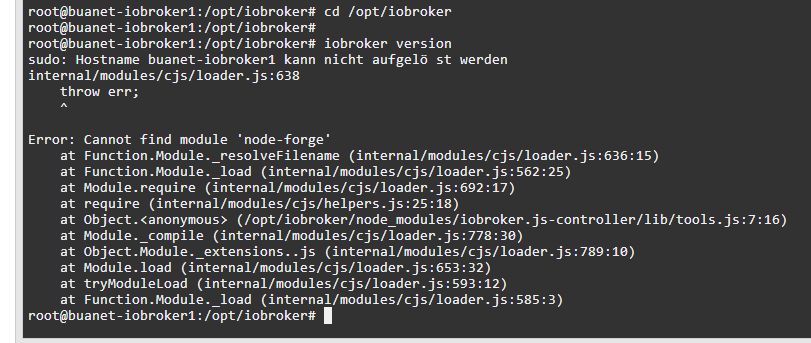
                      @Glasfaser sagte in Update nicht möglich / Error: Cannot find module:

                      cd /opt/iobroker

                      a5f680b6-022c-4617-925b-026b0178c184-image.png

                      GlasfaserG 1 Antwort Letzte Antwort
                      0
                      • T thorkillar

                        @Glasfaser sagte in Update nicht möglich / Error: Cannot find module:

                        cd /opt/iobroker

                        a5f680b6-022c-4617-925b-026b0178c184-image.png

                        GlasfaserG Offline
                        GlasfaserG Offline
                        Glasfaser
                        schrieb am zuletzt editiert von
                        #17

                        @thorkillar

                        Da ist ja ganz schön etwas vermurkst !

                        node-forge , habe ich noch nie gehört , ich suche mal !

                        Synology 918+ 16GB - ioBroker in Docker v9 , VISO auf Trekstor Primebook C13 13,3" , Hikvision Domkameras mit Surveillance Station .. CCU RaspberryMatic in Synology VM .. Zigbee CC2538+CC2592 .. Sonoff .. KNX .. Modbus ..

                        T 1 Antwort Letzte Antwort
                        0
                        • GlasfaserG Glasfaser

                          @thorkillar

                          Da ist ja ganz schön etwas vermurkst !

                          node-forge , habe ich noch nie gehört , ich suche mal !

                          T Offline
                          T Offline
                          thorkillar
                          schrieb am zuletzt editiert von
                          #18

                          @Glasfaser danke für deine Hilfe. ich warte.

                          GlasfaserG 1 Antwort Letzte Antwort
                          0
                          • T thorkillar

                            @Glasfaser danke für deine Hilfe. ich warte.

                            GlasfaserG Offline
                            GlasfaserG Offline
                            Glasfaser
                            schrieb am zuletzt editiert von
                            #19

                            @thorkillar

                            Hast du den Adapter NODE-RED ?

                            Synology 918+ 16GB - ioBroker in Docker v9 , VISO auf Trekstor Primebook C13 13,3" , Hikvision Domkameras mit Surveillance Station .. CCU RaspberryMatic in Synology VM .. Zigbee CC2538+CC2592 .. Sonoff .. KNX .. Modbus ..

                            T 1 Antwort Letzte Antwort
                            0
                            • GlasfaserG Glasfaser

                              @thorkillar

                              Hast du den Adapter NODE-RED ?

                              T Offline
                              T Offline
                              thorkillar
                              schrieb am zuletzt editiert von
                              #20

                              Ich bin mir nicht sicher. Ich glaube, ich hatte es zu testzwecken mal installiert und danach deinstalliert.

                              GlasfaserG 1 Antwort Letzte Antwort
                              0
                              • T thorkillar

                                Ich bin mir nicht sicher. Ich glaube, ich hatte es zu testzwecken mal installiert und danach deinstalliert.

                                GlasfaserG Offline
                                GlasfaserG Offline
                                Glasfaser
                                schrieb am zuletzt editiert von Glasfaser
                                #21

                                @thorkillar

                                versuche erstmal ohne sudo

                                cd /opt/iobroker
                                npm install node-forge
                                

                                Synology 918+ 16GB - ioBroker in Docker v9 , VISO auf Trekstor Primebook C13 13,3" , Hikvision Domkameras mit Surveillance Station .. CCU RaspberryMatic in Synology VM .. Zigbee CC2538+CC2592 .. Sonoff .. KNX .. Modbus ..

                                T 1 Antwort Letzte Antwort
                                0
                                • GlasfaserG Glasfaser

                                  @thorkillar

                                  versuche erstmal ohne sudo

                                  cd /opt/iobroker
                                  npm install node-forge
                                  
                                  T Offline
                                  T Offline
                                  thorkillar
                                  schrieb am zuletzt editiert von
                                  #22

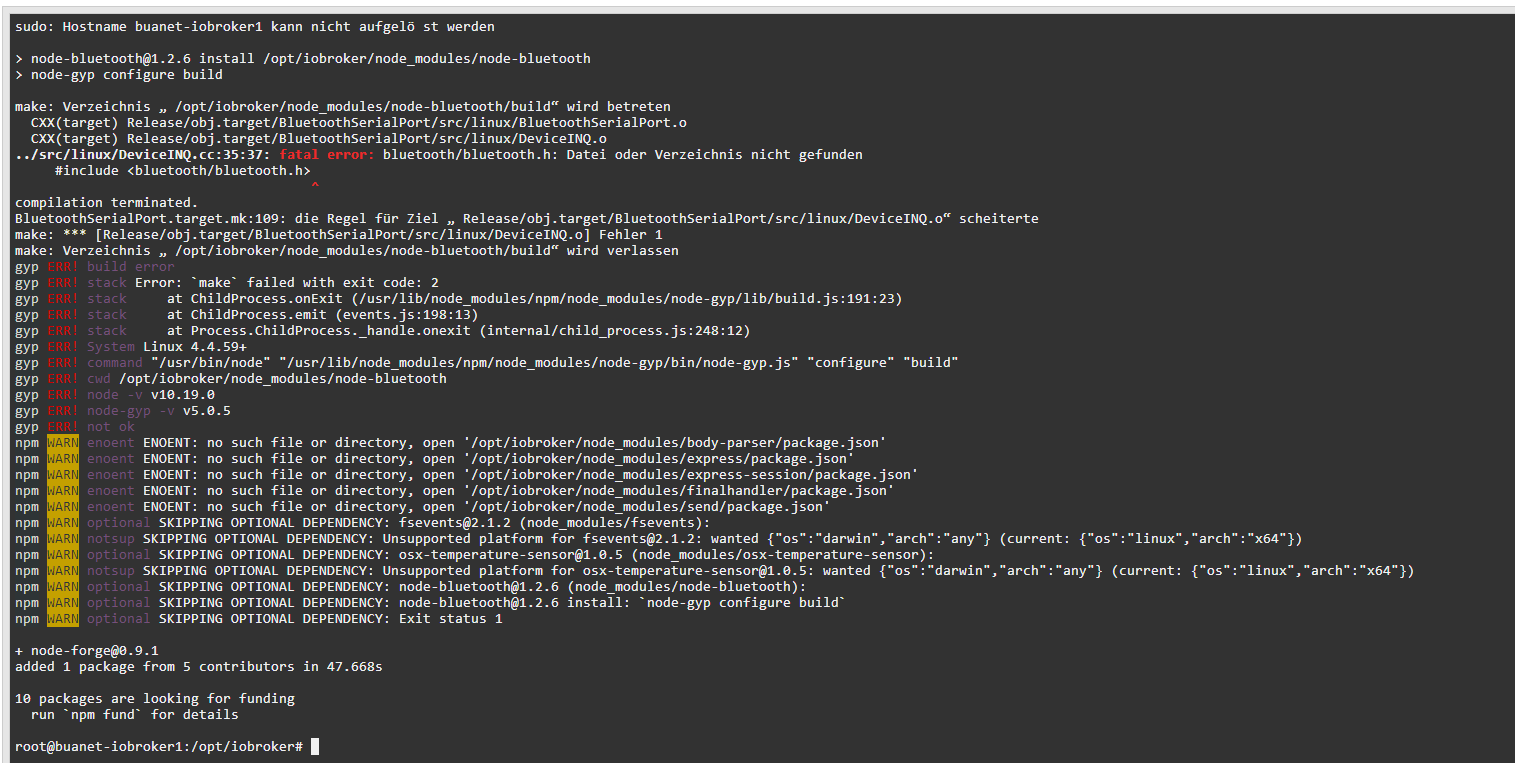
                                  @Glasfaser sagte in Update nicht möglich / Error: Cannot find module:

                                  cd /opt/iobroker
                                  npm install node-forge
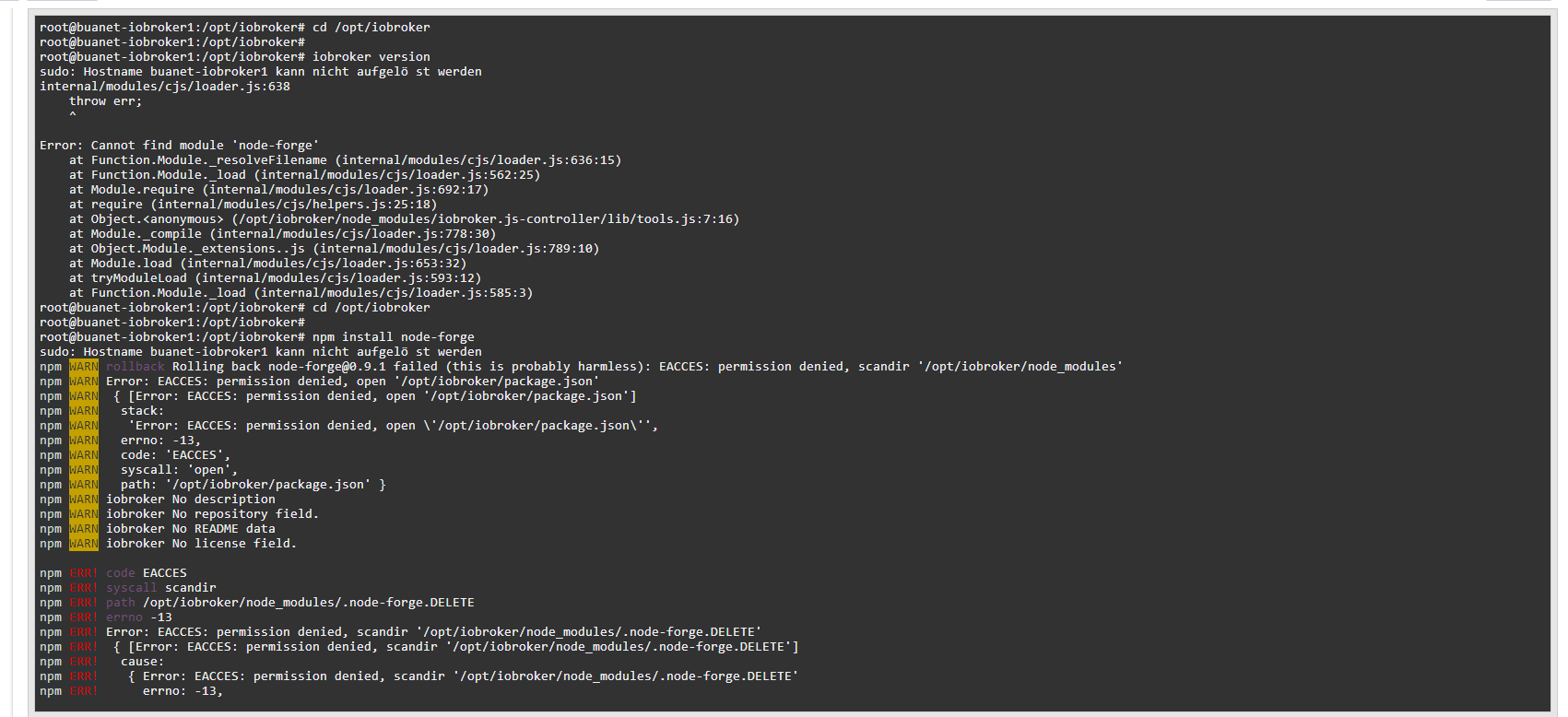
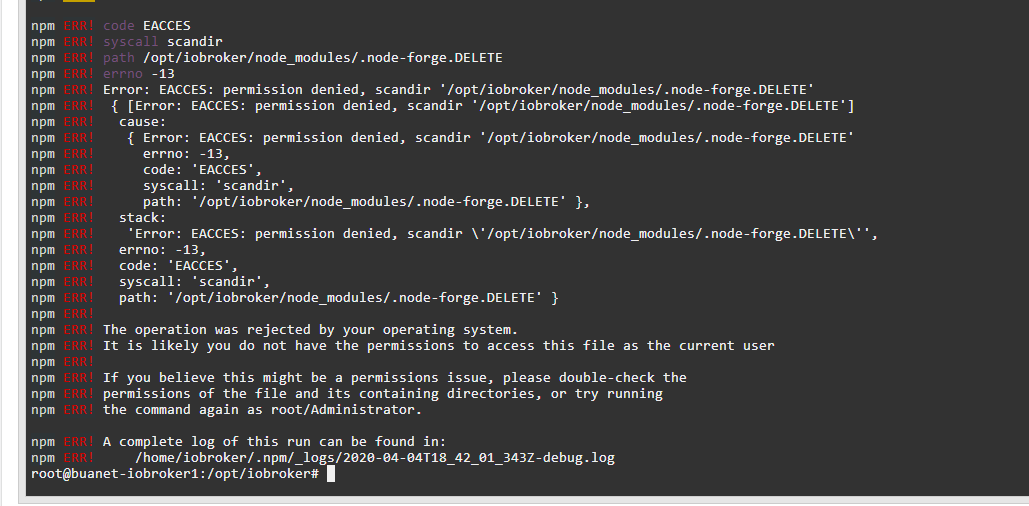
                                  335eb0d5-7680-48aa-8b71-694d64e2ed84-image.png
                                  08c3ed77-24a7-44db-b9ef-0c014a8e8cf2-image.png

                                  GlasfaserG 1 Antwort Letzte Antwort
                                  0
                                  • T thorkillar

                                    @Glasfaser sagte in Update nicht möglich / Error: Cannot find module:

                                    cd /opt/iobroker
                                    npm install node-forge

                                    335eb0d5-7680-48aa-8b71-694d64e2ed84-image.png
                                    08c3ed77-24a7-44db-b9ef-0c014a8e8cf2-image.png

                                    GlasfaserG Offline
                                    GlasfaserG Offline
                                    Glasfaser
                                    schrieb am zuletzt editiert von
                                    #23

                                    @thorkillar

                                    dann mit sudo davor

                                    Synology 918+ 16GB - ioBroker in Docker v9 , VISO auf Trekstor Primebook C13 13,3" , Hikvision Domkameras mit Surveillance Station .. CCU RaspberryMatic in Synology VM .. Zigbee CC2538+CC2592 .. Sonoff .. KNX .. Modbus ..

                                    T 1 Antwort Letzte Antwort
                                    0
                                    • GlasfaserG Glasfaser

                                      @thorkillar

                                      dann mit sudo davor

                                      T Offline
                                      T Offline
                                      thorkillar
                                      schrieb am zuletzt editiert von
                                      #24

                                      @Glasfaser 4a87c8d0-4432-4d4d-95a8-201ecd00844c-image.png

                                      GlasfaserG 1 Antwort Letzte Antwort
                                      0
                                      • T thorkillar

                                        @Glasfaser 4a87c8d0-4432-4d4d-95a8-201ecd00844c-image.png

                                        GlasfaserG Offline
                                        GlasfaserG Offline
                                        Glasfaser
                                        schrieb am zuletzt editiert von
                                        #25

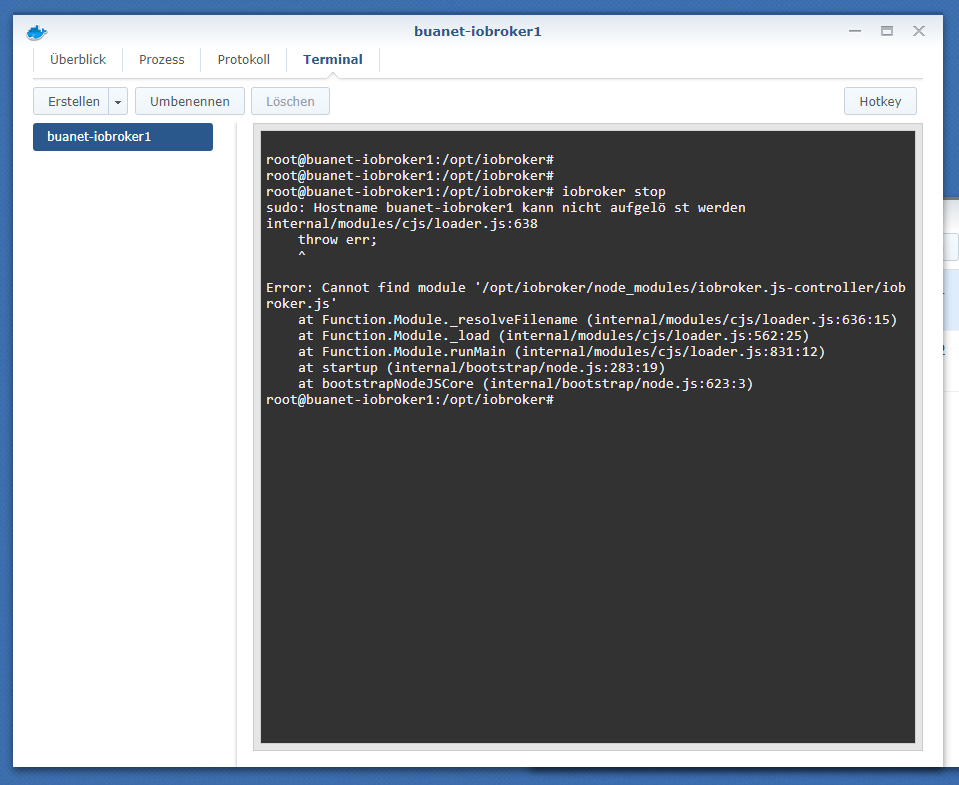
                                        @thorkillar

                                        cd /opt/iobroker
                                        
                                        iobroker version
                                        

                                        Synology 918+ 16GB - ioBroker in Docker v9 , VISO auf Trekstor Primebook C13 13,3" , Hikvision Domkameras mit Surveillance Station .. CCU RaspberryMatic in Synology VM .. Zigbee CC2538+CC2592 .. Sonoff .. KNX .. Modbus ..

                                        1 Antwort Letzte Antwort
                                        0
                                        • T Offline
                                          T Offline
                                          thorkillar
                                          schrieb am zuletzt editiert von
                                          #26

                                          @Glasfaser sagte in Update nicht möglich / Error: Cannot find module:

                                          cd /opt/iobroker

                                          iobroker version
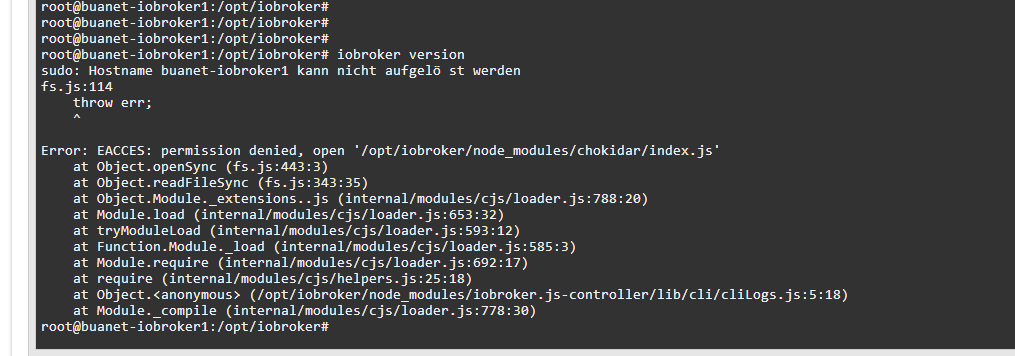
                                          8ca1bfcb-fb18-4501-b2d6-3edfc99bdf66-image.png

                                          GlasfaserG 1 Antwort Letzte Antwort
                                          0
                                          Antworten
                                          • In einem neuen Thema antworten
                                          Anmelden zum Antworten
                                          • Älteste zuerst
                                          • Neuste zuerst
                                          • Meiste Stimmen


                                          Support us

                                          ioBroker
                                          Community Adapters
                                          Donate
                                          FAQ Cloud / IOT
                                          HowTo: Node.js-Update
                                          HowTo: Backup/Restore
                                          Downloads
                                          BLOG

                                          729

                                          Online

                                          32.5k

                                          Benutzer

                                          81.7k

                                          Themen

                                          1.3m

                                          Beiträge
                                          Community
                                          Impressum | Datenschutz-Bestimmungen | Nutzungsbedingungen | Einwilligungseinstellungen
                                          ioBroker Community 2014-2025
                                          logo
                                          • Anmelden

                                          • Du hast noch kein Konto? Registrieren

                                          • Anmelden oder registrieren, um zu suchen
                                          • Erster Beitrag
                                            Letzter Beitrag
                                          0
                                          • Home
                                          • Aktuell
                                          • Tags
                                          • Ungelesen 0
                                          • Kategorien
                                          • Unreplied
                                          • Beliebt
                                          • GitHub
                                          • Docu
                                          • Hilfe