




Iobroker Oberfläche öffnet nicht
-
pi@raspberrypi:~ $ cd /opt/iobroker pi@raspberrypi:/opt/iobroker $ iobroker list instances internal/modules/cjs/loader.js:638 throw err; ^ Error: Cannot find module '/opt/iobroker/node_modules/iobroker.js-controller/iob roker.js' at Function.Module._resolveFilename (internal/modules/cjs/loader.js:636:15) at Function.Module._load (internal/modules/cjs/loader.js:562:25) at Function.Module.runMain (internal/modules/cjs/loader.js:831:12) at startup (internal/bootstrap/node.js:283:19) at bootstrapNodeJSCore (internal/bootstrap/node.js:623:3) pi@raspberrypi:/opt/iobroker $ node -v v10.17.0 pi@raspberrypi:/opt/iobroker $ nodejs -v v10.17.0 pi@raspberrypi:/opt/iobroker $ npm -v 6.11.3 pi@raspberrypi:/opt/iobroker $ -
pi@raspberrypi:~ $ cd /opt/iobroker pi@raspberrypi:/opt/iobroker $ iobroker start Starting iobroker controller daemon... iobroker controller daemon failed to start: Failed to write pidfile (EACCES) Error: Failed to write pidfile (EACCES) pi@raspberrypi:/opt/iobroker $ node node_modules/iobroker.js-controller/controll er.js --logs 2019-11-22 14:18:17.200 - info: host.raspberrypi iobroker.js-controller version 1.5.14 js-controller starting 2019-11-22 14:18:17.207 - info: host.raspberrypi Copyright (c) 2014-2018 bluefo x, 2014 hobbyquaker 2019-11-22 14:18:17.208 - info: host.raspberrypi hostname: raspberrypi, node: v 10.17.0 2019-11-22 14:18:17.212 - info: host.raspberrypi ip addresses: 192.168.178.87 2 a02:810c:ccc0:45a0:6733:40f8:70dd:257f fe80::3b7f:ed1c:96e6:b13b 2019-11-22 14:18:17.359 - info: host.raspberrypi inMem-states listening on por t 9000 2019-11-22 14:18:18.061 - info: host.raspberrypi inMem-objects listening on po rt 9001 2019-11-22 14:18:18.100 - info: host.raspberrypi InMemoryDB connected 2019-11-22 14:18:18.144 - info: host.raspberrypi 19 instances found host.raspberrypi check instance "system.adapter.admin.0" for host "raspberrypi" host.raspberrypi check instance "system.adapter.discovery.0" for host "raspberrypi" host.raspberrypi check instance "system.adapter.cloud.0" for host "raspberrypi" host.raspberrypi check instance "system.adapter.web.0" for host "raspberrypi" host.raspberrypi check instance "system.adapter.rpi2.0" for host "raspberrypi" host.raspberrypi check instance "system.adapter.vis.0" for host "raspberrypi" host.raspberrypi check instance "system.adapter.terminal.0" for host "raspberrypi" host.raspberrypi check instance "system.adapter.alexa2.0" for host "raspberrypi" host.raspberrypi check instance "system.adapter.vis-players.0" for host "raspberrypi" host.raspberrypi check instance "system.adapter.scenes.0" for host "raspberrypi" host.raspberrypi check instance "system.adapter.mihome.0" for host "raspberrypi" host.raspberrypi check instance "system.adapter.javascript.0" for host "raspberrypi" host.raspberrypi check instance "system.adapter.telegram.0" for host "raspberrypi" host.raspberrypi check instance "system.adapter.text2command.0" for host "raspberrypi" host.raspberrypi check instance "system.adapter.shelly.0" for host "raspberrypi" host.raspberrypi check instance "system.adapter.pushover.0" for host "raspberrypi" host.raspberrypi check instance "system.adapter.info.0" for host "raspberrypi" host.raspberrypi check instance "system.adapter.shelly.1" for host "raspberrypi" host.raspberrypi check instance "system.adapter.backitup.0" for host "raspberrypi" 2019-11-22 14:18:18.190 - info: host.raspberrypi starting 14 instances 2019-11-22 14:18:18.304 - info: host.raspberrypi instance system.adapter.admin.0 started with pid 18290 2019-11-22 14:18:19.309 - error: uncaught exception: EACCES: permission denied, open '/opt/iobroker/node_modules/iobroker.js-controller/pids.txt' 2019-11-22 14:18:19.313 - error: Error: EACCES: permission denied, open '/opt/iobroker/node_modules/iobroker.js-controller/pids.txt' at Object.openSync (fs.js:443:3) at Object.writeFileSync (fs.js:1194:35) at Timeout._onTimeout (/opt/iobroker/node_modules/iobroker.js-controller/controller.js:2024:16) at ontimeout (timers.js:436:11) at tryOnTimeout (timers.js:300:5) at listOnTimeout (timers.js:263:5) at Timer.processTimers (timers.js:223:10) 2019-11-22 14:18:19.319 - info: iobroker _restart 2019-11-22 14:18:20.059 - info: iobroker Starting node restart.js 2019-11-22 14:18:20.087 - info: iobroker exit 0 2019-11-22 14:18:29.331 - info: host.raspberrypi force terminating 2019-11-22 14:18:29.332 - info: Adapter admin still running 2019-11-22 14:18:30.234 - info: host.raspberrypi instance system.adapter.alexa2.0 started with pid 18323 pi@raspberrypi:/opt/iobroker $ -
Hallo Liebe Leute,
folgender Fehler:
Wollte heute morgen den Iobroker öffnen und erhielt nur einen Seite Ladefehler. Wollte dann rebooten und es kam folgendes:
pi@raspberrypi:/opt/iobroker $ iobroker reboot internal/modules/cjs/loader.js:638 throw err; ^ Error: Cannot find module '/opt/iobroker/node_modules/iobroker.js-controller/iobroker.js' at Function.Module._resolveFilename (internal/modules/cjs/loader.js:636:15) at Function.Module._load (internal/modules/cjs/loader.js:562:25) at Function.Module.runMain (internal/modules/cjs/loader.js:831:12) at startup (internal/bootstrap/node.js:283:19) at bootstrapNodeJSCore (internal/bootstrap/node.js:623:3) -
pi@raspberrypi:~ $ cd /opt/iobroker pi@raspberrypi:/opt/iobroker $ iobroker start Starting iobroker controller daemon... iobroker controller daemon failed to start: Failed to write pidfile (EACCES) Error: Failed to write pidfile (EACCES) pi@raspberrypi:/opt/iobroker $ node node_modules/iobroker.js-controller/controll er.js --logs 2019-11-22 14:18:17.200 - info: host.raspberrypi iobroker.js-controller version 1.5.14 js-controller starting 2019-11-22 14:18:17.207 - info: host.raspberrypi Copyright (c) 2014-2018 bluefo x, 2014 hobbyquaker 2019-11-22 14:18:17.208 - info: host.raspberrypi hostname: raspberrypi, node: v 10.17.0 2019-11-22 14:18:17.212 - info: host.raspberrypi ip addresses: 192.168.178.87 2 a02:810c:ccc0:45a0:6733:40f8:70dd:257f fe80::3b7f:ed1c:96e6:b13b 2019-11-22 14:18:17.359 - info: host.raspberrypi inMem-states listening on por t 9000 2019-11-22 14:18:18.061 - info: host.raspberrypi inMem-objects listening on po rt 9001 2019-11-22 14:18:18.100 - info: host.raspberrypi InMemoryDB connected 2019-11-22 14:18:18.144 - info: host.raspberrypi 19 instances found host.raspberrypi check instance "system.adapter.admin.0" for host "raspberrypi" host.raspberrypi check instance "system.adapter.discovery.0" for host "raspberrypi" host.raspberrypi check instance "system.adapter.cloud.0" for host "raspberrypi" host.raspberrypi check instance "system.adapter.web.0" for host "raspberrypi" host.raspberrypi check instance "system.adapter.rpi2.0" for host "raspberrypi" host.raspberrypi check instance "system.adapter.vis.0" for host "raspberrypi" host.raspberrypi check instance "system.adapter.terminal.0" for host "raspberrypi" host.raspberrypi check instance "system.adapter.alexa2.0" for host "raspberrypi" host.raspberrypi check instance "system.adapter.vis-players.0" for host "raspberrypi" host.raspberrypi check instance "system.adapter.scenes.0" for host "raspberrypi" host.raspberrypi check instance "system.adapter.mihome.0" for host "raspberrypi" host.raspberrypi check instance "system.adapter.javascript.0" for host "raspberrypi" host.raspberrypi check instance "system.adapter.telegram.0" for host "raspberrypi" host.raspberrypi check instance "system.adapter.text2command.0" for host "raspberrypi" host.raspberrypi check instance "system.adapter.shelly.0" for host "raspberrypi" host.raspberrypi check instance "system.adapter.pushover.0" for host "raspberrypi" host.raspberrypi check instance "system.adapter.info.0" for host "raspberrypi" host.raspberrypi check instance "system.adapter.shelly.1" for host "raspberrypi" host.raspberrypi check instance "system.adapter.backitup.0" for host "raspberrypi" 2019-11-22 14:18:18.190 - info: host.raspberrypi starting 14 instances 2019-11-22 14:18:18.304 - info: host.raspberrypi instance system.adapter.admin.0 started with pid 18290 2019-11-22 14:18:19.309 - error: uncaught exception: EACCES: permission denied, open '/opt/iobroker/node_modules/iobroker.js-controller/pids.txt' 2019-11-22 14:18:19.313 - error: Error: EACCES: permission denied, open '/opt/iobroker/node_modules/iobroker.js-controller/pids.txt' at Object.openSync (fs.js:443:3) at Object.writeFileSync (fs.js:1194:35) at Timeout._onTimeout (/opt/iobroker/node_modules/iobroker.js-controller/controller.js:2024:16) at ontimeout (timers.js:436:11) at tryOnTimeout (timers.js:300:5) at listOnTimeout (timers.js:263:5) at Timer.processTimers (timers.js:223:10) 2019-11-22 14:18:19.319 - info: iobroker _restart 2019-11-22 14:18:20.059 - info: iobroker Starting node restart.js 2019-11-22 14:18:20.087 - info: iobroker exit 0 2019-11-22 14:18:29.331 - info: host.raspberrypi force terminating 2019-11-22 14:18:29.332 - info: Adapter admin still running 2019-11-22 14:18:30.234 - info: host.raspberrypi instance system.adapter.alexa2.0 started with pid 18323 pi@raspberrypi:/opt/iobroker $iobroker list instances system.adapter.admin.0 : admin - enabled, port: 8081, bind: 0.0.0.0, run as: admin system.adapter.alexa2.0 : alexa2 - enabled system.adapter.backitup.0 : backitup - enabled system.adapter.cloud.0 : cloud - enabled system.adapter.discovery.0 : discovery - disabled system.adapter.info.0 : info - enabled system.adapter.javascript.0 : javascript - enabled system.adapter.mihome.0 : mihome - enabled, port: 9898, bind: 0.0.0.0 system.adapter.pushover.0 : pushover - enabled system.adapter.rpi2.0 : rpi2 - disabled system.adapter.scenes.0 : scenes - disabled system.adapter.shelly.0 : shelly - enabled, port: 1882, bind: 0.0.0.0 system.adapter.shelly.1 : shelly - enabled, port: 1882, bind: 0.0.0.0 system.adapter.telegram.0 : telegram - enabled, port: 8443, bind: 0.0.0.0 system.adapter.terminal.0 : terminal - enabled, port: 8088, bind: 0.0.0.0, run as: admin system.adapter.text2command.0 : text2command - enabled system.adapter.vis-players.0 : vis-players - enabled system.adapter.vis.0 : vis - disabled system.adapter.web.0 : web - disabled, port: 8082, bind: 0.0.0.0, run as: admin -
iobroker list instances system.adapter.admin.0 : admin - enabled, port: 8081, bind: 0.0.0.0, run as: admin system.adapter.alexa2.0 : alexa2 - enabled system.adapter.backitup.0 : backitup - enabled system.adapter.cloud.0 : cloud - enabled system.adapter.discovery.0 : discovery - disabled system.adapter.info.0 : info - enabled system.adapter.javascript.0 : javascript - enabled system.adapter.mihome.0 : mihome - enabled, port: 9898, bind: 0.0.0.0 system.adapter.pushover.0 : pushover - enabled system.adapter.rpi2.0 : rpi2 - disabled system.adapter.scenes.0 : scenes - disabled system.adapter.shelly.0 : shelly - enabled, port: 1882, bind: 0.0.0.0 system.adapter.shelly.1 : shelly - enabled, port: 1882, bind: 0.0.0.0 system.adapter.telegram.0 : telegram - enabled, port: 8443, bind: 0.0.0.0 system.adapter.terminal.0 : terminal - enabled, port: 8088, bind: 0.0.0.0, run as: admin system.adapter.text2command.0 : text2command - enabled system.adapter.vis-players.0 : vis-players - enabled system.adapter.vis.0 : vis - disabled system.adapter.web.0 : web - disabled, port: 8082, bind: 0.0.0.0, run as: admin@Rocket85
hast Du mal den Fixer laufen lassen ?
Das hier sieht nach einem Rechte Problem aus...EACCES: permission denieFixer
curl -sL https://iobroker.net/fix.sh | bash - -
@dslraser sagte in Iobroker Oberfläche öffnet nicht:
curl -sL https://iobroker.net/fix.sh | bash -
moment läuft
-
@Rocket85
hast Du mal den Fixer laufen lassen ?
Das hier sieht nach einem Rechte Problem aus...EACCES: permission denieFixer
curl -sL https://iobroker.net/fix.sh | bash - -
geht wieder.
Ich danke dir vielmals bzw. euch allen.
jetzt will er ein update des admin. kann man das ohne probleme machen?
@Rocket85 sagte in Iobroker Oberfläche öffnet nicht:
geht wieder.
Ich danke dir vielmals bzw. euch allen.
jetzt will er ein update des admin. kann man das ohne probleme machen?
Ich denke schon. Immer wenn Du nicht sicher bist was Du machst, vorher Backup machen.
-
Jetzt versteh ich nix mehr. Es läuft wieder alles.
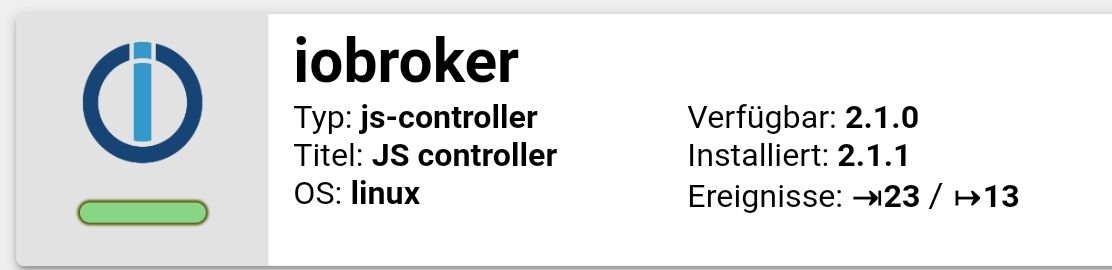
Allerdings hatte ich den js-controller vor Tagen schon auf die neuste verseion upgedatet. Und jetzt steht er wieder verfügbar auf 2.1.0 und installiert 1.5.14??
@Rocket85 sagte in Iobroker Oberfläche öffnet nicht:
Jetzt versteh ich nix mehr. Es läuft wieder alles.
Allerdings hatte ich den js-controller vor Tagen schon auf die neuste verseion upgedatet. Und jetzt steht er wieder verfügbar auf 2.1.0 und installiert 1.5.14??
wahrscheinlich hattest Du den Verwahrungsort auf default und hast dann nach der verlinkten Anleitung alles wieder hergestellt ?
PS:
Es gibt heute Abend dann 2.1.1 in latest. -
@Rocket85 sagte in Iobroker Oberfläche öffnet nicht:
Na dann warte ich bis morgen :-)
Ich habe 2.1.1 schon installiert und es läuft bisher alles ohne Auffälligkeiten.



Hey! Du scheinst an dieser Unterhaltung interessiert zu sein, hast aber noch kein Konto.
Hast du es satt, bei jedem Besuch durch die gleichen Beiträge zu scrollen? Wenn du dich für ein Konto anmeldest, kommst du immer genau dorthin zurück, wo du zuvor warst, und kannst dich über neue Antworten benachrichtigen lassen (entweder per E-Mail oder Push-Benachrichtigung). Du kannst auch Lesezeichen speichern und Beiträge positiv bewerten, um anderen Community-Mitgliedern deine Wertschätzung zu zeigen.
Mit deinem Input könnte dieser Beitrag noch besser werden 💗
Registrieren AnmeldenSupport us
297
Online33.0k
Benutzer83.6k
Themen1.3m
Beiträge