
NEWS




Wir helfen Altersrentner
-
Cannot find io-package.json in null
Cannot parse null/io-package.json:Error: ENOENT: no such file or directory, open 'null/io-package.json'
Cannot find io-package.json in null
Cannot parse null/io-package.json:Error: ENOENT: no such file or directory, open 'null/io-package.json'
Cannot find io-package.json in null
Cannot parse null/io-package.json:Error: ENOENT: no such file or directory, open 'null/io-package.json'
got /opt/iobroker/node_modules/iobroker.backitup/admin
upload [3] backitup.admin /opt/iobroker/node_modules/iobroker.backitup/admin/words.js words.js application/javascript
upload [2] backitup.admin /opt/iobroker/node_modules/iobroker.backitup/admin/index_m.html index_m.html text/html
upload [1] backitup.admin /opt/iobroker/node_modules/iobroker.backitup/admin/index.html index.html text/html
upload [0] backitup.admin /opt/iobroker/node_modules/iobroker.backitup/admin/backitup.png backitup.png image/png
Cannot find io-package.json in null
Cannot parse null/io-package.json:Error: ENOENT: no such file or directory, open 'null/io-package.json'
Cannot find io-package.json in null
Cannot parse null/io-package.json:Error: ENOENT: no such file or directory, open 'null/io-package.json'
Cannot find io-package.json in null
Cannot parse null/io-package.json:Error: ENOENT: no such file or directory, open 'null/io-package.json'
Cannot find io-package.json in null
Cannot parse null/io-package.json:Error: ENOENT: no such file or directory, open 'null/io-package.json'
Cannot find io-package.json in null
Cannot parse null/io-package.json:Error: ENOENT: no such file or directory, open 'null/io-package.json'
Cannot find io-package.json in null
Cannot parse null/io-package.json:Error: ENOENT: no such file or directory, open 'null/io-package.json'
Cannot find io-package.json in null
Cannot parse null/io-package.json:Error: ENOENT: no such file or directory, open 'null/io-package.json'
Cannot find io-package.json in null
Cannot parse null/io-package.json:Error: ENOENT: no such file or directory, open 'null/io-package.json'
Cannot find io-package.json in null
Cannot parse null/io-package.json:Error: ENOENT: no such file or directory, open 'null/io-package.json'
Cannot find io-package.json in null
Cannot parse null/io-package.json:Error: ENOENT: no such file or directory, open 'null/io-package.json'
Cannot find io-package.json in null
Cannot parse null/io-package.json:Error: ENOENT: no such file or directory, open 'null/io-package.json'
Cannot find io-package.json in null
Cannot parse null/io-package.json:Error: ENOENT: no such file or directory, open 'null/io-package.json'
Cannot find io-package.json in null
Cannot parse null/io-package.json:Error: ENOENT: no such file or directory, open 'null/io-package.json'
Cannot find io-package.json in null
Cannot parse null/io-package.json:Error: ENOENT: no such file or directory, open 'null/io-package.json'
Cannot find io-package.json in null
Cannot parse null/io-package.json:Error: ENOENT: no such file or directory, open 'null/io-package.json'
Cannot find io-package.json in null
Cannot parse null/io-package.json:Error: ENOENT: no such file or directory, open 'null/io-package.json'
Cannot find io-package.json in null
Cannot parse null/io-package.json:Error: ENOENT: no such file or directory, open 'null/io-package.json'
Cannot find io-package.json in null
Cannot parse null/io-package.json:Error: ENOENT: no such file or directory, open 'null/io-package.json'
Cannot find io-package.json in null
Cannot parse null/io-package.json:Error: ENOENT: no such file or directory, open 'null/io-package.json'
Cannot find io-package.json in null
Cannot parse null/io-package.json:Error: ENOENT: no such file or directory, open 'null/io-package.json'
Cannot find io-package.json in null
Cannot parse null/io-package.json:Error: ENOENT: no such file or directory, open 'null/io-package.json'
Cannot find io-package.json in null
Cannot parse null/io-package.json:Error: ENOENT: no such file or directory, open 'null/io-package.json'
Cannot find io-package.json in null
Cannot parse null/io-package.json:Error: ENOENT: no such file or directory, open 'null/io-package.json'
Cannot find io-package.json in null
Cannot parse null/io-package.json:Error: ENOENT: no such file or directory, open 'null/io-package.json'
Cannot find io-package.json in null
Cannot parse null/io-package.json:Error: ENOENT: no such file or directory, open 'null/io-package.json'
Cannot find io-package.json in null
Cannot parse null/io-package.json:Error: ENOENT: no such file or directory, open 'null/io-package.json'
Cannot find io-package.json in null
Cannot parse null/io-package.json:Error: ENOENT: no such file or directory, open 'null/io-package.json'
Cannot find io-package.json in null
Cannot parse null/io-package.json:Error: ENOENT: no such file or directory, open 'null/io-package.json'
Cannot find io-package.json in null
Cannot parse null/io-package.json:Error: ENOENT: no such file or directory, open 'null/io-package.json'
Cannot find io-package.json in null
Cannot parse null/io-package.json:Error: ENOENT: no such file or directory, open 'null/io-package.json'
Cannot find io-package.json in null
Cannot parse null/io-package.json:Error: ENOENT: no such file or directory, open 'null/io-package.json'
Cannot find io-package.json in null
Cannot parse null/io-package.json:Error: ENOENT: no such file or directory, open 'null/io-package.json'
Cannot find io-package.json in null
Cannot parse null/io-package.json:Error: ENOENT: no such file or directory, open 'null/io-package.json'
Cannot find io-package.json in null
Cannot parse null/io-package.json:Error: ENOENT: no such file or directory, open 'null/io-package.json'
Cannot find io-package.json in null
Cannot parse null/io-package.json:Error: ENOENT: no such file or directory, open 'null/io-package.json'
Cannot find io-package.json in null
Cannot parse null/io-package.json:Error: ENOENT: no such file or directory, open 'null/io-package.json'
Cannot find io-package.json in null
Cannot parse null/io-package.json:Error: ENOENT: no such file or directory, open 'null/io-package.json'
Cannot find io-package.json in null
Cannot parse null/io-package.json:Error: ENOENT: no such file or directory, open 'null/io-package.json'
Cannot find io-package.json in null
Cannot parse null/io-package.json:Error: ENOENT: no such file or directory, open 'null/io-package.json'
Cannot find io-package.json in null
Cannot parse null/io-package.json:Error: ENOENT: no such file or directory, open 'null/io-package.json'
Cannot find io-package.json in null
Cannot parse null/io-package.json:Error: ENOENT: no such file or directory, open 'null/io-package.json'
Cannot find io-package.json in null
Cannot parse null/io-package.json:Error: ENOENT: no such file or directory, open 'null/io-package.json'
got /opt/iobroker/node_modules/iobroker.discovery/admin
upload [5] discovery.admin /opt/iobroker/node_modules/iobroker.discovery/admin/words.js words.js application/javascript
upload [4] discovery.admin /opt/iobroker/node_modules/iobroker.discovery/admin/settings_m.html settings_m.html text/html
upload [3] discovery.admin /opt/iobroker/node_modules/iobroker.discovery/admin/settings.html settings.html text/html
upload [2] discovery.admin /opt/iobroker/node_modules/iobroker.discovery/admin/index_m.html index_m.html text/html
upload [1] discovery.admin /opt/iobroker/node_modules/iobroker.discovery/admin/index.html index.html text/html
upload [0] discovery.admin /opt/iobroker/node_modules/iobroker.discovery/admin/discovery.png discovery.png image/png
got /opt/iobroker/node_modules/iobroker.admin/admin
upload [3] admin.admin /opt/iobroker/node_modules/iobroker.admin/admin/words.js words.js application/javascript
upload [2] admin.admin /opt/iobroker/node_modules/iobroker.admin/admin/index_m.html index_m.html text/html
upload [1] admin.admin /opt/iobroker/node_modules/iobroker.admin/admin/index.html index.html text/html
upload [0] admin.admin /opt/iobroker/node_modules/iobroker.admin/admin/admin.png admin.png image/png
pi@raspberrypi:~ $
Ohne Erfolg
@Altersrentner sagte in Zigbee Stick funktioniert nicht mehr:
Cannot find io-package.json in null
Hast du den Befehl im Verzeichnis ausgeführt !?
/opt/iobroker -
ja habe ich.
Mache jetzt die Kiste aus.
Mir platzt der Schädel!!
Gute Nacht
Gruß Michael -
ja habe ich.
Mache jetzt die Kiste aus.
Mir platzt der Schädel!!
Gute Nacht
Gruß MichaelLass dann den Fixer nochmal drüber laufen
-
Guten Morgen
 Your installation was fixed successfully
    Run iobroker start to start ioBroker again!
Das brachte keinen Erfolg.
Habe festgestellt, das keine Adapter mehr vorhanden sind.
Folgenden Beitrag durchgeackert und alles probiert.
ohne Erfolg.pi@raspberrypi:/opt/iobroker $ sudo iobroker stop pi@raspberrypi:/opt/iobroker $ sudo npm cache clean npm ERR! As of npm@5, the npm cache self-heals from corruption issues and data extracted from the cache is guaranteed to be valid. If you want to make sure everything is consistent, use 'npm cache verify' instead. On the other hand, if you're debugging an issue with the installer, you can use `npm install --cache /tmp/empty-cache` to use a temporary cache instead of nuking the actual one. npm ERR! npm ERR! If you're sure you want to delete the entire cache, rerun this command with --force. npm ERR! A complete log of this run can be found in: npm ERR! /root/.npm/_logs/2019-10-19T06_38_26_970Z-debug.log pi@raspberrypi:/opt/iobroker $ sudo iobroker upgrade admin Requested repository "stable" does not exit in config. pi@raspberrypi:/opt/iobroker $ sudo iobroker upgrade flot Requested repository "stable" does not exit in config. pi@raspberrypi:/opt/iobroker $ sudo iobroker startGruß Michael
-
Guten Morgen
 Your installation was fixed successfully
    Run iobroker start to start ioBroker again!
Das brachte keinen Erfolg.
Habe festgestellt, das keine Adapter mehr vorhanden sind.
Folgenden Beitrag durchgeackert und alles probiert.
ohne Erfolg.pi@raspberrypi:/opt/iobroker $ sudo iobroker stop pi@raspberrypi:/opt/iobroker $ sudo npm cache clean npm ERR! As of npm@5, the npm cache self-heals from corruption issues and data extracted from the cache is guaranteed to be valid. If you want to make sure everything is consistent, use 'npm cache verify' instead. On the other hand, if you're debugging an issue with the installer, you can use `npm install --cache /tmp/empty-cache` to use a temporary cache instead of nuking the actual one. npm ERR! npm ERR! If you're sure you want to delete the entire cache, rerun this command with --force. npm ERR! A complete log of this run can be found in: npm ERR! /root/.npm/_logs/2019-10-19T06_38_26_970Z-debug.log pi@raspberrypi:/opt/iobroker $ sudo iobroker upgrade admin Requested repository "stable" does not exit in config. pi@raspberrypi:/opt/iobroker $ sudo iobroker upgrade flot Requested repository "stable" does not exit in config. pi@raspberrypi:/opt/iobroker $ sudo iobroker startGruß Michael
@Altersrentner Übrigens Backups wurden heute Nacht autom. erstellt.
Minimal und Komplett -
@Altersrentner Übrigens Backups wurden heute Nacht autom. erstellt.
Minimal und Komplett@Altersrentner
Wie ist denn der aktuelle Stand? Dein alter PI läuft noch und macht schön Backups, was jetzt auch auf den NAS klappt?
Das Log oben ist vom neuen PI4? -
Moin,
Der alte sowie auch der neue Pi haben beide auf der NAS min und komplett
Backups gemacht.
Auf dem 4er fehlen alle Adapter.

Aktualisieren und die Vorschläge aus Beitrag
https://forum.iobroker.net/topic/9734/gelöst-admin-reiter-bleibt-leer-und-hängt-bei-bearbeite-fest-admin-v2-und-v3/210
brachten keine Veränderung. -
Moin,
Der alte sowie auch der neue Pi haben beide auf der NAS min und komplett
Backups gemacht.
Auf dem 4er fehlen alle Adapter.
Aktualisieren und die Vorschläge aus Beitrag
https://forum.iobroker.net/topic/9734/gelöst-admin-reiter-bleibt-leer-und-hängt-bei-bearbeite-fest-admin-v2-und-v3/210
brachten keine Veränderung.@Altersrentner
Du bist noch auf default und nicht latest? -
@Altersrentner
Du bist noch auf default und nicht latest?@Jan1 Verstehe ich leider nicht??
-
@Jan1 Verstehe ich leider nicht??
@Altersrentner
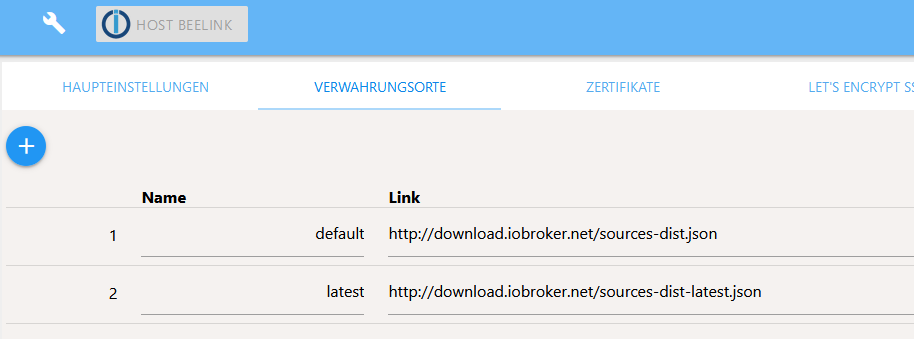
geh mal oben auf den Schraubenschlüssel und schau was unter "aktiver Verwahrungsort" steht. -
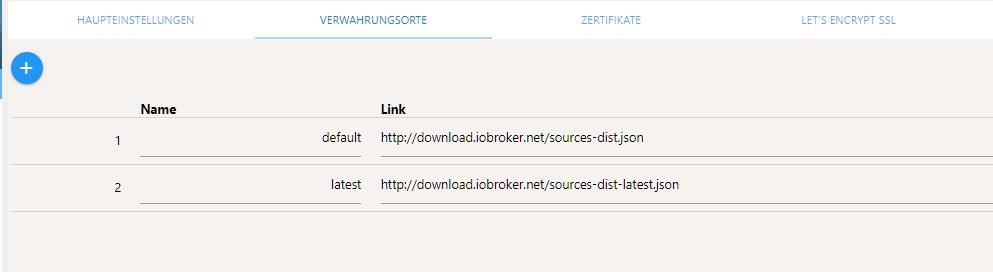
ist das ok? -
ist das ok?@Altersrentner
So jetzt aber mal auch genau lesen was ich schreibe und nicht nur die Hälfte
Ich habe "aktiver Verwarungsort" geschrieben und wo bist Du? schon ein Reiter zu weit. -
Habe unter 1 "stable" eingetragen und die Adapter sind wieder da.
Aber sonst bei den Instanzen keine Veränderung:File index_m.html not found -
Habe unter 1 "stable" eingetragen und die Adapter sind wieder da.
Aber sonst bei den Instanzen keine Veränderung:File index_m.html not found@Altersrentner
Du sollst nicht irgendwo was ändern, sondern erst mal da tun was hier von Dir verlangt wird.
stable sollte da nie eingetragen werden, sondern DU mir einfach mal sagen was bei Dir hier steht:
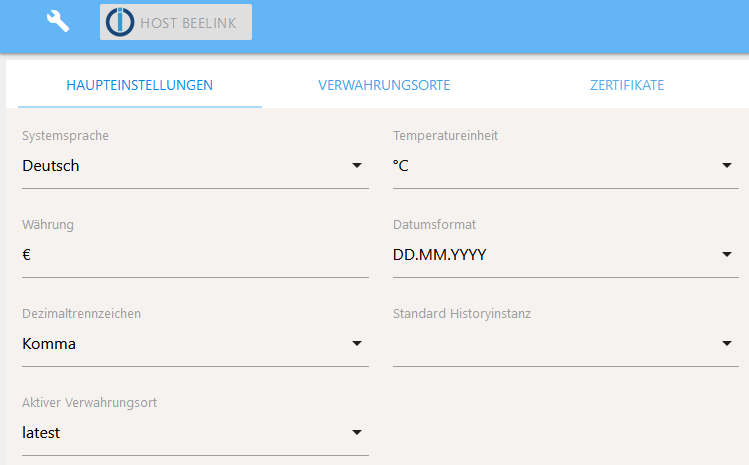
Wenn Du was anderes änderst, ist es sehr schwer zu helfen, da dann Dinge passieren, die eben nicht so geplant sind.
-
Entschuldige, das hatte ich übersehen.
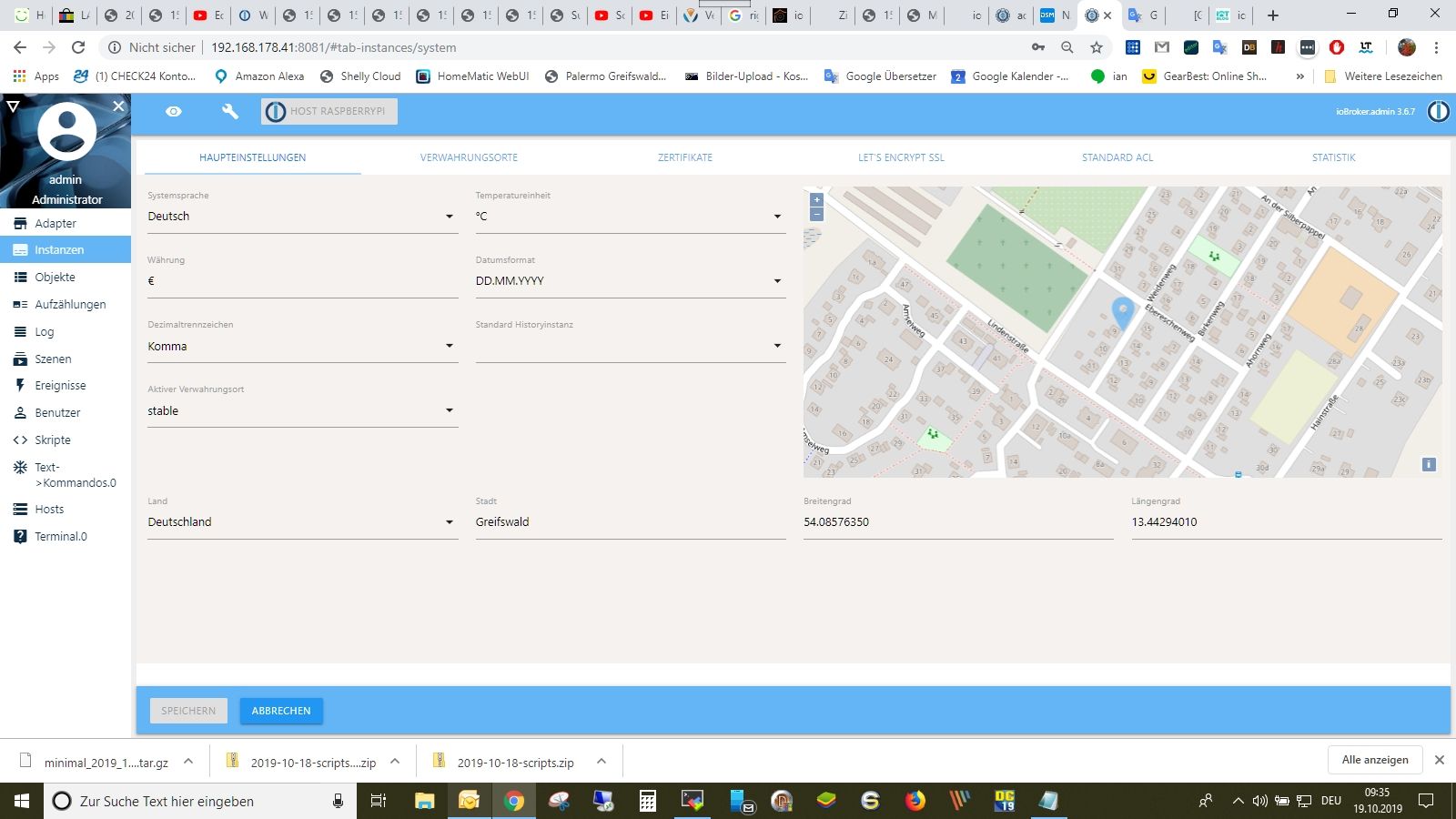
-
Entschuldige, das hatte ich übersehen.
@Altersrentner
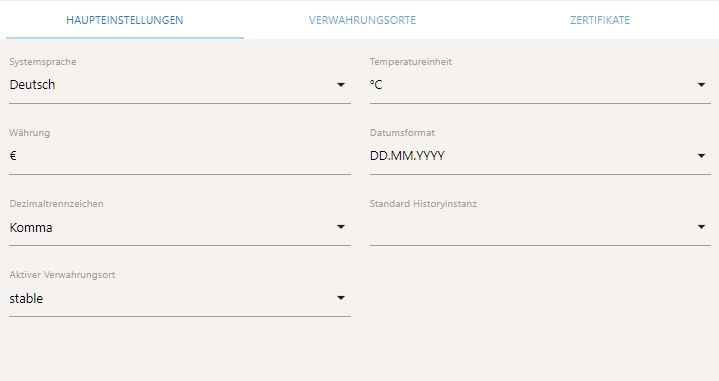
Ist ja lustig, hast da von Hand "stable" eingetragen?
Und mach mal das Bild kleiner, oder willst dass jeder weiß wo Dein Haus wohnt
-
Entschuldige, das hatte ich übersehen.
@Altersrentner said in Zigbee Stick funktioniert nicht mehr:
Entschuldige, das hatte ich übersehen.
-
Entschuldige, das hatte ich übersehen.
@Altersrentner said in Zigbee Stick funktioniert nicht mehr:
Entschuldige, das hatte ich übersehen.
-
wie kann ich das Bild löschen. Nichts von Hand eingetragen.
-
@Altersrentner said in Zigbee Stick funktioniert nicht mehr:
Entschuldige, das hatte ich übersehen.
@Altersrentner
OK mittlerweile sind wir weit weg von dem was ich wollte. Da kommt normal kein "stable" als Auswahl. Oben hast geschrieben, dass Du das irgendwo eingetragen hast, mach das mal wieder schön so wie es vorher war.
Den Beitrag mit dem Bild einfach bearbeiten und das Bild löschen.Ich denke, Du hast hier was von Hand geändert:

Hey! Du scheinst an dieser Unterhaltung interessiert zu sein, hast aber noch kein Konto.
Hast du es satt, bei jedem Besuch durch die gleichen Beiträge zu scrollen? Wenn du dich für ein Konto anmeldest, kommst du immer genau dorthin zurück, wo du zuvor warst, und kannst dich über neue Antworten benachrichtigen lassen (entweder per E-Mail oder Push-Benachrichtigung). Du kannst auch Lesezeichen speichern und Beiträge positiv bewerten, um anderen Community-Mitgliedern deine Wertschätzung zu zeigen.
Mit deinem Input könnte dieser Beitrag noch besser werden 💗
Registrieren Anmelden426
Online33.1k
Benutzende83.7k
Themen1.3m
Beiträge