




Smartmeter optische Schnittstelle
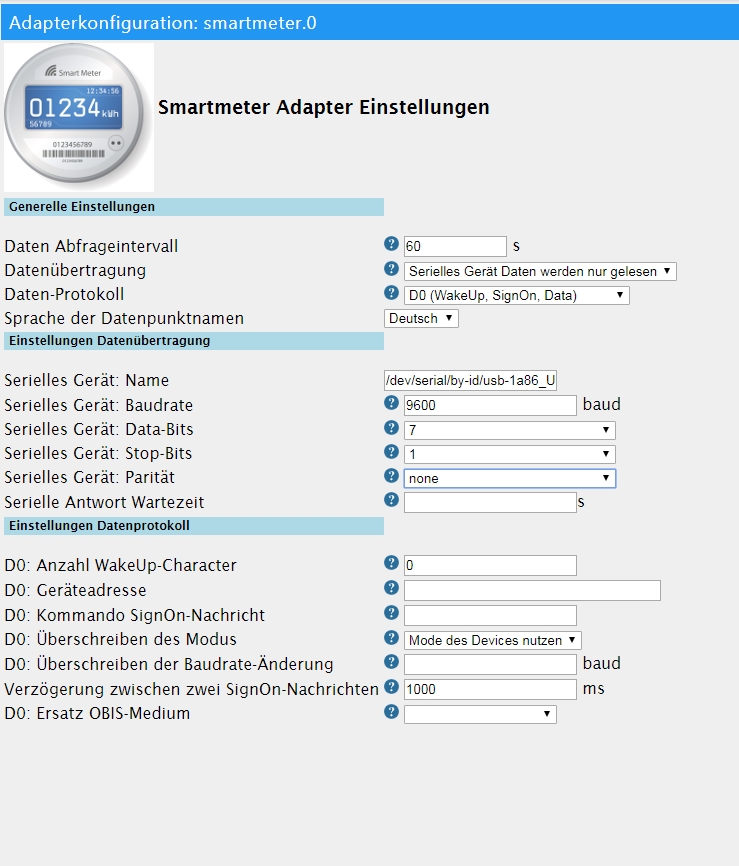
-
@tilly sagte in Smartmeter optische Schnittstelle:
ich habe mir von Volkszähler den IR-Schreibe-Lesekopf ... zusammengebastelt
Und du bist sicher, dass er funktioniert.
Es ist ja jetzt wirklich schon fast alles geprüft worden.@Homoran said in Smartmeter optische Schnittstelle:
@tilly sagte in Smartmeter optische Schnittstelle:
ich habe mir von Volkszähler den IR-Schreibe-Lesekopf ... zusammengebastelt
Und du bist sicher, dass er funktioniert.
Es ist ja jetzt wirklich schon fast alles geprüft worden.Nein bin mir nicht sicher, aber wie bekommt man das raus?
Wenn ich mit einer TV-Fernbedienung davor sende, kommt ja was an, also denke ich schon, dass der IR-Schreibe-Lesekopf funktioniert. -
@Homoran said in Smartmeter optische Schnittstelle:
@tilly sagte in Smartmeter optische Schnittstelle:
ich habe mir von Volkszähler den IR-Schreibe-Lesekopf ... zusammengebastelt
Und du bist sicher, dass er funktioniert.
Es ist ja jetzt wirklich schon fast alles geprüft worden.Nein bin mir nicht sicher, aber wie bekommt man das raus?
Wenn ich mit einer TV-Fernbedienung davor sende, kommt ja was an, also denke ich schon, dass der IR-Schreibe-Lesekopf funktioniert.@tilly
Das hast du aber über die konsole gesehen.Konsole und Adapter geht nicht.
Bitte in der konsole das Gerät wieder freigeben.Dann instanz auf depug stellen und instanz neustarten.
Was Steht Dann im log
-
@tilly
Das hast du aber über die konsole gesehen.Konsole und Adapter geht nicht.
Bitte in der konsole das Gerät wieder freigeben.Dann instanz auf depug stellen und instanz neustarten.
Was Steht Dann im log
@Homoran said in Smartmeter optische Schnittstelle:
@tilly
Das hast du aber über die konsole gesehen.ja mit minicom
Konsole und Adapter geht nicht.
Bitte in der konsole das Gerät wieder freigeben.wenn ich minicom beende, sollte das Gerät doch wieder freigegeben sein, oder?
Dann instanz auf depug stellen und instanz neustarten.
Was Steht Dann im log
hier das log
smartmeter.0	2019-03-27 22:17:20.720	debug	SET MESSAGE TIMEOUT TIMER: 120000
smartmeter.0	2019-03-27 22:17:20.712	debug	SERIALPORT OPEN
smartmeter.0	2019-03-27 22:17:20.703	debug	CREATE SERIALPORT: 9600 7 1 even
smartmeter.0	2019-03-27 22:17:06.979	debug	system.adapter.admin.0: logging true
smartmeter.0	2019-03-27 22:16:20.683	debug	SCHEDULE NEXT RUN IN 60s
smartmeter.0	2019-03-27 22:16:20.680	debug	SERIALPORT CLOSE
smartmeter.0	2019-03-27 22:16:20.671	debug	Transport Reset!! Restart = true
smartmeter.0	2019-03-27 22:16:20.670	debug	Error: No or too long answer from Serial Device after last request.
smartmeter.0	2019-03-27 22:16:20.669	warn	No or too long answer from Serial Device after last request.
smartmeter.0	2019-03-27 22:16:20.662	debug	Error: No or too long answer from Serial Device after last request.
smartmeter.0	2019-03-27 22:16:20.659	debug	MESSAGE TIMEOUT TRIGGERED
smartmeter.0	2019-03-27 22:16:12.937	debug	system.adapter.admin.0: logging false
smartmeter.0	2019-03-27 22:15:13.680	debug	system.adapter.admin.0: logging true
smartmeter.0	2019-03-27 22:15:05.119	debug	system.adapter.admin.0: logging false
smartmeter.0	2019-03-27 22:14:20.656	debug	SET MESSAGE TIMEOUT TIMER: 120000
smartmeter.0	2019-03-27 22:14:20.600	debug	SERIALPORT OPEN
smartmeter.0	2019-03-27 22:14:20.561	debug	CREATE SERIALPORT: 9600 7 1 even
smartmeter.0	2019-03-27 22:14:20.550	debug	SmartmeterObis options: {"debug":2,"protocol":"D0Protocol","transport":"SerialResponseTransport","requestInterval":"60","anotherQueryDelay":"1000","transportSerialPort":"/dev/ttyUSB0","transportSeria
smartmeter.0	2019-03-27 22:14:20.481	info	starting. Version 1.2.2 in /opt/iobroker/node_modules/iobroker.smartmeter, node: v8.15.1
smartmeter.0	2019-03-27 22:14:20.378	debug	statesDB connected
smartmeter.0	2019-03-27 22:14:20.279	debug	objectDB connected
Ich habe smartmeter nochmal deinstalliert, raspberry neu gestartet und neu installiert. Dabei kamen diese Meldungen:
$ ./iobroker add smartmeter --host raspberrypi NPM version: 6.4.1 npm install iobroker.smartmeter@1.2.2 --production --save --prefix "/opt/iobroker" (System call) host.raspberrypi install adapter smartmeter npm install --production (System call) in "/opt/iobroker/node_modules/iobroker.smartmeter" prebuild-install WARN install No prebuilt binaries found (target=8.15.1 runtime=node arch=arm platform=linux) ../src/serialport.cpp: In function ‘void EIO_AfterOpen(uv_work_t*)’:../src/serialport.cpp:95:30: warning: ‘v8::Local<v8::Value> Nan::Callback::Call(int, v8::Local<v8::Value>*) const’ is deprecated [-Wdeprecated-declarations] data->callback.Call(2, argv); ^ In file included from ../src/./serialport.h:6:0, from ../src/serialport.cpp:1: ../../nan/nan.h:1674:3: note: declared here Call(int argc, v8::Local<v8::Value> argv[]) const { ^~~~ ../src/serialport.cpp: In function ‘void EIO_AfterUpdate(uv_work_t*)’:../src/serialport.cpp:150:30: warning: ‘v8::Local<v8::Value> Nan::Callback::Call(int, v8::Local<v8::Value>*) const’ is deprecated [-Wdeprecated-declarations] data->callback.Call(1, argv); ^ In file included from ../src/./serialport.h:6:0, from ../src/serialport.cpp:1: ../../nan/nan.h:1674:3: note: declared here Call(int argc, v8::Local<v8::Value> argv[]) const { ^~~~ ../src/serialport.cpp: In function ‘void EIO_AfterClose(uv_work_t*)’:../src/serialport.cpp:188:30: warning: ‘v8::Local<v8::Value> Nan::Callback::Call(int, v8::Local<v8::Value>*) const’ is deprecated [-Wdeprecated-declarations] data->callback.Call(1, argv); ^ In file included from ../src/./serialport.h:6:0, from ../src/serialport.cpp:1: ../../nan/nan.h:1674:3: note: declared here Call(int argc, v8::Local<v8::Value> argv[]) const { ^~~~ ../src/serialport.cpp: In function ‘void EIO_AfterFlush(uv_work_t*)’:../src/serialport.cpp:231:30: warning: ‘v8::Local<v8::Value> Nan::Callback::Call(int, v8::Local<v8::Value>*) const’ is deprecated [-Wdeprecated-declarations] data->callback.Call(1, argv); ^ In file included from ../src/./serialport.h:6:0, from ../src/serialport.cpp:1: ../../nan/nan.h:1674:3: note: declared here Call(int argc, v8::Local<v8::Value> argv[]) const { ^~~~ ../src/serialport.cpp: In function ‘void EIO_AfterSet(uv_work_t*)’:../src/serialport.cpp:285:30: warning: ‘v8::Local<v8::Value> Nan::Callback::Call(int, v8::Local<v8::Value>*) const’ is deprecated [-Wdeprecated-declarations] data->callback.Call(1, argv); ^ In file included from ../src/./serialport.h:6:0, from ../src/serialport.cpp:1: ../../nan/nan.h:1674:3: note: declared here Call(int argc, v8::Local<v8::Value> argv[]) const { ^~~~ ../src/serialport.cpp: In function ‘void EIO_AfterGet(uv_work_t*)’:../src/serialport.cpp:336:30: warning: ‘v8::Local<v8::Value> Nan::Callback::Call(int, v8::Local<v8::Value>*) const’ is deprecated [-Wdeprecated-declarations] data->callback.Call(2, argv); ^ In file included from ../src/./serialport.h:6:0, from ../src/serialport.cpp:1: ../../nan/nan.h:1674:3: note: declared here Call(int argc, v8::Local<v8::Value> argv[]) const { ^~~~ ../src/serialport.cpp: In function ‘void EIO_AfterGetBaudRate(uv_work_t*)’:../src/serialport.cpp:383:30: warning: ‘v8::Local<v8::Value> Nan::Callback::Call(int, v8::Local<v8::Value>*) const’ is deprecated [-Wdeprecated-declarations] data->callback.Call(2, argv); ^ In file included from ../src/./serialport.h:6:0, from ../src/serialport.cpp:1: ../../nan/nan.h:1674:3: note: declared here Call(int argc, v8::Local<v8::Value> argv[]) const { ^~~~ ../src/serialport.cpp: In function ‘void EIO_AfterDrain(uv_work_t*)’:../src/serialport.cpp:424:30: warning: ‘v8::Local<v8::Value> Nan::Callback::Call(int, v8::Local<v8::Value>*) const’ is deprecated [-Wdeprecated-declarations] data->callback.Call(1, argv); ^ In file included from ../src/./serialport.h:6:0, from ../src/serialport.cpp:1: ../../nan/nan.h:1674:3: note: declared here Call(int argc, v8::Local<v8::Value> argv[]) const { ^~~~ ../src/poller.cpp: In static member function ‘static void Poller::onData(uv_poll_t*, int, int)’:../src/poller.cpp:69:29: warning: ‘v8::Local<v8::Value> Nan::Callback::Call(int, v8::Local<v8::Value>*) const’ is deprecated [-Wdeprecated-declarations] obj->callback.Call(2, argv); ^ In file included from ../src/poller.cpp:1:0:../../nan/nan.h:1674:3: note: declared here Call(int argc, v8::Local<v8::Value> argv[]) const { ^~~~ npm notice created a lockfile as package-lock.json. You should commit this file. got /opt/iobroker/node_modules/iobroker.smartmeter/admin upload [5] smartmeter.admin /opt/iobroker/node_modules/iobroker.smartmeter/admin/words.js words.js application/javascript upload [4] smartmeter.admin /opt/iobroker/node_modules/iobroker.smartmeter/admin/tooltip.css tooltip.css text/css upload [3] smartmeter.admin /opt/iobroker/node_modules/iobroker.smartmeter/admin/smartmeter.png smartmeter.png image/png upload [2] smartmeter.admin /opt/iobroker/node_modules/iobroker.smartmeter/admin/smartmeter.jpg smartmeter.jpg image/jpeg upload [1] smartmeter.admin /opt/iobroker/node_modules/iobroker.smartmeter/admin/questionmark.png questionmark.png image/png upload [0] smartmeter.admin /opt/iobroker/node_modules/iobroker.smartmeter/admin/index.html index.html text/html host.raspberrypi object system.adapter.smartmeter created host.raspberrypi create instance smartmeter host.raspberrypi object system.adapter.smartmeter.0.outputCount created host.raspberrypi object system.adapter.smartmeter.0.inputCount created host.raspberrypi object system.adapter.smartmeter.0.uptime created host.raspberrypi object system.adapter.smartmeter.0.memRss created host.raspberrypi object system.adapter.smartmeter.0.memHeapTotal created host.raspberrypi object system.adapter.smartmeter.0.memHeapUsed created host.raspberrypi object system.adapter.smartmeter.0.cputime created host.raspberrypi object system.adapter.smartmeter.0.cpu created host.raspberrypi object system.adapter.smartmeter.0.connected created host.raspberrypi object system.adapter.smartmeter.0.alive created host.raspberrypi object system.adapter.smartmeter.0 created process exited with code 0 -
@Homoran said in Smartmeter optische Schnittstelle:
@tilly
Das hast du aber über die konsole gesehen.ja mit minicom
Konsole und Adapter geht nicht.
Bitte in der konsole das Gerät wieder freigeben.wenn ich minicom beende, sollte das Gerät doch wieder freigegeben sein, oder?
Dann instanz auf depug stellen und instanz neustarten.
Was Steht Dann im log
hier das log
smartmeter.0	2019-03-27 22:17:20.720	debug	SET MESSAGE TIMEOUT TIMER: 120000
smartmeter.0	2019-03-27 22:17:20.712	debug	SERIALPORT OPEN
smartmeter.0	2019-03-27 22:17:20.703	debug	CREATE SERIALPORT: 9600 7 1 even
smartmeter.0	2019-03-27 22:17:06.979	debug	system.adapter.admin.0: logging true
smartmeter.0	2019-03-27 22:16:20.683	debug	SCHEDULE NEXT RUN IN 60s
smartmeter.0	2019-03-27 22:16:20.680	debug	SERIALPORT CLOSE
smartmeter.0	2019-03-27 22:16:20.671	debug	Transport Reset!! Restart = true
smartmeter.0	2019-03-27 22:16:20.670	debug	Error: No or too long answer from Serial Device after last request.
smartmeter.0	2019-03-27 22:16:20.669	warn	No or too long answer from Serial Device after last request.
smartmeter.0	2019-03-27 22:16:20.662	debug	Error: No or too long answer from Serial Device after last request.
smartmeter.0	2019-03-27 22:16:20.659	debug	MESSAGE TIMEOUT TRIGGERED
smartmeter.0	2019-03-27 22:16:12.937	debug	system.adapter.admin.0: logging false
smartmeter.0	2019-03-27 22:15:13.680	debug	system.adapter.admin.0: logging true
smartmeter.0	2019-03-27 22:15:05.119	debug	system.adapter.admin.0: logging false
smartmeter.0	2019-03-27 22:14:20.656	debug	SET MESSAGE TIMEOUT TIMER: 120000
smartmeter.0	2019-03-27 22:14:20.600	debug	SERIALPORT OPEN
smartmeter.0	2019-03-27 22:14:20.561	debug	CREATE SERIALPORT: 9600 7 1 even
smartmeter.0	2019-03-27 22:14:20.550	debug	SmartmeterObis options: {"debug":2,"protocol":"D0Protocol","transport":"SerialResponseTransport","requestInterval":"60","anotherQueryDelay":"1000","transportSerialPort":"/dev/ttyUSB0","transportSeria
smartmeter.0	2019-03-27 22:14:20.481	info	starting. Version 1.2.2 in /opt/iobroker/node_modules/iobroker.smartmeter, node: v8.15.1
smartmeter.0	2019-03-27 22:14:20.378	debug	statesDB connected
smartmeter.0	2019-03-27 22:14:20.279	debug	objectDB connected
Ich habe smartmeter nochmal deinstalliert, raspberry neu gestartet und neu installiert. Dabei kamen diese Meldungen:
$ ./iobroker add smartmeter --host raspberrypi NPM version: 6.4.1 npm install iobroker.smartmeter@1.2.2 --production --save --prefix "/opt/iobroker" (System call) host.raspberrypi install adapter smartmeter npm install --production (System call) in "/opt/iobroker/node_modules/iobroker.smartmeter" prebuild-install WARN install No prebuilt binaries found (target=8.15.1 runtime=node arch=arm platform=linux) ../src/serialport.cpp: In function ‘void EIO_AfterOpen(uv_work_t*)’:../src/serialport.cpp:95:30: warning: ‘v8::Local<v8::Value> Nan::Callback::Call(int, v8::Local<v8::Value>*) const’ is deprecated [-Wdeprecated-declarations] data->callback.Call(2, argv); ^ In file included from ../src/./serialport.h:6:0, from ../src/serialport.cpp:1: ../../nan/nan.h:1674:3: note: declared here Call(int argc, v8::Local<v8::Value> argv[]) const { ^~~~ ../src/serialport.cpp: In function ‘void EIO_AfterUpdate(uv_work_t*)’:../src/serialport.cpp:150:30: warning: ‘v8::Local<v8::Value> Nan::Callback::Call(int, v8::Local<v8::Value>*) const’ is deprecated [-Wdeprecated-declarations] data->callback.Call(1, argv); ^ In file included from ../src/./serialport.h:6:0, from ../src/serialport.cpp:1: ../../nan/nan.h:1674:3: note: declared here Call(int argc, v8::Local<v8::Value> argv[]) const { ^~~~ ../src/serialport.cpp: In function ‘void EIO_AfterClose(uv_work_t*)’:../src/serialport.cpp:188:30: warning: ‘v8::Local<v8::Value> Nan::Callback::Call(int, v8::Local<v8::Value>*) const’ is deprecated [-Wdeprecated-declarations] data->callback.Call(1, argv); ^ In file included from ../src/./serialport.h:6:0, from ../src/serialport.cpp:1: ../../nan/nan.h:1674:3: note: declared here Call(int argc, v8::Local<v8::Value> argv[]) const { ^~~~ ../src/serialport.cpp: In function ‘void EIO_AfterFlush(uv_work_t*)’:../src/serialport.cpp:231:30: warning: ‘v8::Local<v8::Value> Nan::Callback::Call(int, v8::Local<v8::Value>*) const’ is deprecated [-Wdeprecated-declarations] data->callback.Call(1, argv); ^ In file included from ../src/./serialport.h:6:0, from ../src/serialport.cpp:1: ../../nan/nan.h:1674:3: note: declared here Call(int argc, v8::Local<v8::Value> argv[]) const { ^~~~ ../src/serialport.cpp: In function ‘void EIO_AfterSet(uv_work_t*)’:../src/serialport.cpp:285:30: warning: ‘v8::Local<v8::Value> Nan::Callback::Call(int, v8::Local<v8::Value>*) const’ is deprecated [-Wdeprecated-declarations] data->callback.Call(1, argv); ^ In file included from ../src/./serialport.h:6:0, from ../src/serialport.cpp:1: ../../nan/nan.h:1674:3: note: declared here Call(int argc, v8::Local<v8::Value> argv[]) const { ^~~~ ../src/serialport.cpp: In function ‘void EIO_AfterGet(uv_work_t*)’:../src/serialport.cpp:336:30: warning: ‘v8::Local<v8::Value> Nan::Callback::Call(int, v8::Local<v8::Value>*) const’ is deprecated [-Wdeprecated-declarations] data->callback.Call(2, argv); ^ In file included from ../src/./serialport.h:6:0, from ../src/serialport.cpp:1: ../../nan/nan.h:1674:3: note: declared here Call(int argc, v8::Local<v8::Value> argv[]) const { ^~~~ ../src/serialport.cpp: In function ‘void EIO_AfterGetBaudRate(uv_work_t*)’:../src/serialport.cpp:383:30: warning: ‘v8::Local<v8::Value> Nan::Callback::Call(int, v8::Local<v8::Value>*) const’ is deprecated [-Wdeprecated-declarations] data->callback.Call(2, argv); ^ In file included from ../src/./serialport.h:6:0, from ../src/serialport.cpp:1: ../../nan/nan.h:1674:3: note: declared here Call(int argc, v8::Local<v8::Value> argv[]) const { ^~~~ ../src/serialport.cpp: In function ‘void EIO_AfterDrain(uv_work_t*)’:../src/serialport.cpp:424:30: warning: ‘v8::Local<v8::Value> Nan::Callback::Call(int, v8::Local<v8::Value>*) const’ is deprecated [-Wdeprecated-declarations] data->callback.Call(1, argv); ^ In file included from ../src/./serialport.h:6:0, from ../src/serialport.cpp:1: ../../nan/nan.h:1674:3: note: declared here Call(int argc, v8::Local<v8::Value> argv[]) const { ^~~~ ../src/poller.cpp: In static member function ‘static void Poller::onData(uv_poll_t*, int, int)’:../src/poller.cpp:69:29: warning: ‘v8::Local<v8::Value> Nan::Callback::Call(int, v8::Local<v8::Value>*) const’ is deprecated [-Wdeprecated-declarations] obj->callback.Call(2, argv); ^ In file included from ../src/poller.cpp:1:0:../../nan/nan.h:1674:3: note: declared here Call(int argc, v8::Local<v8::Value> argv[]) const { ^~~~ npm notice created a lockfile as package-lock.json. You should commit this file. got /opt/iobroker/node_modules/iobroker.smartmeter/admin upload [5] smartmeter.admin /opt/iobroker/node_modules/iobroker.smartmeter/admin/words.js words.js application/javascript upload [4] smartmeter.admin /opt/iobroker/node_modules/iobroker.smartmeter/admin/tooltip.css tooltip.css text/css upload [3] smartmeter.admin /opt/iobroker/node_modules/iobroker.smartmeter/admin/smartmeter.png smartmeter.png image/png upload [2] smartmeter.admin /opt/iobroker/node_modules/iobroker.smartmeter/admin/smartmeter.jpg smartmeter.jpg image/jpeg upload [1] smartmeter.admin /opt/iobroker/node_modules/iobroker.smartmeter/admin/questionmark.png questionmark.png image/png upload [0] smartmeter.admin /opt/iobroker/node_modules/iobroker.smartmeter/admin/index.html index.html text/html host.raspberrypi object system.adapter.smartmeter created host.raspberrypi create instance smartmeter host.raspberrypi object system.adapter.smartmeter.0.outputCount created host.raspberrypi object system.adapter.smartmeter.0.inputCount created host.raspberrypi object system.adapter.smartmeter.0.uptime created host.raspberrypi object system.adapter.smartmeter.0.memRss created host.raspberrypi object system.adapter.smartmeter.0.memHeapTotal created host.raspberrypi object system.adapter.smartmeter.0.memHeapUsed created host.raspberrypi object system.adapter.smartmeter.0.cputime created host.raspberrypi object system.adapter.smartmeter.0.cpu created host.raspberrypi object system.adapter.smartmeter.0.connected created host.raspberrypi object system.adapter.smartmeter.0.alive created host.raspberrypi object system.adapter.smartmeter.0 created process exited with code 0@tilly
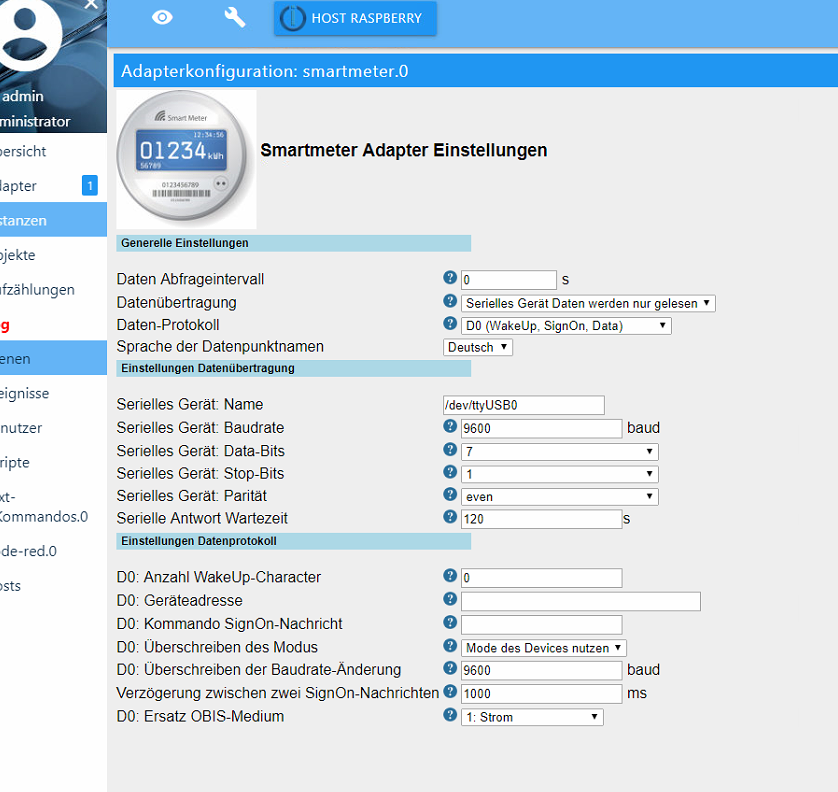
Die unteren logs sind ok!Kann also fast nur an den Einstellungen liegen, wenn der kopf ok ist.
Bitte allecEinstellungen erstveinmal lassen wie sie sind, als gerät /dev/ttyusb0 eingeben und als protokoll d0 und nur lesen
-
@Homoran said in Smartmeter optische Schnittstelle:
@tilly
Das hast du aber über die konsole gesehen.ja mit minicom
Konsole und Adapter geht nicht.
Bitte in der konsole das Gerät wieder freigeben.wenn ich minicom beende, sollte das Gerät doch wieder freigegeben sein, oder?
Dann instanz auf depug stellen und instanz neustarten.
Was Steht Dann im log
hier das log
smartmeter.0	2019-03-27 22:17:20.720	debug	SET MESSAGE TIMEOUT TIMER: 120000
smartmeter.0	2019-03-27 22:17:20.712	debug	SERIALPORT OPEN
smartmeter.0	2019-03-27 22:17:20.703	debug	CREATE SERIALPORT: 9600 7 1 even
smartmeter.0	2019-03-27 22:17:06.979	debug	system.adapter.admin.0: logging true
smartmeter.0	2019-03-27 22:16:20.683	debug	SCHEDULE NEXT RUN IN 60s
smartmeter.0	2019-03-27 22:16:20.680	debug	SERIALPORT CLOSE
smartmeter.0	2019-03-27 22:16:20.671	debug	Transport Reset!! Restart = true
smartmeter.0	2019-03-27 22:16:20.670	debug	Error: No or too long answer from Serial Device after last request.
smartmeter.0	2019-03-27 22:16:20.669	warn	No or too long answer from Serial Device after last request.
smartmeter.0	2019-03-27 22:16:20.662	debug	Error: No or too long answer from Serial Device after last request.
smartmeter.0	2019-03-27 22:16:20.659	debug	MESSAGE TIMEOUT TRIGGERED
smartmeter.0	2019-03-27 22:16:12.937	debug	system.adapter.admin.0: logging false
smartmeter.0	2019-03-27 22:15:13.680	debug	system.adapter.admin.0: logging true
smartmeter.0	2019-03-27 22:15:05.119	debug	system.adapter.admin.0: logging false
smartmeter.0	2019-03-27 22:14:20.656	debug	SET MESSAGE TIMEOUT TIMER: 120000
smartmeter.0	2019-03-27 22:14:20.600	debug	SERIALPORT OPEN
smartmeter.0	2019-03-27 22:14:20.561	debug	CREATE SERIALPORT: 9600 7 1 even
smartmeter.0	2019-03-27 22:14:20.550	debug	SmartmeterObis options: {"debug":2,"protocol":"D0Protocol","transport":"SerialResponseTransport","requestInterval":"60","anotherQueryDelay":"1000","transportSerialPort":"/dev/ttyUSB0","transportSeria
smartmeter.0	2019-03-27 22:14:20.481	info	starting. Version 1.2.2 in /opt/iobroker/node_modules/iobroker.smartmeter, node: v8.15.1
smartmeter.0	2019-03-27 22:14:20.378	debug	statesDB connected
smartmeter.0	2019-03-27 22:14:20.279	debug	objectDB connected
Ich habe smartmeter nochmal deinstalliert, raspberry neu gestartet und neu installiert. Dabei kamen diese Meldungen:
$ ./iobroker add smartmeter --host raspberrypi NPM version: 6.4.1 npm install iobroker.smartmeter@1.2.2 --production --save --prefix "/opt/iobroker" (System call) host.raspberrypi install adapter smartmeter npm install --production (System call) in "/opt/iobroker/node_modules/iobroker.smartmeter" prebuild-install WARN install No prebuilt binaries found (target=8.15.1 runtime=node arch=arm platform=linux) ../src/serialport.cpp: In function ‘void EIO_AfterOpen(uv_work_t*)’:../src/serialport.cpp:95:30: warning: ‘v8::Local<v8::Value> Nan::Callback::Call(int, v8::Local<v8::Value>*) const’ is deprecated [-Wdeprecated-declarations] data->callback.Call(2, argv); ^ In file included from ../src/./serialport.h:6:0, from ../src/serialport.cpp:1: ../../nan/nan.h:1674:3: note: declared here Call(int argc, v8::Local<v8::Value> argv[]) const { ^~~~ ../src/serialport.cpp: In function ‘void EIO_AfterUpdate(uv_work_t*)’:../src/serialport.cpp:150:30: warning: ‘v8::Local<v8::Value> Nan::Callback::Call(int, v8::Local<v8::Value>*) const’ is deprecated [-Wdeprecated-declarations] data->callback.Call(1, argv); ^ In file included from ../src/./serialport.h:6:0, from ../src/serialport.cpp:1: ../../nan/nan.h:1674:3: note: declared here Call(int argc, v8::Local<v8::Value> argv[]) const { ^~~~ ../src/serialport.cpp: In function ‘void EIO_AfterClose(uv_work_t*)’:../src/serialport.cpp:188:30: warning: ‘v8::Local<v8::Value> Nan::Callback::Call(int, v8::Local<v8::Value>*) const’ is deprecated [-Wdeprecated-declarations] data->callback.Call(1, argv); ^ In file included from ../src/./serialport.h:6:0, from ../src/serialport.cpp:1: ../../nan/nan.h:1674:3: note: declared here Call(int argc, v8::Local<v8::Value> argv[]) const { ^~~~ ../src/serialport.cpp: In function ‘void EIO_AfterFlush(uv_work_t*)’:../src/serialport.cpp:231:30: warning: ‘v8::Local<v8::Value> Nan::Callback::Call(int, v8::Local<v8::Value>*) const’ is deprecated [-Wdeprecated-declarations] data->callback.Call(1, argv); ^ In file included from ../src/./serialport.h:6:0, from ../src/serialport.cpp:1: ../../nan/nan.h:1674:3: note: declared here Call(int argc, v8::Local<v8::Value> argv[]) const { ^~~~ ../src/serialport.cpp: In function ‘void EIO_AfterSet(uv_work_t*)’:../src/serialport.cpp:285:30: warning: ‘v8::Local<v8::Value> Nan::Callback::Call(int, v8::Local<v8::Value>*) const’ is deprecated [-Wdeprecated-declarations] data->callback.Call(1, argv); ^ In file included from ../src/./serialport.h:6:0, from ../src/serialport.cpp:1: ../../nan/nan.h:1674:3: note: declared here Call(int argc, v8::Local<v8::Value> argv[]) const { ^~~~ ../src/serialport.cpp: In function ‘void EIO_AfterGet(uv_work_t*)’:../src/serialport.cpp:336:30: warning: ‘v8::Local<v8::Value> Nan::Callback::Call(int, v8::Local<v8::Value>*) const’ is deprecated [-Wdeprecated-declarations] data->callback.Call(2, argv); ^ In file included from ../src/./serialport.h:6:0, from ../src/serialport.cpp:1: ../../nan/nan.h:1674:3: note: declared here Call(int argc, v8::Local<v8::Value> argv[]) const { ^~~~ ../src/serialport.cpp: In function ‘void EIO_AfterGetBaudRate(uv_work_t*)’:../src/serialport.cpp:383:30: warning: ‘v8::Local<v8::Value> Nan::Callback::Call(int, v8::Local<v8::Value>*) const’ is deprecated [-Wdeprecated-declarations] data->callback.Call(2, argv); ^ In file included from ../src/./serialport.h:6:0, from ../src/serialport.cpp:1: ../../nan/nan.h:1674:3: note: declared here Call(int argc, v8::Local<v8::Value> argv[]) const { ^~~~ ../src/serialport.cpp: In function ‘void EIO_AfterDrain(uv_work_t*)’:../src/serialport.cpp:424:30: warning: ‘v8::Local<v8::Value> Nan::Callback::Call(int, v8::Local<v8::Value>*) const’ is deprecated [-Wdeprecated-declarations] data->callback.Call(1, argv); ^ In file included from ../src/./serialport.h:6:0, from ../src/serialport.cpp:1: ../../nan/nan.h:1674:3: note: declared here Call(int argc, v8::Local<v8::Value> argv[]) const { ^~~~ ../src/poller.cpp: In static member function ‘static void Poller::onData(uv_poll_t*, int, int)’:../src/poller.cpp:69:29: warning: ‘v8::Local<v8::Value> Nan::Callback::Call(int, v8::Local<v8::Value>*) const’ is deprecated [-Wdeprecated-declarations] obj->callback.Call(2, argv); ^ In file included from ../src/poller.cpp:1:0:../../nan/nan.h:1674:3: note: declared here Call(int argc, v8::Local<v8::Value> argv[]) const { ^~~~ npm notice created a lockfile as package-lock.json. You should commit this file. got /opt/iobroker/node_modules/iobroker.smartmeter/admin upload [5] smartmeter.admin /opt/iobroker/node_modules/iobroker.smartmeter/admin/words.js words.js application/javascript upload [4] smartmeter.admin /opt/iobroker/node_modules/iobroker.smartmeter/admin/tooltip.css tooltip.css text/css upload [3] smartmeter.admin /opt/iobroker/node_modules/iobroker.smartmeter/admin/smartmeter.png smartmeter.png image/png upload [2] smartmeter.admin /opt/iobroker/node_modules/iobroker.smartmeter/admin/smartmeter.jpg smartmeter.jpg image/jpeg upload [1] smartmeter.admin /opt/iobroker/node_modules/iobroker.smartmeter/admin/questionmark.png questionmark.png image/png upload [0] smartmeter.admin /opt/iobroker/node_modules/iobroker.smartmeter/admin/index.html index.html text/html host.raspberrypi object system.adapter.smartmeter created host.raspberrypi create instance smartmeter host.raspberrypi object system.adapter.smartmeter.0.outputCount created host.raspberrypi object system.adapter.smartmeter.0.inputCount created host.raspberrypi object system.adapter.smartmeter.0.uptime created host.raspberrypi object system.adapter.smartmeter.0.memRss created host.raspberrypi object system.adapter.smartmeter.0.memHeapTotal created host.raspberrypi object system.adapter.smartmeter.0.memHeapUsed created host.raspberrypi object system.adapter.smartmeter.0.cputime created host.raspberrypi object system.adapter.smartmeter.0.cpu created host.raspberrypi object system.adapter.smartmeter.0.connected created host.raspberrypi object system.adapter.smartmeter.0.alive created host.raspberrypi object system.adapter.smartmeter.0 created process exited with code 0@tilly sagte in Smartmeter optische Schnittstelle:
@Homoran said in Smartmeter optische Schnittstelle:
@tilly
Das hast du aber über die konsole gesehen.ja mit minicom
Konsole und Adapter geht nicht.
Bitte in der konsole das Gerät wieder freigeben.wenn ich minicom beende, sollte das Gerät doch wieder freigegeben sein, oder?
Wenn du sowieso schon minicom hast, kannst du auch erstmal darüber testweise den Stromzähler auslesen. Dazu in der configration von Minicom die Schnittstellenparameter eintragen und mit "save setup as dfl" speichern. Wenn du jetzt minicom wieder aufrufst, sollte mit minicom -s deine Werte dort stehen.
Im ioBroker den Smartmeter-Adapter stoppen und dann mal in der Konsole "cat /dev/ttyUSB0"eingeben. Was kommt dann dabei raus?
-
Bitte keine Fragen per PN, die gehören ins Forum!
Benutzt das Voting rechts unten im Beitrag wenn er euch geholfen hat.
-
Es will einfach nicht. Hat jemand vielleicht einen USB-IR-Schreibe-Lesekopf oder eine Bezugsquelle?
-
@wendy2702 sagte in Smartmeter optische Schnittstelle:
Bezugsquelle:
Ich habe den gleichen, auch von Weidmann.
Klappt einwandfrei.




Hey! Du scheinst an dieser Unterhaltung interessiert zu sein, hast aber noch kein Konto.
Hast du es satt, bei jedem Besuch durch die gleichen Beiträge zu scrollen? Wenn du dich für ein Konto anmeldest, kommst du immer genau dorthin zurück, wo du zuvor warst, und kannst dich über neue Antworten benachrichtigen lassen (entweder per E-Mail oder Push-Benachrichtigung). Du kannst auch Lesezeichen speichern und Beiträge positiv bewerten, um anderen Community-Mitgliedern deine Wertschätzung zu zeigen.
Mit deinem Input könnte dieser Beitrag noch besser werden 💗
Registrieren Anmelden502
Online33.0k
Benutzer83.6k
Themen1.3m
Beiträge