




[gelöst] Sonoff Error beim flashen mit Atom
-
Hallo
Ich melde mich dann wieder mal mit dem selben Problem!!
Beim letzten mal habe ich dabei Sonoff Datei auf dem Bildschirm gespeichert und dann ging es!!
Nun möchte ich wieder mal mit der selben Einstellung einen Sonoff Basic neu flashen…
der wurde schon mal geflasht und hat funktioniert.
Nun möchte ich eine neu Tasmota drauf flashen….
Ich habe die selbe Datei wie beim letzten mal (aber schon neuer als die alte)
Bekomme aber immer ERROR
! ````
Checking size .pioenvs\sonoff-DE\firmware.elf
! Memory Usage -> http://bit.ly/pio-memory-usage
DATA: [======= ] 67.5% (used 55264 bytes from 81920 bytes)
PROGRAM: [===== ] 51.9% (used 544643 bytes from 1048576 bytes)
Configuring upload protocol...
Looking for upload port...
Use manually specified: COM4
Uploading .pioenvs\sonoff-DE\firmware.bin
*** [upload] Error -1
error: Failed to open COM4
error: espcomm_open failed
error: espcomm_upload_mem failed
[ERROR] Took 13.95 seconds[SUMMARY]
Environment sonoff [SKIP]
Environment sonoff-minimal [SKIP]
Environment sonoff-classic [SKIP]
Environment sonoff-knx [SKIP]
Environment sonoff-allsensors [SKIP]
Environment sonoff-BG [SKIP]
Environment sonoff-BR [SKIP]
Environment sonoff-CN [SKIP]
Environment sonoff-CZ [SKIP]
Environment sonoff-ES [SKIP]
Environment sonoff-FR [SKIP]
Environment sonoff-GR [SKIP]
Environment sonoff-HU [SKIP]
Environment sonoff-IT [SKIP]
Environment sonoff-NL [SKIP]
Environment sonoff-PL [SKIP]
Environment sonoff-PT [SKIP]
Environment sonoff-RU [SKIP]
Environment sonoff-UK [SKIP]
Environment sonoff-TW [SKIP]
Environment sonoff-DE [ERROR]
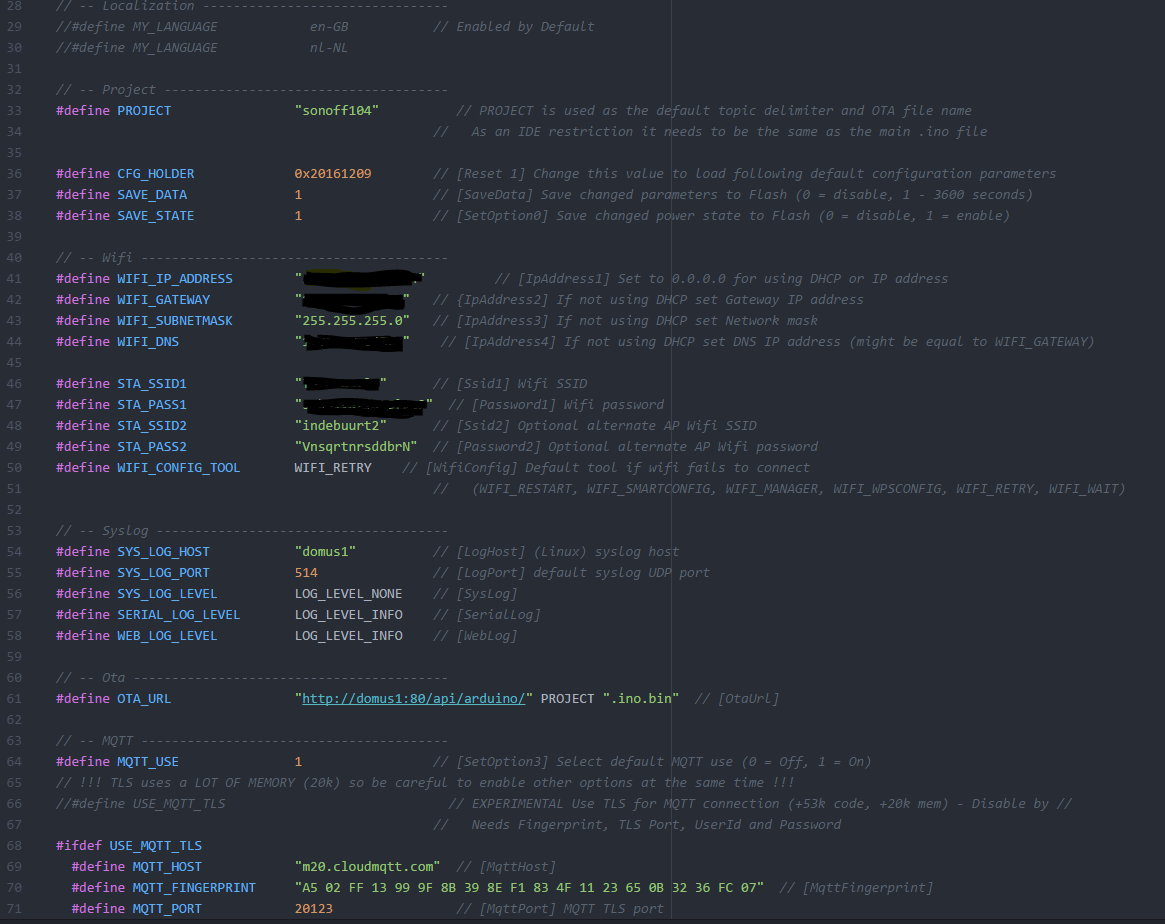
[ERROR] Took 13.96 secondsWo liegt da der fehler?? Ich habe mir die Aktuelle Tasmota von git geladen… aber immer ERROR >! ```` my_user_config.h platformio.ini 1 >! ; PlatformIO Project Configuration File ; ; Build options: build flags, source filter, extra scripting ; Upload options: custom port, speed and extra flags ; Library options: dependencies, extra library storages ; ; Please visit documentation for the other options and examples ; http://docs.platformio.org/en/stable/projectconf.html [platformio] src_dir = sonoff >! 18.1 s platformio run --target upload Checking size .pioenvs\sonoff-DE\firmware.elf Building .pioenvs\sonoff-DE\firmware.bin Memory Usage -> http://bit.ly/pio-memory-usage DATA: [======= ] 67.6% (used 55352 bytes from 81920 bytes) PROGRAM: [===== ] 48.0% (used 503331 bytes from 1048576 bytes) Configuring upload protocol... Looking for upload port... >! Use manually specified: COM4 Uploading .pioenvs\sonoff-DE\firmware.bin error: Failed to open COM4 error: espcomm_open failed error: espcomm_upload_mem failed *** [upload] Error -1 [ERROR] Took 17.52 seconds [SUMMARY] Environment sonoff [SKIP] Environment sonoff-minimal [SKIP] Environment sonoff-basic [SKIP] Environment sonoff-classic [SKIP] Environment sonoff-knx [SKIP] Environment sonoff-sensors [SKIP] Environment sonoff-display [SKIP] Environment sonoff-BG [SKIP] Environment sonoff-BR [SKIP] Environment sonoff-CN [SKIP] Environment sonoff-CZ [SKIP] Environment sonoff-ES [SKIP] Environment sonoff-FR [SKIP] Environment sonoff-GR [SKIP] Environment sonoff-HE [SKIP] Environment sonoff-HU [SKIP] Environment sonoff-IT [SKIP] Environment sonoff-NL [SKIP] Environment sonoff-PL [SKIP] Environment sonoff-PT [SKIP] Environment sonoff-RU [SKIP] Environment sonoff-TR [SKIP] Environment sonoff-TW [SKIP] Environment sonoff-UK [SKIP] Environment sonoff-DE [ERROR] [ERROR] Took 17.52 secondsBitte um Hilfe!!
Danke
-
Habs jetzt noch mit einem neuen Sonoff Basic probiert!
Immer der gleiche Fehler.
Was mach ich falsch?
-
Danke das wars!
Kann mir zwar nicht erklären das es plötzlich ein anderer COM ist aber gut so.
Hir wird man geholfen!!
Echt tolle unterstützung!!
Danke
-
Danke das wars!
Kann mir zwar nicht erklären das es plötzlich ein anderer COM ist aber gut so.
Hir wird man geholfen!!
Echt tolle unterstützung!!
Danke
-
Hi,
Ich habe das selbe Problem aber ich weiß nicht was ich dann hinschreiben soll Weil z.B. COM10 Hat nicht funktioniert.
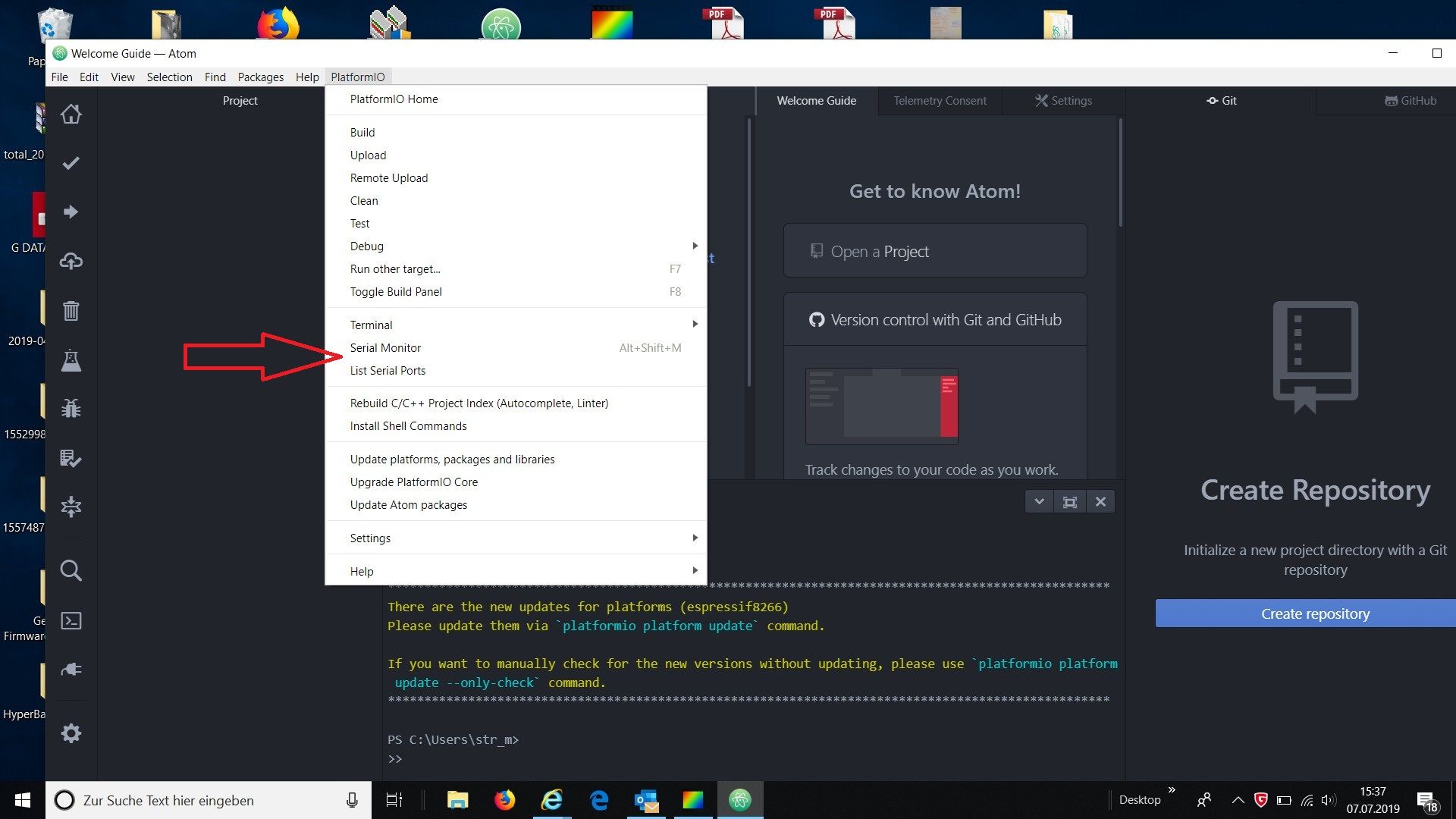
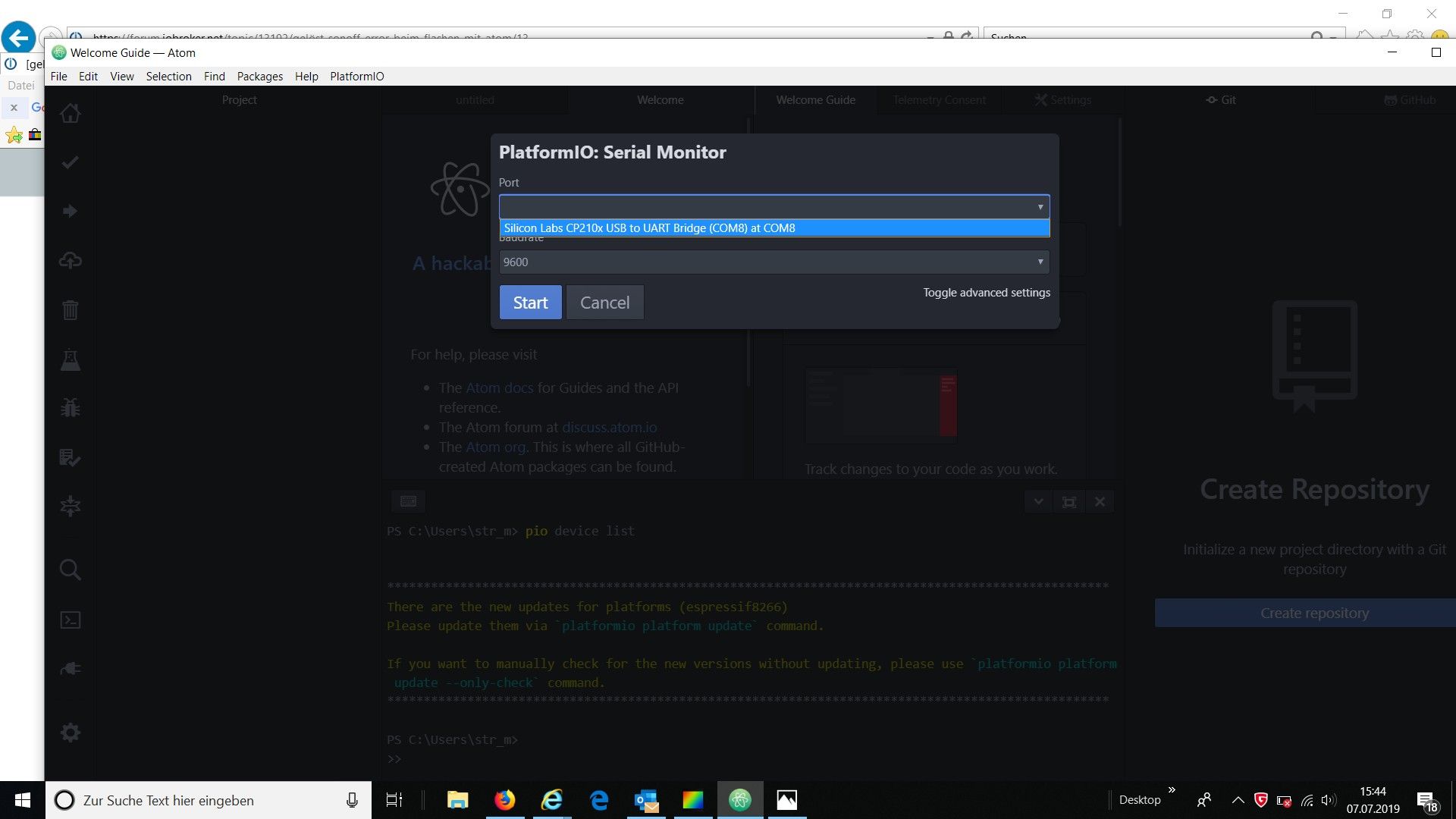
Kannst du Dir in Serial Monitor / List Serial Ports anzeigen lassen , welcher Port überhaupt vorhanden ist .
-
Beim flashen mit Atom oder VSC kommt jedes mal dieses Fehlermeldung, sowohl auf meinem PC als auch auf einem anderen PC, wo Atom und VSC neu installiert wurden.
habe bereits Atom neu installiert, die Tasmota Software neu heruntergeladen und weiß nicht weiter.> Executing task: platformio.exe run < Warning! `env_default` configuration option in section [platformio] is deprecated and will be removed in the next release! Please use `default_envs` instead Processing sonoff-DE (framework: arduino; platform: espressif8266@1.5.0; board: esp01_1m) -------------------------------------------------------------------------------------------------------------------------------------------------------------------------------------------------------------------------- Verbose mode can be enabled via `-v, --verbose` option CONFIGURATION: https://docs.platformio.org/page/boards/espressif8266/esp01_1m.html PLATFORM: Espressif 8266 1.5.0 > Espressif Generic ESP8266 ESP-01 1M HARDWARE: ESP8266 80MHz, 80KB RAM, 1MB Flash PACKAGES: toolchain-xtensa 1.40802.0 (4.8.2), tool-esptool 1.409.0 (4.9), framework-arduinoespressif8266 1.20300.1 (2.3.0) Converting sonoff.ino LDF: Library Dependency Finder -> http://bit.ly/configure-pio-ldf LDF Modes: Finder ~ chain, Compatibility ~ soft Found 52 compatible libraries Scanning dependencies... Dependency Graph |-- <ESP8266WiFi> 1.0 |-- <TasmotaModbus> 1.1.0 | |-- <TasmotaSerial> 2.3.0 ... |-- <Adafruit GFX Library> 1.2.9 | |-- <SPI> 1.0 |-- <I2Cdevlib-MPU6050> | |-- <I2Cdevlib-Core> | | |-- <Wire> 1.0 |-- <BME680_driver-bme680_v3.5.9> Compiling .pio\build\sonoff-DE\src\sonoff.ino.cpp.o Linking .pio\build\sonoff-DE\firmware.elf c:/users/pc/.platformio/packages/toolchain-xtensa/bin/../lib/gcc/xtensa-lx106-elf/4.8.2/../../../../xtensa-lx106-elf/bin/ld.exe: .pio\build\sonoff-DE\firmware.elf section `.text' will not fit in region `iram1_0_seg' collect2.exe: error: ld returned 1 exit status *** [.pio\build\sonoff-DE\firmware.elf] Error 1 =============================================================================================== [ERROR] Took 12.07 seconds =============================================================================================== ======================================================================================================= [SUMMARY] ======================================================================================================= Environment sonoff [IGNORED] Environment sonoff-minimal [IGNORED] Environment sonoff-basic [IGNORED] Environment sonoff-classic [IGNORED] Environment sonoff-knx [IGNORED] Environment sonoff-sensors [IGNORED] Environment sonoff-display [IGNORED] Environment sonoff-BG [IGNORED] Environment sonoff-BR [IGNORED] Environment sonoff-CN [IGNORED] Environment sonoff-CZ [IGNORED] Environment sonoff-DE [FAILED] Environment sonoff-ES [IGNORED] Environment sonoff-FR [IGNORED] Environment sonoff-GR [IGNORED] Environment sonoff-HE [IGNORED] Environment sonoff-HU [IGNORED]Atom funktionier bei mir garnicht mehr: bleibt bei Neuinstallation bei "Atom dependencies" hängen.
-
Beim flashen mit Atom oder VSC kommt jedes mal dieses Fehlermeldung, sowohl auf meinem PC als auch auf einem anderen PC, wo Atom und VSC neu installiert wurden.
habe bereits Atom neu installiert, die Tasmota Software neu heruntergeladen und weiß nicht weiter.> Executing task: platformio.exe run < Warning! `env_default` configuration option in section [platformio] is deprecated and will be removed in the next release! Please use `default_envs` instead Processing sonoff-DE (framework: arduino; platform: espressif8266@1.5.0; board: esp01_1m) -------------------------------------------------------------------------------------------------------------------------------------------------------------------------------------------------------------------------- Verbose mode can be enabled via `-v, --verbose` option CONFIGURATION: https://docs.platformio.org/page/boards/espressif8266/esp01_1m.html PLATFORM: Espressif 8266 1.5.0 > Espressif Generic ESP8266 ESP-01 1M HARDWARE: ESP8266 80MHz, 80KB RAM, 1MB Flash PACKAGES: toolchain-xtensa 1.40802.0 (4.8.2), tool-esptool 1.409.0 (4.9), framework-arduinoespressif8266 1.20300.1 (2.3.0) Converting sonoff.ino LDF: Library Dependency Finder -> http://bit.ly/configure-pio-ldf LDF Modes: Finder ~ chain, Compatibility ~ soft Found 52 compatible libraries Scanning dependencies... Dependency Graph |-- <ESP8266WiFi> 1.0 |-- <TasmotaModbus> 1.1.0 | |-- <TasmotaSerial> 2.3.0 ... |-- <Adafruit GFX Library> 1.2.9 | |-- <SPI> 1.0 |-- <I2Cdevlib-MPU6050> | |-- <I2Cdevlib-Core> | | |-- <Wire> 1.0 |-- <BME680_driver-bme680_v3.5.9> Compiling .pio\build\sonoff-DE\src\sonoff.ino.cpp.o Linking .pio\build\sonoff-DE\firmware.elf c:/users/pc/.platformio/packages/toolchain-xtensa/bin/../lib/gcc/xtensa-lx106-elf/4.8.2/../../../../xtensa-lx106-elf/bin/ld.exe: .pio\build\sonoff-DE\firmware.elf section `.text' will not fit in region `iram1_0_seg' collect2.exe: error: ld returned 1 exit status *** [.pio\build\sonoff-DE\firmware.elf] Error 1 =============================================================================================== [ERROR] Took 12.07 seconds =============================================================================================== ======================================================================================================= [SUMMARY] ======================================================================================================= Environment sonoff [IGNORED] Environment sonoff-minimal [IGNORED] Environment sonoff-basic [IGNORED] Environment sonoff-classic [IGNORED] Environment sonoff-knx [IGNORED] Environment sonoff-sensors [IGNORED] Environment sonoff-display [IGNORED] Environment sonoff-BG [IGNORED] Environment sonoff-BR [IGNORED] Environment sonoff-CN [IGNORED] Environment sonoff-CZ [IGNORED] Environment sonoff-DE [FAILED] Environment sonoff-ES [IGNORED] Environment sonoff-FR [IGNORED] Environment sonoff-GR [IGNORED] Environment sonoff-HE [IGNORED] Environment sonoff-HU [IGNORED]Atom funktionier bei mir garnicht mehr: bleibt bei Neuinstallation bei "Atom dependencies" hängen.
@PhilippG sagte in [gelöst] Sonoff Error beim flashen mit Atom:
Atom funktionier bei mir garnicht mehr: bleibt bei Neuinstallation bei "Atom dependencies" hängen.
https://forum.iobroker.net/topic/14734/probleme-mit-der-installation-von-atom/5
Hast du keine fertige Firmware.bin Datei , was möchtest du denn machen.
-
Beim flashen mit Atom oder VSC kommt jedes mal dieses Fehlermeldung, sowohl auf meinem PC als auch auf einem anderen PC, wo Atom und VSC neu installiert wurden.
habe bereits Atom neu installiert, die Tasmota Software neu heruntergeladen und weiß nicht weiter.> Executing task: platformio.exe run < Warning! `env_default` configuration option in section [platformio] is deprecated and will be removed in the next release! Please use `default_envs` instead Processing sonoff-DE (framework: arduino; platform: espressif8266@1.5.0; board: esp01_1m) -------------------------------------------------------------------------------------------------------------------------------------------------------------------------------------------------------------------------- Verbose mode can be enabled via `-v, --verbose` option CONFIGURATION: https://docs.platformio.org/page/boards/espressif8266/esp01_1m.html PLATFORM: Espressif 8266 1.5.0 > Espressif Generic ESP8266 ESP-01 1M HARDWARE: ESP8266 80MHz, 80KB RAM, 1MB Flash PACKAGES: toolchain-xtensa 1.40802.0 (4.8.2), tool-esptool 1.409.0 (4.9), framework-arduinoespressif8266 1.20300.1 (2.3.0) Converting sonoff.ino LDF: Library Dependency Finder -> http://bit.ly/configure-pio-ldf LDF Modes: Finder ~ chain, Compatibility ~ soft Found 52 compatible libraries Scanning dependencies... Dependency Graph |-- <ESP8266WiFi> 1.0 |-- <TasmotaModbus> 1.1.0 | |-- <TasmotaSerial> 2.3.0 ... |-- <Adafruit GFX Library> 1.2.9 | |-- <SPI> 1.0 |-- <I2Cdevlib-MPU6050> | |-- <I2Cdevlib-Core> | | |-- <Wire> 1.0 |-- <BME680_driver-bme680_v3.5.9> Compiling .pio\build\sonoff-DE\src\sonoff.ino.cpp.o Linking .pio\build\sonoff-DE\firmware.elf c:/users/pc/.platformio/packages/toolchain-xtensa/bin/../lib/gcc/xtensa-lx106-elf/4.8.2/../../../../xtensa-lx106-elf/bin/ld.exe: .pio\build\sonoff-DE\firmware.elf section `.text' will not fit in region `iram1_0_seg' collect2.exe: error: ld returned 1 exit status *** [.pio\build\sonoff-DE\firmware.elf] Error 1 =============================================================================================== [ERROR] Took 12.07 seconds =============================================================================================== ======================================================================================================= [SUMMARY] ======================================================================================================= Environment sonoff [IGNORED] Environment sonoff-minimal [IGNORED] Environment sonoff-basic [IGNORED] Environment sonoff-classic [IGNORED] Environment sonoff-knx [IGNORED] Environment sonoff-sensors [IGNORED] Environment sonoff-display [IGNORED] Environment sonoff-BG [IGNORED] Environment sonoff-BR [IGNORED] Environment sonoff-CN [IGNORED] Environment sonoff-CZ [IGNORED] Environment sonoff-DE [FAILED] Environment sonoff-ES [IGNORED] Environment sonoff-FR [IGNORED] Environment sonoff-GR [IGNORED] Environment sonoff-HE [IGNORED] Environment sonoff-HU [IGNORED]Atom funktionier bei mir garnicht mehr: bleibt bei Neuinstallation bei "Atom dependencies" hängen.
@PhilippG
Hatte ich auch und Atom nun endgültig runter geschmissen. VSC hatte auch zuerst Probleme, hab mir dann die aktuelle Version runter geladen und damit läuft es wieder. Kann auch sein, dass VSC erst noch was nach installiert und es erst beim zweiten Versuch kompiliert.

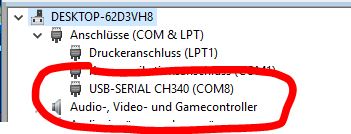

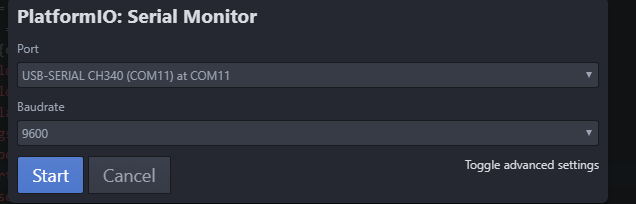
 Denn in der Systemsteuerung steht Com 10
Hey! Du scheinst an dieser Unterhaltung interessiert zu sein, hast aber noch kein Konto.
Hast du es satt, bei jedem Besuch durch die gleichen Beiträge zu scrollen? Wenn du dich für ein Konto anmeldest, kommst du immer genau dorthin zurück, wo du zuvor warst, und kannst dich über neue Antworten benachrichtigen lassen (entweder per E-Mail oder Push-Benachrichtigung). Du kannst auch Lesezeichen speichern und Beiträge positiv bewerten, um anderen Community-Mitgliedern deine Wertschätzung zu zeigen.
Mit deinem Input könnte dieser Beitrag noch besser werden 💗
Registrieren Anmelden455
Online33.0k
Benutzende83.7k
Themen1.3m
Beiträge