




Tradfri Tutorial
-
Ahh ok,
dann warte ich mal darauf.
Vielen Dank schon mal für die Unterstützung!
Ulrich
-
OK hab ich installiert im Terminal.
! root@iobrokerBosaca:/opt/iobroker/node_modules/iobroker.tradfri/node_modules/node-dtls-client# npm install
! node-aead-crypto
! npm WARN deprecated github@0.2.4: 'github' has been renamed to '@octokit/rest' (https://git.io/vNB11)
! > node-aead-crypto@1.1.4 install /opt/iobroker/node_modules/iobroker.tradfri/node_modules/node-dtls-client/
! node_modules/node-aead-crypto
! > node lib/install.js
! running default installation script
! > node-aead-crypto@1.1.4 install:default /opt/iobroker/node_modules/iobroker.tradfri/node_modules/node-dtls
! -client/node_modules/node-aead-crypto
! > node-pre-gyp install –fallback-to-build
! node-pre-gyp WARN Tried to download(404): https://github.com/AlCalzone/node-aead- ... download/v
! 1.1.4/node-v59-linux-x64.tar.gz
! node-pre-gyp WARN Pre-built binaries not found for node-aead-crypto@1.1.4 and node@9.8.0 (node-v59 ABI, gli
! bc) (falling back to source compile with node-gyp)
! make: Verzeichnis „/opt/iobroker/node_modules/iobroker.tradfri/node_modules/node-dtls-client/node_modules/
! node-aead-crypto/build“ wird betreten
! CXX(target) Release/obj.target/node_aead_crypto/src/node-aes-ccm.o
! CXX(target) Release/obj.target/node_aead_crypto/src/node-aes-gcm.o
! CXX(target) Release/obj.target/node_aead_crypto/src/addon.o
! SOLINK_MODULE(target) Release/obj.target/node_aead_crypto.node
! COPY Release/node_aead_crypto.node
! COPY /opt/iobroker/node_modules/iobroker.tradfri/node_modules/node-dtls-client/node_modules/node-aead-cry
! pto/build/Release/node-v59-linux-x64/node_aead_crypto.node
! TOUCH Release/obj.target/action_after_build.stamp
! make: Verzeichnis „/opt/iobroker/node_modules/iobroker.tradfri/node_modules/node-dtls-client/node_modules/
! node-aead-crypto/build“ wird verlassen
! + node-aead-crypto@1.1.4
! updated 1 package and audited 101 packages in 21.01s
! found 0 vulnerabilities
Lief offensichtlich ohne Fehler durch.Jetzt einfach Adapter neu starten oder neue Instanz oder wie weiter?
Ulrich
-
Hmm, immer noch der selbe Fehler oder?
! host.iobrokerBosaca 2018-06-28 21:44:12.854 error instance system.adapter.tradfri.0 terminated with code 1 ()
! Caught 2018-06-28 21:44:12.853 error by controller[0]: at Object. <anonymous>(/opt/iobroker/node_modules/iobroker.tradfri/node_modules/node-dtls-client/node_modules/node-aead-crypto/index.js:4:15)
! Caught 2018-06-28 21:44:12.852 error by controller[0]: Error: Cannot find module '/opt/iobroker/node_modules/iobroker.tradfri/node_modules/node-dtls-client/node_modules/node-aead-crypto/build/Release/node-v48-linux-x64/node_aead_crypto.
! host.iobrokerBosaca 2018-06-28 21:44:12.118 info instance system.adapter.tradfri.0 started with pid 26240
! host.iobrokerBosaca 2018-06-28 21:44:12.100 info object change system.adapter.tradfri.0
! host.iobrokerBosaca 2018-06-28 21:44:06.528 info Restart adapter system.adapter.tradfri.0 because enabled</anonymous>Edit: Nach Neustart ioBroker im log:
! host.iobrokerBosaca 2018-06-28 21:57:09.826 error instance system.adapter.tradfri.0 terminated with code 1 ()
! host.iobrokerBosaca 2018-06-28 21:57:09.826 error Caught by controller[0]: at Function.Module._load (module.js:445:3)
! host.iobrokerBosaca 2018-06-28 21:57:09.826 error Caught by controller[0]: at tryModuleLoad (module.js:453:12)
! host.iobrokerBosaca 2018-06-28 21:57:09.826 error Caught by controller[0]: at Module.load (module.js:494:32)
! host.iobrokerBosaca 2018-06-28 21:57:09.826 error Caught by controller[0]: at Object.Module._extensions..js (module.js:586:10)
! host.iobrokerBosaca 2018-06-28 21:57:09.826 error Caught by controller[0]: at Module._compile (module.js:577:32)
! host.iobrokerBosaca 2018-06-28 21:57:09.825 error Caught by controller[0]: at Object. <anonymous>(/opt/iobroker/node_modules/iobroker.tradfri/node_modules/node-dtls-client/node_modules/node-aead-crypto/index.js:4:15)
! host.iobrokerBosaca 2018-06-28 21:57:09.825 error Caught by controller[0]: at require (internal/module.js:20:19)
! host.iobrokerBosaca 2018-06-28 21:57:09.825 error Caught by controller[0]: at Module.require (module.js:504:17)
! host.iobrokerBosaca 2018-06-28 21:57:09.825 error Caught by controller[0]: at Function.Module._load (module.js:424:25)
! host.iobrokerBosaca 2018-06-28 21:57:09.825 error Caught by controller[0]: at Function.Module._resolveFilename (module.js:476:15)
! host.iobrokerBosaca 2018-06-28 21:57:09.824 error Caught by controller[0]: Error: Cannot find module '/opt/iobroker/node_modules/iobroker.tradfri/node_modules/node-dtls-client/node_modules/node-aead-crypto/build/Release/node-v48-linux-x64/node_aead_c
! host.iobrokerBosaca 2018-06-28 21:57:09.824 error Caught by controller[0]: ^
! host.iobrokerBosaca 2018-06-28 21:57:09.824 error Caught by controller[0]: throw err;
! host.iobrokerBosaca 2018-06-28 21:57:09.824 error Caught by controller[0]: module.js:478
! host.iobrokerBosaca 2018-06-28 21:57:09.082 info instance system.adapter.tradfri.0 started with pid 411</anonymous> -
Ahh, hast du vor kurzem ein NodeJS-Upgrade gemacht? Beim Kompilieren wird eine v59 erstellt (dürfte Node 10 sein?), beim Ausführen aber eine v48 gesucht.
Ich glaube da hilft nur noch die Holzhammermethode…
aus /opt/iobroker/node_modules/ die folgenden Ordner komplett löschen, wenn sie existieren:
iobroker.tradfri
node-tradfri-client
node-coap-client
node-dtls-client
node-aead-crypto
Und danach den Adapter installieren, in deinem Fall am besten direkt über die Konsole
cd /opt/iobroker npm install iobroker.tradfri --unsafe-perm -
Habe kein node update gemacht
! root@iobrokerBosaca:/opt/iobroker# node -v
! v6.14.3Step by step nach Deiner Anweisung die Ordner gelöscht, von der Konsole neu installiert
! root@iobrokerBosaca:/opt/iobroker# npm install iobroker.tradfri –unsafe-perm
! > node-dtls-client@0.5.4 install /opt/iobroker/node_modules/node-dtls-client
! > node install/postinstall.js
! node-dtls-client: testing NodeJS version
! Version < 10, installing node-aead-crypto...
! npm WARN deprecated github@0.2.4: 'github' has been renamed to '@octokit/rest' (https://git.io/vNB11)
! > node-aead-crypto@1.1.4 install /opt/iobroker/node_modules/node-dtls-client/node_modules/node-aead-crypto
! > node lib/install.js
! running default installation script
! > node-aead-crypto@1.1.4 install:default /opt/iobroker/node_modules/node-dtls-client/node_modules/node-aead
! -crypto
! > node-pre-gyp install --fallback-to-build
! node-pre-gyp WARN Tried to download(404): https://github.com/AlCalzone/node-aead- ... download/v
! 1.1.4/node-v59-linux-x64.tar.gz
! node-pre-gyp WARN Pre-built binaries not found for node-aead-crypto@1.1.4 and node@9.8.0 (node-v59 ABI, gli
! bc) (falling back to source compile with node-gyp)
! make: Verzeichnis „/opt/iobroker/node_modules/node-dtls-client/node_modules/node-aead-crypto/build“ wird b
! etreten
! CXX(target) Release/obj.target/node_aead_crypto/src/node-aes-ccm.o
! CXX(target) Release/obj.target/node_aead_crypto/src/node-aes-gcm.o
! CXX(target) Release/obj.target/node_aead_crypto/src/addon.o
! SOLINK_MODULE(target) Release/obj.target/node_aead_crypto.node
! COPY Release/node_aead_crypto.node
! COPY /opt/iobroker/node_modules/node-dtls-client/node_modules/node-aead-crypto/build/Release/node-v59-lin
! ux-x64/node_aead_crypto.node
! TOUCH Release/obj.target/action_after_build.stamp
! make: Verzeichnis „/opt/iobroker/node_modules/node-dtls-client/node_modules/node-aead-crypto/build“ wird v
! erlassen
! npm notice created a lockfile as package-lock.json. You should commit this file.
! + node-aead-crypto@1.1.4
! added 73 packages from 41 contributors and audited 103 packages in 23.899s
! found 0 vulnerabilities
! + iobroker.tradfri@1.4.1
! added 7 packages from 6 contributors and audited 4084 packages in 90.886s
! found 83 vulnerabilities (43 low, 29 moderate, 11 high)
! runnpm audit fixto fix them, ornpm auditfor detailsDas log zeigt
! host.iobrokerBosaca 2018-06-29 16:33:45.649 error instance system.adapter.tradfri.0 terminated with code 1 ()
! Caught 2018-06-29 16:33:45.648 error by controller[0]: at Function.Module._load (module.js:445:3)
! Caught 2018-06-29 16:33:45.648 error by controller[0]: at tryModuleLoad (module.js:453:12)
! Caught 2018-06-29 16:33:45.648 error by controller[0]: at Module.load (module.js:494:32)
! Caught 2018-06-29 16:33:45.648 error by controller[0]: at Object.Module._extensions..js (module.js:586:10)
! Caught 2018-06-29 16:33:45.648 error by controller[0]: at Module._compile (module.js:577:32)
! Caught 2018-06-29 16:33:45.648 error by controller[0]: at Object. <anonymous>(/opt/iobroker/node_modules/node-dtls-client/node_modules/node-aead-crypto/index.js:4:15)
! Caught 2018-06-29 16:33:45.648 error by controller[0]: at require (internal/module.js:20:19)
! Caught 2018-06-29 16:33:45.648 error by controller[0]: at Module.require (module.js:504:17)
! Caught 2018-06-29 16:33:45.648 error by controller[0]: at Function.Module._load (module.js:424:25)
! Caught 2018-06-29 16:33:45.647 error by controller[0]: at Function.Module._resolveFilename (module.js:476:15)
! Caught 2018-06-29 16:33:45.647 error by controller[0]: Error: Cannot find module '/opt/iobroker/node_modules/node-dtls-client/node_modules/node-aead-crypto/build/Release/node-v48-linux-x64/node_aead_crypto.node'
! Caught 2018-06-29 16:33:45.647 error by controller[0]: ^
! Caught 2018-06-29 16:33:45.647 error by controller[0]: throw err;
! Caught 2018-06-29 16:33:45.647 error by controller[0]: module.js:478
! host.iobrokerBosaca 2018-06-29 16:33:44.915 info instance system.adapter.tradfri.0 started with pid 17958</anonymous>Ich hoffe Du bist nicht genauso gefrustet wie ich

Ulrich
Edit: nach Neustart des Docker Containers im log:
! host.iobrokerBosaca 2018-06-29 18:05:02.698 error instance system.adapter.tradfri.0 terminated with code 1 ()
! host.iobrokerBosaca 2018-06-29 18:05:01.959 info instance system.adapter.tradfri.0 started with pid 1569
! host.iobrokerBosaca 2018-06-29 18:05:01.941 info object change system.adapter.tradfri.0
! host.iobrokerBosaca 2018-06-29 18:05:00.603 info Restart adapter system.adapter.tradfri.0 because enabled -
Wie kann ich das feststellen/beseitigen?
wenn ich versuche upzudaten kommt
! root@iobrokerBosaca:/opt/iobroker# apt-get install -y nodejs
! Paketlisten werden gelesen… Fertig
! Abhängigkeitsbaum wird aufgebaut.
! Statusinformationen werden eingelesen.... Fertig
! nodejs ist schon die neueste Version (6.14.3-1nodesource1).
! 0 aktualisiert, 0 neu installiert, 0 zu entfernen und 3 nicht aktualisiert. -
Es sollte erst einmal festgestellt werden, wo welche Version von node.js installiert ist.
ls -l /usr/bin/node*
/usr/bin/node -v
ls -l /usr/local/bin/node*
/usr/local/bin/node -v
und mit welcher Version ioBroker beim Boot automatisch gestartet wird: Datei /etc/init.d/iobroker.sh, Zeile 13 so ?
NODECMD=/usr/bin/node -
Ich freue mich total, dass ich noch einen Tip bekomme.
Diese Woche bin ich ortsabwesend und kann daher erst nach meiner Rückkehr Deine Hinweise abarbeiten, dann aber sehr gerne!
Ich melde mich dann.
Ulrich
Gesendet von meinem T1-A21L mit Tapatalk
-
Hallo zusammen,
ich hätte eine Verständnisfrage oder besser gesagt ein kleines Problem mit folgender Konstellation:
-
Raspi 3 mit ioBroker und VIS sowie Cloudadapter für Alexa
-
Tradfri Gateway mit mehreren Tradfri Lampen sowie normalen Gruppen (aus der App) bzw Virtuellen Gruppen
-
dazu einen Echo Plus sowie einen Echo Show.
Wenn ich nun mittels Alexa oder VIS die Gruppen ausschalte und sie anschließend wieder normal mit dem Schalter einschalten will werden sie immer auf eine Brightness von 0,4% gestellt. Das wieder einschalten per Schalter ist einmal normal ausschalten (Tradfri Stromlos) und anschließend wieder auf ein und mit Strom versorgen. Gibt es hier irgendwo eine Definition welche Brightness die Lampen haben, wenn sie wieder normal mit Strom versorgt werden?
Bin ehrlich gesagt ein wenig ratlos. Wenn ich das Licht mittels VIS oder Alexa normal Einschalte ohne es zuvor am Schalter auszuschalten funktioniert alles wie es soll wobei hier der Cloudadapter bei "An" automatisch eine Brightness von 100% definiert. Das Problem besteht wirklich nur sobald das Licht über den Schalter wieder eingeschaltet werden soll und vorher über VIS bzw Alexa ausgeschaltet wurde.
Vielen Dank für Eure Hilfe
-
-
Die Tradfri sollten NIE stromlos sein, sondern nur über die Fernbedienung oder das Gateway geschaltet werden.
Nach stromlos einschalten befinden die sich im bootmodus eingeschaltet (also auch nach Stromausfall gehen die Lampen bei Stromwiederkehr an).
Ulrich
Gesendet von meinem SM-J700H mit Tapatalk
-
Mir ist das ja bewusst allerdings den kleinen Damen im Hause nicht. Hier wird halt leider immernoch benötigt das die Lampen auch mit einem normalen Wippenschalter ein und ausgeschaltet werden können, was auch ohne weiteres geht solang die Brightness zuvor nicht per Alexa oder VIS auf 0% geregelt wird.
-
Je nach baulicher Gegebenheit könntest du den Schalter überbrücken, so dass die tradfri dauernd Spannung haben.
Darüber hinaus könntest du dann mit dem Schalter (nachdem er ggf. gegen einen Taster getauscht wurde) über Sonoff oder Homematic und iobroker die tradfry zusätzlich über den Taster betätigen.
Gesendet von meinem SM-J700H mit Tapatalk
-
Es sollte erst einmal festgestellt werden, wo welche Version von node.js installiert ist.
ls -l /usr/bin/node*
/usr/bin/node -v
ls -l /usr/local/bin/node*
/usr/local/bin/node -v
und mit welcher Version ioBroker beim Boot automatisch gestartet wird: Datei /etc/init.d/iobroker.sh, Zeile 13 so ?
NODECMD=/usr/bin/node ```` `Am Terminal bekomme ich
! root@iobrokerBosaca:/opt/iobroker# ls -l /usr/bin/node*
! -rwxr-xr-x 1 root root 25379760 Jun 13 01:59 /usr/bin/node
! lrwxrwxrwx 1 root root 24 Jun 18 03:35 /usr/bin/nodejs -> /etc/alternatives/nodejs
! root@iobrokerBosaca:/opt/iobroker# /usr/bin/node -v
! v6.14.3
! root@iobrokerBosaca:/opt/iobroker# ls -l /usr/local/bin/node*
! ls: Zugriff auf '/usr/local/bin/node*' nicht möglich: Datei oder Verzeichnis nicht gefunden
! root@iobrokerBosaca:/opt/iobroker# /usr/local/bin/node -v
! bash: /usr/local/bin/node: Datei oder Verzeichnis nicht gefundenBei mir läuft ioBroker im Docker-container, habe/finde daher keine init.d.
Gestartet wird der Container mit
node node_modules/iobroker.js-controller/controller.js >/opt/scripts/docker_iobroker_log.txt 2>&1 &
wenn ich den js-controller von Hand starte bekomme ich
! root@iobrokerBosaca:/opt/iobroker# node node_modules/iobroker.js-controller/controller.js
! host.iobrokerBosaca check instance "system.adapter.admin.0" for host "iobrokerBosaca"
! host.iobrokerBosaca check instance "system.adapter.hm-rpc.0" for host "iobrokerBosaca"
! host.iobrokerBosaca check instance "system.adapter.hm-rega.0" for host "iobrokerBosaca"
! host.iobrokerBosaca check instance "system.adapter.web.0" for host "iobrokerBosaca"
! host.iobrokerBosaca check instance "system.adapter.vis.0" for host "iobrokerBosaca"
! host.iobrokerBosaca check instance "system.adapter.vis-hqwidgets.0" for host "iobrokerBosaca"
! host.iobrokerBosaca check instance "system.adapter.vis-timeandweather.0" for host "iobrokerBosaca"
! host.iobrokerBosaca check instance "system.adapter.vis-metro.0" for host "iobrokerBosaca"
! host.iobrokerBosaca check instance "system.adapter.hm-rpc.1" for host "iobrokerBosaca"
! host.iobrokerBosaca check instance "system.adapter.hm-rpc.2" for host "iobrokerBosaca"
! host.iobrokerBosaca check instance "system.adapter.nut.0" for host "iobrokerBosaca"
! host.iobrokerBosaca check instance "system.adapter.tr-064.0" for host "iobrokerBosaca"
! host.iobrokerBosaca check instance "system.adapter.ical.0" for host "iobrokerBosaca"
! host.iobrokerBosaca check instance "system.adapter.node-red.0" for host "iobrokerBosaca"
! host.iobrokerBosaca check instance "system.adapter.javascript.0" for host "iobrokerBosaca"
! host.iobrokerBosaca check instance "system.adapter.dwd.0" for host "iobrokerBosaca"
! host.iobrokerBosaca check instance "system.adapter.ping.0" for host "iobrokerBosaca"
! host.iobrokerBosaca check instance "system.adapter.feiertage.0" for host "iobrokerBosaca"
! host.iobrokerBosaca check instance "system.adapter.samsung.0" for host "iobrokerBosaca"
! host.iobrokerBosaca check instance "system.adapter.rpi2.0" for host "iobrokerBosaca"
! host.iobrokerBosaca check instance "system.adapter.fritzdect.0" for host "iobrokerBosaca"
! host.iobrokerBosaca check instance "system.adapter.vis-jqui-mfd.0" for host "iobrokerBosaca"
! host.iobrokerBosaca check instance "system.adapter.sql.0" for host "iobrokerBosaca"
! host.iobrokerBosaca check instance "system.adapter.email.0" for host "iobrokerBosaca"
! host.iobrokerBosaca check instance "system.adapter.tvspielfilm.0" for host "iobrokerBosaca"
! host.iobrokerBosaca check instance "system.adapter.javascript.1" for host "iobrokerBosaca"
! host.iobrokerBosaca check instance "system.adapter.broadlink2.0" for host "iobrokerBosaca"
! host.iobrokerBosaca check instance "system.adapter.ham.0" for host "iobrokerBosaca"
! host.iobrokerBosaca check instance "system.adapter.tradfri.0" for host "iobrokerBosaca"
! Send diag info: {"uuid":"ab265f4a-67f9-a46a-c0b2-61e4b95cefe5","language":"de","hosts":[{"version":"1.4.2",
! "platform":"Javascript/Node.js","type":"linux"}],"node":"v6.14.3","arch":"x64","adapters":{"admin":{"versio
! n":"3.4.6","platform":"Javascript/Node.js"},"hm-rpc":{"version":"1.6.0","platform":"Javascript/Node.js"},"h
! m-rega":{"version":"1.7.0","platform":"Javascript/Node.js"},"web":{"version":"2.1.9","platform":"Javascript
! /Node.js"},"vis":{"version":"1.1.2","platform":"Javascript/Node.js"},"vis-hqwidgets":{"version":"1.1.1","pl
! atform":"Javascript/Node.js"},"vis-timeandweather":{"version":"1.1.7","platform":"Javascript/Node.js"},"vis
! -metro":{"version":"1.1.2","platform":"Javascript/Node.js"},"nut":{"version":"1.1.3","platform":"Javascript
! /Node.js"},"tr-064":{"version":"0.4.14","platform":"Javascript/Node.js"},"icons-mfd-png":{"version":"1.0.2"
! ,"platform":"javascript/Node.js"},"icons-ultimate-png":{"version":"1.0.1","platform":"javascript/Node.js"},
! "ical":{"version":"1.5.2","platform":"Javascript/Node.js"},"node-red":{"version":"1.5.1","platform":"Javasc
! ript/Node.js"},"javascript":{"version":"3.6.4","platform":"Javascript/Node.js"},"dwd":{"version":"2.2.2","p
! latform":"javascript/Node.js"},"history":{"version":"1.7.2","platform":"Javascript/Node.js"},"ping":{"versi
! on":"1.3.2","platform":"Javascript/Node.js"},"feiertage":{"version":"1.0.0","platform":"javascript/Node.js"
! },"samsung":{"version":"0.2.9","platform":"Javascript/Node.js"},"rpi2":{"version":"0.3.2","platform":"javas
! cript/Node.js"},"fritzdect":{"version":"0.1.1","platform":"Javascript/Node.js"},"vis-jqui-mfd":{"version":"
! 1.0.11","platform":"Javascript/Node.js"},"sql":{"version":"1.8.0","platform":"Javascript/Node.js"},"flot":{
! "version":"1.7.9","platform":"javascript/Node.js"},"email":{"version":"1.0.4","platform":"Javascript/Node.j
! s"},"tvspielfilm":{"version":"1.0.4","platform":"javascript/Node.js"},"broadlink2":{"version":"1.8.0","plat
! form":"Javascript/Node.js"},"ham":{"version":"0.4.2","platform":"Javascript/Node.js"},"tradfri":{"version":
! "1.4.1","platform":"Javascript/Node.js"}},"model":"Intel(R) Celeron(R) CPU N3160 @ 1.60GHz","cpus":4,"mem
! ":8287760384,"ostype":"Linux","vis":594}
! Cannot find module 'pg-native'Hilft das weiter zu Fehlersuche?
-
Am Terminal bekomme ich `
Das sieht doch gut aus: Offenbar existiert node.js nur in der Version 6.14.3.Woher dann diese Meldung kommt, ist rätselhaft:Pre-built binaries not found for node-aead-crypto@1.1.4 and node@9.8.0Mit Docker kenne ich mich nicht aus. Gibt es im Suchpfad noch weitere Verzeichnisse, in denen sich eine weitere Node-Version verstecken könnte ?
Funktioniert etwas in ioBroker nicht ?
-
Am Terminal bekomme ich `
Das sieht doch gut aus: Offenbar existiert node.js nur in der Version 6.14.3.Woher dann diese Meldung kommt, ist rätselhaft:Pre-built binaries not found for node-aead-crypto@1.1.4 and node@9.8.0Mit Docker kenne ich mich nicht aus. Gibt es im Suchpfad noch weitere Verzeichnisse, in denen sich eine weitere Node-Version verstecken könnte ?
Funktioniert etwas in ioBroker nicht ? `
Also im ioBroker funktioniert alles bis auf den Tradfri.
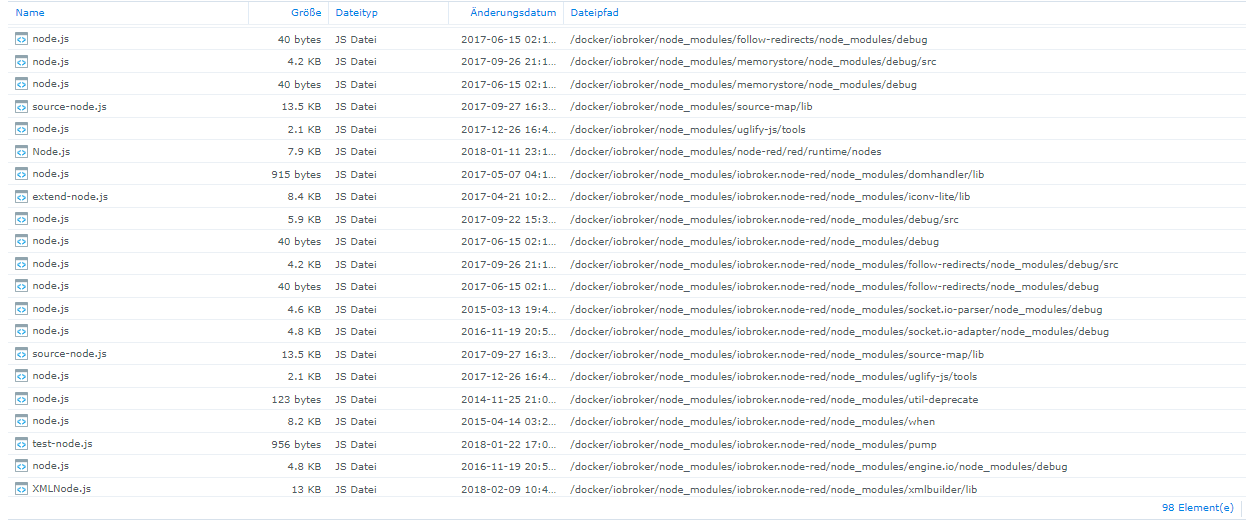
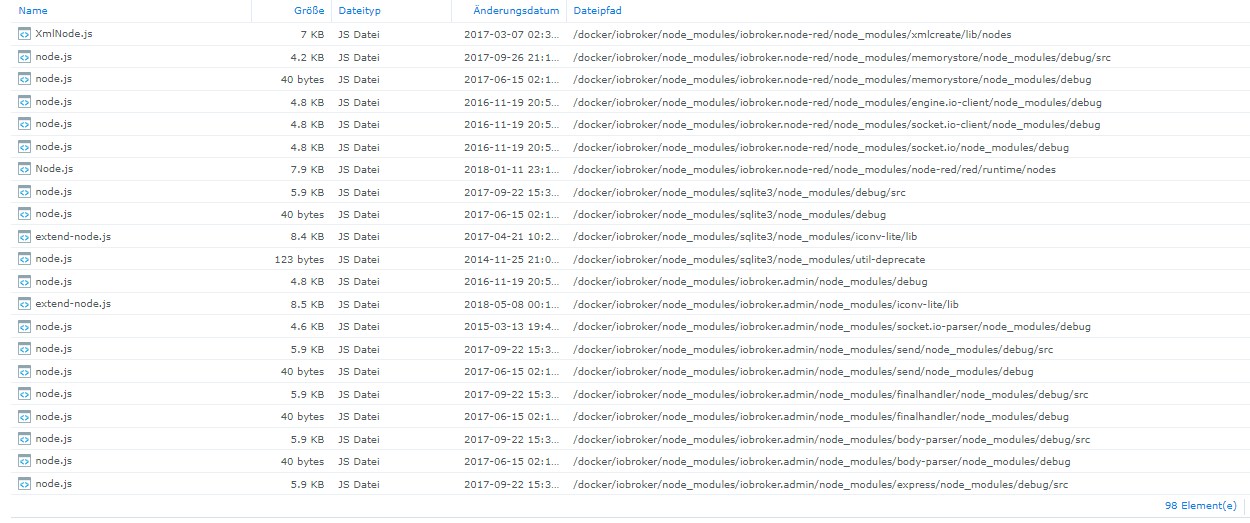
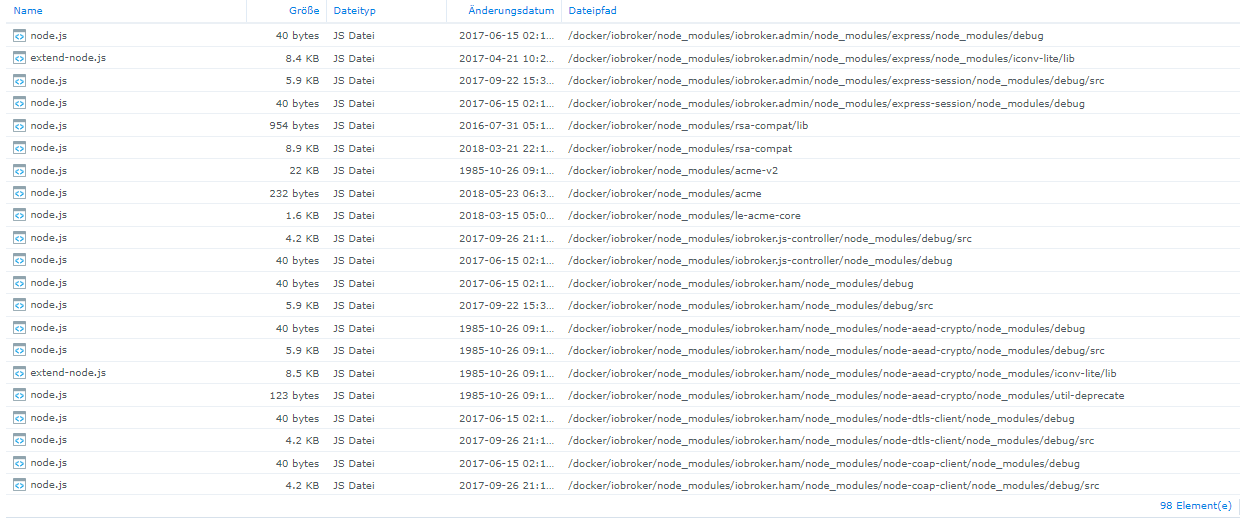
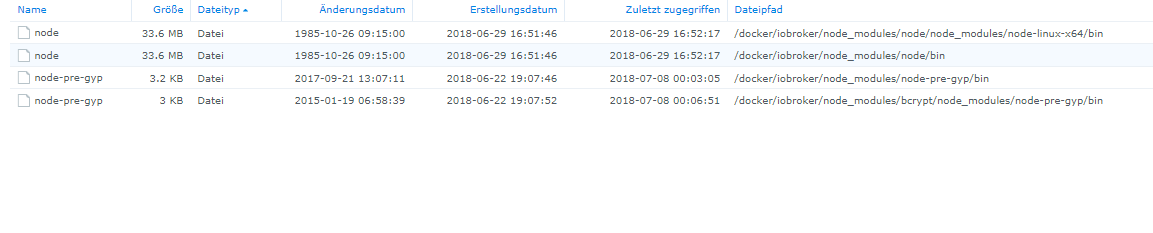
Eine Suche nach node.js ergibt

-


Hey! Du scheinst an dieser Unterhaltung interessiert zu sein, hast aber noch kein Konto.
Hast du es satt, bei jedem Besuch durch die gleichen Beiträge zu scrollen? Wenn du dich für ein Konto anmeldest, kommst du immer genau dorthin zurück, wo du zuvor warst, und kannst dich über neue Antworten benachrichtigen lassen (entweder per E-Mail oder Push-Benachrichtigung). Du kannst auch Lesezeichen speichern und Beiträge positiv bewerten, um anderen Community-Mitgliedern deine Wertschätzung zu zeigen.
Mit deinem Input könnte dieser Beitrag noch besser werden 💗
Registrieren Anmelden164
Online33.0k
Benutzende83.7k
Themen1.3m
Beiträge