




Test Adapter Midea Geräten v1.x.x


-
da ich der Fraktion "Ich bin froh wenn alles funktioniert" angehöre, bin ich nicht sicher wie ich das ganze anstellen soll. Mein iobroker läuft in einer VM in der Synology.
Kann ich eine 2te VM machen und das Betriebssystem installieren danach iobroker.Oder gint es eine Möglichkeit zum Update des Betriebssystems?
@Holger-Etzel
Daraus darf aber nicht das dämliche 'never tatsch irgendwas again' folgen.
Du musst deine Kisten immer im Supportfenster halten. Im optimalen Fall also alle zwei Jahre das Zeug auf die dann aktuelle Version hieven. Gilt für Debian wie für Schnubbibuntu LTS gleichermaßen. -
@Holger-Etzel
Daraus darf aber nicht das dämliche 'never tatsch irgendwas again' folgen.
Du musst deine Kisten immer im Supportfenster halten. Im optimalen Fall also alle zwei Jahre das Zeug auf die dann aktuelle Version hieven. Gilt für Debian wie für Schnubbibuntu LTS gleichermaßen.lässt sich Debian leichter bedienen als Ubuntu, oder warum schwört jeder auf Debian. Sorry für meine blöde Frage, ich kenne es halt nicht
-
lässt sich Debian leichter bedienen als Ubuntu, oder warum schwört jeder auf Debian. Sorry für meine blöde Frage, ich kenne es halt nicht
Ubuntu ist von Debian abgeleitet (und in meinen Augen die schlechtere Kopie).
Auf der Kommandozeile bedient sich das aber weitestgehend gleich.
Über Desktop-Umgebungen sprechen wir im Server-Betrieb ja erst gar nicht, weil Server nie eine graphische Oberfläche haben. -
hallo, ich versuche den Midea-Adapter zu installieren. Bekomme dann die Meldung, das ich Python 3.8 installieren soll. Wie installiert mal Python, und vor allem wo. Ich ahbe schon ein paar Versuche hinter mit und bekomme es nicht hin.
$ iobroker url TA2k/ioBroker.midea --host raspberry --debug

install TA2k/ioBroker.midea

NPM version: 10.9.7

Installing TA2k/ioBroker.midea... (System call)

npm error code 1

npm error git dep preparation failed

npm error command /usr/bin/node /usr/lib/node_modules/npm/bin/npm-cli.js install --force --cache=/home/iobroker/.npm --prefer-offline=false --prefer-online=false --offline=false --no-progress --no-save --no-audit --include=dev --include=peer --include=optional --no-package-lock-only --no-dry-runnpm error > esbuild@0.11.23 postinstallnpm error > node install.jsnpm errornpm errornpm error > iobroker.midea@0.1.0 postinstallnpm error > node ./pythonPackages.jsnpm errornpm errornpm error Start Python package installationnpm errornpm error Python 3 not found. Please install minimum python 3.8npm error npm warn using --force Recommended protections disabled.npm error npm warn deprecated @humanwhocodes/config-array@0.13.0: Use @eslint/config-array insteadnpm error npm warn deprecated @humanwhocodes/object-schema@2.0.3: Use @eslint/object-schema insteadnpm error npm warn deprecated glob@10.5.0: Old versions of glob are not supported, and contain widely publicized security vulnerabilities, which have been fixed in the current version. Please update. Support for old versions may be purchased (at exorbitant rates) by contacting i@izs.menpm error npm warn deprecated eslint@8.57.1: This version is no longer supported. Please see https://eslint.org/version-support for other options.npm error /bin/sh: 1: python3: not foundnpm error npm error code 1npm error npm error path /home/iobroker/.npm/_cacache/tmp/git-clonei3tMNdnpm error npm error command failednpm error npm error command sh -c node ./pythonPackages.jsnpm error npm error A complete log of this run can be found in: /home/iobroker/.npm/_logs/2026-05-18T18_18_38_166Z-debug-0.log

host.raspberry Cannot install TA2k/ioBroker.midea: 1

ERROR: Process exited with code 25
MOD-EDIT: Code in code-tags gesetzt!
@Holger-Etzel das mit dem python wird aber nicht richtig funktionieren.. ich werde es wohl nochmal umschreiben aber brauch jemand zum testen via email tombox2020@gmail.com
-
@Holger-Etzel das mit dem python wird aber nicht richtig funktionieren.. ich werde es wohl nochmal umschreiben aber brauch jemand zum testen via email tombox2020@gmail.com
Ja, ändere es dahingehend, das es richtig in einem ENV läuft.
Die obige Installation musste ich etwas dreckig machen... -
lässt sich Debian leichter bedienen als Ubuntu, oder warum schwört jeder auf Debian. Sorry für meine blöde Frage, ich kenne es halt nicht
@Holger-Etzel ist jetzt alles wieder native nodejs.. bitte mal testen
-
lässt sich Debian leichter bedienen als Ubuntu, oder warum schwört jeder auf Debian. Sorry für meine blöde Frage, ich kenne es halt nicht
@Holger-Etzel als Otto-Normal-Benutzer der Server-Version ohne GUI, also maximal in der Bash unterwegs wirst du Unterschiede mit der Lupe suchen müssen.
Debian besteht komplett aus freier Software, also ohne proprietäre Treiber oder Programme wie z.B. Grafikkartentreiber.
Ubuntu integriert bei Bedarf eben diese Treiber und Programme wenn diese benötigt werden.Bedienen lässt sich beides gleich. Wenn ich für etwas keine Anleitung für Ubuntu finde, nehme ich eben die von Debian.
Ubuntu basiert auf Debian, hat aber z.B. seine eigenen Kernel.
Die Wahrheit liegt wie immer in der Mitte - Proxmox basiert z.B. Debian, nutzt aber den Ubuntu-Kernel.Im Gewerblichen Umfeld interessant: Bei Ubuntu kann man direkt bei Canonical (der Firma dahinter) Support einkaufen, bei Debian gibt es so etwas nicht direkt. Weshalb es innerhalb von Appliances steckt, z.B. in Everpure-Storagesystemen (ehemals Pure Storage)
Ein Unterschied bei den Nutzern von Ubuntu ist, das diese sich nicht negativ über Debian äußern, Debianer aber gerne über Ubuntu herziehen weil es ja nur abgeleitet ist und nicht das Original ist.
Wie auch über die 51 anderen bekannten Linux-Distributionen die auf Debian basieren: https://de.wikipedia.org/wiki/Kategorie:Debian-basierte_Linux-DistributionAlso: Kein Problem, nimm was du meinst, du wirst zurecht kommen.
ioBroker@Ubuntu 24.04 LTS (Proxmox VM) für: >260 Geräte, 6 Switche, 7 AP, 10 IP-Cam, 1 NAS 42TB, 1 Proxmox 128GB 15TB, 2 Proxmox 32GB 1TB, 1 Hyper-V 52GB 42TB, 14 x Echo, 5x FireTV, 5 x Tablett/Handy VIS || >=160 Tasmota/Shelly || >=95 ZigBee || PV 8.1kW / Akku 14kWh || 2x USV APC 750W kaskadiert || Kobra S1 Max
-
@Holger-Etzel als Otto-Normal-Benutzer der Server-Version ohne GUI, also maximal in der Bash unterwegs wirst du Unterschiede mit der Lupe suchen müssen.
Debian besteht komplett aus freier Software, also ohne proprietäre Treiber oder Programme wie z.B. Grafikkartentreiber.
Ubuntu integriert bei Bedarf eben diese Treiber und Programme wenn diese benötigt werden.Bedienen lässt sich beides gleich. Wenn ich für etwas keine Anleitung für Ubuntu finde, nehme ich eben die von Debian.
Ubuntu basiert auf Debian, hat aber z.B. seine eigenen Kernel.
Die Wahrheit liegt wie immer in der Mitte - Proxmox basiert z.B. Debian, nutzt aber den Ubuntu-Kernel.Im Gewerblichen Umfeld interessant: Bei Ubuntu kann man direkt bei Canonical (der Firma dahinter) Support einkaufen, bei Debian gibt es so etwas nicht direkt. Weshalb es innerhalb von Appliances steckt, z.B. in Everpure-Storagesystemen (ehemals Pure Storage)
Ein Unterschied bei den Nutzern von Ubuntu ist, das diese sich nicht negativ über Debian äußern, Debianer aber gerne über Ubuntu herziehen weil es ja nur abgeleitet ist und nicht das Original ist.
Wie auch über die 51 anderen bekannten Linux-Distributionen die auf Debian basieren: https://de.wikipedia.org/wiki/Kategorie:Debian-basierte_Linux-DistributionAlso: Kein Problem, nimm was du meinst, du wirst zurecht kommen.
Debianer aber gerne über Ubuntu herziehen weil es ja nur abgeleitet ist und nicht das Original ist.
Nein, nicht weil es auf Debian basiert kritisiere ich Ubuntu, sondern wegen deren mehr als seltsamen Entscheidungen und ihrem komischen Sonderstrick (z. B. snap) in der Vergangnenheit, der dann meist auch nach relativ kurzer Zeit wieder eingestellt wurde.
Debian besteht komplett aus freier Software, also ohne proprietäre Treiber oder Programme wie z.B. Grafikkartentreiber.
Das stimmt so auch nicht. Frag mal die Leute von
https://libre.debian.net/ -
@Holger-Etzel als Otto-Normal-Benutzer der Server-Version ohne GUI, also maximal in der Bash unterwegs wirst du Unterschiede mit der Lupe suchen müssen.
Debian besteht komplett aus freier Software, also ohne proprietäre Treiber oder Programme wie z.B. Grafikkartentreiber.
Ubuntu integriert bei Bedarf eben diese Treiber und Programme wenn diese benötigt werden.Bedienen lässt sich beides gleich. Wenn ich für etwas keine Anleitung für Ubuntu finde, nehme ich eben die von Debian.
Ubuntu basiert auf Debian, hat aber z.B. seine eigenen Kernel.
Die Wahrheit liegt wie immer in der Mitte - Proxmox basiert z.B. Debian, nutzt aber den Ubuntu-Kernel.Im Gewerblichen Umfeld interessant: Bei Ubuntu kann man direkt bei Canonical (der Firma dahinter) Support einkaufen, bei Debian gibt es so etwas nicht direkt. Weshalb es innerhalb von Appliances steckt, z.B. in Everpure-Storagesystemen (ehemals Pure Storage)
Ein Unterschied bei den Nutzern von Ubuntu ist, das diese sich nicht negativ über Debian äußern, Debianer aber gerne über Ubuntu herziehen weil es ja nur abgeleitet ist und nicht das Original ist.
Wie auch über die 51 anderen bekannten Linux-Distributionen die auf Debian basieren: https://de.wikipedia.org/wiki/Kategorie:Debian-basierte_Linux-DistributionAlso: Kein Problem, nimm was du meinst, du wirst zurecht kommen.
-
@BananaJoe Der Adapter wurde komplett neu geschrieben bitte testen ob er noch funktioniert
@tombox Anmeldung klappt nicht.
Ich nutze dieNetHome PlusApp, Passwort ist richtig! Gerade mit der App kontrolliert und im Adapter neu gesetzt:2026-05-19 11:53:41.900 - info: host.iobroker instance system.adapter.midea.0 in version "1.3.0" (non-npm: TA2k/ioBroker.midea) started with pid 29112 2026-05-19 11:53:42.930 - info: midea.0 (29112) starting. Version 1.3.0 (non-npm: TA2k/ioBroker.midea) in /opt/iobroker/node_modules/iobroker.midea, node: v22.22.2, js-controller: 7.1.2 2026-05-19 11:53:47.981 - info: midea.0 (29112) LAN discovery found 2 appliance(s) 2026-05-19 11:53:48.468 - warn: midea.0 (29112) Could not fetch token/key for 145135534971917: CloudClient: Account or password incorrect, please re-enter (code=3102) — the device is offline in the cloud account, or the credentials in the adapter config are wrong. 2026-05-19 11:53:48.888 - warn: midea.0 (29112) Could not fetch token/key for 144036023343615: CloudClient: Account or password incorrect, please re-enter (code=3102) — the device is offline in the cloud account, or the credentials in the adapter config are wrong. 2026-05-19 11:53:49.195 - warn: midea.0 (29112) Cloud listAppliances failed: CloudClient: Account or password incorrect, please re-enter (code=3102)Hier als Debug:
2026-05-19 11:58:12.264  - info: host.iobroker "system.adapter.midea.0" enabled
2026-05-19 11:58:13.059  - info: host.iobroker instance system.adapter.midea.0 in version "1.3.0" (non-npm: TA2k/ioBroker.midea) started with pid 30124
2026-05-19 11:58:13.620  - debug: midea.0 (30124) Redis Objects: Use Redis connection: 0.0.0.0:9001
2026-05-19 11:58:14.645  - debug: midea.0 (30124) Objects client ready ... initialize now
2026-05-19 11:58:14.647  - debug: midea.0 (30124) Objects create System PubSub Client
2026-05-19 11:58:14.647  - debug: midea.0 (30124) Objects create User PubSub Client
2026-05-19 11:58:14.811  - debug: midea.0 (30124) Objects client initialize lua scripts
2026-05-19 11:58:14.820  - debug: midea.0 (30124) Objects connected to redis: 0.0.0.0:9001
2026-05-19 11:58:14.902  - debug: midea.0 (30124) Redis States: Use Redis connection: 127.0.0.1:6379
2026-05-19 11:58:14.910  - debug: midea.0 (30124) States create System PubSub Client
2026-05-19 11:58:14.911  - debug: midea.0 (30124) States create User PubSub Client
2026-05-19 11:58:14.915  - debug: midea.0 (30124) States connected to redis: 127.0.0.1:6379
2026-05-19 11:58:15.397  - info: midea.0 (30124) starting. Version 1.3.0 (non-npm: TA2k/ioBroker.midea) in /opt/iobroker/node_modules/iobroker.midea, node: v22.22.2, js-controller: 7.1.2
2026-05-19 11:58:15.414  - debug: midea.0 (30124) Schedule restart: 1 4,13 * * *
2026-05-19 11:58:16.461  - debug: midea.0 (30124) Midea adapter starting up, poll interval=30 s
2026-05-19 11:58:16.462  - debug: midea.0 (30124) discover: starting UDP broadcast target=255.255.255.255 timeoutMs=5000
2026-05-19 11:58:16.543  - debug: midea.0 (30124) discover: 192.168.1.30 -> id=145135534971917 type=0xac (ac) v3=true
2026-05-19 11:58:16.551  - debug: midea.0 (30124) discover: 192.168.1.29 -> id=144036023343615 type=0xac (ac) v3=true
2026-05-19 11:58:21.463  - debug: midea.0 (30124) discover: finished, 2 appliance(s)
2026-05-19 11:58:21.464  - info: midea.0 (30124) LAN discovery found 2 appliance(s)
2026-05-19 11:58:21.564  - debug: midea.0 (30124) CloudClient: POST /v1/user/login/id/get bodyLen=205 hasToken=false
2026-05-19 11:58:22.260  - debug: midea.0 (30124) CloudClient: /v1/user/login/id/get reply code=3102 msg=Account or password incorrect, please re-enter
2026-05-19 11:58:22.260  - warn: midea.0 (30124) Could not fetch token/key for 145135534971917: CloudClient: Account or password incorrect, please re-enter (code=3102) — the device is offline in the cloud account, or the credentials in the adapter config are wrong.
2026-05-19 11:58:22.367  - debug: midea.0 (30124) CloudClient: POST /v1/user/login/id/get bodyLen=205 hasToken=false
2026-05-19 11:58:22.684  - debug: midea.0 (30124) CloudClient: /v1/user/login/id/get reply code=3102 msg=Account or password incorrect, please re-enter
2026-05-19 11:58:22.684  - warn: midea.0 (30124) Could not fetch token/key for 144036023343615: CloudClient: Account or password incorrect, please re-enter (code=3102) — the device is offline in the cloud account, or the credentials in the adapter config are wrong.
2026-05-19 11:58:22.684  - debug: midea.0 (30124) CloudClient: POST /v1/user/login/id/get bodyLen=205 hasToken=false
2026-05-19 11:58:22.993  - debug: midea.0 (30124) CloudClient: /v1/user/login/id/get reply code=3102 msg=Account or password incorrect, please re-enter
2026-05-19 11:58:22.993  - warn: midea.0 (30124) Cloud listAppliances failed: CloudClient: Account or password incorrect, please re-enter (code=3102)
Die alte Version 0.0.7 konnte zwar nicht schalten, aber die Werte abfragen
Edit: Passende Tokens für die Geräte für den lokalen Zugriff hätte ich sogar, kann man die manuell setzen?
-
Und im Objekte-Baum habe ich die Anlagen jetzt 2x:
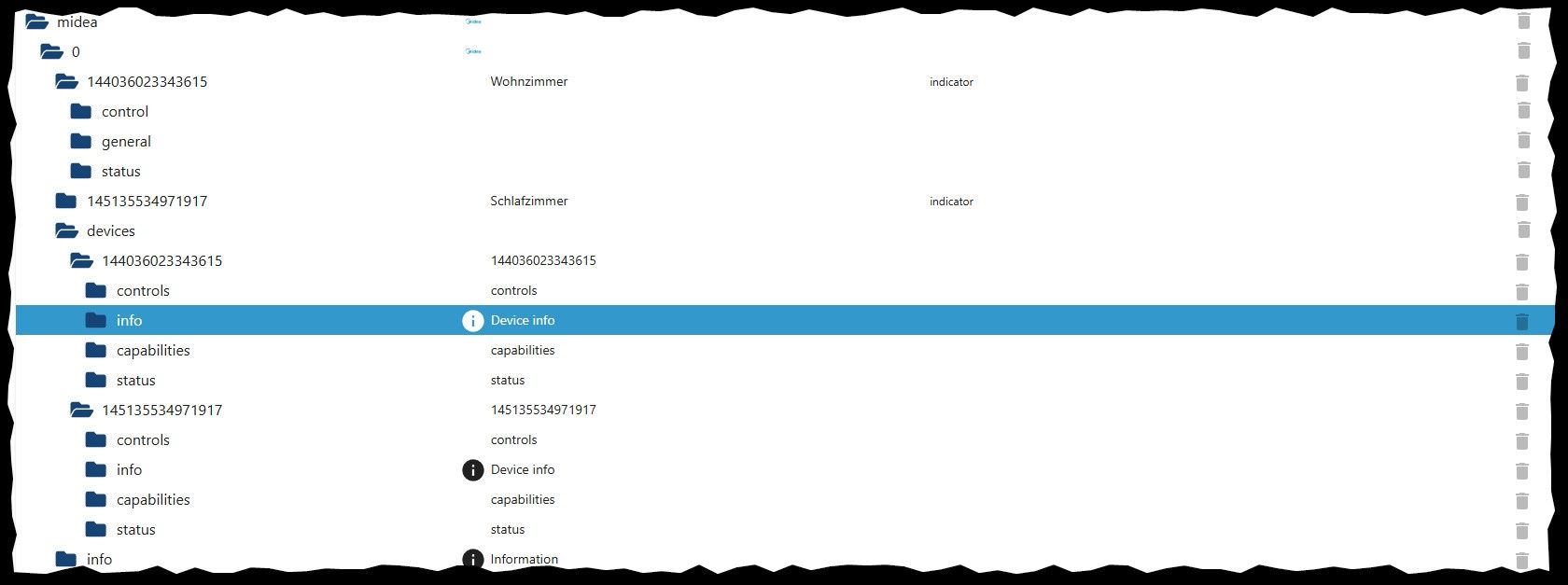
Die unteren unterhalb von
devicessind von der neuen Version? Das es Klimaanlagen sind, wurde ja scheinbar schon erkannt -
Und im Objekte-Baum habe ich die Anlagen jetzt 2x:
Die unteren unterhalb von
devicessind von der neuen Version? Das es Klimaanlagen sind, wurde ja scheinbar schon erkannt -
@BananaJoe wie hat der login dann geklappt?
bitte v1.4.0 testen
@tombox Ok, nachdem ich Entdeckt hatte, das man nun in den Einstellungen die App auswählen kann, klappt es, hier ein Auszug dem dem Debug-Log:
2026-05-19 16:00:03.458  - debug: midea.0 (79590) AC[144036023343615]: refreshNewProtocol() -> sending B1 query
2026-05-19 16:00:03.458  - debug: midea.0 (79590) Device[144036023343615]: _request(getNewProtocol) cmdHex=aa1eac00000000000303b108420018001500170033024b000a0009000a8aca
2026-05-19 16:00:03.458  - debug: midea.0 (79590) LanClient[144036023343615]: pump label=getNewProtocol queue=0
2026-05-19 16:00:03.458  - debug: midea.0 (79590) LanClient[144036023343615]: connecting to 192.168.1.29:6444 (protocol=3)
2026-05-19 16:00:03.458  - debug: midea.0 (79590) Device[144036023343615]: _request(getNewProtocol) failed: LanClient: socket closed mid-request
2026-05-19 16:00:03.471  - warn: midea.0 (79590) State "midea.0.144036023343615.status.online" has no existing object, this might lead to an error in future versions
2026-05-19 16:00:03.895  - debug: midea.0 (79590) LanClient[144036023343615]: connected
2026-05-19 16:00:03.896  - debug: midea.0 (79590) LanClient[144036023343615]: handshake start tokenLen=64
2026-05-19 16:00:03.896  - debug: midea.0 (79590) LanClient[144036023343615]: pump error label=null (LanClient: not connected)
2026-05-19 16:00:05.010  - error: midea.0 (79590) uncaught exception: connect ETIMEDOUT 192.168.1.29:6444
2026-05-19 16:00:05.010  - error: midea.0 (79590) Error: connect ETIMEDOUT 192.168.1.29:6444
2026-05-19 16:00:05.010  - error: midea.0 (79590) Exception-Code: ETIMEDOUT: connect ETIMEDOUT 192.168.1.29:6444
2026-05-19 16:00:05.012  - info: midea.0 (79590) terminating
2026-05-19 16:00:05.012  - warn: midea.0 (79590) Terminated (UNCAUGHT_EXCEPTION): Without reason
2026-05-19 16:00:05.513  - info: midea.0 (79590) terminating
2026-05-19 16:00:05.513  - info: midea.0 (79590) terminating
2026-05-19 16:00:05.710  - error: host.iobroker instance system.adapter.midea.0 terminated with code 6 (UNCAUGHT_EXCEPTION)
2026-05-19 16:00:05.710  - info: host.iobroker Restart adapter system.adapter.midea.0 because enabled
2026-05-19 16:00:07.154  - info: host.iobroker instance system.adapter.midea.0 in version "1.6.0" (non-npm: TA2k/ioBroker.midea) started with pid 80756
2026-05-19 16:00:07.645  - debug: midea.0 (80756) Redis Objects: Use Redis connection: 0.0.0.0:9001
2026-05-19 16:00:07.697  - debug: midea.0 (80756) Objects client ready ... initialize now
2026-05-19 16:00:07.698  - debug: midea.0 (80756) Objects create System PubSub Client
2026-05-19 16:00:07.698  - debug: midea.0 (80756) Objects create User PubSub Client
2026-05-19 16:00:07.858  - debug: midea.0 (80756) Objects client initialize lua scripts
2026-05-19 16:00:07.861  - debug: midea.0 (80756) Objects connected to redis: 0.0.0.0:9001
2026-05-19 16:00:07.944  - debug: midea.0 (80756) Redis States: Use Redis connection: 127.0.0.1:6379
2026-05-19 16:00:07.946  - debug: midea.0 (80756) States create System PubSub Client
2026-05-19 16:00:07.947  - debug: midea.0 (80756) States create User PubSub Client
2026-05-19 16:00:07.949  - debug: midea.0 (80756) States connected to redis: 127.0.0.1:6379
2026-05-19 16:00:08.218  - info: midea.0 (80756) starting. Version 1.6.0 (non-npm: TA2k/ioBroker.midea) in /opt/iobroker/node_modules/iobroker.midea, node: v22.22.2, js-controller: 7.1.2
2026-05-19 16:00:08.240  - debug: midea.0 (80756) Schedule restart: 1 4,13 * * *
2026-05-19 16:00:08.271  - debug: midea.0 (80756) Midea adapter starting up, poll interval=30 s
2026-05-19 16:00:08.273  - debug: midea.0 (80756) CloudClientV1: POST /v1/user/login/id/get hasToken=false
2026-05-19 16:00:08.381  - debug: midea.0 (80756) CloudClientV1: POST /v1/user/login hasToken=false
2026-05-19 16:00:08.434  - debug: midea.0 (80756) CloudClientV1: authenticated (app=nethome)
2026-05-19 16:00:08.434  - debug: midea.0 (80756) CloudClientV1: listAppliances()
2026-05-19 16:00:08.434  - debug: midea.0 (80756) CloudClientV1: POST /v1/appliance/user/list/get hasToken=true
2026-05-19 16:00:08.497  - debug: midea.0 (80756) discover: starting UDP broadcast targets=[192.168.3.255] ports=[6445,20086] timeoutMs=5000
2026-05-19 16:00:08.601  - debug: midea.0 (80756) discover: 192.168.1.30 -> id=145135534971917 type=0xac (ac) protocol=3
2026-05-19 16:00:13.499  - debug: midea.0 (80756) discover: finished, 1 appliance(s)
2026-05-19 16:00:13.499  - info: midea.0 (80756) LAN discovery found 1 appliance(s)
2026-05-19 16:00:13.644  - debug: midea.0 (80756) CloudClientV1: getToken(udpId=a6c623fa83691f32c2e4b6e613451dde)
2026-05-19 16:00:13.645  - debug: midea.0 (80756) CloudClientV1: POST /v1/iot/secure/getToken hasToken=true
2026-05-19 16:00:13.722  - debug: midea.0 (80756) Device 145135534971917: token/key fetched (token=98C93C8F…)
2026-05-19 16:00:13.725  - debug: midea.0 (80756) AC[145135534971917]: refreshCapabilities() -> sending B5 query
2026-05-19 16:00:13.726  - debug: midea.0 (80756) Device[145135534971917]: _request(getCapabilities) cmdHex=aa0eac00000000000303b501118eeb
2026-05-19 16:00:13.726  - debug: midea.0 (80756) LanClient[145135534971917]: pump label=getCapabilities queue=0
2026-05-19 16:00:13.730  - debug: midea.0 (80756) LanClient[145135534971917]: connecting to 192.168.1.30:6444 (protocol=3)
2026-05-19 16:00:13.822  - debug: midea.0 (80756) LanClient[145135534971917]: connected
2026-05-19 16:00:13.823  - debug: midea.0 (80756) LanClient[145135534971917]: handshake start tokenLen=64
2026-05-19 16:00:14.230  - debug: midea.0 (80756) LanClient[145135534971917]: pump error label=getCapabilities (LanClient: authenticate ERROR)
2026-05-19 16:00:14.231  - debug: midea.0 (80756) Device[145135534971917]: _request(getCapabilities) failed: LanClient: authenticate ERROR
2026-05-19 16:00:14.232  - warn: midea.0 (80756) refreshCapabilities for 145135534971917 failed: LanClient: authenticate ERROR
2026-05-19 16:00:14.232  - debug: midea.0 (80756) AC[145135534971917]: refreshStatus() -> sending C0 query
2026-05-19 16:00:14.232  - debug: midea.0 (80756) Device[145135534971917]: _request(getStatus) cmdHex=aa20ac00000000000003418100ff03ff000200000000000000000000000003cd9c
2026-05-19 16:00:14.232  - debug: midea.0 (80756) LanClient[145135534971917]: pump label=getStatus queue=0
2026-05-19 16:00:14.232  - debug: midea.0 (80756) LanClient[145135534971917]: connecting to 192.168.1.30:6444 (protocol=3)
2026-05-19 16:00:14.234  - debug: midea.0 (80756) Device[145135534971917]: _request(getStatus) failed: LanClient: socket closed mid-request
2026-05-19 16:00:14.234  - warn: midea.0 (80756) refreshStatus for 145135534971917 failed: LanClient: socket closed mid-request
2026-05-19 16:00:14.235  - debug: midea.0 (80756) AC[145135534971917]: refreshPowerUsage() -> sending C1 query
2026-05-19 16:00:14.235  - debug: midea.0 (80756) Device[145135534971917]: _request(getPowerUsage) cmdHex=aa11ac00000000000303412101440001098c
2026-05-19 16:00:14.235  - debug: midea.0 (80756) LanClient[145135534971917]: pump label=getPowerUsage queue=0
2026-05-19 16:00:14.235  - debug: midea.0 (80756) LanClient[145135534971917]: connecting to 192.168.1.30:6444 (protocol=3)
2026-05-19 16:00:14.235  - debug: midea.0 (80756) LanClient[145135534971917]: connected
2026-05-19 16:00:14.237  - debug: midea.0 (80756) LanClient[145135534971917]: handshake start tokenLen=64
2026-05-19 16:00:14.240  - debug: midea.0 (80756) LanClient[145135534971917]: connected
2026-05-19 16:00:14.240  - debug: midea.0 (80756) LanClient[145135534971917]: handshake start tokenLen=64
2026-05-19 16:00:14.725  - debug: midea.0 (80756) LanClient[145135534971917]: pump error label=getPowerUsage (LanClient: authenticate ERROR)
2026-05-19 16:00:14.725  - debug: midea.0 (80756) Device[145135534971917]: _request(getPowerUsage) failed: LanClient: authenticate ERROR
2026-05-19 16:00:14.725  - debug: midea.0 (80756) refreshPowerUsage for 145135534971917 failed (not all units support it): LanClient: authenticate ERROR
2026-05-19 16:00:14.726  - debug: midea.0 (80756) AC[145135534971917]: refreshOperatingTime() -> sending C1/40 query
2026-05-19 16:00:14.726  - debug: midea.0 (80756) Device[145135534971917]: _request(getOperatingTime) cmdHex=aa11ac000000000003034121014000019702
2026-05-19 16:00:14.726  - debug: midea.0 (80756) LanClient[145135534971917]: pump label=getOperatingTime queue=0
2026-05-19 16:00:14.726  - debug: midea.0 (80756) LanClient[145135534971917]: connecting to 192.168.1.30:6444 (protocol=3)
2026-05-19 16:00:14.726  - debug: midea.0 (80756) Device[145135534971917]: _request(getOperatingTime) failed: LanClient: socket closed mid-request
2026-05-19 16:00:14.726  - debug: midea.0 (80756) refreshOperatingTime for 145135534971917 failed: LanClient: socket closed mid-request
2026-05-19 16:00:14.727  - debug: midea.0 (80756) AC[145135534971917]: refreshHumidity() -> sending C1/45 query
2026-05-19 16:00:14.727  - debug: midea.0 (80756) Device[145135534971917]: _request(getHumidity) cmdHex=aa11ac00000000000303412101450001a2f2
2026-05-19 16:00:14.727  - debug: midea.0 (80756) LanClient[145135534971917]: pump label=getHumidity queue=0
2026-05-19 16:00:14.727  - debug: midea.0 (80756) LanClient[145135534971917]: connecting to 192.168.1.30:6444 (protocol=3)
2026-05-19 16:00:14.787  - debug: midea.0 (80756) LanClient[145135534971917]: connected
2026-05-19 16:00:14.787  - debug: midea.0 (80756) LanClient[145135534971917]: handshake start tokenLen=64
2026-05-19 16:00:14.788  - debug: midea.0 (80756) LanClient[145135534971917]: connected
2026-05-19 16:00:14.788  - debug: midea.0 (80756) LanClient[145135534971917]: handshake start tokenLen=64
2026-05-19 16:00:15.240  - debug: midea.0 (80756) LanClient[145135534971917]: pump error label=getHumidity (LanClient: authenticate ERROR)
2026-05-19 16:00:15.240  - debug: midea.0 (80756) Device[145135534971917]: _request(getHumidity) failed: LanClient: authenticate ERROR
2026-05-19 16:00:15.240  - debug: midea.0 (80756) refreshHumidity for 145135534971917 failed: LanClient: authenticate ERROR
2026-05-19 16:00:15.241  - debug: midea.0 (80756) AC[145135534971917]: refreshNewProtocol() -> sending B1 query
2026-05-19 16:00:15.241  - debug: midea.0 (80756) Device[145135534971917]: _request(getNewProtocol) cmdHex=aa1eac00000000000303b108420018001500170033024b000a000900024814
2026-05-19 16:00:15.241  - debug: midea.0 (80756) LanClient[145135534971917]: pump label=getNewProtocol queue=0
2026-05-19 16:00:15.241  - debug: midea.0 (80756) LanClient[145135534971917]: connecting to 192.168.1.30:6444 (protocol=3)
2026-05-19 16:00:15.242  - debug: midea.0 (80756) Device[145135534971917]: _request(getNewProtocol) failed: LanClient: socket closed mid-request
2026-05-19 16:00:15.242  - debug: midea.0 (80756) refreshNewProtocol for 145135534971917 failed: LanClient: socket closed mid-request
2026-05-19 16:00:15.244  - warn: midea.0 (80756) Appliance 144036023343615 (Wohnzimmer) is bound to the cloud account but did not respond to LAN discovery — control requires a local broadcast domain, or UDP/6445 is firewalled.
2026-05-19 16:00:15.294  - debug: midea.0 (80756) LanClient[145135534971917]: connected
2026-05-19 16:00:15.294  - debug: midea.0 (80756) LanClient[145135534971917]: handshake start tokenLen=64
2026-05-19 16:00:15.295  - debug: midea.0 (80756) LanClient[145135534971917]: pump error label=null (LanClient: not connected)
2026-05-19 16:00:45.249  - debug: midea.0 (80756) AC[145135534971917]: refreshStatus() -> sending C0 query
2026-05-19 16:00:45.250  - debug: midea.0 (80756) Device[145135534971917]: _request(getStatus) cmdHex=aa20ac00000000000003418100ff03ff000200000000000000000000000003cd9c
2026-05-19 16:00:45.250  - debug: midea.0 (80756) LanClient[145135534971917]: pump label=getStatus queue=0
2026-05-19 16:00:45.250  - debug: midea.0 (80756) LanClient[145135534971917]: connecting to 192.168.1.30:6444 (protocol=3)
2026-05-19 16:00:45.254  - debug: midea.0 (80756) LanClient[145135534971917]: connected
2026-05-19 16:00:45.255  - debug: midea.0 (80756) LanClient[145135534971917]: handshake start tokenLen=64
2026-05-19 16:00:45.553  - debug: midea.0 (80756) LanClient[145135534971917]: pump error label=getStatus (LanClient: authenticate ERROR)
2026-05-19 16:00:45.553  - debug: midea.0 (80756) Device[145135534971917]: _request(getStatus) failed: LanClient: authenticate ERROR
2026-05-19 16:00:45.553  - debug: midea.0 (80756) refreshStatus(145135534971917) failed: LanClient: authenticate ERROR
2026-05-19 16:00:45.553  - debug: midea.0 (80756) AC[145135534971917]: refreshPowerUsage() -> sending C1 query
2026-05-19 16:00:45.553  - debug: midea.0 (80756) Device[145135534971917]: _request(getPowerUsage) cmdHex=aa11ac00000000000303412101440001098c
2026-05-19 16:00:45.554  - debug: midea.0 (80756) LanClient[145135534971917]: pump label=getPowerUsage queue=0
2026-05-19 16:00:45.554  - debug: midea.0 (80756) LanClient[145135534971917]: connecting to 192.168.1.30:6444 (protocol=3)
2026-05-19 16:00:45.555  - debug: midea.0 (80756) Device[145135534971917]: _request(getPowerUsage) failed: LanClient: socket closed mid-request
2026-05-19 16:00:45.555  - debug: midea.0 (80756) AC[145135534971917]: refreshOperatingTime() -> sending C1/40 query
2026-05-19 16:00:45.555  - debug: midea.0 (80756) Device[145135534971917]: _request(getOperatingTime) cmdHex=aa11ac000000000003034121014000019702
2026-05-19 16:00:45.555  - debug: midea.0 (80756) LanClient[145135534971917]: pump label=getOperatingTime queue=0
2026-05-19 16:00:45.555  - debug: midea.0 (80756) LanClient[145135534971917]: connecting to 192.168.1.30:6444 (protocol=3)
2026-05-19 16:00:45.560  - debug: midea.0 (80756) LanClient[145135534971917]: connected
2026-05-19 16:00:45.560  - debug: midea.0 (80756) LanClient[145135534971917]: handshake start tokenLen=64
2026-05-19 16:00:45.561  - debug: midea.0 (80756) LanClient[145135534971917]: connected
2026-05-19 16:00:45.561  - debug: midea.0 (80756) LanClient[145135534971917]: handshake start tokenLen=64
2026-05-19 16:00:46.052  - debug: midea.0 (80756) LanClient[145135534971917]: pump error label=getOperatingTime (LanClient: authenticate ERROR)
2026-05-19 16:00:46.053  - debug: midea.0 (80756) Device[145135534971917]: _request(getOperatingTime) failed: LanClient: authenticate ERROR
2026-05-19 16:00:46.053  - debug: midea.0 (80756) AC[145135534971917]: refreshHumidity() -> sending C1/45 query
2026-05-19 16:00:46.053  - debug: midea.0 (80756) Device[145135534971917]: _request(getHumidity) cmdHex=aa11ac00000000000303412101450001a2f2
2026-05-19 16:00:46.053  - debug: midea.0 (80756) LanClient[145135534971917]: pump label=getHumidity queue=0
2026-05-19 16:00:46.053  - debug: midea.0 (80756) LanClient[145135534971917]: connecting to 192.168.1.30:6444 (protocol=3)
2026-05-19 16:00:46.054  - debug: midea.0 (80756) Device[145135534971917]: _request(getHumidity) failed: LanClient: socket closed mid-request
2026-05-19 16:00:46.054  - debug: midea.0 (80756) AC[145135534971917]: refreshNewProtocol() -> sending B1 query
2026-05-19 16:00:46.054  - debug: midea.0 (80756) Device[145135534971917]: _request(getNewProtocol) cmdHex=aa1eac00000000000303b108420018001500170033024b000a000900031645
2026-05-19 16:00:46.054  - debug: midea.0 (80756) LanClient[145135534971917]: pump label=getNewProtocol queue=0
2026-05-19 16:00:46.054  - debug: midea.0 (80756) LanClient[145135534971917]: connecting to 192.168.1.30:6444 (protocol=3)
2026-05-19 16:00:46.057  - debug: midea.0 (80756) LanClient[145135534971917]: connected
2026-05-19 16:00:46.057  - debug: midea.0 (80756) LanClient[145135534971917]: handshake start tokenLen=64
2026-05-19 16:00:46.058  - debug: midea.0 (80756) LanClient[145135534971917]: connected
2026-05-19 16:00:46.058  - debug: midea.0 (80756) LanClient[145135534971917]: handshake start tokenLen=64
2026-05-19 16:00:46.546  - debug: midea.0 (80756) LanClient[145135534971917]: pump error label=getNewProtocol (LanClient: authenticate ERROR)
2026-05-19 16:00:46.546  - debug: midea.0 (80756) Device[145135534971917]: _request(getNewProtocol) failed: LanClient: authenticate ERROR
2026-05-19 16:00:46.549  - warn: midea.0 (80756) State "midea.0.145135534971917.status.online" has no existing object, this might lead to an error in future versions
2026-05-19 16:01:16.551  - debug: midea.0 (80756) AC[145135534971917]: refreshStatus() -> sending C0 query
2026-05-19 16:01:16.551  - debug: midea.0 (80756) Device[145135534971917]: _request(getStatus) cmdHex=aa20ac00000000000003418100ff03ff000200000000000000000000000003cd9c
2026-05-19 16:01:16.551  - debug: midea.0 (80756) LanClient[145135534971917]: pump label=getStatus queue=0
2026-05-19 16:01:16.551  - debug: midea.0 (80756) LanClient[145135534971917]: connecting to 192.168.1.30:6444 (protocol=3)
2026-05-19 16:01:16.552  - debug: midea.0 (80756) LanClient[145135534971917]: connected
2026-05-19 16:01:16.552  - debug: midea.0 (80756) LanClient[145135534971917]: handshake start tokenLen=64
2026-05-19 16:01:16.832  - debug: midea.0 (80756) LanClient[145135534971917]: pump error label=getStatus (LanClient: authenticate ERROR)
2026-05-19 16:01:16.833  - debug: midea.0 (80756) Device[145135534971917]: _request(getStatus) failed: LanClient: authenticate ERROR
2026-05-19 16:01:16.833  - debug: midea.0 (80756) refreshStatus(145135534971917) failed: LanClient: authenticate ERROR
2026-05-19 16:01:16.833  - debug: midea.0 (80756) AC[145135534971917]: refreshPowerUsage() -> sending C1 query
2026-05-19 16:01:16.833  - debug: midea.0 (80756) Device[145135534971917]: _request(getPowerUsage) cmdHex=aa11ac00000000000303412101440001098c
2026-05-19 16:01:16.834  - debug: midea.0 (80756) LanClient[145135534971917]: pump label=getPowerUsage queue=0
2026-05-19 16:01:16.834  - debug: midea.0 (80756) LanClient[145135534971917]: connecting to 192.168.1.30:6444 (protocol=3)
2026-05-19 16:01:16.836  - debug: midea.0 (80756) Device[145135534971917]: _request(getPowerUsage) failed: LanClient: socket closed mid-request
2026-05-19 16:01:16.836  - debug: midea.0 (80756) AC[145135534971917]: refreshOperatingTime() -> sending C1/40 query
2026-05-19 16:01:16.836  - debug: midea.0 (80756) Device[145135534971917]: _request(getOperatingTime) cmdHex=aa11ac000000000003034121014000019702
2026-05-19 16:01:16.836  - debug: midea.0 (80756) LanClient[145135534971917]: pump label=getOperatingTime queue=0
2026-05-19 16:01:16.836  - debug: midea.0 (80756) LanClient[145135534971917]: connecting to 192.168.1.30:6444 (protocol=3)
2026-05-19 16:01:16.837  - debug: midea.0 (80756) LanClient[145135534971917]: connected
2026-05-19 16:01:16.837  - debug: midea.0 (80756) LanClient[145135534971917]: handshake start tokenLen=64
2026-05-19 16:01:16.875  - debug: midea.0 (80756) LanClient[145135534971917]: connected
2026-05-19 16:01:16.875  - debug: midea.0 (80756) LanClient[145135534971917]: handshake start tokenLen=64
2026-05-19 16:01:17.326  - debug: midea.0 (80756) LanClient[145135534971917]: pump error label=getOperatingTime (LanClient: authenticate ERROR)
2026-05-19 16:01:17.326  - debug: midea.0 (80756) Device[145135534971917]: _request(getOperatingTime) failed: LanClient: authenticate ERROR
2026-05-19 16:01:17.327  - debug: midea.0 (80756) AC[145135534971917]: refreshHumidity() -> sending C1/45 query
2026-05-19 16:01:17.327  - debug: midea.0 (80756) Device[145135534971917]: _request(getHumidity) cmdHex=aa11ac00000000000303412101450001a2f2
2026-05-19 16:01:17.327  - debug: midea.0 (80756) LanClient[145135534971917]: pump label=getHumidity queue=0
2026-05-19 16:01:17.327  - debug: midea.0 (80756) LanClient[145135534971917]: connecting to 192.168.1.30:6444 (protocol=3)
2026-05-19 16:01:17.327  - debug: midea.0 (80756) Device[145135534971917]: _request(getHumidity) failed: LanClient: socket closed mid-request
2026-05-19 16:01:17.328  - debug: midea.0 (80756) AC[145135534971917]: refreshNewProtocol() -> sending B1 query
2026-05-19 16:01:17.328  - debug: midea.0 (80756) Device[145135534971917]: _request(getNewProtocol) cmdHex=aa1eac00000000000303b108420018001500170033024b000a0009000495c5
2026-05-19 16:01:17.328  - debug: midea.0 (80756) LanClient[145135534971917]: pump label=getNewProtocol queue=0
2026-05-19 16:01:17.328  - debug: midea.0 (80756) LanClient[145135534971917]: connecting to 192.168.1.30:6444 (protocol=3)
2026-05-19 16:01:17.370  - debug: midea.0 (80756) LanClient[145135534971917]: connected
2026-05-19 16:01:17.370  - debug: midea.0 (80756) LanClient[145135534971917]: handshake start tokenLen=64
2026-05-19 16:01:17.371  - debug: midea.0 (80756) LanClient[145135534971917]: connected
2026-05-19 16:01:17.371  - debug: midea.0 (80756) LanClient[145135534971917]: handshake start tokenLen=64
2026-05-19 16:01:20.876  - debug: midea.0 (80756) LanClient[145135534971917]: pump error label=getNewProtocol (LanClient: timeout waiting for authenticate — TCP/6444 is being blocked, or another LAN client (the phone app) is currently connected. Only one TCP control session is allowed at a time.)
2026-05-19 16:01:20.876  - debug: midea.0 (80756) Device[145135534971917]: _request(getNewProtocol) failed: LanClient: timeout waiting for authenticate — TCP/6444 is being blocked, or another LAN client (the phone app) is currently connected. Only one TCP control session is allowed at a time.
2026-05-19 16:01:20.879  - warn: midea.0 (80756) State "midea.0.145135534971917.status.online" has no existing object, this might lead to an error in future versions
2026-05-19 16:01:36.146  - warn: midea.0 (80756) LanClient[145135534971917]: socket error read ETIMEDOUT
2026-05-19 16:01:36.658  - warn: midea.0 (80756) LanClient[145135534971917]: socket error read ETIMEDOUT
2026-05-19 16:01:36.658  - warn: midea.0 (80756) LanClient[145135534971917]: socket error read ETIMEDOUT
2026-05-19 16:01:37.170  - warn: midea.0 (80756) LanClient[145135534971917]: socket error read ETIMEDOUT
2026-05-19 16:01:37.170  - warn: midea.0 (80756) LanClient[145135534971917]: socket error read ETIMEDOUT
2026-05-19 16:01:37.170  - warn: midea.0 (80756) LanClient[145135534971917]: socket error read ETIMEDOUT
2026-05-19 16:01:37.683  - warn: midea.0 (80756) LanClient[145135534971917]: socket error read ETIMEDOUT
2026-05-19 16:01:50.881  - debug: midea.0 (80756) AC[145135534971917]: refreshStatus() -> sending C0 query
2026-05-19 16:01:50.881  - debug: midea.0 (80756) Device[145135534971917]: _request(getStatus) cmdHex=aa20ac00000000000003418100ff03ff000200000000000000000000000003cd9c
2026-05-19 16:01:50.881  - debug: midea.0 (80756) LanClient[145135534971917]: pump label=getStatus queue=0
2026-05-19 16:01:50.881  - debug: midea.0 (80756) LanClient[145135534971917]: connecting to 192.168.1.30:6444 (protocol=3)
2026-05-19 16:01:50.898  - debug: midea.0 (80756) LanClient[145135534971917]: connected
2026-05-19 16:01:50.898  - debug: midea.0 (80756) LanClient[145135534971917]: handshake start tokenLen=64
2026-05-19 16:01:51.379  - debug: midea.0 (80756) LanClient[145135534971917]: pump error label=getStatus (LanClient: authenticate ERROR)
2026-05-19 16:01:51.379  - debug: midea.0 (80756) Device[145135534971917]: _request(getStatus) failed: LanClient: authenticate ERROR
2026-05-19 16:01:51.379  - debug: midea.0 (80756) refreshStatus(145135534971917) failed: LanClient: authenticate ERROR
2026-05-19 16:01:51.379  - debug: midea.0 (80756) AC[145135534971917]: refreshPowerUsage() -> sending C1 query
2026-05-19 16:01:51.379  - debug: midea.0 (80756) Device[145135534971917]: _request(getPowerUsage) cmdHex=aa11ac00000000000303412101440001098c
2026-05-19 16:01:51.379  - debug: midea.0 (80756) LanClient[145135534971917]: pump label=getPowerUsage queue=0
2026-05-19 16:01:51.379  - debug: midea.0 (80756) LanClient[145135534971917]: connecting to 192.168.1.30:6444 (protocol=3)
2026-05-19 16:01:51.380  - debug: midea.0 (80756) Device[145135534971917]: _request(getPowerUsage) failed: LanClient: socket closed mid-request
2026-05-19 16:01:51.380  - debug: midea.0 (80756) AC[145135534971917]: refreshOperatingTime() -> sending C1/40 query
2026-05-19 16:01:51.380  - debug: midea.0 (80756) Device[145135534971917]: _request(getOperatingTime) cmdHex=aa11ac000000000003034121014000019702
2026-05-19 16:01:51.380  - debug: midea.0 (80756) LanClient[145135534971917]: pump label=getOperatingTime queue=0
2026-05-19 16:01:51.380  - debug: midea.0 (80756) LanClient[145135534971917]: connecting to 192.168.1.30:6444 (protocol=3)
2026-05-19 16:01:51.385  - debug: midea.0 (80756) LanClient[145135534971917]: connected
2026-05-19 16:01:51.385  - debug: midea.0 (80756) LanClient[145135534971917]: handshake start tokenLen=64
2026-05-19 16:01:51.385  - debug: midea.0 (80756) LanClient[145135534971917]: connected
2026-05-19 16:01:51.386  - debug: midea.0 (80756) LanClient[145135534971917]: handshake start tokenLen=64
2026-05-19 16:01:51.877  - debug: midea.0 (80756) LanClient[145135534971917]: pump error label=getOperatingTime (LanClient: authenticate ERROR)
2026-05-19 16:01:51.877  - debug: midea.0 (80756) Device[145135534971917]: _request(getOperatingTime) failed: LanClient: authenticate ERROR
2026-05-19 16:01:51.877  - debug: midea.0 (80756) AC[145135534971917]: refreshHumidity() -> sending C1/45 query
2026-05-19 16:01:51.877  - debug: midea.0 (80756) Device[145135534971917]: _request(getHumidity) cmdHex=aa11ac00000000000303412101450001a2f2
2026-05-19 16:01:51.878  - debug: midea.0 (80756) LanClient[145135534971917]: pump label=getHumidity queue=0
2026-05-19 16:01:51.878  - debug: midea.0 (80756) LanClient[145135534971917]: connecting to 192.168.1.30:6444 (protocol=3)
2026-05-19 16:01:51.878  - debug: midea.0 (80756) Device[145135534971917]: _request(getHumidity) failed: LanClient: socket closed mid-request
2026-05-19 16:01:51.878  - debug: midea.0 (80756) AC[145135534971917]: refreshNewProtocol() -> sending B1 query
2026-05-19 16:01:51.878  - debug: midea.0 (80756) Device[145135534971917]: _request(getNewProtocol) cmdHex=aa1eac00000000000303b108420018001500170033024b000a00090005cb8e
2026-05-19 16:01:51.878  - debug: midea.0 (80756) LanClient[145135534971917]: pump label=getNewProtocol queue=0
2026-05-19 16:01:51.878  - debug: midea.0 (80756) LanClient[145135534971917]: connecting to 192.168.1.30:6444 (protocol=3)
2026-05-19 16:01:51.881  - debug: midea.0 (80756) LanClient[145135534971917]: connected
2026-05-19 16:01:51.881  - debug: midea.0 (80756) LanClient[145135534971917]: handshake start tokenLen=64
2026-05-19 16:01:51.882  - debug: midea.0 (80756) LanClient[145135534971917]: connected
2026-05-19 16:01:51.882  - debug: midea.0 (80756) LanClient[145135534971917]: handshake start tokenLen=64
2026-05-19 16:01:52.369  - debug: midea.0 (80756) LanClient[145135534971917]: pump error label=getNewProtocol (LanClient: authenticate ERROR)
2026-05-19 16:01:52.369  - debug: midea.0 (80756) Device[145135534971917]: _request(getNewProtocol) failed: LanClient: authenticate ERROR
2026-05-19 16:01:52.371  - warn: midea.0 (80756) State "midea.0.145135534971917.status.online" has no existing object, this might lead to an error in future versions
2026-05-19 16:02:22.374  - debug: midea.0 (80756) AC[145135534971917]: refreshStatus() -> sending C0 query
2026-05-19 16:02:22.374  - debug: midea.0 (80756) Device[145135534971917]: _request(getStatus) cmdHex=aa20ac00000000000003418100ff03ff000200000000000000000000000003cd9c
2026-05-19 16:02:22.374  - debug: midea.0 (80756) LanClient[145135534971917]: pump label=getStatus queue=0
2026-05-19 16:02:22.374  - debug: midea.0 (80756) LanClient[145135534971917]: connecting to 192.168.1.30:6444 (protocol=3)
2026-05-19 16:02:22.390  - debug: midea.0 (80756) LanClient[145135534971917]: connected
2026-05-19 16:02:22.391  - debug: midea.0 (80756) LanClient[145135534971917]: handshake start tokenLen=64
Schalten geht jedenfalls nicht:
2026-05-19 16:10:43.990 - warn: midea.0 (80756) Control powerOn written for unknown/unregistered device 144036023343615 -
@tombox Ok, nachdem ich Entdeckt hatte, das man nun in den Einstellungen die App auswählen kann, klappt es, hier ein Auszug dem dem Debug-Log:
2026-05-19 16:00:03.458  - debug: midea.0 (79590) AC[144036023343615]: refreshNewProtocol() -> sending B1 query
2026-05-19 16:00:03.458  - debug: midea.0 (79590) Device[144036023343615]: _request(getNewProtocol) cmdHex=aa1eac00000000000303b108420018001500170033024b000a0009000a8aca
2026-05-19 16:00:03.458  - debug: midea.0 (79590) LanClient[144036023343615]: pump label=getNewProtocol queue=0
2026-05-19 16:00:03.458  - debug: midea.0 (79590) LanClient[144036023343615]: connecting to 192.168.1.29:6444 (protocol=3)
2026-05-19 16:00:03.458  - debug: midea.0 (79590) Device[144036023343615]: _request(getNewProtocol) failed: LanClient: socket closed mid-request
2026-05-19 16:00:03.471  - warn: midea.0 (79590) State "midea.0.144036023343615.status.online" has no existing object, this might lead to an error in future versions
2026-05-19 16:00:03.895  - debug: midea.0 (79590) LanClient[144036023343615]: connected
2026-05-19 16:00:03.896  - debug: midea.0 (79590) LanClient[144036023343615]: handshake start tokenLen=64
2026-05-19 16:00:03.896  - debug: midea.0 (79590) LanClient[144036023343615]: pump error label=null (LanClient: not connected)
2026-05-19 16:00:05.010  - error: midea.0 (79590) uncaught exception: connect ETIMEDOUT 192.168.1.29:6444
2026-05-19 16:00:05.010  - error: midea.0 (79590) Error: connect ETIMEDOUT 192.168.1.29:6444
2026-05-19 16:00:05.010  - error: midea.0 (79590) Exception-Code: ETIMEDOUT: connect ETIMEDOUT 192.168.1.29:6444
2026-05-19 16:00:05.012  - info: midea.0 (79590) terminating
2026-05-19 16:00:05.012  - warn: midea.0 (79590) Terminated (UNCAUGHT_EXCEPTION): Without reason
2026-05-19 16:00:05.513  - info: midea.0 (79590) terminating
2026-05-19 16:00:05.513  - info: midea.0 (79590) terminating
2026-05-19 16:00:05.710  - error: host.iobroker instance system.adapter.midea.0 terminated with code 6 (UNCAUGHT_EXCEPTION)
2026-05-19 16:00:05.710  - info: host.iobroker Restart adapter system.adapter.midea.0 because enabled
2026-05-19 16:00:07.154  - info: host.iobroker instance system.adapter.midea.0 in version "1.6.0" (non-npm: TA2k/ioBroker.midea) started with pid 80756
2026-05-19 16:00:07.645  - debug: midea.0 (80756) Redis Objects: Use Redis connection: 0.0.0.0:9001
2026-05-19 16:00:07.697  - debug: midea.0 (80756) Objects client ready ... initialize now
2026-05-19 16:00:07.698  - debug: midea.0 (80756) Objects create System PubSub Client
2026-05-19 16:00:07.698  - debug: midea.0 (80756) Objects create User PubSub Client
2026-05-19 16:00:07.858  - debug: midea.0 (80756) Objects client initialize lua scripts
2026-05-19 16:00:07.861  - debug: midea.0 (80756) Objects connected to redis: 0.0.0.0:9001
2026-05-19 16:00:07.944  - debug: midea.0 (80756) Redis States: Use Redis connection: 127.0.0.1:6379
2026-05-19 16:00:07.946  - debug: midea.0 (80756) States create System PubSub Client
2026-05-19 16:00:07.947  - debug: midea.0 (80756) States create User PubSub Client
2026-05-19 16:00:07.949  - debug: midea.0 (80756) States connected to redis: 127.0.0.1:6379
2026-05-19 16:00:08.218  - info: midea.0 (80756) starting. Version 1.6.0 (non-npm: TA2k/ioBroker.midea) in /opt/iobroker/node_modules/iobroker.midea, node: v22.22.2, js-controller: 7.1.2
2026-05-19 16:00:08.240  - debug: midea.0 (80756) Schedule restart: 1 4,13 * * *
2026-05-19 16:00:08.271  - debug: midea.0 (80756) Midea adapter starting up, poll interval=30 s
2026-05-19 16:00:08.273  - debug: midea.0 (80756) CloudClientV1: POST /v1/user/login/id/get hasToken=false
2026-05-19 16:00:08.381  - debug: midea.0 (80756) CloudClientV1: POST /v1/user/login hasToken=false
2026-05-19 16:00:08.434  - debug: midea.0 (80756) CloudClientV1: authenticated (app=nethome)
2026-05-19 16:00:08.434  - debug: midea.0 (80756) CloudClientV1: listAppliances()
2026-05-19 16:00:08.434  - debug: midea.0 (80756) CloudClientV1: POST /v1/appliance/user/list/get hasToken=true
2026-05-19 16:00:08.497  - debug: midea.0 (80756) discover: starting UDP broadcast targets=[192.168.3.255] ports=[6445,20086] timeoutMs=5000
2026-05-19 16:00:08.601  - debug: midea.0 (80756) discover: 192.168.1.30 -> id=145135534971917 type=0xac (ac) protocol=3
2026-05-19 16:00:13.499  - debug: midea.0 (80756) discover: finished, 1 appliance(s)
2026-05-19 16:00:13.499  - info: midea.0 (80756) LAN discovery found 1 appliance(s)
2026-05-19 16:00:13.644  - debug: midea.0 (80756) CloudClientV1: getToken(udpId=a6c623fa83691f32c2e4b6e613451dde)
2026-05-19 16:00:13.645  - debug: midea.0 (80756) CloudClientV1: POST /v1/iot/secure/getToken hasToken=true
2026-05-19 16:00:13.722  - debug: midea.0 (80756) Device 145135534971917: token/key fetched (token=98C93C8F…)
2026-05-19 16:00:13.725  - debug: midea.0 (80756) AC[145135534971917]: refreshCapabilities() -> sending B5 query
2026-05-19 16:00:13.726  - debug: midea.0 (80756) Device[145135534971917]: _request(getCapabilities) cmdHex=aa0eac00000000000303b501118eeb
2026-05-19 16:00:13.726  - debug: midea.0 (80756) LanClient[145135534971917]: pump label=getCapabilities queue=0
2026-05-19 16:00:13.730  - debug: midea.0 (80756) LanClient[145135534971917]: connecting to 192.168.1.30:6444 (protocol=3)
2026-05-19 16:00:13.822  - debug: midea.0 (80756) LanClient[145135534971917]: connected
2026-05-19 16:00:13.823  - debug: midea.0 (80756) LanClient[145135534971917]: handshake start tokenLen=64
2026-05-19 16:00:14.230  - debug: midea.0 (80756) LanClient[145135534971917]: pump error label=getCapabilities (LanClient: authenticate ERROR)
2026-05-19 16:00:14.231  - debug: midea.0 (80756) Device[145135534971917]: _request(getCapabilities) failed: LanClient: authenticate ERROR
2026-05-19 16:00:14.232  - warn: midea.0 (80756) refreshCapabilities for 145135534971917 failed: LanClient: authenticate ERROR
2026-05-19 16:00:14.232  - debug: midea.0 (80756) AC[145135534971917]: refreshStatus() -> sending C0 query
2026-05-19 16:00:14.232  - debug: midea.0 (80756) Device[145135534971917]: _request(getStatus) cmdHex=aa20ac00000000000003418100ff03ff000200000000000000000000000003cd9c
2026-05-19 16:00:14.232  - debug: midea.0 (80756) LanClient[145135534971917]: pump label=getStatus queue=0
2026-05-19 16:00:14.232  - debug: midea.0 (80756) LanClient[145135534971917]: connecting to 192.168.1.30:6444 (protocol=3)
2026-05-19 16:00:14.234  - debug: midea.0 (80756) Device[145135534971917]: _request(getStatus) failed: LanClient: socket closed mid-request
2026-05-19 16:00:14.234  - warn: midea.0 (80756) refreshStatus for 145135534971917 failed: LanClient: socket closed mid-request
2026-05-19 16:00:14.235  - debug: midea.0 (80756) AC[145135534971917]: refreshPowerUsage() -> sending C1 query
2026-05-19 16:00:14.235  - debug: midea.0 (80756) Device[145135534971917]: _request(getPowerUsage) cmdHex=aa11ac00000000000303412101440001098c
2026-05-19 16:00:14.235  - debug: midea.0 (80756) LanClient[145135534971917]: pump label=getPowerUsage queue=0
2026-05-19 16:00:14.235  - debug: midea.0 (80756) LanClient[145135534971917]: connecting to 192.168.1.30:6444 (protocol=3)
2026-05-19 16:00:14.235  - debug: midea.0 (80756) LanClient[145135534971917]: connected
2026-05-19 16:00:14.237  - debug: midea.0 (80756) LanClient[145135534971917]: handshake start tokenLen=64
2026-05-19 16:00:14.240  - debug: midea.0 (80756) LanClient[145135534971917]: connected
2026-05-19 16:00:14.240  - debug: midea.0 (80756) LanClient[145135534971917]: handshake start tokenLen=64
2026-05-19 16:00:14.725  - debug: midea.0 (80756) LanClient[145135534971917]: pump error label=getPowerUsage (LanClient: authenticate ERROR)
2026-05-19 16:00:14.725  - debug: midea.0 (80756) Device[145135534971917]: _request(getPowerUsage) failed: LanClient: authenticate ERROR
2026-05-19 16:00:14.725  - debug: midea.0 (80756) refreshPowerUsage for 145135534971917 failed (not all units support it): LanClient: authenticate ERROR
2026-05-19 16:00:14.726  - debug: midea.0 (80756) AC[145135534971917]: refreshOperatingTime() -> sending C1/40 query
2026-05-19 16:00:14.726  - debug: midea.0 (80756) Device[145135534971917]: _request(getOperatingTime) cmdHex=aa11ac000000000003034121014000019702
2026-05-19 16:00:14.726  - debug: midea.0 (80756) LanClient[145135534971917]: pump label=getOperatingTime queue=0
2026-05-19 16:00:14.726  - debug: midea.0 (80756) LanClient[145135534971917]: connecting to 192.168.1.30:6444 (protocol=3)
2026-05-19 16:00:14.726  - debug: midea.0 (80756) Device[145135534971917]: _request(getOperatingTime) failed: LanClient: socket closed mid-request
2026-05-19 16:00:14.726  - debug: midea.0 (80756) refreshOperatingTime for 145135534971917 failed: LanClient: socket closed mid-request
2026-05-19 16:00:14.727  - debug: midea.0 (80756) AC[145135534971917]: refreshHumidity() -> sending C1/45 query
2026-05-19 16:00:14.727  - debug: midea.0 (80756) Device[145135534971917]: _request(getHumidity) cmdHex=aa11ac00000000000303412101450001a2f2
2026-05-19 16:00:14.727  - debug: midea.0 (80756) LanClient[145135534971917]: pump label=getHumidity queue=0
2026-05-19 16:00:14.727  - debug: midea.0 (80756) LanClient[145135534971917]: connecting to 192.168.1.30:6444 (protocol=3)
2026-05-19 16:00:14.787  - debug: midea.0 (80756) LanClient[145135534971917]: connected
2026-05-19 16:00:14.787  - debug: midea.0 (80756) LanClient[145135534971917]: handshake start tokenLen=64
2026-05-19 16:00:14.788  - debug: midea.0 (80756) LanClient[145135534971917]: connected
2026-05-19 16:00:14.788  - debug: midea.0 (80756) LanClient[145135534971917]: handshake start tokenLen=64
2026-05-19 16:00:15.240  - debug: midea.0 (80756) LanClient[145135534971917]: pump error label=getHumidity (LanClient: authenticate ERROR)
2026-05-19 16:00:15.240  - debug: midea.0 (80756) Device[145135534971917]: _request(getHumidity) failed: LanClient: authenticate ERROR
2026-05-19 16:00:15.240  - debug: midea.0 (80756) refreshHumidity for 145135534971917 failed: LanClient: authenticate ERROR
2026-05-19 16:00:15.241  - debug: midea.0 (80756) AC[145135534971917]: refreshNewProtocol() -> sending B1 query
2026-05-19 16:00:15.241  - debug: midea.0 (80756) Device[145135534971917]: _request(getNewProtocol) cmdHex=aa1eac00000000000303b108420018001500170033024b000a000900024814
2026-05-19 16:00:15.241  - debug: midea.0 (80756) LanClient[145135534971917]: pump label=getNewProtocol queue=0
2026-05-19 16:00:15.241  - debug: midea.0 (80756) LanClient[145135534971917]: connecting to 192.168.1.30:6444 (protocol=3)
2026-05-19 16:00:15.242  - debug: midea.0 (80756) Device[145135534971917]: _request(getNewProtocol) failed: LanClient: socket closed mid-request
2026-05-19 16:00:15.242  - debug: midea.0 (80756) refreshNewProtocol for 145135534971917 failed: LanClient: socket closed mid-request
2026-05-19 16:00:15.244  - warn: midea.0 (80756) Appliance 144036023343615 (Wohnzimmer) is bound to the cloud account but did not respond to LAN discovery — control requires a local broadcast domain, or UDP/6445 is firewalled.
2026-05-19 16:00:15.294  - debug: midea.0 (80756) LanClient[145135534971917]: connected
2026-05-19 16:00:15.294  - debug: midea.0 (80756) LanClient[145135534971917]: handshake start tokenLen=64
2026-05-19 16:00:15.295  - debug: midea.0 (80756) LanClient[145135534971917]: pump error label=null (LanClient: not connected)
2026-05-19 16:00:45.249  - debug: midea.0 (80756) AC[145135534971917]: refreshStatus() -> sending C0 query
2026-05-19 16:00:45.250  - debug: midea.0 (80756) Device[145135534971917]: _request(getStatus) cmdHex=aa20ac00000000000003418100ff03ff000200000000000000000000000003cd9c
2026-05-19 16:00:45.250  - debug: midea.0 (80756) LanClient[145135534971917]: pump label=getStatus queue=0
2026-05-19 16:00:45.250  - debug: midea.0 (80756) LanClient[145135534971917]: connecting to 192.168.1.30:6444 (protocol=3)
2026-05-19 16:00:45.254  - debug: midea.0 (80756) LanClient[145135534971917]: connected
2026-05-19 16:00:45.255  - debug: midea.0 (80756) LanClient[145135534971917]: handshake start tokenLen=64
2026-05-19 16:00:45.553  - debug: midea.0 (80756) LanClient[145135534971917]: pump error label=getStatus (LanClient: authenticate ERROR)
2026-05-19 16:00:45.553  - debug: midea.0 (80756) Device[145135534971917]: _request(getStatus) failed: LanClient: authenticate ERROR
2026-05-19 16:00:45.553  - debug: midea.0 (80756) refreshStatus(145135534971917) failed: LanClient: authenticate ERROR
2026-05-19 16:00:45.553  - debug: midea.0 (80756) AC[145135534971917]: refreshPowerUsage() -> sending C1 query
2026-05-19 16:00:45.553  - debug: midea.0 (80756) Device[145135534971917]: _request(getPowerUsage) cmdHex=aa11ac00000000000303412101440001098c
2026-05-19 16:00:45.554  - debug: midea.0 (80756) LanClient[145135534971917]: pump label=getPowerUsage queue=0
2026-05-19 16:00:45.554  - debug: midea.0 (80756) LanClient[145135534971917]: connecting to 192.168.1.30:6444 (protocol=3)
2026-05-19 16:00:45.555  - debug: midea.0 (80756) Device[145135534971917]: _request(getPowerUsage) failed: LanClient: socket closed mid-request
2026-05-19 16:00:45.555  - debug: midea.0 (80756) AC[145135534971917]: refreshOperatingTime() -> sending C1/40 query
2026-05-19 16:00:45.555  - debug: midea.0 (80756) Device[145135534971917]: _request(getOperatingTime) cmdHex=aa11ac000000000003034121014000019702
2026-05-19 16:00:45.555  - debug: midea.0 (80756) LanClient[145135534971917]: pump label=getOperatingTime queue=0
2026-05-19 16:00:45.555  - debug: midea.0 (80756) LanClient[145135534971917]: connecting to 192.168.1.30:6444 (protocol=3)
2026-05-19 16:00:45.560  - debug: midea.0 (80756) LanClient[145135534971917]: connected
2026-05-19 16:00:45.560  - debug: midea.0 (80756) LanClient[145135534971917]: handshake start tokenLen=64
2026-05-19 16:00:45.561  - debug: midea.0 (80756) LanClient[145135534971917]: connected
2026-05-19 16:00:45.561  - debug: midea.0 (80756) LanClient[145135534971917]: handshake start tokenLen=64
2026-05-19 16:00:46.052  - debug: midea.0 (80756) LanClient[145135534971917]: pump error label=getOperatingTime (LanClient: authenticate ERROR)
2026-05-19 16:00:46.053  - debug: midea.0 (80756) Device[145135534971917]: _request(getOperatingTime) failed: LanClient: authenticate ERROR
2026-05-19 16:00:46.053  - debug: midea.0 (80756) AC[145135534971917]: refreshHumidity() -> sending C1/45 query
2026-05-19 16:00:46.053  - debug: midea.0 (80756) Device[145135534971917]: _request(getHumidity) cmdHex=aa11ac00000000000303412101450001a2f2
2026-05-19 16:00:46.053  - debug: midea.0 (80756) LanClient[145135534971917]: pump label=getHumidity queue=0
2026-05-19 16:00:46.053  - debug: midea.0 (80756) LanClient[145135534971917]: connecting to 192.168.1.30:6444 (protocol=3)
2026-05-19 16:00:46.054  - debug: midea.0 (80756) Device[145135534971917]: _request(getHumidity) failed: LanClient: socket closed mid-request
2026-05-19 16:00:46.054  - debug: midea.0 (80756) AC[145135534971917]: refreshNewProtocol() -> sending B1 query
2026-05-19 16:00:46.054  - debug: midea.0 (80756) Device[145135534971917]: _request(getNewProtocol) cmdHex=aa1eac00000000000303b108420018001500170033024b000a000900031645
2026-05-19 16:00:46.054  - debug: midea.0 (80756) LanClient[145135534971917]: pump label=getNewProtocol queue=0
2026-05-19 16:00:46.054  - debug: midea.0 (80756) LanClient[145135534971917]: connecting to 192.168.1.30:6444 (protocol=3)
2026-05-19 16:00:46.057  - debug: midea.0 (80756) LanClient[145135534971917]: connected
2026-05-19 16:00:46.057  - debug: midea.0 (80756) LanClient[145135534971917]: handshake start tokenLen=64
2026-05-19 16:00:46.058  - debug: midea.0 (80756) LanClient[145135534971917]: connected
2026-05-19 16:00:46.058  - debug: midea.0 (80756) LanClient[145135534971917]: handshake start tokenLen=64
2026-05-19 16:00:46.546  - debug: midea.0 (80756) LanClient[145135534971917]: pump error label=getNewProtocol (LanClient: authenticate ERROR)
2026-05-19 16:00:46.546  - debug: midea.0 (80756) Device[145135534971917]: _request(getNewProtocol) failed: LanClient: authenticate ERROR
2026-05-19 16:00:46.549  - warn: midea.0 (80756) State "midea.0.145135534971917.status.online" has no existing object, this might lead to an error in future versions
2026-05-19 16:01:16.551  - debug: midea.0 (80756) AC[145135534971917]: refreshStatus() -> sending C0 query
2026-05-19 16:01:16.551  - debug: midea.0 (80756) Device[145135534971917]: _request(getStatus) cmdHex=aa20ac00000000000003418100ff03ff000200000000000000000000000003cd9c
2026-05-19 16:01:16.551  - debug: midea.0 (80756) LanClient[145135534971917]: pump label=getStatus queue=0
2026-05-19 16:01:16.551  - debug: midea.0 (80756) LanClient[145135534971917]: connecting to 192.168.1.30:6444 (protocol=3)
2026-05-19 16:01:16.552  - debug: midea.0 (80756) LanClient[145135534971917]: connected
2026-05-19 16:01:16.552  - debug: midea.0 (80756) LanClient[145135534971917]: handshake start tokenLen=64
2026-05-19 16:01:16.832  - debug: midea.0 (80756) LanClient[145135534971917]: pump error label=getStatus (LanClient: authenticate ERROR)
2026-05-19 16:01:16.833  - debug: midea.0 (80756) Device[145135534971917]: _request(getStatus) failed: LanClient: authenticate ERROR
2026-05-19 16:01:16.833  - debug: midea.0 (80756) refreshStatus(145135534971917) failed: LanClient: authenticate ERROR
2026-05-19 16:01:16.833  - debug: midea.0 (80756) AC[145135534971917]: refreshPowerUsage() -> sending C1 query
2026-05-19 16:01:16.833  - debug: midea.0 (80756) Device[145135534971917]: _request(getPowerUsage) cmdHex=aa11ac00000000000303412101440001098c
2026-05-19 16:01:16.834  - debug: midea.0 (80756) LanClient[145135534971917]: pump label=getPowerUsage queue=0
2026-05-19 16:01:16.834  - debug: midea.0 (80756) LanClient[145135534971917]: connecting to 192.168.1.30:6444 (protocol=3)
2026-05-19 16:01:16.836  - debug: midea.0 (80756) Device[145135534971917]: _request(getPowerUsage) failed: LanClient: socket closed mid-request
2026-05-19 16:01:16.836  - debug: midea.0 (80756) AC[145135534971917]: refreshOperatingTime() -> sending C1/40 query
2026-05-19 16:01:16.836  - debug: midea.0 (80756) Device[145135534971917]: _request(getOperatingTime) cmdHex=aa11ac000000000003034121014000019702
2026-05-19 16:01:16.836  - debug: midea.0 (80756) LanClient[145135534971917]: pump label=getOperatingTime queue=0
2026-05-19 16:01:16.836  - debug: midea.0 (80756) LanClient[145135534971917]: connecting to 192.168.1.30:6444 (protocol=3)
2026-05-19 16:01:16.837  - debug: midea.0 (80756) LanClient[145135534971917]: connected
2026-05-19 16:01:16.837  - debug: midea.0 (80756) LanClient[145135534971917]: handshake start tokenLen=64
2026-05-19 16:01:16.875  - debug: midea.0 (80756) LanClient[145135534971917]: connected
2026-05-19 16:01:16.875  - debug: midea.0 (80756) LanClient[145135534971917]: handshake start tokenLen=64
2026-05-19 16:01:17.326  - debug: midea.0 (80756) LanClient[145135534971917]: pump error label=getOperatingTime (LanClient: authenticate ERROR)
2026-05-19 16:01:17.326  - debug: midea.0 (80756) Device[145135534971917]: _request(getOperatingTime) failed: LanClient: authenticate ERROR
2026-05-19 16:01:17.327  - debug: midea.0 (80756) AC[145135534971917]: refreshHumidity() -> sending C1/45 query
2026-05-19 16:01:17.327  - debug: midea.0 (80756) Device[145135534971917]: _request(getHumidity) cmdHex=aa11ac00000000000303412101450001a2f2
2026-05-19 16:01:17.327  - debug: midea.0 (80756) LanClient[145135534971917]: pump label=getHumidity queue=0
2026-05-19 16:01:17.327  - debug: midea.0 (80756) LanClient[145135534971917]: connecting to 192.168.1.30:6444 (protocol=3)
2026-05-19 16:01:17.327  - debug: midea.0 (80756) Device[145135534971917]: _request(getHumidity) failed: LanClient: socket closed mid-request
2026-05-19 16:01:17.328  - debug: midea.0 (80756) AC[145135534971917]: refreshNewProtocol() -> sending B1 query
2026-05-19 16:01:17.328  - debug: midea.0 (80756) Device[145135534971917]: _request(getNewProtocol) cmdHex=aa1eac00000000000303b108420018001500170033024b000a0009000495c5
2026-05-19 16:01:17.328  - debug: midea.0 (80756) LanClient[145135534971917]: pump label=getNewProtocol queue=0
2026-05-19 16:01:17.328  - debug: midea.0 (80756) LanClient[145135534971917]: connecting to 192.168.1.30:6444 (protocol=3)
2026-05-19 16:01:17.370  - debug: midea.0 (80756) LanClient[145135534971917]: connected
2026-05-19 16:01:17.370  - debug: midea.0 (80756) LanClient[145135534971917]: handshake start tokenLen=64
2026-05-19 16:01:17.371  - debug: midea.0 (80756) LanClient[145135534971917]: connected
2026-05-19 16:01:17.371  - debug: midea.0 (80756) LanClient[145135534971917]: handshake start tokenLen=64
2026-05-19 16:01:20.876  - debug: midea.0 (80756) LanClient[145135534971917]: pump error label=getNewProtocol (LanClient: timeout waiting for authenticate — TCP/6444 is being blocked, or another LAN client (the phone app) is currently connected. Only one TCP control session is allowed at a time.)
2026-05-19 16:01:20.876  - debug: midea.0 (80756) Device[145135534971917]: _request(getNewProtocol) failed: LanClient: timeout waiting for authenticate — TCP/6444 is being blocked, or another LAN client (the phone app) is currently connected. Only one TCP control session is allowed at a time.
2026-05-19 16:01:20.879  - warn: midea.0 (80756) State "midea.0.145135534971917.status.online" has no existing object, this might lead to an error in future versions
2026-05-19 16:01:36.146  - warn: midea.0 (80756) LanClient[145135534971917]: socket error read ETIMEDOUT
2026-05-19 16:01:36.658  - warn: midea.0 (80756) LanClient[145135534971917]: socket error read ETIMEDOUT
2026-05-19 16:01:36.658  - warn: midea.0 (80756) LanClient[145135534971917]: socket error read ETIMEDOUT
2026-05-19 16:01:37.170  - warn: midea.0 (80756) LanClient[145135534971917]: socket error read ETIMEDOUT
2026-05-19 16:01:37.170  - warn: midea.0 (80756) LanClient[145135534971917]: socket error read ETIMEDOUT
2026-05-19 16:01:37.170  - warn: midea.0 (80756) LanClient[145135534971917]: socket error read ETIMEDOUT
2026-05-19 16:01:37.683  - warn: midea.0 (80756) LanClient[145135534971917]: socket error read ETIMEDOUT
2026-05-19 16:01:50.881  - debug: midea.0 (80756) AC[145135534971917]: refreshStatus() -> sending C0 query
2026-05-19 16:01:50.881  - debug: midea.0 (80756) Device[145135534971917]: _request(getStatus) cmdHex=aa20ac00000000000003418100ff03ff000200000000000000000000000003cd9c
2026-05-19 16:01:50.881  - debug: midea.0 (80756) LanClient[145135534971917]: pump label=getStatus queue=0
2026-05-19 16:01:50.881  - debug: midea.0 (80756) LanClient[145135534971917]: connecting to 192.168.1.30:6444 (protocol=3)
2026-05-19 16:01:50.898  - debug: midea.0 (80756) LanClient[145135534971917]: connected
2026-05-19 16:01:50.898  - debug: midea.0 (80756) LanClient[145135534971917]: handshake start tokenLen=64
2026-05-19 16:01:51.379  - debug: midea.0 (80756) LanClient[145135534971917]: pump error label=getStatus (LanClient: authenticate ERROR)
2026-05-19 16:01:51.379  - debug: midea.0 (80756) Device[145135534971917]: _request(getStatus) failed: LanClient: authenticate ERROR
2026-05-19 16:01:51.379  - debug: midea.0 (80756) refreshStatus(145135534971917) failed: LanClient: authenticate ERROR
2026-05-19 16:01:51.379  - debug: midea.0 (80756) AC[145135534971917]: refreshPowerUsage() -> sending C1 query
2026-05-19 16:01:51.379  - debug: midea.0 (80756) Device[145135534971917]: _request(getPowerUsage) cmdHex=aa11ac00000000000303412101440001098c
2026-05-19 16:01:51.379  - debug: midea.0 (80756) LanClient[145135534971917]: pump label=getPowerUsage queue=0
2026-05-19 16:01:51.379  - debug: midea.0 (80756) LanClient[145135534971917]: connecting to 192.168.1.30:6444 (protocol=3)
2026-05-19 16:01:51.380  - debug: midea.0 (80756) Device[145135534971917]: _request(getPowerUsage) failed: LanClient: socket closed mid-request
2026-05-19 16:01:51.380  - debug: midea.0 (80756) AC[145135534971917]: refreshOperatingTime() -> sending C1/40 query
2026-05-19 16:01:51.380  - debug: midea.0 (80756) Device[145135534971917]: _request(getOperatingTime) cmdHex=aa11ac000000000003034121014000019702
2026-05-19 16:01:51.380  - debug: midea.0 (80756) LanClient[145135534971917]: pump label=getOperatingTime queue=0
2026-05-19 16:01:51.380  - debug: midea.0 (80756) LanClient[145135534971917]: connecting to 192.168.1.30:6444 (protocol=3)
2026-05-19 16:01:51.385  - debug: midea.0 (80756) LanClient[145135534971917]: connected
2026-05-19 16:01:51.385  - debug: midea.0 (80756) LanClient[145135534971917]: handshake start tokenLen=64
2026-05-19 16:01:51.385  - debug: midea.0 (80756) LanClient[145135534971917]: connected
2026-05-19 16:01:51.386  - debug: midea.0 (80756) LanClient[145135534971917]: handshake start tokenLen=64
2026-05-19 16:01:51.877  - debug: midea.0 (80756) LanClient[145135534971917]: pump error label=getOperatingTime (LanClient: authenticate ERROR)
2026-05-19 16:01:51.877  - debug: midea.0 (80756) Device[145135534971917]: _request(getOperatingTime) failed: LanClient: authenticate ERROR
2026-05-19 16:01:51.877  - debug: midea.0 (80756) AC[145135534971917]: refreshHumidity() -> sending C1/45 query
2026-05-19 16:01:51.877  - debug: midea.0 (80756) Device[145135534971917]: _request(getHumidity) cmdHex=aa11ac00000000000303412101450001a2f2
2026-05-19 16:01:51.878  - debug: midea.0 (80756) LanClient[145135534971917]: pump label=getHumidity queue=0
2026-05-19 16:01:51.878  - debug: midea.0 (80756) LanClient[145135534971917]: connecting to 192.168.1.30:6444 (protocol=3)
2026-05-19 16:01:51.878  - debug: midea.0 (80756) Device[145135534971917]: _request(getHumidity) failed: LanClient: socket closed mid-request
2026-05-19 16:01:51.878  - debug: midea.0 (80756) AC[145135534971917]: refreshNewProtocol() -> sending B1 query
2026-05-19 16:01:51.878  - debug: midea.0 (80756) Device[145135534971917]: _request(getNewProtocol) cmdHex=aa1eac00000000000303b108420018001500170033024b000a00090005cb8e
2026-05-19 16:01:51.878  - debug: midea.0 (80756) LanClient[145135534971917]: pump label=getNewProtocol queue=0
2026-05-19 16:01:51.878  - debug: midea.0 (80756) LanClient[145135534971917]: connecting to 192.168.1.30:6444 (protocol=3)
2026-05-19 16:01:51.881  - debug: midea.0 (80756) LanClient[145135534971917]: connected
2026-05-19 16:01:51.881  - debug: midea.0 (80756) LanClient[145135534971917]: handshake start tokenLen=64
2026-05-19 16:01:51.882  - debug: midea.0 (80756) LanClient[145135534971917]: connected
2026-05-19 16:01:51.882  - debug: midea.0 (80756) LanClient[145135534971917]: handshake start tokenLen=64
2026-05-19 16:01:52.369  - debug: midea.0 (80756) LanClient[145135534971917]: pump error label=getNewProtocol (LanClient: authenticate ERROR)
2026-05-19 16:01:52.369  - debug: midea.0 (80756) Device[145135534971917]: _request(getNewProtocol) failed: LanClient: authenticate ERROR
2026-05-19 16:01:52.371  - warn: midea.0 (80756) State "midea.0.145135534971917.status.online" has no existing object, this might lead to an error in future versions
2026-05-19 16:02:22.374  - debug: midea.0 (80756) AC[145135534971917]: refreshStatus() -> sending C0 query
2026-05-19 16:02:22.374  - debug: midea.0 (80756) Device[145135534971917]: _request(getStatus) cmdHex=aa20ac00000000000003418100ff03ff000200000000000000000000000003cd9c
2026-05-19 16:02:22.374  - debug: midea.0 (80756) LanClient[145135534971917]: pump label=getStatus queue=0
2026-05-19 16:02:22.374  - debug: midea.0 (80756) LanClient[145135534971917]: connecting to 192.168.1.30:6444 (protocol=3)
2026-05-19 16:02:22.390  - debug: midea.0 (80756) LanClient[145135534971917]: connected
2026-05-19 16:02:22.391  - debug: midea.0 (80756) LanClient[145135534971917]: handshake start tokenLen=64
Schalten geht jedenfalls nicht:
2026-05-19 16:10:43.990 - warn: midea.0 (80756) Control powerOn written for unknown/unregistered device 144036023343615@BananaJoe 1.6.1 testen und kompletten debug log via mail schicken
-
Hi, ich habe auch grade getestet. Habe diese Fehlermeldung:
midea.0 2026-05-19 18:06:20.315 warn Control powerOn ignored: device 152832116580279 (Entfeuchter) is in your cloud account but currently unreachable on the LAN — it did not respond to LAN discovery (different broadcast domain or UDP/6445 firewalled). ioBroker is broadcasting to [192.168.178.255] on UDP/6445 — make sure one of these covers the appliance's subnet. Power-cycle the appliance or fix the network path, then restart the adapter. midea.0 2026-05-19 18:05:49.514 info Discovery summary: cloud=1, lan=0, both=0, registered=0 cloud-only=[152832116580279] midea.0 2026-05-19 18:05:49.513 warn Appliance 152832116580279 (Entfeuchter) is bound to the cloud account but did not respond to LAN discovery — control requires a local broadcast domain, or UDP/6445 is firewalled. midea.0 2026-05-19 18:05:49.512 warn LAN discovery found 0 appliance(s) — your ioBroker host is not on the same broadcast domain as the appliance, or UDP 6445 is firewalled. Across VLANs you need a UDP broadcast relay (e.g. udpbroadcastrelay). midea.0 2026-05-19 18:05:43.946 info starting. Version 1.6.1 (non-npm: TA2k/ioBroker.midea#dc19875b9866be0253afd3645992189636d8913f) in /opt/iobroker/node_modules/iobroker.midea, node: v22.22.2, js-controller: 7.0.7 midea.0 2026-05-19 18:05:37.037 info terminating midea.0 2026-05-19 18:05:36.534 info Terminated (ADAPTER_REQUESTED_TERMINATION): Without reason midea.0 2026-05-19 18:05:36.533 info terminating midea.0 2026-05-19 18:05:36.530 info Got terminate signal TERMINATE_YOURSELF -
@BananaJoe 1.6.1 testen und kompletten debug log via mail schicken
@tombox Mail ist raus.
Ich steuere die Anlage ja schon länger per
midea-beautiful-air-cli, die hat sich damals einfach lokal einen eigenen Key geholt/generiert den ich seit dem Benutze.Mein System ist auch kein Container sondern eine native Ubuntu VM die direkt mit dem Netzwerk sprechen darf / dort seine eigene IP hat, es gibt keine VLANs oder Subnetze.
Die anderen Tokens hatte ich mir seinerzeit mal per msmart-ng geholt
-
@tombox Mail ist raus.
Ich steuere die Anlage ja schon länger per
midea-beautiful-air-cli, die hat sich damals einfach lokal einen eigenen Key geholt/generiert den ich seit dem Benutze.Mein System ist auch kein Container sondern eine native Ubuntu VM die direkt mit dem Netzwerk sprechen darf / dort seine eigene IP hat, es gibt keine VLANs oder Subnetze.
Die anderen Tokens hatte ich mir seinerzeit mal per msmart-ng geholt
@BananaJoe habe noch keine erhalte aber probiere mal 1.7 dort kann man manuell die ip eintragen
-
Ich habe nun das:
midea.0
2026-05-19 21:22:46.283	warn	State "midea.0.152832116580279.status.online" has no existing object, this might lead to an error in future versions

midea.0
2026-05-19 21:22:41.130	warn	State "midea.0.152832116580279.status.online" has no existing object, this might lead to an error in future versions

midea.0
2026-05-19 21:22:35.989	warn	State "midea.0.152832116580279.status.online" has no existing object, this might lead to an error in future versions

midea.0
2026-05-19 21:22:30.626	warn	State "midea.0.152832116580279.status.online" has no existing object, this might lead to an error in future versions

midea.0
2026-05-19 21:22:25.402	warn	State "midea.0.152832116580279.status.online" has no existing object, this might lead to an error in future versions

midea.0
2026-05-19 21:22:24.464	error	setStatus(152832116580279, powerOn=true) failed: LanClient: authenticate ERROR

midea.0
2026-05-19 21:22:20.175	warn	State "midea.0.152832116580279.status.online" has no existing object, this might lead to an error in future versions

midea.0
2026-05-19 21:22:14.953	warn	State "midea.0.152832116580279.status.online" has no existing object, this might lead to an error in future versions

midea.0
2026-05-19 21:22:09.827	warn	State "midea.0.152832116580279.status.online" has no existing object, this might lead to an error in future versions

midea.0
2026-05-19 21:22:04.609	warn	State "midea.0.152832116580279.status.online" has no existing object, this might lead to an error in future versions

midea.0
2026-05-19 21:21:59.441	info	Discovery summary: cloud=1, lan=1, both=1, registered=1

midea.0
2026-05-19 21:21:59.178	warn	refreshStatus for 152832116580279 failed: LanClient: authenticate ERROR

midea.0
2026-05-19 21:21:59.069	warn	refreshCapabilities for 152832116580279 failed: LanClient: authenticate ERROR

midea.0
2026-05-19 21:21:58.447	info	LAN discovery found 1 appliance(s)

midea.0
2026-05-19 21:21:53.439	info	LAN discovery: also unicast-probing configured device IPs [192.168.178.51]

midea.0
2026-05-19 21:21:53.436	info	Cloud listing: 1 appliance(s)

midea.0
2026-05-19 21:21:53.111	info	starting. Version 1.6.2 (non-npm: TA2k/ioBroker.midea#ec069dcd8be8e95e44b0099b4ea9678c93fa5755) in /opt/iobroker/node_modules/iobroker.midea, node: v22.22.2, js-controller: 7.0.7

midea.0
2026-05-19 21:21:45.853	info	terminating

midea.0
2026-05-19 21:21:45.351	info	Terminated (ADAPTER_REQUESTED_TERMINATION): Without reason

midea.0
2026-05-19 21:21:45.349	info	terminating

midea.0
2026-05-19 21:21:45.345	info	Got terminate signal TERMINATE_YOURSELF
Grüße
-
@BananaJoe habe noch keine erhalte aber probiere mal 1.7 dort kann man manuell die ip eintragen
-
@BananaJoe habe noch keine erhalte aber probiere mal 1.7 dort kann man manuell die ip eintragen
@tombox über von GitHub / Katze installiert er die 1.6.2?
Da kann ich unten die Geräte hinzufügen, aber nichts in die Felder tippen.In meinem Skript was ich bisher nutze braucht es zur Steuerung folgendes
- IP
- ID
- Key
- Token
Wenn müsste man das alles angeben Können (und gerne ein Feld für den Namen)
Log der 1.6.2 habe ich dir gerade gesendet
Edit: die midea-beautiful-air-cli braucht keine ID! Nur IP, Key und Token!




Hey! Du scheinst an dieser Unterhaltung interessiert zu sein, hast aber noch kein Konto.
Hast du es satt, bei jedem Besuch durch die gleichen Beiträge zu scrollen? Wenn du dich für ein Konto anmeldest, kommst du immer genau dorthin zurück, wo du zuvor warst, und kannst dich über neue Antworten benachrichtigen lassen (entweder per E-Mail oder Push-Benachrichtigung). Du kannst auch Lesezeichen speichern und Beiträge positiv bewerten, um anderen Community-Mitgliedern deine Wertschätzung zu zeigen.
Mit deinem Input könnte dieser Beitrag noch besser werden 💗
Registrieren AnmeldenSupport us
217
Online33.0k
Benutzer83.6k
Themen1.3m
Beiträge