



[TEST] Mammotion – Adapter für Mammotion Luba / Yuka
-
Ich habe die neue Version installiert. Die Limits sind immer noch falsch.
Das Problem was ich sehe, mein Yuka Mini 800 wird als normaler "großer" Yuka erkannt. Habe jetzt auf die schnelle nicht gefunden, wie du den Device Type bestimmst.Mein Produkt Key ist "a1biqVGvxrE"
Bei pyMammotion sind alle Keys aufgelistet.
https://github.com/mikey0000/PyMammotion/blob/main/pymammotion/utility/device_type.pyIch habe die neue Version installiert. Die Limits sind immer noch falsch.
Das Problem was ich sehe, mein Yuka Mini 800 wird als normaler "großer" Yuka erkannt. Habe jetzt auf die schnelle nicht gefunden, wie du den Device Type bestimmst.Mein Produkt Key ist "a1biqVGvxrE"
Bei pyMammotion sind alle Keys aufgelistet.
https://github.com/mikey0000/PyMammotion/blob/main/pymammotion/utility/device_type.pyUnd das mit den Zonen? Geht das jetzt?
-
Ich habe jetzt mal 0.0.6 installiert und vorher den gesamten devices Ordner gelöscht.
Die Limits sind jetzt richtig. Bei produktKeyGroup steht auch YukaMiniProduct drinnen.
Nur leider werden keine Zonen mehr geladen. Habe mehrfach requestAeraNames versucht, leider keine Erfolg.Log vom Request (ich hoffe es sind keine Zugangsdaten etc. dabei):
2026-04-08 10:35:40.863 - silly: mammotion.0 (163289) States user redis pmessage mammotion.0.devices.*.commands.*/mammotion.0.devices.nhg8I3xJQs5UtuLHKik0000000.commands.requestAreaNames:{"val":true,"ack":false,"ts":1775637340862,"q":0,"from":"system.adapter.admin.0","user":"system.user.admin","lc":1775637340862} 2026-04-08 10:35:40.865 - debug: mammotion.0 (163289) [AREA-REQ] Sende sub_cmd=3 (AppGetAllAreaHashName) für Yuka-MNUDCRH6 2026-04-08 10:35:41.013 - warn: mammotion.0 (163289) Modern command path liefert Invalid device für Yuka-MNUDCRH6, versuche Aliyun-Fallback. 2026-04-08 10:35:41.159 - debug: mammotion.0 (163289) [LEGACY-INVOKE] response: messageId=1954086573 data={"msg":"ok","iMsgInfo":0,"code":0,"iMsgprop":240,"pbNav":222,"iotState":1,"iotMsgTotalCD":73258,"iotMsgSurplus":99881,"iMsgCfgReq":20,"pbLocal":0,"valid":1,"iotMsgHz":10000,"iMsgProtobuf":9126,"iMsgVoice":0,"pbPlan":0,"pbOta":2,"iMsgWarn":0,"pbNet":4,"iotMsgTotal":100000,"iMsgLogProg":0,"iotSameMsgH output.content len=0 content len=0 2026-04-08 10:35:41.159 - debug: mammotion.0 (163289) [AREA-REQ] sub_cmd=3 Response (len=10): 1954086573 2026-04-08 10:35:41.278 - warn: mammotion.0 (163289) Modern command path liefert Invalid device für Yuka-MNUDCRH6, versuche Aliyun-Fallback. 2026-04-08 10:35:41.392 - debug: mammotion.0 (163289) [LEGACY-INVOKE] response: messageId=1955985927 data={"msg":"ok","iMsgInfo":0,"code":0,"iMsgprop":240,"pbNav":222,"iotState":1,"iotMsgTotalCD":73258,"iotMsgSurplus":99881,"iMsgCfgReq":20,"pbLocal":0,"valid":1,"iotMsgHz":10000,"iMsgProtobuf":9126,"iMsgVoice":0,"pbPlan":0,"pbOta":2,"iMsgWarn":0,"pbNet":4,"iotMsgTotal":100000,"iMsgLogProg":0,"iotSameMsgH output.content len=0 content len=0 2026-04-08 10:35:41.392 - debug: mammotion.0 (163289) [AREA-REQ] sub_cmd=0 Response (len=10): 1955985927 2026-04-08 10:35:41.435 - silly: mammotion.0 (163289) States user redis pmessage mammotion.0.devices.*.commands.*/mammotion.0.devices.nhg8I3xJQs5UtuLHKik0000000.commands.requestAreaNames:{"val":false,"ack":true,"ts":1775637341434,"q":0,"from":"system.adapter.mammotion.0","lc":1775637341434} 2026-04-08 10:35:41.435 - info: mammotion.0 (163289) Area-Name-Liste angefordert für Yuka-MNUDCRH6. 2026-04-08 10:35:42.011 - info: mammotion.0 (163289) MQTT verbunden. 2026-04-08 10:35:42.012 - debug: mammotion.0 (163289) [MQTT] Physisches Device-Topic erreichbar: /sys/a1biqVGvxrE/Yuka-MNUDCRH6/thing/event/+/post 2026-04-08 10:35:42.012 - debug: mammotion.0 (163289) [MQTT] Physisches Device-Topic erreichbar: /sys/proto/a1biqVGvxrE/Yuka-MNUDCRH6/thing/event/+/post 2026-04-08 10:35:42.012 - debug: mammotion.0 (163289) [MQTT] Physisches Device-Topic erreichbar: /sys/a1biqVGvxrE/Yuka-MNUDCRH6/app/down/thing/event/property/post_reply 2026-04-08 10:35:42.012 - debug: mammotion.0 (163289) [MQTT] Physisches Device-Topic erreichbar: /sys/a1biqVGvxrE/Yuka-MNUDCRH6/thing/event/property/post 2026-04-08 10:35:42.080 - debug: mammotion.0 (163289) JWT MQTT offline 2026-04-08 10:35:42.081 - debug: mammotion.0 (163289) JWT MQTT connection closed 2026-04-08 10:35:47.121 - info: mammotion.0 (163289) MQTT verbunden. 2026-04-08 10:35:47.121 - debug: mammotion.0 (163289) [MQTT] Physisches Device-Topic erreichbar: /sys/a1biqVGvxrE/Yuka-MNUDCRH6/thing/event/+/post 2026-04-08 10:35:47.121 - debug: mammotion.0 (163289) [MQTT] Physisches Device-Topic erreichbar: /sys/proto/a1biqVGvxrE/Yuka-MNUDCRH6/thing/event/+/post 2026-04-08 10:35:47.121 - debug: mammotion.0 (163289) [MQTT] Physisches Device-Topic erreichbar: /sys/a1biqVGvxrE/Yuka-MNUDCRH6/app/down/thing/event/property/post_reply 2026-04-08 10:35:47.121 - debug: mammotion.0 (163289) [MQTT] Physisches Device-Topic erreichbar: /sys/a1biqVGvxrE/Yuka-MNUDCRH6/thing/event/property/post 2026-04-08 10:35:47.192 - debug: mammotion.0 (163289) JWT MQTT offline 2026-04-08 10:35:47.193 - debug: mammotion.0 (163289) JWT MQTT connection closed 2026-04-08 10:35:52.232 - info: mammotion.0 (163289) MQTT verbunden. 2026-04-08 10:35:52.233 - debug: mammotion.0 (163289) [MQTT] Physisches Device-Topic erreichbar: /sys/a1biqVGvxrE/Yuka-MNUDCRH6/thing/event/+/post 2026-04-08 10:35:52.233 - debug: mammotion.0 (163289) [MQTT] Physisches Device-Topic erreichbar: /sys/proto/a1biqVGvxrE/Yuka-MNUDCRH6/thing/event/+/post 2026-04-08 10:35:52.233 - debug: mammotion.0 (163289) [MQTT] Physisches Device-Topic erreichbar: /sys/a1biqVGvxrE/Yuka-MNUDCRH6/app/down/thing/event/property/post_reply 2026-04-08 10:35:52.233 - debug: mammotion.0 (163289) [MQTT] Physisches Device-Topic erreichbar: /sys/a1biqVGvxrE/Yuka-MNUDCRH6/thing/event/property/post 2026-04-08 10:35:52.297 - debug: mammotion.0 (163289) JWT MQTT offline 2026-04-08 10:35:52.297 - debug: mammotion.0 (163289) JWT MQTT connection closed 2026-04-08 10:35:57.336 - info: mammotion.0 (163289) MQTT verbunden. 2026-04-08 10:35:57.337 - debug: mammotion.0 (163289) [MQTT] Physisches Device-Topic erreichbar: /sys/a1biqVGvxrE/Yuka-MNUDCRH6/thing/event/+/post 2026-04-08 10:35:57.337 - debug: mammotion.0 (163289) [MQTT] Physisches Device-Topic erreichbar: /sys/proto/a1biqVGvxrE/Yuka-MNUDCRH6/thing/event/+/post 2026-04-08 10:35:57.337 - debug: mammotion.0 (163289) [MQTT] Physisches Device-Topic erreichbar: /sys/a1biqVGvxrE/Yuka-MNUDCRH6/app/down/thing/event/property/post_reply 2026-04-08 10:35:57.337 - debug: mammotion.0 (163289) [MQTT] Physisches Device-Topic erreichbar: /sys/a1biqVGvxrE/Yuka-MNUDCRH6/thing/event/property/post 2026-04-08 10:35:57.403 - debug: mammotion.0 (163289) JWT MQTT offline 2026-04-08 10:35:57.403 - debug: mammotion.0 (163289) JWT MQTT connection closed 2026-04-08 10:36:02.441 - info: mammotion.0 (163289) MQTT verbunden. 2026-04-08 10:36:02.441 - debug: mammotion.0 (163289) [MQTT] Physisches Device-Topic erreichbar: /sys/a1biqVGvxrE/Yuka-MNUDCRH6/thing/event/+/post 2026-04-08 10:36:02.441 - debug: mammotion.0 (163289) [MQTT] Physisches Device-Topic erreichbar: /sys/proto/a1biqVGvxrE/Yuka-MNUDCRH6/thing/event/+/post 2026-04-08 10:36:02.441 - debug: mammotion.0 (163289) [MQTT] Physisches Device-Topic erreichbar: /sys/a1biqVGvxrE/Yuka-MNUDCRH6/app/down/thing/event/property/post_reply 2026-04-08 10:36:02.441 - debug: mammotion.0 (163289) [MQTT] Physisches Device-Topic erreichbar: /sys/a1biqVGvxrE/Yuka-MNUDCRH6/thing/event/property/post 2026-04-08 10:36:02.514 - debug: mammotion.0 (163289) JWT MQTT offline 2026-04-08 10:36:02.514 - debug: mammotion.0 (163289) JWT MQTT connection closed 2026-04-08 10:36:06.082 - debug: mammotion.0 (163289) [MQTT] topic=/sys/a5vlvzwIhhj/5bd51317d887a8c2acccafde7ef4d0f2/app/down/thing/events payloadLen=1285 2026-04-08 10:36:06.083 - debug: mammotion.0 (163289) [MQTT] payload (first 2000): {"method":"thing.events","id":"17756373660672273","params":{"groupIdList":["a103KFib2pj733DB"],"checkFailedData":{},"_tenantId":"17845CF217414362AC96EA8F506A5F3F","groupId":"a103KFib2pj733DB","batchId":"4ed72ec1e1f74ce9b7224c442b8a2718","productKey":"a1biqVGvxrE","type":"info","generateTime":1775637366048,"deviceName":"Yuka-MNUDCRH6","JMSXDeliveryCount":1,"checkLevel":0,"qos":1,"requestId":"9417","_categoryKey":"TmallGenie.LawnMower","value":{"content":"CPQBEAEYBzABOM+arYkGUqgCugKkAhKOAQgLEAEYZCgOMPam2M4GOIECQmYKBkVDMjAwQRIVRUMyMDBBRVVWMUhBUjAyQTA3TTE2Gg84NjM4MTkwNzAwNjEwNzEgBSoPMjA4MDEyNDA0OTkxNzQzOLn//////////wFCAEoUODkzMzAxMjQ1Nzc4MDIwODgzMzBKAFIAWgBgCmoLEP///////////wEiJgiq1AEQop34////////ARjZiu3///////8BIAUwwIim6vLBmsgrKjAQASDIAUgBYL2gp43V+4vJEHD3nYGKrNCnokJ4wqKLy5S+6OwSiAEBoAEyqgECCAM6Dgj7rwoQz9A5IgQI19Y3SiMJYu/2hzRInD8RdAI1k99k078Zm/c1J8J+VkAgAigBMFA4UFoCMAI="},"deviceType":"LawnMower","identifier":"device_protobuf_msg_event","categoryKey":"LawnMower","gmtCreate":1775637366048,"_traceId":"a9fef20417756373660435876d007b","iotId":"nhg8I3xJQs5UtuLHKik0000000","namespace":"TmallGenie","tenantId":"17845CF217414362AC96EA8F506A5F3F","name":"Protobuf协议信息事件","thingType":"DEVICE","time":1775637366046,"tenantInstanceId":"iotx-oxssharez700"},"version":"1.0"} 2026-04-08 10:36:06.087 - debug: mammotion.0 (163289) [MQTT] params top-level keys: groupIdList,checkFailedData,_tenantId,groupId,batchId,productKey,type,generateTime,deviceName,JMSXDeliveryCount,checkLevel,qos,requestId,_categoryKey,value,deviceType,identifier,categoryKey,gmtCreate,_traceId,iotId,namespace,tenantId,name,thingType,time,tenantInstanceId 2026-04-08 10:36:06.087 - debug: mammotion.0 (163289) [MQTT] protoContent found (len=420) 2026-04-08 10:36:06.087 - debug: mammotion.0 (163289) [PROTO] LubaMsg fields: 1,2,3,6,7,10 2026-04-08 10:36:06.088 - debug: mammotion.0 (163289) [MQTT] protoContent enthält keine Zone-Namen / kein HashListAck 2026-04-08 10:36:07.553 - info: mammotion.0 (163289) MQTT verbunden. 2026-04-08 10:36:07.553 - debug: mammotion.0 (163289) [MQTT] Physisches Device-Topic erreichbar: /sys/a1biqVGvxrE/Yuka-MNUDCRH6/thing/event/+/post 2026-04-08 10:36:07.553 - debug: mammotion.0 (163289) [MQTT] Physisches Device-Topic erreichbar: /sys/proto/a1biqVGvxrE/Yuka-MNUDCRH6/thing/event/+/post 2026-04-08 10:36:07.553 - debug: mammotion.0 (163289) [MQTT] Physisches Device-Topic erreichbar: /sys/a1biqVGvxrE/Yuka-MNUDCRH6/app/down/thing/event/property/post_reply 2026-04-08 10:36:07.553 - debug: mammotion.0 (163289) [MQTT] Physisches Device-Topic erreichbar: /sys/a1biqVGvxrE/Yuka-MNUDCRH6/thing/event/property/post 2026-04-08 10:36:07.622 - debug: mammotion.0 (163289) JWT MQTT offline 2026-04-08 10:36:07.622 - debug: mammotion.0 (163289) JWT MQTT connection closed -
Ich habe jetzt mal 0.0.6 installiert und vorher den gesamten devices Ordner gelöscht.
Die Limits sind jetzt richtig. Bei produktKeyGroup steht auch YukaMiniProduct drinnen.
Nur leider werden keine Zonen mehr geladen. Habe mehrfach requestAeraNames versucht, leider keine Erfolg.Log vom Request (ich hoffe es sind keine Zugangsdaten etc. dabei):
2026-04-08 10:35:40.863 - silly: mammotion.0 (163289) States user redis pmessage mammotion.0.devices.*.commands.*/mammotion.0.devices.nhg8I3xJQs5UtuLHKik0000000.commands.requestAreaNames:{"val":true,"ack":false,"ts":1775637340862,"q":0,"from":"system.adapter.admin.0","user":"system.user.admin","lc":1775637340862} 2026-04-08 10:35:40.865 - debug: mammotion.0 (163289) [AREA-REQ] Sende sub_cmd=3 (AppGetAllAreaHashName) für Yuka-MNUDCRH6 2026-04-08 10:35:41.013 - warn: mammotion.0 (163289) Modern command path liefert Invalid device für Yuka-MNUDCRH6, versuche Aliyun-Fallback. 2026-04-08 10:35:41.159 - debug: mammotion.0 (163289) [LEGACY-INVOKE] response: messageId=1954086573 data={"msg":"ok","iMsgInfo":0,"code":0,"iMsgprop":240,"pbNav":222,"iotState":1,"iotMsgTotalCD":73258,"iotMsgSurplus":99881,"iMsgCfgReq":20,"pbLocal":0,"valid":1,"iotMsgHz":10000,"iMsgProtobuf":9126,"iMsgVoice":0,"pbPlan":0,"pbOta":2,"iMsgWarn":0,"pbNet":4,"iotMsgTotal":100000,"iMsgLogProg":0,"iotSameMsgH output.content len=0 content len=0 2026-04-08 10:35:41.159 - debug: mammotion.0 (163289) [AREA-REQ] sub_cmd=3 Response (len=10): 1954086573 2026-04-08 10:35:41.278 - warn: mammotion.0 (163289) Modern command path liefert Invalid device für Yuka-MNUDCRH6, versuche Aliyun-Fallback. 2026-04-08 10:35:41.392 - debug: mammotion.0 (163289) [LEGACY-INVOKE] response: messageId=1955985927 data={"msg":"ok","iMsgInfo":0,"code":0,"iMsgprop":240,"pbNav":222,"iotState":1,"iotMsgTotalCD":73258,"iotMsgSurplus":99881,"iMsgCfgReq":20,"pbLocal":0,"valid":1,"iotMsgHz":10000,"iMsgProtobuf":9126,"iMsgVoice":0,"pbPlan":0,"pbOta":2,"iMsgWarn":0,"pbNet":4,"iotMsgTotal":100000,"iMsgLogProg":0,"iotSameMsgH output.content len=0 content len=0 2026-04-08 10:35:41.392 - debug: mammotion.0 (163289) [AREA-REQ] sub_cmd=0 Response (len=10): 1955985927 2026-04-08 10:35:41.435 - silly: mammotion.0 (163289) States user redis pmessage mammotion.0.devices.*.commands.*/mammotion.0.devices.nhg8I3xJQs5UtuLHKik0000000.commands.requestAreaNames:{"val":false,"ack":true,"ts":1775637341434,"q":0,"from":"system.adapter.mammotion.0","lc":1775637341434} 2026-04-08 10:35:41.435 - info: mammotion.0 (163289) Area-Name-Liste angefordert für Yuka-MNUDCRH6. 2026-04-08 10:35:42.011 - info: mammotion.0 (163289) MQTT verbunden. 2026-04-08 10:35:42.012 - debug: mammotion.0 (163289) [MQTT] Physisches Device-Topic erreichbar: /sys/a1biqVGvxrE/Yuka-MNUDCRH6/thing/event/+/post 2026-04-08 10:35:42.012 - debug: mammotion.0 (163289) [MQTT] Physisches Device-Topic erreichbar: /sys/proto/a1biqVGvxrE/Yuka-MNUDCRH6/thing/event/+/post 2026-04-08 10:35:42.012 - debug: mammotion.0 (163289) [MQTT] Physisches Device-Topic erreichbar: /sys/a1biqVGvxrE/Yuka-MNUDCRH6/app/down/thing/event/property/post_reply 2026-04-08 10:35:42.012 - debug: mammotion.0 (163289) [MQTT] Physisches Device-Topic erreichbar: /sys/a1biqVGvxrE/Yuka-MNUDCRH6/thing/event/property/post 2026-04-08 10:35:42.080 - debug: mammotion.0 (163289) JWT MQTT offline 2026-04-08 10:35:42.081 - debug: mammotion.0 (163289) JWT MQTT connection closed 2026-04-08 10:35:47.121 - info: mammotion.0 (163289) MQTT verbunden. 2026-04-08 10:35:47.121 - debug: mammotion.0 (163289) [MQTT] Physisches Device-Topic erreichbar: /sys/a1biqVGvxrE/Yuka-MNUDCRH6/thing/event/+/post 2026-04-08 10:35:47.121 - debug: mammotion.0 (163289) [MQTT] Physisches Device-Topic erreichbar: /sys/proto/a1biqVGvxrE/Yuka-MNUDCRH6/thing/event/+/post 2026-04-08 10:35:47.121 - debug: mammotion.0 (163289) [MQTT] Physisches Device-Topic erreichbar: /sys/a1biqVGvxrE/Yuka-MNUDCRH6/app/down/thing/event/property/post_reply 2026-04-08 10:35:47.121 - debug: mammotion.0 (163289) [MQTT] Physisches Device-Topic erreichbar: /sys/a1biqVGvxrE/Yuka-MNUDCRH6/thing/event/property/post 2026-04-08 10:35:47.192 - debug: mammotion.0 (163289) JWT MQTT offline 2026-04-08 10:35:47.193 - debug: mammotion.0 (163289) JWT MQTT connection closed 2026-04-08 10:35:52.232 - info: mammotion.0 (163289) MQTT verbunden. 2026-04-08 10:35:52.233 - debug: mammotion.0 (163289) [MQTT] Physisches Device-Topic erreichbar: /sys/a1biqVGvxrE/Yuka-MNUDCRH6/thing/event/+/post 2026-04-08 10:35:52.233 - debug: mammotion.0 (163289) [MQTT] Physisches Device-Topic erreichbar: /sys/proto/a1biqVGvxrE/Yuka-MNUDCRH6/thing/event/+/post 2026-04-08 10:35:52.233 - debug: mammotion.0 (163289) [MQTT] Physisches Device-Topic erreichbar: /sys/a1biqVGvxrE/Yuka-MNUDCRH6/app/down/thing/event/property/post_reply 2026-04-08 10:35:52.233 - debug: mammotion.0 (163289) [MQTT] Physisches Device-Topic erreichbar: /sys/a1biqVGvxrE/Yuka-MNUDCRH6/thing/event/property/post 2026-04-08 10:35:52.297 - debug: mammotion.0 (163289) JWT MQTT offline 2026-04-08 10:35:52.297 - debug: mammotion.0 (163289) JWT MQTT connection closed 2026-04-08 10:35:57.336 - info: mammotion.0 (163289) MQTT verbunden. 2026-04-08 10:35:57.337 - debug: mammotion.0 (163289) [MQTT] Physisches Device-Topic erreichbar: /sys/a1biqVGvxrE/Yuka-MNUDCRH6/thing/event/+/post 2026-04-08 10:35:57.337 - debug: mammotion.0 (163289) [MQTT] Physisches Device-Topic erreichbar: /sys/proto/a1biqVGvxrE/Yuka-MNUDCRH6/thing/event/+/post 2026-04-08 10:35:57.337 - debug: mammotion.0 (163289) [MQTT] Physisches Device-Topic erreichbar: /sys/a1biqVGvxrE/Yuka-MNUDCRH6/app/down/thing/event/property/post_reply 2026-04-08 10:35:57.337 - debug: mammotion.0 (163289) [MQTT] Physisches Device-Topic erreichbar: /sys/a1biqVGvxrE/Yuka-MNUDCRH6/thing/event/property/post 2026-04-08 10:35:57.403 - debug: mammotion.0 (163289) JWT MQTT offline 2026-04-08 10:35:57.403 - debug: mammotion.0 (163289) JWT MQTT connection closed 2026-04-08 10:36:02.441 - info: mammotion.0 (163289) MQTT verbunden. 2026-04-08 10:36:02.441 - debug: mammotion.0 (163289) [MQTT] Physisches Device-Topic erreichbar: /sys/a1biqVGvxrE/Yuka-MNUDCRH6/thing/event/+/post 2026-04-08 10:36:02.441 - debug: mammotion.0 (163289) [MQTT] Physisches Device-Topic erreichbar: /sys/proto/a1biqVGvxrE/Yuka-MNUDCRH6/thing/event/+/post 2026-04-08 10:36:02.441 - debug: mammotion.0 (163289) [MQTT] Physisches Device-Topic erreichbar: /sys/a1biqVGvxrE/Yuka-MNUDCRH6/app/down/thing/event/property/post_reply 2026-04-08 10:36:02.441 - debug: mammotion.0 (163289) [MQTT] Physisches Device-Topic erreichbar: /sys/a1biqVGvxrE/Yuka-MNUDCRH6/thing/event/property/post 2026-04-08 10:36:02.514 - debug: mammotion.0 (163289) JWT MQTT offline 2026-04-08 10:36:02.514 - debug: mammotion.0 (163289) JWT MQTT connection closed 2026-04-08 10:36:06.082 - debug: mammotion.0 (163289) [MQTT] topic=/sys/a5vlvzwIhhj/5bd51317d887a8c2acccafde7ef4d0f2/app/down/thing/events payloadLen=1285 2026-04-08 10:36:06.083 - debug: mammotion.0 (163289) [MQTT] payload (first 2000): {"method":"thing.events","id":"17756373660672273","params":{"groupIdList":["a103KFib2pj733DB"],"checkFailedData":{},"_tenantId":"17845CF217414362AC96EA8F506A5F3F","groupId":"a103KFib2pj733DB","batchId":"4ed72ec1e1f74ce9b7224c442b8a2718","productKey":"a1biqVGvxrE","type":"info","generateTime":1775637366048,"deviceName":"Yuka-MNUDCRH6","JMSXDeliveryCount":1,"checkLevel":0,"qos":1,"requestId":"9417","_categoryKey":"TmallGenie.LawnMower","value":{"content":"CPQBEAEYBzABOM+arYkGUqgCugKkAhKOAQgLEAEYZCgOMPam2M4GOIECQmYKBkVDMjAwQRIVRUMyMDBBRVVWMUhBUjAyQTA3TTE2Gg84NjM4MTkwNzAwNjEwNzEgBSoPMjA4MDEyNDA0OTkxNzQzOLn//////////wFCAEoUODkzMzAxMjQ1Nzc4MDIwODgzMzBKAFIAWgBgCmoLEP///////////wEiJgiq1AEQop34////////ARjZiu3///////8BIAUwwIim6vLBmsgrKjAQASDIAUgBYL2gp43V+4vJEHD3nYGKrNCnokJ4wqKLy5S+6OwSiAEBoAEyqgECCAM6Dgj7rwoQz9A5IgQI19Y3SiMJYu/2hzRInD8RdAI1k99k078Zm/c1J8J+VkAgAigBMFA4UFoCMAI="},"deviceType":"LawnMower","identifier":"device_protobuf_msg_event","categoryKey":"LawnMower","gmtCreate":1775637366048,"_traceId":"a9fef20417756373660435876d007b","iotId":"nhg8I3xJQs5UtuLHKik0000000","namespace":"TmallGenie","tenantId":"17845CF217414362AC96EA8F506A5F3F","name":"Protobuf协议信息事件","thingType":"DEVICE","time":1775637366046,"tenantInstanceId":"iotx-oxssharez700"},"version":"1.0"} 2026-04-08 10:36:06.087 - debug: mammotion.0 (163289) [MQTT] params top-level keys: groupIdList,checkFailedData,_tenantId,groupId,batchId,productKey,type,generateTime,deviceName,JMSXDeliveryCount,checkLevel,qos,requestId,_categoryKey,value,deviceType,identifier,categoryKey,gmtCreate,_traceId,iotId,namespace,tenantId,name,thingType,time,tenantInstanceId 2026-04-08 10:36:06.087 - debug: mammotion.0 (163289) [MQTT] protoContent found (len=420) 2026-04-08 10:36:06.087 - debug: mammotion.0 (163289) [PROTO] LubaMsg fields: 1,2,3,6,7,10 2026-04-08 10:36:06.088 - debug: mammotion.0 (163289) [MQTT] protoContent enthält keine Zone-Namen / kein HashListAck 2026-04-08 10:36:07.553 - info: mammotion.0 (163289) MQTT verbunden. 2026-04-08 10:36:07.553 - debug: mammotion.0 (163289) [MQTT] Physisches Device-Topic erreichbar: /sys/a1biqVGvxrE/Yuka-MNUDCRH6/thing/event/+/post 2026-04-08 10:36:07.553 - debug: mammotion.0 (163289) [MQTT] Physisches Device-Topic erreichbar: /sys/proto/a1biqVGvxrE/Yuka-MNUDCRH6/thing/event/+/post 2026-04-08 10:36:07.553 - debug: mammotion.0 (163289) [MQTT] Physisches Device-Topic erreichbar: /sys/a1biqVGvxrE/Yuka-MNUDCRH6/app/down/thing/event/property/post_reply 2026-04-08 10:36:07.553 - debug: mammotion.0 (163289) [MQTT] Physisches Device-Topic erreichbar: /sys/a1biqVGvxrE/Yuka-MNUDCRH6/thing/event/property/post 2026-04-08 10:36:07.622 - debug: mammotion.0 (163289) JWT MQTT offline 2026-04-08 10:36:07.622 - debug: mammotion.0 (163289) JWT MQTT connection closed -
Hi,
Falls du Probeme mit deinen Github Benachtichtigungen hast hier auch nochmal der letzte comment auf Github.
Bitte bearbeiten und auf GitHub im PR für den Latest einen Kommentar hinterlassen sobald erledigt.https://github.com/ioBroker/ioBroker.repositories/pull/5607#issuecomment-4208809044
- Please add object dump as requested before:
To verify the object structure of this adapter during REVIEW please export the object structure of a working installation and attach the file to this PR. You find a guide how to export the object struture here: https://github.com/ioBroker/ioBroker.repochecker/blob/master/OBJECTDUMP.md
- Please add standard github based testing. See workflows and files created by create-adapter.
You may clone them form ioBroker.examples.
Taking a look at https://github.com/Jey-Cee/iobroker-ai-developer-guide is recommended too.
- Please fix other issues reported by adapter checker.
Please drop a note as soon as those issues are fixed so I can start the review.
Entwicklung u Betreuung: envertech-pv, hoymiles-ms, ns-client, pid, snmp Adapter;
Support Repositoryverwaltung.Wer 'nen Kaffee spendieren will: https://paypal.me
-
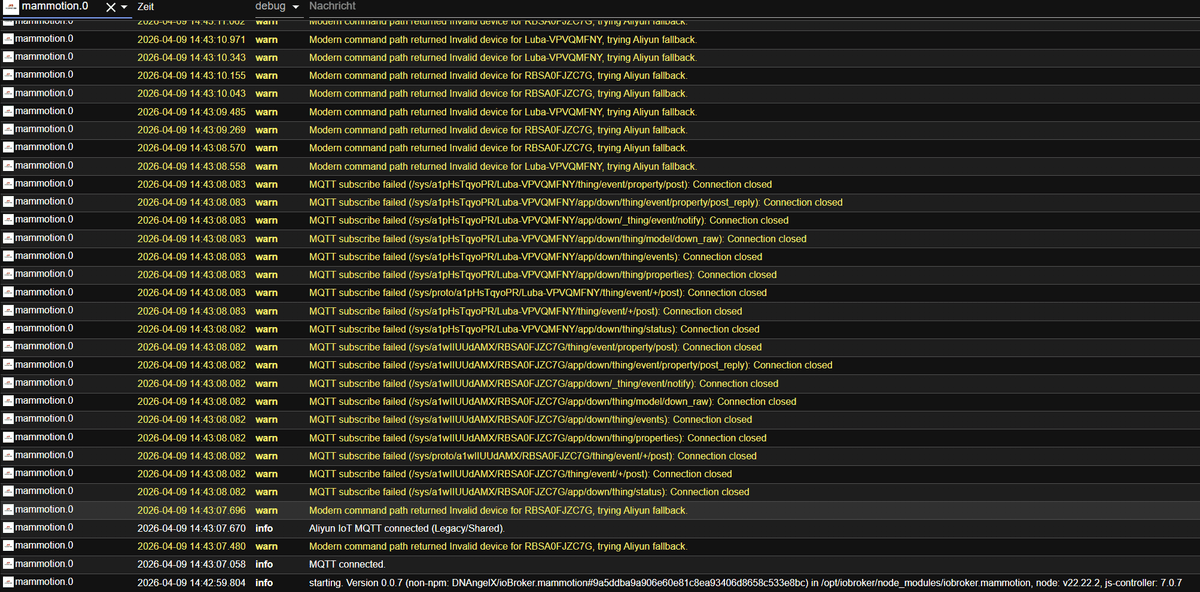
Hab es mal testweise für meinen Luba 2 installiert. Ich bekomme Objekte aber er hagelt mir das Log voll. Eingestellt ist aber Pull und nicht MQTT. Er schaltet automatisch auf MQTT.
-
Hi,
Falls du Probeme mit deinen Github Benachtichtigungen hast hier auch nochmal der letzte comment auf Github.
Bitte bearbeiten und auf GitHub im PR für den Latest einen Kommentar hinterlassen sobald erledigt.https://github.com/ioBroker/ioBroker.repositories/pull/5607#issuecomment-4208809044
- Please add object dump as requested before:
To verify the object structure of this adapter during REVIEW please export the object structure of a working installation and attach the file to this PR. You find a guide how to export the object struture here: https://github.com/ioBroker/ioBroker.repochecker/blob/master/OBJECTDUMP.md
- Please add standard github based testing. See workflows and files created by create-adapter.
You may clone them form ioBroker.examples.
Taking a look at https://github.com/Jey-Cee/iobroker-ai-developer-guide is recommended too.
- Please fix other issues reported by adapter checker.
Please drop a note as soon as those issues are fixed so I can start the review.
@mcm1957 Hey, hatte ich gestern schon geändert :) Es war aber spät weshalb ich noch nichts geantwortet hatte.
@maverick78 ja, das soll noch so sein solange der Adapter im Development Status ist, du kannst auf ERROR umschalten dann sind die Warns (die ich in der neuen Version schon auf Info umgeschaltet habe) weg.
WICHTIG
Zonen Testen!
Mein Luba ist aktuell TOT
Luba 1 Update führte zu defekter RTK Verbindung, ich warte auf replacement von Mammotion, ich kann das nicht testen aktuell (bei mir gab es keine Fehler im Test, bei Yuka aber offensichtlich schon).
-
Was genau soll bei den Zonen getestet werden? Meine 13 Zonen wurden geladen. Bis auf ein Umlautfehler mit "ß" im Namen ist alles da.
-
Was genau soll bei den Zonen getestet werden? Meine 13 Zonen wurden geladen. Bis auf ein Umlautfehler mit "ß" im Namen ist alles da.
Bitte screenshot der Zonen (Luba 1 hat keine Namen, das konnte ich auch nicht testen).
Testing:
-
Einzelne Zonen mal starten > Schauen ob die auch angefahren werden
mammotion.0.devices.XXX.zones.Area_2.start -
mehre Zonen auswählen und starten, schauen ob die so wie du die position ausgewählt hast auch angefahren werden
z.B.mammotion.0.devices.XXX.zones.Area_2.enabled= true
mammotion.0.devices.XXX.zones.Area_5.enabled= true
mammotion.0.devices.XXX.commands.startZones= true
Wenn du eine Sub Account nutzt, dann kannst du das auch auf dem Smartphone sehen, welche er wählt, das würde für mich reichen.
-
-
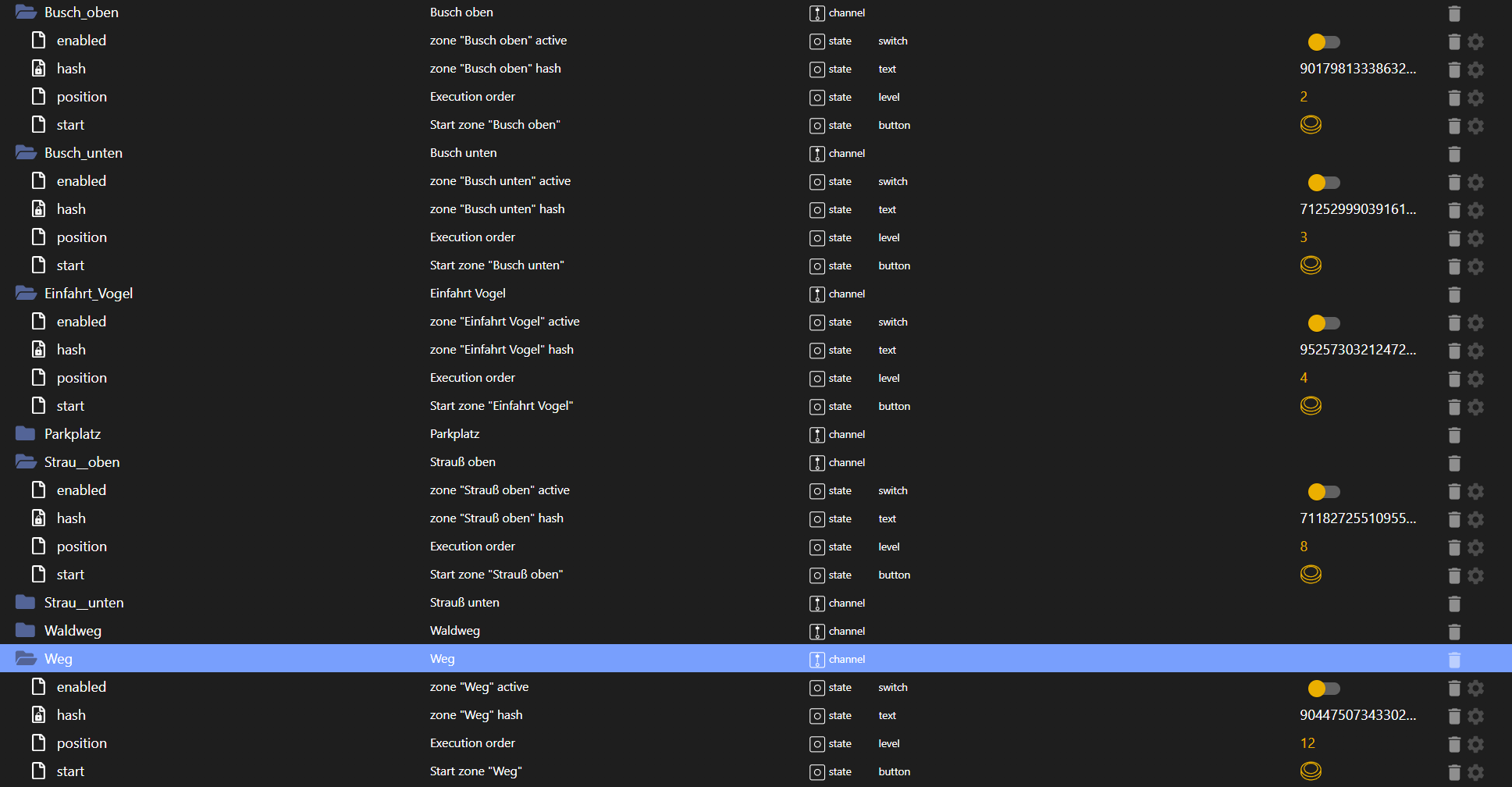
Mal exemplarisch die Zonen. Sind aber zu viele für einen Screenshot.
Das anfahren der Zonen teste ich später wenn er fertig ist mit mähen
-
@eLichte
Versuche mal die 0.0.7, da habe ich einiges umgestellt.Ich habe den Adapter testweise auch im leerem System installiert, Zonen kommen ca. 2 min nach Adapter-Start.
-
@stolly82
Habe 0.0.7
Leider kommen immer noch keine Zonen. Habe den Adapter eine Stunde laufen lassen. Auch RequestAreaNames bringt kein Ergebnis. -
Bitte screenshot der Zonen (Luba 1 hat keine Namen, das konnte ich auch nicht testen).
Testing:
-
Einzelne Zonen mal starten > Schauen ob die auch angefahren werden
mammotion.0.devices.XXX.zones.Area_2.start -
mehre Zonen auswählen und starten, schauen ob die so wie du die position ausgewählt hast auch angefahren werden
z.B.mammotion.0.devices.XXX.zones.Area_2.enabled= true
mammotion.0.devices.XXX.zones.Area_5.enabled= true
mammotion.0.devices.XXX.commands.startZones= true
Wenn du eine Sub Account nutzt, dann kannst du das auch auf dem Smartphone sehen, welche er wählt, das würde für mich reichen.
Testing:
Einzelne Zonen mal starten > Schauen ob die auch angefahren werden
mammotion.0.devices.XXX.zones.Area_2.startFunktioniert
mehre Zonen auswählen und starten, schauen ob die so wie du die position ausgewählt hast auch angefahren werden
z.B. mammotion.0.devices.XXX.zones.Area_2.enabled = true
mammotion.0.devices.XXX.zones.Area_5.enabled = true
mammotion.0.devices.XXX.commands.startZones = trueMit 3 Zonen getestet, funktioniert. Auch die geänderte Höheneinstellung wird übernommen.
-
-
Testing:
Einzelne Zonen mal starten > Schauen ob die auch angefahren werden
mammotion.0.devices.XXX.zones.Area_2.startFunktioniert
mehre Zonen auswählen und starten, schauen ob die so wie du die position ausgewählt hast auch angefahren werden
z.B. mammotion.0.devices.XXX.zones.Area_2.enabled = true
mammotion.0.devices.XXX.zones.Area_5.enabled = true
mammotion.0.devices.XXX.commands.startZones = trueMit 3 Zonen getestet, funktioniert. Auch die geänderte Höheneinstellung wird übernommen.
Geilo!
-
Hallo und vielen Dank für die Arbeit!
Ich habe einen Luba 2 aus 2024.
Nach dem Adapterstart und der Anmeldung wird der Luba 2 und die RTK mit Datenpunkten angelegt. Areas bekomme ich leider keine Trotz triggern über "requestAreaNames".
Bin kein Programmierer, aber falls ich unterstützen kann, gerne!gruß Freak
-
Hallo und vielen Dank für die Arbeit!
Ich habe einen Luba 2 aus 2024.
Nach dem Adapterstart und der Anmeldung wird der Luba 2 und die RTK mit Datenpunkten angelegt. Areas bekomme ich leider keine Trotz triggern über "requestAreaNames".
Bin kein Programmierer, aber falls ich unterstützen kann, gerne!gruß Freak
Hey @Freak,
wenn du die aktuelle Version von dem Adapter drauf hast (0.0.7) dann brauche ich entweder einmal die Logs (Adapter neu starten, warten, dann nach 2 min.
requestAreaNamesdrücken und AB DA die logs, da müsste dann mit Filter ZONE in den logs ein wenig was stehen.Gerne sonst den Luba einmal kurz sharen, dann logge ich das sonst eben
stolly82+iobdev@gmail.com. -
Ok, ich hab mir das kurz angesehen. Ich glaube so weit kommt er gar nicht.
Ich kriege immer die Meldungen:
Modern command path returned Invalid device for RTK............ , trying Aliyun fallback.
Modern command path returned Invalid device for Luba-......... , trying Aliyun fallback.Allerdings weiß ich nicht, was mir diese Meldungen sagen wollen.
Gruß Freak
-
 H Homoran verschob dieses Thema von Tester am
-
H Homoran verschob dieses Thema von ...nicht in offiziellem Repo am
-
H Homoran verschob dieses Thema von Tester am
-
Ich weiß nicht ob es mit dem Adapter im Zusammenhang steht, aber ich habe seit vorgestern arge Probleme beim Zugriff auf die App. Alles ist sehr langsam und teilweise auch Meldungen das das Laden der Kartendaten fehlgeschlagen ist, aber auch Setting die nicht korrekt angezeigt werden.
Der Adapter läuft unter einem eigenen Account mit Gerätefreigabe.
Schalte ich den Adapter ab geht es nach ein paar Minuten wieder in der App, aber auch noch zäh.Kann es sein, das es ein Rate Limit bei den Api Calls gibt und durch die vielen "Invalid device for Luba-......... , trying Aliyun fallback" Meldungen ein Rate Limit am Server gesprengt wird?
Ich lasse den Adapter mal aus und schau ob sich das verhalten der App wieder normalisiert.
-
Eeeendlich hat jemand diesen Adapter gebaut, dafür erstmal vielen Dank!!! Habe ihn frisch aus Github installiert und einen Luba 2 1000 in Benutzung. Irgendwas scheint mit der MQTT Verbindung nicht zu stimmen. Nach Adapterstart bekomme ich auf Loglevel Debug folgende Logeinträge:
mammotion.0 2026-04-16 17:41:06.126	debug	Area-Name-Re-Request (missing) failed for Luba-VSY6PEGK: Request failed with status code 429

mammotion.0 2026-04-16 17:41:06.109	warn	Modern command path returned Invalid device for Luba-VSY6PEGK, trying Aliyun fallback.

mammotion.0 2026-04-16 17:41:06.018	debug	JWT MQTT connection closed

mammotion.0 2026-04-16 17:41:06.018	debug	JWT MQTT offline

mammotion.0 2026-04-16 17:41:05.945	debug	[AREA-REQ] Sending sub_cmd=3 (AppGetAllAreaHashName) for Luba-VSY6PEGK, receiver=1

mammotion.0 2026-04-16 17:41:05.943	debug	[MQTT] Physical device topic reachable: /sys/a1LLmy1zc0j/Luba-VSY6PEGK/thing/event/property/post

mammotion.0 2026-04-16 17:41:05.943	debug	[MQTT] Physical device topic reachable: /sys/a1LLmy1zc0j/Luba-VSY6PEGK/app/down/thing/event/property/post_reply

mammotion.0 2026-04-16 17:41:05.943	debug	[MQTT] Physical device topic reachable: /sys/proto/a1LLmy1zc0j/Luba-VSY6PEGK/thing/event/+/post

mammotion.0 2026-04-16 17:41:05.943	debug	[MQTT] Physical device topic reachable: /sys/a1LLmy1zc0j/Luba-VSY6PEGK/thing/event/+/post

mammotion.0 2026-04-16 17:41:05.942	info	MQTT connected.
Die Einträge kommen zyklisch alle 5sek wieder. Das Abrufen der Zonen funktioniert leider auch nicht. Habe ein 2. Konto für den Adapter erstellt und den Luba 2 geteilt. Muss ich die RTK auch teilen? Ich hoffe das die Entwicklung des Adapters weiter geht sobald du eine neue RTK Basis von Mammotion bekommst ;)

Hey! Du scheinst an dieser Unterhaltung interessiert zu sein, hast aber noch kein Konto.
Hast du es satt, bei jedem Besuch durch die gleichen Beiträge zu scrollen? Wenn du dich für ein Konto anmeldest, kommst du immer genau dorthin zurück, wo du zuvor warst, und kannst dich über neue Antworten benachrichtigen lassen (entweder per E-Mail oder Push-Benachrichtigung). Du kannst auch Lesezeichen speichern und Beiträge positiv bewerten, um anderen Community-Mitgliedern deine Wertschätzung zu zeigen.
Mit deinem Input könnte dieser Beitrag noch besser werden 💗
Registrieren AnmeldenSupport us
502
Online33.0k
Benutzer83.6k
Themen1.3m
Beiträge