




Iobroker backitup error.. Wo liegt das problem
-
Du musst also als root mounten...=> habe ich gemacht, jedoch bleibt die Fehlermeldung
hier steht alles, von beiden Systemen
https://forum.iobroker.net/post/132983214:08:47.142INFOguiBackup gestartet ... 14:08:57.287DEBUGmountcifs-mount command: "sudo mount -t cifs -o username=ioBroker,password=****,noserverino,cache=loose,rw,forceuid,uid=iobroker,forcegid,gid=iobroker,file_mode=0777,dir_mode=0777,vers=3.1.1 //192.168.1.1/fritz.nas/iobroker_backup /opt/iobroker/backups" 14:08:57.340DEBUGmountfirst mount attempt with smb option failed. try next mount attempt without smb option ... 14:08:57.345DEBUGmountcifs-mount command: "sudo mount -t cifs -o username=ioBroker,password=****,noserverino,cache=loose,rw,forceuid,uid=iobroker,forcegid,gid=iobroker,file_mode=0777,dir_mode=0777 //192.168.1.1/fritz.nas/iobroker_backup /opt/iobroker/backups" 14:08:57.411DEBUGmountError: Command failed: sudo mount -t cifs -o username=ioBroker,password=****,noserverino,cache=loose,rw,forceuid,uid=iobroker,forcegid,gid=iobroker,file_mode=0777,dir_mode=0777 //192.168.1.1/fritz.nas/iobroker_backup /opt/iobroker/backups mount error(2): No such file or directory Refer to the mount.cifs(8) manual page (e.g. man mount.cifs) and kernel log messages (dmesg) 14:09:01.738DEBUGiobrokerhost.RaspberryPi4 2376 objects saved 14:09:02.028DEBUGiobrokerhost.RaspberryPi4 1727 states saved 14:09:02.034DEBUGiobrokerhost.RaspberryPi4 Validating backup ... 14:09:02.040DEBUGiobrokerhost.RaspberryPi4 "config.json" is valid 14:09:02.046DEBUGiobrokerhost.RaspberryPi4 "objects.jsonl" exists host.RaspberryPi4 "states.jsonl" exists 14:09:02.466DEBUGiobrokerhost.RaspberryPi4 JSONL lines are valid 14:09:02.490DEBUGiobrokerhost.RaspberryPi4 The backup is valid! 14:09:03.243DEBUGiobrokerBackup created: /opt/iobroker/backups/iobroker_2026_03_15-14_08_57_backupiobroker.tar.gz 14:09:03.252DEBUGiobrokerThis backup can only be restored with js-controller version 7.0 or higher 14:09:04.294DEBUGiobrokerdone 14:09:06.434DEBUGnoderedCreated nodered tmp directory 14:09:06.543DEBUGnoderedNode-Red tmp copy finish 14:09:06.648DEBUGnoderedBackup created: /opt/iobroker/backups/nodered.0_2026_03_15-14_09_06_backupiobroker.tar.gz 14:09:06.663DEBUGnoderedTry deleting the old node-red tmp directory: "/opt/iobroker/backups/noderedtmp0" 14:09:06.668DEBUGnoderednode-red tmp directory "/opt/iobroker/backups/noderedtmp0" successfully deleted 14:09:06.709DEBUGnoderedfound node-red database: node-red.0 14:09:06.711DEBUGnodereddone 14:09:07.262DEBUGcifsused copy path: /fritz.nas/iobroker_backup 14:09:07.264DEBUGcifsdone 14:09:07.872ERRORcleanBackup files not deleted from /opt/iobroker/backups because some errors. 14:09:07.874DEBUGcleandone 14:09:08.033DEBUGhistoryHTMLnew history html values created 14:09:08.126DEBUGhistoryHTMLdone 14:09:08.296DEBUGhistoryJSONnew history json values created 14:09:08.337DEBUGhistoryJSONdone -
Du musst also als root mounten...=> habe ich gemacht, jedoch bleibt die Fehlermeldung
hier steht alles, von beiden Systemen
https://forum.iobroker.net/post/132983214:08:47.142INFOguiBackup gestartet ... 14:08:57.287DEBUGmountcifs-mount command: "sudo mount -t cifs -o username=ioBroker,password=****,noserverino,cache=loose,rw,forceuid,uid=iobroker,forcegid,gid=iobroker,file_mode=0777,dir_mode=0777,vers=3.1.1 //192.168.1.1/fritz.nas/iobroker_backup /opt/iobroker/backups" 14:08:57.340DEBUGmountfirst mount attempt with smb option failed. try next mount attempt without smb option ... 14:08:57.345DEBUGmountcifs-mount command: "sudo mount -t cifs -o username=ioBroker,password=****,noserverino,cache=loose,rw,forceuid,uid=iobroker,forcegid,gid=iobroker,file_mode=0777,dir_mode=0777 //192.168.1.1/fritz.nas/iobroker_backup /opt/iobroker/backups" 14:08:57.411DEBUGmountError: Command failed: sudo mount -t cifs -o username=ioBroker,password=****,noserverino,cache=loose,rw,forceuid,uid=iobroker,forcegid,gid=iobroker,file_mode=0777,dir_mode=0777 //192.168.1.1/fritz.nas/iobroker_backup /opt/iobroker/backups mount error(2): No such file or directory Refer to the mount.cifs(8) manual page (e.g. man mount.cifs) and kernel log messages (dmesg) 14:09:01.738DEBUGiobrokerhost.RaspberryPi4 2376 objects saved 14:09:02.028DEBUGiobrokerhost.RaspberryPi4 1727 states saved 14:09:02.034DEBUGiobrokerhost.RaspberryPi4 Validating backup ... 14:09:02.040DEBUGiobrokerhost.RaspberryPi4 "config.json" is valid 14:09:02.046DEBUGiobrokerhost.RaspberryPi4 "objects.jsonl" exists host.RaspberryPi4 "states.jsonl" exists 14:09:02.466DEBUGiobrokerhost.RaspberryPi4 JSONL lines are valid 14:09:02.490DEBUGiobrokerhost.RaspberryPi4 The backup is valid! 14:09:03.243DEBUGiobrokerBackup created: /opt/iobroker/backups/iobroker_2026_03_15-14_08_57_backupiobroker.tar.gz 14:09:03.252DEBUGiobrokerThis backup can only be restored with js-controller version 7.0 or higher 14:09:04.294DEBUGiobrokerdone 14:09:06.434DEBUGnoderedCreated nodered tmp directory 14:09:06.543DEBUGnoderedNode-Red tmp copy finish 14:09:06.648DEBUGnoderedBackup created: /opt/iobroker/backups/nodered.0_2026_03_15-14_09_06_backupiobroker.tar.gz 14:09:06.663DEBUGnoderedTry deleting the old node-red tmp directory: "/opt/iobroker/backups/noderedtmp0" 14:09:06.668DEBUGnoderednode-red tmp directory "/opt/iobroker/backups/noderedtmp0" successfully deleted 14:09:06.709DEBUGnoderedfound node-red database: node-red.0 14:09:06.711DEBUGnodereddone 14:09:07.262DEBUGcifsused copy path: /fritz.nas/iobroker_backup 14:09:07.264DEBUGcifsdone 14:09:07.872ERRORcleanBackup files not deleted from /opt/iobroker/backups because some errors. 14:09:07.874DEBUGcleandone 14:09:08.033DEBUGhistoryHTMLnew history html values created 14:09:08.126DEBUGhistoryHTMLdone 14:09:08.296DEBUGhistoryJSONnew history json values created 14:09:08.337DEBUGhistoryJSONdone@SpeedyBlade sagte in Iobroker backitup error.. Wo liegt das problem:
Da muss was falsch sein. Ist die IP richtig? Üblicherweise ist 192.168.178.1 die IP einer FritzBox. Jedenfalls, wenn man das nicht bewusst umstellt.
-
die IP ist richtig von der fritzbox...192.168.1.1 => wurde bewusst geändert ;)
-
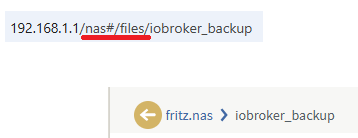
das macht mich ein wenig stutzig
-
das macht mich ein wenig stutzig
-
kannst du das mit backup vom iobroker testen?
Und kannst mal deine Einstellungen im backup-iobroker senden sharen bitte. -
kannst du das mit backup vom iobroker testen?
Und kannst mal deine Einstellungen im backup-iobroker senden sharen bitte.@SpeedyBlade
Klar: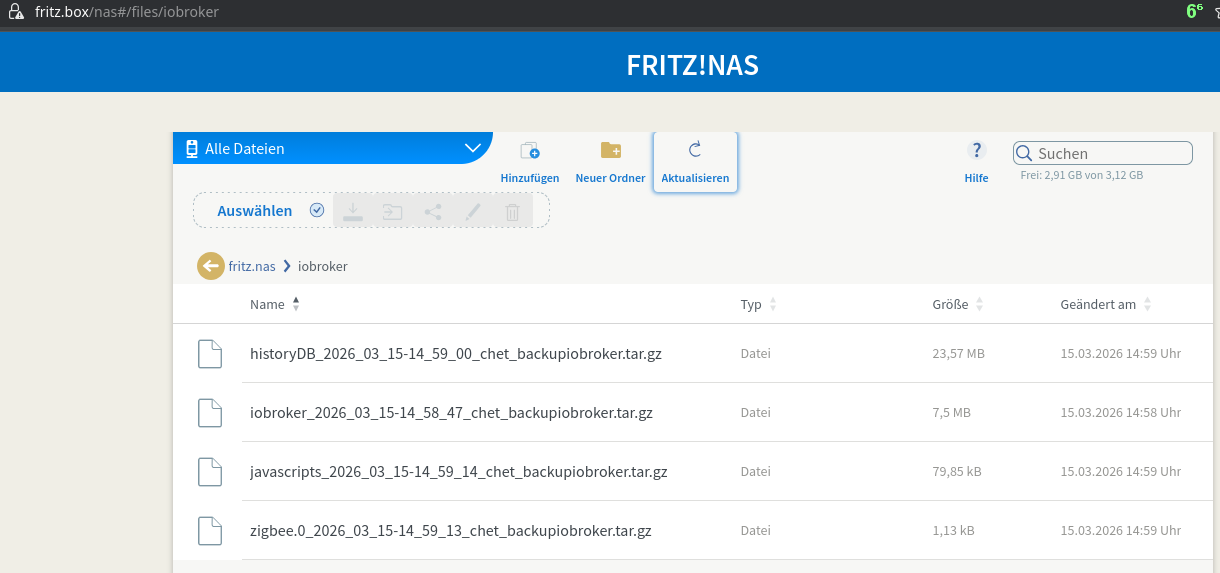
Liegt jetzt im internen Bereich des FritzNas.
Was läuft da bei dir? Also welche FritzBox mit welchem FritzOS? -
kannst du das mit backup vom iobroker testen?
Und kannst mal deine Einstellungen im backup-iobroker senden sharen bitte.@SpeedyBlade sagte in Iobroker backitup error.. Wo liegt das problem:
Und kannst mal deine Einstellungen im backup-iobroker senden sharen bitte.
Das nutzt dir nix, ich verwende die Experten-Optionen an der Stelle.
-
@SpeedyBlade
Klar:Liegt jetzt im internen Bereich des FritzNas.
Was läuft da bei dir? Also welche FritzBox mit welchem FritzOS?FRITZ!Box 5590 Fiber
FRITZ!OS: 8.02 -
FRITZ!Box 5590 Fiber
FRITZ!OS: 8.02@SpeedyBlade sagte in Iobroker backitup error.. Wo liegt das problem:
FRITZ!OS: 8.02
Typo? 8.20 ist aktuell.
-
FRITZ!Box 5590 Fiber
FRITZ!OS: 8.02copy-paste...;)
hab gerade auf 8.20 upgedated von 8.02
FRITZ!OS: 8.20hat leider auch keine besserung gebracht
15:23:30.416INFOguiBackup gestartet ... 15:23:40.536DEBUGmountcifs-mount command: "sudo mount -t cifs -o username=ioBroker,password=****,noserverino,cache=loose,rw,forceuid,uid=iobroker,forcegid,gid=iobroker,file_mode=0777,dir_mode=0777,vers=3.1.1 //192.168.1.1/fritz.nas/nas#/files/iobroker_backup /opt/iobroker/backups" 15:23:40.589DEBUGmountfirst mount attempt with smb option failed. try next mount attempt without smb option ... 15:23:40.592DEBUGmountcifs-mount command: "sudo mount -t cifs -o username=ioBroker,password=****,noserverino,cache=loose,rw,forceuid,uid=iobroker,forcegid,gid=iobroker,file_mode=0777,dir_mode=0777 //192.168.1.1/fritz.nas/nas#/files/iobroker_backup /opt/iobroker/backups" 15:23:40.648DEBUGmountError: Command failed: sudo mount -t cifs -o username=ioBroker,password=****,noserverino,cache=loose,rw,forceuid,uid=iobroker,forcegid,gid=iobroker,file_mode=0777,dir_mode=0777 //192.168.1.1/fritz.nas/nas#/files/iobroker_backup /opt/iobroker/backups mount error(2): No such file or directory Refer to the mount.cifs(8) manual page (e.g. man mount.cifs) and kernel log messages (dmesg) 15:23:44.769DEBUGiobrokerhost.RaspberryPi4 2376 objects saved 15:23:45.068DEBUGiobrokerhost.RaspberryPi4 1727 states saved 15:23:45.084DEBUGiobrokerhost.RaspberryPi4 Validating backup ... host.RaspberryPi4 "config.json" is valid 15:23:45.097DEBUGiobrokerhost.RaspberryPi4 "objects.jsonl" exists host.RaspberryPi4 "states.jsonl" exists 15:23:45.490DEBUGiobrokerhost.RaspberryPi4 JSONL lines are valid 15:23:45.548DEBUGiobrokerhost.RaspberryPi4 The backup is valid! 15:23:46.265DEBUGiobrokerBackup created: /opt/iobroker/backups/iobroker_2026_03_15-15_23_41_backupiobroker.tar.gz 15:23:46.272DEBUGiobrokerThis backup can only be restored with js-controller version 7.0 or higher 15:23:47.308DEBUGiobrokerdone 15:23:49.429DEBUGnoderedCreated nodered tmp directory 15:23:49.547DEBUGnoderedNode-Red tmp copy finish 15:23:49.669DEBUGnoderedBackup created: /opt/iobroker/backups/nodered.0_2026_03_15-15_23_49_backupiobroker.tar.gz 15:23:49.684DEBUGnoderedTry deleting the old node-red tmp directory: "/opt/iobroker/backups/noderedtmp0" 15:23:49.690DEBUGnoderednode-red tmp directory "/opt/iobroker/backups/noderedtmp0" successfully deleted 15:23:49.692DEBUGnoderedfound node-red database: node-red.0 15:23:49.730DEBUGnodereddone 15:23:50.283DEBUGcifsused copy path: /fritz.nas/nas#/files/iobroker_backup 15:23:50.286DEBUGcifsdone 15:23:50.891ERRORcleanBackup files not deleted from /opt/iobroker/backups because some errors. 15:23:50.931DEBUGcleandone 15:23:51.053DEBUGhistoryHTMLnew history html values created 15:23:51.066DEBUGhistoryHTMLdone 15:23:51.231DEBUGhistoryJSONnew history json values created 15:23:51.274DEBUGhistoryJSONdone -
copy-paste...;)
hab gerade auf 8.20 upgedated von 8.02
FRITZ!OS: 8.20hat leider auch keine besserung gebracht
15:23:30.416INFOguiBackup gestartet ... 15:23:40.536DEBUGmountcifs-mount command: "sudo mount -t cifs -o username=ioBroker,password=****,noserverino,cache=loose,rw,forceuid,uid=iobroker,forcegid,gid=iobroker,file_mode=0777,dir_mode=0777,vers=3.1.1 //192.168.1.1/fritz.nas/nas#/files/iobroker_backup /opt/iobroker/backups" 15:23:40.589DEBUGmountfirst mount attempt with smb option failed. try next mount attempt without smb option ... 15:23:40.592DEBUGmountcifs-mount command: "sudo mount -t cifs -o username=ioBroker,password=****,noserverino,cache=loose,rw,forceuid,uid=iobroker,forcegid,gid=iobroker,file_mode=0777,dir_mode=0777 //192.168.1.1/fritz.nas/nas#/files/iobroker_backup /opt/iobroker/backups" 15:23:40.648DEBUGmountError: Command failed: sudo mount -t cifs -o username=ioBroker,password=****,noserverino,cache=loose,rw,forceuid,uid=iobroker,forcegid,gid=iobroker,file_mode=0777,dir_mode=0777 //192.168.1.1/fritz.nas/nas#/files/iobroker_backup /opt/iobroker/backups mount error(2): No such file or directory Refer to the mount.cifs(8) manual page (e.g. man mount.cifs) and kernel log messages (dmesg) 15:23:44.769DEBUGiobrokerhost.RaspberryPi4 2376 objects saved 15:23:45.068DEBUGiobrokerhost.RaspberryPi4 1727 states saved 15:23:45.084DEBUGiobrokerhost.RaspberryPi4 Validating backup ... host.RaspberryPi4 "config.json" is valid 15:23:45.097DEBUGiobrokerhost.RaspberryPi4 "objects.jsonl" exists host.RaspberryPi4 "states.jsonl" exists 15:23:45.490DEBUGiobrokerhost.RaspberryPi4 JSONL lines are valid 15:23:45.548DEBUGiobrokerhost.RaspberryPi4 The backup is valid! 15:23:46.265DEBUGiobrokerBackup created: /opt/iobroker/backups/iobroker_2026_03_15-15_23_41_backupiobroker.tar.gz 15:23:46.272DEBUGiobrokerThis backup can only be restored with js-controller version 7.0 or higher 15:23:47.308DEBUGiobrokerdone 15:23:49.429DEBUGnoderedCreated nodered tmp directory 15:23:49.547DEBUGnoderedNode-Red tmp copy finish 15:23:49.669DEBUGnoderedBackup created: /opt/iobroker/backups/nodered.0_2026_03_15-15_23_49_backupiobroker.tar.gz 15:23:49.684DEBUGnoderedTry deleting the old node-red tmp directory: "/opt/iobroker/backups/noderedtmp0" 15:23:49.690DEBUGnoderednode-red tmp directory "/opt/iobroker/backups/noderedtmp0" successfully deleted 15:23:49.692DEBUGnoderedfound node-red database: node-red.0 15:23:49.730DEBUGnodereddone 15:23:50.283DEBUGcifsused copy path: /fritz.nas/nas#/files/iobroker_backup 15:23:50.286DEBUGcifsdone 15:23:50.891ERRORcleanBackup files not deleted from /opt/iobroker/backups because some errors. 15:23:50.931DEBUGcleandone 15:23:51.053DEBUGhistoryHTMLnew history html values created 15:23:51.066DEBUGhistoryHTMLdone 15:23:51.231DEBUGhistoryJSONnew history json values created 15:23:51.274DEBUGhistoryJSONdone@SpeedyBlade sagte in Iobroker backitup error.. Wo liegt das problem:
Ist falsch. Der Pfad muss
lauten.
-
@SpeedyBlade sagte in Iobroker backitup error.. Wo liegt das problem:
Ist falsch. Der Pfad muss
lauten.
@Thomas-Braun sagte in Iobroker backitup error.. Wo liegt das problem:
Ist falsch. Der Pfad muss
der wird aber doch zusammengesetzt!
nach den Informationen von @speedyblade hier: https://forum.iobroker.net/post/1329835
müsste es richtig sein.
existiert noch ein separater mount?
kein Support per PN! - Fragen im Forum stellen - Benutzt das Voting rechts unten im Beitrag wenn er euch geholfen hat.
Das Forum freut sich über eine Spende. Benutzt dazu den Spendenbutton oben rechts. Danke!
der Installationsfixer: curl -fsL https://iobroker.net/fix.sh | bash - -
@Thomas-Braun sagte in Iobroker backitup error.. Wo liegt das problem:
Ist falsch. Der Pfad muss
der wird aber doch zusammengesetzt!
nach den Informationen von @speedyblade hier: https://forum.iobroker.net/post/1329835
müsste es richtig sein.
existiert noch ein separater mount?
@Homoran sagte in Iobroker backitup error.. Wo liegt das problem:
der wird aber doch zusammengesetzt!
Jein. Aber nicht so.
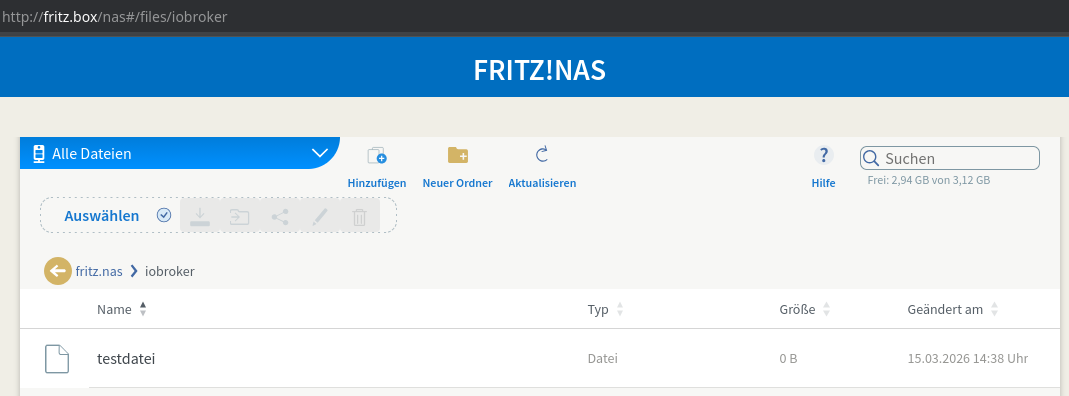
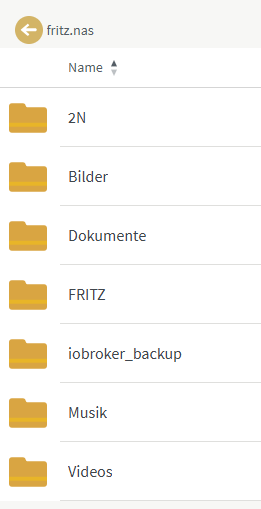
//192.168.178.1/fritz.nas/iobroker /opt/iobroker/backups cifs credentials=/home/iobroker/.smbcredentials,users,noserverino,noauto,rw,forceuid,uid=iobroker,forcegid,gid=iobroker,file_mode=0770,dir_mode=0770,vers=3.1.1 0 0Der FritzNas-interne Bereich wird mit
//192.168.178.1/fritz.nas/iobrokerdefiniert. Hier ist noch ein Verzeichnis namens 'iobroker' angelegt, wo die Backups dann abgelegt werden. -
egal wie ich es schreibe, es kommt immer der gleiche Fehler
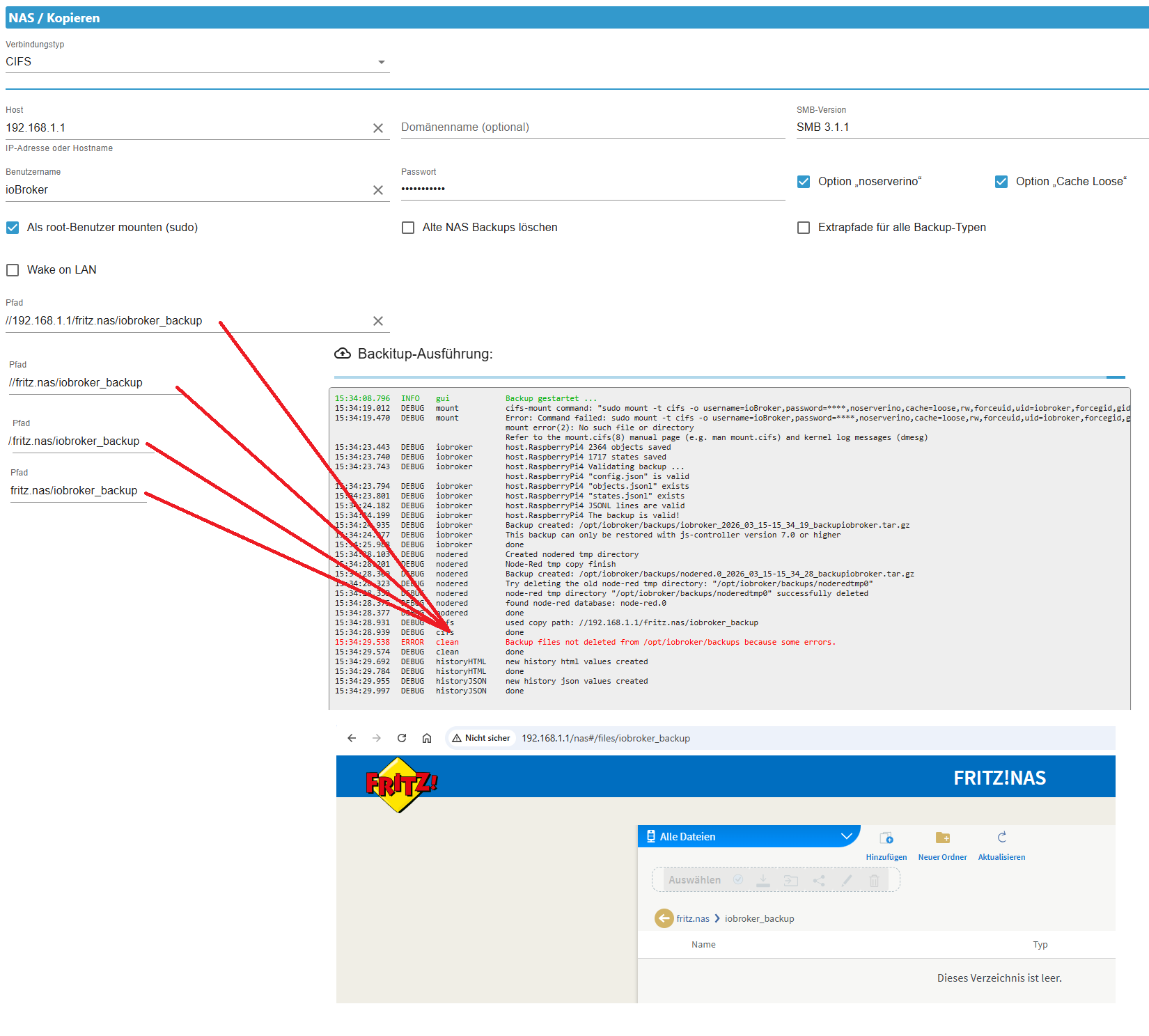
-
@Thomas-Braun sagte in Iobroker backitup error.. Wo liegt das problem:
Ist falsch. Der Pfad muss
der wird aber doch zusammengesetzt!
nach den Informationen von @speedyblade hier: https://forum.iobroker.net/post/1329835
müsste es richtig sein.
existiert noch ein separater mount?
@Homoran sagte in Iobroker backitup error.. Wo liegt das problem:
existiert noch ein separater mount?
es wird noch mit einer Gegensprechanlage, aber dafür nutze ich einen anderen User, auf ein anderes Verzeichnis auf der Fritzbox zugegriffen.
-
@Homoran sagte in Iobroker backitup error.. Wo liegt das problem:
der wird aber doch zusammengesetzt!
Jein. Aber nicht so.
//192.168.178.1/fritz.nas/iobroker /opt/iobroker/backups cifs credentials=/home/iobroker/.smbcredentials,users,noserverino,noauto,rw,forceuid,uid=iobroker,forcegid,gid=iobroker,file_mode=0770,dir_mode=0770,vers=3.1.1 0 0Der FritzNas-interne Bereich wird mit
//192.168.178.1/fritz.nas/iobrokerdefiniert. Hier ist noch ein Verzeichnis namens 'iobroker' angelegt, wo die Backups dann abgelegt werden. -
egal wie ich es schreibe, es kommt immer der gleiche Fehler
@SpeedyBlade sagte in Iobroker backitup error.. Wo liegt das problem:
es kommt immer der gleiche Fehler
der Fehler ist nicht wo du die roten Linien zusammenlaufen lässt, sondern in der 2.und 3. Zeile
kein Support per PN! - Fragen im Forum stellen - Benutzt das Voting rechts unten im Beitrag wenn er euch geholfen hat.
Das Forum freut sich über eine Spende. Benutzt dazu den Spendenbutton oben rechts. Danke!
der Installationsfixer: curl -fsL https://iobroker.net/fix.sh | bash - -
Hier übrigens ein Screenshot meiner alten Einstellungen (bevor es die Experten-Option gab):


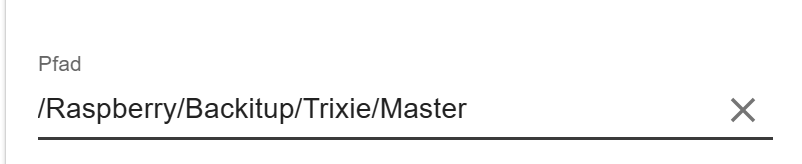

Hey! Du scheinst an dieser Unterhaltung interessiert zu sein, hast aber noch kein Konto.
Hast du es satt, bei jedem Besuch durch die gleichen Beiträge zu scrollen? Wenn du dich für ein Konto anmeldest, kommst du immer genau dorthin zurück, wo du zuvor warst, und kannst dich über neue Antworten benachrichtigen lassen (entweder per E-Mail oder Push-Benachrichtigung). Du kannst auch Lesezeichen speichern und Beiträge positiv bewerten, um anderen Community-Mitgliedern deine Wertschätzung zu zeigen.
Mit deinem Input könnte dieser Beitrag noch besser werden 💗
Registrieren Anmelden322
Online33.0k
Benutzer83.6k
Themen1.3m
Beiträge