Skip to content
  • Home
  • Aktuell
  • Tags
  • 0 Ungelesen 0
  • Kategorien
  • Unreplied
  • Beliebt
  • GitHub
  • Docu
  • Hilfe
Skins
  • Light
  • Brite
  • Cerulean
  • Cosmo
  • Flatly
  • Journal
  • Litera
  • Lumen
  • Lux
  • Materia
  • Minty
  • Morph
  • Pulse
  • Sandstone
  • Simplex
  • Sketchy
  • Spacelab
  • United
  • Yeti
  • Zephyr
  • Dark
  • Cyborg
  • Darkly
  • Quartz
  • Slate
  • Solar
  • Superhero
  • Vapor

  • Standard: (Kein Skin)
  • Kein Skin
Einklappen
ioBroker Logo

Community Forum

donate donate
  1. ioBroker Community Home
  2. Deutsch
  3. ioBroker Allgemein
  4. Hilfestellung Raspi4: Zigbee2Mqtt, InfluxDB, Grafana

NEWS

  • Jahresrückblick 2025 – unser neuer Blogbeitrag ist online! ✨
    BluefoxB
    Bluefox
    16
    1
    947

  • Neuer Blogbeitrag: Monatsrückblick - Dezember 2025 🎄
    BluefoxB
    Bluefox
    13
    1
    690

  • Weihnachtsangebot 2025! 🎄
    BluefoxB
    Bluefox
    25
    1
    2.0k

Hilfestellung Raspi4: Zigbee2Mqtt, InfluxDB, Grafana

Geplant Angeheftet Gesperrt Verschoben ioBroker Allgemein
67 Beiträge 7 Kommentatoren 514 Aufrufe 6 Watching
  • Älteste zuerst
  • Neuste zuerst
  • Meiste Stimmen
Antworten
  • In einem neuen Thema antworten
Anmelden zum Antworten
Dieses Thema wurde gelöscht. Nur Nutzer mit entsprechenden Rechten können es sehen.
  • M marcelinho

    @crunchip @thomas-braun wisst ihr zufällig wieso ich das Zigbee2mqtt nicht zum laufen bekomme?
    Kurz zum Verlauf, wollte am Freitag Abend meine alte Micro SD auf Trixie bringen ist aber fehlgeschlagen. Ich kann mich leider per Putty nicht mehr drauf einloggen. Micro HDMI kommt morgen um eine direkte Verbindung zum Raspi zu herzustellen damit ich es hoffentlich wieder gerade biegen kann. Komischerweise geht die alte Karte bzw. ioBroker wenn ich Sie einlege. Wenn ich aber meine neue zum laufen bekomme ist die alte natürlich hinfällig. Meine neue Micro SD hab ich Zigbee2mqtt nur auf grün gebracht mit externer MQTT-Server anbei 2 Bilder sowie die YAML:
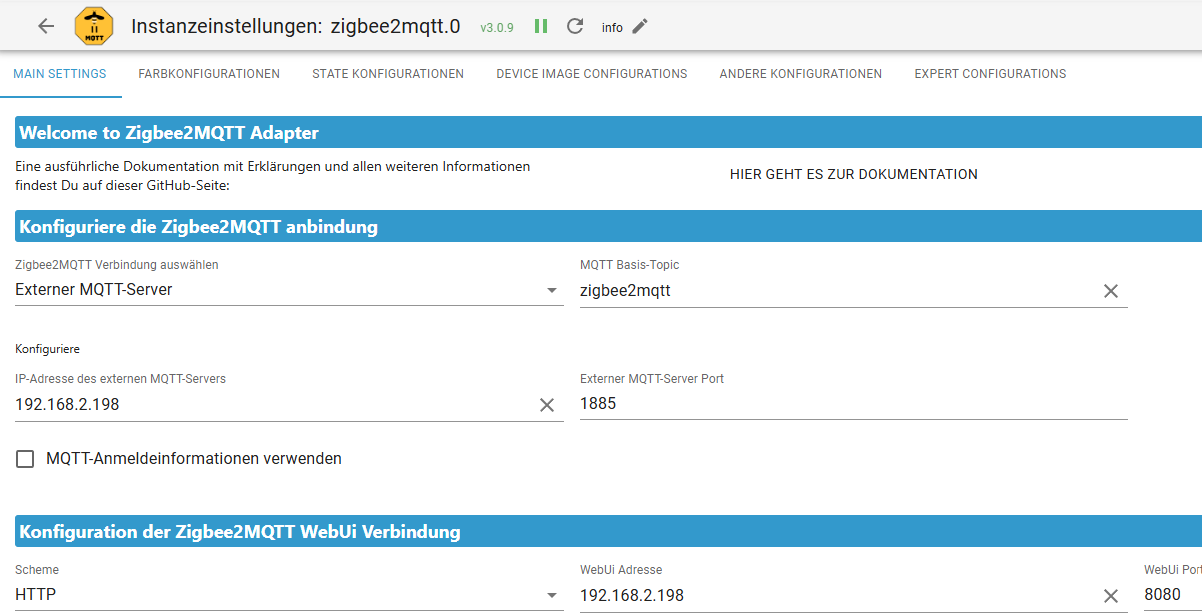
    Zigbee2mqtt neue Karte.png
    mqtt neue Karte.png
    und hier die YAML:

    homeassistant: false
    permit_join: true

    frontend:
    port: 8080
    host: 0.0.0.0

    mqtt:
    base_topic: zigbee2mqtt
    server: mqtt://192.168.2.198:1885

    serial:
    port: /dev/serial/by-id/usb-ITead_Sonoff_Zigbee_3.0_USB_Dongle_Plus_c4452914ae9ded11bf33d1a5a7669f5d-if00-port0

    advanced:
    pan_id: 19452
    ext_pan_id: [72, 200, 193, 101, 193, 116, 146, 56]
    channel: 11
    network_key: [249, 141, 167, 140, 102, 102, 126, 74, 119, 102, 162, 222, 69, 128, 250, 3]

    und bei meiner alten Micro SD war es wie folgt:
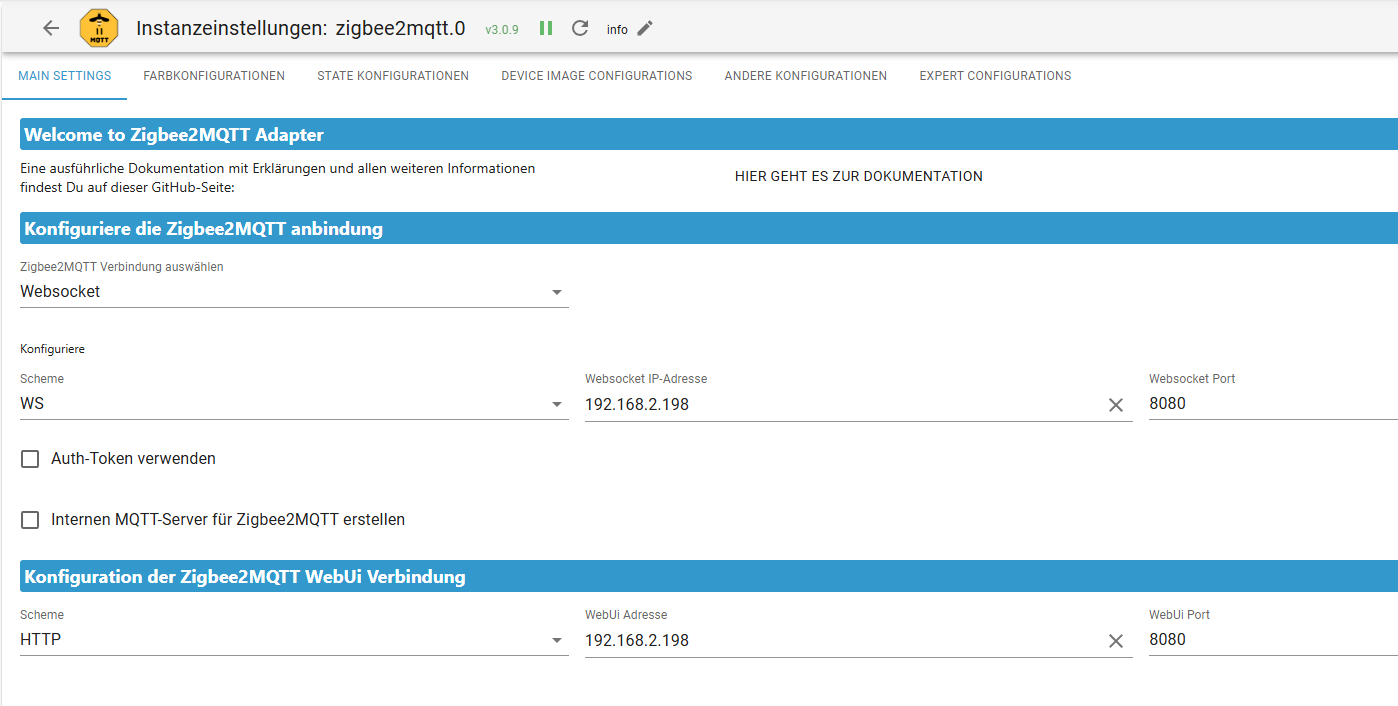
    Zigbee2mqtt alte Karte.png
    mqtt alte Karte.png

    YAML alt:

    homeassistant: false
    permit_join: true

    frontend:
    port: 8080
    host: 0.0.0.0

    mqtt:
    base_topic: zigbee2mqtt
    server: mqtt://192.168.2.198:1885

    serial:
    port: /dev/serial/by-id/usb-ITead_Sonoff_Zigbee_3.0_USB_Dongle_Plus_c4452914ae9ded11bf33d1a5a7669f5d-if00-port0

    advanced:
    pan_id: 19452
    ext_pan_id: [72, 200, 193, 101, 193, 116, 146, 56]
    channel: 11
    network_key: [249, 141, 167, 140, 102, 102, 126, 74, 119, 102, 162, 222, 69, 128, 250, 3]

    wenn ich auf der neuen WS eingebe wird der Adapter nicht mehr grün... Verstehe nicht wieso, bin seit gestern schon dran und bekomme es nicht zum laufen.

    Danke vorab.

    crunchipC Abwesend
    crunchipC Abwesend
    crunchip
    Forum Testing Most Active
    schrieb am zuletzt editiert von
    #8

    @marcelinho sagte in Hilfestellung Raspi4: Zigbee2Mqtt, InfluxDB, Grafana:

    WS eingebe wird der Adapter nicht mehr grün

    und was kommt im log?

    umgestiegen von Proxmox auf Unraid

    M 1 Antwort Letzte Antwort
    0
    • crunchipC crunchip

      @marcelinho sagte in Hilfestellung Raspi4: Zigbee2Mqtt, InfluxDB, Grafana:

      WS eingebe wird der Adapter nicht mehr grün

      und was kommt im log?

      M Offline
      M Offline
      marcelinho
      schrieb am zuletzt editiert von Homoran
      #9

      @crunchip

      
      zigbee2mqtt.0
      2026-01-04 21:57:08.955	warn	Start try again in 1 seconds...
      
      zigbee2mqtt.0
      2026-01-04 21:57:07.951	warn	Start try again in 1 seconds...
      
      zigbee2mqtt.0
      2026-01-04 21:57:06.947	warn	Start try again in 1 seconds...
      
      zigbee2mqtt.0
      2026-01-04 21:57:05.940	warn	Start try again in 1 seconds...
      
      zigbee2mqtt.0
      2026-01-04 21:57:04.934	warn	Start try again in 1 seconds...
      
      zigbee2mqtt.0
      2026-01-04 21:57:03.930	warn	Start try again in 1 seconds...
      
      zigbee2mqtt.0
      2026-01-04 21:57:03.790	info	==================================================================================
      
      zigbee2mqtt.0
      2026-01-04 21:57:03.790	info	|| Coordinator Check Cron : 0 3 * * *
      
      zigbee2mqtt.0
      2026-01-04 21:57:03.790	info	|| Coordinator Check Loglevel: info
      
      zigbee2mqtt.0
      2026-01-04 21:57:03.790	info	|| Use Automatic Coordinator Check: yes
      
      zigbee2mqtt.0
      2026-01-04 21:57:03.789	info	|| Use Simple Press/Release State: no
      
      zigbee2mqtt.0
      2026-01-04 21:57:03.789	info	|| Use Simple Move/Stop State: no
      
      zigbee2mqtt.0
      2026-01-04 21:57:03.789	info	|| Use Simple Hold/Release State: yes
      
      zigbee2mqtt.0
      2026-01-04 21:57:03.789	info	|| Use Device Icons: no
      
      zigbee2mqtt.0
      2026-01-04 21:57:03.789	info	|| Use Event In Desc: yes
      
      zigbee2mqtt.0
      2026-01-04 21:57:03.788	info	|| Use BrightnessStep OnOff: no
      
      zigbee2mqtt.0
      2026-01-04 21:57:03.788	info	|| Use BrightnessMove OnOff: no
      
      zigbee2mqtt.0
      2026-01-04 21:57:03.788	info	|| Use ColorTemperature ColorSync: no
      
      zigbee2mqtt.0
      2026-01-04 21:57:03.788	info	|| Use Kelvin: no
      
      zigbee2mqtt.0
      2026-01-04 21:57:03.788	info	|| Proxy Zigbee2MQTT Logs to ioBroker Logs: activated
      
      zigbee2mqtt.0
      2026-01-04 21:57:03.788	info	|| Zigbee2MQTT Debug Log: deactivated
      
      zigbee2mqtt.0
      2026-01-04 21:57:03.787	info	|| Zigbee2MQTT Websocket Dummy MQTT-Server: deactivated
      
      zigbee2mqtt.0
      2026-01-04 21:57:03.787	info	|| Zigbee2MQTT Websocket Auth-Token: unused
      
      zigbee2mqtt.0
      2026-01-04 21:57:03.786	info	|| Zigbee2MQTT Websocket Port: 8080
      
      zigbee2mqtt.0
      2026-01-04 21:57:03.785	info	|| Zigbee2MQTT Websocket Server: 192.168.2.198
      
      zigbee2mqtt.0
      2026-01-04 21:57:03.785	info	|| Zigbee2MQTT Websocket Scheme: ws
      
      zigbee2mqtt.0
      2026-01-04 21:57:03.784	info	|| Zigbee2MQTT Connection Type: ws
      
      zigbee2mqtt.0
      2026-01-04 21:57:03.784	info	|| Zigbee2MQTT Frontend Port: 8080
      
      zigbee2mqtt.0
      2026-01-04 21:57:03.784	info	|| Zigbee2MQTT Frontend Server: 192.168.2.198
      
      zigbee2mqtt.0
      2026-01-04 21:57:03.783	info	|| Zigbee2MQTT Frontend Scheme: http
      
      zigbee2mqtt.0
      2026-01-04 21:57:03.782	info	================================= Adapter Config =================================
      
      zigbee2mqtt.0
      2026-01-04 21:57:03.757	info	starting. Version 3.0.9 in /opt/iobroker/node_modules/iobroker.zigbee2mqtt, node: v22.21.0, js-controller: 7.0.7
      
      host.raspberrypi
      2026-01-04 21:57:01.311	info	instance system.adapter.zigbee2mqtt.0 in version "3.0.9" started with pid 1979
      
      1 Antwort Letzte Antwort
      0
      • M marcelinho

        @crunchip danke, ich möchte das es wie vorher war. Das ich auf die Web Socket komme. Der Adapter ist zwar grün meine Geräte werden alle erkannt (wohl wegen backitup) aber ich bekomme es nicht zum laufen. Bzw. wenn ich manuell zb. Licht aus/an schalte reagiert es nicht. Oder müsste die Yaml anders aussehen?

        crunchipC Abwesend
        crunchipC Abwesend
        crunchip
        Forum Testing Most Active
        schrieb am zuletzt editiert von
        #10

        @marcelinho sagte in Hilfestellung Raspi4: Zigbee2Mqtt, InfluxDB, Grafana:

        möchte das es wie vorher wa

        also so? https://forum.iobroker.net/post/880192

        umgestiegen von Proxmox auf Unraid

        1 Antwort Letzte Antwort
        0
        • MartinPM Online
          MartinPM Online
          MartinP
          schrieb am zuletzt editiert von
          #11

          Läuft denn überhaupt der externe zigbee2mqtt Server?
          Wenn ja, stimmt Port und IP Adresse?
          Mir scheint, der zigbee2mqtt Adapter findet keinen Server

          Intel(R) Celeron(R) CPU N3000 @ 1.04GHz 8G RAM 480G SSD
          Virtualization : unprivileged lxc container (debian 12 on Proxmox 8.4.14)
          Linux pve 6.8.12-16-pve
          6 GByte RAM für den Container
          Fritzbox 6591 FW 8.03 (Vodafone Leih-Box)
          Remote-Access über Wireguard der Fritzbox

          M 1 Antwort Letzte Antwort
          1
          • MartinPM MartinP

            Läuft denn überhaupt der externe zigbee2mqtt Server?
            Wenn ja, stimmt Port und IP Adresse?
            Mir scheint, der zigbee2mqtt Adapter findet keinen Server

            M Offline
            M Offline
            marcelinho
            schrieb am zuletzt editiert von
            #12

            @MartinP der externe zigbee2mqtt wird grün aber ich kann die Geräte nicht steuern. Ich denke die sind noch angelegt von dem backitup das ich eingespielt habe.

            || Zigbee2MQTT Version: 1.35.1
            || Coordinator type: zStack3x0
            || Network panid 19452 channel: 11
            

            mit Mosquitto kam auch die Nachricht an mit einem zweiten Putty Fenster:

            mosquitto_pub -h 192.168.2.198 -p 1885 ...
            mosquitto_sub -h 192.168.2.198 -p 1885 ...
            
            1 Antwort Letzte Antwort
            0
            • MartinPM Online
              MartinPM Online
              MartinP
              schrieb am zuletzt editiert von
              #13

              Kommst Du denn auf die Webseite des zigbee2mqtt Servers?

              Intel(R) Celeron(R) CPU N3000 @ 1.04GHz 8G RAM 480G SSD
              Virtualization : unprivileged lxc container (debian 12 on Proxmox 8.4.14)
              Linux pve 6.8.12-16-pve
              6 GByte RAM für den Container
              Fritzbox 6591 FW 8.03 (Vodafone Leih-Box)
              Remote-Access über Wireguard der Fritzbox

              M 1 Antwort Letzte Antwort
              0
              • MartinPM MartinP

                Kommst Du denn auf die Webseite des zigbee2mqtt Servers?

                M Offline
                M Offline
                marcelinho
                schrieb am zuletzt editiert von
                #14

                @MartinP leider nicht. Adapter wird nur bei externer MQTT-Server grün bei Web Socket nicht

                1 Antwort Letzte Antwort
                0
                • crunchipC crunchip

                  @marcelinho sagte in Hilfestellung Raspi4: Zigbee2Mqtt, InfluxDB, Grafana:

                  hier die YAML

                  ist doch ausgelegt für externen mqtt server, warum möchtest du jetzt umstellen?

                  HomoranH Nicht stören
                  HomoranH Nicht stören
                  Homoran
                  Global Moderator Administrators
                  schrieb am zuletzt editiert von Homoran
                  #15

                  was sagte hier bereits

                  @crunchip sagte in Hilfestellung Raspi4: Zigbee2Mqtt, InfluxDB, Grafana:

                  @marcelinho sagte in Hilfestellung Raspi4: Zigbee2Mqtt, InfluxDB, Grafana:

                  hier die YAML

                  ist doch ausgelegt für externen mqtt server

                  kein Support per PN! - Fragen im Forum stellen - es gibt fast nichts, was nicht auch für andere interessant ist.

                  Benutzt das Voting rechts unten im Beitrag wenn er euch geholfen hat.

                  der Installationsfixer: curl -fsL https://iobroker.net/fix.sh | bash -

                  M 1 Antwort Letzte Antwort
                  0
                  • HomoranH Homoran

                    was sagte hier bereits

                    @crunchip sagte in Hilfestellung Raspi4: Zigbee2Mqtt, InfluxDB, Grafana:

                    @marcelinho sagte in Hilfestellung Raspi4: Zigbee2Mqtt, InfluxDB, Grafana:

                    hier die YAML

                    ist doch ausgelegt für externen mqtt server

                    M Offline
                    M Offline
                    marcelinho
                    schrieb am zuletzt editiert von
                    #16

                    @Homoran ich glaube das ich den Zusammenhang zwischen externen mqtt server und Websocket nicht ganz verstehe. Ich möchte aufjedenfall wie auf meiner alten Karte das Web Socket konfigurieren.

                    crunchipC 1 Antwort Letzte Antwort
                    0
                    • MartinPM Online
                      MartinPM Online
                      MartinP
                      schrieb am zuletzt editiert von
                      #17

                      Hmm ich benutze den zigbee2mqtt Adapter nicht. Der Zigbee2mqtt Server verbindet sich bei mir direkt mit mqtt.0.

                      Wenn Du mit dem Browser nicht auf das Web-Interface vom Zigbee2mqtt Server kommst, liegt dort etwas im Argen

                      Intel(R) Celeron(R) CPU N3000 @ 1.04GHz 8G RAM 480G SSD
                      Virtualization : unprivileged lxc container (debian 12 on Proxmox 8.4.14)
                      Linux pve 6.8.12-16-pve
                      6 GByte RAM für den Container
                      Fritzbox 6591 FW 8.03 (Vodafone Leih-Box)
                      Remote-Access über Wireguard der Fritzbox

                      1 Antwort Letzte Antwort
                      0
                      • M marcelinho

                        @Homoran ich glaube das ich den Zusammenhang zwischen externen mqtt server und Websocket nicht ganz verstehe. Ich möchte aufjedenfall wie auf meiner alten Karte das Web Socket konfigurieren.

                        crunchipC Abwesend
                        crunchipC Abwesend
                        crunchip
                        Forum Testing Most Active
                        schrieb am zuletzt editiert von crunchip
                        #18

                        @marcelinho dann mal nochmals alle Informationen am Stück und Kompakt
                        dein Raspberry/alte SIM mit der IP 192.168.2.198
                        darauf lief

                        • iobroker( darauf bereits ein Adapter/MQTT SERVER)
                        • influx
                        • Grafana
                        • Z2M v1.35.1
                        • Mosquitto

                        deine Neue SIM
                        bis jetzt installiert

                        • iobroker
                        • Z2M v2.7.2
                        • Mosquitto

                        https://github.com/Koenkk/zigbee2mqtt/discussions/24198 breaking changes

                        umgestiegen von Proxmox auf Unraid

                        1 Antwort Letzte Antwort
                        1
                        • M Offline
                          M Offline
                          marcelinho
                          schrieb am zuletzt editiert von marcelinho
                          #19

                          @crunchip
                          hier iob diag von meiner alten Micro SD:

                          107*** BASE SYSTEM ***
                          Operating System: Debian GNU/Linux 12 (bookworm)
                          Static hostname: raspberrypi
                                 Icon name: computer
                                    Kernel: Linux 6.12.47+rpt-rpi-v8
                              Architecture: arm64
                          OS is similar to:
                          
                          Model        : Raspberry Pi 4 Model B Rev 1.5
                          Docker          : false
                          Virtualization  : none
                          Kernel          : aarch64
                          Userland        : 64 bit
                          
                          Systemuptime and Load:
                          21:18:05 up 53 min,  1 user,  load average: 0.31, 0.42, 0.59
                          CPU threads: 4
                          
                          
                          107*** LIFE CYCLE STATUS ***
                          Debian 'bookworm' is the current oldstable version. Please upgrade to the latest stable release 'trixie' in due time!
                          
                          107*** RASPBERRY THROTTLING ***
                          Current issues:
                          No throttling issues detected.
                          
                          Previously detected issues:
                          No throttling issues detected.
                          
                          107*** TIME AND TIMEZONES ***
                                         Local time: Fri 2026-01-02 21:18:05 CET
                                     Universal time: Fri 2026-01-02 20:18:05 UTC
                                           RTC time: n/a
                                          Time zone: Europe/Berlin (CET, +0100)
                          System clock synchronized: yes
                                        NTP service: active
                                    RTC in local TZ: no
                          
                          107*** Users and Groups ***
                          User that called 'iob diag':
                          iobroker
                          HOME=/home/iobroker
                          GROUPS=iobroker tty dialout audio video plugdev bluetooth gpio i2c
                          
                          User that is running 'js-controller':
                          iobroker
                          HOME=/home/iobroker
                          GROUPS=iobroker tty dialout audio video plugdev bluetooth gpio i2c
                          
                          A default user should be created! This user will be enabled to temporarily switch to root via 'sudo'!
                          A root login is not required in most Linux Distributions.
                          Run 'iobroker fix' or use the system tools to create a user.
                          107*** DISPLAY-SERVER SETUP ***
                          Display-Server:     false
                          Unit display-manager.service could not be found.
                          Display-Manager:     
                          Desktop:         
                          Session:         
                          
                          107*** MEMORY ***
                                         total        used        free      shared  buff/cache   available
                          Mem:            4.0G        3.0G        365M        610K        673M        966M
                          Swap:           209M        209M        516K
                          Total:          4.2G        3.2G        365M
                          
                          Active iob-Instances:     28
                          
                                   3796 M total memory
                                   2874 M used memory
                                   1981 M active memory
                                   1256 M inactive memory
                                    348 M free memory
                                     55 M buffer memory
                                    587 M swap cache
                                    199 M total swap
                                    199 M used swap
                                      0 M free swap
                          
                          107*** top - Table Of Processes  ***
                          top - 21:18:06 up 54 min,  1 user,  load average: 0.31, 0.42, 0.59
                          Tasks: 232 total,   1 running, 231 sleeping,   0 stopped,   0 zombie
                          %Cpu(s): 11.1 us, 11.1 sy,  0.0 ni, 66.7 id, 11.1 wa,  0.0 hi,  0.0 si,  0.0 st
                          MiB Mem :   3796.9 total,    348.3 free,   2874.9 used,    642.8 buff/cache    
                          MiB Swap:    200.0 total,      0.5 free,    199.5 used.    922.0 avail Mem
                          
                          107*** FAILED SERVICES ***
                          
                            UNIT LOAD ACTIVE SUB DESCRIPTION
                          0 loaded units listed.
                          
                          
                          107*** DMESG CRITICAL ERRORS ***
                          sudo: a terminal is required to read the password; either use the -S option to read from standard input or configure an askpass helper
                          sudo: a password is required
                          No critical errors detected
                          
                          107*** FILESYSTEM ***
                          Filesystem     Type      Size  Used Avail Use% Mounted on
                          udev           devtmpfs  1.6G     0  1.6G   0% /dev
                          tmpfs          tmpfs     760M  1.2M  759M   1% /run
                          /dev/mmcblk0p2 ext4       29G   18G  9.3G  66% /
                          tmpfs          tmpfs     1.9G  8.0K  1.9G   1% /dev/shm
                          tmpfs          tmpfs     5.0M   16K  5.0M   1% /run/lock
                          /dev/mmcblk0p1 vfat      510M   78M  433M  16% /boot/firmware
                          tmpfs          tmpfs     380M   40K  380M   1% /run/user/1000
                          
                          Messages concerning ext4 filesystem in dmesg:
                          sudo
                          : a terminal is required to read the password; either use the -S option to read from standard input or configure an askpass helper
                          sudo: a password is required
                          
                          Show mounted filesystems:
                          TARGET           SOURCE         FSTYPE OPTIONS
                          /                /dev/mmcblk0p2 ext4   rw,noatime
                          `-/boot/firmware /dev/mmcblk0p1 vfat   rw,relatime,fmask=0022,dmask=0022,codepage=437,iocharset=ascii,shortname=mixed,errors=remount-ro
                          
                          Files in neuralgic directories:
                          
                          /var:
                          sudo: a terminal is required to read the password; either use the -S option to read from standard input or configure an askpass helper
                          sudo: a password is required
                          
                          Hint: You are currently not seeing messages from other users and the system.
                                Users in groups 'adm', 'systemd-journal' can see all messages.
                                Pass -q to turn off this notice.
                          Archived and active journals take up 170.2M in the file system.
                          
                          /opt/iobroker/backups:
                          145M    /opt/iobroker/backups/
                          
                          /opt/iobroker/iobroker-data:
                          1.8G    /opt/iobroker/iobroker-data/
                          1.4G    /opt/iobroker/iobroker-data/history
                          236M    /opt/iobroker/iobroker-data/files
                          109M    /opt/iobroker/iobroker-data/backup-objects
                          47M    /opt/iobroker/iobroker-data/files/admin.admin
                          
                          The five largest files in iobroker-data are:
                          49M    /opt/iobroker/iobroker-data/objects.jsonl
                          24M    /opt/iobroker/iobroker-data/files/modbus.admin/static/js/main.6a71b34c.js.map
                          9.8M    /opt/iobroker/iobroker-data/files/vis-2/material-icons/knx-uf.json
                          9.8M    /opt/iobroker/iobroker-data/files/homekit-controller.admin/static/js/main.f592ece1.js
                          9.3M    /opt/iobroker/iobroker-data/files/modbus.admin/static/js/main.6a71b34c.js
                          
                          USB-Devices by-id:
                          USB-Sticks -  Avoid direct links to /dev/tty* in your adapter setups, please always prefer the links 'by-id':
                          
                          /dev/serial/by-id/usb-ITead_Sonoff_Zigbee_3.0_USB_Dongle_Plus_c4452914ae9ded11bf33d1a5a7669f5d-if00-port0
                          
                          107*** ZigBee Settings ***
                          Zigbee Network Settings on your coordinator/in nvbackup are:
                          
                          zigbee.X
                          Extended Pan ID:
                          *** MASKED ***
                          Pan ID:
                          *** MASKED ***
                          Channel:
                          *** MASKED ***
                          Network Key:
                          *** MASKED ***
                          
                          To unmask the settings run 'iob diag --unmask'
                          
                          
                          107*** NodeJS-Installation ***
                          
                          /usr/bin/nodejs     v22.21.1
                          /usr/bin/node         v22.21.1
                          /usr/bin/npm         11.6.4
                          /usr/bin/npx         11.6.4
                          /usr/bin/corepack     0.34.0
                          
                          nodejs:
                            Installed: 22.21.1-1nodesource1
                            Candidate: 22.21.1-1nodesource1
                            Version table:
                          *** 22.21.1-1nodesource1 100
                                  100 /var/lib/dpkg/status
                          
                          Temp directories causing deletion problem: 0
                          No problems detected
                          
                          Errors in npm tree: 0
                          No problems detected
                          
                          Checking for nodejs vulnerability:
                          
                          
                          █████  ██      ██           ██████   ██████   ██████  ██████         ██
                          ██   ██ ██      ██          ██       ██    ██ ██    ██ ██   ██     ██  ██
                          ███████ ██      ██          ██   ███ ██    ██ ██    ██ ██   ██         ██
                          ██   ██ ██      ██          ██    ██ ██    ██ ██    ██ ██   ██     ██  ██
                          ██   ██ ███████ ███████      ██████   ██████   ██████  ██████         ██


                          107*** ioBroker-Installation ***
                          
                          ioBroker Status
                          iobroker is running on this host.
                          
                          
                          Objects type: jsonl
                          States  type: jsonl
                          
                          Hosts:
                          raspberrypi         raspberrypi (version: 7.0.7, hostname: raspberrypi   , alive, uptime: 3217)
                          
                          Core adapters versions
                          js-controller:     7.0.7
                          admin:         7.7.19
                          javascript:     9.0.11
                          
                          nodejs modules from github:     1
                          +-- homebridge-tapo@1.4.17 (git+ssh://git@github.com/apatsufas/homebridge-tapo-p100.git#8d25f8ab9ffc1d7cca1118cd0081d1ba28fd3cd1)
                          
                          Adapter State
                          + system.adapter.admin.0                  : admin                 : raspberrypi                              -  enabled, port: 8081, bind: 0.0.0.0, run as: admin
                          + system.adapter.awtrix-light.0           : awtrix-light          : raspberrypi                              -  enabled
                          + system.adapter.backitup.0               : backitup              : raspberrypi                              -  enabled
                          + system.adapter.cloud.0                  : cloud                 : raspberrypi                              -  enabled
                          + system.adapter.daikin-cloud.0           : daikin-cloud          : raspberrypi                              -  enabled
                          + system.adapter.daikin.0                 : daikin                : raspberrypi                              -  enabled
                          + system.adapter.daikin.1                 : daikin                : raspberrypi                              -  enabled
                          + system.adapter.discovery.0              : discovery             : raspberrypi                              -  enabled
                          + system.adapter.ecovacs-deebot.0         : ecovacs-deebot        : raspberrypi                              -  enabled
                          + system.adapter.energiefluss-erweitert.0 : energiefluss-erweitert: raspberrypi                              -  enabled
                          + system.adapter.history.0                : history               : raspberrypi                              -  enabled
                          + system.adapter.homeconnect.0            : homeconnect           : raspberrypi                              -  enabled
                          + system.adapter.influxdb.0               : influxdb              : raspberrypi                              -  enabled, port: 8086
                          + system.adapter.iqontrol.0               : iqontrol              : raspberrypi                              -  enabled
                          + system.adapter.javascript.0             : javascript            : raspberrypi                              -  enabled
                          + system.adapter.lg-thinq.0               : lg-thinq              : raspberrypi                              -  enabled
                          + system.adapter.meross.0                 : meross                : raspberrypi                              -  enabled
                          + system.adapter.mqtt.0                   : mqtt                  : raspberrypi                              -  enabled, port: 1885, bind: 0.0.0.0
                          + system.adapter.myenergi.0               : myenergi              : raspberrypi                              -  enabled
                          + system.adapter.shelly.0                 : shelly                : raspberrypi                              -  enabled, port: 1882, bind: 0.0.0.0
                          + system.adapter.statistics.0             : statistics            : raspberrypi                              -  enabled
                          + system.adapter.sun2000.0                : sun2000               : raspberrypi                              -  enabled, port: 502
                          + system.adapter.terminal.0               : terminal              : raspberrypi                              -  enabled, port: 8088, bind: 0.0.0.0, run as: admin
                          + system.adapter.tesla-motors.0           : tesla-motors          : raspberrypi                              -  enabled
                          + system.adapter.tuya.0                   : tuya                  : raspberrypi                              -  enabled
                            system.adapter.vis-2.0                  : vis-2                 : raspberrypi                              - disabled
                          + system.adapter.web.0                    : web                   : raspberrypi                              -  enabled, port: 8082, bind: 0.0.0.0, run as: admin
                          + system.adapter.zigbee2mqtt.0            : zigbee2mqtt           : raspberrypi                              -  enabled
                          
                          + instance is alive
                          
                          Enabled adapters with bindings
                          + system.adapter.admin.0                  : admin                 : raspberrypi                              -  enabled, port: 8081, bind: 0.0.0.0, run as: admin
                          + system.adapter.influxdb.0               : influxdb              : raspberrypi                              -  enabled, port: 8086
                          + system.adapter.mqtt.0                   : mqtt                  : raspberrypi                              -  enabled, port: 1885, bind: 0.0.0.0
                          + system.adapter.shelly.0                 : shelly                : raspberrypi                              -  enabled, port: 1882, bind: 0.0.0.0
                          + system.adapter.sun2000.0                : sun2000               : raspberrypi                              -  enabled, port: 502
                          + system.adapter.terminal.0               : terminal              : raspberrypi                              -  enabled, port: 8088, bind: 0.0.0.0, run as: admin
                          + system.adapter.web.0                    : web                   : raspberrypi                              -  enabled, port: 8082, bind: 0.0.0.0, run as: admin
                          
                          ioBroker-Repositories
                          ┌─────────┬──────────┬─────────────────────────────────────────────────────────┬──────────────┐
                          │ (index) │ name     │ url                                                     │ auto upgrade │
                          ├─────────┼──────────┼─────────────────────────────────────────────────────────┼──────────────┤
                          │ 0       │ 'stable' │ 'http://download.iobroker.net/sources-dist.json'        │ false        │
                          │ 1       │ 'beta'   │ 'http://download.iobroker.net/sources-dist-latest.json' │ false        │
                          └─────────┴──────────┴─────────────────────────────────────────────────────────┴──────────────┘
                          
                          Active repo(s): stable
                          Upgrade policy: none
                          
                          Installed ioBroker-Adapters
                          Used repository: stable
                          Adapter    "admin"        : 7.7.19   , installed 7.7.19
                          Adapter    "awtrix-light" : 3.0.0    , installed 3.0.0
                          Adapter    "backitup"     : 3.3.10   , installed 3.3.10
                          Adapter    "cloud"        : 5.0.1    , installed 5.0.1
                          Adapter    "daikin"       : 1.5.1    , installed 1.5.1
                          Adapter    "daikin-cloud" : 0.4.12   , installed 0.4.12
                          Adapter    "discovery"    : 5.0.0    , installed 5.0.0
                          Adapter    "ecovacs-deebot": 1.4.15  , installed 1.4.15
                          Adapter    "energiefluss-erweitert": 0.8.1, installed 0.8.1
                          Adapter    "history"      : 3.0.1    , installed 3.0.1
                          Adapter    "homeconnect"  : 1.4.3    , installed 1.4.3
                          Adapter    "homekit-controller": 0.5.11, installed 0.5.11
                          Adapter    "influxdb"     : 4.0.2    , installed 4.0.2
                          Adapter    "iqontrol"     : 3.0.0    , installed 3.0.0
                          Adapter    "javascript"   : 9.0.11   , installed 9.0.11
                          Controller "js-controller": 7.0.7    , installed 7.0.7
                          Adapter    "lg-thinq"     : 1.1.3    , installed 1.1.3
                          Adapter    "meross"       : 1.17.0   , installed 1.17.0
                          Adapter    "modbus"       : 6.3.2    , installed 6.3.2
                          Adapter    "mqtt"         : 6.1.4    , installed 6.1.4
                          Adapter    "mqtt-client"  : 3.0.0    , installed 3.0.0
                          Adapter    "myenergi"     : 0.0.3    , installed 0.0.3
                          Adapter    "openhab"      : 1.2.0    , installed 1.2.0
                          Adapter    "shelly"       : 10.4.1   , installed 10.4.1
                          Adapter    "simple-api"   : 2.8.0    , installed 2.8.0
                          Adapter    "socketio"     : 6.7.1    , installed 6.7.1
                          Adapter    "statistics"   : 2.4.0    , installed 2.4.0
                          Adapter    "sun2000"      : 2.3.5    , installed 2.3.5
                          Adapter    "terminal"     : 1.0.0    , installed 1.0.0
                          Adapter    "tesla-motors" : 1.3.2    , installed 1.3.2
                          Adapter    "tuya"         : 3.16.0   , installed 3.16.0
                          Adapter    "vis-2"        : 2.13.4   , installed 2.13.8
                          Adapter    "web"          : 7.0.8    , installed 7.0.8
                          Adapter    "ws"           : 2.6.2    , installed 2.6.2
                          Adapter    "zigbee"       : 3.1.5    , installed 3.1.5
                          Adapter    "zigbee2mqtt"  : 3.0.9    , installed 3.0.9
                          

                          auf meiner neuen Micro SD Karte sind alle Adapter Identisch zu meiner alten Micro SD Karte aus backitup wiederhergestellt, installiert und "grün".
                          MQTT Adapter ist ebenfalls grün, Zigbee2mqtt geht nicht über Web Socket.. Mosquitto ist ebenfalls installiert.
                          Was benötigst du noch? (kann Dir alle Daten von Zigbee2mqtt aus der json geben falls benötigt von der alten Karte)
                          Aber ich habe glaube einen grundlegenden Fehler nach der Installation gemacht, ich habe keinen seperaten user angelegt. Er lässt mich auch nicht auf der neuen Karte "iob diag" machen. Könnte das damit zusammenhängen?

                          pi@raspberrypi:~ $ iob diag
                          [sudo] password for iobroker:
                          

                          Was influx betrifft und Grafana -- bin ich noch nicht gekommen, möchte erst Zigbee2mqtt zum laufen bekommen das zumindest mal wieder meine Automationen, Lichter etc. laufen.

                          crunchipC Thomas BraunT 2 Antworten Letzte Antwort
                          0
                          • MartinPM Online
                            MartinPM Online
                            MartinP
                            schrieb am zuletzt editiert von
                            #20

                            So lange das Web-Interface des externen zigbee2mqtt Servers nicht läuft ist die Fehlersuche von iobroker aus meiner Meinung nach wenig erfolgversprechend...

                            Kommst Du mit dem Browser auf die Seite

                            http://192.168.2.198:8080/#/settings/settings

                            Intel(R) Celeron(R) CPU N3000 @ 1.04GHz 8G RAM 480G SSD
                            Virtualization : unprivileged lxc container (debian 12 on Proxmox 8.4.14)
                            Linux pve 6.8.12-16-pve
                            6 GByte RAM für den Container
                            Fritzbox 6591 FW 8.03 (Vodafone Leih-Box)
                            Remote-Access über Wireguard der Fritzbox

                            M 1 Antwort Letzte Antwort
                            0
                            • M marcelinho

                              @crunchip
                              hier iob diag von meiner alten Micro SD:

                              107*** BASE SYSTEM ***
                              Operating System: Debian GNU/Linux 12 (bookworm)
                              Static hostname: raspberrypi
                                     Icon name: computer
                                        Kernel: Linux 6.12.47+rpt-rpi-v8
                                  Architecture: arm64
                              OS is similar to:
                              
                              Model        : Raspberry Pi 4 Model B Rev 1.5
                              Docker          : false
                              Virtualization  : none
                              Kernel          : aarch64
                              Userland        : 64 bit
                              
                              Systemuptime and Load:
                              21:18:05 up 53 min,  1 user,  load average: 0.31, 0.42, 0.59
                              CPU threads: 4
                              
                              
                              107*** LIFE CYCLE STATUS ***
                              Debian 'bookworm' is the current oldstable version. Please upgrade to the latest stable release 'trixie' in due time!
                              
                              107*** RASPBERRY THROTTLING ***
                              Current issues:
                              No throttling issues detected.
                              
                              Previously detected issues:
                              No throttling issues detected.
                              
                              107*** TIME AND TIMEZONES ***
                                             Local time: Fri 2026-01-02 21:18:05 CET
                                         Universal time: Fri 2026-01-02 20:18:05 UTC
                                               RTC time: n/a
                                              Time zone: Europe/Berlin (CET, +0100)
                              System clock synchronized: yes
                                            NTP service: active
                                        RTC in local TZ: no
                              
                              107*** Users and Groups ***
                              User that called 'iob diag':
                              iobroker
                              HOME=/home/iobroker
                              GROUPS=iobroker tty dialout audio video plugdev bluetooth gpio i2c
                              
                              User that is running 'js-controller':
                              iobroker
                              HOME=/home/iobroker
                              GROUPS=iobroker tty dialout audio video plugdev bluetooth gpio i2c
                              
                              A default user should be created! This user will be enabled to temporarily switch to root via 'sudo'!
                              A root login is not required in most Linux Distributions.
                              Run 'iobroker fix' or use the system tools to create a user.
                              107*** DISPLAY-SERVER SETUP ***
                              Display-Server:     false
                              Unit display-manager.service could not be found.
                              Display-Manager:     
                              Desktop:         
                              Session:         
                              
                              107*** MEMORY ***
                                             total        used        free      shared  buff/cache   available
                              Mem:            4.0G        3.0G        365M        610K        673M        966M
                              Swap:           209M        209M        516K
                              Total:          4.2G        3.2G        365M
                              
                              Active iob-Instances:     28
                              
                                       3796 M total memory
                                       2874 M used memory
                                       1981 M active memory
                                       1256 M inactive memory
                                        348 M free memory
                                         55 M buffer memory
                                        587 M swap cache
                                        199 M total swap
                                        199 M used swap
                                          0 M free swap
                              
                              107*** top - Table Of Processes  ***
                              top - 21:18:06 up 54 min,  1 user,  load average: 0.31, 0.42, 0.59
                              Tasks: 232 total,   1 running, 231 sleeping,   0 stopped,   0 zombie
                              %Cpu(s): 11.1 us, 11.1 sy,  0.0 ni, 66.7 id, 11.1 wa,  0.0 hi,  0.0 si,  0.0 st
                              MiB Mem :   3796.9 total,    348.3 free,   2874.9 used,    642.8 buff/cache    
                              MiB Swap:    200.0 total,      0.5 free,    199.5 used.    922.0 avail Mem
                              
                              107*** FAILED SERVICES ***
                              
                                UNIT LOAD ACTIVE SUB DESCRIPTION
                              0 loaded units listed.
                              
                              
                              107*** DMESG CRITICAL ERRORS ***
                              sudo: a terminal is required to read the password; either use the -S option to read from standard input or configure an askpass helper
                              sudo: a password is required
                              No critical errors detected
                              
                              107*** FILESYSTEM ***
                              Filesystem     Type      Size  Used Avail Use% Mounted on
                              udev           devtmpfs  1.6G     0  1.6G   0% /dev
                              tmpfs          tmpfs     760M  1.2M  759M   1% /run
                              /dev/mmcblk0p2 ext4       29G   18G  9.3G  66% /
                              tmpfs          tmpfs     1.9G  8.0K  1.9G   1% /dev/shm
                              tmpfs          tmpfs     5.0M   16K  5.0M   1% /run/lock
                              /dev/mmcblk0p1 vfat      510M   78M  433M  16% /boot/firmware
                              tmpfs          tmpfs     380M   40K  380M   1% /run/user/1000
                              
                              Messages concerning ext4 filesystem in dmesg:
                              sudo
                              : a terminal is required to read the password; either use the -S option to read from standard input or configure an askpass helper
                              sudo: a password is required
                              
                              Show mounted filesystems:
                              TARGET           SOURCE         FSTYPE OPTIONS
                              /                /dev/mmcblk0p2 ext4   rw,noatime
                              `-/boot/firmware /dev/mmcblk0p1 vfat   rw,relatime,fmask=0022,dmask=0022,codepage=437,iocharset=ascii,shortname=mixed,errors=remount-ro
                              
                              Files in neuralgic directories:
                              
                              /var:
                              sudo: a terminal is required to read the password; either use the -S option to read from standard input or configure an askpass helper
                              sudo: a password is required
                              
                              Hint: You are currently not seeing messages from other users and the system.
                                    Users in groups 'adm', 'systemd-journal' can see all messages.
                                    Pass -q to turn off this notice.
                              Archived and active journals take up 170.2M in the file system.
                              
                              /opt/iobroker/backups:
                              145M    /opt/iobroker/backups/
                              
                              /opt/iobroker/iobroker-data:
                              1.8G    /opt/iobroker/iobroker-data/
                              1.4G    /opt/iobroker/iobroker-data/history
                              236M    /opt/iobroker/iobroker-data/files
                              109M    /opt/iobroker/iobroker-data/backup-objects
                              47M    /opt/iobroker/iobroker-data/files/admin.admin
                              
                              The five largest files in iobroker-data are:
                              49M    /opt/iobroker/iobroker-data/objects.jsonl
                              24M    /opt/iobroker/iobroker-data/files/modbus.admin/static/js/main.6a71b34c.js.map
                              9.8M    /opt/iobroker/iobroker-data/files/vis-2/material-icons/knx-uf.json
                              9.8M    /opt/iobroker/iobroker-data/files/homekit-controller.admin/static/js/main.f592ece1.js
                              9.3M    /opt/iobroker/iobroker-data/files/modbus.admin/static/js/main.6a71b34c.js
                              
                              USB-Devices by-id:
                              USB-Sticks -  Avoid direct links to /dev/tty* in your adapter setups, please always prefer the links 'by-id':
                              
                              /dev/serial/by-id/usb-ITead_Sonoff_Zigbee_3.0_USB_Dongle_Plus_c4452914ae9ded11bf33d1a5a7669f5d-if00-port0
                              
                              107*** ZigBee Settings ***
                              Zigbee Network Settings on your coordinator/in nvbackup are:
                              
                              zigbee.X
                              Extended Pan ID:
                              *** MASKED ***
                              Pan ID:
                              *** MASKED ***
                              Channel:
                              *** MASKED ***
                              Network Key:
                              *** MASKED ***
                              
                              To unmask the settings run 'iob diag --unmask'
                              
                              
                              107*** NodeJS-Installation ***
                              
                              /usr/bin/nodejs     v22.21.1
                              /usr/bin/node         v22.21.1
                              /usr/bin/npm         11.6.4
                              /usr/bin/npx         11.6.4
                              /usr/bin/corepack     0.34.0
                              
                              nodejs:
                                Installed: 22.21.1-1nodesource1
                                Candidate: 22.21.1-1nodesource1
                                Version table:
                              *** 22.21.1-1nodesource1 100
                                      100 /var/lib/dpkg/status
                              
                              Temp directories causing deletion problem: 0
                              No problems detected
                              
                              Errors in npm tree: 0
                              No problems detected
                              
                              Checking for nodejs vulnerability:
                              
                              
                              █████  ██      ██           ██████   ██████   ██████  ██████         ██
                              ██   ██ ██      ██          ██       ██    ██ ██    ██ ██   ██     ██  ██
                              ███████ ██      ██          ██   ███ ██    ██ ██    ██ ██   ██         ██
                              ██   ██ ██      ██          ██    ██ ██    ██ ██    ██ ██   ██     ██  ██
                              ██   ██ ███████ ███████      ██████   ██████   ██████  ██████         ██


                              107*** ioBroker-Installation ***
                              
                              ioBroker Status
                              iobroker is running on this host.
                              
                              
                              Objects type: jsonl
                              States  type: jsonl
                              
                              Hosts:
                              raspberrypi         raspberrypi (version: 7.0.7, hostname: raspberrypi   , alive, uptime: 3217)
                              
                              Core adapters versions
                              js-controller:     7.0.7
                              admin:         7.7.19
                              javascript:     9.0.11
                              
                              nodejs modules from github:     1
                              +-- homebridge-tapo@1.4.17 (git+ssh://git@github.com/apatsufas/homebridge-tapo-p100.git#8d25f8ab9ffc1d7cca1118cd0081d1ba28fd3cd1)
                              
                              Adapter State
                              + system.adapter.admin.0                  : admin                 : raspberrypi                              -  enabled, port: 8081, bind: 0.0.0.0, run as: admin
                              + system.adapter.awtrix-light.0           : awtrix-light          : raspberrypi                              -  enabled
                              + system.adapter.backitup.0               : backitup              : raspberrypi                              -  enabled
                              + system.adapter.cloud.0                  : cloud                 : raspberrypi                              -  enabled
                              + system.adapter.daikin-cloud.0           : daikin-cloud          : raspberrypi                              -  enabled
                              + system.adapter.daikin.0                 : daikin                : raspberrypi                              -  enabled
                              + system.adapter.daikin.1                 : daikin                : raspberrypi                              -  enabled
                              + system.adapter.discovery.0              : discovery             : raspberrypi                              -  enabled
                              + system.adapter.ecovacs-deebot.0         : ecovacs-deebot        : raspberrypi                              -  enabled
                              + system.adapter.energiefluss-erweitert.0 : energiefluss-erweitert: raspberrypi                              -  enabled
                              + system.adapter.history.0                : history               : raspberrypi                              -  enabled
                              + system.adapter.homeconnect.0            : homeconnect           : raspberrypi                              -  enabled
                              + system.adapter.influxdb.0               : influxdb              : raspberrypi                              -  enabled, port: 8086
                              + system.adapter.iqontrol.0               : iqontrol              : raspberrypi                              -  enabled
                              + system.adapter.javascript.0             : javascript            : raspberrypi                              -  enabled
                              + system.adapter.lg-thinq.0               : lg-thinq              : raspberrypi                              -  enabled
                              + system.adapter.meross.0                 : meross                : raspberrypi                              -  enabled
                              + system.adapter.mqtt.0                   : mqtt                  : raspberrypi                              -  enabled, port: 1885, bind: 0.0.0.0
                              + system.adapter.myenergi.0               : myenergi              : raspberrypi                              -  enabled
                              + system.adapter.shelly.0                 : shelly                : raspberrypi                              -  enabled, port: 1882, bind: 0.0.0.0
                              + system.adapter.statistics.0             : statistics            : raspberrypi                              -  enabled
                              + system.adapter.sun2000.0                : sun2000               : raspberrypi                              -  enabled, port: 502
                              + system.adapter.terminal.0               : terminal              : raspberrypi                              -  enabled, port: 8088, bind: 0.0.0.0, run as: admin
                              + system.adapter.tesla-motors.0           : tesla-motors          : raspberrypi                              -  enabled
                              + system.adapter.tuya.0                   : tuya                  : raspberrypi                              -  enabled
                                system.adapter.vis-2.0                  : vis-2                 : raspberrypi                              - disabled
                              + system.adapter.web.0                    : web                   : raspberrypi                              -  enabled, port: 8082, bind: 0.0.0.0, run as: admin
                              + system.adapter.zigbee2mqtt.0            : zigbee2mqtt           : raspberrypi                              -  enabled
                              
                              + instance is alive
                              
                              Enabled adapters with bindings
                              + system.adapter.admin.0                  : admin                 : raspberrypi                              -  enabled, port: 8081, bind: 0.0.0.0, run as: admin
                              + system.adapter.influxdb.0               : influxdb              : raspberrypi                              -  enabled, port: 8086
                              + system.adapter.mqtt.0                   : mqtt                  : raspberrypi                              -  enabled, port: 1885, bind: 0.0.0.0
                              + system.adapter.shelly.0                 : shelly                : raspberrypi                              -  enabled, port: 1882, bind: 0.0.0.0
                              + system.adapter.sun2000.0                : sun2000               : raspberrypi                              -  enabled, port: 502
                              + system.adapter.terminal.0               : terminal              : raspberrypi                              -  enabled, port: 8088, bind: 0.0.0.0, run as: admin
                              + system.adapter.web.0                    : web                   : raspberrypi                              -  enabled, port: 8082, bind: 0.0.0.0, run as: admin
                              
                              ioBroker-Repositories
                              ┌─────────┬──────────┬─────────────────────────────────────────────────────────┬──────────────┐
                              │ (index) │ name     │ url                                                     │ auto upgrade │
                              ├─────────┼──────────┼─────────────────────────────────────────────────────────┼──────────────┤
                              │ 0       │ 'stable' │ 'http://download.iobroker.net/sources-dist.json'        │ false        │
                              │ 1       │ 'beta'   │ 'http://download.iobroker.net/sources-dist-latest.json' │ false        │
                              └─────────┴──────────┴─────────────────────────────────────────────────────────┴──────────────┘
                              
                              Active repo(s): stable
                              Upgrade policy: none
                              
                              Installed ioBroker-Adapters
                              Used repository: stable
                              Adapter    "admin"        : 7.7.19   , installed 7.7.19
                              Adapter    "awtrix-light" : 3.0.0    , installed 3.0.0
                              Adapter    "backitup"     : 3.3.10   , installed 3.3.10
                              Adapter    "cloud"        : 5.0.1    , installed 5.0.1
                              Adapter    "daikin"       : 1.5.1    , installed 1.5.1
                              Adapter    "daikin-cloud" : 0.4.12   , installed 0.4.12
                              Adapter    "discovery"    : 5.0.0    , installed 5.0.0
                              Adapter    "ecovacs-deebot": 1.4.15  , installed 1.4.15
                              Adapter    "energiefluss-erweitert": 0.8.1, installed 0.8.1
                              Adapter    "history"      : 3.0.1    , installed 3.0.1
                              Adapter    "homeconnect"  : 1.4.3    , installed 1.4.3
                              Adapter    "homekit-controller": 0.5.11, installed 0.5.11
                              Adapter    "influxdb"     : 4.0.2    , installed 4.0.2
                              Adapter    "iqontrol"     : 3.0.0    , installed 3.0.0
                              Adapter    "javascript"   : 9.0.11   , installed 9.0.11
                              Controller "js-controller": 7.0.7    , installed 7.0.7
                              Adapter    "lg-thinq"     : 1.1.3    , installed 1.1.3
                              Adapter    "meross"       : 1.17.0   , installed 1.17.0
                              Adapter    "modbus"       : 6.3.2    , installed 6.3.2
                              Adapter    "mqtt"         : 6.1.4    , installed 6.1.4
                              Adapter    "mqtt-client"  : 3.0.0    , installed 3.0.0
                              Adapter    "myenergi"     : 0.0.3    , installed 0.0.3
                              Adapter    "openhab"      : 1.2.0    , installed 1.2.0
                              Adapter    "shelly"       : 10.4.1   , installed 10.4.1
                              Adapter    "simple-api"   : 2.8.0    , installed 2.8.0
                              Adapter    "socketio"     : 6.7.1    , installed 6.7.1
                              Adapter    "statistics"   : 2.4.0    , installed 2.4.0
                              Adapter    "sun2000"      : 2.3.5    , installed 2.3.5
                              Adapter    "terminal"     : 1.0.0    , installed 1.0.0
                              Adapter    "tesla-motors" : 1.3.2    , installed 1.3.2
                              Adapter    "tuya"         : 3.16.0   , installed 3.16.0
                              Adapter    "vis-2"        : 2.13.4   , installed 2.13.8
                              Adapter    "web"          : 7.0.8    , installed 7.0.8
                              Adapter    "ws"           : 2.6.2    , installed 2.6.2
                              Adapter    "zigbee"       : 3.1.5    , installed 3.1.5
                              Adapter    "zigbee2mqtt"  : 3.0.9    , installed 3.0.9
                              

                              auf meiner neuen Micro SD Karte sind alle Adapter Identisch zu meiner alten Micro SD Karte aus backitup wiederhergestellt, installiert und "grün".
                              MQTT Adapter ist ebenfalls grün, Zigbee2mqtt geht nicht über Web Socket.. Mosquitto ist ebenfalls installiert.
                              Was benötigst du noch? (kann Dir alle Daten von Zigbee2mqtt aus der json geben falls benötigt von der alten Karte)
                              Aber ich habe glaube einen grundlegenden Fehler nach der Installation gemacht, ich habe keinen seperaten user angelegt. Er lässt mich auch nicht auf der neuen Karte "iob diag" machen. Könnte das damit zusammenhängen?

                              pi@raspberrypi:~ $ iob diag
                              [sudo] password for iobroker:
                              

                              Was influx betrifft und Grafana -- bin ich noch nicht gekommen, möchte erst Zigbee2mqtt zum laufen bekommen das zumindest mal wieder meine Automationen, Lichter etc. laufen.

                              crunchipC Abwesend
                              crunchipC Abwesend
                              crunchip
                              Forum Testing Most Active
                              schrieb am zuletzt editiert von crunchip
                              #21

                              @marcelinho sagte in Hilfestellung Raspi4: Zigbee2Mqtt, InfluxDB, Grafana:

                              möchte erst Zigbee2mqtt zum laufen bekommen

                              darum habe ich oben gelistet, was installiert war und ist (Mosquitto trage ich nach) dann sollte dir selbst auffallen was fehlt

                              @marcelinho sagte in Hilfestellung Raspi4: Zigbee2Mqtt, InfluxDB, Grafana:

                              grundlegenden Fehler nach der Installation gemacht, ich habe keinen seperaten user angelegt

                              naja, das Grundgerüst sollte schon passen

                              umgestiegen von Proxmox auf Unraid

                              1 Antwort Letzte Antwort
                              0
                              • MartinPM MartinP

                                So lange das Web-Interface des externen zigbee2mqtt Servers nicht läuft ist die Fehlersuche von iobroker aus meiner Meinung nach wenig erfolgversprechend...

                                Kommst Du mit dem Browser auf die Seite

                                http://192.168.2.198:8080/#/settings/settings

                                M Offline
                                M Offline
                                marcelinho
                                schrieb am zuletzt editiert von
                                #22

                                @MartinP ja komme ich aber da muss ich alles einstellen obwohl ich die YAML konfiguriert habe.

                                crunchipC 1 Antwort Letzte Antwort
                                0
                                • M marcelinho

                                  @crunchip
                                  hier iob diag von meiner alten Micro SD:

                                  107*** BASE SYSTEM ***
                                  Operating System: Debian GNU/Linux 12 (bookworm)
                                  Static hostname: raspberrypi
                                         Icon name: computer
                                            Kernel: Linux 6.12.47+rpt-rpi-v8
                                      Architecture: arm64
                                  OS is similar to:
                                  
                                  Model        : Raspberry Pi 4 Model B Rev 1.5
                                  Docker          : false
                                  Virtualization  : none
                                  Kernel          : aarch64
                                  Userland        : 64 bit
                                  
                                  Systemuptime and Load:
                                  21:18:05 up 53 min,  1 user,  load average: 0.31, 0.42, 0.59
                                  CPU threads: 4
                                  
                                  
                                  107*** LIFE CYCLE STATUS ***
                                  Debian 'bookworm' is the current oldstable version. Please upgrade to the latest stable release 'trixie' in due time!
                                  
                                  107*** RASPBERRY THROTTLING ***
                                  Current issues:
                                  No throttling issues detected.
                                  
                                  Previously detected issues:
                                  No throttling issues detected.
                                  
                                  107*** TIME AND TIMEZONES ***
                                                 Local time: Fri 2026-01-02 21:18:05 CET
                                             Universal time: Fri 2026-01-02 20:18:05 UTC
                                                   RTC time: n/a
                                                  Time zone: Europe/Berlin (CET, +0100)
                                  System clock synchronized: yes
                                                NTP service: active
                                            RTC in local TZ: no
                                  
                                  107*** Users and Groups ***
                                  User that called 'iob diag':
                                  iobroker
                                  HOME=/home/iobroker
                                  GROUPS=iobroker tty dialout audio video plugdev bluetooth gpio i2c
                                  
                                  User that is running 'js-controller':
                                  iobroker
                                  HOME=/home/iobroker
                                  GROUPS=iobroker tty dialout audio video plugdev bluetooth gpio i2c
                                  
                                  A default user should be created! This user will be enabled to temporarily switch to root via 'sudo'!
                                  A root login is not required in most Linux Distributions.
                                  Run 'iobroker fix' or use the system tools to create a user.
                                  107*** DISPLAY-SERVER SETUP ***
                                  Display-Server:     false
                                  Unit display-manager.service could not be found.
                                  Display-Manager:     
                                  Desktop:         
                                  Session:         
                                  
                                  107*** MEMORY ***
                                                 total        used        free      shared  buff/cache   available
                                  Mem:            4.0G        3.0G        365M        610K        673M        966M
                                  Swap:           209M        209M        516K
                                  Total:          4.2G        3.2G        365M
                                  
                                  Active iob-Instances:     28
                                  
                                           3796 M total memory
                                           2874 M used memory
                                           1981 M active memory
                                           1256 M inactive memory
                                            348 M free memory
                                             55 M buffer memory
                                            587 M swap cache
                                            199 M total swap
                                            199 M used swap
                                              0 M free swap
                                  
                                  107*** top - Table Of Processes  ***
                                  top - 21:18:06 up 54 min,  1 user,  load average: 0.31, 0.42, 0.59
                                  Tasks: 232 total,   1 running, 231 sleeping,   0 stopped,   0 zombie
                                  %Cpu(s): 11.1 us, 11.1 sy,  0.0 ni, 66.7 id, 11.1 wa,  0.0 hi,  0.0 si,  0.0 st
                                  MiB Mem :   3796.9 total,    348.3 free,   2874.9 used,    642.8 buff/cache    
                                  MiB Swap:    200.0 total,      0.5 free,    199.5 used.    922.0 avail Mem
                                  
                                  107*** FAILED SERVICES ***
                                  
                                    UNIT LOAD ACTIVE SUB DESCRIPTION
                                  0 loaded units listed.
                                  
                                  
                                  107*** DMESG CRITICAL ERRORS ***
                                  sudo: a terminal is required to read the password; either use the -S option to read from standard input or configure an askpass helper
                                  sudo: a password is required
                                  No critical errors detected
                                  
                                  107*** FILESYSTEM ***
                                  Filesystem     Type      Size  Used Avail Use% Mounted on
                                  udev           devtmpfs  1.6G     0  1.6G   0% /dev
                                  tmpfs          tmpfs     760M  1.2M  759M   1% /run
                                  /dev/mmcblk0p2 ext4       29G   18G  9.3G  66% /
                                  tmpfs          tmpfs     1.9G  8.0K  1.9G   1% /dev/shm
                                  tmpfs          tmpfs     5.0M   16K  5.0M   1% /run/lock
                                  /dev/mmcblk0p1 vfat      510M   78M  433M  16% /boot/firmware
                                  tmpfs          tmpfs     380M   40K  380M   1% /run/user/1000
                                  
                                  Messages concerning ext4 filesystem in dmesg:
                                  sudo
                                  : a terminal is required to read the password; either use the -S option to read from standard input or configure an askpass helper
                                  sudo: a password is required
                                  
                                  Show mounted filesystems:
                                  TARGET           SOURCE         FSTYPE OPTIONS
                                  /                /dev/mmcblk0p2 ext4   rw,noatime
                                  `-/boot/firmware /dev/mmcblk0p1 vfat   rw,relatime,fmask=0022,dmask=0022,codepage=437,iocharset=ascii,shortname=mixed,errors=remount-ro
                                  
                                  Files in neuralgic directories:
                                  
                                  /var:
                                  sudo: a terminal is required to read the password; either use the -S option to read from standard input or configure an askpass helper
                                  sudo: a password is required
                                  
                                  Hint: You are currently not seeing messages from other users and the system.
                                        Users in groups 'adm', 'systemd-journal' can see all messages.
                                        Pass -q to turn off this notice.
                                  Archived and active journals take up 170.2M in the file system.
                                  
                                  /opt/iobroker/backups:
                                  145M    /opt/iobroker/backups/
                                  
                                  /opt/iobroker/iobroker-data:
                                  1.8G    /opt/iobroker/iobroker-data/
                                  1.4G    /opt/iobroker/iobroker-data/history
                                  236M    /opt/iobroker/iobroker-data/files
                                  109M    /opt/iobroker/iobroker-data/backup-objects
                                  47M    /opt/iobroker/iobroker-data/files/admin.admin
                                  
                                  The five largest files in iobroker-data are:
                                  49M    /opt/iobroker/iobroker-data/objects.jsonl
                                  24M    /opt/iobroker/iobroker-data/files/modbus.admin/static/js/main.6a71b34c.js.map
                                  9.8M    /opt/iobroker/iobroker-data/files/vis-2/material-icons/knx-uf.json
                                  9.8M    /opt/iobroker/iobroker-data/files/homekit-controller.admin/static/js/main.f592ece1.js
                                  9.3M    /opt/iobroker/iobroker-data/files/modbus.admin/static/js/main.6a71b34c.js
                                  
                                  USB-Devices by-id:
                                  USB-Sticks -  Avoid direct links to /dev/tty* in your adapter setups, please always prefer the links 'by-id':
                                  
                                  /dev/serial/by-id/usb-ITead_Sonoff_Zigbee_3.0_USB_Dongle_Plus_c4452914ae9ded11bf33d1a5a7669f5d-if00-port0
                                  
                                  107*** ZigBee Settings ***
                                  Zigbee Network Settings on your coordinator/in nvbackup are:
                                  
                                  zigbee.X
                                  Extended Pan ID:
                                  *** MASKED ***
                                  Pan ID:
                                  *** MASKED ***
                                  Channel:
                                  *** MASKED ***
                                  Network Key:
                                  *** MASKED ***
                                  
                                  To unmask the settings run 'iob diag --unmask'
                                  
                                  
                                  107*** NodeJS-Installation ***
                                  
                                  /usr/bin/nodejs     v22.21.1
                                  /usr/bin/node         v22.21.1
                                  /usr/bin/npm         11.6.4
                                  /usr/bin/npx         11.6.4
                                  /usr/bin/corepack     0.34.0
                                  
                                  nodejs:
                                    Installed: 22.21.1-1nodesource1
                                    Candidate: 22.21.1-1nodesource1
                                    Version table:
                                  *** 22.21.1-1nodesource1 100
                                          100 /var/lib/dpkg/status
                                  
                                  Temp directories causing deletion problem: 0
                                  No problems detected
                                  
                                  Errors in npm tree: 0
                                  No problems detected
                                  
                                  Checking for nodejs vulnerability:
                                  
                                  
                                  █████  ██      ██           ██████   ██████   ██████  ██████         ██
                                  ██   ██ ██      ██          ██       ██    ██ ██    ██ ██   ██     ██  ██
                                  ███████ ██      ██          ██   ███ ██    ██ ██    ██ ██   ██         ██
                                  ██   ██ ██      ██          ██    ██ ██    ██ ██    ██ ██   ██     ██  ██
                                  ██   ██ ███████ ███████      ██████   ██████   ██████  ██████         ██


                                  107*** ioBroker-Installation ***
                                  
                                  ioBroker Status
                                  iobroker is running on this host.
                                  
                                  
                                  Objects type: jsonl
                                  States  type: jsonl
                                  
                                  Hosts:
                                  raspberrypi         raspberrypi (version: 7.0.7, hostname: raspberrypi   , alive, uptime: 3217)
                                  
                                  Core adapters versions
                                  js-controller:     7.0.7
                                  admin:         7.7.19
                                  javascript:     9.0.11
                                  
                                  nodejs modules from github:     1
                                  +-- homebridge-tapo@1.4.17 (git+ssh://git@github.com/apatsufas/homebridge-tapo-p100.git#8d25f8ab9ffc1d7cca1118cd0081d1ba28fd3cd1)
                                  
                                  Adapter State
                                  + system.adapter.admin.0                  : admin                 : raspberrypi                              -  enabled, port: 8081, bind: 0.0.0.0, run as: admin
                                  + system.adapter.awtrix-light.0           : awtrix-light          : raspberrypi                              -  enabled
                                  + system.adapter.backitup.0               : backitup              : raspberrypi                              -  enabled
                                  + system.adapter.cloud.0                  : cloud                 : raspberrypi                              -  enabled
                                  + system.adapter.daikin-cloud.0           : daikin-cloud          : raspberrypi                              -  enabled
                                  + system.adapter.daikin.0                 : daikin                : raspberrypi                              -  enabled
                                  + system.adapter.daikin.1                 : daikin                : raspberrypi                              -  enabled
                                  + system.adapter.discovery.0              : discovery             : raspberrypi                              -  enabled
                                  + system.adapter.ecovacs-deebot.0         : ecovacs-deebot        : raspberrypi                              -  enabled
                                  + system.adapter.energiefluss-erweitert.0 : energiefluss-erweitert: raspberrypi                              -  enabled
                                  + system.adapter.history.0                : history               : raspberrypi                              -  enabled
                                  + system.adapter.homeconnect.0            : homeconnect           : raspberrypi                              -  enabled
                                  + system.adapter.influxdb.0               : influxdb              : raspberrypi                              -  enabled, port: 8086
                                  + system.adapter.iqontrol.0               : iqontrol              : raspberrypi                              -  enabled
                                  + system.adapter.javascript.0             : javascript            : raspberrypi                              -  enabled
                                  + system.adapter.lg-thinq.0               : lg-thinq              : raspberrypi                              -  enabled
                                  + system.adapter.meross.0                 : meross                : raspberrypi                              -  enabled
                                  + system.adapter.mqtt.0                   : mqtt                  : raspberrypi                              -  enabled, port: 1885, bind: 0.0.0.0
                                  + system.adapter.myenergi.0               : myenergi              : raspberrypi                              -  enabled
                                  + system.adapter.shelly.0                 : shelly                : raspberrypi                              -  enabled, port: 1882, bind: 0.0.0.0
                                  + system.adapter.statistics.0             : statistics            : raspberrypi                              -  enabled
                                  + system.adapter.sun2000.0                : sun2000               : raspberrypi                              -  enabled, port: 502
                                  + system.adapter.terminal.0               : terminal              : raspberrypi                              -  enabled, port: 8088, bind: 0.0.0.0, run as: admin
                                  + system.adapter.tesla-motors.0           : tesla-motors          : raspberrypi                              -  enabled
                                  + system.adapter.tuya.0                   : tuya                  : raspberrypi                              -  enabled
                                    system.adapter.vis-2.0                  : vis-2                 : raspberrypi                              - disabled
                                  + system.adapter.web.0                    : web                   : raspberrypi                              -  enabled, port: 8082, bind: 0.0.0.0, run as: admin
                                  + system.adapter.zigbee2mqtt.0            : zigbee2mqtt           : raspberrypi                              -  enabled
                                  
                                  + instance is alive
                                  
                                  Enabled adapters with bindings
                                  + system.adapter.admin.0                  : admin                 : raspberrypi                              -  enabled, port: 8081, bind: 0.0.0.0, run as: admin
                                  + system.adapter.influxdb.0               : influxdb              : raspberrypi                              -  enabled, port: 8086
                                  + system.adapter.mqtt.0                   : mqtt                  : raspberrypi                              -  enabled, port: 1885, bind: 0.0.0.0
                                  + system.adapter.shelly.0                 : shelly                : raspberrypi                              -  enabled, port: 1882, bind: 0.0.0.0
                                  + system.adapter.sun2000.0                : sun2000               : raspberrypi                              -  enabled, port: 502
                                  + system.adapter.terminal.0               : terminal              : raspberrypi                              -  enabled, port: 8088, bind: 0.0.0.0, run as: admin
                                  + system.adapter.web.0                    : web                   : raspberrypi                              -  enabled, port: 8082, bind: 0.0.0.0, run as: admin
                                  
                                  ioBroker-Repositories
                                  ┌─────────┬──────────┬─────────────────────────────────────────────────────────┬──────────────┐
                                  │ (index) │ name     │ url                                                     │ auto upgrade │
                                  ├─────────┼──────────┼─────────────────────────────────────────────────────────┼──────────────┤
                                  │ 0       │ 'stable' │ 'http://download.iobroker.net/sources-dist.json'        │ false        │
                                  │ 1       │ 'beta'   │ 'http://download.iobroker.net/sources-dist-latest.json' │ false        │
                                  └─────────┴──────────┴─────────────────────────────────────────────────────────┴──────────────┘
                                  
                                  Active repo(s): stable
                                  Upgrade policy: none
                                  
                                  Installed ioBroker-Adapters
                                  Used repository: stable
                                  Adapter    "admin"        : 7.7.19   , installed 7.7.19
                                  Adapter    "awtrix-light" : 3.0.0    , installed 3.0.0
                                  Adapter    "backitup"     : 3.3.10   , installed 3.3.10
                                  Adapter    "cloud"        : 5.0.1    , installed 5.0.1
                                  Adapter    "daikin"       : 1.5.1    , installed 1.5.1
                                  Adapter    "daikin-cloud" : 0.4.12   , installed 0.4.12
                                  Adapter    "discovery"    : 5.0.0    , installed 5.0.0
                                  Adapter    "ecovacs-deebot": 1.4.15  , installed 1.4.15
                                  Adapter    "energiefluss-erweitert": 0.8.1, installed 0.8.1
                                  Adapter    "history"      : 3.0.1    , installed 3.0.1
                                  Adapter    "homeconnect"  : 1.4.3    , installed 1.4.3
                                  Adapter    "homekit-controller": 0.5.11, installed 0.5.11
                                  Adapter    "influxdb"     : 4.0.2    , installed 4.0.2
                                  Adapter    "iqontrol"     : 3.0.0    , installed 3.0.0
                                  Adapter    "javascript"   : 9.0.11   , installed 9.0.11
                                  Controller "js-controller": 7.0.7    , installed 7.0.7
                                  Adapter    "lg-thinq"     : 1.1.3    , installed 1.1.3
                                  Adapter    "meross"       : 1.17.0   , installed 1.17.0
                                  Adapter    "modbus"       : 6.3.2    , installed 6.3.2
                                  Adapter    "mqtt"         : 6.1.4    , installed 6.1.4
                                  Adapter    "mqtt-client"  : 3.0.0    , installed 3.0.0
                                  Adapter    "myenergi"     : 0.0.3    , installed 0.0.3
                                  Adapter    "openhab"      : 1.2.0    , installed 1.2.0
                                  Adapter    "shelly"       : 10.4.1   , installed 10.4.1
                                  Adapter    "simple-api"   : 2.8.0    , installed 2.8.0
                                  Adapter    "socketio"     : 6.7.1    , installed 6.7.1
                                  Adapter    "statistics"   : 2.4.0    , installed 2.4.0
                                  Adapter    "sun2000"      : 2.3.5    , installed 2.3.5
                                  Adapter    "terminal"     : 1.0.0    , installed 1.0.0
                                  Adapter    "tesla-motors" : 1.3.2    , installed 1.3.2
                                  Adapter    "tuya"         : 3.16.0   , installed 3.16.0
                                  Adapter    "vis-2"        : 2.13.4   , installed 2.13.8
                                  Adapter    "web"          : 7.0.8    , installed 7.0.8
                                  Adapter    "ws"           : 2.6.2    , installed 2.6.2
                                  Adapter    "zigbee"       : 3.1.5    , installed 3.1.5
                                  Adapter    "zigbee2mqtt"  : 3.0.9    , installed 3.0.9
                                  

                                  auf meiner neuen Micro SD Karte sind alle Adapter Identisch zu meiner alten Micro SD Karte aus backitup wiederhergestellt, installiert und "grün".
                                  MQTT Adapter ist ebenfalls grün, Zigbee2mqtt geht nicht über Web Socket.. Mosquitto ist ebenfalls installiert.
                                  Was benötigst du noch? (kann Dir alle Daten von Zigbee2mqtt aus der json geben falls benötigt von der alten Karte)
                                  Aber ich habe glaube einen grundlegenden Fehler nach der Installation gemacht, ich habe keinen seperaten user angelegt. Er lässt mich auch nicht auf der neuen Karte "iob diag" machen. Könnte das damit zusammenhängen?

                                  pi@raspberrypi:~ $ iob diag
                                  [sudo] password for iobroker:
                                  

                                  Was influx betrifft und Grafana -- bin ich noch nicht gekommen, möchte erst Zigbee2mqtt zum laufen bekommen das zumindest mal wieder meine Automationen, Lichter etc. laufen.

                                  Thomas BraunT Online
                                  Thomas BraunT Online
                                  Thomas Braun
                                  Most Active
                                  schrieb am zuletzt editiert von Thomas Braun
                                  #23

                                  @marcelinho sagte in Hilfestellung Raspi4: Zigbee2Mqtt, InfluxDB, Grafana:

                                  Er lässt mich auch nicht auf der neuen Karte "iob diag" machen. Könnte das damit zusammenhängen?

                                  Natürlich.

                                  Mit welchem user hast du denn den ioBroker installiert?
                                  Diesem user werden dann im Zuge der Installation auch die passenden Rechte übertragen.
                                  Nach der iob-Installation einmal reboot und als erste Aktion dann ein

                                  iob stop
                                  iob fix
                                  iob start
                                  

                                  schließt die Installation final ab.

                                  Linux-Werkzeugkasten:
                                  https://forum.iobroker.net/topic/42952/der-kleine-iobroker-linux-werkzeugkasten
                                  NodeJS Fixer Skript:
                                  https://forum.iobroker.net/topic/68035/iob-node-fix-skript
                                  iob_diag: curl -sLf -o diag.sh https://iobroker.net/diag.sh && bash diag.sh

                                  1 Antwort Letzte Antwort
                                  0
                                  • M marcelinho

                                    @MartinP ja komme ich aber da muss ich alles einstellen obwohl ich die YAML konfiguriert habe.

                                    crunchipC Abwesend
                                    crunchipC Abwesend
                                    crunchip
                                    Forum Testing Most Active
                                    schrieb am zuletzt editiert von
                                    #24

                                    @marcelinho sagte in Hilfestellung Raspi4: Zigbee2Mqtt, InfluxDB, Grafana:

                                    komme ich aber da muss ich alles einstellen obwohl ich die YAML konfiguriert habe

                                    ich weiß zwar nicht was mit backitup alles bei z2m gesichert wird, gehe aber mal davon aus, wenn man das zurückspielt, nichts mehr eingestellt werden muss, andernfalls passt ggf etwas mit deinen Rechten nicht. Allerdings mit fehlender yaml z2m gar nicht erst starten dürfte

                                    umgestiegen von Proxmox auf Unraid

                                    M 1 Antwort Letzte Antwort
                                    0
                                    • crunchipC crunchip

                                      @marcelinho sagte in Hilfestellung Raspi4: Zigbee2Mqtt, InfluxDB, Grafana:

                                      komme ich aber da muss ich alles einstellen obwohl ich die YAML konfiguriert habe

                                      ich weiß zwar nicht was mit backitup alles bei z2m gesichert wird, gehe aber mal davon aus, wenn man das zurückspielt, nichts mehr eingestellt werden muss, andernfalls passt ggf etwas mit deinen Rechten nicht. Allerdings mit fehlender yaml z2m gar nicht erst starten dürfte

                                      M Offline
                                      M Offline
                                      marcelinho
                                      schrieb am zuletzt editiert von
                                      #25

                                      @crunchip das heisst ich installiere z2m und mosquitto manuell über SSH und das hat nichts mit dem z2m adapter in iobroker zu tun, richtig?

                                      crunchipC 1 Antwort Letzte Antwort
                                      0
                                      • M marcelinho

                                        @crunchip das heisst ich installiere z2m und mosquitto manuell über SSH und das hat nichts mit dem z2m adapter in iobroker zu tun, richtig?

                                        crunchipC Abwesend
                                        crunchipC Abwesend
                                        crunchip
                                        Forum Testing Most Active
                                        schrieb am zuletzt editiert von crunchip
                                        #26

                                        @marcelinho na der zigbee2mqtt Adapter ist der eine Baustein, ohne den anderen Baustein z2m installiert zu haben geht der Adapter nicht. Mosquitto ist dafür auch nicht zwingend nötig
                                        zeig mal die Ausgabe von

                                        systemctl status zigbee2mqtt.service
                                        

                                        umgestiegen von Proxmox auf Unraid

                                        M 1 Antwort Letzte Antwort
                                        0
                                        • crunchipC crunchip

                                          @marcelinho na der zigbee2mqtt Adapter ist der eine Baustein, ohne den anderen Baustein z2m installiert zu haben geht der Adapter nicht. Mosquitto ist dafür auch nicht zwingend nötig
                                          zeig mal die Ausgabe von

                                          systemctl status zigbee2mqtt.service
                                          
                                          M Offline
                                          M Offline
                                          marcelinho
                                          schrieb am zuletzt editiert von marcelinho
                                          #27

                                          @crunchip

                                          pi@raspberrypi:~/zigbee2mqtt $ systemctl status zigbee2mqtt
                                          ● zigbee2mqtt.service - Zigbee2MQTT
                                               Loaded: loaded (/etc/systemd/system/zigbee2mqtt.service; enabled; preset: enabled)
                                               Active: active (running) since Mon 2026-01-05 23:10:43 CET; 3min 43s ago
                                           Invocation: 79bf1356b73f443196ef4396a24b1f7e
                                             Main PID: 4504 (npm start)
                                                Tasks: 19 (limit: 3920)
                                                  CPU: 2.499s
                                               CGroup: /system.slice/zigbee2mqtt.service
                                                       ├─4504 "npm start"
                                                       ├─4515 sh -c "node index.js"
                                                       └─4516 node index.js
                                          
                                          Jan 05 23:10:43 raspberrypi systemd[1]: Started zigbee2mqtt.service - Zigbee2MQTT.
                                          Jan 05 23:10:44 raspberrypi npm[4504]: > zigbee2mqtt@2.7.2 start
                                          Jan 05 23:10:44 raspberrypi npm[4504]: > node index.js
                                          Jan 05 23:10:44 raspberrypi npm[4516]: Starting Zigbee2MQTT without watchdog.
                                          Jan 05 23:10:45 raspberrypi npm[4516]: Onboarding page is available at http://0.0.0.0:8080/

                                          pi@raspberrypi:~/zigbee2mqtt $ journalctl -u zigbee2mqtt -f
                                          Jan 05 23:10:43 raspberrypi systemd[1]: Started zigbee2mqtt.service - Zigbee2MQTT.
                                          Jan 05 23:10:44 raspberrypi npm[4504]: > zigbee2mqtt@2.7.2 start
                                          Jan 05 23:10:44 raspberrypi npm[4504]: > node index.js
                                          Jan 05 23:10:44 raspberrypi npm[4516]: Starting Zigbee2MQTT without watchdog.
                                          Jan 05 23:10:45 raspberrypi npm[4516]: Onboarding page is available at http://0.0.0.0:8080/

                                          
                                          
                                          crunchipC 1 Antwort Letzte Antwort
                                          0
                                          Antworten
                                          • In einem neuen Thema antworten
                                          Anmelden zum Antworten
                                          • Älteste zuerst
                                          • Neuste zuerst
                                          • Meiste Stimmen


                                          Support us

                                          ioBroker
                                          Community Adapters
                                          Donate
                                          FAQ Cloud / IOT
                                          HowTo: Node.js-Update
                                          HowTo: Backup/Restore
                                          Downloads
                                          BLOG

                                          678

                                          Online

                                          32.6k

                                          Benutzer

                                          82.0k

                                          Themen

                                          1.3m

                                          Beiträge
                                          Community
                                          Impressum | Datenschutz-Bestimmungen | Nutzungsbedingungen | Einwilligungseinstellungen
                                          ioBroker Community 2014-2025
                                          logo
                                          • Anmelden

                                          • Du hast noch kein Konto? Registrieren

                                          • Anmelden oder registrieren, um zu suchen
                                          • Erster Beitrag
                                            Letzter Beitrag
                                          0
                                          • Home
                                          • Aktuell
                                          • Tags
                                          • Ungelesen 0
                                          • Kategorien
                                          • Unreplied
                                          • Beliebt
                                          • GitHub
                                          • Docu
                                          • Hilfe