
NEWS




[ESPHome] Beta release 0.5.0-beta.1 ready
-
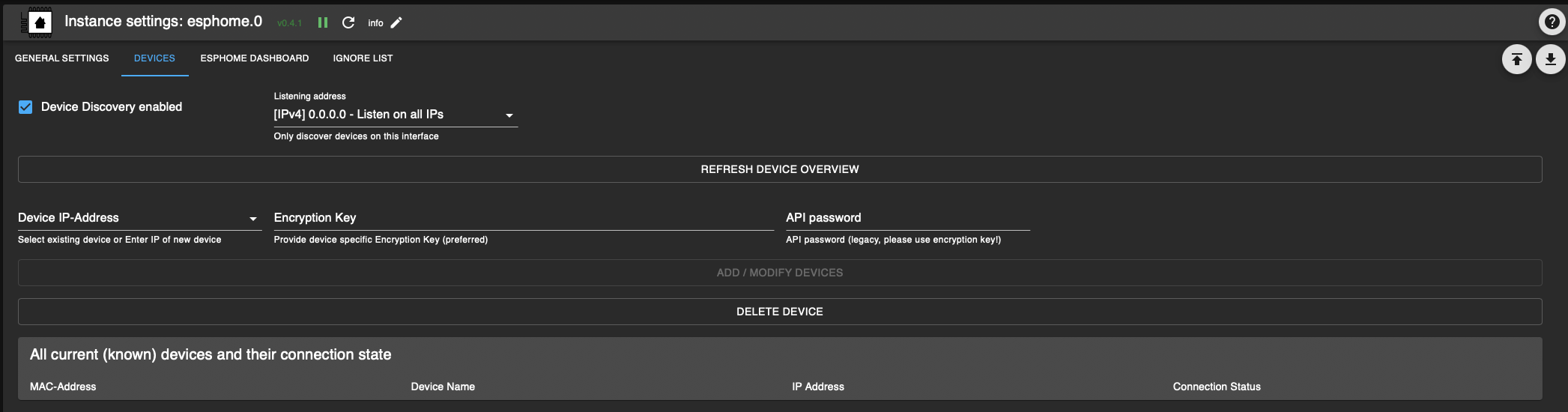
@simon42 Problem ist, dass ich nicht auf die Entwicklerkonsole komme.
Alle angeschlossenen Geräte liefern richtige Daten.
Hier der Log der 0.6.2:
6.pdf
Und in den Objekten steht:
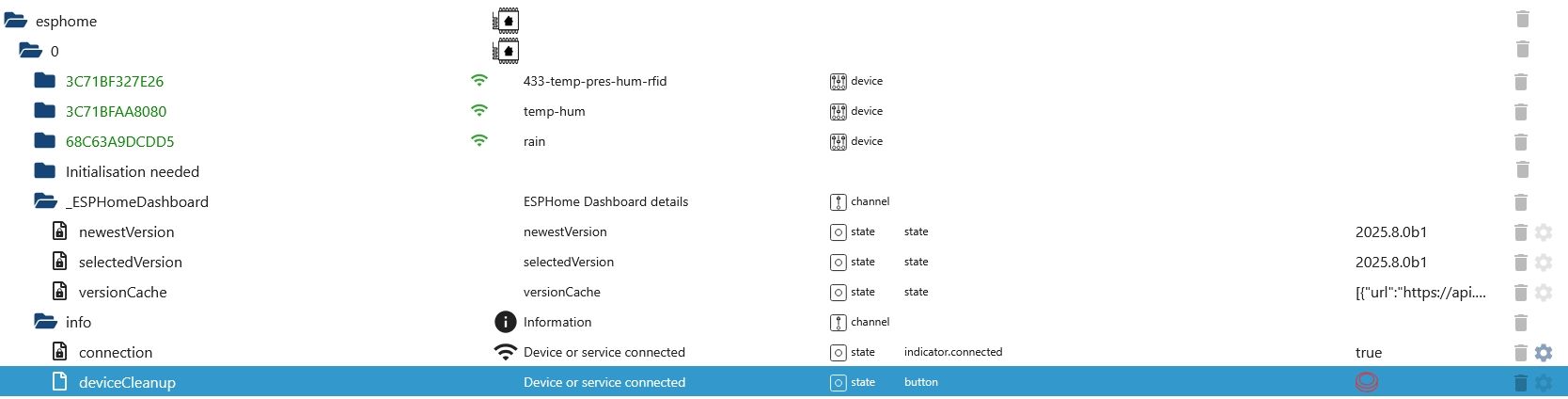
Ich habe im aktuellen iob_diag "Installed ioBroker-Adapters" den ESPhome-Adapter nicht gefunden, in den Instanze ist auf die Version 0.6.2 aktualisiert (hatte Adapter über Expertenmodus und "Katze" installiert).
Hänge hier nochmal die aktuelle log-Datei an:
iob_diag.logDanke!
@tontechniker Und in der 0.6.2 hast in den Adaptereinstellungen Dashboard sicher aktiviert?
Eventuell Adapter mal neustarten und dann logs senden.
Wenn das Dashboard aktiviert ist sollte zumindest folgende Meldung im Log sein:
esphome.0
2025-08-14 19:34:27.577 info Native Integration of ESPHome Dashboard enabled, making environment ready, bei dir ist aber gar nichts zu "dashboard" im Log
-
@tontechniker Und in der 0.6.2 hast in den Adaptereinstellungen Dashboard sicher aktiviert?
Eventuell Adapter mal neustarten und dann logs senden.
Wenn das Dashboard aktiviert ist sollte zumindest folgende Meldung im Log sein:
esphome.0
2025-08-14 19:34:27.577 info Native Integration of ESPHome Dashboard enabled, making environment ready, bei dir ist aber gar nichts zu "dashboard" im Log
@simon42 Danke für Deine Geduld!
Nachdem ich noch einmal versucht habe alles zu testen, habe ich auch den Start vom Dashboard im Log gesehen. Ich wollte ihn Dir noch einmal zu Begutachtung schicken, habe aber dann den Adapter komplett gelöscht und neu installiert.
Erst als ich im Dasboard die allgemeine Angabe (Text: Hostadresse?) durch meine IP-Adresse eingegeben habe hat wieder alles funktioniert. Musste nur in allen Listingsota:
- platform: esphome (wird hier nicht als - vor "platform" dargestellt)
password: !secret ota_pw_xx
ändern/ergänzen.
Vielen Dank noch einmal für Deine Hilfe!
Hans - platform: esphome (wird hier nicht als - vor "platform" dargestellt)
-
@simon42 Danke für Deine Geduld!
Nachdem ich noch einmal versucht habe alles zu testen, habe ich auch den Start vom Dashboard im Log gesehen. Ich wollte ihn Dir noch einmal zu Begutachtung schicken, habe aber dann den Adapter komplett gelöscht und neu installiert.
Erst als ich im Dasboard die allgemeine Angabe (Text: Hostadresse?) durch meine IP-Adresse eingegeben habe hat wieder alles funktioniert. Musste nur in allen Listingsota:
- platform: esphome (wird hier nicht als - vor "platform" dargestellt)
password: !secret ota_pw_xx
ändern/ergänzen.
Vielen Dank noch einmal für Deine Hilfe!
Hans@tontechniker said in [ESPHome] Beta release 0.5.0-beta.1 ready:
Musste nur in allen Listings
ota:platform: esphome (wird hier nicht als - vor "platform" dargestellt)
password: !secret ota_pw_xxändern/ergänzen.
Vielen Dank noch einmal für Deine Hilfe!War eine notwendige Änderung die Esphome in neuen versionen eingeführt hat.
Hat der Adpater nichts damit zu tun / kann nix dafür.
Kein Problem, super das dus gelöst hast.
- platform: esphome (wird hier nicht als - vor "platform" dargestellt)
-
Hallo,
vielleicht kann mit jemand helfen. Habe das Problem, dass beim Start des Dashboards unten stehender Fehletext geloggt wird.
Die angeschlossenen ESP-Home Teilnehmer funktionieren weiterhin.Danke! Gruß Hans
-
Hallo,
vielleicht kann mit jemand helfen. Habe das Problem, dass beim Start des Dashboards unten stehender Fehletext geloggt wird.
Die angeschlossenen ESP-Home Teilnehmer funktionieren weiterhin.Danke! Gruß Hans
Bitte so kurze Ausgaben direkt ins Forum, eingebettet in </> Codetags.
The conflict is caused by:
The user requested pillow==10.4.0
esphome 2025.12.0b2 depends on pillow==11.3.0Da müssen die Versionen aufeinander abgestimmt werden. Am besten wird da pillow 11.3.0 installiert.
-
Kannst Du mir sagen, wie ich das machen muss?
Danke! -
Kannst Du mir sagen, wie ich das machen muss?
Danke!@Tontechniker
Wo kommt denn das KommandoError: Command failed with exit code 1: /home/iobroker/.cache/autopy/venv/esphome/bin/python3 -m pip install esphome==2025.12.0b2 pillow==10.4.0her? Ich würde dann da halt pillow==11.3.0 setzen.
-
Ich stehe auf dem Schlauch! Das Problem sitzt hinter meiner Stirn!
Wie installiere ich pillow 11.3.0 auf meinem raspi? -
Ich stehe auf dem Schlauch! Das Problem sitzt hinter meiner Stirn!
Wie installiere ich pillow 11.3.0 auf meinem raspi?Welches Vorgehen löst denn die obengenannte Meldung aus?
-
Wie oben beschrieben der Aufruf des dashboards in ESP-Home.
Zur Info: bis 10.12. funktionierte es ohne Probleme. Ich habe in der Zwischenzeit keine Änderungen vorgenommen. -
Wie oben beschrieben der Aufruf des dashboards in ESP-Home.
Zur Info: bis 10.12. funktionierte es ohne Probleme. Ich habe in der Zwischenzeit keine Änderungen vorgenommen.Hab mir den Code gerade mal angeschaut.
In der Datei steht fix die nicht mehr ausreichende Version drin:Mach ein Issue auf, das muss da angepasst werden.
-
Bitte entschuldige meine Dummheit!
Problem hat sich vermutlich erledigt. Am Montag muss ich zu Hause die entsprechende Firmware der Geräte neu compilieren und runterladen.
Den Fehler habe ich schon einmal gemacht. Beim Testen einer Änderung hat sich ein bekannter Fehler eingeschlichen. Leider wird dieser nicht in ESP-Home angezeigt und daher war es schwierig diesen zu finden.
Danke nochmal für Deine Hilfe!!
Hans -
Bitte entschuldige meine Dummheit!
Problem hat sich vermutlich erledigt. Am Montag muss ich zu Hause die entsprechende Firmware der Geräte neu compilieren und runterladen.
Den Fehler habe ich schon einmal gemacht. Beim Testen einer Änderung hat sich ein bekannter Fehler eingeschlichen. Leider wird dieser nicht in ESP-Home angezeigt und daher war es schwierig diesen zu finden.
Danke nochmal für Deine Hilfe!!
Hans??? Im Code ist dann immer noch der fixe Verweis auf eine nicht mehr ausreichende Version drin. Warum sollte dich das 'vermutlich erledigt' haben?
-
Bitte entschuldige meine Dummheit!
Problem hat sich vermutlich erledigt. Am Montag muss ich zu Hause die entsprechende Firmware der Geräte neu compilieren und runterladen.
Den Fehler habe ich schon einmal gemacht. Beim Testen einer Änderung hat sich ein bekannter Fehler eingeschlichen. Leider wird dieser nicht in ESP-Home angezeigt und daher war es schwierig diesen zu finden.
Danke nochmal für Deine Hilfe!!
HansIch hab es mal für dich erledigt:
-
Vielen Dank und Dir einen schönen dritten Advent!
-
Kann mir jemand sagen, wie ich diese Warnung beim Compilieren weg bekomme?
<WARNING: Ignoring invalid distribution ~sphome (/home/iobroker/.cache/autopy/venv/esphome/lib/python3.13/site-packages)> -
Kann mir jemand sagen, wie ich diese Warnung beim Compilieren weg bekomme?
<WARNING: Ignoring invalid distribution ~sphome (/home/iobroker/.cache/autopy/venv/esphome/lib/python3.13/site-packages)> -
Moin Moin,
wenn ich das Dashboard einschalte kommt diese Fehlermeldung. Phyton3 ist installiert, Ubuntu 24.04
Wenn ich -m pip install eintippe kommt invalid option. bei Upgrade diese Warnung..., wie kann ich Phyton so intallieren das es von ESPhome genutzt werden kann??~$ pip install --upgrade pip / pip3 install --upgrade pip error: externally-managed-environment × This environment is externally managed ╰─> To install Python packages system-wide, try apt install python3-xyz, where xyz is the package you are trying to install. If you wish to install a non-Debian-packaged Python package, create a virtual environment using python3 -m venv path/to/venv. Then use path/to/venv/bin/python and path/to/venv/bin/pip. Make sure you have python3-full installed. If you wish to install a non-Debian packaged Python application, it may be easiest to use pipx install xyz, which will manage a virtual environment for you. Make sure you have pipx installed. See /usr/share/doc/python3.12/README.venv for more information.2025-12-20 17:41:27.653 error Fatal error starting ESPHomeDashboard | Error: Command failed with exit code 1: /home/iobroker/.cache/autopy/venv/esphome/bin/python3 -m pip install esphome==2025.12.1 pillow==10.4.0 ERROR: Cannot install esphome==2025.12.1 and pillow==10.4.0 because these package versions have conflicting dependencies. [notice] A new release of pip is available: 24.3.1 -> 25.3 [notice] To update, run: /home/iobroker/.cache/autopy/venv/esphome/bin/python3 -m pip install --upgrade pip ERROR: ResolutionImpossible: for help visit https://pip.pypa.io/en/latest/topics/dependency-resolution/#dealing-with-dependency-conflicts Collecting esphome==2025.12.1 Downloading esphome-2025.12.1-py3-none-any.whl.metadata (3.6 kB) Collecting pillow==10.4.0 Using cached pillow-10.4.0-cp313-cp313-manylinux_2_28_x86_64.whl.metadata (9.2 kB) Collecting cryptography==45.0.1 (from esphome==2025.12.1) Using cached cryptography-45.0.1-cp311-abi3-manylinux_2_34_x86_64.whl.metadata (5.7 kB) Collecting voluptuous==0.15.2 (from esphome==2025.12.1) Using cached voluptuous-0.15.2-py3-none-any.whl.metadata (20 kB) Collecting PyYAML==6.0.3 (from esphome==2025.12.1) Using cached pyyaml-6.0.3-cp313-cp313-manylinux2014_x86_64.manylinux_2_17_x86_64.manylinux_2_28_x86_64.whl.metadata (2.4 kB) Collecting paho-mqtt==1.6.1 (from esphome==2025.12.1) Using cached paho-mqtt-1.6.1.tar.gz (99 kB) Installing build dependencies: started Installing build dependencies: finished with status 'done' Getting requirements to build wheel: started Getting requirements to build wheel: finished with status 'done' Preparing metadata (pyproject.toml): started Preparing metadata (pyproject.toml): finished with status 'done' Collecting colorama==0.4.6 (from esphome==2025.12.1) Using cached colorama-0.4.6-py2.py3-none-any.whl.metadata (17 kB) Collecting icmplib==3.0.4 (from esphome==2025.12.1) Using cached icmplib-3.0.4-py3-none-any.whl.metadata (19 kB) Collecting tornado==6.5.2 (from esphome==2025.12.1) Using cached tornado-6.5.2-cp39-abi3-manylinux_2_5_x86_64.manylinux1_x86_64.manylinux_2_17_x86_64.manylinux2014_x86_64.whl.metadata (2.8 kB) Collecting tzlocal==5.3.1 (from esphome==2025.12.1) Using cached tzlocal-5.3.1-py3-none-any.whl.metadata (7.6 kB) Collecting tzdata>=2021.1 (from esphome==2025.12.1) Using cached tzdata-2025.3-py2.py3-none-any.whl.metadata (1.4 kB) Collecting pyserial==3.5 (from esphome==2025.12.1) Using cached pyserial-3.5-py2.py3-none-any.whl.metadata (1.6 kB) Collecting platformio==6.1.18 (from esphome==2025.12.1) Using cached platformio-6.1.18-py3-none-any.whl.metadata (7.1 kB) Collecting esptool==5.1.0 (from esphome==2025.12.1) Using cached esptool-5.1.0.tar.gz (383 kB) Installing build dependencies: started Installing build dependencies: finished with status 'done' Getting requirements to build wheel: started Getting requirements to build wheel: finished with status 'done' Preparing metadata (pyproject.toml): started Preparing metadata (pyproject.toml): finished with status 'done' Collecting click==8.1.7 (from esphome==2025.12.1) Using cached click-8.1.7-py3-none-any.whl.metadata (3.0 kB) Collecting esphome-dashboard==20251013.0 (from esphome==2025.12.1) Using cached esphome_dashboard-20251013.0-py3-none-any.whl.metadata (1.2 kB) Collecting aioesphomeapi==43.2.1 (from esphome==2025.12.1) Using cached aioesphomeapi-43.2.1-cp313-cp313-manylinux2014_x86_64.manylinux_2_17_x86_64.manylinux_2_28_x86_64.whl.metadata (5.2 kB) Collecting zeroconf==0.148.0 (from esphome==2025.12.1) Using cached zeroconf-0.148.0-cp313-cp313-manylinux_2_36_x86_64.whl.metadata (6.3 kB) Collecting puremagic==1.30 (from esphome==2025.12.1) Using cached puremagic-1.30-py3-none-any.whl.metadata (5.8 kB) Collecting ruamel.yaml==0.18.16 (from esphome==2025.12.1) Using cached ruamel.yaml-0.18.16-py3-none-any.whl.metadata (25 kB) Collecting ruamel.yaml.clib==0.2.15 (from esphome==2025.12.1) Using cached ruamel_yaml_clib-0.2.15-cp313-cp313-manylinux2014_x86_64.manylinux_2_17_x86_64.manylinux_2_28_x86_64.whl.metadata (3.5 kB) Collecting esphome-glyphsets==0.2.0 (from esphome==2025.12.1) Using cached esphome_glyphsets-0.2.0-py3-none-any.whl.metadata (3.9 kB) INFO: pip is looking at multiple versions of esphome to determine which version is compatible with other requirements. This could take a while. The conflict is caused by: The user requested pillow==10.4.0 esphome 2025.12.1 depends on pillow==11.3.0 To fix this you could try to: 1. loosen the range of package versions you've specified 2. remove package versions to allow pip to attempt to solve the dependency conflict | Error: Command failed with exit code 1: /home/iobroker/.cache/autopy/venv/esphome/bin/python3 -m pip install esphome==2025.12.1 pillow==10.4.0 ERROR: Cannot install esphome==2025.12.1 and pillow==10.4.0 because these package versions have conflicting dependencies. [notice] A new release of pip is available: 24.3.1 -> 25.3 [notice] To update, run: /home/iobroker/.cache/autopy/venv/esphome/bin/python3 -m pip install --upgrade pip ERROR: ResolutionImpossible: for help visit https://pip.pypa.io/en/latest/topics/dependency-resolution/#dealing-with-dependency-conflicts Collecting esphome==2025.12.1 Downloading esphome-2025.12.1-py3-none-any.whl.metadata (3.6 kB) Collecting pillow==10.4.0 Using cached pillow-10.4.0-cp313-cp313-manylinux_2_28_x86_64.whl.metadata (9.2 kB) Collecting cryptography==45.0.1 (from esphome==2025.12.1) Using cached cryptography-45.0.1-cp311-abi3-manylinux_2_34_x86_64.whl.metadata (5.7 kB) Collecting voluptuous==0.15.2 (from esphome==2025.12.1) Using cached voluptuous-0.15.2-py3-none-any.whl.metadata (20 kB) Collecting PyYAML==6.0.3 (from esphome==2025.12.1) Using cached pyyaml-6.0.3-cp313-cp313-manylinux2014_x86_64.manylinux_2_17_x86_64.manylinux_2_28_x86_64.whl.metadata (2.4 kB) Collecting paho-mqtt==1.6.1 (from esphome==2025.12.1) Using cached paho-mqtt-1.6.1.tar.gz (99 kB) Installing build dependencies: started Installing build dependencies: finished with status 'done' Getting requirements to build wheel: started Getting requirements to build wheel: finished with status 'done' Preparing metadata (pyproject.toml): started Preparing metadata (pyproject.toml): finished with status 'done' Collecting colorama==0.4.6 (from esphome==2025.12.1) Using cached colorama-0.4.6-py2.py3-none-any.whl.metadata (17 kB) Collecting icmplib==3.0.4 (from esphome==2025.12.1) Using cached icmplib-3.0.4-py3-none-any.whl.metadata (19 kB) Collecting tornado==6.5.2 (from esphome==2025.12.1) Using cached tornado-6.5.2-cp39-abi3-manylinux_2_5_x86_64.manylinux1_x86_64.manylinux_2_17_x86_64.manylinux2014_x86_64.whl.metadata (2.8 kB) Collecting tzlocal==5.3.1 (from esphome==2025.12.1) Using cached tzlocal-5.3.1-py3-none-any.whl.metadata (7.6 kB) Collecting tzdata>=2021.1 (from esphome==2025.12.1) Using cached tzdata-2025.3-py2.py3-none-any.whl.metadata (1.4 kB) Collecting pyserial==3.5 (from esphome==2025.12.1) Using cached pyserial-3.5-py2.py3-none-any.whl.metadata (1.6 kB) Collecting platformio==6.1.18 (from esphome==2025.12.1) Using cached platformio-6.1.18-py3-none-any.whl.metadata (7.1 kB) Collecting esptool==5.1.0 (from esphome==2025.12.1) Using cached esptool-5.1.0.tar.gz (383 kB) Installing build dependencies: started Installing build dependencies: finished with status 'done' Getting requirements to build wheel: started Getting requirements to build wheel: finished with status 'done' Preparing metadata (pyproject.toml): started Preparing metadata (pyproject.toml): finished with status 'done' Collecting click==8.1.7 (from esphome==2025.12.1) Using cached click-8.1.7-py3-none-any.whl.metadata (3.0 kB) Collecting esphome-dashboard==20251013.0 (from esphome==2025.12.1) Using cached esphome_dashboard-20251013.0-py3-none-any.whl.metadata (1.2 kB) Collecting aioesphomeapi==43.2.1 (from esphome==2025.12.1) Using cached aioesphomeapi-43.2.1-cp313-cp313-manylinux2014_x86_64.manylinux_2_17_x86_64.manylinux_2_28_x86_64.whl.metadata (5.2 kB) Collecting zeroconf==0.148.0 (from esphome==2025.12.1) Using cached zeroconf-0.148.0-cp313-cp313-manylinux_2_36_x86_64.whl.metadata (6.3 kB) Collecting puremagic==1.30 (from esphome==2025.12.1) Using cached puremagic-1.30-py3-none-any.whl.metadata (5.8 kB) Collecting ruamel.yaml==0.18.16 (from esphome==2025.12.1) Using cached ruamel.yaml-0.18.16-py3-none-any.whl.metadata (25 kB) Collecting ruamel.yaml.clib==0.2.15 (from esphome==2025.12.1) Using cached ruamel_yaml_clib-0.2.15-cp313-cp313-manylinux2014_x86_64.manylinux_2_17_x86_64.manylinux_2_28_x86_64.whl.metadata (3.5 kB) Collecting esphome-glyphsets==0.2.0 (from esphome==2025.12.1) Using cached esphome_glyphsets-0.2.0-py3-none-any.whl.metadata (3.9 kB) INFO: pip is looking at multiple versions of esphome to determine which version is compatible with other requirements. This could take a while. The conflict is caused by: The user requested pillow==10.4.0 esphome 2025.12.1 depends on pillow==11.3.0 To fix this you could try to: 1. loosen the range of package versions you've specified 2. remove package versions to allow pip to attempt to solve the dependency conflict at makeError (file:///opt/iobroker/node_modules/autopy/node_modules/execa/lib/error.js:60:11) at handlePromise (file:///opt/iobroker/node_modules/autopy/node_modules/execa/index.js:124:26) at processTicksAndRejections (node:internal/process/task_queues:105:5) at $df9eabe9bda49ea8$export$e522f41234ab669a (file:///opt/iobroker/node_modules/autopy/src/index.ts:257:13) at Esphome.espHomeDashboard (/opt/iobroker/node_modules/iobroker.esphome/main.js:180:16) at Esphome.onReady (/opt/iobroker/node_modules/iobroker.esphome/main.js:66:4)Gruß
Erik :mrgreen: :mrgreen:
-
Thomas Braun
Dein Tip war goldrichtig! Auf der Seite war ich schon einmal, hatte mich aber nicht getraut die angegenbenen files zu löschen.
Danke!
Gruß und schöne Weihnachten
Hans -
Moin Moin,
wenn ich das Dashboard einschalte kommt diese Fehlermeldung. Phyton3 ist installiert, Ubuntu 24.04
Wenn ich -m pip install eintippe kommt invalid option. bei Upgrade diese Warnung..., wie kann ich Phyton so intallieren das es von ESPhome genutzt werden kann??~$ pip install --upgrade pip / pip3 install --upgrade pip error: externally-managed-environment × This environment is externally managed ╰─> To install Python packages system-wide, try apt install python3-xyz, where xyz is the package you are trying to install. If you wish to install a non-Debian-packaged Python package, create a virtual environment using python3 -m venv path/to/venv. Then use path/to/venv/bin/python and path/to/venv/bin/pip. Make sure you have python3-full installed. If you wish to install a non-Debian packaged Python application, it may be easiest to use pipx install xyz, which will manage a virtual environment for you. Make sure you have pipx installed. See /usr/share/doc/python3.12/README.venv for more information.2025-12-20 17:41:27.653 error Fatal error starting ESPHomeDashboard | Error: Command failed with exit code 1: /home/iobroker/.cache/autopy/venv/esphome/bin/python3 -m pip install esphome==2025.12.1 pillow==10.4.0 ERROR: Cannot install esphome==2025.12.1 and pillow==10.4.0 because these package versions have conflicting dependencies. [notice] A new release of pip is available: 24.3.1 -> 25.3 [notice] To update, run: /home/iobroker/.cache/autopy/venv/esphome/bin/python3 -m pip install --upgrade pip ERROR: ResolutionImpossible: for help visit https://pip.pypa.io/en/latest/topics/dependency-resolution/#dealing-with-dependency-conflicts Collecting esphome==2025.12.1 Downloading esphome-2025.12.1-py3-none-any.whl.metadata (3.6 kB) Collecting pillow==10.4.0 Using cached pillow-10.4.0-cp313-cp313-manylinux_2_28_x86_64.whl.metadata (9.2 kB) Collecting cryptography==45.0.1 (from esphome==2025.12.1) Using cached cryptography-45.0.1-cp311-abi3-manylinux_2_34_x86_64.whl.metadata (5.7 kB) Collecting voluptuous==0.15.2 (from esphome==2025.12.1) Using cached voluptuous-0.15.2-py3-none-any.whl.metadata (20 kB) Collecting PyYAML==6.0.3 (from esphome==2025.12.1) Using cached pyyaml-6.0.3-cp313-cp313-manylinux2014_x86_64.manylinux_2_17_x86_64.manylinux_2_28_x86_64.whl.metadata (2.4 kB) Collecting paho-mqtt==1.6.1 (from esphome==2025.12.1) Using cached paho-mqtt-1.6.1.tar.gz (99 kB) Installing build dependencies: started Installing build dependencies: finished with status 'done' Getting requirements to build wheel: started Getting requirements to build wheel: finished with status 'done' Preparing metadata (pyproject.toml): started Preparing metadata (pyproject.toml): finished with status 'done' Collecting colorama==0.4.6 (from esphome==2025.12.1) Using cached colorama-0.4.6-py2.py3-none-any.whl.metadata (17 kB) Collecting icmplib==3.0.4 (from esphome==2025.12.1) Using cached icmplib-3.0.4-py3-none-any.whl.metadata (19 kB) Collecting tornado==6.5.2 (from esphome==2025.12.1) Using cached tornado-6.5.2-cp39-abi3-manylinux_2_5_x86_64.manylinux1_x86_64.manylinux_2_17_x86_64.manylinux2014_x86_64.whl.metadata (2.8 kB) Collecting tzlocal==5.3.1 (from esphome==2025.12.1) Using cached tzlocal-5.3.1-py3-none-any.whl.metadata (7.6 kB) Collecting tzdata>=2021.1 (from esphome==2025.12.1) Using cached tzdata-2025.3-py2.py3-none-any.whl.metadata (1.4 kB) Collecting pyserial==3.5 (from esphome==2025.12.1) Using cached pyserial-3.5-py2.py3-none-any.whl.metadata (1.6 kB) Collecting platformio==6.1.18 (from esphome==2025.12.1) Using cached platformio-6.1.18-py3-none-any.whl.metadata (7.1 kB) Collecting esptool==5.1.0 (from esphome==2025.12.1) Using cached esptool-5.1.0.tar.gz (383 kB) Installing build dependencies: started Installing build dependencies: finished with status 'done' Getting requirements to build wheel: started Getting requirements to build wheel: finished with status 'done' Preparing metadata (pyproject.toml): started Preparing metadata (pyproject.toml): finished with status 'done' Collecting click==8.1.7 (from esphome==2025.12.1) Using cached click-8.1.7-py3-none-any.whl.metadata (3.0 kB) Collecting esphome-dashboard==20251013.0 (from esphome==2025.12.1) Using cached esphome_dashboard-20251013.0-py3-none-any.whl.metadata (1.2 kB) Collecting aioesphomeapi==43.2.1 (from esphome==2025.12.1) Using cached aioesphomeapi-43.2.1-cp313-cp313-manylinux2014_x86_64.manylinux_2_17_x86_64.manylinux_2_28_x86_64.whl.metadata (5.2 kB) Collecting zeroconf==0.148.0 (from esphome==2025.12.1) Using cached zeroconf-0.148.0-cp313-cp313-manylinux_2_36_x86_64.whl.metadata (6.3 kB) Collecting puremagic==1.30 (from esphome==2025.12.1) Using cached puremagic-1.30-py3-none-any.whl.metadata (5.8 kB) Collecting ruamel.yaml==0.18.16 (from esphome==2025.12.1) Using cached ruamel.yaml-0.18.16-py3-none-any.whl.metadata (25 kB) Collecting ruamel.yaml.clib==0.2.15 (from esphome==2025.12.1) Using cached ruamel_yaml_clib-0.2.15-cp313-cp313-manylinux2014_x86_64.manylinux_2_17_x86_64.manylinux_2_28_x86_64.whl.metadata (3.5 kB) Collecting esphome-glyphsets==0.2.0 (from esphome==2025.12.1) Using cached esphome_glyphsets-0.2.0-py3-none-any.whl.metadata (3.9 kB) INFO: pip is looking at multiple versions of esphome to determine which version is compatible with other requirements. This could take a while. The conflict is caused by: The user requested pillow==10.4.0 esphome 2025.12.1 depends on pillow==11.3.0 To fix this you could try to: 1. loosen the range of package versions you've specified 2. remove package versions to allow pip to attempt to solve the dependency conflict | Error: Command failed with exit code 1: /home/iobroker/.cache/autopy/venv/esphome/bin/python3 -m pip install esphome==2025.12.1 pillow==10.4.0 ERROR: Cannot install esphome==2025.12.1 and pillow==10.4.0 because these package versions have conflicting dependencies. [notice] A new release of pip is available: 24.3.1 -> 25.3 [notice] To update, run: /home/iobroker/.cache/autopy/venv/esphome/bin/python3 -m pip install --upgrade pip ERROR: ResolutionImpossible: for help visit https://pip.pypa.io/en/latest/topics/dependency-resolution/#dealing-with-dependency-conflicts Collecting esphome==2025.12.1 Downloading esphome-2025.12.1-py3-none-any.whl.metadata (3.6 kB) Collecting pillow==10.4.0 Using cached pillow-10.4.0-cp313-cp313-manylinux_2_28_x86_64.whl.metadata (9.2 kB) Collecting cryptography==45.0.1 (from esphome==2025.12.1) Using cached cryptography-45.0.1-cp311-abi3-manylinux_2_34_x86_64.whl.metadata (5.7 kB) Collecting voluptuous==0.15.2 (from esphome==2025.12.1) Using cached voluptuous-0.15.2-py3-none-any.whl.metadata (20 kB) Collecting PyYAML==6.0.3 (from esphome==2025.12.1) Using cached pyyaml-6.0.3-cp313-cp313-manylinux2014_x86_64.manylinux_2_17_x86_64.manylinux_2_28_x86_64.whl.metadata (2.4 kB) Collecting paho-mqtt==1.6.1 (from esphome==2025.12.1) Using cached paho-mqtt-1.6.1.tar.gz (99 kB) Installing build dependencies: started Installing build dependencies: finished with status 'done' Getting requirements to build wheel: started Getting requirements to build wheel: finished with status 'done' Preparing metadata (pyproject.toml): started Preparing metadata (pyproject.toml): finished with status 'done' Collecting colorama==0.4.6 (from esphome==2025.12.1) Using cached colorama-0.4.6-py2.py3-none-any.whl.metadata (17 kB) Collecting icmplib==3.0.4 (from esphome==2025.12.1) Using cached icmplib-3.0.4-py3-none-any.whl.metadata (19 kB) Collecting tornado==6.5.2 (from esphome==2025.12.1) Using cached tornado-6.5.2-cp39-abi3-manylinux_2_5_x86_64.manylinux1_x86_64.manylinux_2_17_x86_64.manylinux2014_x86_64.whl.metadata (2.8 kB) Collecting tzlocal==5.3.1 (from esphome==2025.12.1) Using cached tzlocal-5.3.1-py3-none-any.whl.metadata (7.6 kB) Collecting tzdata>=2021.1 (from esphome==2025.12.1) Using cached tzdata-2025.3-py2.py3-none-any.whl.metadata (1.4 kB) Collecting pyserial==3.5 (from esphome==2025.12.1) Using cached pyserial-3.5-py2.py3-none-any.whl.metadata (1.6 kB) Collecting platformio==6.1.18 (from esphome==2025.12.1) Using cached platformio-6.1.18-py3-none-any.whl.metadata (7.1 kB) Collecting esptool==5.1.0 (from esphome==2025.12.1) Using cached esptool-5.1.0.tar.gz (383 kB) Installing build dependencies: started Installing build dependencies: finished with status 'done' Getting requirements to build wheel: started Getting requirements to build wheel: finished with status 'done' Preparing metadata (pyproject.toml): started Preparing metadata (pyproject.toml): finished with status 'done' Collecting click==8.1.7 (from esphome==2025.12.1) Using cached click-8.1.7-py3-none-any.whl.metadata (3.0 kB) Collecting esphome-dashboard==20251013.0 (from esphome==2025.12.1) Using cached esphome_dashboard-20251013.0-py3-none-any.whl.metadata (1.2 kB) Collecting aioesphomeapi==43.2.1 (from esphome==2025.12.1) Using cached aioesphomeapi-43.2.1-cp313-cp313-manylinux2014_x86_64.manylinux_2_17_x86_64.manylinux_2_28_x86_64.whl.metadata (5.2 kB) Collecting zeroconf==0.148.0 (from esphome==2025.12.1) Using cached zeroconf-0.148.0-cp313-cp313-manylinux_2_36_x86_64.whl.metadata (6.3 kB) Collecting puremagic==1.30 (from esphome==2025.12.1) Using cached puremagic-1.30-py3-none-any.whl.metadata (5.8 kB) Collecting ruamel.yaml==0.18.16 (from esphome==2025.12.1) Using cached ruamel.yaml-0.18.16-py3-none-any.whl.metadata (25 kB) Collecting ruamel.yaml.clib==0.2.15 (from esphome==2025.12.1) Using cached ruamel_yaml_clib-0.2.15-cp313-cp313-manylinux2014_x86_64.manylinux_2_17_x86_64.manylinux_2_28_x86_64.whl.metadata (3.5 kB) Collecting esphome-glyphsets==0.2.0 (from esphome==2025.12.1) Using cached esphome_glyphsets-0.2.0-py3-none-any.whl.metadata (3.9 kB) INFO: pip is looking at multiple versions of esphome to determine which version is compatible with other requirements. This could take a while. The conflict is caused by: The user requested pillow==10.4.0 esphome 2025.12.1 depends on pillow==11.3.0 To fix this you could try to: 1. loosen the range of package versions you've specified 2. remove package versions to allow pip to attempt to solve the dependency conflict at makeError (file:///opt/iobroker/node_modules/autopy/node_modules/execa/lib/error.js:60:11) at handlePromise (file:///opt/iobroker/node_modules/autopy/node_modules/execa/index.js:124:26) at processTicksAndRejections (node:internal/process/task_queues:105:5) at $df9eabe9bda49ea8$export$e522f41234ab669a (file:///opt/iobroker/node_modules/autopy/src/index.ts:257:13) at Esphome.espHomeDashboard (/opt/iobroker/node_modules/iobroker.esphome/main.js:180:16) at Esphome.onReady (/opt/iobroker/node_modules/iobroker.esphome/main.js:66:4)@Rogni sagte in [ESPHome] Beta release 0.5.0-beta.1 ready:
pip install esphome==2025.12.1 pillow==10.4.0 ERROR: Cannot install esphome==2025.12.1 and pillow==10.4.0 because these package versions have conflicting dependencies.
Du musst die aktuelle (Beta)-Version des Adapters verwenden.
€dit: Kann auch sein, dass der Code noch nicht gemerged ist. Dann abwarten...Siehe auch:


Hey! Du scheinst an dieser Unterhaltung interessiert zu sein, hast aber noch kein Konto.
Hast du es satt, bei jedem Besuch durch die gleichen Beiträge zu scrollen? Wenn du dich für ein Konto anmeldest, kommst du immer genau dorthin zurück, wo du zuvor warst, und kannst dich über neue Antworten benachrichtigen lassen (entweder per E-Mail oder Push-Benachrichtigung). Du kannst auch Lesezeichen speichern und Beiträge positiv bewerten, um anderen Community-Mitgliedern deine Wertschätzung zu zeigen.
Mit deinem Input könnte dieser Beitrag noch besser werden 💗
Registrieren AnmeldenSupport us
400
Online33.1k
Benutzende83.7k
Themen1.3m
Beiträge