




ioBroker macht Probleme im Docker
-
nicht? Ich bin laie, wenn ich in die Portainer Oberfläche gehe, läuft er ja. Bringe ich irgendwas durcheinander?
@mühlenbroker sagte in ioBroker macht Probleme im Docker:
Bringe ich irgendwas durcheinander?
Offenbar. Und warum ein Laie gleich mit Dockern & Co. herummacht werde ich wohl auch nie verstehen. Da fehlen offenbar die absoluten Grundlagen, die man für den zusätzlichen Stack braucht.
-
@mühlenbroker sagte in ioBroker macht Probleme im Docker:
Bringe ich irgendwas durcheinander?
Offenbar. Und warum ein Laie gleich mit Dockern & Co. herummacht werde ich wohl auch nie verstehen. Da fehlen offenbar die absoluten Grundlagen, die man für den zusätzlichen Stack braucht.
Ich habe mir das damals nach einer Anleitung so zusammengestellt und es war für mich Plausibel.
-
Ich habe mir das damals nach einer Anleitung so zusammengestellt und es war für mich Plausibel.
@mühlenbroker
Poste bitte die ganze ausgabe von iob diag - die ist unglaublich lang. -
@mühlenbroker
Poste bitte die ganze ausgabe von iob diag - die ist unglaublich lang.========== Start marking the full check here ===========
Script v.2024-09-21

*** BASE SYSTEM ***
 Static hostname: raspberrypi
       Icon name: computer
Operating System: Debian GNU/Linux 12 (bookworm)
          Kernel: Linux 6.6.31+rpt-rpi-v8
    Architecture: arm64
OS is similar to:

Model		: Raspberry Pi 4 Model B Rev 1.5
Docker          : false
Virtualization  : none
Kernel          : aarch64
Userland        : 64 bit

Systemuptime and Load:
 19:08:20 up  2:36,  2 users,  load average: 0.22, 0.20, 0.18
CPU threads: 4


*** LIFE CYCLE STATUS ***
Operating System is the current Debian stable version codenamed 'bookworm'!

*** RASPBERRY THROTTLING ***
Current issues:
No throttling issues detected.

Previously detected issues:
No throttling issues detected.

*** TIME AND TIMEZONES ***
               Local time: Mon 2025-09-29 19:08:21 CEST
           Universal time: Mon 2025-09-29 17:08:21 UTC
                 RTC time: n/a
                Time zone: Europe/Berlin (CEST, +0200)
System clock synchronized: yes
              NTP service: active
          RTC in local TZ: no

*** Users and Groups ***
User that called 'iob diag':
thomas
XDG_CONFIG_HOME=/home/thomas/.config
HOME=/home/thomas
GROUPS=thomas adm dialout cdrom sudo audio video plugdev games users input render netdev lpadmin gpio i2c spi

User that is running 'js-controller':
thomas
HOME=/home/thomas
GROUPS=thomas adm dialout cdrom sudo audio video plugdev games users input render netdev lpadmin docker gpio i2c spi

*** DISPLAY-SERVER SETUP ***
Display-Server: true
Desktop: 	LXDE-pi
Terminal: 	x11

System is booting into 'graphical.target'. Usually a server is running in 'multi-user.target'. Do you want to switch to 'multi-user.target'? (y/n)
New boot target is multi-user now! The system needs to be restarted.
Removed "/etc/systemd/system/default.target".
Created symlink /etc/systemd/system/default.target -> /lib/systemd/system/multi-user.target.

*** MEMORY ***
               total        used        free      shared  buff/cache   available
Mem:            8.2G        2.0G        649M        225M        5.9G        6.2G
Swap:           209M          0B        209M
Total:          8.4G        2.0G        859M

Active iob-Instances: 	0

         7809 M total memory
         1927 M used memory
         6028 M active memory
          702 M inactive memory
          618 M free memory
          173 M buffer memory
         5426 M swap cache
          199 M total swap
            0 M used swap
          199 M free swap

*** top - Table Of Processes  ***
top - 19:29:02 up  2:57,  2 users,  load average: 0.20, 0.14, 0.16
Tasks: 252 total,   1 running, 251 sleeping,   0 stopped,   0 zombie
%Cpu(s): 22.2 us, 22.2 sy,  0.0 ni, 55.6 id,  0.0 wa,  0.0 hi,  0.0 si,  0.0 st
MiB Mem :   7809.0 total,    616.9 free,   1929.5 used,   5600.0 buff/cache
MiB Swap:    200.0 total,    200.0 free,      0.0 used.   5879.5 avail Mem

*** FAILED SERVICES ***

  UNIT LOAD ACTIVE SUB DESCRIPTION
0 loaded units listed.


*** DMESG CRITICAL ERRORS ***
No critical errors detected

*** FILESYSTEM ***
Filesystem     Type      Size  Used Avail Use% Mounted on
udev           devtmpfs  3.6G     0  3.6G   0% /dev
tmpfs          tmpfs     781M  1.8M  780M   1% /run
/dev/sda2      ext4      917G   43G  828G   5% /
tmpfs          tmpfs     3.9G  148K  3.9G   1% /dev/shm
tmpfs          tmpfs     5.0M   16K  5.0M   1% /run/lock
/dev/sda1      vfat      510M   75M  436M  15% /boot/firmware
tmpfs          tmpfs     781M   40K  781M   1% /run/user/1000

Messages concerning ext4 filesystem in dmesg:
[Mon Sep 29 16:32:02 2025] Kernel command line: coherent_pool=1M 8250.nr_uarts=1 snd_bcm2835.enable_headphones=0 snd_bcm2835.enable_headphones=1 snd_bcm2835.enable_hdmi=1 snd_bcm2835.enable_hdmi=0  smsc95xx.macaddr=D8:3A:DD:06:B6:2B vc_mem.mem_base=0x3eb00000 vc_mem.mem_size=0x3ff00000  console=ttyS0,115200 console=tty1 root=PARTUUID=550f0a9c-02 rootfstype=ext4 fsck.repair=yes rootwait quiet splash plymouth.ignore-serial-consoles cfg80211.ieee80211_regdom=DE
[Mon Sep 29 16:32:07 2025] EXT4-fs (sda2): mounted filesystem 4aa56689-dcb4-4759-90e6-179beae559ac ro with ordered data mode. Quota mode: none.
[Mon Sep 29 16:32:08 2025] EXT4-fs (sda2): re-mounted 4aa56689-dcb4-4759-90e6-179beae559ac r/w. Quota mode: none.

Show mounted filesystems:
TARGET                           SOURCE       FSTYPE           OPTIONS
/                                /dev/sda2    ext4             rw,noatime
|-/run/user/1000/doc             portal       fuse.portal      rw,nosuid,nodev,relatime,user_id=1000,group_id=1000
|-/boot/firmware                 /dev/sda1    vfat             rw,relatime,fmask=0022,dmask=0022,codepage=437,iocharset=ascii,shortname=mixed,errors=remount-r
`-/home/thomas/thinclient_drives xrdp-chansrv fuse.xrdp-chansr rw,nosuid,nodev,relatime,user_id=1000,group_id=1000

Files in neuralgic directories:

/var:
40G	/var/
37G	/var/lib/docker
37G	/var/lib
29G	/var/lib/docker/volumes
27G	/var/lib/docker/volumes/influxdb/_data/engine/data/1697462a5e13427f/autogen

Archived and active journals take up 1.9G in the file system.

/opt/iobroker/backups:
4.0K	/opt/iobroker/backups/

/opt/iobroker/iobroker-data:
91M	/opt/iobroker/iobroker-data/
69M	/opt/iobroker/iobroker-data/files
47M	/opt/iobroker/iobroker-data/files/admin.admin
46M	/opt/iobroker/iobroker-data/files/admin.admin/custom/assets
46M	/opt/iobroker/iobroker-data/files/admin.admin/custom

The five largest files in iobroker-data are:
17M	/opt/iobroker/iobroker-data/objects.jsonl
8.6M	/opt/iobroker/iobroker-data/files/backitup.admin/assets/index-BBu8-Y_o.js
3.9M	/opt/iobroker/iobroker-data/states.jsonl
3.7M	/opt/iobroker/iobroker-data/files/backitup.admin/custom/assets/index-00V6sJFg.js
3.7M	/opt/iobroker/iobroker-data/files/admin.admin/custom/assets/index-ZPb95xPG.js

USB-Devices by-id:
USB-Sticks -  Avoid direct links to /dev/tty* in your adapter setups, please always prefer the links 'by-id':

No Devices found 'by-id'

*** NodeJS-Installation ***

nodejs: 		N/A
node: 		N/A
npm: 			N/A
npx: 			N/A
corepack: 	N/A
*** nodejs is NOT correctly installed ***

nodejs:
  Installed: (none)
  Candidate: 18.20.4+dfsg-1~deb12u1
  Version table:
     18.20.4+dfsg-1~deb12u1 500
        500 http://deb.debian.org/debian bookworm/main arm64 Packages
        500 http://deb.debian.org/debian-security bookworm-security/main arm64 Packages

Temp directories causing deletion problem: 1
Some problems detected, please run iob fix

Errors in npm tree: 0
No problems detected

*** ioBroker-Installation ***

ioBroker Status
./iob_diag.sh: line 893: iob: command not found

Hosts:
./iob_diag.sh: line 895: iob: command not found

Core adapters versions
./iob_diag.sh: line 901: iob: command not found
js-controller:
./iob_diag.sh: line 902: iob: command not found
admin:
./iob_diag.sh: line 903: iob: command not found
javascript:

nodejs modules from github: 	0

Adapter State


Enabled adapters with bindings

ioBroker-Repositories
./iob_diag.sh: line 915: iob: command not found

Installed ioBroker-Instances
./iob_diag.sh: line 918: iob: command not found

Objects and States
Please stand by - This may take a while
Objects: 	0
States: 	0

*** OS-Repositories and Updates ***
Hit:1 http://deb.debian.org/debian bookworm InRelease
Hit:2 http://deb.debian.org/debian-security bookworm-security InRelease
Hit:3 http://archive.raspberrypi.com/debian bookworm InRelease
Hit:4 http://deb.debian.org/debian bookworm-updates InRelease
Reading package lists... Done
Pending Updates: 383

*** Listening Ports ***
Active Internet connections (only servers)
Proto Recv-Q Send-Q Local Address           Foreign Address         State       User       Inode      PID/Program name
tcp        0      0 0.0.0.0:22              0.0.0.0:*               LISTEN      0          8609       792/sshd: /usr/sbin
tcp        0      0 0.0.0.0:9090            0.0.0.0:*               LISTEN      0          9918       2174/docker-proxy
tcp        0      0 127.0.0.1:631           0.0.0.0:*               LISTEN      0          12875      2765/cupsd
tcp        0      0 0.0.0.0:9443            0.0.0.0:*               LISTEN      0          11762      2076/docker-proxy
tcp        0      0 0.0.0.0:3000            0.0.0.0:*               LISTEN      0          10816      2102/docker-proxy
tcp        0      0 0.0.0.0:8081            0.0.0.0:*               LISTEN      0          11734      2027/docker-proxy
tcp        0      0 0.0.0.0:8086            0.0.0.0:*               LISTEN      0          9893       2121/docker-proxy
tcp        0      0 127.0.0.1:40743         0.0.0.0:*               LISTEN      0          6385       765/containerd
tcp        0      0 0.0.0.0:8000            0.0.0.0:*               LISTEN      0          12421      2143/docker-proxy
tcp6       0      0 ::1:3350                :::*                    LISTEN      0          7326       766/xrdp-sesman
tcp6       0      0 :::22                   :::*                    LISTEN      0          8611       792/sshd: /usr/sbin
tcp6       0      0 :::9090                 :::*                    LISTEN      0          11804      2188/docker-proxy
tcp6       0      0 :::9443                 :::*                    LISTEN      0          12408      2084/docker-proxy
tcp6       0      0 :::3000                 :::*                    LISTEN      0          10819      2109/docker-proxy
tcp6       0      0 :::3389                 :::*                    LISTEN      112        9232       804/xrdp
tcp6       0      0 :::8081                 :::*                    LISTEN      0          11739      2041/docker-proxy
tcp6       0      0 :::8086                 :::*                    LISTEN      0          12418      2129/docker-proxy
tcp6       0      0 :::8000                 :::*                    LISTEN      0          12424      2151/docker-proxy
tcp6       0      0 ::1:631                 :::*                    LISTEN      0          12874      2765/cupsd
udp        0      0 0.0.0.0:32786           0.0.0.0:*                           104        5396       579/avahi-daemon: r
udp        0      0 0.0.0.0:631             0.0.0.0:*                           0          12919      2767/cups-browsed
udp        0      0 0.0.0.0:5353            0.0.0.0:*                           104        5394       579/avahi-daemon: r
udp6       0      0 :::49062                :::*                                104        5397       579/avahi-daemon: r
udp6       0      0 fe80::fda2:67b9:1e9:546 :::*                                0          10649      616/NetworkManager
udp6       0      0 fe80::e3a4:2db4:b49:546 :::*                                0          10428      616/NetworkManager
udp6       0      0 :::5353                 :::*                                104        5395       579/avahi-daemon: r

*** Log File - Last 25 Lines ***

2025-09-29 19:14:11.394  - info: mqtt.0 (231) All states published
2025-09-29 19:19:11.394  - info: sonoff.0 (246) Client [df42066e06c3.mqtt.0] connection closed: timeout
2025-09-29 19:19:11.396  - info: mqtt.0 (231) Disconnected from 127.0.0.1: undefined
2025-09-29 19:19:21.397  - info: mqtt.0 (231) Reconnected to 127.0.0.1
2025-09-29 19:19:21.402  - info: sonoff.0 (246) Client [df42066e06c3.mqtt.0] connected with secret 1759166361401_1251
2025-09-29 19:19:21.406  - info: mqtt.0 (231) Connected to 127.0.0.1
2025-09-29 19:19:21.408  - info: mqtt.0 (231) Subscribe on "#"
2025-09-29 19:19:21.409  - info: mqtt.0 (231) Publishing state mqtt.0.info.connection
2025-09-29 19:19:21.411  - info: mqtt.0 (231) All states published
2025-09-29 19:24:21.413  - info: sonoff.0 (246) Client [df42066e06c3.mqtt.0] connection closed: timeout
2025-09-29 19:24:21.415  - info: mqtt.0 (231) Disconnected from 127.0.0.1: undefined
2025-09-29 19:24:31.415  - info: mqtt.0 (231) Reconnected to 127.0.0.1
2025-09-29 19:24:31.419  - info: sonoff.0 (246) Client [df42066e06c3.mqtt.0] connected with secret 1759166671417_8156
2025-09-29 19:24:31.421  - info: mqtt.0 (231) Connected to 127.0.0.1
2025-09-29 19:24:31.422  - info: mqtt.0 (231) Subscribe on "#"
2025-09-29 19:24:31.423  - info: mqtt.0 (231) Publishing state mqtt.0.info.connection
2025-09-29 19:24:31.424  - info: mqtt.0 (231) All states published
2025-09-29 19:29:31.424  - info: sonoff.0 (246) Client [df42066e06c3.mqtt.0] connection closed: timeout
2025-09-29 19:29:31.427  - info: mqtt.0 (231) Disconnected from 127.0.0.1: undefined
2025-09-29 19:29:41.428  - info: mqtt.0 (231) Reconnected to 127.0.0.1
2025-09-29 19:29:41.433  - info: sonoff.0 (246) Client [df42066e06c3.mqtt.0] connected with secret 1759166981431_5259
2025-09-29 19:29:41.438  - info: mqtt.0 (231) Connected to 127.0.0.1
2025-09-29 19:29:41.439  - info: mqtt.0 (231) Subscribe on "#"
2025-09-29 19:29:41.439  - info: mqtt.0 (231) Publishing state mqtt.0.info.connection
2025-09-29 19:29:41.441  - info: mqtt.0 (231) All states published
============ Mark until here for C&P =============
iob diag has finished.
-
========== Start marking the full check here ===========
Script v.2024-09-21

*** BASE SYSTEM ***
 Static hostname: raspberrypi
       Icon name: computer
Operating System: Debian GNU/Linux 12 (bookworm)
          Kernel: Linux 6.6.31+rpt-rpi-v8
    Architecture: arm64
OS is similar to:

Model		: Raspberry Pi 4 Model B Rev 1.5
Docker          : false
Virtualization  : none
Kernel          : aarch64
Userland        : 64 bit

Systemuptime and Load:
 19:08:20 up  2:36,  2 users,  load average: 0.22, 0.20, 0.18
CPU threads: 4


*** LIFE CYCLE STATUS ***
Operating System is the current Debian stable version codenamed 'bookworm'!

*** RASPBERRY THROTTLING ***
Current issues:
No throttling issues detected.

Previously detected issues:
No throttling issues detected.

*** TIME AND TIMEZONES ***
               Local time: Mon 2025-09-29 19:08:21 CEST
           Universal time: Mon 2025-09-29 17:08:21 UTC
                 RTC time: n/a
                Time zone: Europe/Berlin (CEST, +0200)
System clock synchronized: yes
              NTP service: active
          RTC in local TZ: no

*** Users and Groups ***
User that called 'iob diag':
thomas
XDG_CONFIG_HOME=/home/thomas/.config
HOME=/home/thomas
GROUPS=thomas adm dialout cdrom sudo audio video plugdev games users input render netdev lpadmin gpio i2c spi

User that is running 'js-controller':
thomas
HOME=/home/thomas
GROUPS=thomas adm dialout cdrom sudo audio video plugdev games users input render netdev lpadmin docker gpio i2c spi

*** DISPLAY-SERVER SETUP ***
Display-Server: true
Desktop: 	LXDE-pi
Terminal: 	x11

System is booting into 'graphical.target'. Usually a server is running in 'multi-user.target'. Do you want to switch to 'multi-user.target'? (y/n)
New boot target is multi-user now! The system needs to be restarted.
Removed "/etc/systemd/system/default.target".
Created symlink /etc/systemd/system/default.target -> /lib/systemd/system/multi-user.target.

*** MEMORY ***
               total        used        free      shared  buff/cache   available
Mem:            8.2G        2.0G        649M        225M        5.9G        6.2G
Swap:           209M          0B        209M
Total:          8.4G        2.0G        859M

Active iob-Instances: 	0

         7809 M total memory
         1927 M used memory
         6028 M active memory
          702 M inactive memory
          618 M free memory
          173 M buffer memory
         5426 M swap cache
          199 M total swap
            0 M used swap
          199 M free swap

*** top - Table Of Processes  ***
top - 19:29:02 up  2:57,  2 users,  load average: 0.20, 0.14, 0.16
Tasks: 252 total,   1 running, 251 sleeping,   0 stopped,   0 zombie
%Cpu(s): 22.2 us, 22.2 sy,  0.0 ni, 55.6 id,  0.0 wa,  0.0 hi,  0.0 si,  0.0 st
MiB Mem :   7809.0 total,    616.9 free,   1929.5 used,   5600.0 buff/cache
MiB Swap:    200.0 total,    200.0 free,      0.0 used.   5879.5 avail Mem

*** FAILED SERVICES ***

  UNIT LOAD ACTIVE SUB DESCRIPTION
0 loaded units listed.


*** DMESG CRITICAL ERRORS ***
No critical errors detected

*** FILESYSTEM ***
Filesystem     Type      Size  Used Avail Use% Mounted on
udev           devtmpfs  3.6G     0  3.6G   0% /dev
tmpfs          tmpfs     781M  1.8M  780M   1% /run
/dev/sda2      ext4      917G   43G  828G   5% /
tmpfs          tmpfs     3.9G  148K  3.9G   1% /dev/shm
tmpfs          tmpfs     5.0M   16K  5.0M   1% /run/lock
/dev/sda1      vfat      510M   75M  436M  15% /boot/firmware
tmpfs          tmpfs     781M   40K  781M   1% /run/user/1000

Messages concerning ext4 filesystem in dmesg:
[Mon Sep 29 16:32:02 2025] Kernel command line: coherent_pool=1M 8250.nr_uarts=1 snd_bcm2835.enable_headphones=0 snd_bcm2835.enable_headphones=1 snd_bcm2835.enable_hdmi=1 snd_bcm2835.enable_hdmi=0  smsc95xx.macaddr=D8:3A:DD:06:B6:2B vc_mem.mem_base=0x3eb00000 vc_mem.mem_size=0x3ff00000  console=ttyS0,115200 console=tty1 root=PARTUUID=550f0a9c-02 rootfstype=ext4 fsck.repair=yes rootwait quiet splash plymouth.ignore-serial-consoles cfg80211.ieee80211_regdom=DE
[Mon Sep 29 16:32:07 2025] EXT4-fs (sda2): mounted filesystem 4aa56689-dcb4-4759-90e6-179beae559ac ro with ordered data mode. Quota mode: none.
[Mon Sep 29 16:32:08 2025] EXT4-fs (sda2): re-mounted 4aa56689-dcb4-4759-90e6-179beae559ac r/w. Quota mode: none.

Show mounted filesystems:
TARGET                           SOURCE       FSTYPE           OPTIONS
/                                /dev/sda2    ext4             rw,noatime
|-/run/user/1000/doc             portal       fuse.portal      rw,nosuid,nodev,relatime,user_id=1000,group_id=1000
|-/boot/firmware                 /dev/sda1    vfat             rw,relatime,fmask=0022,dmask=0022,codepage=437,iocharset=ascii,shortname=mixed,errors=remount-r
`-/home/thomas/thinclient_drives xrdp-chansrv fuse.xrdp-chansr rw,nosuid,nodev,relatime,user_id=1000,group_id=1000

Files in neuralgic directories:

/var:
40G	/var/
37G	/var/lib/docker
37G	/var/lib
29G	/var/lib/docker/volumes
27G	/var/lib/docker/volumes/influxdb/_data/engine/data/1697462a5e13427f/autogen

Archived and active journals take up 1.9G in the file system.

/opt/iobroker/backups:
4.0K	/opt/iobroker/backups/

/opt/iobroker/iobroker-data:
91M	/opt/iobroker/iobroker-data/
69M	/opt/iobroker/iobroker-data/files
47M	/opt/iobroker/iobroker-data/files/admin.admin
46M	/opt/iobroker/iobroker-data/files/admin.admin/custom/assets
46M	/opt/iobroker/iobroker-data/files/admin.admin/custom

The five largest files in iobroker-data are:
17M	/opt/iobroker/iobroker-data/objects.jsonl
8.6M	/opt/iobroker/iobroker-data/files/backitup.admin/assets/index-BBu8-Y_o.js
3.9M	/opt/iobroker/iobroker-data/states.jsonl
3.7M	/opt/iobroker/iobroker-data/files/backitup.admin/custom/assets/index-00V6sJFg.js
3.7M	/opt/iobroker/iobroker-data/files/admin.admin/custom/assets/index-ZPb95xPG.js

USB-Devices by-id:
USB-Sticks -  Avoid direct links to /dev/tty* in your adapter setups, please always prefer the links 'by-id':

No Devices found 'by-id'

*** NodeJS-Installation ***

nodejs: 		N/A
node: 		N/A
npm: 			N/A
npx: 			N/A
corepack: 	N/A
*** nodejs is NOT correctly installed ***

nodejs:
  Installed: (none)
  Candidate: 18.20.4+dfsg-1~deb12u1
  Version table:
     18.20.4+dfsg-1~deb12u1 500
        500 http://deb.debian.org/debian bookworm/main arm64 Packages
        500 http://deb.debian.org/debian-security bookworm-security/main arm64 Packages

Temp directories causing deletion problem: 1
Some problems detected, please run iob fix

Errors in npm tree: 0
No problems detected

*** ioBroker-Installation ***

ioBroker Status
./iob_diag.sh: line 893: iob: command not found

Hosts:
./iob_diag.sh: line 895: iob: command not found

Core adapters versions
./iob_diag.sh: line 901: iob: command not found
js-controller:
./iob_diag.sh: line 902: iob: command not found
admin:
./iob_diag.sh: line 903: iob: command not found
javascript:

nodejs modules from github: 	0

Adapter State


Enabled adapters with bindings

ioBroker-Repositories
./iob_diag.sh: line 915: iob: command not found

Installed ioBroker-Instances
./iob_diag.sh: line 918: iob: command not found

Objects and States
Please stand by - This may take a while
Objects: 	0
States: 	0

*** OS-Repositories and Updates ***
Hit:1 http://deb.debian.org/debian bookworm InRelease
Hit:2 http://deb.debian.org/debian-security bookworm-security InRelease
Hit:3 http://archive.raspberrypi.com/debian bookworm InRelease
Hit:4 http://deb.debian.org/debian bookworm-updates InRelease
Reading package lists... Done
Pending Updates: 383

*** Listening Ports ***
Active Internet connections (only servers)
Proto Recv-Q Send-Q Local Address           Foreign Address         State       User       Inode      PID/Program name
tcp        0      0 0.0.0.0:22              0.0.0.0:*               LISTEN      0          8609       792/sshd: /usr/sbin
tcp        0      0 0.0.0.0:9090            0.0.0.0:*               LISTEN      0          9918       2174/docker-proxy
tcp        0      0 127.0.0.1:631           0.0.0.0:*               LISTEN      0          12875      2765/cupsd
tcp        0      0 0.0.0.0:9443            0.0.0.0:*               LISTEN      0          11762      2076/docker-proxy
tcp        0      0 0.0.0.0:3000            0.0.0.0:*               LISTEN      0          10816      2102/docker-proxy
tcp        0      0 0.0.0.0:8081            0.0.0.0:*               LISTEN      0          11734      2027/docker-proxy
tcp        0      0 0.0.0.0:8086            0.0.0.0:*               LISTEN      0          9893       2121/docker-proxy
tcp        0      0 127.0.0.1:40743         0.0.0.0:*               LISTEN      0          6385       765/containerd
tcp        0      0 0.0.0.0:8000            0.0.0.0:*               LISTEN      0          12421      2143/docker-proxy
tcp6       0      0 ::1:3350                :::*                    LISTEN      0          7326       766/xrdp-sesman
tcp6       0      0 :::22                   :::*                    LISTEN      0          8611       792/sshd: /usr/sbin
tcp6       0      0 :::9090                 :::*                    LISTEN      0          11804      2188/docker-proxy
tcp6       0      0 :::9443                 :::*                    LISTEN      0          12408      2084/docker-proxy
tcp6       0      0 :::3000                 :::*                    LISTEN      0          10819      2109/docker-proxy
tcp6       0      0 :::3389                 :::*                    LISTEN      112        9232       804/xrdp
tcp6       0      0 :::8081                 :::*                    LISTEN      0          11739      2041/docker-proxy
tcp6       0      0 :::8086                 :::*                    LISTEN      0          12418      2129/docker-proxy
tcp6       0      0 :::8000                 :::*                    LISTEN      0          12424      2151/docker-proxy
tcp6       0      0 ::1:631                 :::*                    LISTEN      0          12874      2765/cupsd
udp        0      0 0.0.0.0:32786           0.0.0.0:*                           104        5396       579/avahi-daemon: r
udp        0      0 0.0.0.0:631             0.0.0.0:*                           0          12919      2767/cups-browsed
udp        0      0 0.0.0.0:5353            0.0.0.0:*                           104        5394       579/avahi-daemon: r
udp6       0      0 :::49062                :::*                                104        5397       579/avahi-daemon: r
udp6       0      0 fe80::fda2:67b9:1e9:546 :::*                                0          10649      616/NetworkManager
udp6       0      0 fe80::e3a4:2db4:b49:546 :::*                                0          10428      616/NetworkManager
udp6       0      0 :::5353                 :::*                                104        5395       579/avahi-daemon: r

*** Log File - Last 25 Lines ***

2025-09-29 19:14:11.394  - info: mqtt.0 (231) All states published
2025-09-29 19:19:11.394  - info: sonoff.0 (246) Client [df42066e06c3.mqtt.0] connection closed: timeout
2025-09-29 19:19:11.396  - info: mqtt.0 (231) Disconnected from 127.0.0.1: undefined
2025-09-29 19:19:21.397  - info: mqtt.0 (231) Reconnected to 127.0.0.1
2025-09-29 19:19:21.402  - info: sonoff.0 (246) Client [df42066e06c3.mqtt.0] connected with secret 1759166361401_1251
2025-09-29 19:19:21.406  - info: mqtt.0 (231) Connected to 127.0.0.1
2025-09-29 19:19:21.408  - info: mqtt.0 (231) Subscribe on "#"
2025-09-29 19:19:21.409  - info: mqtt.0 (231) Publishing state mqtt.0.info.connection
2025-09-29 19:19:21.411  - info: mqtt.0 (231) All states published
2025-09-29 19:24:21.413  - info: sonoff.0 (246) Client [df42066e06c3.mqtt.0] connection closed: timeout
2025-09-29 19:24:21.415  - info: mqtt.0 (231) Disconnected from 127.0.0.1: undefined
2025-09-29 19:24:31.415  - info: mqtt.0 (231) Reconnected to 127.0.0.1
2025-09-29 19:24:31.419  - info: sonoff.0 (246) Client [df42066e06c3.mqtt.0] connected with secret 1759166671417_8156
2025-09-29 19:24:31.421  - info: mqtt.0 (231) Connected to 127.0.0.1
2025-09-29 19:24:31.422  - info: mqtt.0 (231) Subscribe on "#"
2025-09-29 19:24:31.423  - info: mqtt.0 (231) Publishing state mqtt.0.info.connection
2025-09-29 19:24:31.424  - info: mqtt.0 (231) All states published
2025-09-29 19:29:31.424  - info: sonoff.0 (246) Client [df42066e06c3.mqtt.0] connection closed: timeout
2025-09-29 19:29:31.427  - info: mqtt.0 (231) Disconnected from 127.0.0.1: undefined
2025-09-29 19:29:41.428  - info: mqtt.0 (231) Reconnected to 127.0.0.1
2025-09-29 19:29:41.433  - info: sonoff.0 (246) Client [df42066e06c3.mqtt.0] connected with secret 1759166981431_5259
2025-09-29 19:29:41.438  - info: mqtt.0 (231) Connected to 127.0.0.1
2025-09-29 19:29:41.439  - info: mqtt.0 (231) Subscribe on "#"
2025-09-29 19:29:41.439  - info: mqtt.0 (231) Publishing state mqtt.0.info.connection
2025-09-29 19:29:41.441  - info: mqtt.0 (231) All states published
============ Mark until here for C&P =============
iob diag has finished.
Mal von dem iob diag (und den katastrophalen Infos ) weg , nach welcher Anleitung hast Du installiert ?
-
Mal von dem iob diag (und den katastrophalen Infos ) weg , nach welcher Anleitung hast Du installiert ?
das ist eine gute Frage. Wenn ich die Anleitung nur noch hätte. Zwei Jahre sind vergangen...
-
es stehen eben nur die Adapter von der Neuinstallation drin.
@mühlenbroker sagte in ioBroker macht Probleme im Docker:
nur die Adapter von der Neuinstallation drin.
das sind aber nur wenige,
sonoff und mqtt gehören nicht dazu
-
@mühlenbroker sagte in ioBroker macht Probleme im Docker:
nur die Adapter von der Neuinstallation drin.
das sind aber nur wenige,
sonoff und mqtt gehören nicht dazu
-
ja, jetzt sind es sehr wenige. Ich hab das halt vermasselt und es wird mir wohl viel Arbeit bevorstehen.
@mühlenbroker sagte in ioBroker macht Probleme im Docker:
ja, jetzt sind es sehr wenige
???
hast du gelesen was ich schrieb??
hier nochmal:
laut log läuft bei dir sonoff und mqtt.
Die sind in keiner Neuinstallation dabei!
Also müssten die aus dem Backup kommen.BTW
was ist aus@homoran sagte in ioBroker macht Probleme im Docker:
@mühlenbroker entpack doch mal dein backup und zeig was drin steht
geworden?
-
@mühlenbroker sagte in ioBroker macht Probleme im Docker:
ja, jetzt sind es sehr wenige
???
hast du gelesen was ich schrieb??
hier nochmal:
laut log läuft bei dir sonoff und mqtt.
Die sind in keiner Neuinstallation dabei!
Also müssten die aus dem Backup kommen.BTW
was ist aus@homoran sagte in ioBroker macht Probleme im Docker:
@mühlenbroker entpack doch mal dein backup und zeig was drin steht
geworden?
ja, diese beiden habe ich versucht, nach der Neuinstallation zu Installieren. Das hat allerdings auch nicht so recht geklappt. Ich sitze ja nun schon zwei Tage dran und habe sicher eineiges in die falsche Richtung gemacht.
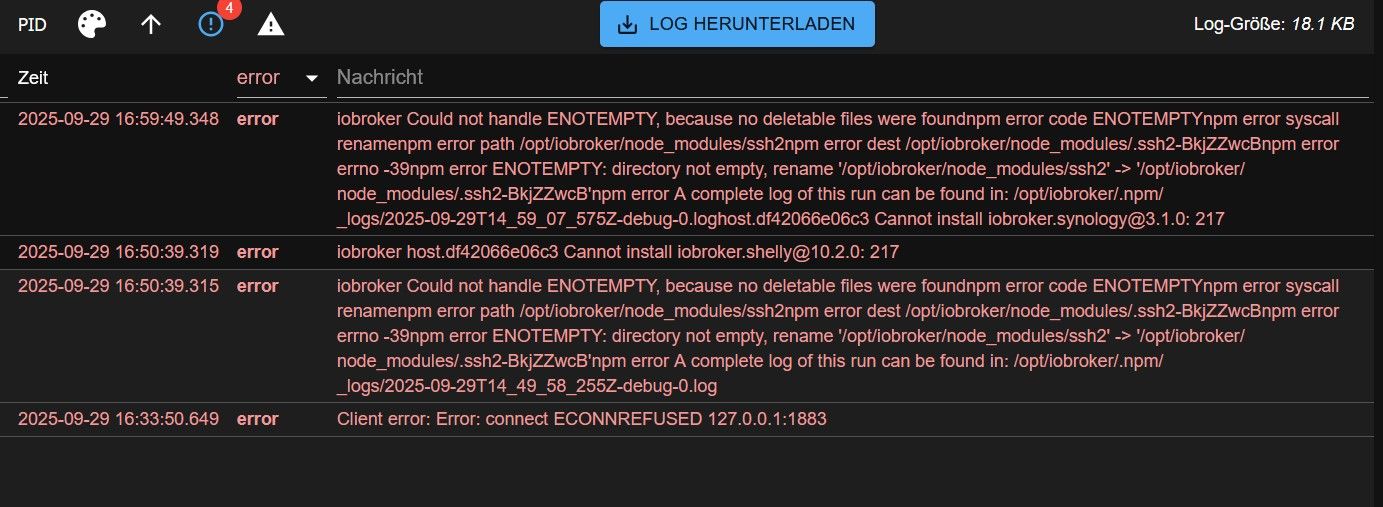
Nach der Backup Datei schaue ich nochmal
-
ja, diese beiden habe ich versucht, nach der Neuinstallation zu Installieren. Das hat allerdings auch nicht so recht geklappt. Ich sitze ja nun schon zwei Tage dran und habe sicher eineiges in die falsche Richtung gemacht.
Nach der Backup Datei schaue ich nochmal
@mühlenbroker logs bitte immer als Text in code-tags posten
-
ja, diese beiden habe ich versucht, nach der Neuinstallation zu Installieren. Das hat allerdings auch nicht so recht geklappt. Ich sitze ja nun schon zwei Tage dran und habe sicher eineiges in die falsche Richtung gemacht.
Nach der Backup Datei schaue ich nochmal
@mühlenbroker sagte in ioBroker macht Probleme im Docker:
Nach der Backup Datei schaue ich nochmal
Sowas gehört auf jeden Fall auf einen separaten Datenträger. Also ins NAS, auf 'nen Stick oder gleich in die Cloud.
Wenn Du ein aktuelles Backup gefunden hast, solltest Du vielleicht nochmal neu anfangen.
Also von Grund auf neu installieren. Und zwar ohne Desktop. Was nicht installiert ist, frisst keine Ressourcen und kann auch keine Probleme produzieren. Braucht man für ioBroker ja auch nicht.
Wie das geht, steht hier: https://forum.iobroker.net/topic/51869/installation-auf-raspi-einfacher-geht-s-nichtAls Anfänger und auf einem kleinen Pi macht Docker IMHO nicht wirklich Sinn. Auch wenn's technisch funktionieren sollte.
Das muss dann erstmal sauber laufen.
Wenn Du soweit bist, melde dich wieder hier. -
@mühlenbroker sagte in ioBroker macht Probleme im Docker:
Nach der Backup Datei schaue ich nochmal
Sowas gehört auf jeden Fall auf einen separaten Datenträger. Also ins NAS, auf 'nen Stick oder gleich in die Cloud.
Wenn Du ein aktuelles Backup gefunden hast, solltest Du vielleicht nochmal neu anfangen.
Also von Grund auf neu installieren. Und zwar ohne Desktop. Was nicht installiert ist, frisst keine Ressourcen und kann auch keine Probleme produzieren. Braucht man für ioBroker ja auch nicht.
Wie das geht, steht hier: https://forum.iobroker.net/topic/51869/installation-auf-raspi-einfacher-geht-s-nichtAls Anfänger und auf einem kleinen Pi macht Docker IMHO nicht wirklich Sinn. Auch wenn's technisch funktionieren sollte.
Das muss dann erstmal sauber laufen.
Wenn Du soweit bist, melde dich wieder hier.Ich habe alles neu aufgesetzt und es läuft wieder hervorragend. Als nächstes kümmere ich mich ums Backup.
Danke



Hey! Du scheinst an dieser Unterhaltung interessiert zu sein, hast aber noch kein Konto.
Hast du es satt, bei jedem Besuch durch die gleichen Beiträge zu scrollen? Wenn du dich für ein Konto anmeldest, kommst du immer genau dorthin zurück, wo du zuvor warst, und kannst dich über neue Antworten benachrichtigen lassen (entweder per E-Mail oder Push-Benachrichtigung). Du kannst auch Lesezeichen speichern und Beiträge positiv bewerten, um anderen Community-Mitgliedern deine Wertschätzung zu zeigen.
Mit deinem Input könnte dieser Beitrag noch besser werden 💗
Registrieren Anmelden525
Online33.0k
Benutzer83.6k
Themen1.3m
Beiträge