




nodejs 22.18 update
-
hallo alle zusammen ich habe gerade ein update versucht durchzuführen. auf diese nodejs siehe bild
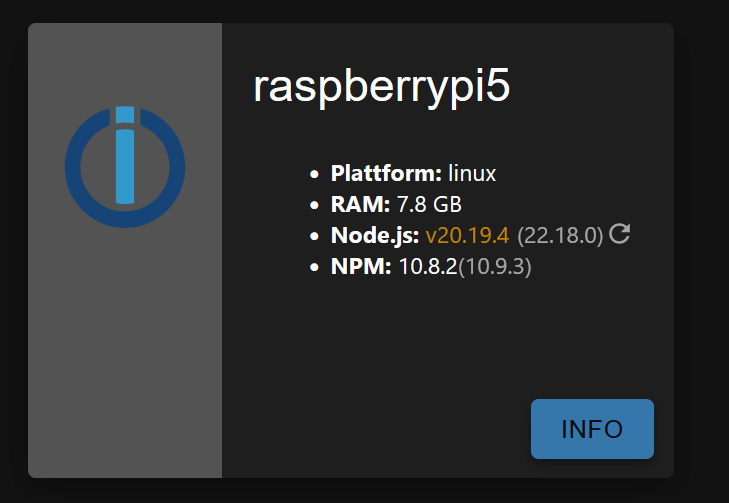
erst werde ich informiert das das update erfolg hatte und das System neu gestartet wird dann lief mein z2mqtt nicht mehr keine Verbindung zum Koordinator und nodejs steht immernoch auf 20.19.4
Wie bekomme ich jetzt mein z2m wieder zum laufen und warum funktioniert das update nichtGruß
Mico -
-
@thomas-braun ich drücke immer diesen kreis neben dem nodejs der im uhrzeigersinn angezeigt wird.
-
In deinem Terminal...
Da klickt nix, nur die Tastatur. -
In deinem Terminal...
Da klickt nix, nur die Tastatur.========== Start marking the full check here =========== ```bash Script v.2025-08-09 *** BASE SYSTEM *** Operating System: Debian GNU/Linux 12 (bookworm) Static hostname: raspberrypi5 Icon name: computer Kernel: Linux 6.12.34+rpt-rpi-2712 Architecture: arm64 OS is similar to: Model : Raspberry Pi 5 Model B Rev 1.0 Docker : false Virtualization : none Kernel : aarch64 Userland : 64 bit Systemuptime and Load: 07:30:50 up 41 min, 4 users, load average: 0.50, 0.52, 0.58 CPU threads: 4 *** LIFE CYCLE STATUS *** Operating System is the current Debian stable version codenamed 'bookworm'! *** RASPBERRY THROTTLING *** Current issues: No throttling issues detected. Previously detected issues: ~ Under-voltage has occurred ~ Arm frequency capping has occurred ~ Throttling has occurred ~ Soft temperature limit has occurred *** TIME AND TIMEZONES *** Local time: Tue 2025-08-12 07:30:50 CEST Universal time: Tue 2025-08-12 05:30:50 UTC RTC time: Tue 2025-08-12 05:30:50 Time zone: Europe/Berlin (CEST, +0200) System clock synchronized: yes NTP service: active RTC in local TZ: no *** Users and Groups *** User that called 'iob diag': pi HOME=/home/pi GROUPS=pi adm dialout cdrom sudo audio video plugdev games users input render netdev lpadmin gpio i2c spi iobroker User that is running 'js-controller': iobroker HOME=/home/iobroker GROUPS=iobroker tty dialout audio video plugdev bluetooth gpio i2c *** DISPLAY-SERVER SETUP *** Display-Server: true Display-Manager: * lightdm.service - Light Display Manager Desktop: Session: tty System is booting into 'graphical.target'. Usually a server is running in 'multi-user.target'. Please set BootTarget to 'multi-user.target' or run 'iobroker fix' *** MEMORY *** total used free shared buff/cache available Mem: 8.5G 3.6G 3.2G 28M 1.8G 4.9G Swap: 209M 0B 209M Total: 8.7G 3.6G 3.4G Active iob-Instances: 37 8063 M total memory 3405 M used memory 3673 M active memory 872 M inactive memory 3013 M free memory 140 M buffer memory 1618 M swap cache 199 M total swap 0 M used swap 199 M free swap *** top - Table Of Processes *** top - 07:30:51 up 41 min, 4 users, load average: 0.50, 0.52, 0.58 Tasks: 265 total, 1 running, 264 sleeping, 0 stopped, 0 zombie %Cpu(s): 0.0 us, 33.3 sy, 0.0 ni, 66.7 id, 0.0 wa, 0.0 hi, 0.0 si, 0.0 st MiB Mem : 8063.2 total, 3013.8 free, 3405.7 used, 1758.9 buff/cache MiB Swap: 200.0 total, 200.0 free, 0.0 used. 4657.5 avail Mem *** FAILED SERVICES *** UNIT LOAD ACTIVE SUB DESCRIPTION 0 loaded units listed. *** DMESG CRITICAL ERRORS *** No critical errors detected *** FILESYSTEM *** Filesystem Type Size Used Avail Use% Mounted on udev devtmpfs 3.9G 0 3.9G 0% /dev tmpfs tmpfs 1.6G 6.0M 1.6G 1% /run /dev/mmcblk0p2 ext4 58G 41G 15G 75% / tmpfs tmpfs 4.0G 400K 4.0G 1% /dev/shm tmpfs tmpfs 5.0M 48K 5.0M 1% /run/lock /dev/mmcblk0p1 vfat 510M 78M 433M 16% /boot/firmware tmpfs tmpfs 807M 192K 807M 1% /run/user/1000 Messages concerning ext4 filesystem in dmesg: [Tue Aug 12 06:49:30 2025] Kernel command line: reboot=w coherent_pool=1M 8250.nr_uarts=1 pci=pcie_bus_safe cgroup_disable=memory numa_policy=interleave nvme.max_host_mem_size_mb=0 numa=fake=8 system_heap.max_order=0 smsc95xx.macaddr=2C:CF:67:32:68:16 vc_mem.mem_base=0x3fc00000 vc_mem.mem_size=0x40000000 console=ttyAMA10,115200 console=tty1 root=PARTUUID=a84847a9-02 rootfstype=ext4 fsck.repair=yes rootwait quiet splash plymouth.ignore-serial-consoles [Tue Aug 12 06:49:32 2025] EXT4-fs (mmcblk0p2): mounted filesystem 5170097f-f1f6-42d8-a2ff-8938cbdfa7be ro with ordered data mode. Quota mode: none. [Tue Aug 12 06:49:33 2025] EXT4-fs (mmcblk0p2): re-mounted 5170097f-f1f6-42d8-a2ff-8938cbdfa7be r/w. Show mounted filesystems: TARGET SOURCE FSTYPE OPTIONS / /dev/mmcblk0p2 ext4 rw,noatime |-/run/user/1000/doc portal fuse.portal rw,nosuid,nodev,relatime,user_id=1000,group_id=1000 `-/boot/firmware /dev/mmcblk0p1 vfat rw,relatime,fmask=0022,dmask=0022,codepage=437,iocharset=ascii,shortname=mixed,errors=remount-ro Files in neuralgic directories: /var: 30G /var/ 28G /var/lib/influxdb/engine/data/2d344d64e0714233/autogen 28G /var/lib/influxdb/engine/data/2d344d64e0714233 28G /var/lib/influxdb/engine/data 28G /var/lib/influxdb/engine Archived and active journals take up 1.5G in the file system. /opt/iobroker/backups: 84M /opt/iobroker/backups/ /opt/iobroker/iobroker-data: 1.1G /opt/iobroker/iobroker-data/ 536M /opt/iobroker/iobroker-data/files 377M /opt/iobroker/iobroker-data/history 165M /opt/iobroker/iobroker-data/files/vis-2 122M /opt/iobroker/iobroker-data/backup-objects The five largest files in iobroker-data are: 38M /opt/iobroker/iobroker-data/files/iot.admin/static/js/main.d3d286bd.js.map 35M /opt/iobroker/iobroker-data/files/devices.admin/static/js/main.24f2bb56.js.map 32M /opt/iobroker/iobroker-data/objects.jsonl 24M /opt/iobroker/iobroker-data/files/vis-2/static/js/main.f305bc29.js.map 24M /opt/iobroker/iobroker-data/files/vis-2/static/js/main.8e80ccb0.js.map USB-Devices by-id: USB-Sticks - Avoid direct links to /dev/tty* in your adapter setups, please always prefer the links 'by-id': /dev/serial/by-id/usb-dresden_elektronik_ConBee_III_DE03218114-if00-port0 *** ZigBee Settings *** Zigbee Network Settings on your coordinator/in nvbackup are: zigbee.X Extended Pan ID: *** MASKED *** Pan ID: *** MASKED *** Channel: *** MASKED *** Network Key: *** MASKED *** To unmask the settings run 'iob diag --unmask' *** NodeJS-Installation *** /usr/bin/nodejs v20.19.4 /usr/bin/node v20.19.4 /usr/bin/npm 10.8.2 /usr/bin/npx 10.8.2 /usr/bin/corepack 0.32.0 nodejs: Installed: 20.19.4-1nodesource1 Candidate: 20.19.4-1nodesource1 Version table: *** 20.19.4-1nodesource1 600 500 https://deb.nodesource.com/node_20.x nodistro/main arm64 Packages 100 /var/lib/dpkg/status 20.19.3-1nodesource1 600 500 https://deb.nodesource.com/node_20.x nodistro/main arm64 Packages 20.19.2-1nodesource1 600 500 https://deb.nodesource.com/node_20.x nodistro/main arm64 Packages 20.19.1-1nodesource1 600 500 https://deb.nodesource.com/node_20.x nodistro/main arm64 Packages 20.19.0-1nodesource1 600 500 https://deb.nodesource.com/node_20.x nodistro/main arm64 Packages 20.18.3-1nodesource1 600 500 https://deb.nodesource.com/node_20.x nodistro/main arm64 Packages 20.18.2-1nodesource1 600 500 https://deb.nodesource.com/node_20.x nodistro/main arm64 Packages 20.18.1-1nodesource1 600 500 https://deb.nodesource.com/node_20.x nodistro/main arm64 Packages 20.18.0-1nodesource1 600 500 https://deb.nodesource.com/node_20.x nodistro/main arm64 Packages 20.17.0-1nodesource1 600 500 https://deb.nodesource.com/node_20.x nodistro/main arm64 Packages 20.16.0-1nodesource1 600 500 https://deb.nodesource.com/node_20.x nodistro/main arm64 Packages 20.15.1-1nodesource1 600 500 https://deb.nodesource.com/node_20.x nodistro/main arm64 Packages 20.15.0-1nodesource1 600 500 https://deb.nodesource.com/node_20.x nodistro/main arm64 Packages 20.14.0-1nodesource1 600 500 https://deb.nodesource.com/node_20.x nodistro/main arm64 Packages 20.13.1-1nodesource1 600 500 https://deb.nodesource.com/node_20.x nodistro/main arm64 Packages 20.13.0-1nodesource1 600 500 https://deb.nodesource.com/node_20.x nodistro/main arm64 Packages 20.12.2-1nodesource1 600 500 https://deb.nodesource.com/node_20.x nodistro/main arm64 Packages 20.12.1-1nodesource1 600 500 https://deb.nodesource.com/node_20.x nodistro/main arm64 Packages 20.12.0-1nodesource1 600 500 https://deb.nodesource.com/node_20.x nodistro/main arm64 Packages 20.11.1-1nodesource1 600 500 https://deb.nodesource.com/node_20.x nodistro/main arm64 Packages 20.11.0-1nodesource1 600 500 https://deb.nodesource.com/node_20.x nodistro/main arm64 Packages 20.10.0-1nodesource1 600 500 https://deb.nodesource.com/node_20.x nodistro/main arm64 Packages 20.9.0-1nodesource1 600 500 https://deb.nodesource.com/node_20.x nodistro/main arm64 Packages 20.8.1-1nodesource1 600 500 https://deb.nodesource.com/node_20.x nodistro/main arm64 Packages 20.8.0-1nodesource1 600 500 https://deb.nodesource.com/node_20.x nodistro/main arm64 Packages 20.7.0-1nodesource1 600 500 https://deb.nodesource.com/node_20.x nodistro/main arm64 Packages 20.6.1-1nodesource1 600 500 https://deb.nodesource.com/node_20.x nodistro/main arm64 Packages 20.6.0-1nodesource1 600 500 https://deb.nodesource.com/node_20.x nodistro/main arm64 Packages 20.5.1-1nodesource1 600 500 https://deb.nodesource.com/node_20.x nodistro/main arm64 Packages 20.5.0-1nodesource1 600 500 https://deb.nodesource.com/node_20.x nodistro/main arm64 Packages 20.4.0-1nodesource1 600 500 https://deb.nodesource.com/node_20.x nodistro/main arm64 Packages 20.3.1-1nodesource1 600 500 https://deb.nodesource.com/node_20.x nodistro/main arm64 Packages 20.3.0-1nodesource1 600 500 https://deb.nodesource.com/node_20.x nodistro/main arm64 Packages 20.2.0-1nodesource1 600 500 https://deb.nodesource.com/node_20.x nodistro/main arm64 Packages 20.1.0-1nodesource1 600 500 https://deb.nodesource.com/node_20.x nodistro/main arm64 Packages 20.0.0-1nodesource1 600 500 https://deb.nodesource.com/node_20.x nodistro/main arm64 Packages 18.19.0+dfsg-6~deb12u2 500 500 http://deb.debian.org/debian bookworm/main arm64 Packages 18.19.0+dfsg-6~deb12u1 500 500 http://deb.debian.org/debian-security bookworm-security/main arm64 Packages Temp directories causing deletion problem: 0 No problems detected Errors in npm tree: 0 No problems detected Checking for nodejs vulnerability: █████ ██ ██ ██████ ██████ ██████ ██████ ██ ██ ██ ██ ██ ██ ██ ██ ██ ██ ██ ██ ██ ██ ███████ ██ ██ ██ ███ ██ ██ ██ ██ ██ ██ ██ ██ ██ ██ ██ ██ ██ ██ ██ ██ ██ ██ ██ ██ ██ ██ ██ ███████ ███████ ██████ ██████ ██████ ██████ ██ *** ioBroker-Installation *** ioBroker Status iobroker is running on this host. Objects type: jsonl States type: jsonl Hosts: raspberrypi2 raspberrypi2 (version: 7.0.6, hostname: raspberrypi2 , alive, uptime: 1499) raspberrypi5 raspberrypi5 (version: 7.0.6, hostname: raspberrypi5 , alive, uptime: 1337) Core adapters versions js-controller: 7.0.6 admin: 7.6.17 javascript: 8.9.2 nodejs modules from github: 2 | +-- samsungtv@0.0.0 (git+https://git@github.com/luca-saggese/samsungtv.git#7fc20107455414e2afb94022682e0787e8635550) +-- iobroker.smartthings@0.2.2 (git+ssh://git@github.com/TA2k/ioBroker.smartthings.git#b055221990231cf4c8b7fbfd6bee94ff59b0fd75) Adapter State + system.adapter.admin.0 : admin : raspberrypi5 - enabled, port: 8081, bind: 0.0.0.0, run as: admin + system.adapter.alexa2.0 : alexa2 : raspberrypi5 - enabled system.adapter.alias-manager.0 : alias-manager : raspberrypi5 - disabled + system.adapter.backitup.0 : backitup : raspberrypi5 - enabled + system.adapter.cloud.0 : cloud : raspberrypi5 - enabled + system.adapter.device-reminder.0 : device-reminder : raspberrypi5 - enabled system.adapter.devices.0 : devices : raspberrypi5 - disabled + system.adapter.discovery.0 : discovery : raspberrypi5 - enabled + system.adapter.fullcalendar.0 : fullcalendar : raspberrypi5 - enabled + system.adapter.geofency.0 : geofency : raspberrypi5 - enabled, port: 7999, bind: 0.0.0.0 + system.adapter.growatt.0 : growatt : raspberrypi5 - enabled system.adapter.habpanel.0 : habpanel : raspberrypi5 - disabled + system.adapter.history.0 : history : raspberrypi5 - enabled system.adapter.ical.0 : ical : raspberrypi5 - enabled system.adapter.icons-freepic.0 : icons-freepic : raspberrypi5 - disabled system.adapter.icons-material-svg.0 : icons-material-svg : raspberrypi5 - disabled system.adapter.icons-mfd-svg.0 : icons-mfd-svg : raspberrypi5 - disabled + system.adapter.influxdb.0 : influxdb : raspberrypi5 - enabled, port: 8086 + system.adapter.iot.0 : iot : raspberrypi5 - enabled + system.adapter.javascript.0 : javascript : raspberrypi5 - enabled + system.adapter.meross.0 : meross : raspberrypi5 - enabled + system.adapter.mqtt.0 : mqtt : raspberrypi2 - enabled, port: 1883, bind: 0.0.0.0 + system.adapter.mqtt.1 : mqtt : raspberrypi5 - enabled, port: 1886, bind: 0.0.0.0 + system.adapter.node-red.0 : node-red : raspberrypi5 - enabled, port: 1880, bind: 0.0.0.0 system.adapter.openweathermap.0 : openweathermap : raspberrypi5 - enabled + system.adapter.pushover.0 : pushover : raspberrypi5 - enabled + system.adapter.reolink.0 : reolink : raspberrypi5 - enabled + system.adapter.reolink.1 : reolink : raspberrypi5 - enabled + system.adapter.samsung.0 : samsung : raspberrypi5 - enabled + system.adapter.samsung_tizen.0 : samsung_tizen : raspberrypi5 - enabled, port: 8002 + system.adapter.scenes.0 : scenes : raspberrypi5 - enabled + system.adapter.shelly.0 : shelly : raspberrypi5 - enabled, port: 1882, bind: 0.0.0.0 + system.adapter.shelly.1 : shelly : raspberrypi5 - enabled, port: 1882, bind: 0.0.0.0 + system.adapter.smartthings.0 : smartthings : raspberrypi5 - enabled + system.adapter.sonoff.0 : sonoff : raspberrypi2 - enabled, port: 1889, bind: 0.0.0.0 + system.adapter.statistics.0 : statistics : raspberrypi5 - enabled + system.adapter.telegram.0 : telegram : raspberrypi5 - enabled, port: 8443, bind: 0.0.0.0 + system.adapter.text2command.0 : text2command : raspberrypi5 - enabled + system.adapter.trashschedule.0 : trashschedule : raspberrypi5 - enabled + system.adapter.tuya.0 : tuya : raspberrypi5 - enabled + system.adapter.vis-2.0 : vis-2 : raspberrypi5 - enabled system.adapter.vis-fancyswitch.0 : vis-fancyswitch : raspberrypi5 - disabled system.adapter.vis-hqwidgets.0 : vis-hqwidgets : raspberrypi5 - disabled system.adapter.vis-icontwo.0 : vis-icontwo : raspberrypi5 - disabled system.adapter.vis-material-advanced.0 : vis-material-advanced : raspberrypi5 - disabled system.adapter.vis-timeandweather.0 : vis-timeandweather : raspberrypi5 - disabled system.adapter.vis.0 : vis : raspberrypi5 - enabled + system.adapter.web.0 : web : raspberrypi5 - enabled, port: 8082, bind: 0.0.0.0, run as: admin + system.adapter.yahka.0 : yahka : raspberrypi5 - enabled system.adapter.yr.0 : yr : raspberrypi5 - enabled + system.adapter.zigbee2mqtt.1 : zigbee2mqtt : raspberrypi5 - enabled + instance is alive Enabled adapters with bindings + system.adapter.admin.0 : admin : raspberrypi5 - enabled, port: 8081, bind: 0.0.0.0, run as: admin + system.adapter.geofency.0 : geofency : raspberrypi5 - enabled, port: 7999, bind: 0.0.0.0 + system.adapter.influxdb.0 : influxdb : raspberrypi5 - enabled, port: 8086 + system.adapter.mqtt.0 : mqtt : raspberrypi2 - enabled, port: 1883, bind: 0.0.0.0 + system.adapter.mqtt.1 : mqtt : raspberrypi5 - enabled, port: 1886, bind: 0.0.0.0 + system.adapter.node-red.0 : node-red : raspberrypi5 - enabled, port: 1880, bind: 0.0.0.0 + system.adapter.samsung_tizen.0 : samsung_tizen : raspberrypi5 - enabled, port: 8002 + system.adapter.shelly.0 : shelly : raspberrypi5 - enabled, port: 1882, bind: 0.0.0.0 + system.adapter.shelly.1 : shelly : raspberrypi5 - enabled, port: 1882, bind: 0.0.0.0 + system.adapter.sonoff.0 : sonoff : raspberrypi2 - enabled, port: 1889, bind: 0.0.0.0 + system.adapter.telegram.0 : telegram : raspberrypi5 - enabled, port: 8443, bind: 0.0.0.0 + system.adapter.web.0 : web : raspberrypi5 - enabled, port: 8082, bind: 0.0.0.0, run as: admin ioBroker-Repositories ┌─────────┬──────────┬─────────────────────────────────────────────────────────┬──────────────┐ │ (index) │ name │ url │ auto upgrade │ ├─────────┼──────────┼─────────────────────────────────────────────────────────┼──────────────┤ │ 0 │ 'stable' │ 'http://download.iobroker.net/sources-dist.json' │ false │ │ 1 │ 'beta' │ 'http://download.iobroker.net/sources-dist-latest.json' │ false │ └─────────┴──────────┴─────────────────────────────────────────────────────────┴──────────────┘ Active repo(s): stable Upgrade policy: none Installed ioBroker-Adapters Used repository: stable Adapter "admin" : 7.6.17 , installed 7.6.17 Adapter "alexa2" : 3.27.3 , installed 3.27.3 Adapter "alias-manager": 2.0.0 , installed 2.0.0 Adapter "backitup" : 3.3.5 , installed 3.3.5 Adapter "cloud" : 5.0.1 , installed 5.0.1 Adapter "device-reminder": 3.1.2 , installed 3.1.2 Adapter "devices" : 1.1.5 , installed 1.1.5 Adapter "discovery" : 5.0.0 , installed 5.0.0 Adapter "fullcalendar" : 2.4.5 , installed 2.4.5 Adapter "geofency" : 1.2.4 , installed 1.2.4 Adapter "growatt" : 3.3.1 , installed 3.3.1 Adapter "habpanel" : 0.5.0 , installed 0.5.0 Adapter "history" : 3.0.1 , installed 3.0.1 Adapter "ical" : 1.16.2 , installed 1.16.2 Adapter "icons-freepic": 1.0.0 , installed 1.0.0 Adapter "icons-material-svg": 0.1.0, installed 0.1.0 Adapter "icons-mfd-svg": 1.2.0 , installed 1.2.0 Adapter "influxdb" : 4.0.2 , installed 4.0.2 Adapter "iot" : 3.3.0 , installed 3.3.0 Adapter "javascript" : 8.9.2 , installed 8.9.2 Controller "js-controller": 7.0.6 , installed 7.0.6 Adapter "meross" : 1.17.0 , installed 1.17.0 Adapter "mqtt" : 6.1.2 , installed 6.1.2 Adapter "node-red" : 5.2.1 , installed 5.2.1 Adapter "openweathermap": 1.1.2 , installed 1.1.2 Adapter "pushover" : 4.1.0 , installed 4.1.0 Adapter "reolink" : 1.2.3 , installed 1.2.3 Adapter "samsung" : 0.6.1 , installed 0.6.1 Adapter "samsung_tizen": 1.1.0 , installed 1.1.0 Adapter "scenes" : 3.2.3 , installed 3.2.3 Adapter "shelly" : 10.1.0 , installed 10.1.0 Adapter "socketio" : 6.7.1 , installed 7.0.8 Adapter "statistics" : 2.4.0 , installed 2.4.0 Adapter "telegram" : 4.1.0 , installed 4.1.0 Adapter "text2command" : 3.0.3 , installed 3.0.3 Adapter "trashschedule": 3.3.0 , installed 3.3.0 Adapter "tuya" : 3.16.0 , installed 3.16.0 Adapter "vis" : 1.5.6 , installed 1.5.6 Adapter "vis-2" : 2.9.64 , installed 2.9.64 Adapter "vis-fancyswitch": 1.1.0 , installed 1.1.0 Adapter "vis-hqwidgets": 1.5.1 , installed 1.5.1 Adapter "vis-icontwo" : 1.12.0 , installed 1.12.0 Adapter "vis-material-advanced": 1.7.4, installed 1.7.4 Adapter "vis-timeandweather": 1.2.2, installed 1.2.2 Adapter "web" : 7.0.8 , installed 7.0.8 Adapter "ws" : 2.6.2 , installed 3.0.19 Adapter "yahka" : 1.0.3 , installed 1.0.3 Adapter "yr" : 5.3.0 , installed 5.3.0 Adapter "zigbee2mqtt" : 3.0.9 , installed 3.0.9 Objects and States Please stand by - This may take a while Objects: 14179 States: 11326 *** OS-Repositories and Updates *** Hit:1 http://deb.debian.org/debian bookworm InRelease Hit:2 http://deb.debian.org/debian-security bookworm-security InRelease Hit:3 http://archive.raspberrypi.com/debian bookworm InRelease Hit:4 http://deb.debian.org/debian bookworm-updates InRelease Hit:5 https://repos.influxdata.com/debian stable InRelease Hit:6 https://apt.grafana.com stable InRelease Hit:7 https://deb.nodesource.com/node_20.x nodistro InRelease Hit:8 https://repo.mosquitto.org/debian bookworm InRelease Reading package lists... Pending Updates: 0 *** Listening Ports *** Active Internet connections (only servers) Proto Recv-Q Send-Q Local Address Foreign Address State User Inode PID/Program name tcp 0 0 0.0.0.0:22 0.0.0.0:* LISTEN 0 7316 833/sshd: /usr/sbin tcp 0 0 0.0.0.0:9001 0.0.0.0:* LISTEN 1001 31261 5766/iobroker.js-co tcp 0 0 0.0.0.0:9000 0.0.0.0:* LISTEN 1001 31266 5766/iobroker.js-co tcp 0 0 127.0.0.1:631 0.0.0.0:* LISTEN 0 7356 816/cupsd tcp 0 0 127.0.0.1:34259 0.0.0.0:* LISTEN 1001 48557 6489/io.yahka.0 tcp 0 0 0.0.0.0:1880 0.0.0.0:* LISTEN 1001 33315 5935/node-red tcp 0 0 0.0.0.0:1882 0.0.0.0:* LISTEN 1001 34419 6192/io.shelly.0 tcp 0 0 0.0.0.0:1884 0.0.0.0:* LISTEN 113 6655 824/mosquitto tcp 0 0 0.0.0.0:1887 0.0.0.0:* LISTEN 1001 31683 6134/io.mqtt.1 tcp 0 0 0.0.0.0:1886 0.0.0.0:* LISTEN 1001 31682 6134/io.mqtt.1 tcp 0 0 0.0.0.0:35415 0.0.0.0:* LISTEN 1001 35072 6489/io.yahka.0 tcp6 0 0 :::22 :::* LISTEN 0 7318 833/sshd: /usr/sbin tcp6 0 0 :::1884 :::* LISTEN 113 6656 824/mosquitto tcp6 0 0 :::3000 :::* LISTEN 112 10091 2066/grafana tcp6 0 0 ::1:631 :::* LISTEN 0 7355 816/cupsd tcp6 0 0 :::7999 :::* LISTEN 1001 31620 6071/io.geofency.0 tcp6 0 0 :::8081 :::* LISTEN 1001 31325 5791/io.admin.0 tcp6 0 0 :::8082 :::* LISTEN 1001 35963 6474/io.web.0 tcp6 0 0 :::8086 :::* LISTEN 999 12414 1205/influxd udp 0 0 0.0.0.0:5353 0.0.0.0:* 104 8808 651/avahi-daemon: r udp 0 0 0.0.0.0:5683 0.0.0.0:* 1001 33525 6211/io.shelly.1 udp 0 0 0.0.0.0:6666 0.0.0.0:* 1001 32652 6226/io.tuya.0 udp 0 0 0.0.0.0:6667 0.0.0.0:* 1001 32653 6226/io.tuya.0 udp 0 0 0.0.0.0:45274 0.0.0.0:* 104 8810 651/avahi-daemon: r udp6 0 0 :::5353 :::* 104 8809 651/avahi-daemon: r udp6 0 0 :::56697 :::* 104 8811 651/avahi-daemon: r udp6 0 0 fe80::201f:2fec:9bc:546 :::* 0 10508 772/NetworkManager *** Log File - Last 25 Lines *** 2025-08-12 07:31:03.771 - warn: zigbee2mqtt.1 (7970) Start try again in 1 seconds... 2025-08-12 07:31:04.774 - warn: zigbee2mqtt.1 (7970) Start try again in 1 seconds... 2025-08-12 07:31:05.775 - warn: zigbee2mqtt.1 (7970) Start try again in 1 seconds... 2025-08-12 07:31:06.775 - warn: zigbee2mqtt.1 (7970) Start try again in 1 seconds... 2025-08-12 07:31:07.776 - warn: zigbee2mqtt.1 (7970) Start try again in 1 seconds... 2025-08-12 07:31:08.777 - warn: zigbee2mqtt.1 (7970) Start try again in 1 seconds... 2025-08-12 07:31:09.779 - warn: zigbee2mqtt.1 (7970) Start try again in 1 seconds... 2025-08-12 07:31:10.781 - warn: zigbee2mqtt.1 (7970) Start try again in 1 seconds... 2025-08-12 07:31:11.784 - warn: zigbee2mqtt.1 (7970) Start try again in 1 seconds... 2025-08-12 07:31:12.786 - warn: zigbee2mqtt.1 (7970) Start try again in 1 seconds... 2025-08-12 07:31:13.788 - warn: zigbee2mqtt.1 (7970) Start try again in 1 seconds... 2025-08-12 07:31:14.319 - warn: shelly.0 (6192) [Mqtt.statusNotifications] 192.168.178.118 (shellyplus1pm / shellyplus1pm-cc7b5c820c00 / shellyplus1pm#cc7b5c820c00#1): "General Status Notifications" are disabled (see adapter documentation for details) 2025-08-12 07:31:14.789 - warn: zigbee2mqtt.1 (7970) Start try again in 1 seconds... 2025-08-12 07:31:15.791 - warn: zigbee2mqtt.1 (7970) Start try again in 1 seconds... 2025-08-12 07:31:16.793 - warn: zigbee2mqtt.1 (7970) Start try again in 1 seconds... 2025-08-12 07:31:17.794 - warn: zigbee2mqtt.1 (7970) Start try again in 1 seconds... 2025-08-12 07:31:18.796 - warn: zigbee2mqtt.1 (7970) Start try again in 1 seconds... 2025-08-12 07:31:19.797 - warn: zigbee2mqtt.1 (7970) Start try again in 1 seconds... 2025-08-12 07:31:20.798 - warn: zigbee2mqtt.1 (7970) Start try again in 1 seconds... 2025-08-12 07:31:21.800 - warn: zigbee2mqtt.1 (7970) Start try again in 1 seconds... 2025-08-12 07:31:22.801 - warn: zigbee2mqtt.1 (7970) Start try again in 1 seconds... 2025-08-12 07:31:23.803 - warn: zigbee2mqtt.1 (7970) Start try again in 1 seconds... 2025-08-12 07:31:24.804 - warn: zigbee2mqtt.1 (7970) Start try again in 1 seconds... 2025-08-12 07:31:25.806 - warn: zigbee2mqtt.1 (7970) Start try again in 1 seconds... 2025-08-12 07:31:26.807 - warn: zigbee2mqtt.1 (7970) Start try again in 1 seconds...============ Mark until here for C&P =============
iob diag has finished.
-
nodejs ist richtig installiert.
Da belügt dich mal wieder eine graphische Oberfläche.
Starte die Kiste mal sauber durch (NIE einfach den Strom kappen!)iob stop sudo reboot -
========== Start marking the full check here =========== ```bash Script v.2025-08-09 *** BASE SYSTEM *** Operating System: Debian GNU/Linux 12 (bookworm) Static hostname: raspberrypi5 Icon name: computer Kernel: Linux 6.12.34+rpt-rpi-2712 Architecture: arm64 OS is similar to: Model : Raspberry Pi 5 Model B Rev 1.0 Docker : false Virtualization : none Kernel : aarch64 Userland : 64 bit Systemuptime and Load: 07:30:50 up 41 min, 4 users, load average: 0.50, 0.52, 0.58 CPU threads: 4 *** LIFE CYCLE STATUS *** Operating System is the current Debian stable version codenamed 'bookworm'! *** RASPBERRY THROTTLING *** Current issues: No throttling issues detected. Previously detected issues: ~ Under-voltage has occurred ~ Arm frequency capping has occurred ~ Throttling has occurred ~ Soft temperature limit has occurred *** TIME AND TIMEZONES *** Local time: Tue 2025-08-12 07:30:50 CEST Universal time: Tue 2025-08-12 05:30:50 UTC RTC time: Tue 2025-08-12 05:30:50 Time zone: Europe/Berlin (CEST, +0200) System clock synchronized: yes NTP service: active RTC in local TZ: no *** Users and Groups *** User that called 'iob diag': pi HOME=/home/pi GROUPS=pi adm dialout cdrom sudo audio video plugdev games users input render netdev lpadmin gpio i2c spi iobroker User that is running 'js-controller': iobroker HOME=/home/iobroker GROUPS=iobroker tty dialout audio video plugdev bluetooth gpio i2c *** DISPLAY-SERVER SETUP *** Display-Server: true Display-Manager: * lightdm.service - Light Display Manager Desktop: Session: tty System is booting into 'graphical.target'. Usually a server is running in 'multi-user.target'. Please set BootTarget to 'multi-user.target' or run 'iobroker fix' *** MEMORY *** total used free shared buff/cache available Mem: 8.5G 3.6G 3.2G 28M 1.8G 4.9G Swap: 209M 0B 209M Total: 8.7G 3.6G 3.4G Active iob-Instances: 37 8063 M total memory 3405 M used memory 3673 M active memory 872 M inactive memory 3013 M free memory 140 M buffer memory 1618 M swap cache 199 M total swap 0 M used swap 199 M free swap *** top - Table Of Processes *** top - 07:30:51 up 41 min, 4 users, load average: 0.50, 0.52, 0.58 Tasks: 265 total, 1 running, 264 sleeping, 0 stopped, 0 zombie %Cpu(s): 0.0 us, 33.3 sy, 0.0 ni, 66.7 id, 0.0 wa, 0.0 hi, 0.0 si, 0.0 st MiB Mem : 8063.2 total, 3013.8 free, 3405.7 used, 1758.9 buff/cache MiB Swap: 200.0 total, 200.0 free, 0.0 used. 4657.5 avail Mem *** FAILED SERVICES *** UNIT LOAD ACTIVE SUB DESCRIPTION 0 loaded units listed. *** DMESG CRITICAL ERRORS *** No critical errors detected *** FILESYSTEM *** Filesystem Type Size Used Avail Use% Mounted on udev devtmpfs 3.9G 0 3.9G 0% /dev tmpfs tmpfs 1.6G 6.0M 1.6G 1% /run /dev/mmcblk0p2 ext4 58G 41G 15G 75% / tmpfs tmpfs 4.0G 400K 4.0G 1% /dev/shm tmpfs tmpfs 5.0M 48K 5.0M 1% /run/lock /dev/mmcblk0p1 vfat 510M 78M 433M 16% /boot/firmware tmpfs tmpfs 807M 192K 807M 1% /run/user/1000 Messages concerning ext4 filesystem in dmesg: [Tue Aug 12 06:49:30 2025] Kernel command line: reboot=w coherent_pool=1M 8250.nr_uarts=1 pci=pcie_bus_safe cgroup_disable=memory numa_policy=interleave nvme.max_host_mem_size_mb=0 numa=fake=8 system_heap.max_order=0 smsc95xx.macaddr=2C:CF:67:32:68:16 vc_mem.mem_base=0x3fc00000 vc_mem.mem_size=0x40000000 console=ttyAMA10,115200 console=tty1 root=PARTUUID=a84847a9-02 rootfstype=ext4 fsck.repair=yes rootwait quiet splash plymouth.ignore-serial-consoles [Tue Aug 12 06:49:32 2025] EXT4-fs (mmcblk0p2): mounted filesystem 5170097f-f1f6-42d8-a2ff-8938cbdfa7be ro with ordered data mode. Quota mode: none. [Tue Aug 12 06:49:33 2025] EXT4-fs (mmcblk0p2): re-mounted 5170097f-f1f6-42d8-a2ff-8938cbdfa7be r/w. Show mounted filesystems: TARGET SOURCE FSTYPE OPTIONS / /dev/mmcblk0p2 ext4 rw,noatime |-/run/user/1000/doc portal fuse.portal rw,nosuid,nodev,relatime,user_id=1000,group_id=1000 `-/boot/firmware /dev/mmcblk0p1 vfat rw,relatime,fmask=0022,dmask=0022,codepage=437,iocharset=ascii,shortname=mixed,errors=remount-ro Files in neuralgic directories: /var: 30G /var/ 28G /var/lib/influxdb/engine/data/2d344d64e0714233/autogen 28G /var/lib/influxdb/engine/data/2d344d64e0714233 28G /var/lib/influxdb/engine/data 28G /var/lib/influxdb/engine Archived and active journals take up 1.5G in the file system. /opt/iobroker/backups: 84M /opt/iobroker/backups/ /opt/iobroker/iobroker-data: 1.1G /opt/iobroker/iobroker-data/ 536M /opt/iobroker/iobroker-data/files 377M /opt/iobroker/iobroker-data/history 165M /opt/iobroker/iobroker-data/files/vis-2 122M /opt/iobroker/iobroker-data/backup-objects The five largest files in iobroker-data are: 38M /opt/iobroker/iobroker-data/files/iot.admin/static/js/main.d3d286bd.js.map 35M /opt/iobroker/iobroker-data/files/devices.admin/static/js/main.24f2bb56.js.map 32M /opt/iobroker/iobroker-data/objects.jsonl 24M /opt/iobroker/iobroker-data/files/vis-2/static/js/main.f305bc29.js.map 24M /opt/iobroker/iobroker-data/files/vis-2/static/js/main.8e80ccb0.js.map USB-Devices by-id: USB-Sticks - Avoid direct links to /dev/tty* in your adapter setups, please always prefer the links 'by-id': /dev/serial/by-id/usb-dresden_elektronik_ConBee_III_DE03218114-if00-port0 *** ZigBee Settings *** Zigbee Network Settings on your coordinator/in nvbackup are: zigbee.X Extended Pan ID: *** MASKED *** Pan ID: *** MASKED *** Channel: *** MASKED *** Network Key: *** MASKED *** To unmask the settings run 'iob diag --unmask' *** NodeJS-Installation *** /usr/bin/nodejs v20.19.4 /usr/bin/node v20.19.4 /usr/bin/npm 10.8.2 /usr/bin/npx 10.8.2 /usr/bin/corepack 0.32.0 nodejs: Installed: 20.19.4-1nodesource1 Candidate: 20.19.4-1nodesource1 Version table: *** 20.19.4-1nodesource1 600 500 https://deb.nodesource.com/node_20.x nodistro/main arm64 Packages 100 /var/lib/dpkg/status 20.19.3-1nodesource1 600 500 https://deb.nodesource.com/node_20.x nodistro/main arm64 Packages 20.19.2-1nodesource1 600 500 https://deb.nodesource.com/node_20.x nodistro/main arm64 Packages 20.19.1-1nodesource1 600 500 https://deb.nodesource.com/node_20.x nodistro/main arm64 Packages 20.19.0-1nodesource1 600 500 https://deb.nodesource.com/node_20.x nodistro/main arm64 Packages 20.18.3-1nodesource1 600 500 https://deb.nodesource.com/node_20.x nodistro/main arm64 Packages 20.18.2-1nodesource1 600 500 https://deb.nodesource.com/node_20.x nodistro/main arm64 Packages 20.18.1-1nodesource1 600 500 https://deb.nodesource.com/node_20.x nodistro/main arm64 Packages 20.18.0-1nodesource1 600 500 https://deb.nodesource.com/node_20.x nodistro/main arm64 Packages 20.17.0-1nodesource1 600 500 https://deb.nodesource.com/node_20.x nodistro/main arm64 Packages 20.16.0-1nodesource1 600 500 https://deb.nodesource.com/node_20.x nodistro/main arm64 Packages 20.15.1-1nodesource1 600 500 https://deb.nodesource.com/node_20.x nodistro/main arm64 Packages 20.15.0-1nodesource1 600 500 https://deb.nodesource.com/node_20.x nodistro/main arm64 Packages 20.14.0-1nodesource1 600 500 https://deb.nodesource.com/node_20.x nodistro/main arm64 Packages 20.13.1-1nodesource1 600 500 https://deb.nodesource.com/node_20.x nodistro/main arm64 Packages 20.13.0-1nodesource1 600 500 https://deb.nodesource.com/node_20.x nodistro/main arm64 Packages 20.12.2-1nodesource1 600 500 https://deb.nodesource.com/node_20.x nodistro/main arm64 Packages 20.12.1-1nodesource1 600 500 https://deb.nodesource.com/node_20.x nodistro/main arm64 Packages 20.12.0-1nodesource1 600 500 https://deb.nodesource.com/node_20.x nodistro/main arm64 Packages 20.11.1-1nodesource1 600 500 https://deb.nodesource.com/node_20.x nodistro/main arm64 Packages 20.11.0-1nodesource1 600 500 https://deb.nodesource.com/node_20.x nodistro/main arm64 Packages 20.10.0-1nodesource1 600 500 https://deb.nodesource.com/node_20.x nodistro/main arm64 Packages 20.9.0-1nodesource1 600 500 https://deb.nodesource.com/node_20.x nodistro/main arm64 Packages 20.8.1-1nodesource1 600 500 https://deb.nodesource.com/node_20.x nodistro/main arm64 Packages 20.8.0-1nodesource1 600 500 https://deb.nodesource.com/node_20.x nodistro/main arm64 Packages 20.7.0-1nodesource1 600 500 https://deb.nodesource.com/node_20.x nodistro/main arm64 Packages 20.6.1-1nodesource1 600 500 https://deb.nodesource.com/node_20.x nodistro/main arm64 Packages 20.6.0-1nodesource1 600 500 https://deb.nodesource.com/node_20.x nodistro/main arm64 Packages 20.5.1-1nodesource1 600 500 https://deb.nodesource.com/node_20.x nodistro/main arm64 Packages 20.5.0-1nodesource1 600 500 https://deb.nodesource.com/node_20.x nodistro/main arm64 Packages 20.4.0-1nodesource1 600 500 https://deb.nodesource.com/node_20.x nodistro/main arm64 Packages 20.3.1-1nodesource1 600 500 https://deb.nodesource.com/node_20.x nodistro/main arm64 Packages 20.3.0-1nodesource1 600 500 https://deb.nodesource.com/node_20.x nodistro/main arm64 Packages 20.2.0-1nodesource1 600 500 https://deb.nodesource.com/node_20.x nodistro/main arm64 Packages 20.1.0-1nodesource1 600 500 https://deb.nodesource.com/node_20.x nodistro/main arm64 Packages 20.0.0-1nodesource1 600 500 https://deb.nodesource.com/node_20.x nodistro/main arm64 Packages 18.19.0+dfsg-6~deb12u2 500 500 http://deb.debian.org/debian bookworm/main arm64 Packages 18.19.0+dfsg-6~deb12u1 500 500 http://deb.debian.org/debian-security bookworm-security/main arm64 Packages Temp directories causing deletion problem: 0 No problems detected Errors in npm tree: 0 No problems detected Checking for nodejs vulnerability: █████ ██ ██ ██████ ██████ ██████ ██████ ██ ██ ██ ██ ██ ██ ██ ██ ██ ██ ██ ██ ██ ██ ███████ ██ ██ ██ ███ ██ ██ ██ ██ ██ ██ ██ ██ ██ ██ ██ ██ ██ ██ ██ ██ ██ ██ ██ ██ ██ ██ ██ ███████ ███████ ██████ ██████ ██████ ██████ ██ *** ioBroker-Installation *** ioBroker Status iobroker is running on this host. Objects type: jsonl States type: jsonl Hosts: raspberrypi2 raspberrypi2 (version: 7.0.6, hostname: raspberrypi2 , alive, uptime: 1499) raspberrypi5 raspberrypi5 (version: 7.0.6, hostname: raspberrypi5 , alive, uptime: 1337) Core adapters versions js-controller: 7.0.6 admin: 7.6.17 javascript: 8.9.2 nodejs modules from github: 2 | +-- samsungtv@0.0.0 (git+https://git@github.com/luca-saggese/samsungtv.git#7fc20107455414e2afb94022682e0787e8635550) +-- iobroker.smartthings@0.2.2 (git+ssh://git@github.com/TA2k/ioBroker.smartthings.git#b055221990231cf4c8b7fbfd6bee94ff59b0fd75) Adapter State + system.adapter.admin.0 : admin : raspberrypi5 - enabled, port: 8081, bind: 0.0.0.0, run as: admin + system.adapter.alexa2.0 : alexa2 : raspberrypi5 - enabled system.adapter.alias-manager.0 : alias-manager : raspberrypi5 - disabled + system.adapter.backitup.0 : backitup : raspberrypi5 - enabled + system.adapter.cloud.0 : cloud : raspberrypi5 - enabled + system.adapter.device-reminder.0 : device-reminder : raspberrypi5 - enabled system.adapter.devices.0 : devices : raspberrypi5 - disabled + system.adapter.discovery.0 : discovery : raspberrypi5 - enabled + system.adapter.fullcalendar.0 : fullcalendar : raspberrypi5 - enabled + system.adapter.geofency.0 : geofency : raspberrypi5 - enabled, port: 7999, bind: 0.0.0.0 + system.adapter.growatt.0 : growatt : raspberrypi5 - enabled system.adapter.habpanel.0 : habpanel : raspberrypi5 - disabled + system.adapter.history.0 : history : raspberrypi5 - enabled system.adapter.ical.0 : ical : raspberrypi5 - enabled system.adapter.icons-freepic.0 : icons-freepic : raspberrypi5 - disabled system.adapter.icons-material-svg.0 : icons-material-svg : raspberrypi5 - disabled system.adapter.icons-mfd-svg.0 : icons-mfd-svg : raspberrypi5 - disabled + system.adapter.influxdb.0 : influxdb : raspberrypi5 - enabled, port: 8086 + system.adapter.iot.0 : iot : raspberrypi5 - enabled + system.adapter.javascript.0 : javascript : raspberrypi5 - enabled + system.adapter.meross.0 : meross : raspberrypi5 - enabled + system.adapter.mqtt.0 : mqtt : raspberrypi2 - enabled, port: 1883, bind: 0.0.0.0 + system.adapter.mqtt.1 : mqtt : raspberrypi5 - enabled, port: 1886, bind: 0.0.0.0 + system.adapter.node-red.0 : node-red : raspberrypi5 - enabled, port: 1880, bind: 0.0.0.0 system.adapter.openweathermap.0 : openweathermap : raspberrypi5 - enabled + system.adapter.pushover.0 : pushover : raspberrypi5 - enabled + system.adapter.reolink.0 : reolink : raspberrypi5 - enabled + system.adapter.reolink.1 : reolink : raspberrypi5 - enabled + system.adapter.samsung.0 : samsung : raspberrypi5 - enabled + system.adapter.samsung_tizen.0 : samsung_tizen : raspberrypi5 - enabled, port: 8002 + system.adapter.scenes.0 : scenes : raspberrypi5 - enabled + system.adapter.shelly.0 : shelly : raspberrypi5 - enabled, port: 1882, bind: 0.0.0.0 + system.adapter.shelly.1 : shelly : raspberrypi5 - enabled, port: 1882, bind: 0.0.0.0 + system.adapter.smartthings.0 : smartthings : raspberrypi5 - enabled + system.adapter.sonoff.0 : sonoff : raspberrypi2 - enabled, port: 1889, bind: 0.0.0.0 + system.adapter.statistics.0 : statistics : raspberrypi5 - enabled + system.adapter.telegram.0 : telegram : raspberrypi5 - enabled, port: 8443, bind: 0.0.0.0 + system.adapter.text2command.0 : text2command : raspberrypi5 - enabled + system.adapter.trashschedule.0 : trashschedule : raspberrypi5 - enabled + system.adapter.tuya.0 : tuya : raspberrypi5 - enabled + system.adapter.vis-2.0 : vis-2 : raspberrypi5 - enabled system.adapter.vis-fancyswitch.0 : vis-fancyswitch : raspberrypi5 - disabled system.adapter.vis-hqwidgets.0 : vis-hqwidgets : raspberrypi5 - disabled system.adapter.vis-icontwo.0 : vis-icontwo : raspberrypi5 - disabled system.adapter.vis-material-advanced.0 : vis-material-advanced : raspberrypi5 - disabled system.adapter.vis-timeandweather.0 : vis-timeandweather : raspberrypi5 - disabled system.adapter.vis.0 : vis : raspberrypi5 - enabled + system.adapter.web.0 : web : raspberrypi5 - enabled, port: 8082, bind: 0.0.0.0, run as: admin + system.adapter.yahka.0 : yahka : raspberrypi5 - enabled system.adapter.yr.0 : yr : raspberrypi5 - enabled + system.adapter.zigbee2mqtt.1 : zigbee2mqtt : raspberrypi5 - enabled + instance is alive Enabled adapters with bindings + system.adapter.admin.0 : admin : raspberrypi5 - enabled, port: 8081, bind: 0.0.0.0, run as: admin + system.adapter.geofency.0 : geofency : raspberrypi5 - enabled, port: 7999, bind: 0.0.0.0 + system.adapter.influxdb.0 : influxdb : raspberrypi5 - enabled, port: 8086 + system.adapter.mqtt.0 : mqtt : raspberrypi2 - enabled, port: 1883, bind: 0.0.0.0 + system.adapter.mqtt.1 : mqtt : raspberrypi5 - enabled, port: 1886, bind: 0.0.0.0 + system.adapter.node-red.0 : node-red : raspberrypi5 - enabled, port: 1880, bind: 0.0.0.0 + system.adapter.samsung_tizen.0 : samsung_tizen : raspberrypi5 - enabled, port: 8002 + system.adapter.shelly.0 : shelly : raspberrypi5 - enabled, port: 1882, bind: 0.0.0.0 + system.adapter.shelly.1 : shelly : raspberrypi5 - enabled, port: 1882, bind: 0.0.0.0 + system.adapter.sonoff.0 : sonoff : raspberrypi2 - enabled, port: 1889, bind: 0.0.0.0 + system.adapter.telegram.0 : telegram : raspberrypi5 - enabled, port: 8443, bind: 0.0.0.0 + system.adapter.web.0 : web : raspberrypi5 - enabled, port: 8082, bind: 0.0.0.0, run as: admin ioBroker-Repositories ┌─────────┬──────────┬─────────────────────────────────────────────────────────┬──────────────┐ │ (index) │ name │ url │ auto upgrade │ ├─────────┼──────────┼─────────────────────────────────────────────────────────┼──────────────┤ │ 0 │ 'stable' │ 'http://download.iobroker.net/sources-dist.json' │ false │ │ 1 │ 'beta' │ 'http://download.iobroker.net/sources-dist-latest.json' │ false │ └─────────┴──────────┴─────────────────────────────────────────────────────────┴──────────────┘ Active repo(s): stable Upgrade policy: none Installed ioBroker-Adapters Used repository: stable Adapter "admin" : 7.6.17 , installed 7.6.17 Adapter "alexa2" : 3.27.3 , installed 3.27.3 Adapter "alias-manager": 2.0.0 , installed 2.0.0 Adapter "backitup" : 3.3.5 , installed 3.3.5 Adapter "cloud" : 5.0.1 , installed 5.0.1 Adapter "device-reminder": 3.1.2 , installed 3.1.2 Adapter "devices" : 1.1.5 , installed 1.1.5 Adapter "discovery" : 5.0.0 , installed 5.0.0 Adapter "fullcalendar" : 2.4.5 , installed 2.4.5 Adapter "geofency" : 1.2.4 , installed 1.2.4 Adapter "growatt" : 3.3.1 , installed 3.3.1 Adapter "habpanel" : 0.5.0 , installed 0.5.0 Adapter "history" : 3.0.1 , installed 3.0.1 Adapter "ical" : 1.16.2 , installed 1.16.2 Adapter "icons-freepic": 1.0.0 , installed 1.0.0 Adapter "icons-material-svg": 0.1.0, installed 0.1.0 Adapter "icons-mfd-svg": 1.2.0 , installed 1.2.0 Adapter "influxdb" : 4.0.2 , installed 4.0.2 Adapter "iot" : 3.3.0 , installed 3.3.0 Adapter "javascript" : 8.9.2 , installed 8.9.2 Controller "js-controller": 7.0.6 , installed 7.0.6 Adapter "meross" : 1.17.0 , installed 1.17.0 Adapter "mqtt" : 6.1.2 , installed 6.1.2 Adapter "node-red" : 5.2.1 , installed 5.2.1 Adapter "openweathermap": 1.1.2 , installed 1.1.2 Adapter "pushover" : 4.1.0 , installed 4.1.0 Adapter "reolink" : 1.2.3 , installed 1.2.3 Adapter "samsung" : 0.6.1 , installed 0.6.1 Adapter "samsung_tizen": 1.1.0 , installed 1.1.0 Adapter "scenes" : 3.2.3 , installed 3.2.3 Adapter "shelly" : 10.1.0 , installed 10.1.0 Adapter "socketio" : 6.7.1 , installed 7.0.8 Adapter "statistics" : 2.4.0 , installed 2.4.0 Adapter "telegram" : 4.1.0 , installed 4.1.0 Adapter "text2command" : 3.0.3 , installed 3.0.3 Adapter "trashschedule": 3.3.0 , installed 3.3.0 Adapter "tuya" : 3.16.0 , installed 3.16.0 Adapter "vis" : 1.5.6 , installed 1.5.6 Adapter "vis-2" : 2.9.64 , installed 2.9.64 Adapter "vis-fancyswitch": 1.1.0 , installed 1.1.0 Adapter "vis-hqwidgets": 1.5.1 , installed 1.5.1 Adapter "vis-icontwo" : 1.12.0 , installed 1.12.0 Adapter "vis-material-advanced": 1.7.4, installed 1.7.4 Adapter "vis-timeandweather": 1.2.2, installed 1.2.2 Adapter "web" : 7.0.8 , installed 7.0.8 Adapter "ws" : 2.6.2 , installed 3.0.19 Adapter "yahka" : 1.0.3 , installed 1.0.3 Adapter "yr" : 5.3.0 , installed 5.3.0 Adapter "zigbee2mqtt" : 3.0.9 , installed 3.0.9 Objects and States Please stand by - This may take a while Objects: 14179 States: 11326 *** OS-Repositories and Updates *** Hit:1 http://deb.debian.org/debian bookworm InRelease Hit:2 http://deb.debian.org/debian-security bookworm-security InRelease Hit:3 http://archive.raspberrypi.com/debian bookworm InRelease Hit:4 http://deb.debian.org/debian bookworm-updates InRelease Hit:5 https://repos.influxdata.com/debian stable InRelease Hit:6 https://apt.grafana.com stable InRelease Hit:7 https://deb.nodesource.com/node_20.x nodistro InRelease Hit:8 https://repo.mosquitto.org/debian bookworm InRelease Reading package lists... Pending Updates: 0 *** Listening Ports *** Active Internet connections (only servers) Proto Recv-Q Send-Q Local Address Foreign Address State User Inode PID/Program name tcp 0 0 0.0.0.0:22 0.0.0.0:* LISTEN 0 7316 833/sshd: /usr/sbin tcp 0 0 0.0.0.0:9001 0.0.0.0:* LISTEN 1001 31261 5766/iobroker.js-co tcp 0 0 0.0.0.0:9000 0.0.0.0:* LISTEN 1001 31266 5766/iobroker.js-co tcp 0 0 127.0.0.1:631 0.0.0.0:* LISTEN 0 7356 816/cupsd tcp 0 0 127.0.0.1:34259 0.0.0.0:* LISTEN 1001 48557 6489/io.yahka.0 tcp 0 0 0.0.0.0:1880 0.0.0.0:* LISTEN 1001 33315 5935/node-red tcp 0 0 0.0.0.0:1882 0.0.0.0:* LISTEN 1001 34419 6192/io.shelly.0 tcp 0 0 0.0.0.0:1884 0.0.0.0:* LISTEN 113 6655 824/mosquitto tcp 0 0 0.0.0.0:1887 0.0.0.0:* LISTEN 1001 31683 6134/io.mqtt.1 tcp 0 0 0.0.0.0:1886 0.0.0.0:* LISTEN 1001 31682 6134/io.mqtt.1 tcp 0 0 0.0.0.0:35415 0.0.0.0:* LISTEN 1001 35072 6489/io.yahka.0 tcp6 0 0 :::22 :::* LISTEN 0 7318 833/sshd: /usr/sbin tcp6 0 0 :::1884 :::* LISTEN 113 6656 824/mosquitto tcp6 0 0 :::3000 :::* LISTEN 112 10091 2066/grafana tcp6 0 0 ::1:631 :::* LISTEN 0 7355 816/cupsd tcp6 0 0 :::7999 :::* LISTEN 1001 31620 6071/io.geofency.0 tcp6 0 0 :::8081 :::* LISTEN 1001 31325 5791/io.admin.0 tcp6 0 0 :::8082 :::* LISTEN 1001 35963 6474/io.web.0 tcp6 0 0 :::8086 :::* LISTEN 999 12414 1205/influxd udp 0 0 0.0.0.0:5353 0.0.0.0:* 104 8808 651/avahi-daemon: r udp 0 0 0.0.0.0:5683 0.0.0.0:* 1001 33525 6211/io.shelly.1 udp 0 0 0.0.0.0:6666 0.0.0.0:* 1001 32652 6226/io.tuya.0 udp 0 0 0.0.0.0:6667 0.0.0.0:* 1001 32653 6226/io.tuya.0 udp 0 0 0.0.0.0:45274 0.0.0.0:* 104 8810 651/avahi-daemon: r udp6 0 0 :::5353 :::* 104 8809 651/avahi-daemon: r udp6 0 0 :::56697 :::* 104 8811 651/avahi-daemon: r udp6 0 0 fe80::201f:2fec:9bc:546 :::* 0 10508 772/NetworkManager *** Log File - Last 25 Lines *** 2025-08-12 07:31:03.771 - warn: zigbee2mqtt.1 (7970) Start try again in 1 seconds... 2025-08-12 07:31:04.774 - warn: zigbee2mqtt.1 (7970) Start try again in 1 seconds... 2025-08-12 07:31:05.775 - warn: zigbee2mqtt.1 (7970) Start try again in 1 seconds... 2025-08-12 07:31:06.775 - warn: zigbee2mqtt.1 (7970) Start try again in 1 seconds... 2025-08-12 07:31:07.776 - warn: zigbee2mqtt.1 (7970) Start try again in 1 seconds... 2025-08-12 07:31:08.777 - warn: zigbee2mqtt.1 (7970) Start try again in 1 seconds... 2025-08-12 07:31:09.779 - warn: zigbee2mqtt.1 (7970) Start try again in 1 seconds... 2025-08-12 07:31:10.781 - warn: zigbee2mqtt.1 (7970) Start try again in 1 seconds... 2025-08-12 07:31:11.784 - warn: zigbee2mqtt.1 (7970) Start try again in 1 seconds... 2025-08-12 07:31:12.786 - warn: zigbee2mqtt.1 (7970) Start try again in 1 seconds... 2025-08-12 07:31:13.788 - warn: zigbee2mqtt.1 (7970) Start try again in 1 seconds... 2025-08-12 07:31:14.319 - warn: shelly.0 (6192) [Mqtt.statusNotifications] 192.168.178.118 (shellyplus1pm / shellyplus1pm-cc7b5c820c00 / shellyplus1pm#cc7b5c820c00#1): "General Status Notifications" are disabled (see adapter documentation for details) 2025-08-12 07:31:14.789 - warn: zigbee2mqtt.1 (7970) Start try again in 1 seconds... 2025-08-12 07:31:15.791 - warn: zigbee2mqtt.1 (7970) Start try again in 1 seconds... 2025-08-12 07:31:16.793 - warn: zigbee2mqtt.1 (7970) Start try again in 1 seconds... 2025-08-12 07:31:17.794 - warn: zigbee2mqtt.1 (7970) Start try again in 1 seconds... 2025-08-12 07:31:18.796 - warn: zigbee2mqtt.1 (7970) Start try again in 1 seconds... 2025-08-12 07:31:19.797 - warn: zigbee2mqtt.1 (7970) Start try again in 1 seconds... 2025-08-12 07:31:20.798 - warn: zigbee2mqtt.1 (7970) Start try again in 1 seconds... 2025-08-12 07:31:21.800 - warn: zigbee2mqtt.1 (7970) Start try again in 1 seconds... 2025-08-12 07:31:22.801 - warn: zigbee2mqtt.1 (7970) Start try again in 1 seconds... 2025-08-12 07:31:23.803 - warn: zigbee2mqtt.1 (7970) Start try again in 1 seconds... 2025-08-12 07:31:24.804 - warn: zigbee2mqtt.1 (7970) Start try again in 1 seconds... 2025-08-12 07:31:25.806 - warn: zigbee2mqtt.1 (7970) Start try again in 1 seconds... 2025-08-12 07:31:26.807 - warn: zigbee2mqtt.1 (7970) Start try again in 1 seconds...============ Mark until here for C&P =============
iob diag has finished.
Und schalt den Desktop-Quark aus. Der belügt dich ja ohnehin nur.
Server immer ohne solchen Overhead. -
Und schalt den Desktop-Quark aus. Der belügt dich ja ohnehin nur.
Server immer ohne solchen Overhead. -
Was soll ich da genau abschalten die Übersicht?
Geht u.a. per
iob fixDa wirste gefragt, ob die graphische Oberfläche ausgeschaltet werden soll.
-
Geht u.a. per
iob fixDa wirste gefragt, ob die graphische Oberfläche ausgeschaltet werden soll.
@thomas-braun
OK das ist aber nicht dann der Browser über denn ich immer zum Iobroker gelange per PC -
@thomas-braun
OK das ist aber nicht dann der Browser über denn ich immer zum Iobroker gelange per PCEine Weboberfläche hat nichts mit dem Desktop zu tun.
Den ioBroker-Admin erreichst du natürlich weiter über den Browser. -
@thomas-braun
OK das ist aber nicht dann der Browser über denn ich immer zum Iobroker gelange per PC -
Haste die Seite mal neugeladen?
Wie gesagt, GUIs sind notorische Lügner. -
Haste die Seite mal neugeladen?
Wie gesagt, GUIs sind notorische Lügner.@thomas-braun sagte in nodejs 22.18 update:
Haste die Seite mal neugeladen?
@Mico
= Browsercache geleert/mit incognitoTab geöffnetkein Support per PN! - Fragen im Forum stellen - Benutzt das Voting rechts unten im Beitrag wenn er euch geholfen hat.
Das Forum freut sich über eine Spende. Benutzt dazu den Spendenbutton oben rechts. Danke!
der Installationsfixer: curl -fsL https://iobroker.net/fix.sh | bash - -
@thomas-braun sagte in nodejs 22.18 update:
Haste die Seite mal neugeladen?
@Mico
= Browsercache geleert/mit incognitoTab geöffnet@homoran @Thomas-Braun Vielleicht übersehe ich es am Habdy aber das was ihm der Browser anzeigt als installierte Version ist doch laut iob diag auch installiert und er würde gerne auf NodeJS 22.x
Ist der „runde Pfeil“ nicht nur ein refresh Button?
Bitte keine Fragen per PN, die gehören ins Forum!
Benutzt das Voting rechts unten im Beitrag wenn er euch geholfen hat.
-
@homoran @Thomas-Braun Vielleicht übersehe ich es am Habdy aber das was ihm der Browser anzeigt als installierte Version ist doch laut iob diag auch installiert und er würde gerne auf NodeJS 22.x
Ist der „runde Pfeil“ nicht nur ein refresh Button?
Deswegen vermute ich, das nur die Seite mal neugeladen werden muss.
-
Deswegen vermute ich, das nur die Seite mal neugeladen werden muss.
@thomas-braun
Hmm - vielleicht verwechsel ich was.
Aber der Update Button im UI aktualisisert doch nur innerhalb einer node Release.
Zum Update 20 -> 22 muss man doch 'iob node-update' auf der Coammndline aufrufen.
Oder?Entwicklung u Betreuung: envertech-pv, hoymiles-ms, ns-client, pid, snmp Adapter;
Support Repositoryverwaltung.Wer 'nen Kaffee spendieren will: https://paypal.me
-
@thomas-braun
Hmm - vielleicht verwechsel ich was.
Aber der Update Button im UI aktualisisert doch nur innerhalb einer node Release.
Zum Update 20 -> 22 muss man doch 'iob node-update' auf der Coammndline aufrufen.
Oder?OMG, ihr habt natürlich beide Recht...
Hab die 20 total überlesen...@Mico
Ein Upgrade auf einen anderen Zweig macht man periob nodejs-update -
OMG, ihr habt natürlich beide Recht...
Hab die 20 total überlesen...@Mico
Ein Upgrade auf einen anderen Zweig macht man periob nodejs-update@thomas-braun
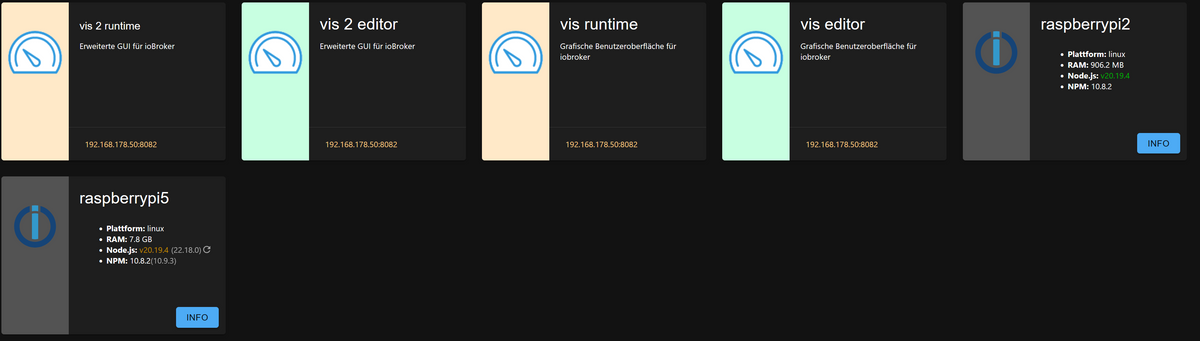
Ich hab jetzt mal ein Issue erstellt (https://github.com/ioBroker/ioBroker.admin/issues/3152) damit admin da verbessert wird. Wenn du da Ideen zu einer Umsetzung oder sonstige Anmerkungen hast - nur rein damit.



Hey! Du scheinst an dieser Unterhaltung interessiert zu sein, hast aber noch kein Konto.
Hast du es satt, bei jedem Besuch durch die gleichen Beiträge zu scrollen? Wenn du dich für ein Konto anmeldest, kommst du immer genau dorthin zurück, wo du zuvor warst, und kannst dich über neue Antworten benachrichtigen lassen (entweder per E-Mail oder Push-Benachrichtigung). Du kannst auch Lesezeichen speichern und Beiträge positiv bewerten, um anderen Community-Mitgliedern deine Wertschätzung zu zeigen.
Mit deinem Input könnte dieser Beitrag noch besser werden 💗
Registrieren Anmelden528
Online33.0k
Benutzer83.6k
Themen1.3m
Beiträge