




Fehler beim Start Javascript nach Neuinstallation
-
Es waren 4 Module installiert.
qr-image
Moment
moment-parseformat
axiosDiese habe ich mal rausgenommen, weil ich dachte das sie stören
@matrose65 sagte in Fehler beim Start Javascript nach Neuinstallation:
weil ich dachte das sie stören
Da dürfte eher das Gegenteil der Fall sein.
Wenn da benötigte Pakete fehlen (darum heißt es ja auch "required") gehen die Scripte auf die Bretter. -
@matrose65 sagte in Fehler beim Start Javascript nach Neuinstallation:
weil ich dachte das sie stören
Da dürfte eher das Gegenteil der Fall sein.
Wenn da benötigte Pakete fehlen (darum heißt es ja auch "required") gehen die Scripte auf die Bretter.@codierknecht
Ok, das sehe ich ein aber auch mit den Modulen beginnen die Fehler wieder2025-02-03 10:35:20.003 - info: host.IOB "system.adapter.javascript.0" enabled 2025-02-03 10:35:20.332 - info: host.IOB instance system.adapter.javascript.0 in version "8.8.3" started with pid 7772 2025-02-03 10:35:20.928 - error: host.IOB Caught by controller[0]: /opt/iobroker/node_modules/typescript/lib/typescript.js:135490 2025-02-03 10:35:20.928 - error: host.IOB Caught by controller[0]: ScriptElementKijdModifier2["ambientModifier"] = "declare"; 2025-02-03 10:35:20.928 - error: host.IOB Caught by controller[0]: ^ 2025-02-03 10:35:20.928 - error: host.IOB Caught by controller[0]: ReferenceError: ScriptElementKijdModifier2 is not defined 2025-02-03 10:35:20.928 - error: host.IOB Caught by controller[0]: at /opt/iobroker/node_modules/typescript/lib/typescript.js:135490:3 2025-02-03 10:35:20.928 - error: host.IOB Caught by controller[0]: at /opt/iobroker/node_modules/typescript/lib/typescript.js:135508:3 2025-02-03 10:35:20.928 - error: host.IOB Caught by controller[0]: at Object. (/opt/iobroker/node_modules/typescript/lib/typescript.js:195004:3) 2025-02-03 10:35:20.928 - error: host.IOB Caught by controller[0]: at Module._compile (node:internal/modules/cjs/loader:1469:14) 2025-02-03 10:35:20.928 - error: host.IOB Caught by controller[0]: at Module._extensions..js (node:internal/modules/cjs/loader:1548:10) 2025-02-03 10:35:20.928 - error: host.IOB Caught by controller[0]: at Module.load (node:internal/modules/cjs/loader:1288:32) 2025-02-03 10:35:20.928 - error: host.IOB Caught by controller[0]: at Module._load (node:internal/modules/cjs/loader:1104:12) 2025-02-03 10:35:20.928 - error: host.IOB Caught by controller[0]: at Module.require (node:internal/modules/cjs/loader:1311:19) 2025-02-03 10:35:20.929 - error: host.IOB Caught by controller[0]: at require (node:internal/modules/helpers:179:18) 2025-02-03 10:35:20.929 - error: host.IOB Caught by controller[0]: at Object. (/opt/iobroker/node_modules/iobroker.javascript/lib/typescriptSettings.js:1:20) 2025-02-03 10:35:20.929 - error: host.IOB Caught by controller[0]: Node.js v20.18.2 2025-02-03 10:35:20.929 - error: host.IOB instance system.adapter.javascript.0 terminated with code 1 (JS_CONTROLLER_STOPPED) 2025-02-03 10:35:20.929 - info: host.IOB Restart adapter system.adapter.javascript.0 because enabled 2025-02-03 10:35:51.237 - info: host.IOB instance system.adapter.javascript.0 in version "8.8.3" started with pid 7779 2025-02-03 10:35:51.830 - error: host.IOB Caught by controller[0]: /opt/iobroker/node_modules/typescript/lib/typescript.js:135490 2025-02-03 10:35:51.830 - error: host.IOB Caught by controller[0]: ScriptElementKijdModifier2["ambientModifier"] = "declare"; 2025-02-03 10:35:51.830 - error: host.IOB Caught by controller[0]: ^ 2025-02-03 10:35:51.830 - error: host.IOB Caught by controller[0]: ReferenceError: ScriptElementKijdModifier2 is not defined 2025-02-03 10:35:51.830 - error: host.IOB Caught by controller[0]: at /opt/iobroker/node_modules/typescript/lib/typescript.js:135490:3 2025-02-03 10:35:51.830 - error: host.IOB Caught by controller[0]: at /opt/iobroker/node_modules/typescript/lib/typescript.js:135508:3 2025-02-03 10:35:51.830 - error: host.IOB Caught by controller[0]: at Object. (/opt/iobroker/node_modules/typescript/lib/typescript.js:195004:3) 2025-02-03 10:35:51.830 - error: host.IOB Caught by controller[0]: at Module._compile (node:internal/modules/cjs/loader:1469:14) 2025-02-03 10:35:51.830 - error: host.IOB Caught by controller[0]: at Module._extensions..js (node:internal/modules/cjs/loader:1548:10) 2025-02-03 10:35:51.830 - error: host.IOB Caught by controller[0]: at Module.load (node:internal/modules/cjs/loader:1288:32) 2025-02-03 10:35:51.831 - error: host.IOB Caught by controller[0]: at Module._load (node:internal/modules/cjs/loader:1104:12) 2025-02-03 10:35:51.831 - error: host.IOB Caught by controller[0]: at Module.require (node:internal/modules/cjs/loader:1311:19) 2025-02-03 10:35:51.831 - error: host.IOB Caught by controller[0]: at require (node:internal/modules/helpers:179:18) 2025-02-03 10:35:51.831 - error: host.IOB Caught by controller[0]: at Object. (/opt/iobroker/node_modules/iobroker.javascript/lib/typescriptSettings.js:1:20) 2025-02-03 10:35:51.831 - error: host.IOB Caught by controller[0]: Node.js v20.18.2 2025-02-03 10:35:51.831 - error: host.IOB instance system.adapter.javascript.0 terminated with code 1 (JS_CONTROLLER_STOPPED) 2025-02-03 10:35:51.831 - info: host.IOB Restart adapter system.adapter.javascript.0 because enabled -
@codierknecht
Ok, das sehe ich ein aber auch mit den Modulen beginnen die Fehler wieder2025-02-03 10:35:20.003 - info: host.IOB "system.adapter.javascript.0" enabled 2025-02-03 10:35:20.332 - info: host.IOB instance system.adapter.javascript.0 in version "8.8.3" started with pid 7772 2025-02-03 10:35:20.928 - error: host.IOB Caught by controller[0]: /opt/iobroker/node_modules/typescript/lib/typescript.js:135490 2025-02-03 10:35:20.928 - error: host.IOB Caught by controller[0]: ScriptElementKijdModifier2["ambientModifier"] = "declare"; 2025-02-03 10:35:20.928 - error: host.IOB Caught by controller[0]: ^ 2025-02-03 10:35:20.928 - error: host.IOB Caught by controller[0]: ReferenceError: ScriptElementKijdModifier2 is not defined 2025-02-03 10:35:20.928 - error: host.IOB Caught by controller[0]: at /opt/iobroker/node_modules/typescript/lib/typescript.js:135490:3 2025-02-03 10:35:20.928 - error: host.IOB Caught by controller[0]: at /opt/iobroker/node_modules/typescript/lib/typescript.js:135508:3 2025-02-03 10:35:20.928 - error: host.IOB Caught by controller[0]: at Object. (/opt/iobroker/node_modules/typescript/lib/typescript.js:195004:3) 2025-02-03 10:35:20.928 - error: host.IOB Caught by controller[0]: at Module._compile (node:internal/modules/cjs/loader:1469:14) 2025-02-03 10:35:20.928 - error: host.IOB Caught by controller[0]: at Module._extensions..js (node:internal/modules/cjs/loader:1548:10) 2025-02-03 10:35:20.928 - error: host.IOB Caught by controller[0]: at Module.load (node:internal/modules/cjs/loader:1288:32) 2025-02-03 10:35:20.928 - error: host.IOB Caught by controller[0]: at Module._load (node:internal/modules/cjs/loader:1104:12) 2025-02-03 10:35:20.928 - error: host.IOB Caught by controller[0]: at Module.require (node:internal/modules/cjs/loader:1311:19) 2025-02-03 10:35:20.929 - error: host.IOB Caught by controller[0]: at require (node:internal/modules/helpers:179:18) 2025-02-03 10:35:20.929 - error: host.IOB Caught by controller[0]: at Object. (/opt/iobroker/node_modules/iobroker.javascript/lib/typescriptSettings.js:1:20) 2025-02-03 10:35:20.929 - error: host.IOB Caught by controller[0]: Node.js v20.18.2 2025-02-03 10:35:20.929 - error: host.IOB instance system.adapter.javascript.0 terminated with code 1 (JS_CONTROLLER_STOPPED) 2025-02-03 10:35:20.929 - info: host.IOB Restart adapter system.adapter.javascript.0 because enabled 2025-02-03 10:35:51.237 - info: host.IOB instance system.adapter.javascript.0 in version "8.8.3" started with pid 7779 2025-02-03 10:35:51.830 - error: host.IOB Caught by controller[0]: /opt/iobroker/node_modules/typescript/lib/typescript.js:135490 2025-02-03 10:35:51.830 - error: host.IOB Caught by controller[0]: ScriptElementKijdModifier2["ambientModifier"] = "declare"; 2025-02-03 10:35:51.830 - error: host.IOB Caught by controller[0]: ^ 2025-02-03 10:35:51.830 - error: host.IOB Caught by controller[0]: ReferenceError: ScriptElementKijdModifier2 is not defined 2025-02-03 10:35:51.830 - error: host.IOB Caught by controller[0]: at /opt/iobroker/node_modules/typescript/lib/typescript.js:135490:3 2025-02-03 10:35:51.830 - error: host.IOB Caught by controller[0]: at /opt/iobroker/node_modules/typescript/lib/typescript.js:135508:3 2025-02-03 10:35:51.830 - error: host.IOB Caught by controller[0]: at Object. (/opt/iobroker/node_modules/typescript/lib/typescript.js:195004:3) 2025-02-03 10:35:51.830 - error: host.IOB Caught by controller[0]: at Module._compile (node:internal/modules/cjs/loader:1469:14) 2025-02-03 10:35:51.830 - error: host.IOB Caught by controller[0]: at Module._extensions..js (node:internal/modules/cjs/loader:1548:10) 2025-02-03 10:35:51.830 - error: host.IOB Caught by controller[0]: at Module.load (node:internal/modules/cjs/loader:1288:32) 2025-02-03 10:35:51.831 - error: host.IOB Caught by controller[0]: at Module._load (node:internal/modules/cjs/loader:1104:12) 2025-02-03 10:35:51.831 - error: host.IOB Caught by controller[0]: at Module.require (node:internal/modules/cjs/loader:1311:19) 2025-02-03 10:35:51.831 - error: host.IOB Caught by controller[0]: at require (node:internal/modules/helpers:179:18) 2025-02-03 10:35:51.831 - error: host.IOB Caught by controller[0]: at Object. (/opt/iobroker/node_modules/iobroker.javascript/lib/typescriptSettings.js:1:20) 2025-02-03 10:35:51.831 - error: host.IOB Caught by controller[0]: Node.js v20.18.2 2025-02-03 10:35:51.831 - error: host.IOB instance system.adapter.javascript.0 terminated with code 1 (JS_CONTROLLER_STOPPED) 2025-02-03 10:35:51.831 - info: host.IOB Restart adapter system.adapter.javascript.0 because enabled -
Hallo
Muss jetzt leider erstmal auf Arbeit.
Kann sicher mitlesen und antworten, aber nichts testen.Melde mich heute Abend nochmal
Danke
-
Hallo
Bin wieder am Rechner.
Habe jetzt alle Scripte angehalten und dann Javascript gestartet. Aber keine Änderung.Versuche noch einmal zu deinstallieren, sonst weiß ich nicht weiter.
Guten Morgen zusammen
Hat keiner eine Idee was ich noch machen soll?
Mein Plan ist, ich werde heute alles nochmal neu aufsetzen. Mal sehen.
Wenn das auch nichts wird, dann besorge ich mir eine neue SSD. Irgendwie habe ich das Gefühl das von da die Probleme kommen -
Guten Morgen zusammen
Hat keiner eine Idee was ich noch machen soll?
Mein Plan ist, ich werde heute alles nochmal neu aufsetzen. Mal sehen.
Wenn das auch nichts wird, dann besorge ich mir eine neue SSD. Irgendwie habe ich das Gefühl das von da die Probleme kommenStartet der Adapter auch ohne aktivierte Skripte?
Ich habe mal nach dieser Referenz das Internet durchsucht,
Leider nichts gefunden. Selbst im Repository von TypeSkript taucht das nicht auf.
Obwohl die Fehlermeldung dorthin zeigt.Wenn der Adapter ohne Skript startet, dann liegt es wohl an einem deiner Skripte.
Dann musst du die der Reihe nach aktivieren und schauen, an welchem es liegt. -
@oliverio
Guten MorgenIch habe gestern Abend alle Scripte gestoppt und trotzdem kamen die Fehler.
Jetzt habe ich die ganze Sache neu aufgesetzt.
Also eine VM und den IOB.Beim Start habe ich nur den Haken beim installieren vom Javascript Adapter gesetzt.
Und schon habe ich wieder 2 Fehler2025-02-04 08:31:17.335 - info: host.iobroker iobroker.js-controller version 7.0.6 js-controller starting 2025-02-04 08:31:17.337 - info: host.iobroker Copyright (c) 2014-2024 bluefox, 2014 hobbyquaker 2025-02-04 08:31:17.338 - info: host.iobroker hostname: iobroker, node: v20.18.2 2025-02-04 08:31:17.338 - info: host.iobroker ip addresses: 192.168.1.13 fe80::be24:11ff:fe8e:f452 2025-02-04 08:31:17.590 - info: host.iobroker connected to Objects and States 2025-02-04 08:31:17.607 - info: host.iobroker Node.js version has changed from unknown to 20.18.2 2025-02-04 08:31:17.617 - info: host.iobroker added notifications configuration of host 2025-02-04 08:31:17.619 - info: host.iobroker Successfully updated capabilities "cap_net_admin, cap_net_bind_service, cap_net_raw" for /usr/bin/node 2025-02-04 08:31:17.728 - info: host.iobroker 3 instances found 2025-02-04 08:31:17.731 - info: host.iobroker starting 3 instances 2025-02-04 08:31:17.803 - info: host.iobroker instance system.adapter.admin.0 in version "7.4.10" started with pid 11091 2025-02-04 08:31:18.654 - info: admin.0 (11091) starting. Version 7.4.10 in /opt/iobroker/node_modules/iobroker.admin, node: v20.18.2, js-controller: 7.0.6 2025-02-04 08:31:18.670 - info: admin.0 (11091) requesting all objects 2025-02-04 08:31:18.748 - info: admin.0 (11091) received all objects 2025-02-04 08:31:18.756 - info: admin.0 (11091) Request actual repository... 2025-02-04 08:31:18.768 - info: host.iobroker Updating repository "stable" under "http://download.iobroker.net/sources-dist.json" 2025-02-04 08:31:18.770 - info: admin.0 (11091) socket.io server listening on port 8081 2025-02-04 08:31:18.772 - info: admin.0 (11091) http server listening on port 8081 2025-02-04 08:31:18.772 - info: admin.0 (11091) Use link "http://127.0.0.1:8081" to configure. 2025-02-04 08:31:18.936 - warn: admin.0 (11091) Repository cannot be read: Active repo - stable 2025-02-04 08:31:18.950 - warn: admin.0 (11091) Active repository "stable" cannot be read 2025-02-04 08:31:20.314 - info: admin.0 (11091) Repository received successfully. 2025-02-04 08:31:21.851 - info: host.iobroker instance system.adapter.backitup.0 in version "3.0.31" started with pid 11136 2025-02-04 08:31:22.555 - info: backitup.0 (11136) starting. Version 3.0.31 in /opt/iobroker/node_modules/iobroker.backitup, node: v20.18.2, js-controller: 7.0.6 2025-02-04 08:31:22.579 - info: backitup.0 (11136) [iobroker] backup will be activated at 02:48 every 1 day(s) 2025-02-04 08:31:25.870 - info: host.iobroker instance system.adapter.discovery.0 in version "5.0.0" started with pid 11157 2025-02-04 08:31:26.515 - info: discovery.0 (11157) starting. Version 5.0.0 in /opt/iobroker/node_modules/iobroker.discovery, node: v20.18.2, js-controller: 7.0.6 2025-02-04 08:37:22.917 - info: admin.0 (11091) ==> Connected system.user.admin from ::ffff:192.168.1.121 2025-02-04 08:39:00.544 - info: host.iobroker iobroker add javascript 2025-02-04 08:39:01.440 - info: host.iobroker iobroker NPM version: 10.8.2 2025-02-04 08:39:01.441 - info: host.iobroker iobroker Installing iobroker.javascript@8.8.3... (System call) 2025-02-04 08:39:20.335 - error: host.iobroker iobroker npm error code ERR_SSL_CIPHER_OPERATION_FAILEDnpm error 800C2FCEF07F0000:error:1C800066:Provider routines:ossl_gcm_stream_update:cipher operation failed:../deps/openssl/openssl/providers/implementations/ciphers/ciphercommon_gcm.c:325:npm errornpm error A complete log of this run can be found in: /home/iobroker/.npm/_logs/2025-02-04T07_39_01_538Z-debug-0.log 2025-02-04 08:39:20.336 - error: host.iobroker iobroker host.iobroker Cannot install iobroker.javascript@8.8.3: 1 2025-02-04 08:39:21.346 - info: host.iobroker iobroker exit 25 2025-02-04 08:39:54.620 - info: host.iobroker stopInstance system.adapter.admin.0 (force=false, process=true) 2025-02-04 08:39:54.622 - info: admin.0 (11091) Got terminate signal TERMINATE_YOURSELF 2025-02-04 08:39:54.624 - info: admin.0 (11091) terminating http server on port 8081 2025-02-04 08:39:54.626 - info: admin.0 (11091) terminating 2025-02-04 08:39:54.626 - info: admin.0 (11091) Terminated (ADAPTER_REQUESTED_TERMINATION): Without reason 2025-02-04 08:39:54.663 - info: host.iobroker stopInstance system.adapter.admin.0 send kill signal 2025-02-04 08:39:55.127 - info: admin.0 (11091) terminating 2025-02-04 08:39:55.145 - info: host.iobroker instance system.adapter.admin.0 terminated with code 11 (ADAPTER_REQUESTED_TERMINATION) 2025-02-04 08:39:58.295 - info: host.iobroker instance system.adapter.admin.0 in version "7.4.10" started with pid 11314 2025-02-04 08:39:59.125 - info: admin.0 (11314) starting. Version 7.4.10 in /opt/iobroker/node_modules/iobroker.admin, node: v20.18.2, js-controller: 7.0.6 2025-02-04 08:39:59.143 - info: admin.0 (11314) requesting all objects 2025-02-04 08:39:59.393 - info: admin.0 (11314) received all objects 2025-02-04 08:39:59.527 - info: admin.0 (11314) socket.io server listening on port 8081 2025-02-04 08:39:59.528 - info: admin.0 (11314) http server listening on port 8081 -
Jetzt habe ich die ganze Sache neu aufgesetzt.
Also eine VM und den IOB.Beim Start habe ich nur den Haken beim installieren vom Javascript Adapter gesetzt.
Und schon habe ich wieder 2 Fehler2025-02-04 08:31:17.335 - info: host.iobroker iobroker.js-controller version 7.0.6 js-controller starting 2025-02-04 08:31:17.337 - info: host.iobroker Copyright (c) 2014-2024 bluefox, 2014 hobbyquaker 2025-02-04 08:31:17.338 - info: host.iobroker hostname: iobroker, node: v20.18.2 2025-02-04 08:31:17.338 - info: host.iobroker ip addresses: 192.168.1.13 fe80::be24:11ff:fe8e:f452 2025-02-04 08:31:17.590 - info: host.iobroker connected to Objects and States 2025-02-04 08:31:17.607 - info: host.iobroker Node.js version has changed from unknown to 20.18.2 2025-02-04 08:31:17.617 - info: host.iobroker added notifications configuration of host 2025-02-04 08:31:17.619 - info: host.iobroker Successfully updated capabilities "cap_net_admin, cap_net_bind_service, cap_net_raw" for /usr/bin/node 2025-02-04 08:31:17.728 - info: host.iobroker 3 instances found 2025-02-04 08:31:17.731 - info: host.iobroker starting 3 instances 2025-02-04 08:31:17.803 - info: host.iobroker instance system.adapter.admin.0 in version "7.4.10" started with pid 11091 2025-02-04 08:31:18.654 - info: admin.0 (11091) starting. Version 7.4.10 in /opt/iobroker/node_modules/iobroker.admin, node: v20.18.2, js-controller: 7.0.6 2025-02-04 08:31:18.670 - info: admin.0 (11091) requesting all objects 2025-02-04 08:31:18.748 - info: admin.0 (11091) received all objects 2025-02-04 08:31:18.756 - info: admin.0 (11091) Request actual repository... 2025-02-04 08:31:18.768 - info: host.iobroker Updating repository "stable" under "http://download.iobroker.net/sources-dist.json" 2025-02-04 08:31:18.770 - info: admin.0 (11091) socket.io server listening on port 8081 2025-02-04 08:31:18.772 - info: admin.0 (11091) http server listening on port 8081 2025-02-04 08:31:18.772 - info: admin.0 (11091) Use link "http://127.0.0.1:8081" to configure. 2025-02-04 08:31:18.936 - warn: admin.0 (11091) Repository cannot be read: Active repo - stable 2025-02-04 08:31:18.950 - warn: admin.0 (11091) Active repository "stable" cannot be read 2025-02-04 08:31:20.314 - info: admin.0 (11091) Repository received successfully. 2025-02-04 08:31:21.851 - info: host.iobroker instance system.adapter.backitup.0 in version "3.0.31" started with pid 11136 2025-02-04 08:31:22.555 - info: backitup.0 (11136) starting. Version 3.0.31 in /opt/iobroker/node_modules/iobroker.backitup, node: v20.18.2, js-controller: 7.0.6 2025-02-04 08:31:22.579 - info: backitup.0 (11136) [iobroker] backup will be activated at 02:48 every 1 day(s) 2025-02-04 08:31:25.870 - info: host.iobroker instance system.adapter.discovery.0 in version "5.0.0" started with pid 11157 2025-02-04 08:31:26.515 - info: discovery.0 (11157) starting. Version 5.0.0 in /opt/iobroker/node_modules/iobroker.discovery, node: v20.18.2, js-controller: 7.0.6 2025-02-04 08:37:22.917 - info: admin.0 (11091) ==> Connected system.user.admin from ::ffff:192.168.1.121 2025-02-04 08:39:00.544 - info: host.iobroker iobroker add javascript 2025-02-04 08:39:01.440 - info: host.iobroker iobroker NPM version: 10.8.2 2025-02-04 08:39:01.441 - info: host.iobroker iobroker Installing iobroker.javascript@8.8.3... (System call) 2025-02-04 08:39:20.335 - error: host.iobroker iobroker npm error code ERR_SSL_CIPHER_OPERATION_FAILEDnpm error 800C2FCEF07F0000:error:1C800066:Provider routines:ossl_gcm_stream_update:cipher operation failed:../deps/openssl/openssl/providers/implementations/ciphers/ciphercommon_gcm.c:325:npm errornpm error A complete log of this run can be found in: /home/iobroker/.npm/_logs/2025-02-04T07_39_01_538Z-debug-0.log 2025-02-04 08:39:20.336 - error: host.iobroker iobroker host.iobroker Cannot install iobroker.javascript@8.8.3: 1 2025-02-04 08:39:21.346 - info: host.iobroker iobroker exit 25 2025-02-04 08:39:54.620 - info: host.iobroker stopInstance system.adapter.admin.0 (force=false, process=true) 2025-02-04 08:39:54.622 - info: admin.0 (11091) Got terminate signal TERMINATE_YOURSELF 2025-02-04 08:39:54.624 - info: admin.0 (11091) terminating http server on port 8081 2025-02-04 08:39:54.626 - info: admin.0 (11091) terminating 2025-02-04 08:39:54.626 - info: admin.0 (11091) Terminated (ADAPTER_REQUESTED_TERMINATION): Without reason 2025-02-04 08:39:54.663 - info: host.iobroker stopInstance system.adapter.admin.0 send kill signal 2025-02-04 08:39:55.127 - info: admin.0 (11091) terminating 2025-02-04 08:39:55.145 - info: host.iobroker instance system.adapter.admin.0 terminated with code 11 (ADAPTER_REQUESTED_TERMINATION) 2025-02-04 08:39:58.295 - info: host.iobroker instance system.adapter.admin.0 in version "7.4.10" started with pid 11314 2025-02-04 08:39:59.125 - info: admin.0 (11314) starting. Version 7.4.10 in /opt/iobroker/node_modules/iobroker.admin, node: v20.18.2, js-controller: 7.0.6 2025-02-04 08:39:59.143 - info: admin.0 (11314) requesting all objects 2025-02-04 08:39:59.393 - info: admin.0 (11314) received all objects 2025-02-04 08:39:59.527 - info: admin.0 (11314) socket.io server listening on port 8081 2025-02-04 08:39:59.528 - info: admin.0 (11314) http server listening on port 8081@matrose65 sagte in Fehler beim Start Javascript nach Neuinstallation:
Jetzt habe ich die ganze Sache neu aufgesetzt.
Also eine VM und den IOB.Wie installiert?
Hast Du SSL und/oder Authentication konfiguriert?
-
Jetzt habe ich die ganze Sache neu aufgesetzt.
Also eine VM und den IOB.Beim Start habe ich nur den Haken beim installieren vom Javascript Adapter gesetzt.
Und schon habe ich wieder 2 Fehler2025-02-04 08:31:17.335 - info: host.iobroker iobroker.js-controller version 7.0.6 js-controller starting 2025-02-04 08:31:17.337 - info: host.iobroker Copyright (c) 2014-2024 bluefox, 2014 hobbyquaker 2025-02-04 08:31:17.338 - info: host.iobroker hostname: iobroker, node: v20.18.2 2025-02-04 08:31:17.338 - info: host.iobroker ip addresses: 192.168.1.13 fe80::be24:11ff:fe8e:f452 2025-02-04 08:31:17.590 - info: host.iobroker connected to Objects and States 2025-02-04 08:31:17.607 - info: host.iobroker Node.js version has changed from unknown to 20.18.2 2025-02-04 08:31:17.617 - info: host.iobroker added notifications configuration of host 2025-02-04 08:31:17.619 - info: host.iobroker Successfully updated capabilities "cap_net_admin, cap_net_bind_service, cap_net_raw" for /usr/bin/node 2025-02-04 08:31:17.728 - info: host.iobroker 3 instances found 2025-02-04 08:31:17.731 - info: host.iobroker starting 3 instances 2025-02-04 08:31:17.803 - info: host.iobroker instance system.adapter.admin.0 in version "7.4.10" started with pid 11091 2025-02-04 08:31:18.654 - info: admin.0 (11091) starting. Version 7.4.10 in /opt/iobroker/node_modules/iobroker.admin, node: v20.18.2, js-controller: 7.0.6 2025-02-04 08:31:18.670 - info: admin.0 (11091) requesting all objects 2025-02-04 08:31:18.748 - info: admin.0 (11091) received all objects 2025-02-04 08:31:18.756 - info: admin.0 (11091) Request actual repository... 2025-02-04 08:31:18.768 - info: host.iobroker Updating repository "stable" under "http://download.iobroker.net/sources-dist.json" 2025-02-04 08:31:18.770 - info: admin.0 (11091) socket.io server listening on port 8081 2025-02-04 08:31:18.772 - info: admin.0 (11091) http server listening on port 8081 2025-02-04 08:31:18.772 - info: admin.0 (11091) Use link "http://127.0.0.1:8081" to configure. 2025-02-04 08:31:18.936 - warn: admin.0 (11091) Repository cannot be read: Active repo - stable 2025-02-04 08:31:18.950 - warn: admin.0 (11091) Active repository "stable" cannot be read 2025-02-04 08:31:20.314 - info: admin.0 (11091) Repository received successfully. 2025-02-04 08:31:21.851 - info: host.iobroker instance system.adapter.backitup.0 in version "3.0.31" started with pid 11136 2025-02-04 08:31:22.555 - info: backitup.0 (11136) starting. Version 3.0.31 in /opt/iobroker/node_modules/iobroker.backitup, node: v20.18.2, js-controller: 7.0.6 2025-02-04 08:31:22.579 - info: backitup.0 (11136) [iobroker] backup will be activated at 02:48 every 1 day(s) 2025-02-04 08:31:25.870 - info: host.iobroker instance system.adapter.discovery.0 in version "5.0.0" started with pid 11157 2025-02-04 08:31:26.515 - info: discovery.0 (11157) starting. Version 5.0.0 in /opt/iobroker/node_modules/iobroker.discovery, node: v20.18.2, js-controller: 7.0.6 2025-02-04 08:37:22.917 - info: admin.0 (11091) ==> Connected system.user.admin from ::ffff:192.168.1.121 2025-02-04 08:39:00.544 - info: host.iobroker iobroker add javascript 2025-02-04 08:39:01.440 - info: host.iobroker iobroker NPM version: 10.8.2 2025-02-04 08:39:01.441 - info: host.iobroker iobroker Installing iobroker.javascript@8.8.3... (System call) 2025-02-04 08:39:20.335 - error: host.iobroker iobroker npm error code ERR_SSL_CIPHER_OPERATION_FAILEDnpm error 800C2FCEF07F0000:error:1C800066:Provider routines:ossl_gcm_stream_update:cipher operation failed:../deps/openssl/openssl/providers/implementations/ciphers/ciphercommon_gcm.c:325:npm errornpm error A complete log of this run can be found in: /home/iobroker/.npm/_logs/2025-02-04T07_39_01_538Z-debug-0.log 2025-02-04 08:39:20.336 - error: host.iobroker iobroker host.iobroker Cannot install iobroker.javascript@8.8.3: 1 2025-02-04 08:39:21.346 - info: host.iobroker iobroker exit 25 2025-02-04 08:39:54.620 - info: host.iobroker stopInstance system.adapter.admin.0 (force=false, process=true) 2025-02-04 08:39:54.622 - info: admin.0 (11091) Got terminate signal TERMINATE_YOURSELF 2025-02-04 08:39:54.624 - info: admin.0 (11091) terminating http server on port 8081 2025-02-04 08:39:54.626 - info: admin.0 (11091) terminating 2025-02-04 08:39:54.626 - info: admin.0 (11091) Terminated (ADAPTER_REQUESTED_TERMINATION): Without reason 2025-02-04 08:39:54.663 - info: host.iobroker stopInstance system.adapter.admin.0 send kill signal 2025-02-04 08:39:55.127 - info: admin.0 (11091) terminating 2025-02-04 08:39:55.145 - info: host.iobroker instance system.adapter.admin.0 terminated with code 11 (ADAPTER_REQUESTED_TERMINATION) 2025-02-04 08:39:58.295 - info: host.iobroker instance system.adapter.admin.0 in version "7.4.10" started with pid 11314 2025-02-04 08:39:59.125 - info: admin.0 (11314) starting. Version 7.4.10 in /opt/iobroker/node_modules/iobroker.admin, node: v20.18.2, js-controller: 7.0.6 2025-02-04 08:39:59.143 - info: admin.0 (11314) requesting all objects 2025-02-04 08:39:59.393 - info: admin.0 (11314) received all objects 2025-02-04 08:39:59.527 - info: admin.0 (11314) socket.io server listening on port 8081 2025-02-04 08:39:59.528 - info: admin.0 (11314) http server listening on port 8081Zeile 32 sieht nach einem ssl Fehler aus. Daher wird nicht oder nicht vollständig installiert.
-
@matrose65 sagte in Fehler beim Start Javascript nach Neuinstallation:
Jetzt habe ich die ganze Sache neu aufgesetzt.
Also eine VM und den IOB.Wie installiert?
Hast Du SSL und/oder Authentication konfiguriert?
@codierknecht
Ja habe zugriff über SSL -
Jetzt habe ich die ganze Sache neu aufgesetzt.
Also eine VM und den IOB.Beim Start habe ich nur den Haken beim installieren vom Javascript Adapter gesetzt.
Und schon habe ich wieder 2 Fehler2025-02-04 08:31:17.335 - info: host.iobroker iobroker.js-controller version 7.0.6 js-controller starting 2025-02-04 08:31:17.337 - info: host.iobroker Copyright (c) 2014-2024 bluefox, 2014 hobbyquaker 2025-02-04 08:31:17.338 - info: host.iobroker hostname: iobroker, node: v20.18.2 2025-02-04 08:31:17.338 - info: host.iobroker ip addresses: 192.168.1.13 fe80::be24:11ff:fe8e:f452 2025-02-04 08:31:17.590 - info: host.iobroker connected to Objects and States 2025-02-04 08:31:17.607 - info: host.iobroker Node.js version has changed from unknown to 20.18.2 2025-02-04 08:31:17.617 - info: host.iobroker added notifications configuration of host 2025-02-04 08:31:17.619 - info: host.iobroker Successfully updated capabilities "cap_net_admin, cap_net_bind_service, cap_net_raw" for /usr/bin/node 2025-02-04 08:31:17.728 - info: host.iobroker 3 instances found 2025-02-04 08:31:17.731 - info: host.iobroker starting 3 instances 2025-02-04 08:31:17.803 - info: host.iobroker instance system.adapter.admin.0 in version "7.4.10" started with pid 11091 2025-02-04 08:31:18.654 - info: admin.0 (11091) starting. Version 7.4.10 in /opt/iobroker/node_modules/iobroker.admin, node: v20.18.2, js-controller: 7.0.6 2025-02-04 08:31:18.670 - info: admin.0 (11091) requesting all objects 2025-02-04 08:31:18.748 - info: admin.0 (11091) received all objects 2025-02-04 08:31:18.756 - info: admin.0 (11091) Request actual repository... 2025-02-04 08:31:18.768 - info: host.iobroker Updating repository "stable" under "http://download.iobroker.net/sources-dist.json" 2025-02-04 08:31:18.770 - info: admin.0 (11091) socket.io server listening on port 8081 2025-02-04 08:31:18.772 - info: admin.0 (11091) http server listening on port 8081 2025-02-04 08:31:18.772 - info: admin.0 (11091) Use link "http://127.0.0.1:8081" to configure. 2025-02-04 08:31:18.936 - warn: admin.0 (11091) Repository cannot be read: Active repo - stable 2025-02-04 08:31:18.950 - warn: admin.0 (11091) Active repository "stable" cannot be read 2025-02-04 08:31:20.314 - info: admin.0 (11091) Repository received successfully. 2025-02-04 08:31:21.851 - info: host.iobroker instance system.adapter.backitup.0 in version "3.0.31" started with pid 11136 2025-02-04 08:31:22.555 - info: backitup.0 (11136) starting. Version 3.0.31 in /opt/iobroker/node_modules/iobroker.backitup, node: v20.18.2, js-controller: 7.0.6 2025-02-04 08:31:22.579 - info: backitup.0 (11136) [iobroker] backup will be activated at 02:48 every 1 day(s) 2025-02-04 08:31:25.870 - info: host.iobroker instance system.adapter.discovery.0 in version "5.0.0" started with pid 11157 2025-02-04 08:31:26.515 - info: discovery.0 (11157) starting. Version 5.0.0 in /opt/iobroker/node_modules/iobroker.discovery, node: v20.18.2, js-controller: 7.0.6 2025-02-04 08:37:22.917 - info: admin.0 (11091) ==> Connected system.user.admin from ::ffff:192.168.1.121 2025-02-04 08:39:00.544 - info: host.iobroker iobroker add javascript 2025-02-04 08:39:01.440 - info: host.iobroker iobroker NPM version: 10.8.2 2025-02-04 08:39:01.441 - info: host.iobroker iobroker Installing iobroker.javascript@8.8.3... (System call) 2025-02-04 08:39:20.335 - error: host.iobroker iobroker npm error code ERR_SSL_CIPHER_OPERATION_FAILEDnpm error 800C2FCEF07F0000:error:1C800066:Provider routines:ossl_gcm_stream_update:cipher operation failed:../deps/openssl/openssl/providers/implementations/ciphers/ciphercommon_gcm.c:325:npm errornpm error A complete log of this run can be found in: /home/iobroker/.npm/_logs/2025-02-04T07_39_01_538Z-debug-0.log 2025-02-04 08:39:20.336 - error: host.iobroker iobroker host.iobroker Cannot install iobroker.javascript@8.8.3: 1 2025-02-04 08:39:21.346 - info: host.iobroker iobroker exit 25 2025-02-04 08:39:54.620 - info: host.iobroker stopInstance system.adapter.admin.0 (force=false, process=true) 2025-02-04 08:39:54.622 - info: admin.0 (11091) Got terminate signal TERMINATE_YOURSELF 2025-02-04 08:39:54.624 - info: admin.0 (11091) terminating http server on port 8081 2025-02-04 08:39:54.626 - info: admin.0 (11091) terminating 2025-02-04 08:39:54.626 - info: admin.0 (11091) Terminated (ADAPTER_REQUESTED_TERMINATION): Without reason 2025-02-04 08:39:54.663 - info: host.iobroker stopInstance system.adapter.admin.0 send kill signal 2025-02-04 08:39:55.127 - info: admin.0 (11091) terminating 2025-02-04 08:39:55.145 - info: host.iobroker instance system.adapter.admin.0 terminated with code 11 (ADAPTER_REQUESTED_TERMINATION) 2025-02-04 08:39:58.295 - info: host.iobroker instance system.adapter.admin.0 in version "7.4.10" started with pid 11314 2025-02-04 08:39:59.125 - info: admin.0 (11314) starting. Version 7.4.10 in /opt/iobroker/node_modules/iobroker.admin, node: v20.18.2, js-controller: 7.0.6 2025-02-04 08:39:59.143 - info: admin.0 (11314) requesting all objects 2025-02-04 08:39:59.393 - info: admin.0 (11314) received all objects 2025-02-04 08:39:59.527 - info: admin.0 (11314) socket.io server listening on port 8081 2025-02-04 08:39:59.528 - info: admin.0 (11314) http server listening on port 8081@matrose65 sagte in Fehler beim Start Javascript nach Neuinstallation:
A complete log of this run can be found in: /home/iobroker/.npm/_logs/2025-02-04T07_39_01_538Z-debug-0.log
-
@matrose65 sagte in Fehler beim Start Javascript nach Neuinstallation:
A complete log of this run can be found in: /home/iobroker/.npm/_logs/2025-02-04T07_39_01_538Z-debug-0.log
-
@codierknecht
Ja habe zugriff über SSLGemäß stackoverflow mach mal folgendes
npm cache clear --forceWenn das nicht funktioniert, dann mal probieren die ganzen SSL Basis Zertifikate in deinem Image aktualisieren
https://manpages.debian.org/buster/ca-certificates/update-ca-certificates.8.en.htmlIch weiß ja nicht wie alt das Image ist beziehungsweise wann da das letzte Mal ein Update drüber gemacht worden ist
Und natürlich auch in das Detaillog einmal reinschauen, eventuell gibt es da noch Hinweise
-
Gemäß stackoverflow mach mal folgendes
npm cache clear --forceWenn das nicht funktioniert, dann mal probieren die ganzen SSL Basis Zertifikate in deinem Image aktualisieren
https://manpages.debian.org/buster/ca-certificates/update-ca-certificates.8.en.htmlIch weiß ja nicht wie alt das Image ist beziehungsweise wann da das letzte Mal ein Update drüber gemacht worden ist
Und natürlich auch in das Detaillog einmal reinschauen, eventuell gibt es da noch Hinweise
-
@codierknecht
Ja habe zugriff über SSL@matrose65 sagte in Fehler beim Start Javascript nach Neuinstallation:
Ja habe zugriff über SSL
Nur so als Anmerkung:
SSL im lokalen Netz ist eigentlich unnötig, solange das alles tatsächlich lokal bleibt. Eine Fehlerquelle weniger.
Auch Authentifizierung am ioBroker in der Web-GUI kann man sich schenken, wenn nicht gerade irgendwelche Pupertisten im Haus sind die dem Vater gerne mal einen Streich spielen. -
@matrose65 sagte in Fehler beim Start Javascript nach Neuinstallation:
Ja habe zugriff über SSL
Nur so als Anmerkung:
SSL im lokalen Netz ist eigentlich unnötig, solange das alles tatsächlich lokal bleibt. Eine Fehlerquelle weniger.
Auch Authentifizierung am ioBroker in der Web-GUI kann man sich schenken, wenn nicht gerade irgendwelche Pupertisten im Haus sind die dem Vater gerne mal einen Streich spielen. -
@codierknecht
Ok Danke Ja es soll alles lokal bleiben.
Und das mit den Pupertisten hat sich schon eine Weile erledigt@matrose65 sagte in Fehler beim Start Javascript nach Neuinstallation:
Ok Danke Ja es soll alles lokal bleiben.
Dann kannst Du eigentlich auf SSL und Authentifizierung verzichten.
Eine potenzielle Fehlerquelle weniger.Und das mit den Pupertisten hat sich schon eine Weile erledigt
Hab' ich mir gedacht. Wir dürften den gleichen Jahrgang haben ;-)
-
@matrose65 sagte in Fehler beim Start Javascript nach Neuinstallation:
Ok Danke Ja es soll alles lokal bleiben.
Dann kannst Du eigentlich auf SSL und Authentifizierung verzichten.
Eine potenzielle Fehlerquelle weniger.Und das mit den Pupertisten hat sich schon eine Weile erledigt
Hab' ich mir gedacht. Wir dürften den gleichen Jahrgang haben ;-)
-
@codierknecht
Authentifizierung habe ich abgestellt bei SSL weis ich ehrlich nicht so richtig wie?Ansonsten läuft das backup gerade zurück. Mal sehen was wird
Das mit dem Alter könnte laut deinem Bild passen ( 1965)
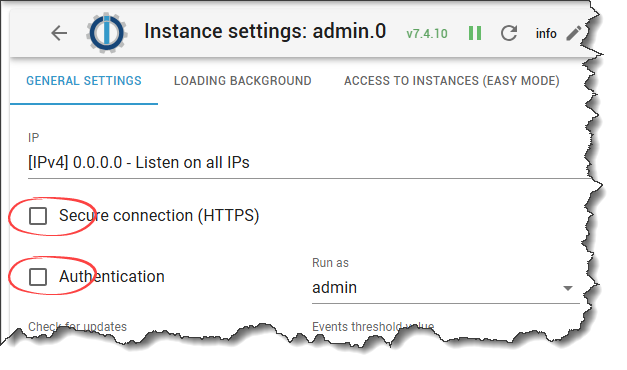
@matrose65 sagte in Fehler beim Start Javascript nach Neuinstallation:
bei SSL weis ich ehrlich nicht so richtig wie?


Hey! Du scheinst an dieser Unterhaltung interessiert zu sein, hast aber noch kein Konto.
Hast du es satt, bei jedem Besuch durch die gleichen Beiträge zu scrollen? Wenn du dich für ein Konto anmeldest, kommst du immer genau dorthin zurück, wo du zuvor warst, und kannst dich über neue Antworten benachrichtigen lassen (entweder per E-Mail oder Push-Benachrichtigung). Du kannst auch Lesezeichen speichern und Beiträge positiv bewerten, um anderen Community-Mitgliedern deine Wertschätzung zu zeigen.
Mit deinem Input könnte dieser Beitrag noch besser werden 💗
Registrieren AnmeldenSupport us
268
Online33.0k
Benutzer83.6k
Themen1.3m
Beiträge