




[Gelöst] JS Controller Update läuft auf Fehler
-
@uhu01 said in JS Controller UUpdate läuft auf Fehler:
Hallo zusammen,
bei mir läuf das JS Controller Update immer auf anhängigen Fehler. Könnt ihr mir helfen?
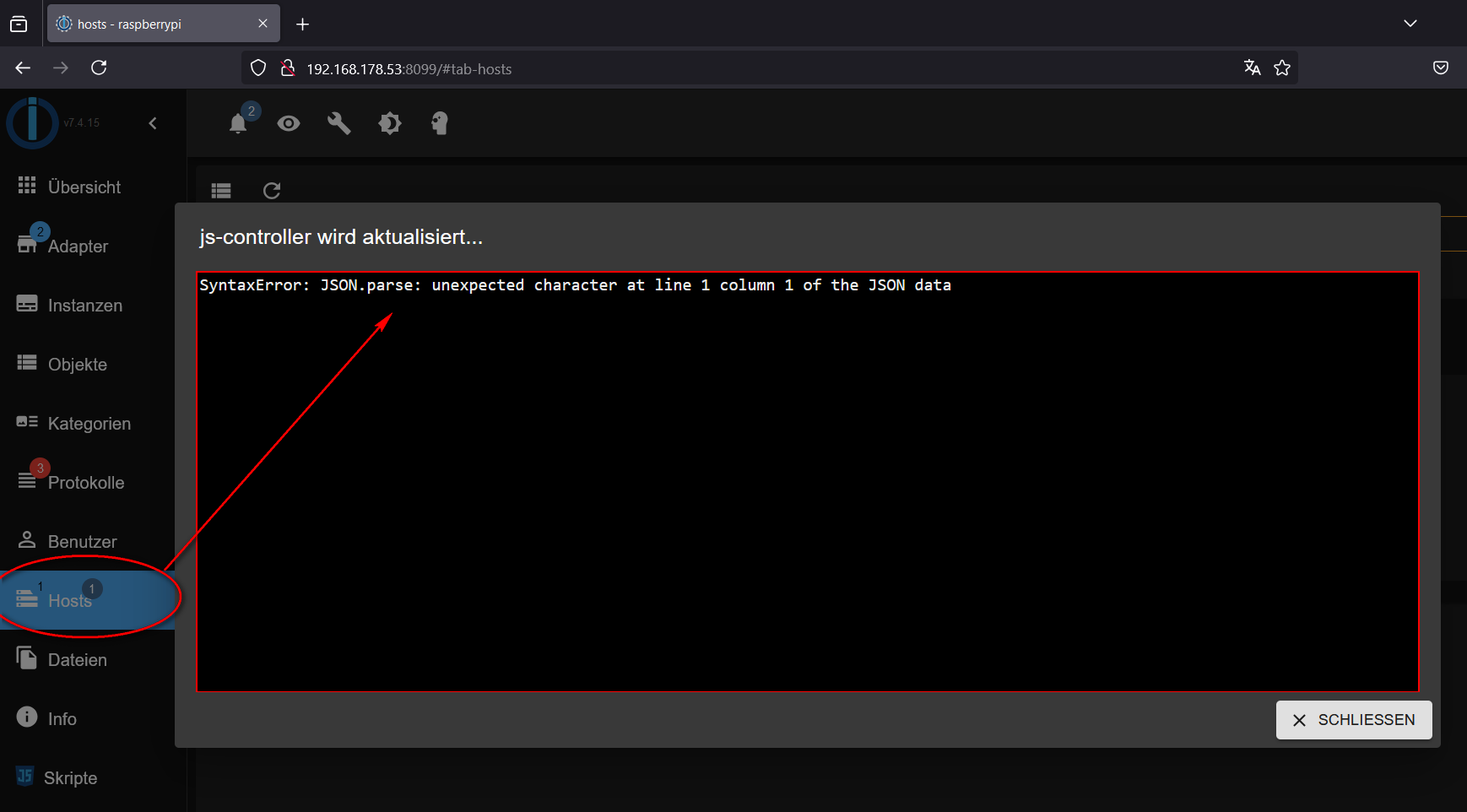
Ich tippe mal auf meine Glaskugel und die blendet ein, dass du ev. DOCKER verwendest :-)
In einer Docker Umgeung musst du auf 7.0.6 via Commandline aktualisiseren. Das Problem ist bekannt und eben in 7.0.6 behoben. Such ggF nach gefühtl 100 Beitrrögen zu dem Them hier im Forum
@mcm1957 Ich bin ziemlicher Laie und weiß daher nicht so genau welche Informationen hilfreich sind. Tatsächlich habe ich alles direkt auf einem Raspi laufen. Kein Docker o.Ä. Wie wäre denn die Kommandozeile? Kann ich ja trotzdem mal testen.
-
@mcm1957 Ich bin ziemlicher Laie und weiß daher nicht so genau welche Informationen hilfreich sind. Tatsächlich habe ich alles direkt auf einem Raspi laufen. Kein Docker o.Ä. Wie wäre denn die Kommandozeile? Kann ich ja trotzdem mal testen.
@uhu01 sagte in JS Controller UUpdate läuft auf Fehler:
Tatsächlich habe ich alles direkt auf einem Raspi laufen. Kein Docker o.Ä. Wie wäre denn die Kommandozeile?
iob update
iob stop
iob upgrade self
iob start
Du kannst aber auch mal zeigen, wie Du da überhaupt unterwegs bist.
Dazu die Langfassung voniob diaghier posten (in Code-Tags </>)
-
@mcm1957 Ich bin ziemlicher Laie und weiß daher nicht so genau welche Informationen hilfreich sind. Tatsächlich habe ich alles direkt auf einem Raspi laufen. Kein Docker o.Ä. Wie wäre denn die Kommandozeile? Kann ich ja trotzdem mal testen.
Auf dem Raspi temporär bitte so:
curl https://raw.githubusercontent.com/Grothesk242/ioBroker/refs/heads/Raspbian/diag.sh > iob_diag.sh
chmod 744 iob_diag.sh
./iob_diag.sh
Jedenfalls wenn es mit dem direkten Aufruf nicht funktioniert.
-
Auf dem Raspi temporär bitte so:
curl https://raw.githubusercontent.com/Grothesk242/ioBroker/refs/heads/Raspbian/diag.sh > iob_diag.sh
chmod 744 iob_diag.sh
./iob_diag.sh
Jedenfalls wenn es mit dem direkten Aufruf nicht funktioniert.
@thomas-braun Nach fix und update hat es jetzt funktioniert den Controller zu aktualisieren. Hier trotzdem mal die Diagnose. Gibt bestimmt noch mehr Baustellen:
========== Start marking the full check here =========== ```bash Script v.2024-12-09 Raspbian+zigbee diag+masking *** BASE SYSTEM *** Static hostname: raspberrypi Icon name: computer Operating System: Raspbian GNU/Linux 11 (bullseye) Kernel: Linux 6.1.21-v8+ Architecture: arm64 OS is similar to: debian Model : Raspberry Pi 4 Model B Rev 1.4 Docker : false Virtualization : none Kernel : aarch64 Userland : 32 bit Systemuptime and Load: 19:50:55 up 98 days, 27 min, 1 user, load average: 1.00, 2.28, 2.29 CPU threads: 4 *** LIFE CYCLE STATUS *** Debian 'bullseye' is the current oldstable version. Please upgrade to the latest stable release 'bookworm' in due time! *** RASPBERRY THROTTLING *** Current issues: No throttling issues detected. Previously detected issues: No throttling issues detected. *** TIME AND TIMEZONES *** Local time: Sun 2025-01-26 19:50:55 CET Universal time: Sun 2025-01-26 18:50:55 UTC RTC time: n/a Time zone: Europe/Berlin (CET, +0100) System clock synchronized: no NTP service: n/a RTC in local TZ: no *** Users and Groups *** User that called 'iob diag': pi HOME=/home/pi GROUPS=pi adm dialout cdrom sudo audio video plugdev games users input netdev lpadmin gpio i2c spi iobroker User that is running 'js-controller': iobroker HOME=/home/iobroker GROUPS=iobroker tty dialout audio video plugdev bluetooth gpio i2c *** DISPLAY-SERVER SETUP *** Display-Server: false Desktop: Terminal: tty *** MEMORY *** total used free shared buff/cache available Mem: 7.8G 1.9G 1.7G 0.0K 4.3G 5.8G Swap: 99M 0B 99M Total: 7.9G 1.9G 1.8G Active iob-Instances: 21 7812 M total memory 1852 M used memory 2503 M active memory 3165 M inactive memory 1682 M free memory 282 M buffer memory 3995 M swap cache 99 M total swap 0 M used swap 99 M free swap *** top - Table Of Processes *** top - 19:50:55 up 98 days, 27 min, 1 user, load average: 1.00, 2.28, 2.29 Tasks: 171 total, 2 running, 169 sleeping, 0 stopped, 0 zombie %Cpu(s): 43.1 us, 12.5 sy, 0.0 ni, 43.1 id, 0.0 wa, 0.0 hi, 1.4 si, 0.0 st MiB Mem : 7812.3 total, 1681.6 free, 1852.7 used, 4278.0 buff/cache MiB Swap: 100.0 total, 100.0 free, 0.0 used. 5789.2 avail Mem *** FAILED SERVICES *** UNIT LOAD ACTIVE SUB DESCRIPTION * hciuart.service loaded failed failed Configure Bluetooth Modems con...* motioneye.service loaded failed failed motionEye Server * run-r1c3b976f44ca47afa9a38b2d6... loaded failed failed /usr/bin/node /opt/iobroker/no...* run-r2fd84954123c4431bb5e8ef8e... loaded failed failed /usr/bin/node /opt/iobroker/no...* run-r47cdd2edbca24604a52480051... loaded failed failed /usr/bin/node /opt/iobroker/no...* run-r5353d92724ff4829a94a27f7e... loaded failed failed /usr/bin/node /opt/iobroker/no...* run-r5c87c1800de54c2597303a4de... loaded failed failed /usr/bin/node /opt/iobroker/no...* run-r65cf2a59af08422b9a795b5c4... loaded failed failed /usr/bin/node /opt/iobroker/no...* run-r8332dc44ede846c98a6a0289e... loaded failed failed /usr/bin/node /opt/iobroker/no...* run-ra8215279992546dbb522455f7... loaded failed failed /usr/bin/node /opt/iobroker/no...* run-rbf9a06f20bc04e48b465c703e... loaded failed failed /usr/bin/node /opt/iobroker/no...* run-rcc2ca0e4a68b4406b298c9efd... loaded failed failed /usr/bin/node /opt/iobroker/no...* run-rd2b14b37168f44019996d3e10... loaded failed failed /usr/bin/node /opt/iobroker/no...* run-re27041a612b249aaba3250f54... loaded failed failed /usr/bin/node /opt/iobroker/no...* run-re284b30398b4433086d319a29... loaded failed failed /usr/bin/node /opt/iobroker/no...* run-re6f2accceb9942b2ba4c6c9c0... loaded failed failed /usr/bin/node /opt/iobroker/no...* run-re779a355b5e44691bd7accc28... loaded failed failed /usr/bin/node /opt/iobroker/no...* run-redf8272a681b4ea1b1c264109... loaded failed failed /usr/bin/node /opt/iobroker/no... LOAD = Reflects whether the unit definition was properly loaded. ACTIVE = The high-level unit activation state, i.e. generalization of SUB. SUB = The low-level unit activation state, values depend on unit type. 18 loaded units listed. *** DMESG CRITICAL ERRORS *** No critical errors detected *** FILESYSTEM *** Filesystem Type Size Used Avail Use% Mounted on /dev/root ext4 117G 22G 91G 19% / devtmpfs devtmpfs 3.6G 0 3.6G 0% /dev tmpfs tmpfs 3.9G 0 3.9G 0% /dev/shm tmpfs tmpfs 1.6G 836K 1.6G 1% /run tmpfs tmpfs 5.0M 4.0K 5.0M 1% /run/lock /dev/mmcblk0p1 vfat 253M 51M 202M 20% /boot tmpfs tmpfs 782M 24K 782M 1% /run/user/1000 Messages concerning ext4 filesystem in dmesg: [Sun Oct 20 20:23:31 2024] Kernel command line: coherent_pool=1M 8250.nr_uarts=0 snd_bcm2835.enable_headphones=0 snd_bcm2835.enable_headphones=1 snd_bcm2835.enable_hdmi=1 smsc95xx.macaddr=E4:5F:01:0D:0A:F1 vc_mem.mem_base=0x3ec00000 vc_mem.mem_size=0x40000000 console=ttyS0,115200 console=tty1 root=PARTUUID=64538962-02 rootfstype=ext4 elevator=deadline fsck.repair=yes rootwait quiet splash plymouth.ignore-serial-consoles [Sun Oct 20 20:23:32 2024] EXT4-fs (mmcblk0p2): mounted filesystem with ordered data mode. Quota mode: none. [Sun Oct 20 20:23:32 2024] VFS: Mounted root (ext4 filesystem) readonly on device 179:2. [Sun Oct 20 20:23:35 2024] EXT4-fs (mmcblk0p2): re-mounted. Quota mode: none. Show mounted filesystems: TARGET SOURCE FSTYPE OPTIONS / /dev/mmcblk0p2 ext4 rw,noatime `-/boot /dev/mmcblk0p1 vfat rw,relatime,fmask=0022,dmask=0022,codepage=437,iocharset=asc Files in neuralgic directories: /var: 5.6G /var/ 3.8G /var/log/journal/9e9ac854acef421abae9f158c44125bf 3.8G /var/log/journal 3.8G /var/log 1.6G /var/cache/apt Archived and active journals take up 3.7G in the file system. /opt/iobroker/backups: 23M /opt/iobroker/backups/ /opt/iobroker/iobroker-data: 894M /opt/iobroker/iobroker-data/ 509M /opt/iobroker/iobroker-data/files 189M /opt/iobroker/iobroker-data/sonosCache 158M /opt/iobroker/iobroker-data/files/admin.admin 157M /opt/iobroker/iobroker-data/files/admin.admin/custom/static/js The five largest files in iobroker-data are: 21M /opt/iobroker/iobroker-data/objects.jsonl 19M /opt/iobroker/iobroker-data/files/web.admin/static/js/main.6964fae2.js.map 16M /opt/iobroker/iobroker-data/files/vis-2/static/js/main.5e602f04.js.map 16M /opt/iobroker/iobroker-data/files/vis-2/customWidgets.js.map 15M /opt/iobroker/iobroker-data/files/vis-2/static/js/118.c8f873ca.chunk.js.map USB-Devices by-id: USB-Sticks - Avoid direct links to /dev/tty* in your adapter setups, please always prefer the links 'by-id': /dev/serial/by-id/usb-Silicon_Labs_Sonoff_Zigbee_3.0_USB_Dongle_Plus_0001-if00-port0 *** ZigBee Settings *** Your zigbee.0 COM-Port is matching 'by-id'. Very good! Zigbee Network Settings on your coordinator/in nvbackup are: zigbee.X Extended Pan ID: *** MASKED *** Pan ID: *** MASKED *** Channel: *** MASKED *** Network Key: *** MASKED *** To unmask the settings run 'iob diag --unmask' *** NodeJS-Installation *** /usr/bin/nodejs v20.18.1 /usr/bin/node v20.18.1 /usr/bin/npm 10.8.2 /usr/bin/npx 10.8.2 /usr/bin/corepack 0.29.4 nodejs: Installed: 20.18.1-1nodesource1 Candidate: 20.18.2-1nodesource1 Version table: 20.18.2-1nodesource1 1001 500 https://deb.nodesource.com/node_20.x nodistro/main armhf Packages *** 20.18.1-1nodesource1 1001 500 https://deb.nodesource.com/node_20.x nodistro/main armhf Packages 100 /var/lib/dpkg/status 20.18.0-1nodesource1 1001 500 https://deb.nodesource.com/node_20.x nodistro/main armhf Packages 20.17.0-1nodesource1 1001 500 https://deb.nodesource.com/node_20.x nodistro/main armhf Packages 20.16.0-1nodesource1 1001 500 https://deb.nodesource.com/node_20.x nodistro/main armhf Packages 20.15.1-1nodesource1 1001 500 https://deb.nodesource.com/node_20.x nodistro/main armhf Packages 20.15.0-1nodesource1 1001 500 https://deb.nodesource.com/node_20.x nodistro/main armhf Packages 20.14.0-1nodesource1 1001 500 https://deb.nodesource.com/node_20.x nodistro/main armhf Packages 20.13.1-1nodesource1 1001 500 https://deb.nodesource.com/node_20.x nodistro/main armhf Packages 20.13.0-1nodesource1 1001 500 https://deb.nodesource.com/node_20.x nodistro/main armhf Packages 20.12.2-1nodesource1 1001 500 https://deb.nodesource.com/node_20.x nodistro/main armhf Packages 20.12.1-1nodesource1 1001 500 https://deb.nodesource.com/node_20.x nodistro/main armhf Packages 20.12.0-1nodesource1 1001 500 https://deb.nodesource.com/node_20.x nodistro/main armhf Packages 20.11.1-1nodesource1 1001 500 https://deb.nodesource.com/node_20.x nodistro/main armhf Packages 20.11.0-1nodesource1 1001 500 https://deb.nodesource.com/node_20.x nodistro/main armhf Packages 20.10.0-1nodesource1 1001 500 https://deb.nodesource.com/node_20.x nodistro/main armhf Packages 20.9.0-1nodesource1 1001 500 https://deb.nodesource.com/node_20.x nodistro/main armhf Packages 20.8.1-1nodesource1 1001 500 https://deb.nodesource.com/node_20.x nodistro/main armhf Packages 20.8.0-1nodesource1 1001 500 https://deb.nodesource.com/node_20.x nodistro/main armhf Packages 20.7.0-1nodesource1 1001 500 https://deb.nodesource.com/node_20.x nodistro/main armhf Packages 20.6.1-1nodesource1 1001 500 https://deb.nodesource.com/node_20.x nodistro/main armhf Packages 20.6.0-1nodesource1 1001 500 https://deb.nodesource.com/node_20.x nodistro/main armhf Packages 20.5.1-1nodesource1 1001 500 https://deb.nodesource.com/node_20.x nodistro/main armhf Packages 20.5.0-1nodesource1 1001 500 https://deb.nodesource.com/node_20.x nodistro/main armhf Packages 20.4.0-1nodesource1 1001 500 https://deb.nodesource.com/node_20.x nodistro/main armhf Packages 20.3.1-1nodesource1 1001 500 https://deb.nodesource.com/node_20.x nodistro/main armhf Packages 20.3.0-1nodesource1 1001 500 https://deb.nodesource.com/node_20.x nodistro/main armhf Packages 20.2.0-1nodesource1 1001 500 https://deb.nodesource.com/node_20.x nodistro/main armhf Packages 20.1.0-1nodesource1 1001 500 https://deb.nodesource.com/node_20.x nodistro/main armhf Packages 20.0.0-1nodesource1 1001 500 https://deb.nodesource.com/node_20.x nodistro/main armhf Packages 12.22.12~dfsg-1~deb11u5 500 500 http://raspbian.raspberrypi.org/raspbian bullseye/main armhf Packages Temp directories causing deletion problem: 0 No problems detected Errors in npm tree: 0 No problems detected *** ioBroker-Installation *** ioBroker Status iobroker is running on this host. Objects type: jsonl States type: jsonl Hosts: raspberrypi raspberrypi (version: 7.0.6, hostname: raspberrypi , alive, uptime: 365) Core adapters versions js-controller: 7.0.6 admin: 7.4.18 javascript: 8.9.0 nodejs modules from github: 4 | `-- kodi-ws@2.4.3 (git+https://git@github.com/iobroker-community-adapters/kodi-ws.git#c276cfa6576302974904e2ef3fc2b0d9fab8482e) +-- iobroker.vis-bars@0.1.4 (git+ssh://git@github.com/ioBroker/ioBroker.vis-bars.git#e6e01bd4dae5ce7a09dbfee91ab06d18c81c43e4) +-- iobroker.vis-fancyswitch@1.1.0 (git+ssh://git@github.com/ioBroker/ioBroker.vis-fancyswitch.git#62fe89a9bf646392c6a53e7f91744352409135ae) +-- iobroker.vis-keyboard@0.0.2 (git+ssh://git@github.com/ioBroker/ioBroker.vis-keyboard.git#91dd01381baea2e0c77144a2936389b9ce38f1b8) Adapter State + system.adapter.admin.0 : admin : raspberrypi - enabled, port: 8099, bind: 0.0.0.0, run as: admin system.adapter.alexa2.0 : alexa2 : raspberrypi - enabled system.adapter.alias-manager.0 : alias-manager : raspberrypi - enabled + system.adapter.backitup.0 : backitup : raspberrypi - enabled + system.adapter.chromecast.0 : chromecast : raspberrypi - enabled system.adapter.cloud.0 : cloud : raspberrypi - disabled system.adapter.deconz.0 : deconz : raspberrypi - disabled, port: 80 + system.adapter.discovery.0 : discovery : raspberrypi - enabled + system.adapter.email.0 : email : raspberrypi - enabled system.adapter.fb-checkpresence.0 : fb-checkpresence : raspberrypi - disabled system.adapter.flot.0 : flot : raspberrypi - enabled system.adapter.fritzdect.0 : fritzdect : raspberrypi - disabled + system.adapter.history.0 : history : raspberrypi - enabled system.adapter.homeconnect.0 : homeconnect : raspberrypi - disabled system.adapter.ical.0 : ical : raspberrypi - enabled system.adapter.icons-icons8.0 : icons-icons8 : raspberrypi - enabled + system.adapter.info.0 : info : raspberrypi - enabled + system.adapter.iot.0 : iot : raspberrypi - enabled + system.adapter.javascript.0 : javascript : raspberrypi - enabled + system.adapter.lg-thinq.0 : lg-thinq : raspberrypi - enabled + system.adapter.mercedesme.0 : mercedesme : raspberrypi - enabled system.adapter.mihome.0 : mihome : raspberrypi - disabled, port: 9898, bind: 0.0.0.0 system.adapter.panasonic-viera.1 : panasonic-viera : raspberrypi - disabled + system.adapter.ping.0 : ping : raspberrypi - enabled + system.adapter.shelly.0 : shelly : raspberrypi - enabled, port: 1882, bind: 0.0.0.0 + system.adapter.shelly.1 : shelly : raspberrypi - enabled, port: 1882, bind: 0.0.0.0 + system.adapter.smartcontrol.0 : smartcontrol : raspberrypi - enabled system.adapter.sonos.0 : sonos : raspberrypi - disabled + system.adapter.telegram.1 : telegram : raspberrypi - enabled, port: 8443, bind: 0.0.0.0 + system.adapter.tr-064.1 : tr-064 : raspberrypi - enabled system.adapter.tvspielfilm.0 : tvspielfilm : raspberrypi - disabled system.adapter.vis-2-widgets-jaeger-design.0: vis-2-widgets-jaeger-design: raspberrypi - enabled system.adapter.vis-hqwidgets.0 : vis-hqwidgets : raspberrypi - enabled system.adapter.vis-icontwo.0 : vis-icontwo : raspberrypi - enabled system.adapter.vis-players.0 : vis-players : raspberrypi - enabled system.adapter.vis-weather.0 : vis-weather : raspberrypi - enabled system.adapter.vis.0 : vis : raspberrypi - enabled + system.adapter.web.0 : web : raspberrypi - enabled, port: 8082, bind: 0.0.0.0, run as: admin system.adapter.whatsapp-cmb.0 : whatsapp-cmb : raspberrypi - disabled + system.adapter.yeelight-2.0 : yeelight-2 : raspberrypi - enabled + system.adapter.zigbee.0 : zigbee : raspberrypi - enabled, port: /dev/serial/by-id/usb-Silicon_Labs_Sonoff_Zigbee_3.0_USB_Dongle_Plus_0001-if00-port0 + instance is alive Enabled adapters with bindings + system.adapter.admin.0 : admin : raspberrypi - enabled, port: 8099, bind: 0.0.0.0, run as: admin + system.adapter.shelly.0 : shelly : raspberrypi - enabled, port: 1882, bind: 0.0.0.0 + system.adapter.shelly.1 : shelly : raspberrypi - enabled, port: 1882, bind: 0.0.0.0 + system.adapter.telegram.1 : telegram : raspberrypi - enabled, port: 8443, bind: 0.0.0.0 + system.adapter.web.0 : web : raspberrypi - enabled, port: 8082, bind: 0.0.0.0, run as: admin + system.adapter.zigbee.0 : zigbee : raspberrypi - enabled, port: /dev/serial/by-id/usb-Silicon_Labs_Sonoff_Zigbee_3.0_USB_Dongle_Plus_0001-if00-port0 ioBroker-Repositories ┌─────────┬───────────┬─────────────────────────────────────────────────────────┬──────────────┐ │ (index) │ name │ url │ auto upgrade │ ├─────────┼───────────┼─────────────────────────────────────────────────────────┼──────────────┤ │ 0 │ 'default' │ 'http://download.iobroker.net/sources-dist-latest.json' │ false │ │ 1 │ 'gith ub' │ 'https://github.com/TA2k/' │ false │ └─────────┴───────────┴─────────────────────────────────────────────────────────┴──────────────┘ Active repo(s): default Upgrade policy: none Installed ioBroker-Instances Used repository: default Adapter "admin" : 7.4.18 , installed 7.4.18 Adapter "alexa2" : 3.26.7 , installed 3.26.7 Adapter "alias-manager": 2.0.0 , installed 2.0.0 Adapter "backitup" : 3.0.31 , installed 3.0.31 Adapter "chromecast" : 4.0.0 , installed 4.0.0 Adapter "cloud" : 5.0.1 , installed 5.0.1 Adapter "deconz" : 1.6.4 , installed 1.6.4 Adapter "discovery" : 5.0.0 , installed 5.0.0 Adapter "email" : 1.3.1 , installed 1.3.1 Adapter "fb-checkpresence": 1.2.8 , installed 1.2.8 Adapter "flot" : 1.12.0 , installed 1.12.0 Adapter "fritzdect" : 2.5.12 , installed 2.5.12 Adapter "history" : 3.0.1 , installed 3.0.1 Adapter "homeconnect" : 1.4.3 , installed 1.4.3 Adapter "ical" : 1.16.1 , installed 1.16.1 Adapter "icons-icons8" : 0.0.1 , installed 0.0.1 Adapter "iot" : 3.4.5 , installed 3.4.5 Adapter "javascript" : 8.9.0 , installed 8.9.0 Controller "js-controller": 7.0.6 , installed 7.0.6 Adapter "kodi" : 3.1.0 , installed 3.1.0 Adapter "lg-thinq" : 1.0.7 , installed 1.0.7 Adapter "mercedesme" : 0.3.4 , installed 0.3.4 Adapter "mihome" : 1.4.0 , installed 1.4.0 Adapter "mqtt" : 6.1.2 , installed 6.1.2 Adapter "panasonic-viera": 2.1.0 , installed 2.1.0 Adapter "ping" : 1.7.9 , installed 1.7.9 Adapter "shelly" : 8.5.1 , installed 8.5.1 Adapter "simple-api" : 2.8.0 , installed 2.8.0 Adapter "smartcontrol" : 2.0.1 , installed 2.0.1 Adapter "socketio" : 6.7.1 , installed 6.7.1 Adapter "sonos" : 3.0.0 , installed 3.0.0 Adapter "telegram" : 4.0.0 , installed 4.0.0 Adapter "tr-064" : 4.3.0 , installed 4.3.0 Adapter "tvprogram" : 4.0.0 , installed 2.3.1 [Updatable] Adapter "tvspielfilm" : 2.1.0 , installed 2.1.0 Adapter "vis" : 1.5.6 , installed 1.5.6 Adapter "vis-2" : 2.11.2 , installed 2.11.1 [Updatable] Adapter "vis-2-widgets-jaeger-design": 1.3.9, installed 1.3.9 Adapter "vis-bars" : 0.1.4 , installed 0.1.4 Adapter "vis-colorpicker": 2.0.3 , installed 2.0.3 Adapter "vis-fancyswitch": 1.1.0 , installed 1.1.0 Adapter "vis-hqwidgets": 1.5.1 , installed 1.5.1 Adapter "vis-icontwo" : 1.11.0 , installed 1.10.1 [Updatable] Adapter "vis-inventwo" : 3.3.4 , installed 3.3.4 Adapter "vis-jqui-mfd" : 1.1.1 , installed 1.1.1 Adapter "vis-keyboard" : 0.0.2 , installed 0.0.2 Adapter "vis-map" : 1.1.2 , installed 1.1.2 Adapter "vis-metro" : 1.2.0 , installed 1.2.0 Adapter "vis-players" : 0.1.6 , installed 0.1.6 Adapter "vis-timeandweather": 1.2.2, installed 1.2.2 Adapter "vis-weather" : 2.5.9 , installed 2.5.9 Adapter "web" : 6.3.1 , installed 6.3.1 Adapter "whatsapp-cmb" : 0.3.0 , installed 0.3.0 Adapter "ws" : 2.6.2 , installed 2.6.2 Adapter "yeelight-2" : 1.4.0 , installed 1.4.0 Adapter "zigbee" : 1.10.14 , installed 1.10.14 Objects and States Please stand by - This may take a while Objects: 15013 States: 12400 *** OS-Repositories and Updates *** Hit:1 http://phoscon.de/apt/deconz bullseye InRelease Hit:2 http://archive.raspberrypi.org/debian bullseye InRelease Hit:3 http://raspbian.raspberrypi.org/raspbian bullseye InRelease Hit:4 https://deb.nodesource.com/node_20.x nodistro InRelease Reading package lists... Done Pending Updates: 62 *** Listening Ports *** Active Internet connections (only servers) Proto Recv-Q Send-Q Local Address Foreign Address State User Inode PID/Program name tcp 0 0 0.0.0.0:443 0.0.0.0:* LISTEN 1000 1877 375/deCONZ tcp 0 0 0.0.0.0:80 0.0.0.0:* LISTEN 1000 15551 375/deCONZ tcp 0 0 0.0.0.0:22 0.0.0.0:* LISTEN 0 15494 581/sshd: /usr/sbin tcp 0 0 0.0.0.0:1882 0.0.0.0:* LISTEN 1001 460560542 16045/io.shelly.1 tcp 0 0 127.0.0.1:631 0.0.0.0:* LISTEN 0 456786256 16099/cupsd tcp 0 0 127.0.0.1:9001 0.0.0.0:* LISTEN 1001 460557907 15561/iobroker.js-c tcp 0 0 127.0.0.1:9000 0.0.0.0:* LISTEN 1001 460557912 15561/iobroker.js-c tcp 0 0 127.0.0.1:53 0.0.0.0:* LISTEN 0 13998 372/connmand tcp6 0 0 ::1:631 :::* LISTEN 0 456786255 16099/cupsd tcp6 0 0 :::4369 :::* LISTEN 0 3473 1/init tcp6 0 0 :::22 :::* LISTEN 0 15496 581/sshd: /usr/sbin tcp6 0 0 ::1:53 :::* LISTEN 0 14002 372/connmand tcp6 0 0 :::8082 :::* LISTEN 1001 460562940 16325/io.web.0 tcp6 0 0 :::8099 :::* LISTEN 1001 460558109 15613/io.admin.0 tcp6 0 0 :::3389 :::* LISTEN 115 1870 593/xrdp tcp6 0 0 ::1:3350 :::* LISTEN 0 13982 582/xrdp-sesman udp 0 0 127.0.0.1:53 0.0.0.0:* 0 13990 372/connmand udp 0 0 0.0.0.0:68 0.0.0.0:* 0 15602 484/dhcpcd udp 0 0 192.168.178.53:5353 0.0.0.0:* 1001 460559845 16175/io.tr-064.1 udp 0 0 0.0.0.0:5353 0.0.0.0:* 1001 460556250 15850/io.chromecast udp 0 0 0.0.0.0:5353 0.0.0.0:* 108 1739 366/avahi-daemon: r udp 0 0 0.0.0.0:54668 0.0.0.0:* 108 1741 366/avahi-daemon: r udp 0 0 0.0.0.0:5683 0.0.0.0:* 1001 460559411 15890/io.shelly.0 udp 0 0 0.0.0.0:1900 0.0.0.0:* 1000 1904 375/deCONZ udp 0 0 0.0.0.0:44779 0.0.0.0:* 0 460585453 372/connmand udp6 0 0 ::1:53 :::* 0 13994 372/connmand udp6 0 0 :::37508 :::* 108 1742 366/avahi-daemon: r udp6 0 0 :::5353 :::* 108 1740 366/avahi-daemon: r *** Log File - Last 25 Lines *** 2025-01-26 19:46:53.730 - info: shelly.1 (16045) [MQTT] Device with client id "shellyplus2pm-485519a1f430" connected! 2025-01-26 19:46:54.829 - info: smartcontrol.0 (16531) Adapter admin configuration successfully validated... 2025-01-26 19:46:57.419 - info: lg-thinq.0 (16242) Update raw datapoints for 9735209f-656a-1117-8694-d8e35e32800c 2025-01-26 19:46:57.923 - info: info.0 (16354) cpu Temp res = {"main":72.549,"cores":[],"max":72.549,"socket":[],"chipset":null} 2025-01-26 19:46:58.081 - info: shelly.1 (16045) [MQTT] Device with client id "shellyplus2pm-fcb467ba2770" connected! 2025-01-26 19:46:59.219 - info: smartcontrol.0 (16531) Subscribing to all target devices and trigger states. 4 trigger schedules activated... 2025-01-26 19:46:59.224 - info: lg-thinq.0 (16242) Found MQTT Host Copy text starting here: ```bash ======================= SUMMARY ======================= v.2024-12-09 Raspbian+zigbee diag+masking Static hostname: raspberrypi Icon name: computer Operating System: Raspbian GNU/Linux 11 (bullseye) Kernel: Linux 6.1.21-v8+ Architecture: arm64 Installation: native Kernel: aarch64 Userland: 32 bit Timezone: Europe/Berlin (CET, +0100) User-ID: 1000 Display-Server: false Boot Target: multi-user.target Pending OS-Updates: 62 Pending iob updates: 3 Nodejs-Installation: /usr/bin/nodejs v20.18.1 /usr/bin/node v20.18.1 /usr/bin/npm 10.8.2 /usr/bin/npx 10.8.2 /usr/bin/corepack 0.29.4 Recommended versions are nodejs 20.18.2 and npm 10.8.2 nodeJS installation is correct MEMORY: total used free shared buff/cache available Mem: 7.8G 1.9G 1.6G 0.0K 4.3G 5.7G Swap: 99M 0B 99M Total: 7.9G 1.9G 1.7G Active iob-Instances: 21 Upgrade policy: none ioBroker Core: js-controller 7.0.6 admin 7.4.18 ioBroker Status: iobroker is running on this host. Objects type: jsonl States type: jsonl Status admin and web instance: + system.adapter.admin.0 : admin : raspberrypi - enabled, port: 8099, bind: 0.0.0.0, run as: admin + system.adapter.web.0 : web : raspberrypi - enabled, port: 8082, bind: 0.0.0.0, run as: admin Objects: 15013 States: 12400 Size of iob-Database: 21M /opt/iobroker/iobroker-data/objects.jsonl 9.2M /opt/iobroker/iobroker-data/objects.json.migrated 9.2M /opt/iobroker/iobroker-data/objects.json.bak.migrated 7.6M /opt/iobroker/iobroker-data/states.jsonl 2.0M /opt/iobroker/iobroker-data/states.json.migrated 2.0M /opt/iobroker/iobroker-data/states.json.bak.migrated Debian 'bullseye' is the current oldstable version. Please upgrade to the latest stable release 'bookworm' in due time! =================== END OF SUMMARY ======================= Mark text until here for copying ===
-
@thomas-braun Nach fix und update hat es jetzt funktioniert den Controller zu aktualisieren. Hier trotzdem mal die Diagnose. Gibt bestimmt noch mehr Baustellen:
========== Start marking the full check here =========== ```bash Script v.2024-12-09 Raspbian+zigbee diag+masking *** BASE SYSTEM *** Static hostname: raspberrypi Icon name: computer Operating System: Raspbian GNU/Linux 11 (bullseye) Kernel: Linux 6.1.21-v8+ Architecture: arm64 OS is similar to: debian Model : Raspberry Pi 4 Model B Rev 1.4 Docker : false Virtualization : none Kernel : aarch64 Userland : 32 bit Systemuptime and Load: 19:50:55 up 98 days, 27 min, 1 user, load average: 1.00, 2.28, 2.29 CPU threads: 4 *** LIFE CYCLE STATUS *** Debian 'bullseye' is the current oldstable version. Please upgrade to the latest stable release 'bookworm' in due time! *** RASPBERRY THROTTLING *** Current issues: No throttling issues detected. Previously detected issues: No throttling issues detected. *** TIME AND TIMEZONES *** Local time: Sun 2025-01-26 19:50:55 CET Universal time: Sun 2025-01-26 18:50:55 UTC RTC time: n/a Time zone: Europe/Berlin (CET, +0100) System clock synchronized: no NTP service: n/a RTC in local TZ: no *** Users and Groups *** User that called 'iob diag': pi HOME=/home/pi GROUPS=pi adm dialout cdrom sudo audio video plugdev games users input netdev lpadmin gpio i2c spi iobroker User that is running 'js-controller': iobroker HOME=/home/iobroker GROUPS=iobroker tty dialout audio video plugdev bluetooth gpio i2c *** DISPLAY-SERVER SETUP *** Display-Server: false Desktop: Terminal: tty *** MEMORY *** total used free shared buff/cache available Mem: 7.8G 1.9G 1.7G 0.0K 4.3G 5.8G Swap: 99M 0B 99M Total: 7.9G 1.9G 1.8G Active iob-Instances: 21 7812 M total memory 1852 M used memory 2503 M active memory 3165 M inactive memory 1682 M free memory 282 M buffer memory 3995 M swap cache 99 M total swap 0 M used swap 99 M free swap *** top - Table Of Processes *** top - 19:50:55 up 98 days, 27 min, 1 user, load average: 1.00, 2.28, 2.29 Tasks: 171 total, 2 running, 169 sleeping, 0 stopped, 0 zombie %Cpu(s): 43.1 us, 12.5 sy, 0.0 ni, 43.1 id, 0.0 wa, 0.0 hi, 1.4 si, 0.0 st MiB Mem : 7812.3 total, 1681.6 free, 1852.7 used, 4278.0 buff/cache MiB Swap: 100.0 total, 100.0 free, 0.0 used. 5789.2 avail Mem *** FAILED SERVICES *** UNIT LOAD ACTIVE SUB DESCRIPTION * hciuart.service loaded failed failed Configure Bluetooth Modems con...* motioneye.service loaded failed failed motionEye Server * run-r1c3b976f44ca47afa9a38b2d6... loaded failed failed /usr/bin/node /opt/iobroker/no...* run-r2fd84954123c4431bb5e8ef8e... loaded failed failed /usr/bin/node /opt/iobroker/no...* run-r47cdd2edbca24604a52480051... loaded failed failed /usr/bin/node /opt/iobroker/no...* run-r5353d92724ff4829a94a27f7e... loaded failed failed /usr/bin/node /opt/iobroker/no...* run-r5c87c1800de54c2597303a4de... loaded failed failed /usr/bin/node /opt/iobroker/no...* run-r65cf2a59af08422b9a795b5c4... loaded failed failed /usr/bin/node /opt/iobroker/no...* run-r8332dc44ede846c98a6a0289e... loaded failed failed /usr/bin/node /opt/iobroker/no...* run-ra8215279992546dbb522455f7... loaded failed failed /usr/bin/node /opt/iobroker/no...* run-rbf9a06f20bc04e48b465c703e... loaded failed failed /usr/bin/node /opt/iobroker/no...* run-rcc2ca0e4a68b4406b298c9efd... loaded failed failed /usr/bin/node /opt/iobroker/no...* run-rd2b14b37168f44019996d3e10... loaded failed failed /usr/bin/node /opt/iobroker/no...* run-re27041a612b249aaba3250f54... loaded failed failed /usr/bin/node /opt/iobroker/no...* run-re284b30398b4433086d319a29... loaded failed failed /usr/bin/node /opt/iobroker/no...* run-re6f2accceb9942b2ba4c6c9c0... loaded failed failed /usr/bin/node /opt/iobroker/no...* run-re779a355b5e44691bd7accc28... loaded failed failed /usr/bin/node /opt/iobroker/no...* run-redf8272a681b4ea1b1c264109... loaded failed failed /usr/bin/node /opt/iobroker/no... LOAD = Reflects whether the unit definition was properly loaded. ACTIVE = The high-level unit activation state, i.e. generalization of SUB. SUB = The low-level unit activation state, values depend on unit type. 18 loaded units listed. *** DMESG CRITICAL ERRORS *** No critical errors detected *** FILESYSTEM *** Filesystem Type Size Used Avail Use% Mounted on /dev/root ext4 117G 22G 91G 19% / devtmpfs devtmpfs 3.6G 0 3.6G 0% /dev tmpfs tmpfs 3.9G 0 3.9G 0% /dev/shm tmpfs tmpfs 1.6G 836K 1.6G 1% /run tmpfs tmpfs 5.0M 4.0K 5.0M 1% /run/lock /dev/mmcblk0p1 vfat 253M 51M 202M 20% /boot tmpfs tmpfs 782M 24K 782M 1% /run/user/1000 Messages concerning ext4 filesystem in dmesg: [Sun Oct 20 20:23:31 2024] Kernel command line: coherent_pool=1M 8250.nr_uarts=0 snd_bcm2835.enable_headphones=0 snd_bcm2835.enable_headphones=1 snd_bcm2835.enable_hdmi=1 smsc95xx.macaddr=E4:5F:01:0D:0A:F1 vc_mem.mem_base=0x3ec00000 vc_mem.mem_size=0x40000000 console=ttyS0,115200 console=tty1 root=PARTUUID=64538962-02 rootfstype=ext4 elevator=deadline fsck.repair=yes rootwait quiet splash plymouth.ignore-serial-consoles [Sun Oct 20 20:23:32 2024] EXT4-fs (mmcblk0p2): mounted filesystem with ordered data mode. Quota mode: none. [Sun Oct 20 20:23:32 2024] VFS: Mounted root (ext4 filesystem) readonly on device 179:2. [Sun Oct 20 20:23:35 2024] EXT4-fs (mmcblk0p2): re-mounted. Quota mode: none. Show mounted filesystems: TARGET SOURCE FSTYPE OPTIONS / /dev/mmcblk0p2 ext4 rw,noatime `-/boot /dev/mmcblk0p1 vfat rw,relatime,fmask=0022,dmask=0022,codepage=437,iocharset=asc Files in neuralgic directories: /var: 5.6G /var/ 3.8G /var/log/journal/9e9ac854acef421abae9f158c44125bf 3.8G /var/log/journal 3.8G /var/log 1.6G /var/cache/apt Archived and active journals take up 3.7G in the file system. /opt/iobroker/backups: 23M /opt/iobroker/backups/ /opt/iobroker/iobroker-data: 894M /opt/iobroker/iobroker-data/ 509M /opt/iobroker/iobroker-data/files 189M /opt/iobroker/iobroker-data/sonosCache 158M /opt/iobroker/iobroker-data/files/admin.admin 157M /opt/iobroker/iobroker-data/files/admin.admin/custom/static/js The five largest files in iobroker-data are: 21M /opt/iobroker/iobroker-data/objects.jsonl 19M /opt/iobroker/iobroker-data/files/web.admin/static/js/main.6964fae2.js.map 16M /opt/iobroker/iobroker-data/files/vis-2/static/js/main.5e602f04.js.map 16M /opt/iobroker/iobroker-data/files/vis-2/customWidgets.js.map 15M /opt/iobroker/iobroker-data/files/vis-2/static/js/118.c8f873ca.chunk.js.map USB-Devices by-id: USB-Sticks - Avoid direct links to /dev/tty* in your adapter setups, please always prefer the links 'by-id': /dev/serial/by-id/usb-Silicon_Labs_Sonoff_Zigbee_3.0_USB_Dongle_Plus_0001-if00-port0 *** ZigBee Settings *** Your zigbee.0 COM-Port is matching 'by-id'. Very good! Zigbee Network Settings on your coordinator/in nvbackup are: zigbee.X Extended Pan ID: *** MASKED *** Pan ID: *** MASKED *** Channel: *** MASKED *** Network Key: *** MASKED *** To unmask the settings run 'iob diag --unmask' *** NodeJS-Installation *** /usr/bin/nodejs v20.18.1 /usr/bin/node v20.18.1 /usr/bin/npm 10.8.2 /usr/bin/npx 10.8.2 /usr/bin/corepack 0.29.4 nodejs: Installed: 20.18.1-1nodesource1 Candidate: 20.18.2-1nodesource1 Version table: 20.18.2-1nodesource1 1001 500 https://deb.nodesource.com/node_20.x nodistro/main armhf Packages *** 20.18.1-1nodesource1 1001 500 https://deb.nodesource.com/node_20.x nodistro/main armhf Packages 100 /var/lib/dpkg/status 20.18.0-1nodesource1 1001 500 https://deb.nodesource.com/node_20.x nodistro/main armhf Packages 20.17.0-1nodesource1 1001 500 https://deb.nodesource.com/node_20.x nodistro/main armhf Packages 20.16.0-1nodesource1 1001 500 https://deb.nodesource.com/node_20.x nodistro/main armhf Packages 20.15.1-1nodesource1 1001 500 https://deb.nodesource.com/node_20.x nodistro/main armhf Packages 20.15.0-1nodesource1 1001 500 https://deb.nodesource.com/node_20.x nodistro/main armhf Packages 20.14.0-1nodesource1 1001 500 https://deb.nodesource.com/node_20.x nodistro/main armhf Packages 20.13.1-1nodesource1 1001 500 https://deb.nodesource.com/node_20.x nodistro/main armhf Packages 20.13.0-1nodesource1 1001 500 https://deb.nodesource.com/node_20.x nodistro/main armhf Packages 20.12.2-1nodesource1 1001 500 https://deb.nodesource.com/node_20.x nodistro/main armhf Packages 20.12.1-1nodesource1 1001 500 https://deb.nodesource.com/node_20.x nodistro/main armhf Packages 20.12.0-1nodesource1 1001 500 https://deb.nodesource.com/node_20.x nodistro/main armhf Packages 20.11.1-1nodesource1 1001 500 https://deb.nodesource.com/node_20.x nodistro/main armhf Packages 20.11.0-1nodesource1 1001 500 https://deb.nodesource.com/node_20.x nodistro/main armhf Packages 20.10.0-1nodesource1 1001 500 https://deb.nodesource.com/node_20.x nodistro/main armhf Packages 20.9.0-1nodesource1 1001 500 https://deb.nodesource.com/node_20.x nodistro/main armhf Packages 20.8.1-1nodesource1 1001 500 https://deb.nodesource.com/node_20.x nodistro/main armhf Packages 20.8.0-1nodesource1 1001 500 https://deb.nodesource.com/node_20.x nodistro/main armhf Packages 20.7.0-1nodesource1 1001 500 https://deb.nodesource.com/node_20.x nodistro/main armhf Packages 20.6.1-1nodesource1 1001 500 https://deb.nodesource.com/node_20.x nodistro/main armhf Packages 20.6.0-1nodesource1 1001 500 https://deb.nodesource.com/node_20.x nodistro/main armhf Packages 20.5.1-1nodesource1 1001 500 https://deb.nodesource.com/node_20.x nodistro/main armhf Packages 20.5.0-1nodesource1 1001 500 https://deb.nodesource.com/node_20.x nodistro/main armhf Packages 20.4.0-1nodesource1 1001 500 https://deb.nodesource.com/node_20.x nodistro/main armhf Packages 20.3.1-1nodesource1 1001 500 https://deb.nodesource.com/node_20.x nodistro/main armhf Packages 20.3.0-1nodesource1 1001 500 https://deb.nodesource.com/node_20.x nodistro/main armhf Packages 20.2.0-1nodesource1 1001 500 https://deb.nodesource.com/node_20.x nodistro/main armhf Packages 20.1.0-1nodesource1 1001 500 https://deb.nodesource.com/node_20.x nodistro/main armhf Packages 20.0.0-1nodesource1 1001 500 https://deb.nodesource.com/node_20.x nodistro/main armhf Packages 12.22.12~dfsg-1~deb11u5 500 500 http://raspbian.raspberrypi.org/raspbian bullseye/main armhf Packages Temp directories causing deletion problem: 0 No problems detected Errors in npm tree: 0 No problems detected *** ioBroker-Installation *** ioBroker Status iobroker is running on this host. Objects type: jsonl States type: jsonl Hosts: raspberrypi raspberrypi (version: 7.0.6, hostname: raspberrypi , alive, uptime: 365) Core adapters versions js-controller: 7.0.6 admin: 7.4.18 javascript: 8.9.0 nodejs modules from github: 4 | `-- kodi-ws@2.4.3 (git+https://git@github.com/iobroker-community-adapters/kodi-ws.git#c276cfa6576302974904e2ef3fc2b0d9fab8482e) +-- iobroker.vis-bars@0.1.4 (git+ssh://git@github.com/ioBroker/ioBroker.vis-bars.git#e6e01bd4dae5ce7a09dbfee91ab06d18c81c43e4) +-- iobroker.vis-fancyswitch@1.1.0 (git+ssh://git@github.com/ioBroker/ioBroker.vis-fancyswitch.git#62fe89a9bf646392c6a53e7f91744352409135ae) +-- iobroker.vis-keyboard@0.0.2 (git+ssh://git@github.com/ioBroker/ioBroker.vis-keyboard.git#91dd01381baea2e0c77144a2936389b9ce38f1b8) Adapter State + system.adapter.admin.0 : admin : raspberrypi - enabled, port: 8099, bind: 0.0.0.0, run as: admin system.adapter.alexa2.0 : alexa2 : raspberrypi - enabled system.adapter.alias-manager.0 : alias-manager : raspberrypi - enabled + system.adapter.backitup.0 : backitup : raspberrypi - enabled + system.adapter.chromecast.0 : chromecast : raspberrypi - enabled system.adapter.cloud.0 : cloud : raspberrypi - disabled system.adapter.deconz.0 : deconz : raspberrypi - disabled, port: 80 + system.adapter.discovery.0 : discovery : raspberrypi - enabled + system.adapter.email.0 : email : raspberrypi - enabled system.adapter.fb-checkpresence.0 : fb-checkpresence : raspberrypi - disabled system.adapter.flot.0 : flot : raspberrypi - enabled system.adapter.fritzdect.0 : fritzdect : raspberrypi - disabled + system.adapter.history.0 : history : raspberrypi - enabled system.adapter.homeconnect.0 : homeconnect : raspberrypi - disabled system.adapter.ical.0 : ical : raspberrypi - enabled system.adapter.icons-icons8.0 : icons-icons8 : raspberrypi - enabled + system.adapter.info.0 : info : raspberrypi - enabled + system.adapter.iot.0 : iot : raspberrypi - enabled + system.adapter.javascript.0 : javascript : raspberrypi - enabled + system.adapter.lg-thinq.0 : lg-thinq : raspberrypi - enabled + system.adapter.mercedesme.0 : mercedesme : raspberrypi - enabled system.adapter.mihome.0 : mihome : raspberrypi - disabled, port: 9898, bind: 0.0.0.0 system.adapter.panasonic-viera.1 : panasonic-viera : raspberrypi - disabled + system.adapter.ping.0 : ping : raspberrypi - enabled + system.adapter.shelly.0 : shelly : raspberrypi - enabled, port: 1882, bind: 0.0.0.0 + system.adapter.shelly.1 : shelly : raspberrypi - enabled, port: 1882, bind: 0.0.0.0 + system.adapter.smartcontrol.0 : smartcontrol : raspberrypi - enabled system.adapter.sonos.0 : sonos : raspberrypi - disabled + system.adapter.telegram.1 : telegram : raspberrypi - enabled, port: 8443, bind: 0.0.0.0 + system.adapter.tr-064.1 : tr-064 : raspberrypi - enabled system.adapter.tvspielfilm.0 : tvspielfilm : raspberrypi - disabled system.adapter.vis-2-widgets-jaeger-design.0: vis-2-widgets-jaeger-design: raspberrypi - enabled system.adapter.vis-hqwidgets.0 : vis-hqwidgets : raspberrypi - enabled system.adapter.vis-icontwo.0 : vis-icontwo : raspberrypi - enabled system.adapter.vis-players.0 : vis-players : raspberrypi - enabled system.adapter.vis-weather.0 : vis-weather : raspberrypi - enabled system.adapter.vis.0 : vis : raspberrypi - enabled + system.adapter.web.0 : web : raspberrypi - enabled, port: 8082, bind: 0.0.0.0, run as: admin system.adapter.whatsapp-cmb.0 : whatsapp-cmb : raspberrypi - disabled + system.adapter.yeelight-2.0 : yeelight-2 : raspberrypi - enabled + system.adapter.zigbee.0 : zigbee : raspberrypi - enabled, port: /dev/serial/by-id/usb-Silicon_Labs_Sonoff_Zigbee_3.0_USB_Dongle_Plus_0001-if00-port0 + instance is alive Enabled adapters with bindings + system.adapter.admin.0 : admin : raspberrypi - enabled, port: 8099, bind: 0.0.0.0, run as: admin + system.adapter.shelly.0 : shelly : raspberrypi - enabled, port: 1882, bind: 0.0.0.0 + system.adapter.shelly.1 : shelly : raspberrypi - enabled, port: 1882, bind: 0.0.0.0 + system.adapter.telegram.1 : telegram : raspberrypi - enabled, port: 8443, bind: 0.0.0.0 + system.adapter.web.0 : web : raspberrypi - enabled, port: 8082, bind: 0.0.0.0, run as: admin + system.adapter.zigbee.0 : zigbee : raspberrypi - enabled, port: /dev/serial/by-id/usb-Silicon_Labs_Sonoff_Zigbee_3.0_USB_Dongle_Plus_0001-if00-port0 ioBroker-Repositories ┌─────────┬───────────┬─────────────────────────────────────────────────────────┬──────────────┐ │ (index) │ name │ url │ auto upgrade │ ├─────────┼───────────┼─────────────────────────────────────────────────────────┼──────────────┤ │ 0 │ 'default' │ 'http://download.iobroker.net/sources-dist-latest.json' │ false │ │ 1 │ 'gith ub' │ 'https://github.com/TA2k/' │ false │ └─────────┴───────────┴─────────────────────────────────────────────────────────┴──────────────┘ Active repo(s): default Upgrade policy: none Installed ioBroker-Instances Used repository: default Adapter "admin" : 7.4.18 , installed 7.4.18 Adapter "alexa2" : 3.26.7 , installed 3.26.7 Adapter "alias-manager": 2.0.0 , installed 2.0.0 Adapter "backitup" : 3.0.31 , installed 3.0.31 Adapter "chromecast" : 4.0.0 , installed 4.0.0 Adapter "cloud" : 5.0.1 , installed 5.0.1 Adapter "deconz" : 1.6.4 , installed 1.6.4 Adapter "discovery" : 5.0.0 , installed 5.0.0 Adapter "email" : 1.3.1 , installed 1.3.1 Adapter "fb-checkpresence": 1.2.8 , installed 1.2.8 Adapter "flot" : 1.12.0 , installed 1.12.0 Adapter "fritzdect" : 2.5.12 , installed 2.5.12 Adapter "history" : 3.0.1 , installed 3.0.1 Adapter "homeconnect" : 1.4.3 , installed 1.4.3 Adapter "ical" : 1.16.1 , installed 1.16.1 Adapter "icons-icons8" : 0.0.1 , installed 0.0.1 Adapter "iot" : 3.4.5 , installed 3.4.5 Adapter "javascript" : 8.9.0 , installed 8.9.0 Controller "js-controller": 7.0.6 , installed 7.0.6 Adapter "kodi" : 3.1.0 , installed 3.1.0 Adapter "lg-thinq" : 1.0.7 , installed 1.0.7 Adapter "mercedesme" : 0.3.4 , installed 0.3.4 Adapter "mihome" : 1.4.0 , installed 1.4.0 Adapter "mqtt" : 6.1.2 , installed 6.1.2 Adapter "panasonic-viera": 2.1.0 , installed 2.1.0 Adapter "ping" : 1.7.9 , installed 1.7.9 Adapter "shelly" : 8.5.1 , installed 8.5.1 Adapter "simple-api" : 2.8.0 , installed 2.8.0 Adapter "smartcontrol" : 2.0.1 , installed 2.0.1 Adapter "socketio" : 6.7.1 , installed 6.7.1 Adapter "sonos" : 3.0.0 , installed 3.0.0 Adapter "telegram" : 4.0.0 , installed 4.0.0 Adapter "tr-064" : 4.3.0 , installed 4.3.0 Adapter "tvprogram" : 4.0.0 , installed 2.3.1 [Updatable] Adapter "tvspielfilm" : 2.1.0 , installed 2.1.0 Adapter "vis" : 1.5.6 , installed 1.5.6 Adapter "vis-2" : 2.11.2 , installed 2.11.1 [Updatable] Adapter "vis-2-widgets-jaeger-design": 1.3.9, installed 1.3.9 Adapter "vis-bars" : 0.1.4 , installed 0.1.4 Adapter "vis-colorpicker": 2.0.3 , installed 2.0.3 Adapter "vis-fancyswitch": 1.1.0 , installed 1.1.0 Adapter "vis-hqwidgets": 1.5.1 , installed 1.5.1 Adapter "vis-icontwo" : 1.11.0 , installed 1.10.1 [Updatable] Adapter "vis-inventwo" : 3.3.4 , installed 3.3.4 Adapter "vis-jqui-mfd" : 1.1.1 , installed 1.1.1 Adapter "vis-keyboard" : 0.0.2 , installed 0.0.2 Adapter "vis-map" : 1.1.2 , installed 1.1.2 Adapter "vis-metro" : 1.2.0 , installed 1.2.0 Adapter "vis-players" : 0.1.6 , installed 0.1.6 Adapter "vis-timeandweather": 1.2.2, installed 1.2.2 Adapter "vis-weather" : 2.5.9 , installed 2.5.9 Adapter "web" : 6.3.1 , installed 6.3.1 Adapter "whatsapp-cmb" : 0.3.0 , installed 0.3.0 Adapter "ws" : 2.6.2 , installed 2.6.2 Adapter "yeelight-2" : 1.4.0 , installed 1.4.0 Adapter "zigbee" : 1.10.14 , installed 1.10.14 Objects and States Please stand by - This may take a while Objects: 15013 States: 12400 *** OS-Repositories and Updates *** Hit:1 http://phoscon.de/apt/deconz bullseye InRelease Hit:2 http://archive.raspberrypi.org/debian bullseye InRelease Hit:3 http://raspbian.raspberrypi.org/raspbian bullseye InRelease Hit:4 https://deb.nodesource.com/node_20.x nodistro InRelease Reading package lists... Done Pending Updates: 62 *** Listening Ports *** Active Internet connections (only servers) Proto Recv-Q Send-Q Local Address Foreign Address State User Inode PID/Program name tcp 0 0 0.0.0.0:443 0.0.0.0:* LISTEN 1000 1877 375/deCONZ tcp 0 0 0.0.0.0:80 0.0.0.0:* LISTEN 1000 15551 375/deCONZ tcp 0 0 0.0.0.0:22 0.0.0.0:* LISTEN 0 15494 581/sshd: /usr/sbin tcp 0 0 0.0.0.0:1882 0.0.0.0:* LISTEN 1001 460560542 16045/io.shelly.1 tcp 0 0 127.0.0.1:631 0.0.0.0:* LISTEN 0 456786256 16099/cupsd tcp 0 0 127.0.0.1:9001 0.0.0.0:* LISTEN 1001 460557907 15561/iobroker.js-c tcp 0 0 127.0.0.1:9000 0.0.0.0:* LISTEN 1001 460557912 15561/iobroker.js-c tcp 0 0 127.0.0.1:53 0.0.0.0:* LISTEN 0 13998 372/connmand tcp6 0 0 ::1:631 :::* LISTEN 0 456786255 16099/cupsd tcp6 0 0 :::4369 :::* LISTEN 0 3473 1/init tcp6 0 0 :::22 :::* LISTEN 0 15496 581/sshd: /usr/sbin tcp6 0 0 ::1:53 :::* LISTEN 0 14002 372/connmand tcp6 0 0 :::8082 :::* LISTEN 1001 460562940 16325/io.web.0 tcp6 0 0 :::8099 :::* LISTEN 1001 460558109 15613/io.admin.0 tcp6 0 0 :::3389 :::* LISTEN 115 1870 593/xrdp tcp6 0 0 ::1:3350 :::* LISTEN 0 13982 582/xrdp-sesman udp 0 0 127.0.0.1:53 0.0.0.0:* 0 13990 372/connmand udp 0 0 0.0.0.0:68 0.0.0.0:* 0 15602 484/dhcpcd udp 0 0 192.168.178.53:5353 0.0.0.0:* 1001 460559845 16175/io.tr-064.1 udp 0 0 0.0.0.0:5353 0.0.0.0:* 1001 460556250 15850/io.chromecast udp 0 0 0.0.0.0:5353 0.0.0.0:* 108 1739 366/avahi-daemon: r udp 0 0 0.0.0.0:54668 0.0.0.0:* 108 1741 366/avahi-daemon: r udp 0 0 0.0.0.0:5683 0.0.0.0:* 1001 460559411 15890/io.shelly.0 udp 0 0 0.0.0.0:1900 0.0.0.0:* 1000 1904 375/deCONZ udp 0 0 0.0.0.0:44779 0.0.0.0:* 0 460585453 372/connmand udp6 0 0 ::1:53 :::* 0 13994 372/connmand udp6 0 0 :::37508 :::* 108 1742 366/avahi-daemon: r udp6 0 0 :::5353 :::* 108 1740 366/avahi-daemon: r *** Log File - Last 25 Lines *** 2025-01-26 19:46:53.730 - info: shelly.1 (16045) [MQTT] Device with client id "shellyplus2pm-485519a1f430" connected! 2025-01-26 19:46:54.829 - info: smartcontrol.0 (16531) Adapter admin configuration successfully validated... 2025-01-26 19:46:57.419 - info: lg-thinq.0 (16242) Update raw datapoints for 9735209f-656a-1117-8694-d8e35e32800c 2025-01-26 19:46:57.923 - info: info.0 (16354) cpu Temp res = {"main":72.549,"cores":[],"max":72.549,"socket":[],"chipset":null} 2025-01-26 19:46:58.081 - info: shelly.1 (16045) [MQTT] Device with client id "shellyplus2pm-fcb467ba2770" connected! 2025-01-26 19:46:59.219 - info: smartcontrol.0 (16531) Subscribing to all target devices and trigger states. 4 trigger schedules activated... 2025-01-26 19:46:59.224 - info: lg-thinq.0 (16242) Found MQTT Host Copy text starting here: ```bash ======================= SUMMARY ======================= v.2024-12-09 Raspbian+zigbee diag+masking Static hostname: raspberrypi Icon name: computer Operating System: Raspbian GNU/Linux 11 (bullseye) Kernel: Linux 6.1.21-v8+ Architecture: arm64 Installation: native Kernel: aarch64 Userland: 32 bit Timezone: Europe/Berlin (CET, +0100) User-ID: 1000 Display-Server: false Boot Target: multi-user.target Pending OS-Updates: 62 Pending iob updates: 3 Nodejs-Installation: /usr/bin/nodejs v20.18.1 /usr/bin/node v20.18.1 /usr/bin/npm 10.8.2 /usr/bin/npx 10.8.2 /usr/bin/corepack 0.29.4 Recommended versions are nodejs 20.18.2 and npm 10.8.2 nodeJS installation is correct MEMORY: total used free shared buff/cache available Mem: 7.8G 1.9G 1.6G 0.0K 4.3G 5.7G Swap: 99M 0B 99M Total: 7.9G 1.9G 1.7G Active iob-Instances: 21 Upgrade policy: none ioBroker Core: js-controller 7.0.6 admin 7.4.18 ioBroker Status: iobroker is running on this host. Objects type: jsonl States type: jsonl Status admin and web instance: + system.adapter.admin.0 : admin : raspberrypi - enabled, port: 8099, bind: 0.0.0.0, run as: admin + system.adapter.web.0 : web : raspberrypi - enabled, port: 8082, bind: 0.0.0.0, run as: admin Objects: 15013 States: 12400 Size of iob-Database: 21M /opt/iobroker/iobroker-data/objects.jsonl 9.2M /opt/iobroker/iobroker-data/objects.json.migrated 9.2M /opt/iobroker/iobroker-data/objects.json.bak.migrated 7.6M /opt/iobroker/iobroker-data/states.jsonl 2.0M /opt/iobroker/iobroker-data/states.json.migrated 2.0M /opt/iobroker/iobroker-data/states.json.bak.migrated Debian 'bullseye' is the current oldstable version. Please upgrade to the latest stable release 'bookworm' in due time! =================== END OF SUMMARY ======================= Mark text until here for copying ===
@uhu01 sagte in JS Controller UUpdate läuft auf Fehler:
Userland : 32 bit
bei der Neuinstallation mit bookworm bitte die 64bit Variante nehmen.
@uhu01 sagte in JS Controller UUpdate läuft auf Fehler:
Debian 'bullseye' is the current oldstable version. Please upgrade to the latest stable release 'bookworm' in due time!
@uhu01 sagte in JS Controller UUpdate läuft auf Fehler:
0 │ 'default' │ 'http://download.iobroker.net/sources-dist-latest.json'
wo ist dieser URL her?
stable im Namen und beta in der Url gemischt?@uhu01 sagte in JS Controller UUpdate läuft auf Fehler:
Pending Updates: 62
OS Updates nachholen!
-
@thomas-braun Nach fix und update hat es jetzt funktioniert den Controller zu aktualisieren. Hier trotzdem mal die Diagnose. Gibt bestimmt noch mehr Baustellen:
========== Start marking the full check here =========== ```bash Script v.2024-12-09 Raspbian+zigbee diag+masking *** BASE SYSTEM *** Static hostname: raspberrypi Icon name: computer Operating System: Raspbian GNU/Linux 11 (bullseye) Kernel: Linux 6.1.21-v8+ Architecture: arm64 OS is similar to: debian Model : Raspberry Pi 4 Model B Rev 1.4 Docker : false Virtualization : none Kernel : aarch64 Userland : 32 bit Systemuptime and Load: 19:50:55 up 98 days, 27 min, 1 user, load average: 1.00, 2.28, 2.29 CPU threads: 4 *** LIFE CYCLE STATUS *** Debian 'bullseye' is the current oldstable version. Please upgrade to the latest stable release 'bookworm' in due time! *** RASPBERRY THROTTLING *** Current issues: No throttling issues detected. Previously detected issues: No throttling issues detected. *** TIME AND TIMEZONES *** Local time: Sun 2025-01-26 19:50:55 CET Universal time: Sun 2025-01-26 18:50:55 UTC RTC time: n/a Time zone: Europe/Berlin (CET, +0100) System clock synchronized: no NTP service: n/a RTC in local TZ: no *** Users and Groups *** User that called 'iob diag': pi HOME=/home/pi GROUPS=pi adm dialout cdrom sudo audio video plugdev games users input netdev lpadmin gpio i2c spi iobroker User that is running 'js-controller': iobroker HOME=/home/iobroker GROUPS=iobroker tty dialout audio video plugdev bluetooth gpio i2c *** DISPLAY-SERVER SETUP *** Display-Server: false Desktop: Terminal: tty *** MEMORY *** total used free shared buff/cache available Mem: 7.8G 1.9G 1.7G 0.0K 4.3G 5.8G Swap: 99M 0B 99M Total: 7.9G 1.9G 1.8G Active iob-Instances: 21 7812 M total memory 1852 M used memory 2503 M active memory 3165 M inactive memory 1682 M free memory 282 M buffer memory 3995 M swap cache 99 M total swap 0 M used swap 99 M free swap *** top - Table Of Processes *** top - 19:50:55 up 98 days, 27 min, 1 user, load average: 1.00, 2.28, 2.29 Tasks: 171 total, 2 running, 169 sleeping, 0 stopped, 0 zombie %Cpu(s): 43.1 us, 12.5 sy, 0.0 ni, 43.1 id, 0.0 wa, 0.0 hi, 1.4 si, 0.0 st MiB Mem : 7812.3 total, 1681.6 free, 1852.7 used, 4278.0 buff/cache MiB Swap: 100.0 total, 100.0 free, 0.0 used. 5789.2 avail Mem *** FAILED SERVICES *** UNIT LOAD ACTIVE SUB DESCRIPTION * hciuart.service loaded failed failed Configure Bluetooth Modems con...* motioneye.service loaded failed failed motionEye Server * run-r1c3b976f44ca47afa9a38b2d6... loaded failed failed /usr/bin/node /opt/iobroker/no...* run-r2fd84954123c4431bb5e8ef8e... loaded failed failed /usr/bin/node /opt/iobroker/no...* run-r47cdd2edbca24604a52480051... loaded failed failed /usr/bin/node /opt/iobroker/no...* run-r5353d92724ff4829a94a27f7e... loaded failed failed /usr/bin/node /opt/iobroker/no...* run-r5c87c1800de54c2597303a4de... loaded failed failed /usr/bin/node /opt/iobroker/no...* run-r65cf2a59af08422b9a795b5c4... loaded failed failed /usr/bin/node /opt/iobroker/no...* run-r8332dc44ede846c98a6a0289e... loaded failed failed /usr/bin/node /opt/iobroker/no...* run-ra8215279992546dbb522455f7... loaded failed failed /usr/bin/node /opt/iobroker/no...* run-rbf9a06f20bc04e48b465c703e... loaded failed failed /usr/bin/node /opt/iobroker/no...* run-rcc2ca0e4a68b4406b298c9efd... loaded failed failed /usr/bin/node /opt/iobroker/no...* run-rd2b14b37168f44019996d3e10... loaded failed failed /usr/bin/node /opt/iobroker/no...* run-re27041a612b249aaba3250f54... loaded failed failed /usr/bin/node /opt/iobroker/no...* run-re284b30398b4433086d319a29... loaded failed failed /usr/bin/node /opt/iobroker/no...* run-re6f2accceb9942b2ba4c6c9c0... loaded failed failed /usr/bin/node /opt/iobroker/no...* run-re779a355b5e44691bd7accc28... loaded failed failed /usr/bin/node /opt/iobroker/no...* run-redf8272a681b4ea1b1c264109... loaded failed failed /usr/bin/node /opt/iobroker/no... LOAD = Reflects whether the unit definition was properly loaded. ACTIVE = The high-level unit activation state, i.e. generalization of SUB. SUB = The low-level unit activation state, values depend on unit type. 18 loaded units listed. *** DMESG CRITICAL ERRORS *** No critical errors detected *** FILESYSTEM *** Filesystem Type Size Used Avail Use% Mounted on /dev/root ext4 117G 22G 91G 19% / devtmpfs devtmpfs 3.6G 0 3.6G 0% /dev tmpfs tmpfs 3.9G 0 3.9G 0% /dev/shm tmpfs tmpfs 1.6G 836K 1.6G 1% /run tmpfs tmpfs 5.0M 4.0K 5.0M 1% /run/lock /dev/mmcblk0p1 vfat 253M 51M 202M 20% /boot tmpfs tmpfs 782M 24K 782M 1% /run/user/1000 Messages concerning ext4 filesystem in dmesg: [Sun Oct 20 20:23:31 2024] Kernel command line: coherent_pool=1M 8250.nr_uarts=0 snd_bcm2835.enable_headphones=0 snd_bcm2835.enable_headphones=1 snd_bcm2835.enable_hdmi=1 smsc95xx.macaddr=E4:5F:01:0D:0A:F1 vc_mem.mem_base=0x3ec00000 vc_mem.mem_size=0x40000000 console=ttyS0,115200 console=tty1 root=PARTUUID=64538962-02 rootfstype=ext4 elevator=deadline fsck.repair=yes rootwait quiet splash plymouth.ignore-serial-consoles [Sun Oct 20 20:23:32 2024] EXT4-fs (mmcblk0p2): mounted filesystem with ordered data mode. Quota mode: none. [Sun Oct 20 20:23:32 2024] VFS: Mounted root (ext4 filesystem) readonly on device 179:2. [Sun Oct 20 20:23:35 2024] EXT4-fs (mmcblk0p2): re-mounted. Quota mode: none. Show mounted filesystems: TARGET SOURCE FSTYPE OPTIONS / /dev/mmcblk0p2 ext4 rw,noatime `-/boot /dev/mmcblk0p1 vfat rw,relatime,fmask=0022,dmask=0022,codepage=437,iocharset=asc Files in neuralgic directories: /var: 5.6G /var/ 3.8G /var/log/journal/9e9ac854acef421abae9f158c44125bf 3.8G /var/log/journal 3.8G /var/log 1.6G /var/cache/apt Archived and active journals take up 3.7G in the file system. /opt/iobroker/backups: 23M /opt/iobroker/backups/ /opt/iobroker/iobroker-data: 894M /opt/iobroker/iobroker-data/ 509M /opt/iobroker/iobroker-data/files 189M /opt/iobroker/iobroker-data/sonosCache 158M /opt/iobroker/iobroker-data/files/admin.admin 157M /opt/iobroker/iobroker-data/files/admin.admin/custom/static/js The five largest files in iobroker-data are: 21M /opt/iobroker/iobroker-data/objects.jsonl 19M /opt/iobroker/iobroker-data/files/web.admin/static/js/main.6964fae2.js.map 16M /opt/iobroker/iobroker-data/files/vis-2/static/js/main.5e602f04.js.map 16M /opt/iobroker/iobroker-data/files/vis-2/customWidgets.js.map 15M /opt/iobroker/iobroker-data/files/vis-2/static/js/118.c8f873ca.chunk.js.map USB-Devices by-id: USB-Sticks - Avoid direct links to /dev/tty* in your adapter setups, please always prefer the links 'by-id': /dev/serial/by-id/usb-Silicon_Labs_Sonoff_Zigbee_3.0_USB_Dongle_Plus_0001-if00-port0 *** ZigBee Settings *** Your zigbee.0 COM-Port is matching 'by-id'. Very good! Zigbee Network Settings on your coordinator/in nvbackup are: zigbee.X Extended Pan ID: *** MASKED *** Pan ID: *** MASKED *** Channel: *** MASKED *** Network Key: *** MASKED *** To unmask the settings run 'iob diag --unmask' *** NodeJS-Installation *** /usr/bin/nodejs v20.18.1 /usr/bin/node v20.18.1 /usr/bin/npm 10.8.2 /usr/bin/npx 10.8.2 /usr/bin/corepack 0.29.4 nodejs: Installed: 20.18.1-1nodesource1 Candidate: 20.18.2-1nodesource1 Version table: 20.18.2-1nodesource1 1001 500 https://deb.nodesource.com/node_20.x nodistro/main armhf Packages *** 20.18.1-1nodesource1 1001 500 https://deb.nodesource.com/node_20.x nodistro/main armhf Packages 100 /var/lib/dpkg/status 20.18.0-1nodesource1 1001 500 https://deb.nodesource.com/node_20.x nodistro/main armhf Packages 20.17.0-1nodesource1 1001 500 https://deb.nodesource.com/node_20.x nodistro/main armhf Packages 20.16.0-1nodesource1 1001 500 https://deb.nodesource.com/node_20.x nodistro/main armhf Packages 20.15.1-1nodesource1 1001 500 https://deb.nodesource.com/node_20.x nodistro/main armhf Packages 20.15.0-1nodesource1 1001 500 https://deb.nodesource.com/node_20.x nodistro/main armhf Packages 20.14.0-1nodesource1 1001 500 https://deb.nodesource.com/node_20.x nodistro/main armhf Packages 20.13.1-1nodesource1 1001 500 https://deb.nodesource.com/node_20.x nodistro/main armhf Packages 20.13.0-1nodesource1 1001 500 https://deb.nodesource.com/node_20.x nodistro/main armhf Packages 20.12.2-1nodesource1 1001 500 https://deb.nodesource.com/node_20.x nodistro/main armhf Packages 20.12.1-1nodesource1 1001 500 https://deb.nodesource.com/node_20.x nodistro/main armhf Packages 20.12.0-1nodesource1 1001 500 https://deb.nodesource.com/node_20.x nodistro/main armhf Packages 20.11.1-1nodesource1 1001 500 https://deb.nodesource.com/node_20.x nodistro/main armhf Packages 20.11.0-1nodesource1 1001 500 https://deb.nodesource.com/node_20.x nodistro/main armhf Packages 20.10.0-1nodesource1 1001 500 https://deb.nodesource.com/node_20.x nodistro/main armhf Packages 20.9.0-1nodesource1 1001 500 https://deb.nodesource.com/node_20.x nodistro/main armhf Packages 20.8.1-1nodesource1 1001 500 https://deb.nodesource.com/node_20.x nodistro/main armhf Packages 20.8.0-1nodesource1 1001 500 https://deb.nodesource.com/node_20.x nodistro/main armhf Packages 20.7.0-1nodesource1 1001 500 https://deb.nodesource.com/node_20.x nodistro/main armhf Packages 20.6.1-1nodesource1 1001 500 https://deb.nodesource.com/node_20.x nodistro/main armhf Packages 20.6.0-1nodesource1 1001 500 https://deb.nodesource.com/node_20.x nodistro/main armhf Packages 20.5.1-1nodesource1 1001 500 https://deb.nodesource.com/node_20.x nodistro/main armhf Packages 20.5.0-1nodesource1 1001 500 https://deb.nodesource.com/node_20.x nodistro/main armhf Packages 20.4.0-1nodesource1 1001 500 https://deb.nodesource.com/node_20.x nodistro/main armhf Packages 20.3.1-1nodesource1 1001 500 https://deb.nodesource.com/node_20.x nodistro/main armhf Packages 20.3.0-1nodesource1 1001 500 https://deb.nodesource.com/node_20.x nodistro/main armhf Packages 20.2.0-1nodesource1 1001 500 https://deb.nodesource.com/node_20.x nodistro/main armhf Packages 20.1.0-1nodesource1 1001 500 https://deb.nodesource.com/node_20.x nodistro/main armhf Packages 20.0.0-1nodesource1 1001 500 https://deb.nodesource.com/node_20.x nodistro/main armhf Packages 12.22.12~dfsg-1~deb11u5 500 500 http://raspbian.raspberrypi.org/raspbian bullseye/main armhf Packages Temp directories causing deletion problem: 0 No problems detected Errors in npm tree: 0 No problems detected *** ioBroker-Installation *** ioBroker Status iobroker is running on this host. Objects type: jsonl States type: jsonl Hosts: raspberrypi raspberrypi (version: 7.0.6, hostname: raspberrypi , alive, uptime: 365) Core adapters versions js-controller: 7.0.6 admin: 7.4.18 javascript: 8.9.0 nodejs modules from github: 4 | `-- kodi-ws@2.4.3 (git+https://git@github.com/iobroker-community-adapters/kodi-ws.git#c276cfa6576302974904e2ef3fc2b0d9fab8482e) +-- iobroker.vis-bars@0.1.4 (git+ssh://git@github.com/ioBroker/ioBroker.vis-bars.git#e6e01bd4dae5ce7a09dbfee91ab06d18c81c43e4) +-- iobroker.vis-fancyswitch@1.1.0 (git+ssh://git@github.com/ioBroker/ioBroker.vis-fancyswitch.git#62fe89a9bf646392c6a53e7f91744352409135ae) +-- iobroker.vis-keyboard@0.0.2 (git+ssh://git@github.com/ioBroker/ioBroker.vis-keyboard.git#91dd01381baea2e0c77144a2936389b9ce38f1b8) Adapter State + system.adapter.admin.0 : admin : raspberrypi - enabled, port: 8099, bind: 0.0.0.0, run as: admin system.adapter.alexa2.0 : alexa2 : raspberrypi - enabled system.adapter.alias-manager.0 : alias-manager : raspberrypi - enabled + system.adapter.backitup.0 : backitup : raspberrypi - enabled + system.adapter.chromecast.0 : chromecast : raspberrypi - enabled system.adapter.cloud.0 : cloud : raspberrypi - disabled system.adapter.deconz.0 : deconz : raspberrypi - disabled, port: 80 + system.adapter.discovery.0 : discovery : raspberrypi - enabled + system.adapter.email.0 : email : raspberrypi - enabled system.adapter.fb-checkpresence.0 : fb-checkpresence : raspberrypi - disabled system.adapter.flot.0 : flot : raspberrypi - enabled system.adapter.fritzdect.0 : fritzdect : raspberrypi - disabled + system.adapter.history.0 : history : raspberrypi - enabled system.adapter.homeconnect.0 : homeconnect : raspberrypi - disabled system.adapter.ical.0 : ical : raspberrypi - enabled system.adapter.icons-icons8.0 : icons-icons8 : raspberrypi - enabled + system.adapter.info.0 : info : raspberrypi - enabled + system.adapter.iot.0 : iot : raspberrypi - enabled + system.adapter.javascript.0 : javascript : raspberrypi - enabled + system.adapter.lg-thinq.0 : lg-thinq : raspberrypi - enabled + system.adapter.mercedesme.0 : mercedesme : raspberrypi - enabled system.adapter.mihome.0 : mihome : raspberrypi - disabled, port: 9898, bind: 0.0.0.0 system.adapter.panasonic-viera.1 : panasonic-viera : raspberrypi - disabled + system.adapter.ping.0 : ping : raspberrypi - enabled + system.adapter.shelly.0 : shelly : raspberrypi - enabled, port: 1882, bind: 0.0.0.0 + system.adapter.shelly.1 : shelly : raspberrypi - enabled, port: 1882, bind: 0.0.0.0 + system.adapter.smartcontrol.0 : smartcontrol : raspberrypi - enabled system.adapter.sonos.0 : sonos : raspberrypi - disabled + system.adapter.telegram.1 : telegram : raspberrypi - enabled, port: 8443, bind: 0.0.0.0 + system.adapter.tr-064.1 : tr-064 : raspberrypi - enabled system.adapter.tvspielfilm.0 : tvspielfilm : raspberrypi - disabled system.adapter.vis-2-widgets-jaeger-design.0: vis-2-widgets-jaeger-design: raspberrypi - enabled system.adapter.vis-hqwidgets.0 : vis-hqwidgets : raspberrypi - enabled system.adapter.vis-icontwo.0 : vis-icontwo : raspberrypi - enabled system.adapter.vis-players.0 : vis-players : raspberrypi - enabled system.adapter.vis-weather.0 : vis-weather : raspberrypi - enabled system.adapter.vis.0 : vis : raspberrypi - enabled + system.adapter.web.0 : web : raspberrypi - enabled, port: 8082, bind: 0.0.0.0, run as: admin system.adapter.whatsapp-cmb.0 : whatsapp-cmb : raspberrypi - disabled + system.adapter.yeelight-2.0 : yeelight-2 : raspberrypi - enabled + system.adapter.zigbee.0 : zigbee : raspberrypi - enabled, port: /dev/serial/by-id/usb-Silicon_Labs_Sonoff_Zigbee_3.0_USB_Dongle_Plus_0001-if00-port0 + instance is alive Enabled adapters with bindings + system.adapter.admin.0 : admin : raspberrypi - enabled, port: 8099, bind: 0.0.0.0, run as: admin + system.adapter.shelly.0 : shelly : raspberrypi - enabled, port: 1882, bind: 0.0.0.0 + system.adapter.shelly.1 : shelly : raspberrypi - enabled, port: 1882, bind: 0.0.0.0 + system.adapter.telegram.1 : telegram : raspberrypi - enabled, port: 8443, bind: 0.0.0.0 + system.adapter.web.0 : web : raspberrypi - enabled, port: 8082, bind: 0.0.0.0, run as: admin + system.adapter.zigbee.0 : zigbee : raspberrypi - enabled, port: /dev/serial/by-id/usb-Silicon_Labs_Sonoff_Zigbee_3.0_USB_Dongle_Plus_0001-if00-port0 ioBroker-Repositories ┌─────────┬───────────┬─────────────────────────────────────────────────────────┬──────────────┐ │ (index) │ name │ url │ auto upgrade │ ├─────────┼───────────┼─────────────────────────────────────────────────────────┼──────────────┤ │ 0 │ 'default' │ 'http://download.iobroker.net/sources-dist-latest.json' │ false │ │ 1 │ 'gith ub' │ 'https://github.com/TA2k/' │ false │ └─────────┴───────────┴─────────────────────────────────────────────────────────┴──────────────┘ Active repo(s): default Upgrade policy: none Installed ioBroker-Instances Used repository: default Adapter "admin" : 7.4.18 , installed 7.4.18 Adapter "alexa2" : 3.26.7 , installed 3.26.7 Adapter "alias-manager": 2.0.0 , installed 2.0.0 Adapter "backitup" : 3.0.31 , installed 3.0.31 Adapter "chromecast" : 4.0.0 , installed 4.0.0 Adapter "cloud" : 5.0.1 , installed 5.0.1 Adapter "deconz" : 1.6.4 , installed 1.6.4 Adapter "discovery" : 5.0.0 , installed 5.0.0 Adapter "email" : 1.3.1 , installed 1.3.1 Adapter "fb-checkpresence": 1.2.8 , installed 1.2.8 Adapter "flot" : 1.12.0 , installed 1.12.0 Adapter "fritzdect" : 2.5.12 , installed 2.5.12 Adapter "history" : 3.0.1 , installed 3.0.1 Adapter "homeconnect" : 1.4.3 , installed 1.4.3 Adapter "ical" : 1.16.1 , installed 1.16.1 Adapter "icons-icons8" : 0.0.1 , installed 0.0.1 Adapter "iot" : 3.4.5 , installed 3.4.5 Adapter "javascript" : 8.9.0 , installed 8.9.0 Controller "js-controller": 7.0.6 , installed 7.0.6 Adapter "kodi" : 3.1.0 , installed 3.1.0 Adapter "lg-thinq" : 1.0.7 , installed 1.0.7 Adapter "mercedesme" : 0.3.4 , installed 0.3.4 Adapter "mihome" : 1.4.0 , installed 1.4.0 Adapter "mqtt" : 6.1.2 , installed 6.1.2 Adapter "panasonic-viera": 2.1.0 , installed 2.1.0 Adapter "ping" : 1.7.9 , installed 1.7.9 Adapter "shelly" : 8.5.1 , installed 8.5.1 Adapter "simple-api" : 2.8.0 , installed 2.8.0 Adapter "smartcontrol" : 2.0.1 , installed 2.0.1 Adapter "socketio" : 6.7.1 , installed 6.7.1 Adapter "sonos" : 3.0.0 , installed 3.0.0 Adapter "telegram" : 4.0.0 , installed 4.0.0 Adapter "tr-064" : 4.3.0 , installed 4.3.0 Adapter "tvprogram" : 4.0.0 , installed 2.3.1 [Updatable] Adapter "tvspielfilm" : 2.1.0 , installed 2.1.0 Adapter "vis" : 1.5.6 , installed 1.5.6 Adapter "vis-2" : 2.11.2 , installed 2.11.1 [Updatable] Adapter "vis-2-widgets-jaeger-design": 1.3.9, installed 1.3.9 Adapter "vis-bars" : 0.1.4 , installed 0.1.4 Adapter "vis-colorpicker": 2.0.3 , installed 2.0.3 Adapter "vis-fancyswitch": 1.1.0 , installed 1.1.0 Adapter "vis-hqwidgets": 1.5.1 , installed 1.5.1 Adapter "vis-icontwo" : 1.11.0 , installed 1.10.1 [Updatable] Adapter "vis-inventwo" : 3.3.4 , installed 3.3.4 Adapter "vis-jqui-mfd" : 1.1.1 , installed 1.1.1 Adapter "vis-keyboard" : 0.0.2 , installed 0.0.2 Adapter "vis-map" : 1.1.2 , installed 1.1.2 Adapter "vis-metro" : 1.2.0 , installed 1.2.0 Adapter "vis-players" : 0.1.6 , installed 0.1.6 Adapter "vis-timeandweather": 1.2.2, installed 1.2.2 Adapter "vis-weather" : 2.5.9 , installed 2.5.9 Adapter "web" : 6.3.1 , installed 6.3.1 Adapter "whatsapp-cmb" : 0.3.0 , installed 0.3.0 Adapter "ws" : 2.6.2 , installed 2.6.2 Adapter "yeelight-2" : 1.4.0 , installed 1.4.0 Adapter "zigbee" : 1.10.14 , installed 1.10.14 Objects and States Please stand by - This may take a while Objects: 15013 States: 12400 *** OS-Repositories and Updates *** Hit:1 http://phoscon.de/apt/deconz bullseye InRelease Hit:2 http://archive.raspberrypi.org/debian bullseye InRelease Hit:3 http://raspbian.raspberrypi.org/raspbian bullseye InRelease Hit:4 https://deb.nodesource.com/node_20.x nodistro InRelease Reading package lists... Done Pending Updates: 62 *** Listening Ports *** Active Internet connections (only servers) Proto Recv-Q Send-Q Local Address Foreign Address State User Inode PID/Program name tcp 0 0 0.0.0.0:443 0.0.0.0:* LISTEN 1000 1877 375/deCONZ tcp 0 0 0.0.0.0:80 0.0.0.0:* LISTEN 1000 15551 375/deCONZ tcp 0 0 0.0.0.0:22 0.0.0.0:* LISTEN 0 15494 581/sshd: /usr/sbin tcp 0 0 0.0.0.0:1882 0.0.0.0:* LISTEN 1001 460560542 16045/io.shelly.1 tcp 0 0 127.0.0.1:631 0.0.0.0:* LISTEN 0 456786256 16099/cupsd tcp 0 0 127.0.0.1:9001 0.0.0.0:* LISTEN 1001 460557907 15561/iobroker.js-c tcp 0 0 127.0.0.1:9000 0.0.0.0:* LISTEN 1001 460557912 15561/iobroker.js-c tcp 0 0 127.0.0.1:53 0.0.0.0:* LISTEN 0 13998 372/connmand tcp6 0 0 ::1:631 :::* LISTEN 0 456786255 16099/cupsd tcp6 0 0 :::4369 :::* LISTEN 0 3473 1/init tcp6 0 0 :::22 :::* LISTEN 0 15496 581/sshd: /usr/sbin tcp6 0 0 ::1:53 :::* LISTEN 0 14002 372/connmand tcp6 0 0 :::8082 :::* LISTEN 1001 460562940 16325/io.web.0 tcp6 0 0 :::8099 :::* LISTEN 1001 460558109 15613/io.admin.0 tcp6 0 0 :::3389 :::* LISTEN 115 1870 593/xrdp tcp6 0 0 ::1:3350 :::* LISTEN 0 13982 582/xrdp-sesman udp 0 0 127.0.0.1:53 0.0.0.0:* 0 13990 372/connmand udp 0 0 0.0.0.0:68 0.0.0.0:* 0 15602 484/dhcpcd udp 0 0 192.168.178.53:5353 0.0.0.0:* 1001 460559845 16175/io.tr-064.1 udp 0 0 0.0.0.0:5353 0.0.0.0:* 1001 460556250 15850/io.chromecast udp 0 0 0.0.0.0:5353 0.0.0.0:* 108 1739 366/avahi-daemon: r udp 0 0 0.0.0.0:54668 0.0.0.0:* 108 1741 366/avahi-daemon: r udp 0 0 0.0.0.0:5683 0.0.0.0:* 1001 460559411 15890/io.shelly.0 udp 0 0 0.0.0.0:1900 0.0.0.0:* 1000 1904 375/deCONZ udp 0 0 0.0.0.0:44779 0.0.0.0:* 0 460585453 372/connmand udp6 0 0 ::1:53 :::* 0 13994 372/connmand udp6 0 0 :::37508 :::* 108 1742 366/avahi-daemon: r udp6 0 0 :::5353 :::* 108 1740 366/avahi-daemon: r *** Log File - Last 25 Lines *** 2025-01-26 19:46:53.730 - info: shelly.1 (16045) [MQTT] Device with client id "shellyplus2pm-485519a1f430" connected! 2025-01-26 19:46:54.829 - info: smartcontrol.0 (16531) Adapter admin configuration successfully validated... 2025-01-26 19:46:57.419 - info: lg-thinq.0 (16242) Update raw datapoints for 9735209f-656a-1117-8694-d8e35e32800c 2025-01-26 19:46:57.923 - info: info.0 (16354) cpu Temp res = {"main":72.549,"cores":[],"max":72.549,"socket":[],"chipset":null} 2025-01-26 19:46:58.081 - info: shelly.1 (16045) [MQTT] Device with client id "shellyplus2pm-fcb467ba2770" connected! 2025-01-26 19:46:59.219 - info: smartcontrol.0 (16531) Subscribing to all target devices and trigger states. 4 trigger schedules activated... 2025-01-26 19:46:59.224 - info: lg-thinq.0 (16242) Found MQTT Host Copy text starting here: ```bash ======================= SUMMARY ======================= v.2024-12-09 Raspbian+zigbee diag+masking Static hostname: raspberrypi Icon name: computer Operating System: Raspbian GNU/Linux 11 (bullseye) Kernel: Linux 6.1.21-v8+ Architecture: arm64 Installation: native Kernel: aarch64 Userland: 32 bit Timezone: Europe/Berlin (CET, +0100) User-ID: 1000 Display-Server: false Boot Target: multi-user.target Pending OS-Updates: 62 Pending iob updates: 3 Nodejs-Installation: /usr/bin/nodejs v20.18.1 /usr/bin/node v20.18.1 /usr/bin/npm 10.8.2 /usr/bin/npx 10.8.2 /usr/bin/corepack 0.29.4 Recommended versions are nodejs 20.18.2 and npm 10.8.2 nodeJS installation is correct MEMORY: total used free shared buff/cache available Mem: 7.8G 1.9G 1.6G 0.0K 4.3G 5.7G Swap: 99M 0B 99M Total: 7.9G 1.9G 1.7G Active iob-Instances: 21 Upgrade policy: none ioBroker Core: js-controller 7.0.6 admin 7.4.18 ioBroker Status: iobroker is running on this host. Objects type: jsonl States type: jsonl Status admin and web instance: + system.adapter.admin.0 : admin : raspberrypi - enabled, port: 8099, bind: 0.0.0.0, run as: admin + system.adapter.web.0 : web : raspberrypi - enabled, port: 8082, bind: 0.0.0.0, run as: admin Objects: 15013 States: 12400 Size of iob-Database: 21M /opt/iobroker/iobroker-data/objects.jsonl 9.2M /opt/iobroker/iobroker-data/objects.json.migrated 9.2M /opt/iobroker/iobroker-data/objects.json.bak.migrated 7.6M /opt/iobroker/iobroker-data/states.jsonl 2.0M /opt/iobroker/iobroker-data/states.json.migrated 2.0M /opt/iobroker/iobroker-data/states.json.bak.migrated Debian 'bullseye' is the current oldstable version. Please upgrade to the latest stable release 'bookworm' in due time! =================== END OF SUMMARY ======================= Mark text until here for copying ===
@uhu01 sagte in JS Controller UUpdate läuft auf Fehler:
Debian 'bullseye' is the current oldstable version. Please upgrade to the latest stable release 'bookworm' in due time!
Das dann als NEUinstallation in der 64Bit-Lite-Variante.
-
@uhu01 sagte in JS Controller UUpdate läuft auf Fehler:
Debian 'bullseye' is the current oldstable version. Please upgrade to the latest stable release 'bookworm' in due time!
Das dann als NEUinstallation in der 64Bit-Lite-Variante.
@thomas-braun Gibt es wo eine Schritt für Schritt Anleitung dazu? Google wirft zumindest bei mir mehr Fragen als Antworten auf
-
@thomas-braun Gibt es wo eine Schritt für Schritt Anleitung dazu? Google wirft zumindest bei mir mehr Fragen als Antworten auf
@uhu01 sagte in JS Controller UUpdate läuft auf Fehler:
Gibt es wo eine Schritt für Schritt Anleitung dazu? Google wirft zumindest bei mir mehr Fragen als Antworten auf
https://forum.iobroker.net/topic/51869/installation-auf-raspi-einfacher-geht-s-nicht
"Any fool can write code that a computer can understand. Good programmers write code that humans can understand." (Martin Fowler, "Refactoring")
Proxmox 9.1.1 LXC|8 GB|Core i7-6700
HmIP|ZigBee|Tasmota|Unifi
Zabbix Certified Specialist
Konnte ich Dir helfen? Dann benutze bitte das Voting unten rechts im Beitrag -
@thomas-braun Gibt es wo eine Schritt für Schritt Anleitung dazu? Google wirft zumindest bei mir mehr Fragen als Antworten auf
@uhu01 sagte in JS Controller UUpdate läuft auf Fehler:
eine Schritt für Schritt Anleitung dazu
wozu?
Installation?
https://forum.iobroker.net/topic/51869/installation-auf-raspi-einfacher-geht-s-nicht?_=1737919548374Backup/Restore?
backitup Wiki -
@uhu01 sagte in JS Controller UUpdate läuft auf Fehler:
Gibt es wo eine Schritt für Schritt Anleitung dazu? Google wirft zumindest bei mir mehr Fragen als Antworten auf
https://forum.iobroker.net/topic/51869/installation-auf-raspi-einfacher-geht-s-nicht
@codierknecht @Homoran @mcm1957 @Thomas-Braun
Erstmal danke für die Antworten. Habe ich das richtig verstanden, dass ich den pi komplett neu aufsetzen sollte bzw muss?
Demzufolge:1 Backup iobroker
2 NEUinstallation gemäß "einfacher geht's nicht" Anleitung
3 Backup zurückspielen??
-
@codierknecht @Homoran @mcm1957 @Thomas-Braun
Erstmal danke für die Antworten. Habe ich das richtig verstanden, dass ich den pi komplett neu aufsetzen sollte bzw muss?
Demzufolge:1 Backup iobroker
2 NEUinstallation gemäß "einfacher geht's nicht" Anleitung
3 Backup zurückspielen??
@uhu01 sagte in JS Controller UUpdate läuft auf Fehler:
Habe ich das richtig verstanden, dass ich den pi komplett neu aufsetzen sollte bzw muss?
Solltest Du.
- Du bist da mit 'nem OS unterwegs, das sein EOL (EndOfLife) längst überschritten hat.
Das wird auf absehbare Zeit nicht mehr mit (evtl. kritischen) Updates versorgt. - Das aktuelle OS ist noch ein 32-Bit.
Dein Fahrplan passt.
- Du bist da mit 'nem OS unterwegs, das sein EOL (EndOfLife) längst überschritten hat.
-
@codierknecht @Homoran @mcm1957 @Thomas-Braun
Erstmal danke für die Antworten. Habe ich das richtig verstanden, dass ich den pi komplett neu aufsetzen sollte bzw muss?
Demzufolge:1 Backup iobroker
2 NEUinstallation gemäß "einfacher geht's nicht" Anleitung
3 Backup zurückspielen??
@uhu01 sagte in JS Controller UUpdate läuft auf Fehler:
Habe ich das richtig verstanden, dass ich den pi komplett neu aufsetzen sollte bzw muss?
Ja.
-
@codierknecht @Homoran @mcm1957 @Thomas-Braun
Erstmal danke für die Antworten. Habe ich das richtig verstanden, dass ich den pi komplett neu aufsetzen sollte bzw muss?
Demzufolge:1 Backup iobroker
2 NEUinstallation gemäß "einfacher geht's nicht" Anleitung
3 Backup zurückspielen??
@uhu01 genau so!
Wenn du dann noch eine neue SD Karte nimmst, hast du die alte noch als physikalisches Backup -
@uhu01 sagte in JS Controller UUpdate läuft auf Fehler:
Habe ich das richtig verstanden, dass ich den pi komplett neu aufsetzen sollte bzw muss?
Ja.
@thomas-braun
Deine "einfacher gehts nicht" Anleitung ist ja Raspi-spezifisch. Ich habe noch einen HP-ProDesk liegen (Core i5 6500T, 16/256 GB) durch den ich den Raspi bei der Gelegenheit ersetzen wollen würde.
Gibt es Tipps welche Softwarevariante (Betriebssystem) sich da anbietet? Windows mit Virtualisierung oder auch direkt Debian drauf?
Analog zum jetzigen Pi soll künftig auch nur der IOBroker, Motioneye und ein Phoscon-Stick darauf laufen. -
@thomas-braun
Deine "einfacher gehts nicht" Anleitung ist ja Raspi-spezifisch. Ich habe noch einen HP-ProDesk liegen (Core i5 6500T, 16/256 GB) durch den ich den Raspi bei der Gelegenheit ersetzen wollen würde.
Gibt es Tipps welche Softwarevariante (Betriebssystem) sich da anbietet? Windows mit Virtualisierung oder auch direkt Debian drauf?
Analog zum jetzigen Pi soll künftig auch nur der IOBroker, Motioneye und ein Phoscon-Stick darauf laufen.Debian.
Auf Servern aus meiner Sicht grundsätzlich erste Wahl. -
@thomas-braun
Deine "einfacher gehts nicht" Anleitung ist ja Raspi-spezifisch. Ich habe noch einen HP-ProDesk liegen (Core i5 6500T, 16/256 GB) durch den ich den Raspi bei der Gelegenheit ersetzen wollen würde.
Gibt es Tipps welche Softwarevariante (Betriebssystem) sich da anbietet? Windows mit Virtualisierung oder auch direkt Debian drauf?
Analog zum jetzigen Pi soll künftig auch nur der IOBroker, Motioneye und ein Phoscon-Stick darauf laufen.@uhu01 sagte in JS Controller UUpdate läuft auf Fehler:
Gibt es Tipps welche Softwarevariante (Betriebssystem) sich da anbietet? Windows mit Virtualisierung oder auch direkt Debian drauf?
Wenn da gleich mehrere Dinge drauf laufen sollen, würde sich Proxmox anbieten.
ioBroker als LXC mit Debian 12. Dem Motioneye würde ich auch seinen eigenen LXC gönnen."Any fool can write code that a computer can understand. Good programmers write code that humans can understand." (Martin Fowler, "Refactoring")
Proxmox 9.1.1 LXC|8 GB|Core i7-6700
HmIP|ZigBee|Tasmota|Unifi
Zabbix Certified Specialist
Konnte ich Dir helfen? Dann benutze bitte das Voting unten rechts im Beitrag -
@uhu01 sagte in JS Controller UUpdate läuft auf Fehler:
Gibt es Tipps welche Softwarevariante (Betriebssystem) sich da anbietet? Windows mit Virtualisierung oder auch direkt Debian drauf?
Wenn da gleich mehrere Dinge drauf laufen sollen, würde sich Proxmox anbieten.
ioBroker als LXC mit Debian 12. Dem Motioneye würde ich auch seinen eigenen LXC gönnen.@codierknecht So weit so gut. Der neue Server läuft und der Umzug vom Broker auf Proxmox ist auch halbwegs erledigt. Allerdings ist jetzt meine VIS nicht mehr erreichbar. Weder der Editor, noch die Runtime. Habt ihr eine Idee?
-
@codierknecht So weit so gut. Der neue Server läuft und der Umzug vom Broker auf Proxmox ist auch halbwegs erledigt. Allerdings ist jetzt meine VIS nicht mehr erreichbar. Weder der Editor, noch die Runtime. Habt ihr eine Idee?
@uhu01 sagte in JS Controller UUpdate läuft auf Fehler:
Habt ihr eine Idee?
tausende

mit mehr Fakten wäre es einfacher .
iob diag in der Langfassung wäre ein Anfang
kein Support per PN! - Fragen im Forum stellen - Benutzt das Voting rechts unten im Beitrag wenn er euch geholfen hat.
Das Forum freut sich über eine Spende. Benutzt dazu den Spendenbutton oben rechts. Danke!
der Installationsfixer: curl -fsL https://iobroker.net/fix.sh | bash - -
@codierknecht So weit so gut. Der neue Server läuft und der Umzug vom Broker auf Proxmox ist auch halbwegs erledigt. Allerdings ist jetzt meine VIS nicht mehr erreichbar. Weder der Editor, noch die Runtime. Habt ihr eine Idee?
-
@uhu01 sagte in JS Controller UUpdate läuft auf Fehler:
Habt ihr eine Idee?
tausende
mit mehr Fakten wäre es einfacher .
iob diag in der Langfassung wäre ein Anfang
@Codierknecht @Homoran : Brauche tatsächlich die Schritt für Schritt Anleitungen ;) Danke für die Geduld.
========== Start marking the full check here =========== ```bash Script v.2025-02-02 *** BASE SYSTEM *** Static hostname: IOBroker Icon name: computer-container Chassis: container ☐ Virtualization: lxc Operating System: Debian GNU/Linux 12 (bookworm) Kernel: Linux 6.8.12-8-pve Architecture: x86-64 OS is similar to: model name : Intel(R) Core(TM) i5-6500T CPU @ 2.50GHz Docker : false Virtualization : lxc Kernel : x86_64 Userland : 64 bit Systemuptime and Load: 18:16:38 up 20:56, 2 users, load average: 0.10, 0.21, 0.18 CPU threads: 4 *** LIFE CYCLE STATUS *** Unknown release codenamed ''. Please check yourself if the Operating System is actively maintained. *** TIME AND TIMEZONES *** Local time: Thu 2025-02-06 18:16:38 CET Universal time: Thu 2025-02-06 17:16:38 UTC RTC time: n/a Time zone: Europe/Berlin (CET, +0100) System clock synchronized: yes NTP service: inactive RTC in local TZ: no *** Users and Groups *** User that called 'iob diag': iobroker HOME=/home/iobroker GROUPS=iobroker tty dialout sudo audio video plugdev users User that is running 'js-controller': iobroker HOME=/home/iobroker GROUPS=iobroker tty dialout sudo audio video plugdev users A default user should be created! This user will be enabled to temporarily switch to root via 'sudo'! A root login is not required in most Linux Distributions. Run 'iobroker fix' or use the system tools to create a user. *** DISPLAY-SERVER SETUP *** Display-Server: false Desktop: Terminal: System is booting into 'graphical.target'. Usually a server is running in 'multi-user.target'. Please set BootTarget to 'multi-user.target' or run 'iobroker fix' *** MEMORY *** total used free shared buff/cache available Mem: 9.5G 1.9G 5.8G 110K 1.9G 7.7G Swap: 536M 0B 536M Total: 10G 1.9G 6.3G Active iob-Instances: 24 9092 M total memory 1775 M used memory 1672 M active memory 1659 M inactive memory 5533 M free memory 0 M buffer memory 1782 M swap cache 512 M total swap 0 M used swap 512 M free swap *** top - Table Of Processes *** top - 18:16:38 up 20:56, 2 users, load average: 0.10, 0.21, 0.18 Tasks: 49 total, 1 running, 48 sleeping, 0 stopped, 0 zombie %Cpu(s): 0.0 us, 0.0 sy, 0.0 ni,100.0 id, 0.0 wa, 0.0 hi, 0.0 si, 0.0 st MiB Mem : 9092.0 total, 5531.5 free, 1777.7 used, 1783.0 buff/cache MiB Swap: 512.0 total, 512.0 free, 0.0 used. 7314.3 avail Mem *** FAILED SERVICES *** UNIT LOAD ACTIVE SUB DESCRIPTION * run-rpc_pipefs.mount loaded failed failed RPC Pipe File System LOAD = Reflects whether the unit definition was properly loaded. ACTIVE = The high-level unit activation state, i.e. generalization of SUB. SUB = The low-level unit activation state, values depend on unit type. 1 loaded units listed. *** DMESG CRITICAL ERRORS *** [sudo] password for iobroker: dmesg: read kernel buffer failed: Operation not permitted No critical errors detected *** FILESYSTEM *** Filesystem Type Size Used Avail Use% Mounted on /dev/mapper/pve-vm--100--disk--1 ext4 63G 3.5G 56G 6% / none tmpfs 492K 4.0K 488K 1% /dev udev devtmpfs 7.8G 0 7.8G 0% /dev/tty tmpfs tmpfs 7.8G 0 7.8G 0% /dev/shm tmpfs tmpfs 3.1G 108K 3.1G 1% /run tmpfs tmpfs 5.0M 0 5.0M 0% /run/lock Messages concerning ext4 filesystem in dmesg: dmesg: read kernel buffer failed: Operation not permitted Show mounted filesystems: TARGET SOURCE FSTYPE OPTIONS / /dev/mapper/pve-vm--100--disk--1 ext4 rw,relatime,stripe=16 Files in neuralgic directories: /var: 413M /var/ 249M /var/cache 245M /var/cache/apt 170M /var/cache/apt/archives 147M /var/lib Hint: You are currently not seeing messages from other users and the system. Users in groups 'adm', 'systemd-journal' can see all messages. Pass -q to turn off this notice. Archived and active journals take up 8.0M in the file system. /opt/iobroker/backups: 6.7M /opt/iobroker/backups/ /opt/iobroker/iobroker-data: 482M /opt/iobroker/iobroker-data/ 379M /opt/iobroker/iobroker-data/files 158M /opt/iobroker/iobroker-data/files/admin.admin 157M /opt/iobroker/iobroker-data/files/admin.admin/custom/static/js 157M /opt/iobroker/iobroker-data/files/admin.admin/custom/static The five largest files in iobroker-data are: 33M /opt/iobroker/iobroker-data/objects.jsonl 22M /opt/iobroker/iobroker-data/states.jsonl 19M /opt/iobroker/iobroker-data/files/web.admin/static/js/main.6964fae2.js.map 7.5M /opt/iobroker/iobroker-data/files/web.admin/static/js/main.6964fae2.js 7.4M /opt/iobroker/iobroker-data/files/javascript.admin/custom/static/js/vendors-node_modules_iobroker_adapter-react-v5_node_modules_mui_icons-material_esm_index_js.3514cab0.chunk.js.map USB-Devices by-id: USB-Sticks - Avoid direct links to /dev/tty* in your adapter setups, please always prefer the links 'by-id': No Devices found 'by-id' HINT: Your zigbee.0 COM-Port is NOT matching 'by-id'. Please check your setting: /dev/serial/by-id/usb-Silicon_Labs_Sonoff_Zigbee_3.0_USB_Dongle_Plus_0001-if00-port0 *** NodeJS-Installation *** /usr/bin/nodejs v20.18.2 /usr/bin/node v20.18.2 /usr/bin/npm 10.8.2 /usr/bin/npx 10.8.2 /usr/bin/corepack 0.29.4 nodejs: Installed: 20.18.2-1nodesource1 Candidate: 20.18.2-1nodesource1 Version table: *** 20.18.2-1nodesource1 1001 500 https://deb.nodesource.com/node_20.x nodistro/main amd64 Packages 100 /var/lib/dpkg/status 20.18.1-1nodesource1 1001 500 https://deb.nodesource.com/node_20.x nodistro/main amd64 Packages 20.18.0-1nodesource1 1001 500 https://deb.nodesource.com/node_20.x nodistro/main amd64 Packages 20.17.0-1nodesource1 1001 500 https://deb.nodesource.com/node_20.x nodistro/main amd64 Packages 20.16.0-1nodesource1 1001 500 https://deb.nodesource.com/node_20.x nodistro/main amd64 Packages 20.15.1-1nodesource1 1001 500 https://deb.nodesource.com/node_20.x nodistro/main amd64 Packages 20.15.0-1nodesource1 1001 500 https://deb.nodesource.com/node_20.x nodistro/main amd64 Packages 20.14.0-1nodesource1 1001 500 https://deb.nodesource.com/node_20.x nodistro/main amd64 Packages 20.13.1-1nodesource1 1001 500 https://deb.nodesource.com/node_20.x nodistro/main amd64 Packages 20.13.0-1nodesource1 1001 500 https://deb.nodesource.com/node_20.x nodistro/main amd64 Packages 20.12.2-1nodesource1 1001 500 https://deb.nodesource.com/node_20.x nodistro/main amd64 Packages 20.12.1-1nodesource1 1001 500 https://deb.nodesource.com/node_20.x nodistro/main amd64 Packages 20.12.0-1nodesource1 1001 500 https://deb.nodesource.com/node_20.x nodistro/main amd64 Packages 20.11.1-1nodesource1 1001 500 https://deb.nodesource.com/node_20.x nodistro/main amd64 Packages 20.11.0-1nodesource1 1001 500 https://deb.nodesource.com/node_20.x nodistro/main amd64 Packages 20.10.0-1nodesource1 1001 500 https://deb.nodesource.com/node_20.x nodistro/main amd64 Packages 20.9.0-1nodesource1 1001 500 https://deb.nodesource.com/node_20.x nodistro/main amd64 Packages 20.8.1-1nodesource1 1001 500 https://deb.nodesource.com/node_20.x nodistro/main amd64 Packages 20.8.0-1nodesource1 1001 500 https://deb.nodesource.com/node_20.x nodistro/main amd64 Packages 20.7.0-1nodesource1 1001 500 https://deb.nodesource.com/node_20.x nodistro/main amd64 Packages 20.6.1-1nodesource1 1001 500 https://deb.nodesource.com/node_20.x nodistro/main amd64 Packages 20.6.0-1nodesource1 1001 500 https://deb.nodesource.com/node_20.x nodistro/main amd64 Packages 20.5.1-1nodesource1 1001 500 https://deb.nodesource.com/node_20.x nodistro/main amd64 Packages 20.5.0-1nodesource1 1001 500 https://deb.nodesource.com/node_20.x nodistro/main amd64 Packages 20.4.0-1nodesource1 1001 500 https://deb.nodesource.com/node_20.x nodistro/main amd64 Packages 20.3.1-1nodesource1 1001 500 https://deb.nodesource.com/node_20.x nodistro/main amd64 Packages 20.3.0-1nodesource1 1001 500 https://deb.nodesource.com/node_20.x nodistro/main amd64 Packages 20.2.0-1nodesource1 1001 500 https://deb.nodesource.com/node_20.x nodistro/main amd64 Packages 20.1.0-1nodesource1 1001 500 https://deb.nodesource.com/node_20.x nodistro/main amd64 Packages 20.0.0-1nodesource1 1001 500 https://deb.nodesource.com/node_20.x nodistro/main amd64 Packages 18.19.0+dfsg-6~deb12u2 500 500 http://deb.debian.org/debian bookworm/main amd64 Packages 18.19.0+dfsg-6~deb12u1 500 500 http://security.debian.org bookworm-security/main amd64 Packages Temp directories causing deletion problem: 0 No problems detected Errors in npm tree: 0 No problems detected *** ioBroker-Installation *** ioBroker Status iobroker is running on this host. Objects type: jsonl States type: jsonl Hosts: IOBroker IOBroker (version: 7.0.6, hostname: IOBroker , alive, uptime: 75020) Core adapters versions js-controller: 7.0.6 admin: 7.4.19 javascript: 8.9.1 nodejs modules from github: 0 Adapter State + system.adapter.admin.0 : admin : IOBroker - enabled, port: 8099, bind: 0.0.0.0, run as: admin + system.adapter.alexa2.0 : alexa2 : IOBroker - enabled system.adapter.alias-manager.0 : alias-manager : IOBroker - disabled + system.adapter.backitup.0 : backitup : IOBroker - enabled + system.adapter.chromecast.0 : chromecast : IOBroker - enabled + system.adapter.cloud.0 : cloud : IOBroker - enabled + system.adapter.deconz.0 : deconz : IOBroker - enabled, port: 80 + system.adapter.discovery.0 : discovery : IOBroker - enabled + system.adapter.email.0 : email : IOBroker - enabled system.adapter.fb-checkpresence.0 : fb-checkpresence : IOBroker - disabled system.adapter.flot.0 : flot : IOBroker - disabled system.adapter.fritzdect.0 : fritzdect : IOBroker - disabled + system.adapter.history.0 : history : IOBroker - enabled + system.adapter.homeconnect.0 : homeconnect : IOBroker - enabled system.adapter.ical.0 : ical : IOBroker - enabled system.adapter.icons-icons8.0 : icons-icons8 : IOBroker - disabled system.adapter.info.0 : info : IOBroker - disabled + system.adapter.iot.0 : iot : IOBroker - enabled + system.adapter.javascript.0 : javascript : IOBroker - enabled + system.adapter.lg-thinq.0 : lg-thinq : IOBroker - enabled system.adapter.mercedesme.0 : mercedesme : IOBroker - disabled system.adapter.mihome.0 : mihome : IOBroker - disabled, port: 9898, bind: 192.168.178.53 + system.adapter.panasonic-viera.1 : panasonic-viera : IOBroker - enabled + system.adapter.ping.0 : ping : IOBroker - enabled + system.adapter.shelly.0 : shelly : IOBroker - enabled, port: 1882, bind: 0.0.0.0 + system.adapter.shelly.1 : shelly : IOBroker - enabled, port: 1882, bind: 0.0.0.0 + system.adapter.smartcontrol.0 : smartcontrol : IOBroker - enabled + system.adapter.sonos.0 : sonos : IOBroker - enabled + system.adapter.telegram.1 : telegram : IOBroker - enabled, port: 8443, bind: 0.0.0.0 + system.adapter.tr-064.1 : tr-064 : IOBroker - enabled system.adapter.tvspielfilm.0 : tvspielfilm : IOBroker - disabled system.adapter.vis-2-widgets-jaeger-design.0: vis-2-widgets-jaeger-design: IOBroker - disabled system.adapter.vis-hqwidgets.0 : vis-hqwidgets : IOBroker - disabled system.adapter.vis-icontwo.0 : vis-icontwo : IOBroker - disabled system.adapter.vis-players.0 : vis-players : IOBroker - disabled system.adapter.vis-weather.0 : vis-weather : IOBroker - disabled system.adapter.vis.0 : vis : IOBroker - enabled system.adapter.web.0 : web : IOBroker - disabled, port: 8082, bind: 0.0.0.0, run as: admin + system.adapter.whatsapp-cmb.0 : whatsapp-cmb : IOBroker - enabled + system.adapter.yeelight-2.0 : yeelight-2 : IOBroker - enabled system.adapter.zigbee.0 : zigbee : IOBroker - disabled, port: /dev/serial/by-id/usb-Silicon_Labs_Sonoff_Zigbee_3.0_USB_Dongle_Plus_0001-if00-port0 + instance is alive Enabled adapters with bindings + system.adapter.admin.0 : admin : IOBroker - enabled, port: 8099, bind: 0.0.0.0, run as: admin + system.adapter.deconz.0 : deconz : IOBroker - enabled, port: 80 + system.adapter.shelly.0 : shelly : IOBroker - enabled, port: 1882, bind: 0.0.0.0 + system.adapter.shelly.1 : shelly : IOBroker - enabled, port: 1882, bind: 0.0.0.0 + system.adapter.telegram.1 : telegram : IOBroker - enabled, port: 8443, bind: 0.0.0.0 ioBroker-Repositories ┌─────────┬───────────┬─────────────────────────────────────────────────────────┬──────────────┐ │ (index) │ name │ url │ auto upgrade │ ├─────────┼───────────┼─────────────────────────────────────────────────────────┼──────────────┤ │ 0 │ 'default' │ 'http://download.iobroker.net/sources-dist-latest.json' │ false │ │ 1 │ 'gith ub' │ 'https://github.com/TA2k/' │ false │ └─────────┴───────────┴─────────────────────────────────────────────────────────┴──────────────┘ Active repo(s): default Upgrade policy: none Installed ioBroker-Instances Used repository: default Adapter "admin" : 7.4.19 , installed 7.4.19 Adapter "alexa2" : 3.26.7 , installed 3.26.7 Adapter "alias-manager": 2.0.0 , installed 2.0.0 Adapter "backitup" : 3.0.31 , installed 3.0.31 Adapter "chromecast" : 4.0.0 , installed 4.0.0 Adapter "cloud" : 5.0.1 , installed 5.0.1 Adapter "deconz" : 1.6.4 , installed 1.6.4 Adapter "discovery" : 5.0.0 , installed 5.0.0 Adapter "email" : 1.3.1 , installed 1.3.1 Adapter "fb-checkpresence": 1.2.8 , installed 1.2.8 Adapter "flot" : 1.12.0 , installed 1.12.0 Adapter "fritzdect" : 2.5.12 , installed 2.5.12 Adapter "history" : 3.0.1 , installed 3.0.1 Adapter "homeconnect" : 1.4.3 , installed 1.4.3 Adapter "ical" : 1.16.1 , installed 1.16.1 Adapter "icons-icons8" : 0.0.1 , installed 0.0.1 Adapter "iot" : 3.4.5 , installed 3.4.5 Adapter "javascript" : 8.9.1 , installed 8.9.1 Controller "js-controller": 7.0.6 , installed 7.0.6 Adapter "lg-thinq" : 1.0.7 , installed 1.0.7 Adapter "mercedesme" : 0.3.4 , installed 0.3.4 Adapter "mihome" : 1.4.0 , installed 1.4.0 Adapter "panasonic-viera": 2.1.0 , installed 2.1.0 Adapter "ping" : 1.7.9 , installed 1.7.9 Adapter "shelly" : 8.5.1 , installed 8.5.1 Adapter "simple-api" : 2.8.0 , installed 2.8.0 Adapter "smartcontrol" : 2.0.1 , installed 2.0.1 Adapter "socketio" : 6.7.1 , installed 6.7.1 Adapter "sonos" : 3.0.0 , installed 3.0.0 Adapter "telegram" : 4.0.0 , installed 4.0.0 Adapter "tr-064" : 4.3.0 , installed 4.3.0 Adapter "tvspielfilm" : 2.1.0 , installed 2.1.0 Adapter "vis" : 1.5.6 , installed 1.5.6 Adapter "vis-2-widgets-jaeger-design": 1.3.9, installed 1.3.9 Adapter "vis-hqwidgets": 1.5.1 , installed 1.5.1 Adapter "vis-icontwo" : 1.11.0 , installed 1.11.0 Adapter "vis-players" : 0.1.6 , installed 0.1.6 Adapter "vis-weather" : 2.5.9 , installed 2.5.9 Adapter "web" : 6.3.1 , installed 6.3.1 Adapter "whatsapp-cmb" : 0.3.0 , installed 0.3.0 Adapter "ws" : 2.6.2 , installed 2.6.2 Adapter "yeelight-2" : 1.4.0 , installed 1.4.0 Adapter "zigbee" : 1.10.14 , installed 1.10.14 Objects and States Please stand by - This may take a while Objects: 15014 States: 12335 *** OS-Repositories and Updates *** Hit:1 http://deb.debian.org/debian bookworm InRelease Hit:2 http://security.debian.org bookworm-security InRelease Hit:3 http://deb.debian.org/debian bookworm-updates InRelease Hit:4 https://deb.nodesource.com/node_20.x nodistro InRelease Reading package lists... Pending Updates: 0 *** Listening Ports *** Active Internet connections (only servers) Proto Recv-Q Send-Q Local Address Foreign Address State User Inode PID/Program name tcp 0 0 127.0.0.1:25 0.0.0.0:* LISTEN 0 1658763 296/master tcp 0 0 127.0.0.1:9000 0.0.0.0:* LISTEN 1000 1672265 547/iobroker.js-con tcp 0 0 127.0.0.1:9001 0.0.0.0:* LISTEN 1000 1672260 547/iobroker.js-con tcp 0 0 0.0.0.0:111 0.0.0.0:* LISTEN 0 1658524 1/init tcp 0 0 0.0.0.0:1882 0.0.0.0:* LISTEN 1000 1683360 2527/io.shelly.1 tcp6 0 0 :::8099 :::* LISTEN 1000 1670808 579/io.admin.0 tcp6 0 0 ::1:25 :::* LISTEN 0 1658764 296/master tcp6 0 0 :::3500 :::* LISTEN 1000 5592335 76372/io.sonos.0 tcp6 0 0 :::22 :::* LISTEN 0 1660286 1/init tcp6 0 0 :::111 :::* LISTEN 0 1658526 1/init udp 0 0 0.0.0.0:5683 0.0.0.0:* 1000 1684068 2515/io.shelly.0 udp 0 0 0.0.0.0:111 0.0.0.0:* 0 1658525 1/init udp 0 0 0.0.0.0:1900 0.0.0.0:* 1000 1680931 1749/io.deconz.0 udp 0 0 192.168.178.53:5353 0.0.0.0:* 1000 1685034 2625/io.tr-064.1 udp 0 0 0.0.0.0:5353 0.0.0.0:* 1000 1679343 1708/io.chromecast. udp6 0 0 :::111 :::* 0 1658527 1/init udp6 0 0 :::1900 :::* 1000 1680932 1749/io.deconz.0 *** Log File - Last 25 Lines *** 2025-02-06 18:13:59.845 - info: sonos.0 (76372) starting. Version 3.0.0 in /opt/iobroker/node_modules/iobroker.sonos, node: v20.18.2, js-controller: 7.0.6 2025-02-06 18:13:59.945 - warn: deconz.0 (1749) Could not connect to websocket instance of deConz/Phoscon. Error: connect ECONNREFUSED 192.168.178.53:443 2025-02-06 18:14:00.600 - warn: sonos.0 (76372) State "sonos.0.root.192_168_178_60.current_track_number" has no existing object, this might lead to an error in future versions 2025-02-06 18:14:00.727 - warn: sonos.0 (76372) State "sonos.0.root.192_168_178_58.current_track_number" has no existing object, this might lead to an error in future versions 2025-02-06 18:14:00.733 - warn: sonos.0 (76372) State "sonos.0.root.192_168_178_39.favorites_list_html" has no existing object, this might lead to an error in future versions 2025-02-06 18:14:00.734 - warn: sonos.0 (76372) State "sonos.0.root.192_168_178_58.favorites_list_html" has no existing object, this might lead to an error in future versions 2025-02-06 18:14:00.774 - warn: sonos.0 (76372) State "sonos.0.root.192_168_178_60.favorites_list_html" has no existing object, this might lead to an error in future versions 2025-02-06 18:14:00.827 - warn: sonos.0 (76372) State "sonos.0.root.192_168_178_39.favorites_list_html" has no existing object, this might lead to an error in future versions 2025-02-06 18:14:00.828 - warn: sonos.0 (76372) State "sonos.0.root.192_168_178_58.favorites_list_html" has no existing object, this might lead to an error in future versions 2025-02-06 18:14:00.829 - warn: sonos.0 (76372) State "sonos.0.root.192_168_178_60.favorites_list_html" has no existing object, this might lead to an error in future versions 2025-02-06 18:14:01.365 - warn: sonos.0 (76372) State "sonos.0.root.192_168_178_39.current_track_number" has no existing object, this might lead to an error in future versions 2025-02-06 18:14:01.370 - warn: sonos.0 (76372) State "sonos.0.root.192_168_178_39.queue_html" has no existing object, this might lead to an error in future versions 2025-02-06 18:14:07.562 - warn: sonos.0 (76372) State "sonos.0.root.192_168_178_39.current_track_number" has no existing object, this might lead to an error in future versions 2025-02-06 18:14:07.603 - warn: sonos.0 (76372) State "sonos.0.root.192_168_178_39.queue_html" has no existing object, this might lead to an error in future versions 2025-02-06 18:14:20.859 - warn: sonos.0 (76372) State "sonos.0.root.192_168_178_39.current_track_number" has no existing object, this might lead to an error in future versions 2025-02-06 18:14:20.862 - warn: sonos.0 (76372) State "sonos.0.root.192_168_178_39.queue_html" has no existing object, this might lead to an error in future versions 2025-02-06 18:14:59.946 - warn: deconz.0 (1749) Could not connect to websocket instance of deConz/Phoscon. Error: connect ECONNREFUSED 192.168.178.53:443 2025-02-06 18:15:03.010 - info: host.IOBroker instance system.adapter.tvspielfilm.0 in version "2.1.0" started with pid 76447 2025-02-06 18:15:03.728 - error: tvspielfilm.0 (76447) adapter disabled 2025-02-06 18:15:03.772 - warn: tvspielfilm.0 (76447) Terminated (NO_ADAPTER_CONFIG_FOUND): Without reason 2025-02-06 18:15:04.286 - error: host.IOBroker instance system.adapter.tvspielfilm.0 having pid 76447 terminated with code 3 (NO_ADAPTER_CONFIG_FOUND) 2025-02-06 18:15:59.948 - warn: deconz.0 (1749) Could not connect to websocket instance of deConz/Phoscon. Error: connect ECONNREFUSED 192.168.178.53:443 2025-02-06 18:16:38.376 - warn: javascript.0 (2332) script.js.common.Wohnzimmer.Gehweg_per_Taster_und_VIS: Script Wohnzimmer ausgelöst 2025-02-06 18:16:38.580 - warn: shelly.0 (2515) [http controlFunction] Unable to perform request - device 192.168.178.79 (shellycolorbulb / shellycolorbulb-98CDAC1F2884 / SHCB-1#98CDAC1F2884#1) is offline 2025-02-06 18:16:59.949 - warn: deconz.0 (1749) Could not connect to websocket instance of deConz/Phoscon. Error: connect ECONNREFUSED 192.168.178.53:443============ Mark until here for C&P =============
iob diag has finished.





Hey! Du scheinst an dieser Unterhaltung interessiert zu sein, hast aber noch kein Konto.
Hast du es satt, bei jedem Besuch durch die gleichen Beiträge zu scrollen? Wenn du dich für ein Konto anmeldest, kommst du immer genau dorthin zurück, wo du zuvor warst, und kannst dich über neue Antworten benachrichtigen lassen (entweder per E-Mail oder Push-Benachrichtigung). Du kannst auch Lesezeichen speichern und Beiträge positiv bewerten, um anderen Community-Mitgliedern deine Wertschätzung zu zeigen.
Mit deinem Input könnte dieser Beitrag noch besser werden 💗
Registrieren Anmelden455
Online33.0k
Benutzer83.7k
Themen1.3m
Beiträge