




Backitup - Influxdb2 Fehler bei Sicherung
-
@Thomas-Braun
Werds versuchen -
Ich habe Iobroker in Proxmox auf einer VM
Influxdb2 in einem eigenen ContainerBackitup erzeugt folgenden Meldung
20:14:03.439INFOguiBackup gestartet ... 20:14:03.488DEBUGmountmount activ... umount is started before mount!! 20:14:03.644DEBUGmountumount successfully completed 20:14:13.470DEBUGmountnfs-mount command: "sudo mount 192.168.178.10:/Sicherung/iobroker /opt/iobroker/backups" 20:14:13.545DEBUGmountmount successfully completed 20:14:13.589DEBUGmountdone 20:14:14.575DEBUGiobrokerhost.iobroker 196 states saved 20:14:14.594DEBUGiobrokerhost.iobroker 330 objects saved 20:14:14.846DEBUGiobrokerBackup created: /opt/iobroker/backups/iobroker_2024_11_22-20_14_12_Proxmox_backupiobroker.tar.gz This backup can only be restored with js-controller version up from 4.1 20:14:15.853DEBUGiobrokerdone 20:14:16.010DEBUGinfluxDBInfluxDB-Backup started ... 20:14:16.019DEBUGinfluxDBStart InfluxDB Backup ... 20:14:16.070DEBUGinfluxDBInfluxDB tmp directory "/opt/iobroker/backups/influxDB_2024_11_22-20_14_14_Proxmox_backupiobroker" successfully deleted 20:14:16.148DEBUGinfluxDBdone 20:14:16.772DEBUGhistoryDBcompress from historyDB started ... 20:14:16.778DEBUGhistoryDBBackup created: /opt/iobroker/backups/historyDB_2024_11_22-20_14_15_Proxmox_backupiobroker.tar.gz 20:14:16.817DEBUGhistoryDBdone 20:14:17.679DEBUGjavascriptsCreated javascript_tmp directory: "/opt/iobroker/backups/tmpScripts" 20:14:17.741DEBUGjavascriptsTry deleting the Javascript tmp directory: "/opt/iobroker/backups/tmpScripts" 20:14:17.785DEBUGjavascriptsJavascript tmp directory "/opt/iobroker/backups/tmpScripts" successfully deleted 20:14:17.791DEBUGjavascriptsBackup created: /opt/iobroker/backups/javascripts_2024_11_22-20_14_16_Proxmox_backupiobroker.tar.gz 20:14:17.800DEBUGjavascriptsdone 20:14:19.449DEBUGonedriveOnedrive: Copy iobroker_2024_11_22-20_14_12_Proxmox_backupiobroker.tar.gz... 20:14:21.417DEBUGonedrive77% uploaded from iobroker_2024_11_22-20_14_12_Proxmox_backupiobroker.tar.gz 20:14:22.270DEBUGonedrive100% uploaded from iobroker_2024_11_22-20_14_12_Proxmox_backupiobroker.tar.gz 20:14:22.284DEBUGonedriveOnedrive: Copy historyDB_2024_11_22-20_14_15_Proxmox_backupiobroker.tar.gz... 20:14:23.765DEBUGonedrive100% uploaded from historyDB_2024_11_22-20_14_15_Proxmox_backupiobroker.tar.gz 20:14:23.778DEBUGonedrivehistoryDB_2024_11_22-20_14_15_Proxmox_backupiobroker.tar.gz with Id: F9759285BF3AC29!s13ced90a49024e8ca407102f2e0a1f60 saved on Onedrive 20:14:23.789DEBUGonedriveOnedrive: Copy javascripts_2024_11_22-20_14_16_Proxmox_backupiobroker.tar.gz... 20:14:25.082DEBUGonedrive100% uploaded from javascripts_2024_11_22-20_14_16_Proxmox_backupiobroker.tar.gz 20:14:25.126DEBUGonedrivejavascripts_2024_11_22-20_14_16_Proxmox_backupiobroker.tar.gz with Id: F9759285BF3AC29!s5504a43ce19d44d98a12133ecb3aa421 saved on Onedrive 20:14:25.138DEBUGonedrivedone 20:14:25.269DEBUGcifsused copy path: /Sicherung/iobroker 20:14:25.289DEBUGcifsdone 20:14:25.689DEBUGgoogledriveGoogle Drive: Copy iobroker_2024_11_22-20_14_12_Proxmox_backupiobroker.tar.gz... 20:14:28.201ERRORgoogledriveGoogle Drive: File "/opt/iobroker/backups/influxDB_2024_11_22-20_14_14_Proxmox_backupiobroker.tar.gz" not found 20:14:28.311DEBUGgoogledriveGoogle Drive: Copy historyDB_2024_11_22-20_14_15_Proxmox_backupiobroker.tar.gz... 20:14:30.444DEBUGgoogledriveGoogle Drive: Copy javascripts_2024_11_22-20_14_16_Proxmox_backupiobroker.tar.gz... 20:14:32.595DEBUGgoogledrivedone 20:14:32.800ERRORcleanBackup files not deleted from /opt/iobroker/backups because some errors. 20:14:32.808DEBUGcleandone 20:14:32.899DEBUGhistoryHTMLnew history html values created 20:14:32.986DEBUGhistoryHTMLdone 20:14:33.141DEBUGhistoryJSONnew history json values created 20:14:33.188DEBUGhistoryJSONdone 20:14:33.297DEBUGumountmount active, umount is started ... 20:14:38.373DEBUGumountumount successfully completed 20:14:38.418DEBUGumountdone 20:14:38.678DEBUGemaildone 20:14:40.735DEBUGnotificationAdmin notification will be sent 20:14:40.778DEBUGnotificationdone 20:14:40.886INFOguiDas Backup wurde erfolgreich erstellt!Probleme bei influx eigentlich nicht ersichtbar
im iobroker log dann dies
backitup.0 2024-11-22 20:14:31.666 error [iobroker/clean] Backup files not deleted from /opt/iobroker/backups because some errors. backitup.0 2024-11-22 20:14:27.079 error [iobroker/googledrive] Google Drive: File "/opt/iobroker/backups/influxDB_2024_11_22-20_14_14_Proxmox_backupiobroker.tar.gz" not found backitup.0 2024-11-22 20:14:21.154 error [iobroker/onedrive] Onedrive: File "/opt/iobroker/backups/influxDB_2024_11_22-20_14_14_Proxmox_backupiobroker.tar.gz" not found backitup.0 2024-11-22 20:14:14.935 error [iobroker] Error: Command failed: influx backup --bucket iobroker -t 5GtVXZUdOX6jOnzTpVNscZ6zjRHLUTBxhGqVAhUMxqKdhhU0uAPZL68Z_bynD53ntnns9cBDHEzXb4Un4QqGFQ== "/opt/iobroker/backups/influxDB_2024_11_22-20_14_14_Proxmox_backupiobroker"/bin/sh: 1: influx: not found backitup.0 2024-11-22 20:14:14.935 error [iobroker/influxDB] /bin/sh: 1: influx: not found backitup.0 2024-11-22 20:14:14.935 error [iobroker/influxDB] Error: Command failed: influx backup --bucket iobroker -t 5GtVXZUdOX6jOnzTpVNscZ6zjRHLUTBxhGqVAhUMxqKdhhU0uAPZL68Z_bynD53ntnns9cBDHEzXb4Un4QqGFQ== "/opt/iobroker/backups/influxDB_2024_11_22-20_14_14_Proxmox_backupiobroker" admin.0 2024-11-22 20:13:45.845 info ==> Connected system.user.admin from ::ffff:192.168.178.93Mache ich ein Restore einer noch vom Raspberry erzeugten Sicherung kommt das.
20:23:11.904INFOguistarting Restore... 20:23:12.093DEBUGinfluxDBinfluxdb.0 is stopped 20:23:33.690ERRORinfluxDB/bin/sh: 1: influx: not found 20:23:33.832DEBUGinfluxDBinfluxdb.0 startedIch checks einfach nicht
Liegt es vielleicht daran dass die Influxdb nicht im selben system wie der iobroker liegt?@snopy_16 sagte in Backitup - Influxdb2 Fehler bei Sicherung:
Liegt es vielleicht daran dass die Influxdb nicht im selben system wie der iobroker liegt?
hatte ich dir im anderen Thread geschrieben, Beschreibung von backitup, siehe https://github.com/simatec/ioBroker.backitup/wiki/ioBroker.backitup-Wiki-Deutsch
-
@snopy_16 sagte in Backitup - Influxdb2 Fehler bei Sicherung:
Liegt es vielleicht daran dass die Influxdb nicht im selben system wie der iobroker liegt?
hatte ich dir im anderen Thread geschrieben, Beschreibung von backitup, siehe https://github.com/simatec/ioBroker.backitup/wiki/ioBroker.backitup-Wiki-Deutsch
Ich weiss, dass ich mit meinen Fragen oft nerve.
Aber für mich ist das noch alles ein bißchen komplex.
Aber mit jedem Schritt lerne ich dazu und verstehe alles ein bisschen besser.
Drum danke Euch, die mich unterstützen.


(Will gar nicht mehr zu meinen Anfängen zurückdenken - stand da wie der Ochs vorm Tor)

-
@snopy_16 sagte in Backitup - Influxdb2 Fehler bei Sicherung:
Liegt es vielleicht daran dass die Influxdb nicht im selben system wie der iobroker liegt?
hatte ich dir im anderen Thread geschrieben, Beschreibung von backitup, siehe https://github.com/simatec/ioBroker.backitup/wiki/ioBroker.backitup-Wiki-Deutsch
@crunchip
Also, irgendwas mache ich komplett falsch.Beim Restore der influxdb werden keine Datenpunkte zurückgeschrieben.
Restore Fehlermeldung.15:00:34.581INFOguistarting Restore... 15:00:34.721DEBUGinfluxDBCreated tmp directory 15:00:34.736DEBUGinfluxDBStart influxDB Restore ... 15:00:57.433ERRORinfluxDBError: API compatibility check failed: Get "http://localhost:8086/health": dial tcp [::1]:8086: connect: connection refused 15:00:57.450DEBUGinfluxDBTry deleting the InfluxDB tmp directory 15:00:57.557DEBUGinfluxDBinfluxDB Restore completed successfullyim log
backitup.0 2024-11-23 15:00:56.770 error [influxDB] Error: API compatibility check failed: Get "http://localhost:8086/health": dial tcp [::1]:8086: connect: connection refused backitup.0 2024-11-23 15:00:13.312 error Error: ENOENT: no such file or directory, lstat '/opt/iobroker/backups/influxDB_2024_11_23-14_35_27_backupiobroker.tar.gz' backitup.0 2024-11-23 15:00:09.710 error umount: /opt/iobroker/backups: not mounted. backitup.0 2024-11-23 14:59:02.506 error umount: /opt/iobroker/backups: not mounted.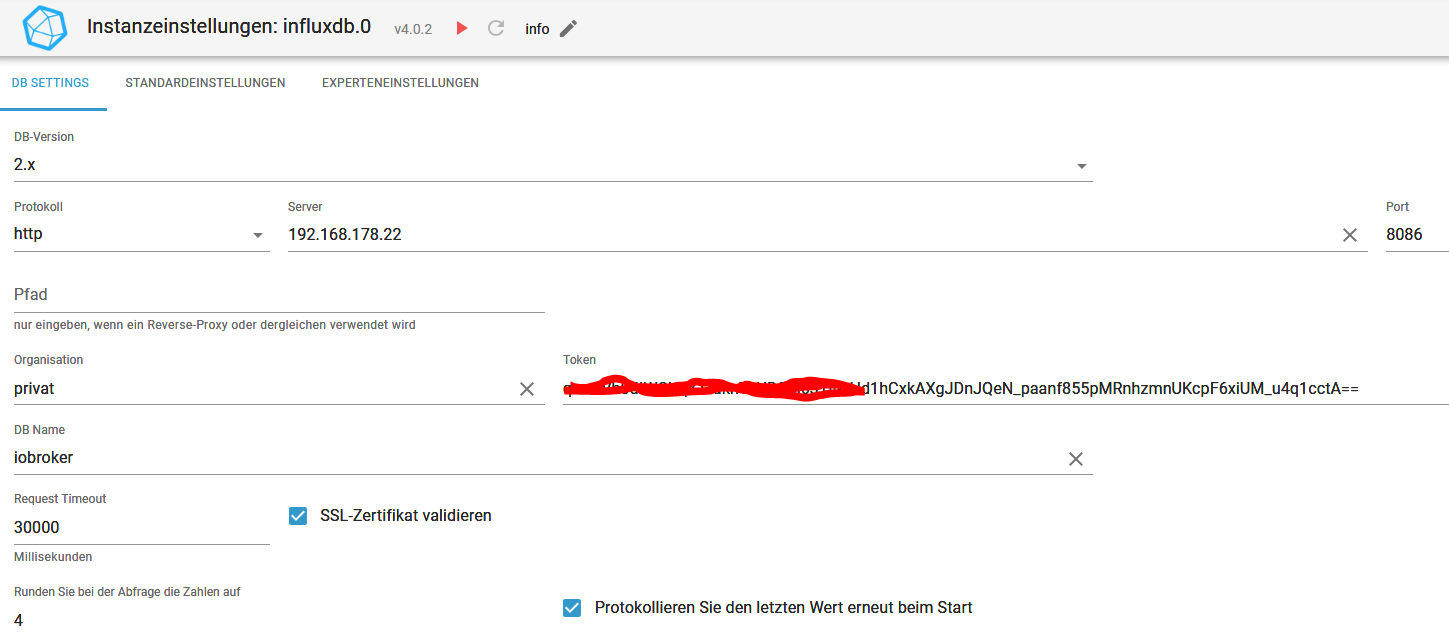
Adapter influxdb vor restore habe ich gestoppt. Alte Influx-Datenbank vor der Wiederherstellung automatisch löschen habe ich auch probiert.
Bucket wird angelegt, Measurements werden angelegt. Nur die Historiedaten fehlen. -
Ich habe Iobroker in Proxmox auf einer VM
Influxdb2 in einem eigenen ContainerBackitup erzeugt folgenden Meldung
20:14:03.439INFOguiBackup gestartet ... 20:14:03.488DEBUGmountmount activ... umount is started before mount!! 20:14:03.644DEBUGmountumount successfully completed 20:14:13.470DEBUGmountnfs-mount command: "sudo mount 192.168.178.10:/Sicherung/iobroker /opt/iobroker/backups" 20:14:13.545DEBUGmountmount successfully completed 20:14:13.589DEBUGmountdone 20:14:14.575DEBUGiobrokerhost.iobroker 196 states saved 20:14:14.594DEBUGiobrokerhost.iobroker 330 objects saved 20:14:14.846DEBUGiobrokerBackup created: /opt/iobroker/backups/iobroker_2024_11_22-20_14_12_Proxmox_backupiobroker.tar.gz This backup can only be restored with js-controller version up from 4.1 20:14:15.853DEBUGiobrokerdone 20:14:16.010DEBUGinfluxDBInfluxDB-Backup started ... 20:14:16.019DEBUGinfluxDBStart InfluxDB Backup ... 20:14:16.070DEBUGinfluxDBInfluxDB tmp directory "/opt/iobroker/backups/influxDB_2024_11_22-20_14_14_Proxmox_backupiobroker" successfully deleted 20:14:16.148DEBUGinfluxDBdone 20:14:16.772DEBUGhistoryDBcompress from historyDB started ... 20:14:16.778DEBUGhistoryDBBackup created: /opt/iobroker/backups/historyDB_2024_11_22-20_14_15_Proxmox_backupiobroker.tar.gz 20:14:16.817DEBUGhistoryDBdone 20:14:17.679DEBUGjavascriptsCreated javascript_tmp directory: "/opt/iobroker/backups/tmpScripts" 20:14:17.741DEBUGjavascriptsTry deleting the Javascript tmp directory: "/opt/iobroker/backups/tmpScripts" 20:14:17.785DEBUGjavascriptsJavascript tmp directory "/opt/iobroker/backups/tmpScripts" successfully deleted 20:14:17.791DEBUGjavascriptsBackup created: /opt/iobroker/backups/javascripts_2024_11_22-20_14_16_Proxmox_backupiobroker.tar.gz 20:14:17.800DEBUGjavascriptsdone 20:14:19.449DEBUGonedriveOnedrive: Copy iobroker_2024_11_22-20_14_12_Proxmox_backupiobroker.tar.gz... 20:14:21.417DEBUGonedrive77% uploaded from iobroker_2024_11_22-20_14_12_Proxmox_backupiobroker.tar.gz 20:14:22.270DEBUGonedrive100% uploaded from iobroker_2024_11_22-20_14_12_Proxmox_backupiobroker.tar.gz 20:14:22.284DEBUGonedriveOnedrive: Copy historyDB_2024_11_22-20_14_15_Proxmox_backupiobroker.tar.gz... 20:14:23.765DEBUGonedrive100% uploaded from historyDB_2024_11_22-20_14_15_Proxmox_backupiobroker.tar.gz 20:14:23.778DEBUGonedrivehistoryDB_2024_11_22-20_14_15_Proxmox_backupiobroker.tar.gz with Id: F9759285BF3AC29!s13ced90a49024e8ca407102f2e0a1f60 saved on Onedrive 20:14:23.789DEBUGonedriveOnedrive: Copy javascripts_2024_11_22-20_14_16_Proxmox_backupiobroker.tar.gz... 20:14:25.082DEBUGonedrive100% uploaded from javascripts_2024_11_22-20_14_16_Proxmox_backupiobroker.tar.gz 20:14:25.126DEBUGonedrivejavascripts_2024_11_22-20_14_16_Proxmox_backupiobroker.tar.gz with Id: F9759285BF3AC29!s5504a43ce19d44d98a12133ecb3aa421 saved on Onedrive 20:14:25.138DEBUGonedrivedone 20:14:25.269DEBUGcifsused copy path: /Sicherung/iobroker 20:14:25.289DEBUGcifsdone 20:14:25.689DEBUGgoogledriveGoogle Drive: Copy iobroker_2024_11_22-20_14_12_Proxmox_backupiobroker.tar.gz... 20:14:28.201ERRORgoogledriveGoogle Drive: File "/opt/iobroker/backups/influxDB_2024_11_22-20_14_14_Proxmox_backupiobroker.tar.gz" not found 20:14:28.311DEBUGgoogledriveGoogle Drive: Copy historyDB_2024_11_22-20_14_15_Proxmox_backupiobroker.tar.gz... 20:14:30.444DEBUGgoogledriveGoogle Drive: Copy javascripts_2024_11_22-20_14_16_Proxmox_backupiobroker.tar.gz... 20:14:32.595DEBUGgoogledrivedone 20:14:32.800ERRORcleanBackup files not deleted from /opt/iobroker/backups because some errors. 20:14:32.808DEBUGcleandone 20:14:32.899DEBUGhistoryHTMLnew history html values created 20:14:32.986DEBUGhistoryHTMLdone 20:14:33.141DEBUGhistoryJSONnew history json values created 20:14:33.188DEBUGhistoryJSONdone 20:14:33.297DEBUGumountmount active, umount is started ... 20:14:38.373DEBUGumountumount successfully completed 20:14:38.418DEBUGumountdone 20:14:38.678DEBUGemaildone 20:14:40.735DEBUGnotificationAdmin notification will be sent 20:14:40.778DEBUGnotificationdone 20:14:40.886INFOguiDas Backup wurde erfolgreich erstellt!Probleme bei influx eigentlich nicht ersichtbar
im iobroker log dann dies
backitup.0 2024-11-22 20:14:31.666 error [iobroker/clean] Backup files not deleted from /opt/iobroker/backups because some errors. backitup.0 2024-11-22 20:14:27.079 error [iobroker/googledrive] Google Drive: File "/opt/iobroker/backups/influxDB_2024_11_22-20_14_14_Proxmox_backupiobroker.tar.gz" not found backitup.0 2024-11-22 20:14:21.154 error [iobroker/onedrive] Onedrive: File "/opt/iobroker/backups/influxDB_2024_11_22-20_14_14_Proxmox_backupiobroker.tar.gz" not found backitup.0 2024-11-22 20:14:14.935 error [iobroker] Error: Command failed: influx backup --bucket iobroker -t 5GtVXZUdOX6jOnzTpVNscZ6zjRHLUTBxhGqVAhUMxqKdhhU0uAPZL68Z_bynD53ntnns9cBDHEzXb4Un4QqGFQ== "/opt/iobroker/backups/influxDB_2024_11_22-20_14_14_Proxmox_backupiobroker"/bin/sh: 1: influx: not found backitup.0 2024-11-22 20:14:14.935 error [iobroker/influxDB] /bin/sh: 1: influx: not found backitup.0 2024-11-22 20:14:14.935 error [iobroker/influxDB] Error: Command failed: influx backup --bucket iobroker -t 5GtVXZUdOX6jOnzTpVNscZ6zjRHLUTBxhGqVAhUMxqKdhhU0uAPZL68Z_bynD53ntnns9cBDHEzXb4Un4QqGFQ== "/opt/iobroker/backups/influxDB_2024_11_22-20_14_14_Proxmox_backupiobroker" admin.0 2024-11-22 20:13:45.845 info ==> Connected system.user.admin from ::ffff:192.168.178.93Mache ich ein Restore einer noch vom Raspberry erzeugten Sicherung kommt das.
20:23:11.904INFOguistarting Restore... 20:23:12.093DEBUGinfluxDBinfluxdb.0 is stopped 20:23:33.690ERRORinfluxDB/bin/sh: 1: influx: not found 20:23:33.832DEBUGinfluxDBinfluxdb.0 startedIch checks einfach nicht
Liegt es vielleicht daran dass die Influxdb nicht im selben system wie der iobroker liegt?@snopy_16 sagte in Backitup - Influxdb2 Fehler bei Sicherung:
Ich habe Iobroker in Proxmox auf einer VM
Influxdb2 in einem eigenen ContainerWenn die InfluxDB von einem entfernten Server gesichert werden soll, müssen in der influxdb.conf auf dem entfernten Server die Remote-Rechte für den RPC-Dienst angepasst werden. bind-address = "<InfluxDB-IP>:8088" oder bind-address = "0.0.0.0:8088" Nach dem Änderungen in der Konfiguration muss der InfluxDB-Dienst neugestartet werden. Weitere Informationen zur Datensicherung der InfluxDB sind hier zu finden. -
@snopy_16 sagte in Backitup - Influxdb2 Fehler bei Sicherung:
Ich habe Iobroker in Proxmox auf einer VM
Influxdb2 in einem eigenen ContainerWenn die InfluxDB von einem entfernten Server gesichert werden soll, müssen in der influxdb.conf auf dem entfernten Server die Remote-Rechte für den RPC-Dienst angepasst werden. bind-address = "<InfluxDB-IP>:8088" oder bind-address = "0.0.0.0:8088" Nach dem Änderungen in der Konfiguration muss der InfluxDB-Dienst neugestartet werden. Weitere Informationen zur Datensicherung der InfluxDB sind hier zu finden.@crunchip
hab ich aber nur bei influxdb 1 gelesen, ich hab influxdb 2
Habs aber jetzt hinbekommen.
Dafür die nächste Hürde: grafana in einem anderen Container als influx installiert.
Beim restore kommt dann das18:10:02.838INFOguistarting Restore... 18:10:02.862DEBUGgrafanaStart Grafana Restore ... 18:10:02.918DEBUGgrafanafilename for restore: /opt/iobroker/backups/grafana_2024_11_23-14_38_55_backupiobroker.tar.gz 18:10:02.924DEBUGgrafanaGrafana tmp directory created: /opt/iobroker/backups/grafana_tmp 18:10:02.936DEBUGgrafanastart decompress 18:10:03.970DEBUGgrafanaGrafana request started 18:10:03.990DEBUGgrafanaGrafana is available ... Status: 200 18:10:04.001DEBUGgrafanaTry to Restore: /opt/iobroker/backups/grafana_tmp/datasource/InfluxDB.json 18:10:04.017DEBUGgrafanacannot restore datasource "InfluxDB": "Invalid username or password" 18:10:04.024DEBUGgrafanaTry to Restore: /opt/iobroker/backups/grafana_tmp/dashboards/fronius.json 18:10:04.067DEBUGgrafanaTry to Restore: /opt/iobroker/backups/grafana_tmp/dashboards/haustechnik.json 18:10:04.072DEBUGgrafanacannot restore dashboard "haustechnik": {"message":"Unauthorized","traceID":""} 18:10:04.075DEBUGgrafanacannot restore dashboard "fronius": {"message":"Unauthorized","traceID":""} 18:10:04.110DEBUGgrafanaGrafana request ended 18:10:04.122DEBUGgrafanaTry deleting the Grafana tmp directory 18:10:04.126DEBUGgrafanaGrafana tmp directory was successfully deleted 18:10:06.076DEBUGgrafanaGrafana Restore completed successfullygrafana datenquelle zeigt beim Test
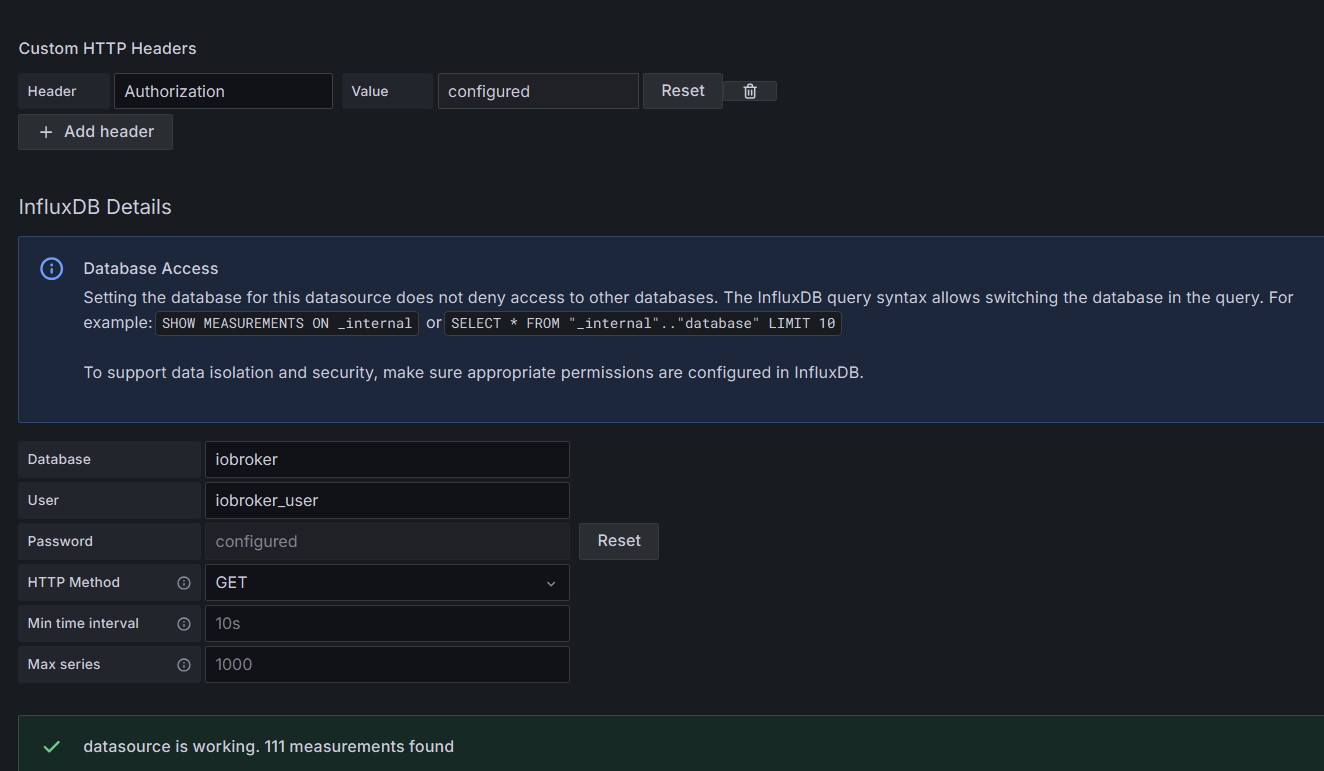
es wird nichts restored
-
@snopy_16 hast du deinen token erstellt?
-
Hi,
weil ich Antworten auf Fragen, die nie gestellt wurden so liebe ;-):Proxmox hat auch eine super Backup-Funktion. Per Klick oder Zeitplan kannst Du einfach einzelne/alle Container bzw. VMs sichern oder restoren.
Was ich besonders nützlich finde, wenn man gerne rumspielt und/oder sich noch nicht so gut auskennt:
Neben dem laufendem System aus einem Backup eine Containerkopie restoren, darin die gewünschten Änderungen ausprobieren und wenn's funktioniert diese im Original umsetzen. Hat man den Container "kaputt" gespielt - löschen, neuen restoren und nochmal probieren. -
@thomas-braun said in Backitup - Influxdb2 Fehler bei Sicherung:
Dann dürfte es
sudo apt update
sudo apt install influxdb2-cli
sein.
Da kommt bei mir allerdings:
iobrokeradmin@ioBroker8neu:~$ sudo apt install influxdb2-cli Reading package lists... Done Building dependency tree... Done Reading state information... Done E: Unable to locate package influxdb2-cliWie hast du das gelöst?
===========================
Vollständige Beschreibung: Ich habe das fast identisch wie bei dir installiert: Iobroker ist ein LXC-Container auf dem Proxmox, die Influx DB in Version 2.7.5 ein weiterer LXC-Container. Den Iobroker-Container habe ich die letzten Tage erneuert (neuen Container angelegt und dann das Backup eingespielt). Seither kommt der Fehler wie bei dir: "[iobroker/influxDB] /bin/sh: 1: influx: not found" beim Backup. -
@thomas-braun said in Backitup - Influxdb2 Fehler bei Sicherung:
Dann dürfte es
sudo apt update
sudo apt install influxdb2-cli
sein.
Da kommt bei mir allerdings:
iobrokeradmin@ioBroker8neu:~$ sudo apt install influxdb2-cli Reading package lists... Done Building dependency tree... Done Reading state information... Done E: Unable to locate package influxdb2-cliWie hast du das gelöst?
===========================
Vollständige Beschreibung: Ich habe das fast identisch wie bei dir installiert: Iobroker ist ein LXC-Container auf dem Proxmox, die Influx DB in Version 2.7.5 ein weiterer LXC-Container. Den Iobroker-Container habe ich die letzten Tage erneuert (neuen Container angelegt und dann das Backup eingespielt). Seither kommt der Fehler wie bei dir: "[iobroker/influxDB] /bin/sh: 1: influx: not found" beim Backup. -
@thomas-braun said in Backitup - Influxdb2 Fehler bei Sicherung:
apt policy influxdb2*
Da kommt nichts. "sudo apt update" läuft durch, aber dann
iobrokeradmin@ioBroker8neu:~$ apt policy influxdb2* N: Unable to locate package influxdb2* N: Couldn't find any package by glob 'influxdb2*'Wie bekommt man das Repo angelegt?
-
@thomas-braun said in Backitup - Influxdb2 Fehler bei Sicherung:
apt policy influxdb2*
Da kommt nichts. "sudo apt update" läuft durch, aber dann
iobrokeradmin@ioBroker8neu:~$ apt policy influxdb2* N: Unable to locate package influxdb2* N: Couldn't find any package by glob 'influxdb2*'Wie bekommt man das Repo angelegt?
@io2345 sagte in Backitup - Influxdb2 Fehler bei Sicherung:
"sudo apt update" läuft durch
Zeigen!
An der Ausgabe hätte ich schon sehen können was da angelegt ist oder nicht. -
@io2345 sagte in Backitup - Influxdb2 Fehler bei Sicherung:
"sudo apt update" läuft durch
Zeigen!
An der Ausgabe hätte ich schon sehen können was da angelegt ist oder nicht.@thomas-braun said in Backitup - Influxdb2 Fehler bei Sicherung:
Zeigen!
Ah, sorry. Hier isses:
iobrokeradmin@ioBroker8neu:~$ sudo apt update [sudo] password for iobrokeradmin: Hit:1 http://security.debian.org bullseye-security InRelease Hit:2 http://deb.debian.org/debian bullseye InRelease Hit:3 http://deb.debian.org/debian bullseye-updates InRelease Hit:4 https://deb.nodesource.com/node_20.x nodistro InRelease Reading package lists... Done Building dependency tree... Done Reading state information... Done All packages are up to date. iobrokeradmin@ioBroker8neu:~$ apt policy influxdb2* N: Unable to locate package influxdb2* N: Couldn't find any package by glob 'influxdb2*' iobrokeradmin@ioBroker8neu:~$ -
@thomas-braun said in Backitup - Influxdb2 Fehler bei Sicherung:
Zeigen!
Ah, sorry. Hier isses:
iobrokeradmin@ioBroker8neu:~$ sudo apt update [sudo] password for iobrokeradmin: Hit:1 http://security.debian.org bullseye-security InRelease Hit:2 http://deb.debian.org/debian bullseye InRelease Hit:3 http://deb.debian.org/debian bullseye-updates InRelease Hit:4 https://deb.nodesource.com/node_20.x nodistro InRelease Reading package lists... Done Building dependency tree... Done Reading state information... Done All packages are up to date. iobrokeradmin@ioBroker8neu:~$ apt policy influxdb2* N: Unable to locate package influxdb2* N: Couldn't find any package by glob 'influxdb2*' iobrokeradmin@ioBroker8neu:~$sudo rm /etc/apt/sources.list.d/influ* wget -q https://repos.influxdata.com/influxdata-archive_compat.key echo '393e8779c89ac8d958f81f942f9ad7fb82a25e133faddaf92e15b16e6ac9ce4c influxdata-archive_compat.key' | sha256sum -c && cat influxdata-archive_compat.key | gpg --dearmor | sudo tee /usr/share/keyrings/influxdata-archive_compat.gpg > /dev/null echo 'deb [signed-by=/usr/share/keyrings/influxdata-archive_compat.gpg] https://repos.influxdata.com/debian stable main' | sudo tee /etc/apt/sources.list.d/influxdata.list rm influxdata-archive_compat.keyDanach stehen die Pakete in deinem Pakermanager zur Installation bereit.
-
sudo rm /etc/apt/sources.list.d/influ* wget -q https://repos.influxdata.com/influxdata-archive_compat.key echo '393e8779c89ac8d958f81f942f9ad7fb82a25e133faddaf92e15b16e6ac9ce4c influxdata-archive_compat.key' | sha256sum -c && cat influxdata-archive_compat.key | gpg --dearmor | sudo tee /usr/share/keyrings/influxdata-archive_compat.gpg > /dev/null echo 'deb [signed-by=/usr/share/keyrings/influxdata-archive_compat.gpg] https://repos.influxdata.com/debian stable main' | sudo tee /etc/apt/sources.list.d/influxdata.list rm influxdata-archive_compat.keyDanach stehen die Pakete in deinem Pakermanager zur Installation bereit.
@thomas-braun
Danke!
Nach dieser Aktion klappt ein weiterer Aufruf von
sudo apt update
sudo apt install influxdb2-cli
und installiert den gewünschten Client.Fragt sich, ob das andere, die so wie ich alle halbe Jahre mal an ihrer Installation rumschrauben, ohne Hilfe von Spezialisten wie dir hinbekommen. Eher nicht, denke ich. Aber dafür ist dieses Forum ja da, gell?
Sieht man eigentlich irgendwo in der Oberfläche des Iobroker, dass da nun ein zusätzlicher DB-Client installiert ist? Unter Instanzen sehe ich da weiterhin nur den Adapter "influxdb".
-
@thomas-braun
Danke!
Nach dieser Aktion klappt ein weiterer Aufruf von
sudo apt update
sudo apt install influxdb2-cli
und installiert den gewünschten Client.Fragt sich, ob das andere, die so wie ich alle halbe Jahre mal an ihrer Installation rumschrauben, ohne Hilfe von Spezialisten wie dir hinbekommen. Eher nicht, denke ich. Aber dafür ist dieses Forum ja da, gell?
Sieht man eigentlich irgendwo in der Oberfläche des Iobroker, dass da nun ein zusätzlicher DB-Client installiert ist? Unter Instanzen sehe ich da weiterhin nur den Adapter "influxdb".
@io2345 sagte in Backitup - Influxdb2 Fehler bei Sicherung:
halbe Jahre mal an ihrer Installation rumschrauben
DEUTLICH zu selten. Mach das regelmäßig häufiger.
-
@io2345 sagte in Backitup - Influxdb2 Fehler bei Sicherung:
halbe Jahre mal an ihrer Installation rumschrauben
DEUTLICH zu selten. Mach das regelmäßig häufiger.
-
@io2345 sagte in Backitup - Influxdb2 Fehler bei Sicherung:
Ich bin ja eher der Typ "never change a running system"
Falscher Ansatz. Halt die Kiste REGELMÄSSIG auf Stand. Dann 'runnt' das auch besser.


Hey! Du scheinst an dieser Unterhaltung interessiert zu sein, hast aber noch kein Konto.
Hast du es satt, bei jedem Besuch durch die gleichen Beiträge zu scrollen? Wenn du dich für ein Konto anmeldest, kommst du immer genau dorthin zurück, wo du zuvor warst, und kannst dich über neue Antworten benachrichtigen lassen (entweder per E-Mail oder Push-Benachrichtigung). Du kannst auch Lesezeichen speichern und Beiträge positiv bewerten, um anderen Community-Mitgliedern deine Wertschätzung zu zeigen.
Mit deinem Input könnte dieser Beitrag noch besser werden 💗
Registrieren Anmelden277
Online33.0k
Benutzer83.7k
Themen1.3m
Beiträge