



Skip to content
  • Home
  • Aktuell
  • Tags
  • 0 Ungelesen 0
  • Kategorien
  • Unreplied
  • Beliebt
  • GitHub
  • Docu
  • Hilfe
Skins
  • Light
  • Brite
  • Cerulean
  • Cosmo
  • Flatly
  • Journal
  • Litera
  • Lumen
  • Lux
  • Materia
  • Minty
  • Morph
  • Pulse
  • Sandstone
  • Simplex
  • Sketchy
  • Spacelab
  • United
  • Yeti
  • Zephyr
  • Dark
  • Cyborg
  • Darkly
  • Quartz
  • Slate
  • Solar
  • Superhero
  • Vapor

  • Standard: (Kein Skin)
  • Kein Skin
Einklappen
ioBroker Logo

Community Forum

donate donate
  1. ioBroker Community Home
  2. Deutsch
  3. ioBroker Allgemein
  4. BackItUp Adapter jarvis Fehlermeldung

NEWS

  • Neuer Blogbeitrag: Monatsrückblick - Dezember 2025 🎄
    BluefoxB
    Bluefox
    5
    1
    44

  • Weihnachtsangebot 2025! 🎄
    BluefoxB
    Bluefox
    24
    1
    1.4k

  • UPDATE 31.10.: Amazon Alexa - ioBroker Skill läuft aus ?
    apollon77A
    apollon77
    48
    3
    9.3k

BackItUp Adapter jarvis Fehlermeldung

Geplant Angeheftet Gesperrt Verschoben ioBroker Allgemein
22 Beiträge 6 Kommentatoren 2.3k Aufrufe 6 Watching
  • Älteste zuerst
  • Neuste zuerst
  • Meiste Stimmen
Antworten
  • In einem neuen Thema antworten
Anmelden zum Antworten
Dieses Thema wurde gelöscht. Nur Nutzer mit entsprechenden Rechten können es sehen.
  • chappo59C chappo59

    Schade, dass es hier keine weiteren Lösungsvorschläge gibt. Habe nämlich das gleiche Problem.

    simatecS Online
    simatecS Online
    simatec
    Developer Most Active
    schrieb am zuletzt editiert von
    #11

    @chappo59 Bitte poste hier den Debuglog

    • Besuche meine Github Seite
    • Beitrag hat geholfen oder willst du mich unterstützen
    • HowTo Restore ioBroker
    chappo59C 1 Antwort Letzte Antwort
    0
    • simatecS simatec

      @chappo59 Bitte poste hier den Debuglog

      chappo59C Offline
      chappo59C Offline
      chappo59
      schrieb am zuletzt editiert von Homoran
      #12

      @simatec
      Ich sehe gerade, da hat sich eine Instanz 1 eingeschlichen, die es bei mir gar nicht gibt.

      [DEBUG] [jarvis] Created jarvis_tmp directory: "/opt/iobroker/backups/tmpJavis0"
      [DEBUG] [jarvis] found Jarvis Instance: 0
      [DEBUG] [jarvis] start Jarvis Backup for Instance 0...
      [DEBUG] [jarvis] Created jarvis_tmp directory: "/opt/iobroker/backups/tmpJavis1"
      [DEBUG] [jarvis] found Jarvis Instance: 1
      [DEBUG] [jarvis] start Jarvis Backup for Instance 1...
      [DEBUG] [jarvis] /opt/iobroker/iobroker-data/jarvis/0 copy success!
      [DEBUG] [jarvis] Created states_tmp directory: "/opt/iobroker/backups/tmpJavis0/states"
      [DEBUG] [jarvis] /opt/iobroker/iobroker-data/jarvis/1 copy success!
      [DEBUG] [jarvis] Created states_tmp directory: "/opt/iobroker/backups/tmpJavis1/states"
      [WARN] [jarvis] settings "css" not found
      [WARN] [jarvis] settings "devices" not found
      [WARN] [jarvis] settings "layout" not found
      [WARN] [jarvis] settings "notifications" not found
      [WARN] [jarvis] settings "widgets" not found
      [WARN] [jarvis] settings "scripts" not found
      [WARN] [jarvis] settings "theme" not found
      [WARN] [jarvis] settings "pro" not found
      [DEBUG] [jarvis] Try deleting the Jarvis tmp directory: "/opt/iobroker/backups/tmpJavis1"
      [DEBUG] [jarvis] Jarvis tmp directory "/opt/iobroker/backups/tmpJavis1" successfully deleted
      [DEBUG] [jarvis] Backup created: /opt/iobroker/backups/jarvis.1_2024_11_14-18_13_39_backupiobroker.tar.gz
      [DEBUG] [jarvis] Try deleting the Jarvis tmp directory: "/opt/iobroker/backups/tmpJavis0"
      [DEBUG] [jarvis] Jarvis tmp directory "/opt/iobroker/backups/tmpJavis0" successfully deleted
      [DEBUG] [jarvis] Backup created: /opt/iobroker/backups/jarvis.0_2024_11_14-18_13_39_backupiobroker.tar.gz
      [DEBUG] [jarvis] done
      

      MOD-EDIT: Code in code-tags gesetzt!

      simatecS 1 Antwort Letzte Antwort
      0
      • chappo59C chappo59

        @simatec
        Ich sehe gerade, da hat sich eine Instanz 1 eingeschlichen, die es bei mir gar nicht gibt.

        [DEBUG] [jarvis] Created jarvis_tmp directory: "/opt/iobroker/backups/tmpJavis0"
        [DEBUG] [jarvis] found Jarvis Instance: 0
        [DEBUG] [jarvis] start Jarvis Backup for Instance 0...
        [DEBUG] [jarvis] Created jarvis_tmp directory: "/opt/iobroker/backups/tmpJavis1"
        [DEBUG] [jarvis] found Jarvis Instance: 1
        [DEBUG] [jarvis] start Jarvis Backup for Instance 1...
        [DEBUG] [jarvis] /opt/iobroker/iobroker-data/jarvis/0 copy success!
        [DEBUG] [jarvis] Created states_tmp directory: "/opt/iobroker/backups/tmpJavis0/states"
        [DEBUG] [jarvis] /opt/iobroker/iobroker-data/jarvis/1 copy success!
        [DEBUG] [jarvis] Created states_tmp directory: "/opt/iobroker/backups/tmpJavis1/states"
        [WARN] [jarvis] settings "css" not found
        [WARN] [jarvis] settings "devices" not found
        [WARN] [jarvis] settings "layout" not found
        [WARN] [jarvis] settings "notifications" not found
        [WARN] [jarvis] settings "widgets" not found
        [WARN] [jarvis] settings "scripts" not found
        [WARN] [jarvis] settings "theme" not found
        [WARN] [jarvis] settings "pro" not found
        [DEBUG] [jarvis] Try deleting the Jarvis tmp directory: "/opt/iobroker/backups/tmpJavis1"
        [DEBUG] [jarvis] Jarvis tmp directory "/opt/iobroker/backups/tmpJavis1" successfully deleted
        [DEBUG] [jarvis] Backup created: /opt/iobroker/backups/jarvis.1_2024_11_14-18_13_39_backupiobroker.tar.gz
        [DEBUG] [jarvis] Try deleting the Jarvis tmp directory: "/opt/iobroker/backups/tmpJavis0"
        [DEBUG] [jarvis] Jarvis tmp directory "/opt/iobroker/backups/tmpJavis0" successfully deleted
        [DEBUG] [jarvis] Backup created: /opt/iobroker/backups/jarvis.0_2024_11_14-18_13_39_backupiobroker.tar.gz
        [DEBUG] [jarvis] done
        

        MOD-EDIT: Code in code-tags gesetzt!

        simatecS Online
        simatecS Online
        simatec
        Developer Most Active
        schrieb am zuletzt editiert von
        #13

        @chappo59 Dann lösche mal den Ordner in /iobroker-data und ggfs. die Objekte unter jarvis.1.

        • Besuche meine Github Seite
        • Beitrag hat geholfen oder willst du mich unterstützen
        • HowTo Restore ioBroker
        1 Antwort Letzte Antwort
        1
        • E el-lutschi

          Hallo zusammen,

          seit einiger Zeit erhalte ich beim Backup von jarvis folgende Meldungen in der Log:

          2024-10-17 08:19:39.325 - warn: backitup.0 (2071895) [iobroker/jarvis] settings "css" not found
          2024-10-17 08:19:39.326 - warn: backitup.0 (2071895) [iobroker/jarvis] settings "devices" not found
          2024-10-17 08:19:39.328 - warn: backitup.0 (2071895) [iobroker/jarvis] settings "layout" not found
          2024-10-17 08:19:39.330 - warn: backitup.0 (2071895) [iobroker/jarvis] settings "notifications" not found
          2024-10-17 08:19:39.332 - warn: backitup.0 (2071895) [iobroker/jarvis] settings "widgets" not found
          2024-10-17 08:19:39.333 - warn: backitup.0 (2071895) [iobroker/jarvis] settings "scripts" not found
          2024-10-17 08:19:39.334 - warn: backitup.0 (2071895) [iobroker/jarvis] settings "theme" not found
          2024-10-17 08:19:39.335 - warn: backitup.0 (2071895) [iobroker/jarvis] settings "pro" not found
          

          Ansonsten scheint laut Log alles OK zu sein. Auch wenn ich das Backup manuell starte wird es als erfolgreich gekennzeichnet. Jemand ne Idee was da los sein könnte?

          Gruss
          Chris

          simatecS Online
          simatecS Online
          simatec
          Developer Most Active
          schrieb am zuletzt editiert von
          #14

          @el-lutschi auch bei dir wäre der vollständige Debuglog vom Backup interessant

          • Besuche meine Github Seite
          • Beitrag hat geholfen oder willst du mich unterstützen
          • HowTo Restore ioBroker
          chappo59C 1 Antwort Letzte Antwort
          0
          • simatecS simatec

            @el-lutschi auch bei dir wäre der vollständige Debuglog vom Backup interessant

            chappo59C Offline
            chappo59C Offline
            chappo59
            schrieb am zuletzt editiert von chappo59
            #15

            @simatec Das Objekt jarvis.1 hatte ich gerade kurz zuvor versuchsweise gelöscht. Das brachte keinen Erfolg.
            Des Rätsels Lösung war vermutlich den Ordner "1" unter /iobroker-data/jarvis zu löschen. Jetzt lief das Backup ohne Fehlermeldung durch.
            Herzlichen Dank für die tolle Unterstützung.

            simatecS 1 Antwort Letzte Antwort
            0
            • chappo59C chappo59

              @simatec Das Objekt jarvis.1 hatte ich gerade kurz zuvor versuchsweise gelöscht. Das brachte keinen Erfolg.
              Des Rätsels Lösung war vermutlich den Ordner "1" unter /iobroker-data/jarvis zu löschen. Jetzt lief das Backup ohne Fehlermeldung durch.
              Herzlichen Dank für die tolle Unterstützung.

              simatecS Online
              simatecS Online
              simatec
              Developer Most Active
              schrieb am zuletzt editiert von
              #16

              @chappo59 sehr gerne 😉

              • Besuche meine Github Seite
              • Beitrag hat geholfen oder willst du mich unterstützen
              • HowTo Restore ioBroker
              1 Antwort Letzte Antwort
              0
              • G Offline
                G Offline
                gutgut30
                schrieb am zuletzt editiert von
                #17

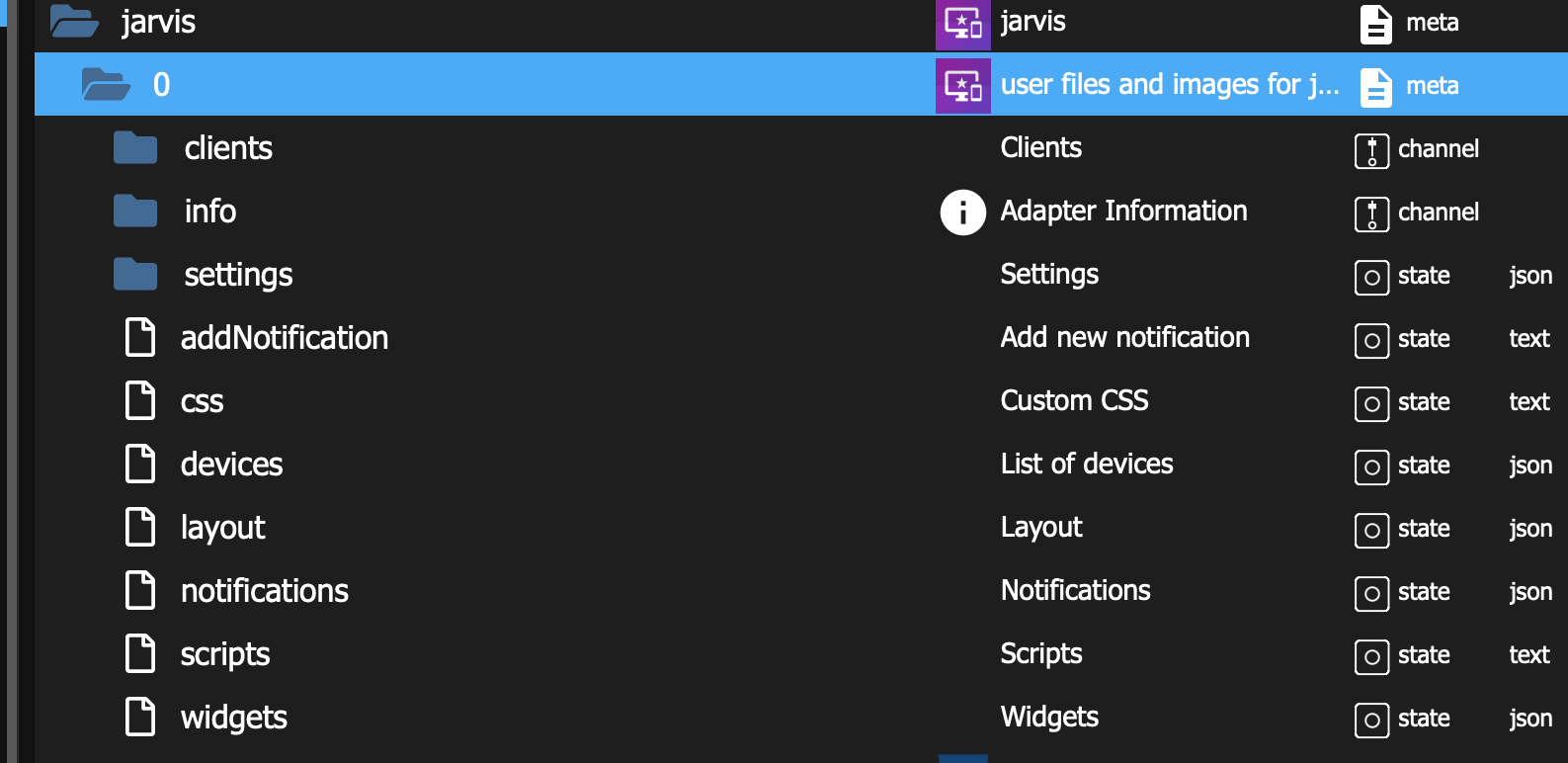
                Auch ich erhalte die Meldung "[iobroker/jarvis] settings "theme" not found", habe den Eintrag "theme" in den Objekten aber auch nicht. Die Installation ist "frisch".
                bee91f46-a7bf-4fc2-a912-25c41e6becb8-image.png

                Den Eintrag im Adapter anlegen fühlt sich nicht so ganz korrekt an.

                M 1 Antwort Letzte Antwort
                0
                • G gutgut30

                  Auch ich erhalte die Meldung "[iobroker/jarvis] settings "theme" not found", habe den Eintrag "theme" in den Objekten aber auch nicht. Die Installation ist "frisch".

                  bee91f46-a7bf-4fc2-a912-25c41e6becb8-image.png

                  Den Eintrag im Adapter anlegen fühlt sich nicht so ganz korrekt an.

                  M Online
                  M Online
                  MCU
                  schrieb am zuletzt editiert von
                  #18

                  @gutgut30 Ist bei neueren Versionen korrigiert worden.
                  Dort gibt es aber noch andere Probleme, so dass man sich ein Wechsel überlegen, bzw. Issues prüfen sollte.

                  NUC i7 64GB mit Proxmox ---- Jarvis Infos Aktualisierungen der Doku auf Instagram verfolgen -> mcuiobroker Instagram
                  Wenn Euch mein Vorschlag geholfen hat, bitte rechts "^" klicken.

                  G 1 Antwort Letzte Antwort
                  0
                  • M MCU

                    @gutgut30 Ist bei neueren Versionen korrigiert worden.
                    Dort gibt es aber noch andere Probleme, so dass man sich ein Wechsel überlegen, bzw. Issues prüfen sollte.

                    G Offline
                    G Offline
                    gutgut30
                    schrieb am zuletzt editiert von
                    #19

                    @mcu Okay, danke für die Info. Dann warte ich mal ab.

                    Aktuell wird also die Meldung ausgegeben, das Backup aber erstellt?

                    M 1 Antwort Letzte Antwort
                    0
                    • G gutgut30

                      @mcu Okay, danke für die Info. Dann warte ich mal ab.

                      Aktuell wird also die Meldung ausgegeben, das Backup aber erstellt?

                      M Online
                      M Online
                      MCU
                      schrieb am zuletzt editiert von MCU
                      #20

                      @gutgut30 Solange du keine neue jarvis-Version installierst, kannst du auch einen jarvis.0.theme DP anlegen, dann verschwindet die Meldung.

                      {
                        "_id": "jarvis.0.theme",
                        "type": "state",
                        "common": {
                          "name": "Theme",
                          "role": "json",
                          "type": "string",
                          "read": true,
                          "write": true,
                          "def": "{}"
                        },
                        "from": "system.adapter.jarvis.0",
                        "user": "system.user.admin",
                        "ts": 1734304396000,
                        "acl": {
                          "object": 1636,
                          "state": 1636,
                          "owner": "system.user.admin",
                          "ownerGroup": "system.group.administrator"
                        }
                      }

                      

                      NUC i7 64GB mit Proxmox ---- Jarvis Infos Aktualisierungen der Doku auf Instagram verfolgen -> mcuiobroker Instagram
                      Wenn Euch mein Vorschlag geholfen hat, bitte rechts "^" klicken.

                      S 1 Antwort Letzte Antwort
                      0
                      • M MCU

                        @gutgut30 Solange du keine neue jarvis-Version installierst, kannst du auch einen jarvis.0.theme DP anlegen, dann verschwindet die Meldung.

                        {
                          "_id": "jarvis.0.theme",
                          "type": "state",
                          "common": {
                            "name": "Theme",
                            "role": "json",
                            "type": "string",
                            "read": true,
                            "write": true,
                            "def": "{}"
                          },
                          "from": "system.adapter.jarvis.0",
                          "user": "system.user.admin",
                          "ts": 1734304396000,
                          "acl": {
                            "object": 1636,
                            "state": 1636,
                            "owner": "system.user.admin",
                            "ownerGroup": "system.group.administrator"
                          }
                        }

                        
                        S Offline
                        S Offline
                        sokrates
                        schrieb am zuletzt editiert von
                        #21

                        @mcu vielen dank, das hat bei mir funktioniert. aber man muss theme klein schreiben. :)

                        M 1 Antwort Letzte Antwort
                        0
                        • S sokrates

                          @mcu vielen dank, das hat bei mir funktioniert. aber man muss theme klein schreiben. :)

                          M Online
                          M Online
                          MCU
                          schrieb am zuletzt editiert von MCU
                          #22

                          @sokrates sagte in BackItUp Adapter jarvis Fehlermeldung:

                          aber man muss theme klein schreiben

                          Wo ist es groß geschrieben? Oder nur als Hinweis?
                          af0e460c-bbc1-42d7-b2a5-68acde3d50d0-image.png

                          NUC i7 64GB mit Proxmox ---- Jarvis Infos Aktualisierungen der Doku auf Instagram verfolgen -> mcuiobroker Instagram
                          Wenn Euch mein Vorschlag geholfen hat, bitte rechts "^" klicken.

                          1 Antwort Letzte Antwort
                          0
                          Antworten
                          • In einem neuen Thema antworten
                          Anmelden zum Antworten
                          • Älteste zuerst
                          • Neuste zuerst
                          • Meiste Stimmen


                          Support us

                          ioBroker
                          Community Adapters
                          Donate
                          FAQ Cloud / IOT
                          HowTo: Node.js-Update
                          HowTo: Backup/Restore
                          Downloads
                          BLOG

                          361

                          Online

                          32.5k

                          Benutzer

                          81.7k

                          Themen

                          1.3m

                          Beiträge
                          Community
                          Impressum | Datenschutz-Bestimmungen | Nutzungsbedingungen | Einwilligungseinstellungen
                          ioBroker Community 2014-2025
                          logo
                          • Anmelden

                          • Du hast noch kein Konto? Registrieren

                          • Anmelden oder registrieren, um zu suchen
                          • Erster Beitrag
                            Letzter Beitrag
                          0
                          • Home
                          • Aktuell
                          • Tags
                          • Ungelesen 0
                          • Kategorien
                          • Unreplied
                          • Beliebt
                          • GitHub
                          • Docu
                          • Hilfe
