




Shelly >= 6.6.0 mit BLU-Geräten (Bluetooth Low Energy)
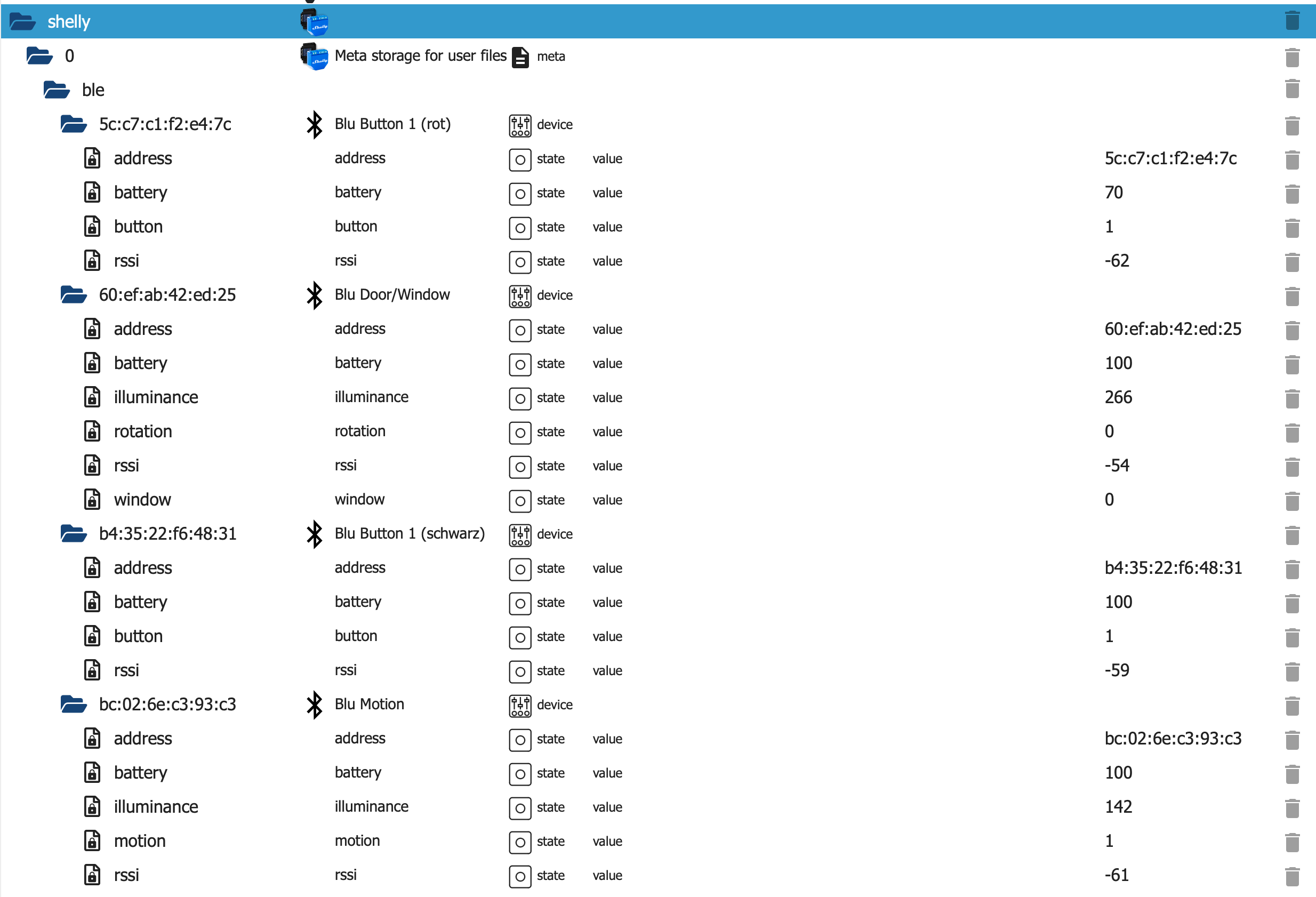
-
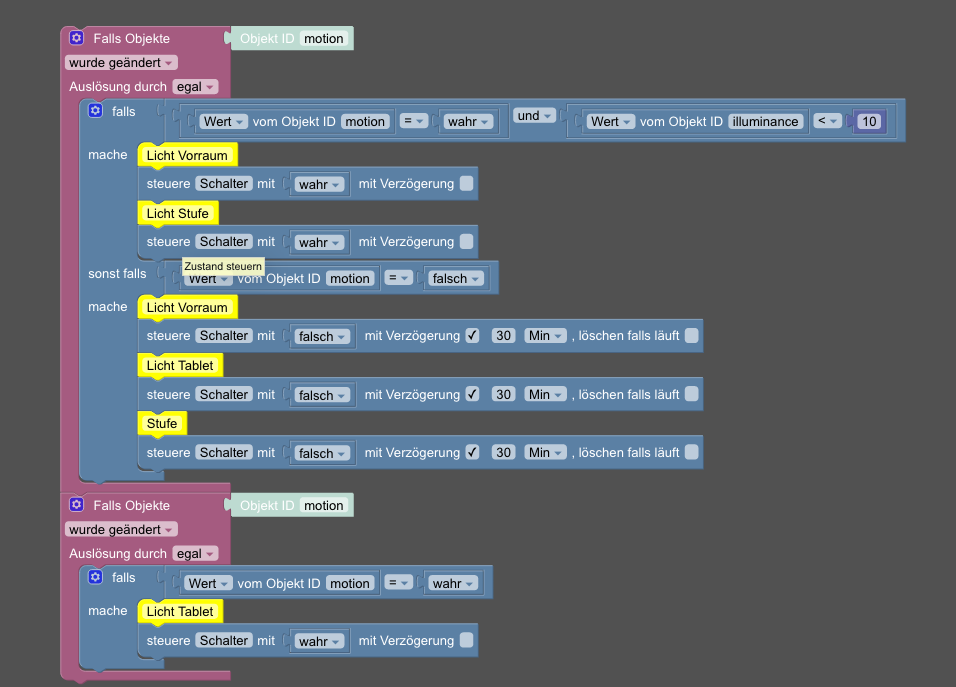
Wenn ich es richtig verstehe willst du wenn Bewegung erkannt das Licht für Zeit x an ist.
Dann müsst ja noch einen Timer einbauen der immer von vorne beginnt wenn eine neue Bewegung erkannt wird.
Aber so macht er es ja richtig Bewegung an keine Bewegung aus dann wieder Bewegung an.
-
Ich hab mal das Script angepasst.
MAC Adresse in Namen übersetzen und die Zeile ersetzt damit ein BLU H&T die Werte richtig überträgt. Vielleicht hilft es ja dem ein oder anderen.// v0.2 custom let SCRIPT_VERSION = '0.2'; let BTHOME_SVC_ID_STR = 'fcd2'; let uint8 = 0; let int8 = 1; let uint16 = 2; let int16 = 3; let uint24 = 4; let int24 = 5; let BTH = {}; let SHELLY_ID = undefined; const BTH = { 0x00: { n: 'pid', t: uint8 }, 0x01: { n: 'battery', t: uint8, u: '%' }, 0x02: { n: 'temperature', t: int16, f: 0.01, u: 'tC' }, 0x45: { n: 'temperature', t: int16, f: 0.1, u: 'tC' }, 0x03: { n: 'humidity', t: uint16, f: 0.01, u: '%' }, 0x2e: { n: 'humidity', t: uint8, u: '%' }, 0x05: { n: 'illuminance', t: uint24, f: 0.01 }, 0x1a: { n: 'door', t: uint8 }, 0x20: { n: 'moisture', t: uint8 }, 0x21: { n: 'motion', t: uint8 }, 0x2d: { n: 'window', t: uint8 }, 0x3a: { n: 'button', t: uint8 }, 0x3f: { n: 'rotation', t: int16, f: 0.1 } }; // Mapping of MAC addresses to individual names let macToName = { 'aa:bb:cc:dd:ee:ff': 'Device1', '11:22:33:44:55:66': 'Device2' }; function getByteSize(type) { if (type === uint8 || type === int8) return 1; if (type === uint16 || type === int16) return 2; if (type === uint24 || type === int24) return 3; // impossible as advertisements are much smaller return 255; } let BTHomeDecoder = { utoi: function (num, bitsz) { let mask = 1 << (bitsz - 1); return num & mask ? num - (1 << bitsz) : num; }, getUInt8: function (buffer) { return buffer.at(0); }, getInt8: function (buffer) { return this.utoi(this.getUInt8(buffer), 8); }, getUInt16LE: function (buffer) { return 0xffff & ((buffer.at(1) << 8) | buffer.at(0)); }, getInt16LE: function (buffer) { return this.utoi(this.getUInt16LE(buffer), 16); }, getUInt24LE: function (buffer) { return ( 0x00ffffff & ((buffer.at(2) << 16) | (buffer.at(1) << 8) | buffer.at(0)) ); }, getInt24LE: function (buffer) { return this.utoi(this.getUInt24LE(buffer), 24); }, getBufValue: function (type, buffer) { if (buffer.length < getByteSize(type)) return null; let res = null; if (type === uint8) res = this.getUInt8(buffer); if (type === int8) res = this.getInt8(buffer); if (type === uint16) res = this.getUInt16LE(buffer); if (type === int16) res = this.getInt16LE(buffer); if (type === uint24) res = this.getUInt24LE(buffer); if (type === int24) res = this.getInt24LE(buffer); return res; }, unpack: function (buffer) { // beacons might not provide BTH service data if (typeof buffer !== 'string' || buffer.length === 0) return null; let result = {}; let _dib = buffer.at(0); result['encryption'] = _dib & 0x1 ? true : false; result['BTHome_version'] = _dib >> 5; if (result['BTHome_version'] !== 2) return null; // can not handle encrypted data if (result['encryption']) return result; buffer = buffer.slice(1); let _bth; let _value; while (buffer.length > 0) { _bth = BTH[buffer.at(0)]; if (typeof _bth === 'undefined') { console.log('Error: unknown type ' + buffer.at(0)); break; } buffer = buffer.slice(1); _value = this.getBufValue(_bth.t, buffer); if (_value === null) break; if (typeof _bth.f !== 'undefined') _value = _value * _bth.f; result[_bth.n] = _value; buffer = buffer.slice(getByteSize(_bth.t)); } return result; } }; let lastPacketId = 0x100; // Callback for the BLE scanner object function bleScanCallback(event, result) { // exit if not a result of a scan if (event !== BLE.Scanner.SCAN_RESULT) { return; } // exit if service_data member is missing if ( typeof result.service_data === 'undefined' || typeof result.service_data[BTHOME_SVC_ID_STR] === 'undefined' ) { // console.log('Error: Missing service_data member'); return; } let unpackedData = BTHomeDecoder.unpack( result.service_data[BTHOME_SVC_ID_STR] ); // exit if unpacked data is null or the device is encrypted if ( unpackedData === null || typeof unpackedData === "undefined" || unpackedData["encryption"] ) { console.log('Error: Encrypted devices are not supported'); return; } // exit if the event is duplicated if (lastPacketId === unpackedData.pid) { return; } lastPacketId = unpackedData.pid; unpackedData.rssi = result.rssi; unpackedData.address = result.addr; // Convert MAC address to lowercase for case insensitive matching let macLower = result.addr.toLowerCase(); let deviceName = macToName[macLower] || result.addr; // create MQTT-Payload let message = { scriptVersion: SCRIPT_VERSION, src: SHELLY_ID, srcBle: { type: result.local_name, mac: deviceName }, payload: unpackedData }; console.log('Received ' + JSON.stringify(unpackedData)); if (MQTT.isConnected()) { MQTT.publish(SHELLY_ID + '/events/ble', JSON.stringify(message)); } } // Initializes the script and performs the necessary checks and configurations function init() { // get the config of ble component let bleConfig = Shelly.getComponentConfig('ble'); // exit if the BLE isn't enabled if (!bleConfig.enable) { console.log('Error: The Bluetooth is not enabled, please enable it in the settings'); return; } // check if the scanner is already running if (BLE.Scanner.isRunning()) { console.log('Info: The BLE gateway is running, the BLE scan configuration is managed by the device'); } else { // start the scanner let bleScanner = BLE.Scanner.Start({ duration_ms: BLE.Scanner.INFINITE_SCAN, active: true }); if (!bleScanner) { console.log('Error: Can not start new scanner'); } } BLE.Scanner.Subscribe(bleScanCallback); } Shelly.call('Mqtt.GetConfig', '', function (res, err_code, err_msg, ud) { SHELLY_ID = res['topic_prefix']; init(); });@apfelwurm leider, auch dieses Script bringt mir kein Event in den ioBroker
-
Hi zusammen
ich hätte mal eine Frage zu diesem Thema.
Ich habe jetzt ein neues Shelly Gateway und darauf ein das neue Shelly BLU TRV verbunden.Ich schaffe es leider nicht per MQTT die Daten in den iobroker zu bringen. Hab schon mehrere Anpassungen am Script versucht.
Das ist der Script den ich drin hab im BLU Gateway Gen.3Ich habe alles nach der Anleitung hier gemacht:
https://github.com/iobroker-community-adapters/ioBroker.shelly/blob/master/docs/en/ble-devices.mdDas neueste Script ist drin.
// v0.4
const SCRIPT_VERSION = '0.4';
const BTHOME_SVC_ID_STR = 'fcd2';

const uint8 = 0;
const int8 = 1;
const uint16 = 2;
const int16 = 3;
const uint24 = 4;
const int24 = 5;
const uint32 = 6;
const int32 = 7;

let SHELLY_ID = undefined;

const BTH = {
    // Misc
    0x00: { n: 'pid', t: uint8 },
    0xf0: { n: 'device_type', t: uint16 },
    0xf1: { n: 'firmware_version', t: uint32 },
    0xf2: { n: 'firmware_version', t: uint24 },
    // Sensor data
    0x51: { n: 'acceleration', t: uint16, f: 0.001, u: 'm/s²' },
    0x01: { n: 'battery', t: uint8, u: '%' },
    0x12: { n: 'co2', t: uint16, u: 'ppm' },
    0x09: { n: 'count', t: uint8 },
    0x3d: { n: 'count', t: uint8 },
    0x3e: { n: 'count', t: uint8 },
    0x43: { n: 'current', t: uint16, f: 0.001, u: 'A' },
    0x08: { n: 'dewpoint', t: int16, f: 0.01, u: '°C' },
    0x40: { n: 'distance_mm', t: uint16, u: 'mm' },
    0x41: { n: 'distance_m', t: uint16, f: 0.1, u: 'm' },
    0x42: { n: 'duration', t: uint24, f: 0.001, u: 's' },
    0x4d: { n: 'energy', t: uint32, f: 0.001, u: 'kWh' },
    0x0a: { n: 'energy', t: uint24, f: 0.001, u: 'kWh' },
    0x4b: { n: 'gas', t: uint24, f: 0.001, u: 'm3' },
    0x4c: { n: 'gas', t: uint32, f: 0.001, u: 'm3' },
    0x52: { n: 'gyroscope', t: uint16, f: 0.001, u: '°/s' },
    0x03: { n: 'humidity', t: uint16, f: 0.01, u: '%' },
    0x2e: { n: 'humidity', t: uint8, u: '%' },
    0x05: { n: 'illuminance', t: uint24, f: 0.01, u: 'lux' },
    0x06: { n: 'mass_kg', t: uint16, f: 0.01, u: 'kg' },
    0x07: { n: 'mass_lb', t: uint16, f: 0.01, u: 'lb' },
    0x14: { n: 'moisture', t: uint16, f: 0.01, u: '%' },
    0x2f: { n: 'moisture', t: uint8, u: '%' },
    0x0d: { n: 'pm2_5', t: uint16, u: 'ug/m3' },
    0x0e: { n: 'pm10', t: uint16, u: 'ug/m3' },
    0x0b: { n: 'power', t: uint24, f: 0.01, u: 'W' },
    0x04: { n: 'pressure', t: uint24, f: 0.01, u: 'hPa' },
    0x3f: { n: 'rotation', t: int16, f: 0.1, u: '°' },
    0x44: { n: 'speed', t: uint16, f: 0.01, u: 'm/s' },
    0x45: { n: 'temperature', t: int16, f: 0.1, u: '°C' },
    0x02: { n: 'temperature', t: int16, f: 0.01, u: '°C' },
    0x13: { n: 'tvoc', t: uint16, u: 'ug/m3' },
    0x0c: { n: 'voltage', t: uint16, f: 0.001, u: 'V' },
    0x4a: { n: 'voltage', t: uint16, f: 0.1, u: 'V' },
    0x4e: { n: 'volume', t: uint32, f: 0.001, u: 'l' },
    0x47: { n: 'volume', t: uint16, f: 0.1, u: 'l' },
    0x48: { n: 'volume', t: uint16, u: 'ml' },
    0x55: { n: 'volume', t: uint32, f: 0.001, u: 'l' },
    0x49: { n: 'volume', t: uint16, f: 0.001, u: 'm3/h' },
    0x46: { n: 'uv_index', t: uint8, f: 0.1 },
    0x4f: { n: 'water', t: uint32, f: 0.001, u: 'l' },
    // Binary Sensor data
    0x15: { n: 'battery', t: uint8 },
    0x16: { n: 'battery_charging', t: uint8 },
    0x17: { n: 'carbon_monoxide', t: uint8 },
    0x18: { n: 'cold', t: uint8 },
    0x19: { n: 'connectivity', t: uint8 },
    0x1a: { n: 'door', t: uint8 },
    0x1b: { n: 'garage_door', t: uint8 },
    0x1c: { n: 'gas', t: uint8 },
    0x0f: { n: 'generic_boolean', t: uint8 },
    0x1d: { n: 'heat', t: uint8 },
    0x1e: { n: 'light', t: uint8 },
    0x1f: { n: 'lock', t: uint8 },
    0x20: { n: 'moisture', t: uint8 },
    0x21: { n: 'motion', t: uint8 },
    0x22: { n: 'moving', t: uint8 },
    0x23: { n: 'occupancy', t: uint8 },
    0x11: { n: 'opening', t: uint8 },
    0x24: { n: 'plug', t: uint8 },
    0x10: { n: 'power', t: uint8 },
    0x25: { n: 'presence', t: uint8 },
    0x26: { n: 'problem', t: uint8 },
    0x27: { n: 'running', t: uint8 },
    0x28: { n: 'safety', t: uint8 },
    0x29: { n: 'smoke', t: uint8 },
    0x2a: { n: 'sound', t: uint8 },
    0x2b: { n: 'tamper', t: uint8 },
    0x2c: { n: 'vibration', t: uint8 },
    0x2d: { n: 'window', t: uint8 },
    // Events
    0x3a: { n: 'button', t: uint8, b: 1 },
    0x3c: { n: 'dimmer', t: uint8 }
};

function getByteSize(type) {
    if (type === uint8 || type === int8) return 1;
    if (type === uint16 || type === int16) return 2;
    if (type === uint24 || type === int24) return 3;
    // impossible as advertisements are much smaller
    return 255;
}

let BTHomeDecoder = {
    utoi: function (num, bitsz) {
        let mask = 1 << (bitsz - 1);
        return num & mask ? num - (1 << bitsz) : num;
    },
    getUInt8: function (buffer) {
        return buffer.at(0);
    },
    getInt8: function (buffer) {
        return this.utoi(this.getUInt8(buffer), 8);
    },
    getUInt16LE: function (buffer) {
        return 0xffff & ((buffer.at(1) << 8) | buffer.at(0));
    },
    getInt16LE: function (buffer) {
        return this.utoi(this.getUInt16LE(buffer), 16);
    },
    getUInt24LE: function (buffer) {
        return (
            0x00ffffff & ((buffer.at(2) << 16) | (buffer.at(1) << 8) | buffer.at(0))
        );
    },
    getInt24LE: function (buffer) {
        return this.utoi(this.getUInt24LE(buffer), 24);
    },
    getUInt32LE: function (buffer) {
        return (
            0x00ffffffff & ((buffer.at(3) << 24) | (buffer.at(2) << 16) | (buffer.at(1) << 8) | buffer.at(0))
        );
    },
    getInt32LE: function (buffer) {
        return this.utoi(this.getUInt32LE(buffer), 32);
    },
    getBufValue: function (type, buffer) {
        if (buffer.length < getByteSize(type)) return null;
        let res = null;
        if (type === uint8) res = this.getUInt8(buffer);
        if (type === int8) res = this.getInt8(buffer);
        if (type === uint16) res = this.getUInt16LE(buffer);
        if (type === int16) res = this.getInt16LE(buffer);
        if (type === uint24) res = this.getUInt24LE(buffer);
        if (type === int24) res = this.getInt24LE(buffer);
        if (type === uint32) res = this.getUInt32LE(buffer);
        if (type === int32) res = this.getInt32LE(buffer);
        return res;
    },
    unpack: function (buffer) {
        // beacons might not provide BTH service data
        if (typeof buffer !== 'string' || buffer.length === 0) return null;
        let result = {};
        let _dib = buffer.at(0);
        result['encryption'] = _dib & 0x1 ? true : false;
        result['BTHome_version'] = _dib >> 5;
        if (result['BTHome_version'] !== 2) return null;
        // can not handle encrypted data
        if (result['encryption']) return result;
        buffer = buffer.slice(1);

        let _bth;
        let _value;
        let _name;
        let _btnNum = 1;
        while (buffer.length > 0) {
            _bth = BTH[buffer.at(0)];
            if (typeof _bth === 'undefined') {
                console.log('Error: unknown type ' + buffer.at(0));
                break;
            }
            buffer = buffer.slice(1);
            _value = this.getBufValue(_bth.t, buffer);
            if (_value === null) break;
            if (typeof _bth.f !== 'undefined') _value = _value * _bth.f;

            _name = _bth.n;
            if (typeof _bth.b !== "undefined") {
                _name = _name + '_' + _btnNum.toString();
                _btnNum++;
            }

            result[_name] = _value;
            buffer = buffer.slice(getByteSize(_bth.t));
        }
        return result;
    }
};

let lastPacketId = 0x100;

// Callback for the BLE scanner object
function bleScanCallback(event, result) {
    // exit if not a result of a scan
    if (event !== BLE.Scanner.SCAN_RESULT) {
        return;
    }

    // exit if service_data member is missing
    if (
        typeof result.service_data === 'undefined' ||
        typeof result.service_data[BTHOME_SVC_ID_STR] === 'undefined'
    ) {
        // console.log('Error: Missing service_data member');
        return;
    }

    let unpackedData = BTHomeDecoder.unpack(
        result.service_data[BTHOME_SVC_ID_STR]
    );

    // exit if unpacked data is null or the device is encrypted
    if (
        unpackedData === null ||
        typeof unpackedData === 'undefined' ||
        unpackedData['encryption']
    ) {
        console.log('Error: Encrypted devices are not supported');
        return;
    }

    // exit if the event is duplicated
    if (lastPacketId === unpackedData.pid) {
        return;
    }

    lastPacketId = unpackedData.pid;

    unpackedData.rssi = result.rssi;
    unpackedData.address = result.addr;

    // create MQTT-Payload
    let message = {
        scriptVersion: SCRIPT_VERSION,
        src: SHELLY_ID,
        srcBle: {
            type: result.local_name,
            mac: result.addr
        },
        payload: unpackedData
    };

    console.log('Received ' + JSON.stringify(unpackedData));

    if (MQTT.isConnected()) {
        MQTT.publish(SHELLY_ID + '/events/ble', JSON.stringify(message));
    }
}

// Initializes the script and performs the necessary checks and configurations
function init() {
    // get the config of ble component
    let bleConfig = Shelly.getComponentConfig('ble');

    // exit if the BLE isn't enabled
    if (!bleConfig.enable) {
        console.log('Error: The Bluetooth is not enabled, please enable it in the settings');
        return;
    }

    // check if the scanner is already running
    if (BLE.Scanner.isRunning()) {
        console.log('Info: The BLE gateway is running, the BLE scan configuration is managed by the device');
    } else {
        // start the scanner
        let bleScanner = BLE.Scanner.Start({
            duration_ms: BLE.Scanner.INFINITE_SCAN,
            active: true
        });

        if (!bleScanner) {
            console.log('Error: Can not start new scanner');
        }
    }

    BLE.Scanner.Subscribe(bleScanCallback);
}

Shelly.call('Mqtt.GetConfig', '', function (res, err_code, err_msg, ud) {
    SHELLY_ID = res['topic_prefix'];

    init();
});
alle Adapter sind aktualisiert
Shelly Geräte auch alle,
JS Controller upgedatet.
Shelly Adapter ist auf : V8.2.1Ich bekomme vom Script immer die Meldung 84 zurück, weiß vielleicht jemand von euch woran das liegen könnte?
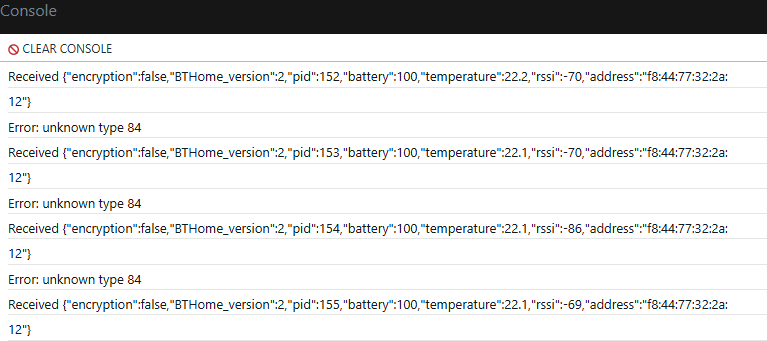
Dadurch hab ich auch bei den Objekten unter BLE nichts drin

Für einen Tipp wäre ich sehr dankbar.
Vielen Dank
LG Mathias -
Hi zusammen
ich hätte mal eine Frage zu diesem Thema.
Ich habe jetzt ein neues Shelly Gateway und darauf ein das neue Shelly BLU TRV verbunden.Ich schaffe es leider nicht per MQTT die Daten in den iobroker zu bringen. Hab schon mehrere Anpassungen am Script versucht.
Das ist der Script den ich drin hab im BLU Gateway Gen.3Ich habe alles nach der Anleitung hier gemacht:
https://github.com/iobroker-community-adapters/ioBroker.shelly/blob/master/docs/en/ble-devices.mdDas neueste Script ist drin.
// v0.4
const SCRIPT_VERSION = '0.4';
const BTHOME_SVC_ID_STR = 'fcd2';

const uint8 = 0;
const int8 = 1;
const uint16 = 2;
const int16 = 3;
const uint24 = 4;
const int24 = 5;
const uint32 = 6;
const int32 = 7;

let SHELLY_ID = undefined;

const BTH = {
    // Misc
    0x00: { n: 'pid', t: uint8 },
    0xf0: { n: 'device_type', t: uint16 },
    0xf1: { n: 'firmware_version', t: uint32 },
    0xf2: { n: 'firmware_version', t: uint24 },
    // Sensor data
    0x51: { n: 'acceleration', t: uint16, f: 0.001, u: 'm/s²' },
    0x01: { n: 'battery', t: uint8, u: '%' },
    0x12: { n: 'co2', t: uint16, u: 'ppm' },
    0x09: { n: 'count', t: uint8 },
    0x3d: { n: 'count', t: uint8 },
    0x3e: { n: 'count', t: uint8 },
    0x43: { n: 'current', t: uint16, f: 0.001, u: 'A' },
    0x08: { n: 'dewpoint', t: int16, f: 0.01, u: '°C' },
    0x40: { n: 'distance_mm', t: uint16, u: 'mm' },
    0x41: { n: 'distance_m', t: uint16, f: 0.1, u: 'm' },
    0x42: { n: 'duration', t: uint24, f: 0.001, u: 's' },
    0x4d: { n: 'energy', t: uint32, f: 0.001, u: 'kWh' },
    0x0a: { n: 'energy', t: uint24, f: 0.001, u: 'kWh' },
    0x4b: { n: 'gas', t: uint24, f: 0.001, u: 'm3' },
    0x4c: { n: 'gas', t: uint32, f: 0.001, u: 'm3' },
    0x52: { n: 'gyroscope', t: uint16, f: 0.001, u: '°/s' },
    0x03: { n: 'humidity', t: uint16, f: 0.01, u: '%' },
    0x2e: { n: 'humidity', t: uint8, u: '%' },
    0x05: { n: 'illuminance', t: uint24, f: 0.01, u: 'lux' },
    0x06: { n: 'mass_kg', t: uint16, f: 0.01, u: 'kg' },
    0x07: { n: 'mass_lb', t: uint16, f: 0.01, u: 'lb' },
    0x14: { n: 'moisture', t: uint16, f: 0.01, u: '%' },
    0x2f: { n: 'moisture', t: uint8, u: '%' },
    0x0d: { n: 'pm2_5', t: uint16, u: 'ug/m3' },
    0x0e: { n: 'pm10', t: uint16, u: 'ug/m3' },
    0x0b: { n: 'power', t: uint24, f: 0.01, u: 'W' },
    0x04: { n: 'pressure', t: uint24, f: 0.01, u: 'hPa' },
    0x3f: { n: 'rotation', t: int16, f: 0.1, u: '°' },
    0x44: { n: 'speed', t: uint16, f: 0.01, u: 'm/s' },
    0x45: { n: 'temperature', t: int16, f: 0.1, u: '°C' },
    0x02: { n: 'temperature', t: int16, f: 0.01, u: '°C' },
    0x13: { n: 'tvoc', t: uint16, u: 'ug/m3' },
    0x0c: { n: 'voltage', t: uint16, f: 0.001, u: 'V' },
    0x4a: { n: 'voltage', t: uint16, f: 0.1, u: 'V' },
    0x4e: { n: 'volume', t: uint32, f: 0.001, u: 'l' },
    0x47: { n: 'volume', t: uint16, f: 0.1, u: 'l' },
    0x48: { n: 'volume', t: uint16, u: 'ml' },
    0x55: { n: 'volume', t: uint32, f: 0.001, u: 'l' },
    0x49: { n: 'volume', t: uint16, f: 0.001, u: 'm3/h' },
    0x46: { n: 'uv_index', t: uint8, f: 0.1 },
    0x4f: { n: 'water', t: uint32, f: 0.001, u: 'l' },
    // Binary Sensor data
    0x15: { n: 'battery', t: uint8 },
    0x16: { n: 'battery_charging', t: uint8 },
    0x17: { n: 'carbon_monoxide', t: uint8 },
    0x18: { n: 'cold', t: uint8 },
    0x19: { n: 'connectivity', t: uint8 },
    0x1a: { n: 'door', t: uint8 },
    0x1b: { n: 'garage_door', t: uint8 },
    0x1c: { n: 'gas', t: uint8 },
    0x0f: { n: 'generic_boolean', t: uint8 },
    0x1d: { n: 'heat', t: uint8 },
    0x1e: { n: 'light', t: uint8 },
    0x1f: { n: 'lock', t: uint8 },
    0x20: { n: 'moisture', t: uint8 },
    0x21: { n: 'motion', t: uint8 },
    0x22: { n: 'moving', t: uint8 },
    0x23: { n: 'occupancy', t: uint8 },
    0x11: { n: 'opening', t: uint8 },
    0x24: { n: 'plug', t: uint8 },
    0x10: { n: 'power', t: uint8 },
    0x25: { n: 'presence', t: uint8 },
    0x26: { n: 'problem', t: uint8 },
    0x27: { n: 'running', t: uint8 },
    0x28: { n: 'safety', t: uint8 },
    0x29: { n: 'smoke', t: uint8 },
    0x2a: { n: 'sound', t: uint8 },
    0x2b: { n: 'tamper', t: uint8 },
    0x2c: { n: 'vibration', t: uint8 },
    0x2d: { n: 'window', t: uint8 },
    // Events
    0x3a: { n: 'button', t: uint8, b: 1 },
    0x3c: { n: 'dimmer', t: uint8 }
};

function getByteSize(type) {
    if (type === uint8 || type === int8) return 1;
    if (type === uint16 || type === int16) return 2;
    if (type === uint24 || type === int24) return 3;
    // impossible as advertisements are much smaller
    return 255;
}

let BTHomeDecoder = {
    utoi: function (num, bitsz) {
        let mask = 1 << (bitsz - 1);
        return num & mask ? num - (1 << bitsz) : num;
    },
    getUInt8: function (buffer) {
        return buffer.at(0);
    },
    getInt8: function (buffer) {
        return this.utoi(this.getUInt8(buffer), 8);
    },
    getUInt16LE: function (buffer) {
        return 0xffff & ((buffer.at(1) << 8) | buffer.at(0));
    },
    getInt16LE: function (buffer) {
        return this.utoi(this.getUInt16LE(buffer), 16);
    },
    getUInt24LE: function (buffer) {
        return (
            0x00ffffff & ((buffer.at(2) << 16) | (buffer.at(1) << 8) | buffer.at(0))
        );
    },
    getInt24LE: function (buffer) {
        return this.utoi(this.getUInt24LE(buffer), 24);
    },
    getUInt32LE: function (buffer) {
        return (
            0x00ffffffff & ((buffer.at(3) << 24) | (buffer.at(2) << 16) | (buffer.at(1) << 8) | buffer.at(0))
        );
    },
    getInt32LE: function (buffer) {
        return this.utoi(this.getUInt32LE(buffer), 32);
    },
    getBufValue: function (type, buffer) {
        if (buffer.length < getByteSize(type)) return null;
        let res = null;
        if (type === uint8) res = this.getUInt8(buffer);
        if (type === int8) res = this.getInt8(buffer);
        if (type === uint16) res = this.getUInt16LE(buffer);
        if (type === int16) res = this.getInt16LE(buffer);
        if (type === uint24) res = this.getUInt24LE(buffer);
        if (type === int24) res = this.getInt24LE(buffer);
        if (type === uint32) res = this.getUInt32LE(buffer);
        if (type === int32) res = this.getInt32LE(buffer);
        return res;
    },
    unpack: function (buffer) {
        // beacons might not provide BTH service data
        if (typeof buffer !== 'string' || buffer.length === 0) return null;
        let result = {};
        let _dib = buffer.at(0);
        result['encryption'] = _dib & 0x1 ? true : false;
        result['BTHome_version'] = _dib >> 5;
        if (result['BTHome_version'] !== 2) return null;
        // can not handle encrypted data
        if (result['encryption']) return result;
        buffer = buffer.slice(1);

        let _bth;
        let _value;
        let _name;
        let _btnNum = 1;
        while (buffer.length > 0) {
            _bth = BTH[buffer.at(0)];
            if (typeof _bth === 'undefined') {
                console.log('Error: unknown type ' + buffer.at(0));
                break;
            }
            buffer = buffer.slice(1);
            _value = this.getBufValue(_bth.t, buffer);
            if (_value === null) break;
            if (typeof _bth.f !== 'undefined') _value = _value * _bth.f;

            _name = _bth.n;
            if (typeof _bth.b !== "undefined") {
                _name = _name + '_' + _btnNum.toString();
                _btnNum++;
            }

            result[_name] = _value;
            buffer = buffer.slice(getByteSize(_bth.t));
        }
        return result;
    }
};

let lastPacketId = 0x100;

// Callback for the BLE scanner object
function bleScanCallback(event, result) {
    // exit if not a result of a scan
    if (event !== BLE.Scanner.SCAN_RESULT) {
        return;
    }

    // exit if service_data member is missing
    if (
        typeof result.service_data === 'undefined' ||
        typeof result.service_data[BTHOME_SVC_ID_STR] === 'undefined'
    ) {
        // console.log('Error: Missing service_data member');
        return;
    }

    let unpackedData = BTHomeDecoder.unpack(
        result.service_data[BTHOME_SVC_ID_STR]
    );

    // exit if unpacked data is null or the device is encrypted
    if (
        unpackedData === null ||
        typeof unpackedData === 'undefined' ||
        unpackedData['encryption']
    ) {
        console.log('Error: Encrypted devices are not supported');
        return;
    }

    // exit if the event is duplicated
    if (lastPacketId === unpackedData.pid) {
        return;
    }

    lastPacketId = unpackedData.pid;

    unpackedData.rssi = result.rssi;
    unpackedData.address = result.addr;

    // create MQTT-Payload
    let message = {
        scriptVersion: SCRIPT_VERSION,
        src: SHELLY_ID,
        srcBle: {
            type: result.local_name,
            mac: result.addr
        },
        payload: unpackedData
    };

    console.log('Received ' + JSON.stringify(unpackedData));

    if (MQTT.isConnected()) {
        MQTT.publish(SHELLY_ID + '/events/ble', JSON.stringify(message));
    }
}

// Initializes the script and performs the necessary checks and configurations
function init() {
    // get the config of ble component
    let bleConfig = Shelly.getComponentConfig('ble');

    // exit if the BLE isn't enabled
    if (!bleConfig.enable) {
        console.log('Error: The Bluetooth is not enabled, please enable it in the settings');
        return;
    }

    // check if the scanner is already running
    if (BLE.Scanner.isRunning()) {
        console.log('Info: The BLE gateway is running, the BLE scan configuration is managed by the device');
    } else {
        // start the scanner
        let bleScanner = BLE.Scanner.Start({
            duration_ms: BLE.Scanner.INFINITE_SCAN,
            active: true
        });

        if (!bleScanner) {
            console.log('Error: Can not start new scanner');
        }
    }

    BLE.Scanner.Subscribe(bleScanCallback);
}

Shelly.call('Mqtt.GetConfig', '', function (res, err_code, err_msg, ud) {
    SHELLY_ID = res['topic_prefix'];

    init();
});
alle Adapter sind aktualisiert
Shelly Geräte auch alle,
JS Controller upgedatet.
Shelly Adapter ist auf : V8.2.1Ich bekomme vom Script immer die Meldung 84 zurück, weiß vielleicht jemand von euch woran das liegen könnte?
Dadurch hab ich auch bei den Objekten unter BLE nichts drin
Für einen Tipp wäre ich sehr dankbar.
Vielen Dank
LG Mathias🧑🎓 Autor des beliebten ioBroker-Master-Kurses
🎥 Tutorials rund um das Thema DIY-Smart-Home: https://haus-automatisierung.com/
📚 Meine Dokumentation -
@haus-automatisierung
oh, vielen Dank!
LG -
Hi,
hat sich schon jemand mit dem shelly blu wall switch 4 bzw. dem shelly blu rc button 4
beschäftigt. Habe das v0.3-Script im Einsatz und empfange darüber auch payloads von den o.g. Devices, aber so wie es aussieht muss wohl das Script für die o.g. Devices angepasst werden.
Hat sich schon jemand damit beschäftigt und kann mir ggf. einen Tip geben - danke vorab ! -
Hi,
hat sich schon jemand mit dem shelly blu wall switch 4 bzw. dem shelly blu rc button 4
beschäftigt. Habe das v0.3-Script im Einsatz und empfange darüber auch payloads von den o.g. Devices, aber so wie es aussieht muss wohl das Script für die o.g. Devices angepasst werden.
Hat sich schon jemand damit beschäftigt und kann mir ggf. einen Tip geben - danke vorab !@rolfs Ist längst erledigt. Funktioniert mit der aktuellen Beta und dem neuesten Script
-
Hallo Community,
@haus-automatisierung, danke für das Script und die Anleitungen, ein Shelly Blu Button und ein Shelly Blu Button Tough kommen super in iobroker an, keine Probleme oder Abweichungen zu den Beschreibungen. Gedanklich seh ich mich schon mit Lokalisierungs-Use Cases spielen, aber dafür müsste ich viel mehr Empfänger (Plus Plugs o.Ä.) kaufen und das steht aktuell nicht dafür.
Vielleicht nur ein kleiner Gedankengang (teils dem Script, teils BT Home geschuldet): ist es aus Security-Sicht sinnvoll, das Script komplett transparent zu halten, ohne irgendwelche Pairing-Aktionen zwischen Buttons und Plugs? Was ich damit meine: ich hab meinen Tough Button nach Einrichtung aller Scripts usw. gekauft, FW mit der Debug App aktualisiert und der erste Tastendruck führt sofort zur Einrichtung der Datenpunkte in iobroker mit der MAC-Adresse des Buttons. Kein Pairing durch Shelly App oder sonst was nötig. Wenn mein Nachbar seinen Blu Button in Reichweite meiner Installation hat, wird der auch an Bord geholt, wenn ein Attacker N mac Adressen "simuliert" hab ich N Datenpunkte drin, etc...
Kann das über Einstellungen am Shelly unterbunden werden oder müsste das Script um ein Whitelisting erweitert werden? Bluetooth Einstellungen am Plug: Bluetooth, RPC und Bluetooth Gateway aktiviert.
Liebe Grüße!
-
Hallo Community,
@haus-automatisierung, danke für das Script und die Anleitungen, ein Shelly Blu Button und ein Shelly Blu Button Tough kommen super in iobroker an, keine Probleme oder Abweichungen zu den Beschreibungen. Gedanklich seh ich mich schon mit Lokalisierungs-Use Cases spielen, aber dafür müsste ich viel mehr Empfänger (Plus Plugs o.Ä.) kaufen und das steht aktuell nicht dafür.
Vielleicht nur ein kleiner Gedankengang (teils dem Script, teils BT Home geschuldet): ist es aus Security-Sicht sinnvoll, das Script komplett transparent zu halten, ohne irgendwelche Pairing-Aktionen zwischen Buttons und Plugs? Was ich damit meine: ich hab meinen Tough Button nach Einrichtung aller Scripts usw. gekauft, FW mit der Debug App aktualisiert und der erste Tastendruck führt sofort zur Einrichtung der Datenpunkte in iobroker mit der MAC-Adresse des Buttons. Kein Pairing durch Shelly App oder sonst was nötig. Wenn mein Nachbar seinen Blu Button in Reichweite meiner Installation hat, wird der auch an Bord geholt, wenn ein Attacker N mac Adressen "simuliert" hab ich N Datenpunkte drin, etc...
Kann das über Einstellungen am Shelly unterbunden werden oder müsste das Script um ein Whitelisting erweitert werden? Bluetooth Einstellungen am Plug: Bluetooth, RPC und Bluetooth Gateway aktiviert.
Liebe Grüße!
@matthiasb85 sagte in Shelly >= 6.6.0 mit BLU-Geräten (Bluetooth Low Energy):
Kann das über Einstellungen am Shelly unterbunden werden oder müsste das Script um ein Whitelisting erweitert werden?
Könnte man schon machen. Auch im Adapter. Aber was hilft Dir das bei dem Szenario?
Richtig wäre, encryption auf den BLE-Geräten zu aktivieren. Aber da findet man keine Infos, wie genau das mit dem Pairing und den Schlüsseln ablaufen muss. Ich nutze die BLE-Komponenten nicht, und bin da nicht so hinterher.
Wenn Du ein funktionierendes Beispiel mit aktiver encryption hast, implementiere ich das aber gern.
-
@matthiasb85 sagte in Shelly >= 6.6.0 mit BLU-Geräten (Bluetooth Low Energy):
Kann das über Einstellungen am Shelly unterbunden werden oder müsste das Script um ein Whitelisting erweitert werden?
Könnte man schon machen. Auch im Adapter. Aber was hilft Dir das bei dem Szenario?
Richtig wäre, encryption auf den BLE-Geräten zu aktivieren. Aber da findet man keine Infos, wie genau das mit dem Pairing und den Schlüsseln ablaufen muss. Ich nutze die BLE-Komponenten nicht, und bin da nicht so hinterher.
Wenn Du ein funktionierendes Beispiel mit aktiver encryption hast, implementiere ich das aber gern.
@haus-automatisierung
Mir geht's an sich nur darum rogue devices vom Netzwerk / iobroker fern zu halten, welches Mittel auch immer das Richtige ist. Bin aber weder BLE- noch Security Experte um dazu eine qualifizierte Meinung zu haben, wie man Fremdgeräte am besten draußen hält. Ich versuch mich mal in die Encryption einzulesen und schaue mir auch an, wie das in anderen veröffentlichten Scripts gelöst ist, die ShellyBlu zu MQTT umsetzen. -
@haus-automatisierung
Mir geht's an sich nur darum rogue devices vom Netzwerk / iobroker fern zu halten, welches Mittel auch immer das Richtige ist. Bin aber weder BLE- noch Security Experte um dazu eine qualifizierte Meinung zu haben, wie man Fremdgeräte am besten draußen hält. Ich versuch mich mal in die Encryption einzulesen und schaue mir auch an, wie das in anderen veröffentlichten Scripts gelöst ist, die ShellyBlu zu MQTT umsetzen.@matthiasb85 sagte in Shelly >= 6.6.0 mit BLU-Geräten (Bluetooth Low Energy):
und schaue mir auch an, wie das in anderen veröffentlichten Scripts gelöst ist
Ich kenne kein Beispiel, was mit aktivierter Encryption arbeitet.
-
@joesch80 Na die Lösung bzw das Problem hatte ich in meiner ersten Antwort ja schon genannt. Keine Ahnung warum das bei dir anders ist mit der gleichen Firmware.
Man müsste also in der nächsten Version des Scripts mal alles hinzufügen was das Protokoll kann. Nur fehlt mir dafür die Zeit aktuell.
Erst mal.....vielen Dank für das Script.
Ich hab seid Sonntagabend 3x Shelly blu Door/Window im Einsatz.
Eingebunden mit deinem Script über einen PM.
Wozu dient die Angabe in dem Bild?
Muss dass noch eingefügt werden, wenn ja, wo genau?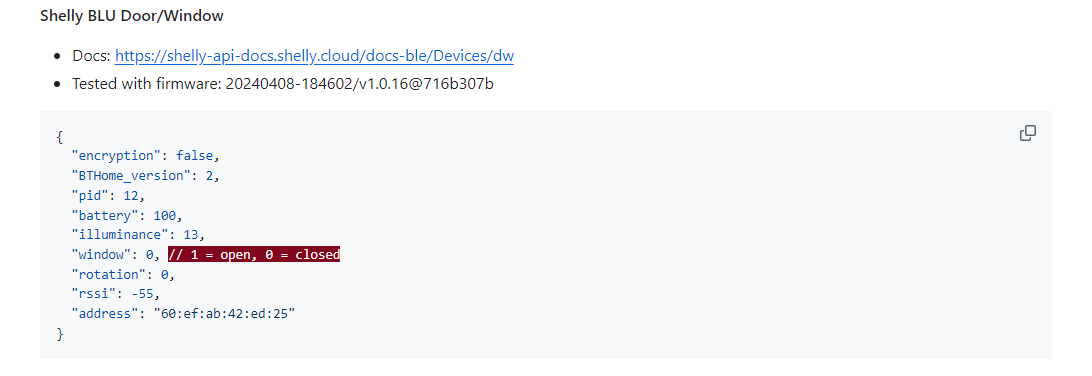
-
Erst mal.....vielen Dank für das Script.
Ich hab seid Sonntagabend 3x Shelly blu Door/Window im Einsatz.
Eingebunden mit deinem Script über einen PM.
Wozu dient die Angabe in dem Bild?
Muss dass noch eingefügt werden, wenn ja, wo genau?@accuface Nur zur Info. Die Schritte im YouTube Video sind noch aktuell
-
@accuface Nur zur Info. Die Schritte im YouTube Video sind noch aktuell
@haus-automatisierung said in Shelly >= 6.6.0 mit BLU-Geräten (Bluetooth Low Energy):
@accuface Nur zur Info. Die Schritte im YouTube Video sind noch aktuell
hab ich dann wohl gekonnt übersehen. sry.
schau ich sofort nochmal an.
Danke
EDIT:
Ich hab in dem Video nix gesehen dass du den Code aus meinem Bild irgendwo verwendet hast.
Nur um sicher zu gehen, die Installation der Bluetooth Paket benötige ich NUR wenn ich über den Stick und den BLE Adapter gehe, richtig?
-
@haus-automatisierung said in Shelly >= 6.6.0 mit BLU-Geräten (Bluetooth Low Energy):
@accuface Nur zur Info. Die Schritte im YouTube Video sind noch aktuell
hab ich dann wohl gekonnt übersehen. sry.
schau ich sofort nochmal an.
Danke
EDIT:
Ich hab in dem Video nix gesehen dass du den Code aus meinem Bild irgendwo verwendet hast.
Nur um sicher zu gehen, die Installation der Bluetooth Paket benötige ich NUR wenn ich über den Stick und den BLE Adapter gehe, richtig?
@accuface sagte in Shelly >= 6.6.0 mit BLU-Geräten (Bluetooth Low Energy):
Ich hab in dem Video nix gesehen dass du den Code aus meinem Bild irgendwo verwendet hast.
Na guck. Daher eben der Hinweis, dass das da nur zur Info steht (was genau intern ankommt).
Nur um sicher zu gehen, die Installation der Bluetooth Paket benötige ich NUR wenn ich über den Stick und den BLE Adapter gehe, richtig?
Richtig
-
@accuface sagte in Shelly >= 6.6.0 mit BLU-Geräten (Bluetooth Low Energy):
Ich hab in dem Video nix gesehen dass du den Code aus meinem Bild irgendwo verwendet hast.
Na guck. Daher eben der Hinweis, dass das da nur zur Info steht (was genau intern ankommt).
Nur um sicher zu gehen, die Installation der Bluetooth Paket benötige ich NUR wenn ich über den Stick und den BLE Adapter gehe, richtig?
Richtig
@haus-automatisierung said in Shelly >= 6.6.0 mit BLU-Geräten (Bluetooth Low Energy):
@accuface sagte in Shelly >= 6.6.0 mit BLU-Geräten (Bluetooth Low Energy):
Ich hab in dem Video nix gesehen dass du den Code aus meinem Bild irgendwo verwendet hast.
Na guck. Daher eben der Hinweis, dass das da nur zur Info steht (was genau intern ankommt).
Und ich war kurz am Zweifeln ob ich schon Alzheimer habe.

Nur um sicher zu gehen, die Installation der Bluetooth Paket benötige ich NUR wenn ich über den Stick und den BLE Adapter gehe, richtig?
Richtig
Danke
-
@accuface sagte in Shelly >= 6.6.0 mit BLU-Geräten (Bluetooth Low Energy):
Ich hab in dem Video nix gesehen dass du den Code aus meinem Bild irgendwo verwendet hast.
Na guck. Daher eben der Hinweis, dass das da nur zur Info steht (was genau intern ankommt).
Nur um sicher zu gehen, die Installation der Bluetooth Paket benötige ich NUR wenn ich über den Stick und den BLE Adapter gehe, richtig?
Richtig
Moin,
jetzt muss ich nochmal fragen:
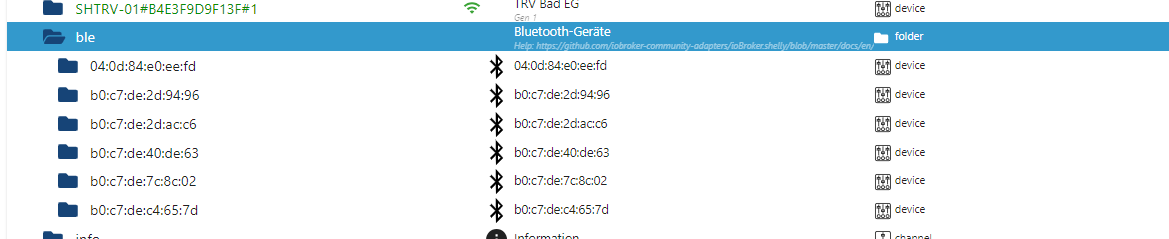
Woran könnte es liegen dass ich heute Morgen die Fensterkontakte 6x (bei 3 Realen) in den objekten habe?
Mir ist schon klar dass 3 stück "fake" sind, aber warum? bei diesen fehlt auch der DP Window, der bei den realen vorhanden ist.
Alle Adapter sind aktuell.
Sonst noch Angaben?ich lasse den Shelly adapter heute mal auf Debug stehen und schauen was passiert bis heute abend.
-
Moin,
jetzt muss ich nochmal fragen:
Woran könnte es liegen dass ich heute Morgen die Fensterkontakte 6x (bei 3 Realen) in den objekten habe?
Mir ist schon klar dass 3 stück "fake" sind, aber warum? bei diesen fehlt auch der DP Window, der bei den realen vorhanden ist.
Alle Adapter sind aktuell.
Sonst noch Angaben?ich lasse den Shelly adapter heute mal auf Debug stehen und schauen was passiert bis heute abend.
@accuface Eventuell aus der Nachbarschaft?
-
@accuface Eventuell aus der Nachbarschaft?
@haus-automatisierung said in Shelly >= 6.6.0 mit BLU-Geräten (Bluetooth Low Energy):
@accuface Eventuell aus der Nachbarschaft?
Schwer vorstellbar, das ist eine Altersgeneration die vermutlich ned viel mit smart home zu tun hat.
Ich finds halt seltsam dass es genau 3 stück sind und bei denen der DP Window fehlt. hört sich für mich wie eine Kopie an.
Ich kann aber die nächste Zeit in der Nachbarschaft fragen, wenn ich jemand antreffe. Glaubs aber eher nicht.
Angenommen es käme aus der Nachbarschaft und es sind echte Geräte, dann müsste ich doch beim aktivieren meins Bluetooth am Handy, alle 6 Geräte empfangen, oder liege ich da falsch?



Hey! Du scheinst an dieser Unterhaltung interessiert zu sein, hast aber noch kein Konto.
Hast du es satt, bei jedem Besuch durch die gleichen Beiträge zu scrollen? Wenn du dich für ein Konto anmeldest, kommst du immer genau dorthin zurück, wo du zuvor warst, und kannst dich über neue Antworten benachrichtigen lassen (entweder per E-Mail oder Push-Benachrichtigung). Du kannst auch Lesezeichen speichern und Beiträge positiv bewerten, um anderen Community-Mitgliedern deine Wertschätzung zu zeigen.
Mit deinem Input könnte dieser Beitrag noch besser werden 💗
Registrieren AnmeldenSupport us
489
Online33.0k
Benutzer83.6k
Themen1.3m
Beiträge