




Could not determine controller directory
-
moin!
bei mir kommt nach dem js-controller update von V5.0.19 auf V7.0.3 auch die meldung in einer endlosschleife:uncaught exception: Could not determine controller directoryich hatte das gleiche problem schon beim update auf V6.x und bin deswegen dann erstmal bei der V5.0.19 geblieben.
vielleicht hat jemand eine idee, was da der grund sein könnte.
vielen dank schonmaliob diag kurzform:
======================= SUMMARY =======================
                        v.2024-10-19


 Static hostname: vm01
       Icon name: computer-vm
         Chassis: vm
  Virtualization: vmware
Operating System: Ubuntu 22.04.5 LTS
          Kernel: Linux 5.15.0-126-generic
    Architecture: x86-64
 Hardware Vendor: VMware, Inc.
  Hardware Model: VMware Virtual Platform

Installation:           vmware
Kernel:                 x86_64
Userland:               64 bit
Timezone:               Europe/Berlin (CET, +0100)
User-ID:                1000
Display-Server:         false
Boot Target:            multi-user.target

Pending OS-Updates:     0
Pending iob updates:    0

Nodejs-Installation:
/usr/bin/nodejs         v20.18.1
/usr/bin/node           v20.18.1
/usr/bin/npm            10.8.2
/usr/bin/npx            10.8.2
/usr/bin/corepack       0.29.4

Recommended versions are nodejs  and npm
nodeJS installation is correct

MEMORY:
               total        used        free      shared  buff/cache   available
Mem:            7.9G        777M        4.5G        7.0M        2.7G        6.9G
Swap:           1.0G          0B        1.0G
Total:          9.0G        777M        5.5G

Active iob-Instances:   1
Upgrade policy: none

ioBroker Core:          js-controller           7.0.3
                        admin                   7.4.2

ioBroker Status:        iobroker is not running on this host.


Objects type: jsonl
States  type: jsonl

Status admin and web instance:
  system.adapter.admin.0                  : admin                 : vm01                                     -  enabled, port: 8081, bind: 0.0.0.0, run as: admin
  system.adapter.web.0                    : web                   : vm01                                     -  enabled, port: 8082, bind: 0.0.0.0, run as: admin

Objects:                10688
States:                 151231

Size of iob-Database:

13M     /opt/iobroker/iobroker-data/objects.jsonl
11M     /opt/iobroker/iobroker-data/objects.json.broken
8.0M    /opt/iobroker/iobroker-data/objects.json.migrated
8.0M    /opt/iobroker/iobroker-data/objects.json.bak.migrated
34M     /opt/iobroker/iobroker-data/states.json.migrated
34M     /opt/iobroker/iobroker-data/states.json.bak.migrated
32M     /opt/iobroker/iobroker-data/states.jsonl
0       /opt/iobroker/iobroker-data/states.json.broken


Operating System codenamed 'jammy' is an aging Ubuntu release! Please upgrade to the latest LTS release 'noble' in due time!

=================== END OF SUMMARY ====================
und dann hier noch mal in lang:
Script v.2024-10-19 *** BASE SYSTEM *** Static hostname: vm01 Icon name: computer-vm Chassis: vm Virtualization: vmware Operating System: Ubuntu 22.04.5 LTS Kernel: Linux 5.15.0-126-generic Architecture: x86-64 Hardware Vendor: VMware, Inc. Hardware Model: VMware Virtual Platform OS is similar to: debian model name : Intel(R) Core(TM) i7-9750H CPU @ 2.60GHz Docker : false Virtualization : vmware Kernel : x86_64 Userland : 64 bit Systemuptime and Load: 09:26:05 up 18 min, 2 users, load average: 0.64, 0.58, 0.47 CPU threads: 12 *** LIFE CYCLE STATUS *** Operating System codenamed 'jammy' is an aging Ubuntu release! Please upgrade to the latest LTS release 'noble' in due time! *** TIME AND TIMEZONES *** Local time: Tue 2024-11-26 09:26:05 CET Universal time: Tue 2024-11-26 08:26:05 UTC RTC time: Tue 2024-11-26 08:26:05 Time zone: Europe/Berlin (CET, +0100) System clock synchronized: yes NTP service: active RTC in local TZ: no *** Users and Groups *** User that called 'iob diag': arno DERBY_HOME=/usr/lib/jvm/java-8-oracle/db JAVA_HOME=/usr/lib/jvm/java-8-oracle HOME=/home/arno GROUPS=arno adm cdrom sudo dip plugdev sambashare lpadmin iobroker User that is running 'js-controller': js-controller is not running *** DISPLAY-SERVER SETUP *** Display-Server: false Desktop: Terminal: tty *** MEMORY *** total used free shared buff/cache available Mem: 7.9G 798M 4.3G 7.0M 2.8G 6.8G Swap: 1.0G 0B 1.0G Total: 9.0G 798M 5.4G Active iob-Instances: 1 7935 M total memory 799 M used memory 1646 M active memory 1418 M inactive memory 4343 M free memory 691 M buffer memory 2101 M swap cache 1021 M total swap 0 M used swap 1021 M free swap *** top - Table Of Processes *** top - 09:26:05 up 18 min, 2 users, load average: 0.64, 0.58, 0.47 Tasks: 283 total, 1 running, 282 sleeping, 0 stopped, 0 zombie %Cpu(s): 0.5 us, 0.5 sy, 0.0 ni, 99.0 id, 0.0 wa, 0.0 hi, 0.0 si, 0.0 st MiB Mem : 7935.4 total, 4343.9 free, 798.9 used, 2792.6 buff/cache MiB Swap: 1022.0 total, 1022.0 free, 0.0 used. 6830.7 avail Mem *** FAILED SERVICES *** UNIT LOAD ACTIVE SUB DESCRIPTION * iobroker.service loaded failed failed ioBroker Server * tftpd-hpa.service loaded failed failed LSB: HPA's tftp server LOAD = Reflects whether the unit definition was properly loaded. ACTIVE = The high-level unit activation state, i.e. generalization of SUB. SUB = The low-level unit activation state, values depend on unit type. 2 loaded units listed. *** DMESG CRITICAL ERRORS *** No critical errors detected *** FILESYSTEM *** Filesystem Type Size Used Avail Use% Mounted on tmpfs tmpfs 794M 2.6M 791M 1% /run /dev/sda1 ext4 78G 40G 34G 54% / tmpfs tmpfs 3.9G 0 3.9G 0% /dev/shm tmpfs tmpfs 5.0M 0 5.0M 0% /run/lock /dev/sdb1 ext4 59G 12G 45G 21% /mnt/hd1 tmpfs tmpfs 3.9G 0 3.9G 0% /run/qemu store01.worxnet.localnet:/volume1/shares nfs 13T 6.0T 6.3T 49% /mnt/autofs/store01_vol1_nfs tmpfs tmpfs 794M 0 794M 0% /run/user/1000 Messages concerning ext4 filesystem in dmesg: [Tue Nov 26 09:07:47 2024] EXT4-fs (sda1): mounted filesystem with ordered data mode. Opts: (null). Quota mode: none. [Tue Nov 26 09:07:47 2024] EXT4-fs (sda1): re-mounted. Opts: errors=remount-ro. Quota mode: none. [Tue Nov 26 09:07:48 2024] EXT4-fs (sdb1): mounted filesystem with ordered data mode. Opts: (null). Quota mode: none. Show mounted filesystems: TARGET SOURCE FSTYPE OPTIONS / /dev/sda1 ext4 rw,relatime,errors=remount-ro |-/mnt/hd1 /dev/sdb1 ext4 rw,relatime `-/mnt/autofs/store01_vol1_nfs store01.worxnet.localnet:/volume1/shares nfs rw,relatime,vers=3,rsize=131072,wsize=131072,namlen=255,hard,proto=tcp,timeo=600,retrans=2,sec=sys,mountaddr=192.168.178.240,mountvers=3,mountport=892,mountproto=udp,local_lock=none,addr=192.168.178.240 Files in neuralgic directories: /var: 1.4G /var/ 632M /var/cache 625M /var/lib 359M /var/lib/apt/lists 359M /var/lib/apt Archived and active journals take up 48.0M in the file system. /opt/iobroker/backups: 383M /opt/iobroker/backups/ /opt/iobroker/iobroker-data: 1.8G /opt/iobroker/iobroker-data/ 1009M /opt/iobroker/iobroker-data/files 617M /opt/iobroker/iobroker-data/files/javascript.admin 560M /opt/iobroker/iobroker-data/files/javascript.admin/static 558M /opt/iobroker/iobroker-data/files/javascript.admin/static/js The five largest files in iobroker-data are: 34M /opt/iobroker/iobroker-data/states.json.migrated 34M /opt/iobroker/iobroker-data/states.json.bak.migrated 32M /opt/iobroker/iobroker-data/states.jsonl 24M /opt/iobroker/iobroker-data/files/scenes.admin/static/js/main.c9369f6c.js.map 19M /opt/iobroker/iobroker-data/files/web.admin/static/js/main.6964fae2.js.map USB-Devices by-id: USB-Sticks - Avoid direct links to /dev/tty* in your adapter setups, please always prefer the links 'by-id': No Devices found 'by-id' *** NodeJS-Installation *** /usr/bin/nodejs v20.18.1 /usr/bin/node v20.18.1 /usr/bin/npm 10.8.2 /usr/bin/npx 10.8.2 /usr/bin/corepack 0.29.4 nodejs: Installed: 20.18.1-1nodesource1 Candidate: 20.18.1-1nodesource1 Version table: *** 20.18.1-1nodesource1 1001 500 https://deb.nodesource.com/node_20.x nodistro/main amd64 Packages 100 /var/lib/dpkg/status 20.18.0-1nodesource1 1001 500 https://deb.nodesource.com/node_20.x nodistro/main amd64 Packages 20.17.0-1nodesource1 1001 500 https://deb.nodesource.com/node_20.x nodistro/main amd64 Packages 20.16.0-1nodesource1 1001 500 https://deb.nodesource.com/node_20.x nodistro/main amd64 Packages 20.15.1-1nodesource1 1001 500 https://deb.nodesource.com/node_20.x nodistro/main amd64 Packages 20.15.0-1nodesource1 1001 500 https://deb.nodesource.com/node_20.x nodistro/main amd64 Packages 20.14.0-1nodesource1 1001 500 https://deb.nodesource.com/node_20.x nodistro/main amd64 Packages 20.13.1-1nodesource1 1001 500 https://deb.nodesource.com/node_20.x nodistro/main amd64 Packages 20.13.0-1nodesource1 1001 500 https://deb.nodesource.com/node_20.x nodistro/main amd64 Packages 20.12.2-1nodesource1 1001 500 https://deb.nodesource.com/node_20.x nodistro/main amd64 Packages 20.12.1-1nodesource1 1001 500 https://deb.nodesource.com/node_20.x nodistro/main amd64 Packages 20.12.0-1nodesource1 1001 500 https://deb.nodesource.com/node_20.x nodistro/main amd64 Packages 20.11.1-1nodesource1 1001 500 https://deb.nodesource.com/node_20.x nodistro/main amd64 Packages 20.11.0-1nodesource1 1001 500 https://deb.nodesource.com/node_20.x nodistro/main amd64 Packages 20.10.0-1nodesource1 1001 500 https://deb.nodesource.com/node_20.x nodistro/main amd64 Packages 20.9.0-1nodesource1 1001 500 https://deb.nodesource.com/node_20.x nodistro/main amd64 Packages 20.8.1-1nodesource1 1001 500 https://deb.nodesource.com/node_20.x nodistro/main amd64 Packages 20.8.0-1nodesource1 1001 500 https://deb.nodesource.com/node_20.x nodistro/main amd64 Packages 20.7.0-1nodesource1 1001 500 https://deb.nodesource.com/node_20.x nodistro/main amd64 Packages 20.6.1-1nodesource1 1001 500 https://deb.nodesource.com/node_20.x nodistro/main amd64 Packages 20.6.0-1nodesource1 1001 500 https://deb.nodesource.com/node_20.x nodistro/main amd64 Packages 20.5.1-1nodesource1 1001 500 https://deb.nodesource.com/node_20.x nodistro/main amd64 Packages 20.5.0-1nodesource1 1001 500 https://deb.nodesource.com/node_20.x nodistro/main amd64 Packages 20.4.0-1nodesource1 1001 500 https://deb.nodesource.com/node_20.x nodistro/main amd64 Packages 20.3.1-1nodesource1 1001 500 https://deb.nodesource.com/node_20.x nodistro/main amd64 Packages 20.3.0-1nodesource1 1001 500 https://deb.nodesource.com/node_20.x nodistro/main amd64 Packages 20.2.0-1nodesource1 1001 500 https://deb.nodesource.com/node_20.x nodistro/main amd64 Packages 20.1.0-1nodesource1 1001 500 https://deb.nodesource.com/node_20.x nodistro/main amd64 Packages 20.0.0-1nodesource1 1001 500 https://deb.nodesource.com/node_20.x nodistro/main amd64 Packages 12.22.9~dfsg-1ubuntu3.6 500 500 http://de.archive.ubuntu.com/ubuntu jammy-updates/universe amd64 Packages 500 http://security.ubuntu.com/ubuntu jammy-security/universe amd64 Packages 12.22.9~dfsg-1ubuntu3 500 500 http://de.archive.ubuntu.com/ubuntu jammy/universe amd64 Packages Temp directories causing deletion problem: 0 No problems detected Errors in npm tree: 0 No problems detected *** ioBroker-Installation *** ioBroker Status iobroker is not running on this host. Objects type: jsonl States type: jsonl Hosts: vm01 vm01 (version: 7.0.3, hostname: vm01 , alive, uptime: 2) Core adapters versions js-controller: 7.0.3 admin: 7.4.2 javascript: 8.8.3 nodejs modules from github: 1 | `-- xmlbuilder@0.4.2 invalid: "https://github.com/hobbyquaker/xmlbuilder-js/tarball/29fe5030dc6852007dc8d1bfd5109d75f8da58d5" from node_modules/homematic-xmlrpc Adapter State system.adapter.admin.0 : admin : vm01 - enabled, port: 8081, bind: 0.0.0.0, run as: admin system.adapter.alexa2.0 : alexa2 : vm01 - enabled system.adapter.email.0 : email : vm01 - enabled system.adapter.enigma2.0 : enigma2 : vm01 - disabled system.adapter.fritzdect.0 : fritzdect : vm01 - enabled system.adapter.history.0 : history : vm01 - enabled system.adapter.hm-rega.0 : hm-rega : vm01 - enabled system.adapter.hm-rpc.0 : hm-rpc : vm01 - enabled, port: 0 system.adapter.hm-rpc.1 : hm-rpc : vm01 - enabled, port: 0 system.adapter.hm-rpc.2 : hm-rpc : vm01 - disabled, port: 0 system.adapter.hue.0 : hue : vm01 - enabled, port: 80 system.adapter.ical.0 : ical : vm01 - enabled system.adapter.iot.0 : iot : vm01 - enabled system.adapter.javascript.0 : javascript : vm01 - enabled system.adapter.netatmo.0 : netatmo : vm01 - enabled system.adapter.nina.0 : nina : vm01 - enabled system.adapter.nut.0 : nut : vm01 - enabled system.adapter.openweathermap.0 : openweathermap : vm01 - disabled system.adapter.scenes.0 : scenes : vm01 - enabled system.adapter.simple-api.0 : simple-api : vm01 - enabled, port: 8087, bind: 0.0.0.0, run as: admin system.adapter.sonos.0 : sonos : vm01 - enabled system.adapter.telegram.0 : telegram : vm01 - enabled, port: 8443, bind: 0.0.0.0 system.adapter.text2command.0 : text2command : vm01 - enabled system.adapter.vis-2.0 : vis-2 : vm01 - enabled system.adapter.vis-hqwidgets.0 : vis-hqwidgets : vm01 - enabled system.adapter.vis-jqui-mfd.0 : vis-jqui-mfd : vm01 - enabled system.adapter.vis-materialdesign.0 : vis-materialdesign : vm01 - enabled system.adapter.vis-players.0 : vis-players : vm01 - enabled system.adapter.vis-timeandweather.0 : vis-timeandweather : vm01 - enabled system.adapter.vis.0 : vis : vm01 - enabled system.adapter.web.0 : web : vm01 - enabled, port: 8082, bind: 0.0.0.0, run as: admin system.adapter.whatsapp-cmb.0 : whatsapp-cmb : vm01 - enabled + instance is alive Enabled adapters with bindings system.adapter.admin.0 : admin : vm01 - enabled, port: 8081, bind: 0.0.0.0, run as: admin system.adapter.hm-rpc.0 : hm-rpc : vm01 - enabled, port: 0 system.adapter.hm-rpc.1 : hm-rpc : vm01 - enabled, port: 0 system.adapter.hue.0 : hue : vm01 - enabled, port: 80 system.adapter.simple-api.0 : simple-api : vm01 - enabled, port: 8087, bind: 0.0.0.0, run as: admin system.adapter.telegram.0 : telegram : vm01 - enabled, port: 8443, bind: 0.0.0.0 system.adapter.web.0 : web : vm01 - enabled, port: 8082, bind: 0.0.0.0, run as: admin ioBroker-Repositories ┌─────────┬───────────┬─────────────────────────────────────────────────────────────────────────────────────────────┬──────────────┐ │ (index) │ name │ url │ auto upgrade │ ├─────────┼───────────┼─────────────────────────────────────────────────────────────────────────────────────────────┼──────────────┤ │ 0 │ 'beta' │ 'http://download.iobroker.net/sources-dist-latest.json' │ false │ │ 1 │ 'sources' │ 'conf/sources-dist.json' │ false │ │ 2 │ 'online' │ 'https://raw.githubusercontent.com/ioBroker/ioBroker.repositories/master/sources-dist.json' │ false │ │ 3 │ 'stable' │ 'http://download.iobroker.net/sources-dist.json' │ false │ └─────────┴───────────┴─────────────────────────────────────────────────────────────────────────────────────────────┴──────────────┘ Active repo(s): beta Upgrade policy: none Installed ioBroker-Instances Used repository: beta Adapter "admin" : 7.4.2 , installed 7.4.2 Adapter "alexa2" : 3.26.7 , installed 3.26.7 Adapter "email" : 1.3.1 , installed 1.3.1 Adapter "enigma2" : 2.2.1 , installed 2.2.1 Adapter "fritzdect" : 2.5.11 , installed 2.5.11 Adapter "history" : 3.0.1 , installed 3.0.1 Adapter "hm-rega" : 5.1.0 , installed 5.1.0 Adapter "hm-rpc" : 2.0.2 , installed 2.0.2 Adapter "hue" : 3.13.1 , installed 3.13.1 Adapter "ical" : 1.16.1 , installed 1.16.1 Adapter "iot" : 3.4.3 , installed 3.4.3 Adapter "javascript" : 8.8.3 , installed 8.8.3 Controller "js-controller": 7.0.3 , installed 7.0.3 Adapter "netatmo" : 3.1.0 , installed 3.1.0 Adapter "nina" : 0.0.26 , installed 0.0.26 Adapter "nut" : 1.6.0 , installed 1.6.0 Adapter "openweathermap": 1.1.2 , installed 1.1.2 Adapter "scenes" : 3.2.3 , installed 3.2.3 Adapter "signifylights": 0.4.2 , installed 0.4.2 Adapter "simple-api" : 2.8.0 , installed 2.8.0 Adapter "socketio" : 6.7.1 , installed 6.7.1 Adapter "sonos" : 3.0.0 , installed 3.0.0 Adapter "telegram" : 3.9.0 , installed 3.9.0 Adapter "text2command" : 3.0.3 , installed 3.0.3 Adapter "vis" : 1.5.6 , installed 1.5.6 Adapter "vis-2" : 2.10.8 , installed 2.10.8 Adapter "vis-hqwidgets": 1.5.1 , installed 1.5.1 Adapter "vis-jqui-mfd" : 1.1.1 , installed 1.1.1 Adapter "vis-materialdesign": 0.5.9, installed 0.5.9 Adapter "vis-players" : 0.1.6 , installed 0.1.6 Adapter "vis-timeandweather": 1.2.2, installed 1.2.2 Adapter "web" : 6.3.1 , installed 6.3.1 Adapter "whatsapp-cmb" : 0.3.0 , installed 0.3.0 Adapter "ws" : 2.6.2 , installed 2.6.2 Objects and States Please stand by - This may take a while Objects: 10688 States: 151231 *** OS-Repositories and Updates *** Hit:1 http://de.archive.ubuntu.com/ubuntu jammy InRelease Hit:2 http://de.archive.ubuntu.com/ubuntu jammy-updates InRelease Hit:3 http://de.archive.ubuntu.com/ubuntu jammy-backports InRelease Hit:4 https://deb.nodesource.com/node_20.x nodistro InRelease Hit:5 http://security.ubuntu.com/ubuntu jammy-security InRelease Reading package lists... Pending Updates: 0 *** Listening Ports *** Active Internet connections (only servers) Proto Recv-Q Send-Q Local Address Foreign Address State User Inode PID/Program name tcp 0 0 0.0.0.0:41587 0.0.0.0:* LISTEN 0 1024 925/rpc.mountd tcp 0 0 0.0.0.0:554 0.0.0.0:* LISTEN 0 21714 986/MediaServer tcp 0 0 0.0.0.0:46055 0.0.0.0:* LISTEN 0 16918 - tcp 0 0 0.0.0.0:5005 0.0.0.0:* LISTEN 0 27389 784/node tcp 0 0 0.0.0.0:9100 0.0.0.0:* LISTEN 0 23848 1055/xinetd tcp 0 0 0.0.0.0:81 0.0.0.0:* LISTEN 0 21716 986/MediaServer tcp 0 0 0.0.0.0:80 0.0.0.0:* LISTEN 0 16940 1056/apache2 tcp 0 0 0.0.0.0:111 0.0.0.0:* LISTEN 0 23582 1/init tcp 0 0 0.0.0.0:22 0.0.0.0:* LISTEN 0 13889 930/sshd: /usr/sbin tcp 0 0 0.0.0.0:21 0.0.0.0:* LISTEN 0 16887 927/vsftpd tcp 0 0 0.0.0.0:444 0.0.0.0:* LISTEN 0 21717 986/MediaServer tcp 0 0 0.0.0.0:443 0.0.0.0:* LISTEN 0 16942 1056/apache2 tcp 0 0 0.0.0.0:1688 0.0.0.0:* LISTEN 0 26869 965/XXXXX tcp 0 0 0.0.0.0:34400 0.0.0.0:* LISTEN 0 17000 957/xteve tcp 0 0 0.0.0.0:1935 0.0.0.0:* LISTEN 0 21715 986/MediaServer tcp 0 0 0.0.0.0:10000 0.0.0.0:* LISTEN 0 21732 986/MediaServer tcp 0 0 192.168.178.20:445 0.0.0.0:* LISTEN 0 27371 1042/smbd tcp 0 0 192.168.178.20:139 0.0.0.0:* LISTEN 0 27372 1042/smbd tcp 0 0 0.0.0.0:55817 0.0.0.0:* LISTEN 0 1004 925/rpc.mountd tcp 0 0 0.0.0.0:39465 0.0.0.0:* LISTEN 0 995 925/rpc.mountd tcp 0 0 0.0.0.0:3010 0.0.0.0:* LISTEN 0 29339 699/node tcp 0 0 0.0.0.0:44013 0.0.0.0:* LISTEN 106 1010 890/rpc.statd tcp 0 0 0.0.0.0:23424 0.0.0.0:* LISTEN 0 23849 1055/xinetd tcp 0 0 0.0.0.0:23423 0.0.0.0:* LISTEN 0 23850 1055/xinetd tcp 0 0 0.0.0.0:2223 0.0.0.0:* LISTEN 0 23847 1055/xinetd tcp 0 0 0.0.0.0:2222 0.0.0.0:* LISTEN 0 23846 1055/xinetd tcp 0 0 0.0.0.0:2049 0.0.0.0:* LISTEN 0 14945 - tcp 0 0 127.0.0.53:53 0.0.0.0:* LISTEN 117 21654 623/systemd-resolve tcp 0 0 127.0.0.1:445 0.0.0.0:* LISTEN 0 27373 1042/smbd tcp 0 0 0.0.0.0:8079 0.0.0.0:* LISTEN 0 23844 1055/xinetd tcp 0 0 0.0.0.0:8089 0.0.0.0:* LISTEN 0 23843 1055/xinetd tcp 0 0 127.0.0.1:139 0.0.0.0:* LISTEN 0 27374 1042/smbd tcp 0 0 127.0.0.1:5037 0.0.0.0:* LISTEN 0 14578 713/adb tcp 0 0 0.0.0.0:3500 0.0.0.0:* LISTEN 0 27392 784/node tcp 0 0 0.0.0.0:7522 0.0.0.0:* LISTEN 0 23845 1055/xinetd udp 0 0 0.0.0.0:32784 0.0.0.0:* 0 1001 925/rpc.mountd udp 0 0 127.0.0.53:53 0.0.0.0:* 117 21653 623/systemd-resolve udp 0 0 192.168.178.20:68 0.0.0.0:* 116 21638 586/systemd-network udp 0 0 0.0.0.0:111 0.0.0.0:* 0 24591 1/init udp 0 0 192.168.178.255:137 0.0.0.0:* 0 29754 874/nmbd udp 0 0 192.168.178.20:137 0.0.0.0:* 0 29753 874/nmbd udp 0 0 0.0.0.0:137 0.0.0.0:* 0 29738 874/nmbd udp 0 0 192.168.178.255:138 0.0.0.0:* 0 29756 874/nmbd udp 0 0 192.168.178.20:138 0.0.0.0:* 0 29755 874/nmbd udp 0 0 0.0.0.0:138 0.0.0.0:* 0 29739 874/nmbd udp 0 0 0.0.0.0:53392 0.0.0.0:* 0 992 925/rpc.mountd udp 0 0 127.0.0.1:642 0.0.0.0:* 0 16839 890/rpc.statd udp 0 0 0.0.0.0:9000 0.0.0.0:* 0 21745 986/MediaServer udp 0 0 0.0.0.0:9000 0.0.0.0:* 0 21744 986/MediaServer udp 0 0 0.0.0.0:9000 0.0.0.0:* 0 21743 986/MediaServer udp 0 0 0.0.0.0:9000 0.0.0.0:* 0 21742 986/MediaServer udp 0 0 0.0.0.0:9000 0.0.0.0:* 0 21740 986/MediaServer udp 0 0 0.0.0.0:9000 0.0.0.0:* 0 21739 986/MediaServer udp 0 0 0.0.0.0:9000 0.0.0.0:* 0 21738 986/MediaServer udp 0 0 0.0.0.0:9000 0.0.0.0:* 0 21737 986/MediaServer udp 0 0 0.0.0.0:9000 0.0.0.0:* 0 21736 986/MediaServer udp 0 0 0.0.0.0:9000 0.0.0.0:* 0 21735 986/MediaServer udp 0 0 0.0.0.0:9000 0.0.0.0:* 0 21734 986/MediaServer udp 0 0 0.0.0.0:9000 0.0.0.0:* 0 21733 986/MediaServer udp 0 0 0.0.0.0:42718 0.0.0.0:* 0 1021 925/rpc.mountd udp 0 0 0.0.0.0:10000 0.0.0.0:* 0 21731 986/MediaServer udp 0 0 0.0.0.0:10000 0.0.0.0:* 0 21730 986/MediaServer udp 0 0 0.0.0.0:10000 0.0.0.0:* 0 21729 986/MediaServer udp 0 0 0.0.0.0:10000 0.0.0.0:* 0 21728 986/MediaServer udp 0 0 0.0.0.0:10000 0.0.0.0:* 0 21727 986/MediaServer udp 0 0 0.0.0.0:10000 0.0.0.0:* 0 21726 986/MediaServer udp 0 0 0.0.0.0:10000 0.0.0.0:* 0 21725 986/MediaServer udp 0 0 0.0.0.0:10000 0.0.0.0:* 0 21724 986/MediaServer udp 0 0 0.0.0.0:10000 0.0.0.0:* 0 21723 986/MediaServer udp 0 0 0.0.0.0:10000 0.0.0.0:* 0 21722 986/MediaServer udp 0 0 0.0.0.0:10000 0.0.0.0:* 0 21721 986/MediaServer udp 0 0 0.0.0.0:10000 0.0.0.0:* 0 21720 986/MediaServer udp 0 0 0.0.0.0:1900 0.0.0.0:* 0 13902 957/xteve udp 0 0 0.0.0.0:44062 0.0.0.0:* 0 16917 - udp 0 0 0.0.0.0:57097 0.0.0.0:* 106 16864 890/rpc.statd *** Log File - Last 25 Lines *** 2024-11-26 09:09:59.241 - info: host.vm01 stopInstance system.adapter.vis-jqui-mfd.0 (force=false, process=false) 2024-11-26 09:09:59.241 - info: host.vm01 stopInstance system.adapter.vis-players.0 (force=false, process=false) 2024-11-26 09:09:59.242 - info: host.vm01 stopInstance system.adapter.vis-materialdesign.0 (force=false, process=false) 2024-11-26 09:09:59.242 - info: host.vm01 stopInstance system.adapter.vis-timeandweather.0 (force=false, process=false) 2024-11-26 09:09:59.242 - info: host.vm01 stopInstance system.adapter.vis-2.0 (force=false, process=false) 2024-11-26 09:09:59.242 - info: host.vm01 stopInstance system.adapter.vis.0 (force=false, process=false) 2024-11-26 09:09:59.251 - info: telegram.0 (1951) Got terminate signal TERMINATE_YOURSELF 2024-11-26 09:09:59.251 - info: javascript.0 (1925) Got terminate signal TERMINATE_YOURSELF 2024-11-26 09:09:59.253 - info: admin.0 (1627) Got terminate signal TERMINATE_YOURSELF 2024-11-26 09:09:59.254 - info: javascript.0 (1925) terminating 2024-11-26 09:09:59.254 - info: javascript.0 (1925) Terminated (ADAPTER_REQUESTED_TERMINATION): Without reason 2024-11-26 09:09:59.253 - info: admin.0 (1627) terminating http server on port 8081 2024-11-26 09:09:59.254 - info: admin.0 (1627) terminating 2024-11-26 09:09:59.254 - info: admin.0 (1627) Terminated (ADAPTER_REQUESTED_TERMINATION): Without reason 2024-11-26 09:09:59.326 - info: host.vm01 stopInstance system.adapter.admin.0 send kill signal 2024-11-26 09:09:59.326 - info: host.vm01 stopInstance system.adapter.email.0 send kill signal 2024-11-26 09:09:59.326 - info: host.vm01 stopInstance system.adapter.javascript.0 send kill signal 2024-11-26 09:09:59.326 - info: host.vm01 stopInstance system.adapter.telegram.0 send kill signal 2024-11-26 09:09:59.752 - info: telegram.0 (1951) terminating 2024-11-26 09:09:59.752 - info: javascript.0 (1925) terminating 2024-11-26 09:09:59.753 - info: telegram.0 (1951) Terminated (ADAPTER_REQUESTED_TERMINATION): Without reason 2024-11-26 09:09:59.755 - info: admin.0 (1627) terminating 2024-11-26 09:09:59.795 - info: host.vm01 instance system.adapter.email.0 terminated with code 11 (ADAPTER_REQUESTED_TERMINATION) 2024-11-26 09:09:59.845 - info: host.vm01 instance system.adapter.admin.0 terminated with code 11 (ADAPTER_REQUESTED_TERMINATION) 2024-11-26 09:09:59.846 - info: host.vm01 instance system.adapter.javascript.0 terminated with code 11 (ADAPTER_REQUESTED_TERMINATION)@arniworx sagte in [gelöst] Dauerhafter ioBroker Restart nach JS-Update:
*** FAILED SERVICES ***
UNIT LOAD ACTIVE SUB DESCRIPTION- iobroker.service loaded failed failed ioBroker Server
Schau dir an warum der Service nicht startet.
Könnte insystemctl status iobroker.servicedrin stehen.
-
@arniworx sagte in [gelöst] Dauerhafter ioBroker Restart nach JS-Update:
*** FAILED SERVICES ***
UNIT LOAD ACTIVE SUB DESCRIPTION- iobroker.service loaded failed failed ioBroker Server
Schau dir an warum der Service nicht startet.
Könnte insystemctl status iobroker.servicedrin stehen.
@thomas-braun
ok, dann bekomme ich das hier:× iobroker.service - ioBroker Server Loaded: loaded (/lib/systemd/system/iobroker.service; enabled; vendor preset: enabled) Active: failed (Result: exit-code) since Tue 2024-11-26 09:10:08 CET; 54min ago Docs: http://iobroker.net Process: 1609 ExecStart=/usr/bin/bash -c ${NODE} /opt/iobroker/node_modules/iobroker.js-controller/controller.js (code=exited, status=6) Main PID: 1609 (code=exited, status=6) CPU: 40.207s Nov 26 09:09:59 vm01 bash[1609]: at Module.getAdapterDir (file:///opt/iobroker/node_modules/@iobroker/js-controller-common-db/build/esm/lib/common/tools.js:1306:37) Nov 26 09:09:59 vm01 bash[1609]: at startInstance (file:///opt/iobroker/node_modules/iobroker.js-controller/build/esm/main.js:3224:30) Nov 26 09:09:59 vm01 bash[1609]: ================================== > LOG REDIRECT system.adapter.admin.0 => false [Process stopped] Nov 26 09:09:59 vm01 bash[1609]: ================================== > LOG REDIRECT system.adapter.javascript.0 => false [Process stopped] Nov 26 09:09:59 vm01 bash[1609]: ================================== > LOG REDIRECT system.adapter.admin.0 => false [system.adapter.admin.0.logging] Nov 26 09:09:59 vm01 bash[1609]: ================================== > LOG REDIRECT system.adapter.javascript.0 => false [system.adapter.javascript.0.logging] Nov 26 09:10:00 vm01 systemd[1]: iobroker.service: Main process exited, code=exited, status=6/NOTCONFIGURED Nov 26 09:10:08 vm01 systemd[1]: iobroker.service: Failed with result 'exit-code'. Nov 26 09:10:08 vm01 systemd[1]: Stopped ioBroker Server. Nov 26 09:10:08 vm01 systemd[1]: iobroker.service: Consumed 40.207s CPU time.kannst du da was erkennen?
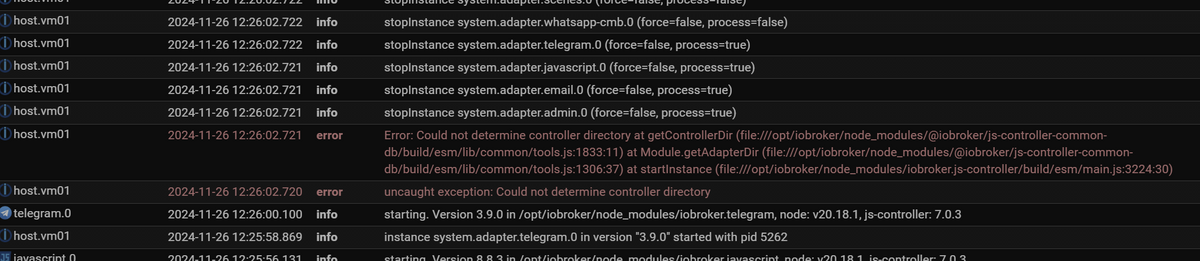
einige reparatur-versuche hab ich schon erfolglos durch:iob nodejs-update 20iob fixcurl -sL https://iobroker.net/fix.sh | bash -das hier, läuft in dauerschleife.
-
@thomas-braun
ok, dann bekomme ich das hier:× iobroker.service - ioBroker Server Loaded: loaded (/lib/systemd/system/iobroker.service; enabled; vendor preset: enabled) Active: failed (Result: exit-code) since Tue 2024-11-26 09:10:08 CET; 54min ago Docs: http://iobroker.net Process: 1609 ExecStart=/usr/bin/bash -c ${NODE} /opt/iobroker/node_modules/iobroker.js-controller/controller.js (code=exited, status=6) Main PID: 1609 (code=exited, status=6) CPU: 40.207s Nov 26 09:09:59 vm01 bash[1609]: at Module.getAdapterDir (file:///opt/iobroker/node_modules/@iobroker/js-controller-common-db/build/esm/lib/common/tools.js:1306:37) Nov 26 09:09:59 vm01 bash[1609]: at startInstance (file:///opt/iobroker/node_modules/iobroker.js-controller/build/esm/main.js:3224:30) Nov 26 09:09:59 vm01 bash[1609]: ================================== > LOG REDIRECT system.adapter.admin.0 => false [Process stopped] Nov 26 09:09:59 vm01 bash[1609]: ================================== > LOG REDIRECT system.adapter.javascript.0 => false [Process stopped] Nov 26 09:09:59 vm01 bash[1609]: ================================== > LOG REDIRECT system.adapter.admin.0 => false [system.adapter.admin.0.logging] Nov 26 09:09:59 vm01 bash[1609]: ================================== > LOG REDIRECT system.adapter.javascript.0 => false [system.adapter.javascript.0.logging] Nov 26 09:10:00 vm01 systemd[1]: iobroker.service: Main process exited, code=exited, status=6/NOTCONFIGURED Nov 26 09:10:08 vm01 systemd[1]: iobroker.service: Failed with result 'exit-code'. Nov 26 09:10:08 vm01 systemd[1]: Stopped ioBroker Server. Nov 26 09:10:08 vm01 systemd[1]: iobroker.service: Consumed 40.207s CPU time.kannst du da was erkennen?
einige reparatur-versuche hab ich schon erfolglos durch:iob nodejs-update 20iob fixcurl -sL https://iobroker.net/fix.sh | bash -das hier, läuft in dauerschleife.
@arniworx sagte in [gelöst] Dauerhafter ioBroker Restart nach JS-Update:
das hier
was genau?
diese schwarze Briefmarke ist mobil nicht zu entziffern.
deswegen code u.ä. immer als Text in code-tags posten! -
@thomas-braun
ok, dann bekomme ich das hier:× iobroker.service - ioBroker Server Loaded: loaded (/lib/systemd/system/iobroker.service; enabled; vendor preset: enabled) Active: failed (Result: exit-code) since Tue 2024-11-26 09:10:08 CET; 54min ago Docs: http://iobroker.net Process: 1609 ExecStart=/usr/bin/bash -c ${NODE} /opt/iobroker/node_modules/iobroker.js-controller/controller.js (code=exited, status=6) Main PID: 1609 (code=exited, status=6) CPU: 40.207s Nov 26 09:09:59 vm01 bash[1609]: at Module.getAdapterDir (file:///opt/iobroker/node_modules/@iobroker/js-controller-common-db/build/esm/lib/common/tools.js:1306:37) Nov 26 09:09:59 vm01 bash[1609]: at startInstance (file:///opt/iobroker/node_modules/iobroker.js-controller/build/esm/main.js:3224:30) Nov 26 09:09:59 vm01 bash[1609]: ================================== > LOG REDIRECT system.adapter.admin.0 => false [Process stopped] Nov 26 09:09:59 vm01 bash[1609]: ================================== > LOG REDIRECT system.adapter.javascript.0 => false [Process stopped] Nov 26 09:09:59 vm01 bash[1609]: ================================== > LOG REDIRECT system.adapter.admin.0 => false [system.adapter.admin.0.logging] Nov 26 09:09:59 vm01 bash[1609]: ================================== > LOG REDIRECT system.adapter.javascript.0 => false [system.adapter.javascript.0.logging] Nov 26 09:10:00 vm01 systemd[1]: iobroker.service: Main process exited, code=exited, status=6/NOTCONFIGURED Nov 26 09:10:08 vm01 systemd[1]: iobroker.service: Failed with result 'exit-code'. Nov 26 09:10:08 vm01 systemd[1]: Stopped ioBroker Server. Nov 26 09:10:08 vm01 systemd[1]: iobroker.service: Consumed 40.207s CPU time.kannst du da was erkennen?
einige reparatur-versuche hab ich schon erfolglos durch:iob nodejs-update 20iob fixcurl -sL https://iobroker.net/fix.sh | bash -das hier, läuft in dauerschleife.
@arniworx sagte in [gelöst] Dauerhafter ioBroker Restart nach JS-Update:
file:///opt/iobroker/node_modules/
ist auch ein total unüblicher Pfad. Das mit file:// vorweg kenne ich eigentlich nur von graphischen Filemanagern. Keine Ahnung wo das bei dir herkommt.
-
ich hab diesen Teil mal abgetrennt.
Ergibt ja keinen Sinn das an einen als [gelöst] markierten Thread anzuhängen.@arniworx Bitte den provisorischen Threadtitel anpassen
-
moin!
bei mir kommt nach dem js-controller update von V5.0.19 auf V7.0.3 auch die meldung in einer endlosschleife:uncaught exception: Could not determine controller directoryich hatte das gleiche problem schon beim update auf V6.x und bin deswegen dann erstmal bei der V5.0.19 geblieben.
vielleicht hat jemand eine idee, was da der grund sein könnte.
vielen dank schonmaliob diag kurzform:
======================= SUMMARY =======================
                        v.2024-10-19


 Static hostname: vm01
       Icon name: computer-vm
         Chassis: vm
  Virtualization: vmware
Operating System: Ubuntu 22.04.5 LTS
          Kernel: Linux 5.15.0-126-generic
    Architecture: x86-64
 Hardware Vendor: VMware, Inc.
  Hardware Model: VMware Virtual Platform

Installation:           vmware
Kernel:                 x86_64
Userland:               64 bit
Timezone:               Europe/Berlin (CET, +0100)
User-ID:                1000
Display-Server:         false
Boot Target:            multi-user.target

Pending OS-Updates:     0
Pending iob updates:    0

Nodejs-Installation:
/usr/bin/nodejs         v20.18.1
/usr/bin/node           v20.18.1
/usr/bin/npm            10.8.2
/usr/bin/npx            10.8.2
/usr/bin/corepack       0.29.4

Recommended versions are nodejs  and npm
nodeJS installation is correct

MEMORY:
               total        used        free      shared  buff/cache   available
Mem:            7.9G        777M        4.5G        7.0M        2.7G        6.9G
Swap:           1.0G          0B        1.0G
Total:          9.0G        777M        5.5G

Active iob-Instances:   1
Upgrade policy: none

ioBroker Core:          js-controller           7.0.3
                        admin                   7.4.2

ioBroker Status:        iobroker is not running on this host.


Objects type: jsonl
States  type: jsonl

Status admin and web instance:
  system.adapter.admin.0                  : admin                 : vm01                                     -  enabled, port: 8081, bind: 0.0.0.0, run as: admin
  system.adapter.web.0                    : web                   : vm01                                     -  enabled, port: 8082, bind: 0.0.0.0, run as: admin

Objects:                10688
States:                 151231

Size of iob-Database:

13M     /opt/iobroker/iobroker-data/objects.jsonl
11M     /opt/iobroker/iobroker-data/objects.json.broken
8.0M    /opt/iobroker/iobroker-data/objects.json.migrated
8.0M    /opt/iobroker/iobroker-data/objects.json.bak.migrated
34M     /opt/iobroker/iobroker-data/states.json.migrated
34M     /opt/iobroker/iobroker-data/states.json.bak.migrated
32M     /opt/iobroker/iobroker-data/states.jsonl
0       /opt/iobroker/iobroker-data/states.json.broken


Operating System codenamed 'jammy' is an aging Ubuntu release! Please upgrade to the latest LTS release 'noble' in due time!

=================== END OF SUMMARY ====================
und dann hier noch mal in lang:
Script v.2024-10-19 *** BASE SYSTEM *** Static hostname: vm01 Icon name: computer-vm Chassis: vm Virtualization: vmware Operating System: Ubuntu 22.04.5 LTS Kernel: Linux 5.15.0-126-generic Architecture: x86-64 Hardware Vendor: VMware, Inc. Hardware Model: VMware Virtual Platform OS is similar to: debian model name : Intel(R) Core(TM) i7-9750H CPU @ 2.60GHz Docker : false Virtualization : vmware Kernel : x86_64 Userland : 64 bit Systemuptime and Load: 09:26:05 up 18 min, 2 users, load average: 0.64, 0.58, 0.47 CPU threads: 12 *** LIFE CYCLE STATUS *** Operating System codenamed 'jammy' is an aging Ubuntu release! Please upgrade to the latest LTS release 'noble' in due time! *** TIME AND TIMEZONES *** Local time: Tue 2024-11-26 09:26:05 CET Universal time: Tue 2024-11-26 08:26:05 UTC RTC time: Tue 2024-11-26 08:26:05 Time zone: Europe/Berlin (CET, +0100) System clock synchronized: yes NTP service: active RTC in local TZ: no *** Users and Groups *** User that called 'iob diag': arno DERBY_HOME=/usr/lib/jvm/java-8-oracle/db JAVA_HOME=/usr/lib/jvm/java-8-oracle HOME=/home/arno GROUPS=arno adm cdrom sudo dip plugdev sambashare lpadmin iobroker User that is running 'js-controller': js-controller is not running *** DISPLAY-SERVER SETUP *** Display-Server: false Desktop: Terminal: tty *** MEMORY *** total used free shared buff/cache available Mem: 7.9G 798M 4.3G 7.0M 2.8G 6.8G Swap: 1.0G 0B 1.0G Total: 9.0G 798M 5.4G Active iob-Instances: 1 7935 M total memory 799 M used memory 1646 M active memory 1418 M inactive memory 4343 M free memory 691 M buffer memory 2101 M swap cache 1021 M total swap 0 M used swap 1021 M free swap *** top - Table Of Processes *** top - 09:26:05 up 18 min, 2 users, load average: 0.64, 0.58, 0.47 Tasks: 283 total, 1 running, 282 sleeping, 0 stopped, 0 zombie %Cpu(s): 0.5 us, 0.5 sy, 0.0 ni, 99.0 id, 0.0 wa, 0.0 hi, 0.0 si, 0.0 st MiB Mem : 7935.4 total, 4343.9 free, 798.9 used, 2792.6 buff/cache MiB Swap: 1022.0 total, 1022.0 free, 0.0 used. 6830.7 avail Mem *** FAILED SERVICES *** UNIT LOAD ACTIVE SUB DESCRIPTION * iobroker.service loaded failed failed ioBroker Server * tftpd-hpa.service loaded failed failed LSB: HPA's tftp server LOAD = Reflects whether the unit definition was properly loaded. ACTIVE = The high-level unit activation state, i.e. generalization of SUB. SUB = The low-level unit activation state, values depend on unit type. 2 loaded units listed. *** DMESG CRITICAL ERRORS *** No critical errors detected *** FILESYSTEM *** Filesystem Type Size Used Avail Use% Mounted on tmpfs tmpfs 794M 2.6M 791M 1% /run /dev/sda1 ext4 78G 40G 34G 54% / tmpfs tmpfs 3.9G 0 3.9G 0% /dev/shm tmpfs tmpfs 5.0M 0 5.0M 0% /run/lock /dev/sdb1 ext4 59G 12G 45G 21% /mnt/hd1 tmpfs tmpfs 3.9G 0 3.9G 0% /run/qemu store01.worxnet.localnet:/volume1/shares nfs 13T 6.0T 6.3T 49% /mnt/autofs/store01_vol1_nfs tmpfs tmpfs 794M 0 794M 0% /run/user/1000 Messages concerning ext4 filesystem in dmesg: [Tue Nov 26 09:07:47 2024] EXT4-fs (sda1): mounted filesystem with ordered data mode. Opts: (null). Quota mode: none. [Tue Nov 26 09:07:47 2024] EXT4-fs (sda1): re-mounted. Opts: errors=remount-ro. Quota mode: none. [Tue Nov 26 09:07:48 2024] EXT4-fs (sdb1): mounted filesystem with ordered data mode. Opts: (null). Quota mode: none. Show mounted filesystems: TARGET SOURCE FSTYPE OPTIONS / /dev/sda1 ext4 rw,relatime,errors=remount-ro |-/mnt/hd1 /dev/sdb1 ext4 rw,relatime `-/mnt/autofs/store01_vol1_nfs store01.worxnet.localnet:/volume1/shares nfs rw,relatime,vers=3,rsize=131072,wsize=131072,namlen=255,hard,proto=tcp,timeo=600,retrans=2,sec=sys,mountaddr=192.168.178.240,mountvers=3,mountport=892,mountproto=udp,local_lock=none,addr=192.168.178.240 Files in neuralgic directories: /var: 1.4G /var/ 632M /var/cache 625M /var/lib 359M /var/lib/apt/lists 359M /var/lib/apt Archived and active journals take up 48.0M in the file system. /opt/iobroker/backups: 383M /opt/iobroker/backups/ /opt/iobroker/iobroker-data: 1.8G /opt/iobroker/iobroker-data/ 1009M /opt/iobroker/iobroker-data/files 617M /opt/iobroker/iobroker-data/files/javascript.admin 560M /opt/iobroker/iobroker-data/files/javascript.admin/static 558M /opt/iobroker/iobroker-data/files/javascript.admin/static/js The five largest files in iobroker-data are: 34M /opt/iobroker/iobroker-data/states.json.migrated 34M /opt/iobroker/iobroker-data/states.json.bak.migrated 32M /opt/iobroker/iobroker-data/states.jsonl 24M /opt/iobroker/iobroker-data/files/scenes.admin/static/js/main.c9369f6c.js.map 19M /opt/iobroker/iobroker-data/files/web.admin/static/js/main.6964fae2.js.map USB-Devices by-id: USB-Sticks - Avoid direct links to /dev/tty* in your adapter setups, please always prefer the links 'by-id': No Devices found 'by-id' *** NodeJS-Installation *** /usr/bin/nodejs v20.18.1 /usr/bin/node v20.18.1 /usr/bin/npm 10.8.2 /usr/bin/npx 10.8.2 /usr/bin/corepack 0.29.4 nodejs: Installed: 20.18.1-1nodesource1 Candidate: 20.18.1-1nodesource1 Version table: *** 20.18.1-1nodesource1 1001 500 https://deb.nodesource.com/node_20.x nodistro/main amd64 Packages 100 /var/lib/dpkg/status 20.18.0-1nodesource1 1001 500 https://deb.nodesource.com/node_20.x nodistro/main amd64 Packages 20.17.0-1nodesource1 1001 500 https://deb.nodesource.com/node_20.x nodistro/main amd64 Packages 20.16.0-1nodesource1 1001 500 https://deb.nodesource.com/node_20.x nodistro/main amd64 Packages 20.15.1-1nodesource1 1001 500 https://deb.nodesource.com/node_20.x nodistro/main amd64 Packages 20.15.0-1nodesource1 1001 500 https://deb.nodesource.com/node_20.x nodistro/main amd64 Packages 20.14.0-1nodesource1 1001 500 https://deb.nodesource.com/node_20.x nodistro/main amd64 Packages 20.13.1-1nodesource1 1001 500 https://deb.nodesource.com/node_20.x nodistro/main amd64 Packages 20.13.0-1nodesource1 1001 500 https://deb.nodesource.com/node_20.x nodistro/main amd64 Packages 20.12.2-1nodesource1 1001 500 https://deb.nodesource.com/node_20.x nodistro/main amd64 Packages 20.12.1-1nodesource1 1001 500 https://deb.nodesource.com/node_20.x nodistro/main amd64 Packages 20.12.0-1nodesource1 1001 500 https://deb.nodesource.com/node_20.x nodistro/main amd64 Packages 20.11.1-1nodesource1 1001 500 https://deb.nodesource.com/node_20.x nodistro/main amd64 Packages 20.11.0-1nodesource1 1001 500 https://deb.nodesource.com/node_20.x nodistro/main amd64 Packages 20.10.0-1nodesource1 1001 500 https://deb.nodesource.com/node_20.x nodistro/main amd64 Packages 20.9.0-1nodesource1 1001 500 https://deb.nodesource.com/node_20.x nodistro/main amd64 Packages 20.8.1-1nodesource1 1001 500 https://deb.nodesource.com/node_20.x nodistro/main amd64 Packages 20.8.0-1nodesource1 1001 500 https://deb.nodesource.com/node_20.x nodistro/main amd64 Packages 20.7.0-1nodesource1 1001 500 https://deb.nodesource.com/node_20.x nodistro/main amd64 Packages 20.6.1-1nodesource1 1001 500 https://deb.nodesource.com/node_20.x nodistro/main amd64 Packages 20.6.0-1nodesource1 1001 500 https://deb.nodesource.com/node_20.x nodistro/main amd64 Packages 20.5.1-1nodesource1 1001 500 https://deb.nodesource.com/node_20.x nodistro/main amd64 Packages 20.5.0-1nodesource1 1001 500 https://deb.nodesource.com/node_20.x nodistro/main amd64 Packages 20.4.0-1nodesource1 1001 500 https://deb.nodesource.com/node_20.x nodistro/main amd64 Packages 20.3.1-1nodesource1 1001 500 https://deb.nodesource.com/node_20.x nodistro/main amd64 Packages 20.3.0-1nodesource1 1001 500 https://deb.nodesource.com/node_20.x nodistro/main amd64 Packages 20.2.0-1nodesource1 1001 500 https://deb.nodesource.com/node_20.x nodistro/main amd64 Packages 20.1.0-1nodesource1 1001 500 https://deb.nodesource.com/node_20.x nodistro/main amd64 Packages 20.0.0-1nodesource1 1001 500 https://deb.nodesource.com/node_20.x nodistro/main amd64 Packages 12.22.9~dfsg-1ubuntu3.6 500 500 http://de.archive.ubuntu.com/ubuntu jammy-updates/universe amd64 Packages 500 http://security.ubuntu.com/ubuntu jammy-security/universe amd64 Packages 12.22.9~dfsg-1ubuntu3 500 500 http://de.archive.ubuntu.com/ubuntu jammy/universe amd64 Packages Temp directories causing deletion problem: 0 No problems detected Errors in npm tree: 0 No problems detected *** ioBroker-Installation *** ioBroker Status iobroker is not running on this host. Objects type: jsonl States type: jsonl Hosts: vm01 vm01 (version: 7.0.3, hostname: vm01 , alive, uptime: 2) Core adapters versions js-controller: 7.0.3 admin: 7.4.2 javascript: 8.8.3 nodejs modules from github: 1 | `-- xmlbuilder@0.4.2 invalid: "https://github.com/hobbyquaker/xmlbuilder-js/tarball/29fe5030dc6852007dc8d1bfd5109d75f8da58d5" from node_modules/homematic-xmlrpc Adapter State system.adapter.admin.0 : admin : vm01 - enabled, port: 8081, bind: 0.0.0.0, run as: admin system.adapter.alexa2.0 : alexa2 : vm01 - enabled system.adapter.email.0 : email : vm01 - enabled system.adapter.enigma2.0 : enigma2 : vm01 - disabled system.adapter.fritzdect.0 : fritzdect : vm01 - enabled system.adapter.history.0 : history : vm01 - enabled system.adapter.hm-rega.0 : hm-rega : vm01 - enabled system.adapter.hm-rpc.0 : hm-rpc : vm01 - enabled, port: 0 system.adapter.hm-rpc.1 : hm-rpc : vm01 - enabled, port: 0 system.adapter.hm-rpc.2 : hm-rpc : vm01 - disabled, port: 0 system.adapter.hue.0 : hue : vm01 - enabled, port: 80 system.adapter.ical.0 : ical : vm01 - enabled system.adapter.iot.0 : iot : vm01 - enabled system.adapter.javascript.0 : javascript : vm01 - enabled system.adapter.netatmo.0 : netatmo : vm01 - enabled system.adapter.nina.0 : nina : vm01 - enabled system.adapter.nut.0 : nut : vm01 - enabled system.adapter.openweathermap.0 : openweathermap : vm01 - disabled system.adapter.scenes.0 : scenes : vm01 - enabled system.adapter.simple-api.0 : simple-api : vm01 - enabled, port: 8087, bind: 0.0.0.0, run as: admin system.adapter.sonos.0 : sonos : vm01 - enabled system.adapter.telegram.0 : telegram : vm01 - enabled, port: 8443, bind: 0.0.0.0 system.adapter.text2command.0 : text2command : vm01 - enabled system.adapter.vis-2.0 : vis-2 : vm01 - enabled system.adapter.vis-hqwidgets.0 : vis-hqwidgets : vm01 - enabled system.adapter.vis-jqui-mfd.0 : vis-jqui-mfd : vm01 - enabled system.adapter.vis-materialdesign.0 : vis-materialdesign : vm01 - enabled system.adapter.vis-players.0 : vis-players : vm01 - enabled system.adapter.vis-timeandweather.0 : vis-timeandweather : vm01 - enabled system.adapter.vis.0 : vis : vm01 - enabled system.adapter.web.0 : web : vm01 - enabled, port: 8082, bind: 0.0.0.0, run as: admin system.adapter.whatsapp-cmb.0 : whatsapp-cmb : vm01 - enabled + instance is alive Enabled adapters with bindings system.adapter.admin.0 : admin : vm01 - enabled, port: 8081, bind: 0.0.0.0, run as: admin system.adapter.hm-rpc.0 : hm-rpc : vm01 - enabled, port: 0 system.adapter.hm-rpc.1 : hm-rpc : vm01 - enabled, port: 0 system.adapter.hue.0 : hue : vm01 - enabled, port: 80 system.adapter.simple-api.0 : simple-api : vm01 - enabled, port: 8087, bind: 0.0.0.0, run as: admin system.adapter.telegram.0 : telegram : vm01 - enabled, port: 8443, bind: 0.0.0.0 system.adapter.web.0 : web : vm01 - enabled, port: 8082, bind: 0.0.0.0, run as: admin ioBroker-Repositories ┌─────────┬───────────┬─────────────────────────────────────────────────────────────────────────────────────────────┬──────────────┐ │ (index) │ name │ url │ auto upgrade │ ├─────────┼───────────┼─────────────────────────────────────────────────────────────────────────────────────────────┼──────────────┤ │ 0 │ 'beta' │ 'http://download.iobroker.net/sources-dist-latest.json' │ false │ │ 1 │ 'sources' │ 'conf/sources-dist.json' │ false │ │ 2 │ 'online' │ 'https://raw.githubusercontent.com/ioBroker/ioBroker.repositories/master/sources-dist.json' │ false │ │ 3 │ 'stable' │ 'http://download.iobroker.net/sources-dist.json' │ false │ └─────────┴───────────┴─────────────────────────────────────────────────────────────────────────────────────────────┴──────────────┘ Active repo(s): beta Upgrade policy: none Installed ioBroker-Instances Used repository: beta Adapter "admin" : 7.4.2 , installed 7.4.2 Adapter "alexa2" : 3.26.7 , installed 3.26.7 Adapter "email" : 1.3.1 , installed 1.3.1 Adapter "enigma2" : 2.2.1 , installed 2.2.1 Adapter "fritzdect" : 2.5.11 , installed 2.5.11 Adapter "history" : 3.0.1 , installed 3.0.1 Adapter "hm-rega" : 5.1.0 , installed 5.1.0 Adapter "hm-rpc" : 2.0.2 , installed 2.0.2 Adapter "hue" : 3.13.1 , installed 3.13.1 Adapter "ical" : 1.16.1 , installed 1.16.1 Adapter "iot" : 3.4.3 , installed 3.4.3 Adapter "javascript" : 8.8.3 , installed 8.8.3 Controller "js-controller": 7.0.3 , installed 7.0.3 Adapter "netatmo" : 3.1.0 , installed 3.1.0 Adapter "nina" : 0.0.26 , installed 0.0.26 Adapter "nut" : 1.6.0 , installed 1.6.0 Adapter "openweathermap": 1.1.2 , installed 1.1.2 Adapter "scenes" : 3.2.3 , installed 3.2.3 Adapter "signifylights": 0.4.2 , installed 0.4.2 Adapter "simple-api" : 2.8.0 , installed 2.8.0 Adapter "socketio" : 6.7.1 , installed 6.7.1 Adapter "sonos" : 3.0.0 , installed 3.0.0 Adapter "telegram" : 3.9.0 , installed 3.9.0 Adapter "text2command" : 3.0.3 , installed 3.0.3 Adapter "vis" : 1.5.6 , installed 1.5.6 Adapter "vis-2" : 2.10.8 , installed 2.10.8 Adapter "vis-hqwidgets": 1.5.1 , installed 1.5.1 Adapter "vis-jqui-mfd" : 1.1.1 , installed 1.1.1 Adapter "vis-materialdesign": 0.5.9, installed 0.5.9 Adapter "vis-players" : 0.1.6 , installed 0.1.6 Adapter "vis-timeandweather": 1.2.2, installed 1.2.2 Adapter "web" : 6.3.1 , installed 6.3.1 Adapter "whatsapp-cmb" : 0.3.0 , installed 0.3.0 Adapter "ws" : 2.6.2 , installed 2.6.2 Objects and States Please stand by - This may take a while Objects: 10688 States: 151231 *** OS-Repositories and Updates *** Hit:1 http://de.archive.ubuntu.com/ubuntu jammy InRelease Hit:2 http://de.archive.ubuntu.com/ubuntu jammy-updates InRelease Hit:3 http://de.archive.ubuntu.com/ubuntu jammy-backports InRelease Hit:4 https://deb.nodesource.com/node_20.x nodistro InRelease Hit:5 http://security.ubuntu.com/ubuntu jammy-security InRelease Reading package lists... Pending Updates: 0 *** Listening Ports *** Active Internet connections (only servers) Proto Recv-Q Send-Q Local Address Foreign Address State User Inode PID/Program name tcp 0 0 0.0.0.0:41587 0.0.0.0:* LISTEN 0 1024 925/rpc.mountd tcp 0 0 0.0.0.0:554 0.0.0.0:* LISTEN 0 21714 986/MediaServer tcp 0 0 0.0.0.0:46055 0.0.0.0:* LISTEN 0 16918 - tcp 0 0 0.0.0.0:5005 0.0.0.0:* LISTEN 0 27389 784/node tcp 0 0 0.0.0.0:9100 0.0.0.0:* LISTEN 0 23848 1055/xinetd tcp 0 0 0.0.0.0:81 0.0.0.0:* LISTEN 0 21716 986/MediaServer tcp 0 0 0.0.0.0:80 0.0.0.0:* LISTEN 0 16940 1056/apache2 tcp 0 0 0.0.0.0:111 0.0.0.0:* LISTEN 0 23582 1/init tcp 0 0 0.0.0.0:22 0.0.0.0:* LISTEN 0 13889 930/sshd: /usr/sbin tcp 0 0 0.0.0.0:21 0.0.0.0:* LISTEN 0 16887 927/vsftpd tcp 0 0 0.0.0.0:444 0.0.0.0:* LISTEN 0 21717 986/MediaServer tcp 0 0 0.0.0.0:443 0.0.0.0:* LISTEN 0 16942 1056/apache2 tcp 0 0 0.0.0.0:1688 0.0.0.0:* LISTEN 0 26869 965/XXXXX tcp 0 0 0.0.0.0:34400 0.0.0.0:* LISTEN 0 17000 957/xteve tcp 0 0 0.0.0.0:1935 0.0.0.0:* LISTEN 0 21715 986/MediaServer tcp 0 0 0.0.0.0:10000 0.0.0.0:* LISTEN 0 21732 986/MediaServer tcp 0 0 192.168.178.20:445 0.0.0.0:* LISTEN 0 27371 1042/smbd tcp 0 0 192.168.178.20:139 0.0.0.0:* LISTEN 0 27372 1042/smbd tcp 0 0 0.0.0.0:55817 0.0.0.0:* LISTEN 0 1004 925/rpc.mountd tcp 0 0 0.0.0.0:39465 0.0.0.0:* LISTEN 0 995 925/rpc.mountd tcp 0 0 0.0.0.0:3010 0.0.0.0:* LISTEN 0 29339 699/node tcp 0 0 0.0.0.0:44013 0.0.0.0:* LISTEN 106 1010 890/rpc.statd tcp 0 0 0.0.0.0:23424 0.0.0.0:* LISTEN 0 23849 1055/xinetd tcp 0 0 0.0.0.0:23423 0.0.0.0:* LISTEN 0 23850 1055/xinetd tcp 0 0 0.0.0.0:2223 0.0.0.0:* LISTEN 0 23847 1055/xinetd tcp 0 0 0.0.0.0:2222 0.0.0.0:* LISTEN 0 23846 1055/xinetd tcp 0 0 0.0.0.0:2049 0.0.0.0:* LISTEN 0 14945 - tcp 0 0 127.0.0.53:53 0.0.0.0:* LISTEN 117 21654 623/systemd-resolve tcp 0 0 127.0.0.1:445 0.0.0.0:* LISTEN 0 27373 1042/smbd tcp 0 0 0.0.0.0:8079 0.0.0.0:* LISTEN 0 23844 1055/xinetd tcp 0 0 0.0.0.0:8089 0.0.0.0:* LISTEN 0 23843 1055/xinetd tcp 0 0 127.0.0.1:139 0.0.0.0:* LISTEN 0 27374 1042/smbd tcp 0 0 127.0.0.1:5037 0.0.0.0:* LISTEN 0 14578 713/adb tcp 0 0 0.0.0.0:3500 0.0.0.0:* LISTEN 0 27392 784/node tcp 0 0 0.0.0.0:7522 0.0.0.0:* LISTEN 0 23845 1055/xinetd udp 0 0 0.0.0.0:32784 0.0.0.0:* 0 1001 925/rpc.mountd udp 0 0 127.0.0.53:53 0.0.0.0:* 117 21653 623/systemd-resolve udp 0 0 192.168.178.20:68 0.0.0.0:* 116 21638 586/systemd-network udp 0 0 0.0.0.0:111 0.0.0.0:* 0 24591 1/init udp 0 0 192.168.178.255:137 0.0.0.0:* 0 29754 874/nmbd udp 0 0 192.168.178.20:137 0.0.0.0:* 0 29753 874/nmbd udp 0 0 0.0.0.0:137 0.0.0.0:* 0 29738 874/nmbd udp 0 0 192.168.178.255:138 0.0.0.0:* 0 29756 874/nmbd udp 0 0 192.168.178.20:138 0.0.0.0:* 0 29755 874/nmbd udp 0 0 0.0.0.0:138 0.0.0.0:* 0 29739 874/nmbd udp 0 0 0.0.0.0:53392 0.0.0.0:* 0 992 925/rpc.mountd udp 0 0 127.0.0.1:642 0.0.0.0:* 0 16839 890/rpc.statd udp 0 0 0.0.0.0:9000 0.0.0.0:* 0 21745 986/MediaServer udp 0 0 0.0.0.0:9000 0.0.0.0:* 0 21744 986/MediaServer udp 0 0 0.0.0.0:9000 0.0.0.0:* 0 21743 986/MediaServer udp 0 0 0.0.0.0:9000 0.0.0.0:* 0 21742 986/MediaServer udp 0 0 0.0.0.0:9000 0.0.0.0:* 0 21740 986/MediaServer udp 0 0 0.0.0.0:9000 0.0.0.0:* 0 21739 986/MediaServer udp 0 0 0.0.0.0:9000 0.0.0.0:* 0 21738 986/MediaServer udp 0 0 0.0.0.0:9000 0.0.0.0:* 0 21737 986/MediaServer udp 0 0 0.0.0.0:9000 0.0.0.0:* 0 21736 986/MediaServer udp 0 0 0.0.0.0:9000 0.0.0.0:* 0 21735 986/MediaServer udp 0 0 0.0.0.0:9000 0.0.0.0:* 0 21734 986/MediaServer udp 0 0 0.0.0.0:9000 0.0.0.0:* 0 21733 986/MediaServer udp 0 0 0.0.0.0:42718 0.0.0.0:* 0 1021 925/rpc.mountd udp 0 0 0.0.0.0:10000 0.0.0.0:* 0 21731 986/MediaServer udp 0 0 0.0.0.0:10000 0.0.0.0:* 0 21730 986/MediaServer udp 0 0 0.0.0.0:10000 0.0.0.0:* 0 21729 986/MediaServer udp 0 0 0.0.0.0:10000 0.0.0.0:* 0 21728 986/MediaServer udp 0 0 0.0.0.0:10000 0.0.0.0:* 0 21727 986/MediaServer udp 0 0 0.0.0.0:10000 0.0.0.0:* 0 21726 986/MediaServer udp 0 0 0.0.0.0:10000 0.0.0.0:* 0 21725 986/MediaServer udp 0 0 0.0.0.0:10000 0.0.0.0:* 0 21724 986/MediaServer udp 0 0 0.0.0.0:10000 0.0.0.0:* 0 21723 986/MediaServer udp 0 0 0.0.0.0:10000 0.0.0.0:* 0 21722 986/MediaServer udp 0 0 0.0.0.0:10000 0.0.0.0:* 0 21721 986/MediaServer udp 0 0 0.0.0.0:10000 0.0.0.0:* 0 21720 986/MediaServer udp 0 0 0.0.0.0:1900 0.0.0.0:* 0 13902 957/xteve udp 0 0 0.0.0.0:44062 0.0.0.0:* 0 16917 - udp 0 0 0.0.0.0:57097 0.0.0.0:* 106 16864 890/rpc.statd *** Log File - Last 25 Lines *** 2024-11-26 09:09:59.241 - info: host.vm01 stopInstance system.adapter.vis-jqui-mfd.0 (force=false, process=false) 2024-11-26 09:09:59.241 - info: host.vm01 stopInstance system.adapter.vis-players.0 (force=false, process=false) 2024-11-26 09:09:59.242 - info: host.vm01 stopInstance system.adapter.vis-materialdesign.0 (force=false, process=false) 2024-11-26 09:09:59.242 - info: host.vm01 stopInstance system.adapter.vis-timeandweather.0 (force=false, process=false) 2024-11-26 09:09:59.242 - info: host.vm01 stopInstance system.adapter.vis-2.0 (force=false, process=false) 2024-11-26 09:09:59.242 - info: host.vm01 stopInstance system.adapter.vis.0 (force=false, process=false) 2024-11-26 09:09:59.251 - info: telegram.0 (1951) Got terminate signal TERMINATE_YOURSELF 2024-11-26 09:09:59.251 - info: javascript.0 (1925) Got terminate signal TERMINATE_YOURSELF 2024-11-26 09:09:59.253 - info: admin.0 (1627) Got terminate signal TERMINATE_YOURSELF 2024-11-26 09:09:59.254 - info: javascript.0 (1925) terminating 2024-11-26 09:09:59.254 - info: javascript.0 (1925) Terminated (ADAPTER_REQUESTED_TERMINATION): Without reason 2024-11-26 09:09:59.253 - info: admin.0 (1627) terminating http server on port 8081 2024-11-26 09:09:59.254 - info: admin.0 (1627) terminating 2024-11-26 09:09:59.254 - info: admin.0 (1627) Terminated (ADAPTER_REQUESTED_TERMINATION): Without reason 2024-11-26 09:09:59.326 - info: host.vm01 stopInstance system.adapter.admin.0 send kill signal 2024-11-26 09:09:59.326 - info: host.vm01 stopInstance system.adapter.email.0 send kill signal 2024-11-26 09:09:59.326 - info: host.vm01 stopInstance system.adapter.javascript.0 send kill signal 2024-11-26 09:09:59.326 - info: host.vm01 stopInstance system.adapter.telegram.0 send kill signal 2024-11-26 09:09:59.752 - info: telegram.0 (1951) terminating 2024-11-26 09:09:59.752 - info: javascript.0 (1925) terminating 2024-11-26 09:09:59.753 - info: telegram.0 (1951) Terminated (ADAPTER_REQUESTED_TERMINATION): Without reason 2024-11-26 09:09:59.755 - info: admin.0 (1627) terminating 2024-11-26 09:09:59.795 - info: host.vm01 instance system.adapter.email.0 terminated with code 11 (ADAPTER_REQUESTED_TERMINATION) 2024-11-26 09:09:59.845 - info: host.vm01 instance system.adapter.admin.0 terminated with code 11 (ADAPTER_REQUESTED_TERMINATION) 2024-11-26 09:09:59.846 - info: host.vm01 instance system.adapter.javascript.0 terminated with code 11 (ADAPTER_REQUESTED_TERMINATION)@arniworx sagte in Could not determine controller directory:
nach dem js-controller update von V5.0.19 auf V7.0.3
v7 ist noch im Betastadium
wenn aber
@arniworx sagte in Could not determine controller directory:
das gleiche problem schon beim update auf V6.x
existierte, wird die Fehlersuche jetzt möglicherweise durch andere überlagernde Issues von v7 erschwert.
sehe ich das richtig, dass du unter VM-Ware eine Ubuntu VM betreibst?
@arniworx sagte in Could not determine controller directory:
Recommended versions are nodejs and npm
irgendwie funktioniert das Skript auch nicht richtig, da fehlt was
-
@arniworx sagte in Could not determine controller directory:
nach dem js-controller update von V5.0.19 auf V7.0.3
v7 ist noch im Betastadium
wenn aber
@arniworx sagte in Could not determine controller directory:
das gleiche problem schon beim update auf V6.x
existierte, wird die Fehlersuche jetzt möglicherweise durch andere überlagernde Issues von v7 erschwert.
sehe ich das richtig, dass du unter VM-Ware eine Ubuntu VM betreibst?
@arniworx sagte in Could not determine controller directory:
Recommended versions are nodejs and npm
irgendwie funktioniert das Skript auch nicht richtig, da fehlt was
@homoran
das kommt in dauerschleife (vorhin ging nur noch ein screenshot, sorry)2024-11-26 13:16:20.271 info stopInstance system.adapter.admin.0 (force=false, process=true) 2024-11-26 13:16:20.270 error Error: Could not determine controller directory at getControllerDir (file:///opt/iobroker/node_modules/@iobroker/js-controller-common-db/build/esm/lib/common/tools.js:1833:11) at Module.getAdapterDir (file:///opt/iobroker/node_modules/@iobroker/js-controller-common-db/build/esm/lib/common/tools.js:1306:37) at startInstance (file:///opt/iobroker/node_modules/iobroker.js-controller/build/esm/main.js:3224:30) 2024-11-26 13:16:20.270 error uncaught exception: Could not determine controller directoryja, "Ubuntu VM" unter ESXi ist richtig, ist das nicht erlaubt?
@homoran
was meinst du mit: "irgendwie funktioniert das Skript auch nicht richtig, da fehlt was" ? -
@homoran
das kommt in dauerschleife (vorhin ging nur noch ein screenshot, sorry)2024-11-26 13:16:20.271 info stopInstance system.adapter.admin.0 (force=false, process=true) 2024-11-26 13:16:20.270 error Error: Could not determine controller directory at getControllerDir (file:///opt/iobroker/node_modules/@iobroker/js-controller-common-db/build/esm/lib/common/tools.js:1833:11) at Module.getAdapterDir (file:///opt/iobroker/node_modules/@iobroker/js-controller-common-db/build/esm/lib/common/tools.js:1306:37) at startInstance (file:///opt/iobroker/node_modules/iobroker.js-controller/build/esm/main.js:3224:30) 2024-11-26 13:16:20.270 error uncaught exception: Could not determine controller directoryja, "Ubuntu VM" unter ESXi ist richtig, ist das nicht erlaubt?
@homoran
was meinst du mit: "irgendwie funktioniert das Skript auch nicht richtig, da fehlt was" ?@arniworx sagte in Could not determine controller directory:
ist das nicht erlaubt?
ich sammle nur Fakten, die nicht erwähnt wurden.
@arniworx sagte in Could not determine controller directory:
fehlt was" ?
die empfohlenen Versionen gehören da noch rein.
So ergibt der Satz keinen Sinnkein Support per PN! - Fragen im Forum stellen - Benutzt das Voting rechts unten im Beitrag wenn er euch geholfen hat.
Das Forum freut sich über eine Spende. Benutzt dazu den Spendenbutton oben rechts. Danke!
der Installationsfixer: curl -fsL https://iobroker.net/fix.sh | bash - -
@arniworx sagte in Could not determine controller directory:
ist das nicht erlaubt?
ich sammle nur Fakten, die nicht erwähnt wurden.
@arniworx sagte in Could not determine controller directory:
fehlt was" ?
die empfohlenen Versionen gehören da noch rein.
So ergibt der Satz keinen Sinn@homoran sagte in Could not determine controller directory:
die empfohlenen Versionen gehören da noch rein.
So ergibt der Satz keinen SinnDann kann 'iob diag' die entsprechenden DPs nicht auslesen. Warum auch immer.
-
@homoran sagte in Could not determine controller directory:
die empfohlenen Versionen gehören da noch rein.
So ergibt der Satz keinen SinnDann kann 'iob diag' die entsprechenden DPs nicht auslesen. Warum auch immer.
@thomas-braun sagte in Could not determine controller directory:
Dann kann 'iob diag' die entsprechenden DPs nicht auslesen.
richtig!
Deswegen
@homoran sagte in Could not determine controller directory:irgendwie funktioniert das Skript auch nicht richtig
@thomas-braun sagte in Could not determine controller directory:
Warum auch immer.
Da klemmt dan wohl noch mehr, deswegen der Blick auf
@arniworx sagte in Could not determine controller directory:
"Ubuntu VM" unter ESXi
Vielleicht wird da mal wieder eine Sonderlocke geklöppelt
-
@thomas-braun sagte in Could not determine controller directory:
Dann kann 'iob diag' die entsprechenden DPs nicht auslesen.
richtig!
Deswegen
@homoran sagte in Could not determine controller directory:irgendwie funktioniert das Skript auch nicht richtig
@thomas-braun sagte in Could not determine controller directory:
Warum auch immer.
Da klemmt dan wohl noch mehr, deswegen der Blick auf
@arniworx sagte in Could not determine controller directory:
"Ubuntu VM" unter ESXi
Vielleicht wird da mal wieder eine Sonderlocke geklöppelt
@homoran said in Could not determine controller directory:
Vielleicht wird da mal wieder eine Sonderlocke geklöppelt
...was das wohl heisst?
in der laufenden umgebung (V5.0.19), steht auch etwas mehr im summary von "iob diag":
======================= SUMMARY ======================= v.2024-10-19 Static hostname: vm01 Icon name: computer-vm Chassis: vm Virtualization: vmware Operating System: Ubuntu 22.04.5 LTS Kernel: Linux 5.15.0-126-generic Architecture: x86-64 Hardware Vendor: VMware, Inc. Hardware Model: VMware Virtual Platform Installation: vmware Kernel: x86_64 Userland: 64 bit Timezone: Europe/Berlin (CET, +0100) User-ID: 1000 Display-Server: false Boot Target: graphical.target Pending OS-Updates: 1 Pending iob updates: 1 Nodejs-Installation: /usr/bin/nodejs v20.18.1 /usr/bin/node v20.18.1 /usr/bin/npm 10.8.2 /usr/bin/npx 10.8.2 /usr/bin/corepack 0.29.4 Recommended versions are nodejs 20.18.1 and npm 10.8.2 nodeJS installation is correct MEMORY: total used free shared buff/cache available Mem: 7.9G 582M 3.1G 8.0M 4.3G 7.0G Swap: 1.0G 0B 1.0G Total: 9.0G 582M 4.1G Active iob-Instances: 1 Active repo(s): beta ioBroker Core: js-controller 5.0.19 admin 7.4.2 ioBroker Status: iobroker is not running on this host. Objects type: jsonl States type: jsonl Status admin and web instance: system.adapter.admin.0 : admin : vm01 - enabled, port: 8081, bind: 0.0.0.0, run as: admin system.adapter.web.0 : web : vm01 - enabled, port: 8082, bind: 0.0.0.0, run as: admin Objects: 10663 States: 151265 Size of iob-Database: 19M /opt/iobroker/iobroker-data/objects.jsonl 11M /opt/iobroker/iobroker-data/objects.json.broken 8.0M /opt/iobroker/iobroker-data/objects.json.migrated 8.0M /opt/iobroker/iobroker-data/objects.json.bak.migrated 34M /opt/iobroker/iobroker-data/states.json.migrated 34M /opt/iobroker/iobroker-data/states.json.bak.migrated 32M /opt/iobroker/iobroker-data/states.jsonl 0 /opt/iobroker/iobroker-data/states.json.broken Operating System codenamed 'jammy' is an aging Ubuntu release! Please upgrade to the latest LTS release 'noble' in due time! =================== END OF SUMMARY ==================== -
@homoran said in Could not determine controller directory:
Vielleicht wird da mal wieder eine Sonderlocke geklöppelt
...was das wohl heisst?
in der laufenden umgebung (V5.0.19), steht auch etwas mehr im summary von "iob diag":
======================= SUMMARY ======================= v.2024-10-19 Static hostname: vm01 Icon name: computer-vm Chassis: vm Virtualization: vmware Operating System: Ubuntu 22.04.5 LTS Kernel: Linux 5.15.0-126-generic Architecture: x86-64 Hardware Vendor: VMware, Inc. Hardware Model: VMware Virtual Platform Installation: vmware Kernel: x86_64 Userland: 64 bit Timezone: Europe/Berlin (CET, +0100) User-ID: 1000 Display-Server: false Boot Target: graphical.target Pending OS-Updates: 1 Pending iob updates: 1 Nodejs-Installation: /usr/bin/nodejs v20.18.1 /usr/bin/node v20.18.1 /usr/bin/npm 10.8.2 /usr/bin/npx 10.8.2 /usr/bin/corepack 0.29.4 Recommended versions are nodejs 20.18.1 and npm 10.8.2 nodeJS installation is correct MEMORY: total used free shared buff/cache available Mem: 7.9G 582M 3.1G 8.0M 4.3G 7.0G Swap: 1.0G 0B 1.0G Total: 9.0G 582M 4.1G Active iob-Instances: 1 Active repo(s): beta ioBroker Core: js-controller 5.0.19 admin 7.4.2 ioBroker Status: iobroker is not running on this host. Objects type: jsonl States type: jsonl Status admin and web instance: system.adapter.admin.0 : admin : vm01 - enabled, port: 8081, bind: 0.0.0.0, run as: admin system.adapter.web.0 : web : vm01 - enabled, port: 8082, bind: 0.0.0.0, run as: admin Objects: 10663 States: 151265 Size of iob-Database: 19M /opt/iobroker/iobroker-data/objects.jsonl 11M /opt/iobroker/iobroker-data/objects.json.broken 8.0M /opt/iobroker/iobroker-data/objects.json.migrated 8.0M /opt/iobroker/iobroker-data/objects.json.bak.migrated 34M /opt/iobroker/iobroker-data/states.json.migrated 34M /opt/iobroker/iobroker-data/states.json.bak.migrated 32M /opt/iobroker/iobroker-data/states.jsonl 0 /opt/iobroker/iobroker-data/states.json.broken Operating System codenamed 'jammy' is an aging Ubuntu release! Please upgrade to the latest LTS release 'noble' in due time! =================== END OF SUMMARY ====================@arniworx sagte in Could not determine controller directory:
...was das wohl heisst?
war für @Thomas-Braun gedacht.
Ubuntu stammt zwar von Debian ab, macht aber immer wieder das ein oder andere anders.Und ob das auch bei VM Ware gilt weiß ich nicht.
Wenn du das ausschließen kannst, dass dieses Verhalten vom OS oder Hypervisor bedingt ist, müssen wir es bei "dir" suchen.
Also einen "Fehler" an/bei deiner Installation -
@arniworx sagte in Could not determine controller directory:
...was das wohl heisst?
war für @Thomas-Braun gedacht.
Ubuntu stammt zwar von Debian ab, macht aber immer wieder das ein oder andere anders.Und ob das auch bei VM Ware gilt weiß ich nicht.
Wenn du das ausschließen kannst, dass dieses Verhalten vom OS oder Hypervisor bedingt ist, müssen wir es bei "dir" suchen.
Also einen "Fehler" an/bei deiner Installation@homoran
ok, das mit dem "ausschliessen" ist immer so eine sache. ich würde allerdings sagen, dass ich ziemlich (~90%) sicher bin, dass es an meiner ioBroker installation liegt.
also lieber erstmal haupt-augenmerk darauf, ob mit node, berechtigungen, etc. alles stimmt, da bin ich mir nicht so sicher. hab ihr eine idee, wo ich da anfangen könnte? -
@homoran
ok, das mit dem "ausschliessen" ist immer so eine sache. ich würde allerdings sagen, dass ich ziemlich (~90%) sicher bin, dass es an meiner ioBroker installation liegt.
also lieber erstmal haupt-augenmerk darauf, ob mit node, berechtigungen, etc. alles stimmt, da bin ich mir nicht so sicher. hab ihr eine idee, wo ich da anfangen könnte?@arniworx sagte in Could not determine controller directory:
hab ihr eine idee, wo ich da anfangen könnte?
In den 8 Stunden in denen hier diskutiert wird hätte man vermutlich "mal eben" 'ne neue VM (mit Debian 12) aufgesetzt, ioBroker neu installiert und ein Backup wiederhergestellt.
Aber das wäre ja keine Herausforderung
-
@arniworx sagte in Could not determine controller directory:
hab ihr eine idee, wo ich da anfangen könnte?
In den 8 Stunden in denen hier diskutiert wird hätte man vermutlich "mal eben" 'ne neue VM (mit Debian 12) aufgesetzt, ioBroker neu installiert und ein Backup wiederhergestellt.
Aber das wäre ja keine Herausforderung@codierknecht
hast ja recht, hat 15 min gedauert.
ich dachte nur, es gäbe eine einfache lösung um die installation zu erhalten.
fehler nicht gefunden - wissenschaftlich betrachet, ein kompletter fehlschlag ;-)
vielen dank an @homoran und @thomas-braun
kann geschlossen werden -
@codierknecht
hast ja recht, hat 15 min gedauert.
ich dachte nur, es gäbe eine einfache lösung um die installation zu erhalten.
fehler nicht gefunden - wissenschaftlich betrachet, ein kompletter fehlschlag ;-)
vielen dank an @homoran und @thomas-braun
kann geschlossen werden@arniworx sagte in Could not determine controller directory:
wissenschaftlich betrachet, ein kompletter fehlschlag
schade!
Dieser Fehler ist mWn zum ersten Mal aufgetreten. Da wäre es für später auftretende gleich gelagerte Fälle natürlich schön gewesen die Ursache zu kennen. -
@arniworx sagte in Could not determine controller directory:
wissenschaftlich betrachet, ein kompletter fehlschlag
schade!
Dieser Fehler ist mWn zum ersten Mal aufgetreten. Da wäre es für später auftretende gleich gelagerte Fälle natürlich schön gewesen die Ursache zu kennen.@homoran
finde ich auch. ich hatte nur keine idee, wo ich anfangen sollte zu suchen.
ich habe jetzt nur das alte verzeichnis umbenannt (in /opt/iobroker-) und ioBroker neu installiert (in /opt/iobroker)
danach das backup eingespielt und alles lief direkt.
demnach ist es sehr warscheinlich, dass es nicht an der umgebung (ubuntu, vmware, etc.) lag.
wenn ihr bock habt, kann ich die alte installation wieder scharfschalten und weiter nach dem fehler suchen.
alleine hab ich allerdings zu wenig ahnung 😐 -
@homoran
finde ich auch. ich hatte nur keine idee, wo ich anfangen sollte zu suchen.
ich habe jetzt nur das alte verzeichnis umbenannt (in /opt/iobroker-) und ioBroker neu installiert (in /opt/iobroker)
danach das backup eingespielt und alles lief direkt.
demnach ist es sehr warscheinlich, dass es nicht an der umgebung (ubuntu, vmware, etc.) lag.
wenn ihr bock habt, kann ich die alte installation wieder scharfschalten und weiter nach dem fehler suchen.
alleine hab ich allerdings zu wenig ahnung 😐@foxriver76
Wenn dann könntest wahrscheinlich nur du da schaun ob was im js-controller zu verbessern wäre. -
Hallo,
ich habe ein ähnliches Problem mit meiner Installation. Nach ein paar Updates von Adaptern stirbt der iobroker einfach immer wieder mit:
2024-12-03 14:30:01.024  - error: host.omv Error: Could not determine controller directory
    at getControllerDir (file:///opt/iobroker/node_modules/@iobroker/js-controller-common-db/build/esm/lib/common/tools.js:1853:11)
    at Module.getPidsFileName (file:///opt/iobroker/node_modules/@iobroker/js-controller-common-db/build/esm/lib/common/tools.js:3392:22)
    at Timeout._onTimeout (file:///opt/iobroker/node_modules/iobroker.js-controller/build/esm/main.js:2863:91)
    at listOnTimeout (node:internal/timers:569:17)
    at processTimers (node:internal/timers:512:7)
Ich hatte letzte Woche ein Update auf node v20 gewagt und bin auf das gleiche Problem gestoßen. Das Backup der /opt/iobroker/ directory lief dann wieder wunderbar, bis ich heute wieder ein paar Adapter Updates installieren wollte. Dann war igendwann einfach der js-controller weg (npm not found module). Das habe ich mit
sudo -H -u iobroker npm install iobroker.js-controller --verbosewieder hergestellt. Und jetzt startet der iobroker normal durch bis er mit der Fehlermeldung oben gleich wieder wegstirbt.
Ideen?Beste Grüße
//tetzlaviob diag:
======================= SUMMARY ======================= v.2024-10-19 Static hostname: omv Icon name: computer-server Chassis: server Operating System: Debian GNU/Linux 11 (bullseye) Kernel: Linux 6.1.0-0.deb11.21-amd64 Architecture: x86-64 Installation: native Kernel: x86_64 Userland: 64 bit Timezone: Europe/Berlin (CET, +0100) User-ID: 1000 Display-Server: false Boot Target: multi-user.target Pending OS-Updates: 0 Pending iob updates: 15 Nodejs-Installation: /usr/bin/nodejs v18.20.5 /usr/bin/node v18.20.5 /usr/bin/npm 10.8.2 /usr/bin/npx 10.8.2 /usr/bin/corepack 0.29.4 Recommended versions are nodejs 18.20.5 and npm 10.8.2 nodeJS installation is correct MEMORY: total used free shared buff/cache available Mem: 31G 13G 8.2G 238M 10G 18G Swap: 20G 1.9G 18G Total: 52G 15G 26G Active iob-Instances: 1 Upgrade policy: none ioBroker Core: js-controller 6.0.11 admin 6.17.3 ioBroker Status: iobroker is not running on this host. Objects type: jsonl States type: jsonl Status admin and web instance: system.adapter.admin.0 : admin : omv - enabled, port: 8082, bind: 0.0.0.0, run as: admin system.adapter.web.0 : web : omv - enabled, port: 8084, bind: 0.0.0.0, run as: admin system.adapter.web.1 : web : omv - disabled, port: 8085, bind: 0.0.0.0, run as: admin Objects: 25931 States: 19571 Size of iob-Database: 26M /opt/iobroker/iobroker-data/objects.jsonl 12M /opt/iobroker/iobroker-data/objects.json.migrated 12M /opt/iobroker/iobroker-data/objects.json.bak.migrated 8.6M /opt/iobroker/iobroker-data/states.jsonl 2.9M /opt/iobroker/iobroker-data/states.json.migrated 2.9M /opt/iobroker/iobroker-data/states.json.bak.migrated Debian 'bullseye' is the current oldstable version. Please upgrade to the latest stable release 'bookworm' in due time! =================== END OF SUMMARY ==================== -
Hallo,
ich habe ein ähnliches Problem mit meiner Installation. Nach ein paar Updates von Adaptern stirbt der iobroker einfach immer wieder mit:
2024-12-03 14:30:01.024  - error: host.omv Error: Could not determine controller directory
    at getControllerDir (file:///opt/iobroker/node_modules/@iobroker/js-controller-common-db/build/esm/lib/common/tools.js:1853:11)
    at Module.getPidsFileName (file:///opt/iobroker/node_modules/@iobroker/js-controller-common-db/build/esm/lib/common/tools.js:3392:22)
    at Timeout._onTimeout (file:///opt/iobroker/node_modules/iobroker.js-controller/build/esm/main.js:2863:91)
    at listOnTimeout (node:internal/timers:569:17)
    at processTimers (node:internal/timers:512:7)
Ich hatte letzte Woche ein Update auf node v20 gewagt und bin auf das gleiche Problem gestoßen. Das Backup der /opt/iobroker/ directory lief dann wieder wunderbar, bis ich heute wieder ein paar Adapter Updates installieren wollte. Dann war igendwann einfach der js-controller weg (npm not found module). Das habe ich mit
sudo -H -u iobroker npm install iobroker.js-controller --verbosewieder hergestellt. Und jetzt startet der iobroker normal durch bis er mit der Fehlermeldung oben gleich wieder wegstirbt.
Ideen?Beste Grüße
//tetzlaviob diag:
======================= SUMMARY ======================= v.2024-10-19 Static hostname: omv Icon name: computer-server Chassis: server Operating System: Debian GNU/Linux 11 (bullseye) Kernel: Linux 6.1.0-0.deb11.21-amd64 Architecture: x86-64 Installation: native Kernel: x86_64 Userland: 64 bit Timezone: Europe/Berlin (CET, +0100) User-ID: 1000 Display-Server: false Boot Target: multi-user.target Pending OS-Updates: 0 Pending iob updates: 15 Nodejs-Installation: /usr/bin/nodejs v18.20.5 /usr/bin/node v18.20.5 /usr/bin/npm 10.8.2 /usr/bin/npx 10.8.2 /usr/bin/corepack 0.29.4 Recommended versions are nodejs 18.20.5 and npm 10.8.2 nodeJS installation is correct MEMORY: total used free shared buff/cache available Mem: 31G 13G 8.2G 238M 10G 18G Swap: 20G 1.9G 18G Total: 52G 15G 26G Active iob-Instances: 1 Upgrade policy: none ioBroker Core: js-controller 6.0.11 admin 6.17.3 ioBroker Status: iobroker is not running on this host. Objects type: jsonl States type: jsonl Status admin and web instance: system.adapter.admin.0 : admin : omv - enabled, port: 8082, bind: 0.0.0.0, run as: admin system.adapter.web.0 : web : omv - enabled, port: 8084, bind: 0.0.0.0, run as: admin system.adapter.web.1 : web : omv - disabled, port: 8085, bind: 0.0.0.0, run as: admin Objects: 25931 States: 19571 Size of iob-Database: 26M /opt/iobroker/iobroker-data/objects.jsonl 12M /opt/iobroker/iobroker-data/objects.json.migrated 12M /opt/iobroker/iobroker-data/objects.json.bak.migrated 8.6M /opt/iobroker/iobroker-data/states.jsonl 2.9M /opt/iobroker/iobroker-data/states.json.migrated 2.9M /opt/iobroker/iobroker-data/states.json.bak.migrated Debian 'bullseye' is the current oldstable version. Please upgrade to the latest stable release 'bookworm' in due time! =================== END OF SUMMARY ====================Zunächst würde ich das alles in die Gegenwart heben.
nodejs, die 15 iob-Updates und das Betriebssystem.



Hey! Du scheinst an dieser Unterhaltung interessiert zu sein, hast aber noch kein Konto.
Hast du es satt, bei jedem Besuch durch die gleichen Beiträge zu scrollen? Wenn du dich für ein Konto anmeldest, kommst du immer genau dorthin zurück, wo du zuvor warst, und kannst dich über neue Antworten benachrichtigen lassen (entweder per E-Mail oder Push-Benachrichtigung). Du kannst auch Lesezeichen speichern und Beiträge positiv bewerten, um anderen Community-Mitgliedern deine Wertschätzung zu zeigen.
Mit deinem Input könnte dieser Beitrag noch besser werden 💗
Registrieren AnmeldenSupport us
386
Online33.0k
Benutzer83.6k
Themen1.3m
Beiträge