




Kann Skripte nicht anklicken (gelöst)
-
@thomas-braun
ich hoffe du meinst das======================= SUMMARY ======================= v.2024-10-19 Static hostname: raspberrypi Icon name: computer Operating System: Debian GNU/Linux 11 (bullseye) Kernel: Linux 6.6.62-v8+ Architecture: arm64 Installation: native Kernel: aarch64 Userland: 64 bit Timezone: Europe/Berlin (CET, +0100) User-ID: 1000 Display-Server: false Boot Target: multi-user.target Pending OS-Updates: 2 Pending iob updates: 0 Nodejs-Installation: /usr/bin/nodejs v20.18.0 /usr/bin/node v20.18.0 /usr/bin/npm 10.8.2 /usr/bin/npx 10.8.2 /usr/bin/corepack 0.29.3 Recommended versions are nodejs 20.18.0 and npm 10.8.2 nodeJS installation is correct MEMORY: total used free shared buff/cache available Mem: 3.8G 1.3G 1.8G 1.0M 679M 2.4G Swap: 99M 0B 99M Total: 3.9G 1.3G 1.9G Active iob-Instances: 17 Upgrade policy: none ioBroker Core: js-controller 6.0.11 admin 7.1.5 ioBroker Status: iobroker is running on this host. Objects type: jsonl States type: jsonl Status admin and web instance: + system.adapter.admin.0 : admin : raspberrypi - enabled, port: 8081, bind: 0.0.0.0, run as: admin + system.adapter.web.0 : web : raspberrypi - enabled, port: 8082, bind: 0.0.0.0, run as: admin Objects: 5973 States: 6791 Size of iob-Database: 23M /opt/iobroker/iobroker-data/objects.jsonl 2.8M /opt/iobroker/iobroker-data/states.jsonl Debian 'bullseye' is the current oldstable version. Please upgrade to the latest stable release 'bookworm' in due time!=================== END OF SUMMARY ====================
Soweit seh ich da nix. Vielleicht mal die Langfassung posten.
-
@thomas-braun
ich hoffe du meinst das======================= SUMMARY ======================= v.2024-10-19 Static hostname: raspberrypi Icon name: computer Operating System: Debian GNU/Linux 11 (bullseye) Kernel: Linux 6.6.62-v8+ Architecture: arm64 Installation: native Kernel: aarch64 Userland: 64 bit Timezone: Europe/Berlin (CET, +0100) User-ID: 1000 Display-Server: false Boot Target: multi-user.target Pending OS-Updates: 2 Pending iob updates: 0 Nodejs-Installation: /usr/bin/nodejs v20.18.0 /usr/bin/node v20.18.0 /usr/bin/npm 10.8.2 /usr/bin/npx 10.8.2 /usr/bin/corepack 0.29.3 Recommended versions are nodejs 20.18.0 and npm 10.8.2 nodeJS installation is correct MEMORY: total used free shared buff/cache available Mem: 3.8G 1.3G 1.8G 1.0M 679M 2.4G Swap: 99M 0B 99M Total: 3.9G 1.3G 1.9G Active iob-Instances: 17 Upgrade policy: none ioBroker Core: js-controller 6.0.11 admin 7.1.5 ioBroker Status: iobroker is running on this host. Objects type: jsonl States type: jsonl Status admin and web instance: + system.adapter.admin.0 : admin : raspberrypi - enabled, port: 8081, bind: 0.0.0.0, run as: admin + system.adapter.web.0 : web : raspberrypi - enabled, port: 8082, bind: 0.0.0.0, run as: admin Objects: 5973 States: 6791 Size of iob-Database: 23M /opt/iobroker/iobroker-data/objects.jsonl 2.8M /opt/iobroker/iobroker-data/states.jsonl Debian 'bullseye' is the current oldstable version. Please upgrade to the latest stable release 'bookworm' in due time!=================== END OF SUMMARY ====================
Mal abgesehen davon, dass du noch Bullseye verwendest, was uralt ist und daher zu seltsamen Phänomenen führen kann, wäre ein Screenshot vielleicht für uns hilfreicher.
-
@wendy2702
Habe beides Probiert hat nichts gebrachtich habe jetzt das System komplett neu aufgesetzt und habe auch nochmal alle angebenden Ratschlägen versucht leider keine Änderung.
@ilovegym was meinst du mit Bullseye und was genau möchtest du für einen Screenshot im erste post ist ja einer.
Hier ein paar weitere Infos
Script v.2024-10-19 *** BASE SYSTEM *** Static hostname: raspberrypi Icon name: computer Operating System: Debian GNU/Linux 12 (bookworm) Kernel: Linux 6.6.51+rpt-rpi-v8 Architecture: arm64 OS is similar to: Model : Raspberry Pi 4 Model B Rev 1.2 Docker : false Virtualization : none Kernel : aarch64 Userland : 64 bit Systemuptime and Load: 21:31:41 up 17 min, 2 users, load average: 0.52, 0.91, 0.81 CPU threads: 4 *** LIFE CYCLE STATUS *** Operating System is the current Debian stable version codenamed 'bookworm'! *** RASPBERRY THROTTLING *** Current issues: No throttling issues detected. Previously detected issues: No throttling issues detected. *** TIME AND TIMEZONES *** Local time: Tue 2024-11-19 21:31:41 CET Universal time: Tue 2024-11-19 20:31:41 UTC RTC time: n/a Time zone: Europe/Berlin (CET, +0100) System clock synchronized: yes NTP service: active RTC in local TZ: no *** Users and Groups *** User that called 'iob diag': pi HOME=/home/pi GROUPS=pi adm dialout cdrom sudo audio video plugdev games users input render ne tdev gpio i2c spi iobroker User that is running 'js-controller': iobroker HOME=/home/iobroker GROUPS=iobroker tty dialout audio video plugdev bluetooth gpio i2c *** DISPLAY-SERVER SETUP *** Display-Server: false Desktop: Terminal: tty *** MEMORY *** total used free shared buff/cache available Mem: 4.0G 1.5G 1.8G 1.2M 819M 2.5G Swap: 536M 0B 536M Total: 4.5G 1.5G 2.3G Active iob-Instances: 20 3790 M total memory 1410 M used memory 1485 M active memory 454 M inactive memory 1675 M free memory 64 M buffer memory 717 M swap cache 511 M total swap 0 M used swap 511 M free swap *** top - Table Of Processes *** top - 21:31:41 up 17 min, 2 users, load average: 0.52, 0.91, 0.81 Tasks: 183 total, 1 running, 182 sleeping, 0 stopped, 0 zombie %Cpu(s): 50.0 us, 25.0 sy, 0.0 ni, 25.0 id, 0.0 wa, 0.0 hi, 0.0 si, 0.0 st MiB Mem : 3791.0 total, 1676.0 free, 1410.1 used, 781.7 buff/cache MiB Swap: 512.0 total, 512.0 free, 0.0 used. 2380.9 avail Mem *** FAILED SERVICES *** UNIT LOAD ACTIVE SUB DESCRIPTION 0 loaded units listed. *** DMESG CRITICAL ERRORS *** No critical errors detected *** FILESYSTEM *** Filesystem Type Size Used Avail Use% Mounted on udev devtmpfs 1.6G 0 1.6G 0% /dev tmpfs tmpfs 380M 1.2M 378M 1% /run /dev/sda2 ext4 110G 5.5G 100G 6% / tmpfs tmpfs 1.9G 0 1.9G 0% /dev/shm tmpfs tmpfs 5.0M 16K 5.0M 1% /run/lock /dev/sda1 vfat 510M 64M 447M 13% /boot/firmware tmpfs tmpfs 380M 0 380M 0% /run/user/1000 Messages concerning ext4 filesystem in dmesg: [Tue Nov 19 21:13:59 2024] Kernel command line: coherent_pool=1M 8250.nr_uarts=0 snd_bcm2835.enable_headphones=0 snd_bcm2835.enable_headphones=1 snd_bcm2835.ena ble_hdmi=1 snd_bcm2835.enable_hdmi=0 smsc95xx.macaddr=DC:A6:32:59:72:FC vc_mem. mem_base=0x3eb00000 vc_mem.mem_size=0x3ff00000 console=ttyS0,115200 console=tty 1 root=PARTUUID=e12e16cb-02 rootfstype=ext4 fsck.repair=yes rootwait cfg80211.ie ee80211_regdom=DE [Tue Nov 19 21:14:01 2024] EXT4-fs (sda2): mounted filesystem ce208fd3-38a8-424a -87a2-cd44114eb820 ro with ordered data mode. Quota mode: none. [Tue Nov 19 21:14:03 2024] EXT4-fs (sda2): re-mounted ce208fd3-38a8-424a-87a2-cd 44114eb820 r/w. Quota mode: none. Show mounted filesystems: TARGET SOURCE FSTYPE OPTIONS / /dev/sda2 ext4 rw,noatime,commit=600 `-/boot/firmware /dev/sda1 vfat rw,relatime,fmask=0022,dmask=0022,codepage=437 ,iocharset=ascii,shortname=mixed,errors=remount-ro Files in neuralgic directories: /var: 1.1G /var/ 205M /var/cache 199M /var/cache/apt 163M /var/lib 161M /var/log/journal/a81e89c245434f208844b59db739f6a9 Archived and active journals take up 160.0M in the file system. /opt/iobroker/backups: 9.1M /opt/iobroker/backups/ /opt/iobroker/iobroker-data: 811M /opt/iobroker/iobroker-data/ 791M /opt/iobroker/iobroker-data/files 617M /opt/iobroker/iobroker-data/files/javascript.admin 560M /opt/iobroker/iobroker-data/files/javascript.admin/static 558M /opt/iobroker/iobroker-data/files/javascript.admin/static/js The five largest files in iobroker-data are: 38M /opt/iobroker/iobroker-data/files/iot.admin/static/js/main.d3d286bd.js.m ap 24M /opt/iobroker/iobroker-data/files/web.admin/static/js/main.135279a0.js.m ap 16M /opt/iobroker/iobroker-data/objects.jsonl 12M /opt/iobroker/iobroker-data/files/backitup.admin/static/js/main.bd24114f .js 8.8M /opt/iobroker/iobroker-data/files/iot.admin/static/js/main.d3d286bd.js USB-Devices by-id: USB-Sticks - Avoid direct links to /dev/tty* in your adapter setups, please alw ays prefer the links 'by-id': No Devices found 'by-id' *** NodeJS-Installation *** /usr/bin/nodejs v20.18.0 /usr/bin/node v20.18.0 /usr/bin/npm 10.8.2 /usr/bin/npx 10.8.2 /usr/bin/corepack 0.29.3 nodejs: Installed: 20.18.0-1nodesource1 Candidate: 20.18.0-1nodesource1 Version table: *** 20.18.0-1nodesource1 1001 500 https://deb.nodesource.com/node_20.x nodistro/main arm64 Packages 100 /var/lib/dpkg/status 20.17.0-1nodesource1 1001 500 https://deb.nodesource.com/node_20.x nodistro/main arm64 Packages 20.16.0-1nodesource1 1001 500 https://deb.nodesource.com/node_20.x nodistro/main arm64 Packages 20.15.1-1nodesource1 1001 500 https://deb.nodesource.com/node_20.x nodistro/main arm64 Packages 20.15.0-1nodesource1 1001 500 https://deb.nodesource.com/node_20.x nodistro/main arm64 Packages 20.14.0-1nodesource1 1001 500 https://deb.nodesource.com/node_20.x nodistro/main arm64 Packages 20.13.1-1nodesource1 1001 500 https://deb.nodesource.com/node_20.x nodistro/main arm64 Packages 20.13.0-1nodesource1 1001 500 https://deb.nodesource.com/node_20.x nodistro/main arm64 Packages 20.12.2-1nodesource1 1001 500 https://deb.nodesource.com/node_20.x nodistro/main arm64 Packages 20.12.1-1nodesource1 1001 500 https://deb.nodesource.com/node_20.x nodistro/main arm64 Packages 20.12.0-1nodesource1 1001 500 https://deb.nodesource.com/node_20.x nodistro/main arm64 Packages 20.11.1-1nodesource1 1001 500 https://deb.nodesource.com/node_20.x nodistro/main arm64 Packages 20.11.0-1nodesource1 1001 500 https://deb.nodesource.com/node_20.x nodistro/main arm64 Packages 20.10.0-1nodesource1 1001 500 https://deb.nodesource.com/node_20.x nodistro/main arm64 Packages 20.9.0-1nodesource1 1001 500 https://deb.nodesource.com/node_20.x nodistro/main arm64 Packages 20.8.1-1nodesource1 1001 500 https://deb.nodesource.com/node_20.x nodistro/main arm64 Packages 20.8.0-1nodesource1 1001 500 https://deb.nodesource.com/node_20.x nodistro/main arm64 Packages 20.7.0-1nodesource1 1001 500 https://deb.nodesource.com/node_20.x nodistro/main arm64 Packages 20.6.1-1nodesource1 1001 500 https://deb.nodesource.com/node_20.x nodistro/main arm64 Packages 20.6.0-1nodesource1 1001 500 https://deb.nodesource.com/node_20.x nodistro/main arm64 Packages 20.5.1-1nodesource1 1001 500 https://deb.nodesource.com/node_20.x nodistro/main arm64 Packages 20.5.0-1nodesource1 1001 500 https://deb.nodesource.com/node_20.x nodistro/main arm64 Packages 20.4.0-1nodesource1 1001 500 https://deb.nodesource.com/node_20.x nodistro/main arm64 Packages 20.3.1-1nodesource1 1001 500 https://deb.nodesource.com/node_20.x nodistro/main arm64 Packages 20.3.0-1nodesource1 1001 500 https://deb.nodesource.com/node_20.x nodistro/main arm64 Packages 20.2.0-1nodesource1 1001 500 https://deb.nodesource.com/node_20.x nodistro/main arm64 Packages 20.1.0-1nodesource1 1001 500 https://deb.nodesource.com/node_20.x nodistro/main arm64 Packages 20.0.0-1nodesource1 1001 500 https://deb.nodesource.com/node_20.x nodistro/main arm64 Packages 18.19.0+dfsg-6~deb12u2 500 500 http://deb.debian.org/debian bookworm/main arm64 Packages 18.19.0+dfsg-6~deb12u1 500 500 http://deb.debian.org/debian-security bookworm-security/main arm64 P ackages Temp directories causing deletion problem: 0 No problems detected Errors in npm tree: 0 No problems detected *** ioBroker-Installation *** ioBroker Status iobroker is running on this host. Objects type: jsonl States type: jsonl Hosts: raspberrypi raspberrypi (version: 6.0.11, hostname: raspberrypi , alive, uptime: 829) Core adapters versions js-controller: 6.0.11 admin: 7.1.5 javascript: 8.8.3 nodejs modules from github: 1 +-- iobroker.connector-local-control@0.0.3 (git+ssh://git@github.com/ConnectorGit/ioBroker.connector-local-control.git#16883762689caa1cbfe39d5db0c2eeb4202d10ea) Adapter State + system.adapter.admin.0 : admin : raspberrypi - enabled, port: 8081, bind: 0.0.0.0, run as: admin + system.adapter.alexa2.0 : alexa2 : raspberrypi - enabled + system.adapter.backitup.0 : backitup : raspberrypi - enabled + system.adapter.broadlink2.0 : broadlink2 : raspberrypi - enabled + system.adapter.connector-local-control.0: connector-local-control: raspberrypi - enabled + system.adapter.discovery.0 : discovery : raspberrypi - enabled + system.adapter.dysonairpurifier.0 : dysonairpurifier : raspberrypi - enabled + system.adapter.email.0 : email : raspberrypi - enabled system.adapter.feiertage.0 : feiertage : raspberrypi - enabled + system.adapter.fritzdect.0 : fritzdect : raspberrypi - enabled + system.adapter.iot.0 : iot : raspberrypi - enabled + system.adapter.javascript.0 : javascript : raspberrypi - enabled system.adapter.netatmo-crawler.0 : netatmo-crawler : raspberrypi - enabled + system.adapter.onkyo.0 : onkyo : raspberrypi - enabled + system.adapter.pollenflug.0 : pollenflug : raspberrypi - enabled + system.adapter.shelly.0 : shelly : raspberrypi - enabled, port: 1882, bind: 0.0.0.0 + system.adapter.sonos.0 : sonos : raspberrypi - enabled + system.adapter.telegram.0 : telegram : raspberrypi - enabled, port: 8443, bind: 0.0.0.0 + system.adapter.tr-064.0 : tr-064 : raspberrypi - enabled + system.adapter.tradfri.0 : tradfri : raspberrypi - enabled system.adapter.vis-hqwidgets.0 : vis-hqwidgets : raspberrypi - disabled system.adapter.vis-timeandweather.0 : vis-timeandweather : raspberrypi - disabled system.adapter.vis.0 : vis : raspberrypi - enabled + system.adapter.web.0 : web : raspberrypi - enabled, port: 8082, bind: 0.0.0.0, run as: admin + instance is alive Enabled adapters with bindings + system.adapter.admin.0 : admin : raspberrypi - enabled, port: 8081, bind: 0.0.0.0, run as: admin + system.adapter.shelly.0 : shelly : raspberrypi - enabled, port: 1882, bind: 0.0.0.0 + system.adapter.telegram.0 : telegram : raspberrypi - enabled, port: 8443, bind: 0.0.0.0 + system.adapter.web.0 : web : raspberrypi - enabled, port: 8082, bind: 0.0.0.0, run as: admin ioBroker-Repositories ┌─────────┬──────────┬─────────────────────────────────────────────────────────┬──────────────┐ │ (index) │ name │ url │ auto upgrade │ ├─────────┼──────────┼─────────────────────────────────────────────────────────┼──────────────┤ │ 0 │ 'stable' │ 'http://download.iobroker.net/sources-dist.json' │ false │ │ 1 │ 'beta' │ 'http://download.iobroker.net/sources-dist-latest.json' │ false │ └─────────┴──────────┴─────────────────────────────────────────────────────────┴──────────────┘ Active repo(s): stable Upgrade policy: none Installed ioBroker-Instances Used repository: stable Adapter "admin" : 7.1.5 , installed 7.1.5 Adapter "alexa2" : 3.26.5 , installed 3.26.5 Adapter "backitup" : 3.0.25 , installed 3.0.25 Adapter "broadlink2" : 2.3.0 , installed 2.3.0 Adapter "discovery" : 5.0.0 , installed 5.0.0 Adapter "dysonairpurifier": 3.2.3 , installed 3.2.3 Adapter "email" : 1.3.1 , installed 1.3.1 Adapter "feiertage" : 1.2.0 , installed 1.2.0 Adapter "fritzdect" : 2.5.11 , installed 2.5.11 Adapter "iot" : 3.3.0 , installed 3.3.0 Adapter "javascript" : 8.8.3 , installed 8.8.3 Controller "js-controller": 6.0.11 , installed 6.0.11 Adapter "netatmo-crawler": 0.8.1 , installed 0.8.1 Adapter "onkyo" : 2.1.2 , installed 2.1.2 Adapter "pollenflug" : 2.0.0 , installed 2.0.0 Adapter "shelly" : 8.2.1 , installed 8.2.1 Adapter "simple-api" : 2.8.0 , installed 2.8.0 Adapter "socketio" : 6.7.1 , installed 6.7.1 Adapter "sonos" : 3.0.0 , installed 3.0.0 Adapter "telegram" : 3.9.0 , installed 3.9.0 Adapter "tr-064" : 4.3.0 , installed 4.3.0 Adapter "tradfri" : 3.1.3 , installed 3.1.3 Adapter "vis" : 1.5.6 , installed 1.5.6 Adapter "vis-hqwidgets": 1.5.1 , installed 1.5.1 Adapter "vis-timeandweather": 1.2.2, installed 1.2.2 Adapter "web" : 6.2.5 , installed 6.2.5 Adapter "ws" : 2.6.2 , installed 2.6.2 Objects and States Please stand by - This may take a while Objects: 6038 States: 6837 *** OS-Repositories and Updates *** ▒Hit:1 http://deb.debian.org/debian bookworm InRelease Hit:2 http://archive.raspberrypi.com/debian bookworm InRelease Hit:3 http://deb.debian.org/debian-security bookworm-security InRelease Hit:4 http://deb.debian.org/debian bookworm-updates InRelease Hit:5 https://deb.nodesource.com/node_20.x nodistro InRelease Reading package lists... Pending Updates: 0 *** Listening Ports *** Active Internet connections (only servers) Proto Recv-Q Send-Q Local Address Foreign Address State User Inode PID/Program name tcp 0 0 0.0.0.0:22 0.0.0.0:* LISTEN 0 607 601/sshd: /usr/sbin tcp 0 0 127.0.0.1:9000 0.0.0.0:* LISTEN 1001 14367 2154/iobroker.js-co tcp 0 0 127.0.0.1:9001 0.0.0.0:* LISTEN 1001 14362 2154/iobroker.js-co tcp6 0 0 :::22 :::* LISTEN 0 609 601/sshd: /usr/sbin tcp6 0 0 :::8081 :::* LISTEN 1001 13395 2172/io.admin.0 tcp6 0 0 :::8082 :::* LISTEN 1001 28908 4579/io.web.0 udp 0 0 0.0.0.0:56977 0.0.0.0:* 104 5583 450/avahi-daemon: r udp 0 0 0.0.0.0:57099 0.0.0.0:* 1001 13601 2298/io.broadlink2. udp 0 0 192.168.178.82:1905 0.0.0.0:* 1001 31677 2392/io.sonos.0 udp 0 0 0.0.0.0:44939 0.0.0.0:* 1001 22364 2298/io.broadlink2. udp 0 0 0.0.0.0:15001 0.0.0.0:* 1001 13598 2298/io.broadlink2. udp 0 0 192.168.178.82:5353 0.0.0.0:* 1001 15449 2407/io.tr-064.0 udp 0 0 192.168.178.79:5353 0.0.0.0:* 1001 15448 2407/io.tr-064.0 udp 0 0 0.0.0.0:5353 0.0.0.0:* 104 5581 450/avahi-daemon: r udp 0 0 0.0.0.0:56608 0.0.0.0:* 1001 13843 2496/io.tradfri.0 udp 0 0 0.0.0.0:32101 0.0.0.0:* 1001 12756 2433/io.connector-l udp 0 0 0.0.0.0:5683 0.0.0.0:* 1001 12611 2377/io.shelly.0 udp6 0 0 fe80::72e1:68b2:f84:546 :::* 0 681 497/NetworkManager udp6 0 0 fe80::ee7f:45f6:989:546 :::* 0 6533 497/NetworkManager udp6 0 0 :::37853 :::* 104 5584 450/avahi-daemon: r udp6 0 0 :::5353 :::* 104 5582 450/avahi-daemon: r *** Log File - Last 25 Lines *** 2024-11-19 21:31:48.339 - info: dysonairpurifier.0 (2317) NN2-EU-HKA2437A - MQTT disconnected. 2024-11-19 21:31:49.304 - info: shelly.0 (2377) [authEnabled] 192.168.178.81 (shellyplug-s / shellyplug-s-C8C9A3B88D72 / SHPLG-S#C8C9A3B88D72#1): This device is not protected via restricted login (see adapter documentation for details) 2024-11-19 21:31:49.340 - info: dysonairpurifier.0 (2317) NN2-EU-HKA2437A - MQTT reconnecting. 2024-11-19 21:31:52.403 - info: dysonairpurifier.0 (2317) NN2-EU-HKA2437A - MQTT disconnected. 2024-11-19 21:31:53.404 - info: dysonairpurifier.0 (2317) NN2-EU-HKA2437A - MQTT reconnecting. 2024-11-19 21:31:56.471 - info: dysonairpurifier.0 (2317) NN2-EU-HKA2437A - MQTT disconnected. 2024-11-19 21:31:57.472 - info: dysonairpurifier.0 (2317) NN2-EU-HKA2437A - MQTT reconnecting. 2024-11-19 21:31:59.441 - info: shelly.0 (2377) [authEnabled] 192.168.178.81 (shellyplug-s / shellyplug-s-C8C9A3B88D72 / SHPLG-S#C8C9A3B88D72#1): This device is not protected via restricted login (see adapter documentation for details) 2024-11-19 21:32:00.531 - info: dysonairpurifier.0 (2317) NN2-EU-HKA2437A - MQTT disconnected. 2024-11-19 21:32:01.538 - info: dysonairpurifier.0 (2317) NN2-EU-HKA2437A - MQTT reconnecting. 2024-11-19 21:32:04.599 - info: dysonairpurifier.0 (2317) NN2-EU-HKA2437A - MQTT disconnected. 2024-11-19 21:32:05.602 - info: dysonairpurifier.0 (2317) NN2-EU-HKA2437A - MQTT reconnecting. 2024-11-19 21:32:08.663 - info: dysonairpurifier.0 (2317) NN2-EU-HKA2437A - MQTT disconnected. 2024-11-19 21:32:09.579 - info: shelly.0 (2377) [authEnabled] 192.168.178.81 (shellyplug-s / shellyplug-s-C8C9A3B88D72 / SHPLG-S#C8C9A3B88D72#1): This device is not protected via restricted login (see adapter documentation for details) 2024-11-19 21:32:09.664 - info: dysonairpurifier.0 (2317) NN2-EU-HKA2437A - MQTT reconnecting. 2024-11-19 21:32:12.723 - info: dysonairpurifier.0 (2317) NN2-EU-HKA2437A - MQTT disconnected. 2024-11-19 21:32:13.724 - info: dysonairpurifier.0 (2317) NN2-EU-HKA2437A - MQTT reconnecting. 2024-11-19 21:32:16.787 - info: dysonairpurifier.0 (2317) NN2-EU-HKA2437A - MQTT disconnected. 2024-11-19 21:32:17.788 - info: dysonairpurifier.0 (2317) NN2-EU-HKA2437A - MQTT reconnecting. 2024-11-19 21:32:19.737 - info: shelly.0 (2377) [authEnabled] 192.168.178.81 (shellyplug-s / shellyplug-s-C8C9A3B88D72 / SHPLG-S#C8C9A3B88D72#1): This device is not protected via restricted login (see adapter documentation for details) 2024-11-19 21:32:20.851 - info: dysonairpurifier.0 (2317) NN2-EU-HKA2437A - MQTT disconnected. 2024-11-19 21:32:21.853 - info: dysonairpurifier.0 (2317) NN2-EU-HKA2437A - MQTT reconnecting. 2024-11-19 21:32:24.915 - info: dysonairpurifier.0 (2317) NN2-EU-HKA2437A - MQTT disconnected. 2024-11-19 21:32:25.916 - info: dysonairpurifier.0 (2317) NN2-EU-HKA2437A - MQTT reconnecting. 2024-11-19 21:32:28.979 - info: dysonairpurifier.0 (2317) NN2-EU-HKA2437A - MQTT disconnected.Aktueller Screenshot
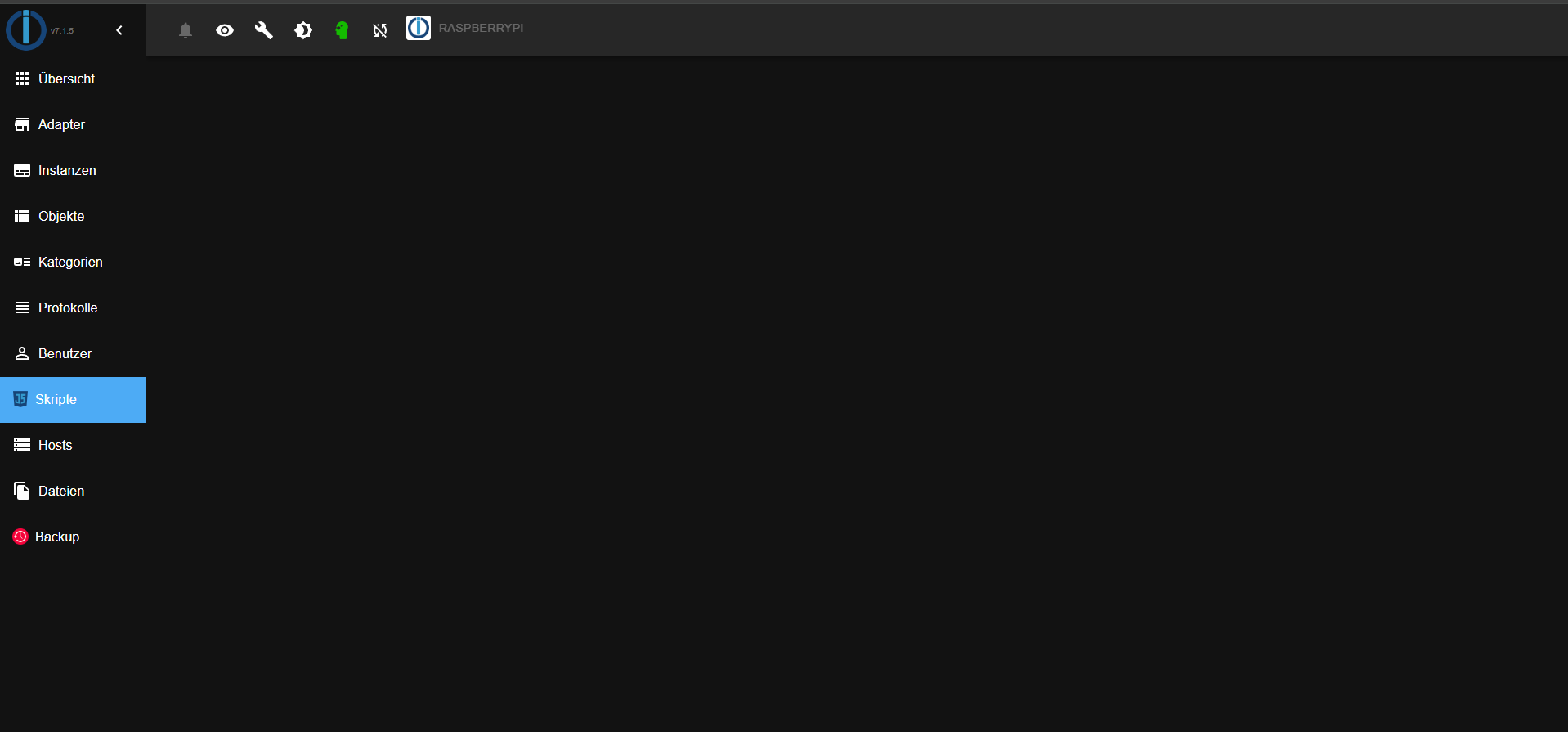
-
@wendy2702
Habe beides Probiert hat nichts gebrachtich habe jetzt das System komplett neu aufgesetzt und habe auch nochmal alle angebenden Ratschlägen versucht leider keine Änderung.
@ilovegym was meinst du mit Bullseye und was genau möchtest du für einen Screenshot im erste post ist ja einer.
Hier ein paar weitere Infos
Script v.2024-10-19 *** BASE SYSTEM *** Static hostname: raspberrypi Icon name: computer Operating System: Debian GNU/Linux 12 (bookworm) Kernel: Linux 6.6.51+rpt-rpi-v8 Architecture: arm64 OS is similar to: Model : Raspberry Pi 4 Model B Rev 1.2 Docker : false Virtualization : none Kernel : aarch64 Userland : 64 bit Systemuptime and Load: 21:31:41 up 17 min, 2 users, load average: 0.52, 0.91, 0.81 CPU threads: 4 *** LIFE CYCLE STATUS *** Operating System is the current Debian stable version codenamed 'bookworm'! *** RASPBERRY THROTTLING *** Current issues: No throttling issues detected. Previously detected issues: No throttling issues detected. *** TIME AND TIMEZONES *** Local time: Tue 2024-11-19 21:31:41 CET Universal time: Tue 2024-11-19 20:31:41 UTC RTC time: n/a Time zone: Europe/Berlin (CET, +0100) System clock synchronized: yes NTP service: active RTC in local TZ: no *** Users and Groups *** User that called 'iob diag': pi HOME=/home/pi GROUPS=pi adm dialout cdrom sudo audio video plugdev games users input render ne tdev gpio i2c spi iobroker User that is running 'js-controller': iobroker HOME=/home/iobroker GROUPS=iobroker tty dialout audio video plugdev bluetooth gpio i2c *** DISPLAY-SERVER SETUP *** Display-Server: false Desktop: Terminal: tty *** MEMORY *** total used free shared buff/cache available Mem: 4.0G 1.5G 1.8G 1.2M 819M 2.5G Swap: 536M 0B 536M Total: 4.5G 1.5G 2.3G Active iob-Instances: 20 3790 M total memory 1410 M used memory 1485 M active memory 454 M inactive memory 1675 M free memory 64 M buffer memory 717 M swap cache 511 M total swap 0 M used swap 511 M free swap *** top - Table Of Processes *** top - 21:31:41 up 17 min, 2 users, load average: 0.52, 0.91, 0.81 Tasks: 183 total, 1 running, 182 sleeping, 0 stopped, 0 zombie %Cpu(s): 50.0 us, 25.0 sy, 0.0 ni, 25.0 id, 0.0 wa, 0.0 hi, 0.0 si, 0.0 st MiB Mem : 3791.0 total, 1676.0 free, 1410.1 used, 781.7 buff/cache MiB Swap: 512.0 total, 512.0 free, 0.0 used. 2380.9 avail Mem *** FAILED SERVICES *** UNIT LOAD ACTIVE SUB DESCRIPTION 0 loaded units listed. *** DMESG CRITICAL ERRORS *** No critical errors detected *** FILESYSTEM *** Filesystem Type Size Used Avail Use% Mounted on udev devtmpfs 1.6G 0 1.6G 0% /dev tmpfs tmpfs 380M 1.2M 378M 1% /run /dev/sda2 ext4 110G 5.5G 100G 6% / tmpfs tmpfs 1.9G 0 1.9G 0% /dev/shm tmpfs tmpfs 5.0M 16K 5.0M 1% /run/lock /dev/sda1 vfat 510M 64M 447M 13% /boot/firmware tmpfs tmpfs 380M 0 380M 0% /run/user/1000 Messages concerning ext4 filesystem in dmesg: [Tue Nov 19 21:13:59 2024] Kernel command line: coherent_pool=1M 8250.nr_uarts=0 snd_bcm2835.enable_headphones=0 snd_bcm2835.enable_headphones=1 snd_bcm2835.ena ble_hdmi=1 snd_bcm2835.enable_hdmi=0 smsc95xx.macaddr=DC:A6:32:59:72:FC vc_mem. mem_base=0x3eb00000 vc_mem.mem_size=0x3ff00000 console=ttyS0,115200 console=tty 1 root=PARTUUID=e12e16cb-02 rootfstype=ext4 fsck.repair=yes rootwait cfg80211.ie ee80211_regdom=DE [Tue Nov 19 21:14:01 2024] EXT4-fs (sda2): mounted filesystem ce208fd3-38a8-424a -87a2-cd44114eb820 ro with ordered data mode. Quota mode: none. [Tue Nov 19 21:14:03 2024] EXT4-fs (sda2): re-mounted ce208fd3-38a8-424a-87a2-cd 44114eb820 r/w. Quota mode: none. Show mounted filesystems: TARGET SOURCE FSTYPE OPTIONS / /dev/sda2 ext4 rw,noatime,commit=600 `-/boot/firmware /dev/sda1 vfat rw,relatime,fmask=0022,dmask=0022,codepage=437 ,iocharset=ascii,shortname=mixed,errors=remount-ro Files in neuralgic directories: /var: 1.1G /var/ 205M /var/cache 199M /var/cache/apt 163M /var/lib 161M /var/log/journal/a81e89c245434f208844b59db739f6a9 Archived and active journals take up 160.0M in the file system. /opt/iobroker/backups: 9.1M /opt/iobroker/backups/ /opt/iobroker/iobroker-data: 811M /opt/iobroker/iobroker-data/ 791M /opt/iobroker/iobroker-data/files 617M /opt/iobroker/iobroker-data/files/javascript.admin 560M /opt/iobroker/iobroker-data/files/javascript.admin/static 558M /opt/iobroker/iobroker-data/files/javascript.admin/static/js The five largest files in iobroker-data are: 38M /opt/iobroker/iobroker-data/files/iot.admin/static/js/main.d3d286bd.js.m ap 24M /opt/iobroker/iobroker-data/files/web.admin/static/js/main.135279a0.js.m ap 16M /opt/iobroker/iobroker-data/objects.jsonl 12M /opt/iobroker/iobroker-data/files/backitup.admin/static/js/main.bd24114f .js 8.8M /opt/iobroker/iobroker-data/files/iot.admin/static/js/main.d3d286bd.js USB-Devices by-id: USB-Sticks - Avoid direct links to /dev/tty* in your adapter setups, please alw ays prefer the links 'by-id': No Devices found 'by-id' *** NodeJS-Installation *** /usr/bin/nodejs v20.18.0 /usr/bin/node v20.18.0 /usr/bin/npm 10.8.2 /usr/bin/npx 10.8.2 /usr/bin/corepack 0.29.3 nodejs: Installed: 20.18.0-1nodesource1 Candidate: 20.18.0-1nodesource1 Version table: *** 20.18.0-1nodesource1 1001 500 https://deb.nodesource.com/node_20.x nodistro/main arm64 Packages 100 /var/lib/dpkg/status 20.17.0-1nodesource1 1001 500 https://deb.nodesource.com/node_20.x nodistro/main arm64 Packages 20.16.0-1nodesource1 1001 500 https://deb.nodesource.com/node_20.x nodistro/main arm64 Packages 20.15.1-1nodesource1 1001 500 https://deb.nodesource.com/node_20.x nodistro/main arm64 Packages 20.15.0-1nodesource1 1001 500 https://deb.nodesource.com/node_20.x nodistro/main arm64 Packages 20.14.0-1nodesource1 1001 500 https://deb.nodesource.com/node_20.x nodistro/main arm64 Packages 20.13.1-1nodesource1 1001 500 https://deb.nodesource.com/node_20.x nodistro/main arm64 Packages 20.13.0-1nodesource1 1001 500 https://deb.nodesource.com/node_20.x nodistro/main arm64 Packages 20.12.2-1nodesource1 1001 500 https://deb.nodesource.com/node_20.x nodistro/main arm64 Packages 20.12.1-1nodesource1 1001 500 https://deb.nodesource.com/node_20.x nodistro/main arm64 Packages 20.12.0-1nodesource1 1001 500 https://deb.nodesource.com/node_20.x nodistro/main arm64 Packages 20.11.1-1nodesource1 1001 500 https://deb.nodesource.com/node_20.x nodistro/main arm64 Packages 20.11.0-1nodesource1 1001 500 https://deb.nodesource.com/node_20.x nodistro/main arm64 Packages 20.10.0-1nodesource1 1001 500 https://deb.nodesource.com/node_20.x nodistro/main arm64 Packages 20.9.0-1nodesource1 1001 500 https://deb.nodesource.com/node_20.x nodistro/main arm64 Packages 20.8.1-1nodesource1 1001 500 https://deb.nodesource.com/node_20.x nodistro/main arm64 Packages 20.8.0-1nodesource1 1001 500 https://deb.nodesource.com/node_20.x nodistro/main arm64 Packages 20.7.0-1nodesource1 1001 500 https://deb.nodesource.com/node_20.x nodistro/main arm64 Packages 20.6.1-1nodesource1 1001 500 https://deb.nodesource.com/node_20.x nodistro/main arm64 Packages 20.6.0-1nodesource1 1001 500 https://deb.nodesource.com/node_20.x nodistro/main arm64 Packages 20.5.1-1nodesource1 1001 500 https://deb.nodesource.com/node_20.x nodistro/main arm64 Packages 20.5.0-1nodesource1 1001 500 https://deb.nodesource.com/node_20.x nodistro/main arm64 Packages 20.4.0-1nodesource1 1001 500 https://deb.nodesource.com/node_20.x nodistro/main arm64 Packages 20.3.1-1nodesource1 1001 500 https://deb.nodesource.com/node_20.x nodistro/main arm64 Packages 20.3.0-1nodesource1 1001 500 https://deb.nodesource.com/node_20.x nodistro/main arm64 Packages 20.2.0-1nodesource1 1001 500 https://deb.nodesource.com/node_20.x nodistro/main arm64 Packages 20.1.0-1nodesource1 1001 500 https://deb.nodesource.com/node_20.x nodistro/main arm64 Packages 20.0.0-1nodesource1 1001 500 https://deb.nodesource.com/node_20.x nodistro/main arm64 Packages 18.19.0+dfsg-6~deb12u2 500 500 http://deb.debian.org/debian bookworm/main arm64 Packages 18.19.0+dfsg-6~deb12u1 500 500 http://deb.debian.org/debian-security bookworm-security/main arm64 P ackages Temp directories causing deletion problem: 0 No problems detected Errors in npm tree: 0 No problems detected *** ioBroker-Installation *** ioBroker Status iobroker is running on this host. Objects type: jsonl States type: jsonl Hosts: raspberrypi raspberrypi (version: 6.0.11, hostname: raspberrypi , alive, uptime: 829) Core adapters versions js-controller: 6.0.11 admin: 7.1.5 javascript: 8.8.3 nodejs modules from github: 1 +-- iobroker.connector-local-control@0.0.3 (git+ssh://git@github.com/ConnectorGit/ioBroker.connector-local-control.git#16883762689caa1cbfe39d5db0c2eeb4202d10ea) Adapter State + system.adapter.admin.0 : admin : raspberrypi - enabled, port: 8081, bind: 0.0.0.0, run as: admin + system.adapter.alexa2.0 : alexa2 : raspberrypi - enabled + system.adapter.backitup.0 : backitup : raspberrypi - enabled + system.adapter.broadlink2.0 : broadlink2 : raspberrypi - enabled + system.adapter.connector-local-control.0: connector-local-control: raspberrypi - enabled + system.adapter.discovery.0 : discovery : raspberrypi - enabled + system.adapter.dysonairpurifier.0 : dysonairpurifier : raspberrypi - enabled + system.adapter.email.0 : email : raspberrypi - enabled system.adapter.feiertage.0 : feiertage : raspberrypi - enabled + system.adapter.fritzdect.0 : fritzdect : raspberrypi - enabled + system.adapter.iot.0 : iot : raspberrypi - enabled + system.adapter.javascript.0 : javascript : raspberrypi - enabled system.adapter.netatmo-crawler.0 : netatmo-crawler : raspberrypi - enabled + system.adapter.onkyo.0 : onkyo : raspberrypi - enabled + system.adapter.pollenflug.0 : pollenflug : raspberrypi - enabled + system.adapter.shelly.0 : shelly : raspberrypi - enabled, port: 1882, bind: 0.0.0.0 + system.adapter.sonos.0 : sonos : raspberrypi - enabled + system.adapter.telegram.0 : telegram : raspberrypi - enabled, port: 8443, bind: 0.0.0.0 + system.adapter.tr-064.0 : tr-064 : raspberrypi - enabled + system.adapter.tradfri.0 : tradfri : raspberrypi - enabled system.adapter.vis-hqwidgets.0 : vis-hqwidgets : raspberrypi - disabled system.adapter.vis-timeandweather.0 : vis-timeandweather : raspberrypi - disabled system.adapter.vis.0 : vis : raspberrypi - enabled + system.adapter.web.0 : web : raspberrypi - enabled, port: 8082, bind: 0.0.0.0, run as: admin + instance is alive Enabled adapters with bindings + system.adapter.admin.0 : admin : raspberrypi - enabled, port: 8081, bind: 0.0.0.0, run as: admin + system.adapter.shelly.0 : shelly : raspberrypi - enabled, port: 1882, bind: 0.0.0.0 + system.adapter.telegram.0 : telegram : raspberrypi - enabled, port: 8443, bind: 0.0.0.0 + system.adapter.web.0 : web : raspberrypi - enabled, port: 8082, bind: 0.0.0.0, run as: admin ioBroker-Repositories ┌─────────┬──────────┬─────────────────────────────────────────────────────────┬──────────────┐ │ (index) │ name │ url │ auto upgrade │ ├─────────┼──────────┼─────────────────────────────────────────────────────────┼──────────────┤ │ 0 │ 'stable' │ 'http://download.iobroker.net/sources-dist.json' │ false │ │ 1 │ 'beta' │ 'http://download.iobroker.net/sources-dist-latest.json' │ false │ └─────────┴──────────┴─────────────────────────────────────────────────────────┴──────────────┘ Active repo(s): stable Upgrade policy: none Installed ioBroker-Instances Used repository: stable Adapter "admin" : 7.1.5 , installed 7.1.5 Adapter "alexa2" : 3.26.5 , installed 3.26.5 Adapter "backitup" : 3.0.25 , installed 3.0.25 Adapter "broadlink2" : 2.3.0 , installed 2.3.0 Adapter "discovery" : 5.0.0 , installed 5.0.0 Adapter "dysonairpurifier": 3.2.3 , installed 3.2.3 Adapter "email" : 1.3.1 , installed 1.3.1 Adapter "feiertage" : 1.2.0 , installed 1.2.0 Adapter "fritzdect" : 2.5.11 , installed 2.5.11 Adapter "iot" : 3.3.0 , installed 3.3.0 Adapter "javascript" : 8.8.3 , installed 8.8.3 Controller "js-controller": 6.0.11 , installed 6.0.11 Adapter "netatmo-crawler": 0.8.1 , installed 0.8.1 Adapter "onkyo" : 2.1.2 , installed 2.1.2 Adapter "pollenflug" : 2.0.0 , installed 2.0.0 Adapter "shelly" : 8.2.1 , installed 8.2.1 Adapter "simple-api" : 2.8.0 , installed 2.8.0 Adapter "socketio" : 6.7.1 , installed 6.7.1 Adapter "sonos" : 3.0.0 , installed 3.0.0 Adapter "telegram" : 3.9.0 , installed 3.9.0 Adapter "tr-064" : 4.3.0 , installed 4.3.0 Adapter "tradfri" : 3.1.3 , installed 3.1.3 Adapter "vis" : 1.5.6 , installed 1.5.6 Adapter "vis-hqwidgets": 1.5.1 , installed 1.5.1 Adapter "vis-timeandweather": 1.2.2, installed 1.2.2 Adapter "web" : 6.2.5 , installed 6.2.5 Adapter "ws" : 2.6.2 , installed 2.6.2 Objects and States Please stand by - This may take a while Objects: 6038 States: 6837 *** OS-Repositories and Updates *** ▒Hit:1 http://deb.debian.org/debian bookworm InRelease Hit:2 http://archive.raspberrypi.com/debian bookworm InRelease Hit:3 http://deb.debian.org/debian-security bookworm-security InRelease Hit:4 http://deb.debian.org/debian bookworm-updates InRelease Hit:5 https://deb.nodesource.com/node_20.x nodistro InRelease Reading package lists... Pending Updates: 0 *** Listening Ports *** Active Internet connections (only servers) Proto Recv-Q Send-Q Local Address Foreign Address State User Inode PID/Program name tcp 0 0 0.0.0.0:22 0.0.0.0:* LISTEN 0 607 601/sshd: /usr/sbin tcp 0 0 127.0.0.1:9000 0.0.0.0:* LISTEN 1001 14367 2154/iobroker.js-co tcp 0 0 127.0.0.1:9001 0.0.0.0:* LISTEN 1001 14362 2154/iobroker.js-co tcp6 0 0 :::22 :::* LISTEN 0 609 601/sshd: /usr/sbin tcp6 0 0 :::8081 :::* LISTEN 1001 13395 2172/io.admin.0 tcp6 0 0 :::8082 :::* LISTEN 1001 28908 4579/io.web.0 udp 0 0 0.0.0.0:56977 0.0.0.0:* 104 5583 450/avahi-daemon: r udp 0 0 0.0.0.0:57099 0.0.0.0:* 1001 13601 2298/io.broadlink2. udp 0 0 192.168.178.82:1905 0.0.0.0:* 1001 31677 2392/io.sonos.0 udp 0 0 0.0.0.0:44939 0.0.0.0:* 1001 22364 2298/io.broadlink2. udp 0 0 0.0.0.0:15001 0.0.0.0:* 1001 13598 2298/io.broadlink2. udp 0 0 192.168.178.82:5353 0.0.0.0:* 1001 15449 2407/io.tr-064.0 udp 0 0 192.168.178.79:5353 0.0.0.0:* 1001 15448 2407/io.tr-064.0 udp 0 0 0.0.0.0:5353 0.0.0.0:* 104 5581 450/avahi-daemon: r udp 0 0 0.0.0.0:56608 0.0.0.0:* 1001 13843 2496/io.tradfri.0 udp 0 0 0.0.0.0:32101 0.0.0.0:* 1001 12756 2433/io.connector-l udp 0 0 0.0.0.0:5683 0.0.0.0:* 1001 12611 2377/io.shelly.0 udp6 0 0 fe80::72e1:68b2:f84:546 :::* 0 681 497/NetworkManager udp6 0 0 fe80::ee7f:45f6:989:546 :::* 0 6533 497/NetworkManager udp6 0 0 :::37853 :::* 104 5584 450/avahi-daemon: r udp6 0 0 :::5353 :::* 104 5582 450/avahi-daemon: r *** Log File - Last 25 Lines *** 2024-11-19 21:31:48.339 - info: dysonairpurifier.0 (2317) NN2-EU-HKA2437A - MQTT disconnected. 2024-11-19 21:31:49.304 - info: shelly.0 (2377) [authEnabled] 192.168.178.81 (shellyplug-s / shellyplug-s-C8C9A3B88D72 / SHPLG-S#C8C9A3B88D72#1): This device is not protected via restricted login (see adapter documentation for details) 2024-11-19 21:31:49.340 - info: dysonairpurifier.0 (2317) NN2-EU-HKA2437A - MQTT reconnecting. 2024-11-19 21:31:52.403 - info: dysonairpurifier.0 (2317) NN2-EU-HKA2437A - MQTT disconnected. 2024-11-19 21:31:53.404 - info: dysonairpurifier.0 (2317) NN2-EU-HKA2437A - MQTT reconnecting. 2024-11-19 21:31:56.471 - info: dysonairpurifier.0 (2317) NN2-EU-HKA2437A - MQTT disconnected. 2024-11-19 21:31:57.472 - info: dysonairpurifier.0 (2317) NN2-EU-HKA2437A - MQTT reconnecting. 2024-11-19 21:31:59.441 - info: shelly.0 (2377) [authEnabled] 192.168.178.81 (shellyplug-s / shellyplug-s-C8C9A3B88D72 / SHPLG-S#C8C9A3B88D72#1): This device is not protected via restricted login (see adapter documentation for details) 2024-11-19 21:32:00.531 - info: dysonairpurifier.0 (2317) NN2-EU-HKA2437A - MQTT disconnected. 2024-11-19 21:32:01.538 - info: dysonairpurifier.0 (2317) NN2-EU-HKA2437A - MQTT reconnecting. 2024-11-19 21:32:04.599 - info: dysonairpurifier.0 (2317) NN2-EU-HKA2437A - MQTT disconnected. 2024-11-19 21:32:05.602 - info: dysonairpurifier.0 (2317) NN2-EU-HKA2437A - MQTT reconnecting. 2024-11-19 21:32:08.663 - info: dysonairpurifier.0 (2317) NN2-EU-HKA2437A - MQTT disconnected. 2024-11-19 21:32:09.579 - info: shelly.0 (2377) [authEnabled] 192.168.178.81 (shellyplug-s / shellyplug-s-C8C9A3B88D72 / SHPLG-S#C8C9A3B88D72#1): This device is not protected via restricted login (see adapter documentation for details) 2024-11-19 21:32:09.664 - info: dysonairpurifier.0 (2317) NN2-EU-HKA2437A - MQTT reconnecting. 2024-11-19 21:32:12.723 - info: dysonairpurifier.0 (2317) NN2-EU-HKA2437A - MQTT disconnected. 2024-11-19 21:32:13.724 - info: dysonairpurifier.0 (2317) NN2-EU-HKA2437A - MQTT reconnecting. 2024-11-19 21:32:16.787 - info: dysonairpurifier.0 (2317) NN2-EU-HKA2437A - MQTT disconnected. 2024-11-19 21:32:17.788 - info: dysonairpurifier.0 (2317) NN2-EU-HKA2437A - MQTT reconnecting. 2024-11-19 21:32:19.737 - info: shelly.0 (2377) [authEnabled] 192.168.178.81 (shellyplug-s / shellyplug-s-C8C9A3B88D72 / SHPLG-S#C8C9A3B88D72#1): This device is not protected via restricted login (see adapter documentation for details) 2024-11-19 21:32:20.851 - info: dysonairpurifier.0 (2317) NN2-EU-HKA2437A - MQTT disconnected. 2024-11-19 21:32:21.853 - info: dysonairpurifier.0 (2317) NN2-EU-HKA2437A - MQTT reconnecting. 2024-11-19 21:32:24.915 - info: dysonairpurifier.0 (2317) NN2-EU-HKA2437A - MQTT disconnected. 2024-11-19 21:32:25.916 - info: dysonairpurifier.0 (2317) NN2-EU-HKA2437A - MQTT reconnecting. 2024-11-19 21:32:28.979 - info: dysonairpurifier.0 (2317) NN2-EU-HKA2437A - MQTT disconnected.Aktueller Screenshot
@babu242 sagte in Kann Skripte nicht anklicken:
was meinst du mit Bullseye
@babu242 sagte in Kann Skripte nicht anklicken:
Operating System: Debian GNU/Linux 11 (bullseye)
ist das jetzige iob diag vom selben Rechner ohne dass du was geändert hast?
Auch der Kernel ist jetzt anders -
Hallo Ihr liebe
heute habe ich festgestellt, dass ich in der Rubrik "Meine Skripte" keine Skripte mehr anklicken kann. Wenn ich ein Skript auswähle, wird es nicht angezeigt, und auch alle anderen sind weg.
In diesem Zustand kann ich keine Skripte mehr sehen oder bearbeiten. Nach einem Backup erscheinen die Skripte zwar wieder, aber sobald ich eines auswähle, sind erneut alle verschwunden.
Laufen tun die Skripte.Ich wäre für Hilfe wirklich dankbar.
LG babuRasp 4 mit 4 GB
Node.js 20.18.0
NPM 10.8.2
js-controller6.0.11
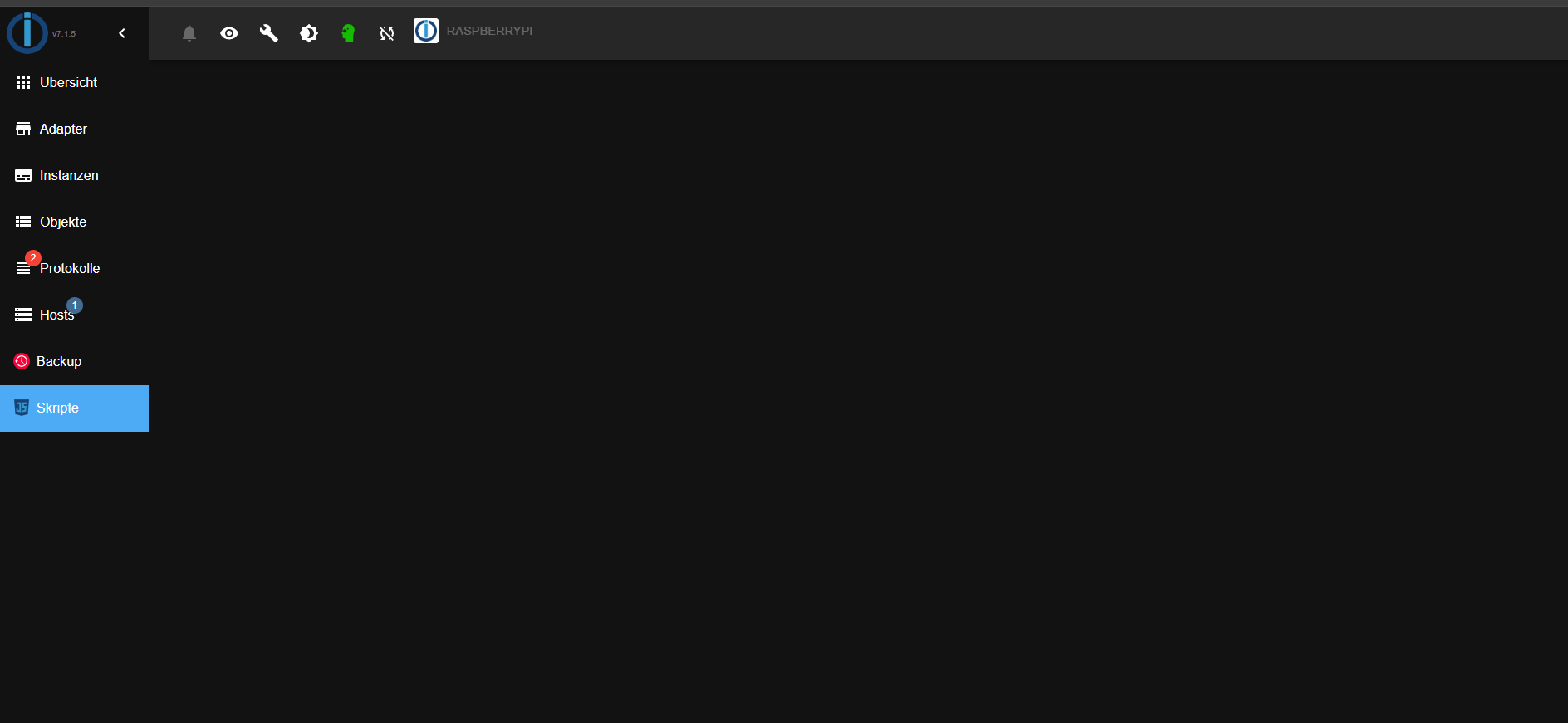
Mach ein Backup, nimm ne neue SD Karte, installiere Debian bookworm , ioBroker und das Backup wieder restoren.
-
Mach ein Backup, nimm ne neue SD Karte, installiere Debian bookworm , ioBroker und das Backup wieder restoren.
@ilovegym sagte in Kann Skripte nicht anklicken:
installiere Debian bookworm
ist es jetzt angeblich
@babu242 sagte in Kann Skripte nicht anklicken:
Operating System: Debian GNU/Linux 12 (bookworm)
da ist was faul
kein Support per PN! - Fragen im Forum stellen - Benutzt das Voting rechts unten im Beitrag wenn er euch geholfen hat.
Das Forum freut sich über eine Spende. Benutzt dazu den Spendenbutton oben rechts. Danke!
der Installationsfixer: curl -fsL https://iobroker.net/fix.sh | bash - -
@ilovegym sagte in Kann Skripte nicht anklicken:
installiere Debian bookworm
ist es jetzt angeblich
@babu242 sagte in Kann Skripte nicht anklicken:
Operating System: Debian GNU/Linux 12 (bookworm)
da ist was faul
@homoran sagte in Kann Skripte nicht anklicken:
da ist was faul
Ja, denn
Operating System: Debian GNU/Linux 11 (bullseye)
Kernel: Linux 6.6.62-v8+
passt schon nicht. Da ist wohl mit rpi-update der aktuellste LTS-Kernel reingeknallt worden:
longterm: 6.6.62 2024-11-17
So ein zusammengestoppeltes System kannste nicht vernünftig supporten.
-
@wendy2702
Habe beides Probiert hat nichts gebrachtich habe jetzt das System komplett neu aufgesetzt und habe auch nochmal alle angebenden Ratschlägen versucht leider keine Änderung.
@ilovegym was meinst du mit Bullseye und was genau möchtest du für einen Screenshot im erste post ist ja einer.
Hier ein paar weitere Infos
Script v.2024-10-19 *** BASE SYSTEM *** Static hostname: raspberrypi Icon name: computer Operating System: Debian GNU/Linux 12 (bookworm) Kernel: Linux 6.6.51+rpt-rpi-v8 Architecture: arm64 OS is similar to: Model : Raspberry Pi 4 Model B Rev 1.2 Docker : false Virtualization : none Kernel : aarch64 Userland : 64 bit Systemuptime and Load: 21:31:41 up 17 min, 2 users, load average: 0.52, 0.91, 0.81 CPU threads: 4 *** LIFE CYCLE STATUS *** Operating System is the current Debian stable version codenamed 'bookworm'! *** RASPBERRY THROTTLING *** Current issues: No throttling issues detected. Previously detected issues: No throttling issues detected. *** TIME AND TIMEZONES *** Local time: Tue 2024-11-19 21:31:41 CET Universal time: Tue 2024-11-19 20:31:41 UTC RTC time: n/a Time zone: Europe/Berlin (CET, +0100) System clock synchronized: yes NTP service: active RTC in local TZ: no *** Users and Groups *** User that called 'iob diag': pi HOME=/home/pi GROUPS=pi adm dialout cdrom sudo audio video plugdev games users input render ne tdev gpio i2c spi iobroker User that is running 'js-controller': iobroker HOME=/home/iobroker GROUPS=iobroker tty dialout audio video plugdev bluetooth gpio i2c *** DISPLAY-SERVER SETUP *** Display-Server: false Desktop: Terminal: tty *** MEMORY *** total used free shared buff/cache available Mem: 4.0G 1.5G 1.8G 1.2M 819M 2.5G Swap: 536M 0B 536M Total: 4.5G 1.5G 2.3G Active iob-Instances: 20 3790 M total memory 1410 M used memory 1485 M active memory 454 M inactive memory 1675 M free memory 64 M buffer memory 717 M swap cache 511 M total swap 0 M used swap 511 M free swap *** top - Table Of Processes *** top - 21:31:41 up 17 min, 2 users, load average: 0.52, 0.91, 0.81 Tasks: 183 total, 1 running, 182 sleeping, 0 stopped, 0 zombie %Cpu(s): 50.0 us, 25.0 sy, 0.0 ni, 25.0 id, 0.0 wa, 0.0 hi, 0.0 si, 0.0 st MiB Mem : 3791.0 total, 1676.0 free, 1410.1 used, 781.7 buff/cache MiB Swap: 512.0 total, 512.0 free, 0.0 used. 2380.9 avail Mem *** FAILED SERVICES *** UNIT LOAD ACTIVE SUB DESCRIPTION 0 loaded units listed. *** DMESG CRITICAL ERRORS *** No critical errors detected *** FILESYSTEM *** Filesystem Type Size Used Avail Use% Mounted on udev devtmpfs 1.6G 0 1.6G 0% /dev tmpfs tmpfs 380M 1.2M 378M 1% /run /dev/sda2 ext4 110G 5.5G 100G 6% / tmpfs tmpfs 1.9G 0 1.9G 0% /dev/shm tmpfs tmpfs 5.0M 16K 5.0M 1% /run/lock /dev/sda1 vfat 510M 64M 447M 13% /boot/firmware tmpfs tmpfs 380M 0 380M 0% /run/user/1000 Messages concerning ext4 filesystem in dmesg: [Tue Nov 19 21:13:59 2024] Kernel command line: coherent_pool=1M 8250.nr_uarts=0 snd_bcm2835.enable_headphones=0 snd_bcm2835.enable_headphones=1 snd_bcm2835.ena ble_hdmi=1 snd_bcm2835.enable_hdmi=0 smsc95xx.macaddr=DC:A6:32:59:72:FC vc_mem. mem_base=0x3eb00000 vc_mem.mem_size=0x3ff00000 console=ttyS0,115200 console=tty 1 root=PARTUUID=e12e16cb-02 rootfstype=ext4 fsck.repair=yes rootwait cfg80211.ie ee80211_regdom=DE [Tue Nov 19 21:14:01 2024] EXT4-fs (sda2): mounted filesystem ce208fd3-38a8-424a -87a2-cd44114eb820 ro with ordered data mode. Quota mode: none. [Tue Nov 19 21:14:03 2024] EXT4-fs (sda2): re-mounted ce208fd3-38a8-424a-87a2-cd 44114eb820 r/w. Quota mode: none. Show mounted filesystems: TARGET SOURCE FSTYPE OPTIONS / /dev/sda2 ext4 rw,noatime,commit=600 `-/boot/firmware /dev/sda1 vfat rw,relatime,fmask=0022,dmask=0022,codepage=437 ,iocharset=ascii,shortname=mixed,errors=remount-ro Files in neuralgic directories: /var: 1.1G /var/ 205M /var/cache 199M /var/cache/apt 163M /var/lib 161M /var/log/journal/a81e89c245434f208844b59db739f6a9 Archived and active journals take up 160.0M in the file system. /opt/iobroker/backups: 9.1M /opt/iobroker/backups/ /opt/iobroker/iobroker-data: 811M /opt/iobroker/iobroker-data/ 791M /opt/iobroker/iobroker-data/files 617M /opt/iobroker/iobroker-data/files/javascript.admin 560M /opt/iobroker/iobroker-data/files/javascript.admin/static 558M /opt/iobroker/iobroker-data/files/javascript.admin/static/js The five largest files in iobroker-data are: 38M /opt/iobroker/iobroker-data/files/iot.admin/static/js/main.d3d286bd.js.m ap 24M /opt/iobroker/iobroker-data/files/web.admin/static/js/main.135279a0.js.m ap 16M /opt/iobroker/iobroker-data/objects.jsonl 12M /opt/iobroker/iobroker-data/files/backitup.admin/static/js/main.bd24114f .js 8.8M /opt/iobroker/iobroker-data/files/iot.admin/static/js/main.d3d286bd.js USB-Devices by-id: USB-Sticks - Avoid direct links to /dev/tty* in your adapter setups, please alw ays prefer the links 'by-id': No Devices found 'by-id' *** NodeJS-Installation *** /usr/bin/nodejs v20.18.0 /usr/bin/node v20.18.0 /usr/bin/npm 10.8.2 /usr/bin/npx 10.8.2 /usr/bin/corepack 0.29.3 nodejs: Installed: 20.18.0-1nodesource1 Candidate: 20.18.0-1nodesource1 Version table: *** 20.18.0-1nodesource1 1001 500 https://deb.nodesource.com/node_20.x nodistro/main arm64 Packages 100 /var/lib/dpkg/status 20.17.0-1nodesource1 1001 500 https://deb.nodesource.com/node_20.x nodistro/main arm64 Packages 20.16.0-1nodesource1 1001 500 https://deb.nodesource.com/node_20.x nodistro/main arm64 Packages 20.15.1-1nodesource1 1001 500 https://deb.nodesource.com/node_20.x nodistro/main arm64 Packages 20.15.0-1nodesource1 1001 500 https://deb.nodesource.com/node_20.x nodistro/main arm64 Packages 20.14.0-1nodesource1 1001 500 https://deb.nodesource.com/node_20.x nodistro/main arm64 Packages 20.13.1-1nodesource1 1001 500 https://deb.nodesource.com/node_20.x nodistro/main arm64 Packages 20.13.0-1nodesource1 1001 500 https://deb.nodesource.com/node_20.x nodistro/main arm64 Packages 20.12.2-1nodesource1 1001 500 https://deb.nodesource.com/node_20.x nodistro/main arm64 Packages 20.12.1-1nodesource1 1001 500 https://deb.nodesource.com/node_20.x nodistro/main arm64 Packages 20.12.0-1nodesource1 1001 500 https://deb.nodesource.com/node_20.x nodistro/main arm64 Packages 20.11.1-1nodesource1 1001 500 https://deb.nodesource.com/node_20.x nodistro/main arm64 Packages 20.11.0-1nodesource1 1001 500 https://deb.nodesource.com/node_20.x nodistro/main arm64 Packages 20.10.0-1nodesource1 1001 500 https://deb.nodesource.com/node_20.x nodistro/main arm64 Packages 20.9.0-1nodesource1 1001 500 https://deb.nodesource.com/node_20.x nodistro/main arm64 Packages 20.8.1-1nodesource1 1001 500 https://deb.nodesource.com/node_20.x nodistro/main arm64 Packages 20.8.0-1nodesource1 1001 500 https://deb.nodesource.com/node_20.x nodistro/main arm64 Packages 20.7.0-1nodesource1 1001 500 https://deb.nodesource.com/node_20.x nodistro/main arm64 Packages 20.6.1-1nodesource1 1001 500 https://deb.nodesource.com/node_20.x nodistro/main arm64 Packages 20.6.0-1nodesource1 1001 500 https://deb.nodesource.com/node_20.x nodistro/main arm64 Packages 20.5.1-1nodesource1 1001 500 https://deb.nodesource.com/node_20.x nodistro/main arm64 Packages 20.5.0-1nodesource1 1001 500 https://deb.nodesource.com/node_20.x nodistro/main arm64 Packages 20.4.0-1nodesource1 1001 500 https://deb.nodesource.com/node_20.x nodistro/main arm64 Packages 20.3.1-1nodesource1 1001 500 https://deb.nodesource.com/node_20.x nodistro/main arm64 Packages 20.3.0-1nodesource1 1001 500 https://deb.nodesource.com/node_20.x nodistro/main arm64 Packages 20.2.0-1nodesource1 1001 500 https://deb.nodesource.com/node_20.x nodistro/main arm64 Packages 20.1.0-1nodesource1 1001 500 https://deb.nodesource.com/node_20.x nodistro/main arm64 Packages 20.0.0-1nodesource1 1001 500 https://deb.nodesource.com/node_20.x nodistro/main arm64 Packages 18.19.0+dfsg-6~deb12u2 500 500 http://deb.debian.org/debian bookworm/main arm64 Packages 18.19.0+dfsg-6~deb12u1 500 500 http://deb.debian.org/debian-security bookworm-security/main arm64 P ackages Temp directories causing deletion problem: 0 No problems detected Errors in npm tree: 0 No problems detected *** ioBroker-Installation *** ioBroker Status iobroker is running on this host. Objects type: jsonl States type: jsonl Hosts: raspberrypi raspberrypi (version: 6.0.11, hostname: raspberrypi , alive, uptime: 829) Core adapters versions js-controller: 6.0.11 admin: 7.1.5 javascript: 8.8.3 nodejs modules from github: 1 +-- iobroker.connector-local-control@0.0.3 (git+ssh://git@github.com/ConnectorGit/ioBroker.connector-local-control.git#16883762689caa1cbfe39d5db0c2eeb4202d10ea) Adapter State + system.adapter.admin.0 : admin : raspberrypi - enabled, port: 8081, bind: 0.0.0.0, run as: admin + system.adapter.alexa2.0 : alexa2 : raspberrypi - enabled + system.adapter.backitup.0 : backitup : raspberrypi - enabled + system.adapter.broadlink2.0 : broadlink2 : raspberrypi - enabled + system.adapter.connector-local-control.0: connector-local-control: raspberrypi - enabled + system.adapter.discovery.0 : discovery : raspberrypi - enabled + system.adapter.dysonairpurifier.0 : dysonairpurifier : raspberrypi - enabled + system.adapter.email.0 : email : raspberrypi - enabled system.adapter.feiertage.0 : feiertage : raspberrypi - enabled + system.adapter.fritzdect.0 : fritzdect : raspberrypi - enabled + system.adapter.iot.0 : iot : raspberrypi - enabled + system.adapter.javascript.0 : javascript : raspberrypi - enabled system.adapter.netatmo-crawler.0 : netatmo-crawler : raspberrypi - enabled + system.adapter.onkyo.0 : onkyo : raspberrypi - enabled + system.adapter.pollenflug.0 : pollenflug : raspberrypi - enabled + system.adapter.shelly.0 : shelly : raspberrypi - enabled, port: 1882, bind: 0.0.0.0 + system.adapter.sonos.0 : sonos : raspberrypi - enabled + system.adapter.telegram.0 : telegram : raspberrypi - enabled, port: 8443, bind: 0.0.0.0 + system.adapter.tr-064.0 : tr-064 : raspberrypi - enabled + system.adapter.tradfri.0 : tradfri : raspberrypi - enabled system.adapter.vis-hqwidgets.0 : vis-hqwidgets : raspberrypi - disabled system.adapter.vis-timeandweather.0 : vis-timeandweather : raspberrypi - disabled system.adapter.vis.0 : vis : raspberrypi - enabled + system.adapter.web.0 : web : raspberrypi - enabled, port: 8082, bind: 0.0.0.0, run as: admin + instance is alive Enabled adapters with bindings + system.adapter.admin.0 : admin : raspberrypi - enabled, port: 8081, bind: 0.0.0.0, run as: admin + system.adapter.shelly.0 : shelly : raspberrypi - enabled, port: 1882, bind: 0.0.0.0 + system.adapter.telegram.0 : telegram : raspberrypi - enabled, port: 8443, bind: 0.0.0.0 + system.adapter.web.0 : web : raspberrypi - enabled, port: 8082, bind: 0.0.0.0, run as: admin ioBroker-Repositories ┌─────────┬──────────┬─────────────────────────────────────────────────────────┬──────────────┐ │ (index) │ name │ url │ auto upgrade │ ├─────────┼──────────┼─────────────────────────────────────────────────────────┼──────────────┤ │ 0 │ 'stable' │ 'http://download.iobroker.net/sources-dist.json' │ false │ │ 1 │ 'beta' │ 'http://download.iobroker.net/sources-dist-latest.json' │ false │ └─────────┴──────────┴─────────────────────────────────────────────────────────┴──────────────┘ Active repo(s): stable Upgrade policy: none Installed ioBroker-Instances Used repository: stable Adapter "admin" : 7.1.5 , installed 7.1.5 Adapter "alexa2" : 3.26.5 , installed 3.26.5 Adapter "backitup" : 3.0.25 , installed 3.0.25 Adapter "broadlink2" : 2.3.0 , installed 2.3.0 Adapter "discovery" : 5.0.0 , installed 5.0.0 Adapter "dysonairpurifier": 3.2.3 , installed 3.2.3 Adapter "email" : 1.3.1 , installed 1.3.1 Adapter "feiertage" : 1.2.0 , installed 1.2.0 Adapter "fritzdect" : 2.5.11 , installed 2.5.11 Adapter "iot" : 3.3.0 , installed 3.3.0 Adapter "javascript" : 8.8.3 , installed 8.8.3 Controller "js-controller": 6.0.11 , installed 6.0.11 Adapter "netatmo-crawler": 0.8.1 , installed 0.8.1 Adapter "onkyo" : 2.1.2 , installed 2.1.2 Adapter "pollenflug" : 2.0.0 , installed 2.0.0 Adapter "shelly" : 8.2.1 , installed 8.2.1 Adapter "simple-api" : 2.8.0 , installed 2.8.0 Adapter "socketio" : 6.7.1 , installed 6.7.1 Adapter "sonos" : 3.0.0 , installed 3.0.0 Adapter "telegram" : 3.9.0 , installed 3.9.0 Adapter "tr-064" : 4.3.0 , installed 4.3.0 Adapter "tradfri" : 3.1.3 , installed 3.1.3 Adapter "vis" : 1.5.6 , installed 1.5.6 Adapter "vis-hqwidgets": 1.5.1 , installed 1.5.1 Adapter "vis-timeandweather": 1.2.2, installed 1.2.2 Adapter "web" : 6.2.5 , installed 6.2.5 Adapter "ws" : 2.6.2 , installed 2.6.2 Objects and States Please stand by - This may take a while Objects: 6038 States: 6837 *** OS-Repositories and Updates *** ▒Hit:1 http://deb.debian.org/debian bookworm InRelease Hit:2 http://archive.raspberrypi.com/debian bookworm InRelease Hit:3 http://deb.debian.org/debian-security bookworm-security InRelease Hit:4 http://deb.debian.org/debian bookworm-updates InRelease Hit:5 https://deb.nodesource.com/node_20.x nodistro InRelease Reading package lists... Pending Updates: 0 *** Listening Ports *** Active Internet connections (only servers) Proto Recv-Q Send-Q Local Address Foreign Address State User Inode PID/Program name tcp 0 0 0.0.0.0:22 0.0.0.0:* LISTEN 0 607 601/sshd: /usr/sbin tcp 0 0 127.0.0.1:9000 0.0.0.0:* LISTEN 1001 14367 2154/iobroker.js-co tcp 0 0 127.0.0.1:9001 0.0.0.0:* LISTEN 1001 14362 2154/iobroker.js-co tcp6 0 0 :::22 :::* LISTEN 0 609 601/sshd: /usr/sbin tcp6 0 0 :::8081 :::* LISTEN 1001 13395 2172/io.admin.0 tcp6 0 0 :::8082 :::* LISTEN 1001 28908 4579/io.web.0 udp 0 0 0.0.0.0:56977 0.0.0.0:* 104 5583 450/avahi-daemon: r udp 0 0 0.0.0.0:57099 0.0.0.0:* 1001 13601 2298/io.broadlink2. udp 0 0 192.168.178.82:1905 0.0.0.0:* 1001 31677 2392/io.sonos.0 udp 0 0 0.0.0.0:44939 0.0.0.0:* 1001 22364 2298/io.broadlink2. udp 0 0 0.0.0.0:15001 0.0.0.0:* 1001 13598 2298/io.broadlink2. udp 0 0 192.168.178.82:5353 0.0.0.0:* 1001 15449 2407/io.tr-064.0 udp 0 0 192.168.178.79:5353 0.0.0.0:* 1001 15448 2407/io.tr-064.0 udp 0 0 0.0.0.0:5353 0.0.0.0:* 104 5581 450/avahi-daemon: r udp 0 0 0.0.0.0:56608 0.0.0.0:* 1001 13843 2496/io.tradfri.0 udp 0 0 0.0.0.0:32101 0.0.0.0:* 1001 12756 2433/io.connector-l udp 0 0 0.0.0.0:5683 0.0.0.0:* 1001 12611 2377/io.shelly.0 udp6 0 0 fe80::72e1:68b2:f84:546 :::* 0 681 497/NetworkManager udp6 0 0 fe80::ee7f:45f6:989:546 :::* 0 6533 497/NetworkManager udp6 0 0 :::37853 :::* 104 5584 450/avahi-daemon: r udp6 0 0 :::5353 :::* 104 5582 450/avahi-daemon: r *** Log File - Last 25 Lines *** 2024-11-19 21:31:48.339 - info: dysonairpurifier.0 (2317) NN2-EU-HKA2437A - MQTT disconnected. 2024-11-19 21:31:49.304 - info: shelly.0 (2377) [authEnabled] 192.168.178.81 (shellyplug-s / shellyplug-s-C8C9A3B88D72 / SHPLG-S#C8C9A3B88D72#1): This device is not protected via restricted login (see adapter documentation for details) 2024-11-19 21:31:49.340 - info: dysonairpurifier.0 (2317) NN2-EU-HKA2437A - MQTT reconnecting. 2024-11-19 21:31:52.403 - info: dysonairpurifier.0 (2317) NN2-EU-HKA2437A - MQTT disconnected. 2024-11-19 21:31:53.404 - info: dysonairpurifier.0 (2317) NN2-EU-HKA2437A - MQTT reconnecting. 2024-11-19 21:31:56.471 - info: dysonairpurifier.0 (2317) NN2-EU-HKA2437A - MQTT disconnected. 2024-11-19 21:31:57.472 - info: dysonairpurifier.0 (2317) NN2-EU-HKA2437A - MQTT reconnecting. 2024-11-19 21:31:59.441 - info: shelly.0 (2377) [authEnabled] 192.168.178.81 (shellyplug-s / shellyplug-s-C8C9A3B88D72 / SHPLG-S#C8C9A3B88D72#1): This device is not protected via restricted login (see adapter documentation for details) 2024-11-19 21:32:00.531 - info: dysonairpurifier.0 (2317) NN2-EU-HKA2437A - MQTT disconnected. 2024-11-19 21:32:01.538 - info: dysonairpurifier.0 (2317) NN2-EU-HKA2437A - MQTT reconnecting. 2024-11-19 21:32:04.599 - info: dysonairpurifier.0 (2317) NN2-EU-HKA2437A - MQTT disconnected. 2024-11-19 21:32:05.602 - info: dysonairpurifier.0 (2317) NN2-EU-HKA2437A - MQTT reconnecting. 2024-11-19 21:32:08.663 - info: dysonairpurifier.0 (2317) NN2-EU-HKA2437A - MQTT disconnected. 2024-11-19 21:32:09.579 - info: shelly.0 (2377) [authEnabled] 192.168.178.81 (shellyplug-s / shellyplug-s-C8C9A3B88D72 / SHPLG-S#C8C9A3B88D72#1): This device is not protected via restricted login (see adapter documentation for details) 2024-11-19 21:32:09.664 - info: dysonairpurifier.0 (2317) NN2-EU-HKA2437A - MQTT reconnecting. 2024-11-19 21:32:12.723 - info: dysonairpurifier.0 (2317) NN2-EU-HKA2437A - MQTT disconnected. 2024-11-19 21:32:13.724 - info: dysonairpurifier.0 (2317) NN2-EU-HKA2437A - MQTT reconnecting. 2024-11-19 21:32:16.787 - info: dysonairpurifier.0 (2317) NN2-EU-HKA2437A - MQTT disconnected. 2024-11-19 21:32:17.788 - info: dysonairpurifier.0 (2317) NN2-EU-HKA2437A - MQTT reconnecting. 2024-11-19 21:32:19.737 - info: shelly.0 (2377) [authEnabled] 192.168.178.81 (shellyplug-s / shellyplug-s-C8C9A3B88D72 / SHPLG-S#C8C9A3B88D72#1): This device is not protected via restricted login (see adapter documentation for details) 2024-11-19 21:32:20.851 - info: dysonairpurifier.0 (2317) NN2-EU-HKA2437A - MQTT disconnected. 2024-11-19 21:32:21.853 - info: dysonairpurifier.0 (2317) NN2-EU-HKA2437A - MQTT reconnecting. 2024-11-19 21:32:24.915 - info: dysonairpurifier.0 (2317) NN2-EU-HKA2437A - MQTT disconnected. 2024-11-19 21:32:25.916 - info: dysonairpurifier.0 (2317) NN2-EU-HKA2437A - MQTT reconnecting. 2024-11-19 21:32:28.979 - info: dysonairpurifier.0 (2317) NN2-EU-HKA2437A - MQTT disconnected.Aktueller Screenshot
@babu242 sagte in Kann Skripte nicht anklicken:
Aktueller Screenshot
Mal versucht auf hellen Modus umzustellen,zumindest gab es früher auch schon mal das Problem im Dark Modus
-
@babu242 sagte in Kann Skripte nicht anklicken:
Aktueller Screenshot
Mal versucht auf hellen Modus umzustellen,zumindest gab es früher auch schon mal das Problem im Dark Modus
-
@homoran sagte in Kann Skripte nicht anklicken:
da ist was faul
Ja, denn
Operating System: Debian GNU/Linux 11 (bullseye)
Kernel: Linux 6.6.62-v8+
passt schon nicht. Da ist wohl mit rpi-update der aktuellste LTS-Kernel reingeknallt worden:
longterm: 6.6.62 2024-11-17
So ein zusammengestoppeltes System kannste nicht vernünftig supporten.
@thomas-braun
ok da ist also etwas nicht in Ordnung
vielleicht kannst du ja helfen es wieder in Ordnung zu bringen -
@thomas-braun
ok da ist also etwas nicht in Ordnung
vielleicht kannst du ja helfen es wieder in Ordnung zu bringen@babu242 sagte in Kann Skripte nicht anklicken:
vielleicht kannst du ja helfen es wieder in Ordnung zu bringen
dazu eürde es extrem helfen zu wissen warum das so ist.
Was hast du denn gemacht?z.B.
@thomas-braun sagte in Kann Skripte nicht anklicken:
Da ist wohl mit rpi-update der aktuellste LTS-Kernel reingeknallt worden
oder anderes unkonventionelles
-
@thomas-braun
ok da ist also etwas nicht in Ordnung
vielleicht kannst du ja helfen es wieder in Ordnung zu bringen@babu242 sagte in Kann Skripte nicht anklicken:
@thomas-braun
ok da ist also etwas nicht in Ordnung
vielleicht kannst du ja helfen es wieder in Ordnung zu bringenIst doch schon geschrieben worden. :man-shrugging:
@ilovegym sagte in Kann Skripte nicht anklicken:
Mach ein Backup, nimm ne neue SD Karte, installiere Debian bookworm , ioBroker und das Backup wieder restoren.
-
@babu242 sagte in Kann Skripte nicht anklicken:
vielleicht kannst du ja helfen es wieder in Ordnung zu bringen
dazu eürde es extrem helfen zu wissen warum das so ist.
Was hast du denn gemacht?z.B.
@thomas-braun sagte in Kann Skripte nicht anklicken:
Da ist wohl mit rpi-update der aktuellste LTS-Kernel reingeknallt worden
oder anderes unkonventionelles
@homoran
Ich habe das System gestern neu aufgesetzt mit dieser Anleitung
https://forum.iobroker.net/topic/51869/installation-auf-raspi-einfacher-geht-s-nichtund dann mein Backup mit Backitup eingespielt.
Ich bin kein echter Profi deshalb verstehe ich nicht was ich falsch gemacht haben kann.
Ich habe auch kein Problem das System nochmal neu aufzusetzen wenn es eine besser Anleitung gibt die Fehler vermeidet. -
@homoran
Ich habe das System gestern neu aufgesetzt mit dieser Anleitung
https://forum.iobroker.net/topic/51869/installation-auf-raspi-einfacher-geht-s-nichtund dann mein Backup mit Backitup eingespielt.
Ich bin kein echter Profi deshalb verstehe ich nicht was ich falsch gemacht haben kann.
Ich habe auch kein Problem das System nochmal neu aufzusetzen wenn es eine besser Anleitung gibt die Fehler vermeidet.@babu242 sagte in Kann Skripte nicht anklicken:
@homoran
Ich habe das System gestern neu aufgesetzt mit dieser Anleitung
https://forum.iobroker.net/topic/51869/installation-auf-raspi-einfacher-geht-s-nichtund dann mein Backup mit Backitup eingespielt.
Ich bin kein echter Profi deshalb verstehe ich nicht was ich falsch gemacht haben kann.
Ich habe auch kein Problem das System nochmal neu aufzusetzen wenn es eine besser Anleitung gibt die Fehler vermeidet.Wenn du das ausgeführt hast, sollte das System richtig stehen.
Dann bitte jetzt noch einmal die Langfassung von
iob diaghier in </> code tags hier reinstellen, damit man mal sieht, wo du tatsächlich mit deinem System stehst. -
Welcher Browser?
Welches Endgerät?
Was kommt in der Browser Konsole und eventuell im iobroker log?
@wendy2702 sagte in Kann Skripte nicht anklicken:
Welcher Browser?
Welches Endgerät?
Was kommt in der Browser Konsole und eventuell im iobroker log?
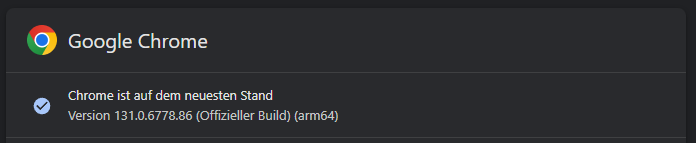
Hier wurde schon mal nach dem Browser gefragt. Welchen nutzt du denn?
Ro75.
-
@wendy2702 sagte in Kann Skripte nicht anklicken:
Welcher Browser?
Welches Endgerät?
Was kommt in der Browser Konsole und eventuell im iobroker log?
Hier wurde schon mal nach dem Browser gefragt. Welchen nutzt du denn?
Ro75.
-
@babu242 und schon mal über "inPrivate" Fenster versucht?
Ro75.
EDIT: Schon mal den Edge oder FF versucht?





Hey! Du scheinst an dieser Unterhaltung interessiert zu sein, hast aber noch kein Konto.
Hast du es satt, bei jedem Besuch durch die gleichen Beiträge zu scrollen? Wenn du dich für ein Konto anmeldest, kommst du immer genau dorthin zurück, wo du zuvor warst, und kannst dich über neue Antworten benachrichtigen lassen (entweder per E-Mail oder Push-Benachrichtigung). Du kannst auch Lesezeichen speichern und Beiträge positiv bewerten, um anderen Community-Mitgliedern deine Wertschätzung zu zeigen.
Mit deinem Input könnte dieser Beitrag noch besser werden 💗
Registrieren Anmelden278
Online33.0k
Benutzende83.7k
Themen1.3m
Beiträge