




Bild versand
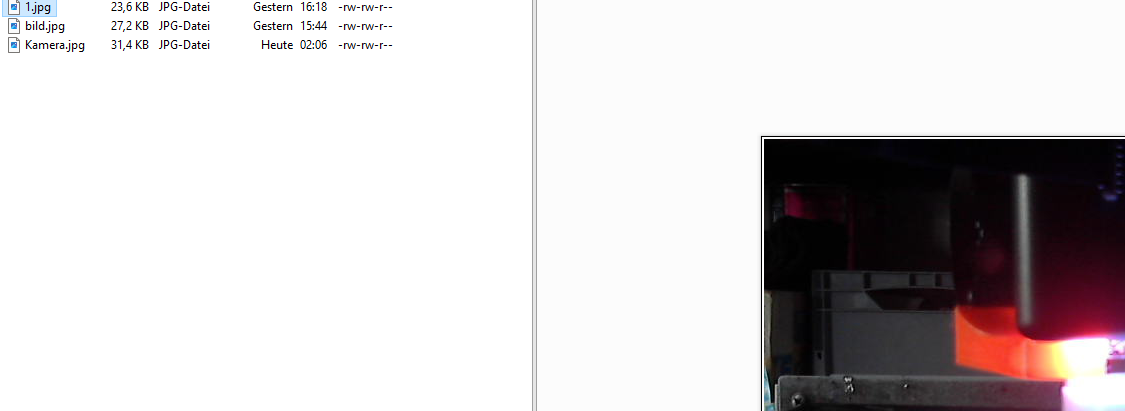

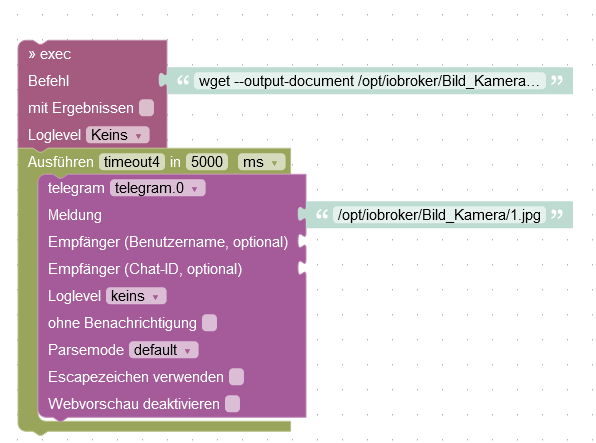

-
setzte beim
execmal den Haken mit Ergebnissen und verschiebe dentelegramBlock dann innerhalb desexecBlocks.
Statt timeout wird dann gesendet wenn derwgetBefehl fertig ist.Zudem nimm statt des Pfades
/opt/iobroker/Bild_Kamera/den Pfad/tmp/Man soll eigentlich nicht auf diese Art etwas in den ioBroker-Ordner schreiben.
statt
lsmach mal ein
ls -ldann könnte man auch sehen wem das Bild gehört. Wenn du den
wgetmal als root ausgeführt hast, darf der iobroker-Benutzer das Bild gar nicht überschreiben. Im Screenshot sind zwar die Rechte zu sehen, aber nicht der BesitzerioBroker@Ubuntu 24.04 LTS (Proxmox VM) für: >260 Geräte, 6 Switche, 7 AP, 10 IP-Cam, 1 NAS 42TB, 1 Proxmox 128GB 15TB, 2 Proxmox 32GB 1TB, 1 Hyper-V 52GB 42TB, 14 x Echo, 5x FireTV, 5 x Tablett/Handy VIS || >=160 Tasmota/Shelly || >=95 ZigBee || PV 8.1kW / Akku 14kWh || 2x USV APC 750W kaskadiert || Kobra S1 Max
-
setzte beim
execmal den Haken mit Ergebnissen und verschiebe dentelegramBlock dann innerhalb desexecBlocks.
Statt timeout wird dann gesendet wenn derwgetBefehl fertig ist.Zudem nimm statt des Pfades
/opt/iobroker/Bild_Kamera/den Pfad/tmp/Man soll eigentlich nicht auf diese Art etwas in den ioBroker-Ordner schreiben.
statt
lsmach mal ein
ls -ldann könnte man auch sehen wem das Bild gehört. Wenn du den
wgetmal als root ausgeführt hast, darf der iobroker-Benutzer das Bild gar nicht überschreiben. Im Screenshot sind zwar die Rechte zu sehen, aber nicht der BesitzerHi,
ich habe das schon seit Jahren so laufen.
Habe es auch schon im Temp versucht, dort geht es auch nicht.Gruß Totocotonio
Bin noch Anfänger in Sachen IO-Broker und lerne gerne dazu. :P
-
Hi,
ich habe das schon seit Jahren so laufen.
Habe es auch schon im Temp versucht, dort geht es auch nicht.Gruß Totocotonio
Bin noch Anfänger in Sachen IO-Broker und lerne gerne dazu. :P
-
@totocotonio Genau so benutze ich das seit Jahren:
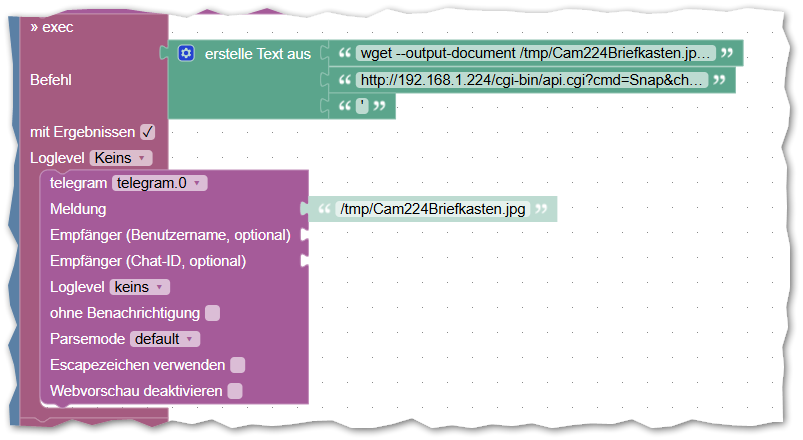
sagt das Log etwas? iobroker schon mal durchgestartet? Welche Adapterversionen?
Am besten mal hier die Ausgabe voniob diagin voller Länge posten
ioBroker@Ubuntu 24.04 LTS (Proxmox VM) für: >260 Geräte, 6 Switche, 7 AP, 10 IP-Cam, 1 NAS 42TB, 1 Proxmox 128GB 15TB, 2 Proxmox 32GB 1TB, 1 Hyper-V 52GB 42TB, 14 x Echo, 5x FireTV, 5 x Tablett/Handy VIS || >=160 Tasmota/Shelly || >=95 ZigBee || PV 8.1kW / Akku 14kWh || 2x USV APC 750W kaskadiert || Kobra S1 Max
-
@totocotonio Genau so benutze ich das seit Jahren:
sagt das Log etwas? iobroker schon mal durchgestartet? Welche Adapterversionen?
Am besten mal hier die Ausgabe voniob diagin voller Länge posten
@bananajoe
Hi,
ja durchgestartet habe ich natürlich schon mehrfach gemacht.Das sagt, das log

Script v.2024-10-19 *** BASE SYSTEM *** Static hostname: iobdebian Icon name: computer-container Chassis: container ☐ Virtualization: lxc Operating System: Debian GNU/Linux 12 (bookworm) Kernel: Linux 6.8.12-2-pve Architecture: x86-64 OS is similar to: model name : Intel(R) Core(TM) i3-10110U CPU @ 2.10GHz Docker : false Virtualization : lxc Kernel : x86_64 Userland : 64 bit Systemuptime and Load: 16:30:46 up 1 day, 14:51, 2 users, load average: 1.81, 2.50, 2.33 CPU threads: 4 *** LIFE CYCLE STATUS *** Unknown release codenamed ''. Please check yourself if the Operating System is actively maintained. *** TIME AND TIMEZONES *** Local time: Mon 2024-10-21 16:30:46 CEST Universal time: Mon 2024-10-21 14:30:46 UTC RTC time: n/a Time zone: Europe/Berlin (CEST, +0200) System clock synchronized: yes NTP service: inactive RTC in local TZ: no *** Users and Groups *** User that called 'iob diag': torsten HOME=/home/torsten GROUPS=torsten sudo users User that is running 'js-controller': iobroker HOME=/home/iobroker GROUPS=iobroker tty dialout audio video plugdev *** DISPLAY-SERVER SETUP *** Display-Server: false Desktop: Terminal: System is booting into 'graphical.target'. Usually a server is running in 'multi-user.target'. Please set BootTarget to 'multi-user.target' or run 'iobroker fix' *** MEMORY *** total used free shared buff/cache available Mem: 8.6G 4.6G 2.0G 135K 2.0G 4.0G Swap: 2.1G 4.1K 2.1G Total: 10G 4.6G 4.2G Active iob-Instances: 61 8192 M total memory 4395 M used memory 4075 M active memory 1727 M inactive memory 1915 M free memory 0 M buffer memory 1880 M swap cache 2047 M total swap 0 M used swap 2047 M free swap *** top - Table Of Processes *** top - 16:30:46 up 1 day, 14:51, 2 users, load average: 1.83, 2.49, 2.33 Tasks: 99 total, 1 running, 98 sleeping, 0 stopped, 0 zombie %Cpu(s): 0.0 us, 0.0 sy, 0.0 ni,100.0 id, 0.0 wa, 0.0 hi, 0.0 si, 0.0 st MiB Mem : 8192.0 total, 1913.9 free, 4397.3 used, 1880.9 buff/cache MiB Swap: 2048.0 total, 2048.0 free, 0.0 used. 3794.7 avail Mem *** FAILED SERVICES *** UNIT LOAD ACTIVE SUB DESCRIPTION * run-rpc_pipefs.mount loaded failed failed RPC Pipe File System LOAD = Reflects whether the unit definition was properly loaded. ACTIVE = The high-level unit activation state, i.e. generalization of SUB. SUB = The low-level unit activation state, values depend on unit type. 1 loaded units listed. *** DMESG CRITICAL ERRORS *** dmesg: read kernel buffer failed: Operation not permitted No critical errors detected *** FILESYSTEM *** Filesystem Type Size Used Avail Use% Mounted on /dev/mapper/pve-vm--119--disk--1 ext4 32G 11G 20G 35% / none tmpfs 492K 4.0K 488K 1% /dev udev devtmpfs 20G 0 20G 0% /dev/tty tmpfs tmpfs 20G 0 20G 0% /dev/shm tmpfs tmpfs 7.8G 132K 7.8G 1% /run tmpfs tmpfs 5.0M 0 5.0M 0% /run/lock tmpfs tmpfs 3.9G 0 3.9G 0% /run/user/0 Messages concerning ext4 filesystem in dmesg: dmesg: read kernel buffer failed: Operation not permitted Show mounted filesystems: TARGET SOURCE FSTYPE OPTIONS / /dev/mapper/pve-vm--119--disk--1 ext4 rw,relatime,stripe=16 Files in neuralgic directories: /var: 707M /var/ 280M /var/cache 279M /var/log/journal/bedee8e8251140b295fe88ba675d67ae 279M /var/log/journal 279M /var/log Hint: You are currently not seeing messages from other users and the system. Users in groups 'adm', 'systemd-journal' can see all messages. Pass -q to turn off this notice. Archived and active journals take up 8.0M in the file system. /opt/iobroker/backups: 375M /opt/iobroker/backups/ /opt/iobroker/iobroker-data: 2.1G /opt/iobroker/iobroker-data/ 1.6G /opt/iobroker/iobroker-data/files 617M /opt/iobroker/iobroker-data/files/javascript.admin 560M /opt/iobroker/iobroker-data/files/javascript.admin/static 558M /opt/iobroker/iobroker-data/files/javascript.admin/static/js The five largest files in iobroker-data are: find: Failed to change directory: /root: Permission denied find: Failed to change directory: /root: Permission denied find: Failed to change directory: /root: Permission denied find: Failed to change directory: /root: Permission denied find: Failed to change directory: /root: Permission denied find: Failed to change directory: /root: Permission denied find: Failed to change directory: /root: Permission denied find: Failed to change directory: /root: Permission denied find: Failed to change directory: /root: Permission denied find: Failed to change directory: /root: Permission denied find: Failed to change directory: /root: Permission denied find: Failed to change directory: /root: Permission denied find: Failed to change directory: /root: Permission denied find: Failed to change directory: /root: Permission denied find: Failed to change directory: /root: Permission denied find: Failed to change directory: /root: Permission denied find: Failed to change directory: /root: Permission denied find: Failed to change directory: /root: Permission denied find: Failed to change directory: /root: Permission denied find: Failed to change directory: /root: Permission denied find: Failed to change directory: /root: Permission denied find: Failed to change directory: /root: Permission denied find: Failed to restore initial working directory: /root: Permission denied USB-Devices by-id: USB-Sticks - Avoid direct links to /dev/tty* in your adapter setups, please always prefer the links 'by-id': No Devices found 'by-id' HINT: Your zigbee.0 COM-Port is NOT matching 'by-id'. Please check your setting: tcp *** NodeJS-Installation *** /usr/bin/nodejs v20.18.0 /usr/bin/node v20.18.0 /usr/bin/npm 10.8.2 /usr/bin/npx 10.8.2 /usr/bin/corepack 0.29.3 nodejs: Installed: 20.18.0-1nodesource1 Candidate: 20.18.0-1nodesource1 Version table: *** 20.18.0-1nodesource1 1001 500 https://deb.nodesource.com/node_20.x nodistro/main amd64 Packages 100 /var/lib/dpkg/status 20.17.0-1nodesource1 1001 500 https://deb.nodesource.com/node_20.x nodistro/main amd64 Packages 20.16.0-1nodesource1 1001 500 https://deb.nodesource.com/node_20.x nodistro/main amd64 Packages 20.15.1-1nodesource1 1001 500 https://deb.nodesource.com/node_20.x nodistro/main amd64 Packages 20.15.0-1nodesource1 1001 500 https://deb.nodesource.com/node_20.x nodistro/main amd64 Packages 20.14.0-1nodesource1 1001 500 https://deb.nodesource.com/node_20.x nodistro/main amd64 Packages 20.13.1-1nodesource1 1001 500 https://deb.nodesource.com/node_20.x nodistro/main amd64 Packages 20.13.0-1nodesource1 1001 500 https://deb.nodesource.com/node_20.x nodistro/main amd64 Packages 20.12.2-1nodesource1 1001 500 https://deb.nodesource.com/node_20.x nodistro/main amd64 Packages 20.12.1-1nodesource1 1001 500 https://deb.nodesource.com/node_20.x nodistro/main amd64 Packages 20.12.0-1nodesource1 1001 500 https://deb.nodesource.com/node_20.x nodistro/main amd64 Packages 20.11.1-1nodesource1 1001 500 https://deb.nodesource.com/node_20.x nodistro/main amd64 Packages 20.11.0-1nodesource1 1001 500 https://deb.nodesource.com/node_20.x nodistro/main amd64 Packages 20.10.0-1nodesource1 1001 500 https://deb.nodesource.com/node_20.x nodistro/main amd64 Packages 20.9.0-1nodesource1 1001 500 https://deb.nodesource.com/node_20.x nodistro/main amd64 Packages 20.8.1-1nodesource1 1001 500 https://deb.nodesource.com/node_20.x nodistro/main amd64 Packages 20.8.0-1nodesource1 1001 500 https://deb.nodesource.com/node_20.x nodistro/main amd64 Packages 20.7.0-1nodesource1 1001 500 https://deb.nodesource.com/node_20.x nodistro/main amd64 Packages 20.6.1-1nodesource1 1001 500 https://deb.nodesource.com/node_20.x nodistro/main amd64 Packages 20.6.0-1nodesource1 1001 500 https://deb.nodesource.com/node_20.x nodistro/main amd64 Packages 20.5.1-1nodesource1 1001 500 https://deb.nodesource.com/node_20.x nodistro/main amd64 Packages 20.5.0-1nodesource1 1001 500 https://deb.nodesource.com/node_20.x nodistro/main amd64 Packages 20.4.0-1nodesource1 1001 500 https://deb.nodesource.com/node_20.x nodistro/main amd64 Packages 20.3.1-1nodesource1 1001 500 https://deb.nodesource.com/node_20.x nodistro/main amd64 Packages 20.3.0-1nodesource1 1001 500 https://deb.nodesource.com/node_20.x nodistro/main amd64 Packages 20.2.0-1nodesource1 1001 500 https://deb.nodesource.com/node_20.x nodistro/main amd64 Packages 20.1.0-1nodesource1 1001 500 https://deb.nodesource.com/node_20.x nodistro/main amd64 Packages 20.0.0-1nodesource1 1001 500 https://deb.nodesource.com/node_20.x nodistro/main amd64 Packages 18.19.0+dfsg-6~deb12u2 500 500 http://deb.debian.org/debian bookworm/main amd64 Packages 18.19.0+dfsg-6~deb12u1 500 500 http://security.debian.org bookworm-security/main amd64 Packages find: Failed to restore initial working directory: /root: Permission denied Temp directories causing deletion problem: 0 No problems detected Errors in npm tree: 0 No problems detected *** ioBroker-Installation *** ioBroker Status iobroker is running on this host. Objects type: jsonl States type: jsonl Hosts: iobdebian iobdebian (version: 6.0.11, hostname: iobdebian , alive, uptime: 513) Core adapters versions js-controller: 6.0.11 admin: 7.1.5 javascript: 8.8.3 nodejs modules from github: 9 +-- iobroker.bmw@2.6.2 (git+ssh://git@github.com/TA2k/ioBroker.bmw.git#0099deef6a444cdec23fe43c09cdb0c74ef06cfd) +-- iobroker.fully-tablet-control@0.3.1-beta.2 (git+ssh://git@github.com/xXBJXx/ioBroker.fully-tablet-control.git#b13e1a66ce3e9462dd3dc972af8f0ba6c4a06c16) | `-- kodi-ws@2.4.4 (git+https://git@github.com/iobroker-community-adapters/kodi-ws.git#ad5a1fdc5cd0a282e6818ff152594b5d32535103) | +-- samsungtv@0.0.0 (git+https://git@github.com/luca-saggese/samsungtv.git#7fc20107455414e2afb94022682e0787e8635550) +-- iobroker.slideshow@0.1.4 (git+ssh://git@github.com/gaudes/ioBroker.slideshow.git#07f045f491d76062044ba084c77ee24b414d7574) +-- iobroker.sourceanalytix@0.4.15-alpha.1 (git+ssh://git@github.com/DrozmotiX/ioBroker.sourceanalytix.git#fd3b7f9f362a348741cbe18d70a130d2bfee6727) | +-- syno@3.0.0 (git+https://git@github.com/MeisterTR/syno.git#0104a973d33fe332aa6b1ab5be7fe8c57d3c68b0) +-- iobroker.vis-materialdesign@0.5.86 (git+ssh://git@github.com/Scrounger/ioBroker.vis-materialdesign.git#cf7fc5b85debcda156a3ec7feb761cff217fa855) +-- iobroker.web-speedy@0.2.0 (git+ssh://git@github.com/DrozmotiX/ioBroker.web-speedy.git#629f35c43f46f62ee5d9113c0df80c0f9a1c4b04) Adapter State + system.adapter.admin.0 : admin : iobdebian - enabled, port: 8081, bind: 0.0.0.0, run as: admin system.adapter.admin.1 : admin : iobdebian - disabled, port: 8091, bind: 0.0.0.0, run as: admin system.adapter.alarm.0 : alarm : iobdebian - disabled + system.adapter.alexa-timer-vis.0 : alexa-timer-vis : iobdebian - enabled + system.adapter.alexa2.0 : alexa2 : iobdebian - enabled system.adapter.alias-manager.0 : alias-manager : iobdebian - disabled + system.adapter.backitup.0 : backitup : iobdebian - enabled system.adapter.bmw.0 : bmw : iobdebian - disabled + system.adapter.bring.0 : bring : iobdebian - enabled system.adapter.daswetter.0 : daswetter : iobdebian - enabled system.adapter.device-reminder.0 : device-reminder : iobdebian - disabled + system.adapter.device-watcher.0 : device-watcher : iobdebian - enabled system.adapter.devices.0 : devices : iobdebian - disabled system.adapter.discovery.0 : discovery : iobdebian - disabled system.adapter.dwd.0 : dwd : iobdebian - enabled + system.adapter.energiefluss-erweitert.0 : energiefluss-erweitert: iobdebian - enabled system.adapter.espresense.0 : espresense : iobdebian - disabled + system.adapter.firetv.0 : firetv : iobdebian - enabled + system.adapter.fritzbox.0 : fritzbox : iobdebian - enabled + system.adapter.fritzdect.0 : fritzdect : iobdebian - enabled + system.adapter.fully-tablet-control.0 : fully-tablet-control : iobdebian - enabled + system.adapter.ham.0 : ham : iobdebian - enabled system.adapter.hass.0 : hass : iobdebian - disabled, port: 8123 + system.adapter.hm-rega.0 : hm-rega : iobdebian - enabled + system.adapter.hm-rpc.0 : hm-rpc : iobdebian - enabled, port: 0 + system.adapter.hm-rpc.1 : hm-rpc : iobdebian - enabled, port: 0 system.adapter.ical.0 : ical : iobdebian - enabled system.adapter.ical.1 : ical : iobdebian - enabled system.adapter.icons-addictive-flavour-png.0: icons-addictive-flavour-png: iobdebian - disabled system.adapter.icons-icons8.0 : icons-icons8 : iobdebian - disabled system.adapter.icons-material-png.0 : icons-material-png : iobdebian - disabled system.adapter.icons-mfd-png.0 : icons-mfd-png : iobdebian - disabled system.adapter.icons-mfd-svg.0 : icons-mfd-svg : iobdebian - disabled system.adapter.icons-open-icon-library-png.0: icons-open-icon-library-png: iobdebian - disabled system.adapter.icons-ultimate-png.0 : icons-ultimate-png : iobdebian - disabled system.adapter.influxdb.0 : influxdb : iobdebian - disabled, port: 8086 + system.adapter.influxdb.1 : influxdb : iobdebian - enabled, port: 8086 + system.adapter.iot.0 : iot : iobdebian - enabled system.adapter.iot.1 : iot : iobdebian - disabled + system.adapter.javascript.0 : javascript : iobdebian - enabled system.adapter.kodi.0 : kodi : iobdebian - disabled, port: 9090 + system.adapter.logparser.0 : logparser : iobdebian - enabled + system.adapter.lorawan.0 : lorawan : iobdebian - enabled, port: 8883 + system.adapter.luftdaten.0 : luftdaten : iobdebian - enabled system.adapter.meteoalarm.0 : meteoalarm : iobdebian - enabled + system.adapter.mihome-vacuum.0 : mihome-vacuum : iobdebian - enabled, port: 54321 + system.adapter.mihome.0 : mihome : iobdebian - enabled, port: 9898, bind: 0.0.0.0 system.adapter.milight.0 : milight : iobdebian - disabled, port: 8899 system.adapter.mobile.0 : mobile : iobdebian - disabled system.adapter.modbus.0 : modbus : iobdebian - disabled + system.adapter.mqtt-client.0 : mqtt-client : iobdebian - enabled, port: 8883 + system.adapter.mqtt.0 : mqtt : iobdebian - enabled, port: 1884, bind: 0.0.0.0 + system.adapter.mqtt.1 : mqtt : iobdebian - enabled, port: 1883, bind: 0.0.0.0 + system.adapter.net-tools.0 : net-tools : iobdebian - enabled + system.adapter.nina.0 : nina : iobdebian - enabled + system.adapter.node-red.0 : node-red : iobdebian - enabled, port: 1880, bind: 0.0.0.0 + system.adapter.node-red.1 : node-red : iobdebian - enabled, port: 1881, bind: 0.0.0.0 + system.adapter.nut.0 : nut : iobdebian - enabled + system.adapter.octoprint.0 : octoprint : iobdebian - enabled system.adapter.parcel.1 : parcel : iobdebian - disabled + system.adapter.parser.0 : parser : iobdebian - enabled + system.adapter.pi-hole.0 : pi-hole : iobdebian - enabled + system.adapter.ping.0 : ping : iobdebian - enabled + system.adapter.pixelit.0 : pixelit : iobdebian - enabled + system.adapter.pixelit.1 : pixelit : iobdebian - enabled + system.adapter.proxmox.0 : proxmox : iobdebian - enabled, port: 8006 + system.adapter.pushover.0 : pushover : iobdebian - enabled + system.adapter.pvforecast.0 : pvforecast : iobdebian - enabled + system.adapter.samsung.0 : samsung : iobdebian - enabled system.adapter.sayit.0 : sayit : iobdebian - disabled + system.adapter.scenes.0 : scenes : iobdebian - enabled + system.adapter.shelly.0 : shelly : iobdebian - enabled, port: 1885, bind: 0.0.0.0 + system.adapter.shuttercontrol.0 : shuttercontrol : iobdebian - enabled + system.adapter.simple-api.0 : simple-api : iobdebian - enabled, port: 8087, bind: 0.0.0.0, run as: admin system.adapter.slideshow.0 : slideshow : iobdebian - disabled + system.adapter.sonoff.0 : sonoff : iobdebian - enabled, port: 1883, bind: 192.168.178.122 + system.adapter.sourceanalytix.0 : sourceanalytix : iobdebian - enabled system.adapter.spotify-premium.0 : spotify-premium : iobdebian - disabled system.adapter.statistics.0 : statistics : iobdebian - disabled + system.adapter.synology.0 : synology : iobdebian - enabled, port: 38000 system.adapter.systeminfo.0 : systeminfo : iobdebian - disabled + system.adapter.tankerkoenig.0 : tankerkoenig : iobdebian - enabled + system.adapter.telegram.0 : telegram : iobdebian - enabled, port: 8443, bind: 0.0.0.0 + system.adapter.telegram.1 : telegram : iobdebian - enabled, port: 8443, bind: 0.0.0.0 system.adapter.terminal.0 : terminal : iobdebian - disabled, port: 8088, bind: 192.168.178.122, run as: admin + system.adapter.tr-064.0 : tr-064 : iobdebian - enabled + system.adapter.trashschedule.0 : trashschedule : iobdebian - enabled system.adapter.tvspielfilm.0 : tvspielfilm : iobdebian - enabled system.adapter.vis-2-widgets-energy.0 : vis-2-widgets-energy : iobdebian - enabled system.adapter.vis-2-widgets-gauges.0 : vis-2-widgets-gauges : iobdebian - enabled system.adapter.vis-2-widgets-jaeger-design.0: vis-2-widgets-jaeger-design: iobdebian - enabled system.adapter.vis-2-widgets-material.0 : vis-2-widgets-material: iobdebian - enabled + system.adapter.vis-2.0 : vis-2 : iobdebian - enabled system.adapter.vis-bars.0 : vis-bars : iobdebian - disabled system.adapter.vis-canvas-gauges.0 : vis-canvas-gauges : iobdebian - disabled system.adapter.vis-colorpicker.0 : vis-colorpicker : iobdebian - disabled system.adapter.vis-history.0 : vis-history : iobdebian - disabled system.adapter.vis-hqwidgets.0 : vis-hqwidgets : iobdebian - disabled system.adapter.vis-icontwo.0 : vis-icontwo : iobdebian - disabled + system.adapter.vis-inventwo.0 : vis-inventwo : iobdebian - enabled system.adapter.vis-jqui-mfd.0 : vis-jqui-mfd : iobdebian - disabled system.adapter.vis-justgage.0 : vis-justgage : iobdebian - disabled system.adapter.vis-map.0 : vis-map : iobdebian - disabled system.adapter.vis-materialdesign.0 : vis-materialdesign : iobdebian - disabled system.adapter.vis-metro.0 : vis-metro : iobdebian - disabled system.adapter.vis-plumb.0 : vis-plumb : iobdebian - disabled system.adapter.vis-rgraph.0 : vis-rgraph : iobdebian - disabled system.adapter.vis-timeandweather.0 : vis-timeandweather : iobdebian - disabled system.adapter.vis.0 : vis : iobdebian - enabled system.adapter.weatherunderground.0 : weatherunderground : iobdebian - enabled system.adapter.web-speedy.0 : web-speedy : iobdebian - disabled + system.adapter.web.0 : web : iobdebian - enabled, port: 8082, bind: 0.0.0.0, run as: admin system.adapter.wifilight.0 : wifilight : iobdebian - disabled system.adapter.withings.0 : withings : iobdebian - disabled system.adapter.wled.0 : wled : iobdebian - disabled + system.adapter.yahka.0 : yahka : iobdebian - enabled + system.adapter.yamaha.0 : yamaha : iobdebian - enabled + system.adapter.zendure-solarflow.0 : zendure-solarflow : iobdebian - enabled + system.adapter.zigbee.0 : zigbee : iobdebian - enabled, port: tcp://192.168.178.183:20108 + instance is alive Enabled adapters with bindings + system.adapter.admin.0 : admin : iobdebian - enabled, port: 8081, bind: 0.0.0.0, run as: admin + system.adapter.hm-rpc.0 : hm-rpc : iobdebian - enabled, port: 0 + system.adapter.hm-rpc.1 : hm-rpc : iobdebian - enabled, port: 0 + system.adapter.influxdb.1 : influxdb : iobdebian - enabled, port: 8086 + system.adapter.lorawan.0 : lorawan : iobdebian - enabled, port: 8883 + system.adapter.mihome-vacuum.0 : mihome-vacuum : iobdebian - enabled, port: 54321 + system.adapter.mihome.0 : mihome : iobdebian - enabled, port: 9898, bind: 0.0.0.0 + system.adapter.mqtt-client.0 : mqtt-client : iobdebian - enabled, port: 8883 + system.adapter.mqtt.0 : mqtt : iobdebian - enabled, port: 1884, bind: 0.0.0.0 + system.adapter.mqtt.1 : mqtt : iobdebian - enabled, port: 1883, bind: 0.0.0.0 + system.adapter.node-red.0 : node-red : iobdebian - enabled, port: 1880, bind: 0.0.0.0 + system.adapter.node-red.1 : node-red : iobdebian - enabled, port: 1881, bind: 0.0.0.0 + system.adapter.proxmox.0 : proxmox : iobdebian - enabled, port: 8006 + system.adapter.shelly.0 : shelly : iobdebian - enabled, port: 1885, bind: 0.0.0.0 + system.adapter.simple-api.0 : simple-api : iobdebian - enabled, port: 8087, bind: 0.0.0.0, run as: admin + system.adapter.sonoff.0 : sonoff : iobdebian - enabled, port: 1883, bind: 192.168.178.122 + system.adapter.synology.0 : synology : iobdebian - enabled, port: 38000 + system.adapter.telegram.0 : telegram : iobdebian - enabled, port: 8443, bind: 0.0.0.0 + system.adapter.telegram.1 : telegram : iobdebian - enabled, port: 8443, bind: 0.0.0.0 + system.adapter.web.0 : web : iobdebian - enabled, port: 8082, bind: 0.0.0.0, run as: admin + system.adapter.zigbee.0 : zigbee : iobdebian - enabled, port: tcp://192.168.178.183:20108 ioBroker-Repositories ┌─────────┬────────────────────┬─────────────────────────────────────────────────────────┬──────────────┐ │ (index) │ name │ url │ auto upgrade │ ├─────────┼────────────────────┼─────────────────────────────────────────────────────────┼──────────────┤ │ 0 │ 'Stable (default)' │ 'http://download.iobroker.net/sources-dist.json' │ false │ │ 1 │ 'Beta (latest)' │ 'http://download.iobroker.net/sources-dist-latest.json' │ false │ └─────────┴────────────────────┴─────────────────────────────────────────────────────────┴──────────────┘ Active repo(s): Stable (default) Upgrade policy: none Installed ioBroker-Instances Used repository: Stable (default) Adapter "admin" : 7.1.5 , installed 7.1.5 Adapter "alarm" : 3.6.2 , installed 3.6.2 Adapter "alexa-timer-vis": 2.0.5 , installed 2.0.5 Adapter "alexa2" : 3.26.5 , installed 3.26.5 Adapter "alias-manager": 1.2.6 , installed 1.2.6 Adapter "backitup" : 3.0.25 , installed 3.0.25 Adapter "bring" : 1.8.4 , installed 1.8.4 Adapter "daswetter" : 3.1.16 , installed 3.1.16 Adapter "device-reminder": 3.1.2 , installed 3.1.2 Adapter "device-watcher": 2.12.1 , installed 2.12.1 Adapter "devices" : 1.1.5 , installed 1.1.5 Adapter "discovery" : 5.0.0 , installed 5.0.0 Adapter "dwd" : 2.8.5 , installed 2.8.5 Adapter "energiefluss-erweitert": 0.4.1, installed 0.4.1 Adapter "espresense" : 0.4.4 , installed 0.4.4 Adapter "firetv" : 2.1.0 , installed 2.1.0 Adapter "fritzbox" : 0.6.0 , installed 0.6.0 Adapter "fritzdect" : 2.5.11 , installed 2.5.11 Adapter "ham" : 5.3.1 , installed 5.3.1 Adapter "hass" : 1.4.0 , installed 1.4.0 Adapter "hm-rega" : 5.1.0 , installed 5.1.0 Adapter "hm-rpc" : 2.0.2 , installed 2.0.2 Adapter "ical" : 1.15.0 , installed 1.15.0 Adapter "icons-addictive-flavour-png": 0.1.0, installed 0.1.0 Adapter "icons-icons8" : 0.0.1 , installed 0.0.1 Adapter "icons-material-png": 0.1.0, installed 0.1.0 Adapter "icons-mfd-png": 1.2.1 , installed 1.2.1 Adapter "icons-mfd-svg": 1.2.0 , installed 1.2.0 Adapter "icons-open-icon-library-png": 0.1.2, installed 0.1.2 Adapter "icons-ultimate-png": 1.0.1, installed 1.0.1 Adapter "influxdb" : 4.0.2 , installed 4.0.2 Adapter "iot" : 3.3.0 , installed 3.3.0 Adapter "javascript" : 8.8.3 , installed 8.8.3 Controller "js-controller": 6.0.11 , installed 6.0.11 Adapter "kodi" : 3.1.0 , installed 3.1.0 Adapter "logparser" : 2.2.2 , installed 2.2.2 Adapter "lorawan" : 1.4.2 , installed 1.4.2 Adapter "luftdaten" : 4.0.0 , installed 4.0.0 Adapter "meteoalarm" : 3.0.3 , installed 3.0.3 Adapter "mihome" : 1.4.0 , installed 1.4.0 Adapter "mihome-vacuum": 4.2.0 , installed 4.2.0 Adapter "milight" : 0.4.0 , installed 0.4.0 Adapter "mobile" : 1.0.1 , installed 1.0.1 Adapter "modbus" : 6.3.2 , installed 6.3.2 Adapter "mqtt" : 6.1.2 , installed 6.1.2 Adapter "mqtt-client" : 2.0.0 , installed 2.0.0 Adapter "net-tools" : 1.0.11 , installed 1.0.11 Adapter "nina" : 0.0.25 , installed 0.0.25 Adapter "node-red" : 5.2.1 , installed 5.2.1 Adapter "nut" : 1.6.0 , installed 1.6.0 Adapter "octoprint" : 5.1.0 , installed 5.1.0 Adapter "parser" : 2.2.4 , installed 2.2.4 Adapter "pi-hole" : 1.3.6 , installed 1.3.6 Adapter "ping" : 1.6.2 , installed 1.6.2 Adapter "pixelit" : 1.1.4 , installed 1.1.4 Adapter "proxmox" : 2.3.0 , installed 2.3.0 Adapter "pushover" : 4.1.0 , installed 4.1.0 Adapter "pvforecast" : 3.0.0 , installed 3.0.0 Adapter "samsung" : 0.6.1 , installed 0.6.1 Adapter "sayit" : 5.0.0 , installed 5.0.0 Adapter "scenes" : 3.2.3 , installed 3.2.3 Adapter "shelly" : 8.2.1 , installed 8.2.1 Adapter "shuttercontrol": 1.8.2 , installed 1.8.2 Adapter "simple-api" : 2.8.0 , installed 2.8.0 Adapter "socketio" : 6.7.1 , installed 6.7.1 Adapter "sonoff" : 3.1.2 , installed 3.1.2 Adapter "spotify-premium": 1.5.0 , installed 1.5.0 Adapter "statistics" : 2.4.0 , installed 2.4.0 Adapter "synology" : 3.1.0 , installed 3.1.0 Adapter "systeminfo" : 1.2.0 , installed 1.2.0 Adapter "tankerkoenig" : 3.4.0 , installed 3.4.0 Adapter "telegram" : 3.9.0 , installed 3.9.0 Adapter "terminal" : 1.0.0 , installed 1.0.0 Adapter "tr-064" : 4.3.0 , installed 4.3.0 Adapter "trashschedule": 3.3.0 , installed 3.3.0 Adapter "tvspielfilm" : 2.1.0 , installed 2.1.0 Adapter "vis" : 1.5.6 , installed 1.5.6 Adapter "vis-2" : 2.9.64 , installed 2.9.64 Adapter "vis-2-widgets-energy": 1.0.2, installed 1.0.2 Adapter "vis-2-widgets-gauges": 1.1.0, installed 1.1.0 Adapter "vis-2-widgets-jaeger-design": 1.2.7, installed 1.2.7 Adapter "vis-2-widgets-material": 1.4.10, installed 1.4.10 Adapter "vis-bars" : 0.1.4 , installed 0.1.4 Adapter "vis-canvas-gauges": 1.0.1, installed 1.0.1 Adapter "vis-colorpicker": 2.0.3 , installed 2.0.3 Adapter "vis-history" : 1.0.0 , installed 1.0.0 Adapter "vis-hqwidgets": 1.5.1 , installed 1.5.1 Adapter "vis-icontwo" : 1.5.0 , installed 1.5.0 Adapter "vis-inventwo" : 3.3.4 , installed 3.3.4 Adapter "vis-jqui-mfd" : 1.1.1 , installed 1.1.1 Adapter "vis-justgage" : 2.1.7 , installed 2.1.7 Adapter "vis-map" : 1.1.2 , installed 1.1.2 Adapter "vis-materialdesign": 0.5.9, installed 0.5.86 Adapter "vis-metro" : 1.2.0 , installed 1.2.0 Adapter "vis-plumb" : 1.0.2 , installed 1.0.2 Adapter "vis-rgraph" : 0.0.2 , installed 0.0.2 Adapter "vis-timeandweather": 1.2.2, installed 1.2.2 Adapter "weatherunderground": 3.7.0, installed 3.7.0 Adapter "web" : 6.2.5 , installed 6.2.5 Adapter "wifilight" : 1.2.2 , installed 1.2.2 Adapter "withings" : 0.0.13 , installed 0.0.13 Adapter "wled" : 0.7.2 , installed 0.7.2 Adapter "ws" : 2.6.2 , installed 2.6.2 Adapter "yahka" : 1.0.3 , installed 1.0.3 Adapter "yamaha" : 0.5.4 , installed 0.5.4 Adapter "zendure-solarflow": 1.8.5, installed 1.8.5 Adapter "zigbee" : 1.10.3 , installed 1.10.3 Objects and States Please stand by - This may take a while Objects: 58610 States: 49696 *** OS-Repositories and Updates *** Hit:1 http://security.debian.org bookworm-security InRelease Hit:2 http://deb.debian.org/debian bookworm InRelease Hit:3 http://deb.debian.org/debian bookworm-updates InRelease Hit:4 https://deb.nodesource.com/node_20.x nodistro InRelease Reading package lists... Pending Updates: 0 *** Listening Ports *** Active Internet connections (only servers) Proto Recv-Q Send-Q Local Address Foreign Address State User Inode PID/Program name tcp 0 0 127.0.0.1:9001 0.0.0.0:* LISTEN 1001 82666361 480091/iobroker.js- tcp 0 0 127.0.0.1:9000 0.0.0.0:* LISTEN 1001 82667073 480091/iobroker.js- tcp 0 0 127.0.0.1:25 0.0.0.0:* LISTEN 0 58681303 322/master tcp 0 0 192.168.178.122:2010 0.0.0.0:* LISTEN 1001 82677680 480600/io.hm-rpc.1 tcp 0 0 192.168.178.122:2001 0.0.0.0:* LISTEN 1001 82678626 480541/io.hm-rpc.0 tcp 0 0 192.168.178.122:1883 0.0.0.0:* LISTEN 1001 82696611 482033/io.sonoff.0 tcp 0 0 0.0.0.0:44591 0.0.0.0:* LISTEN 1001 82717586 482592/io.yahka.0 tcp 0 0 0.0.0.0:1881 0.0.0.0:* LISTEN 1001 82673740 480281/node-red tcp 0 0 0.0.0.0:1880 0.0.0.0:* LISTEN 1001 82671954 480229/node-red tcp 0 0 0.0.0.0:1885 0.0.0.0:* LISTEN 1001 82694043 481791/io.shelly.0 tcp 0 0 0.0.0.0:1884 0.0.0.0:* LISTEN 1001 82685969 480956/io.mqtt.0 tcp 0 0 0.0.0.0:111 0.0.0.0:* LISTEN 0 58681694 1/init tcp6 0 0 ::1:25 :::* LISTEN 0 58681304 322/master tcp6 0 0 :::8081 :::* LISTEN 1001 82667403 480110/io.admin.0 tcp6 0 0 :::8082 :::* LISTEN 1001 82719138 482576/io.web.0 tcp6 0 0 :::8087 :::* LISTEN 1001 82711439 482471/io.simple-ap tcp6 0 0 :::8095 :::* LISTEN 1001 82671035 480229/node-red tcp6 0 0 :::22 :::* LISTEN 0 58672919 1/init tcp6 0 0 :::111 :::* LISTEN 0 58681696 1/init udp 0 0 0.0.0.0:68 0.0.0.0:* 0 58681919 110/dhclient udp 0 0 0.0.0.0:111 0.0.0.0:* 0 58681695 1/init udp 0 0 0.0.0.0:1900 0.0.0.0:* 1001 82704040 482134/io.yamaha.0 udp 0 0 0.0.0.0:1900 0.0.0.0:* 1001 82671958 480229/node-red udp 0 0 0.0.0.0:5353 0.0.0.0:* 1001 82717583 482592/io.yahka.0 udp 0 0 192.168.178.122:5353 0.0.0.0:* 1001 82697170 482077/io.tr-064.0 udp 0 0 0.0.0.0:9898 0.0.0.0:* 1001 82683199 480718/io.mihome.0 udp 0 0 192.168.178.122:50489 0.0.0.0:* 1001 82704039 482134/io.yamaha.0 udp 0 0 0.0.0.0:53421 0.0.0.0:* 1001 82681583 480703/io.mihome-va udp6 0 0 :::111 :::* 0 58681697 1/init *** Log File - Last 25 Lines *** 2024-10-21 16:31:13.023 - info: mqtt.0 (480956) Client [AHOY-DTU-47CEDF] subscribes on "mqtt.0.BKW_Sued.ctrl.restart.1" 2024-10-21 16:31:13.025 - info: mqtt.0 (480956) Client [AHOY-DTU-47CEDF] subscribes on "mqtt.0.BKW_Sued.ctrl.power.1" 2024-10-21 16:31:13.026 - info: mqtt.0 (480956) Client [AHOY-DTU-47CEDF] subscribes on "mqtt.0.BKW_Sued.ctrl.limit.2" 2024-10-21 16:31:13.028 - info: mqtt.0 (480956) Client [AHOY-DTU-47CEDF] subscribes on "mqtt.0.BKW_Sued.ctrl.restart.2" 2024-10-21 16:31:13.029 - info: mqtt.0 (480956) Client [AHOY-DTU-47CEDF] subscribes on "mqtt.0.BKW_Sued.ctrl.power.2" 2024-10-21 16:31:13.039 - info: mqtt.0 (480956) Client [AHOY-DTU-47CEDF] subscribes on "mqtt.0.BKW_Sued.ctrl.limit.3" 2024-10-21 16:31:13.040 - info: mqtt.0 (480956) Client [AHOY-DTU-47CEDF] subscribes on "mqtt.0.BKW_Sued.ctrl.restart.3" 2024-10-21 16:31:13.045 - info: mqtt.0 (480956) Client [AHOY-DTU-47CEDF] subscribes on "mqtt.0.BKW_Sued.ctrl.power.3" 2024-10-21 16:31:13.045 - info: mqtt.0 (480956) Client [AHOY-DTU-47CEDF] subscribes on "mqtt.0.BKW_Sued.setup.set_time" 2024-10-21 16:31:13.217 - info: mqtt.0 (480956) Client [AHOY-DTU-47CEDF] publishOnSubscribe 2024-10-21 16:31:13.219 - info: mqtt.0 (480956) Client [AHOY-DTU-47CEDF] publishOnSubscribe 2024-10-21 16:31:13.219 - info: mqtt.0 (480956) Client [AHOY-DTU-47CEDF] publishOnSubscribe 2024-10-21 16:31:13.223 - info: mqtt.0 (480956) Client [AHOY-DTU-47CEDF] publishOnSubscribe 2024-10-21 16:31:13.223 - info: mqtt.0 (480956) Client [AHOY-DTU-47CEDF] publishOnSubscribe 2024-10-21 16:31:13.225 - info: mqtt.0 (480956) Client [AHOY-DTU-47CEDF] publishOnSubscribe 2024-10-21 16:31:13.226 - info: mqtt.0 (480956) Client [AHOY-DTU-47CEDF] publishOnSubscribe 2024-10-21 16:31:13.227 - info: mqtt.0 (480956) Client [AHOY-DTU-47CEDF] publishOnSubscribe 2024-10-21 16:31:13.229 - info: mqtt.0 (480956) Client [AHOY-DTU-47CEDF] publishOnSubscribe 2024-10-21 16:31:13.239 - info: mqtt.0 (480956) Client [AHOY-DTU-47CEDF] publishOnSubscribe 2024-10-21 16:31:13.240 - info: mqtt.0 (480956) Client [AHOY-DTU-47CEDF] publishOnSubscribe 2024-10-21 16:31:13.245 - info: mqtt.0 (480956) Client [AHOY-DTU-47CEDF] publishOnSubscribe 2024-10-21 16:31:13.246 - info: mqtt.0 (480956) Client [AHOY-DTU-47CEDF] publishOnSubscribe 2024-10-21 16:31:17.606 - info: mqtt.1 (481002) send2Server mqtt.1.XUBFYhcp.R0k8d16D.state[XUBFYhcp/R0k8d16D/state] 2024-10-21 16:31:18.920 - info: net-tools.0 (481047) Can not get mac for 192.168.178.122. Going to next IP. 2024-10-21 16:31:18.956 - info: net-tools.0 (481047) MAC address for 192.168.178.122: nullGruß Totocotonio
Bin noch Anfänger in Sachen IO-Broker und lerne gerne dazu. :P
-
@bananajoe
Hi,
ja durchgestartet habe ich natürlich schon mehrfach gemacht.Das sagt, das log
Script v.2024-10-19 *** BASE SYSTEM *** Static hostname: iobdebian Icon name: computer-container Chassis: container ☐ Virtualization: lxc Operating System: Debian GNU/Linux 12 (bookworm) Kernel: Linux 6.8.12-2-pve Architecture: x86-64 OS is similar to: model name : Intel(R) Core(TM) i3-10110U CPU @ 2.10GHz Docker : false Virtualization : lxc Kernel : x86_64 Userland : 64 bit Systemuptime and Load: 16:30:46 up 1 day, 14:51, 2 users, load average: 1.81, 2.50, 2.33 CPU threads: 4 *** LIFE CYCLE STATUS *** Unknown release codenamed ''. Please check yourself if the Operating System is actively maintained. *** TIME AND TIMEZONES *** Local time: Mon 2024-10-21 16:30:46 CEST Universal time: Mon 2024-10-21 14:30:46 UTC RTC time: n/a Time zone: Europe/Berlin (CEST, +0200) System clock synchronized: yes NTP service: inactive RTC in local TZ: no *** Users and Groups *** User that called 'iob diag': torsten HOME=/home/torsten GROUPS=torsten sudo users User that is running 'js-controller': iobroker HOME=/home/iobroker GROUPS=iobroker tty dialout audio video plugdev *** DISPLAY-SERVER SETUP *** Display-Server: false Desktop: Terminal: System is booting into 'graphical.target'. Usually a server is running in 'multi-user.target'. Please set BootTarget to 'multi-user.target' or run 'iobroker fix' *** MEMORY *** total used free shared buff/cache available Mem: 8.6G 4.6G 2.0G 135K 2.0G 4.0G Swap: 2.1G 4.1K 2.1G Total: 10G 4.6G 4.2G Active iob-Instances: 61 8192 M total memory 4395 M used memory 4075 M active memory 1727 M inactive memory 1915 M free memory 0 M buffer memory 1880 M swap cache 2047 M total swap 0 M used swap 2047 M free swap *** top - Table Of Processes *** top - 16:30:46 up 1 day, 14:51, 2 users, load average: 1.83, 2.49, 2.33 Tasks: 99 total, 1 running, 98 sleeping, 0 stopped, 0 zombie %Cpu(s): 0.0 us, 0.0 sy, 0.0 ni,100.0 id, 0.0 wa, 0.0 hi, 0.0 si, 0.0 st MiB Mem : 8192.0 total, 1913.9 free, 4397.3 used, 1880.9 buff/cache MiB Swap: 2048.0 total, 2048.0 free, 0.0 used. 3794.7 avail Mem *** FAILED SERVICES *** UNIT LOAD ACTIVE SUB DESCRIPTION * run-rpc_pipefs.mount loaded failed failed RPC Pipe File System LOAD = Reflects whether the unit definition was properly loaded. ACTIVE = The high-level unit activation state, i.e. generalization of SUB. SUB = The low-level unit activation state, values depend on unit type. 1 loaded units listed. *** DMESG CRITICAL ERRORS *** dmesg: read kernel buffer failed: Operation not permitted No critical errors detected *** FILESYSTEM *** Filesystem Type Size Used Avail Use% Mounted on /dev/mapper/pve-vm--119--disk--1 ext4 32G 11G 20G 35% / none tmpfs 492K 4.0K 488K 1% /dev udev devtmpfs 20G 0 20G 0% /dev/tty tmpfs tmpfs 20G 0 20G 0% /dev/shm tmpfs tmpfs 7.8G 132K 7.8G 1% /run tmpfs tmpfs 5.0M 0 5.0M 0% /run/lock tmpfs tmpfs 3.9G 0 3.9G 0% /run/user/0 Messages concerning ext4 filesystem in dmesg: dmesg: read kernel buffer failed: Operation not permitted Show mounted filesystems: TARGET SOURCE FSTYPE OPTIONS / /dev/mapper/pve-vm--119--disk--1 ext4 rw,relatime,stripe=16 Files in neuralgic directories: /var: 707M /var/ 280M /var/cache 279M /var/log/journal/bedee8e8251140b295fe88ba675d67ae 279M /var/log/journal 279M /var/log Hint: You are currently not seeing messages from other users and the system. Users in groups 'adm', 'systemd-journal' can see all messages. Pass -q to turn off this notice. Archived and active journals take up 8.0M in the file system. /opt/iobroker/backups: 375M /opt/iobroker/backups/ /opt/iobroker/iobroker-data: 2.1G /opt/iobroker/iobroker-data/ 1.6G /opt/iobroker/iobroker-data/files 617M /opt/iobroker/iobroker-data/files/javascript.admin 560M /opt/iobroker/iobroker-data/files/javascript.admin/static 558M /opt/iobroker/iobroker-data/files/javascript.admin/static/js The five largest files in iobroker-data are: find: Failed to change directory: /root: Permission denied find: Failed to change directory: /root: Permission denied find: Failed to change directory: /root: Permission denied find: Failed to change directory: /root: Permission denied find: Failed to change directory: /root: Permission denied find: Failed to change directory: /root: Permission denied find: Failed to change directory: /root: Permission denied find: Failed to change directory: /root: Permission denied find: Failed to change directory: /root: Permission denied find: Failed to change directory: /root: Permission denied find: Failed to change directory: /root: Permission denied find: Failed to change directory: /root: Permission denied find: Failed to change directory: /root: Permission denied find: Failed to change directory: /root: Permission denied find: Failed to change directory: /root: Permission denied find: Failed to change directory: /root: Permission denied find: Failed to change directory: /root: Permission denied find: Failed to change directory: /root: Permission denied find: Failed to change directory: /root: Permission denied find: Failed to change directory: /root: Permission denied find: Failed to change directory: /root: Permission denied find: Failed to change directory: /root: Permission denied find: Failed to restore initial working directory: /root: Permission denied USB-Devices by-id: USB-Sticks - Avoid direct links to /dev/tty* in your adapter setups, please always prefer the links 'by-id': No Devices found 'by-id' HINT: Your zigbee.0 COM-Port is NOT matching 'by-id'. Please check your setting: tcp *** NodeJS-Installation *** /usr/bin/nodejs v20.18.0 /usr/bin/node v20.18.0 /usr/bin/npm 10.8.2 /usr/bin/npx 10.8.2 /usr/bin/corepack 0.29.3 nodejs: Installed: 20.18.0-1nodesource1 Candidate: 20.18.0-1nodesource1 Version table: *** 20.18.0-1nodesource1 1001 500 https://deb.nodesource.com/node_20.x nodistro/main amd64 Packages 100 /var/lib/dpkg/status 20.17.0-1nodesource1 1001 500 https://deb.nodesource.com/node_20.x nodistro/main amd64 Packages 20.16.0-1nodesource1 1001 500 https://deb.nodesource.com/node_20.x nodistro/main amd64 Packages 20.15.1-1nodesource1 1001 500 https://deb.nodesource.com/node_20.x nodistro/main amd64 Packages 20.15.0-1nodesource1 1001 500 https://deb.nodesource.com/node_20.x nodistro/main amd64 Packages 20.14.0-1nodesource1 1001 500 https://deb.nodesource.com/node_20.x nodistro/main amd64 Packages 20.13.1-1nodesource1 1001 500 https://deb.nodesource.com/node_20.x nodistro/main amd64 Packages 20.13.0-1nodesource1 1001 500 https://deb.nodesource.com/node_20.x nodistro/main amd64 Packages 20.12.2-1nodesource1 1001 500 https://deb.nodesource.com/node_20.x nodistro/main amd64 Packages 20.12.1-1nodesource1 1001 500 https://deb.nodesource.com/node_20.x nodistro/main amd64 Packages 20.12.0-1nodesource1 1001 500 https://deb.nodesource.com/node_20.x nodistro/main amd64 Packages 20.11.1-1nodesource1 1001 500 https://deb.nodesource.com/node_20.x nodistro/main amd64 Packages 20.11.0-1nodesource1 1001 500 https://deb.nodesource.com/node_20.x nodistro/main amd64 Packages 20.10.0-1nodesource1 1001 500 https://deb.nodesource.com/node_20.x nodistro/main amd64 Packages 20.9.0-1nodesource1 1001 500 https://deb.nodesource.com/node_20.x nodistro/main amd64 Packages 20.8.1-1nodesource1 1001 500 https://deb.nodesource.com/node_20.x nodistro/main amd64 Packages 20.8.0-1nodesource1 1001 500 https://deb.nodesource.com/node_20.x nodistro/main amd64 Packages 20.7.0-1nodesource1 1001 500 https://deb.nodesource.com/node_20.x nodistro/main amd64 Packages 20.6.1-1nodesource1 1001 500 https://deb.nodesource.com/node_20.x nodistro/main amd64 Packages 20.6.0-1nodesource1 1001 500 https://deb.nodesource.com/node_20.x nodistro/main amd64 Packages 20.5.1-1nodesource1 1001 500 https://deb.nodesource.com/node_20.x nodistro/main amd64 Packages 20.5.0-1nodesource1 1001 500 https://deb.nodesource.com/node_20.x nodistro/main amd64 Packages 20.4.0-1nodesource1 1001 500 https://deb.nodesource.com/node_20.x nodistro/main amd64 Packages 20.3.1-1nodesource1 1001 500 https://deb.nodesource.com/node_20.x nodistro/main amd64 Packages 20.3.0-1nodesource1 1001 500 https://deb.nodesource.com/node_20.x nodistro/main amd64 Packages 20.2.0-1nodesource1 1001 500 https://deb.nodesource.com/node_20.x nodistro/main amd64 Packages 20.1.0-1nodesource1 1001 500 https://deb.nodesource.com/node_20.x nodistro/main amd64 Packages 20.0.0-1nodesource1 1001 500 https://deb.nodesource.com/node_20.x nodistro/main amd64 Packages 18.19.0+dfsg-6~deb12u2 500 500 http://deb.debian.org/debian bookworm/main amd64 Packages 18.19.0+dfsg-6~deb12u1 500 500 http://security.debian.org bookworm-security/main amd64 Packages find: Failed to restore initial working directory: /root: Permission denied Temp directories causing deletion problem: 0 No problems detected Errors in npm tree: 0 No problems detected *** ioBroker-Installation *** ioBroker Status iobroker is running on this host. Objects type: jsonl States type: jsonl Hosts: iobdebian iobdebian (version: 6.0.11, hostname: iobdebian , alive, uptime: 513) Core adapters versions js-controller: 6.0.11 admin: 7.1.5 javascript: 8.8.3 nodejs modules from github: 9 +-- iobroker.bmw@2.6.2 (git+ssh://git@github.com/TA2k/ioBroker.bmw.git#0099deef6a444cdec23fe43c09cdb0c74ef06cfd) +-- iobroker.fully-tablet-control@0.3.1-beta.2 (git+ssh://git@github.com/xXBJXx/ioBroker.fully-tablet-control.git#b13e1a66ce3e9462dd3dc972af8f0ba6c4a06c16) | `-- kodi-ws@2.4.4 (git+https://git@github.com/iobroker-community-adapters/kodi-ws.git#ad5a1fdc5cd0a282e6818ff152594b5d32535103) | +-- samsungtv@0.0.0 (git+https://git@github.com/luca-saggese/samsungtv.git#7fc20107455414e2afb94022682e0787e8635550) +-- iobroker.slideshow@0.1.4 (git+ssh://git@github.com/gaudes/ioBroker.slideshow.git#07f045f491d76062044ba084c77ee24b414d7574) +-- iobroker.sourceanalytix@0.4.15-alpha.1 (git+ssh://git@github.com/DrozmotiX/ioBroker.sourceanalytix.git#fd3b7f9f362a348741cbe18d70a130d2bfee6727) | +-- syno@3.0.0 (git+https://git@github.com/MeisterTR/syno.git#0104a973d33fe332aa6b1ab5be7fe8c57d3c68b0) +-- iobroker.vis-materialdesign@0.5.86 (git+ssh://git@github.com/Scrounger/ioBroker.vis-materialdesign.git#cf7fc5b85debcda156a3ec7feb761cff217fa855) +-- iobroker.web-speedy@0.2.0 (git+ssh://git@github.com/DrozmotiX/ioBroker.web-speedy.git#629f35c43f46f62ee5d9113c0df80c0f9a1c4b04) Adapter State + system.adapter.admin.0 : admin : iobdebian - enabled, port: 8081, bind: 0.0.0.0, run as: admin system.adapter.admin.1 : admin : iobdebian - disabled, port: 8091, bind: 0.0.0.0, run as: admin system.adapter.alarm.0 : alarm : iobdebian - disabled + system.adapter.alexa-timer-vis.0 : alexa-timer-vis : iobdebian - enabled + system.adapter.alexa2.0 : alexa2 : iobdebian - enabled system.adapter.alias-manager.0 : alias-manager : iobdebian - disabled + system.adapter.backitup.0 : backitup : iobdebian - enabled system.adapter.bmw.0 : bmw : iobdebian - disabled + system.adapter.bring.0 : bring : iobdebian - enabled system.adapter.daswetter.0 : daswetter : iobdebian - enabled system.adapter.device-reminder.0 : device-reminder : iobdebian - disabled + system.adapter.device-watcher.0 : device-watcher : iobdebian - enabled system.adapter.devices.0 : devices : iobdebian - disabled system.adapter.discovery.0 : discovery : iobdebian - disabled system.adapter.dwd.0 : dwd : iobdebian - enabled + system.adapter.energiefluss-erweitert.0 : energiefluss-erweitert: iobdebian - enabled system.adapter.espresense.0 : espresense : iobdebian - disabled + system.adapter.firetv.0 : firetv : iobdebian - enabled + system.adapter.fritzbox.0 : fritzbox : iobdebian - enabled + system.adapter.fritzdect.0 : fritzdect : iobdebian - enabled + system.adapter.fully-tablet-control.0 : fully-tablet-control : iobdebian - enabled + system.adapter.ham.0 : ham : iobdebian - enabled system.adapter.hass.0 : hass : iobdebian - disabled, port: 8123 + system.adapter.hm-rega.0 : hm-rega : iobdebian - enabled + system.adapter.hm-rpc.0 : hm-rpc : iobdebian - enabled, port: 0 + system.adapter.hm-rpc.1 : hm-rpc : iobdebian - enabled, port: 0 system.adapter.ical.0 : ical : iobdebian - enabled system.adapter.ical.1 : ical : iobdebian - enabled system.adapter.icons-addictive-flavour-png.0: icons-addictive-flavour-png: iobdebian - disabled system.adapter.icons-icons8.0 : icons-icons8 : iobdebian - disabled system.adapter.icons-material-png.0 : icons-material-png : iobdebian - disabled system.adapter.icons-mfd-png.0 : icons-mfd-png : iobdebian - disabled system.adapter.icons-mfd-svg.0 : icons-mfd-svg : iobdebian - disabled system.adapter.icons-open-icon-library-png.0: icons-open-icon-library-png: iobdebian - disabled system.adapter.icons-ultimate-png.0 : icons-ultimate-png : iobdebian - disabled system.adapter.influxdb.0 : influxdb : iobdebian - disabled, port: 8086 + system.adapter.influxdb.1 : influxdb : iobdebian - enabled, port: 8086 + system.adapter.iot.0 : iot : iobdebian - enabled system.adapter.iot.1 : iot : iobdebian - disabled + system.adapter.javascript.0 : javascript : iobdebian - enabled system.adapter.kodi.0 : kodi : iobdebian - disabled, port: 9090 + system.adapter.logparser.0 : logparser : iobdebian - enabled + system.adapter.lorawan.0 : lorawan : iobdebian - enabled, port: 8883 + system.adapter.luftdaten.0 : luftdaten : iobdebian - enabled system.adapter.meteoalarm.0 : meteoalarm : iobdebian - enabled + system.adapter.mihome-vacuum.0 : mihome-vacuum : iobdebian - enabled, port: 54321 + system.adapter.mihome.0 : mihome : iobdebian - enabled, port: 9898, bind: 0.0.0.0 system.adapter.milight.0 : milight : iobdebian - disabled, port: 8899 system.adapter.mobile.0 : mobile : iobdebian - disabled system.adapter.modbus.0 : modbus : iobdebian - disabled + system.adapter.mqtt-client.0 : mqtt-client : iobdebian - enabled, port: 8883 + system.adapter.mqtt.0 : mqtt : iobdebian - enabled, port: 1884, bind: 0.0.0.0 + system.adapter.mqtt.1 : mqtt : iobdebian - enabled, port: 1883, bind: 0.0.0.0 + system.adapter.net-tools.0 : net-tools : iobdebian - enabled + system.adapter.nina.0 : nina : iobdebian - enabled + system.adapter.node-red.0 : node-red : iobdebian - enabled, port: 1880, bind: 0.0.0.0 + system.adapter.node-red.1 : node-red : iobdebian - enabled, port: 1881, bind: 0.0.0.0 + system.adapter.nut.0 : nut : iobdebian - enabled + system.adapter.octoprint.0 : octoprint : iobdebian - enabled system.adapter.parcel.1 : parcel : iobdebian - disabled + system.adapter.parser.0 : parser : iobdebian - enabled + system.adapter.pi-hole.0 : pi-hole : iobdebian - enabled + system.adapter.ping.0 : ping : iobdebian - enabled + system.adapter.pixelit.0 : pixelit : iobdebian - enabled + system.adapter.pixelit.1 : pixelit : iobdebian - enabled + system.adapter.proxmox.0 : proxmox : iobdebian - enabled, port: 8006 + system.adapter.pushover.0 : pushover : iobdebian - enabled + system.adapter.pvforecast.0 : pvforecast : iobdebian - enabled + system.adapter.samsung.0 : samsung : iobdebian - enabled system.adapter.sayit.0 : sayit : iobdebian - disabled + system.adapter.scenes.0 : scenes : iobdebian - enabled + system.adapter.shelly.0 : shelly : iobdebian - enabled, port: 1885, bind: 0.0.0.0 + system.adapter.shuttercontrol.0 : shuttercontrol : iobdebian - enabled + system.adapter.simple-api.0 : simple-api : iobdebian - enabled, port: 8087, bind: 0.0.0.0, run as: admin system.adapter.slideshow.0 : slideshow : iobdebian - disabled + system.adapter.sonoff.0 : sonoff : iobdebian - enabled, port: 1883, bind: 192.168.178.122 + system.adapter.sourceanalytix.0 : sourceanalytix : iobdebian - enabled system.adapter.spotify-premium.0 : spotify-premium : iobdebian - disabled system.adapter.statistics.0 : statistics : iobdebian - disabled + system.adapter.synology.0 : synology : iobdebian - enabled, port: 38000 system.adapter.systeminfo.0 : systeminfo : iobdebian - disabled + system.adapter.tankerkoenig.0 : tankerkoenig : iobdebian - enabled + system.adapter.telegram.0 : telegram : iobdebian - enabled, port: 8443, bind: 0.0.0.0 + system.adapter.telegram.1 : telegram : iobdebian - enabled, port: 8443, bind: 0.0.0.0 system.adapter.terminal.0 : terminal : iobdebian - disabled, port: 8088, bind: 192.168.178.122, run as: admin + system.adapter.tr-064.0 : tr-064 : iobdebian - enabled + system.adapter.trashschedule.0 : trashschedule : iobdebian - enabled system.adapter.tvspielfilm.0 : tvspielfilm : iobdebian - enabled system.adapter.vis-2-widgets-energy.0 : vis-2-widgets-energy : iobdebian - enabled system.adapter.vis-2-widgets-gauges.0 : vis-2-widgets-gauges : iobdebian - enabled system.adapter.vis-2-widgets-jaeger-design.0: vis-2-widgets-jaeger-design: iobdebian - enabled system.adapter.vis-2-widgets-material.0 : vis-2-widgets-material: iobdebian - enabled + system.adapter.vis-2.0 : vis-2 : iobdebian - enabled system.adapter.vis-bars.0 : vis-bars : iobdebian - disabled system.adapter.vis-canvas-gauges.0 : vis-canvas-gauges : iobdebian - disabled system.adapter.vis-colorpicker.0 : vis-colorpicker : iobdebian - disabled system.adapter.vis-history.0 : vis-history : iobdebian - disabled system.adapter.vis-hqwidgets.0 : vis-hqwidgets : iobdebian - disabled system.adapter.vis-icontwo.0 : vis-icontwo : iobdebian - disabled + system.adapter.vis-inventwo.0 : vis-inventwo : iobdebian - enabled system.adapter.vis-jqui-mfd.0 : vis-jqui-mfd : iobdebian - disabled system.adapter.vis-justgage.0 : vis-justgage : iobdebian - disabled system.adapter.vis-map.0 : vis-map : iobdebian - disabled system.adapter.vis-materialdesign.0 : vis-materialdesign : iobdebian - disabled system.adapter.vis-metro.0 : vis-metro : iobdebian - disabled system.adapter.vis-plumb.0 : vis-plumb : iobdebian - disabled system.adapter.vis-rgraph.0 : vis-rgraph : iobdebian - disabled system.adapter.vis-timeandweather.0 : vis-timeandweather : iobdebian - disabled system.adapter.vis.0 : vis : iobdebian - enabled system.adapter.weatherunderground.0 : weatherunderground : iobdebian - enabled system.adapter.web-speedy.0 : web-speedy : iobdebian - disabled + system.adapter.web.0 : web : iobdebian - enabled, port: 8082, bind: 0.0.0.0, run as: admin system.adapter.wifilight.0 : wifilight : iobdebian - disabled system.adapter.withings.0 : withings : iobdebian - disabled system.adapter.wled.0 : wled : iobdebian - disabled + system.adapter.yahka.0 : yahka : iobdebian - enabled + system.adapter.yamaha.0 : yamaha : iobdebian - enabled + system.adapter.zendure-solarflow.0 : zendure-solarflow : iobdebian - enabled + system.adapter.zigbee.0 : zigbee : iobdebian - enabled, port: tcp://192.168.178.183:20108 + instance is alive Enabled adapters with bindings + system.adapter.admin.0 : admin : iobdebian - enabled, port: 8081, bind: 0.0.0.0, run as: admin + system.adapter.hm-rpc.0 : hm-rpc : iobdebian - enabled, port: 0 + system.adapter.hm-rpc.1 : hm-rpc : iobdebian - enabled, port: 0 + system.adapter.influxdb.1 : influxdb : iobdebian - enabled, port: 8086 + system.adapter.lorawan.0 : lorawan : iobdebian - enabled, port: 8883 + system.adapter.mihome-vacuum.0 : mihome-vacuum : iobdebian - enabled, port: 54321 + system.adapter.mihome.0 : mihome : iobdebian - enabled, port: 9898, bind: 0.0.0.0 + system.adapter.mqtt-client.0 : mqtt-client : iobdebian - enabled, port: 8883 + system.adapter.mqtt.0 : mqtt : iobdebian - enabled, port: 1884, bind: 0.0.0.0 + system.adapter.mqtt.1 : mqtt : iobdebian - enabled, port: 1883, bind: 0.0.0.0 + system.adapter.node-red.0 : node-red : iobdebian - enabled, port: 1880, bind: 0.0.0.0 + system.adapter.node-red.1 : node-red : iobdebian - enabled, port: 1881, bind: 0.0.0.0 + system.adapter.proxmox.0 : proxmox : iobdebian - enabled, port: 8006 + system.adapter.shelly.0 : shelly : iobdebian - enabled, port: 1885, bind: 0.0.0.0 + system.adapter.simple-api.0 : simple-api : iobdebian - enabled, port: 8087, bind: 0.0.0.0, run as: admin + system.adapter.sonoff.0 : sonoff : iobdebian - enabled, port: 1883, bind: 192.168.178.122 + system.adapter.synology.0 : synology : iobdebian - enabled, port: 38000 + system.adapter.telegram.0 : telegram : iobdebian - enabled, port: 8443, bind: 0.0.0.0 + system.adapter.telegram.1 : telegram : iobdebian - enabled, port: 8443, bind: 0.0.0.0 + system.adapter.web.0 : web : iobdebian - enabled, port: 8082, bind: 0.0.0.0, run as: admin + system.adapter.zigbee.0 : zigbee : iobdebian - enabled, port: tcp://192.168.178.183:20108 ioBroker-Repositories ┌─────────┬────────────────────┬─────────────────────────────────────────────────────────┬──────────────┐ │ (index) │ name │ url │ auto upgrade │ ├─────────┼────────────────────┼─────────────────────────────────────────────────────────┼──────────────┤ │ 0 │ 'Stable (default)' │ 'http://download.iobroker.net/sources-dist.json' │ false │ │ 1 │ 'Beta (latest)' │ 'http://download.iobroker.net/sources-dist-latest.json' │ false │ └─────────┴────────────────────┴─────────────────────────────────────────────────────────┴──────────────┘ Active repo(s): Stable (default) Upgrade policy: none Installed ioBroker-Instances Used repository: Stable (default) Adapter "admin" : 7.1.5 , installed 7.1.5 Adapter "alarm" : 3.6.2 , installed 3.6.2 Adapter "alexa-timer-vis": 2.0.5 , installed 2.0.5 Adapter "alexa2" : 3.26.5 , installed 3.26.5 Adapter "alias-manager": 1.2.6 , installed 1.2.6 Adapter "backitup" : 3.0.25 , installed 3.0.25 Adapter "bring" : 1.8.4 , installed 1.8.4 Adapter "daswetter" : 3.1.16 , installed 3.1.16 Adapter "device-reminder": 3.1.2 , installed 3.1.2 Adapter "device-watcher": 2.12.1 , installed 2.12.1 Adapter "devices" : 1.1.5 , installed 1.1.5 Adapter "discovery" : 5.0.0 , installed 5.0.0 Adapter "dwd" : 2.8.5 , installed 2.8.5 Adapter "energiefluss-erweitert": 0.4.1, installed 0.4.1 Adapter "espresense" : 0.4.4 , installed 0.4.4 Adapter "firetv" : 2.1.0 , installed 2.1.0 Adapter "fritzbox" : 0.6.0 , installed 0.6.0 Adapter "fritzdect" : 2.5.11 , installed 2.5.11 Adapter "ham" : 5.3.1 , installed 5.3.1 Adapter "hass" : 1.4.0 , installed 1.4.0 Adapter "hm-rega" : 5.1.0 , installed 5.1.0 Adapter "hm-rpc" : 2.0.2 , installed 2.0.2 Adapter "ical" : 1.15.0 , installed 1.15.0 Adapter "icons-addictive-flavour-png": 0.1.0, installed 0.1.0 Adapter "icons-icons8" : 0.0.1 , installed 0.0.1 Adapter "icons-material-png": 0.1.0, installed 0.1.0 Adapter "icons-mfd-png": 1.2.1 , installed 1.2.1 Adapter "icons-mfd-svg": 1.2.0 , installed 1.2.0 Adapter "icons-open-icon-library-png": 0.1.2, installed 0.1.2 Adapter "icons-ultimate-png": 1.0.1, installed 1.0.1 Adapter "influxdb" : 4.0.2 , installed 4.0.2 Adapter "iot" : 3.3.0 , installed 3.3.0 Adapter "javascript" : 8.8.3 , installed 8.8.3 Controller "js-controller": 6.0.11 , installed 6.0.11 Adapter "kodi" : 3.1.0 , installed 3.1.0 Adapter "logparser" : 2.2.2 , installed 2.2.2 Adapter "lorawan" : 1.4.2 , installed 1.4.2 Adapter "luftdaten" : 4.0.0 , installed 4.0.0 Adapter "meteoalarm" : 3.0.3 , installed 3.0.3 Adapter "mihome" : 1.4.0 , installed 1.4.0 Adapter "mihome-vacuum": 4.2.0 , installed 4.2.0 Adapter "milight" : 0.4.0 , installed 0.4.0 Adapter "mobile" : 1.0.1 , installed 1.0.1 Adapter "modbus" : 6.3.2 , installed 6.3.2 Adapter "mqtt" : 6.1.2 , installed 6.1.2 Adapter "mqtt-client" : 2.0.0 , installed 2.0.0 Adapter "net-tools" : 1.0.11 , installed 1.0.11 Adapter "nina" : 0.0.25 , installed 0.0.25 Adapter "node-red" : 5.2.1 , installed 5.2.1 Adapter "nut" : 1.6.0 , installed 1.6.0 Adapter "octoprint" : 5.1.0 , installed 5.1.0 Adapter "parser" : 2.2.4 , installed 2.2.4 Adapter "pi-hole" : 1.3.6 , installed 1.3.6 Adapter "ping" : 1.6.2 , installed 1.6.2 Adapter "pixelit" : 1.1.4 , installed 1.1.4 Adapter "proxmox" : 2.3.0 , installed 2.3.0 Adapter "pushover" : 4.1.0 , installed 4.1.0 Adapter "pvforecast" : 3.0.0 , installed 3.0.0 Adapter "samsung" : 0.6.1 , installed 0.6.1 Adapter "sayit" : 5.0.0 , installed 5.0.0 Adapter "scenes" : 3.2.3 , installed 3.2.3 Adapter "shelly" : 8.2.1 , installed 8.2.1 Adapter "shuttercontrol": 1.8.2 , installed 1.8.2 Adapter "simple-api" : 2.8.0 , installed 2.8.0 Adapter "socketio" : 6.7.1 , installed 6.7.1 Adapter "sonoff" : 3.1.2 , installed 3.1.2 Adapter "spotify-premium": 1.5.0 , installed 1.5.0 Adapter "statistics" : 2.4.0 , installed 2.4.0 Adapter "synology" : 3.1.0 , installed 3.1.0 Adapter "systeminfo" : 1.2.0 , installed 1.2.0 Adapter "tankerkoenig" : 3.4.0 , installed 3.4.0 Adapter "telegram" : 3.9.0 , installed 3.9.0 Adapter "terminal" : 1.0.0 , installed 1.0.0 Adapter "tr-064" : 4.3.0 , installed 4.3.0 Adapter "trashschedule": 3.3.0 , installed 3.3.0 Adapter "tvspielfilm" : 2.1.0 , installed 2.1.0 Adapter "vis" : 1.5.6 , installed 1.5.6 Adapter "vis-2" : 2.9.64 , installed 2.9.64 Adapter "vis-2-widgets-energy": 1.0.2, installed 1.0.2 Adapter "vis-2-widgets-gauges": 1.1.0, installed 1.1.0 Adapter "vis-2-widgets-jaeger-design": 1.2.7, installed 1.2.7 Adapter "vis-2-widgets-material": 1.4.10, installed 1.4.10 Adapter "vis-bars" : 0.1.4 , installed 0.1.4 Adapter "vis-canvas-gauges": 1.0.1, installed 1.0.1 Adapter "vis-colorpicker": 2.0.3 , installed 2.0.3 Adapter "vis-history" : 1.0.0 , installed 1.0.0 Adapter "vis-hqwidgets": 1.5.1 , installed 1.5.1 Adapter "vis-icontwo" : 1.5.0 , installed 1.5.0 Adapter "vis-inventwo" : 3.3.4 , installed 3.3.4 Adapter "vis-jqui-mfd" : 1.1.1 , installed 1.1.1 Adapter "vis-justgage" : 2.1.7 , installed 2.1.7 Adapter "vis-map" : 1.1.2 , installed 1.1.2 Adapter "vis-materialdesign": 0.5.9, installed 0.5.86 Adapter "vis-metro" : 1.2.0 , installed 1.2.0 Adapter "vis-plumb" : 1.0.2 , installed 1.0.2 Adapter "vis-rgraph" : 0.0.2 , installed 0.0.2 Adapter "vis-timeandweather": 1.2.2, installed 1.2.2 Adapter "weatherunderground": 3.7.0, installed 3.7.0 Adapter "web" : 6.2.5 , installed 6.2.5 Adapter "wifilight" : 1.2.2 , installed 1.2.2 Adapter "withings" : 0.0.13 , installed 0.0.13 Adapter "wled" : 0.7.2 , installed 0.7.2 Adapter "ws" : 2.6.2 , installed 2.6.2 Adapter "yahka" : 1.0.3 , installed 1.0.3 Adapter "yamaha" : 0.5.4 , installed 0.5.4 Adapter "zendure-solarflow": 1.8.5, installed 1.8.5 Adapter "zigbee" : 1.10.3 , installed 1.10.3 Objects and States Please stand by - This may take a while Objects: 58610 States: 49696 *** OS-Repositories and Updates *** Hit:1 http://security.debian.org bookworm-security InRelease Hit:2 http://deb.debian.org/debian bookworm InRelease Hit:3 http://deb.debian.org/debian bookworm-updates InRelease Hit:4 https://deb.nodesource.com/node_20.x nodistro InRelease Reading package lists... Pending Updates: 0 *** Listening Ports *** Active Internet connections (only servers) Proto Recv-Q Send-Q Local Address Foreign Address State User Inode PID/Program name tcp 0 0 127.0.0.1:9001 0.0.0.0:* LISTEN 1001 82666361 480091/iobroker.js- tcp 0 0 127.0.0.1:9000 0.0.0.0:* LISTEN 1001 82667073 480091/iobroker.js- tcp 0 0 127.0.0.1:25 0.0.0.0:* LISTEN 0 58681303 322/master tcp 0 0 192.168.178.122:2010 0.0.0.0:* LISTEN 1001 82677680 480600/io.hm-rpc.1 tcp 0 0 192.168.178.122:2001 0.0.0.0:* LISTEN 1001 82678626 480541/io.hm-rpc.0 tcp 0 0 192.168.178.122:1883 0.0.0.0:* LISTEN 1001 82696611 482033/io.sonoff.0 tcp 0 0 0.0.0.0:44591 0.0.0.0:* LISTEN 1001 82717586 482592/io.yahka.0 tcp 0 0 0.0.0.0:1881 0.0.0.0:* LISTEN 1001 82673740 480281/node-red tcp 0 0 0.0.0.0:1880 0.0.0.0:* LISTEN 1001 82671954 480229/node-red tcp 0 0 0.0.0.0:1885 0.0.0.0:* LISTEN 1001 82694043 481791/io.shelly.0 tcp 0 0 0.0.0.0:1884 0.0.0.0:* LISTEN 1001 82685969 480956/io.mqtt.0 tcp 0 0 0.0.0.0:111 0.0.0.0:* LISTEN 0 58681694 1/init tcp6 0 0 ::1:25 :::* LISTEN 0 58681304 322/master tcp6 0 0 :::8081 :::* LISTEN 1001 82667403 480110/io.admin.0 tcp6 0 0 :::8082 :::* LISTEN 1001 82719138 482576/io.web.0 tcp6 0 0 :::8087 :::* LISTEN 1001 82711439 482471/io.simple-ap tcp6 0 0 :::8095 :::* LISTEN 1001 82671035 480229/node-red tcp6 0 0 :::22 :::* LISTEN 0 58672919 1/init tcp6 0 0 :::111 :::* LISTEN 0 58681696 1/init udp 0 0 0.0.0.0:68 0.0.0.0:* 0 58681919 110/dhclient udp 0 0 0.0.0.0:111 0.0.0.0:* 0 58681695 1/init udp 0 0 0.0.0.0:1900 0.0.0.0:* 1001 82704040 482134/io.yamaha.0 udp 0 0 0.0.0.0:1900 0.0.0.0:* 1001 82671958 480229/node-red udp 0 0 0.0.0.0:5353 0.0.0.0:* 1001 82717583 482592/io.yahka.0 udp 0 0 192.168.178.122:5353 0.0.0.0:* 1001 82697170 482077/io.tr-064.0 udp 0 0 0.0.0.0:9898 0.0.0.0:* 1001 82683199 480718/io.mihome.0 udp 0 0 192.168.178.122:50489 0.0.0.0:* 1001 82704039 482134/io.yamaha.0 udp 0 0 0.0.0.0:53421 0.0.0.0:* 1001 82681583 480703/io.mihome-va udp6 0 0 :::111 :::* 0 58681697 1/init *** Log File - Last 25 Lines *** 2024-10-21 16:31:13.023 - info: mqtt.0 (480956) Client [AHOY-DTU-47CEDF] subscribes on "mqtt.0.BKW_Sued.ctrl.restart.1" 2024-10-21 16:31:13.025 - info: mqtt.0 (480956) Client [AHOY-DTU-47CEDF] subscribes on "mqtt.0.BKW_Sued.ctrl.power.1" 2024-10-21 16:31:13.026 - info: mqtt.0 (480956) Client [AHOY-DTU-47CEDF] subscribes on "mqtt.0.BKW_Sued.ctrl.limit.2" 2024-10-21 16:31:13.028 - info: mqtt.0 (480956) Client [AHOY-DTU-47CEDF] subscribes on "mqtt.0.BKW_Sued.ctrl.restart.2" 2024-10-21 16:31:13.029 - info: mqtt.0 (480956) Client [AHOY-DTU-47CEDF] subscribes on "mqtt.0.BKW_Sued.ctrl.power.2" 2024-10-21 16:31:13.039 - info: mqtt.0 (480956) Client [AHOY-DTU-47CEDF] subscribes on "mqtt.0.BKW_Sued.ctrl.limit.3" 2024-10-21 16:31:13.040 - info: mqtt.0 (480956) Client [AHOY-DTU-47CEDF] subscribes on "mqtt.0.BKW_Sued.ctrl.restart.3" 2024-10-21 16:31:13.045 - info: mqtt.0 (480956) Client [AHOY-DTU-47CEDF] subscribes on "mqtt.0.BKW_Sued.ctrl.power.3" 2024-10-21 16:31:13.045 - info: mqtt.0 (480956) Client [AHOY-DTU-47CEDF] subscribes on "mqtt.0.BKW_Sued.setup.set_time" 2024-10-21 16:31:13.217 - info: mqtt.0 (480956) Client [AHOY-DTU-47CEDF] publishOnSubscribe 2024-10-21 16:31:13.219 - info: mqtt.0 (480956) Client [AHOY-DTU-47CEDF] publishOnSubscribe 2024-10-21 16:31:13.219 - info: mqtt.0 (480956) Client [AHOY-DTU-47CEDF] publishOnSubscribe 2024-10-21 16:31:13.223 - info: mqtt.0 (480956) Client [AHOY-DTU-47CEDF] publishOnSubscribe 2024-10-21 16:31:13.223 - info: mqtt.0 (480956) Client [AHOY-DTU-47CEDF] publishOnSubscribe 2024-10-21 16:31:13.225 - info: mqtt.0 (480956) Client [AHOY-DTU-47CEDF] publishOnSubscribe 2024-10-21 16:31:13.226 - info: mqtt.0 (480956) Client [AHOY-DTU-47CEDF] publishOnSubscribe 2024-10-21 16:31:13.227 - info: mqtt.0 (480956) Client [AHOY-DTU-47CEDF] publishOnSubscribe 2024-10-21 16:31:13.229 - info: mqtt.0 (480956) Client [AHOY-DTU-47CEDF] publishOnSubscribe 2024-10-21 16:31:13.239 - info: mqtt.0 (480956) Client [AHOY-DTU-47CEDF] publishOnSubscribe 2024-10-21 16:31:13.240 - info: mqtt.0 (480956) Client [AHOY-DTU-47CEDF] publishOnSubscribe 2024-10-21 16:31:13.245 - info: mqtt.0 (480956) Client [AHOY-DTU-47CEDF] publishOnSubscribe 2024-10-21 16:31:13.246 - info: mqtt.0 (480956) Client [AHOY-DTU-47CEDF] publishOnSubscribe 2024-10-21 16:31:17.606 - info: mqtt.1 (481002) send2Server mqtt.1.XUBFYhcp.R0k8d16D.state[XUBFYhcp/R0k8d16D/state] 2024-10-21 16:31:18.920 - info: net-tools.0 (481047) Can not get mac for 192.168.178.122. Going to next IP. 2024-10-21 16:31:18.956 - info: net-tools.0 (481047) MAC address for 192.168.178.122: null@totocotonio sieht ok aus,
keine Ahnung, im Moment habe ich keine Idee.Aus das Log des entsprechenden Telegram Adapters auf Debug zu stellen und dann noch mal senden und schauen was das Log sagt.
Die Bilder sind auch wirklich gültige Bilder? Wenn du dir diese mal ansiehst? Nicht das der Dateityp nicht - mehr - stimmt.
Hattest du schon im ersten Post geschrieben das du die Bilder kontrolliert hast.Text senden geht nehme ich an.
-
Warum überhaupt noch wget? Dafür habe ich doch die httpGet-Aktionen zur Verfügung gestellt :(
Geht mittlerweile alles ohne exec und wget...🧑🎓 Autor des beliebten ioBroker-Master-Kurses
🎥 Tutorials rund um das Thema DIY-Smart-Home: https://haus-automatisierung.com/
📚 Meine Dokumentation -
Warum überhaupt noch wget? Dafür habe ich doch die httpGet-Aktionen zur Verfügung gestellt :(
Geht mittlerweile alles ohne exec und wget...Hi,
kannst du mir mal ein Beispiel geben?Gruß Totocotonio
Bin noch Anfänger in Sachen IO-Broker und lerne gerne dazu. :P
-
Warum überhaupt noch wget? Dafür habe ich doch die httpGet-Aktionen zur Verfügung gestellt :(
Geht mittlerweile alles ohne exec und wget...Ich bin da etwas ratlos und würde auch gerne auf Ursachenforschung gehen.
-
Hi,
kannst du mir mal ein Beispiel geben?@totocotonio sagte in Bild versand:
kannst du mir mal ein Beispiel geben?
Hier ein Screenshot aus dem Kurs:
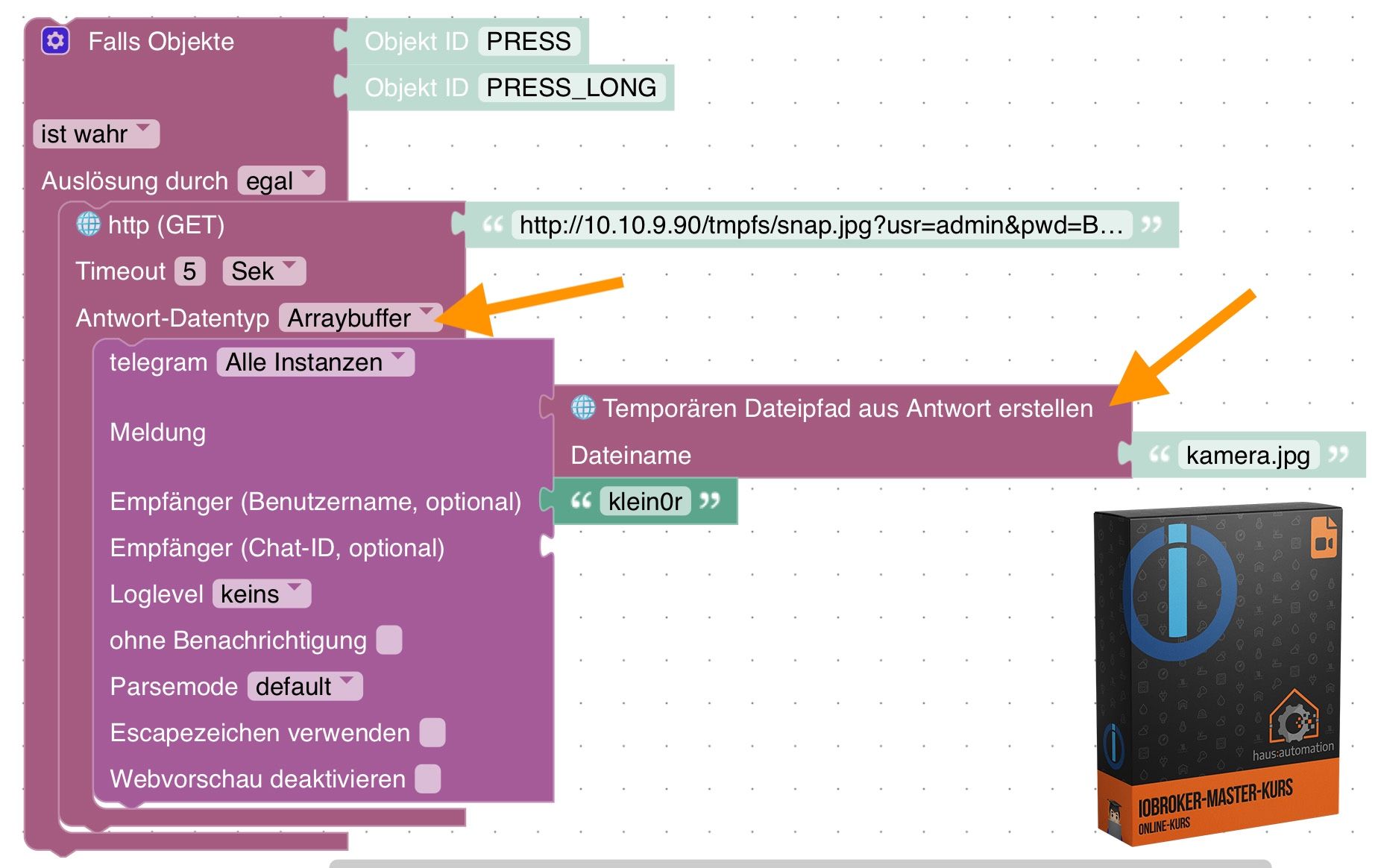
🧑🎓 Autor des beliebten ioBroker-Master-Kurses
🎥 Tutorials rund um das Thema DIY-Smart-Home: https://haus-automatisierung.com/
📚 Meine Dokumentation -
Ich bin da etwas ratlos und würde auch gerne auf Ursachenforschung gehen.
@totocotonio
Es liegt am Bild (danke fürs zu schicken) und damit ist es egal, auf welche Weise du es abholst.
Wenn man dein Bild in Paint ohne etwas zu ändern unter anderem Namen speicherst, dann lässt es sich über Telegram verschicken. Beide haben 640x480, 96dpi, beide unkomprimiert, das Original hat ca. 40 kB, die Kopie 70 kB. Versuch mal ob du bei den Einstellungen beim Octoprint was erreichen kannst. -
@totocotonio sagte in Bild versand:
kannst du mir mal ein Beispiel geben?
Hier ein Screenshot aus dem Kurs:
@haus-automatisierung sagte in Bild versand:
@totocotonio sagte in Bild versand:
kannst du mir mal ein Beispiel geben?
Hier ein Screenshot aus dem Kurs:
Das wäre ja eine "Aufräum-Aktion" wert ... wie pingelig ist das get bzgl Zertifikaten... wget musste ein wenig "überredet" werden..
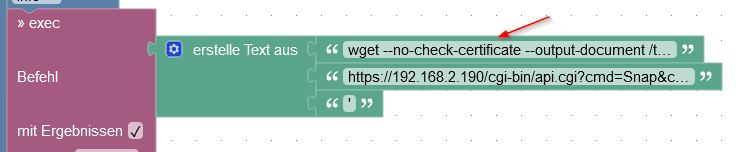
Intel(R) Celeron(R) CPU N3000 @1.04GHz 8G RAM 480G SSD * Virtualization : unprivileged lxc container on Proxmox * 6 GByte RAM für den iobroker Container * Remote-Access über Wireguard meiner Fritzbox
-
@totocotonio
Es liegt am Bild (danke fürs zu schicken) und damit ist es egal, auf welche Weise du es abholst.
Wenn man dein Bild in Paint ohne etwas zu ändern unter anderem Namen speicherst, dann lässt es sich über Telegram verschicken. Beide haben 640x480, 96dpi, beide unkomprimiert, das Original hat ca. 40 kB, die Kopie 70 kB. Versuch mal ob du bei den Einstellungen beim Octoprint was erreichen kannst.@j_paul sagte in Bild versand:
@totocotonio
Es liegt am Bild (danke fürs zu schicken) und damit ist es egal, auf welche Weise du es abholst.
Wenn man dein Bild in Paint ohne etwas zu ändern unter anderem Namen speicherst, dann lässt es sich über Telegram verschicken. Beide haben 640x480, 96dpi, beide unkomprimiert, das Original hat ca. 40 kB, die Kopie 70 kB. Versuch mal ob du bei den Einstellungen beim Octoprint was erreichen kannst.Als Workaround (Pfuschen):
- ImageMagick nachinstallieren auf der ioBroker Maschine (Befehle für Debian gemäß https://linuxcapable.com/how-to-install-imagemagick-on-debian-linux/)
sudo apt install libpng-dev libjpeg-dev libtiff-dev
sudo apt install imagemagick
und dann ein
execin dasexecwelches den Befehlconvertaufruft und das Bild umwandelt, so etwas wieconvert 1.jpg 1.pngMan könnte auch die Auflösung oder Qualität ändern (statt das Format)
ioBroker@Ubuntu 24.04 LTS (Proxmox VM) für: >260 Geräte, 6 Switche, 7 AP, 10 IP-Cam, 1 NAS 42TB, 1 Proxmox 128GB 15TB, 2 Proxmox 32GB 1TB, 1 Hyper-V 52GB 42TB, 14 x Echo, 5x FireTV, 5 x Tablett/Handy VIS || >=160 Tasmota/Shelly || >=95 ZigBee || PV 8.1kW / Akku 14kWh || 2x USV APC 750W kaskadiert || Kobra S1 Max
-
@haus-automatisierung sagte in Bild versand:
@totocotonio sagte in Bild versand:
kannst du mir mal ein Beispiel geben?
Hier ein Screenshot aus dem Kurs:
Das wäre ja eine "Aufräum-Aktion" wert ... wie pingelig ist das get bzgl Zertifikaten... wget musste ein wenig "überredet" werden..
@martinp sagte in Bild versand:
wie pingelig ist das get bzgl Zertifikaten...
Wird validiert. Die Validierung deaktivieren geht aktuell nur per JavaScript und ist in Blockly nicht umgesetzt.
🧑🎓 Autor des beliebten ioBroker-Master-Kurses
🎥 Tutorials rund um das Thema DIY-Smart-Home: https://haus-automatisierung.com/
📚 Meine Dokumentation -
@totocotonio
Es liegt am Bild (danke fürs zu schicken) und damit ist es egal, auf welche Weise du es abholst.
Wenn man dein Bild in Paint ohne etwas zu ändern unter anderem Namen speicherst, dann lässt es sich über Telegram verschicken. Beide haben 640x480, 96dpi, beide unkomprimiert, das Original hat ca. 40 kB, die Kopie 70 kB. Versuch mal ob du bei den Einstellungen beim Octoprint was erreichen kannst.@j_paul
Danke Jörg.
-
@totocotonio sagte in Bild versand:
kannst du mir mal ein Beispiel geben?
Hier ein Screenshot aus dem Kurs:
-
@j_paul sagte in Bild versand:
@totocotonio
Es liegt am Bild (danke fürs zu schicken) und damit ist es egal, auf welche Weise du es abholst.
Wenn man dein Bild in Paint ohne etwas zu ändern unter anderem Namen speicherst, dann lässt es sich über Telegram verschicken. Beide haben 640x480, 96dpi, beide unkomprimiert, das Original hat ca. 40 kB, die Kopie 70 kB. Versuch mal ob du bei den Einstellungen beim Octoprint was erreichen kannst.Als Workaround (Pfuschen):
- ImageMagick nachinstallieren auf der ioBroker Maschine (Befehle für Debian gemäß https://linuxcapable.com/how-to-install-imagemagick-on-debian-linux/)
sudo apt install libpng-dev libjpeg-dev libtiff-dev
sudo apt install imagemagick
und dann ein
execin dasexecwelches den Befehlconvertaufruft und das Bild umwandelt, so etwas wieconvert 1.jpg 1.pngMan könnte auch die Auflösung oder Qualität ändern (statt das Format)
@bananajoe
Das wäre eine Möglichkeit.Ich fange jetzt erst einmal damit an, was bei Octoprint passiert ist.
Es hat ja immer funktioniert. Da muss also was mit dem Bild passiert sein.Ich gebe auf jeden Fall Rückmeldung
-
@martinp sagte in Bild versand:
wie pingelig ist das get bzgl Zertifikaten...
Wird validiert. Die Validierung deaktivieren geht aktuell nur per JavaScript und ist in Blockly nicht umgesetzt.
@haus-automatisierung Danke - eine Ausrede, da vorerst nicht aufzuräumen ;-)
Der Snapshot kommt direkt von einer Reolink-Kamera... vielleicht kann man sich da ja einen Workaround mit eigenem DNS (oder schlichtweg einer hosts-Datei) und einer URL passend zum Zertifikat basteln ...
Sind aber aktuell schon zwei Reolink-Kameras ...
Habe mal das Zertifikat der beiden Kameras unter die Lupe genommen
C:\> certutil -dump certificate.pem
X.509-Zertifikat:
Version: 1
Seriennummer: 01
Signaturalgorithmus:
    Algorithmus Objekt-ID: 1.2.840.113549.1.1.11 sha256RSA
    Algorithmusparameter:
    05 00
Aussteller:
    E=CERTIFICATE@CERTIFICATE.com
    CN=CERTIFICATE
    OU=CERTIFICATE
    O=CERTIFICATE
    L=SZ
    S=GD
    C=CN
  Namenshash (sha1): 8c30e4da4a81d52b835743fc261edeb26b0ac4da
  Namenshash (md5): 606efb5bd531bd73d791f6522a1d22f9

 Nicht vor: 12.05.2023 11:36
 Nicht nach: 07.05.2043 11:36

Antragsteller:
    E=CERTIFICATE@CERTIFICATE.com
    CN=CERTIFICATE
    OU=CERTIFICATE
    O=CERTIFICATE
    L=SZ
    S=GD
    C=CN
  Namenshash (sha1): 8c30e4da4a81d52b835743fc261edeb26b0ac4da
  Namenshash (md5): 606efb5bd531bd73d791f6522a1d22f9

Öffentlicher Schlüssel-Algorithmus:
    Algorithmus Objekt-ID: 1.2.840.113549.1.1.1 RSA (RSA_SIGN)
    Algorithmusparameter:
    05 00
Länge des öffentlichen Schlüssels: 2048 Bits
Öffentlicher Schlüssel: Nicht verwendete Bits = 0
    0000  30 82 01 0a 02 82 01 01  00 bb 7a 3c d7 3c 95 40
    0010  70 80 a0 44 98 fb 77 03  1c ef 02 5c 0f af 99 b0
    0020  61 08 0d b0 a9 d0 14 38  e7 2b 95 08 04 74 85 61
    0030  f7 28 ee 37 00 79 c7 cf  81 a9 b8 0d ec 46 e7 be
    0040  a6 ba 15 2c 2b a9 0e fa  38 23 f4 51 ca 3a f6 4b
    0050  c5 eb 3e 43 ff 11 04 e9  bc a9 f2 1f 2a 22 1e 08
    0060  c8 d6 5b 90 e8 23 62 bc  a3 ab bd bc 8c 29 f0 21
    0070  4c 03 bd 17 94 56 ca db  b2 34 af 45 19 54 89 18
    0080  14 27 4e 13 a0 f4 03 2a  9a 74 0a 99 d3 c2 3e 14
    0090  ca 23 66 1e 43 1c 4a ce  e7 e8 31 75 2c 96 6a df
    00a0  97 fb 09 b5 63 25 fa 3e  02 27 0d 4b 0e 41 d3 e6
    00b0  86 47 1c 57 00 74 00 45  3e 8e c7 74 a2 8e e3 dd
    00c0  fa 13 5b e3 f2 29 d0 d2  fc da 4d 74 70 aa 28 82
    00d0  d0 32 a0 b6 9e c1 83 58  f8 63 37 e7 eb 49 2f 00
    00e0  31 cd 30 a8 33 4b 5b 61  3d b6 4c af 91 31 97 7b
    00f0  a6 d4 1e e5 7a d5 6e 3f  f0 80 7e f2 e8 7e 68 bd
    0100  95 16 54 7d c8 68 50 1d  65 02 03 01 00 01
Zertifikaterweiterungen: 0
Signaturalgorithmus:
    Algorithmus Objekt-ID: 1.2.840.113549.1.1.11 sha256RSA
    Algorithmusparameter:
    05 00
Signatur: Nicht verwendete Bits=0
    0000  bb 27 8d c1 d2 1f 21 56  0d 61 1e 36 be 9f 70 cc
    0010  49 de 94 37 1a 47 7f 2f  0f 3d ce fa 80 73 ce 94
    0020  4b e3 4c d7 4d 02 e6 7e  74 22 1e cb 07 af 94 ae
    0030  5d 49 a2 de 91 c6 17 f6  7a cb ee 8d 30 32 0c 5d
    0040  f9 5a 64 8d 79 1b 2b a4  28 99 f9 3c 1b 1c 7e 16
    0050  25 88 5e 7b fc dd b5 d6  c3 16 cd 20 a3 65 f3 0f
    0060  a2 36 a3 6a eb 74 29 dc  4f fa d7 a4 6e 6d c9 9d
    0070  9f f2 0f 1d c5 2e 5e 2e  37 b3 f0 e0 37 ca f0 f7
    0080  99 d8 47 7d 65 d9 9a 8c  c4 3a e6 df 97 81 3a 80
    0090  ad 10 23 2c 76 94 d3 7f  36 6b f2 09 68 3a bb a7
    00a0  04 a1 fd 4d 51 e2 c6 d8  13 86 ae 9a ad 13 47 9d
    00b0  4f 1f 9f 4e 52 05 b0 72  7a e8 de 29 6d 05 9f 9d
    00c0  c8 bc 0a 90 37 d8 fd 62  9e 79 b0 14 b8 95 ff 0e
    00d0  15 c6 d7 5c 42 58 9b 7b  43 20 c3 9d b0 63 d4 3d
    00e0  7b 54 aa 6f ef 2c dd 92  65 52 65 84 9b b6 62 03
    00f0  6f f8 e2 7b 5e 5c be 21  d3 f2 9a e3 86 31 05 5e
Mögliches Stammzertifikat: Antragsteller stimmt mit dem Aussteller überein, die Signaturüberprüfung ist jedoch fehlgeschlagen: c000a000
Schlüssel-ID-Hash(rfc-sha1): 03adbc8bcb86603f51966ab575bdfbe5162cb2a0
Schlüssel-ID-Hash(sha1): 34685c10923c3cb37b0016727a0f4bfae4cbb2db
Schlüssel-ID-Hash(bcrypt-sha1): dc23c04a86d3756a28aa64f336b64015f70c58fd
Schlüssel-ID-Hash(bcrypt-sha256): bacb41f8b26978c5f38972d5afb1466eef577d27e854e8e620c81a2d8a53986f
Schlüssel-ID-Hash(md5): e5ed45bb65c078a13444b98762ed3a21
Schlüssel-ID-Hash(sha256): b8354843a3f64e5bc705b9df0c7b0d8bc645d4bbdcb48d340be4f176cda11ae7
Schlüssel-ID-Hash(pin-sha256): pnwMqh30qaq4iVkysVTZ2xU0g1YrOA5vTUVL9Tbf3MU=
Schlüssel-ID-Hash(pin-sha256-hex): a67c0caa1df4a9aab8895932b154d9db153483562b380e6f4d454bf536dfdcc5
Zertifikathash(md5): 759c6764d15b1eac3d2e97a564c540c9
Zertifikathash(sha1): c3611265dde2ff12aec1494b16882aa10624038e
Zertifikathash(sha256): d0f5937fdf67bb73f342b5abd108bc33843ee55af3641a48a83c453a7b884d40
Signaturhash: c4e34e8e50e2547b235d99146660b2d60429ac351e7ae7533b98de8069f47d44
CertUtil: -dump-Befehl wurde erfolgreich ausgeführt.
Da wird man wohl wenig Glück haben, sich eine Fake-URL in seine hosts - datei zu basteln ...
Habe es mal versucht
die certificate.pem Datei mit dem Broweser heruntergeladen, und auf den iobroker Linux LXC geschoben:
martin@iobroker-test-sicher:/usr/local/share/ca-certificates$ mv reolink.pem reolink.crt
martin@iobroker-test-sicher:/usr/local/share/ca-certificates$ sudo mv reolink.pem reolink.crt
martin@iobroker-test-sicher:/usr/local/share/ca-certificates$ ls
reolink.crt
martin@iobroker-test-sicher:/usr/local/share/ca-certificates$ cd ..
martin@iobroker-test-sicher:/usr/local/share$ bash update-ca-certificates
bash: update-ca-certificates: No such file or directory
martin@iobroker-test-sicher:/usr/local/share$ sudo update-ca-certificates
Updating certificates in /etc/ssl/certs...
rehash: warning: skipping ca-certificates.crt,it does not contain exactly one certificate or CRL
1 added, 0 removed; done.
Running hooks in /etc/ca-certificates/update.d...
done.
martin@iobroker-test-sicher:/usr/local/share$
Hilft aber erstmal nicht ...
martin@iobroker-test-sicher:/usr/local/share$ wget 'https://192.168.2.190/cgi-bin/api.cgi?cmd=Snap&channel=0&rs=wuuPhkmUCeI9WG7C&user=Martin&passwordxxxxxxxxxxxxxxx&width=640&height=480'
--2024-10-22 13:38:38--  https://192.168.2.190/cgi-bin/api.cgi?cmd=Snap&channel=0&rs=wuuPhkmUCeI9WG7C&user=Martin&password=xxxxxxxxxxxxxx&width=640&height=480
Connecting to 192.168.2.190:443... connected.
The certificate's owner does not match hostname '192.168.2.190'
martin@iobroker-test-sicher:/usr/local/share$
jetzt mit hosts Einträgen
192.168.2.190 garage.CERTIFICATE garage.CERTIFICATE.cn garage.CERTIFICATE.com garage.CERTIFICATE.CERTIFICATEnichts funktioniert
martin@iobroker-test-sicher:~$ wget --verbose 'https://garage.CERTIFICATE#/cgi-bin/api.cgi?cmd=Snap&channel=0&rs=wuuPhkmUCeI9WG7C&userq=Martin&password=xxxxxxxxxxxxxxxx!&width=640&height=480'
--2024-10-22 14:01:37--  https://garage.certificate/
Resolving garage.certificate (garage.certificate)... 192.168.2.190
Connecting to garage.certificate (garage.certificate)|192.168.2.190|:443... connected.
The certificate's owner does not match hostname 'garage.certificate'
martin@iobroker-test-sicher:~$ wget --verbose 'https://garage.CERTIFICATE.com#/cgi-bin/api.cgi?cmd=Snap&channel=0&rs=wuuPhkmUCeI9WG7C&userq=Martin&passwordxxxxxxxxxxxxxxxx!&width=640&height=480'
--2024-10-22 14:01:49--  https://garage.certificate.com/
Resolving garage.certificate.com (garage.certificate.com)... 192.168.2.190
Connecting to garage.certificate.com (garage.certificate.com)|192.168.2.190|:443... connected.
The certificate's owner does not match hostname 'garage.certificate.com'
martin@iobroker-test-sicher:~$ wget --verbose 'https://garage.CERTIFICATE.cn#/cgi-bin/api.cgi?cmd=Snap&channel=0&rs=wuuPhkmUCeI9WG7C&userq=Martin&password=xxxxxxxxxxxxx!&width=640&height=480'
--2024-10-22 14:01:58--  https://garage.certificate.cn/
Resolving garage.certificate.cn (garage.certificate.cn)... 192.168.2.190
Connecting to garage.certificate.cn (garage.certificate.cn)|192.168.2.190|:443... connected.
The certificate's owner does not match hostname 'garage.certificate.cn'
martin@iobroker-test-sicher:~$ wget --verbose 'https://garage.CERTIFICATE.certificate#/cgi-bin/api.cgi?cmd=Snap&channel=0&rs=wuuPhkmUCeI9WG7C&userq=Martin&passworxxxxxxxxxxx!&width=640&height=480'
--2024-10-22 14:02:10--  https://garage.certificate.certificate/
Resolving garage.certificate.certificate (garage.certificate.certificate)... 192.168.2.190
Connecting to garage.certificate.certificate (garage.certificate.certificate)|192.168.2.190|:443... connected.
The certificate's owner does not match hostname 'garage.certificate.certificate'
martin@iobroker-test-sicher:~$
Intel(R) Celeron(R) CPU N3000 @1.04GHz 8G RAM 480G SSD * Virtualization : unprivileged lxc container on Proxmox * 6 GByte RAM für den iobroker Container * Remote-Access über Wireguard meiner Fritzbox
-
@haus-automatisierung Danke - eine Ausrede, da vorerst nicht aufzuräumen ;-)
Der Snapshot kommt direkt von einer Reolink-Kamera... vielleicht kann man sich da ja einen Workaround mit eigenem DNS (oder schlichtweg einer hosts-Datei) und einer URL passend zum Zertifikat basteln ...
Sind aber aktuell schon zwei Reolink-Kameras ...
Habe mal das Zertifikat der beiden Kameras unter die Lupe genommen
C:\> certutil -dump certificate.pem
X.509-Zertifikat:
Version: 1
Seriennummer: 01
Signaturalgorithmus:
    Algorithmus Objekt-ID: 1.2.840.113549.1.1.11 sha256RSA
    Algorithmusparameter:
    05 00
Aussteller:
    E=CERTIFICATE@CERTIFICATE.com
    CN=CERTIFICATE
    OU=CERTIFICATE
    O=CERTIFICATE
    L=SZ
    S=GD
    C=CN
  Namenshash (sha1): 8c30e4da4a81d52b835743fc261edeb26b0ac4da
  Namenshash (md5): 606efb5bd531bd73d791f6522a1d22f9

 Nicht vor: 12.05.2023 11:36
 Nicht nach: 07.05.2043 11:36

Antragsteller:
    E=CERTIFICATE@CERTIFICATE.com
    CN=CERTIFICATE
    OU=CERTIFICATE
    O=CERTIFICATE
    L=SZ
    S=GD
    C=CN
  Namenshash (sha1): 8c30e4da4a81d52b835743fc261edeb26b0ac4da
  Namenshash (md5): 606efb5bd531bd73d791f6522a1d22f9

Öffentlicher Schlüssel-Algorithmus:
    Algorithmus Objekt-ID: 1.2.840.113549.1.1.1 RSA (RSA_SIGN)
    Algorithmusparameter:
    05 00
Länge des öffentlichen Schlüssels: 2048 Bits
Öffentlicher Schlüssel: Nicht verwendete Bits = 0
    0000  30 82 01 0a 02 82 01 01  00 bb 7a 3c d7 3c 95 40
    0010  70 80 a0 44 98 fb 77 03  1c ef 02 5c 0f af 99 b0
    0020  61 08 0d b0 a9 d0 14 38  e7 2b 95 08 04 74 85 61
    0030  f7 28 ee 37 00 79 c7 cf  81 a9 b8 0d ec 46 e7 be
    0040  a6 ba 15 2c 2b a9 0e fa  38 23 f4 51 ca 3a f6 4b
    0050  c5 eb 3e 43 ff 11 04 e9  bc a9 f2 1f 2a 22 1e 08
    0060  c8 d6 5b 90 e8 23 62 bc  a3 ab bd bc 8c 29 f0 21
    0070  4c 03 bd 17 94 56 ca db  b2 34 af 45 19 54 89 18
    0080  14 27 4e 13 a0 f4 03 2a  9a 74 0a 99 d3 c2 3e 14
    0090  ca 23 66 1e 43 1c 4a ce  e7 e8 31 75 2c 96 6a df
    00a0  97 fb 09 b5 63 25 fa 3e  02 27 0d 4b 0e 41 d3 e6
    00b0  86 47 1c 57 00 74 00 45  3e 8e c7 74 a2 8e e3 dd
    00c0  fa 13 5b e3 f2 29 d0 d2  fc da 4d 74 70 aa 28 82
    00d0  d0 32 a0 b6 9e c1 83 58  f8 63 37 e7 eb 49 2f 00
    00e0  31 cd 30 a8 33 4b 5b 61  3d b6 4c af 91 31 97 7b
    00f0  a6 d4 1e e5 7a d5 6e 3f  f0 80 7e f2 e8 7e 68 bd
    0100  95 16 54 7d c8 68 50 1d  65 02 03 01 00 01
Zertifikaterweiterungen: 0
Signaturalgorithmus:
    Algorithmus Objekt-ID: 1.2.840.113549.1.1.11 sha256RSA
    Algorithmusparameter:
    05 00
Signatur: Nicht verwendete Bits=0
    0000  bb 27 8d c1 d2 1f 21 56  0d 61 1e 36 be 9f 70 cc
    0010  49 de 94 37 1a 47 7f 2f  0f 3d ce fa 80 73 ce 94
    0020  4b e3 4c d7 4d 02 e6 7e  74 22 1e cb 07 af 94 ae
    0030  5d 49 a2 de 91 c6 17 f6  7a cb ee 8d 30 32 0c 5d
    0040  f9 5a 64 8d 79 1b 2b a4  28 99 f9 3c 1b 1c 7e 16
    0050  25 88 5e 7b fc dd b5 d6  c3 16 cd 20 a3 65 f3 0f
    0060  a2 36 a3 6a eb 74 29 dc  4f fa d7 a4 6e 6d c9 9d
    0070  9f f2 0f 1d c5 2e 5e 2e  37 b3 f0 e0 37 ca f0 f7
    0080  99 d8 47 7d 65 d9 9a 8c  c4 3a e6 df 97 81 3a 80
    0090  ad 10 23 2c 76 94 d3 7f  36 6b f2 09 68 3a bb a7
    00a0  04 a1 fd 4d 51 e2 c6 d8  13 86 ae 9a ad 13 47 9d
    00b0  4f 1f 9f 4e 52 05 b0 72  7a e8 de 29 6d 05 9f 9d
    00c0  c8 bc 0a 90 37 d8 fd 62  9e 79 b0 14 b8 95 ff 0e
    00d0  15 c6 d7 5c 42 58 9b 7b  43 20 c3 9d b0 63 d4 3d
    00e0  7b 54 aa 6f ef 2c dd 92  65 52 65 84 9b b6 62 03
    00f0  6f f8 e2 7b 5e 5c be 21  d3 f2 9a e3 86 31 05 5e
Mögliches Stammzertifikat: Antragsteller stimmt mit dem Aussteller überein, die Signaturüberprüfung ist jedoch fehlgeschlagen: c000a000
Schlüssel-ID-Hash(rfc-sha1): 03adbc8bcb86603f51966ab575bdfbe5162cb2a0
Schlüssel-ID-Hash(sha1): 34685c10923c3cb37b0016727a0f4bfae4cbb2db
Schlüssel-ID-Hash(bcrypt-sha1): dc23c04a86d3756a28aa64f336b64015f70c58fd
Schlüssel-ID-Hash(bcrypt-sha256): bacb41f8b26978c5f38972d5afb1466eef577d27e854e8e620c81a2d8a53986f
Schlüssel-ID-Hash(md5): e5ed45bb65c078a13444b98762ed3a21
Schlüssel-ID-Hash(sha256): b8354843a3f64e5bc705b9df0c7b0d8bc645d4bbdcb48d340be4f176cda11ae7
Schlüssel-ID-Hash(pin-sha256): pnwMqh30qaq4iVkysVTZ2xU0g1YrOA5vTUVL9Tbf3MU=
Schlüssel-ID-Hash(pin-sha256-hex): a67c0caa1df4a9aab8895932b154d9db153483562b380e6f4d454bf536dfdcc5
Zertifikathash(md5): 759c6764d15b1eac3d2e97a564c540c9
Zertifikathash(sha1): c3611265dde2ff12aec1494b16882aa10624038e
Zertifikathash(sha256): d0f5937fdf67bb73f342b5abd108bc33843ee55af3641a48a83c453a7b884d40
Signaturhash: c4e34e8e50e2547b235d99146660b2d60429ac351e7ae7533b98de8069f47d44
CertUtil: -dump-Befehl wurde erfolgreich ausgeführt.
Da wird man wohl wenig Glück haben, sich eine Fake-URL in seine hosts - datei zu basteln ...
Habe es mal versucht
die certificate.pem Datei mit dem Broweser heruntergeladen, und auf den iobroker Linux LXC geschoben:
martin@iobroker-test-sicher:/usr/local/share/ca-certificates$ mv reolink.pem reolink.crt
martin@iobroker-test-sicher:/usr/local/share/ca-certificates$ sudo mv reolink.pem reolink.crt
martin@iobroker-test-sicher:/usr/local/share/ca-certificates$ ls
reolink.crt
martin@iobroker-test-sicher:/usr/local/share/ca-certificates$ cd ..
martin@iobroker-test-sicher:/usr/local/share$ bash update-ca-certificates
bash: update-ca-certificates: No such file or directory
martin@iobroker-test-sicher:/usr/local/share$ sudo update-ca-certificates
Updating certificates in /etc/ssl/certs...
rehash: warning: skipping ca-certificates.crt,it does not contain exactly one certificate or CRL
1 added, 0 removed; done.
Running hooks in /etc/ca-certificates/update.d...
done.
martin@iobroker-test-sicher:/usr/local/share$
Hilft aber erstmal nicht ...
martin@iobroker-test-sicher:/usr/local/share$ wget 'https://192.168.2.190/cgi-bin/api.cgi?cmd=Snap&channel=0&rs=wuuPhkmUCeI9WG7C&user=Martin&passwordxxxxxxxxxxxxxxx&width=640&height=480'
--2024-10-22 13:38:38--  https://192.168.2.190/cgi-bin/api.cgi?cmd=Snap&channel=0&rs=wuuPhkmUCeI9WG7C&user=Martin&password=xxxxxxxxxxxxxx&width=640&height=480
Connecting to 192.168.2.190:443... connected.
The certificate's owner does not match hostname '192.168.2.190'
martin@iobroker-test-sicher:/usr/local/share$
jetzt mit hosts Einträgen
192.168.2.190 garage.CERTIFICATE garage.CERTIFICATE.cn garage.CERTIFICATE.com garage.CERTIFICATE.CERTIFICATEnichts funktioniert
martin@iobroker-test-sicher:~$ wget --verbose 'https://garage.CERTIFICATE#/cgi-bin/api.cgi?cmd=Snap&channel=0&rs=wuuPhkmUCeI9WG7C&userq=Martin&password=xxxxxxxxxxxxxxxx!&width=640&height=480' --2024-10-22 14:01:37-- https://garage.certificate/ Resolving garage.certificate (garage.certificate)... 192.168.2.190 Connecting to garage.certificate (garage.certificate)|192.168.2.190|:443... connected. The certificate's owner does not match hostname 'garage.certificate' martin@iobroker-test-sicher:~$ wget --verbose 'https://garage.CERTIFICATE.com#/cgi-bin/api.cgi?cmd=Snap&channel=0&rs=wuuPhkmUCeI9WG7C&userq=Martin&passwordxxxxxxxxxxxxxxxx!&width=640&height=480' --2024-10-22 14:01:49-- https://garage.certificate.com/ Resolving garage.certificate.com (garage.certificate.com)... 192.168.2.190 Connecting to garage.certificate.com (garage.certificate.com)|192.168.2.190|:443... connected. The certificate's owner does not match hostname 'garage.certificate.com' martin@iobroker-test-sicher:~$ wget --verbose 'https://garage.CERTIFICATE.cn#/cgi-bin/api.cgi?cmd=Snap&channel=0&rs=wuuPhkmUCeI9WG7C&userq=Martin&password=xxxxxxxxxxxxx!&width=640&height=480' --2024-10-22 14:01:58-- https://garage.certificate.cn/ Resolving garage.certificate.cn (garage.certificate.cn)... 192.168.2.190 Connecting to garage.certificate.cn (garage.certificate.cn)|192.168.2.190|:443... connected. The certificate's owner does not match hostname 'garage.certificate.cn' martin@iobroker-test-sicher:~$ wget --verbose 'https://garage.CERTIFICATE.certificate#/cgi-bin/api.cgi?cmd=Snap&channel=0&rs=wuuPhkmUCeI9WG7C&userq=Martin&passworxxxxxxxxxxx!&width=640&height=480' --2024-10-22 14:02:10-- https://garage.certificate.certificate/ Resolving garage.certificate.certificate (garage.certificate.certificate)... 192.168.2.190 Connecting to garage.certificate.certificate (garage.certificate.certificate)|192.168.2.190|:443... connected. The certificate's owner does not match hostname 'garage.certificate.certificate' martin@iobroker-test-sicher:~$Logisch. Kannst Dir ja keine Domain ausdenken und darauf ein beliebiges Zertifikat ausliefern:
@martinp sagte in Bild versand:
The certificate's owner does not match hostname 'garage.certificate'
🧑🎓 Autor des beliebten ioBroker-Master-Kurses
🎥 Tutorials rund um das Thema DIY-Smart-Home: https://haus-automatisierung.com/
📚 Meine Dokumentation -
Logisch. Kannst Dir ja keine Domain ausdenken und darauf ein beliebiges Zertifikat ausliefern:
@martinp sagte in Bild versand:
The certificate's owner does not match hostname 'garage.certificate'
Bei EINER Kamera würde es so funktionieren ...
hosts Eintrag
192.168.2.190 certificateWget-Aufruf
martin@iobroker-test-sicher:~$ wget --verbose 'https://certificate#/cgi-bin/api.cgi?cmd=Snap&channel=0&rs=wuuPhkmUCeI9WG7C&userq=Martin&password=xxxxxxxxxxxx&width=640&height=480'
--2024-10-22 14:17:25--  https://certificate/
Resolving certificate (certificate)... 192.168.2.190
Connecting to certificate (certificate)|192.168.2.190|:443... connected.
HTTP request sent, awaiting response... 200 OK
Length: 23193 (23K) [text/html]
Saving to: 'index.html.1'
Leider ist das Zertifikat der zweiten Kamera auch auf die Dummy-Domain "certificate" ausgestellt ...
Wenn die die Zertifikate jeder einzelnen Kamera auf "<seriennummer>.certificate" ausstellen würden, wäre das ja eine Lösung ....
oder es in den Zertifikaten eine Liste von Domains gäbe, z. B. "0.certifikate" bis "255.certificate"Muss mich wohl noch weiter mit dem Zertifikationsgedöns auseinandersetzen ...
dachte, wenn man ein Zertifikat für" blablubb.de" hat, gilt das auch für "dies.blablubb.de" und "das.blablubb.de".
Gilt aber leider nur für "blablubb.de/dies" und "blablubb.de/das"
Dafür gibt es dann keine "hosts" Tricks ;-)Intel(R) Celeron(R) CPU N3000 @1.04GHz 8G RAM 480G SSD * Virtualization : unprivileged lxc container on Proxmox * 6 GByte RAM für den iobroker Container * Remote-Access über Wireguard meiner Fritzbox



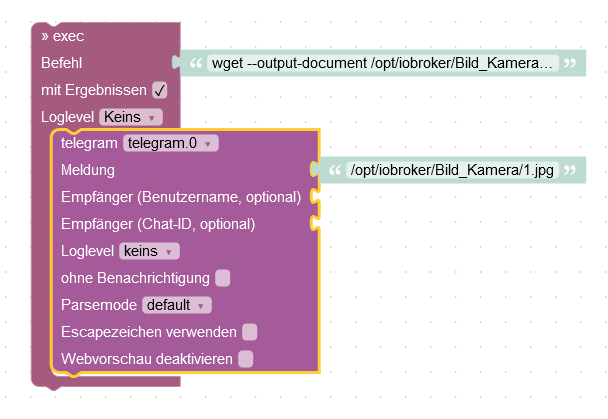


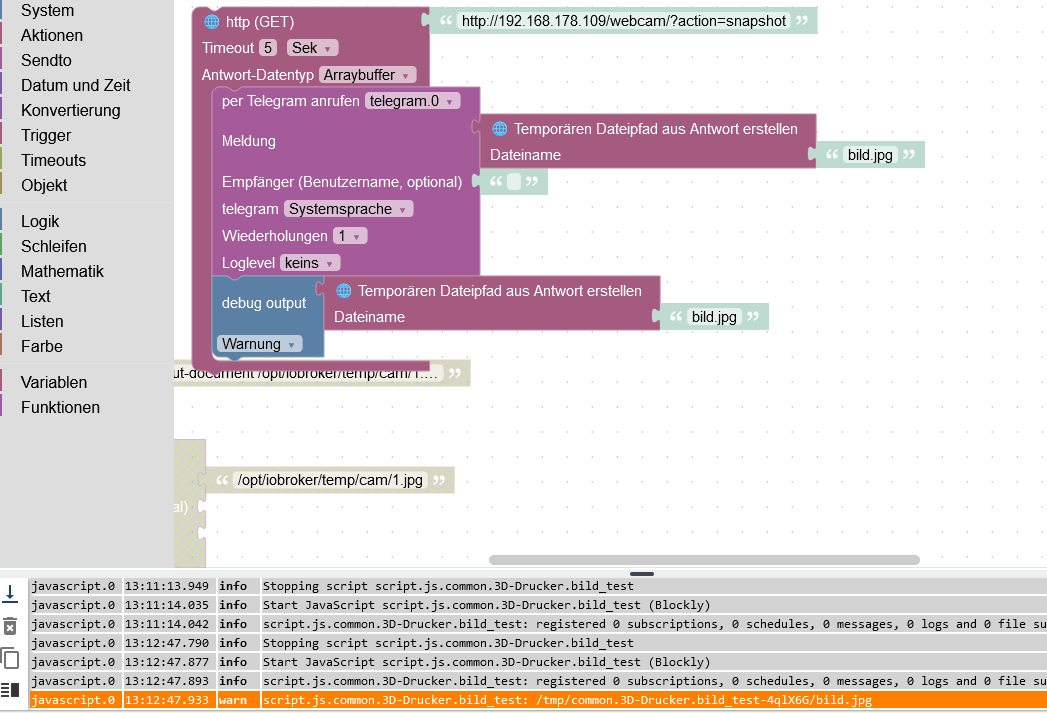
Hey! Du scheinst an dieser Unterhaltung interessiert zu sein, hast aber noch kein Konto.
Hast du es satt, bei jedem Besuch durch die gleichen Beiträge zu scrollen? Wenn du dich für ein Konto anmeldest, kommst du immer genau dorthin zurück, wo du zuvor warst, und kannst dich über neue Antworten benachrichtigen lassen (entweder per E-Mail oder Push-Benachrichtigung). Du kannst auch Lesezeichen speichern und Beiträge positiv bewerten, um anderen Community-Mitgliedern deine Wertschätzung zu zeigen.
Mit deinem Input könnte dieser Beitrag noch besser werden 💗
Registrieren AnmeldenSupport us
421
Online33.1k
Benutzende83.7k
Themen1.3m
Beiträge