




Keinen Zugriff mehr auf ADMIN, VIS Oberfläche erreichbar
-
Hallo,
ich kann aktuell den ADMIN nicht erreichen, bzw. es kommt der Anmeldebildschirm und dann geht es nicht mehr weiter.
Vis ist ganz normal erreichbar.Hier mal mein Ergebnis von: iob diag
Vielleicht hilft das schon weiter.Danke und Gruß
HaubadaSkript v.2024-05-22 *** BASE SYSTEM *** Static hostname: raspberrypi Icon name: computer Operating System: Debian GNU/Linux 12 (bookworm) Kernel: Linux 6.1.0-rpi4-rpi-v8 Architecture: arm64 Model : Raspberry Pi 4 Model B Rev 1.5 Docker : false Virtualization : none Kernel : aarch64 Userland : 64 bit Systemuptime and Load: 14:47:55 up 113 days, 4:12, 2 users, load average: 0.35, 0.44, 0.53 CPU threads: 4 *** RASPBERRY THROTTLING *** Current issues: No throttling issues detected. Previously detected issues: No throttling issues detected. *** Time and Time Zones *** Local time: Tue 2024-09-24 14:47:55 CEST Universal time: Tue 2024-09-24 12:47:55 UTC RTC time: n/a Time zone: Europe/Berlin (CEST, +0200) System clock synchronized: yes NTP service: active RTC in local TZ: no *** Users and Groups *** User that called 'iob diag': pi HOME=/home/pi GROUPS=pi adm dialout cdrom sudo audio video plugdev games users input render netdev gpio i2c spi iobroker User that is running 'js-controller': iobroker HOME=/home/iobroker GROUPS=iobroker tty dialout audio video plugdev bluetooth gpio i2c *** Display-Server-Setup *** Display-Server: false Desktop: Terminal: tty Boot Target: multi-user.target *** MEMORY *** total used free shared buff/cache available Mem: 4.0G 1.2G 819M 229K 2.0G 2.7G Swap: 104M 14M 90M Total: 4.1G 1.3G 909M Active iob-Instances: 14 3793 M total memory 1184 M used memory 1282 M active memory 1479 M inactive memory 781 M free memory 115 M buffer memory 1788 M swap cache 99 M total swap 13 M used swap 86 M free swap *** top - Table Of Processes *** top - 14:47:56 up 113 days, 4:12, 2 users, load average: 0.35, 0.44, 0.53 Tasks: 168 total, 1 running, 167 sleeping, 0 stopped, 0 zombie %Cpu(s): 0.0 us, 28.6 sy, 0.0 ni, 71.4 id, 0.0 wa, 0.0 hi, 0.0 si, 0.0 st MiB Mem : 3793.2 total, 780.1 free, 1185.5 used, 1903.7 buff/cache MiB Swap: 100.0 total, 86.3 free, 13.7 used. 2607.7 avail Mem *** FAILED SERVICES *** UNIT LOAD ACTIVE SUB DESCRIPTION 0 loaded units listed. *** FILESYSTEM *** Filesystem Type Size Used Avail Use% Mounted on udev devtmpfs 1.6G 0 1.6G 0% /dev tmpfs tmpfs 380M 1.2M 379M 1% /run /dev/mmcblk0p2 ext4 29G 8.2G 20G 30% / tmpfs tmpfs 1.9G 0 1.9G 0% /dev/shm tmpfs tmpfs 5.0M 16K 5.0M 1% /run/lock /dev/mmcblk0p1 vfat 510M 61M 450M 12% /boot/firmware tmpfs tmpfs 380M 0 380M 0% /run/user/1000 Messages concerning ext4 filesystem in dmesg: Show mounted filesystems: TARGET SOURCE FSTYPE OPTIONS / /dev/mmcblk0p2 ext4 rw,noatime |-/sys sysfs sysfs rw,nosuid,nodev,noexec,relatime | |-/sys/kernel/security securityfs securityfs rw,nosuid,nodev,noexec,relatime | |-/sys/fs/cgroup cgroup2 cgroup2 rw,nosuid,nodev,noexec,relatime,nsdelegate,memory_recursiveprot | |-/sys/fs/pstore pstore pstore rw,nosuid,nodev,noexec,relatime | |-/sys/fs/bpf bpf bpf rw,nosuid,nodev,noexec,relatime,mode=700 | |-/sys/kernel/tracing tracefs tracefs rw,nosuid,nodev,noexec,relatime | |-/sys/kernel/debug debugfs debugfs rw,nosuid,nodev,noexec,relatime | |-/sys/fs/fuse/connections fusectl fusectl rw,nosuid,nodev,noexec,relatime | `-/sys/kernel/config configfs configfs rw,nosuid,nodev,noexec,relatime |-/proc proc proc rw,relatime | `-/proc/sys/fs/binfmt_misc systemd-1 autofs rw,relatime,fd=30,pgrp=1,timeout=0,minproto=5,maxproto=5,direct,pipe_ino=11049 | `-/proc/sys/fs/binfmt_misc binfmt_misc binfmt_misc rw,nosuid,nodev,noexec,relatime |-/dev udev devtmpfs rw,nosuid,relatime,size=1672444k,nr_inodes=418111,mode=755 | |-/dev/pts devpts devpts rw,nosuid,noexec,relatime,gid=5,mode=620,ptmxmode=000 | |-/dev/shm tmpfs tmpfs rw,nosuid,nodev | `-/dev/mqueue mqueue mqueue rw,nosuid,nodev,noexec,relatime |-/run tmpfs tmpfs rw,nosuid,nodev,noexec,relatime,size=388424k,mode=755 | |-/run/lock tmpfs tmpfs rw,nosuid,nodev,noexec,relatime,size=5120k | |-/run/credentials/systemd-sysusers.service ramfs ramfs ro,nosuid,nodev,noexec,relatime,mode=700 | |-/run/credentials/systemd-sysctl.service ramfs ramfs ro,nosuid,nodev,noexec,relatime,mode=700 | |-/run/credentials/systemd-tmpfiles-setup-dev.service ramfs ramfs ro,nosuid,nodev,noexec,relatime,mode=700 | |-/run/rpc_pipefs sunrpc rpc_pipefs rw,relatime | |-/run/credentials/systemd-tmpfiles-setup.service ramfs ramfs ro,nosuid,nodev,noexec,relatime,mode=700 | `-/run/user/1000 tmpfs tmpfs rw,nosuid,nodev,relatime,size=388424k,nr_inodes=97106,mode=700,uid=1000,gid=1000 `-/boot/firmware /dev/mmcblk0p1 vfat rw,relatime,fmask=0022,dmask=0022,codepage=437,iocharset=ascii,shortname=mixed,errors=remount-ro Files in neuralgic directories: /var: 2.7G /var/ 2.2G /var/log/journal/b656039fa4ae4234b58673c86559ff52 2.2G /var/log/journal 2.2G /var/log 204M /var/cache Archived and active journals take up 2.1G in the file system. /opt/iobroker/backups: 71M /opt/iobroker/backups/ /opt/iobroker/iobroker-data: 2.4G /opt/iobroker/iobroker-data/ 2.0G /opt/iobroker/iobroker-data/history 364M /opt/iobroker/iobroker-data/files 89M /opt/iobroker/iobroker-data/files/echarts.admin 67M /opt/iobroker/iobroker-data/files/javascript.admin The five largest files in iobroker-data are: 35M /opt/iobroker/iobroker-data/files/devices.admin/static/js/main.24f2bb56.js.map 24M /opt/iobroker/iobroker-data/files/echarts/static/js/main.2b7495c2.js.map 24M /opt/iobroker/iobroker-data/files/echarts.admin/chart/static/js/main.2b7495c2.js.map 23M /opt/iobroker/iobroker-data/files/echarts.admin/static/js/main.245b61c0.js.map 22M /opt/iobroker/iobroker-data/files/web.admin/static/js/main.c05ba1d3.js.map USB-Devices by-id: USB-Sticks - Avoid direct links to /dev/tty* in your adapter setups, please always prefer the links 'by-id': No Devices found 'by-id' *** NodeJS-Installation *** /usr/bin/nodejs v18.18.2 /usr/bin/node v18.18.2 /usr/bin/npm 9.8.1 /usr/bin/npx 9.8.1 /usr/bin/corepack 0.19.0 nodejs: Installed: 18.18.2-1nodesource1 Candidate: 18.20.4-1nodesource1 Version table: 18.20.4-1nodesource1 500 500 https://deb.nodesource.com/node_18.x nodistro/main arm64 Packages 18.20.3-1nodesource1 500 500 https://deb.nodesource.com/node_18.x nodistro/main arm64 Packages 18.20.2-1nodesource1 500 500 https://deb.nodesource.com/node_18.x nodistro/main arm64 Packages 18.20.1-1nodesource1 500 500 https://deb.nodesource.com/node_18.x nodistro/main arm64 Packages 18.20.0-1nodesource1 500 500 https://deb.nodesource.com/node_18.x nodistro/main arm64 Packages 18.19.1-1nodesource1 500 500 https://deb.nodesource.com/node_18.x nodistro/main arm64 Packages 18.19.0+dfsg-6~deb12u2 500 500 http://deb.debian.org/debian bookworm/main arm64 Packages 18.19.0+dfsg-6~deb12u1 500 500 http://deb.debian.org/debian-security bookworm-security/main arm64 Packages 18.19.0-1nodesource1 500 500 https://deb.nodesource.com/node_18.x nodistro/main arm64 Packages *** 18.18.2-1nodesource1 500 500 https://deb.nodesource.com/node_18.x nodistro/main arm64 Packages 100 /var/lib/dpkg/status 18.18.1-1nodesource1 500 500 https://deb.nodesource.com/node_18.x nodistro/main arm64 Packages 18.18.0-1nodesource1 500 500 https://deb.nodesource.com/node_18.x nodistro/main arm64 Packages 18.17.1-1nodesource1 500 500 https://deb.nodesource.com/node_18.x nodistro/main arm64 Packages 18.17.0-1nodesource1 500 500 https://deb.nodesource.com/node_18.x nodistro/main arm64 Packages 18.16.1-1nodesource1 500 500 https://deb.nodesource.com/node_18.x nodistro/main arm64 Packages 18.16.0-1nodesource1 500 500 https://deb.nodesource.com/node_18.x nodistro/main arm64 Packages 18.15.0-1nodesource1 500 500 https://deb.nodesource.com/node_18.x nodistro/main arm64 Packages 18.14.2-1nodesource1 500 500 https://deb.nodesource.com/node_18.x nodistro/main arm64 Packages 18.14.1-1nodesource1 500 500 https://deb.nodesource.com/node_18.x nodistro/main arm64 Packages 18.14.0-1nodesource1 500 500 https://deb.nodesource.com/node_18.x nodistro/main arm64 Packages 18.13.0-1nodesource1 500 500 https://deb.nodesource.com/node_18.x nodistro/main arm64 Packages 18.12.0-1nodesource1 500 500 https://deb.nodesource.com/node_18.x nodistro/main arm64 Packages 18.11.0-1nodesource1 500 500 https://deb.nodesource.com/node_18.x nodistro/main arm64 Packages 18.10.0-1nodesource1 500 500 https://deb.nodesource.com/node_18.x nodistro/main arm64 Packages 18.9.1-1nodesource1 500 500 https://deb.nodesource.com/node_18.x nodistro/main arm64 Packages 18.9.0-1nodesource1 500 500 https://deb.nodesource.com/node_18.x nodistro/main arm64 Packages 18.8.0-1nodesource1 500 500 https://deb.nodesource.com/node_18.x nodistro/main arm64 Packages 18.7.0-1nodesource1 500 500 https://deb.nodesource.com/node_18.x nodistro/main arm64 Packages 18.6.0-1nodesource1 500 500 https://deb.nodesource.com/node_18.x nodistro/main arm64 Packages 18.5.0-1nodesource1 500 500 https://deb.nodesource.com/node_18.x nodistro/main arm64 Packages 18.4.0-1nodesource1 500 500 https://deb.nodesource.com/node_18.x nodistro/main arm64 Packages 18.3.0-1nodesource1 500 500 https://deb.nodesource.com/node_18.x nodistro/main arm64 Packages 18.2.0-1nodesource1 500 500 https://deb.nodesource.com/node_18.x nodistro/main arm64 Packages 18.1.0-1nodesource1 500 500 https://deb.nodesource.com/node_18.x nodistro/main arm64 Packages 18.0.0-1nodesource1 500 500 https://deb.nodesource.com/node_18.x nodistro/main arm64 Packages Temp directories causing npm8 problem: 0 No problems detected Errors in npm tree: *** ioBroker-Installation *** ioBroker Status iobroker is running on this host. Objects type: jsonl States type: jsonl Core adapters versions js-controller: 5.0.17 admin: 6.13.15 javascript: 7.1.6 nodejs modules from github: 0 Adapter State + system.adapter.admin.0 : admin : raspberrypi - enabled, port: 8081, bind: 0.0.0.0, run as: admin + system.adapter.backitup.0 : backitup : raspberrypi - enabled system.adapter.devices.0 : devices : raspberrypi - enabled system.adapter.discovery.0 : discovery : raspberrypi - disabled + system.adapter.echarts.0 : echarts : raspberrypi - enabled system.adapter.flot.0 : flot : raspberrypi - disabled + system.adapter.growatt.0 : growatt : raspberrypi - enabled system.adapter.ham.0 : ham : raspberrypi - disabled + system.adapter.history.0 : history : raspberrypi - enabled system.adapter.influxdb.0 : influxdb : raspberrypi - disabled, port: 8086 system.adapter.info.0 : info : raspberrypi - disabled + system.adapter.javascript.0 : javascript : raspberrypi - enabled + system.adapter.modbus.0 : modbus : raspberrypi - enabled system.adapter.mqtt.0 : mqtt : raspberrypi - disabled, port: 1883, bind: 0.0.0.0 system.adapter.mqtt.1 : mqtt : raspberrypi - disabled, port: 1883, bind: 0.0.0.0 + system.adapter.rpi2.0 : rpi2 : raspberrypi - enabled + system.adapter.shelly.0 : shelly : raspberrypi - enabled, port: 1882, bind: 0.0.0.0 + system.adapter.smartmeter.0 : smartmeter : raspberrypi - enabled + system.adapter.socketio.0 : socketio : raspberrypi - enabled, port: 8084, bind: 0.0.0.0, run as: admin + system.adapter.viessmannapi.0 : viessmannapi : raspberrypi - enabled system.adapter.vis.0 : vis : raspberrypi - enabled + system.adapter.web.0 : web : raspberrypi - enabled, port: 8082, bind: 0.0.0.0, run as: admin + instance is alive Enabled adapters with bindings + system.adapter.admin.0 : admin : raspberrypi - enabled, port: 8081, bind: 0.0.0.0, run as: admin + system.adapter.shelly.0 : shelly : raspberrypi - enabled, port: 1882, bind: 0.0.0.0 + system.adapter.socketio.0 : socketio : raspberrypi - enabled, port: 8084, bind: 0.0.0.0, run as: admin + system.adapter.web.0 : web : raspberrypi - enabled, port: 8082, bind: 0.0.0.0, run as: admin ioBroker-Repositories stable : http://download.iobroker.net/sources-dist.json beta : http://download.iobroker.net/sources-dist-latest.json Active repo(s): stable Installed ioBroker-Instances Used repository: stable Adapter "admin" : 7.1.2 , installed 6.13.15 [Updatable] Adapter "backitup" : 3.0.22 , installed 2.8.1 [Updatable] Adapter "devices" : 1.1.5 , installed 1.1.5 Adapter "discovery" : 5.0.0 , installed 3.1.0 [Updatable] Adapter "echarts" : 1.9.2 , installed 1.7.2 [Updatable] Adapter "flot" : 1.12.0 , installed 1.12.0 Adapter "growatt" : 3.2.5 , installed 3.2.4 [Updatable] Adapter "ham" : 5.3.1 , installed 5.3.1 Adapter "history" : 3.0.1 , installed 3.0.1 Adapter "influxdb" : 4.0.2 , installed 3.2.0 [Updatable] Adapter "javascript" : 8.7.6 , installed 7.1.6 [Updatable] Controller "js-controller": 6.0.11 , installed 5.0.17 [Updatable] Adapter "modbus" : 6.2.3 , installed 6.1.0 [Updatable] Adapter "mqtt" : 5.2.0 , installed 5.1.0 [Updatable] Adapter "rpi2" : 1.3.2 , installed 1.3.2 Adapter "shelly" : 7.0.0 , installed 6.6.1 [Updatable] Adapter "simple-api" : 2.8.0 , installed 2.7.2 [Updatable] Adapter "smartmeter" : 3.4.0 , installed 3.4.0 Adapter "socketio" : 6.7.1 , installed 6.6.0 [Updatable] Adapter "viessmannapi" : 2.3.0 , installed 2.3.0 Adapter "vis" : 1.5.6 , installed 1.5.4 [Updatable] Adapter "web" : 6.2.5 , installed 6.2.3 [Updatable] Adapter "ws" : 2.6.2 , installed 2.5.10 [Updatable] Objects and States Please stand by - This may take a while Objects: 9886 States: 7736 *** OS-Repositories and Updates *** Hit:1 http://deb.debian.org/debian bookworm InRelease Hit:2 http://deb.debian.org/debian-security bookworm-security InRelease Hit:3 http://deb.debian.org/debian bookworm-updates InRelease Hit:4 http://archive.raspberrypi.com/debian bookworm InRelease Hit:5 https://deb.nodesource.com/node_18.x nodistro InRelease Reading package lists... Pending Updates: 132 *** Listening Ports *** Active Internet connections (only servers) Proto Recv-Q Send-Q Local Address Foreign Address State User Inode PID/Program name tcp 0 0 127.0.0.1:9000 0.0.0.0:* LISTEN 1001 159083862 2224415/iobroker.js tcp 0 0 127.0.0.1:9001 0.0.0.0:* LISTEN 1001 159082118 2224415/iobroker.js tcp 0 0 0.0.0.0:1882 0.0.0.0:* LISTEN 1001 159082337 2224557/io.shelly.0 tcp 0 0 0.0.0.0:22 0.0.0.0:* LISTEN 0 16476 690/sshd: /usr/sbin tcp6 0 0 :::8084 :::* LISTEN 1001 159084079 2224648/io.socketio tcp6 0 0 :::8081 :::* LISTEN 1001 159082143 2224433/io.admin.0 tcp6 0 0 :::8082 :::* LISTEN 1001 159081409 2224704/io.web.0 tcp6 0 0 :::22 :::* LISTEN 0 16478 690/sshd: /usr/sbin udp 0 0 0.0.0.0:5353 0.0.0.0:* 104 13778 543/avahi-daemon: r udp 0 0 0.0.0.0:38138 0.0.0.0:* 104 13780 543/avahi-daemon: r udp6 0 0 :::5353 :::* 104 13779 543/avahi-daemon: r udp6 0 0 :::43398 :::* 104 13781 543/avahi-daemon: r udp6 0 0 fe80::526c:410f:553:546 :::* 0 159064196 613/NetworkManager udp6 0 0 fe80::c80a:1d5b:320:546 :::* 0 13962 613/NetworkManager *** Log File - Last 25 Lines *** 2024-09-24 14:45:04.719 - info: smartmeter.0 (2224580) Received 22 values, 14 updated 2024-09-24 14:45:15.700 - info: smartmeter.0 (2224580) Received 22 values, 13 updated 2024-09-24 14:45:26.747 - info: smartmeter.0 (2224580) Received 22 values, 17 updated 2024-09-24 14:45:37.688 - info: smartmeter.0 (2224580) Received 22 values, 14 updated 2024-09-24 14:45:40.696 - info: javascript.0 (2224475) script.js.common.Victron-Pylontech: 45 2024-09-24 14:45:40.696 - info: javascript.0 (2224475) script.js.common.Victron-Pylontech: 4.229999999999998 2024-09-24 14:45:48.745 - info: smartmeter.0 (2224580) Received 22 values, 12 updated 2024-09-24 14:45:59.691 - info: smartmeter.0 (2224580) Received 22 values, 12 updated 2024-09-24 14:46:11.004 - info: smartmeter.0 (2224580) Received 22 values, 13 updated 2024-09-24 14:46:21.730 - info: smartmeter.0 (2224580) Received 22 values, 17 updated 2024-09-24 14:46:32.731 - info: smartmeter.0 (2224580) Received 22 values, 15 updated 2024-09-24 14:46:43.723 - info: smartmeter.0 (2224580) Received 22 values, 14 updated 2024-09-24 14:46:54.691 - info: smartmeter.0 (2224580) Received 22 values, 14 updated 2024-09-24 14:47:05.723 - info: smartmeter.0 (2224580) Received 22 values, 14 updated 2024-09-24 14:47:16.692 - info: smartmeter.0 (2224580) Received 22 values, 12 updated 2024-09-24 14:47:27.829 - info: smartmeter.0 (2224580) Received 22 values, 15 updated 2024-09-24 14:47:38.739 - info: smartmeter.0 (2224580) Received 22 values, 14 updated 2024-09-24 14:47:48.832 - info: javascript.0 (2224475) script.js.common.Victron-Pylontech: 46 2024-09-24 14:47:48.832 - info: javascript.0 (2224475) script.js.common.Victron-Pylontech: 4.319999999999998 2024-09-24 14:47:49.713 - info: smartmeter.0 (2224580) Received 22 values, 16 updated 2024-09-24 14:48:00.768 - info: smartmeter.0 (2224580) Received 22 values, 16 updated 2024-09-24 14:48:11.733 - info: smartmeter.0 (2224580) Received 22 values, 13 updated 2024-09-24 14:48:22.702 - info: smartmeter.0 (2224580) Received 22 values, 14 updated 2024-09-24 14:48:33.787 - info: smartmeter.0 (2224580) Received 22 values, 15 updated 2024-09-24 14:48:44.737 - info: smartmeter.0 (2224580) Received 22 values, 14 updated ============ Mark until here for C&P ============= iob diag has finished. -
Hallo,
ich kann aktuell den ADMIN nicht erreichen, bzw. es kommt der Anmeldebildschirm und dann geht es nicht mehr weiter.
Vis ist ganz normal erreichbar.Hier mal mein Ergebnis von: iob diag
Vielleicht hilft das schon weiter.Danke und Gruß
HaubadaSkript v.2024-05-22 *** BASE SYSTEM *** Static hostname: raspberrypi Icon name: computer Operating System: Debian GNU/Linux 12 (bookworm) Kernel: Linux 6.1.0-rpi4-rpi-v8 Architecture: arm64 Model : Raspberry Pi 4 Model B Rev 1.5 Docker : false Virtualization : none Kernel : aarch64 Userland : 64 bit Systemuptime and Load: 14:47:55 up 113 days, 4:12, 2 users, load average: 0.35, 0.44, 0.53 CPU threads: 4 *** RASPBERRY THROTTLING *** Current issues: No throttling issues detected. Previously detected issues: No throttling issues detected. *** Time and Time Zones *** Local time: Tue 2024-09-24 14:47:55 CEST Universal time: Tue 2024-09-24 12:47:55 UTC RTC time: n/a Time zone: Europe/Berlin (CEST, +0200) System clock synchronized: yes NTP service: active RTC in local TZ: no *** Users and Groups *** User that called 'iob diag': pi HOME=/home/pi GROUPS=pi adm dialout cdrom sudo audio video plugdev games users input render netdev gpio i2c spi iobroker User that is running 'js-controller': iobroker HOME=/home/iobroker GROUPS=iobroker tty dialout audio video plugdev bluetooth gpio i2c *** Display-Server-Setup *** Display-Server: false Desktop: Terminal: tty Boot Target: multi-user.target *** MEMORY *** total used free shared buff/cache available Mem: 4.0G 1.2G 819M 229K 2.0G 2.7G Swap: 104M 14M 90M Total: 4.1G 1.3G 909M Active iob-Instances: 14 3793 M total memory 1184 M used memory 1282 M active memory 1479 M inactive memory 781 M free memory 115 M buffer memory 1788 M swap cache 99 M total swap 13 M used swap 86 M free swap *** top - Table Of Processes *** top - 14:47:56 up 113 days, 4:12, 2 users, load average: 0.35, 0.44, 0.53 Tasks: 168 total, 1 running, 167 sleeping, 0 stopped, 0 zombie %Cpu(s): 0.0 us, 28.6 sy, 0.0 ni, 71.4 id, 0.0 wa, 0.0 hi, 0.0 si, 0.0 st MiB Mem : 3793.2 total, 780.1 free, 1185.5 used, 1903.7 buff/cache MiB Swap: 100.0 total, 86.3 free, 13.7 used. 2607.7 avail Mem *** FAILED SERVICES *** UNIT LOAD ACTIVE SUB DESCRIPTION 0 loaded units listed. *** FILESYSTEM *** Filesystem Type Size Used Avail Use% Mounted on udev devtmpfs 1.6G 0 1.6G 0% /dev tmpfs tmpfs 380M 1.2M 379M 1% /run /dev/mmcblk0p2 ext4 29G 8.2G 20G 30% / tmpfs tmpfs 1.9G 0 1.9G 0% /dev/shm tmpfs tmpfs 5.0M 16K 5.0M 1% /run/lock /dev/mmcblk0p1 vfat 510M 61M 450M 12% /boot/firmware tmpfs tmpfs 380M 0 380M 0% /run/user/1000 Messages concerning ext4 filesystem in dmesg: Show mounted filesystems: TARGET SOURCE FSTYPE OPTIONS / /dev/mmcblk0p2 ext4 rw,noatime |-/sys sysfs sysfs rw,nosuid,nodev,noexec,relatime | |-/sys/kernel/security securityfs securityfs rw,nosuid,nodev,noexec,relatime | |-/sys/fs/cgroup cgroup2 cgroup2 rw,nosuid,nodev,noexec,relatime,nsdelegate,memory_recursiveprot | |-/sys/fs/pstore pstore pstore rw,nosuid,nodev,noexec,relatime | |-/sys/fs/bpf bpf bpf rw,nosuid,nodev,noexec,relatime,mode=700 | |-/sys/kernel/tracing tracefs tracefs rw,nosuid,nodev,noexec,relatime | |-/sys/kernel/debug debugfs debugfs rw,nosuid,nodev,noexec,relatime | |-/sys/fs/fuse/connections fusectl fusectl rw,nosuid,nodev,noexec,relatime | `-/sys/kernel/config configfs configfs rw,nosuid,nodev,noexec,relatime |-/proc proc proc rw,relatime | `-/proc/sys/fs/binfmt_misc systemd-1 autofs rw,relatime,fd=30,pgrp=1,timeout=0,minproto=5,maxproto=5,direct,pipe_ino=11049 | `-/proc/sys/fs/binfmt_misc binfmt_misc binfmt_misc rw,nosuid,nodev,noexec,relatime |-/dev udev devtmpfs rw,nosuid,relatime,size=1672444k,nr_inodes=418111,mode=755 | |-/dev/pts devpts devpts rw,nosuid,noexec,relatime,gid=5,mode=620,ptmxmode=000 | |-/dev/shm tmpfs tmpfs rw,nosuid,nodev | `-/dev/mqueue mqueue mqueue rw,nosuid,nodev,noexec,relatime |-/run tmpfs tmpfs rw,nosuid,nodev,noexec,relatime,size=388424k,mode=755 | |-/run/lock tmpfs tmpfs rw,nosuid,nodev,noexec,relatime,size=5120k | |-/run/credentials/systemd-sysusers.service ramfs ramfs ro,nosuid,nodev,noexec,relatime,mode=700 | |-/run/credentials/systemd-sysctl.service ramfs ramfs ro,nosuid,nodev,noexec,relatime,mode=700 | |-/run/credentials/systemd-tmpfiles-setup-dev.service ramfs ramfs ro,nosuid,nodev,noexec,relatime,mode=700 | |-/run/rpc_pipefs sunrpc rpc_pipefs rw,relatime | |-/run/credentials/systemd-tmpfiles-setup.service ramfs ramfs ro,nosuid,nodev,noexec,relatime,mode=700 | `-/run/user/1000 tmpfs tmpfs rw,nosuid,nodev,relatime,size=388424k,nr_inodes=97106,mode=700,uid=1000,gid=1000 `-/boot/firmware /dev/mmcblk0p1 vfat rw,relatime,fmask=0022,dmask=0022,codepage=437,iocharset=ascii,shortname=mixed,errors=remount-ro Files in neuralgic directories: /var: 2.7G /var/ 2.2G /var/log/journal/b656039fa4ae4234b58673c86559ff52 2.2G /var/log/journal 2.2G /var/log 204M /var/cache Archived and active journals take up 2.1G in the file system. /opt/iobroker/backups: 71M /opt/iobroker/backups/ /opt/iobroker/iobroker-data: 2.4G /opt/iobroker/iobroker-data/ 2.0G /opt/iobroker/iobroker-data/history 364M /opt/iobroker/iobroker-data/files 89M /opt/iobroker/iobroker-data/files/echarts.admin 67M /opt/iobroker/iobroker-data/files/javascript.admin The five largest files in iobroker-data are: 35M /opt/iobroker/iobroker-data/files/devices.admin/static/js/main.24f2bb56.js.map 24M /opt/iobroker/iobroker-data/files/echarts/static/js/main.2b7495c2.js.map 24M /opt/iobroker/iobroker-data/files/echarts.admin/chart/static/js/main.2b7495c2.js.map 23M /opt/iobroker/iobroker-data/files/echarts.admin/static/js/main.245b61c0.js.map 22M /opt/iobroker/iobroker-data/files/web.admin/static/js/main.c05ba1d3.js.map USB-Devices by-id: USB-Sticks - Avoid direct links to /dev/tty* in your adapter setups, please always prefer the links 'by-id': No Devices found 'by-id' *** NodeJS-Installation *** /usr/bin/nodejs v18.18.2 /usr/bin/node v18.18.2 /usr/bin/npm 9.8.1 /usr/bin/npx 9.8.1 /usr/bin/corepack 0.19.0 nodejs: Installed: 18.18.2-1nodesource1 Candidate: 18.20.4-1nodesource1 Version table: 18.20.4-1nodesource1 500 500 https://deb.nodesource.com/node_18.x nodistro/main arm64 Packages 18.20.3-1nodesource1 500 500 https://deb.nodesource.com/node_18.x nodistro/main arm64 Packages 18.20.2-1nodesource1 500 500 https://deb.nodesource.com/node_18.x nodistro/main arm64 Packages 18.20.1-1nodesource1 500 500 https://deb.nodesource.com/node_18.x nodistro/main arm64 Packages 18.20.0-1nodesource1 500 500 https://deb.nodesource.com/node_18.x nodistro/main arm64 Packages 18.19.1-1nodesource1 500 500 https://deb.nodesource.com/node_18.x nodistro/main arm64 Packages 18.19.0+dfsg-6~deb12u2 500 500 http://deb.debian.org/debian bookworm/main arm64 Packages 18.19.0+dfsg-6~deb12u1 500 500 http://deb.debian.org/debian-security bookworm-security/main arm64 Packages 18.19.0-1nodesource1 500 500 https://deb.nodesource.com/node_18.x nodistro/main arm64 Packages *** 18.18.2-1nodesource1 500 500 https://deb.nodesource.com/node_18.x nodistro/main arm64 Packages 100 /var/lib/dpkg/status 18.18.1-1nodesource1 500 500 https://deb.nodesource.com/node_18.x nodistro/main arm64 Packages 18.18.0-1nodesource1 500 500 https://deb.nodesource.com/node_18.x nodistro/main arm64 Packages 18.17.1-1nodesource1 500 500 https://deb.nodesource.com/node_18.x nodistro/main arm64 Packages 18.17.0-1nodesource1 500 500 https://deb.nodesource.com/node_18.x nodistro/main arm64 Packages 18.16.1-1nodesource1 500 500 https://deb.nodesource.com/node_18.x nodistro/main arm64 Packages 18.16.0-1nodesource1 500 500 https://deb.nodesource.com/node_18.x nodistro/main arm64 Packages 18.15.0-1nodesource1 500 500 https://deb.nodesource.com/node_18.x nodistro/main arm64 Packages 18.14.2-1nodesource1 500 500 https://deb.nodesource.com/node_18.x nodistro/main arm64 Packages 18.14.1-1nodesource1 500 500 https://deb.nodesource.com/node_18.x nodistro/main arm64 Packages 18.14.0-1nodesource1 500 500 https://deb.nodesource.com/node_18.x nodistro/main arm64 Packages 18.13.0-1nodesource1 500 500 https://deb.nodesource.com/node_18.x nodistro/main arm64 Packages 18.12.0-1nodesource1 500 500 https://deb.nodesource.com/node_18.x nodistro/main arm64 Packages 18.11.0-1nodesource1 500 500 https://deb.nodesource.com/node_18.x nodistro/main arm64 Packages 18.10.0-1nodesource1 500 500 https://deb.nodesource.com/node_18.x nodistro/main arm64 Packages 18.9.1-1nodesource1 500 500 https://deb.nodesource.com/node_18.x nodistro/main arm64 Packages 18.9.0-1nodesource1 500 500 https://deb.nodesource.com/node_18.x nodistro/main arm64 Packages 18.8.0-1nodesource1 500 500 https://deb.nodesource.com/node_18.x nodistro/main arm64 Packages 18.7.0-1nodesource1 500 500 https://deb.nodesource.com/node_18.x nodistro/main arm64 Packages 18.6.0-1nodesource1 500 500 https://deb.nodesource.com/node_18.x nodistro/main arm64 Packages 18.5.0-1nodesource1 500 500 https://deb.nodesource.com/node_18.x nodistro/main arm64 Packages 18.4.0-1nodesource1 500 500 https://deb.nodesource.com/node_18.x nodistro/main arm64 Packages 18.3.0-1nodesource1 500 500 https://deb.nodesource.com/node_18.x nodistro/main arm64 Packages 18.2.0-1nodesource1 500 500 https://deb.nodesource.com/node_18.x nodistro/main arm64 Packages 18.1.0-1nodesource1 500 500 https://deb.nodesource.com/node_18.x nodistro/main arm64 Packages 18.0.0-1nodesource1 500 500 https://deb.nodesource.com/node_18.x nodistro/main arm64 Packages Temp directories causing npm8 problem: 0 No problems detected Errors in npm tree: *** ioBroker-Installation *** ioBroker Status iobroker is running on this host. Objects type: jsonl States type: jsonl Core adapters versions js-controller: 5.0.17 admin: 6.13.15 javascript: 7.1.6 nodejs modules from github: 0 Adapter State + system.adapter.admin.0 : admin : raspberrypi - enabled, port: 8081, bind: 0.0.0.0, run as: admin + system.adapter.backitup.0 : backitup : raspberrypi - enabled system.adapter.devices.0 : devices : raspberrypi - enabled system.adapter.discovery.0 : discovery : raspberrypi - disabled + system.adapter.echarts.0 : echarts : raspberrypi - enabled system.adapter.flot.0 : flot : raspberrypi - disabled + system.adapter.growatt.0 : growatt : raspberrypi - enabled system.adapter.ham.0 : ham : raspberrypi - disabled + system.adapter.history.0 : history : raspberrypi - enabled system.adapter.influxdb.0 : influxdb : raspberrypi - disabled, port: 8086 system.adapter.info.0 : info : raspberrypi - disabled + system.adapter.javascript.0 : javascript : raspberrypi - enabled + system.adapter.modbus.0 : modbus : raspberrypi - enabled system.adapter.mqtt.0 : mqtt : raspberrypi - disabled, port: 1883, bind: 0.0.0.0 system.adapter.mqtt.1 : mqtt : raspberrypi - disabled, port: 1883, bind: 0.0.0.0 + system.adapter.rpi2.0 : rpi2 : raspberrypi - enabled + system.adapter.shelly.0 : shelly : raspberrypi - enabled, port: 1882, bind: 0.0.0.0 + system.adapter.smartmeter.0 : smartmeter : raspberrypi - enabled + system.adapter.socketio.0 : socketio : raspberrypi - enabled, port: 8084, bind: 0.0.0.0, run as: admin + system.adapter.viessmannapi.0 : viessmannapi : raspberrypi - enabled system.adapter.vis.0 : vis : raspberrypi - enabled + system.adapter.web.0 : web : raspberrypi - enabled, port: 8082, bind: 0.0.0.0, run as: admin + instance is alive Enabled adapters with bindings + system.adapter.admin.0 : admin : raspberrypi - enabled, port: 8081, bind: 0.0.0.0, run as: admin + system.adapter.shelly.0 : shelly : raspberrypi - enabled, port: 1882, bind: 0.0.0.0 + system.adapter.socketio.0 : socketio : raspberrypi - enabled, port: 8084, bind: 0.0.0.0, run as: admin + system.adapter.web.0 : web : raspberrypi - enabled, port: 8082, bind: 0.0.0.0, run as: admin ioBroker-Repositories stable : http://download.iobroker.net/sources-dist.json beta : http://download.iobroker.net/sources-dist-latest.json Active repo(s): stable Installed ioBroker-Instances Used repository: stable Adapter "admin" : 7.1.2 , installed 6.13.15 [Updatable] Adapter "backitup" : 3.0.22 , installed 2.8.1 [Updatable] Adapter "devices" : 1.1.5 , installed 1.1.5 Adapter "discovery" : 5.0.0 , installed 3.1.0 [Updatable] Adapter "echarts" : 1.9.2 , installed 1.7.2 [Updatable] Adapter "flot" : 1.12.0 , installed 1.12.0 Adapter "growatt" : 3.2.5 , installed 3.2.4 [Updatable] Adapter "ham" : 5.3.1 , installed 5.3.1 Adapter "history" : 3.0.1 , installed 3.0.1 Adapter "influxdb" : 4.0.2 , installed 3.2.0 [Updatable] Adapter "javascript" : 8.7.6 , installed 7.1.6 [Updatable] Controller "js-controller": 6.0.11 , installed 5.0.17 [Updatable] Adapter "modbus" : 6.2.3 , installed 6.1.0 [Updatable] Adapter "mqtt" : 5.2.0 , installed 5.1.0 [Updatable] Adapter "rpi2" : 1.3.2 , installed 1.3.2 Adapter "shelly" : 7.0.0 , installed 6.6.1 [Updatable] Adapter "simple-api" : 2.8.0 , installed 2.7.2 [Updatable] Adapter "smartmeter" : 3.4.0 , installed 3.4.0 Adapter "socketio" : 6.7.1 , installed 6.6.0 [Updatable] Adapter "viessmannapi" : 2.3.0 , installed 2.3.0 Adapter "vis" : 1.5.6 , installed 1.5.4 [Updatable] Adapter "web" : 6.2.5 , installed 6.2.3 [Updatable] Adapter "ws" : 2.6.2 , installed 2.5.10 [Updatable] Objects and States Please stand by - This may take a while Objects: 9886 States: 7736 *** OS-Repositories and Updates *** Hit:1 http://deb.debian.org/debian bookworm InRelease Hit:2 http://deb.debian.org/debian-security bookworm-security InRelease Hit:3 http://deb.debian.org/debian bookworm-updates InRelease Hit:4 http://archive.raspberrypi.com/debian bookworm InRelease Hit:5 https://deb.nodesource.com/node_18.x nodistro InRelease Reading package lists... Pending Updates: 132 *** Listening Ports *** Active Internet connections (only servers) Proto Recv-Q Send-Q Local Address Foreign Address State User Inode PID/Program name tcp 0 0 127.0.0.1:9000 0.0.0.0:* LISTEN 1001 159083862 2224415/iobroker.js tcp 0 0 127.0.0.1:9001 0.0.0.0:* LISTEN 1001 159082118 2224415/iobroker.js tcp 0 0 0.0.0.0:1882 0.0.0.0:* LISTEN 1001 159082337 2224557/io.shelly.0 tcp 0 0 0.0.0.0:22 0.0.0.0:* LISTEN 0 16476 690/sshd: /usr/sbin tcp6 0 0 :::8084 :::* LISTEN 1001 159084079 2224648/io.socketio tcp6 0 0 :::8081 :::* LISTEN 1001 159082143 2224433/io.admin.0 tcp6 0 0 :::8082 :::* LISTEN 1001 159081409 2224704/io.web.0 tcp6 0 0 :::22 :::* LISTEN 0 16478 690/sshd: /usr/sbin udp 0 0 0.0.0.0:5353 0.0.0.0:* 104 13778 543/avahi-daemon: r udp 0 0 0.0.0.0:38138 0.0.0.0:* 104 13780 543/avahi-daemon: r udp6 0 0 :::5353 :::* 104 13779 543/avahi-daemon: r udp6 0 0 :::43398 :::* 104 13781 543/avahi-daemon: r udp6 0 0 fe80::526c:410f:553:546 :::* 0 159064196 613/NetworkManager udp6 0 0 fe80::c80a:1d5b:320:546 :::* 0 13962 613/NetworkManager *** Log File - Last 25 Lines *** 2024-09-24 14:45:04.719 - info: smartmeter.0 (2224580) Received 22 values, 14 updated 2024-09-24 14:45:15.700 - info: smartmeter.0 (2224580) Received 22 values, 13 updated 2024-09-24 14:45:26.747 - info: smartmeter.0 (2224580) Received 22 values, 17 updated 2024-09-24 14:45:37.688 - info: smartmeter.0 (2224580) Received 22 values, 14 updated 2024-09-24 14:45:40.696 - info: javascript.0 (2224475) script.js.common.Victron-Pylontech: 45 2024-09-24 14:45:40.696 - info: javascript.0 (2224475) script.js.common.Victron-Pylontech: 4.229999999999998 2024-09-24 14:45:48.745 - info: smartmeter.0 (2224580) Received 22 values, 12 updated 2024-09-24 14:45:59.691 - info: smartmeter.0 (2224580) Received 22 values, 12 updated 2024-09-24 14:46:11.004 - info: smartmeter.0 (2224580) Received 22 values, 13 updated 2024-09-24 14:46:21.730 - info: smartmeter.0 (2224580) Received 22 values, 17 updated 2024-09-24 14:46:32.731 - info: smartmeter.0 (2224580) Received 22 values, 15 updated 2024-09-24 14:46:43.723 - info: smartmeter.0 (2224580) Received 22 values, 14 updated 2024-09-24 14:46:54.691 - info: smartmeter.0 (2224580) Received 22 values, 14 updated 2024-09-24 14:47:05.723 - info: smartmeter.0 (2224580) Received 22 values, 14 updated 2024-09-24 14:47:16.692 - info: smartmeter.0 (2224580) Received 22 values, 12 updated 2024-09-24 14:47:27.829 - info: smartmeter.0 (2224580) Received 22 values, 15 updated 2024-09-24 14:47:38.739 - info: smartmeter.0 (2224580) Received 22 values, 14 updated 2024-09-24 14:47:48.832 - info: javascript.0 (2224475) script.js.common.Victron-Pylontech: 46 2024-09-24 14:47:48.832 - info: javascript.0 (2224475) script.js.common.Victron-Pylontech: 4.319999999999998 2024-09-24 14:47:49.713 - info: smartmeter.0 (2224580) Received 22 values, 16 updated 2024-09-24 14:48:00.768 - info: smartmeter.0 (2224580) Received 22 values, 16 updated 2024-09-24 14:48:11.733 - info: smartmeter.0 (2224580) Received 22 values, 13 updated 2024-09-24 14:48:22.702 - info: smartmeter.0 (2224580) Received 22 values, 14 updated 2024-09-24 14:48:33.787 - info: smartmeter.0 (2224580) Received 22 values, 15 updated 2024-09-24 14:48:44.737 - info: smartmeter.0 (2224580) Received 22 values, 14 updated ============ Mark until here for C&P ============= iob diag has finished.iob stop iob fix sudo apt update sudo apt full-upgrade sudo rebootDann
iob nodejs-update 20 iob update iob upgrade all iob stop iob upgrade self iob startWenn es dann noch klemmt:
iob start adminKünftig sowohl den ioBroker wie das Betriebssystem häufiger aktuell halten. 2x im Monat minimum.
Edit: Typo
-
iob stop
iob fix
sudo apt update
sudo apt full-upgrade
sudo reboot
Dann
iob nodejs-update 20
iob update
iob upgrade all
iob stop
iob upgrade self
iob start
Wenn es dann noch klemmt:
iob start adminKünftig sowohl den ioBroker wie das Betriebssystem häufiger aktuell halten. 2x im Monat minimum.
Edit: Typo
Danke für die schnelle Antwort.
Ich probiere es auch und melde mich... -
iob stop
iob fix
sudo apt update
sudo apt full-upgrade
sudo reboot
Dann
iob nodejs-update 20
iob update
iob upgrade all
iob stop
iob upgrade self
iob start
Wenn es dann noch klemmt:
iob start adminKünftig sowohl den ioBroker wie das Betriebssystem häufiger aktuell halten. 2x im Monat minimum.
Edit: Typo
@thomas-braun
Es kam öfters die Fehlermeldung, dass JS-controller upgedated werden muss.
Das geschieht ja wohl erst beim Befehle "iob upgrade self"
Ist das ein Problem?BE CAREFUL: THIS IS A MAJOR UPGRADE, WHICH WILL MOST LIKELY INTRODUCE BREAKING CHANGES! Would you like to upgrade influxdb from @3.2.0 to @4.0.2 now? [(y)es, (n)o]: y Update influxdb from @3.2.0 to @4.0.2 NPM version: 10.8.2 Installing iobroker.influxdb@4.0.2... (System call) removed 1 package, and changed 1 package in 9s 107 packages are looking for funding run `npm fund` for details Update "system.adapter.influxdb.0" upload [13] influxdb.admin /opt/iobroker/node_modules/iobroker.influxdb/admin/i18n/de/translations.json i18n/de/translations.json application/json upload [12] influxdb.admin /opt/iobroker/node_modules/iobroker.influxdb/admin/i18n/en/translations.json i18n/en/translations.json application/json upload [11] influxdb.admin /opt/iobroker/node_modules/iobroker.influxdb/admin/i18n/es/translations.json i18n/es/translations.json application/json upload [10] influxdb.admin /opt/iobroker/node_modules/iobroker.influxdb/admin/i18n/fr/translations.json i18n/fr/translations.json application/json upload [9] influxdb.admin /opt/iobroker/node_modules/iobroker.influxdb/admin/i18n/it/translations.json i18n/it/translations.json application/json upload [8] influxdb.admin /opt/iobroker/node_modules/iobroker.influxdb/admin/i18n/nl/translations.json i18n/nl/translations.json application/json upload [7] influxdb.admin /opt/iobroker/node_modules/iobroker.influxdb/admin/i18n/pl/translations.json i18n/pl/translations.json application/json upload [6] influxdb.admin /opt/iobroker/node_modules/iobroker.influxdb/admin/i18n/pt/translations.json i18n/pt/translations.json application/json upload [5] influxdb.admin /opt/iobroker/node_modules/iobroker.influxdb/admin/i18n/ru/translations.json i18n/ru/translations.json application/json upload [4] influxdb.admin /opt/iobroker/node_modules/iobroker.influxdb/admin/i18n/zh-cn/translations.json i18n/zh-cn/translations.json application/json upload [3] influxdb.admin /opt/iobroker/node_modules/iobroker.influxdb/admin/influxdb.png influxdb.png image/png upload [2] influxdb.admin /opt/iobroker/node_modules/iobroker.influxdb/admin/jsonConfig.json jsonConfig.json application/json upload [1] influxdb.admin /opt/iobroker/node_modules/iobroker.influxdb/admin/jsonCustom.json jsonCustom.json application/json upload [0] influxdb.admin /opt/iobroker/node_modules/iobroker.influxdb/admin/words.js words.js application/javascript Cannot check dependencies: Invalid version of "js-controller". Installed "5.0.17", required ">=5.0.19 pi@raspberrypi:~ $ iob stop iob pi@raspberrypi:~ $ iob upgrade self Update js-controller from @5.0.17 to @6.0.11 Stopped Objects DB Stopped States DB NPM version: 10.8.2 Installing iobroker.js-controller@6.0.11... (System call) removed 32 packages, and changed 24 packages in 38s 107 packages are looking for funding run `npm fund` for details -
@thomas-braun
Es kam öfters die Fehlermeldung, dass JS-controller upgedated werden muss.
Das geschieht ja wohl erst beim Befehle "iob upgrade self"
Ist das ein Problem?BE CAREFUL: THIS IS A MAJOR UPGRADE, WHICH WILL MOST LIKELY INTRODUCE BREAKING CHANGES! Would you like to upgrade influxdb from @3.2.0 to @4.0.2 now? [(y)es, (n)o]: y Update influxdb from @3.2.0 to @4.0.2 NPM version: 10.8.2 Installing iobroker.influxdb@4.0.2... (System call) removed 1 package, and changed 1 package in 9s 107 packages are looking for funding run `npm fund` for details Update "system.adapter.influxdb.0" upload [13] influxdb.admin /opt/iobroker/node_modules/iobroker.influxdb/admin/i18n/de/translations.json i18n/de/translations.json application/json upload [12] influxdb.admin /opt/iobroker/node_modules/iobroker.influxdb/admin/i18n/en/translations.json i18n/en/translations.json application/json upload [11] influxdb.admin /opt/iobroker/node_modules/iobroker.influxdb/admin/i18n/es/translations.json i18n/es/translations.json application/json upload [10] influxdb.admin /opt/iobroker/node_modules/iobroker.influxdb/admin/i18n/fr/translations.json i18n/fr/translations.json application/json upload [9] influxdb.admin /opt/iobroker/node_modules/iobroker.influxdb/admin/i18n/it/translations.json i18n/it/translations.json application/json upload [8] influxdb.admin /opt/iobroker/node_modules/iobroker.influxdb/admin/i18n/nl/translations.json i18n/nl/translations.json application/json upload [7] influxdb.admin /opt/iobroker/node_modules/iobroker.influxdb/admin/i18n/pl/translations.json i18n/pl/translations.json application/json upload [6] influxdb.admin /opt/iobroker/node_modules/iobroker.influxdb/admin/i18n/pt/translations.json i18n/pt/translations.json application/json upload [5] influxdb.admin /opt/iobroker/node_modules/iobroker.influxdb/admin/i18n/ru/translations.json i18n/ru/translations.json application/json upload [4] influxdb.admin /opt/iobroker/node_modules/iobroker.influxdb/admin/i18n/zh-cn/translations.json i18n/zh-cn/translations.json application/json upload [3] influxdb.admin /opt/iobroker/node_modules/iobroker.influxdb/admin/influxdb.png influxdb.png image/png upload [2] influxdb.admin /opt/iobroker/node_modules/iobroker.influxdb/admin/jsonConfig.json jsonConfig.json application/json upload [1] influxdb.admin /opt/iobroker/node_modules/iobroker.influxdb/admin/jsonCustom.json jsonCustom.json application/json upload [0] influxdb.admin /opt/iobroker/node_modules/iobroker.influxdb/admin/words.js words.js application/javascript Cannot check dependencies: Invalid version of "js-controller". Installed "5.0.17", required ">=5.0.19 pi@raspberrypi:~ $ iob stop iob pi@raspberrypi:~ $ iob upgrade self Update js-controller from @5.0.17 to @6.0.11 Stopped Objects DB Stopped States DB NPM version: 10.8.2 Installing iobroker.js-controller@6.0.11... (System call) removed 32 packages, and changed 24 packages in 38s 107 packages are looking for funding run `npm fund` for detailsDeswegen solltest du ja nun auch nochmal
iob diaganschauen.
Was da noch nicht auf aktuellem Stand ist muss dann auch noch hochgezogen werden. -
Deswegen solltest du ja nun auch nochmal
iob diaganschauen.
Was da noch nicht auf aktuellem Stand ist muss dann auch noch hochgezogen werden.@thomas-braun
Hallo,es scheint alles zu funktionieren außer beim Adapter rpi2.0 gibt es ein Problem mit GPIO 22.
Diesen benutze ich als Eingang für meinen Gaszähler.
Für mich sieht es aus als wäre er richtig eingestellt im Adapter aber es kommt immer die Fehlermeldung:rpi2.0 2024-09-25 07:29:15.776 error Cannot setup port 22 as input: Error: EINVAL: invalid argument, write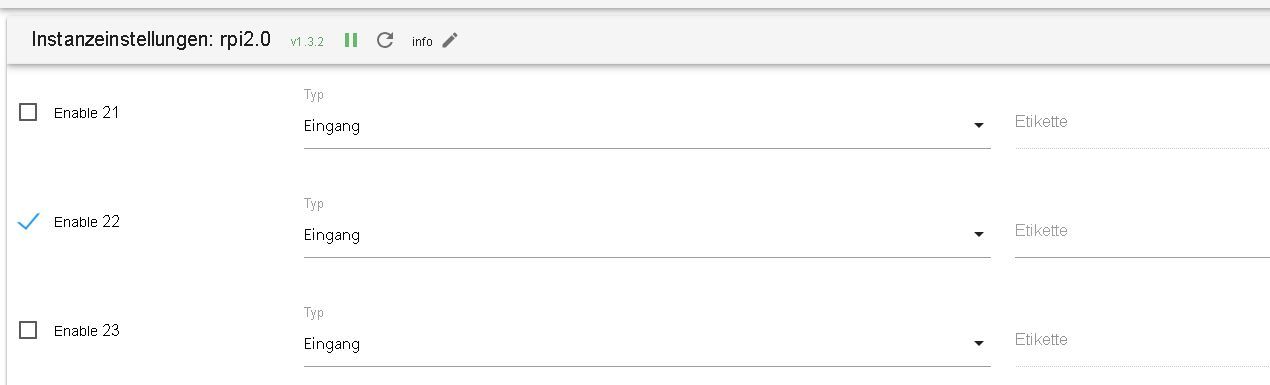
Woran könnte das liegen?
Hier nochmal was passiert wenn ich den Adapter neu starte:
rpi2.0	2024-09-25 07:35:01.209	error	Cannot setup port 22 as input: Error: EINVAL: invalid argument, write
rpi2.0	2024-09-25 07:35:00.047	info	starting. Version 1.3.2 in /opt/iobroker/node_modules/iobroker.rpi2, node: v20.17.0, js-controller: 6.0.1host.raspberrypi
	2024-09-25 07:34:58.155	info	instance system.adapter.rpi2.0 in version "1.3.2" started with pid 37337
host.raspberrypi
	2024-09-25 07:34:57.200	info	"system.adapter.rpi2.0" enabled
Skript v.2024-05-22 *** BASE SYSTEM *** Static hostname: raspberrypi Icon name: computer Operating System: Debian GNU/Linux 12 (bookworm) Kernel: Linux 6.6.47+rpt-rpi-v8 Architecture: arm64 Model : Raspberry Pi 4 Model B Rev 1.5 Docker : false Virtualization : none Kernel : aarch64 Userland : 64 bit Systemuptime and Load: 07:37:32 up 14:40, 2 users, load average: 0.64, 0.37, 0.28 CPU threads: 4 *** RASPBERRY THROTTLING *** Current issues: No throttling issues detected. Previously detected issues: No throttling issues detected. *** Time and Time Zones *** Local time: Wed 2024-09-25 07:37:32 CEST Universal time: Wed 2024-09-25 05:37:32 UTC RTC time: n/a Time zone: Europe/Berlin (CEST, +0200) System clock synchronized: yes NTP service: active RTC in local TZ: no *** Users and Groups *** User that called 'iob diag': pi HOME=/home/pi GROUPS=pi adm dialout cdrom sudo audio video plugdev games users input render netdev gpio i2c spi iobroker User that is running 'js-controller': iobroker HOME=/home/iobroker GROUPS=iobroker tty dialout audio video plugdev bluetooth gpio i2c *** Display-Server-Setup *** Display-Server: false Desktop: Terminal: tty Boot Target: multi-user.target *** MEMORY *** total used free shared buff/cache available Mem: 4.0G 1.4G 320M 1.2M 2.4G 2.6G Swap: 209M 0B 209M Total: 4.2G 1.4G 530M Active iob-Instances: 14 3791 M total memory 1299 M used memory 1637 M active memory 1612 M inactive memory 305 M free memory 133 M buffer memory 2131 M swap cache 199 M total swap 0 M used swap 199 M free swap *** top - Table Of Processes *** top - 07:37:32 up 14:40, 2 users, load average: 0.64, 0.37, 0.28 Tasks: 181 total, 1 running, 180 sleeping, 0 stopped, 0 zombie %Cpu(s): 20.0 us, 0.0 sy, 0.0 ni, 80.0 id, 0.0 wa, 0.0 hi, 0.0 si, 0.0 st MiB Mem : 3792.0 total, 303.8 free, 1300.8 used, 2264.5 buff/cache MiB Swap: 200.0 total, 200.0 free, 0.0 used. 2491.2 avail Mem *** FAILED SERVICES *** UNIT LOAD ACTIVE SUB DESCRIPTION 0 loaded units listed. *** FILESYSTEM *** Filesystem Type Size Used Avail Use% Mounted on udev devtmpfs 1.6G 0 1.6G 0% /dev tmpfs tmpfs 380M 1.2M 379M 1% /run /dev/mmcblk0p2 ext4 29G 9.8G 18G 36% / tmpfs tmpfs 1.9G 0 1.9G 0% /dev/shm tmpfs tmpfs 5.0M 16K 5.0M 1% /run/lock /dev/mmcblk0p1 vfat 510M 64M 447M 13% /boot/firmware tmpfs tmpfs 380M 0 380M 0% /run/user/1000 Messages concerning ext4 filesystem in dmesg: [Tue Sep 24 16:57:28 2024] Kernel command line: coherent_pool=1M 8250.nr_uarts=1 snd_bcm2835.enable_headphones=0 snd_bcm2835.enable_headphones=1 snd_bcm2835.enable_hdmi=1 snd_bcm2835.enable_hdmi=0 smsc95xx.macaddr=D8:3A:DD:83:5A:17 vc_mem.mem_base=0x3ec00000 vc_mem.mem_size=0x40000000 console=tty1 root=PARTUUID=194987c9-02 rootfstype=ext4 fsck.repair=yes rootwait cfg80211.ieee80211_regdom=GB [Tue Sep 24 16:57:30 2024] EXT4-fs (mmcblk0p2): mounted filesystem 6835594d-a5f3-459f-a244-318060e7e0ab ro with ordered data mode. Quota mode: none. [Tue Sep 24 16:57:32 2024] EXT4-fs (mmcblk0p2): re-mounted 6835594d-a5f3-459f-a244-318060e7e0ab r/w. Quota mode: none. Show mounted filesystems: TARGET SOURCE FSTYPE OPTIONS / /dev/mmcblk0p2 ext4 rw,noatime |-/sys sysfs sysfs rw,nosuid,nodev,noexec,relatime | |-/sys/kernel/security securityfs securityfs rw,nosuid,nodev,noexec,relatime | |-/sys/fs/cgroup cgroup2 cgroup2 rw,nosuid,nodev,noexec,relatime,nsdelegate,memory_recursiveprot | |-/sys/fs/pstore pstore pstore rw,nosuid,nodev,noexec,relatime | |-/sys/fs/bpf bpf bpf rw,nosuid,nodev,noexec,relatime,mode=700 | |-/sys/kernel/debug debugfs debugfs rw,nosuid,nodev,noexec,relatime | |-/sys/kernel/tracing tracefs tracefs rw,nosuid,nodev,noexec,relatime | |-/sys/fs/fuse/connections fusectl fusectl rw,nosuid,nodev,noexec,relatime | `-/sys/kernel/config configfs configfs rw,nosuid,nodev,noexec,relatime |-/proc proc proc rw,relatime | `-/proc/sys/fs/binfmt_misc systemd-1 autofs rw,relatime,fd=30,pgrp=1,timeout=0,minproto=5,maxproto=5,direct,pipe_ino=2384 | `-/proc/sys/fs/binfmt_misc binfmt_misc binfmt_misc rw,nosuid,nodev,noexec,relatime |-/dev udev devtmpfs rw,nosuid,relatime,size=1671168k,nr_inodes=417792,mode=755 | |-/dev/pts devpts devpts rw,nosuid,noexec,relatime,gid=5,mode=620,ptmxmode=000 | |-/dev/shm tmpfs tmpfs rw,nosuid,nodev | `-/dev/mqueue mqueue mqueue rw,nosuid,nodev,noexec,relatime |-/run tmpfs tmpfs rw,nosuid,nodev,noexec,relatime,size=388300k,mode=755 | |-/run/lock tmpfs tmpfs rw,nosuid,nodev,noexec,relatime,size=5120k | |-/run/credentials/systemd-sysctl.service ramfs ramfs ro,nosuid,nodev,noexec,relatime,mode=700 | |-/run/credentials/systemd-sysusers.service ramfs ramfs ro,nosuid,nodev,noexec,relatime,mode=700 | |-/run/credentials/systemd-tmpfiles-setup-dev.service ramfs ramfs ro,nosuid,nodev,noexec,relatime,mode=700 | |-/run/rpc_pipefs sunrpc rpc_pipefs rw,relatime | |-/run/credentials/systemd-tmpfiles-setup.service ramfs ramfs ro,nosuid,nodev,noexec,relatime,mode=700 | `-/run/user/1000 tmpfs tmpfs rw,nosuid,nodev,relatime,size=388296k,nr_inodes=97074,mode=700,uid=1000,gid=1000 `-/boot/firmware /dev/mmcblk0p1 vfat rw,relatime,fmask=0022,dmask=0022,codepage=437,iocharset=ascii,shortname=mixed,errors=remount-ro Files in neuralgic directories: /var: 2.8G /var/ 2.2G /var/log/journal/b656039fa4ae4234b58673c86559ff52 2.2G /var/log/journal 2.2G /var/log 233M /var/cache Archived and active journals take up 2.1G in the file system. /opt/iobroker/backups: 71M /opt/iobroker/backups/ /opt/iobroker/iobroker-data: 2.8G /opt/iobroker/iobroker-data/ 2.0G /opt/iobroker/iobroker-data/history 770M /opt/iobroker/iobroker-data/files 441M /opt/iobroker/iobroker-data/files/javascript.admin 409M /opt/iobroker/iobroker-data/files/javascript.admin/static The five largest files in iobroker-data are: 35M /opt/iobroker/iobroker-data/files/devices.admin/static/js/main.24f2bb56.js.map 26M /opt/iobroker/iobroker-data/files/echarts/static/js/main.41cee985.js.map 26M /opt/iobroker/iobroker-data/files/echarts.admin/chart/static/js/main.41cee985.js.map 24M /opt/iobroker/iobroker-data/objects.jsonl 24M /opt/iobroker/iobroker-data/files/web.admin/static/js/main.135279a0.js.map USB-Devices by-id: USB-Sticks - Avoid direct links to /dev/tty* in your adapter setups, please always prefer the links 'by-id': No Devices found 'by-id' *** NodeJS-Installation *** /usr/bin/nodejs v20.17.0 /usr/bin/node v20.17.0 /usr/bin/npm 10.8.2 /usr/bin/npx 10.8.2 /usr/bin/corepack 0.29.3 nodejs: Installed: 20.17.0-1nodesource1 Candidate: 20.17.0-1nodesource1 Version table: *** 20.17.0-1nodesource1 1001 500 https://deb.nodesource.com/node_20.x nodistro/main arm64 Packages 100 /var/lib/dpkg/status 20.16.0-1nodesource1 1001 500 https://deb.nodesource.com/node_20.x nodistro/main arm64 Packages 20.15.1-1nodesource1 1001 500 https://deb.nodesource.com/node_20.x nodistro/main arm64 Packages 20.15.0-1nodesource1 1001 500 https://deb.nodesource.com/node_20.x nodistro/main arm64 Packages 20.14.0-1nodesource1 1001 500 https://deb.nodesource.com/node_20.x nodistro/main arm64 Packages 20.13.1-1nodesource1 1001 500 https://deb.nodesource.com/node_20.x nodistro/main arm64 Packages 20.13.0-1nodesource1 1001 500 https://deb.nodesource.com/node_20.x nodistro/main arm64 Packages 20.12.2-1nodesource1 1001 500 https://deb.nodesource.com/node_20.x nodistro/main arm64 Packages 20.12.1-1nodesource1 1001 500 https://deb.nodesource.com/node_20.x nodistro/main arm64 Packages 20.12.0-1nodesource1 1001 500 https://deb.nodesource.com/node_20.x nodistro/main arm64 Packages 20.11.1-1nodesource1 1001 500 https://deb.nodesource.com/node_20.x nodistro/main arm64 Packages 20.11.0-1nodesource1 1001 500 https://deb.nodesource.com/node_20.x nodistro/main arm64 Packages 20.10.0-1nodesource1 1001 500 https://deb.nodesource.com/node_20.x nodistro/main arm64 Packages 20.9.0-1nodesource1 1001 500 https://deb.nodesource.com/node_20.x nodistro/main arm64 Packages 20.8.1-1nodesource1 1001 500 https://deb.nodesource.com/node_20.x nodistro/main arm64 Packages 20.8.0-1nodesource1 1001 500 https://deb.nodesource.com/node_20.x nodistro/main arm64 Packages 20.7.0-1nodesource1 1001 500 https://deb.nodesource.com/node_20.x nodistro/main arm64 Packages 20.6.1-1nodesource1 1001 500 https://deb.nodesource.com/node_20.x nodistro/main arm64 Packages 20.6.0-1nodesource1 1001 500 https://deb.nodesource.com/node_20.x nodistro/main arm64 Packages 20.5.1-1nodesource1 1001 500 https://deb.nodesource.com/node_20.x nodistro/main arm64 Packages 20.5.0-1nodesource1 1001 500 https://deb.nodesource.com/node_20.x nodistro/main arm64 Packages 20.4.0-1nodesource1 1001 500 https://deb.nodesource.com/node_20.x nodistro/main arm64 Packages 20.3.1-1nodesource1 1001 500 https://deb.nodesource.com/node_20.x nodistro/main arm64 Packages 20.3.0-1nodesource1 1001 500 https://deb.nodesource.com/node_20.x nodistro/main arm64 Packages 20.2.0-1nodesource1 1001 500 https://deb.nodesource.com/node_20.x nodistro/main arm64 Packages 20.1.0-1nodesource1 1001 500 https://deb.nodesource.com/node_20.x nodistro/main arm64 Packages 20.0.0-1nodesource1 1001 500 https://deb.nodesource.com/node_20.x nodistro/main arm64 Packages 18.19.0+dfsg-6~deb12u2 500 500 http://deb.debian.org/debian bookworm/main arm64 Packages 18.19.0+dfsg-6~deb12u1 500 500 http://deb.debian.org/debian-security bookworm-security/main arm64 Packages Temp directories causing npm8 problem: 0 No problems detected Errors in npm tree: *** ioBroker-Installation *** ioBroker Status iobroker is running on this host. Objects type: jsonl States type: jsonl Core adapters versions js-controller: 6.0.11 admin: 7.1.2 javascript: 8.7.6 nodejs modules from github: 0 Adapter State + system.adapter.admin.0 : admin : raspberrypi - enabled, port: 8081, bind: 0.0.0.0, run as: admin + system.adapter.backitup.0 : backitup : raspberrypi - enabled system.adapter.devices.0 : devices : raspberrypi - enabled system.adapter.discovery.0 : discovery : raspberrypi - disabled + system.adapter.echarts.0 : echarts : raspberrypi - enabled system.adapter.flot.0 : flot : raspberrypi - disabled + system.adapter.growatt.0 : growatt : raspberrypi - enabled system.adapter.ham.0 : ham : raspberrypi - disabled + system.adapter.history.0 : history : raspberrypi - enabled system.adapter.influxdb.0 : influxdb : raspberrypi - disabled, port: 8086 system.adapter.info.0 : info : raspberrypi - disabled + system.adapter.javascript.0 : javascript : raspberrypi - enabled + system.adapter.modbus.0 : modbus : raspberrypi - enabled system.adapter.mqtt.0 : mqtt : raspberrypi - disabled, port: 1883, bind: 0.0.0.0 system.adapter.mqtt.1 : mqtt : raspberrypi - disabled, port: 1883, bind: 0.0.0.0 + system.adapter.rpi2.0 : rpi2 : raspberrypi - enabled + system.adapter.shelly.0 : shelly : raspberrypi - enabled, port: 1882, bind: 0.0.0.0 + system.adapter.smartmeter.0 : smartmeter : raspberrypi - enabled + system.adapter.socketio.0 : socketio : raspberrypi - enabled, port: 8084, bind: 0.0.0.0, run as: admin + system.adapter.viessmannapi.0 : viessmannapi : raspberrypi - enabled system.adapter.vis.0 : vis : raspberrypi - enabled + system.adapter.web.0 : web : raspberrypi - enabled, port: 8082, bind: 0.0.0.0, run as: admin + instance is alive Enabled adapters with bindings + system.adapter.admin.0 : admin : raspberrypi - enabled, port: 8081, bind: 0.0.0.0, run as: admin + system.adapter.shelly.0 : shelly : raspberrypi - enabled, port: 1882, bind: 0.0.0.0 + system.adapter.socketio.0 : socketio : raspberrypi - enabled, port: 8084, bind: 0.0.0.0, run as: admin + system.adapter.web.0 : web : raspberrypi - enabled, port: 8082, bind: 0.0.0.0, run as: admin ioBroker-Repositories ┌─────────┬──────────┬─────────────────────────────────────────────────────────┬──────────────┐ │ (index) │ name │ url │ auto upgrade │ ├─────────┼──────────┼─────────────────────────────────────────────────────────┼──────────────┤ │ 0 │ 'stable' │ 'http://download.iobroker.net/sources-dist.json' │ false │ │ 1 │ 'beta' │ 'http://download.iobroker.net/sources-dist-latest.json' │ false │ └─────────┴──────────┴─────────────────────────────────────────────────────────┴──────────────┘ Active repo(s): stable Upgrade policy: none Installed ioBroker-Instances Used repository: stable Adapter "admin" : 7.1.2 , installed 7.1.2 Adapter "backitup" : 3.0.22 , installed 2.8.1 [Updatable] Adapter "devices" : 1.1.5 , installed 1.1.5 Adapter "discovery" : 5.0.0 , installed 5.0.0 Adapter "echarts" : 1.9.2 , installed 1.9.2 Adapter "flot" : 1.12.0 , installed 1.12.0 Adapter "growatt" : 3.2.5 , installed 3.2.5 Adapter "ham" : 5.3.1 , installed 5.3.1 Adapter "history" : 3.0.1 , installed 3.0.1 Adapter "influxdb" : 4.0.2 , installed 4.0.2 Adapter "javascript" : 8.7.6 , installed 8.7.6 Controller "js-controller": 6.0.11 , installed 6.0.11 Adapter "modbus" : 6.2.3 , installed 6.2.3 Adapter "mqtt" : 5.2.0 , installed 5.2.0 Adapter "rpi2" : 1.3.2 , installed 1.3.2 Adapter "shelly" : 7.0.0 , installed 7.0.0 Adapter "simple-api" : 2.8.0 , installed 2.8.0 Adapter "smartmeter" : 3.4.0 , installed 3.4.0 Adapter "socketio" : 6.7.1 , installed 6.7.1 Adapter "viessmannapi" : 2.3.0 , installed 2.3.0 Adapter "vis" : 1.5.6 , installed 1.5.6 Adapter "web" : 6.2.5 , installed 6.2.5 Adapter "ws" : 2.6.2 , installed 2.6.2 Objects and States Please stand by - This may take a while Objects: 9924 States: 7738 *** OS-Repositories and Updates *** Hit:1 http://deb.debian.org/debian bookworm InRelease Hit:2 http://deb.debian.org/debian-security bookworm-security InRelease Hit:3 http://archive.raspberrypi.com/debian bookworm InRelease Hit:4 http://deb.debian.org/debian bookworm-updates InRelease Hit:5 https://deb.nodesource.com/node_20.x nodistro InRelease Reading package lists... Pending Updates: 0 *** Listening Ports *** Active Internet connections (only servers) Proto Recv-Q Send-Q Local Address Foreign Address State User Inode PID/Program name tcp 0 0 0.0.0.0:1882 0.0.0.0:* LISTEN 1001 29734 5457/io.shelly.0 tcp 0 0 0.0.0.0:22 0.0.0.0:* LISTEN 0 2975 707/sshd: /usr/sbin tcp 0 0 127.0.0.1:9000 0.0.0.0:* LISTEN 1001 27300 5303/iobroker.js-co tcp 0 0 127.0.0.1:9001 0.0.0.0:* LISTEN 1001 27295 5303/iobroker.js-co tcp6 0 0 :::8081 :::* LISTEN 1001 25566 5321/io.admin.0 tcp6 0 0 :::8082 :::* LISTEN 1001 28145 5610/io.web.0 tcp6 0 0 :::8084 :::* LISTEN 1001 28973 5551/io.socketio.0 tcp6 0 0 :::22 :::* LISTEN 0 2977 707/sshd: /usr/sbin udp 0 0 0.0.0.0:51467 0.0.0.0:* 104 2791 490/avahi-daemon: r udp 0 0 0.0.0.0:5353 0.0.0.0:* 104 2789 490/avahi-daemon: r udp6 0 0 :::40876 :::* 104 2792 490/avahi-daemon: r udp6 0 0 fe80::526c:410f:553:546 :::* 0 630 640/NetworkManager udp6 0 0 fe80::c80a:1d5b:320:546 :::* 0 6180 640/NetworkManager udp6 0 0 :::5353 :::* 104 2790 490/avahi-daemon: r *** Log File - Last 25 Lines *** 2024-09-25 07:34:52.409 - info: rpi2.0 (37111) terminating 2024-09-25 07:34:52.505 - info: host.raspberrypi instance system.adapter.rpi2.0 terminated with code 11 (ADAPTER_REQUESTED_TERMINATION) 2024-09-25 07:34:55.887 - info: smartmeter.0 (5473) Received 22 values, 15 updated 2024-09-25 07:34:57.200 - info: host.raspberrypi "system.adapter.rpi2.0" enabled 2024-09-25 07:34:58.155 - info: host.raspberrypi instance system.adapter.rpi2.0 in version "1.3.2" started with pid 37337 2024-09-25 07:35:00.047 - info: rpi2.0 (37337) starting. Version 1.3.2 in /opt/iobroker/node_modules/iobroker.rpi2, node: v20.17.0, js-controller: 6.0.11 2024-09-25 07:35:01.209 - error: rpi2.0 (37337) Cannot setup port 22 as input: Error: EINVAL: invalid argument, write 2024-09-25 07:35:06.871 - info: smartmeter.0 (5473) Received 22 values, 15 updated 2024-09-25 07:35:17.848 - info: smartmeter.0 (5473) Received 22 values, 14 updated 2024-09-25 07:35:28.835 - info: smartmeter.0 (5473) Received 22 values, 10 updated 2024-09-25 07:35:39.828 - info: smartmeter.0 (5473) Received 22 values, 13 updated 2024-09-25 07:35:50.863 - info: smartmeter.0 (5473) Received 22 values, 10 updated 2024-09-25 07:36:01.839 - info: smartmeter.0 (5473) Received 22 values, 13 updated 2024-09-25 07:36:12.851 - info: smartmeter.0 (5473) Received 22 values, 12 updated 2024-09-25 07:36:23.845 - info: smartmeter.0 (5473) Received 22 values, 10 updated 2024-09-25 07:36:34.850 - info: smartmeter.0 (5473) Received 22 values, 14 updated 2024-09-25 07:36:45.854 - info: smartmeter.0 (5473) Received 22 values, 14 updated 2024-09-25 07:36:56.869 - info: smartmeter.0 (5473) Received 22 values, 14 updated 2024-09-25 07:37:07.873 - info: smartmeter.0 (5473) Received 22 values, 13 updated 2024-09-25 07:37:18.883 - info: smartmeter.0 (5473) Received 22 values, 13 updated 2024-09-25 07:37:29.820 - info: smartmeter.0 (5473) Received 22 values, 11 updated 2024-09-25 07:37:40.835 - info: smartmeter.0 (5473) Received 22 values, 11 updated 2024-09-25 07:37:51.875 - info: smartmeter.0 (5473) Received 22 values, 14 updated 2024-09-25 07:38:02.881 - info: smartmeter.0 (5473) Received 22 values, 11 updated 2024-09-25 07:38:13.857 - info: smartmeter.0 (5473) Received 22 values, 14 updated -
@thomas-braun
Hallo,es scheint alles zu funktionieren außer beim Adapter rpi2.0 gibt es ein Problem mit GPIO 22.
Diesen benutze ich als Eingang für meinen Gaszähler.
Für mich sieht es aus als wäre er richtig eingestellt im Adapter aber es kommt immer die Fehlermeldung:rpi2.0 2024-09-25 07:29:15.776 error Cannot setup port 22 as input: Error: EINVAL: invalid argument, writeWoran könnte das liegen?
Hier nochmal was passiert wenn ich den Adapter neu starte:
rpi2.0	2024-09-25 07:35:01.209	error	Cannot setup port 22 as input: Error: EINVAL: invalid argument, write
rpi2.0	2024-09-25 07:35:00.047	info	starting. Version 1.3.2 in /opt/iobroker/node_modules/iobroker.rpi2, node: v20.17.0, js-controller: 6.0.1host.raspberrypi
	2024-09-25 07:34:58.155	info	instance system.adapter.rpi2.0 in version "1.3.2" started with pid 37337
host.raspberrypi
	2024-09-25 07:34:57.200	info	"system.adapter.rpi2.0" enabled
Skript v.2024-05-22 *** BASE SYSTEM *** Static hostname: raspberrypi Icon name: computer Operating System: Debian GNU/Linux 12 (bookworm) Kernel: Linux 6.6.47+rpt-rpi-v8 Architecture: arm64 Model : Raspberry Pi 4 Model B Rev 1.5 Docker : false Virtualization : none Kernel : aarch64 Userland : 64 bit Systemuptime and Load: 07:37:32 up 14:40, 2 users, load average: 0.64, 0.37, 0.28 CPU threads: 4 *** RASPBERRY THROTTLING *** Current issues: No throttling issues detected. Previously detected issues: No throttling issues detected. *** Time and Time Zones *** Local time: Wed 2024-09-25 07:37:32 CEST Universal time: Wed 2024-09-25 05:37:32 UTC RTC time: n/a Time zone: Europe/Berlin (CEST, +0200) System clock synchronized: yes NTP service: active RTC in local TZ: no *** Users and Groups *** User that called 'iob diag': pi HOME=/home/pi GROUPS=pi adm dialout cdrom sudo audio video plugdev games users input render netdev gpio i2c spi iobroker User that is running 'js-controller': iobroker HOME=/home/iobroker GROUPS=iobroker tty dialout audio video plugdev bluetooth gpio i2c *** Display-Server-Setup *** Display-Server: false Desktop: Terminal: tty Boot Target: multi-user.target *** MEMORY *** total used free shared buff/cache available Mem: 4.0G 1.4G 320M 1.2M 2.4G 2.6G Swap: 209M 0B 209M Total: 4.2G 1.4G 530M Active iob-Instances: 14 3791 M total memory 1299 M used memory 1637 M active memory 1612 M inactive memory 305 M free memory 133 M buffer memory 2131 M swap cache 199 M total swap 0 M used swap 199 M free swap *** top - Table Of Processes *** top - 07:37:32 up 14:40, 2 users, load average: 0.64, 0.37, 0.28 Tasks: 181 total, 1 running, 180 sleeping, 0 stopped, 0 zombie %Cpu(s): 20.0 us, 0.0 sy, 0.0 ni, 80.0 id, 0.0 wa, 0.0 hi, 0.0 si, 0.0 st MiB Mem : 3792.0 total, 303.8 free, 1300.8 used, 2264.5 buff/cache MiB Swap: 200.0 total, 200.0 free, 0.0 used. 2491.2 avail Mem *** FAILED SERVICES *** UNIT LOAD ACTIVE SUB DESCRIPTION 0 loaded units listed. *** FILESYSTEM *** Filesystem Type Size Used Avail Use% Mounted on udev devtmpfs 1.6G 0 1.6G 0% /dev tmpfs tmpfs 380M 1.2M 379M 1% /run /dev/mmcblk0p2 ext4 29G 9.8G 18G 36% / tmpfs tmpfs 1.9G 0 1.9G 0% /dev/shm tmpfs tmpfs 5.0M 16K 5.0M 1% /run/lock /dev/mmcblk0p1 vfat 510M 64M 447M 13% /boot/firmware tmpfs tmpfs 380M 0 380M 0% /run/user/1000 Messages concerning ext4 filesystem in dmesg: [Tue Sep 24 16:57:28 2024] Kernel command line: coherent_pool=1M 8250.nr_uarts=1 snd_bcm2835.enable_headphones=0 snd_bcm2835.enable_headphones=1 snd_bcm2835.enable_hdmi=1 snd_bcm2835.enable_hdmi=0 smsc95xx.macaddr=D8:3A:DD:83:5A:17 vc_mem.mem_base=0x3ec00000 vc_mem.mem_size=0x40000000 console=tty1 root=PARTUUID=194987c9-02 rootfstype=ext4 fsck.repair=yes rootwait cfg80211.ieee80211_regdom=GB [Tue Sep 24 16:57:30 2024] EXT4-fs (mmcblk0p2): mounted filesystem 6835594d-a5f3-459f-a244-318060e7e0ab ro with ordered data mode. Quota mode: none. [Tue Sep 24 16:57:32 2024] EXT4-fs (mmcblk0p2): re-mounted 6835594d-a5f3-459f-a244-318060e7e0ab r/w. Quota mode: none. Show mounted filesystems: TARGET SOURCE FSTYPE OPTIONS / /dev/mmcblk0p2 ext4 rw,noatime |-/sys sysfs sysfs rw,nosuid,nodev,noexec,relatime | |-/sys/kernel/security securityfs securityfs rw,nosuid,nodev,noexec,relatime | |-/sys/fs/cgroup cgroup2 cgroup2 rw,nosuid,nodev,noexec,relatime,nsdelegate,memory_recursiveprot | |-/sys/fs/pstore pstore pstore rw,nosuid,nodev,noexec,relatime | |-/sys/fs/bpf bpf bpf rw,nosuid,nodev,noexec,relatime,mode=700 | |-/sys/kernel/debug debugfs debugfs rw,nosuid,nodev,noexec,relatime | |-/sys/kernel/tracing tracefs tracefs rw,nosuid,nodev,noexec,relatime | |-/sys/fs/fuse/connections fusectl fusectl rw,nosuid,nodev,noexec,relatime | `-/sys/kernel/config configfs configfs rw,nosuid,nodev,noexec,relatime |-/proc proc proc rw,relatime | `-/proc/sys/fs/binfmt_misc systemd-1 autofs rw,relatime,fd=30,pgrp=1,timeout=0,minproto=5,maxproto=5,direct,pipe_ino=2384 | `-/proc/sys/fs/binfmt_misc binfmt_misc binfmt_misc rw,nosuid,nodev,noexec,relatime |-/dev udev devtmpfs rw,nosuid,relatime,size=1671168k,nr_inodes=417792,mode=755 | |-/dev/pts devpts devpts rw,nosuid,noexec,relatime,gid=5,mode=620,ptmxmode=000 | |-/dev/shm tmpfs tmpfs rw,nosuid,nodev | `-/dev/mqueue mqueue mqueue rw,nosuid,nodev,noexec,relatime |-/run tmpfs tmpfs rw,nosuid,nodev,noexec,relatime,size=388300k,mode=755 | |-/run/lock tmpfs tmpfs rw,nosuid,nodev,noexec,relatime,size=5120k | |-/run/credentials/systemd-sysctl.service ramfs ramfs ro,nosuid,nodev,noexec,relatime,mode=700 | |-/run/credentials/systemd-sysusers.service ramfs ramfs ro,nosuid,nodev,noexec,relatime,mode=700 | |-/run/credentials/systemd-tmpfiles-setup-dev.service ramfs ramfs ro,nosuid,nodev,noexec,relatime,mode=700 | |-/run/rpc_pipefs sunrpc rpc_pipefs rw,relatime | |-/run/credentials/systemd-tmpfiles-setup.service ramfs ramfs ro,nosuid,nodev,noexec,relatime,mode=700 | `-/run/user/1000 tmpfs tmpfs rw,nosuid,nodev,relatime,size=388296k,nr_inodes=97074,mode=700,uid=1000,gid=1000 `-/boot/firmware /dev/mmcblk0p1 vfat rw,relatime,fmask=0022,dmask=0022,codepage=437,iocharset=ascii,shortname=mixed,errors=remount-ro Files in neuralgic directories: /var: 2.8G /var/ 2.2G /var/log/journal/b656039fa4ae4234b58673c86559ff52 2.2G /var/log/journal 2.2G /var/log 233M /var/cache Archived and active journals take up 2.1G in the file system. /opt/iobroker/backups: 71M /opt/iobroker/backups/ /opt/iobroker/iobroker-data: 2.8G /opt/iobroker/iobroker-data/ 2.0G /opt/iobroker/iobroker-data/history 770M /opt/iobroker/iobroker-data/files 441M /opt/iobroker/iobroker-data/files/javascript.admin 409M /opt/iobroker/iobroker-data/files/javascript.admin/static The five largest files in iobroker-data are: 35M /opt/iobroker/iobroker-data/files/devices.admin/static/js/main.24f2bb56.js.map 26M /opt/iobroker/iobroker-data/files/echarts/static/js/main.41cee985.js.map 26M /opt/iobroker/iobroker-data/files/echarts.admin/chart/static/js/main.41cee985.js.map 24M /opt/iobroker/iobroker-data/objects.jsonl 24M /opt/iobroker/iobroker-data/files/web.admin/static/js/main.135279a0.js.map USB-Devices by-id: USB-Sticks - Avoid direct links to /dev/tty* in your adapter setups, please always prefer the links 'by-id': No Devices found 'by-id' *** NodeJS-Installation *** /usr/bin/nodejs v20.17.0 /usr/bin/node v20.17.0 /usr/bin/npm 10.8.2 /usr/bin/npx 10.8.2 /usr/bin/corepack 0.29.3 nodejs: Installed: 20.17.0-1nodesource1 Candidate: 20.17.0-1nodesource1 Version table: *** 20.17.0-1nodesource1 1001 500 https://deb.nodesource.com/node_20.x nodistro/main arm64 Packages 100 /var/lib/dpkg/status 20.16.0-1nodesource1 1001 500 https://deb.nodesource.com/node_20.x nodistro/main arm64 Packages 20.15.1-1nodesource1 1001 500 https://deb.nodesource.com/node_20.x nodistro/main arm64 Packages 20.15.0-1nodesource1 1001 500 https://deb.nodesource.com/node_20.x nodistro/main arm64 Packages 20.14.0-1nodesource1 1001 500 https://deb.nodesource.com/node_20.x nodistro/main arm64 Packages 20.13.1-1nodesource1 1001 500 https://deb.nodesource.com/node_20.x nodistro/main arm64 Packages 20.13.0-1nodesource1 1001 500 https://deb.nodesource.com/node_20.x nodistro/main arm64 Packages 20.12.2-1nodesource1 1001 500 https://deb.nodesource.com/node_20.x nodistro/main arm64 Packages 20.12.1-1nodesource1 1001 500 https://deb.nodesource.com/node_20.x nodistro/main arm64 Packages 20.12.0-1nodesource1 1001 500 https://deb.nodesource.com/node_20.x nodistro/main arm64 Packages 20.11.1-1nodesource1 1001 500 https://deb.nodesource.com/node_20.x nodistro/main arm64 Packages 20.11.0-1nodesource1 1001 500 https://deb.nodesource.com/node_20.x nodistro/main arm64 Packages 20.10.0-1nodesource1 1001 500 https://deb.nodesource.com/node_20.x nodistro/main arm64 Packages 20.9.0-1nodesource1 1001 500 https://deb.nodesource.com/node_20.x nodistro/main arm64 Packages 20.8.1-1nodesource1 1001 500 https://deb.nodesource.com/node_20.x nodistro/main arm64 Packages 20.8.0-1nodesource1 1001 500 https://deb.nodesource.com/node_20.x nodistro/main arm64 Packages 20.7.0-1nodesource1 1001 500 https://deb.nodesource.com/node_20.x nodistro/main arm64 Packages 20.6.1-1nodesource1 1001 500 https://deb.nodesource.com/node_20.x nodistro/main arm64 Packages 20.6.0-1nodesource1 1001 500 https://deb.nodesource.com/node_20.x nodistro/main arm64 Packages 20.5.1-1nodesource1 1001 500 https://deb.nodesource.com/node_20.x nodistro/main arm64 Packages 20.5.0-1nodesource1 1001 500 https://deb.nodesource.com/node_20.x nodistro/main arm64 Packages 20.4.0-1nodesource1 1001 500 https://deb.nodesource.com/node_20.x nodistro/main arm64 Packages 20.3.1-1nodesource1 1001 500 https://deb.nodesource.com/node_20.x nodistro/main arm64 Packages 20.3.0-1nodesource1 1001 500 https://deb.nodesource.com/node_20.x nodistro/main arm64 Packages 20.2.0-1nodesource1 1001 500 https://deb.nodesource.com/node_20.x nodistro/main arm64 Packages 20.1.0-1nodesource1 1001 500 https://deb.nodesource.com/node_20.x nodistro/main arm64 Packages 20.0.0-1nodesource1 1001 500 https://deb.nodesource.com/node_20.x nodistro/main arm64 Packages 18.19.0+dfsg-6~deb12u2 500 500 http://deb.debian.org/debian bookworm/main arm64 Packages 18.19.0+dfsg-6~deb12u1 500 500 http://deb.debian.org/debian-security bookworm-security/main arm64 Packages Temp directories causing npm8 problem: 0 No problems detected Errors in npm tree: *** ioBroker-Installation *** ioBroker Status iobroker is running on this host. Objects type: jsonl States type: jsonl Core adapters versions js-controller: 6.0.11 admin: 7.1.2 javascript: 8.7.6 nodejs modules from github: 0 Adapter State + system.adapter.admin.0 : admin : raspberrypi - enabled, port: 8081, bind: 0.0.0.0, run as: admin + system.adapter.backitup.0 : backitup : raspberrypi - enabled system.adapter.devices.0 : devices : raspberrypi - enabled system.adapter.discovery.0 : discovery : raspberrypi - disabled + system.adapter.echarts.0 : echarts : raspberrypi - enabled system.adapter.flot.0 : flot : raspberrypi - disabled + system.adapter.growatt.0 : growatt : raspberrypi - enabled system.adapter.ham.0 : ham : raspberrypi - disabled + system.adapter.history.0 : history : raspberrypi - enabled system.adapter.influxdb.0 : influxdb : raspberrypi - disabled, port: 8086 system.adapter.info.0 : info : raspberrypi - disabled + system.adapter.javascript.0 : javascript : raspberrypi - enabled + system.adapter.modbus.0 : modbus : raspberrypi - enabled system.adapter.mqtt.0 : mqtt : raspberrypi - disabled, port: 1883, bind: 0.0.0.0 system.adapter.mqtt.1 : mqtt : raspberrypi - disabled, port: 1883, bind: 0.0.0.0 + system.adapter.rpi2.0 : rpi2 : raspberrypi - enabled + system.adapter.shelly.0 : shelly : raspberrypi - enabled, port: 1882, bind: 0.0.0.0 + system.adapter.smartmeter.0 : smartmeter : raspberrypi - enabled + system.adapter.socketio.0 : socketio : raspberrypi - enabled, port: 8084, bind: 0.0.0.0, run as: admin + system.adapter.viessmannapi.0 : viessmannapi : raspberrypi - enabled system.adapter.vis.0 : vis : raspberrypi - enabled + system.adapter.web.0 : web : raspberrypi - enabled, port: 8082, bind: 0.0.0.0, run as: admin + instance is alive Enabled adapters with bindings + system.adapter.admin.0 : admin : raspberrypi - enabled, port: 8081, bind: 0.0.0.0, run as: admin + system.adapter.shelly.0 : shelly : raspberrypi - enabled, port: 1882, bind: 0.0.0.0 + system.adapter.socketio.0 : socketio : raspberrypi - enabled, port: 8084, bind: 0.0.0.0, run as: admin + system.adapter.web.0 : web : raspberrypi - enabled, port: 8082, bind: 0.0.0.0, run as: admin ioBroker-Repositories ┌─────────┬──────────┬─────────────────────────────────────────────────────────┬──────────────┐ │ (index) │ name │ url │ auto upgrade │ ├─────────┼──────────┼─────────────────────────────────────────────────────────┼──────────────┤ │ 0 │ 'stable' │ 'http://download.iobroker.net/sources-dist.json' │ false │ │ 1 │ 'beta' │ 'http://download.iobroker.net/sources-dist-latest.json' │ false │ └─────────┴──────────┴─────────────────────────────────────────────────────────┴──────────────┘ Active repo(s): stable Upgrade policy: none Installed ioBroker-Instances Used repository: stable Adapter "admin" : 7.1.2 , installed 7.1.2 Adapter "backitup" : 3.0.22 , installed 2.8.1 [Updatable] Adapter "devices" : 1.1.5 , installed 1.1.5 Adapter "discovery" : 5.0.0 , installed 5.0.0 Adapter "echarts" : 1.9.2 , installed 1.9.2 Adapter "flot" : 1.12.0 , installed 1.12.0 Adapter "growatt" : 3.2.5 , installed 3.2.5 Adapter "ham" : 5.3.1 , installed 5.3.1 Adapter "history" : 3.0.1 , installed 3.0.1 Adapter "influxdb" : 4.0.2 , installed 4.0.2 Adapter "javascript" : 8.7.6 , installed 8.7.6 Controller "js-controller": 6.0.11 , installed 6.0.11 Adapter "modbus" : 6.2.3 , installed 6.2.3 Adapter "mqtt" : 5.2.0 , installed 5.2.0 Adapter "rpi2" : 1.3.2 , installed 1.3.2 Adapter "shelly" : 7.0.0 , installed 7.0.0 Adapter "simple-api" : 2.8.0 , installed 2.8.0 Adapter "smartmeter" : 3.4.0 , installed 3.4.0 Adapter "socketio" : 6.7.1 , installed 6.7.1 Adapter "viessmannapi" : 2.3.0 , installed 2.3.0 Adapter "vis" : 1.5.6 , installed 1.5.6 Adapter "web" : 6.2.5 , installed 6.2.5 Adapter "ws" : 2.6.2 , installed 2.6.2 Objects and States Please stand by - This may take a while Objects: 9924 States: 7738 *** OS-Repositories and Updates *** Hit:1 http://deb.debian.org/debian bookworm InRelease Hit:2 http://deb.debian.org/debian-security bookworm-security InRelease Hit:3 http://archive.raspberrypi.com/debian bookworm InRelease Hit:4 http://deb.debian.org/debian bookworm-updates InRelease Hit:5 https://deb.nodesource.com/node_20.x nodistro InRelease Reading package lists... Pending Updates: 0 *** Listening Ports *** Active Internet connections (only servers) Proto Recv-Q Send-Q Local Address Foreign Address State User Inode PID/Program name tcp 0 0 0.0.0.0:1882 0.0.0.0:* LISTEN 1001 29734 5457/io.shelly.0 tcp 0 0 0.0.0.0:22 0.0.0.0:* LISTEN 0 2975 707/sshd: /usr/sbin tcp 0 0 127.0.0.1:9000 0.0.0.0:* LISTEN 1001 27300 5303/iobroker.js-co tcp 0 0 127.0.0.1:9001 0.0.0.0:* LISTEN 1001 27295 5303/iobroker.js-co tcp6 0 0 :::8081 :::* LISTEN 1001 25566 5321/io.admin.0 tcp6 0 0 :::8082 :::* LISTEN 1001 28145 5610/io.web.0 tcp6 0 0 :::8084 :::* LISTEN 1001 28973 5551/io.socketio.0 tcp6 0 0 :::22 :::* LISTEN 0 2977 707/sshd: /usr/sbin udp 0 0 0.0.0.0:51467 0.0.0.0:* 104 2791 490/avahi-daemon: r udp 0 0 0.0.0.0:5353 0.0.0.0:* 104 2789 490/avahi-daemon: r udp6 0 0 :::40876 :::* 104 2792 490/avahi-daemon: r udp6 0 0 fe80::526c:410f:553:546 :::* 0 630 640/NetworkManager udp6 0 0 fe80::c80a:1d5b:320:546 :::* 0 6180 640/NetworkManager udp6 0 0 :::5353 :::* 104 2790 490/avahi-daemon: r *** Log File - Last 25 Lines *** 2024-09-25 07:34:52.409 - info: rpi2.0 (37111) terminating 2024-09-25 07:34:52.505 - info: host.raspberrypi instance system.adapter.rpi2.0 terminated with code 11 (ADAPTER_REQUESTED_TERMINATION) 2024-09-25 07:34:55.887 - info: smartmeter.0 (5473) Received 22 values, 15 updated 2024-09-25 07:34:57.200 - info: host.raspberrypi "system.adapter.rpi2.0" enabled 2024-09-25 07:34:58.155 - info: host.raspberrypi instance system.adapter.rpi2.0 in version "1.3.2" started with pid 37337 2024-09-25 07:35:00.047 - info: rpi2.0 (37337) starting. Version 1.3.2 in /opt/iobroker/node_modules/iobroker.rpi2, node: v20.17.0, js-controller: 6.0.11 2024-09-25 07:35:01.209 - error: rpi2.0 (37337) Cannot setup port 22 as input: Error: EINVAL: invalid argument, write 2024-09-25 07:35:06.871 - info: smartmeter.0 (5473) Received 22 values, 15 updated 2024-09-25 07:35:17.848 - info: smartmeter.0 (5473) Received 22 values, 14 updated 2024-09-25 07:35:28.835 - info: smartmeter.0 (5473) Received 22 values, 10 updated 2024-09-25 07:35:39.828 - info: smartmeter.0 (5473) Received 22 values, 13 updated 2024-09-25 07:35:50.863 - info: smartmeter.0 (5473) Received 22 values, 10 updated 2024-09-25 07:36:01.839 - info: smartmeter.0 (5473) Received 22 values, 13 updated 2024-09-25 07:36:12.851 - info: smartmeter.0 (5473) Received 22 values, 12 updated 2024-09-25 07:36:23.845 - info: smartmeter.0 (5473) Received 22 values, 10 updated 2024-09-25 07:36:34.850 - info: smartmeter.0 (5473) Received 22 values, 14 updated 2024-09-25 07:36:45.854 - info: smartmeter.0 (5473) Received 22 values, 14 updated 2024-09-25 07:36:56.869 - info: smartmeter.0 (5473) Received 22 values, 14 updated 2024-09-25 07:37:07.873 - info: smartmeter.0 (5473) Received 22 values, 13 updated 2024-09-25 07:37:18.883 - info: smartmeter.0 (5473) Received 22 values, 13 updated 2024-09-25 07:37:29.820 - info: smartmeter.0 (5473) Received 22 values, 11 updated 2024-09-25 07:37:40.835 - info: smartmeter.0 (5473) Received 22 values, 11 updated 2024-09-25 07:37:51.875 - info: smartmeter.0 (5473) Received 22 values, 14 updated 2024-09-25 07:38:02.881 - info: smartmeter.0 (5473) Received 22 values, 11 updated 2024-09-25 07:38:13.857 - info: smartmeter.0 (5473) Received 22 values, 14 updatedVersuch mal den rpi2-Adapter in der Beta-Version 2.0.0.
Und bring den backitup-Adapter auf Stand.
Setzt den smartmeter-Adapter auf ein weniger gesprächiges LogLevel. -
Versuch mal den rpi2-Adapter in der Beta-Version 2.0.0.
Und bring den backitup-Adapter auf Stand.
Setzt den smartmeter-Adapter auf ein weniger gesprächiges LogLevel.Ich hatte zwischenzeitlich probiert den rpi2 Adapter neu zu installieren.
Jetzt kommen folgende Zeilen:rpi2.0 2024-09-25 15:39:45.027 info terminating rpi2.0 2024-09-25 15:39:44.544 warn Got terminate signal. Checking desired PID: 58268 vs own PID 58216 host.raspberrypi 2024-09-25 15:39:44.537 info instance system.adapter.rpi2.0 in version "1.3.2" started with pid 58268 rpi2.0 2024-09-25 15:39:44.525 info Terminated (ADAPTER_REQUESTED_TERMINATION): Without reason rpi2.0 2024-09-25 15:39:44.524 info terminating rpi2.0 2024-09-25 15:39:44.521 warn Got terminate signal. Checking desired PID: 0 vs own PID 58216 rpi2.0 2024-09-25 15:39:16.508 error Cannot setup port 22 as input: Error: EINVAL: invalid argument, write rpi2.0 2024-09-25 15:39:15.784 error Cannot evaluate: Filesystem 1K-blocks Used Available Use% Mounted on /dev/mmcblk0p2 30106780 10264812 18293656 36% / /1024 rpi2.0 2024-09-25 15:39:15.782 error Cannot evaluate: Filesystem 1K-blocks Used Available Use% Mounted on /dev/mmcblk0p2 30106780 10264812 18293656 36% / /1024 rpi2.0 2024-09-25 15:39:15.438 info starting. Version 1.3.2 in /opt/iobroker/node_modules/iobroker.rpi2, node: v20.17.0, js-controller: 6.0.11Ich probiert jetzt den Beta 2.0.0
-
Ich hatte zwischenzeitlich probiert den rpi2 Adapter neu zu installieren.
Jetzt kommen folgende Zeilen:rpi2.0 2024-09-25 15:39:45.027 info terminating rpi2.0 2024-09-25 15:39:44.544 warn Got terminate signal. Checking desired PID: 58268 vs own PID 58216 host.raspberrypi 2024-09-25 15:39:44.537 info instance system.adapter.rpi2.0 in version "1.3.2" started with pid 58268 rpi2.0 2024-09-25 15:39:44.525 info Terminated (ADAPTER_REQUESTED_TERMINATION): Without reason rpi2.0 2024-09-25 15:39:44.524 info terminating rpi2.0 2024-09-25 15:39:44.521 warn Got terminate signal. Checking desired PID: 0 vs own PID 58216 rpi2.0 2024-09-25 15:39:16.508 error Cannot setup port 22 as input: Error: EINVAL: invalid argument, write rpi2.0 2024-09-25 15:39:15.784 error Cannot evaluate: Filesystem 1K-blocks Used Available Use% Mounted on /dev/mmcblk0p2 30106780 10264812 18293656 36% / /1024 rpi2.0 2024-09-25 15:39:15.782 error Cannot evaluate: Filesystem 1K-blocks Used Available Use% Mounted on /dev/mmcblk0p2 30106780 10264812 18293656 36% / /1024 rpi2.0 2024-09-25 15:39:15.438 info starting. Version 1.3.2 in /opt/iobroker/node_modules/iobroker.rpi2, node: v20.17.0, js-controller: 6.0.11Ich probiert jetzt den Beta 2.0.0
Ich habe auf 2.0.0 upgedated.
Nun kommen noch folgende Meldungen:
rpi2.0
	2024-09-25 16:01:26.740	error	Cannot initialize/setMode GPIO: Error: Cannot find module 'opengpio' Require stack: - /opt/iobroker/node_modules/iobroker.rpi2/lib/gpioControl.js - /opt/iobroker/node_modules/iobroker.rpi2/main.js
rpi2.0
	2024-09-25 16:01:25.325	info	starting. Version 2.0.0 in /opt/iobroker/node_modules/iobroker.rpi2, node: v20.17.0, js-controller: 6.0.11
Ich habe nur den Befehl für Alpha 10 gefunden:
iob upgrade rpi2@2.0.0-alpha.10Was muss ich für Beta eingeben?
iob upgrade rpi2@2.0.0-beta -
Ich habe auf 2.0.0 upgedated.
Nun kommen noch folgende Meldungen:
rpi2.0
	2024-09-25 16:01:26.740	error	Cannot initialize/setMode GPIO: Error: Cannot find module 'opengpio' Require stack: - /opt/iobroker/node_modules/iobroker.rpi2/lib/gpioControl.js - /opt/iobroker/node_modules/iobroker.rpi2/main.js
rpi2.0
	2024-09-25 16:01:25.325	info	starting. Version 2.0.0 in /opt/iobroker/node_modules/iobroker.rpi2, node: v20.17.0, js-controller: 6.0.11
Ich habe nur den Befehl für Alpha 10 gefunden:
iob upgrade rpi2@2.0.0-alpha.10Was muss ich für Beta eingeben?
iob upgrade rpi2@2.0.0-betaWas muss ich für Beta eingeben?
Nix, die 2.0.0 IST im Moment im Beta-Stage.
Du musst den Adapter nur aus dem Beta-Repo oder den npm-Reiter installieren.Zuvor muss aber die libgpiod-dev installiert sein, damit opengpio gebaut werden kann.
sudo apt update
sudo apt install libgpiod-dev
Und dann rpi2 nochmal installieren.
-
Was muss ich für Beta eingeben?
Nix, die 2.0.0 IST im Moment im Beta-Stage.
Du musst den Adapter nur aus dem Beta-Repo oder den npm-Reiter installieren.Zuvor muss aber die libgpiod-dev installiert sein, damit opengpio gebaut werden kann.
sudo apt update
sudo apt install libgpiod-dev
Und dann rpi2 nochmal installieren.
@thomas-braun
Hallo nochmal,ich habe alles so gemacht wie beschrieben.
Bei der Instanz rpi2.0 steht v.2.0.0 dabei.

Es kommt leider noch immer ein Error:
rpi2.0 2024-09-25 20:33:33.686 error Cannot initialize/setMode GPIO: TypeError: Cannot read properties of undefined (reading 'watch') rpi2.0 2024-09-25 20:33:32.214 info starting. Version 2.0.0 in /opt/iobroker/node_modules/iobroker.rpi2, node: v20.17.0, js-controller: 6.0.11 -
@thomas-braun
Hallo nochmal,ich habe alles so gemacht wie beschrieben.
Bei der Instanz rpi2.0 steht v.2.0.0 dabei.
Es kommt leider noch immer ein Error:
rpi2.0 2024-09-25 20:33:33.686 error Cannot initialize/setMode GPIO: TypeError: Cannot read properties of undefined (reading 'watch') rpi2.0 2024-09-25 20:33:32.214 info starting. Version 2.0.0 in /opt/iobroker/node_modules/iobroker.rpi2, node: v20.17.0, js-controller: 6.0.11Ich meine das Thema sei bekannt. Hast du mal in die Issues zum Adapter geschaut?
Edit:
https://forum.iobroker.net/topic/75290/test-adapter-rpi2-2-x/126?_=1727290340474
-
Ich meine das Thema sei bekannt. Hast du mal in die Issues zum Adapter geschaut?
Edit:
https://forum.iobroker.net/topic/75290/test-adapter-rpi2-2-x/126?_=1727290340474
@thomas-braun
@thomas-braun
Das es dieses Problem gibt habe ich mittlerweile auch schon heraus gefunden.
Ich habe diesen Post gefunden mit 159 Beiträgen:
https://forum.iobroker.net/topic/75290/test-adapter-rpi2-2-x/154Ich bin ein Linux Leihe. Viele dieser Diskussionen verstehe ich einfach nicht und
ich konnte bisher keine Lösung darin erkennen.Das ist leider auch der Grund warum so ungerne Updates mache.
Bisher was er jedes mal so, dass etwas danach nicht funktionert hat und ich letztendlich oft
eine komplett neue Installation aufsetzen musste.
Ich möchte hat nur ein System mit mein Homeassist, dass einfach nur läuft.Ist nun die Antwort, dass es noch nicht gelöst wurde oder habe ich nur die Antwort bisher nicht gefunden.
Falls es eine einfache Antwort gäbe, wären bestimmt auch andere froh diese hier nach wenigen Posts zu finden.Danke jedenfalls für den Support bisher.
-
@thomas-braun
@thomas-braun
Das es dieses Problem gibt habe ich mittlerweile auch schon heraus gefunden.
Ich habe diesen Post gefunden mit 159 Beiträgen:
https://forum.iobroker.net/topic/75290/test-adapter-rpi2-2-x/154Ich bin ein Linux Leihe. Viele dieser Diskussionen verstehe ich einfach nicht und
ich konnte bisher keine Lösung darin erkennen.Das ist leider auch der Grund warum so ungerne Updates mache.
Bisher was er jedes mal so, dass etwas danach nicht funktionert hat und ich letztendlich oft
eine komplett neue Installation aufsetzen musste.
Ich möchte hat nur ein System mit mein Homeassist, dass einfach nur läuft.Ist nun die Antwort, dass es noch nicht gelöst wurde oder habe ich nur die Antwort bisher nicht gefunden.
Falls es eine einfache Antwort gäbe, wären bestimmt auch andere froh diese hier nach wenigen Posts zu finden.Danke jedenfalls für den Support bisher.
Wenn du den Thread zu Ende liest siehst du, das @searcher57 erst vor wenigen Stunden die von @Garfonso angefragten Informationen liefern konnte. Es wird daher wohl noch keinen Fix geben.
Ich möchte hat nur ein System mit mein Homeassist, dass einfach nur läuft.
Das erfordert halt permanente Anpassungen und Updates.
-
@thomas-braun
@thomas-braun
Das es dieses Problem gibt habe ich mittlerweile auch schon heraus gefunden.
Ich habe diesen Post gefunden mit 159 Beiträgen:
https://forum.iobroker.net/topic/75290/test-adapter-rpi2-2-x/154Ich bin ein Linux Leihe. Viele dieser Diskussionen verstehe ich einfach nicht und
ich konnte bisher keine Lösung darin erkennen.Das ist leider auch der Grund warum so ungerne Updates mache.
Bisher was er jedes mal so, dass etwas danach nicht funktionert hat und ich letztendlich oft
eine komplett neue Installation aufsetzen musste.
Ich möchte hat nur ein System mit mein Homeassist, dass einfach nur läuft.Ist nun die Antwort, dass es noch nicht gelöst wurde oder habe ich nur die Antwort bisher nicht gefunden.
Falls es eine einfache Antwort gäbe, wären bestimmt auch andere froh diese hier nach wenigen Posts zu finden.Danke jedenfalls für den Support bisher.
@haubada sagte in Keinen Zugriff mehr auf ADMIN, VIS Oberfläche erreichbar:
Ich möchte hat nur ein System mit mein Homeassist, dass einfach nur läuft.
Wie immer gilt auch hier:
Auch Deinen Mac/Windows-Rechner musst Du ständig mit Updates versorgen. Genau wie Dein Handy, Dein Tablet und heutzutage sogar Dein Auto.Das sind in der Regel Sicherheitsupdates, weil irgend ein Fuchs wieder eine Schwachstelle gefunden hat, über die sich Schadcode einschleusen lässt o.ä.
In der Regel erwartet ein Anwender ja auch ein zeitgemäßes System. Darum gehen die Entwickler auch hin und verwenden an diversen Stellen ggf. neuere Funktionen, um das zu realisieren.
Diese neueren Funktionen muss der Unterbau (Linux, Node) anbieten. Auch dazu muss das Ganze regelmäßig auf aktuellem Stand gehalten werden.Mit 'nem Windows-XP, iOS 12 oder Android 6 kommst Du heute auch nicht mehr weit.
-
@haubada sagte in Keinen Zugriff mehr auf ADMIN, VIS Oberfläche erreichbar:
Ich möchte hat nur ein System mit mein Homeassist, dass einfach nur läuft.
Wie immer gilt auch hier:
Auch Deinen Mac/Windows-Rechner musst Du ständig mit Updates versorgen. Genau wie Dein Handy, Dein Tablet und heutzutage sogar Dein Auto.Das sind in der Regel Sicherheitsupdates, weil irgend ein Fuchs wieder eine Schwachstelle gefunden hat, über die sich Schadcode einschleusen lässt o.ä.
In der Regel erwartet ein Anwender ja auch ein zeitgemäßes System. Darum gehen die Entwickler auch hin und verwenden an diversen Stellen ggf. neuere Funktionen, um das zu realisieren.
Diese neueren Funktionen muss der Unterbau (Linux, Node) anbieten. Auch dazu muss das Ganze regelmäßig auf aktuellem Stand gehalten werden.Mit 'nem Windows-XP, iOS 12 oder Android 6 kommst Du heute auch nicht mehr weit.
@codierknecht
Es war nicht meine Absicht jemanden zu beleidigen.
Viele Leute stecken einiges an Aufwand rein, damit dieses Projekt läuft.
Mir ist klar, dass Updates notwendig sind um die Sicherheit zu gewährleisten.Dennoch ist es aus Sicht eines Leihen oft schwierig die Programmierprobleme nachzuvollziehen und
aus den oft sehr langen Threads die Lösung herauszufinden. -
@codierknecht
Es war nicht meine Absicht jemanden zu beleidigen.
Viele Leute stecken einiges an Aufwand rein, damit dieses Projekt läuft.
Mir ist klar, dass Updates notwendig sind um die Sicherheit zu gewährleisten.Dennoch ist es aus Sicht eines Leihen oft schwierig die Programmierprobleme nachzuvollziehen und
aus den oft sehr langen Threads die Lösung herauszufinden.@haubada sagte in Keinen Zugriff mehr auf ADMIN, VIS Oberfläche erreichbar:
Es war nicht meine Absicht jemanden zu beleidigen.
Beleidigt dürfte sich auch niemand fühlen.
Der unschlagbare Vorteil von ioBroker ist auch gleichzeitig ein großer Nachteil: Es gibt Adapter für jeden Furz und Feuerstein. Teilweise mit nur 'ner handvoll Anwender. Die haben dann aber zwangsläufig nur wenige Tests durchlaufen und können demnach auch noch Fehler enthalten und die Stabilität des Gesamtsystems beeinträchtigen.
Das kann aber auch bei Adaptern mit großer Anwenderbasis der Fall sein. Der handelsübliche Anwender möchte einen Adapter einfach nur einsetzen. Zum Testen hat er wenig bis gar keine Lust.
Und ein Entwickler ist der denkbar schlechteste Tester - er weiß nämlich, was er wo einzustellen hat, welche Bedingungen einzuhalten sind und kommt gar nicht auf die Idee, die wildesten Kombinationen zu testen.Dennoch ist es aus Sicht eines Laien oft schwierig die Programmierprobleme nachzuvollziehen
ioBroker ist ein kostenloses System und OpenSource. Genau wie das meist als Basis verwendete Linux.
Es liegt in der Natur der Sache, dass sowas häufigeren Änderungen unterliegt
Das liegt u.a. an den oben beschriebenen unterbliebenen Tests.
Es wird aber in der Regel auch sehr schnell auf Anwenderwünsche oder Sicherheitslücken reagiert.
Ein OpenSource-Projekt kann sich halt keine Testabteilung leisten. Das machen die Anwender.Es steht jedem frei, auf ein anderes System zu wechseln und ggf. dafür zu bezahlen. Dann darf man auch mehr Qualität und eine bessere Dokumentation erwarten. Sonst nicht.
Es steht aber auch jedem frei, sich an der Entwicklung, den Tests oder der Doku zu beteiligen.--
Und weil sich mein innerer Monk gerade meldet:
Ein Nicht-Profi ist ein "Laie". Mehrere davon sind "Laien".
"Leihen" kann man Bücher ;-) -
@haubada sagte in Keinen Zugriff mehr auf ADMIN, VIS Oberfläche erreichbar:
Es war nicht meine Absicht jemanden zu beleidigen.
Beleidigt dürfte sich auch niemand fühlen.
Der unschlagbare Vorteil von ioBroker ist auch gleichzeitig ein großer Nachteil: Es gibt Adapter für jeden Furz und Feuerstein. Teilweise mit nur 'ner handvoll Anwender. Die haben dann aber zwangsläufig nur wenige Tests durchlaufen und können demnach auch noch Fehler enthalten und die Stabilität des Gesamtsystems beeinträchtigen.
Das kann aber auch bei Adaptern mit großer Anwenderbasis der Fall sein. Der handelsübliche Anwender möchte einen Adapter einfach nur einsetzen. Zum Testen hat er wenig bis gar keine Lust.
Und ein Entwickler ist der denkbar schlechteste Tester - er weiß nämlich, was er wo einzustellen hat, welche Bedingungen einzuhalten sind und kommt gar nicht auf die Idee, die wildesten Kombinationen zu testen.Dennoch ist es aus Sicht eines Laien oft schwierig die Programmierprobleme nachzuvollziehen
ioBroker ist ein kostenloses System und OpenSource. Genau wie das meist als Basis verwendete Linux.
Es liegt in der Natur der Sache, dass sowas häufigeren Änderungen unterliegt
Das liegt u.a. an den oben beschriebenen unterbliebenen Tests.
Es wird aber in der Regel auch sehr schnell auf Anwenderwünsche oder Sicherheitslücken reagiert.
Ein OpenSource-Projekt kann sich halt keine Testabteilung leisten. Das machen die Anwender.Es steht jedem frei, auf ein anderes System zu wechseln und ggf. dafür zu bezahlen. Dann darf man auch mehr Qualität und eine bessere Dokumentation erwarten. Sonst nicht.
Es steht aber auch jedem frei, sich an der Entwicklung, den Tests oder der Doku zu beteiligen.--
Und weil sich mein innerer Monk gerade meldet:
Ein Nicht-Profi ist ein "Laie". Mehrere davon sind "Laien".
"Leihen" kann man Bücher ;-)@codierknecht
Vielleicht sollte ich mir wirklich mal ein Paar Linux Bücher ausleihen
Wenn ich das Topic über den RPI2 Adpater so verfolge, scheint es nicht so,
als ob es da bald eine Lösung gäbe.Wenn ist es bisher richtig verstanden habe, ist nicht die PI Verson 3, 4 oder 5 das Problem,
sondern das Update auf 12 Bookworm.Kann ich mein System irgendwie wieder auf 11 Bullseye downgraden, damit es wieder funktioniert?
-
@codierknecht
Vielleicht sollte ich mir wirklich mal ein Paar Linux Bücher ausleihenWenn ich das Topic über den RPI2 Adpater so verfolge, scheint es nicht so,
als ob es da bald eine Lösung gäbe.Wenn ist es bisher richtig verstanden habe, ist nicht die PI Verson 3, 4 oder 5 das Problem,
sondern das Update auf 12 Bookworm.Kann ich mein System irgendwie wieder auf 11 Bullseye downgraden, damit es wieder funktioniert?
Da eigentliche Problem ist, das es für nodejs keine vollständig funktionierende Brücke zur libgpiod gibt.
Für andere Sprachen gibt es da wohl was.
Bullseye dürfte dir auch nichts nutzen, soweit ich weiß wird auch dort mittlerweile die libgpiod verwendet. Man hat den alten Zugang direkt in das System unterbunden. Deswegen funktioniert der rpi2-Adapter nicht mehr, da der diesen 'Schleichweg' halt verwendet hat. -
Da eigentliche Problem ist, das es für nodejs keine vollständig funktionierende Brücke zur libgpiod gibt.
Für andere Sprachen gibt es da wohl was.
Bullseye dürfte dir auch nichts nutzen, soweit ich weiß wird auch dort mittlerweile die libgpiod verwendet. Man hat den alten Zugang direkt in das System unterbunden. Deswegen funktioniert der rpi2-Adapter nicht mehr, da der diesen 'Schleichweg' halt verwendet hat.@thomas-braun
Ich möchte meinen Gaszähler schon ganz gerne wieder auslesen.
Vor dem Upgrade wie im 2. Post beschrieben habe eine SD Karten Sicherung gemacht.
Ich könnte diese Version wieder zurück spielen.Welche Upgrades (bzw. Befehle) könnte ich ausführen um mein ursprüngliches Performance Problem
(Zugriff auf ADMIN) evtl. zu verbesseren, aber nicht auf Bookworm bzw. neueste Nodejs upzudaten?
Wäre das denkbar, oder macht das keinen Sinn?Mein Homeassists ist vorher auch gut gelaufen, es gab nur das Problem mit dem manchmal langsamen Adminzugriff.


Hey! Du scheinst an dieser Unterhaltung interessiert zu sein, hast aber noch kein Konto.
Hast du es satt, bei jedem Besuch durch die gleichen Beiträge zu scrollen? Wenn du dich für ein Konto anmeldest, kommst du immer genau dorthin zurück, wo du zuvor warst, und kannst dich über neue Antworten benachrichtigen lassen (entweder per E-Mail oder Push-Benachrichtigung). Du kannst auch Lesezeichen speichern und Beiträge positiv bewerten, um anderen Community-Mitgliedern deine Wertschätzung zu zeigen.
Mit deinem Input könnte dieser Beitrag noch besser werden 💗
Registrieren Anmelden414
Online33.0k
Benutzende83.7k
Themen1.3m
Beiträge