
NEWS




Diskussion zum HowTo nodejs-Installation und upgrade
-
Hallo,
ich habe leider auch Probleme node-js etc upzudaten.
Ich hab schon alles mögliche versucht.Folgende Fehlermeldung erhalte ich:
Recommended versions are nodejs 20.17.0 and npm 10.8.2
*** nodejs is NOT correctly installed ***
Wrong installation path detected. This needs to be fixed.

Please execute
iobroker nodejs-update
to fix these errors.
komplettes iob diag siehe unten.
iobroker nodejs-update funktioniert dann auch nicht:
ioBroker nodejs fixer 2024-05-23

Recommended nodejs-version is: 20.17.0
Checking your installation now. Please be patient!

Your current setup is:
/usr/bin/node 		v16.18.1
/usr/bin/npm 		8.19.2
/usr/bin/npx 		8.19.2
/usr/bin/corepack 	0.14.1

We found these nodejs versions available for installation:

nodejs:
  Installed: 16.18.1-deb-1nodesource1
  Candidate: 20.17.0-1nodesource1
  Version table:
     20.17.0-1nodesource1 1001
        500 https://deb.nodesource.com/node_20.x nodistro/main armhf Packages
     20.16.0-1nodesource1 1001
        500 https://deb.nodesource.com/node_20.x nodistro/main armhf Packages
     20.15.1-1nodesource1 1001
        500 https://deb.nodesource.com/node_20.x nodistro/main armhf Packages
     20.15.0-1nodesource1 1001
        500 https://deb.nodesource.com/node_20.x nodistro/main armhf Packages
     20.14.0-1nodesource1 1001
        500 https://deb.nodesource.com/node_20.x nodistro/main armhf Packages
     20.13.1-1nodesource1 1001
        500 https://deb.nodesource.com/node_20.x nodistro/main armhf Packages
     20.13.0-1nodesource1 1001
        500 https://deb.nodesource.com/node_20.x nodistro/main armhf Packages
     20.12.2-1nodesource1 1001
        500 https://deb.nodesource.com/node_20.x nodistro/main armhf Packages
     20.12.1-1nodesource1 1001
        500 https://deb.nodesource.com/node_20.x nodistro/main armhf Packages
     20.12.0-1nodesource1 1001
        500 https://deb.nodesource.com/node_20.x nodistro/main armhf Packages
     20.11.1-1nodesource1 1001
        500 https://deb.nodesource.com/node_20.x nodistro/main armhf Packages
     20.11.0-1nodesource1 1001
        500 https://deb.nodesource.com/node_20.x nodistro/main armhf Packages
     20.10.0-1nodesource1 1001
        500 https://deb.nodesource.com/node_20.x nodistro/main armhf Packages
     20.9.0-1nodesource1 1001
        500 https://deb.nodesource.com/node_20.x nodistro/main armhf Packages
     20.8.1-1nodesource1 1001
        500 https://deb.nodesource.com/node_20.x nodistro/main armhf Packages
     20.8.0-1nodesource1 1001
        500 https://deb.nodesource.com/node_20.x nodistro/main armhf Packages
     20.7.0-1nodesource1 1001
        500 https://deb.nodesource.com/node_20.x nodistro/main armhf Packages
     20.6.1-1nodesource1 1001
        500 https://deb.nodesource.com/node_20.x nodistro/main armhf Packages
     20.6.0-1nodesource1 1001
        500 https://deb.nodesource.com/node_20.x nodistro/main armhf Packages
     20.5.1-1nodesource1 1001
        500 https://deb.nodesource.com/node_20.x nodistro/main armhf Packages
     20.5.0-1nodesource1 1001
        500 https://deb.nodesource.com/node_20.x nodistro/main armhf Packages
     20.4.0-1nodesource1 1001
        500 https://deb.nodesource.com/node_20.x nodistro/main armhf Packages
     20.3.1-1nodesource1 1001
        500 https://deb.nodesource.com/node_20.x nodistro/main armhf Packages
     20.3.0-1nodesource1 1001
        500 https://deb.nodesource.com/node_20.x nodistro/main armhf Packages
     20.2.0-1nodesource1 1001
        500 https://deb.nodesource.com/node_20.x nodistro/main armhf Packages
     20.1.0-1nodesource1 1001
        500 https://deb.nodesource.com/node_20.x nodistro/main armhf Packages
     20.0.0-1nodesource1 1001
        500 https://deb.nodesource.com/node_20.x nodistro/main armhf Packages
 *** 16.18.1-deb-1nodesource1 100
        100 /var/lib/dpkg/status
     12.22.12~dfsg-1~deb11u4 500
        500 http://raspbian.raspberrypi.org/raspbian bullseye/main armhf Packages


Nothing to do - Your installation is using the correct paths.

You are running nodejs v16.18.1. Do you want to install recommended version 20.17.0?

Press <y> to continue or any other key to quit
Trying to fix your installation now. Please be patient.
Waiting for ioBroker to shut down - Give me a minute...
############################################################

*** These repos are active on your system:
Hit:1 http://archive.raspberrypi.org/debian bullseye InRelease
Get:2 http://raspbian.raspberrypi.org/raspbian bullseye InRelease [15.0 kB]
Get:3 https://packages.grafana.com/oss/deb stable InRelease [7660 B]
Get:4 http://raspbian.raspberrypi.org/raspbian bullseye/main armhf Packages [13.2 MB]
Err:3 https://packages.grafana.com/oss/deb stable InRelease
  The following signatures couldn't be verified because the public key is not available: NO_PUBKEY 963FA27710458545
Fetched 13.3 MB in 7s (1782 kB/s)
Reading package lists... Done
W: An error occurred during the signature verification. The repository is not updated and the previous index files will be used. GPG error: https://packages.grafana.com/oss/deb stable InRelease: The following signatures couldn't be verified because the public key is not available: NO_PUBKEY 963FA27710458545
W: Failed to fetch https://packages.grafana.com/oss/deb/dists/stable/InRelease  The following signatures couldn't be verified because the public key is not available: NO_PUBKEY 963FA27710458545
W: Some index files failed to download. They have been ignored, or old ones used instead.

*** Installing ca-certificates, curl and gnupg, just in case they are missing.

*** Creating new /etc/apt/sources.list.d/nodesource.list and pinning source

deb [signed-by=/etc/apt/keyrings/nodesource.gpg] https://deb.nodesource.com/node_20.x nodistro main
Package: nodejs
Pin: origin deb.nodesource.com
Pin-Priority: 1001

*** These repos are active after the adjustments:
Hit:1 http://archive.raspberrypi.org/debian bullseye InRelease
Hit:2 http://raspbian.raspberrypi.org/raspbian bullseye InRelease
Get:3 https://packages.grafana.com/oss/deb stable InRelease [7660 B]
Hit:4 https://deb.nodesource.com/node_20.x nodistro InRelease
Err:3 https://packages.grafana.com/oss/deb stable InRelease
  The following signatures couldn't be verified because the public key is not available: NO_PUBKEY 963FA27710458545
Reading package lists... Done
W: An error occurred during the signature verification. The repository is not updated and the previous index files will be used. GPG error: https://packages.grafana.com/oss/deb stable InRelease: The following signatures couldn't be verified because the public key is not available: NO_PUBKEY 963FA27710458545
W: Failed to fetch https://packages.grafana.com/oss/deb/dists/stable/InRelease  The following signatures couldn't be verified because the public key is not available: NO_PUBKEY 963FA27710458545
W: Some index files failed to download. They have been ignored, or old ones used instead.

Installing nodejs now!

/home/iobroker/.nodejs-update.sh: line 370: [: : integer expression expected
/home/iobroker/.nodejs-update.sh: line 387: [: : integer expression expected
Installing the nodejs!
W: An error occurred during the signature verification. The repository is not updated and the previous index files will be used. GPG error: https://packages.grafana.com/oss/deb stable InRelease: The following signatures couldn't be verified because the public key is not available: NO_PUBKEY 963FA27710458545
W: Failed to fetch https://packages.grafana.com/oss/deb/dists/stable/InRelease  The following signatures couldn't be verified because the public key is not available: NO_PUBKEY 963FA27710458545
W: Some index files failed to download. They have been ignored, or old ones used instead.
E: Failed to fetch https://packages.grafana.com/oss/deb/pool/main/g/grafana/grafana-rpi_10.1.0_arm.deb  404  Not Found [IP: 2a04:4e42:8e::729 443]
E: Unable to fetch some archives, maybe run apt-get update or try with --fix-missing?

We tried our best to fix your nodejs. Please run iob diag again to verify.

*** RESTARTING ioBroker NOW! ***
 Please refresh or restart your browser in a few moments.
komplettes iob diag:
======================= SUMMARY ======================= v.2024-05-22 Static hostname: michisraspi Icon name: computer Operating System: Raspbian GNU/Linux 11 (bullseye) Kernel: Linux 5.15.61-v7l+ Architecture: arm Installation: native Kernel: armv7l Userland: 32 bit Timezone: Europe/Berlin (CEST, +0200) User-ID: 1000 Display-Server: true Boot Target: graphical.target Pending OS-Updates: 311 Pending iob updates: 14 Nodejs-Installation: nodejs: N/A /usr/bin/node v16.18.1 /usr/bin/npm 8.19.2 /usr/bin/npx 8.19.2 /usr/bin/corepack 0.14.1 Recommended versions are nodejs 20.17.0 and npm 10.8.2 *** nodejs is NOT correctly installed *** Wrong installation path detected. This needs to be fixed. Please execute iobroker nodejs-update to fix these errors. MEMORY: total used free shared buff/cache available Mem: 1.9G 822M 99M 21M 950M 1.1G Swap: 99M 1.0M 98M Total: 2.0G 824M 197M Active iob-Instances: 14 Active repo(s): stable ioBroker Core: js-controller 4.0.24 admin 7.0.23 ioBroker Status: iobroker is running on this host. Objects type: jsonl States type: jsonl Status admin and web instance: + system.adapter.admin.0 : admin : michisraspi - enabled, port: 8081, bind: 0.0.0.0 (SSL), run as: admin + system.adapter.web.0 : web : michisraspi - enabled, port: 8082, bind: 0.0.0.0, run as: admin Objects: 2107 States: 1864 Size of iob-Database: 11M /opt/iobroker/iobroker-data/objects.jsonl 748K /opt/iobroker/iobroker-data/states.jsonl =================== END OF SUMMARY ====================@michael-üb sagte in Diskussion zum HowTo nodejs-Installation und upgrade:
Raspbian GNU/Linux 11 (bullseye)
alt
@michael-üb sagte in Diskussion zum HowTo nodejs-Installation und upgrade:
ioBroker Core: js-controller 4.0.24
veraltet
weitere Schreckensnachrichten wird wohl die Langfassung ans Tageslicht bringen
-
Du musst deine Paketquellen aufräumen. Bei Grafana klemmt es.
Pending OS-Updates: 311
Super...
Bring das erstmal überhaupt auf einen konsistenten Stand, danach kannste dann über nodejs nachdenken.Und ein Desktop rumpelt da auch umher.
@thomas-braun
OK, ist halt jetzt schon sehr lang, sehr stabil gelaufen, warum also was ändern...
Bis man neue Funktionen benutzen möchte. Na gut ich mach mich mal an die Arbeit..Grüße
Michael -
@thomas-braun
OK, ist halt jetzt schon sehr lang, sehr stabil gelaufen, warum also was ändern...
Bis man neue Funktionen benutzen möchte. Na gut ich mach mich mal an die Arbeit..@michael-üb sagte in Diskussion zum HowTo nodejs-Installation und upgrade:
OK, ist halt jetzt schon sehr lang, sehr stabil gelaufen, warum also was ändern...
Weil man die Kiste GRUNSDÄTZLICH IMMER AKTUELL HÄLT!!
-
@thomas-braun
OK, ist halt jetzt schon sehr lang, sehr stabil gelaufen, warum also was ändern...
Bis man neue Funktionen benutzen möchte. Na gut ich mach mich mal an die Arbeit..@michael-üb sagte in Diskussion zum HowTo nodejs-Installation und upgrade:
Na gut ich mach mich mal an die Arbeit..
Kannste gleich neuinstallieren. Dann in der aktuellen 64Bit-Lite-Version.
Linux-Werkzeugkasten:
https://forum.iobroker.net/topic/42952/der-kleine-iobroker-linux-werkzeugkasten
NodeJS Fixer Skript:
https://forum.iobroker.net/topic/68035/iob-node-fix-skript
iob_diag: curl -sLf -o diag.sh https://iobroker.net/diag.sh && bash diag.sh -
@michael-üb sagte in Diskussion zum HowTo nodejs-Installation und upgrade:
Na gut ich mach mich mal an die Arbeit..
Kannste gleich neuinstallieren. Dann in der aktuellen 64Bit-Lite-Version.
@thomas-braun ob sich aber ein Backup mit controller v4 in eine Neuinstallation mit v6 einlesen lässt ???
@michael-üb
je größer due Sprünge, desto schwieriger bis unmöglich wird ein Updatekein Support per PN! - Fragen im Forum stellen - Benutzt das Voting rechts unten im Beitrag wenn er euch geholfen hat.
Das Forum freut sich über eine Spende. Benutzt dazu den Spendenbutton oben rechts. Danke!
der Installationsfixer: curl -fsL https://iobroker.net/fix.sh | bash - -
@thomas-braun ob sich aber ein Backup mit controller v4 in eine Neuinstallation mit v6 einlesen lässt ???
@michael-üb
je größer due Sprünge, desto schwieriger bis unmöglich wird ein Update@homoran sagte in Diskussion zum HowTo nodejs-Installation und upgrade:
ob sich aber ein Backup mit controller v4 in eine Neuinstallation mit v6 einlesen lässt ???
Nö. Den ganzen Summs natürlich zuvor auf Stand bringen. Und dann damit in den Neubau umziehen.
Linux-Werkzeugkasten:
https://forum.iobroker.net/topic/42952/der-kleine-iobroker-linux-werkzeugkasten
NodeJS Fixer Skript:
https://forum.iobroker.net/topic/68035/iob-node-fix-skript
iob_diag: curl -sLf -o diag.sh https://iobroker.net/diag.sh && bash diag.sh -
@homoran sagte in Diskussion zum HowTo nodejs-Installation und upgrade:
ob sich aber ein Backup mit controller v4 in eine Neuinstallation mit v6 einlesen lässt ???
Nö. Den ganzen Summs natürlich zuvor auf Stand bringen. Und dann damit in den Neubau umziehen.
@thomas-braun
Besten Dank schon mal.
Hab erstmal das "alte" Bullseye auf Stand gebracht.
Bis auf Grafana, da kümmern ich mich später, sehe da keinen direkten Zusammenhang zum iobroker.
iobroker läuft soweit, mit aktuellem npm und node.
Aber was muss ich denn tun, damit ich meine iobroker Backups dann in der Controller Version 6 nutzen kann.
Wenn ich es richtig verstehe, besteht die Gefahr das ich nach update auf js-controller 6.0.xx meine backups nicht mehr lesen kann. -
@michael-üb sagte in Diskussion zum HowTo nodejs-Installation und upgrade:
Bis auf Grafana, da kümmern ich mich später, sehe da keinen direkten Zusammenhang zum iobroker.
Nee, du sieht ja offenbar eh keine Zusammenhänge was wichtige Updates angeht...
Bring das ganze Konstrukt auf einen konsistenten Stand, das gilt auch für Grafana.
Mach einen separaten Thread auf und poste da die Langfassung voniob diagrein.
Linux-Werkzeugkasten:
https://forum.iobroker.net/topic/42952/der-kleine-iobroker-linux-werkzeugkasten
NodeJS Fixer Skript:
https://forum.iobroker.net/topic/68035/iob-node-fix-skript
iob_diag: curl -sLf -o diag.sh https://iobroker.net/diag.sh && bash diag.sh -
@michael-üb sagte in Diskussion zum HowTo nodejs-Installation und upgrade:
Bis auf Grafana, da kümmern ich mich später, sehe da keinen direkten Zusammenhang zum iobroker.
Nee, du sieht ja offenbar eh keine Zusammenhänge was wichtige Updates angeht...
Bring das ganze Konstrukt auf einen konsistenten Stand, das gilt auch für Grafana.
Mach einen separaten Thread auf und poste da die Langfassung voniob diagrein.
@thomas-braun
Oh doch, die Zusammenhänge sehe ich, sonst hätte ich ja keine Backups....
Ich kümmer mich dann mal um grafana........und bitte nicht böse sein, es gibt halt Menschen die fahren lieber Motorrad und machen sich in der Werkstatt die Finger an Drehbank und alten Motoren schmutzig, wenn du mal was in die Richtung brauchst helfe ich auch gerne.
Grüße
Michael -
@thomas-braun
Oh doch, die Zusammenhänge sehe ich, sonst hätte ich ja keine Backups....
Ich kümmer mich dann mal um grafana........und bitte nicht böse sein, es gibt halt Menschen die fahren lieber Motorrad und machen sich in der Werkstatt die Finger an Drehbank und alten Motoren schmutzig, wenn du mal was in die Richtung brauchst helfe ich auch gerne.
@michael-üb sagte in Diskussion zum HowTo nodejs-Installation und upgrade:
Oh doch, die Zusammenhänge sehe ich, sonst hätte ich ja keine Backups....
Dann hättest du aber keine 311 Updates beim OS und 14 beim ioBroker verpennt. Das Mopped hat also akuten Wartungsstau.
Linux-Werkzeugkasten:
https://forum.iobroker.net/topic/42952/der-kleine-iobroker-linux-werkzeugkasten
NodeJS Fixer Skript:
https://forum.iobroker.net/topic/68035/iob-node-fix-skript
iob_diag: curl -sLf -o diag.sh https://iobroker.net/diag.sh && bash diag.sh -
@michael-üb sagte in Diskussion zum HowTo nodejs-Installation und upgrade:
Oh doch, die Zusammenhänge sehe ich, sonst hätte ich ja keine Backups....
Dann hättest du aber keine 311 Updates beim OS und 14 beim ioBroker verpennt. Das Mopped hat also akuten Wartungsstau.
-
@thomas-braun
So, alles wieder im Lot.
Danke hier und an chatgpt ;-)@michael-üb sagte in Diskussion zum HowTo nodejs-Installation und upgrade:
chatgpt
Was hat dir das denn geflüstert?
iob diagflüstert dir?
Linux-Werkzeugkasten:
https://forum.iobroker.net/topic/42952/der-kleine-iobroker-linux-werkzeugkasten
NodeJS Fixer Skript:
https://forum.iobroker.net/topic/68035/iob-node-fix-skript
iob_diag: curl -sLf -o diag.sh https://iobroker.net/diag.sh && bash diag.sh -
@michael-üb sagte in Diskussion zum HowTo nodejs-Installation und upgrade:
chatgpt
Was hat dir das denn geflüstert?
iob diagflüstert dir?
@thomas-braun said in Diskussion zum HowTo nodejs-Installation und upgrade:
@michael-üb sagte in Diskussion zum HowTo nodejs-Installation und upgrade:
chatgpt
Was hat dir das denn geflüstert?
iob diagflüstert dir?
chatgpt hat mir verraten, wie ich die Grafen Installation sauber ziehe.
Ich habs erstmal bei bullseye belassen, hochziehen mit allem Gedöns ist wohl etwas aufwändiger.======================= SUMMARY ======================= v.2024-05-22 Static hostname: michisraspi Icon name: computer Operating System: Raspbian GNU/Linux 11 (bullseye) Kernel: Linux 6.1.21-v8+ Architecture: arm64 Installation: native Kernel: aarch64 Userland: 32 bit Timezone: Europe/Berlin (CEST, +0200) User-ID: 1000 Display-Server: false Boot Target: multi-user.target Pending OS-Updates: 0 Pending iob updates: 5 Nodejs-Installation: /usr/bin/nodejs v20.17.0 /usr/bin/node v20.17.0 /usr/bin/npm 10.8.2 /usr/bin/npx 10.8.2 /usr/bin/corepack 0.29.3 Recommended versions are nodejs 20.17.0 and npm 10.8.2 Your nodejs installation is correct MEMORY: total used free shared buff/cache available Mem: 1.8G 1.0G 184M 0.0K 657M 843M Swap: 99M 6.0M 93M Total: 1.9G 1.0G 278M Active iob-Instances: 13 Upgrade policy: none ioBroker Core: js-controller 6.0.11 admin 7.0.23 ioBroker Status: iobroker is running on this host. Objects type: jsonl States type: jsonl Status admin and web instance: + system.adapter.admin.0 : admin : michisraspi - enabled, port: 8081, bind: 0.0.0.0 (SSL), run as: admin + system.adapter.web.0 : web : michisraspi - enabled, port: 8082, bind: 0.0.0.0, run as: admin Objects: 2111 States: 1842 Size of iob-Database: 17M /opt/iobroker/iobroker-data/objects.jsonl 1.2M /opt/iobroker/iobroker-data/states.jsonl =================== END OF SUMMARY ====================Grüße
Michael -
@thomas-braun said in Diskussion zum HowTo nodejs-Installation und upgrade:
@michael-üb sagte in Diskussion zum HowTo nodejs-Installation und upgrade:
chatgpt
Was hat dir das denn geflüstert?
iob diagflüstert dir?
chatgpt hat mir verraten, wie ich die Grafen Installation sauber ziehe.
Ich habs erstmal bei bullseye belassen, hochziehen mit allem Gedöns ist wohl etwas aufwändiger.======================= SUMMARY ======================= v.2024-05-22 Static hostname: michisraspi Icon name: computer Operating System: Raspbian GNU/Linux 11 (bullseye) Kernel: Linux 6.1.21-v8+ Architecture: arm64 Installation: native Kernel: aarch64 Userland: 32 bit Timezone: Europe/Berlin (CEST, +0200) User-ID: 1000 Display-Server: false Boot Target: multi-user.target Pending OS-Updates: 0 Pending iob updates: 5 Nodejs-Installation: /usr/bin/nodejs v20.17.0 /usr/bin/node v20.17.0 /usr/bin/npm 10.8.2 /usr/bin/npx 10.8.2 /usr/bin/corepack 0.29.3 Recommended versions are nodejs 20.17.0 and npm 10.8.2 Your nodejs installation is correct MEMORY: total used free shared buff/cache available Mem: 1.8G 1.0G 184M 0.0K 657M 843M Swap: 99M 6.0M 93M Total: 1.9G 1.0G 278M Active iob-Instances: 13 Upgrade policy: none ioBroker Core: js-controller 6.0.11 admin 7.0.23 ioBroker Status: iobroker is running on this host. Objects type: jsonl States type: jsonl Status admin and web instance: + system.adapter.admin.0 : admin : michisraspi - enabled, port: 8081, bind: 0.0.0.0 (SSL), run as: admin + system.adapter.web.0 : web : michisraspi - enabled, port: 8082, bind: 0.0.0.0, run as: admin Objects: 2111 States: 1842 Size of iob-Database: 17M /opt/iobroker/iobroker-data/objects.jsonl 1.2M /opt/iobroker/iobroker-data/states.jsonl =================== END OF SUMMARY ====================@michael-üb sagte in Diskussion zum HowTo nodejs-Installation und upgrade:
hochziehen mit allem Gedöns
Hochziehen von Bullseye auf Bookworm funktioniert für Raspberry OS auch nicht. Also ist das nicht aufwändiger als eine komplette Neuinstallation. Mit Backup ist das in kurzer Zeit erledigt.
-
@michael-üb sagte in Diskussion zum HowTo nodejs-Installation und upgrade:
hochziehen mit allem Gedöns
Hochziehen von Bullseye auf Bookworm funktioniert für Raspberry OS auch nicht. Also ist das nicht aufwändiger als eine komplette Neuinstallation. Mit Backup ist das in kurzer Zeit erledigt.
Moin.
Ich habe in der Weboberfläche das node.js Update angeklickt. Was auch immer mich geritten hat ...?
Jetzt dreht sich im Dialogfenster dazu dauerhaft ein blauer Kreis seit geraumer Zeit. Muss ich mir Sorgen machen?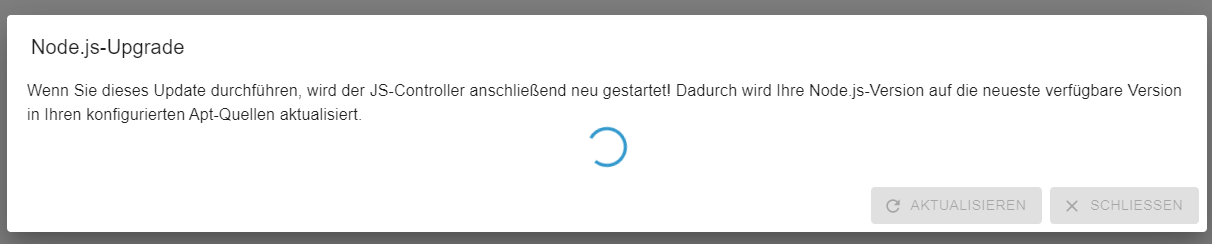
EDIT: läuft immer noch. Kann ich das irgendwie abbrechen?
EDIT 2: so, ich hab grad mal die Website reloaded. Danach war das Dialogfenster weg. node.js und npm sind aktuell nun - gehangen hat es anscheindend, weil iob source analytix installieren wollte, was nicht funktioniert hat (ich hatte SA auf dem alten RPi drauf, es aber nach dem Umstieg auf den Rpi5 (noch) nicht wieder installiert)
Von daher scheint erstmal alles wieder ok zu sein. -
Moin.
Ich habe in der Weboberfläche das node.js Update angeklickt. Was auch immer mich geritten hat ...?
Jetzt dreht sich im Dialogfenster dazu dauerhaft ein blauer Kreis seit geraumer Zeit. Muss ich mir Sorgen machen?EDIT: läuft immer noch. Kann ich das irgendwie abbrechen?
EDIT 2: so, ich hab grad mal die Website reloaded. Danach war das Dialogfenster weg. node.js und npm sind aktuell nun - gehangen hat es anscheindend, weil iob source analytix installieren wollte, was nicht funktioniert hat (ich hatte SA auf dem alten RPi drauf, es aber nach dem Umstieg auf den Rpi5 (noch) nicht wieder installiert)
Von daher scheint erstmal alles wieder ok zu sein.@final sagte in Diskussion zum HowTo nodejs-Installation und upgrade:
Von daher scheint erstmal alles wieder ok zu sein.
Schau mittels
iob nodejs-updateüber die Kommandozeile nach. Das ist ohnehin robuster als GUI-Geraffel.
-
Re: Diskussion zum HowTo nodejs-Installation und upgrade
Ich habe das update mit iob nodejs-update probiert und bekomme folgende Meldung:
chefkochts@iobroker:~$ iob nodejs-update
bash: /home/iobroker/.nodejs-update.sh: Permission denied
Ich wollte von 18.20.4 auf 20.18.0 kommen.
Was muss ich tun das es funktioniert?
Gruß
Thorsten
Mod-Edit: Code/Log in Code Tags gepackt. Bitte benutzt die Code Tags Funktion -> </>
Hier gehts zur Hilfe. -
Re: Diskussion zum HowTo nodejs-Installation und upgrade
Ich habe das update mit iob nodejs-update probiert und bekomme folgende Meldung:
chefkochts@iobroker:~$ iob nodejs-update
bash: /home/iobroker/.nodejs-update.sh: Permission denied
Ich wollte von 18.20.4 auf 20.18.0 kommen.
Was muss ich tun das es funktioniert?
Gruß
Thorsten
Mod-Edit: Code/Log in Code Tags gepackt. Bitte benutzt die Code Tags Funktion -> </>
Hier gehts zur Hilfe. -
Re: Diskussion zum HowTo nodejs-Installation und upgrade
Ich habe das update mit iob nodejs-update probiert und bekomme folgende Meldung:
chefkochts@iobroker:~$ iob nodejs-update
bash: /home/iobroker/.nodejs-update.sh: Permission denied
Ich wollte von 18.20.4 auf 20.18.0 kommen.
Was muss ich tun das es funktioniert?
Gruß
Thorsten
Mod-Edit: Code/Log in Code Tags gepackt. Bitte benutzt die Code Tags Funktion -> </>
Hier gehts zur Hilfe.@chefkochts bitte aussagekräftigen Threadtitel und code-tags verwenden.
-
@thomas-braun hat nichts gebracht
chefkochts@iobroker:~$ sudo chmod 750 /home/iobroker
chefkochts@iobroker:~$ iob nodejs-update
bash: /home/iobroker/.nodejs-update.sh: Permission denied


Hey! Du scheinst an dieser Unterhaltung interessiert zu sein, hast aber noch kein Konto.
Hast du es satt, bei jedem Besuch durch die gleichen Beiträge zu scrollen? Wenn du dich für ein Konto anmeldest, kommst du immer genau dorthin zurück, wo du zuvor warst, und kannst dich über neue Antworten benachrichtigen lassen (entweder per E-Mail oder Push-Benachrichtigung). Du kannst auch Lesezeichen speichern und Beiträge positiv bewerten, um anderen Community-Mitgliedern deine Wertschätzung zu zeigen.
Mit deinem Input könnte dieser Beitrag noch besser werden 💗
Registrieren Anmelden380
Online33.1k
Benutzende83.7k
Themen1.3m
Beiträge