




js-controller 6.0.x jetzt für alle User im STABLE!
-
@thomas-braun,
manchmal ist gut, ich glaube das war gefühlt das 10. mal, das du mir aktiv aus der Patsche geholfen hast. Ungezählt die von mir genutzten Anleitungen.greetz dipsy
Hallo zusammen
habe alles mal upgedated: ALLES super gelaufen! Herzlichen Dank... Bekomme trotzdem noch als "Empfohene Version 18.x" angezeit?
Übersehe ich was?
Admin ist 7.0.22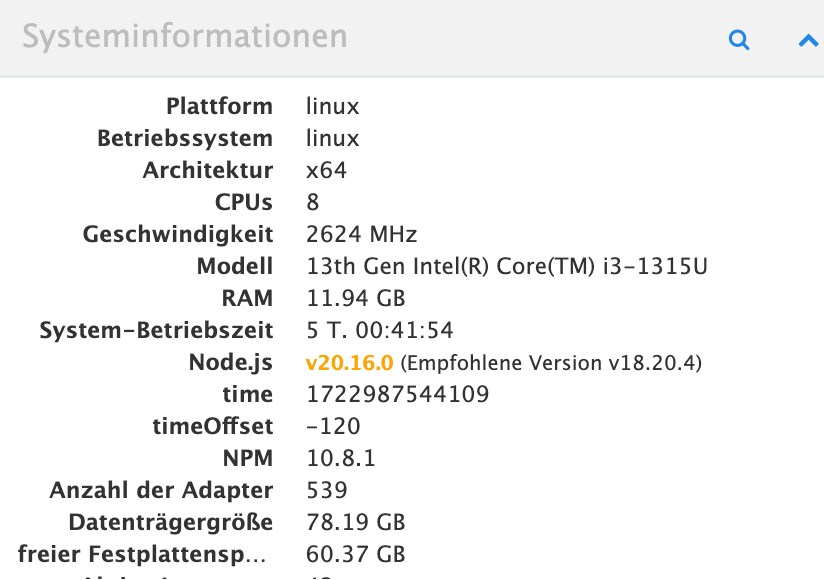

-
Hallo zusammen
habe alles mal upgedated: ALLES super gelaufen! Herzlichen Dank... Bekomme trotzdem noch als "Empfohene Version 18.x" angezeit?
Übersehe ich was?
Admin ist 7.0.22@lemonbiter Möglicherweise das hier?
https://forum.iobroker.net/post/1121560 -
Hallo zusammen
habe alles mal upgedated: ALLES super gelaufen! Herzlichen Dank... Bekomme trotzdem noch als "Empfohene Version 18.x" angezeit?
Übersehe ich was?
Admin ist 7.0.22@lemonbiter
DervInfo Adapter IST DEPRECATED u zeigt tw falsche Infos an. Einfach deinstallieren ... -
Hallo zusammen,
ich habe die Tage den Iobroker aktualisiert.
Admin auf die Version 7 und nach Anlaufschwierigkeiten Nodejs von Version 18 auf 20.
Damit lief es einige Tage.
Heute nach einem Systemupdate und einem Restart geht nichts mehr.
Eine Neuinstallation des Iobrokers brachte nichts.Immer wieder wird der js-controller nicht erkannt.
Ich habe die Version 6.0.9 des js-contollers installiert
ein iob fix brachte nichtsIch habe hier die iob diag Ausgabe:
======================= SUMMARY =======================
			v.2024-05-22


 Static hostname: smarthome
       Icon name: computer-desktop
         Chassis: desktop
Operating System: Ubuntu 22.04.4 LTS
          Kernel: Linux 5.15.0-118-generic
    Architecture: x86-64
 Hardware Vendor: Intel Corporation
  Hardware Model: NUC6CAYH

Installation: 		native
Kernel: 		x86_64
Userland: 		64 bit
Timezone: 		Europe/Berlin (CEST, +0200)
User-ID: 		1000
Display-Server: 	false
Boot Target: 		graphical.target

Pending OS-Updates: 	0
Pending iob updates: 	0

Nodejs-Installation:
/usr/bin/nodejs 	v20.16.0
/usr/bin/node 		v20.16.0
/usr/bin/npm 		10.8.2
/usr/bin/npx 		10.8.2
/usr/bin/corepack 	0.28.2

Recommended versions are nodejs 20.16.0 and npm
Your nodejs installation is correct

MEMORY:
               total        used        free      shared  buff/cache   available
Mem:            7.8G        2.9G        1.1G         49M        3.8G        4.6G
Swap:           2.0G          0B        2.0G
Total:          9.8G        2.9G        3.1G

Active iob-Instances: 	2
Upgrade policy: none

node:internal/modules/cjs/loader:1148
  throw err;
  ^

Error: Cannot find module '/opt/iobroker/node_modules/iobroker.js-controller/iobroker.js'
    at Module._resolveFilename (node:internal/modules/cjs/loader:1145:15)
    at Module._load (node:internal/modules/cjs/loader:986:27)
    at Function.executeUserEntryPoint [as runMain] (node:internal/modules/run_main:174:12)
    at node:internal/main/run_main_module:28:49 {
  code: 'MODULE_NOT_FOUND',
  requireStack: []
}

Node.js v20.16.0
ioBroker Core: 		js-controller
node:internal/modules/cjs/loader:1148
  throw err;
  ^

Error: Cannot find module '/opt/iobroker/node_modules/iobroker.js-controller/iobroker.js'
    at Module._resolveFilename (node:internal/modules/cjs/loader:1145:15)
    at Module._load (node:internal/modules/cjs/loader:986:27)
    at Function.executeUserEntryPoint [as runMain] (node:internal/modules/run_main:174:12)
    at node:internal/main/run_main_module:28:49 {
  code: 'MODULE_NOT_FOUND',
  requireStack: []
}

Node.js v20.16.0
			admin

node:internal/modules/cjs/loader:1148
  throw err;
  ^

Error: Cannot find module '/opt/iobroker/node_modules/iobroker.js-controller/iobroker.js'
    at Module._resolveFilename (node:internal/modules/cjs/loader:1145:15)
    at Module._load (node:internal/modules/cjs/loader:986:27)
    at Function.executeUserEntryPoint [as runMain] (node:internal/modules/run_main:174:12)
    at node:internal/main/run_main_module:28:49 {
  code: 'MODULE_NOT_FOUND',
  requireStack: []
}

Node.js v20.16.0
ioBroker Status:

Status admin and web instance:
+ system.adapter.admin.0                  : admin                 : smarthome                                -  enabled, port: 8081, bind: 0.0.0.0 (SSL), run as: admin
  system.adapter.web.0                    : web                   : smarthome                                -  enabled, port: 8082, bind: 0.0.0.0, run as: admin

Objects: 		0
States: 		0

Size of iob-Database:

39M	/opt/iobroker/iobroker-data/objects.jsonl
12M	/opt/iobroker/iobroker-data/objects.json.migrated
12M	/opt/iobroker/iobroker-data/objects.json.bak.migrated
0	/opt/iobroker/iobroker-data/objects.json.broken
3.4M	/opt/iobroker/iobroker-data/states.jsonl
2.2M	/opt/iobroker/iobroker-data/states.json.migrated
2.2M	/opt/iobroker/iobroker-data/states.json.bak.migrated
0	/opt/iobroker/iobroker-data/states.json.broken


=================== END OF SUMMARY ====================
Vielleicht hat jemand noch eine Idee was ich machen könnte, damit der iobroker wieder läuft
-
Hallo zusammen,
ich habe die Tage den Iobroker aktualisiert.
Admin auf die Version 7 und nach Anlaufschwierigkeiten Nodejs von Version 18 auf 20.
Damit lief es einige Tage.
Heute nach einem Systemupdate und einem Restart geht nichts mehr.
Eine Neuinstallation des Iobrokers brachte nichts.Immer wieder wird der js-controller nicht erkannt.
Ich habe die Version 6.0.9 des js-contollers installiert
ein iob fix brachte nichtsIch habe hier die iob diag Ausgabe:
======================= SUMMARY =======================
			v.2024-05-22


 Static hostname: smarthome
       Icon name: computer-desktop
         Chassis: desktop
Operating System: Ubuntu 22.04.4 LTS
          Kernel: Linux 5.15.0-118-generic
    Architecture: x86-64
 Hardware Vendor: Intel Corporation
  Hardware Model: NUC6CAYH

Installation: 		native
Kernel: 		x86_64
Userland: 		64 bit
Timezone: 		Europe/Berlin (CEST, +0200)
User-ID: 		1000
Display-Server: 	false
Boot Target: 		graphical.target

Pending OS-Updates: 	0
Pending iob updates: 	0

Nodejs-Installation:
/usr/bin/nodejs 	v20.16.0
/usr/bin/node 		v20.16.0
/usr/bin/npm 		10.8.2
/usr/bin/npx 		10.8.2
/usr/bin/corepack 	0.28.2

Recommended versions are nodejs 20.16.0 and npm
Your nodejs installation is correct

MEMORY:
               total        used        free      shared  buff/cache   available
Mem:            7.8G        2.9G        1.1G         49M        3.8G        4.6G
Swap:           2.0G          0B        2.0G
Total:          9.8G        2.9G        3.1G

Active iob-Instances: 	2
Upgrade policy: none

node:internal/modules/cjs/loader:1148
  throw err;
  ^

Error: Cannot find module '/opt/iobroker/node_modules/iobroker.js-controller/iobroker.js'
    at Module._resolveFilename (node:internal/modules/cjs/loader:1145:15)
    at Module._load (node:internal/modules/cjs/loader:986:27)
    at Function.executeUserEntryPoint [as runMain] (node:internal/modules/run_main:174:12)
    at node:internal/main/run_main_module:28:49 {
  code: 'MODULE_NOT_FOUND',
  requireStack: []
}

Node.js v20.16.0
ioBroker Core: 		js-controller
node:internal/modules/cjs/loader:1148
  throw err;
  ^

Error: Cannot find module '/opt/iobroker/node_modules/iobroker.js-controller/iobroker.js'
    at Module._resolveFilename (node:internal/modules/cjs/loader:1145:15)
    at Module._load (node:internal/modules/cjs/loader:986:27)
    at Function.executeUserEntryPoint [as runMain] (node:internal/modules/run_main:174:12)
    at node:internal/main/run_main_module:28:49 {
  code: 'MODULE_NOT_FOUND',
  requireStack: []
}

Node.js v20.16.0
			admin

node:internal/modules/cjs/loader:1148
  throw err;
  ^

Error: Cannot find module '/opt/iobroker/node_modules/iobroker.js-controller/iobroker.js'
    at Module._resolveFilename (node:internal/modules/cjs/loader:1145:15)
    at Module._load (node:internal/modules/cjs/loader:986:27)
    at Function.executeUserEntryPoint [as runMain] (node:internal/modules/run_main:174:12)
    at node:internal/main/run_main_module:28:49 {
  code: 'MODULE_NOT_FOUND',
  requireStack: []
}

Node.js v20.16.0
ioBroker Status:

Status admin and web instance:
+ system.adapter.admin.0                  : admin                 : smarthome                                -  enabled, port: 8081, bind: 0.0.0.0 (SSL), run as: admin
  system.adapter.web.0                    : web                   : smarthome                                -  enabled, port: 8082, bind: 0.0.0.0, run as: admin

Objects: 		0
States: 		0

Size of iob-Database:

39M	/opt/iobroker/iobroker-data/objects.jsonl
12M	/opt/iobroker/iobroker-data/objects.json.migrated
12M	/opt/iobroker/iobroker-data/objects.json.bak.migrated
0	/opt/iobroker/iobroker-data/objects.json.broken
3.4M	/opt/iobroker/iobroker-data/states.jsonl
2.2M	/opt/iobroker/iobroker-data/states.json.migrated
2.2M	/opt/iobroker/iobroker-data/states.json.bak.migrated
0	/opt/iobroker/iobroker-data/states.json.broken


=================== END OF SUMMARY ====================
Vielleicht hat jemand noch eine Idee was ich machen könnte, damit der iobroker wieder läuft
@joe550 sagte in js-controller 6.0.x jetzt für alle User im STABLE!:
Eine Neuinstallation des Iobrokers brachte nichts.
Wie unternommen?
-
@joe550 sagte in js-controller 6.0.x jetzt für alle User im STABLE!:
Eine Neuinstallation des Iobrokers brachte nichts.
Wie unternommen?
So habe ich das System schon 2x wieder zum Laufen bekommen
cd /opt/iobroker
sudo iobroker stop
mv node_modules node_modules_
sudo npm cache clean
sudo npm i npm@latest -g
curl -sLf https://iobroker.net/install.sh | bash --> alles wird neu installiert und dauert eine ganze Weile
-
So habe ich das System schon 2x wieder zum Laufen bekommen
cd /opt/iobroker
sudo iobroker stop
mv node_modules node_modules_
sudo npm cache clean
sudo npm i npm@latest -g
curl -sLf https://iobroker.net/install.sh | bash --> alles wird neu installiert und dauert eine ganze Weile
-
So habe ich das System schon 2x wieder zum Laufen bekommen
cd /opt/iobroker
sudo iobroker stop
mv node_modules node_modules_
sudo npm cache clean
sudo npm i npm@latest -g
curl -sLf https://iobroker.net/install.sh | bash --> alles wird neu installiert und dauert eine ganze Weile
Und mit
sudo iobrokermachst du es wieder kaputt.
Lasst den root und sudo in Ruh!
Und von npm lässt du auch die Finger!Da muss man sich halt auch nicht weiter wundern, wenn das alles nicht funktioniert...
Gib mal die Langfassung von
iob diagzum Besten.
-
Skript v.2024-05-22 *** BASE SYSTEM *** Static hostname: smarthome Icon name: computer-desktop Chassis: desktop Operating System: Ubuntu 22.04.4 LTS Kernel: Linux 5.15.0-118-generic Architecture: x86-64 Hardware Vendor: Intel Corporation Hardware Model: NUC6CAYH model name : Intel(R) Celeron(R) CPU J3455 @ 1.50GHz Docker : false Virtualization : none Kernel : x86_64 Userland : 64 bit Systemuptime and Load: 18:50:37 up 2:35, 2 users, load average: 0.27, 0.23, 0.53 CPU threads: 4 *** Time and Time Zones *** Local time: Tue 2024-08-13 18:50:38 CEST Universal time: Tue 2024-08-13 16:50:38 UTC RTC time: Tue 2024-08-13 16:50:38 Time zone: Europe/Berlin (CEST, +0200) System clock synchronized: yes NTP service: active RTC in local TZ: no *** Users and Groups *** User that called 'iob diag': smarthome HOME=/home/smarthome GROUPS=smarthome adm tty dialout cdrom sudo dip plugdev lxd sambashare lpadmin iobroker User that is running 'js-controller': js-controller is not running *** Display-Server-Setup *** Display-Server: false Desktop: Terminal: tty Boot Target: graphical.target *** MEMORY *** total used free shared buff/cache available Mem: 7.8G 2.0G 2.3G 49M 3.5G 5.4G Swap: 2.0G 0B 2.0G Total: 9.8G 2.0G 4.3G Active iob-Instances: 0 7786 M total memory 1998 M used memory 1494 M active memory 3230 M inactive memory 2264 M free memory 699 M buffer memory 2824 M swap cache 2047 M total swap 0 M used swap 2047 M free swap *** top - Table Of Processes *** top - 18:50:38 up 2:35, 2 users, load average: 0.27, 0.23, 0.53 Tasks: 181 total, 2 running, 179 sleeping, 0 stopped, 0 zombie %Cpu(s): 20.9 us, 7.5 sy, 0.0 ni, 71.6 id, 0.0 wa, 0.0 hi, 0.0 si, 0.0 st MiB Mem : 7786.7 total, 2263.8 free, 1999.0 used, 3523.9 buff/cache MiB Swap: 2048.0 total, 2048.0 free, 0.0 used. 5427.5 avail Mem *** FAILED SERVICES *** UNIT LOAD ACTIVE SUB DESCRIPTION * ureadahead.service loaded failed failed Read required files in advance LOAD = Reflects whether the unit definition was properly loaded. ACTIVE = The high-level unit activation state, i.e. generalization of SUB. SUB = The low-level unit activation state, values depend on unit type. 1 loaded units listed. *** FILESYSTEM *** Filesystem Type Size Used Avail Use% Mounted on tmpfs tmpfs 779M 2.9M 776M 1% /run /dev/sda2 ext4 219G 79G 129G 39% / tmpfs tmpfs 3.9G 0 3.9G 0% /dev/shm tmpfs tmpfs 5.0M 4.0K 5.0M 1% /run/lock /dev/sda1 vfat 511M 9.9M 502M 2% /boot/efi tmpfs tmpfs 779M 4.0K 779M 1% /run/user/1000 Messages concerning ext4 filesystem in dmesg: [Tue Aug 13 16:15:21 2024] EXT4-fs (sda2): mounted filesystem with ordered data mode. Opts: (null). Quota mode: none. [Tue Aug 13 16:15:22 2024] EXT4-fs (sda2): re-mounted. Opts: errors=remount-ro. Quota mode: none. Show mounted filesystems: TARGET SOURCE FSTYPE OPTIONS / /dev/sda2 ext4 rw,relatime,errors=remount-ro |-/sys sysfs sysfs rw,nosuid,nodev,noexec,relatime | |-/sys/kernel/security securityfs securityfs rw,nosuid,nodev,noexec,relatime | |-/sys/fs/cgroup cgroup2 cgroup2 rw,nosuid,nodev,noexec,relatime | |-/sys/fs/pstore pstore pstore rw,nosuid,nodev,noexec,relatime | |-/sys/firmware/efi/efivars efivarfs efivarfs rw,nosuid,nodev,noexec,relatime | |-/sys/fs/bpf bpf bpf rw,nosuid,nodev,noexec,relatime,mode=700 | |-/sys/kernel/debug debugfs debugfs rw,nosuid,nodev,noexec,relatime | | `-/sys/kernel/debug/tracing tracefs tracefs rw,nosuid,nodev,noexec,relatime | |-/sys/kernel/tracing tracefs tracefs rw,nosuid,nodev,noexec,relatime | |-/sys/fs/fuse/connections fusectl fusectl rw,nosuid,nodev,noexec,relatime | `-/sys/kernel/config configfs configfs rw,nosuid,nodev,noexec,relatime |-/proc proc proc rw,nosuid,nodev,noexec,relatime | `-/proc/sys/fs/binfmt_misc systemd-1 autofs rw,relatime,fd=29,pgrp=1,timeout=0,minproto=5,maxproto=5,direct,pipe_ino=15291 | `-/proc/sys/fs/binfmt_misc binfmt_misc binfmt_misc rw,nosuid,nodev,noexec,relatime |-/dev udev devtmpfs rw,nosuid,relatime,size=3928256k,nr_inodes=982064,mode=755,inode64 | |-/dev/pts devpts devpts rw,nosuid,noexec,relatime,gid=5,mode=620,ptmxmode=000 | |-/dev/shm tmpfs tmpfs rw,nosuid,nodev,inode64 | |-/dev/hugepages hugetlbfs hugetlbfs rw,relatime,pagesize=2M | `-/dev/mqueue mqueue mqueue rw,nosuid,nodev,noexec,relatime |-/run tmpfs tmpfs rw,nosuid,nodev,noexec,relatime,size=797364k,mode=755,inode64 | |-/run/lock tmpfs tmpfs rw,nosuid,nodev,noexec,relatime,size=5120k,inode64 | |-/run/credentials/systemd-sysusers.service none ramfs ro,nosuid,nodev,noexec,relatime,mode=700 | |-/run/rpc_pipefs sunrpc rpc_pipefs rw,relatime | |-/run/user/1000 tmpfs tmpfs rw,nosuid,nodev,relatime,size=797360k,nr_inodes=199340,mode=700,uid=1000,gid=1000,inode64 | `-/run/snapd/ns tmpfs[/snapd/ns] tmpfs rw,nosuid,nodev,noexec,relatime,size=797364k,mode=755,inode64 | |-/run/snapd/ns/lxd.mnt nsfs[mnt:[4026532578]] nsfs rw | `-/run/snapd/ns/canonical-livepatch.mnt nsfs[mnt:[4026532579]] nsfs rw |-/snap/canonical-livepatch/282 /dev/loop0 squashfs ro,nodev,relatime,errors=continue |-/snap/canonical-livepatch/278 /dev/loop1 squashfs ro,nodev,relatime,errors=continue |-/snap/core/16928 /dev/loop2 squashfs ro,nodev,relatime,errors=continue |-/snap/core18/2823 /dev/loop3 squashfs ro,nodev,relatime,errors=continue |-/snap/core18/2829 /dev/loop5 squashfs ro,nodev,relatime,errors=continue |-/snap/core/17200 /dev/loop4 squashfs ro,nodev,relatime,errors=continue |-/snap/core20/2264 /dev/loop6 squashfs ro,nodev,relatime,errors=continue |-/snap/core20/2318 /dev/loop7 squashfs ro,nodev,relatime,errors=continue |-/snap/core22/1380 /dev/loop8 squashfs ro,nodev,relatime,errors=continue |-/snap/core22/1439 /dev/loop9 squashfs ro,nodev,relatime,errors=continue |-/snap/lxd/24061 /dev/loop10 squashfs ro,nodev,relatime,errors=continue |-/snap/lxd/29619 /dev/loop11 squashfs ro,nodev,relatime,errors=continue |-/boot/efi /dev/sda1 vfat rw,relatime,fmask=0077,dmask=0077,codepage=437,iocharset=iso8859-1,shortname=mixed,errors=remount-ro `-/var/lib/lxcfs lxcfs fuse.lxcfs rw,nosuid,nodev,relatime,user_id=0,group_id=0,allow_other Files in neuralgic directories: /var: 46G /var/ 38G /var/www/nextcloud 38G /var/www 37G /var/www/nextcloud/data 28G /var/www/nextcloud/data/joe/files Archived and active journals take up 3.9G in the file system. /opt/iobroker/backups: 2.1G /opt/iobroker/backups/ /opt/iobroker/iobroker-data: 964M /opt/iobroker/iobroker-data/ 748M /opt/iobroker/iobroker-data/files 442M /opt/iobroker/iobroker-data/files/javascript.admin 409M /opt/iobroker/iobroker-data/files/javascript.admin/static 408M /opt/iobroker/iobroker-data/files/javascript.admin/static/js The five largest files in iobroker-data are: 38M /opt/iobroker/iobroker-data/files/iot.admin/static/js/main.d3d286bd.js.map 27M /opt/iobroker/iobroker-data/files/backitup.admin/static/js/main.ce422ec2.js.map 24M /opt/iobroker/iobroker-data/files/web.admin/static/js/main.135279a0.js.map 24M /opt/iobroker/iobroker-data/files/scenes.admin/static/js/main.1e6546bb.js.map 19M /opt/iobroker/iobroker-data/files/text2command.admin/static/js/main.02fc3820.js.map USB-Devices by-id: USB-Sticks - Avoid direct links to /dev/tty* in your adapter setups, please always prefer the links 'by-id': /dev/serial/by-id/usb-FTDI_FT230X_Basic_UART_DM00ZYB7-if00-port0 *** NodeJS-Installation *** /usr/bin/nodejs v20.16.0 /usr/bin/node v20.16.0 /usr/bin/npm 10.8.2 /usr/bin/npx 10.8.2 /usr/bin/corepack 0.28.2 nodejs: Installed: 20.16.0-1nodesource1 Candidate: 20.16.0-1nodesource1 Version table: *** 20.16.0-1nodesource1 600 500 https://deb.nodesource.com/node_20.x nodistro/main amd64 Packages 100 /var/lib/dpkg/status 20.15.1-1nodesource1 600 500 https://deb.nodesource.com/node_20.x nodistro/main amd64 Packages 20.15.0-1nodesource1 600 500 https://deb.nodesource.com/node_20.x nodistro/main amd64 Packages 20.14.0-1nodesource1 600 500 https://deb.nodesource.com/node_20.x nodistro/main amd64 Packages 20.13.1-1nodesource1 600 500 https://deb.nodesource.com/node_20.x nodistro/main amd64 Packages 20.13.0-1nodesource1 600 500 https://deb.nodesource.com/node_20.x nodistro/main amd64 Packages 20.12.2-1nodesource1 600 500 https://deb.nodesource.com/node_20.x nodistro/main amd64 Packages 20.12.1-1nodesource1 600 500 https://deb.nodesource.com/node_20.x nodistro/main amd64 Packages 20.12.0-1nodesource1 600 500 https://deb.nodesource.com/node_20.x nodistro/main amd64 Packages 20.11.1-1nodesource1 600 500 https://deb.nodesource.com/node_20.x nodistro/main amd64 Packages 20.11.0-1nodesource1 600 500 https://deb.nodesource.com/node_20.x nodistro/main amd64 Packages 20.10.0-1nodesource1 600 500 https://deb.nodesource.com/node_20.x nodistro/main amd64 Packages 20.9.0-1nodesource1 600 500 https://deb.nodesource.com/node_20.x nodistro/main amd64 Packages 20.8.1-1nodesource1 600 500 https://deb.nodesource.com/node_20.x nodistro/main amd64 Packages 20.8.0-1nodesource1 600 500 https://deb.nodesource.com/node_20.x nodistro/main amd64 Packages 20.7.0-1nodesource1 600 500 https://deb.nodesource.com/node_20.x nodistro/main amd64 Packages 20.6.1-1nodesource1 600 500 https://deb.nodesource.com/node_20.x nodistro/main amd64 Packages 20.6.0-1nodesource1 600 500 https://deb.nodesource.com/node_20.x nodistro/main amd64 Packages 20.5.1-1nodesource1 600 500 https://deb.nodesource.com/node_20.x nodistro/main amd64 Packages 20.5.0-1nodesource1 600 500 https://deb.nodesource.com/node_20.x nodistro/main amd64 Packages 20.4.0-1nodesource1 600 500 https://deb.nodesource.com/node_20.x nodistro/main amd64 Packages 20.3.1-1nodesource1 600 500 https://deb.nodesource.com/node_20.x nodistro/main amd64 Packages 20.3.0-1nodesource1 600 500 https://deb.nodesource.com/node_20.x nodistro/main amd64 Packages 20.2.0-1nodesource1 600 500 https://deb.nodesource.com/node_20.x nodistro/main amd64 Packages 20.1.0-1nodesource1 600 500 https://deb.nodesource.com/node_20.x nodistro/main amd64 Packages 20.0.0-1nodesource1 600 500 https://deb.nodesource.com/node_20.x nodistro/main amd64 Packages 12.22.9~dfsg-1ubuntu3.6 500 500 http://de.archive.ubuntu.com/ubuntu jammy-updates/universe amd64 Packages 500 http://security.ubuntu.com/ubuntu jammy-security/universe amd64 Packages 12.22.9~dfsg-1ubuntu3 500 500 http://de.archive.ubuntu.com/ubuntu jammy/universe amd64 Packages Temp directories causing npm8 problem: 0 No problems detected Errors in npm tree: *** ioBroker-Installation *** ioBroker Status node:internal/modules/cjs/loader:1148 throw err; ^ Error: Cannot find module '/opt/iobroker/node_modules/iobroker.js-controller/iobroker.js' at Module._resolveFilename (node:internal/modules/cjs/loader:1145:15) at Module._load (node:internal/modules/cjs/loader:986:27) at Function.executeUserEntryPoint [as runMain] (node:internal/modules/run_main:174:12) at node:internal/main/run_main_module:28:49 { code: 'MODULE_NOT_FOUND', requireStack: [] } Node.js v20.16.0 Core adapters versions node:internal/modules/cjs/loader:1148 throw err; ^ Error: Cannot find module '/opt/iobroker/node_modules/iobroker.js-controller/iobroker.js' at Module._resolveFilename (node:internal/modules/cjs/loader:1145:15) at Module._load (node:internal/modules/cjs/loader:986:27) at Function.executeUserEntryPoint [as runMain] (node:internal/modules/run_main:174:12) at node:internal/main/run_main_module:28:49 { code: 'MODULE_NOT_FOUND', requireStack: [] } Node.js v20.16.0 js-controller: node:internal/modules/cjs/loader:1148 throw err; ^ Error: Cannot find module '/opt/iobroker/node_modules/iobroker.js-controller/iobroker.js' at Module._resolveFilename (node:internal/modules/cjs/loader:1145:15) at Module._load (node:internal/modules/cjs/loader:986:27) at Function.executeUserEntryPoint [as runMain] (node:internal/modules/run_main:174:12) at node:internal/main/run_main_module:28:49 { code: 'MODULE_NOT_FOUND', requireStack: [] } Node.js v20.16.0 admin: node:internal/modules/cjs/loader:1148 throw err; ^ Error: Cannot find module '/opt/iobroker/node_modules/iobroker.js-controller/iobroker.js' at Module._resolveFilename (node:internal/modules/cjs/loader:1145:15) at Module._load (node:internal/modules/cjs/loader:986:27) at Function.executeUserEntryPoint [as runMain] (node:internal/modules/run_main:174:12) at node:internal/main/run_main_module:28:49 { code: 'MODULE_NOT_FOUND', requireStack: [] } Node.js v20.16.0 javascript: nodejs modules from github: 0 Adapter State Enabled adapters with bindings ioBroker-Repositories node:internal/modules/cjs/loader:1148 throw err; ^ Error: Cannot find module '/opt/iobroker/node_modules/iobroker.js-controller/iobroker.js' at Module._resolveFilename (node:internal/modules/cjs/loader:1145:15) at Module._load (node:internal/modules/cjs/loader:986:27) at Function.executeUserEntryPoint [as runMain] (node:internal/modules/run_main:174:12) at node:internal/main/run_main_module:28:49 { code: 'MODULE_NOT_FOUND', requireStack: [] } Node.js v20.16.0 Installed ioBroker-Instances node:internal/modules/cjs/loader:1148 throw err; ^ Error: Cannot find module '/opt/iobroker/node_modules/iobroker.js-controller/iobroker.js' at Module._resolveFilename (node:internal/modules/cjs/loader:1145:15) at Module._load (node:internal/modules/cjs/loader:986:27) at Function.executeUserEntryPoint [as runMain] (node:internal/modules/run_main:174:12) at node:internal/main/run_main_module:28:49 { code: 'MODULE_NOT_FOUND', requireStack: [] } Node.js v20.16.0 Objects and States Please stand by - This may take a while Objects: 0 States: 0 *** OS-Repositories and Updates *** Hit:1 http://security.ubuntu.com/ubuntu jammy-security InRelease Hit:2 http://de.archive.ubuntu.com/ubuntu jammy InRelease Hit:3 http://de.archive.ubuntu.com/ubuntu jammy-updates InRelease Hit:4 http://de.archive.ubuntu.com/ubuntu jammy-backports InRelease Hit:5 https://deb.nodesource.com/node_20.x nodistro InRelease Hit:6 https://esm.ubuntu.com/apps/ubuntu jammy-apps-security InRelease Hit:7 https://esm.ubuntu.com/apps/ubuntu jammy-apps-updates InRelease Hit:8 https://esm.ubuntu.com/infra/ubuntu jammy-infra-security InRelease Hit:9 https://esm.ubuntu.com/infra/ubuntu jammy-infra-updates InRelease Hit:10 https://ppa.launchpadcontent.net/ondrej/php/ubuntu jammy InRelease Reading package lists... Pending Updates: 0 *** Listening Ports *** Active Internet connections (only servers) Proto Recv-Q Send-Q Local Address Foreign Address State User Inode PID/Program name tcp 0 0 127.0.0.1:3306 0.0.0.0:* LISTEN 113 26362 1004/mariadbd tcp 0 0 0.0.0.0:555 0.0.0.0:* LISTEN 0 30490 1377/perl tcp 0 0 0.0.0.0:8888 0.0.0.0:* LISTEN 0 28373 687/deCONZ tcp 0 0 192.168.178.33:53 0.0.0.0:* LISTEN 110 29197 827/named tcp 0 0 192.168.178.33:53 0.0.0.0:* LISTEN 110 29198 827/named tcp 0 0 192.168.178.33:53 0.0.0.0:* LISTEN 110 29196 827/named tcp 0 0 192.168.178.33:53 0.0.0.0:* LISTEN 110 29195 827/named tcp 0 0 0.0.0.0:111 0.0.0.0:* LISTEN 0 19982 1/init tcp 0 0 0.0.0.0:22 0.0.0.0:* LISTEN 0 30780 1265/sshd: /usr/sbi tcp 0 0 0.0.0.0:139 0.0.0.0:* LISTEN 0 29404 1291/smbd tcp 0 0 0.0.0.0:20877 0.0.0.0:* LISTEN 0 29891 687/deCONZ tcp 0 0 0.0.0.0:445 0.0.0.0:* LISTEN 0 29403 1291/smbd tcp 0 0 127.0.0.1:6379 0.0.0.0:* LISTEN 114 26317 804/redis-server 12 tcp 0 0 0.0.0.0:10000 0.0.0.0:* LISTEN 0 29415 1303/perl tcp 0 0 127.0.0.53:53 0.0.0.0:* LISTEN 101 28272 661/systemd-resolve tcp 0 0 127.0.0.1:11211 0.0.0.0:* LISTEN 115 28837 801/memcached tcp 0 0 127.0.0.1:53 0.0.0.0:* LISTEN 110 29836 827/named tcp 0 0 127.0.0.1:53 0.0.0.0:* LISTEN 110 29835 827/named tcp 0 0 127.0.0.1:53 0.0.0.0:* LISTEN 110 29834 827/named tcp 0 0 127.0.0.1:53 0.0.0.0:* LISTEN 110 29833 827/named tcp 0 0 127.0.0.1:953 0.0.0.0:* LISTEN 110 28404 827/named tcp 0 0 127.0.0.1:953 0.0.0.0:* LISTEN 110 28403 827/named tcp 0 0 127.0.0.1:953 0.0.0.0:* LISTEN 110 28402 827/named tcp 0 0 127.0.0.1:953 0.0.0.0:* LISTEN 110 28401 827/named tcp6 0 0 :::80 :::* LISTEN 0 30301 1272/apache2 tcp6 0 0 :::111 :::* LISTEN 0 19983 1/init tcp6 0 0 :::22 :::* LISTEN 0 30782 1265/sshd: /usr/sbi tcp6 0 0 :::139 :::* LISTEN 0 29402 1291/smbd tcp6 0 0 :::445 :::* LISTEN 0 29401 1291/smbd tcp6 0 0 :::443 :::* LISTEN 0 30305 1272/apache2 tcp6 0 0 fe80::96c6:91ff:fea0:53 :::* LISTEN 110 28634 827/named tcp6 0 0 fe80::96c6:91ff:fea0:53 :::* LISTEN 110 29153 827/named tcp6 0 0 fe80::96c6:91ff:fea0:53 :::* LISTEN 110 29152 827/named tcp6 0 0 fe80::96c6:91ff:fea0:53 :::* LISTEN 110 29151 827/named tcp6 0 0 ::1:53 :::* LISTEN 110 29841 827/named tcp6 0 0 ::1:53 :::* LISTEN 110 29842 827/named tcp6 0 0 ::1:53 :::* LISTEN 110 29843 827/named tcp6 0 0 ::1:53 :::* LISTEN 110 29844 827/named tcp6 0 0 ::1:953 :::* LISTEN 110 28413 827/named tcp6 0 0 ::1:953 :::* LISTEN 110 28412 827/named tcp6 0 0 ::1:953 :::* LISTEN 110 28410 827/named tcp6 0 0 ::1:953 :::* LISTEN 110 28411 827/named tcp6 0 0 2003:c2:ef2f:6e00:96:53 :::* LISTEN 110 26528 827/named tcp6 0 0 2003:c2:ef2f:6e00:96:53 :::* LISTEN 110 26529 827/named tcp6 0 0 2003:c2:ef2f:6e00:96:53 :::* LISTEN 110 26530 827/named tcp6 0 0 2003:c2:ef2f:6e00:96:53 :::* LISTEN 110 26527 827/named tcp6 0 0 ::1:6379 :::* LISTEN 114 26318 804/redis-server 12 udp 0 0 0.0.0.0:48543 0.0.0.0:* 112 26074 680/avahi-daemon: r udp 0 0 192.168.178.33:53 0.0.0.0:* 110 29193 827/named udp 0 0 192.168.178.33:53 0.0.0.0:* 110 29194 827/named udp 0 0 192.168.178.33:53 0.0.0.0:* 110 29192 827/named udp 0 0 192.168.178.33:53 0.0.0.0:* 110 29191 827/named udp 0 0 127.0.0.1:53 0.0.0.0:* 110 29832 827/named udp 0 0 127.0.0.1:53 0.0.0.0:* 110 29831 827/named udp 0 0 127.0.0.1:53 0.0.0.0:* 110 29830 827/named udp 0 0 127.0.0.1:53 0.0.0.0:* 110 29829 827/named udp 0 0 127.0.0.53:53 0.0.0.0:* 101 28271 661/systemd-resolve udp 0 0 192.168.178.33:68 0.0.0.0:* 100 26542 618/systemd-network udp 0 0 0.0.0.0:111 0.0.0.0:* 0 15303 1/init udp 0 0 192.168.178.255:137 0.0.0.0:* 0 30822 1238/nmbd udp 0 0 192.168.178.33:137 0.0.0.0:* 0 30821 1238/nmbd udp 0 0 0.0.0.0:137 0.0.0.0:* 0 30806 1238/nmbd udp 0 0 192.168.178.255:138 0.0.0.0:* 0 30824 1238/nmbd udp 0 0 192.168.178.33:138 0.0.0.0:* 0 30823 1238/nmbd udp 0 0 0.0.0.0:138 0.0.0.0:* 0 30807 1238/nmbd udp 0 0 0.0.0.0:5353 0.0.0.0:* 112 26070 680/avahi-daemon: r udp 0 0 0.0.0.0:10000 0.0.0.0:* 0 29416 1303/perl udp 0 0 0.0.0.0:1900 0.0.0.0:* 0 29037 687/deCONZ udp6 0 0 ::1:53 :::* 110 29837 827/named udp6 0 0 ::1:53 :::* 110 29838 827/named udp6 0 0 ::1:53 :::* 110 29839 827/named udp6 0 0 ::1:53 :::* 110 29840 827/named udp6 0 0 fe80::96c6:91ff:fea0:53 :::* 110 29142 827/named udp6 0 0 fe80::96c6:91ff:fea0:53 :::* 110 28602 827/named udp6 0 0 fe80::96c6:91ff:fea0:53 :::* 110 29150 827/named udp6 0 0 fe80::96c6:91ff:fea0:53 :::* 110 28633 827/named udp6 0 0 2003:c2:ef2f:6e00:96:53 :::* 110 26526 827/named udp6 0 0 2003:c2:ef2f:6e00:96:53 :::* 110 26525 827/named udp6 0 0 2003:c2:ef2f:6e00:96:53 :::* 110 26524 827/named udp6 0 0 2003:c2:ef2f:6e00:96:53 :::* 110 28638 827/named udp6 0 0 :::111 :::* 0 15632 1/init udp6 0 0 :::53572 :::* 112 26075 680/avahi-daemon: r udp6 0 0 fe80::96c6:91ff:fea:546 :::* 100 26519 618/systemd-network udp6 0 0 :::50215 :::* 0 30787 687/deCONZ udp6 0 0 :::5353 :::* 112 26071 680/avahi-daemon: r *** Log File - Last 25 Lines *** 2024-08-13 18:23:51.507 - info: host.smarthome stopInstance system.adapter.ical.1 (force=false, process=false) 2024-08-13 18:23:51.508 - info: host.smarthome stopInstance system.adapter.mihome-vacuum.0 (force=false, process=false) 2024-08-13 18:23:51.508 - info: host.smarthome stopInstance system.adapter.mihome-vacuum.1 (force=false, process=false) 2024-08-13 18:23:51.509 - info: host.smarthome stopInstance system.adapter.ping.0 (force=false, process=false) 2024-08-13 18:23:51.509 - info: host.smarthome stopInstance system.adapter.pollenflug.0 (force=false, process=false) 2024-08-13 18:23:51.510 - info: host.smarthome stopInstance system.adapter.sonoff.0 (force=false, process=false) 2024-08-13 18:23:51.510 - info: host.smarthome stopInstance system.adapter.tr-064.0 (force=false, process=false) 2024-08-13 18:23:51.511 - info: host.smarthome stopInstance system.adapter.weatherunderground.0 (force=false, process=false) 2024-08-13 18:23:51.511 - info: host.smarthome stopInstance system.adapter.alexa2.0 (force=false, process=false) 2024-08-13 18:23:51.511 - info: host.smarthome stopInstance system.adapter.birthdays.0 (force=false, process=false) 2024-08-13 18:23:51.512 - info: host.smarthome stopInstance system.adapter.ble.0 (force=false, process=false) 2024-08-13 18:23:51.512 - info: host.smarthome stopInstance system.adapter.daswetter.0 (force=false, process=false) 2024-08-13 18:23:51.512 - info: host.smarthome stopInstance system.adapter.discovery.0 (force=false, process=false) 2024-08-13 18:23:51.513 - info: host.smarthome stopInstance system.adapter.icons-mfd-png.0 (force=false, process=false) 2024-08-13 18:23:51.513 - info: host.smarthome stopInstance system.adapter.icons-ultimate-png.0 (force=false, process=false) 2024-08-13 18:23:51.513 - info: host.smarthome stopInstance system.adapter.info.0 (force=false, process=false) 2024-08-13 18:23:51.513 - info: host.smarthome stopInstance system.adapter.iot.0 (force=false, process=false) 2024-08-13 18:23:51.514 - info: host.smarthome stopInstance system.adapter.mobile.0 (force=false, process=false) 2024-08-13 18:23:51.514 - info: host.smarthome stopInstance system.adapter.terminal.0 (force=false, process=false) 2024-08-13 18:23:51.514 - info: host.smarthome stopInstance system.adapter.text2command.0 (force=false, process=false) 2024-08-13 18:23:51.514 - info: host.smarthome stopInstance system.adapter.trashschedule.0 (force=false, process=false) 2024-08-13 18:23:51.514 - info: host.smarthome stopInstance system.adapter.vis-hqwidgets.0 (force=false, process=false) 2024-08-13 18:23:51.514 - info: host.smarthome stopInstance system.adapter.vis-materialdesign.0 (force=false, process=false) 2024-08-13 18:23:51.515 - info: host.smarthome stopInstance system.adapter.vis.0 (force=false, process=false) 2024-08-13 18:23:51.515 - info: host.smarthome stopInstance system.adapter.web.0 (force=false, process=false) -
Skript v.2024-05-22 *** BASE SYSTEM *** Static hostname: smarthome Icon name: computer-desktop Chassis: desktop Operating System: Ubuntu 22.04.4 LTS Kernel: Linux 5.15.0-118-generic Architecture: x86-64 Hardware Vendor: Intel Corporation Hardware Model: NUC6CAYH model name : Intel(R) Celeron(R) CPU J3455 @ 1.50GHz Docker : false Virtualization : none Kernel : x86_64 Userland : 64 bit Systemuptime and Load: 18:50:37 up 2:35, 2 users, load average: 0.27, 0.23, 0.53 CPU threads: 4 *** Time and Time Zones *** Local time: Tue 2024-08-13 18:50:38 CEST Universal time: Tue 2024-08-13 16:50:38 UTC RTC time: Tue 2024-08-13 16:50:38 Time zone: Europe/Berlin (CEST, +0200) System clock synchronized: yes NTP service: active RTC in local TZ: no *** Users and Groups *** User that called 'iob diag': smarthome HOME=/home/smarthome GROUPS=smarthome adm tty dialout cdrom sudo dip plugdev lxd sambashare lpadmin iobroker User that is running 'js-controller': js-controller is not running *** Display-Server-Setup *** Display-Server: false Desktop: Terminal: tty Boot Target: graphical.target *** MEMORY *** total used free shared buff/cache available Mem: 7.8G 2.0G 2.3G 49M 3.5G 5.4G Swap: 2.0G 0B 2.0G Total: 9.8G 2.0G 4.3G Active iob-Instances: 0 7786 M total memory 1998 M used memory 1494 M active memory 3230 M inactive memory 2264 M free memory 699 M buffer memory 2824 M swap cache 2047 M total swap 0 M used swap 2047 M free swap *** top - Table Of Processes *** top - 18:50:38 up 2:35, 2 users, load average: 0.27, 0.23, 0.53 Tasks: 181 total, 2 running, 179 sleeping, 0 stopped, 0 zombie %Cpu(s): 20.9 us, 7.5 sy, 0.0 ni, 71.6 id, 0.0 wa, 0.0 hi, 0.0 si, 0.0 st MiB Mem : 7786.7 total, 2263.8 free, 1999.0 used, 3523.9 buff/cache MiB Swap: 2048.0 total, 2048.0 free, 0.0 used. 5427.5 avail Mem *** FAILED SERVICES *** UNIT LOAD ACTIVE SUB DESCRIPTION * ureadahead.service loaded failed failed Read required files in advance LOAD = Reflects whether the unit definition was properly loaded. ACTIVE = The high-level unit activation state, i.e. generalization of SUB. SUB = The low-level unit activation state, values depend on unit type. 1 loaded units listed. *** FILESYSTEM *** Filesystem Type Size Used Avail Use% Mounted on tmpfs tmpfs 779M 2.9M 776M 1% /run /dev/sda2 ext4 219G 79G 129G 39% / tmpfs tmpfs 3.9G 0 3.9G 0% /dev/shm tmpfs tmpfs 5.0M 4.0K 5.0M 1% /run/lock /dev/sda1 vfat 511M 9.9M 502M 2% /boot/efi tmpfs tmpfs 779M 4.0K 779M 1% /run/user/1000 Messages concerning ext4 filesystem in dmesg: [Tue Aug 13 16:15:21 2024] EXT4-fs (sda2): mounted filesystem with ordered data mode. Opts: (null). Quota mode: none. [Tue Aug 13 16:15:22 2024] EXT4-fs (sda2): re-mounted. Opts: errors=remount-ro. Quota mode: none. Show mounted filesystems: TARGET SOURCE FSTYPE OPTIONS / /dev/sda2 ext4 rw,relatime,errors=remount-ro |-/sys sysfs sysfs rw,nosuid,nodev,noexec,relatime | |-/sys/kernel/security securityfs securityfs rw,nosuid,nodev,noexec,relatime | |-/sys/fs/cgroup cgroup2 cgroup2 rw,nosuid,nodev,noexec,relatime | |-/sys/fs/pstore pstore pstore rw,nosuid,nodev,noexec,relatime | |-/sys/firmware/efi/efivars efivarfs efivarfs rw,nosuid,nodev,noexec,relatime | |-/sys/fs/bpf bpf bpf rw,nosuid,nodev,noexec,relatime,mode=700 | |-/sys/kernel/debug debugfs debugfs rw,nosuid,nodev,noexec,relatime | | `-/sys/kernel/debug/tracing tracefs tracefs rw,nosuid,nodev,noexec,relatime | |-/sys/kernel/tracing tracefs tracefs rw,nosuid,nodev,noexec,relatime | |-/sys/fs/fuse/connections fusectl fusectl rw,nosuid,nodev,noexec,relatime | `-/sys/kernel/config configfs configfs rw,nosuid,nodev,noexec,relatime |-/proc proc proc rw,nosuid,nodev,noexec,relatime | `-/proc/sys/fs/binfmt_misc systemd-1 autofs rw,relatime,fd=29,pgrp=1,timeout=0,minproto=5,maxproto=5,direct,pipe_ino=15291 | `-/proc/sys/fs/binfmt_misc binfmt_misc binfmt_misc rw,nosuid,nodev,noexec,relatime |-/dev udev devtmpfs rw,nosuid,relatime,size=3928256k,nr_inodes=982064,mode=755,inode64 | |-/dev/pts devpts devpts rw,nosuid,noexec,relatime,gid=5,mode=620,ptmxmode=000 | |-/dev/shm tmpfs tmpfs rw,nosuid,nodev,inode64 | |-/dev/hugepages hugetlbfs hugetlbfs rw,relatime,pagesize=2M | `-/dev/mqueue mqueue mqueue rw,nosuid,nodev,noexec,relatime |-/run tmpfs tmpfs rw,nosuid,nodev,noexec,relatime,size=797364k,mode=755,inode64 | |-/run/lock tmpfs tmpfs rw,nosuid,nodev,noexec,relatime,size=5120k,inode64 | |-/run/credentials/systemd-sysusers.service none ramfs ro,nosuid,nodev,noexec,relatime,mode=700 | |-/run/rpc_pipefs sunrpc rpc_pipefs rw,relatime | |-/run/user/1000 tmpfs tmpfs rw,nosuid,nodev,relatime,size=797360k,nr_inodes=199340,mode=700,uid=1000,gid=1000,inode64 | `-/run/snapd/ns tmpfs[/snapd/ns] tmpfs rw,nosuid,nodev,noexec,relatime,size=797364k,mode=755,inode64 | |-/run/snapd/ns/lxd.mnt nsfs[mnt:[4026532578]] nsfs rw | `-/run/snapd/ns/canonical-livepatch.mnt nsfs[mnt:[4026532579]] nsfs rw |-/snap/canonical-livepatch/282 /dev/loop0 squashfs ro,nodev,relatime,errors=continue |-/snap/canonical-livepatch/278 /dev/loop1 squashfs ro,nodev,relatime,errors=continue |-/snap/core/16928 /dev/loop2 squashfs ro,nodev,relatime,errors=continue |-/snap/core18/2823 /dev/loop3 squashfs ro,nodev,relatime,errors=continue |-/snap/core18/2829 /dev/loop5 squashfs ro,nodev,relatime,errors=continue |-/snap/core/17200 /dev/loop4 squashfs ro,nodev,relatime,errors=continue |-/snap/core20/2264 /dev/loop6 squashfs ro,nodev,relatime,errors=continue |-/snap/core20/2318 /dev/loop7 squashfs ro,nodev,relatime,errors=continue |-/snap/core22/1380 /dev/loop8 squashfs ro,nodev,relatime,errors=continue |-/snap/core22/1439 /dev/loop9 squashfs ro,nodev,relatime,errors=continue |-/snap/lxd/24061 /dev/loop10 squashfs ro,nodev,relatime,errors=continue |-/snap/lxd/29619 /dev/loop11 squashfs ro,nodev,relatime,errors=continue |-/boot/efi /dev/sda1 vfat rw,relatime,fmask=0077,dmask=0077,codepage=437,iocharset=iso8859-1,shortname=mixed,errors=remount-ro `-/var/lib/lxcfs lxcfs fuse.lxcfs rw,nosuid,nodev,relatime,user_id=0,group_id=0,allow_other Files in neuralgic directories: /var: 46G /var/ 38G /var/www/nextcloud 38G /var/www 37G /var/www/nextcloud/data 28G /var/www/nextcloud/data/joe/files Archived and active journals take up 3.9G in the file system. /opt/iobroker/backups: 2.1G /opt/iobroker/backups/ /opt/iobroker/iobroker-data: 964M /opt/iobroker/iobroker-data/ 748M /opt/iobroker/iobroker-data/files 442M /opt/iobroker/iobroker-data/files/javascript.admin 409M /opt/iobroker/iobroker-data/files/javascript.admin/static 408M /opt/iobroker/iobroker-data/files/javascript.admin/static/js The five largest files in iobroker-data are: 38M /opt/iobroker/iobroker-data/files/iot.admin/static/js/main.d3d286bd.js.map 27M /opt/iobroker/iobroker-data/files/backitup.admin/static/js/main.ce422ec2.js.map 24M /opt/iobroker/iobroker-data/files/web.admin/static/js/main.135279a0.js.map 24M /opt/iobroker/iobroker-data/files/scenes.admin/static/js/main.1e6546bb.js.map 19M /opt/iobroker/iobroker-data/files/text2command.admin/static/js/main.02fc3820.js.map USB-Devices by-id: USB-Sticks - Avoid direct links to /dev/tty* in your adapter setups, please always prefer the links 'by-id': /dev/serial/by-id/usb-FTDI_FT230X_Basic_UART_DM00ZYB7-if00-port0 *** NodeJS-Installation *** /usr/bin/nodejs v20.16.0 /usr/bin/node v20.16.0 /usr/bin/npm 10.8.2 /usr/bin/npx 10.8.2 /usr/bin/corepack 0.28.2 nodejs: Installed: 20.16.0-1nodesource1 Candidate: 20.16.0-1nodesource1 Version table: *** 20.16.0-1nodesource1 600 500 https://deb.nodesource.com/node_20.x nodistro/main amd64 Packages 100 /var/lib/dpkg/status 20.15.1-1nodesource1 600 500 https://deb.nodesource.com/node_20.x nodistro/main amd64 Packages 20.15.0-1nodesource1 600 500 https://deb.nodesource.com/node_20.x nodistro/main amd64 Packages 20.14.0-1nodesource1 600 500 https://deb.nodesource.com/node_20.x nodistro/main amd64 Packages 20.13.1-1nodesource1 600 500 https://deb.nodesource.com/node_20.x nodistro/main amd64 Packages 20.13.0-1nodesource1 600 500 https://deb.nodesource.com/node_20.x nodistro/main amd64 Packages 20.12.2-1nodesource1 600 500 https://deb.nodesource.com/node_20.x nodistro/main amd64 Packages 20.12.1-1nodesource1 600 500 https://deb.nodesource.com/node_20.x nodistro/main amd64 Packages 20.12.0-1nodesource1 600 500 https://deb.nodesource.com/node_20.x nodistro/main amd64 Packages 20.11.1-1nodesource1 600 500 https://deb.nodesource.com/node_20.x nodistro/main amd64 Packages 20.11.0-1nodesource1 600 500 https://deb.nodesource.com/node_20.x nodistro/main amd64 Packages 20.10.0-1nodesource1 600 500 https://deb.nodesource.com/node_20.x nodistro/main amd64 Packages 20.9.0-1nodesource1 600 500 https://deb.nodesource.com/node_20.x nodistro/main amd64 Packages 20.8.1-1nodesource1 600 500 https://deb.nodesource.com/node_20.x nodistro/main amd64 Packages 20.8.0-1nodesource1 600 500 https://deb.nodesource.com/node_20.x nodistro/main amd64 Packages 20.7.0-1nodesource1 600 500 https://deb.nodesource.com/node_20.x nodistro/main amd64 Packages 20.6.1-1nodesource1 600 500 https://deb.nodesource.com/node_20.x nodistro/main amd64 Packages 20.6.0-1nodesource1 600 500 https://deb.nodesource.com/node_20.x nodistro/main amd64 Packages 20.5.1-1nodesource1 600 500 https://deb.nodesource.com/node_20.x nodistro/main amd64 Packages 20.5.0-1nodesource1 600 500 https://deb.nodesource.com/node_20.x nodistro/main amd64 Packages 20.4.0-1nodesource1 600 500 https://deb.nodesource.com/node_20.x nodistro/main amd64 Packages 20.3.1-1nodesource1 600 500 https://deb.nodesource.com/node_20.x nodistro/main amd64 Packages 20.3.0-1nodesource1 600 500 https://deb.nodesource.com/node_20.x nodistro/main amd64 Packages 20.2.0-1nodesource1 600 500 https://deb.nodesource.com/node_20.x nodistro/main amd64 Packages 20.1.0-1nodesource1 600 500 https://deb.nodesource.com/node_20.x nodistro/main amd64 Packages 20.0.0-1nodesource1 600 500 https://deb.nodesource.com/node_20.x nodistro/main amd64 Packages 12.22.9~dfsg-1ubuntu3.6 500 500 http://de.archive.ubuntu.com/ubuntu jammy-updates/universe amd64 Packages 500 http://security.ubuntu.com/ubuntu jammy-security/universe amd64 Packages 12.22.9~dfsg-1ubuntu3 500 500 http://de.archive.ubuntu.com/ubuntu jammy/universe amd64 Packages Temp directories causing npm8 problem: 0 No problems detected Errors in npm tree: *** ioBroker-Installation *** ioBroker Status node:internal/modules/cjs/loader:1148 throw err; ^ Error: Cannot find module '/opt/iobroker/node_modules/iobroker.js-controller/iobroker.js' at Module._resolveFilename (node:internal/modules/cjs/loader:1145:15) at Module._load (node:internal/modules/cjs/loader:986:27) at Function.executeUserEntryPoint [as runMain] (node:internal/modules/run_main:174:12) at node:internal/main/run_main_module:28:49 { code: 'MODULE_NOT_FOUND', requireStack: [] } Node.js v20.16.0 Core adapters versions node:internal/modules/cjs/loader:1148 throw err; ^ Error: Cannot find module '/opt/iobroker/node_modules/iobroker.js-controller/iobroker.js' at Module._resolveFilename (node:internal/modules/cjs/loader:1145:15) at Module._load (node:internal/modules/cjs/loader:986:27) at Function.executeUserEntryPoint [as runMain] (node:internal/modules/run_main:174:12) at node:internal/main/run_main_module:28:49 { code: 'MODULE_NOT_FOUND', requireStack: [] } Node.js v20.16.0 js-controller: node:internal/modules/cjs/loader:1148 throw err; ^ Error: Cannot find module '/opt/iobroker/node_modules/iobroker.js-controller/iobroker.js' at Module._resolveFilename (node:internal/modules/cjs/loader:1145:15) at Module._load (node:internal/modules/cjs/loader:986:27) at Function.executeUserEntryPoint [as runMain] (node:internal/modules/run_main:174:12) at node:internal/main/run_main_module:28:49 { code: 'MODULE_NOT_FOUND', requireStack: [] } Node.js v20.16.0 admin: node:internal/modules/cjs/loader:1148 throw err; ^ Error: Cannot find module '/opt/iobroker/node_modules/iobroker.js-controller/iobroker.js' at Module._resolveFilename (node:internal/modules/cjs/loader:1145:15) at Module._load (node:internal/modules/cjs/loader:986:27) at Function.executeUserEntryPoint [as runMain] (node:internal/modules/run_main:174:12) at node:internal/main/run_main_module:28:49 { code: 'MODULE_NOT_FOUND', requireStack: [] } Node.js v20.16.0 javascript: nodejs modules from github: 0 Adapter State Enabled adapters with bindings ioBroker-Repositories node:internal/modules/cjs/loader:1148 throw err; ^ Error: Cannot find module '/opt/iobroker/node_modules/iobroker.js-controller/iobroker.js' at Module._resolveFilename (node:internal/modules/cjs/loader:1145:15) at Module._load (node:internal/modules/cjs/loader:986:27) at Function.executeUserEntryPoint [as runMain] (node:internal/modules/run_main:174:12) at node:internal/main/run_main_module:28:49 { code: 'MODULE_NOT_FOUND', requireStack: [] } Node.js v20.16.0 Installed ioBroker-Instances node:internal/modules/cjs/loader:1148 throw err; ^ Error: Cannot find module '/opt/iobroker/node_modules/iobroker.js-controller/iobroker.js' at Module._resolveFilename (node:internal/modules/cjs/loader:1145:15) at Module._load (node:internal/modules/cjs/loader:986:27) at Function.executeUserEntryPoint [as runMain] (node:internal/modules/run_main:174:12) at node:internal/main/run_main_module:28:49 { code: 'MODULE_NOT_FOUND', requireStack: [] } Node.js v20.16.0 Objects and States Please stand by - This may take a while Objects: 0 States: 0 *** OS-Repositories and Updates *** Hit:1 http://security.ubuntu.com/ubuntu jammy-security InRelease Hit:2 http://de.archive.ubuntu.com/ubuntu jammy InRelease Hit:3 http://de.archive.ubuntu.com/ubuntu jammy-updates InRelease Hit:4 http://de.archive.ubuntu.com/ubuntu jammy-backports InRelease Hit:5 https://deb.nodesource.com/node_20.x nodistro InRelease Hit:6 https://esm.ubuntu.com/apps/ubuntu jammy-apps-security InRelease Hit:7 https://esm.ubuntu.com/apps/ubuntu jammy-apps-updates InRelease Hit:8 https://esm.ubuntu.com/infra/ubuntu jammy-infra-security InRelease Hit:9 https://esm.ubuntu.com/infra/ubuntu jammy-infra-updates InRelease Hit:10 https://ppa.launchpadcontent.net/ondrej/php/ubuntu jammy InRelease Reading package lists... Pending Updates: 0 *** Listening Ports *** Active Internet connections (only servers) Proto Recv-Q Send-Q Local Address Foreign Address State User Inode PID/Program name tcp 0 0 127.0.0.1:3306 0.0.0.0:* LISTEN 113 26362 1004/mariadbd tcp 0 0 0.0.0.0:555 0.0.0.0:* LISTEN 0 30490 1377/perl tcp 0 0 0.0.0.0:8888 0.0.0.0:* LISTEN 0 28373 687/deCONZ tcp 0 0 192.168.178.33:53 0.0.0.0:* LISTEN 110 29197 827/named tcp 0 0 192.168.178.33:53 0.0.0.0:* LISTEN 110 29198 827/named tcp 0 0 192.168.178.33:53 0.0.0.0:* LISTEN 110 29196 827/named tcp 0 0 192.168.178.33:53 0.0.0.0:* LISTEN 110 29195 827/named tcp 0 0 0.0.0.0:111 0.0.0.0:* LISTEN 0 19982 1/init tcp 0 0 0.0.0.0:22 0.0.0.0:* LISTEN 0 30780 1265/sshd: /usr/sbi tcp 0 0 0.0.0.0:139 0.0.0.0:* LISTEN 0 29404 1291/smbd tcp 0 0 0.0.0.0:20877 0.0.0.0:* LISTEN 0 29891 687/deCONZ tcp 0 0 0.0.0.0:445 0.0.0.0:* LISTEN 0 29403 1291/smbd tcp 0 0 127.0.0.1:6379 0.0.0.0:* LISTEN 114 26317 804/redis-server 12 tcp 0 0 0.0.0.0:10000 0.0.0.0:* LISTEN 0 29415 1303/perl tcp 0 0 127.0.0.53:53 0.0.0.0:* LISTEN 101 28272 661/systemd-resolve tcp 0 0 127.0.0.1:11211 0.0.0.0:* LISTEN 115 28837 801/memcached tcp 0 0 127.0.0.1:53 0.0.0.0:* LISTEN 110 29836 827/named tcp 0 0 127.0.0.1:53 0.0.0.0:* LISTEN 110 29835 827/named tcp 0 0 127.0.0.1:53 0.0.0.0:* LISTEN 110 29834 827/named tcp 0 0 127.0.0.1:53 0.0.0.0:* LISTEN 110 29833 827/named tcp 0 0 127.0.0.1:953 0.0.0.0:* LISTEN 110 28404 827/named tcp 0 0 127.0.0.1:953 0.0.0.0:* LISTEN 110 28403 827/named tcp 0 0 127.0.0.1:953 0.0.0.0:* LISTEN 110 28402 827/named tcp 0 0 127.0.0.1:953 0.0.0.0:* LISTEN 110 28401 827/named tcp6 0 0 :::80 :::* LISTEN 0 30301 1272/apache2 tcp6 0 0 :::111 :::* LISTEN 0 19983 1/init tcp6 0 0 :::22 :::* LISTEN 0 30782 1265/sshd: /usr/sbi tcp6 0 0 :::139 :::* LISTEN 0 29402 1291/smbd tcp6 0 0 :::445 :::* LISTEN 0 29401 1291/smbd tcp6 0 0 :::443 :::* LISTEN 0 30305 1272/apache2 tcp6 0 0 fe80::96c6:91ff:fea0:53 :::* LISTEN 110 28634 827/named tcp6 0 0 fe80::96c6:91ff:fea0:53 :::* LISTEN 110 29153 827/named tcp6 0 0 fe80::96c6:91ff:fea0:53 :::* LISTEN 110 29152 827/named tcp6 0 0 fe80::96c6:91ff:fea0:53 :::* LISTEN 110 29151 827/named tcp6 0 0 ::1:53 :::* LISTEN 110 29841 827/named tcp6 0 0 ::1:53 :::* LISTEN 110 29842 827/named tcp6 0 0 ::1:53 :::* LISTEN 110 29843 827/named tcp6 0 0 ::1:53 :::* LISTEN 110 29844 827/named tcp6 0 0 ::1:953 :::* LISTEN 110 28413 827/named tcp6 0 0 ::1:953 :::* LISTEN 110 28412 827/named tcp6 0 0 ::1:953 :::* LISTEN 110 28410 827/named tcp6 0 0 ::1:953 :::* LISTEN 110 28411 827/named tcp6 0 0 2003:c2:ef2f:6e00:96:53 :::* LISTEN 110 26528 827/named tcp6 0 0 2003:c2:ef2f:6e00:96:53 :::* LISTEN 110 26529 827/named tcp6 0 0 2003:c2:ef2f:6e00:96:53 :::* LISTEN 110 26530 827/named tcp6 0 0 2003:c2:ef2f:6e00:96:53 :::* LISTEN 110 26527 827/named tcp6 0 0 ::1:6379 :::* LISTEN 114 26318 804/redis-server 12 udp 0 0 0.0.0.0:48543 0.0.0.0:* 112 26074 680/avahi-daemon: r udp 0 0 192.168.178.33:53 0.0.0.0:* 110 29193 827/named udp 0 0 192.168.178.33:53 0.0.0.0:* 110 29194 827/named udp 0 0 192.168.178.33:53 0.0.0.0:* 110 29192 827/named udp 0 0 192.168.178.33:53 0.0.0.0:* 110 29191 827/named udp 0 0 127.0.0.1:53 0.0.0.0:* 110 29832 827/named udp 0 0 127.0.0.1:53 0.0.0.0:* 110 29831 827/named udp 0 0 127.0.0.1:53 0.0.0.0:* 110 29830 827/named udp 0 0 127.0.0.1:53 0.0.0.0:* 110 29829 827/named udp 0 0 127.0.0.53:53 0.0.0.0:* 101 28271 661/systemd-resolve udp 0 0 192.168.178.33:68 0.0.0.0:* 100 26542 618/systemd-network udp 0 0 0.0.0.0:111 0.0.0.0:* 0 15303 1/init udp 0 0 192.168.178.255:137 0.0.0.0:* 0 30822 1238/nmbd udp 0 0 192.168.178.33:137 0.0.0.0:* 0 30821 1238/nmbd udp 0 0 0.0.0.0:137 0.0.0.0:* 0 30806 1238/nmbd udp 0 0 192.168.178.255:138 0.0.0.0:* 0 30824 1238/nmbd udp 0 0 192.168.178.33:138 0.0.0.0:* 0 30823 1238/nmbd udp 0 0 0.0.0.0:138 0.0.0.0:* 0 30807 1238/nmbd udp 0 0 0.0.0.0:5353 0.0.0.0:* 112 26070 680/avahi-daemon: r udp 0 0 0.0.0.0:10000 0.0.0.0:* 0 29416 1303/perl udp 0 0 0.0.0.0:1900 0.0.0.0:* 0 29037 687/deCONZ udp6 0 0 ::1:53 :::* 110 29837 827/named udp6 0 0 ::1:53 :::* 110 29838 827/named udp6 0 0 ::1:53 :::* 110 29839 827/named udp6 0 0 ::1:53 :::* 110 29840 827/named udp6 0 0 fe80::96c6:91ff:fea0:53 :::* 110 29142 827/named udp6 0 0 fe80::96c6:91ff:fea0:53 :::* 110 28602 827/named udp6 0 0 fe80::96c6:91ff:fea0:53 :::* 110 29150 827/named udp6 0 0 fe80::96c6:91ff:fea0:53 :::* 110 28633 827/named udp6 0 0 2003:c2:ef2f:6e00:96:53 :::* 110 26526 827/named udp6 0 0 2003:c2:ef2f:6e00:96:53 :::* 110 26525 827/named udp6 0 0 2003:c2:ef2f:6e00:96:53 :::* 110 26524 827/named udp6 0 0 2003:c2:ef2f:6e00:96:53 :::* 110 28638 827/named udp6 0 0 :::111 :::* 0 15632 1/init udp6 0 0 :::53572 :::* 112 26075 680/avahi-daemon: r udp6 0 0 fe80::96c6:91ff:fea:546 :::* 100 26519 618/systemd-network udp6 0 0 :::50215 :::* 0 30787 687/deCONZ udp6 0 0 :::5353 :::* 112 26071 680/avahi-daemon: r *** Log File - Last 25 Lines *** 2024-08-13 18:23:51.507 - info: host.smarthome stopInstance system.adapter.ical.1 (force=false, process=false) 2024-08-13 18:23:51.508 - info: host.smarthome stopInstance system.adapter.mihome-vacuum.0 (force=false, process=false) 2024-08-13 18:23:51.508 - info: host.smarthome stopInstance system.adapter.mihome-vacuum.1 (force=false, process=false) 2024-08-13 18:23:51.509 - info: host.smarthome stopInstance system.adapter.ping.0 (force=false, process=false) 2024-08-13 18:23:51.509 - info: host.smarthome stopInstance system.adapter.pollenflug.0 (force=false, process=false) 2024-08-13 18:23:51.510 - info: host.smarthome stopInstance system.adapter.sonoff.0 (force=false, process=false) 2024-08-13 18:23:51.510 - info: host.smarthome stopInstance system.adapter.tr-064.0 (force=false, process=false) 2024-08-13 18:23:51.511 - info: host.smarthome stopInstance system.adapter.weatherunderground.0 (force=false, process=false) 2024-08-13 18:23:51.511 - info: host.smarthome stopInstance system.adapter.alexa2.0 (force=false, process=false) 2024-08-13 18:23:51.511 - info: host.smarthome stopInstance system.adapter.birthdays.0 (force=false, process=false) 2024-08-13 18:23:51.512 - info: host.smarthome stopInstance system.adapter.ble.0 (force=false, process=false) 2024-08-13 18:23:51.512 - info: host.smarthome stopInstance system.adapter.daswetter.0 (force=false, process=false) 2024-08-13 18:23:51.512 - info: host.smarthome stopInstance system.adapter.discovery.0 (force=false, process=false) 2024-08-13 18:23:51.513 - info: host.smarthome stopInstance system.adapter.icons-mfd-png.0 (force=false, process=false) 2024-08-13 18:23:51.513 - info: host.smarthome stopInstance system.adapter.icons-ultimate-png.0 (force=false, process=false) 2024-08-13 18:23:51.513 - info: host.smarthome stopInstance system.adapter.info.0 (force=false, process=false) 2024-08-13 18:23:51.513 - info: host.smarthome stopInstance system.adapter.iot.0 (force=false, process=false) 2024-08-13 18:23:51.514 - info: host.smarthome stopInstance system.adapter.mobile.0 (force=false, process=false) 2024-08-13 18:23:51.514 - info: host.smarthome stopInstance system.adapter.terminal.0 (force=false, process=false) 2024-08-13 18:23:51.514 - info: host.smarthome stopInstance system.adapter.text2command.0 (force=false, process=false) 2024-08-13 18:23:51.514 - info: host.smarthome stopInstance system.adapter.trashschedule.0 (force=false, process=false) 2024-08-13 18:23:51.514 - info: host.smarthome stopInstance system.adapter.vis-hqwidgets.0 (force=false, process=false) 2024-08-13 18:23:51.514 - info: host.smarthome stopInstance system.adapter.vis-materialdesign.0 (force=false, process=false) 2024-08-13 18:23:51.515 - info: host.smarthome stopInstance system.adapter.vis.0 (force=false, process=false) 2024-08-13 18:23:51.515 - info: host.smarthome stopInstance system.adapter.web.0 (force=false, process=false)iob stop sudo apt update sudo apt install --reinstall nodejs cd /opt/iobroker npm install iobroker.js-controller@6.0.9 iob fix iob startNix mit root, nix mit sudo (außer halt apt), nix mit npm global reinklatschen.
-
jetzt startet der iobroker in kurzen Abständen immer neu.
Der iobroker bleibt immer nur für wenige Sekunden da, hängt sich auf und startet neu.
Im Log ist eine Anzeige, dass der js-controller nicht gefunden wird.
Das Bild stand immer zu kurz, so dass ich kein Screenshot machen konnte -
jetzt startet der iobroker in kurzen Abständen immer neu.
Der iobroker bleibt immer nur für wenige Sekunden da, hängt sich auf und startet neu.
Im Log ist eine Anzeige, dass der js-controller nicht gefunden wird.
Das Bild stand immer zu kurz, so dass ich kein Screenshot machen konnte@joe550 sagte in js-controller 6.0.x jetzt für alle User im STABLE!:
Das Bild stand immer zu kurz, so dass ich kein Screenshot machen konnte
Will ich eh nicht sehen.
Schau in's Log:iob logs --watch -
@thomas-braun sagte in js-controller 6.0.x jetzt für alle User im STABLE!:
iob logs --watch
2024-08-13 19:25:32.571  - info: host.smarthome Delete state "system.host.smarthome.versions.npmNewest"
2024-08-13 19:25:32.620  - info: host.smarthome Delete state "system.host.smarthome.versions.npmNewestNext"
2024-08-13 19:25:32.627  - info: host.smarthome Some obsolete host states deleted.
2024-08-13 19:25:34.781  - info: host.smarthome iobroker npm-install: NPM version: 10.8.1
2024-08-13 19:25:34.783  - info: host.smarthome iobroker npm-install: Installing iobroker.icons-mfd-png@1.2.1... (System call)
2024-08-13 19:25:35.311  - info: admin.0 (92249) starting. Version 7.0.22 in /opt/iobroker/node_modules/iobroker.admin, node: v20.16.0, js-controller: 6.0.9
2024-08-13 19:25:35.351  - info: admin.0 (92249) requesting all objects
2024-08-13 19:25:37.131  - info: admin.0 (92249) received all objects
2024-08-13 19:25:37.776  - info: admin.0 (92249) Secure socket.io server listening on port 8081
2024-08-13 19:25:37.781  - info: admin.0 (92249) https server listening on port 8081
2024-08-13 19:25:37.781  - info: admin.0 (92249) Use link "https://127.0.0.1:8081" to configure.
2024-08-13 19:25:48.401  - error: host.smarthome uncaught exception: Could not determine controller directory
2024-08-13 19:25:48.402  - error: host.smarthome Error: Could not determine controller directory
    at getControllerDir (file:///opt/iobroker/node_modules/@iobroker/js-controller-common-db/build/esm/lib/common/tools.js:1853:11)
    at Module.getAdapterDir (file:///opt/iobroker/node_modules/@iobroker/js-controller-common-db/build/esm/lib/common/tools.js:1323:37)
    at startInstance (file:///opt/iobroker/node_modules/iobroker.js-controller/build/esm/main.js:3223:30)
Das sind die Fehler, die immer wieder angezeigt werden.
Die als fehlend bemängelten Dateien tools.js und main.js sind aber an den genannten Stellen vorhanden
-
@thomas-braun sagte in js-controller 6.0.x jetzt für alle User im STABLE!:
iob logs --watch
2024-08-13 19:25:32.571  - info: host.smarthome Delete state "system.host.smarthome.versions.npmNewest"
2024-08-13 19:25:32.620  - info: host.smarthome Delete state "system.host.smarthome.versions.npmNewestNext"
2024-08-13 19:25:32.627  - info: host.smarthome Some obsolete host states deleted.
2024-08-13 19:25:34.781  - info: host.smarthome iobroker npm-install: NPM version: 10.8.1
2024-08-13 19:25:34.783  - info: host.smarthome iobroker npm-install: Installing iobroker.icons-mfd-png@1.2.1... (System call)
2024-08-13 19:25:35.311  - info: admin.0 (92249) starting. Version 7.0.22 in /opt/iobroker/node_modules/iobroker.admin, node: v20.16.0, js-controller: 6.0.9
2024-08-13 19:25:35.351  - info: admin.0 (92249) requesting all objects
2024-08-13 19:25:37.131  - info: admin.0 (92249) received all objects
2024-08-13 19:25:37.776  - info: admin.0 (92249) Secure socket.io server listening on port 8081
2024-08-13 19:25:37.781  - info: admin.0 (92249) https server listening on port 8081
2024-08-13 19:25:37.781  - info: admin.0 (92249) Use link "https://127.0.0.1:8081" to configure.
2024-08-13 19:25:48.401  - error: host.smarthome uncaught exception: Could not determine controller directory
2024-08-13 19:25:48.402  - error: host.smarthome Error: Could not determine controller directory
    at getControllerDir (file:///opt/iobroker/node_modules/@iobroker/js-controller-common-db/build/esm/lib/common/tools.js:1853:11)
    at Module.getAdapterDir (file:///opt/iobroker/node_modules/@iobroker/js-controller-common-db/build/esm/lib/common/tools.js:1323:37)
    at startInstance (file:///opt/iobroker/node_modules/iobroker.js-controller/build/esm/main.js:3223:30)
Das sind die Fehler, die immer wieder angezeigt werden.
Die als fehlend bemängelten Dateien tools.js und main.js sind aber an den genannten Stellen vorhanden
-
@thomas-braun sagte in js-controller 6.0.x jetzt für alle User im STABLE!:
der iob fix läuft ohne meckern durch.
Habe dann noch immer die gleichen Fehlermeldungen -
@thomas-braun sagte in js-controller 6.0.x jetzt für alle User im STABLE!:
der iob fix läuft ohne meckern durch.
Habe dann noch immer die gleichen FehlermeldungenMoin Zusammen,
ich habe letzte Woche auch die Version 6.0.9 installiert und auf meinem Produktivsystem lief danach alles normal weiter. Mir ist aber aufgefallen das in den letzten Tagen die Reaktion des IOB langsamer ist. Bewegungsmelder schalten das Licht erst nach etwa 2 Sekunden ein und das war vorher nicht so, meine ich zumindest. Wenn ich im IOB unter Hosts nachsehe, ist die CPU im Schnitt bei über 50%. Gestern Linuxupdates gemacht und danach war die Auslastung bei 106%. Also das System aus einem Snapshot, das ich vorher erstellt hatte, wiederhergestellt.
Ich würde jetzt gerne (zum Testen) auf den js-controller 5.x zurückgehen und dann mal sehen wie die Auslastung usw. ist.
Kann ich das problemlos machen? Wenn ja, wie? Ich habe dazu keine Anleitung gefunden?Gruß, Johannes
Intel NUC i7 64GB 1TB SSD - Proxmox - Raspi 4 8GB 500 GB SSD - Raspi 4 4GB 500GB SSD - Qnap 16TB - CCU3 - Fritz 6591 Cable - Green Cell USV 1500VA
Sonoff CC2652P - HUE Bridge - Broadlink RM4 pro u. RM3 mini - 5 x Echo - 1 x Samsung STab 8 - 54 x HM und HMIP - 32 x Zigbee - 2 x Shelly 3EM.
Einfach ein tolles Hobby :-) -
Moin Zusammen,
ich habe letzte Woche auch die Version 6.0.9 installiert und auf meinem Produktivsystem lief danach alles normal weiter. Mir ist aber aufgefallen das in den letzten Tagen die Reaktion des IOB langsamer ist. Bewegungsmelder schalten das Licht erst nach etwa 2 Sekunden ein und das war vorher nicht so, meine ich zumindest. Wenn ich im IOB unter Hosts nachsehe, ist die CPU im Schnitt bei über 50%. Gestern Linuxupdates gemacht und danach war die Auslastung bei 106%. Also das System aus einem Snapshot, das ich vorher erstellt hatte, wiederhergestellt.
Ich würde jetzt gerne (zum Testen) auf den js-controller 5.x zurückgehen und dann mal sehen wie die Auslastung usw. ist.
Kann ich das problemlos machen? Wenn ja, wie? Ich habe dazu keine Anleitung gefunden?Gruß, Johannes
@jojo58 sagte in js-controller 6.0.x jetzt für alle User im STABLE!:
Wenn ja, wie? Ich habe dazu keine Anleitung gefunden?
Steht im ersten Beitrag
umgestiegen von Proxmox auf Unraid
-
@jojo58 sagte in js-controller 6.0.x jetzt für alle User im STABLE!:
Wenn ja, wie? Ich habe dazu keine Anleitung gefunden?
Steht im ersten Beitrag
Okay, das hatte ich echt überlesen. Sorry. Was da nicht steht, man musste vorher in den Ordner IoBroker wechseln, zumindest war es bei mir so.
Nachdem ich zurück auf die Version 5.0.19 bin, liegt die durchschnittliche Auslastung bei 40%, anstatt wie bei 6.0.9 bei über 50% und auch die Bewegungsmelder schalten wieder sofort. Jemand eine Idee, was das sein kann?Ich installiere jetzt nochmal die 6.0.9 und mal sehen ob es immer noch so ist.
Intel NUC i7 64GB 1TB SSD - Proxmox - Raspi 4 8GB 500 GB SSD - Raspi 4 4GB 500GB SSD - Qnap 16TB - CCU3 - Fritz 6591 Cable - Green Cell USV 1500VA
Sonoff CC2652P - HUE Bridge - Broadlink RM4 pro u. RM3 mini - 5 x Echo - 1 x Samsung STab 8 - 54 x HM und HMIP - 32 x Zigbee - 2 x Shelly 3EM.
Einfach ein tolles Hobby :-) -
Okay, das hatte ich echt überlesen. Sorry. Was da nicht steht, man musste vorher in den Ordner IoBroker wechseln, zumindest war es bei mir so.
Nachdem ich zurück auf die Version 5.0.19 bin, liegt die durchschnittliche Auslastung bei 40%, anstatt wie bei 6.0.9 bei über 50% und auch die Bewegungsmelder schalten wieder sofort. Jemand eine Idee, was das sein kann?Ich installiere jetzt nochmal die 6.0.9 und mal sehen ob es immer noch so ist.
Also, folgender Stand:
Version 5.0.19: Auslastung unter Hosts zwischen 30% und 55%. Bewegungsmelder reagieren sofort und Licht geht sofort an.
Version 6.0.9 : Auslastung unter Hosts zwischen 50% und 80%. Bewegungsmelder und damit das Licht einschalten und andere Aktionen, reagieren verzögert. Etwa 1 bis 1,5 Sekunden.
Was kann ich tun im das Problem zu lösen, oder einzugrenzen? Oder muss ich jetzt damit leben?
Das System Bookworm ist auf aktuellem Stand und auch alle Adapter sind aktuell. Das System läuft auf Proxmox mit 8 CPUs und 12 GB Ram. Ich habe zwar etliche Adapter installiert, da aber unter 5.0.19 alles okay ist, sollte es damit nichts zu tun haben.
Oder soll ich die Version 6.0.10 mal testen? Ich weiß im Moment nicht weiter.
Intel NUC i7 64GB 1TB SSD - Proxmox - Raspi 4 8GB 500 GB SSD - Raspi 4 4GB 500GB SSD - Qnap 16TB - CCU3 - Fritz 6591 Cable - Green Cell USV 1500VA
Sonoff CC2652P - HUE Bridge - Broadlink RM4 pro u. RM3 mini - 5 x Echo - 1 x Samsung STab 8 - 54 x HM und HMIP - 32 x Zigbee - 2 x Shelly 3EM.
Einfach ein tolles Hobby :-) -
Okay, das hatte ich echt überlesen. Sorry. Was da nicht steht, man musste vorher in den Ordner IoBroker wechseln, zumindest war es bei mir so.
Nachdem ich zurück auf die Version 5.0.19 bin, liegt die durchschnittliche Auslastung bei 40%, anstatt wie bei 6.0.9 bei über 50% und auch die Bewegungsmelder schalten wieder sofort. Jemand eine Idee, was das sein kann?Ich installiere jetzt nochmal die 6.0.9 und mal sehen ob es immer noch so ist.
@jojo58 sagte in js-controller 6.0.x jetzt für alle User im STABLE!:
zumindest war es bei mir so.
Nicht nur bei dir, das ist immer der Fall






Hey! Du scheinst an dieser Unterhaltung interessiert zu sein, hast aber noch kein Konto.
Hast du es satt, bei jedem Besuch durch die gleichen Beiträge zu scrollen? Wenn du dich für ein Konto anmeldest, kommst du immer genau dorthin zurück, wo du zuvor warst, und kannst dich über neue Antworten benachrichtigen lassen (entweder per E-Mail oder Push-Benachrichtigung). Du kannst auch Lesezeichen speichern und Beiträge positiv bewerten, um anderen Community-Mitgliedern deine Wertschätzung zu zeigen.
Mit deinem Input könnte dieser Beitrag noch besser werden 💗
Registrieren Anmelden338
Online33.0k
Benutzer83.6k
Themen1.3m
Beiträge