




VIS startet nicht mehr - vermutlich Eigenverschulden
-
am besten nochmal von der console aus iob diag hier posten.
evtl fehlt noch der web adapter@oliverio
iob diag kommt gleich.hab zusätzlich (ich glaube bevor ich bemerkt hab, dass die vis nicht mehr geht) mein System aktualisiert und das dort empfohlene "autoremove" gemacht. Kann es daran liegen?
rtwl@smarthome:~ $ sudo apt update
Hit:1 http://deb.debian.org/debian bookworm InRelease
Hit:2 http://archive.raspberrypi.com/debian bookworm InRelease
Get:3 http://deb.debian.org/debian-security bookworm-security InRelease [48.0 kB]
Hit:4 http://deb.debian.org/debian bookworm-updates InRelease
Hit:5 https://deb.nodesource.com/node_18.x nodistro InRelease
Get:6 http://deb.debian.org/debian-security bookworm-security/main arm64 Packages [166 kB]
Get:7 http://deb.debian.org/debian-security bookworm-security/main armhf Packages [163 kB]
Fetched 377 kB in 2s (217 kB/s)
Reading package lists... Done
Building dependency tree... Done
Reading state information... Done
All packages are up to date.
rtwl@smarthome:~ $ iob stop
rtwl@smarthome:~ $ sudo apt full-upgrade
Reading package lists... Done
Building dependency tree... Done
Reading state information... Done
Calculating upgrade... Done
The following packages were automatically installed and are no longer required:
  libcamera0.2 linux-headers-6.6.20+rpt-common-rpi linux-kbuild-6.6.20+rpt
Use 'sudo apt autoremove' to remove them.
0 upgraded, 0 newly installed, 0 to remove and 0 not upgraded.
rtwl@smarthome:~ $ sudo apt autoremove
Reading package lists... Done
Building dependency tree... Done
Reading state information... Done
The following packages will be REMOVED:
  libcamera0.2 linux-headers-6.6.20+rpt-common-rpi linux-kbuild-6.6.20+rpt
0 upgraded, 0 newly installed, 3 to remove and 0 not upgraded.
After this operation, 51.4 MB disk space will be freed.
Do you want to continue? [Y/n] y
(Reading database ... 95684 files and directories currently installed.)
Removing libcamera0.2:arm64 (0.2.0+rpt20240418-1) ...
Removing linux-headers-6.6.20+rpt-common-rpi (1:6.6.20-1+rpt1) ...
Removing linux-kbuild-6.6.20+rpt (1:6.6.20-1+rpt1) ...
Processing triggers for libc-bin (2.36-9+rpt2+deb12u7) ...
rtwl@smarthome:~ $ sudo apt full-upgrade
Reading package lists... Done
Building dependency tree... Done
Reading state information... Done
Calculating upgrade... Done
0 upgraded, 0 newly installed, 0 to remove and 0 not upgraded.
rtwl@smarthome:~ $ sudo reboot

Broadcast message from root@smarthome on pts/1 (Sun 2024-07-28 00:25:30 CEST):

The system will reboot now!
-Peter
-
@oliverio
iob diag kommt gleich.hab zusätzlich (ich glaube bevor ich bemerkt hab, dass die vis nicht mehr geht) mein System aktualisiert und das dort empfohlene "autoremove" gemacht. Kann es daran liegen?
rtwl@smarthome:~ $ sudo apt update Hit:1 http://deb.debian.org/debian bookworm InRelease Hit:2 http://archive.raspberrypi.com/debian bookworm InRelease Get:3 http://deb.debian.org/debian-security bookworm-security InRelease [48.0 kB] Hit:4 http://deb.debian.org/debian bookworm-updates InRelease Hit:5 https://deb.nodesource.com/node_18.x nodistro InRelease Get:6 http://deb.debian.org/debian-security bookworm-security/main arm64 Packages [166 kB] Get:7 http://deb.debian.org/debian-security bookworm-security/main armhf Packages [163 kB] Fetched 377 kB in 2s (217 kB/s) Reading package lists... Done Building dependency tree... Done Reading state information... Done All packages are up to date. rtwl@smarthome:~ $ iob stop rtwl@smarthome:~ $ sudo apt full-upgrade Reading package lists... Done Building dependency tree... Done Reading state information... Done Calculating upgrade... Done The following packages were automatically installed and are no longer required: libcamera0.2 linux-headers-6.6.20+rpt-common-rpi linux-kbuild-6.6.20+rpt Use 'sudo apt autoremove' to remove them. 0 upgraded, 0 newly installed, 0 to remove and 0 not upgraded. rtwl@smarthome:~ $ sudo apt autoremove Reading package lists... Done Building dependency tree... Done Reading state information... Done The following packages will be REMOVED: libcamera0.2 linux-headers-6.6.20+rpt-common-rpi linux-kbuild-6.6.20+rpt 0 upgraded, 0 newly installed, 3 to remove and 0 not upgraded. After this operation, 51.4 MB disk space will be freed. Do you want to continue? [Y/n] y (Reading database ... 95684 files and directories currently installed.) Removing libcamera0.2:arm64 (0.2.0+rpt20240418-1) ... Removing linux-headers-6.6.20+rpt-common-rpi (1:6.6.20-1+rpt1) ... Removing linux-kbuild-6.6.20+rpt (1:6.6.20-1+rpt1) ... Processing triggers for libc-bin (2.36-9+rpt2+deb12u7) ... rtwl@smarthome:~ $ sudo apt full-upgrade Reading package lists... Done Building dependency tree... Done Reading state information... Done Calculating upgrade... Done 0 upgraded, 0 newly installed, 0 to remove and 0 not upgraded. rtwl@smarthome:~ $ sudo reboot Broadcast message from root@smarthome on pts/1 (Sun 2024-07-28 00:25:30 CEST): The system will reboot now!eigentlich nicht.
autoremove deinstalliert Pakete die kein anderes Paket mehr benötigt.
hat mit iobroker eigentlich nicht wirklich was zu tun.
je nachdem wie man mit seinem system umgegangen ist kann man es auch nicht komplett ausschließen. aber da würde ich jetzt nicht davon ausgehen. -
am besten nochmal von der console aus iob diag hier posten.
evtl fehlt noch der web adapter@oliverio sagte in VIS startet nicht mehr - vermutlich Eigenverschulden:
iob diag hier posten
Skript v.2024-05-22 *** BASE SYSTEM *** Static hostname: smarthome Icon name: computer Operating System: Debian GNU/Linux 12 (bookworm) Kernel: Linux 6.6.31+rpt-rpi-v8 Architecture: arm64 Model : Raspberry Pi 4 Model B Rev 1.4 Docker : false Virtualization : none Kernel : aarch64 Userland : 64 bit Systemuptime and Load: 00:57:57 up 31 min, 2 users, load average: 0.98, 0.86, 0.98 CPU threads: 4 *** RASPBERRY THROTTLING *** Current issues: No throttling issues detected. Previously detected issues: No throttling issues detected. *** Time and Time Zones *** Local time: Sun 2024-07-28 00:57:57 CEST Universal time: Sat 2024-07-27 22:57:57 UTC RTC time: n/a Time zone: Europe/Berlin (CEST, +0200) System clock synchronized: yes NTP service: active RTC in local TZ: no *** Users and Groups *** User that called 'iob diag': rtwl HOME=/home/rtwl GROUPS=rtwl adm dialout cdrom sudo audio video plugdev games users input render netdev gpio i2c spi iobroker User that is running 'js-controller': iobroker HOME=/home/iobroker GROUPS=iobroker tty dialout audio video bluetooth gpio i2c *** Display-Server-Setup *** Display-Server: false Desktop: Terminal: tty Boot Target: multi-user.target *** MEMORY *** total used free shared buff/cache available Mem: 4.0G 2.6G 1.1G 1.2M 308M 1.4G Swap: 209M 0B 209M Total: 4.2G 2.6G 1.3G Active iob-Instances: 26 3792 M total memory 2484 M used memory 2467 M active memory 123 M inactive memory 1084 M free memory 42 M buffer memory 251 M swap cache 199 M total swap 0 M used swap 199 M free swap *** top - Table Of Processes *** top - 00:57:57 up 31 min, 2 users, load average: 0.98, 0.86, 0.98 Tasks: 190 total, 1 running, 189 sleeping, 0 stopped, 0 zombie %Cpu(s): 12.5 us, 0.0 sy, 0.0 ni, 87.5 id, 0.0 wa, 0.0 hi, 0.0 si, 0.0 st MiB Mem : 3792.1 total, 1082.4 free, 2487.0 used, 294.1 buff/cache MiB Swap: 200.0 total, 200.0 free, 0.0 used. 1305.1 avail Mem *** FAILED SERVICES *** UNIT LOAD ACTIVE SUB DESCRIPTION 0 loaded units listed. *** FILESYSTEM *** Filesystem Type Size Used Avail Use% Mounted on udev devtmpfs 1.6G 0 1.6G 0% /dev tmpfs tmpfs 380M 1.2M 379M 1% /run /dev/mmcblk0p2 ext4 15G 8.8G 4.7G 66% / tmpfs tmpfs 1.9G 0 1.9G 0% /dev/shm tmpfs tmpfs 5.0M 16K 5.0M 1% /run/lock /dev/mmcblk0p1 vfat 510M 64M 447M 13% /boot/firmware tmpfs tmpfs 380M 0 380M 0% /run/user/1000 Messages concerning ext4 filesystem in dmesg: [Sun Jul 28 00:26:19 2024] Kernel command line: coherent_pool=1M 8250.nr_uarts=0 snd_bcm2835.enable_headphones=0 snd_bcm2835.enable_headphones=1 snd_bcm2835.enable_hdmi=1 snd_bcm2835.enable_hdmi=0 smsc95xx.macaddr=E4:5F:01:75:F7:C5 vc_mem.mem_base=0x3ec00000 vc_mem.mem_size=0x40000000 console=ttyS0,115200 console=tty1 root=PARTUUID=c17d14e5-02 rootfstype=ext4 fsck.repair=yes rootwait [Sun Jul 28 00:26:21 2024] EXT4-fs (mmcblk0p2): mounted filesystem 93c89e92-8f2e-4522-ad32-68faed883d2f ro with ordered data mode. Quota mode: none. [Sun Jul 28 00:26:24 2024] EXT4-fs (mmcblk0p2): re-mounted 93c89e92-8f2e-4522-ad32-68faed883d2f r/w. Quota mode: none. Show mounted filesystems: TARGET SOURCE FSTYPE OPTIONS / /dev/mmcblk0p2 ext4 rw,noatime,commit=600 |-/sys sysfs sysfs rw,nosuid,nodev,noexec,relatime | |-/sys/kernel/security securityfs securityfs rw,nosuid,nodev,noexec,relatime | |-/sys/fs/cgroup cgroup2 cgroup2 rw,nosuid,nodev,noexec,relatime,nsdelegate,memory_recursiveprot | |-/sys/fs/pstore pstore pstore rw,nosuid,nodev,noexec,relatime | |-/sys/fs/bpf bpf bpf rw,nosuid,nodev,noexec,relatime,mode=700 | |-/sys/kernel/debug debugfs debugfs rw,nosuid,nodev,noexec,relatime | |-/sys/kernel/tracing tracefs tracefs rw,nosuid,nodev,noexec,relatime | |-/sys/fs/fuse/connections fusectl fusectl rw,nosuid,nodev,noexec,relatime | `-/sys/kernel/config configfs configfs rw,nosuid,nodev,noexec,relatime |-/proc proc proc rw,relatime | `-/proc/sys/fs/binfmt_misc systemd-1 autofs rw,relatime,fd=30,pgrp=1,timeout=0,minproto=5,maxproto=5,direct,pipe_ino=2635 | `-/proc/sys/fs/binfmt_misc binfmt_misc binfmt_misc rw,nosuid,nodev,noexec,relatime |-/dev udev devtmpfs rw,nosuid,relatime,size=1671308k,nr_inodes=417827,mode=755 | |-/dev/pts devpts devpts rw,nosuid,noexec,relatime,gid=5,mode=620,ptmxmode=000 | |-/dev/shm tmpfs tmpfs rw,nosuid,nodev | `-/dev/mqueue mqueue mqueue rw,nosuid,nodev,noexec,relatime |-/run tmpfs tmpfs rw,nosuid,nodev,noexec,relatime,size=388308k,mode=755 | |-/run/lock tmpfs tmpfs rw,nosuid,nodev,noexec,relatime,size=5120k | |-/run/credentials/systemd-sysctl.service ramfs ramfs ro,nosuid,nodev,noexec,relatime,mode=700 | |-/run/credentials/systemd-sysusers.service ramfs ramfs ro,nosuid,nodev,noexec,relatime,mode=700 | |-/run/credentials/systemd-tmpfiles-setup-dev.service ramfs ramfs ro,nosuid,nodev,noexec,relatime,mode=700 | |-/run/rpc_pipefs sunrpc rpc_pipefs rw,relatime | |-/run/credentials/systemd-tmpfiles-setup.service ramfs ramfs ro,nosuid,nodev,noexec,relatime,mode=700 | `-/run/user/1000 tmpfs tmpfs rw,nosuid,nodev,relatime,size=388304k,nr_inodes=97076,mode=700,uid=1000,gid=1000 `-/boot/firmware /dev/mmcblk0p1 vfat rw,relatime,fmask=0022,dmask=0022,codepage=437,iocharset=ascii,shortname=mixed,errors=remount-ro Files in neuralgic directories: /var: 787M /var/ 219M /var/log 218M /var/log/journal/7abd16222f504c5aa6afc24d57aa23d1 218M /var/log/journal 202M /var/cache Journal file /var/log/journal/7abd16222f504c5aa6afc24d57aa23d1/system@00061d73cad1ee20-8fe04835cf89423d.journal~ is truncated, ignoring file. Archived and active journals take up 217.9M in the file system. /opt/iobroker/backups: 1.9G /opt/iobroker/backups/ /opt/iobroker/iobroker-data: 1.7G /opt/iobroker/iobroker-data/ 1.2G /opt/iobroker/iobroker-data/history 357M /opt/iobroker/iobroker-data/files 138M /opt/iobroker/iobroker-data/files/javascript.admin 118M /opt/iobroker/iobroker-data/files/javascript.admin/static The five largest files in iobroker-data are: 44M /opt/iobroker/iobroker-data/states.jsonl 38M /opt/iobroker/iobroker-data/files/iot.admin/static/js/main.d3d286bd.js.map 34M /opt/iobroker/iobroker-data/objects.jsonl 24M /opt/iobroker/iobroker-data/files/web.admin/static/js/main.135279a0.js.map 23M /opt/iobroker/iobroker-data/files/fullcalendar.admin/static/js/main.7fc1c2df.js.map USB-Devices by-id: USB-Sticks - Avoid direct links to /dev/tty* in your adapter setups, please always prefer the links 'by-id': /dev/serial/by-id/usb-ITEAD_SONOFF_Zigbee_3.0_USB_Dongle_Plus_V2_20230804163324-if00 Your zigbee.0 COM-Port is matching 'by-id'. Very good! *** NodeJS-Installation *** /usr/bin/nodejs v18.20.4 /usr/bin/node v18.20.4 /usr/bin/npm 10.7.0 /usr/bin/npx 10.7.0 /usr/bin/corepack 0.28.0 nodejs: Installed: 18.20.4-1nodesource1 Candidate: 18.20.4-1nodesource1 Version table: *** 18.20.4-1nodesource1 1001 500 https://deb.nodesource.com/node_18.x nodistro/main arm64 Packages 100 /var/lib/dpkg/status 18.20.3-1nodesource1 1001 500 https://deb.nodesource.com/node_18.x nodistro/main arm64 Packages 18.20.2-1nodesource1 1001 500 https://deb.nodesource.com/node_18.x nodistro/main arm64 Packages 18.20.1-1nodesource1 1001 500 https://deb.nodesource.com/node_18.x nodistro/main arm64 Packages 18.20.0-1nodesource1 1001 500 https://deb.nodesource.com/node_18.x nodistro/main arm64 Packages 18.19.1-1nodesource1 1001 500 https://deb.nodesource.com/node_18.x nodistro/main arm64 Packages 18.19.0+dfsg-6~deb12u2 500 500 http://deb.debian.org/debian bookworm/main arm64 Packages 18.19.0+dfsg-6~deb12u1 500 500 http://deb.debian.org/debian-security bookworm-security/main arm64 Packages 18.19.0-1nodesource1 1001 500 https://deb.nodesource.com/node_18.x nodistro/main arm64 Packages 18.18.2-1nodesource1 1001 500 https://deb.nodesource.com/node_18.x nodistro/main arm64 Packages 18.18.1-1nodesource1 1001 500 https://deb.nodesource.com/node_18.x nodistro/main arm64 Packages 18.18.0-1nodesource1 1001 500 https://deb.nodesource.com/node_18.x nodistro/main arm64 Packages 18.17.1-1nodesource1 1001 500 https://deb.nodesource.com/node_18.x nodistro/main arm64 Packages 18.17.0-1nodesource1 1001 500 https://deb.nodesource.com/node_18.x nodistro/main arm64 Packages 18.16.1-1nodesource1 1001 500 https://deb.nodesource.com/node_18.x nodistro/main arm64 Packages 18.16.0-1nodesource1 1001 500 https://deb.nodesource.com/node_18.x nodistro/main arm64 Packages 18.15.0-1nodesource1 1001 500 https://deb.nodesource.com/node_18.x nodistro/main arm64 Packages 18.14.2-1nodesource1 1001 500 https://deb.nodesource.com/node_18.x nodistro/main arm64 Packages 18.14.1-1nodesource1 1001 500 https://deb.nodesource.com/node_18.x nodistro/main arm64 Packages 18.14.0-1nodesource1 1001 500 https://deb.nodesource.com/node_18.x nodistro/main arm64 Packages 18.13.0-1nodesource1 1001 500 https://deb.nodesource.com/node_18.x nodistro/main arm64 Packages 18.12.0-1nodesource1 1001 500 https://deb.nodesource.com/node_18.x nodistro/main arm64 Packages 18.11.0-1nodesource1 1001 500 https://deb.nodesource.com/node_18.x nodistro/main arm64 Packages 18.10.0-1nodesource1 1001 500 https://deb.nodesource.com/node_18.x nodistro/main arm64 Packages 18.9.1-1nodesource1 1001 500 https://deb.nodesource.com/node_18.x nodistro/main arm64 Packages 18.9.0-1nodesource1 1001 500 https://deb.nodesource.com/node_18.x nodistro/main arm64 Packages 18.8.0-1nodesource1 1001 500 https://deb.nodesource.com/node_18.x nodistro/main arm64 Packages 18.7.0-1nodesource1 1001 500 https://deb.nodesource.com/node_18.x nodistro/main arm64 Packages 18.6.0-1nodesource1 1001 500 https://deb.nodesource.com/node_18.x nodistro/main arm64 Packages 18.5.0-1nodesource1 1001 500 https://deb.nodesource.com/node_18.x nodistro/main arm64 Packages 18.4.0-1nodesource1 1001 500 https://deb.nodesource.com/node_18.x nodistro/main arm64 Packages 18.3.0-1nodesource1 1001 500 https://deb.nodesource.com/node_18.x nodistro/main arm64 Packages 18.2.0-1nodesource1 1001 500 https://deb.nodesource.com/node_18.x nodistro/main arm64 Packages 18.1.0-1nodesource1 1001 500 https://deb.nodesource.com/node_18.x nodistro/main arm64 Packages 18.0.0-1nodesource1 1001 500 https://deb.nodesource.com/node_18.x nodistro/main arm64 Packages Temp directories causing npm8 problem: 0 No problems detected Errors in npm tree: *** ioBroker-Installation *** ioBroker Status iobroker is running on this host. Objects type: jsonl States type: jsonl Core adapters versions js-controller: 5.0.19 admin: 6.17.14 javascript: 8.3.1 nodejs modules from github: 4 +-- iobroker.alexa-timer-vis@0.3.0 (git+ssh://git@github.com/MiRo1310/ioBroker.alexa-timer-vis.git#c3aaeb68786ce591dd164a98677895d817ca6f0c) +-- iobroker.drops-weather@0.3.1 (git+ssh://git@github.com/inbux/ioBroker.drops-weather.git#608ed1fcbbde3f59b6a09f2f188b92823481ae90) +-- iobroker.operating-hours@1.0.6 (git+ssh://git@github.com/BenAhrdt/ioBroker.operating-hours.git#b0c1a343737cab4bc5f74ed0d72fffe6a39c9ec6) +-- iobroker.sourceanalytix@0.4.15-alpha.1 (git+ssh://git@github.com/DrozmotiX/ioBroker.sourceanalytix.git#fd3b7f9f362a348741cbe18d70a130d2bfee6727) Adapter State + system.adapter.admin.0 : admin : smarthome - enabled, port: 8081, bind: 0.0.0.0, run as: admin + system.adapter.alexa-timer-vis.0 : alexa-timer-vis : smarthome - enabled + system.adapter.alexa2.0 : alexa2 : smarthome - enabled system.adapter.alias-manager.0 : alias-manager : smarthome - disabled + system.adapter.backitup.0 : backitup : smarthome - enabled + system.adapter.bring.0 : bring : smarthome - enabled system.adapter.cloud.0 : cloud : smarthome - disabled system.adapter.daswetter.0 : daswetter : smarthome - enabled system.adapter.discovery.0 : discovery : smarthome - disabled system.adapter.drops-weather.0 : drops-weather : smarthome - disabled system.adapter.feiertage.0 : feiertage : smarthome - enabled system.adapter.flot.0 : flot : smarthome - disabled + system.adapter.fronius.0 : fronius : smarthome - enabled + system.adapter.harmony.0 : harmony : smarthome - enabled + system.adapter.history.0 : history : smarthome - enabled system.adapter.ical.0 : ical : smarthome - enabled system.adapter.ical.1 : ical : smarthome - enabled system.adapter.iot.0 : iot : smarthome - disabled + system.adapter.javascript.0 : javascript : smarthome - enabled + system.adapter.mqtt.0 : mqtt : smarthome - enabled, port: 1883, bind: 0.0.0.0 system.adapter.netatmo-crawler.0 : netatmo-crawler : smarthome - enabled + system.adapter.onkyo.0 : onkyo : smarthome - enabled system.adapter.openligadb.0 : openligadb : smarthome - disabled + system.adapter.operating-hours.0 : operating-hours : smarthome - enabled system.adapter.pi-hole.0 : pi-hole : smarthome - disabled + system.adapter.pushover.0 : pushover : smarthome - enabled system.adapter.pvforecast.0 : pvforecast : smarthome - disabled + system.adapter.radar2.0 : radar2 : smarthome - enabled + system.adapter.radar2.1 : radar2 : smarthome - enabled + system.adapter.radar2.2 : radar2 : smarthome - enabled + system.adapter.shelly.0 : shelly : smarthome - enabled, port: 1882, bind: 0.0.0.0 + system.adapter.shuttercontrol.0 : shuttercontrol : smarthome - enabled + system.adapter.simple-api.0 : simple-api : smarthome - enabled, port: 8087, bind: 0.0.0.0, run as: admin + system.adapter.socketio.0 : socketio : smarthome - enabled, port: 8084, bind: 0.0.0.0, run as: admin system.adapter.sourceanalytix.0 : sourceanalytix : smarthome - disabled + system.adapter.trashschedule.0 : trashschedule : smarthome - enabled system.adapter.uv-protect.0 : uv-protect : smarthome - disabled system.adapter.vis-icontwo.0 : vis-icontwo : smarthome - disabled + system.adapter.vis-inventwo.0 : vis-inventwo : smarthome - enabled system.adapter.vis-materialdesign.0 : vis-materialdesign : smarthome - disabled system.adapter.vis-timeandweather.0 : vis-timeandweather : smarthome - disabled system.adapter.vis.0 : vis : smarthome - enabled + system.adapter.weather-warnings.0 : weather-warnings : smarthome - enabled + system.adapter.web.0 : web : smarthome - enabled, port: 8082, bind: 0.0.0.0, run as: admin + system.adapter.zigbee.0 : zigbee : smarthome - enabled, port: /dev/serial/by-id/usb-ITEAD_SONOFF_Zigbee_3.0_USB_Dongle_Plus_V2_20230804163324-if00 + instance is alive Enabled adapters with bindings + system.adapter.admin.0 : admin : smarthome - enabled, port: 8081, bind: 0.0.0.0, run as: admin + system.adapter.mqtt.0 : mqtt : smarthome - enabled, port: 1883, bind: 0.0.0.0 + system.adapter.shelly.0 : shelly : smarthome - enabled, port: 1882, bind: 0.0.0.0 + system.adapter.simple-api.0 : simple-api : smarthome - enabled, port: 8087, bind: 0.0.0.0, run as: admin + system.adapter.socketio.0 : socketio : smarthome - enabled, port: 8084, bind: 0.0.0.0, run as: admin + system.adapter.web.0 : web : smarthome - enabled, port: 8082, bind: 0.0.0.0, run as: admin + system.adapter.zigbee.0 : zigbee : smarthome - enabled, port: /dev/serial/by-id/usb-ITEAD_SONOFF_Zigbee_3.0_USB_Dongle_Plus_V2_20230804163324-if00 ioBroker-Repositories stable : http://download.iobroker.net/sources-dist.json beta : http://download.iobroker.net/sources-dist-latest.json Active repo(s): stable Installed ioBroker-Instances Used repository: stable Adapter "admin" : 6.17.14 , installed 6.17.14 Adapter "alexa-timer-vis": 0.3.0 , installed 0.3.0 Adapter "alexa2" : 3.26.5 , installed 3.26.5 Adapter "alias-manager": 1.2.6 , installed 1.2.6 Adapter "backitup" : 2.11.0 , installed 2.11.0 Adapter "bring" : 1.8.4 , installed 1.8.4 Adapter "cloud" : 5.0.1 , installed 5.0.1 Adapter "daswetter" : 3.1.15 , installed 3.1.15 Adapter "discovery" : 4.5.0 , installed 4.5.0 Adapter "feiertage" : 1.2.0 , installed 1.2.0 Adapter "flot" : 1.12.0 , installed 1.12.0 Adapter "fronius" : 2.1.0 , installed 2.1.0 Adapter "fullcalendar" : 2.3.17 , installed 2.3.17 Adapter "harmony" : 1.4.0 , installed 1.4.0 Adapter "history" : 3.0.1 , installed 3.0.1 Adapter "ical" : 1.15.0 , installed 1.15.0 Adapter "iot" : 3.3.0 , installed 3.3.0 Adapter "javascript" : 8.3.1 , installed 8.3.1 Controller "js-controller": 5.0.19 , installed 5.0.19 Adapter "mqtt" : 5.2.0 , installed 5.2.0 Adapter "netatmo-crawler": 0.8.1 , installed 0.8.1 Adapter "onkyo" : 2.1.2 , installed 2.1.2 Adapter "openligadb" : 1.4.9 , installed 1.4.9 Adapter "operating-hours": 1.0.6 , installed 1.0.6 Adapter "pi-hole" : 1.3.6 , installed 1.3.6 Adapter "pushover" : 3.0.6 , installed 3.0.6 Adapter "pvforecast" : 3.0.0 , installed 3.0.0 Adapter "radar2" : 2.2.0 , installed 2.2.0 Adapter "shelly" : 7.0.0 , installed 7.0.0 Adapter "shuttercontrol": 1.7.3 , installed 1.7.3 Adapter "simple-api" : 2.8.0 , installed 2.8.0 Adapter "socketio" : 6.7.0 , installed 6.7.0 Adapter "trashschedule": 3.3.0 , installed 3.3.0 Adapter "uv-protect" : 0.6.0 , installed 0.6.0 Adapter "vis" : 1.5.6 , installed 1.5.6 Adapter "vis-icontwo" : 1.5.0 , installed 1.5.0 Adapter "vis-inventwo" : 3.3.4 , installed 3.3.4 Adapter "vis-materialdesign": 0.5.9, installed 0.5.9 Adapter "vis-timeandweather": 1.2.2, installed 1.2.2 Adapter "weather-warnings": 0.6.7 , installed 0.6.7 Adapter "web" : 6.2.5 , installed 6.2.5 Adapter "ws" : 2.6.1 , installed 2.6.1 Adapter "zigbee" : 1.10.3 , installed 1.10.3 Objects and States Please stand by - This may take a while Objects: 13311 States: 11526 *** OS-Repositories and Updates *** Hit:1 http://deb.debian.org/debian bookworm InRelease Hit:2 http://archive.raspberrypi.com/debian bookworm InRelease Hit:3 http://deb.debian.org/debian-security bookworm-security InRelease Hit:4 http://deb.debian.org/debian bookworm-updates InRelease Hit:5 https://deb.nodesource.com/node_18.x nodistro InRelease Reading package lists... Pending Updates: 0 *** Listening Ports *** Active Internet connections (only servers) Proto Recv-Q Send-Q Local Address Foreign Address State User Inode PID/Program name tcp 0 0 0.0.0.0:1883 0.0.0.0:* LISTEN 1001 6479 944/io.mqtt.0 tcp 0 0 127.0.0.1:9001 0.0.0.0:* LISTEN 1001 1951 667/iobroker.js-con tcp 0 0 127.0.0.1:9000 0.0.0.0:* LISTEN 1001 6201 667/iobroker.js-con tcp 0 0 0.0.0.0:22 0.0.0.0:* LISTEN 0 1928 675/sshd: /usr/sbin tcp6 0 0 :::8084 :::* LISTEN 1001 19983 1540/io.socketio.0 tcp6 0 0 :::8087 :::* LISTEN 1001 12612 1374/io.simple-api. tcp6 0 0 :::8081 :::* LISTEN 1001 5035 756/io.admin.0 tcp6 0 0 :::8082 :::* LISTEN 1001 14014 1470/io.web.0 tcp6 0 0 :::22 :::* LISTEN 0 1930 675/sshd: /usr/sbin tcp6 0 0 :::61991 :::* LISTEN 1001 6437 903/io.harmony.0 udp 0 0 0.0.0.0:39175 0.0.0.0:* 1001 20530 1010/io.shelly.0 udp 0 0 0.0.0.0:57791 0.0.0.0:* 104 5589 532/avahi-daemon: r udp 0 0 0.0.0.0:61991 0.0.0.0:* 1001 6438 903/io.harmony.0 udp 0 0 0.0.0.0:5353 0.0.0.0:* 104 5587 532/avahi-daemon: r udp 0 0 0.0.0.0:5683 0.0.0.0:* 1001 6577 1010/io.shelly.0 udp 0 0 0.0.0.0:67 0.0.0.0:* 1001 9336 1076/io.radar2.2 udp 0 0 0.0.0.0:67 0.0.0.0:* 1001 9241 1051/io.radar2.1 udp 0 0 0.0.0.0:67 0.0.0.0:* 1001 5994 974/io.radar2.0 udp6 0 0 :::57995 :::* 104 5590 532/avahi-daemon: r udp6 0 0 :::5353 :::* 104 5588 532/avahi-daemon: r *** Log File - Last 25 Lines *** 2024-07-28 00:40:55.628 - info: web.0 (1455) terminating 2024-07-28 00:40:55.631 - info: web.0 (1455) Terminated (ADAPTER_REQUESTED_TERMINATION): Without reason 2024-07-28 00:40:55.756 - info: web.0 (1455) <== Disconnect system.user.admin from ::ffff:192.168.0.110 2024-07-28 00:41:00.690 - info: web.0 (1470) starting. Version 6.2.5 in /opt/iobroker/node_modules/iobroker.web, node: v18.20.4, js-controller: 5.0.19 2024-07-28 00:41:00.981 - info: web.0 (1470) socket.io server listening on port 8082 2024-07-28 00:41:00.992 - info: web.0 (1470) simpleAPI server listening on port 8082 2024-07-28 00:41:00.993 - info: web.0 (1470) Allow states only when user is owner: false 2024-07-28 00:41:01.016 - info: web.0 (1470) http server listening on port 8082 2024-07-28 00:41:20.820 - info: web.0 (1470) ==> Connected system.user.admin from ::ffff:192.168.0.110 2024-07-28 00:41:37.276 - info: web.0 (1470) ==> Connected system.user.admin from ::ffff:192.168.0.110 2024-07-28 00:41:41.640 - info: web.0 (1470) <== Disconnect system.user.admin from ::ffff:192.168.0.110 vis.0 2024-07-28 00:41:46.399 - info: web.0 (1470) ==> Connected system.user.admin from ::ffff:192.168.0.110 2024-07-28 00:53:40.268 - info: web.0 (1470) <== Disconnect system.user.admin from ::ffff:192.168.0.110 vis.0 2024-07-28 00:53:41.557 - info: web.0 (1470) ==> Connected system.user.admin from ::ffff:192.168.0.110 2024-07-28 00:53:50.042 - info: socketio.0 (1220) Got terminate signal TERMINATE_YOURSELF 2024-07-28 00:53:50.046 - info: socketio.0 (1220) terminating http server on port 8084 2024-07-28 00:53:50.049 - info: socketio.0 (1220) terminating 2024-07-28 00:53:50.052 - info: socketio.0 (1220) Terminated (ADAPTER_REQUESTED_TERMINATION): Without reason 2024-07-28 00:53:55.677 - info: javascript.0 (793) script.js.common.Adapter_check: 🟥 socketio 2024-07-28 00:54:00.509 - info: socketio.0 (1540) starting. Version 6.7.0 in /opt/iobroker/node_modules/iobroker.socketio, node: v18.20.4, js-controller: 5.0.19 2024-07-28 00:54:00.642 - info: socketio.0 (1540) socket.io server listening on port 8084 2024-07-28 00:56:30.549 - info: javascript.0 (793) script.js.common.Adapter_check: 🟩 socketio 2024-07-28 00:57:10.903 - info: history.0 (767) Delete old history "/opt/iobroker/iobroker-data/history/20240723/history.0_userdata.0.Status.Toni.imFreien.json" 2024-07-28 00:58:49.755 - info: javascript.0 (793) script.js.Haussteuerung.Beleuchtung.Küche_Bewegungsmelder: Bewegung erkannt 2024-07-28 00:58:56.823 - info: web.0 (1470) ==> Connected system.user.admin from ::ffff:192.168.0.3-Peter
-
@oliverio sagte in VIS startet nicht mehr - vermutlich Eigenverschulden:
iob diag hier posten
Skript v.2024-05-22 *** BASE SYSTEM *** Static hostname: smarthome Icon name: computer Operating System: Debian GNU/Linux 12 (bookworm) Kernel: Linux 6.6.31+rpt-rpi-v8 Architecture: arm64 Model : Raspberry Pi 4 Model B Rev 1.4 Docker : false Virtualization : none Kernel : aarch64 Userland : 64 bit Systemuptime and Load: 00:57:57 up 31 min, 2 users, load average: 0.98, 0.86, 0.98 CPU threads: 4 *** RASPBERRY THROTTLING *** Current issues: No throttling issues detected. Previously detected issues: No throttling issues detected. *** Time and Time Zones *** Local time: Sun 2024-07-28 00:57:57 CEST Universal time: Sat 2024-07-27 22:57:57 UTC RTC time: n/a Time zone: Europe/Berlin (CEST, +0200) System clock synchronized: yes NTP service: active RTC in local TZ: no *** Users and Groups *** User that called 'iob diag': rtwl HOME=/home/rtwl GROUPS=rtwl adm dialout cdrom sudo audio video plugdev games users input render netdev gpio i2c spi iobroker User that is running 'js-controller': iobroker HOME=/home/iobroker GROUPS=iobroker tty dialout audio video bluetooth gpio i2c *** Display-Server-Setup *** Display-Server: false Desktop: Terminal: tty Boot Target: multi-user.target *** MEMORY *** total used free shared buff/cache available Mem: 4.0G 2.6G 1.1G 1.2M 308M 1.4G Swap: 209M 0B 209M Total: 4.2G 2.6G 1.3G Active iob-Instances: 26 3792 M total memory 2484 M used memory 2467 M active memory 123 M inactive memory 1084 M free memory 42 M buffer memory 251 M swap cache 199 M total swap 0 M used swap 199 M free swap *** top - Table Of Processes *** top - 00:57:57 up 31 min, 2 users, load average: 0.98, 0.86, 0.98 Tasks: 190 total, 1 running, 189 sleeping, 0 stopped, 0 zombie %Cpu(s): 12.5 us, 0.0 sy, 0.0 ni, 87.5 id, 0.0 wa, 0.0 hi, 0.0 si, 0.0 st MiB Mem : 3792.1 total, 1082.4 free, 2487.0 used, 294.1 buff/cache MiB Swap: 200.0 total, 200.0 free, 0.0 used. 1305.1 avail Mem *** FAILED SERVICES *** UNIT LOAD ACTIVE SUB DESCRIPTION 0 loaded units listed. *** FILESYSTEM *** Filesystem Type Size Used Avail Use% Mounted on udev devtmpfs 1.6G 0 1.6G 0% /dev tmpfs tmpfs 380M 1.2M 379M 1% /run /dev/mmcblk0p2 ext4 15G 8.8G 4.7G 66% / tmpfs tmpfs 1.9G 0 1.9G 0% /dev/shm tmpfs tmpfs 5.0M 16K 5.0M 1% /run/lock /dev/mmcblk0p1 vfat 510M 64M 447M 13% /boot/firmware tmpfs tmpfs 380M 0 380M 0% /run/user/1000 Messages concerning ext4 filesystem in dmesg: [Sun Jul 28 00:26:19 2024] Kernel command line: coherent_pool=1M 8250.nr_uarts=0 snd_bcm2835.enable_headphones=0 snd_bcm2835.enable_headphones=1 snd_bcm2835.enable_hdmi=1 snd_bcm2835.enable_hdmi=0 smsc95xx.macaddr=E4:5F:01:75:F7:C5 vc_mem.mem_base=0x3ec00000 vc_mem.mem_size=0x40000000 console=ttyS0,115200 console=tty1 root=PARTUUID=c17d14e5-02 rootfstype=ext4 fsck.repair=yes rootwait [Sun Jul 28 00:26:21 2024] EXT4-fs (mmcblk0p2): mounted filesystem 93c89e92-8f2e-4522-ad32-68faed883d2f ro with ordered data mode. Quota mode: none. [Sun Jul 28 00:26:24 2024] EXT4-fs (mmcblk0p2): re-mounted 93c89e92-8f2e-4522-ad32-68faed883d2f r/w. Quota mode: none. Show mounted filesystems: TARGET SOURCE FSTYPE OPTIONS / /dev/mmcblk0p2 ext4 rw,noatime,commit=600 |-/sys sysfs sysfs rw,nosuid,nodev,noexec,relatime | |-/sys/kernel/security securityfs securityfs rw,nosuid,nodev,noexec,relatime | |-/sys/fs/cgroup cgroup2 cgroup2 rw,nosuid,nodev,noexec,relatime,nsdelegate,memory_recursiveprot | |-/sys/fs/pstore pstore pstore rw,nosuid,nodev,noexec,relatime | |-/sys/fs/bpf bpf bpf rw,nosuid,nodev,noexec,relatime,mode=700 | |-/sys/kernel/debug debugfs debugfs rw,nosuid,nodev,noexec,relatime | |-/sys/kernel/tracing tracefs tracefs rw,nosuid,nodev,noexec,relatime | |-/sys/fs/fuse/connections fusectl fusectl rw,nosuid,nodev,noexec,relatime | `-/sys/kernel/config configfs configfs rw,nosuid,nodev,noexec,relatime |-/proc proc proc rw,relatime | `-/proc/sys/fs/binfmt_misc systemd-1 autofs rw,relatime,fd=30,pgrp=1,timeout=0,minproto=5,maxproto=5,direct,pipe_ino=2635 | `-/proc/sys/fs/binfmt_misc binfmt_misc binfmt_misc rw,nosuid,nodev,noexec,relatime |-/dev udev devtmpfs rw,nosuid,relatime,size=1671308k,nr_inodes=417827,mode=755 | |-/dev/pts devpts devpts rw,nosuid,noexec,relatime,gid=5,mode=620,ptmxmode=000 | |-/dev/shm tmpfs tmpfs rw,nosuid,nodev | `-/dev/mqueue mqueue mqueue rw,nosuid,nodev,noexec,relatime |-/run tmpfs tmpfs rw,nosuid,nodev,noexec,relatime,size=388308k,mode=755 | |-/run/lock tmpfs tmpfs rw,nosuid,nodev,noexec,relatime,size=5120k | |-/run/credentials/systemd-sysctl.service ramfs ramfs ro,nosuid,nodev,noexec,relatime,mode=700 | |-/run/credentials/systemd-sysusers.service ramfs ramfs ro,nosuid,nodev,noexec,relatime,mode=700 | |-/run/credentials/systemd-tmpfiles-setup-dev.service ramfs ramfs ro,nosuid,nodev,noexec,relatime,mode=700 | |-/run/rpc_pipefs sunrpc rpc_pipefs rw,relatime | |-/run/credentials/systemd-tmpfiles-setup.service ramfs ramfs ro,nosuid,nodev,noexec,relatime,mode=700 | `-/run/user/1000 tmpfs tmpfs rw,nosuid,nodev,relatime,size=388304k,nr_inodes=97076,mode=700,uid=1000,gid=1000 `-/boot/firmware /dev/mmcblk0p1 vfat rw,relatime,fmask=0022,dmask=0022,codepage=437,iocharset=ascii,shortname=mixed,errors=remount-ro Files in neuralgic directories: /var: 787M /var/ 219M /var/log 218M /var/log/journal/7abd16222f504c5aa6afc24d57aa23d1 218M /var/log/journal 202M /var/cache Journal file /var/log/journal/7abd16222f504c5aa6afc24d57aa23d1/system@00061d73cad1ee20-8fe04835cf89423d.journal~ is truncated, ignoring file. Archived and active journals take up 217.9M in the file system. /opt/iobroker/backups: 1.9G /opt/iobroker/backups/ /opt/iobroker/iobroker-data: 1.7G /opt/iobroker/iobroker-data/ 1.2G /opt/iobroker/iobroker-data/history 357M /opt/iobroker/iobroker-data/files 138M /opt/iobroker/iobroker-data/files/javascript.admin 118M /opt/iobroker/iobroker-data/files/javascript.admin/static The five largest files in iobroker-data are: 44M /opt/iobroker/iobroker-data/states.jsonl 38M /opt/iobroker/iobroker-data/files/iot.admin/static/js/main.d3d286bd.js.map 34M /opt/iobroker/iobroker-data/objects.jsonl 24M /opt/iobroker/iobroker-data/files/web.admin/static/js/main.135279a0.js.map 23M /opt/iobroker/iobroker-data/files/fullcalendar.admin/static/js/main.7fc1c2df.js.map USB-Devices by-id: USB-Sticks - Avoid direct links to /dev/tty* in your adapter setups, please always prefer the links 'by-id': /dev/serial/by-id/usb-ITEAD_SONOFF_Zigbee_3.0_USB_Dongle_Plus_V2_20230804163324-if00 Your zigbee.0 COM-Port is matching 'by-id'. Very good! *** NodeJS-Installation *** /usr/bin/nodejs v18.20.4 /usr/bin/node v18.20.4 /usr/bin/npm 10.7.0 /usr/bin/npx 10.7.0 /usr/bin/corepack 0.28.0 nodejs: Installed: 18.20.4-1nodesource1 Candidate: 18.20.4-1nodesource1 Version table: *** 18.20.4-1nodesource1 1001 500 https://deb.nodesource.com/node_18.x nodistro/main arm64 Packages 100 /var/lib/dpkg/status 18.20.3-1nodesource1 1001 500 https://deb.nodesource.com/node_18.x nodistro/main arm64 Packages 18.20.2-1nodesource1 1001 500 https://deb.nodesource.com/node_18.x nodistro/main arm64 Packages 18.20.1-1nodesource1 1001 500 https://deb.nodesource.com/node_18.x nodistro/main arm64 Packages 18.20.0-1nodesource1 1001 500 https://deb.nodesource.com/node_18.x nodistro/main arm64 Packages 18.19.1-1nodesource1 1001 500 https://deb.nodesource.com/node_18.x nodistro/main arm64 Packages 18.19.0+dfsg-6~deb12u2 500 500 http://deb.debian.org/debian bookworm/main arm64 Packages 18.19.0+dfsg-6~deb12u1 500 500 http://deb.debian.org/debian-security bookworm-security/main arm64 Packages 18.19.0-1nodesource1 1001 500 https://deb.nodesource.com/node_18.x nodistro/main arm64 Packages 18.18.2-1nodesource1 1001 500 https://deb.nodesource.com/node_18.x nodistro/main arm64 Packages 18.18.1-1nodesource1 1001 500 https://deb.nodesource.com/node_18.x nodistro/main arm64 Packages 18.18.0-1nodesource1 1001 500 https://deb.nodesource.com/node_18.x nodistro/main arm64 Packages 18.17.1-1nodesource1 1001 500 https://deb.nodesource.com/node_18.x nodistro/main arm64 Packages 18.17.0-1nodesource1 1001 500 https://deb.nodesource.com/node_18.x nodistro/main arm64 Packages 18.16.1-1nodesource1 1001 500 https://deb.nodesource.com/node_18.x nodistro/main arm64 Packages 18.16.0-1nodesource1 1001 500 https://deb.nodesource.com/node_18.x nodistro/main arm64 Packages 18.15.0-1nodesource1 1001 500 https://deb.nodesource.com/node_18.x nodistro/main arm64 Packages 18.14.2-1nodesource1 1001 500 https://deb.nodesource.com/node_18.x nodistro/main arm64 Packages 18.14.1-1nodesource1 1001 500 https://deb.nodesource.com/node_18.x nodistro/main arm64 Packages 18.14.0-1nodesource1 1001 500 https://deb.nodesource.com/node_18.x nodistro/main arm64 Packages 18.13.0-1nodesource1 1001 500 https://deb.nodesource.com/node_18.x nodistro/main arm64 Packages 18.12.0-1nodesource1 1001 500 https://deb.nodesource.com/node_18.x nodistro/main arm64 Packages 18.11.0-1nodesource1 1001 500 https://deb.nodesource.com/node_18.x nodistro/main arm64 Packages 18.10.0-1nodesource1 1001 500 https://deb.nodesource.com/node_18.x nodistro/main arm64 Packages 18.9.1-1nodesource1 1001 500 https://deb.nodesource.com/node_18.x nodistro/main arm64 Packages 18.9.0-1nodesource1 1001 500 https://deb.nodesource.com/node_18.x nodistro/main arm64 Packages 18.8.0-1nodesource1 1001 500 https://deb.nodesource.com/node_18.x nodistro/main arm64 Packages 18.7.0-1nodesource1 1001 500 https://deb.nodesource.com/node_18.x nodistro/main arm64 Packages 18.6.0-1nodesource1 1001 500 https://deb.nodesource.com/node_18.x nodistro/main arm64 Packages 18.5.0-1nodesource1 1001 500 https://deb.nodesource.com/node_18.x nodistro/main arm64 Packages 18.4.0-1nodesource1 1001 500 https://deb.nodesource.com/node_18.x nodistro/main arm64 Packages 18.3.0-1nodesource1 1001 500 https://deb.nodesource.com/node_18.x nodistro/main arm64 Packages 18.2.0-1nodesource1 1001 500 https://deb.nodesource.com/node_18.x nodistro/main arm64 Packages 18.1.0-1nodesource1 1001 500 https://deb.nodesource.com/node_18.x nodistro/main arm64 Packages 18.0.0-1nodesource1 1001 500 https://deb.nodesource.com/node_18.x nodistro/main arm64 Packages Temp directories causing npm8 problem: 0 No problems detected Errors in npm tree: *** ioBroker-Installation *** ioBroker Status iobroker is running on this host. Objects type: jsonl States type: jsonl Core adapters versions js-controller: 5.0.19 admin: 6.17.14 javascript: 8.3.1 nodejs modules from github: 4 +-- iobroker.alexa-timer-vis@0.3.0 (git+ssh://git@github.com/MiRo1310/ioBroker.alexa-timer-vis.git#c3aaeb68786ce591dd164a98677895d817ca6f0c) +-- iobroker.drops-weather@0.3.1 (git+ssh://git@github.com/inbux/ioBroker.drops-weather.git#608ed1fcbbde3f59b6a09f2f188b92823481ae90) +-- iobroker.operating-hours@1.0.6 (git+ssh://git@github.com/BenAhrdt/ioBroker.operating-hours.git#b0c1a343737cab4bc5f74ed0d72fffe6a39c9ec6) +-- iobroker.sourceanalytix@0.4.15-alpha.1 (git+ssh://git@github.com/DrozmotiX/ioBroker.sourceanalytix.git#fd3b7f9f362a348741cbe18d70a130d2bfee6727) Adapter State + system.adapter.admin.0 : admin : smarthome - enabled, port: 8081, bind: 0.0.0.0, run as: admin + system.adapter.alexa-timer-vis.0 : alexa-timer-vis : smarthome - enabled + system.adapter.alexa2.0 : alexa2 : smarthome - enabled system.adapter.alias-manager.0 : alias-manager : smarthome - disabled + system.adapter.backitup.0 : backitup : smarthome - enabled + system.adapter.bring.0 : bring : smarthome - enabled system.adapter.cloud.0 : cloud : smarthome - disabled system.adapter.daswetter.0 : daswetter : smarthome - enabled system.adapter.discovery.0 : discovery : smarthome - disabled system.adapter.drops-weather.0 : drops-weather : smarthome - disabled system.adapter.feiertage.0 : feiertage : smarthome - enabled system.adapter.flot.0 : flot : smarthome - disabled + system.adapter.fronius.0 : fronius : smarthome - enabled + system.adapter.harmony.0 : harmony : smarthome - enabled + system.adapter.history.0 : history : smarthome - enabled system.adapter.ical.0 : ical : smarthome - enabled system.adapter.ical.1 : ical : smarthome - enabled system.adapter.iot.0 : iot : smarthome - disabled + system.adapter.javascript.0 : javascript : smarthome - enabled + system.adapter.mqtt.0 : mqtt : smarthome - enabled, port: 1883, bind: 0.0.0.0 system.adapter.netatmo-crawler.0 : netatmo-crawler : smarthome - enabled + system.adapter.onkyo.0 : onkyo : smarthome - enabled system.adapter.openligadb.0 : openligadb : smarthome - disabled + system.adapter.operating-hours.0 : operating-hours : smarthome - enabled system.adapter.pi-hole.0 : pi-hole : smarthome - disabled + system.adapter.pushover.0 : pushover : smarthome - enabled system.adapter.pvforecast.0 : pvforecast : smarthome - disabled + system.adapter.radar2.0 : radar2 : smarthome - enabled + system.adapter.radar2.1 : radar2 : smarthome - enabled + system.adapter.radar2.2 : radar2 : smarthome - enabled + system.adapter.shelly.0 : shelly : smarthome - enabled, port: 1882, bind: 0.0.0.0 + system.adapter.shuttercontrol.0 : shuttercontrol : smarthome - enabled + system.adapter.simple-api.0 : simple-api : smarthome - enabled, port: 8087, bind: 0.0.0.0, run as: admin + system.adapter.socketio.0 : socketio : smarthome - enabled, port: 8084, bind: 0.0.0.0, run as: admin system.adapter.sourceanalytix.0 : sourceanalytix : smarthome - disabled + system.adapter.trashschedule.0 : trashschedule : smarthome - enabled system.adapter.uv-protect.0 : uv-protect : smarthome - disabled system.adapter.vis-icontwo.0 : vis-icontwo : smarthome - disabled + system.adapter.vis-inventwo.0 : vis-inventwo : smarthome - enabled system.adapter.vis-materialdesign.0 : vis-materialdesign : smarthome - disabled system.adapter.vis-timeandweather.0 : vis-timeandweather : smarthome - disabled system.adapter.vis.0 : vis : smarthome - enabled + system.adapter.weather-warnings.0 : weather-warnings : smarthome - enabled + system.adapter.web.0 : web : smarthome - enabled, port: 8082, bind: 0.0.0.0, run as: admin + system.adapter.zigbee.0 : zigbee : smarthome - enabled, port: /dev/serial/by-id/usb-ITEAD_SONOFF_Zigbee_3.0_USB_Dongle_Plus_V2_20230804163324-if00 + instance is alive Enabled adapters with bindings + system.adapter.admin.0 : admin : smarthome - enabled, port: 8081, bind: 0.0.0.0, run as: admin + system.adapter.mqtt.0 : mqtt : smarthome - enabled, port: 1883, bind: 0.0.0.0 + system.adapter.shelly.0 : shelly : smarthome - enabled, port: 1882, bind: 0.0.0.0 + system.adapter.simple-api.0 : simple-api : smarthome - enabled, port: 8087, bind: 0.0.0.0, run as: admin + system.adapter.socketio.0 : socketio : smarthome - enabled, port: 8084, bind: 0.0.0.0, run as: admin + system.adapter.web.0 : web : smarthome - enabled, port: 8082, bind: 0.0.0.0, run as: admin + system.adapter.zigbee.0 : zigbee : smarthome - enabled, port: /dev/serial/by-id/usb-ITEAD_SONOFF_Zigbee_3.0_USB_Dongle_Plus_V2_20230804163324-if00 ioBroker-Repositories stable : http://download.iobroker.net/sources-dist.json beta : http://download.iobroker.net/sources-dist-latest.json Active repo(s): stable Installed ioBroker-Instances Used repository: stable Adapter "admin" : 6.17.14 , installed 6.17.14 Adapter "alexa-timer-vis": 0.3.0 , installed 0.3.0 Adapter "alexa2" : 3.26.5 , installed 3.26.5 Adapter "alias-manager": 1.2.6 , installed 1.2.6 Adapter "backitup" : 2.11.0 , installed 2.11.0 Adapter "bring" : 1.8.4 , installed 1.8.4 Adapter "cloud" : 5.0.1 , installed 5.0.1 Adapter "daswetter" : 3.1.15 , installed 3.1.15 Adapter "discovery" : 4.5.0 , installed 4.5.0 Adapter "feiertage" : 1.2.0 , installed 1.2.0 Adapter "flot" : 1.12.0 , installed 1.12.0 Adapter "fronius" : 2.1.0 , installed 2.1.0 Adapter "fullcalendar" : 2.3.17 , installed 2.3.17 Adapter "harmony" : 1.4.0 , installed 1.4.0 Adapter "history" : 3.0.1 , installed 3.0.1 Adapter "ical" : 1.15.0 , installed 1.15.0 Adapter "iot" : 3.3.0 , installed 3.3.0 Adapter "javascript" : 8.3.1 , installed 8.3.1 Controller "js-controller": 5.0.19 , installed 5.0.19 Adapter "mqtt" : 5.2.0 , installed 5.2.0 Adapter "netatmo-crawler": 0.8.1 , installed 0.8.1 Adapter "onkyo" : 2.1.2 , installed 2.1.2 Adapter "openligadb" : 1.4.9 , installed 1.4.9 Adapter "operating-hours": 1.0.6 , installed 1.0.6 Adapter "pi-hole" : 1.3.6 , installed 1.3.6 Adapter "pushover" : 3.0.6 , installed 3.0.6 Adapter "pvforecast" : 3.0.0 , installed 3.0.0 Adapter "radar2" : 2.2.0 , installed 2.2.0 Adapter "shelly" : 7.0.0 , installed 7.0.0 Adapter "shuttercontrol": 1.7.3 , installed 1.7.3 Adapter "simple-api" : 2.8.0 , installed 2.8.0 Adapter "socketio" : 6.7.0 , installed 6.7.0 Adapter "trashschedule": 3.3.0 , installed 3.3.0 Adapter "uv-protect" : 0.6.0 , installed 0.6.0 Adapter "vis" : 1.5.6 , installed 1.5.6 Adapter "vis-icontwo" : 1.5.0 , installed 1.5.0 Adapter "vis-inventwo" : 3.3.4 , installed 3.3.4 Adapter "vis-materialdesign": 0.5.9, installed 0.5.9 Adapter "vis-timeandweather": 1.2.2, installed 1.2.2 Adapter "weather-warnings": 0.6.7 , installed 0.6.7 Adapter "web" : 6.2.5 , installed 6.2.5 Adapter "ws" : 2.6.1 , installed 2.6.1 Adapter "zigbee" : 1.10.3 , installed 1.10.3 Objects and States Please stand by - This may take a while Objects: 13311 States: 11526 *** OS-Repositories and Updates *** Hit:1 http://deb.debian.org/debian bookworm InRelease Hit:2 http://archive.raspberrypi.com/debian bookworm InRelease Hit:3 http://deb.debian.org/debian-security bookworm-security InRelease Hit:4 http://deb.debian.org/debian bookworm-updates InRelease Hit:5 https://deb.nodesource.com/node_18.x nodistro InRelease Reading package lists... Pending Updates: 0 *** Listening Ports *** Active Internet connections (only servers) Proto Recv-Q Send-Q Local Address Foreign Address State User Inode PID/Program name tcp 0 0 0.0.0.0:1883 0.0.0.0:* LISTEN 1001 6479 944/io.mqtt.0 tcp 0 0 127.0.0.1:9001 0.0.0.0:* LISTEN 1001 1951 667/iobroker.js-con tcp 0 0 127.0.0.1:9000 0.0.0.0:* LISTEN 1001 6201 667/iobroker.js-con tcp 0 0 0.0.0.0:22 0.0.0.0:* LISTEN 0 1928 675/sshd: /usr/sbin tcp6 0 0 :::8084 :::* LISTEN 1001 19983 1540/io.socketio.0 tcp6 0 0 :::8087 :::* LISTEN 1001 12612 1374/io.simple-api. tcp6 0 0 :::8081 :::* LISTEN 1001 5035 756/io.admin.0 tcp6 0 0 :::8082 :::* LISTEN 1001 14014 1470/io.web.0 tcp6 0 0 :::22 :::* LISTEN 0 1930 675/sshd: /usr/sbin tcp6 0 0 :::61991 :::* LISTEN 1001 6437 903/io.harmony.0 udp 0 0 0.0.0.0:39175 0.0.0.0:* 1001 20530 1010/io.shelly.0 udp 0 0 0.0.0.0:57791 0.0.0.0:* 104 5589 532/avahi-daemon: r udp 0 0 0.0.0.0:61991 0.0.0.0:* 1001 6438 903/io.harmony.0 udp 0 0 0.0.0.0:5353 0.0.0.0:* 104 5587 532/avahi-daemon: r udp 0 0 0.0.0.0:5683 0.0.0.0:* 1001 6577 1010/io.shelly.0 udp 0 0 0.0.0.0:67 0.0.0.0:* 1001 9336 1076/io.radar2.2 udp 0 0 0.0.0.0:67 0.0.0.0:* 1001 9241 1051/io.radar2.1 udp 0 0 0.0.0.0:67 0.0.0.0:* 1001 5994 974/io.radar2.0 udp6 0 0 :::57995 :::* 104 5590 532/avahi-daemon: r udp6 0 0 :::5353 :::* 104 5588 532/avahi-daemon: r *** Log File - Last 25 Lines *** 2024-07-28 00:40:55.628 - info: web.0 (1455) terminating 2024-07-28 00:40:55.631 - info: web.0 (1455) Terminated (ADAPTER_REQUESTED_TERMINATION): Without reason 2024-07-28 00:40:55.756 - info: web.0 (1455) <== Disconnect system.user.admin from ::ffff:192.168.0.110 2024-07-28 00:41:00.690 - info: web.0 (1470) starting. Version 6.2.5 in /opt/iobroker/node_modules/iobroker.web, node: v18.20.4, js-controller: 5.0.19 2024-07-28 00:41:00.981 - info: web.0 (1470) socket.io server listening on port 8082 2024-07-28 00:41:00.992 - info: web.0 (1470) simpleAPI server listening on port 8082 2024-07-28 00:41:00.993 - info: web.0 (1470) Allow states only when user is owner: false 2024-07-28 00:41:01.016 - info: web.0 (1470) http server listening on port 8082 2024-07-28 00:41:20.820 - info: web.0 (1470) ==> Connected system.user.admin from ::ffff:192.168.0.110 2024-07-28 00:41:37.276 - info: web.0 (1470) ==> Connected system.user.admin from ::ffff:192.168.0.110 2024-07-28 00:41:41.640 - info: web.0 (1470) <== Disconnect system.user.admin from ::ffff:192.168.0.110 vis.0 2024-07-28 00:41:46.399 - info: web.0 (1470) ==> Connected system.user.admin from ::ffff:192.168.0.110 2024-07-28 00:53:40.268 - info: web.0 (1470) <== Disconnect system.user.admin from ::ffff:192.168.0.110 vis.0 2024-07-28 00:53:41.557 - info: web.0 (1470) ==> Connected system.user.admin from ::ffff:192.168.0.110 2024-07-28 00:53:50.042 - info: socketio.0 (1220) Got terminate signal TERMINATE_YOURSELF 2024-07-28 00:53:50.046 - info: socketio.0 (1220) terminating http server on port 8084 2024-07-28 00:53:50.049 - info: socketio.0 (1220) terminating 2024-07-28 00:53:50.052 - info: socketio.0 (1220) Terminated (ADAPTER_REQUESTED_TERMINATION): Without reason 2024-07-28 00:53:55.677 - info: javascript.0 (793) script.js.common.Adapter_check: 🟥 socketio 2024-07-28 00:54:00.509 - info: socketio.0 (1540) starting. Version 6.7.0 in /opt/iobroker/node_modules/iobroker.socketio, node: v18.20.4, js-controller: 5.0.19 2024-07-28 00:54:00.642 - info: socketio.0 (1540) socket.io server listening on port 8084 2024-07-28 00:56:30.549 - info: javascript.0 (793) script.js.common.Adapter_check: 🟩 socketio 2024-07-28 00:57:10.903 - info: history.0 (767) Delete old history "/opt/iobroker/iobroker-data/history/20240723/history.0_userdata.0.Status.Toni.imFreien.json" 2024-07-28 00:58:49.755 - info: javascript.0 (793) script.js.Haussteuerung.Beleuchtung.Küche_Bewegungsmelder: Bewegung erkannt 2024-07-28 00:58:56.823 - info: web.0 (1470) ==> Connected system.user.admin from ::ffff:192.168.0.3bin da beim interpretieren nicht ganz so gut.
hab nix spezielles gesehen, meine vermutung war, das noch adapter fehlen, doch die sind alle da (js-controller,admin,web,ws)kommt eine fehlermeldung? so wie ich das sehe, müsste die weboberfläche des iobrokers sich öffnen.
ist die installation mit deinem post von vorhin zusammen gefallen als wir die erhöhte prozessorlast hatten? da wurde dann ein rebuild durchgeführt, der dauert eine weile.evtl kann da @Thomas-Braun drauf schauen, der ist da profi
-
bin da beim interpretieren nicht ganz so gut.
hab nix spezielles gesehen, meine vermutung war, das noch adapter fehlen, doch die sind alle da (js-controller,admin,web,ws)kommt eine fehlermeldung? so wie ich das sehe, müsste die weboberfläche des iobrokers sich öffnen.
ist die installation mit deinem post von vorhin zusammen gefallen als wir die erhöhte prozessorlast hatten? da wurde dann ein rebuild durchgeführt, der dauert eine weile.evtl kann da @Thomas-Braun drauf schauen, der ist da profi
@oliverio
nein, keine Fehlermeldung. es bleibt nur hier hängen:
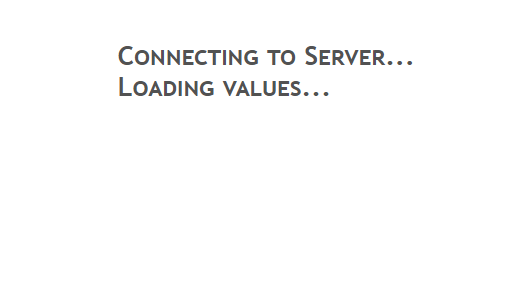
Auf allen Browsern sowie auch Windows und Android Geräten das gleiche.Mein System läuft seit dem Absturz von gestern normal, heute also alles gut - bis auf das VIS Problem eben.
-Peter
-
@oliverio
nein, keine Fehlermeldung. es bleibt nur hier hängen:
Auf allen Browsern sowie auch Windows und Android Geräten das gleiche.Mein System läuft seit dem Absturz von gestern normal, heute also alles gut - bis auf das VIS Problem eben.
-
@oliverio
nein, keine Fehlermeldung. es bleibt nur hier hängen:
Auf allen Browsern sowie auch Windows und Android Geräten das gleiche.Mein System läuft seit dem Absturz von gestern normal, heute also alles gut - bis auf das VIS Problem eben.
iob start vismal ausgeführt?
Ansonsten sieht das sehr ordentlich aus.
Vielleicht beizeiten nodejs@20 draufwerfen.Linux-Werkzeugkasten:
https://forum.iobroker.net/topic/42952/der-kleine-iobroker-linux-werkzeugkasten
NodeJS Fixer Skript:
https://forum.iobroker.net/topic/68035/iob-node-fix-skript
iob_diag: curl -sLf -o diag.sh https://iobroker.net/diag.sh && bash diag.sh -
iob start vismal ausgeführt?
Ansonsten sieht das sehr ordentlich aus.
Vielleicht beizeiten nodejs@20 draufwerfen.@thomas-braun sagte in VIS startet nicht mehr - vermutlich Eigenverschulden:
iob start vis
hab ich soeben gemacht. zu sehen war nichts. ein reload der Runtime bleibt wieder hängen.
In der Browser Console hab ich folgende Fehlermeldungen:
POST https://sentry.iobroker.net/api/77/envelope/?sentry_key=888b0efc877b4b12a8a83e3c1fb7fe1a&sentry_version=7 403 (Forbidden)
(anonymous) @ fetch.ts:126
t @ syncpromise.ts:34
n.Ft @ fetch.ts:125
n.sendSession @ fetch.ts:91
t.sendSession @ basebackend.ts:108
t.ht @ baseclient.ts:262
t.captureSession @ baseclient.ts:158
t.Y @ hub.ts:425
t.captureSession @ hub.ts:371
(anonymous) @ sdk.ts:200
t.init @ sdk.ts:94
_initializeSentry @ widgets.min.js:1
initializeSentry @ widgets.min.js:1
await in initializeSentry (async)
(anonymous) @ materialdesign.js:35
(anonymous) @ widgets.min.js:1
(anonymous) @ widgets.min.js:1
r.onack @ socket.io.js:8
r.onpacket @ socket.io.js:8
(anonymous) @ socket.io.js:8
r.emit @ socket.io.js:6
r.ondecoded @ socket.io.js:6
(anonymous) @ socket.io.js:8
r.emit @ socket.io.js:6
a.add @ socket.io.js:6
r.ondata @ socket.io.js:6
(anonymous) @ socket.io.js:8
r.emit @ socket.io.js:6
r.onPacket @ socket.io.js:6
(anonymous) @ socket.io.js:6
r.emit @ socket.io.js:6
r.onPacket @ socket.io.js:7
r.onData @ socket.io.js:7
ws.onmessage @ socket.io.js:8


helpers.ts:111 Uncaught
TypeError: Cannot read properties of undefined (reading 'data')
    at getUsedObjectIDs (visUtils.js:479:97)
    at Object.getUsedObjectIDs (vis.js:525:22)
    at vis.js:2061:34
    at conn.js:593:25
    at sentryWrapped (helpers.ts:87:17)
getUsedObjectIDs	@	visUtils.js:479
getUsedObjectIDs	@	vis.js:525
(anonymous)	@	vis.js:2061
(anonymous)	@	conn.js:593
sentryWrapped	@	helpers.ts:87
setTimeout (async)
(anonymous)	@	trycatch.ts:119
(anonymous)	@	conn.js:592
r.onack	@	socket.io.js:8
r.onpacket	@	socket.io.js:8
(anonymous)	@	socket.io.js:8
r.emit	@	socket.io.js:6
r.ondecoded	@	socket.io.js:6
(anonymous)	@	socket.io.js:8
r.emit	@	socket.io.js:6
a.add	@	socket.io.js:6
r.ondata	@	socket.io.js:6
(anonymous)	@	socket.io.js:8
r.emit	@	socket.io.js:6
r.onPacket	@	socket.io.js:6
(anonymous)	@	socket.io.js:6
r.emit	@	socket.io.js:6
r.onPacket	@	socket.io.js:7
r.onData	@	socket.io.js:7
ws.onmessage	@	socket.io.js:8
-Peter
-
@thomas-braun sagte in VIS startet nicht mehr - vermutlich Eigenverschulden:
iob start vis
hab ich soeben gemacht. zu sehen war nichts. ein reload der Runtime bleibt wieder hängen.
In der Browser Console hab ich folgende Fehlermeldungen:
POST https://sentry.iobroker.net/api/77/envelope/?sentry_key=888b0efc877b4b12a8a83e3c1fb7fe1a&sentry_version=7 403 (Forbidden) (anonymous) @ fetch.ts:126 t @ syncpromise.ts:34 n.Ft @ fetch.ts:125 n.sendSession @ fetch.ts:91 t.sendSession @ basebackend.ts:108 t.ht @ baseclient.ts:262 t.captureSession @ baseclient.ts:158 t.Y @ hub.ts:425 t.captureSession @ hub.ts:371 (anonymous) @ sdk.ts:200 t.init @ sdk.ts:94 _initializeSentry @ widgets.min.js:1 initializeSentry @ widgets.min.js:1 await in initializeSentry (async) (anonymous) @ materialdesign.js:35 (anonymous) @ widgets.min.js:1 (anonymous) @ widgets.min.js:1 r.onack @ socket.io.js:8 r.onpacket @ socket.io.js:8 (anonymous) @ socket.io.js:8 r.emit @ socket.io.js:6 r.ondecoded @ socket.io.js:6 (anonymous) @ socket.io.js:8 r.emit @ socket.io.js:6 a.add @ socket.io.js:6 r.ondata @ socket.io.js:6 (anonymous) @ socket.io.js:8 r.emit @ socket.io.js:6 r.onPacket @ socket.io.js:6 (anonymous) @ socket.io.js:6 r.emit @ socket.io.js:6 r.onPacket @ socket.io.js:7 r.onData @ socket.io.js:7 ws.onmessage @ socket.io.js:8 helpers.ts:111 Uncaught TypeError: Cannot read properties of undefined (reading 'data') at getUsedObjectIDs (visUtils.js:479:97) at Object.getUsedObjectIDs (vis.js:525:22) at vis.js:2061:34 at conn.js:593:25 at sentryWrapped (helpers.ts:87:17) getUsedObjectIDs @ visUtils.js:479 getUsedObjectIDs @ vis.js:525 (anonymous) @ vis.js:2061 (anonymous) @ conn.js:593 sentryWrapped @ helpers.ts:87 setTimeout (async) (anonymous) @ trycatch.ts:119 (anonymous) @ conn.js:592 r.onack @ socket.io.js:8 r.onpacket @ socket.io.js:8 (anonymous) @ socket.io.js:8 r.emit @ socket.io.js:6 r.ondecoded @ socket.io.js:6 (anonymous) @ socket.io.js:8 r.emit @ socket.io.js:6 a.add @ socket.io.js:6 r.ondata @ socket.io.js:6 (anonymous) @ socket.io.js:8 r.emit @ socket.io.js:6 r.onPacket @ socket.io.js:6 (anonymous) @ socket.io.js:6 r.emit @ socket.io.js:6 r.onPacket @ socket.io.js:7 r.onData @ socket.io.js:7 ws.onmessage @ socket.io.js:8 -
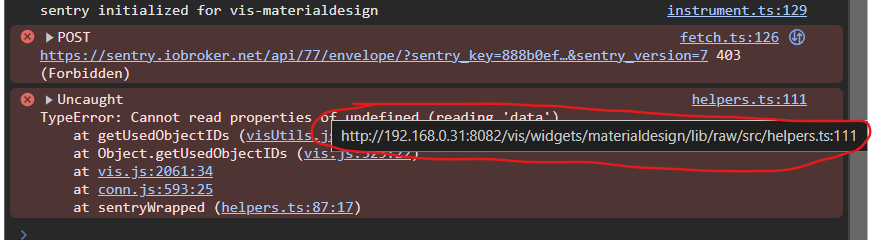
@rtwl
wenn ich mit der Maus hier auf den Link bei der Fehlermeldung gehe, kommt was vom MaterialDesign Adapter.
Kann es damit zusammenhängen?
-
@rtwl
wenn ich mit der Maus hier auf den Link bei der Fehlermeldung gehe, kommt was vom MaterialDesign Adapter.
Kann es damit zusammenhängen?
Materialdesign ist auch disabled. Schalt den mal aktiv.
Linux-Werkzeugkasten:
https://forum.iobroker.net/topic/42952/der-kleine-iobroker-linux-werkzeugkasten
NodeJS Fixer Skript:
https://forum.iobroker.net/topic/68035/iob-node-fix-skript
iob_diag: curl -sLf -o diag.sh https://iobroker.net/diag.sh && bash diag.sh -
Materialdesign ist auch disabled. Schalt den mal aktiv.
@thomas-braun
da gibts keinen "play" button.
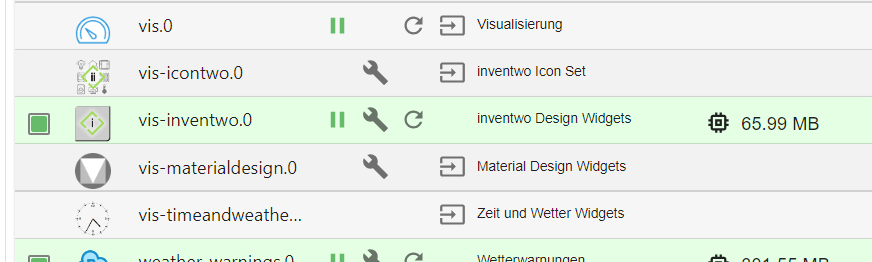
kann ich den via console starten?
-Peter
-
@thomas-braun
da gibts keinen "play" button.
kann ich den via console starten?
@rtwl sagte in VIS startet nicht mehr - vermutlich Eigenverschulden:
@thomas-braun
da gibts keinen "play" button.
kann ich den via console starten?
Nein ist schon Richtig so, aber du hast in einer oder mehreren Views Widgets die du gruppiert hast? Diese machen Probleme was bekannt ist.
Bitte benutzt das Voting rechts unten im Beitrag wenn er euch geholfen hat.
Immer Daten sichern! -
@thomas-braun
da gibts keinen "play" button.
kann ich den via console starten?
Synology DS218+ & 2 x Fujitsu Esprimo (VM/Container) + FritzBox7590 + 2 AVM 3000 Repeater & Homematic & HUE & Osram & Xiaomi, NPM 10.9.8, Nodejs 22.23.2 ,JS Controller 7.2.2 ,Admin 8.0.4
-
@haselchen sagte in VIS startet nicht mehr - vermutlich Eigenverschulden:
Der darf nicht gleichzeitig mit Web und WS laufen.
warum nicht?
tut er bei mir ohne Probleme.kein Support per PN! - Fragen im Forum stellen - Benutzt das Voting rechts unten im Beitrag wenn er euch geholfen hat.
Das Forum freut sich über eine Spende. Benutzt dazu den Spendenbutton oben rechts. Danke!
der Installationsfixer: curl -fsL https://iobroker.net/fix.sh | bash - -
@haselchen sagte in VIS startet nicht mehr - vermutlich Eigenverschulden:
Der darf nicht gleichzeitig mit Web und WS laufen.
warum nicht?
tut er bei mir ohne Probleme. -
@rtwl sagte in VIS startet nicht mehr - vermutlich Eigenverschulden:
@thomas-braun
da gibts keinen "play" button.
kann ich den via console starten?
Nein ist schon Richtig so, aber du hast in einer oder mehreren Views Widgets die du gruppiert hast? Diese machen Probleme was bekannt ist.
@sigi234 sagte in VIS startet nicht mehr - vermutlich Eigenverschulden:
hast in einer oder mehreren Views Widgets die du gruppiert hast?
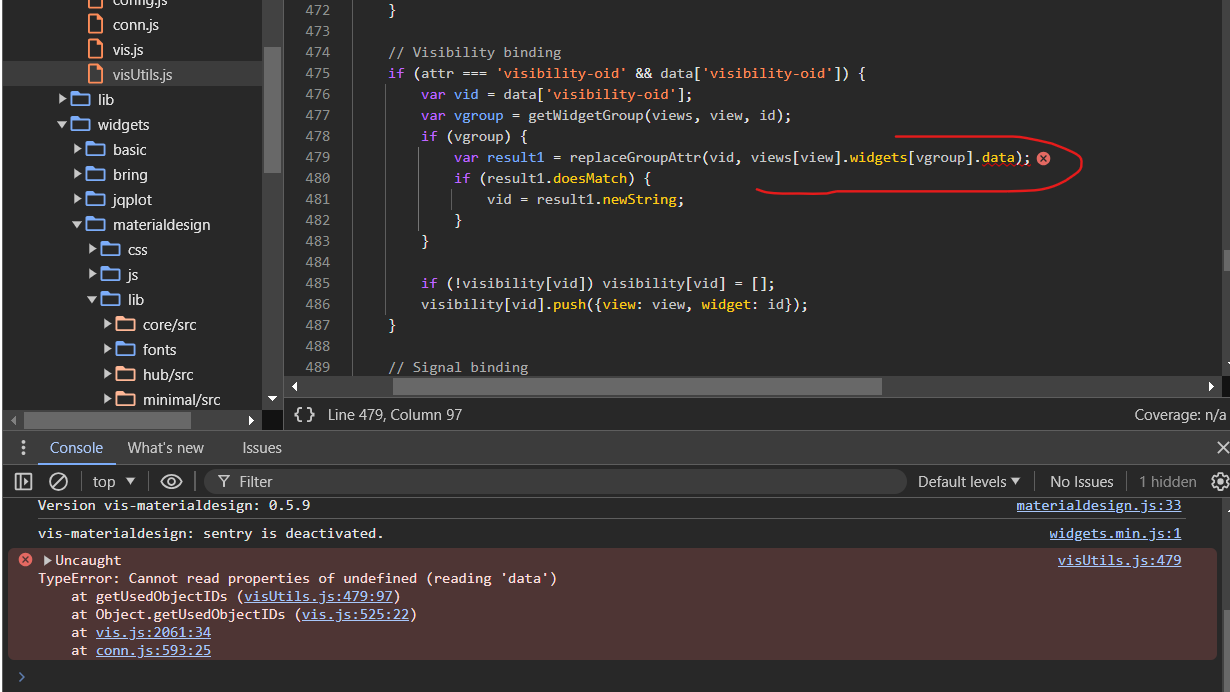
ja, ich hab da in einer view ein paar widget gruppiert. Diese view hab ich gestern dubliziert. Dann ging die runtime nicht mehr.
ist das hier von @Homoran immer noch der korrekte Weg den Fehler zu beheben? https://forum.iobroker.net/topic/75565/zugriff-auf-vis-nicht-mehr-möglich/5?_=1722147764089
-
@rtwl Du hast so viele Baustellen!
Warum stocherst du immer weiter im System herum, anstelle es erst einmal stabil zur Ruhe kommen zu lassen?Damit wird es jetzt bestimmt nicht leichter die Ursachen der anderen Issues systematisch anzugehen
kein Support per PN! - Fragen im Forum stellen - Benutzt das Voting rechts unten im Beitrag wenn er euch geholfen hat.
Das Forum freut sich über eine Spende. Benutzt dazu den Spendenbutton oben rechts. Danke!
der Installationsfixer: curl -fsL https://iobroker.net/fix.sh | bash - -
@rtwl Du hast so viele Baustellen!
Warum stocherst du immer weiter im System herum, anstelle es erst einmal stabil zur Ruhe kommen zu lassen?Damit wird es jetzt bestimmt nicht leichter die Ursachen der anderen Issues systematisch anzugehen






Hey! Du scheinst an dieser Unterhaltung interessiert zu sein, hast aber noch kein Konto.
Hast du es satt, bei jedem Besuch durch die gleichen Beiträge zu scrollen? Wenn du dich für ein Konto anmeldest, kommst du immer genau dorthin zurück, wo du zuvor warst, und kannst dich über neue Antworten benachrichtigen lassen (entweder per E-Mail oder Push-Benachrichtigung). Du kannst auch Lesezeichen speichern und Beiträge positiv bewerten, um anderen Community-Mitgliedern deine Wertschätzung zu zeigen.
Mit deinem Input könnte dieser Beitrag noch besser werden 💗
Registrieren Anmelden296
Online33.0k
Benutzende83.7k
Themen1.3m
Beiträge