




IoBroker und VIS verweigert Zugriff
-
======== Start marking the full check here =========
Skript v.2024-05-22 *** BASE SYSTEM *** Static hostname: raspberrypi Icon name: computer Operating System: Debian GNU/Linux 12 (bookworm) Kernel: Linux 6.6.20+rpt-rpi-v8 Architecture: arm64 Model : Raspberry Pi 4 Model B Rev 1.2 Docker : false Virtualization : none Kernel : aarch64 Userland : 64 bit Systemuptime and Load: 10:56:45 up 17:42, 2 users, load average: 0.37, 1.44, 1.71 CPU threads: 4 *** RASPBERRY THROTTLING *** Current issues: No throttling issues detected. Previously detected issues: ~ Under-voltage has occurred ~ Arm frequency capping has occurred *** Time and Time Zones *** Local time: Thu 2024-06-13 10:56:45 CEST Universal time: Thu 2024-06-13 08:56:45 UTC RTC time: n/a Time zone: Europe/Berlin (CEST, +0200) System clock synchronized: yes NTP service: active RTC in local TZ: no *** Users and Groups *** User that called 'iob diag': ioBroker HOME=/home/ioBroker GROUPS=ioBroker adm dialout cdrom sudo audio video plugdev games users input render netdev gpio i2c spi iobroker User that is running 'js-controller': iobroker HOME=/home/iobroker GROUPS=iobroker tty dialout audio video plugdev bluetooth gpio i2c *** Display-Server-Setup *** Display-Server: false Desktop: Terminal: tty Boot Target: multi-user.target *** MEMORY *** total used free shared buff/cache available Mem: 4.0G 342M 1.9G 1.2M 1.8G 3.6G Swap: 104M 262K 104M Total: 4.1G 342M 2.0G Active iob-Instances: 1 3792 M total memory 327 M used memory 413 M active memory 1356 M inactive memory 1815 M free memory 110 M buffer memory 1615 M swap cache 99 M total swap 0 M used swap 99 M free swap *** top - Table Of Processes *** top - 10:56:45 up 17:42, 2 users, load average: 0.37, 1.44, 1.71 Tasks: 171 total, 1 running, 170 sleeping, 0 stopped, 0 zombie %Cpu(s): 0.0 us, 20.0 sy, 0.0 ni, 80.0 id, 0.0 wa, 0.0 hi, 0.0 si, 0.0 st MiB Mem : 3792.1 total, 1815.3 free, 327.5 used, 1726.0 buff/cache MiB Swap: 100.0 total, 99.7 free, 0.2 used. 3464.6 avail Mem *** FAILED SERVICES *** UNIT LOAD ACTIVE SUB DESCRIPTION 0 loaded units listed. *** FILESYSTEM *** Filesystem Type Size Used Avail Use% Mounted on udev devtmpfs 1.6G 0 1.6G 0% /dev tmpfs tmpfs 380M 1.2M 379M 1% /run /dev/mmcblk0p2 ext4 29G 3.8G 24G 14% / tmpfs tmpfs 1.9G 0 1.9G 0% /dev/shm tmpfs tmpfs 5.0M 16K 5.0M 1% /run/lock /dev/mmcblk0p1 vfat 510M 63M 448M 13% /boot/firmware tmpfs tmpfs 380M 0 380M 0% /run/user/1000 Messages concerning ext4 filesystem in dmesg: [Wed Jun 12 17:14:35 2024] Kernel command line: coherent_pool=1M 8250.nr_uarts=0 snd_bcm2835.enable_headphones=0 snd_bcm2835.enable_headphones=1 snd_bcm2835.enable_hdmi=1 snd_bcm2835.enable_hdmi=0 smsc95xx.macaddr=DC:A6:32:84:3E:C9 vc_mem.mem_base=0x3ec00000 vc_mem.mem_size=0x40000000 console=ttyS0,115200 console=tty1 root=PARTUUID=d17a74ee-02 rootfstype=ext4 fsck.repair=yes rootwait cfg80211.ieee80211_regdom=DE [Wed Jun 12 17:14:37 2024] EXT4-fs (mmcblk0p2): mounted filesystem 93c89e92-8f2e-4522-ad32-68faed883d2f ro with ordered data mode. Quota mode: none. [Wed Jun 12 17:14:39 2024] EXT4-fs (mmcblk0p2): re-mounted 93c89e92-8f2e-4522-ad32-68faed883d2f r/w. Quota mode: none. Show mounted filesystems: TARGET SOURCE FSTYPE OPTIONS / /dev/mmcblk0p2 ext4 rw,noatime |-/sys sysfs sysfs rw,nosuid,nodev,noexec,relatime | |-/sys/kernel/security securityfs securityfs rw,nosuid,nodev,noexec,relatime | |-/sys/fs/cgroup cgroup2 cgroup2 rw,nosuid,nodev,noexec,relatime,nsdelegate,memory_recursiveprot | |-/sys/fs/pstore pstore pstore rw,nosuid,nodev,noexec,relatime | |-/sys/fs/bpf bpf bpf rw,nosuid,nodev,noexec,relatime,mode=700 | |-/sys/kernel/debug debugfs debugfs rw,nosuid,nodev,noexec,relatime | |-/sys/kernel/tracing tracefs tracefs rw,nosuid,nodev,noexec,relatime | |-/sys/kernel/config configfs configfs rw,nosuid,nodev,noexec,relatime | `-/sys/fs/fuse/connections fusectl fusectl rw,nosuid,nodev,noexec,relatime |-/proc proc proc rw,relatime | `-/proc/sys/fs/binfmt_misc systemd-1 autofs rw,relatime,fd=30,pgrp=1,timeout=0,minproto=5,maxproto=5,direct,pipe_ino=2470 | `-/proc/sys/fs/binfmt_misc binfmt_misc binfmt_misc rw,nosuid,nodev,noexec,relatime |-/dev udev devtmpfs rw,nosuid,relatime,size=1671540k,nr_inodes=417885,mode=755 | |-/dev/pts devpts devpts rw,nosuid,noexec,relatime,gid=5,mode=620,ptmxmode=000 | |-/dev/shm tmpfs tmpfs rw,nosuid,nodev | `-/dev/mqueue mqueue mqueue rw,nosuid,nodev,noexec,relatime |-/run tmpfs tmpfs rw,nosuid,nodev,noexec,relatime,size=388308k,mode=755 | |-/run/lock tmpfs tmpfs rw,nosuid,nodev,noexec,relatime,size=5120k | |-/run/credentials/systemd-sysctl.service ramfs ramfs ro,nosuid,nodev,noexec,relatime,mode=700 | |-/run/credentials/systemd-sysusers.service ramfs ramfs ro,nosuid,nodev,noexec,relatime,mode=700 | |-/run/credentials/systemd-tmpfiles-setup-dev.service ramfs ramfs ro,nosuid,nodev,noexec,relatime,mode=700 | |-/run/rpc_pipefs sunrpc rpc_pipefs rw,relatime | |-/run/credentials/systemd-tmpfiles-setup.service ramfs ramfs ro,nosuid,nodev,noexec,relatime,mode=700 | `-/run/user/1000 tmpfs tmpfs rw,nosuid,nodev,relatime,size=388304k,nr_inodes=97076,mode=700,uid=1000,gid=1000 `-/boot/firmware /dev/mmcblk0p1 vfat rw,relatime,fmask=0022,dmask=0022,codepage=437,iocharset=ascii,shortname=mixed,errors=remount-ro Files in neuralgic directories: /var: 508M /var/ 209M /var/cache 204M /var/cache/apt 162M /var/lib 133M /var/lib/apt/lists Archived and active journals take up 36.0M in the file system. /opt/iobroker/backups: 54M /opt/iobroker/backups/ /opt/iobroker/iobroker-data: 706M /opt/iobroker/iobroker-data/ 664M /opt/iobroker/iobroker-data/files 169M /opt/iobroker/iobroker-data/files/vis-2 138M /opt/iobroker/iobroker-data/files/javascript.admin 118M /opt/iobroker/iobroker-data/files/javascript.admin/static The five largest files in iobroker-data are: 27M /opt/iobroker/iobroker-data/objects.jsonl 27M /opt/iobroker/iobroker-data/files/tankerkoenig.admin/build/index.js.map 24M /opt/iobroker/iobroker-data/files/web.admin/static/js/main.135279a0.js.map 24M /opt/iobroker/iobroker-data/files/echarts/static/js/main.2b7495c2.js.map 24M /opt/iobroker/iobroker-data/files/echarts.admin/chart/static/js/main.2b7495c2.js.map USB-Devices by-id: USB-Sticks - Avoid direct links to /dev/tty* in your adapter setups, please always prefer the links 'by-id': No Devices found 'by-id' *** NodeJS-Installation *** /usr/bin/nodejs v20.14.0 /usr/bin/node v20.14.0 /usr/bin/npm 10.7.0 /usr/bin/npx 10.7.0 /usr/bin/corepack 0.28.1 nodejs: Installed: 20.14.0-1nodesource1 Candidate: 20.14.0-1nodesource1 Version table: *** 20.14.0-1nodesource1 1001 500 https://deb.nodesource.com/node_20.x nodistro/main arm64 Packages 100 /var/lib/dpkg/status 20.13.1-1nodesource1 1001 500 https://deb.nodesource.com/node_20.x nodistro/main arm64 Packages 20.13.0-1nodesource1 1001 500 https://deb.nodesource.com/node_20.x nodistro/main arm64 Packages 20.12.2-1nodesource1 1001 500 https://deb.nodesource.com/node_20.x nodistro/main arm64 Packages 20.12.1-1nodesource1 1001 500 https://deb.nodesource.com/node_20.x nodistro/main arm64 Packages 20.12.0-1nodesource1 1001 500 https://deb.nodesource.com/node_20.x nodistro/main arm64 Packages 20.11.1-1nodesource1 1001 500 https://deb.nodesource.com/node_20.x nodistro/main arm64 Packages 20.11.0-1nodesource1 1001 500 https://deb.nodesource.com/node_20.x nodistro/main arm64 Packages 20.10.0-1nodesource1 1001 500 https://deb.nodesource.com/node_20.x nodistro/main arm64 Packages 20.9.0-1nodesource1 1001 500 https://deb.nodesource.com/node_20.x nodistro/main arm64 Packages 20.8.1-1nodesource1 1001 500 https://deb.nodesource.com/node_20.x nodistro/main arm64 Packages 20.8.0-1nodesource1 1001 500 https://deb.nodesource.com/node_20.x nodistro/main arm64 Packages 20.7.0-1nodesource1 1001 500 https://deb.nodesource.com/node_20.x nodistro/main arm64 Packages 20.6.1-1nodesource1 1001 500 https://deb.nodesource.com/node_20.x nodistro/main arm64 Packages 20.6.0-1nodesource1 1001 500 https://deb.nodesource.com/node_20.x nodistro/main arm64 Packages 20.5.1-1nodesource1 1001 500 https://deb.nodesource.com/node_20.x nodistro/main arm64 Packages 20.5.0-1nodesource1 1001 500 https://deb.nodesource.com/node_20.x nodistro/main arm64 Packages 20.4.0-1nodesource1 1001 500 https://deb.nodesource.com/node_20.x nodistro/main arm64 Packages 20.3.1-1nodesource1 1001 500 https://deb.nodesource.com/node_20.x nodistro/main arm64 Packages 20.3.0-1nodesource1 1001 500 https://deb.nodesource.com/node_20.x nodistro/main arm64 Packages 20.2.0-1nodesource1 1001 500 https://deb.nodesource.com/node_20.x nodistro/main arm64 Packages 20.1.0-1nodesource1 1001 500 https://deb.nodesource.com/node_20.x nodistro/main arm64 Packages 20.0.0-1nodesource1 1001 500 https://deb.nodesource.com/node_20.x nodistro/main arm64 Packages 18.19.0+dfsg-6~deb12u1 500 500 http://deb.debian.org/debian-security bookworm-security/main arm64 Packages 18.13.0+dfsg1-1 500 500 http://deb.debian.org/debian bookworm/main arm64 Packages Temp directories causing npm8 problem: 0 No problems detected Errors in npm tree: *** ioBroker-Installation *** ioBroker Status iobroker is running on this host. Objects type: jsonl States type: jsonl Core adapters versions js-controller: 5.0.19 admin: "admin" not found javascript: "javascript" not found nodejs modules from github: 0 Adapter State + instance is alive Enabled adapters with bindings ioBroker-Repositories stable : http://download.iobroker.net/sources-dist.json beta : http://download.iobroker.net/sources-dist-latest.json Active repo(s): beta Installed ioBroker-Instances Used repository: beta Controller "js-controller": 6.0.3 , installed 5.0.19 [Updatable] Objects and States Please stand by - This may take a while Objects: 43 States: 25 *** OS-Repositories and Updates *** Hit:1 http://deb.debian.org/debian bookworm InRelease Hit:2 http://archive.raspberrypi.com/debian bookworm InRelease Hit:3 http://deb.debian.org/debian-security bookworm-security InRelease Hit:4 http://deb.debian.org/debian bookworm-updates InRelease Hit:5 https://deb.nodesource.com/node_20.x nodistro InRelease Reading package lists... Pending Updates: 23 *** Listening Ports *** Active Internet connections (only servers) Proto Recv-Q Send-Q Local Address Foreign Address State User Inode PID/Program name tcp 0 0 127.0.0.1:9000 0.0.0.0:* LISTEN 1001 83074 18939/iobroker.js-c tcp 0 0 127.0.0.1:9001 0.0.0.0:* LISTEN 1001 83069 18939/iobroker.js-c tcp 0 0 0.0.0.0:22 0.0.0.0:* LISTEN 0 6276 754/sshd: /usr/sbin tcp6 0 0 :::22 :::* LISTEN 0 6278 754/sshd: /usr/sbin udp 0 0 0.0.0.0:5353 0.0.0.0:* 104 1605 543/avahi-daemon: r udp 0 0 0.0.0.0:46735 0.0.0.0:* 104 1607 543/avahi-daemon: r udp6 0 0 fe80::b8c3:506d:cd3:546 :::* 0 1702 649/NetworkManager udp6 0 0 :::56455 :::* 104 1608 543/avahi-daemon: r udp6 0 0 :::5353 :::* 104 1606 543/avahi-daemon: r *** Log File - Last 25 Lines *** 2024-06-13 10:38:54.795 - info: host.raspberrypi no instances found 2024-06-13 10:38:55.030 - info: host.raspberrypi Created UUID: 919cdd64-f704-033e-d8c9-eea600032804 2024-06-13 10:41:11.594 - info: host.raspberrypi received SIGTERM 2024-06-13 10:41:11.639 - info: host.raspberrypi terminated 2024-06-13 10:48:05.440 - info: host.raspberrypi iobroker.js-controller version 4.0.24 js-controller starting 2024-06-13 10:48:05.446 - info: host.raspberrypi Copyright (c) 2014-2022 bluefox, 2014 hobbyquaker 2024-06-13 10:48:05.447 - info: host.raspberrypi hostname: raspberrypi, node: v20.14.0 2024-06-13 10:48:05.448 - info: host.raspberrypi ip addresses: 192.168.220.191 2003:c6:1746:d400:9463:955b:bee6:9528 fe80::b8c3:506d:cd32:67e8 2024-06-13 10:48:06.954 - info: host.raspberrypi connected to Objects and States 2024-06-13 10:48:06.982 - info: host.raspberrypi Node.js version has changed from unknown to 20.14.0 2024-06-13 10:48:07.011 - info: host.raspberrypi Successfully updated capabilities "cap_net_admin, cap_net_bind_service, cap_net_raw" for /usr/bin/node 2024-06-13 10:48:07.039 - info: host.raspberrypi added notifications configuration of host 2024-06-13 10:48:07.427 - info: host.raspberrypi no instances found 2024-06-13 10:48:07.428 - info: host.raspberrypi no instances found 2024-06-13 10:48:07.667 - info: host.raspberrypi Created UUID: 919cdd64-f704-033e-d8c9-eea600032804 2024-06-13 10:50:10.451 - info: host.raspberrypi received SIGTERM 2024-06-13 10:50:28.123 - info: host.raspberrypi terminated 2024-06-13 10:55:53.682 - info: host.raspberrypi iobroker.js-controller version 5.0.19 js-controller starting 2024-06-13 10:55:53.687 - info: host.raspberrypi Copyright (c) 2014-2023 bluefox, 2014 hobbyquaker 2024-06-13 10:55:53.689 - info: host.raspberrypi hostname: raspberrypi, node: v20.14.0 2024-06-13 10:55:53.689 - info: host.raspberrypi ip addresses: 192.168.220.191 2003:c6:1746:d400:9463:955b:bee6:9528 fe80::b8c3:506d:cd32:67e8 2024-06-13 10:55:55.159 - info: host.raspberrypi connected to Objects and States 2024-06-13 10:55:55.189 - info: host.raspberrypi added notifications configuration of host 2024-06-13 10:55:55.644 - info: host.raspberrypi no instances found 2024-06-13 10:55:55.645 - info: host.raspberrypi no instances found -
======== Start marking the full check here =========
Skript v.2024-05-22 *** BASE SYSTEM *** Static hostname: raspberrypi Icon name: computer Operating System: Debian GNU/Linux 12 (bookworm) Kernel: Linux 6.6.20+rpt-rpi-v8 Architecture: arm64 Model : Raspberry Pi 4 Model B Rev 1.2 Docker : false Virtualization : none Kernel : aarch64 Userland : 64 bit Systemuptime and Load: 10:56:45 up 17:42, 2 users, load average: 0.37, 1.44, 1.71 CPU threads: 4 *** RASPBERRY THROTTLING *** Current issues: No throttling issues detected. Previously detected issues: ~ Under-voltage has occurred ~ Arm frequency capping has occurred *** Time and Time Zones *** Local time: Thu 2024-06-13 10:56:45 CEST Universal time: Thu 2024-06-13 08:56:45 UTC RTC time: n/a Time zone: Europe/Berlin (CEST, +0200) System clock synchronized: yes NTP service: active RTC in local TZ: no *** Users and Groups *** User that called 'iob diag': ioBroker HOME=/home/ioBroker GROUPS=ioBroker adm dialout cdrom sudo audio video plugdev games users input render netdev gpio i2c spi iobroker User that is running 'js-controller': iobroker HOME=/home/iobroker GROUPS=iobroker tty dialout audio video plugdev bluetooth gpio i2c *** Display-Server-Setup *** Display-Server: false Desktop: Terminal: tty Boot Target: multi-user.target *** MEMORY *** total used free shared buff/cache available Mem: 4.0G 342M 1.9G 1.2M 1.8G 3.6G Swap: 104M 262K 104M Total: 4.1G 342M 2.0G Active iob-Instances: 1 3792 M total memory 327 M used memory 413 M active memory 1356 M inactive memory 1815 M free memory 110 M buffer memory 1615 M swap cache 99 M total swap 0 M used swap 99 M free swap *** top - Table Of Processes *** top - 10:56:45 up 17:42, 2 users, load average: 0.37, 1.44, 1.71 Tasks: 171 total, 1 running, 170 sleeping, 0 stopped, 0 zombie %Cpu(s): 0.0 us, 20.0 sy, 0.0 ni, 80.0 id, 0.0 wa, 0.0 hi, 0.0 si, 0.0 st MiB Mem : 3792.1 total, 1815.3 free, 327.5 used, 1726.0 buff/cache MiB Swap: 100.0 total, 99.7 free, 0.2 used. 3464.6 avail Mem *** FAILED SERVICES *** UNIT LOAD ACTIVE SUB DESCRIPTION 0 loaded units listed. *** FILESYSTEM *** Filesystem Type Size Used Avail Use% Mounted on udev devtmpfs 1.6G 0 1.6G 0% /dev tmpfs tmpfs 380M 1.2M 379M 1% /run /dev/mmcblk0p2 ext4 29G 3.8G 24G 14% / tmpfs tmpfs 1.9G 0 1.9G 0% /dev/shm tmpfs tmpfs 5.0M 16K 5.0M 1% /run/lock /dev/mmcblk0p1 vfat 510M 63M 448M 13% /boot/firmware tmpfs tmpfs 380M 0 380M 0% /run/user/1000 Messages concerning ext4 filesystem in dmesg: [Wed Jun 12 17:14:35 2024] Kernel command line: coherent_pool=1M 8250.nr_uarts=0 snd_bcm2835.enable_headphones=0 snd_bcm2835.enable_headphones=1 snd_bcm2835.enable_hdmi=1 snd_bcm2835.enable_hdmi=0 smsc95xx.macaddr=DC:A6:32:84:3E:C9 vc_mem.mem_base=0x3ec00000 vc_mem.mem_size=0x40000000 console=ttyS0,115200 console=tty1 root=PARTUUID=d17a74ee-02 rootfstype=ext4 fsck.repair=yes rootwait cfg80211.ieee80211_regdom=DE [Wed Jun 12 17:14:37 2024] EXT4-fs (mmcblk0p2): mounted filesystem 93c89e92-8f2e-4522-ad32-68faed883d2f ro with ordered data mode. Quota mode: none. [Wed Jun 12 17:14:39 2024] EXT4-fs (mmcblk0p2): re-mounted 93c89e92-8f2e-4522-ad32-68faed883d2f r/w. Quota mode: none. Show mounted filesystems: TARGET SOURCE FSTYPE OPTIONS / /dev/mmcblk0p2 ext4 rw,noatime |-/sys sysfs sysfs rw,nosuid,nodev,noexec,relatime | |-/sys/kernel/security securityfs securityfs rw,nosuid,nodev,noexec,relatime | |-/sys/fs/cgroup cgroup2 cgroup2 rw,nosuid,nodev,noexec,relatime,nsdelegate,memory_recursiveprot | |-/sys/fs/pstore pstore pstore rw,nosuid,nodev,noexec,relatime | |-/sys/fs/bpf bpf bpf rw,nosuid,nodev,noexec,relatime,mode=700 | |-/sys/kernel/debug debugfs debugfs rw,nosuid,nodev,noexec,relatime | |-/sys/kernel/tracing tracefs tracefs rw,nosuid,nodev,noexec,relatime | |-/sys/kernel/config configfs configfs rw,nosuid,nodev,noexec,relatime | `-/sys/fs/fuse/connections fusectl fusectl rw,nosuid,nodev,noexec,relatime |-/proc proc proc rw,relatime | `-/proc/sys/fs/binfmt_misc systemd-1 autofs rw,relatime,fd=30,pgrp=1,timeout=0,minproto=5,maxproto=5,direct,pipe_ino=2470 | `-/proc/sys/fs/binfmt_misc binfmt_misc binfmt_misc rw,nosuid,nodev,noexec,relatime |-/dev udev devtmpfs rw,nosuid,relatime,size=1671540k,nr_inodes=417885,mode=755 | |-/dev/pts devpts devpts rw,nosuid,noexec,relatime,gid=5,mode=620,ptmxmode=000 | |-/dev/shm tmpfs tmpfs rw,nosuid,nodev | `-/dev/mqueue mqueue mqueue rw,nosuid,nodev,noexec,relatime |-/run tmpfs tmpfs rw,nosuid,nodev,noexec,relatime,size=388308k,mode=755 | |-/run/lock tmpfs tmpfs rw,nosuid,nodev,noexec,relatime,size=5120k | |-/run/credentials/systemd-sysctl.service ramfs ramfs ro,nosuid,nodev,noexec,relatime,mode=700 | |-/run/credentials/systemd-sysusers.service ramfs ramfs ro,nosuid,nodev,noexec,relatime,mode=700 | |-/run/credentials/systemd-tmpfiles-setup-dev.service ramfs ramfs ro,nosuid,nodev,noexec,relatime,mode=700 | |-/run/rpc_pipefs sunrpc rpc_pipefs rw,relatime | |-/run/credentials/systemd-tmpfiles-setup.service ramfs ramfs ro,nosuid,nodev,noexec,relatime,mode=700 | `-/run/user/1000 tmpfs tmpfs rw,nosuid,nodev,relatime,size=388304k,nr_inodes=97076,mode=700,uid=1000,gid=1000 `-/boot/firmware /dev/mmcblk0p1 vfat rw,relatime,fmask=0022,dmask=0022,codepage=437,iocharset=ascii,shortname=mixed,errors=remount-ro Files in neuralgic directories: /var: 508M /var/ 209M /var/cache 204M /var/cache/apt 162M /var/lib 133M /var/lib/apt/lists Archived and active journals take up 36.0M in the file system. /opt/iobroker/backups: 54M /opt/iobroker/backups/ /opt/iobroker/iobroker-data: 706M /opt/iobroker/iobroker-data/ 664M /opt/iobroker/iobroker-data/files 169M /opt/iobroker/iobroker-data/files/vis-2 138M /opt/iobroker/iobroker-data/files/javascript.admin 118M /opt/iobroker/iobroker-data/files/javascript.admin/static The five largest files in iobroker-data are: 27M /opt/iobroker/iobroker-data/objects.jsonl 27M /opt/iobroker/iobroker-data/files/tankerkoenig.admin/build/index.js.map 24M /opt/iobroker/iobroker-data/files/web.admin/static/js/main.135279a0.js.map 24M /opt/iobroker/iobroker-data/files/echarts/static/js/main.2b7495c2.js.map 24M /opt/iobroker/iobroker-data/files/echarts.admin/chart/static/js/main.2b7495c2.js.map USB-Devices by-id: USB-Sticks - Avoid direct links to /dev/tty* in your adapter setups, please always prefer the links 'by-id': No Devices found 'by-id' *** NodeJS-Installation *** /usr/bin/nodejs v20.14.0 /usr/bin/node v20.14.0 /usr/bin/npm 10.7.0 /usr/bin/npx 10.7.0 /usr/bin/corepack 0.28.1 nodejs: Installed: 20.14.0-1nodesource1 Candidate: 20.14.0-1nodesource1 Version table: *** 20.14.0-1nodesource1 1001 500 https://deb.nodesource.com/node_20.x nodistro/main arm64 Packages 100 /var/lib/dpkg/status 20.13.1-1nodesource1 1001 500 https://deb.nodesource.com/node_20.x nodistro/main arm64 Packages 20.13.0-1nodesource1 1001 500 https://deb.nodesource.com/node_20.x nodistro/main arm64 Packages 20.12.2-1nodesource1 1001 500 https://deb.nodesource.com/node_20.x nodistro/main arm64 Packages 20.12.1-1nodesource1 1001 500 https://deb.nodesource.com/node_20.x nodistro/main arm64 Packages 20.12.0-1nodesource1 1001 500 https://deb.nodesource.com/node_20.x nodistro/main arm64 Packages 20.11.1-1nodesource1 1001 500 https://deb.nodesource.com/node_20.x nodistro/main arm64 Packages 20.11.0-1nodesource1 1001 500 https://deb.nodesource.com/node_20.x nodistro/main arm64 Packages 20.10.0-1nodesource1 1001 500 https://deb.nodesource.com/node_20.x nodistro/main arm64 Packages 20.9.0-1nodesource1 1001 500 https://deb.nodesource.com/node_20.x nodistro/main arm64 Packages 20.8.1-1nodesource1 1001 500 https://deb.nodesource.com/node_20.x nodistro/main arm64 Packages 20.8.0-1nodesource1 1001 500 https://deb.nodesource.com/node_20.x nodistro/main arm64 Packages 20.7.0-1nodesource1 1001 500 https://deb.nodesource.com/node_20.x nodistro/main arm64 Packages 20.6.1-1nodesource1 1001 500 https://deb.nodesource.com/node_20.x nodistro/main arm64 Packages 20.6.0-1nodesource1 1001 500 https://deb.nodesource.com/node_20.x nodistro/main arm64 Packages 20.5.1-1nodesource1 1001 500 https://deb.nodesource.com/node_20.x nodistro/main arm64 Packages 20.5.0-1nodesource1 1001 500 https://deb.nodesource.com/node_20.x nodistro/main arm64 Packages 20.4.0-1nodesource1 1001 500 https://deb.nodesource.com/node_20.x nodistro/main arm64 Packages 20.3.1-1nodesource1 1001 500 https://deb.nodesource.com/node_20.x nodistro/main arm64 Packages 20.3.0-1nodesource1 1001 500 https://deb.nodesource.com/node_20.x nodistro/main arm64 Packages 20.2.0-1nodesource1 1001 500 https://deb.nodesource.com/node_20.x nodistro/main arm64 Packages 20.1.0-1nodesource1 1001 500 https://deb.nodesource.com/node_20.x nodistro/main arm64 Packages 20.0.0-1nodesource1 1001 500 https://deb.nodesource.com/node_20.x nodistro/main arm64 Packages 18.19.0+dfsg-6~deb12u1 500 500 http://deb.debian.org/debian-security bookworm-security/main arm64 Packages 18.13.0+dfsg1-1 500 500 http://deb.debian.org/debian bookworm/main arm64 Packages Temp directories causing npm8 problem: 0 No problems detected Errors in npm tree: *** ioBroker-Installation *** ioBroker Status iobroker is running on this host. Objects type: jsonl States type: jsonl Core adapters versions js-controller: 5.0.19 admin: "admin" not found javascript: "javascript" not found nodejs modules from github: 0 Adapter State + instance is alive Enabled adapters with bindings ioBroker-Repositories stable : http://download.iobroker.net/sources-dist.json beta : http://download.iobroker.net/sources-dist-latest.json Active repo(s): beta Installed ioBroker-Instances Used repository: beta Controller "js-controller": 6.0.3 , installed 5.0.19 [Updatable] Objects and States Please stand by - This may take a while Objects: 43 States: 25 *** OS-Repositories and Updates *** Hit:1 http://deb.debian.org/debian bookworm InRelease Hit:2 http://archive.raspberrypi.com/debian bookworm InRelease Hit:3 http://deb.debian.org/debian-security bookworm-security InRelease Hit:4 http://deb.debian.org/debian bookworm-updates InRelease Hit:5 https://deb.nodesource.com/node_20.x nodistro InRelease Reading package lists... Pending Updates: 23 *** Listening Ports *** Active Internet connections (only servers) Proto Recv-Q Send-Q Local Address Foreign Address State User Inode PID/Program name tcp 0 0 127.0.0.1:9000 0.0.0.0:* LISTEN 1001 83074 18939/iobroker.js-c tcp 0 0 127.0.0.1:9001 0.0.0.0:* LISTEN 1001 83069 18939/iobroker.js-c tcp 0 0 0.0.0.0:22 0.0.0.0:* LISTEN 0 6276 754/sshd: /usr/sbin tcp6 0 0 :::22 :::* LISTEN 0 6278 754/sshd: /usr/sbin udp 0 0 0.0.0.0:5353 0.0.0.0:* 104 1605 543/avahi-daemon: r udp 0 0 0.0.0.0:46735 0.0.0.0:* 104 1607 543/avahi-daemon: r udp6 0 0 fe80::b8c3:506d:cd3:546 :::* 0 1702 649/NetworkManager udp6 0 0 :::56455 :::* 104 1608 543/avahi-daemon: r udp6 0 0 :::5353 :::* 104 1606 543/avahi-daemon: r *** Log File - Last 25 Lines *** 2024-06-13 10:38:54.795 - info: host.raspberrypi no instances found 2024-06-13 10:38:55.030 - info: host.raspberrypi Created UUID: 919cdd64-f704-033e-d8c9-eea600032804 2024-06-13 10:41:11.594 - info: host.raspberrypi received SIGTERM 2024-06-13 10:41:11.639 - info: host.raspberrypi terminated 2024-06-13 10:48:05.440 - info: host.raspberrypi iobroker.js-controller version 4.0.24 js-controller starting 2024-06-13 10:48:05.446 - info: host.raspberrypi Copyright (c) 2014-2022 bluefox, 2014 hobbyquaker 2024-06-13 10:48:05.447 - info: host.raspberrypi hostname: raspberrypi, node: v20.14.0 2024-06-13 10:48:05.448 - info: host.raspberrypi ip addresses: 192.168.220.191 2003:c6:1746:d400:9463:955b:bee6:9528 fe80::b8c3:506d:cd32:67e8 2024-06-13 10:48:06.954 - info: host.raspberrypi connected to Objects and States 2024-06-13 10:48:06.982 - info: host.raspberrypi Node.js version has changed from unknown to 20.14.0 2024-06-13 10:48:07.011 - info: host.raspberrypi Successfully updated capabilities "cap_net_admin, cap_net_bind_service, cap_net_raw" for /usr/bin/node 2024-06-13 10:48:07.039 - info: host.raspberrypi added notifications configuration of host 2024-06-13 10:48:07.427 - info: host.raspberrypi no instances found 2024-06-13 10:48:07.428 - info: host.raspberrypi no instances found 2024-06-13 10:48:07.667 - info: host.raspberrypi Created UUID: 919cdd64-f704-033e-d8c9-eea600032804 2024-06-13 10:50:10.451 - info: host.raspberrypi received SIGTERM 2024-06-13 10:50:28.123 - info: host.raspberrypi terminated 2024-06-13 10:55:53.682 - info: host.raspberrypi iobroker.js-controller version 5.0.19 js-controller starting 2024-06-13 10:55:53.687 - info: host.raspberrypi Copyright (c) 2014-2023 bluefox, 2014 hobbyquaker 2024-06-13 10:55:53.689 - info: host.raspberrypi hostname: raspberrypi, node: v20.14.0 2024-06-13 10:55:53.689 - info: host.raspberrypi ip addresses: 192.168.220.191 2003:c6:1746:d400:9463:955b:bee6:9528 fe80::b8c3:506d:cd32:67e8 2024-06-13 10:55:55.159 - info: host.raspberrypi connected to Objects and States 2024-06-13 10:55:55.189 - info: host.raspberrypi added notifications configuration of host 2024-06-13 10:55:55.644 - info: host.raspberrypi no instances found 2024-06-13 10:55:55.645 - info: host.raspberrypi no instances foundund wenn wir schon dabei sind;
@loco sagte in IoBroker und VIS verweigert Zugriff:
Previously detected issues:
~ Under-voltage has occurred
~ Arm frequency capping has occurredDein Raspi verhungert.
Auch das kann zu Fehlern im Dateisystem führen.Wo kommt jetzt dieses diag her?
-
@loco sagte in IoBroker und VIS verweigert Zugriff:
Active repo(s): beta
Und warum schon wieder "BETA"? Warum? Bleib bei "Stable"!
Ro75.
das IOS hat der Imager direkt ausgewählt! Wie ihr vorgeschlagen habt, 64bit Bookworm, lite.
Habe das ausgewählt was weiter oben im Chat vorgeschlagen wurde! Da war nirgends ein Hinweis von "beta" (beim Imager)Ganz nebenbei, ich hab bevor ich iobroker neu installiere dieses ausprobiert:
curl -fsL https://iobroker.net/fix.sh | bash -Your installation was fixed successfully
Run iobroker start to start ioBroker again!wenn ich dann auf iobroker über Browser zugreifen will bekomme ich erneut Meldung "Zugriff verweigert". Das mit dem Backup/Restore funktioniert so nicht (oder ich mach da was falsch)! Ich kann nichtmal mein Backup von heute früh zurückspielen (ohne VIS) und muß iobroker erneut installieren mit allen Adapter und Einstellungen!
-
das IOS hat der Imager direkt ausgewählt! Wie ihr vorgeschlagen habt, 64bit Bookworm, lite.
Habe das ausgewählt was weiter oben im Chat vorgeschlagen wurde! Da war nirgends ein Hinweis von "beta" (beim Imager)Ganz nebenbei, ich hab bevor ich iobroker neu installiere dieses ausprobiert:
curl -fsL https://iobroker.net/fix.sh | bash -Your installation was fixed successfully
Run iobroker start to start ioBroker again!wenn ich dann auf iobroker über Browser zugreifen will bekomme ich erneut Meldung "Zugriff verweigert". Das mit dem Backup/Restore funktioniert so nicht (oder ich mach da was falsch)! Ich kann nichtmal mein Backup von heute früh zurückspielen (ohne VIS) und muß iobroker erneut installieren mit allen Adapter und Einstellungen!
@loco sagte in IoBroker und VIS verweigert Zugriff:
das IOS hat der Imager direkt ausgewählt!
wovon redest du?
ios gibt es nicht.wir reden von der iob Installation aus deinem letzten iob diag.
Wo imner das jetzt herkommt.Bitte mal alles auf Null und aktuellen Status bekanntgegeben!
Und anschließend nicht hin und her springen und nichts machen was wir nicht sagen.
-
das IOS hat der Imager direkt ausgewählt! Wie ihr vorgeschlagen habt, 64bit Bookworm, lite.
Habe das ausgewählt was weiter oben im Chat vorgeschlagen wurde! Da war nirgends ein Hinweis von "beta" (beim Imager)Ganz nebenbei, ich hab bevor ich iobroker neu installiere dieses ausprobiert:
curl -fsL https://iobroker.net/fix.sh | bash -Your installation was fixed successfully
Run iobroker start to start ioBroker again!wenn ich dann auf iobroker über Browser zugreifen will bekomme ich erneut Meldung "Zugriff verweigert". Das mit dem Backup/Restore funktioniert so nicht (oder ich mach da was falsch)! Ich kann nichtmal mein Backup von heute früh zurückspielen (ohne VIS) und muß iobroker erneut installieren mit allen Adapter und Einstellungen!
@loco sagte in IoBroker und VIS verweigert Zugriff:
Da war nirgends ein Hinweis von "beta" (beim Imager)
Hat auch nichts mit dem Image vom OS zu tun. Das ist ein Auszug aus dem iob diag - LOG, wie auch dass da kein gescheites / originales Netzteil am Raspi hängt und wie Homoran geschrieben hat, es zu Problemen kommen kann.
Ro75.
-
das IOS hat der Imager direkt ausgewählt! Wie ihr vorgeschlagen habt, 64bit Bookworm, lite.
Habe das ausgewählt was weiter oben im Chat vorgeschlagen wurde! Da war nirgends ein Hinweis von "beta" (beim Imager)Ganz nebenbei, ich hab bevor ich iobroker neu installiere dieses ausprobiert:
curl -fsL https://iobroker.net/fix.sh | bash -Your installation was fixed successfully
Run iobroker start to start ioBroker again!wenn ich dann auf iobroker über Browser zugreifen will bekomme ich erneut Meldung "Zugriff verweigert". Das mit dem Backup/Restore funktioniert so nicht (oder ich mach da was falsch)! Ich kann nichtmal mein Backup von heute früh zurückspielen (ohne VIS) und muß iobroker erneut installieren mit allen Adapter und Einstellungen!
@loco Bitte nicht bestehende Beiträge ändern wenn schon nachfolgende Beiträge existieren. Da sieht keiner mehr durch und die nachfolgenden Beiträge werden aus dem Kontext gerissen.
Nochmal.
Ein Schritt nach dem anderen! Nicht kreuz und quer. Wie Homoran geschrieben hat. Schritt machen, melden, ggfs. Hinweise beachten/umsetzen - nächster Schritt.Ro75.
-
@loco Bitte nicht bestehende Beiträge ändern wenn schon nachfolgende Beiträge existieren. Da sieht keiner mehr durch und die nachfolgenden Beiträge werden aus dem Kontext gerissen.
Nochmal.
Ein Schritt nach dem anderen! Nicht kreuz und quer. Wie Homoran geschrieben hat. Schritt machen, melden, ggfs. Hinweise beachten/umsetzen - nächster Schritt.Ro75.
@ro75 Okay, dann Schritt für Schritt...
- ich besorge am Wochenende ein sauberes Netzteil für die PI
- bis Netzteil da ist, versuche ich iobroker neu aufzusetzen mit "curl -sLf https://iobroker.net/install.sh | bash -"
- wenn iobroker läuft, installiere ich alle Adapter die ich brauche mit Einstellungen (Tankerkönig, Wetter, Wechselrichter u.s.w.)
dann melde ich mich hier wieder wie ich weiter vorgehen soll!
-
@ro75 Okay, dann Schritt für Schritt...
- ich besorge am Wochenende ein sauberes Netzteil für die PI
- bis Netzteil da ist, versuche ich iobroker neu aufzusetzen mit "curl -sLf https://iobroker.net/install.sh | bash -"
- wenn iobroker läuft, installiere ich alle Adapter die ich brauche mit Einstellungen (Tankerkönig, Wetter, Wechselrichter u.s.w.)
dann melde ich mich hier wieder wie ich weiter vorgehen soll!
@loco sagte in IoBroker und VIS verweigert Zugriff:
bis Netzteil da ist, versuche ich iobroker neu aufzusetzen mit "curl -sLf https://iobroker.net/install.sh | bash -"
NUR bis hier her. Keine Adapter installieren - es soll doch das Backup rein.
Ro75.
-
@loco sagte in IoBroker und VIS verweigert Zugriff:
bis Netzteil da ist, versuche ich iobroker neu aufzusetzen mit "curl -sLf https://iobroker.net/install.sh | bash -"
NUR bis hier her. Keine Adapter installieren - es soll doch das Backup rein.
Ro75.
-
@loco sagte in IoBroker und VIS verweigert Zugriff:
bis Netzteil da ist, versuche ich iobroker neu aufzusetzen mit "curl -sLf https://iobroker.net/install.sh | bash -"
NUR bis hier her. Keine Adapter installieren - es soll doch das Backup rein.
Ro75.
@ro75 iobroker installiert:
ioBroker was installed successfully
Open http://192.168.220.191:8081 in a browser and start configuring!
==========================================================================
You need to re-login before doing anything else on the console!
ioBroker@raspberrypi:/opt/iobroker $
wenn ich jetzt im Browser zugreifen will über "192.168.220.191:8081" bekomme ich Fehler "Zugriff verweigert"
-
@ro75 iobroker installiert:
ioBroker was installed successfully
Open http://192.168.220.191:8081 in a browser and start configuring!
==========================================================================
You need to re-login before doing anything else on the console!
ioBroker@raspberrypi:/opt/iobroker $
wenn ich jetzt im Browser zugreifen will über "192.168.220.191:8081" bekomme ich Fehler "Zugriff verweigert"
@loco sagte in IoBroker und VIS verweigert Zugriff:
iobroker installiert
und vorher auch die SD-Karte neu mit Debian Bookworm 64bit Lite erstellt, oder iob einfach drübergebügelt ?
edit: und vergib da mal nen ordentlichen Usernamen - z.B. loco
-
@loco sagte in IoBroker und VIS verweigert Zugriff:
iobroker installiert
und vorher auch die SD-Karte neu mit Debian Bookworm 64bit Lite erstellt, oder iob einfach drübergebügelt ?
edit: und vergib da mal nen ordentlichen Usernamen - z.B. loco
-
@loco sagte in IoBroker und VIS verweigert Zugriff:
iobroker einfach drüber installiert
Dann fang ganz unten an und setz das Betriebssystem neu auf.
-
@loco sagte in IoBroker und VIS verweigert Zugriff:
iobroker einfach drüber installiert
Dann fang ganz unten an und setz das Betriebssystem neu auf.
-
@thomas-braun ok, mach ich - dauert aber etwas!
Weiteres Vorgehen, wenn das OS steht:
ioBroker mit dem Installer-Einzeiler installieren,
dann den js-controller auf eine Version 4 drücken.
Müsste percd /opt/iobroker npm install iobroker.js-controller@4.0.24gehen. Ohne --force oder sonst irgendwas. Wenn es wider Erwarten nicht direkt so funktioniert, frag hier mit den konkreten Meldungen aus dem Terminal nach, nicht einfach irgendwas irgendwie machen.
Wenn der js-controller drin ist (Prüfe per
iob updatedie Versionsnummern) das alte Backup einspielen. Am besten via Backitup-Adapter, leg die Backup-Datei in /opt/iobroker/backups ab. Der Adapter nimmt das Backup dann von dort auf.
Dann Finger weg vom System selber, nur periobroker logs --watch | uniqbeobachten was da passiert. Kann geraume Zeit (Gute Stunde) dauern und auch zwischenzeitlich aussehen, wie wenn da nichts passiert.
-
Weiteres Vorgehen, wenn das OS steht:
ioBroker mit dem Installer-Einzeiler installieren,
dann den js-controller auf eine Version 4 drücken.
Müsste percd /opt/iobroker npm install iobroker.js-controller@4.0.24gehen. Ohne --force oder sonst irgendwas. Wenn es wider Erwarten nicht direkt so funktioniert, frag hier mit den konkreten Meldungen aus dem Terminal nach, nicht einfach irgendwas irgendwie machen.
Wenn der js-controller drin ist (Prüfe per
iob updatedie Versionsnummern) das alte Backup einspielen. Am besten via Backitup-Adapter, leg die Backup-Datei in /opt/iobroker/backups ab. Der Adapter nimmt das Backup dann von dort auf.
Dann Finger weg vom System selber, nur periobroker logs --watch | uniqbeobachten was da passiert. Kann geraume Zeit (Gute Stunde) dauern und auch zwischenzeitlich aussehen, wie wenn da nichts passiert.
Ich schon wieder mit news....
Aus Zeitgründen konnte ich die SD-Karte nicht mit OS neu bespielen. Bin beruflich unterwegs und habe nur Fernzugriff! Entsprechend habe ich rumgespielt...
- iobroker neu bespielt mit: curl -sLf https://iobroker.net/install.sh | bash -
- iobroker Zugriff möglich über 192.168.220.191:8081
- keine Adapter installiert (Hinweis von Ro75)
- BackItUp aus iobroker gestartet und mein Backup (letzte Version Vis) installiert
- übe: iobroker logs --watch | uniq beobachtet was passiert (Hinweis Thomas Braun)
- ca. 1.5Std gewartet bis Installation abgeschloßen wurde (das hatte ich vorher falsch gemacht)
- Meine VIS läuft wieder, Zugriff möglich, Editieren möglich
- kein Zugriff aus iobroker möglich, Fehler "invalid key"
Meldungen die bei start iob diag erscheinen:
*** iob diag is starting up, please wait ***
The state system.host.raspberrypi.versions.nodeNewestNext was not found!
The state system.host.raspberrypi.versions.npmNewestNext was not found!
The state system.host.raspberrypi.versions.nodeCurrent was not found!Summary Diag:
======================= SUMMARY =======================
v.2024-05-22Static hostname: raspberrypi
Icon name: computer
Operating System: Debian GNU/Linux 12 (bookworm)
Kernel: Linux 6.6.20+rpt-rpi-v8
Architecture: arm64Installation: native
Kernel: aarch64
Userland: 64 bit
Timezone: Europe/Berlin (CEST, +0200)
User-ID: 1000
Display-Server: false
Boot Target: multi-user.targetPending OS-Updates: 23
Pending iob updates: 37Nodejs-Installation:
/usr/bin/nodejs v20.14.0
/usr/bin/node v20.14.0
/usr/bin/npm 10.7.0
/usr/bin/npx 10.7.0
/usr/bin/corepack 0.28.1Recommended versions are nodejs and npm
Your nodejs installation is correctMEMORY:
total used free shared buff/cache available
Mem: 4.0G 1.2G 2.1G 1.2M 750M 2.8G
Swap: 104M 0B 104M
Total: 4.1G 1.2G 2.3GActive iob-Instances: 25
Active repo(s): betaioBroker Core: js-controller 5.0.19
admin 6.3.5ioBroker Status: iobroker is running on this host.
Objects type: jsonl
States type: jsonlStatus admin and web instance:
system.adapter.admin.0 : admin : raspberrypi - enabled, compact disabled, port: 8081, bind: 0.0.0.0, run as: admin- system.adapter.web.0 : web : raspberrypi - enabled, compact enabled (group 1), port: 8082, bind: 0.0.0.0, run as: admin
Objects: 10753
States: 8987Size of iob-Database:
23M /opt/iobroker/iobroker-data/objects.jsonl
11M /opt/iobroker/iobroker-data/states.jsonl=================== END OF SUMMARY ====================
Was würdet ihr nun empfehlen? Meine Vis läuft wieder, ich komme aber nicht auf iobroker drauf (Meldung invalid Key).
Meine VIS:
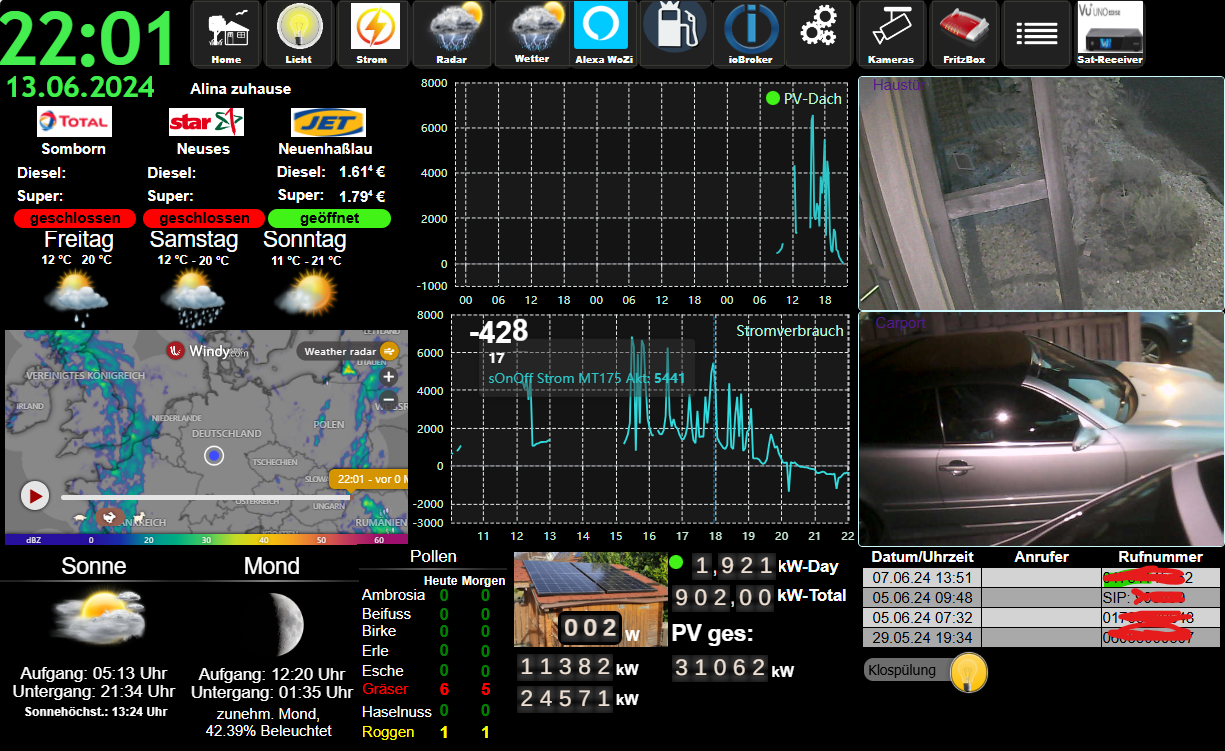
-
Ich schon wieder mit news....
Aus Zeitgründen konnte ich die SD-Karte nicht mit OS neu bespielen. Bin beruflich unterwegs und habe nur Fernzugriff! Entsprechend habe ich rumgespielt...
- iobroker neu bespielt mit: curl -sLf https://iobroker.net/install.sh | bash -
- iobroker Zugriff möglich über 192.168.220.191:8081
- keine Adapter installiert (Hinweis von Ro75)
- BackItUp aus iobroker gestartet und mein Backup (letzte Version Vis) installiert
- übe: iobroker logs --watch | uniq beobachtet was passiert (Hinweis Thomas Braun)
- ca. 1.5Std gewartet bis Installation abgeschloßen wurde (das hatte ich vorher falsch gemacht)
- Meine VIS läuft wieder, Zugriff möglich, Editieren möglich
- kein Zugriff aus iobroker möglich, Fehler "invalid key"
Meldungen die bei start iob diag erscheinen:
*** iob diag is starting up, please wait ***
The state system.host.raspberrypi.versions.nodeNewestNext was not found!
The state system.host.raspberrypi.versions.npmNewestNext was not found!
The state system.host.raspberrypi.versions.nodeCurrent was not found!Summary Diag:
======================= SUMMARY =======================
v.2024-05-22Static hostname: raspberrypi
Icon name: computer
Operating System: Debian GNU/Linux 12 (bookworm)
Kernel: Linux 6.6.20+rpt-rpi-v8
Architecture: arm64Installation: native
Kernel: aarch64
Userland: 64 bit
Timezone: Europe/Berlin (CEST, +0200)
User-ID: 1000
Display-Server: false
Boot Target: multi-user.targetPending OS-Updates: 23
Pending iob updates: 37Nodejs-Installation:
/usr/bin/nodejs v20.14.0
/usr/bin/node v20.14.0
/usr/bin/npm 10.7.0
/usr/bin/npx 10.7.0
/usr/bin/corepack 0.28.1Recommended versions are nodejs and npm
Your nodejs installation is correctMEMORY:
total used free shared buff/cache available
Mem: 4.0G 1.2G 2.1G 1.2M 750M 2.8G
Swap: 104M 0B 104M
Total: 4.1G 1.2G 2.3GActive iob-Instances: 25
Active repo(s): betaioBroker Core: js-controller 5.0.19
admin 6.3.5ioBroker Status: iobroker is running on this host.
Objects type: jsonl
States type: jsonlStatus admin and web instance:
system.adapter.admin.0 : admin : raspberrypi - enabled, compact disabled, port: 8081, bind: 0.0.0.0, run as: admin- system.adapter.web.0 : web : raspberrypi - enabled, compact enabled (group 1), port: 8082, bind: 0.0.0.0, run as: admin
Objects: 10753
States: 8987Size of iob-Database:
23M /opt/iobroker/iobroker-data/objects.jsonl
11M /opt/iobroker/iobroker-data/states.jsonl=================== END OF SUMMARY ====================
Was würdet ihr nun empfehlen? Meine Vis läuft wieder, ich komme aber nicht auf iobroker drauf (Meldung invalid Key).
Meine VIS:
-
@loco sagte in IoBroker und VIS verweigert Zugriff:
Was würdet ihr nun empfehlen?
Ich würde empfehlen, Hinweise, die hier gegeben werden, nicht konsequent wegzuignorieren und Fragen, die an dich gestellt werden, auch zu beantworten. Sonst hat keiner (der sonst hilfsbereiten Formumsmitglieder) Bock mehr zu helfen, und ich kann es verstehen.
-
@loco sagte in IoBroker und VIS verweigert Zugriff:
Was würdet ihr nun empfehlen?
Ich würde empfehlen, Hinweise, die hier gegeben werden, nicht konsequent wegzuignorieren und Fragen, die an dich gestellt werden, auch zu beantworten. Sonst hat keiner (der sonst hilfsbereiten Formumsmitglieder) Bock mehr zu helfen, und ich kann es verstehen.
@marc-berg ja, du hast recht!
ich habe mir alles mögliche angeschaut und nach Fehler gesucht.
Es ging wieder nachdem ich iob restart über Putty eingegeben hatte!
Damit war meine Frage dann auch hinfällig und ich wollte nicht noch mehr aufsehen verursachen -
@marc-berg ja, du hast recht!
ich habe mir alles mögliche angeschaut und nach Fehler gesucht.
Es ging wieder nachdem ich iob restart über Putty eingegeben hatte!
Damit war meine Frage dann auch hinfällig und ich wollte nicht noch mehr aufsehen verursachenDann könntest du das auch mal in Angriff nehmen:
Pending OS-Updates: 23
Pending iob updates: 37Allerdings würde ich zuvor aus dem Beta-Programm aussteigen...




Hey! Du scheinst an dieser Unterhaltung interessiert zu sein, hast aber noch kein Konto.
Hast du es satt, bei jedem Besuch durch die gleichen Beiträge zu scrollen? Wenn du dich für ein Konto anmeldest, kommst du immer genau dorthin zurück, wo du zuvor warst, und kannst dich über neue Antworten benachrichtigen lassen (entweder per E-Mail oder Push-Benachrichtigung). Du kannst auch Lesezeichen speichern und Beiträge positiv bewerten, um anderen Community-Mitgliedern deine Wertschätzung zu zeigen.
Mit deinem Input könnte dieser Beitrag noch besser werden 💗
Registrieren Anmelden358
Online33.0k
Benutzende83.7k
Themen1.3m
Beiträge