Skip to content
  • Home
  • Aktuell
  • Tags
  • 0 Ungelesen 0
  • Kategorien
  • Unreplied
  • Beliebt
  • GitHub
  • Docu
  • Hilfe
Skins
  • Light
  • Brite
  • Cerulean
  • Cosmo
  • Flatly
  • Journal
  • Litera
  • Lumen
  • Lux
  • Materia
  • Minty
  • Morph
  • Pulse
  • Sandstone
  • Simplex
  • Sketchy
  • Spacelab
  • United
  • Yeti
  • Zephyr
  • Dark
  • Cyborg
  • Darkly
  • Quartz
  • Slate
  • Solar
  • Superhero
  • Vapor

  • Standard: (Kein Skin)
  • Kein Skin
Einklappen
ioBroker Logo

Community Forum

donate donate
  1. ioBroker Community Home
  2. Deutsch
  3. ioBroker Allgemein
  4. IoBroker und VIS verweigert Zugriff

NEWS

  • Neuer Blogbeitrag: Monatsrückblick - Dezember 2025 🎄
    BluefoxB
    Bluefox
    11
    1
    535

  • Weihnachtsangebot 2025! 🎄
    BluefoxB
    Bluefox
    24
    1
    1.7k

  • UPDATE 31.10.: Amazon Alexa - ioBroker Skill läuft aus ?
    apollon77A
    apollon77
    48
    3
    9.6k

IoBroker und VIS verweigert Zugriff

Geplant Angeheftet Gesperrt Verschoben ioBroker Allgemein
157 Beiträge 9 Kommentatoren 20.5k Aufrufe 6 Watching
  • Älteste zuerst
  • Neuste zuerst
  • Meiste Stimmen
Antworten
  • In einem neuen Thema antworten
Anmelden zum Antworten
Dieses Thema wurde gelöscht. Nur Nutzer mit entsprechenden Rechten können es sehen.
  • L Loco

    @ro75

    Danke !!!!!

    Installation läuft jetzt.

    Thomas BraunT Online
    Thomas BraunT Online
    Thomas Braun
    Most Active
    schrieb am zuletzt editiert von
    #60

    @loco

    Warum hast du eigentlich keinen gescheiteren User Name vergeben?
    Nenn den ersten user doch 'loco' oder nach deinem Vornamen, aber nicht 'ioBroker'. Das ist zu nah an existierenden Namen und CaMelCasEs sind auch eine schlechte Idee, weil man irgendwann vergisst, welche Buchstaben groß und welche klein sind.

    Linux-Werkzeugkasten:
    https://forum.iobroker.net/topic/42952/der-kleine-iobroker-linux-werkzeugkasten
    NodeJS Fixer Skript:
    https://forum.iobroker.net/topic/68035/iob-node-fix-skript
    iob_diag: curl -sLf -o diag.sh https://iobroker.net/diag.sh && bash diag.sh

    L 1 Antwort Letzte Antwort
    0
    • Thomas BraunT Thomas Braun

      @loco

      Warum hast du eigentlich keinen gescheiteren User Name vergeben?
      Nenn den ersten user doch 'loco' oder nach deinem Vornamen, aber nicht 'ioBroker'. Das ist zu nah an existierenden Namen und CaMelCasEs sind auch eine schlechte Idee, weil man irgendwann vergisst, welche Buchstaben groß und welche klein sind.

      L Offline
      L Offline
      Loco
      schrieb am zuletzt editiert von
      #61

      @thomas-braun
      Das stimmt! Ist hysterisch so gewachsen und ich hab nicht bedacht das anzupassen! Auch steht das auf der PI so drauf (mit Edding aufgeschrieben).

      Mal ne andere Frage, kann meine VIS diesen Zugrifffehler erzeugen? Ich würde also gerne ein Backup erstellen bevor ich irgendwie die VIS wieder zurückspielen versuche...

      Ro75R HomoranH 2 Antworten Letzte Antwort
      0
      • L Loco

        @thomas-braun
        Das stimmt! Ist hysterisch so gewachsen und ich hab nicht bedacht das anzupassen! Auch steht das auf der PI so drauf (mit Edding aufgeschrieben).

        Mal ne andere Frage, kann meine VIS diesen Zugrifffehler erzeugen? Ich würde also gerne ein Backup erstellen bevor ich irgendwie die VIS wieder zurückspielen versuche...

        Ro75R Offline
        Ro75R Offline
        Ro75
        schrieb am zuletzt editiert von
        #62

        @loco sagte in IoBroker und VIS verweigert Zugriff:

        Mal ne andere Frage, kann meine VIS diesen Zugrifffehler erzeugen? Ich würde also gerne ein Backup erstellen bevor ich irgendwie die VIS wieder zurückspielen versuche...

        Ohne Log ist das die Geschichte mit der Glaskugel.

        ioBroker installieren, Raspi aktualisieren, Backup einspielen und dann wenn nötig LOG's.

        Ro75.

        SERVER = Beelink U59 16GB DDR4 RAM 512GB SSD, FB 7490, FritzDect 200+301+440, ConBee II, Zigbee Aqara Sensoren + NOUS A1Z, NOUS A1T, Philips Hue ** ioBroker, REDIS, influxdb2, Grafana, PiHole, Plex-Mediaserver, paperless-ngx (Docker), MariaDB + phpmyadmin *** VIS-Runtime = Intel NUC 8GB RAM 128GB SSD + 24" Touchscreen

        1 Antwort Letzte Antwort
        1
        • L Loco

          @thomas-braun
          Das stimmt! Ist hysterisch so gewachsen und ich hab nicht bedacht das anzupassen! Auch steht das auf der PI so drauf (mit Edding aufgeschrieben).

          Mal ne andere Frage, kann meine VIS diesen Zugrifffehler erzeugen? Ich würde also gerne ein Backup erstellen bevor ich irgendwie die VIS wieder zurückspielen versuche...

          HomoranH Nicht stören
          HomoranH Nicht stören
          Homoran
          Global Moderator Administrators
          schrieb am zuletzt editiert von
          #63

          @loco sagte in IoBroker und VIS verweigert Zugriff:

          Mal ne andere Frage, kann meine VIS diesen Zugrifffehler erzeugen?

          ohne log oder iob diag keine Ahnung.

          Aber eher der web Adapter.
          Dazu müsste man alle Konfigurationen kennen

          kein Support per PN! - Fragen im Forum stellen - es gibt fast nichts, was nicht auch für andere interessant ist.

          Benutzt das Voting rechts unten im Beitrag wenn er euch geholfen hat.

          der Installationsfixer: curl -fsL https://iobroker.net/fix.sh | bash -

          L 1 Antwort Letzte Antwort
          0
          • HomoranH Homoran

            @loco sagte in IoBroker und VIS verweigert Zugriff:

            Mal ne andere Frage, kann meine VIS diesen Zugrifffehler erzeugen?

            ohne log oder iob diag keine Ahnung.

            Aber eher der web Adapter.
            Dazu müsste man alle Konfigurationen kennen

            L Offline
            L Offline
            Loco
            schrieb am zuletzt editiert von
            #64

            iobroker läuft jetzt!

            Wie bekomme ich nun meine alte Vis wieder aufs neue iobroker?

            Ro75R 1 Antwort Letzte Antwort
            0
            • L Loco

              iobroker läuft jetzt!

              Wie bekomme ich nun meine alte Vis wieder aufs neue iobroker?

              Ro75R Offline
              Ro75R Offline
              Ro75
              schrieb am zuletzt editiert von
              #65

              @loco Backup vom ioBroker eingespielt?

              Ro75.

              SERVER = Beelink U59 16GB DDR4 RAM 512GB SSD, FB 7490, FritzDect 200+301+440, ConBee II, Zigbee Aqara Sensoren + NOUS A1Z, NOUS A1T, Philips Hue ** ioBroker, REDIS, influxdb2, Grafana, PiHole, Plex-Mediaserver, paperless-ngx (Docker), MariaDB + phpmyadmin *** VIS-Runtime = Intel NUC 8GB RAM 128GB SSD + 24" Touchscreen

              L 1 Antwort Letzte Antwort
              0
              • Ro75R Ro75

                @loco Backup vom ioBroker eingespielt?

                Ro75.

                L Offline
                L Offline
                Loco
                schrieb am zuletzt editiert von
                #66

                @ro75

                Ich hätte jetzt nur bedenken, dass dieses Backup nicht meine VIS enthält sondern mein iobroker-System. Damit würde ich evtl. den Fehler wieder zuspielen! Oder?

                Ro75R 1 Antwort Letzte Antwort
                0
                • L Loco

                  @ro75

                  Ich hätte jetzt nur bedenken, dass dieses Backup nicht meine VIS enthält sondern mein iobroker-System. Damit würde ich evtl. den Fehler wieder zuspielen! Oder?

                  Ro75R Offline
                  Ro75R Offline
                  Ro75
                  schrieb am zuletzt editiert von
                  #67

                  @loco bei meinen Backup's ist die VIS mit drin. Wie hast du denn die VIS gesichert? Im Backup sind alle Adapter drin, welche ja auch ggfs. eintsprechende Komponenten für deine VIS mitbringen und letztlich Voraussetzung sind.

                  Ro75.

                  SERVER = Beelink U59 16GB DDR4 RAM 512GB SSD, FB 7490, FritzDect 200+301+440, ConBee II, Zigbee Aqara Sensoren + NOUS A1Z, NOUS A1T, Philips Hue ** ioBroker, REDIS, influxdb2, Grafana, PiHole, Plex-Mediaserver, paperless-ngx (Docker), MariaDB + phpmyadmin *** VIS-Runtime = Intel NUC 8GB RAM 128GB SSD + 24" Touchscreen

                  L 1 Antwort Letzte Antwort
                  0
                  • Ro75R Ro75

                    @loco bei meinen Backup's ist die VIS mit drin. Wie hast du denn die VIS gesichert? Im Backup sind alle Adapter drin, welche ja auch ggfs. eintsprechende Komponenten für deine VIS mitbringen und letztlich Voraussetzung sind.

                    Ro75.

                    L Offline
                    L Offline
                    Loco
                    schrieb am zuletzt editiert von Loco
                    #68

                    @ro75
                    So:
                    Backup erstellen:
                    cd /opt/iobroker
                    ./iobroker backup

                    Backup wieder zurückspielen:
                    sudo iobroker stop
                    sudo iobroker restore 0
                    sudo iobroker start all
                    sudo iobroker start
                    sudo iobroker upload all

                    über Putty...

                    Ro75R mcm1957M Thomas BraunT 3 Antworten Letzte Antwort
                    0
                    • L Loco

                      @ro75
                      So:
                      Backup erstellen:
                      cd /opt/iobroker
                      ./iobroker backup

                      Backup wieder zurückspielen:
                      sudo iobroker stop
                      sudo iobroker restore 0
                      sudo iobroker start all
                      sudo iobroker start
                      sudo iobroker upload all

                      über Putty...

                      Ro75R Offline
                      Ro75R Offline
                      Ro75
                      schrieb am zuletzt editiert von
                      #69

                      @loco über die GUI

                      Ro75.

                      SERVER = Beelink U59 16GB DDR4 RAM 512GB SSD, FB 7490, FritzDect 200+301+440, ConBee II, Zigbee Aqara Sensoren + NOUS A1Z, NOUS A1T, Philips Hue ** ioBroker, REDIS, influxdb2, Grafana, PiHole, Plex-Mediaserver, paperless-ngx (Docker), MariaDB + phpmyadmin *** VIS-Runtime = Intel NUC 8GB RAM 128GB SSD + 24" Touchscreen

                      1 Antwort Letzte Antwort
                      0
                      • L Loco

                        @ro75
                        So:
                        Backup erstellen:
                        cd /opt/iobroker
                        ./iobroker backup

                        Backup wieder zurückspielen:
                        sudo iobroker stop
                        sudo iobroker restore 0
                        sudo iobroker start all
                        sudo iobroker start
                        sudo iobroker upload all

                        über Putty...

                        mcm1957M Offline
                        mcm1957M Offline
                        mcm1957
                        schrieb am zuletzt editiert von
                        #70

                        @loco
                        Wie @Thomas-Braun schon geschrieben hat

                        NIE NIE NIE sudo ...

                        Entwicklung u Betreuung: envertech-pv, hoymiles-ms, ns-client, pid, snmp Adapter;
                        Support Repositoryverwaltung.

                        Wer Danke sagen will, kann nen Kaffee spendieren: https://paypal.me/mcm1957atiobroker

                        LESEN - gute Forenbeitrage

                        1 Antwort Letzte Antwort
                        0
                        • L Loco

                          @ro75
                          So:
                          Backup erstellen:
                          cd /opt/iobroker
                          ./iobroker backup

                          Backup wieder zurückspielen:
                          sudo iobroker stop
                          sudo iobroker restore 0
                          sudo iobroker start all
                          sudo iobroker start
                          sudo iobroker upload all

                          über Putty...

                          Thomas BraunT Online
                          Thomas BraunT Online
                          Thomas Braun
                          Most Active
                          schrieb am zuletzt editiert von Thomas Braun
                          #71

                          @loco

                          heul...

                          Wo bitte kommt der Mumpitz mit sudo eigentlich immer her?
                          Der iobroker wird NIE, NIE, NIE, NIEMALS per sudo angepackt. Einfach NIE!

                          Ich glaube ich wiederhole mich aber. Das hatte ich dir vor zwei Stunden schonb mal versucht nahe zu bringen.
                          Mach es NIE!

                          Linux-Werkzeugkasten:
                          https://forum.iobroker.net/topic/42952/der-kleine-iobroker-linux-werkzeugkasten
                          NodeJS Fixer Skript:
                          https://forum.iobroker.net/topic/68035/iob-node-fix-skript
                          iob_diag: curl -sLf -o diag.sh https://iobroker.net/diag.sh && bash diag.sh

                          mcm1957M 1 Antwort Letzte Antwort
                          1
                          • Thomas BraunT Thomas Braun

                            @loco

                            heul...

                            Wo bitte kommt der Mumpitz mit sudo eigentlich immer her?
                            Der iobroker wird NIE, NIE, NIE, NIEMALS per sudo angepackt. Einfach NIE!

                            Ich glaube ich wiederhole mich aber. Das hatte ich dir vor zwei Stunden schonb mal versucht nahe zu bringen.
                            Mach es NIE!

                            mcm1957M Offline
                            mcm1957M Offline
                            mcm1957
                            schrieb am zuletzt editiert von
                            #72

                            @thomas-braun said in IoBroker und VIS verweigert Zugriff:

                            @loco

                            heul...

                            Wo bitte kommt der Mumpitz mit sudo eigentlich immer her?
                            Der iobroker wird NIE, NIE, NIE, NIEMALS per sudo angepackt. Einfach NIE!

                            Beileid - hattest dass doch erst heute geschrieben !?!?

                            Entwicklung u Betreuung: envertech-pv, hoymiles-ms, ns-client, pid, snmp Adapter;
                            Support Repositoryverwaltung.

                            Wer Danke sagen will, kann nen Kaffee spendieren: https://paypal.me/mcm1957atiobroker

                            LESEN - gute Forenbeitrage

                            L 1 Antwort Letzte Antwort
                            0
                            • mcm1957M mcm1957

                              @thomas-braun said in IoBroker und VIS verweigert Zugriff:

                              @loco

                              heul...

                              Wo bitte kommt der Mumpitz mit sudo eigentlich immer her?
                              Der iobroker wird NIE, NIE, NIE, NIEMALS per sudo angepackt. Einfach NIE!

                              Beileid - hattest dass doch erst heute geschrieben !?!?

                              L Offline
                              L Offline
                              Loco
                              schrieb am zuletzt editiert von
                              #73

                              @mcm1957
                              das mit sudo ist ja jetzt klar, habs oft genug gelesen....

                              das Backup welches ich über sudo erstellt hatte ist schon länger her! Niemals sudo ist ja jetzt okay und bringt mich grad auch nicht weiter!

                              Die commands mit sudo sind ausm Internet z.B. hier:
                              https://www.smarthome-tricks.de/software-iobroker/manuelle-sicherung-von-iobroker/

                              Ro75R 1 Antwort Letzte Antwort
                              0
                              • L Loco

                                @mcm1957
                                das mit sudo ist ja jetzt klar, habs oft genug gelesen....

                                das Backup welches ich über sudo erstellt hatte ist schon länger her! Niemals sudo ist ja jetzt okay und bringt mich grad auch nicht weiter!

                                Die commands mit sudo sind ausm Internet z.B. hier:
                                https://www.smarthome-tricks.de/software-iobroker/manuelle-sicherung-von-iobroker/

                                Ro75R Offline
                                Ro75R Offline
                                Ro75
                                schrieb am zuletzt editiert von Ro75
                                #74

                                @loco der Beitrag ist aus 2018! OK. Die Datei zurück und dann über die GUI und dem Backitup - Adapter rücksichern.

                                Ro75.

                                SERVER = Beelink U59 16GB DDR4 RAM 512GB SSD, FB 7490, FritzDect 200+301+440, ConBee II, Zigbee Aqara Sensoren + NOUS A1Z, NOUS A1T, Philips Hue ** ioBroker, REDIS, influxdb2, Grafana, PiHole, Plex-Mediaserver, paperless-ngx (Docker), MariaDB + phpmyadmin *** VIS-Runtime = Intel NUC 8GB RAM 128GB SSD + 24" Touchscreen

                                L 1 Antwort Letzte Antwort
                                0
                                • Ro75R Ro75

                                  @loco der Beitrag ist aus 2018! OK. Die Datei zurück und dann über die GUI und dem Backitup - Adapter rücksichern.

                                  Ro75.

                                  L Offline
                                  L Offline
                                  Loco
                                  schrieb am zuletzt editiert von
                                  #75

                                  6281adf6-a8eb-476b-b330-f565d7df40c6-image.png

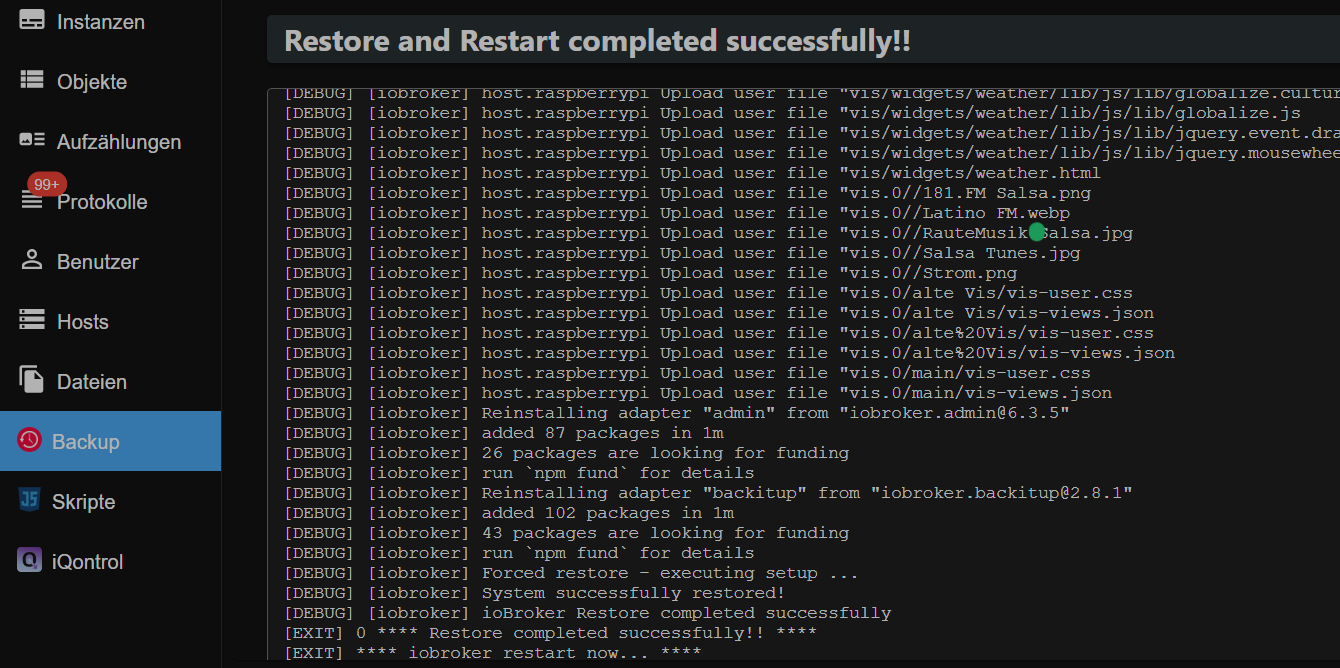
                                  Backup eingespielt und wie erwartet ist der Fehler wieder da! Verbindung abgelehnt!
                                  Also, wieder alles von vorne...

                                  Ro75R 1 Antwort Letzte Antwort
                                  0
                                  • L Loco

                                    6281adf6-a8eb-476b-b330-f565d7df40c6-image.png

                                    Backup eingespielt und wie erwartet ist der Fehler wieder da! Verbindung abgelehnt!
                                    Also, wieder alles von vorne...

                                    Ro75R Offline
                                    Ro75R Offline
                                    Ro75
                                    schrieb am zuletzt editiert von Ro75
                                    #76

                                    @loco STOP. Welcher Fehler denn. Die Rücksicherung dauert...
                                    Ro75.

                                    EDIT: Das Installieren der Adapter dauert etwas, Geduld. Die Backupdaten sind schnell eingespielt - der Rest dauert.

                                    SERVER = Beelink U59 16GB DDR4 RAM 512GB SSD, FB 7490, FritzDect 200+301+440, ConBee II, Zigbee Aqara Sensoren + NOUS A1Z, NOUS A1T, Philips Hue ** ioBroker, REDIS, influxdb2, Grafana, PiHole, Plex-Mediaserver, paperless-ngx (Docker), MariaDB + phpmyadmin *** VIS-Runtime = Intel NUC 8GB RAM 128GB SSD + 24" Touchscreen

                                    L 1 Antwort Letzte Antwort
                                    0
                                    • Ro75R Ro75

                                      @loco STOP. Welcher Fehler denn. Die Rücksicherung dauert...
                                      Ro75.

                                      EDIT: Das Installieren der Adapter dauert etwas, Geduld. Die Backupdaten sind schnell eingespielt - der Rest dauert.

                                      L Offline
                                      L Offline
                                      Loco
                                      schrieb am zuletzt editiert von
                                      #77

                                      @ro75
                                      Der Pi hat neu gestartet und bei Zugriff über 192.xxxxxxx kommt die Meldung das Zugriff abgelehnt

                                      Ro75R HomoranH 2 Antworten Letzte Antwort
                                      0
                                      • L Loco

                                        @ro75
                                        Der Pi hat neu gestartet und bei Zugriff über 192.xxxxxxx kommt die Meldung das Zugriff abgelehnt

                                        Ro75R Offline
                                        Ro75R Offline
                                        Ro75
                                        schrieb am zuletzt editiert von
                                        #78

                                        @loco bitte

                                        iob diag
                                        

                                        Ro75.

                                        SERVER = Beelink U59 16GB DDR4 RAM 512GB SSD, FB 7490, FritzDect 200+301+440, ConBee II, Zigbee Aqara Sensoren + NOUS A1Z, NOUS A1T, Philips Hue ** ioBroker, REDIS, influxdb2, Grafana, PiHole, Plex-Mediaserver, paperless-ngx (Docker), MariaDB + phpmyadmin *** VIS-Runtime = Intel NUC 8GB RAM 128GB SSD + 24" Touchscreen

                                        L 1 Antwort Letzte Antwort
                                        0
                                        • Ro75R Ro75

                                          @loco bitte

                                          iob diag
                                          

                                          Ro75.

                                          L Offline
                                          L Offline
                                          Loco
                                          schrieb am zuletzt editiert von Homoran
                                          #79

                                          @ro75

                                          Skript v.2024-05-22
                                          
                                          *** BASE SYSTEM ***
                                           Static hostname: raspberrypi
                                                 Icon name: computer
                                          Operating System: Debian GNU/Linux 12 (bookworm)
                                                    Kernel: Linux 6.6.31+rpt-rpi-v8
                                              Architecture: arm64
                                          
                                          Model           : Raspberry Pi 4 Model B Rev 1.2
                                          Docker          : false
                                          Virtualization  : none
                                          Kernel          : aarch64
                                          Userland        : 64 bit
                                          
                                          Systemuptime and Load:
                                           16:49:43 up  2:36,  2 users,  load average: 0.42, 1.65, 2.18
                                          CPU threads: 4
                                          
                                          
                                          *** RASPBERRY THROTTLING ***
                                          Current issues:
                                          No throttling issues detected.
                                          
                                          Previously detected issues:
                                          ~ Under-voltage has occurred
                                          ~ Arm frequency capping has occurred
                                          
                                          *** Time and Time Zones ***
                                                         Local time: Tue 2024-06-11 16:49:43 CEST
                                                     Universal time: Tue 2024-06-11 14:49:43 UTC
                                                           RTC time: n/a
                                                          Time zone: Europe/Berlin (CEST, +0200)
                                          System clock synchronized: yes
                                                        NTP service: active
                                                    RTC in local TZ: no
                                          
                                          *** Users and Groups ***
                                          User that called 'iob diag':
                                          ioBroker
                                          HOME=/home/ioBroker
                                          GROUPS=ioBroker adm dialout cdrom sudo audio video plugdev games users input render netdev gpio i2c spi iobroker
                                          
                                          User that is running 'js-controller':
                                          js-controller is not running
                                          
                                          *** Display-Server-Setup ***
                                          Display-Server: false
                                          Desktop:
                                          Terminal:       tty
                                          Boot Target:    multi-user.target
                                          
                                          *** MEMORY ***
                                                         total        used        free      shared  buff/cache   available
                                          Mem:            4.0G        187M        1.5G        1.2M        2.3G        3.8G
                                          Swap:           209M          0B        209M
                                          Total:          4.2G        187M        1.7G
                                          
                                          Active iob-Instances:   1
                                          
                                                   3792 M total memory
                                                    179 M used memory
                                                    404 M active memory
                                                   1703 M inactive memory
                                                   1461 M free memory
                                                    108 M buffer memory
                                                   2120 M swap cache
                                                    199 M total swap
                                                      0 M used swap
                                                    199 M free swap
                                          
                                          *** top - Table Of Processes  ***
                                          top - 16:49:43 up  2:36,  2 users,  load average: 0.42, 1.65, 2.18
                                          Tasks: 166 total,   1 running, 165 sleeping,   0 stopped,   0 zombie
                                          %Cpu(s): 40.0 us,  0.0 sy,  0.0 ni, 60.0 id,  0.0 wa,  0.0 hi,  0.0 si,  0.0 st
                                          MiB Mem :   3792.1 total,   1459.9 free,    180.2 used,   2228.7 buff/cache
                                          MiB Swap:    200.0 total,    200.0 free,      0.0 used.   3611.8 avail Mem
                                          
                                          *** FAILED SERVICES ***
                                          
                                            UNIT             LOAD   ACTIVE SUB    DESCRIPTION
                                          * iobroker.service loaded failed failed ioBroker Server
                                          
                                          LOAD   = Reflects whether the unit definition was properly loaded.
                                          ACTIVE = The high-level unit activation state, i.e. generalization of SUB.
                                          SUB    = The low-level unit activation state, values depend on unit type.
                                          1 loaded units listed.
                                          
                                          *** FILESYSTEM ***
                                          Filesystem     Type      Size  Used Avail Use% Mounted on
                                          udev           devtmpfs  1.6G     0  1.6G   0% /dev
                                          tmpfs          tmpfs     380M  1.2M  379M   1% /run
                                          /dev/mmcblk0p2 ext4       29G  3.9G   24G  15% /
                                          tmpfs          tmpfs     1.9G     0  1.9G   0% /dev/shm
                                          tmpfs          tmpfs     5.0M   16K  5.0M   1% /run/lock
                                          /dev/mmcblk0p1 vfat      510M   64M  447M  13% /boot/firmware
                                          tmpfs          tmpfs     380M     0  380M   0% /run/user/1000
                                          
                                          Messages concerning ext4 filesystem in dmesg:
                                          [Tue Jun 11 14:13:27 2024] Kernel command line: coherent_pool=1M 8250.nr_uarts=0 snd_bcm2835.enable_headphones=0 snd_bcm2835.enable_headphones=1 snd_bcm2835.enable_hdmi=1 snd_bcm2835.enable_hdmi=0  smsc95xx.macaddr=DC:A6:32:84:3E:C9 vc_mem.mem_base=0x3ec00000 vc_mem.mem_size=0x40000000  console=ttyS0,115200 console=tty1 root=PARTUUID=41700a7d-02 rootfstype=ext4 fsck.repair=yes rootwait cfg80211.ieee80211_regdom=DE
                                          [Tue Jun 11 14:13:30 2024] EXT4-fs (mmcblk0p2): mounted filesystem 93c89e92-8f2e-4522-ad32-68faed883d2f ro with ordered data mode. Quota mode: none.
                                          [Tue Jun 11 14:13:32 2024] EXT4-fs (mmcblk0p2): re-mounted 93c89e92-8f2e-4522-ad32-68faed883d2f r/w. Quota mode: none.
                                          
                                          Show mounted filesystems:
                                          TARGET                                                  SOURCE         FSTYPE      OPTIONS
                                          /                                                       /dev/mmcblk0p2 ext4        rw,noatime
                                          |-/sys                                                  sysfs          sysfs       rw,nosuid,nodev,noexec,relatime
                                          | |-/sys/kernel/security                                securityfs     securityfs  rw,nosuid,nodev,noexec,relatime
                                          | |-/sys/fs/cgroup                                      cgroup2        cgroup2     rw,nosuid,nodev,noexec,relatime,nsdelegate,memory_recursiveprot
                                          | |-/sys/fs/pstore                                      pstore         pstore      rw,nosuid,nodev,noexec,relatime
                                          | |-/sys/fs/bpf                                         bpf            bpf         rw,nosuid,nodev,noexec,relatime,mode=700
                                          | |-/sys/kernel/debug                                   debugfs        debugfs     rw,nosuid,nodev,noexec,relatime
                                          | |-/sys/kernel/tracing                                 tracefs        tracefs     rw,nosuid,nodev,noexec,relatime
                                          | |-/sys/fs/fuse/connections                            fusectl        fusectl     rw,nosuid,nodev,noexec,relatime
                                          | `-/sys/kernel/config                                  configfs       configfs    rw,nosuid,nodev,noexec,relatime
                                          |-/proc                                                 proc           proc        rw,relatime
                                          | `-/proc/sys/fs/binfmt_misc                            systemd-1      autofs      rw,relatime,fd=30,pgrp=1,timeout=0,minproto=5,maxproto=5,direct,pipe_ino=5213
                                          |   `-/proc/sys/fs/binfmt_misc                          binfmt_misc    binfmt_misc rw,nosuid,nodev,noexec,relatime
                                          |-/dev                                                  udev           devtmpfs    rw,nosuid,relatime,size=1671308k,nr_inodes=417827,mode=755
                                          | |-/dev/pts                                            devpts         devpts      rw,nosuid,noexec,relatime,gid=5,mode=620,ptmxmode=000
                                          | |-/dev/shm                                            tmpfs          tmpfs       rw,nosuid,nodev
                                          | `-/dev/mqueue                                         mqueue         mqueue      rw,nosuid,nodev,noexec,relatime
                                          |-/run                                                  tmpfs          tmpfs       rw,nosuid,nodev,noexec,relatime,size=388308k,mode=755
                                          | |-/run/lock                                           tmpfs          tmpfs       rw,nosuid,nodev,noexec,relatime,size=5120k
                                          | |-/run/credentials/systemd-sysctl.service             ramfs          ramfs       ro,nosuid,nodev,noexec,relatime,mode=700
                                          | |-/run/credentials/systemd-sysusers.service           ramfs          ramfs       ro,nosuid,nodev,noexec,relatime,mode=700
                                          | |-/run/credentials/systemd-tmpfiles-setup-dev.service ramfs          ramfs       ro,nosuid,nodev,noexec,relatime,mode=700
                                          | |-/run/rpc_pipefs                                     sunrpc         rpc_pipefs  rw,relatime
                                          | |-/run/credentials/systemd-tmpfiles-setup.service     ramfs          ramfs       ro,nosuid,nodev,noexec,relatime,mode=700
                                          | `-/run/user/1000                                      tmpfs          tmpfs       rw,nosuid,nodev,relatime,size=388304k,nr_inodes=97076,mode=700,uid=1000,gid=1000
                                          `-/boot/firmware                                        /dev/mmcblk0p1 vfat        rw,relatime,fmask=0022,dmask=0022,codepage=437,iocharset=ascii,shortname=mixed,errors=remount-ro
                                          
                                          Files in neuralgic directories:
                                          
                                          /var:
                                          624M    /var/
                                          206M    /var/cache
                                          200M    /var/cache/apt
                                          165M    /var/lib
                                          133M    /var/lib/apt/lists
                                          
                                          Archived and active journals take up 52.1M in the file system.
                                          
                                          /opt/iobroker/backups:
                                          38M     /opt/iobroker/backups/
                                          
                                          /opt/iobroker/iobroker-data:
                                          468M    /opt/iobroker/iobroker-data/
                                          434M    /opt/iobroker/iobroker-data/files
                                          142M    /opt/iobroker/iobroker-data/files/vis-2
                                          138M    /opt/iobroker/iobroker-data/files/javascript.admin
                                          118M    /opt/iobroker/iobroker-data/files/javascript.admin/static
                                          
                                          The five largest files in iobroker-data are:
                                          29M     /opt/iobroker/iobroker-data/objects.jsonl
                                          24M     /opt/iobroker/iobroker-data/files/web.admin/static/js/main.135279a0.js.map
                                          19M     /opt/iobroker/iobroker-data/files/vis-2/static/js/main.e7bb655f.js.map
                                          19M     /opt/iobroker/iobroker-data/files/vis-2/static/js/main.368dc292.js.map
                                          19M     /opt/iobroker/iobroker-data/files/vis-2/customWidgets.js.map
                                          
                                          USB-Devices by-id:
                                          USB-Sticks -  Avoid direct links to /dev/tty* in your adapter setups, please always prefer the links 'by-id':
                                          
                                          No Devices found 'by-id'


                                          *** NodeJS-Installation ***
                                          
                                          /usr/bin/nodejs         v20.14.0
                                          /usr/bin/node           v20.14.0
                                          /usr/bin/npm            10.7.0
                                          /usr/bin/npx            10.7.0
                                          /usr/bin/corepack       0.28.1
                                          
                                          
                                          nodejs:
                                            Installed: 20.14.0-1nodesource1
                                            Candidate: 20.14.0-1nodesource1
                                            Version table:
                                           *** 20.14.0-1nodesource1 1001
                                                  500 https://deb.nodesource.com/node_20.x nodistro/main arm64 Packages
                                                  100 /var/lib/dpkg/status
                                               20.13.1-1nodesource1 1001
                                                  500 https://deb.nodesource.com/node_20.x nodistro/main arm64 Packages
                                               20.13.0-1nodesource1 1001
                                                  500 https://deb.nodesource.com/node_20.x nodistro/main arm64 Packages
                                               20.12.2-1nodesource1 1001
                                                  500 https://deb.nodesource.com/node_20.x nodistro/main arm64 Packages
                                               20.12.1-1nodesource1 1001
                                                  500 https://deb.nodesource.com/node_20.x nodistro/main arm64 Packages
                                               20.12.0-1nodesource1 1001
                                                  500 https://deb.nodesource.com/node_20.x nodistro/main arm64 Packages
                                               20.11.1-1nodesource1 1001
                                                  500 https://deb.nodesource.com/node_20.x nodistro/main arm64 Packages
                                               20.11.0-1nodesource1 1001
                                                  500 https://deb.nodesource.com/node_20.x nodistro/main arm64 Packages
                                               20.10.0-1nodesource1 1001
                                                  500 https://deb.nodesource.com/node_20.x nodistro/main arm64 Packages
                                               20.9.0-1nodesource1 1001
                                                  500 https://deb.nodesource.com/node_20.x nodistro/main arm64 Packages
                                               20.8.1-1nodesource1 1001
                                                  500 https://deb.nodesource.com/node_20.x nodistro/main arm64 Packages
                                               20.8.0-1nodesource1 1001
                                                  500 https://deb.nodesource.com/node_20.x nodistro/main arm64 Packages
                                               20.7.0-1nodesource1 1001
                                                  500 https://deb.nodesource.com/node_20.x nodistro/main arm64 Packages
                                               20.6.1-1nodesource1 1001
                                                  500 https://deb.nodesource.com/node_20.x nodistro/main arm64 Packages
                                               20.6.0-1nodesource1 1001
                                                  500 https://deb.nodesource.com/node_20.x nodistro/main arm64 Packages
                                               20.5.1-1nodesource1 1001
                                                  500 https://deb.nodesource.com/node_20.x nodistro/main arm64 Packages
                                               20.5.0-1nodesource1 1001
                                                  500 https://deb.nodesource.com/node_20.x nodistro/main arm64 Packages
                                               20.4.0-1nodesource1 1001
                                                  500 https://deb.nodesource.com/node_20.x nodistro/main arm64 Packages
                                               20.3.1-1nodesource1 1001
                                                  500 https://deb.nodesource.com/node_20.x nodistro/main arm64 Packages
                                               20.3.0-1nodesource1 1001
                                                  500 https://deb.nodesource.com/node_20.x nodistro/main arm64 Packages
                                               20.2.0-1nodesource1 1001
                                                  500 https://deb.nodesource.com/node_20.x nodistro/main arm64 Packages
                                               20.1.0-1nodesource1 1001
                                                  500 https://deb.nodesource.com/node_20.x nodistro/main arm64 Packages
                                               20.0.0-1nodesource1 1001
                                                  500 https://deb.nodesource.com/node_20.x nodistro/main arm64 Packages
                                               18.19.0+dfsg-6~deb12u1 500
                                                  500 http://deb.debian.org/debian-security bookworm-security/main arm64 Packages
                                               18.13.0+dfsg1-1 500
                                                  500 http://deb.debian.org/debian bookworm/main arm64 Packages
                                          
                                          Temp directories causing npm8 problem: 0
                                          No problems detected
                                          
                                          Errors in npm tree:
                                          
                                          *** ioBroker-Installation ***
                                          
                                          ioBroker Status
                                          iobroker is not running on this host.
                                          
                                          
                                          Objects type: jsonl
                                          States  type: jsonl
                                          
                                          Core adapters versions
                                          js-controller:  5.0.19
                                          admin:          6.13.16
                                          javascript:     "javascript" not found
                                          
                                          nodejs modules from github:     0
                                          
                                          Adapter State
                                            system.adapter.admin.0                  : admin                 : raspberrypi                              -  enabled, port: 8081, bind: 0.0.0.0, run as: admin
                                            system.adapter.backitup.0               : backitup              : raspberrypi                              -  enabled
                                            system.adapter.cloud.0                  : cloud                 : raspberrypi                              -  enabled
                                            system.adapter.discovery.0              : discovery             : raspberrypi                              -  enabled
                                            system.adapter.history.0                : history               : raspberrypi                              -  enabled
                                            system.adapter.hue.0                    : hue                   : raspberrypi                              -  enabled, port: 443
                                            system.adapter.hue.1                    : hue                   : raspberrypi                              -  enabled, port: 443
                                            system.adapter.iqontrol.0               : iqontrol              : raspberrypi                              -  enabled
                                            system.adapter.jarvis.0                 : jarvis                : raspberrypi                              -  enabled, port: 8082, bind: 0.0.0.0, run as: admin
                                            system.adapter.javascript.0             : javascript            : raspberrypi                              -  enabled
                                            system.adapter.ping.0                   : ping                  : raspberrypi                              -  enabled
                                            system.adapter.tr-064.0                 : tr-064                : raspberrypi                              -  enabled
                                            system.adapter.vis-2.0                  : vis-2                 : raspberrypi                              -  enabled
                                            system.adapter.web.0                    : web                   : raspberrypi                              -  enabled, port: 8082, bind: 0.0.0.0, run as: admin
                                            system.adapter.wifilight.0              : wifilight             : raspberrypi                              -  enabled
                                          
                                          + instance is alive
                                          
                                          Enabled adapters with bindings
                                            system.adapter.admin.0                  : admin                 : raspberrypi                              -  enabled, port: 8081, bind: 0.0.0.0, run as: admin
                                            system.adapter.hue.0                    : hue                   : raspberrypi                              -  enabled, port: 443
                                            system.adapter.hue.1                    : hue                   : raspberrypi                              -  enabled, port: 443
                                            system.adapter.jarvis.0                 : jarvis                : raspberrypi                              -  enabled, port: 8082, bind: 0.0.0.0, run as: admin
                                            system.adapter.web.0                    : web                   : raspberrypi                              -  enabled, port: 8082, bind: 0.0.0.0, run as: admin
                                          
                                          ioBroker-Repositories
                                          stable        : http://download.iobroker.net/sources-dist.json
                                          beta          : http://download.iobroker.net/sources-dist-latest.json
                                          
                                          Active repo(s): stable
                                          
                                          Installed ioBroker-Instances
                                          Used repository: stable
                                          Adapter    "admin"        : 6.13.16  , installed 6.13.16
                                          Adapter    "backitup"     : 2.11.0   , installed 2.11.0
                                          Controller "js-controller": 5.0.19   , installed 5.0.19
                                          
                                          Objects and States
                                          Please stand by - This may take a while
                                          Objects:        446
                                          States:         195
                                          
                                          *** OS-Repositories and Updates ***
                                          Hit:1 http://deb.debian.org/debian bookworm InRelease
                                          Hit:2 http://archive.raspberrypi.com/debian bookworm InRelease
                                          Hit:3 http://deb.debian.org/debian-security bookworm-security InRelease
                                          Hit:4 http://deb.debian.org/debian bookworm-updates InRelease
                                          Hit:5 https://deb.nodesource.com/node_20.x nodistro InRelease
                                          Reading package lists...
                                          Pending Updates: 0
                                          
                                          *** Listening Ports ***
                                          Active Internet connections (only servers)
                                          Proto Recv-Q Send-Q Local Address           Foreign Address         State       User       Inode      PID/Program name
                                          tcp        0      0 0.0.0.0:22              0.0.0.0:*               LISTEN      0          6154       680/sshd: /usr/sbin
                                          tcp6       0      0 :::22                   :::*                    LISTEN      0          6156       680/sshd: /usr/sbin
                                          udp        0      0 0.0.0.0:56833           0.0.0.0:*                           104        1653       532/avahi-daemon: r
                                          udp        0      0 0.0.0.0:5353            0.0.0.0:*                           104        1651       532/avahi-daemon: r
                                          udp6       0      0 :::40736                :::*                                104        1654       532/avahi-daemon: r
                                          udp6       0      0 fe80::92db:af89:7c1:546 :::*                                0          5927       618/NetworkManager
                                          udp6       0      0 :::5353                 :::*                                104        1652       532/avahi-daemon: r
                                          
                                          *** Log File - Last 25 Lines ***
                                          
                                          2024-06-11 16:38:11.181  - info: host.raspberrypi stopInstance system.adapter.vis-icontwo.0 (force=false, process=false)
                                          2024-06-11 16:38:11.181  - info: host.raspberrypi stopInstance system.adapter.vis-jqui-mfd.0 (force=false, process=false)
                                          2024-06-11 16:38:11.181  - info: host.raspberrypi stopInstance system.adapter.vis-justgage.0 (force=false, process=false)
                                          2024-06-11 16:38:11.181  - info: host.raspberrypi stopInstance system.adapter.vis-material-advanced.0 (force=false, process=false)
                                          2024-06-11 16:38:11.181  - info: host.raspberrypi stopInstance system.adapter.vis-metro.0 (force=false, process=false)
                                          2024-06-11 16:38:11.181  - info: host.raspberrypi stopInstance system.adapter.vis-players.0 (force=false, process=false)
                                          2024-06-11 16:38:11.181  - info: host.raspberrypi stopInstance system.adapter.vis-timeandweather.0 (force=false, process=false)
                                          2024-06-11 16:38:11.181  - info: host.raspberrypi stopInstance system.adapter.vis-weather.0 (force=false, process=false)
                                          2024-06-11 16:38:11.181  - info: host.raspberrypi stopInstance system.adapter.vis.0 (force=false, process=false)
                                          2024-06-11 16:38:11.182  - info: host.raspberrypi iobroker npm-install: exit null
                                          2024-06-11 16:38:11.188  - info: backitup.0 (COMPACT) Got terminate signal TERMINATE_YOURSELF
                                          2024-06-11 16:38:11.191  - info: host.raspberrypi.compactgroup1 stopInstance system.adapter.backitup.0 send kill signal
                                          2024-06-11 16:38:11.192  - info: backitup.0 (COMPACT) terminating
                                          2024-06-11 16:38:11.193  - info: backitup.0 (COMPACT) Terminated (NO_ERROR): Without reason
                                          2024-06-11 16:38:11.268  - info: backitup.0 (COMPACT) terminating
                                          2024-06-11 16:38:12.183  - warn: host.raspberrypi startInstance cannot find adapter "icons-mfd-png@1.1.0". Try to install it... 1 attempt
                                          2024-06-11 16:38:12.183  - info: host.raspberrypi iobroker install icons-mfd-png@1.1.0 using installedFrom
                                          2024-06-11 16:38:12.267  - info: backitup.0 (COMPACT) terminating with timeout
                                          2024-06-11 16:38:12.330  - info: host.raspberrypi.compactgroup1 instance system.adapter.backitup.0 terminated with code 0 (NO_ERROR)
                                          2024-06-11 16:38:12.336  - info: host.raspberrypi.compactgroup1 All instances are stopped.
                                          2024-06-11 16:38:12.379  - info: host.raspberrypi.compactgroup1 terminated
                                          2024-06-11 16:38:13.404  - info: host.raspberrypi compactgroup controller 1 terminated with code 1 (JS_CONTROLLER_STOPPED)
                                          2024-06-11 16:38:13.530  - info: host.raspberrypi All instances are stopped.
                                          2024-06-11 16:38:13.697  - info: host.raspberrypi terminated
                                          2024-06-11 16:38:14.028  - info: host.raspberrypi iobroker npm-install:  Unable to subscribe to meta namespace "meta." changes: Connection is closed.


                                          ============ Mark until here for C&P =============

                                          iob diag has finished.

                                          L 1 Antwort Letzte Antwort
                                          0
                                          Antworten
                                          • In einem neuen Thema antworten
                                          Anmelden zum Antworten
                                          • Älteste zuerst
                                          • Neuste zuerst
                                          • Meiste Stimmen


                                          Support us

                                          ioBroker
                                          Community Adapters
                                          Donate
                                          FAQ Cloud / IOT
                                          HowTo: Node.js-Update
                                          HowTo: Backup/Restore
                                          Downloads
                                          BLOG

                                          316

                                          Online

                                          32.5k

                                          Benutzer

                                          81.8k

                                          Themen

                                          1.3m

                                          Beiträge
                                          Community
                                          Impressum | Datenschutz-Bestimmungen | Nutzungsbedingungen | Einwilligungseinstellungen
                                          ioBroker Community 2014-2025
                                          logo
                                          • Anmelden

                                          • Du hast noch kein Konto? Registrieren

                                          • Anmelden oder registrieren, um zu suchen
                                          • Erster Beitrag
                                            Letzter Beitrag
                                          0
                                          • Home
                                          • Aktuell
                                          • Tags
                                          • Ungelesen 0
                                          • Kategorien
                                          • Unreplied
                                          • Beliebt
                                          • GitHub
                                          • Docu
                                          • Hilfe