




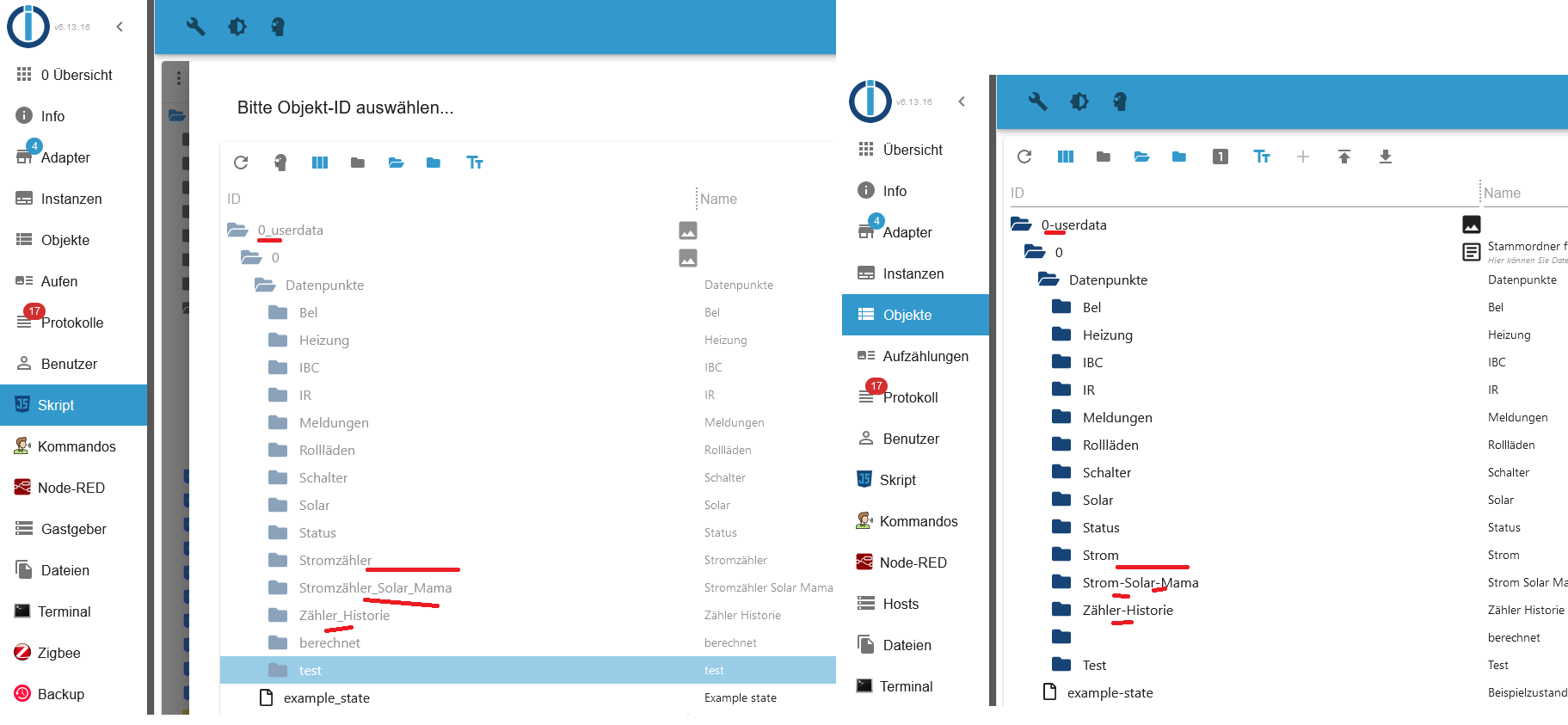
[gelöst] Namen defekt -> anstatt Unterstrich Minus
-
-
@djmarc75
danke für den Hinweis mit iob diag.
Da stand ganz klar:This system needs to be REBOOTED!
Danach war der Fehler weg. Der letzte Neustart war vor 100 Tagen.
Vielen Dank
Gruß Tobi@stfan1409 sagte in Namen defekt -> anstatt Unterstrich Minus:
danke für den Hinweis mit iob diag.
Danke fürs zeigen
 :-)
:-)@djmarc75 sagte in Namen defekt -> anstatt Unterstrich Minus:
zeig doch mal die Langfassung von
-
@stfan1409 sagte in Namen defekt -> anstatt Unterstrich Minus:
danke für den Hinweis mit iob diag.
Danke fürs zeigen
:-)@djmarc75 sagte in Namen defekt -> anstatt Unterstrich Minus:
zeig doch mal die Langfassung von
Ich dachte wenn es so klar drinn steht ist es nicht weiter von Interesse

connection lost .

/opt/iobroker$ iob diag


TERM environment variable not set.

*** iob diag is starting up, please wait ***

TERM environment variable not set.


107*** ioBroker Diagnosis ***

Please stretch the window of your terminal programm (puTTY) as wide as possible or switch to full screen

The following checks may give hints to potential malconfigurations or errors, please post them in our forum:

https://forum.iobroker.net

Just copy and paste the Summary Page, including the ``` characters at start and end.
It helps us to help you!

Press any key to continue


/opt/iobroker$

/opt/iobroker$

/opt/iobroker$ iob diag


TERM environment variable not set.
======== Start marking the full check here =========
Skript v.2024-05-22 107*** BASE SYSTEM *** Static hostname: ubuntu Icon name: computer-desktop Chassis: desktop Operating System: Ubuntu 22.04.3 LTS Kernel: Linux 5.15.0-94-generic Architecture: x86-64 Hardware Vendor: Lenovo Hardware Model: ThinkCentre M910q model name : Intel(R) Core(TM) i5-7500T CPU @ 2.70GHz Docker : false Virtualization : none Kernel : x86_64 Userland : 64 bit Systemuptime and Load: 10:06:22 up 112 days, 19:54, 0 users, load average: 0.14, 0.16, 0.16 CPU threads: 4 This system needs to be REBOOTED! 107*** Time and Time Zones *** Local time: Wed 2024-06-05 10:06:22 CEST Universal time: Wed 2024-06-05 08:06:22 UTC RTC time: Wed 2024-06-05 08:06:22 Time zone: Europe/Berlin (CEST, +0200) System clock synchronized: yes NTP service: active RTC in local TZ: no 107*** Users and Groups *** User that called 'iob diag': iobroker HOME=/home/iobroker GROUPS=iobroker tty dialout audio video User that is running 'js-controller': iobroker HOME=/home/iobroker GROUPS=iobroker tty dialout audio video 107*** Display-Server-Setup *** Display-Server: false Desktop: Terminal: Boot Target: graphical.target 107*** MEMORY *** total used free shared buff/cache available Mem: 15G 5.3G 5.7G 1.0M 4.9G 10G Swap: 4.1G 0B 4.1G Total: 19G 5.3G 9.8G Active iob-Instances: 28 15877 M total memory 5287 M used memory 2249 M active memory 7223 M inactive memory 5718 M free memory 775 M buffer memory 4096 M swap cache 4095 M total swap 0 M used swap 4095 M free swap 107*** top - Table Of Processes *** top - 10:06:23 up 112 days, 19:54, 0 users, load average: 0.14, 0.16, 0.16 Tasks: 178 total, 1 running, 177 sleeping, 0 stopped, 0 zombie %Cpu(s): 7.9 us, 1.6 sy, 0.0 ni, 90.5 id, 0.0 wa, 0.0 hi, 0.0 si, 0.0 st MiB Mem : 15877.8 total, 5718.1 free, 5287.2 used, 4872.5 buff/cache MiB Swap: 4096.0 total, 4096.0 free, 0.0 used. 10252.6 avail Mem 107*** FAILED SERVICES *** UNIT LOAD ACTIVE SUB DESCRIPTION 0 loaded units listed. 107*** FILESYSTEM *** Filesystem Type Size Used Avail Use% Mounted on tmpfs tmpfs 1.6G 1.6M 1.6G 1% /run /dev/mapper/ubuntu--vg-ubuntu--lv ext4 98G 13G 81G 14% / tmpfs tmpfs 7.8G 0 7.8G 0% /dev/shm tmpfs tmpfs 5.0M 0 5.0M 0% /run/lock /dev/nvme0n1p2 ext4 2.0G 253M 1.6G 14% /boot /dev/nvme0n1p1 vfat 1.1G 6.1M 1.1G 1% /boot/efi Messages concerning ext4 filesystem in dmesg: sudo: a terminal is required to read the password; either use the -S option to read from standard input or configure an askpass helper sudo: a password is required Show mounted filesystems: TARGET SOURCE FSTYPE OPTIONS / /dev/mapper/ubuntu--vg-ubuntu--lv ext4 rw,relatime |-/sys sysfs sysfs rw,nosuid,nodev,noexec,relatime | |-/sys/kernel/security securityfs securityfs rw,nosuid,nodev,noexec,relatime | |-/sys/fs/cgroup cgroup2 cgroup2 rw,nosuid,nodev,noexec,relatime,nsdelegate,memory_recursiveprot | |-/sys/fs/pstore pstore pstore rw,nosuid,nodev,noexec,relatime | |-/sys/firmware/efi/efivars efivarfs efivarfs rw,nosuid,nodev,noexec,relatime | |-/sys/fs/bpf bpf bpf rw,nosuid,nodev,noexec,relatime,mode=700 | |-/sys/kernel/debug debugfs debugfs rw,nosuid,nodev,noexec,relatime | |-/sys/kernel/tracing tracefs tracefs rw,nosuid,nodev,noexec,relatime | |-/sys/fs/fuse/connections fusectl fusectl rw,nosuid,nodev,noexec,relatime | `-/sys/kernel/config configfs configfs rw,nosuid,nodev,noexec,relatime |-/proc proc proc rw,nosuid,nodev,noexec,relatime | `-/proc/sys/fs/binfmt_misc systemd-1 autofs rw,relatime,fd=29,pgrp=1,timeout=0,minproto=5,maxproto=5,direct,pipe_ino=21418 | `-/proc/sys/fs/binfmt_misc binfmt_misc binfmt_misc rw,nosuid,nodev,noexec,relatime |-/dev udev devtmpfs rw,nosuid,relatime,size=8071492k,nr_inodes=2017873,mode=755,inode64 | |-/dev/pts devpts devpts rw,nosuid,noexec,relatime,gid=5,mode=620,ptmxmode=000 | |-/dev/shm tmpfs tmpfs rw,nosuid,nodev,inode64 | |-/dev/hugepages hugetlbfs hugetlbfs rw,relatime,pagesize=2M | `-/dev/mqueue mqueue mqueue rw,nosuid,nodev,noexec,relatime |-/run tmpfs tmpfs rw,nosuid,nodev,noexec,relatime,size=1625892k,mode=755,inode64 | |-/run/lock tmpfs tmpfs rw,nosuid,nodev,noexec,relatime,size=5120k,inode64 | |-/run/credentials/systemd-sysusers.service none ramfs ro,nosuid,nodev,noexec,relatime,mode=700 | |-/run/rpc_pipefs sunrpc rpc_pipefs rw,relatime | `-/run/snapd/ns tmpfs[/snapd/ns] tmpfs rw,nosuid,nodev,noexec,relatime,size=1625892k,mode=755,inode64 | `-/run/snapd/ns/lxd.mnt nsfs[mnt:[4026532433]] nsfs rw |-/snap/snapd/21465 /dev/loop1 squashfs ro,nodev,relatime,errors=continue |-/snap/core20/2264 /dev/loop2 squashfs ro,nodev,relatime,errors=continue |-/snap/lxd/28373 /dev/loop7 squashfs ro,nodev,relatime,errors=continue |-/snap/core20/2318 /dev/loop0 squashfs ro,nodev,relatime,errors=continue |-/boot /dev/nvme0n1p2 ext4 rw,relatime | `-/boot/efi /dev/nvme0n1p1 vfat rw,relatime,fmask=0022,dmask=0022,codepage=437,iocharset=iso8859-1,shortname=mixed,errors=remount-ro |-/snap/lxd/27948 /dev/loop4 squashfs ro,nodev,relatime,errors=continue `-/snap/snapd/21759 /dev/loop3 squashfs ro,nodev,relatime,errors=continue Files in neuralgic directories: /var: sudo: a terminal is required to read the password; either use the -S option to read from standard input or configure an askpass helper sudo: a password is required Hint: You are currently not seeing messages from other users and the system. Users in groups 'adm', 'systemd-journal' can see all messages. Pass -q to turn off this notice. Archived and active journals take up 224.0M in the file system. /opt/iobroker/backups: 4.0K /opt/iobroker/backups/ /opt/iobroker/iobroker-data: 531M /opt/iobroker/iobroker-data/ 396M /opt/iobroker/iobroker-data/files 138M /opt/iobroker/iobroker-data/files/javascript.admin 118M /opt/iobroker/iobroker-data/files/javascript.admin/static 117M /opt/iobroker/iobroker-data/files/javascript.admin/static/js The five largest files in iobroker-data are: 33M /opt/iobroker/iobroker-data/objects.jsonl 27M /opt/iobroker/iobroker-data/files/tankerkoenig.admin/build/index.js.map 24M /opt/iobroker/iobroker-data/files/web.admin/static/js/main.135279a0.js.map 22M /opt/iobroker/iobroker-data/files/modbus.admin/static/js/main.578d79d9.js.map 21M /opt/iobroker/iobroker-data/files/s7.admin/static/js/main.9f443724.js.map USB-Devices by-id: USB-Sticks - Avoid direct links to /dev/tty* in your adapter setups, please always prefer the links 'by-id': /dev/serial/by-id/usb-ITead_Sonoff_Zigbee_3.0_USB_Dongle_Plus_c24d7c3ec945ed11a48597a40a86e0b4-if00-port0 HINT: Your zigbee.0 COM-Port is NOT matching 'by-id'. Please check your setting: /dev/ttyUSB0 107*** NodeJS-Installation *** /usr/bin/nodejs v18.18.2 /usr/bin/node v18.18.2 /usr/bin/npm 9.8.1 /usr/bin/npx 9.8.1 /usr/bin/corepack 0.19.0 nodejs: Installed: 18.18.2-1nodesource1 Candidate: 18.20.3-1nodesource1 Version table: 18.20.3-1nodesource1 500 500 https://deb.nodesource.com/node_18.x nodistro/main amd64 Packages 18.20.2-1nodesource1 500 500 https://deb.nodesource.com/node_18.x nodistro/main amd64 Packages 18.20.1-1nodesource1 500 500 https://deb.nodesource.com/node_18.x nodistro/main amd64 Packages 18.20.0-1nodesource1 500 500 https://deb.nodesource.com/node_18.x nodistro/main amd64 Packages 18.19.1-1nodesource1 500 500 https://deb.nodesource.com/node_18.x nodistro/main amd64 Packages 18.19.0-1nodesource1 500 500 https://deb.nodesource.com/node_18.x nodistro/main amd64 Packages *** 18.18.2-1nodesource1 500 500 https://deb.nodesource.com/node_18.x nodistro/main amd64 Packages 100 /var/lib/dpkg/status 18.18.1-1nodesource1 500 500 https://deb.nodesource.com/node_18.x nodistro/main amd64 Packages 18.18.0-1nodesource1 500 500 https://deb.nodesource.com/node_18.x nodistro/main amd64 Packages 18.17.1-1nodesource1 500 500 https://deb.nodesource.com/node_18.x nodistro/main amd64 Packages 18.17.0-1nodesource1 500 500 https://deb.nodesource.com/node_18.x nodistro/main amd64 Packages 18.16.1-1nodesource1 500 500 https://deb.nodesource.com/node_18.x nodistro/main amd64 Packages 18.16.0-1nodesource1 500 500 https://deb.nodesource.com/node_18.x nodistro/main amd64 Packages 18.15.0-1nodesource1 500 500 https://deb.nodesource.com/node_18.x nodistro/main amd64 Packages 18.14.2-1nodesource1 500 500 https://deb.nodesource.com/node_18.x nodistro/main amd64 Packages 18.14.1-1nodesource1 500 500 https://deb.nodesource.com/node_18.x nodistro/main amd64 Packages 18.14.0-1nodesource1 500 500 https://deb.nodesource.com/node_18.x nodistro/main amd64 Packages 18.13.0-1nodesource1 500 500 https://deb.nodesource.com/node_18.x nodistro/main amd64 Packages 18.12.0-1nodesource1 500 500 https://deb.nodesource.com/node_18.x nodistro/main amd64 Packages 18.11.0-1nodesource1 500 500 https://deb.nodesource.com/node_18.x nodistro/main amd64 Packages 18.10.0-1nodesource1 500 500 https://deb.nodesource.com/node_18.x nodistro/main amd64 Packages 18.9.1-1nodesource1 500 500 https://deb.nodesource.com/node_18.x nodistro/main amd64 Packages 18.9.0-1nodesource1 500 500 https://deb.nodesource.com/node_18.x nodistro/main amd64 Packages 18.8.0-1nodesource1 500 500 https://deb.nodesource.com/node_18.x nodistro/main amd64 Packages 18.7.0-1nodesource1 500 500 https://deb.nodesource.com/node_18.x nodistro/main amd64 Packages 18.6.0-1nodesource1 500 500 https://deb.nodesource.com/node_18.x nodistro/main amd64 Packages 18.5.0-1nodesource1 500 500 https://deb.nodesource.com/node_18.x nodistro/main amd64 Packages 18.4.0-1nodesource1 500 500 https://deb.nodesource.com/node_18.x nodistro/main amd64 Packages 18.3.0-1nodesource1 500 500 https://deb.nodesource.com/node_18.x nodistro/main amd64 Packages 18.2.0-1nodesource1 500 500 https://deb.nodesource.com/node_18.x nodistro/main amd64 Packages 18.1.0-1nodesource1 500 500 https://deb.nodesource.com/node_18.x nodistro/main amd64 Packages 18.0.0-1nodesource1 500 500 https://deb.nodesource.com/node_18.x nodistro/main amd64 Packages 12.22.9~dfsg-1ubuntu3.5 500 500 http://de.archive.ubuntu.com/ubuntu jammy-updates/universe amd64 Packages 500 http://de.archive.ubuntu.com/ubuntu jammy-security/universe amd64 Packages 12.22.9~dfsg-1ubuntu3 500 500 http://de.archive.ubuntu.com/ubuntu jammy/universe amd64 Packages Temp directories causing npm8 problem: 0 No problems detected Errors in npm tree: 107*** ioBroker-Installation *** ioBroker Status iobroker is running on this host. Objects type: jsonl States type: jsonl Core adapters versions js-controller: 5.0.19 admin: 6.13.16 javascript: 8.3.1 nodejs modules from github: 2 | `-- kodi-ws@2.4.4 (git+https://git@github.com/iobroker-community-adapters/kodi-ws.git#ad5a1fdc5cd0a282e6818ff152594b5d32535103) | +-- onvif@0.7.0 (git+ssh://git@github.com/agsh/onvif.git#74c21e63f4f8c3db19c5e529842af361050138cf) Adapter State + system.adapter.admin.0 : admin : ubuntu - enabled, port: 8081, bind: 0.0.0.0, run as: admin + system.adapter.alexa2.0 : alexa2 : ubuntu - enabled + system.adapter.artnet.0 : artnet : ubuntu - enabled, port: 6454 + system.adapter.backitup.0 : backitup : ubuntu - enabled system.adapter.denon.0 : denon : ubuntu - disabled + system.adapter.device-reminder.0 : device-reminder : ubuntu - enabled system.adapter.discovery.0 : discovery : ubuntu - disabled system.adapter.flot.0 : flot : ubuntu - disabled system.adapter.fritzdect.0 : fritzdect : ubuntu - disabled system.adapter.hue.0 : hue : ubuntu - disabled, port: 80 system.adapter.icons-mfd-png.0 : icons-mfd-png : ubuntu - disabled + system.adapter.info.0 : info : ubuntu - enabled + system.adapter.iqontrol.0 : iqontrol : ubuntu - enabled + system.adapter.iqontrol.1 : iqontrol : ubuntu - enabled + system.adapter.javascript.0 : javascript : ubuntu - enabled system.adapter.kodi.0 : kodi : ubuntu - disabled, port: 9090 system.adapter.logparser.0 : logparser : ubuntu - disabled + system.adapter.milight.0 : milight : ubuntu - enabled, port: 5987 system.adapter.mobile.0 : mobile : ubuntu - disabled + system.adapter.modbus.0 : modbus : ubuntu - enabled + system.adapter.modbus.1 : modbus : ubuntu - enabled + system.adapter.mqtt.0 : mqtt : ubuntu - enabled, port: 1883, bind: 0.0.0.0 + system.adapter.node-red.0 : node-red : ubuntu - enabled, port: 1880, bind: 0.0.0.0 system.adapter.parser.0 : parser : ubuntu - disabled system.adapter.ping.0 : ping : ubuntu - disabled + system.adapter.s7.0 : s7 : ubuntu - enabled + system.adapter.scenes.0 : scenes : ubuntu - enabled system.adapter.shelly.0 : shelly : ubuntu - disabled, port: 1882, bind: 0.0.0.0 + system.adapter.signal-cmb.0 : signal-cmb : ubuntu - enabled + system.adapter.signal-cmb.1 : signal-cmb : ubuntu - enabled + system.adapter.sql.0 : sql : ubuntu - enabled, port: 3307 + system.adapter.tankerkoenig.0 : tankerkoenig : ubuntu - enabled + system.adapter.telegram.0 : telegram : ubuntu - enabled, port: 8443, bind: 0.0.0.0 + system.adapter.terminal.0 : terminal : ubuntu - enabled, port: 8088, bind: 0.0.0.0, run as: admin + system.adapter.text2command.0 : text2command : ubuntu - enabled + system.adapter.time-switch.0 : time-switch : ubuntu - enabled + system.adapter.viessmannapi.1 : viessmannapi : ubuntu - enabled system.adapter.vis-colorpicker.0 : vis-colorpicker : ubuntu - disabled system.adapter.vis-history.0 : vis-history : ubuntu - disabled system.adapter.vis-hqwidgets.0 : vis-hqwidgets : ubuntu - disabled system.adapter.vis-justgage.0 : vis-justgage : ubuntu - disabled system.adapter.vis-timeandweather.0 : vis-timeandweather : ubuntu - disabled system.adapter.vis.0 : vis : ubuntu - enabled + system.adapter.web.0 : web : ubuntu - enabled, port: 8082, bind: 0.0.0.0, run as: admin + system.adapter.zigbee.0 : zigbee : ubuntu - enabled, port: /dev/ttyUSB0 + instance is alive Enabled adapters with bindings + system.adapter.admin.0 : admin : ubuntu - enabled, port: 8081, bind: 0.0.0.0, run as: admin + system.adapter.artnet.0 : artnet : ubuntu - enabled, port: 6454 + system.adapter.milight.0 : milight : ubuntu - enabled, port: 5987 + system.adapter.mqtt.0 : mqtt : ubuntu - enabled, port: 1883, bind: 0.0.0.0 + system.adapter.node-red.0 : node-red : ubuntu - enabled, port: 1880, bind: 0.0.0.0 + system.adapter.sql.0 : sql : ubuntu - enabled, port: 3307 + system.adapter.telegram.0 : telegram : ubuntu - enabled, port: 8443, bind: 0.0.0.0 + system.adapter.terminal.0 : terminal : ubuntu - enabled, port: 8088, bind: 0.0.0.0, run as: admin + system.adapter.web.0 : web : ubuntu - enabled, port: 8082, bind: 0.0.0.0, run as: admin + system.adapter.zigbee.0 : zigbee : ubuntu - enabled, port: /dev/ttyUSB0 ioBroker-Repositories stable : http://download.iobroker.net/sources-dist.json beta : http://download.iobroker.net/sources-dist-latest.json Active repo(s): stable Installed ioBroker-Instances Used repository: stable Adapter "admin" : 6.13.16 , installed 6.13.16 Adapter "alexa2" : 3.26.5 , installed 3.26.5 Adapter "artnet" : 1.2.2 , installed 1.2.2 Adapter "backitup" : 2.11.0 , installed 2.11.0 Adapter "denon" : 1.15.5 , installed 1.15.5 Adapter "device-reminder": 3.1.2 , installed 3.1.2 Adapter "discovery" : 4.4.0 , installed 4.4.0 Adapter "flot" : 1.12.0 , installed 1.12.0 Adapter "fritzdect" : 2.5.9 , installed 2.5.9 Adapter "hue" : 3.11.0 , installed 3.11.0 Adapter "icons-mfd-png": 1.2.1 , installed 1.2.1 Adapter "iqontrol" : 2.3.0 , installed 2.3.0 Adapter "javascript" : 8.3.1 , installed 8.3.1 Controller "js-controller": 5.0.19 , installed 5.0.19 Adapter "kodi" : 3.1.0 , installed 3.1.0 Adapter "logparser" : 2.2.2 , installed 2.2.2 Adapter "milight" : 0.4.0 , installed 0.4.0 Adapter "mobile" : 1.0.1 , installed 1.0.1 Adapter "modbus" : 6.1.0 , installed 6.1.0 Adapter "mqtt" : 5.2.0 , installed 5.2.0 Adapter "node-red" : 5.2.1 , installed 5.2.1 Adapter "onvif" : 1.1.3 , installed 1.1.3 Adapter "parser" : 2.1.0 , installed 2.1.0 Adapter "ping" : 1.6.2 , installed 1.6.2 Adapter "s7" : 1.4.3 , installed 1.4.3 Adapter "scenes" : 2.3.9 , installed 2.3.9 Adapter "shelly" : 6.9.0 , installed 6.9.0 Adapter "signal-cmb" : 0.3.0 , installed 0.3.0 Adapter "simple-api" : 2.8.0 , installed 2.8.0 Adapter "smartmeter" : 3.4.0 , installed 3.4.0 Adapter "socketio" : 6.7.0 , installed 6.7.0 Adapter "sql" : 2.2.0 , installed 2.2.0 Adapter "tankerkoenig" : 3.4.0 , installed 3.4.0 Adapter "telegram" : 3.3.2 , installed 3.3.2 Adapter "terminal" : 1.0.0 , installed 1.0.0 Adapter "text2command" : 3.0.3 , installed 3.0.3 Adapter "viessmannapi" : 2.3.0 , installed 2.3.0 Adapter "vis" : 1.5.4 , installed 1.5.4 Adapter "vis-colorpicker": 2.0.3 , installed 2.0.3 Adapter "vis-history" : 1.0.0 , installed 1.0.0 Adapter "vis-hqwidgets": 1.5.1 , installed 1.5.1 Adapter "vis-justgage" : 2.1.7 , installed 2.1.7 Adapter "vis-timeandweather": 1.2.2, installed 1.2.2 Adapter "web" : 6.2.5 , installed 6.2.5 Adapter "ws" : 2.6.1 , installed 2.6.1 Adapter "zigbee" : 1.10.3 , installed 1.10.3 Objects and States Please stand by - This may take a while Objects: 11061 States: 9028 107*** OS-Repositories and Updates *** W: Target Packages (contrib/binary-amd64/Packages) is configured multiple times in /etc/apt/sources.list.d/webmin.list:1 and /etc/apt/sources.list.d/webmin.list:2 W: Target Packages (contrib/binary-all/Packages) is configured multiple times in /etc/apt/sources.list.d/webmin.list:1 and /etc/apt/sources.list.d/webmin.list:2 W: Target Translations (contrib/i18n/Translation-en) is configured multiple times in /etc/apt/sources.list.d/webmin.list:1 and /etc/apt/sources.list.d/webmin.list:2 W: Target Translations (contrib/i18n/Translation-de) is configured multiple times in /etc/apt/sources.list.d/webmin.list:1 and /etc/apt/sources.list.d/webmin.list:2 W: Target CNF (contrib/cnf/Commands-amd64) is configured multiple times in /etc/apt/sources.list.d/webmin.list:1 and /etc/apt/sources.list.d/webmin.list:2 W: Target CNF (contrib/cnf/Commands-all) is configured multiple times in /etc/apt/sources.list.d/webmin.list:1 and /etc/apt/sources.list.d/webmin.list:2 W: Target Packages (contrib/binary-amd64/Packages) is configured multiple times in /etc/apt/sources.list.d/webmin.list:1 and /etc/apt/sources.list.d/webmin.list:2 W: Target Packages (contrib/binary-all/Packages) is configured multiple times in /etc/apt/sources.list.d/webmin.list:1 and /etc/apt/sources.list.d/webmin.list:2 W: Target Translations (contrib/i18n/Translation-en) is configured multiple times in /etc/apt/sources.list.d/webmin.list:1 and /etc/apt/sources.list.d/webmin.list:2 W: Target Translations (contrib/i18n/Translation-de) is configured multiple times in /etc/apt/sources.list.d/webmin.list:1 and /etc/apt/sources.list.d/webmin.list:2 W: Target CNF (contrib/cnf/Commands-amd64) is configured multiple times in /etc/apt/sources.list.d/webmin.list:1 and /etc/apt/sources.list.d/webmin.list:2 W: Target CNF (contrib/cnf/Commands-all) is configured multiple times in /etc/apt/sources.list.d/webmin.list:1 and /etc/apt/sources.list.d/webmin.list:2 Hit:1 http://de.archive.ubuntu.com/ubuntu jammy InRelease Hit:2 http://de.archive.ubuntu.com/ubuntu jammy-updates InRelease Hit:3 https://deb.nodesource.com/node_18.x nodistro InRelease Hit:4 http://de.archive.ubuntu.com/ubuntu jammy-backports InRelease Hit:5 http://de.archive.ubuntu.com/ubuntu jammy-security InRelease Ign:6 https://download.webmin.com/download/newkey/repository stable InRelease Hit:7 https://download.webmin.com/download/newkey/repository stable Release Reading package lists... W: Target Packages (contrib/binary-amd64/Packages) is configured multiple times in /etc/apt/sources.list.d/webmin.list:1 and /etc/apt/sources.list.d/webmin.list:2 W: Target Packages (contrib/binary-all/Packages) is configured multiple times in /etc/apt/sources.list.d/webmin.list:1 and /etc/apt/sources.list.d/webmin.list:2 W: Target Translations (contrib/i18n/Translation-en) is configured multiple times in /etc/apt/sources.list.d/webmin.list:1 and /etc/apt/sources.list.d/webmin.list:2 W: Target Translations (contrib/i18n/Translation-de) is configured multiple times in /etc/apt/sources.list.d/webmin.list:1 and /etc/apt/sources.list.d/webmin.list:2 W: Target CNF (contrib/cnf/Commands-amd64) is configured multiple times in /etc/apt/sources.list.d/webmin.list:1 and /etc/apt/sources.list.d/webmin.list:2 W: Target CNF (contrib/cnf/Commands-all) is configured multiple times in /etc/apt/sources.list.d/webmin.list:1 and /etc/apt/sources.list.d/webmin.list:2 W: Target Packages (contrib/binary-amd64/Packages) is configured multiple times in /etc/apt/sources.list.d/webmin.list:1 and /etc/apt/sources.list.d/webmin.list:2 W: Target Packages (contrib/binary-all/Packages) is configured multiple times in /etc/apt/sources.list.d/webmin.list:1 and /etc/apt/sources.list.d/webmin.list:2 W: Target Translations (contrib/i18n/Translation-en) is configured multiple times in /etc/apt/sources.list.d/webmin.list:1 and /etc/apt/sources.list.d/webmin.list:2 W: Target Translations (contrib/i18n/Translation-de) is configured multiple times in /etc/apt/sources.list.d/webmin.list:1 and /etc/apt/sources.list.d/webmin.list:2 W: Target CNF (contrib/cnf/Commands-amd64) is configured multiple times in /etc/apt/sources.list.d/webmin.list:1 and /etc/apt/sources.list.d/webmin.list:2 W: Target CNF (contrib/cnf/Commands-all) is configured multiple times in /etc/apt/sources.list.d/webmin.list:1 and /etc/apt/sources.list.d/webmin.list:2 Pending Updates: 69 107*** Listening Ports *** sudo: a terminal is required to read the password; either use the -S option to read from standard input or configure an askpass helper sudo: a password is required 107*** Log File - Last 25 Lines *** 2024-06-05 09:34:09.498 - info: info.0 (439389) cpu Temp res = {"main":32,"cores":[32,31,33,32],"max":33,"socket":[],"chipset":null} 2024-06-05 09:50:14.515 - info: admin.0 (439094) Adapter rating updated 2024-06-05 09:53:58.027 - info: iqontrol.0 (1063306) COUNTER Fenster OPEN: 1 of 16 2024-06-05 09:53:58.029 - info: iqontrol.0 (1063306) COUNTER Fenster LONG_OPEN: 0 of 16 2024-06-05 09:57:50.828 - info: admin.0 (439094) Request actual repository... 2024-06-05 09:57:51.196 - info: host.ubuntu Updating repository "stable" under "http://download.iobroker.net/sources-dist.json" 2024-06-05 09:57:53.077 - info: admin.0 (439094) Repository received successfully. 2024-06-05 10:02:02.255 - error: sql.0 (439173) Counter must have type "number"! 2024-06-05 10:02:02.506 - info: iqontrol.0 (1063306) COUNTER Fenster OPEN: 2 of 16 2024-06-05 10:02:02.508 - info: iqontrol.0 (1063306) COUNTER Fenster LONG_OPEN: 0 of 16 2024-06-05 10:02:23.009 - info: iqontrol.0 (1063306) COUNTER Fenster OPEN: 1 of 16 2024-06-05 10:02:23.011 - info: iqontrol.0 (1063306) COUNTER Fenster LONG_OPEN: 0 of 16 2024-06-05 10:02:24.807 - error: sql.0 (439173) Counter must have type "number"! 2024-06-05 10:02:25.054 - info: iqontrol.0 (1063306) COUNTER Fenster OPEN: 2 of 16 2024-06-05 10:02:25.056 - info: iqontrol.0 (1063306) COUNTER Fenster LONG_OPEN: 0 of 16 2024-06-05 10:02:27.169 - info: admin.0 (439094) ==> Connected system.user.admin from ::ffff:10.242.2.2 2024-06-05 10:02:35.369 - info: iqontrol.0 (1063306) COUNTER Fenster OPEN: 1 of 16 2024-06-05 10:02:35.371 - info: iqontrol.0 (1063306) COUNTER Fenster LONG_OPEN: 0 of 16 2024-06-05 10:02:40.217 - error: sql.0 (439173) Counter must have type "number"! 2024-06-05 10:02:40.507 - info: iqontrol.0 (1063306) COUNTER Fenster OPEN: 2 of 16 2024-06-05 10:02:40.508 - info: iqontrol.0 (1063306) COUNTER Fenster LONG_OPEN: 0 of 16 2024-06-05 10:02:48.724 - info: iqontrol.0 (1063306) COUNTER Fenster OPEN: 1 of 16 2024-06-05 10:02:48.726 - info: iqontrol.0 (1063306) COUNTER Fenster LONG_OPEN: 0 of 16 2024-06-05 10:04:47.179 - info: admin.0 (439094) <== Disconnect system.user.admin from ::ffff:10.242.2.2 admin 2024-06-05 10:05:14.287 - info: admin.0 (439094) ==> Connected system.user.admin from ::ffff:10.242.2.2============ Mark until here for C&P =============
iob diag has finished.
Press any key for a summary
TERM environment variable not set.
Copy text starting here:
======================= SUMMARY =======================
            v.2024-05-22


Static hostname: ubuntu
       Icon name: computer-desktop
         Chassis: desktop
Operating System: Ubuntu 22.04.3 LTS
          Kernel: Linux 5.15.0-94-generic
    Architecture: x86-64
Hardware Vendor: Lenovo
  Hardware Model: ThinkCentre M910q


Installation:         native

Kernel:         x86_64

Userland:         64 bit

Timezone:         Europe/Berlin (CEST, +0200)
User-ID:         1001

Display-Server:     false

Boot Target:         graphical.target

Pending OS-Updates:     69

Pending iob updates:     0

This system needs to be REBOOTED NOW!


Nodejs-Installation:

/usr/bin/nodejs     v18.18.2

/usr/bin/node         v18.18.2

/usr/bin/npm         9.8.1

/usr/bin/npx         9.8.1

/usr/bin/corepack     0.19.0


Recommended versions are nodejs 18.20.3 and npm 10.7.0

Your nodejs installation is correct

MEMORY:

               total        used        free      shared  buff/cache   available
Mem:             15G        5.3G        5.7G        1.0M        4.9G         10G
Swap:           4.1G          0B        4.1G
Total:           19G        5.3G        9.8G


Active iob-Instances:     28

Active repo(s): stable


ioBroker Core:         js-controller         5.0.19

            admin             6.13.16

ioBroker Status:     iobroker is running on this host.


Objects type: jsonl
States  type: jsonl

Status admin and web instance:

+ system.adapter.admin.0                  : admin                 : ubuntu                                   -  enabled, port: 8081, bind: 0.0.0.0, run as: admin
+ system.adapter.web.0                    : web                   : ubuntu                                   -  enabled, port: 8082, bind: 0.0.0.0, run as: admin


Objects:         11061
States:         9028

Size of iob-Database:


33M    /opt/iobroker/iobroker-data/objects.jsonl

16M    /opt/iobroker/iobroker-data/states.jsonl


=================== END OF SUMMARY ====================
=== Mark text until here for copying ===
/opt/iobroker$
-
Ich dachte wenn es so klar drinn steht ist es nicht weiter von Interesse
connection lost .

/opt/iobroker$ iob diag


TERM environment variable not set.

*** iob diag is starting up, please wait ***

TERM environment variable not set.


107*** ioBroker Diagnosis ***

Please stretch the window of your terminal programm (puTTY) as wide as possible or switch to full screen

The following checks may give hints to potential malconfigurations or errors, please post them in our forum:

https://forum.iobroker.net

Just copy and paste the Summary Page, including the ``` characters at start and end.
It helps us to help you!

Press any key to continue


/opt/iobroker$

/opt/iobroker$

/opt/iobroker$ iob diag


TERM environment variable not set.
======== Start marking the full check here =========
Skript v.2024-05-22 107*** BASE SYSTEM *** Static hostname: ubuntu Icon name: computer-desktop Chassis: desktop Operating System: Ubuntu 22.04.3 LTS Kernel: Linux 5.15.0-94-generic Architecture: x86-64 Hardware Vendor: Lenovo Hardware Model: ThinkCentre M910q model name : Intel(R) Core(TM) i5-7500T CPU @ 2.70GHz Docker : false Virtualization : none Kernel : x86_64 Userland : 64 bit Systemuptime and Load: 10:06:22 up 112 days, 19:54, 0 users, load average: 0.14, 0.16, 0.16 CPU threads: 4 This system needs to be REBOOTED! 107*** Time and Time Zones *** Local time: Wed 2024-06-05 10:06:22 CEST Universal time: Wed 2024-06-05 08:06:22 UTC RTC time: Wed 2024-06-05 08:06:22 Time zone: Europe/Berlin (CEST, +0200) System clock synchronized: yes NTP service: active RTC in local TZ: no 107*** Users and Groups *** User that called 'iob diag': iobroker HOME=/home/iobroker GROUPS=iobroker tty dialout audio video User that is running 'js-controller': iobroker HOME=/home/iobroker GROUPS=iobroker tty dialout audio video 107*** Display-Server-Setup *** Display-Server: false Desktop: Terminal: Boot Target: graphical.target 107*** MEMORY *** total used free shared buff/cache available Mem: 15G 5.3G 5.7G 1.0M 4.9G 10G Swap: 4.1G 0B 4.1G Total: 19G 5.3G 9.8G Active iob-Instances: 28 15877 M total memory 5287 M used memory 2249 M active memory 7223 M inactive memory 5718 M free memory 775 M buffer memory 4096 M swap cache 4095 M total swap 0 M used swap 4095 M free swap 107*** top - Table Of Processes *** top - 10:06:23 up 112 days, 19:54, 0 users, load average: 0.14, 0.16, 0.16 Tasks: 178 total, 1 running, 177 sleeping, 0 stopped, 0 zombie %Cpu(s): 7.9 us, 1.6 sy, 0.0 ni, 90.5 id, 0.0 wa, 0.0 hi, 0.0 si, 0.0 st MiB Mem : 15877.8 total, 5718.1 free, 5287.2 used, 4872.5 buff/cache MiB Swap: 4096.0 total, 4096.0 free, 0.0 used. 10252.6 avail Mem 107*** FAILED SERVICES *** UNIT LOAD ACTIVE SUB DESCRIPTION 0 loaded units listed. 107*** FILESYSTEM *** Filesystem Type Size Used Avail Use% Mounted on tmpfs tmpfs 1.6G 1.6M 1.6G 1% /run /dev/mapper/ubuntu--vg-ubuntu--lv ext4 98G 13G 81G 14% / tmpfs tmpfs 7.8G 0 7.8G 0% /dev/shm tmpfs tmpfs 5.0M 0 5.0M 0% /run/lock /dev/nvme0n1p2 ext4 2.0G 253M 1.6G 14% /boot /dev/nvme0n1p1 vfat 1.1G 6.1M 1.1G 1% /boot/efi Messages concerning ext4 filesystem in dmesg: sudo: a terminal is required to read the password; either use the -S option to read from standard input or configure an askpass helper sudo: a password is required Show mounted filesystems: TARGET SOURCE FSTYPE OPTIONS / /dev/mapper/ubuntu--vg-ubuntu--lv ext4 rw,relatime |-/sys sysfs sysfs rw,nosuid,nodev,noexec,relatime | |-/sys/kernel/security securityfs securityfs rw,nosuid,nodev,noexec,relatime | |-/sys/fs/cgroup cgroup2 cgroup2 rw,nosuid,nodev,noexec,relatime,nsdelegate,memory_recursiveprot | |-/sys/fs/pstore pstore pstore rw,nosuid,nodev,noexec,relatime | |-/sys/firmware/efi/efivars efivarfs efivarfs rw,nosuid,nodev,noexec,relatime | |-/sys/fs/bpf bpf bpf rw,nosuid,nodev,noexec,relatime,mode=700 | |-/sys/kernel/debug debugfs debugfs rw,nosuid,nodev,noexec,relatime | |-/sys/kernel/tracing tracefs tracefs rw,nosuid,nodev,noexec,relatime | |-/sys/fs/fuse/connections fusectl fusectl rw,nosuid,nodev,noexec,relatime | `-/sys/kernel/config configfs configfs rw,nosuid,nodev,noexec,relatime |-/proc proc proc rw,nosuid,nodev,noexec,relatime | `-/proc/sys/fs/binfmt_misc systemd-1 autofs rw,relatime,fd=29,pgrp=1,timeout=0,minproto=5,maxproto=5,direct,pipe_ino=21418 | `-/proc/sys/fs/binfmt_misc binfmt_misc binfmt_misc rw,nosuid,nodev,noexec,relatime |-/dev udev devtmpfs rw,nosuid,relatime,size=8071492k,nr_inodes=2017873,mode=755,inode64 | |-/dev/pts devpts devpts rw,nosuid,noexec,relatime,gid=5,mode=620,ptmxmode=000 | |-/dev/shm tmpfs tmpfs rw,nosuid,nodev,inode64 | |-/dev/hugepages hugetlbfs hugetlbfs rw,relatime,pagesize=2M | `-/dev/mqueue mqueue mqueue rw,nosuid,nodev,noexec,relatime |-/run tmpfs tmpfs rw,nosuid,nodev,noexec,relatime,size=1625892k,mode=755,inode64 | |-/run/lock tmpfs tmpfs rw,nosuid,nodev,noexec,relatime,size=5120k,inode64 | |-/run/credentials/systemd-sysusers.service none ramfs ro,nosuid,nodev,noexec,relatime,mode=700 | |-/run/rpc_pipefs sunrpc rpc_pipefs rw,relatime | `-/run/snapd/ns tmpfs[/snapd/ns] tmpfs rw,nosuid,nodev,noexec,relatime,size=1625892k,mode=755,inode64 | `-/run/snapd/ns/lxd.mnt nsfs[mnt:[4026532433]] nsfs rw |-/snap/snapd/21465 /dev/loop1 squashfs ro,nodev,relatime,errors=continue |-/snap/core20/2264 /dev/loop2 squashfs ro,nodev,relatime,errors=continue |-/snap/lxd/28373 /dev/loop7 squashfs ro,nodev,relatime,errors=continue |-/snap/core20/2318 /dev/loop0 squashfs ro,nodev,relatime,errors=continue |-/boot /dev/nvme0n1p2 ext4 rw,relatime | `-/boot/efi /dev/nvme0n1p1 vfat rw,relatime,fmask=0022,dmask=0022,codepage=437,iocharset=iso8859-1,shortname=mixed,errors=remount-ro |-/snap/lxd/27948 /dev/loop4 squashfs ro,nodev,relatime,errors=continue `-/snap/snapd/21759 /dev/loop3 squashfs ro,nodev,relatime,errors=continue Files in neuralgic directories: /var: sudo: a terminal is required to read the password; either use the -S option to read from standard input or configure an askpass helper sudo: a password is required Hint: You are currently not seeing messages from other users and the system. Users in groups 'adm', 'systemd-journal' can see all messages. Pass -q to turn off this notice. Archived and active journals take up 224.0M in the file system. /opt/iobroker/backups: 4.0K /opt/iobroker/backups/ /opt/iobroker/iobroker-data: 531M /opt/iobroker/iobroker-data/ 396M /opt/iobroker/iobroker-data/files 138M /opt/iobroker/iobroker-data/files/javascript.admin 118M /opt/iobroker/iobroker-data/files/javascript.admin/static 117M /opt/iobroker/iobroker-data/files/javascript.admin/static/js The five largest files in iobroker-data are: 33M /opt/iobroker/iobroker-data/objects.jsonl 27M /opt/iobroker/iobroker-data/files/tankerkoenig.admin/build/index.js.map 24M /opt/iobroker/iobroker-data/files/web.admin/static/js/main.135279a0.js.map 22M /opt/iobroker/iobroker-data/files/modbus.admin/static/js/main.578d79d9.js.map 21M /opt/iobroker/iobroker-data/files/s7.admin/static/js/main.9f443724.js.map USB-Devices by-id: USB-Sticks - Avoid direct links to /dev/tty* in your adapter setups, please always prefer the links 'by-id': /dev/serial/by-id/usb-ITead_Sonoff_Zigbee_3.0_USB_Dongle_Plus_c24d7c3ec945ed11a48597a40a86e0b4-if00-port0 HINT: Your zigbee.0 COM-Port is NOT matching 'by-id'. Please check your setting: /dev/ttyUSB0 107*** NodeJS-Installation *** /usr/bin/nodejs v18.18.2 /usr/bin/node v18.18.2 /usr/bin/npm 9.8.1 /usr/bin/npx 9.8.1 /usr/bin/corepack 0.19.0 nodejs: Installed: 18.18.2-1nodesource1 Candidate: 18.20.3-1nodesource1 Version table: 18.20.3-1nodesource1 500 500 https://deb.nodesource.com/node_18.x nodistro/main amd64 Packages 18.20.2-1nodesource1 500 500 https://deb.nodesource.com/node_18.x nodistro/main amd64 Packages 18.20.1-1nodesource1 500 500 https://deb.nodesource.com/node_18.x nodistro/main amd64 Packages 18.20.0-1nodesource1 500 500 https://deb.nodesource.com/node_18.x nodistro/main amd64 Packages 18.19.1-1nodesource1 500 500 https://deb.nodesource.com/node_18.x nodistro/main amd64 Packages 18.19.0-1nodesource1 500 500 https://deb.nodesource.com/node_18.x nodistro/main amd64 Packages *** 18.18.2-1nodesource1 500 500 https://deb.nodesource.com/node_18.x nodistro/main amd64 Packages 100 /var/lib/dpkg/status 18.18.1-1nodesource1 500 500 https://deb.nodesource.com/node_18.x nodistro/main amd64 Packages 18.18.0-1nodesource1 500 500 https://deb.nodesource.com/node_18.x nodistro/main amd64 Packages 18.17.1-1nodesource1 500 500 https://deb.nodesource.com/node_18.x nodistro/main amd64 Packages 18.17.0-1nodesource1 500 500 https://deb.nodesource.com/node_18.x nodistro/main amd64 Packages 18.16.1-1nodesource1 500 500 https://deb.nodesource.com/node_18.x nodistro/main amd64 Packages 18.16.0-1nodesource1 500 500 https://deb.nodesource.com/node_18.x nodistro/main amd64 Packages 18.15.0-1nodesource1 500 500 https://deb.nodesource.com/node_18.x nodistro/main amd64 Packages 18.14.2-1nodesource1 500 500 https://deb.nodesource.com/node_18.x nodistro/main amd64 Packages 18.14.1-1nodesource1 500 500 https://deb.nodesource.com/node_18.x nodistro/main amd64 Packages 18.14.0-1nodesource1 500 500 https://deb.nodesource.com/node_18.x nodistro/main amd64 Packages 18.13.0-1nodesource1 500 500 https://deb.nodesource.com/node_18.x nodistro/main amd64 Packages 18.12.0-1nodesource1 500 500 https://deb.nodesource.com/node_18.x nodistro/main amd64 Packages 18.11.0-1nodesource1 500 500 https://deb.nodesource.com/node_18.x nodistro/main amd64 Packages 18.10.0-1nodesource1 500 500 https://deb.nodesource.com/node_18.x nodistro/main amd64 Packages 18.9.1-1nodesource1 500 500 https://deb.nodesource.com/node_18.x nodistro/main amd64 Packages 18.9.0-1nodesource1 500 500 https://deb.nodesource.com/node_18.x nodistro/main amd64 Packages 18.8.0-1nodesource1 500 500 https://deb.nodesource.com/node_18.x nodistro/main amd64 Packages 18.7.0-1nodesource1 500 500 https://deb.nodesource.com/node_18.x nodistro/main amd64 Packages 18.6.0-1nodesource1 500 500 https://deb.nodesource.com/node_18.x nodistro/main amd64 Packages 18.5.0-1nodesource1 500 500 https://deb.nodesource.com/node_18.x nodistro/main amd64 Packages 18.4.0-1nodesource1 500 500 https://deb.nodesource.com/node_18.x nodistro/main amd64 Packages 18.3.0-1nodesource1 500 500 https://deb.nodesource.com/node_18.x nodistro/main amd64 Packages 18.2.0-1nodesource1 500 500 https://deb.nodesource.com/node_18.x nodistro/main amd64 Packages 18.1.0-1nodesource1 500 500 https://deb.nodesource.com/node_18.x nodistro/main amd64 Packages 18.0.0-1nodesource1 500 500 https://deb.nodesource.com/node_18.x nodistro/main amd64 Packages 12.22.9~dfsg-1ubuntu3.5 500 500 http://de.archive.ubuntu.com/ubuntu jammy-updates/universe amd64 Packages 500 http://de.archive.ubuntu.com/ubuntu jammy-security/universe amd64 Packages 12.22.9~dfsg-1ubuntu3 500 500 http://de.archive.ubuntu.com/ubuntu jammy/universe amd64 Packages Temp directories causing npm8 problem: 0 No problems detected Errors in npm tree: 107*** ioBroker-Installation *** ioBroker Status iobroker is running on this host. Objects type: jsonl States type: jsonl Core adapters versions js-controller: 5.0.19 admin: 6.13.16 javascript: 8.3.1 nodejs modules from github: 2 | `-- kodi-ws@2.4.4 (git+https://git@github.com/iobroker-community-adapters/kodi-ws.git#ad5a1fdc5cd0a282e6818ff152594b5d32535103) | +-- onvif@0.7.0 (git+ssh://git@github.com/agsh/onvif.git#74c21e63f4f8c3db19c5e529842af361050138cf) Adapter State + system.adapter.admin.0 : admin : ubuntu - enabled, port: 8081, bind: 0.0.0.0, run as: admin + system.adapter.alexa2.0 : alexa2 : ubuntu - enabled + system.adapter.artnet.0 : artnet : ubuntu - enabled, port: 6454 + system.adapter.backitup.0 : backitup : ubuntu - enabled system.adapter.denon.0 : denon : ubuntu - disabled + system.adapter.device-reminder.0 : device-reminder : ubuntu - enabled system.adapter.discovery.0 : discovery : ubuntu - disabled system.adapter.flot.0 : flot : ubuntu - disabled system.adapter.fritzdect.0 : fritzdect : ubuntu - disabled system.adapter.hue.0 : hue : ubuntu - disabled, port: 80 system.adapter.icons-mfd-png.0 : icons-mfd-png : ubuntu - disabled + system.adapter.info.0 : info : ubuntu - enabled + system.adapter.iqontrol.0 : iqontrol : ubuntu - enabled + system.adapter.iqontrol.1 : iqontrol : ubuntu - enabled + system.adapter.javascript.0 : javascript : ubuntu - enabled system.adapter.kodi.0 : kodi : ubuntu - disabled, port: 9090 system.adapter.logparser.0 : logparser : ubuntu - disabled + system.adapter.milight.0 : milight : ubuntu - enabled, port: 5987 system.adapter.mobile.0 : mobile : ubuntu - disabled + system.adapter.modbus.0 : modbus : ubuntu - enabled + system.adapter.modbus.1 : modbus : ubuntu - enabled + system.adapter.mqtt.0 : mqtt : ubuntu - enabled, port: 1883, bind: 0.0.0.0 + system.adapter.node-red.0 : node-red : ubuntu - enabled, port: 1880, bind: 0.0.0.0 system.adapter.parser.0 : parser : ubuntu - disabled system.adapter.ping.0 : ping : ubuntu - disabled + system.adapter.s7.0 : s7 : ubuntu - enabled + system.adapter.scenes.0 : scenes : ubuntu - enabled system.adapter.shelly.0 : shelly : ubuntu - disabled, port: 1882, bind: 0.0.0.0 + system.adapter.signal-cmb.0 : signal-cmb : ubuntu - enabled + system.adapter.signal-cmb.1 : signal-cmb : ubuntu - enabled + system.adapter.sql.0 : sql : ubuntu - enabled, port: 3307 + system.adapter.tankerkoenig.0 : tankerkoenig : ubuntu - enabled + system.adapter.telegram.0 : telegram : ubuntu - enabled, port: 8443, bind: 0.0.0.0 + system.adapter.terminal.0 : terminal : ubuntu - enabled, port: 8088, bind: 0.0.0.0, run as: admin + system.adapter.text2command.0 : text2command : ubuntu - enabled + system.adapter.time-switch.0 : time-switch : ubuntu - enabled + system.adapter.viessmannapi.1 : viessmannapi : ubuntu - enabled system.adapter.vis-colorpicker.0 : vis-colorpicker : ubuntu - disabled system.adapter.vis-history.0 : vis-history : ubuntu - disabled system.adapter.vis-hqwidgets.0 : vis-hqwidgets : ubuntu - disabled system.adapter.vis-justgage.0 : vis-justgage : ubuntu - disabled system.adapter.vis-timeandweather.0 : vis-timeandweather : ubuntu - disabled system.adapter.vis.0 : vis : ubuntu - enabled + system.adapter.web.0 : web : ubuntu - enabled, port: 8082, bind: 0.0.0.0, run as: admin + system.adapter.zigbee.0 : zigbee : ubuntu - enabled, port: /dev/ttyUSB0 + instance is alive Enabled adapters with bindings + system.adapter.admin.0 : admin : ubuntu - enabled, port: 8081, bind: 0.0.0.0, run as: admin + system.adapter.artnet.0 : artnet : ubuntu - enabled, port: 6454 + system.adapter.milight.0 : milight : ubuntu - enabled, port: 5987 + system.adapter.mqtt.0 : mqtt : ubuntu - enabled, port: 1883, bind: 0.0.0.0 + system.adapter.node-red.0 : node-red : ubuntu - enabled, port: 1880, bind: 0.0.0.0 + system.adapter.sql.0 : sql : ubuntu - enabled, port: 3307 + system.adapter.telegram.0 : telegram : ubuntu - enabled, port: 8443, bind: 0.0.0.0 + system.adapter.terminal.0 : terminal : ubuntu - enabled, port: 8088, bind: 0.0.0.0, run as: admin + system.adapter.web.0 : web : ubuntu - enabled, port: 8082, bind: 0.0.0.0, run as: admin + system.adapter.zigbee.0 : zigbee : ubuntu - enabled, port: /dev/ttyUSB0 ioBroker-Repositories stable : http://download.iobroker.net/sources-dist.json beta : http://download.iobroker.net/sources-dist-latest.json Active repo(s): stable Installed ioBroker-Instances Used repository: stable Adapter "admin" : 6.13.16 , installed 6.13.16 Adapter "alexa2" : 3.26.5 , installed 3.26.5 Adapter "artnet" : 1.2.2 , installed 1.2.2 Adapter "backitup" : 2.11.0 , installed 2.11.0 Adapter "denon" : 1.15.5 , installed 1.15.5 Adapter "device-reminder": 3.1.2 , installed 3.1.2 Adapter "discovery" : 4.4.0 , installed 4.4.0 Adapter "flot" : 1.12.0 , installed 1.12.0 Adapter "fritzdect" : 2.5.9 , installed 2.5.9 Adapter "hue" : 3.11.0 , installed 3.11.0 Adapter "icons-mfd-png": 1.2.1 , installed 1.2.1 Adapter "iqontrol" : 2.3.0 , installed 2.3.0 Adapter "javascript" : 8.3.1 , installed 8.3.1 Controller "js-controller": 5.0.19 , installed 5.0.19 Adapter "kodi" : 3.1.0 , installed 3.1.0 Adapter "logparser" : 2.2.2 , installed 2.2.2 Adapter "milight" : 0.4.0 , installed 0.4.0 Adapter "mobile" : 1.0.1 , installed 1.0.1 Adapter "modbus" : 6.1.0 , installed 6.1.0 Adapter "mqtt" : 5.2.0 , installed 5.2.0 Adapter "node-red" : 5.2.1 , installed 5.2.1 Adapter "onvif" : 1.1.3 , installed 1.1.3 Adapter "parser" : 2.1.0 , installed 2.1.0 Adapter "ping" : 1.6.2 , installed 1.6.2 Adapter "s7" : 1.4.3 , installed 1.4.3 Adapter "scenes" : 2.3.9 , installed 2.3.9 Adapter "shelly" : 6.9.0 , installed 6.9.0 Adapter "signal-cmb" : 0.3.0 , installed 0.3.0 Adapter "simple-api" : 2.8.0 , installed 2.8.0 Adapter "smartmeter" : 3.4.0 , installed 3.4.0 Adapter "socketio" : 6.7.0 , installed 6.7.0 Adapter "sql" : 2.2.0 , installed 2.2.0 Adapter "tankerkoenig" : 3.4.0 , installed 3.4.0 Adapter "telegram" : 3.3.2 , installed 3.3.2 Adapter "terminal" : 1.0.0 , installed 1.0.0 Adapter "text2command" : 3.0.3 , installed 3.0.3 Adapter "viessmannapi" : 2.3.0 , installed 2.3.0 Adapter "vis" : 1.5.4 , installed 1.5.4 Adapter "vis-colorpicker": 2.0.3 , installed 2.0.3 Adapter "vis-history" : 1.0.0 , installed 1.0.0 Adapter "vis-hqwidgets": 1.5.1 , installed 1.5.1 Adapter "vis-justgage" : 2.1.7 , installed 2.1.7 Adapter "vis-timeandweather": 1.2.2, installed 1.2.2 Adapter "web" : 6.2.5 , installed 6.2.5 Adapter "ws" : 2.6.1 , installed 2.6.1 Adapter "zigbee" : 1.10.3 , installed 1.10.3 Objects and States Please stand by - This may take a while Objects: 11061 States: 9028 107*** OS-Repositories and Updates *** W: Target Packages (contrib/binary-amd64/Packages) is configured multiple times in /etc/apt/sources.list.d/webmin.list:1 and /etc/apt/sources.list.d/webmin.list:2 W: Target Packages (contrib/binary-all/Packages) is configured multiple times in /etc/apt/sources.list.d/webmin.list:1 and /etc/apt/sources.list.d/webmin.list:2 W: Target Translations (contrib/i18n/Translation-en) is configured multiple times in /etc/apt/sources.list.d/webmin.list:1 and /etc/apt/sources.list.d/webmin.list:2 W: Target Translations (contrib/i18n/Translation-de) is configured multiple times in /etc/apt/sources.list.d/webmin.list:1 and /etc/apt/sources.list.d/webmin.list:2 W: Target CNF (contrib/cnf/Commands-amd64) is configured multiple times in /etc/apt/sources.list.d/webmin.list:1 and /etc/apt/sources.list.d/webmin.list:2 W: Target CNF (contrib/cnf/Commands-all) is configured multiple times in /etc/apt/sources.list.d/webmin.list:1 and /etc/apt/sources.list.d/webmin.list:2 W: Target Packages (contrib/binary-amd64/Packages) is configured multiple times in /etc/apt/sources.list.d/webmin.list:1 and /etc/apt/sources.list.d/webmin.list:2 W: Target Packages (contrib/binary-all/Packages) is configured multiple times in /etc/apt/sources.list.d/webmin.list:1 and /etc/apt/sources.list.d/webmin.list:2 W: Target Translations (contrib/i18n/Translation-en) is configured multiple times in /etc/apt/sources.list.d/webmin.list:1 and /etc/apt/sources.list.d/webmin.list:2 W: Target Translations (contrib/i18n/Translation-de) is configured multiple times in /etc/apt/sources.list.d/webmin.list:1 and /etc/apt/sources.list.d/webmin.list:2 W: Target CNF (contrib/cnf/Commands-amd64) is configured multiple times in /etc/apt/sources.list.d/webmin.list:1 and /etc/apt/sources.list.d/webmin.list:2 W: Target CNF (contrib/cnf/Commands-all) is configured multiple times in /etc/apt/sources.list.d/webmin.list:1 and /etc/apt/sources.list.d/webmin.list:2 Hit:1 http://de.archive.ubuntu.com/ubuntu jammy InRelease Hit:2 http://de.archive.ubuntu.com/ubuntu jammy-updates InRelease Hit:3 https://deb.nodesource.com/node_18.x nodistro InRelease Hit:4 http://de.archive.ubuntu.com/ubuntu jammy-backports InRelease Hit:5 http://de.archive.ubuntu.com/ubuntu jammy-security InRelease Ign:6 https://download.webmin.com/download/newkey/repository stable InRelease Hit:7 https://download.webmin.com/download/newkey/repository stable Release Reading package lists... W: Target Packages (contrib/binary-amd64/Packages) is configured multiple times in /etc/apt/sources.list.d/webmin.list:1 and /etc/apt/sources.list.d/webmin.list:2 W: Target Packages (contrib/binary-all/Packages) is configured multiple times in /etc/apt/sources.list.d/webmin.list:1 and /etc/apt/sources.list.d/webmin.list:2 W: Target Translations (contrib/i18n/Translation-en) is configured multiple times in /etc/apt/sources.list.d/webmin.list:1 and /etc/apt/sources.list.d/webmin.list:2 W: Target Translations (contrib/i18n/Translation-de) is configured multiple times in /etc/apt/sources.list.d/webmin.list:1 and /etc/apt/sources.list.d/webmin.list:2 W: Target CNF (contrib/cnf/Commands-amd64) is configured multiple times in /etc/apt/sources.list.d/webmin.list:1 and /etc/apt/sources.list.d/webmin.list:2 W: Target CNF (contrib/cnf/Commands-all) is configured multiple times in /etc/apt/sources.list.d/webmin.list:1 and /etc/apt/sources.list.d/webmin.list:2 W: Target Packages (contrib/binary-amd64/Packages) is configured multiple times in /etc/apt/sources.list.d/webmin.list:1 and /etc/apt/sources.list.d/webmin.list:2 W: Target Packages (contrib/binary-all/Packages) is configured multiple times in /etc/apt/sources.list.d/webmin.list:1 and /etc/apt/sources.list.d/webmin.list:2 W: Target Translations (contrib/i18n/Translation-en) is configured multiple times in /etc/apt/sources.list.d/webmin.list:1 and /etc/apt/sources.list.d/webmin.list:2 W: Target Translations (contrib/i18n/Translation-de) is configured multiple times in /etc/apt/sources.list.d/webmin.list:1 and /etc/apt/sources.list.d/webmin.list:2 W: Target CNF (contrib/cnf/Commands-amd64) is configured multiple times in /etc/apt/sources.list.d/webmin.list:1 and /etc/apt/sources.list.d/webmin.list:2 W: Target CNF (contrib/cnf/Commands-all) is configured multiple times in /etc/apt/sources.list.d/webmin.list:1 and /etc/apt/sources.list.d/webmin.list:2 Pending Updates: 69 107*** Listening Ports *** sudo: a terminal is required to read the password; either use the -S option to read from standard input or configure an askpass helper sudo: a password is required 107*** Log File - Last 25 Lines *** 2024-06-05 09:34:09.498 - info: info.0 (439389) cpu Temp res = {"main":32,"cores":[32,31,33,32],"max":33,"socket":[],"chipset":null} 2024-06-05 09:50:14.515 - info: admin.0 (439094) Adapter rating updated 2024-06-05 09:53:58.027 - info: iqontrol.0 (1063306) COUNTER Fenster OPEN: 1 of 16 2024-06-05 09:53:58.029 - info: iqontrol.0 (1063306) COUNTER Fenster LONG_OPEN: 0 of 16 2024-06-05 09:57:50.828 - info: admin.0 (439094) Request actual repository... 2024-06-05 09:57:51.196 - info: host.ubuntu Updating repository "stable" under "http://download.iobroker.net/sources-dist.json" 2024-06-05 09:57:53.077 - info: admin.0 (439094) Repository received successfully. 2024-06-05 10:02:02.255 - error: sql.0 (439173) Counter must have type "number"! 2024-06-05 10:02:02.506 - info: iqontrol.0 (1063306) COUNTER Fenster OPEN: 2 of 16 2024-06-05 10:02:02.508 - info: iqontrol.0 (1063306) COUNTER Fenster LONG_OPEN: 0 of 16 2024-06-05 10:02:23.009 - info: iqontrol.0 (1063306) COUNTER Fenster OPEN: 1 of 16 2024-06-05 10:02:23.011 - info: iqontrol.0 (1063306) COUNTER Fenster LONG_OPEN: 0 of 16 2024-06-05 10:02:24.807 - error: sql.0 (439173) Counter must have type "number"! 2024-06-05 10:02:25.054 - info: iqontrol.0 (1063306) COUNTER Fenster OPEN: 2 of 16 2024-06-05 10:02:25.056 - info: iqontrol.0 (1063306) COUNTER Fenster LONG_OPEN: 0 of 16 2024-06-05 10:02:27.169 - info: admin.0 (439094) ==> Connected system.user.admin from ::ffff:10.242.2.2 2024-06-05 10:02:35.369 - info: iqontrol.0 (1063306) COUNTER Fenster OPEN: 1 of 16 2024-06-05 10:02:35.371 - info: iqontrol.0 (1063306) COUNTER Fenster LONG_OPEN: 0 of 16 2024-06-05 10:02:40.217 - error: sql.0 (439173) Counter must have type "number"! 2024-06-05 10:02:40.507 - info: iqontrol.0 (1063306) COUNTER Fenster OPEN: 2 of 16 2024-06-05 10:02:40.508 - info: iqontrol.0 (1063306) COUNTER Fenster LONG_OPEN: 0 of 16 2024-06-05 10:02:48.724 - info: iqontrol.0 (1063306) COUNTER Fenster OPEN: 1 of 16 2024-06-05 10:02:48.726 - info: iqontrol.0 (1063306) COUNTER Fenster LONG_OPEN: 0 of 16 2024-06-05 10:04:47.179 - info: admin.0 (439094) <== Disconnect system.user.admin from ::ffff:10.242.2.2 admin 2024-06-05 10:05:14.287 - info: admin.0 (439094) ==> Connected system.user.admin from ::ffff:10.242.2.2============ Mark until here for C&P =============
iob diag has finished.
Press any key for a summary
TERM environment variable not set.
Copy text starting here:
======================= SUMMARY =======================
            v.2024-05-22


Static hostname: ubuntu
       Icon name: computer-desktop
         Chassis: desktop
Operating System: Ubuntu 22.04.3 LTS
          Kernel: Linux 5.15.0-94-generic
    Architecture: x86-64
Hardware Vendor: Lenovo
  Hardware Model: ThinkCentre M910q


Installation:         native

Kernel:         x86_64

Userland:         64 bit

Timezone:         Europe/Berlin (CEST, +0200)
User-ID:         1001

Display-Server:     false

Boot Target:         graphical.target

Pending OS-Updates:     69

Pending iob updates:     0

This system needs to be REBOOTED NOW!


Nodejs-Installation:

/usr/bin/nodejs     v18.18.2

/usr/bin/node         v18.18.2

/usr/bin/npm         9.8.1

/usr/bin/npx         9.8.1

/usr/bin/corepack     0.19.0


Recommended versions are nodejs 18.20.3 and npm 10.7.0

Your nodejs installation is correct

MEMORY:

               total        used        free      shared  buff/cache   available
Mem:             15G        5.3G        5.7G        1.0M        4.9G         10G
Swap:           4.1G          0B        4.1G
Total:           19G        5.3G        9.8G


Active iob-Instances:     28

Active repo(s): stable


ioBroker Core:         js-controller         5.0.19

            admin             6.13.16

ioBroker Status:     iobroker is running on this host.


Objects type: jsonl
States  type: jsonl

Status admin and web instance:

+ system.adapter.admin.0                  : admin                 : ubuntu                                   -  enabled, port: 8081, bind: 0.0.0.0, run as: admin
+ system.adapter.web.0                    : web                   : ubuntu                                   -  enabled, port: 8082, bind: 0.0.0.0, run as: admin


Objects:         11061
States:         9028

Size of iob-Database:


33M    /opt/iobroker/iobroker-data/objects.jsonl

16M    /opt/iobroker/iobroker-data/states.jsonl


=================== END OF SUMMARY ====================
=== Mark text until here for copying ===
/opt/iobroker$
@stfan1409 sagte in [gelöst] Namen defekt -> anstatt Unterstrich Minus:
ist es nicht weiter von Interesse
nur meist kommt so ein Fehler nicht allein.
ist das jetzt ein neuer Check?
auf due Scnelle und unvollständig
da steht immer noch was von reboot.
und node ist auch nicht aktuell -
@stfan1409 sagte in [gelöst] Namen defekt -> anstatt Unterstrich Minus:
ist es nicht weiter von Interesse
nur meist kommt so ein Fehler nicht allein.
ist das jetzt ein neuer Check?
auf due Scnelle und unvollständig
da steht immer noch was von reboot.
und node ist auch nicht aktuell -
@homoran
Das ist VOR dem Neustart.
Node muss ich tatsächlich aktualisieren. Das hab ich übersehen. Danke.iob stop iob fix iob nodejs-update sudo rebootUnd dann die Langfassung von
iob diagposten.
-
iob stop
iob fix
iob nodejs-update
sudo reboot
Und dann die Langfassung von
iob diagposten.
so, nun sollte alles aktuell sein.
1 Error habe ich aber noch gesehen:
Errors in npm tree: 107*** ioBroker-Installation ***
wofür steht der?iob diag:
Skript v.2024-05-22 107*** BASE SYSTEM *** Static hostname: ubuntu Icon name: computer-desktop Chassis: desktop Operating System: Ubuntu 22.04.4 LTS Kernel: Linux 5.15.0-107-generic Architecture: x86-64 Hardware Vendor: Lenovo Hardware Model: ThinkCentre M910q model name : Intel(R) Core(TM) i5-7500T CPU @ 2.70GHz Docker : false Virtualization : none Kernel : x86_64 Userland : 64 bit Systemuptime and Load: 18:41:16 up 40 min, 0 users, load average: 0.42, 0.36, 0.25 CPU threads: 4 107*** Time and Time Zones *** Local time: Wed 2024-06-05 18:41:16 CEST Universal time: Wed 2024-06-05 16:41:16 UTC RTC time: Wed 2024-06-05 16:41:16 Time zone: Europe/Berlin (CEST, +0200) System clock synchronized: yes NTP service: active RTC in local TZ: no 107*** Users and Groups *** User that called 'iob diag': iobroker HOME=/home/iobroker GROUPS=iobroker tty dialout audio video plugdev User that is running 'js-controller': iobroker HOME=/home/iobroker GROUPS=iobroker tty dialout audio video plugdev 107*** Display-Server-Setup *** Display-Server: false Desktop: Terminal: Boot Target: graphical.target 107*** MEMORY *** total used free shared buff/cache available Mem: 15G 1.8G 13G 1.0M 1.0G 13G Swap: 4.1G 0B 4.1G Total: 19G 1.8G 17G Active iob-Instances: 28 15877 M total memory 1787 M used memory 504 M active memory 1974 M inactive memory 13069 M free memory 111 M buffer memory 909 M swap cache 4095 M total swap 0 M used swap 4095 M free swap 107*** top - Table Of Processes *** top - 18:41:16 up 40 min, 0 users, load average: 0.42, 0.36, 0.25 Tasks: 182 total, 1 running, 181 sleeping, 0 stopped, 0 zombie %Cpu(s): 3.1 us, 1.5 sy, 0.0 ni, 95.4 id, 0.0 wa, 0.0 hi, 0.0 si, 0.0 st MiB Mem : 15877.8 total, 13068.8 free, 1788.0 used, 1020.9 buff/cache MiB Swap: 4096.0 total, 4096.0 free, 0.0 used. 13787.8 avail Mem 107*** FAILED SERVICES *** UNIT LOAD ACTIVE SUB DESCRIPTION 0 loaded units listed. 107*** FILESYSTEM *** Filesystem Type Size Used Avail Use% Mounted on tmpfs tmpfs 1.6G 1.5M 1.6G 1% /run /dev/mapper/ubuntu--vg-ubuntu--lv ext4 98G 14G 80G 15% / tmpfs tmpfs 7.8G 0 7.8G 0% /dev/shm tmpfs tmpfs 5.0M 0 5.0M 0% /run/lock /dev/nvme0n1p2 ext4 2.0G 254M 1.6G 14% /boot /dev/nvme0n1p1 vfat 1.1G 6.1M 1.1G 1% /boot/efi Messages concerning ext4 filesystem in dmesg: sudo: a terminal is required to read the password; either use the -S option to read from standard input or configure an askpass helper sudo: a password is required Show mounted filesystems: TARGET SOURCE FSTYPE OPTIONS / /dev/mapper/ubuntu--vg-ubuntu--lv ext4 rw,relatime |-/sys sysfs sysfs rw,nosuid,nodev,noexec,relatime | |-/sys/kernel/security securityfs securityfs rw,nosuid,nodev,noexec,relatime | |-/sys/fs/cgroup cgroup2 cgroup2 rw,nosuid,nodev,noexec,relatime,nsdelegate,memory_recursiveprot | |-/sys/fs/pstore pstore pstore rw,nosuid,nodev,noexec,relatime | |-/sys/firmware/efi/efivars efivarfs efivarfs rw,nosuid,nodev,noexec,relatime | |-/sys/fs/bpf bpf bpf rw,nosuid,nodev,noexec,relatime,mode=700 | |-/sys/kernel/debug debugfs debugfs rw,nosuid,nodev,noexec,relatime | |-/sys/kernel/tracing tracefs tracefs rw,nosuid,nodev,noexec,relatime | |-/sys/fs/fuse/connections fusectl fusectl rw,nosuid,nodev,noexec,relatime | `-/sys/kernel/config configfs configfs rw,nosuid,nodev,noexec,relatime |-/proc proc proc rw,nosuid,nodev,noexec,relatime | `-/proc/sys/fs/binfmt_misc systemd-1 autofs rw,relatime,fd=29,pgrp=1,timeout=0,minproto=5,maxproto=5,direct,pipe_ino=18348 | `-/proc/sys/fs/binfmt_misc binfmt_misc binfmt_misc rw,nosuid,nodev,noexec,relatime |-/dev udev devtmpfs rw,nosuid,relatime,size=8071116k,nr_inodes=2017779,mode=755,inode64 | |-/dev/pts devpts devpts rw,nosuid,noexec,relatime,gid=5,mode=620,ptmxmode=000 | |-/dev/shm tmpfs tmpfs rw,nosuid,nodev,inode64 | |-/dev/hugepages hugetlbfs hugetlbfs rw,relatime,pagesize=2M | `-/dev/mqueue mqueue mqueue rw,nosuid,nodev,noexec,relatime |-/run tmpfs tmpfs rw,nosuid,nodev,noexec,relatime,size=1625888k,mode=755,inode64 | |-/run/lock tmpfs tmpfs rw,nosuid,nodev,noexec,relatime,size=5120k,inode64 | |-/run/credentials/systemd-sysusers.service none ramfs ro,nosuid,nodev,noexec,relatime,mode=700 | |-/run/rpc_pipefs sunrpc rpc_pipefs rw,relatime | `-/run/snapd/ns tmpfs[/snapd/ns] tmpfs rw,nosuid,nodev,noexec,relatime,size=1625888k,mode=755,inode64 | `-/run/snapd/ns/lxd.mnt nsfs[mnt:[4026532501]] nsfs rw |-/snap/core20/2264 /dev/loop0 squashfs ro,nodev,relatime,errors=continue |-/snap/lxd/28373 /dev/loop2 squashfs ro,nodev,relatime,errors=continue |-/snap/lxd/27948 /dev/loop1 squashfs ro,nodev,relatime,errors=continue |-/snap/snapd/21465 /dev/loop3 squashfs ro,nodev,relatime,errors=continue |-/snap/core20/2318 /dev/loop4 squashfs ro,nodev,relatime,errors=continue |-/snap/snapd/21759 /dev/loop5 squashfs ro,nodev,relatime,errors=continue `-/boot /dev/nvme0n1p2 ext4 rw,relatime `-/boot/efi /dev/nvme0n1p1 vfat rw,relatime,fmask=0022,dmask=0022,codepage=437,iocharset=iso8859-1,shortname=mixed,errors=remount-ro Files in neuralgic directories: /var: sudo: a terminal is required to read the password; either use the -S option to read from standard input or configure an askpass helper sudo: a password is required Hint: You are currently not seeing messages from other users and the system. Users in groups 'adm', 'systemd-journal' can see all messages. Pass -q to turn off this notice. Archived and active journals take up 224.0M in the file system. /opt/iobroker/backups: 4.0K /opt/iobroker/backups/ /opt/iobroker/iobroker-data: 515M /opt/iobroker/iobroker-data/ 396M /opt/iobroker/iobroker-data/files 138M /opt/iobroker/iobroker-data/files/javascript.admin 118M /opt/iobroker/iobroker-data/files/javascript.admin/static 117M /opt/iobroker/iobroker-data/files/javascript.admin/static/js The five largest files in iobroker-data are: 27M /opt/iobroker/iobroker-data/files/tankerkoenig.admin/build/index.js.map 24M /opt/iobroker/iobroker-data/files/web.admin/static/js/main.135279a0.js.map 22M /opt/iobroker/iobroker-data/files/modbus.admin/static/js/main.578d79d9.js.map 21M /opt/iobroker/iobroker-data/objects.jsonl 21M /opt/iobroker/iobroker-data/files/s7.admin/static/js/main.9f443724.js.map USB-Devices by-id: USB-Sticks - Avoid direct links to /dev/tty* in your adapter setups, please always prefer the links 'by-id': /dev/serial/by-id/usb-ITead_Sonoff_Zigbee_3.0_USB_Dongle_Plus_c24d7c3ec945ed11a48597a40a86e0b4-if00-port0 HINT: Your zigbee.0 COM-Port is NOT matching 'by-id'. Please check your setting: /dev/ttyUSB0 107*** NodeJS-Installation *** /usr/bin/nodejs v20.14.0 /usr/bin/node v20.14.0 /usr/bin/npm 10.7.0 /usr/bin/npx 10.7.0 /usr/bin/corepack 0.28.1 nodejs: Installed: 20.14.0-1nodesource1 Candidate: 20.14.0-1nodesource1 Version table: *** 20.14.0-1nodesource1 1001 500 https://deb.nodesource.com/node_20.x nodistro/main amd64 Packages 100 /var/lib/dpkg/status 20.13.1-1nodesource1 1001 500 https://deb.nodesource.com/node_20.x nodistro/main amd64 Packages 20.13.0-1nodesource1 1001 500 https://deb.nodesource.com/node_20.x nodistro/main amd64 Packages 20.12.2-1nodesource1 1001 500 https://deb.nodesource.com/node_20.x nodistro/main amd64 Packages 20.12.1-1nodesource1 1001 500 https://deb.nodesource.com/node_20.x nodistro/main amd64 Packages 20.12.0-1nodesource1 1001 500 https://deb.nodesource.com/node_20.x nodistro/main amd64 Packages 20.11.1-1nodesource1 1001 500 https://deb.nodesource.com/node_20.x nodistro/main amd64 Packages 20.11.0-1nodesource1 1001 500 https://deb.nodesource.com/node_20.x nodistro/main amd64 Packages 20.10.0-1nodesource1 1001 500 https://deb.nodesource.com/node_20.x nodistro/main amd64 Packages 20.9.0-1nodesource1 1001 500 https://deb.nodesource.com/node_20.x nodistro/main amd64 Packages 20.8.1-1nodesource1 1001 500 https://deb.nodesource.com/node_20.x nodistro/main amd64 Packages 20.8.0-1nodesource1 1001 500 https://deb.nodesource.com/node_20.x nodistro/main amd64 Packages 20.7.0-1nodesource1 1001 500 https://deb.nodesource.com/node_20.x nodistro/main amd64 Packages 20.6.1-1nodesource1 1001 500 https://deb.nodesource.com/node_20.x nodistro/main amd64 Packages 20.6.0-1nodesource1 1001 500 https://deb.nodesource.com/node_20.x nodistro/main amd64 Packages 20.5.1-1nodesource1 1001 500 https://deb.nodesource.com/node_20.x nodistro/main amd64 Packages 20.5.0-1nodesource1 1001 500 https://deb.nodesource.com/node_20.x nodistro/main amd64 Packages 20.4.0-1nodesource1 1001 500 https://deb.nodesource.com/node_20.x nodistro/main amd64 Packages 20.3.1-1nodesource1 1001 500 https://deb.nodesource.com/node_20.x nodistro/main amd64 Packages 20.3.0-1nodesource1 1001 500 https://deb.nodesource.com/node_20.x nodistro/main amd64 Packages 20.2.0-1nodesource1 1001 500 https://deb.nodesource.com/node_20.x nodistro/main amd64 Packages 20.1.0-1nodesource1 1001 500 https://deb.nodesource.com/node_20.x nodistro/main amd64 Packages 20.0.0-1nodesource1 1001 500 https://deb.nodesource.com/node_20.x nodistro/main amd64 Packages 12.22.9~dfsg-1ubuntu3.5 500 500 http://de.archive.ubuntu.com/ubuntu jammy-updates/universe amd64 Packages 500 http://de.archive.ubuntu.com/ubuntu jammy-security/universe amd64 Packages 12.22.9~dfsg-1ubuntu3 500 500 http://de.archive.ubuntu.com/ubuntu jammy/universe amd64 Packages Temp directories causing npm8 problem: 0 No problems detected Errors in npm tree: 107*** ioBroker-Installation *** ioBroker Status iobroker is running on this host. Objects type: jsonl States type: jsonl Core adapters versions js-controller: 5.0.19 admin: 6.13.16 javascript: 8.3.1 nodejs modules from github: 2 | `-- kodi-ws@2.4.4 (git+https://git@github.com/iobroker-community-adapters/kodi-ws.git#ad5a1fdc5cd0a282e6818ff152594b5d32535103) | +-- onvif@0.7.0 (git+ssh://git@github.com/agsh/onvif.git#74c21e63f4f8c3db19c5e529842af361050138cf) Adapter State + system.adapter.admin.0 : admin : ubuntu - enabled, port: 8081, bind: 0.0.0.0, run as: admin + system.adapter.alexa2.0 : alexa2 : ubuntu - enabled + system.adapter.artnet.0 : artnet : ubuntu - enabled, port: 6454 + system.adapter.backitup.0 : backitup : ubuntu - enabled system.adapter.denon.0 : denon : ubuntu - disabled + system.adapter.device-reminder.0 : device-reminder : ubuntu - enabled system.adapter.discovery.0 : discovery : ubuntu - disabled system.adapter.flot.0 : flot : ubuntu - disabled system.adapter.fritzdect.0 : fritzdect : ubuntu - disabled system.adapter.hue.0 : hue : ubuntu - disabled, port: 80 system.adapter.icons-mfd-png.0 : icons-mfd-png : ubuntu - disabled + system.adapter.info.0 : info : ubuntu - enabled + system.adapter.iqontrol.0 : iqontrol : ubuntu - enabled + system.adapter.iqontrol.1 : iqontrol : ubuntu - enabled + system.adapter.javascript.0 : javascript : ubuntu - enabled system.adapter.kodi.0 : kodi : ubuntu - disabled, port: 9090 system.adapter.logparser.0 : logparser : ubuntu - disabled + system.adapter.milight.0 : milight : ubuntu - enabled, port: 5987 system.adapter.mobile.0 : mobile : ubuntu - disabled + system.adapter.modbus.0 : modbus : ubuntu - enabled + system.adapter.modbus.1 : modbus : ubuntu - enabled + system.adapter.mqtt.0 : mqtt : ubuntu - enabled, port: 1883, bind: 0.0.0.0 + system.adapter.node-red.0 : node-red : ubuntu - enabled, port: 1880, bind: 0.0.0.0 system.adapter.parser.0 : parser : ubuntu - disabled system.adapter.ping.0 : ping : ubuntu - disabled + system.adapter.s7.0 : s7 : ubuntu - enabled + system.adapter.scenes.0 : scenes : ubuntu - enabled system.adapter.shelly.0 : shelly : ubuntu - disabled, port: 1882, bind: 0.0.0.0 + system.adapter.signal-cmb.0 : signal-cmb : ubuntu - enabled + system.adapter.signal-cmb.1 : signal-cmb : ubuntu - enabled + system.adapter.sql.0 : sql : ubuntu - enabled, port: 3307 + system.adapter.tankerkoenig.0 : tankerkoenig : ubuntu - enabled + system.adapter.telegram.0 : telegram : ubuntu - enabled, port: 8443, bind: 0.0.0.0 + system.adapter.terminal.0 : terminal : ubuntu - enabled, port: 8088, bind: 0.0.0.0, run as: admin + system.adapter.text2command.0 : text2command : ubuntu - enabled + system.adapter.time-switch.0 : time-switch : ubuntu - enabled + system.adapter.viessmannapi.1 : viessmannapi : ubuntu - enabled system.adapter.vis-colorpicker.0 : vis-colorpicker : ubuntu - disabled system.adapter.vis-history.0 : vis-history : ubuntu - disabled system.adapter.vis-hqwidgets.0 : vis-hqwidgets : ubuntu - disabled system.adapter.vis-justgage.0 : vis-justgage : ubuntu - disabled system.adapter.vis-timeandweather.0 : vis-timeandweather : ubuntu - disabled system.adapter.vis.0 : vis : ubuntu - enabled + system.adapter.web.0 : web : ubuntu - enabled, port: 8082, bind: 0.0.0.0, run as: admin + system.adapter.zigbee.0 : zigbee : ubuntu - enabled, port: /dev/ttyUSB0 + instance is alive Enabled adapters with bindings + system.adapter.admin.0 : admin : ubuntu - enabled, port: 8081, bind: 0.0.0.0, run as: admin + system.adapter.artnet.0 : artnet : ubuntu - enabled, port: 6454 + system.adapter.milight.0 : milight : ubuntu - enabled, port: 5987 + system.adapter.mqtt.0 : mqtt : ubuntu - enabled, port: 1883, bind: 0.0.0.0 + system.adapter.node-red.0 : node-red : ubuntu - enabled, port: 1880, bind: 0.0.0.0 + system.adapter.sql.0 : sql : ubuntu - enabled, port: 3307 + system.adapter.telegram.0 : telegram : ubuntu - enabled, port: 8443, bind: 0.0.0.0 + system.adapter.terminal.0 : terminal : ubuntu - enabled, port: 8088, bind: 0.0.0.0, run as: admin + system.adapter.web.0 : web : ubuntu - enabled, port: 8082, bind: 0.0.0.0, run as: admin + system.adapter.zigbee.0 : zigbee : ubuntu - enabled, port: /dev/ttyUSB0 ioBroker-Repositories stable : http://download.iobroker.net/sources-dist.json beta : http://download.iobroker.net/sources-dist-latest.json Active repo(s): stable Installed ioBroker-Instances Used repository: stable Adapter "admin" : 6.13.16 , installed 6.13.16 Adapter "alexa2" : 3.26.5 , installed 3.26.5 Adapter "artnet" : 1.2.2 , installed 1.2.2 Adapter "backitup" : 2.11.0 , installed 2.11.0 Adapter "denon" : 1.15.5 , installed 1.15.5 Adapter "device-reminder": 3.1.2 , installed 3.1.2 Adapter "discovery" : 4.4.0 , installed 4.4.0 Adapter "flot" : 1.12.0 , installed 1.12.0 Adapter "fritzdect" : 2.5.9 , installed 2.5.9 Adapter "hue" : 3.11.0 , installed 3.11.0 Adapter "icons-mfd-png": 1.2.1 , installed 1.2.1 Adapter "iqontrol" : 2.3.0 , installed 2.3.0 Adapter "javascript" : 8.3.1 , installed 8.3.1 Controller "js-controller": 5.0.19 , installed 5.0.19 Adapter "kodi" : 3.1.0 , installed 3.1.0 Adapter "logparser" : 2.2.2 , installed 2.2.2 Adapter "milight" : 0.4.0 , installed 0.4.0 Adapter "mobile" : 1.0.1 , installed 1.0.1 Adapter "modbus" : 6.1.0 , installed 6.1.0 Adapter "mqtt" : 5.2.0 , installed 5.2.0 Adapter "node-red" : 5.2.1 , installed 5.2.1 Adapter "onvif" : 1.1.3 , installed 1.1.3 Adapter "parser" : 2.1.0 , installed 2.1.0 Adapter "ping" : 1.6.2 , installed 1.6.2 Adapter "s7" : 1.4.3 , installed 1.4.3 Adapter "scenes" : 2.3.9 , installed 2.3.9 Adapter "shelly" : 6.9.0 , installed 6.9.0 Adapter "signal-cmb" : 0.3.0 , installed 0.3.0 Adapter "simple-api" : 2.8.0 , installed 2.8.0 Adapter "smartmeter" : 3.4.0 , installed 3.4.0 Adapter "socketio" : 6.7.0 , installed 6.7.0 Adapter "sql" : 2.2.0 , installed 2.2.0 Adapter "tankerkoenig" : 3.4.0 , installed 3.4.0 Adapter "telegram" : 3.3.2 , installed 3.3.2 Adapter "terminal" : 1.0.0 , installed 1.0.0 Adapter "text2command" : 3.0.3 , installed 3.0.3 Adapter "viessmannapi" : 2.3.0 , installed 2.3.0 Adapter "vis" : 1.5.4 , installed 1.5.4 Adapter "vis-colorpicker": 2.0.3 , installed 2.0.3 Adapter "vis-history" : 1.0.0 , installed 1.0.0 Adapter "vis-hqwidgets": 1.5.1 , installed 1.5.1 Adapter "vis-justgage" : 2.1.7 , installed 2.1.7 Adapter "vis-timeandweather": 1.2.2, installed 1.2.2 Adapter "web" : 6.2.5 , installed 6.2.5 Adapter "ws" : 2.6.1 , installed 2.6.1 Adapter "zigbee" : 1.10.3 , installed 1.10.3 Objects and States Please stand by - This may take a while Objects: 11076 States: 9032 107*** OS-Repositories and Updates *** W: Target Packages (contrib/binary-amd64/Packages) is configured multiple times in /etc/apt/sources.list.d/webmin.list:1 and /etc/apt/sources.list.d/webmin.list:2 W: Target Packages (contrib/binary-all/Packages) is configured multiple times in /etc/apt/sources.list.d/webmin.list:1 and /etc/apt/sources.list.d/webmin.list:2 W: Target Translations (contrib/i18n/Translation-en) is configured multiple times in /etc/apt/sources.list.d/webmin.list:1 and /etc/apt/sources.list.d/webmin.list:2 W: Target Translations (contrib/i18n/Translation-de) is configured multiple times in /etc/apt/sources.list.d/webmin.list:1 and /etc/apt/sources.list.d/webmin.list:2 W: Target CNF (contrib/cnf/Commands-amd64) is configured multiple times in /etc/apt/sources.list.d/webmin.list:1 and /etc/apt/sources.list.d/webmin.list:2 W: Target CNF (contrib/cnf/Commands-all) is configured multiple times in /etc/apt/sources.list.d/webmin.list:1 and /etc/apt/sources.list.d/webmin.list:2 W: Target Packages (contrib/binary-amd64/Packages) is configured multiple times in /etc/apt/sources.list.d/webmin.list:1 and /etc/apt/sources.list.d/webmin.list:2 W: Target Packages (contrib/binary-all/Packages) is configured multiple times in /etc/apt/sources.list.d/webmin.list:1 and /etc/apt/sources.list.d/webmin.list:2 W: Target Translations (contrib/i18n/Translation-en) is configured multiple times in /etc/apt/sources.list.d/webmin.list:1 and /etc/apt/sources.list.d/webmin.list:2 W: Target Translations (contrib/i18n/Translation-de) is configured multiple times in /etc/apt/sources.list.d/webmin.list:1 and /etc/apt/sources.list.d/webmin.list:2 W: Target CNF (contrib/cnf/Commands-amd64) is configured multiple times in /etc/apt/sources.list.d/webmin.list:1 and /etc/apt/sources.list.d/webmin.list:2 W: Target CNF (contrib/cnf/Commands-all) is configured multiple times in /etc/apt/sources.list.d/webmin.list:1 and /etc/apt/sources.list.d/webmin.list:2 Hit:1 http://de.archive.ubuntu.com/ubuntu jammy InRelease Hit:2 http://de.archive.ubuntu.com/ubuntu jammy-updates InRelease Hit:3 https://deb.nodesource.com/node_20.x nodistro InRelease Hit:4 http://de.archive.ubuntu.com/ubuntu jammy-backports InRelease Hit:5 http://de.archive.ubuntu.com/ubuntu jammy-security InRelease Ign:6 https://download.webmin.com/download/newkey/repository stable InRelease Hit:7 https://download.webmin.com/download/newkey/repository stable Release Reading package lists... W: Target Packages (contrib/binary-amd64/Packages) is configured multiple times in /etc/apt/sources.list.d/webmin.list:1 and /etc/apt/sources.list.d/webmin.list:2 W: Target Packages (contrib/binary-all/Packages) is configured multiple times in /etc/apt/sources.list.d/webmin.list:1 and /etc/apt/sources.list.d/webmin.list:2 W: Target Translations (contrib/i18n/Translation-en) is configured multiple times in /etc/apt/sources.list.d/webmin.list:1 and /etc/apt/sources.list.d/webmin.list:2 W: Target Translations (contrib/i18n/Translation-de) is configured multiple times in /etc/apt/sources.list.d/webmin.list:1 and /etc/apt/sources.list.d/webmin.list:2 W: Target CNF (contrib/cnf/Commands-amd64) is configured multiple times in /etc/apt/sources.list.d/webmin.list:1 and /etc/apt/sources.list.d/webmin.list:2 W: Target CNF (contrib/cnf/Commands-all) is configured multiple times in /etc/apt/sources.list.d/webmin.list:1 and /etc/apt/sources.list.d/webmin.list:2 W: Target Packages (contrib/binary-amd64/Packages) is configured multiple times in /etc/apt/sources.list.d/webmin.list:1 and /etc/apt/sources.list.d/webmin.list:2 W: Target Packages (contrib/binary-all/Packages) is configured multiple times in /etc/apt/sources.list.d/webmin.list:1 and /etc/apt/sources.list.d/webmin.list:2 W: Target Translations (contrib/i18n/Translation-en) is configured multiple times in /etc/apt/sources.list.d/webmin.list:1 and /etc/apt/sources.list.d/webmin.list:2 W: Target Translations (contrib/i18n/Translation-de) is configured multiple times in /etc/apt/sources.list.d/webmin.list:1 and /etc/apt/sources.list.d/webmin.list:2 W: Target CNF (contrib/cnf/Commands-amd64) is configured multiple times in /etc/apt/sources.list.d/webmin.list:1 and /etc/apt/sources.list.d/webmin.list:2 W: Target CNF (contrib/cnf/Commands-all) is configured multiple times in /etc/apt/sources.list.d/webmin.list:1 and /etc/apt/sources.list.d/webmin.list:2 Pending Updates: 5 107*** Listening Ports *** sudo: a terminal is required to read the password; either use the -S option to read from standard input or configure an askpass helper sudo: a password is required 107*** Log File - Last 25 Lines *** 2024-06-05 18:02:18.845 - info: time-switch.0 (1827) starting. Version 2.2.2 in /opt/iobroker/node_modules/iobroker.time-switch, node: v20.14.0, js-controller: 5.0.19 2024-06-05 18:02:22.843 - info: vis.0 (1842) starting. Version 1.5.4 in /opt/iobroker/node_modules/iobroker.vis, node: v20.14.0, js-controller: 5.0.19 2024-06-05 18:02:23.524 - info: vis.0 (1842) Terminated (NO_ERROR): Without reason 2024-06-05 18:02:24.142 - info: host.ubuntu instance system.adapter.vis.0 terminated while should be started once 2024-06-05 18:02:26.309 - info: host.ubuntu instance system.adapter.web.0 started with pid 1857 2024-06-05 18:02:26.943 - info: web.0 (1857) starting. Version 6.2.5 in /opt/iobroker/node_modules/iobroker.web, node: v20.14.0, js-controller: 5.0.19 2024-06-05 18:02:27.094 - info: web.0 (1857) socket.io server listening on port 8082 2024-06-05 18:02:27.096 - info: web.0 (1857) http server listening on port 8082 2024-06-05 18:02:30.349 - info: host.ubuntu instance system.adapter.viessmannapi.1 started with pid 1874 2024-06-05 18:02:30.943 - info: viessmannapi.1 (1874) starting. Version 2.3.0 in /opt/iobroker/node_modules/iobroker.viessmannapi, node: v20.14.0, js-controller: 5.0.19 2024-06-05 18:02:33.568 - info: viessmannapi.1 (1874) 1 installations found. 2024-06-05 18:02:34.374 - info: host.ubuntu instance system.adapter.signal-cmb.0 started with pid 1889 2024-06-05 18:02:34.910 - info: signal-cmb.0 (1889) starting. Version 0.3.0 in /opt/iobroker/node_modules/iobroker.signal-cmb, node: v20.14.0, js-controller: 5.0.19 2024-06-05 18:02:38.320 - info: host.ubuntu instance system.adapter.signal-cmb.1 started with pid 1904 2024-06-05 18:02:38.843 - info: signal-cmb.1 (1904) starting. Version 0.3.0 in /opt/iobroker/node_modules/iobroker.signal-cmb, node: v20.14.0, js-controller: 5.0.19 2024-06-05 18:02:42.347 - info: host.ubuntu instance system.adapter.device-reminder.0 started with pid 1919 2024-06-05 18:02:42.900 - info: device-reminder.0 (1919) starting. Version 3.1.2 in /opt/iobroker/node_modules/iobroker.device-reminder, node: v20.14.0, js-controller: 5.0.19 2024-06-05 18:02:46.232 - info: host.ubuntu instance system.adapter.milight.0 started with pid 1934 2024-06-05 18:02:46.725 - info: milight.0 (1934) starting. Version 0.4.0 in /opt/iobroker/node_modules/iobroker.milight, node: v20.14.0, js-controller: 5.0.19 2024-06-05 18:02:46.736 - warn: milight.0 (1934) No IP address defined 2024-06-05 18:13:38.340 - info: mqtt.0 (1159) Client [DVES_BD22D6] connection closed: closed 2024-06-05 18:13:49.115 - info: mqtt.0 (1159) Client [DVES_BD22D6] connected with secret 1717604029114_9915 2024-06-05 18:13:49.231 - info: mqtt.0 (1159) Client [DVES_BD22D6] subscribes on "BB_EVU/cmnd/#" with regex /^BB_EVU\.cmnd\..*/ 2024-06-05 18:13:49.231 - info: mqtt.0 (1159) Client [DVES_BD22D6] subscribes on "BB_EVU/cmnd/#" with regex /^mqtt\.0\.BB_EVU\.cmnd\..*/ 2024-06-05 18:13:49.431 - info: mqtt.0 (1159) Client [DVES_BD22D6] publishOnSubscribe send all known states======================= SUMMARY ======================= v.2024-05-22 Static hostname: ubuntu Icon name: computer-desktop Chassis: desktop Operating System: Ubuntu 22.04.4 LTS Kernel: Linux 5.15.0-107-generic Architecture: x86-64 Hardware Vendor: Lenovo Hardware Model: ThinkCentre M910q Installation: native Kernel: x86_64 Userland: 64 bit Timezone: Europe/Berlin (CEST, +0200) User-ID: 1001 Display-Server: false Boot Target: graphical.target Pending OS-Updates: 5 Pending iob updates: 0 Nodejs-Installation: /usr/bin/nodejs v20.14.0 /usr/bin/node v20.14.0 /usr/bin/npm 10.7.0 /usr/bin/npx 10.7.0 /usr/bin/corepack 0.28.1 Recommended versions are nodejs 18.20.3 and npm 10.7.0 Your nodejs installation is correct MEMORY: total used free shared buff/cache available Mem: 15G 1.8G 13G 1.0M 1.0G 13G Swap: 4.1G 0B 4.1G Total: 19G 1.8G 17G Active iob-Instances: 28 Active repo(s): stable ioBroker Core: js-controller 5.0.19 admin 6.13.16 ioBroker Status: iobroker is running on this host. Objects type: jsonl States type: jsonl Status admin and web instance: + system.adapter.admin.0 : admin : ubuntu - enabled, port: 8081, bind: 0.0.0.0, run as: admin + system.adapter.web.0 : web : ubuntu - enabled, port: 8082, bind: 0.0.0.0, run as: admin Objects: 11076 States: 9032 Size of iob-Database: 21M /opt/iobroker/iobroker-data/objects.jsonl 12M /opt/iobroker/iobroker-data/states.jsonl =================== END OF SUMMARY ==================== -
so, nun sollte alles aktuell sein.
1 Error habe ich aber noch gesehen:
Errors in npm tree: 107*** ioBroker-Installation ***
wofür steht der?iob diag:
Skript v.2024-05-22 107*** BASE SYSTEM *** Static hostname: ubuntu Icon name: computer-desktop Chassis: desktop Operating System: Ubuntu 22.04.4 LTS Kernel: Linux 5.15.0-107-generic Architecture: x86-64 Hardware Vendor: Lenovo Hardware Model: ThinkCentre M910q model name : Intel(R) Core(TM) i5-7500T CPU @ 2.70GHz Docker : false Virtualization : none Kernel : x86_64 Userland : 64 bit Systemuptime and Load: 18:41:16 up 40 min, 0 users, load average: 0.42, 0.36, 0.25 CPU threads: 4 107*** Time and Time Zones *** Local time: Wed 2024-06-05 18:41:16 CEST Universal time: Wed 2024-06-05 16:41:16 UTC RTC time: Wed 2024-06-05 16:41:16 Time zone: Europe/Berlin (CEST, +0200) System clock synchronized: yes NTP service: active RTC in local TZ: no 107*** Users and Groups *** User that called 'iob diag': iobroker HOME=/home/iobroker GROUPS=iobroker tty dialout audio video plugdev User that is running 'js-controller': iobroker HOME=/home/iobroker GROUPS=iobroker tty dialout audio video plugdev 107*** Display-Server-Setup *** Display-Server: false Desktop: Terminal: Boot Target: graphical.target 107*** MEMORY *** total used free shared buff/cache available Mem: 15G 1.8G 13G 1.0M 1.0G 13G Swap: 4.1G 0B 4.1G Total: 19G 1.8G 17G Active iob-Instances: 28 15877 M total memory 1787 M used memory 504 M active memory 1974 M inactive memory 13069 M free memory 111 M buffer memory 909 M swap cache 4095 M total swap 0 M used swap 4095 M free swap 107*** top - Table Of Processes *** top - 18:41:16 up 40 min, 0 users, load average: 0.42, 0.36, 0.25 Tasks: 182 total, 1 running, 181 sleeping, 0 stopped, 0 zombie %Cpu(s): 3.1 us, 1.5 sy, 0.0 ni, 95.4 id, 0.0 wa, 0.0 hi, 0.0 si, 0.0 st MiB Mem : 15877.8 total, 13068.8 free, 1788.0 used, 1020.9 buff/cache MiB Swap: 4096.0 total, 4096.0 free, 0.0 used. 13787.8 avail Mem 107*** FAILED SERVICES *** UNIT LOAD ACTIVE SUB DESCRIPTION 0 loaded units listed. 107*** FILESYSTEM *** Filesystem Type Size Used Avail Use% Mounted on tmpfs tmpfs 1.6G 1.5M 1.6G 1% /run /dev/mapper/ubuntu--vg-ubuntu--lv ext4 98G 14G 80G 15% / tmpfs tmpfs 7.8G 0 7.8G 0% /dev/shm tmpfs tmpfs 5.0M 0 5.0M 0% /run/lock /dev/nvme0n1p2 ext4 2.0G 254M 1.6G 14% /boot /dev/nvme0n1p1 vfat 1.1G 6.1M 1.1G 1% /boot/efi Messages concerning ext4 filesystem in dmesg: sudo: a terminal is required to read the password; either use the -S option to read from standard input or configure an askpass helper sudo: a password is required Show mounted filesystems: TARGET SOURCE FSTYPE OPTIONS / /dev/mapper/ubuntu--vg-ubuntu--lv ext4 rw,relatime |-/sys sysfs sysfs rw,nosuid,nodev,noexec,relatime | |-/sys/kernel/security securityfs securityfs rw,nosuid,nodev,noexec,relatime | |-/sys/fs/cgroup cgroup2 cgroup2 rw,nosuid,nodev,noexec,relatime,nsdelegate,memory_recursiveprot | |-/sys/fs/pstore pstore pstore rw,nosuid,nodev,noexec,relatime | |-/sys/firmware/efi/efivars efivarfs efivarfs rw,nosuid,nodev,noexec,relatime | |-/sys/fs/bpf bpf bpf rw,nosuid,nodev,noexec,relatime,mode=700 | |-/sys/kernel/debug debugfs debugfs rw,nosuid,nodev,noexec,relatime | |-/sys/kernel/tracing tracefs tracefs rw,nosuid,nodev,noexec,relatime | |-/sys/fs/fuse/connections fusectl fusectl rw,nosuid,nodev,noexec,relatime | `-/sys/kernel/config configfs configfs rw,nosuid,nodev,noexec,relatime |-/proc proc proc rw,nosuid,nodev,noexec,relatime | `-/proc/sys/fs/binfmt_misc systemd-1 autofs rw,relatime,fd=29,pgrp=1,timeout=0,minproto=5,maxproto=5,direct,pipe_ino=18348 | `-/proc/sys/fs/binfmt_misc binfmt_misc binfmt_misc rw,nosuid,nodev,noexec,relatime |-/dev udev devtmpfs rw,nosuid,relatime,size=8071116k,nr_inodes=2017779,mode=755,inode64 | |-/dev/pts devpts devpts rw,nosuid,noexec,relatime,gid=5,mode=620,ptmxmode=000 | |-/dev/shm tmpfs tmpfs rw,nosuid,nodev,inode64 | |-/dev/hugepages hugetlbfs hugetlbfs rw,relatime,pagesize=2M | `-/dev/mqueue mqueue mqueue rw,nosuid,nodev,noexec,relatime |-/run tmpfs tmpfs rw,nosuid,nodev,noexec,relatime,size=1625888k,mode=755,inode64 | |-/run/lock tmpfs tmpfs rw,nosuid,nodev,noexec,relatime,size=5120k,inode64 | |-/run/credentials/systemd-sysusers.service none ramfs ro,nosuid,nodev,noexec,relatime,mode=700 | |-/run/rpc_pipefs sunrpc rpc_pipefs rw,relatime | `-/run/snapd/ns tmpfs[/snapd/ns] tmpfs rw,nosuid,nodev,noexec,relatime,size=1625888k,mode=755,inode64 | `-/run/snapd/ns/lxd.mnt nsfs[mnt:[4026532501]] nsfs rw |-/snap/core20/2264 /dev/loop0 squashfs ro,nodev,relatime,errors=continue |-/snap/lxd/28373 /dev/loop2 squashfs ro,nodev,relatime,errors=continue |-/snap/lxd/27948 /dev/loop1 squashfs ro,nodev,relatime,errors=continue |-/snap/snapd/21465 /dev/loop3 squashfs ro,nodev,relatime,errors=continue |-/snap/core20/2318 /dev/loop4 squashfs ro,nodev,relatime,errors=continue |-/snap/snapd/21759 /dev/loop5 squashfs ro,nodev,relatime,errors=continue `-/boot /dev/nvme0n1p2 ext4 rw,relatime `-/boot/efi /dev/nvme0n1p1 vfat rw,relatime,fmask=0022,dmask=0022,codepage=437,iocharset=iso8859-1,shortname=mixed,errors=remount-ro Files in neuralgic directories: /var: sudo: a terminal is required to read the password; either use the -S option to read from standard input or configure an askpass helper sudo: a password is required Hint: You are currently not seeing messages from other users and the system. Users in groups 'adm', 'systemd-journal' can see all messages. Pass -q to turn off this notice. Archived and active journals take up 224.0M in the file system. /opt/iobroker/backups: 4.0K /opt/iobroker/backups/ /opt/iobroker/iobroker-data: 515M /opt/iobroker/iobroker-data/ 396M /opt/iobroker/iobroker-data/files 138M /opt/iobroker/iobroker-data/files/javascript.admin 118M /opt/iobroker/iobroker-data/files/javascript.admin/static 117M /opt/iobroker/iobroker-data/files/javascript.admin/static/js The five largest files in iobroker-data are: 27M /opt/iobroker/iobroker-data/files/tankerkoenig.admin/build/index.js.map 24M /opt/iobroker/iobroker-data/files/web.admin/static/js/main.135279a0.js.map 22M /opt/iobroker/iobroker-data/files/modbus.admin/static/js/main.578d79d9.js.map 21M /opt/iobroker/iobroker-data/objects.jsonl 21M /opt/iobroker/iobroker-data/files/s7.admin/static/js/main.9f443724.js.map USB-Devices by-id: USB-Sticks - Avoid direct links to /dev/tty* in your adapter setups, please always prefer the links 'by-id': /dev/serial/by-id/usb-ITead_Sonoff_Zigbee_3.0_USB_Dongle_Plus_c24d7c3ec945ed11a48597a40a86e0b4-if00-port0 HINT: Your zigbee.0 COM-Port is NOT matching 'by-id'. Please check your setting: /dev/ttyUSB0 107*** NodeJS-Installation *** /usr/bin/nodejs v20.14.0 /usr/bin/node v20.14.0 /usr/bin/npm 10.7.0 /usr/bin/npx 10.7.0 /usr/bin/corepack 0.28.1 nodejs: Installed: 20.14.0-1nodesource1 Candidate: 20.14.0-1nodesource1 Version table: *** 20.14.0-1nodesource1 1001 500 https://deb.nodesource.com/node_20.x nodistro/main amd64 Packages 100 /var/lib/dpkg/status 20.13.1-1nodesource1 1001 500 https://deb.nodesource.com/node_20.x nodistro/main amd64 Packages 20.13.0-1nodesource1 1001 500 https://deb.nodesource.com/node_20.x nodistro/main amd64 Packages 20.12.2-1nodesource1 1001 500 https://deb.nodesource.com/node_20.x nodistro/main amd64 Packages 20.12.1-1nodesource1 1001 500 https://deb.nodesource.com/node_20.x nodistro/main amd64 Packages 20.12.0-1nodesource1 1001 500 https://deb.nodesource.com/node_20.x nodistro/main amd64 Packages 20.11.1-1nodesource1 1001 500 https://deb.nodesource.com/node_20.x nodistro/main amd64 Packages 20.11.0-1nodesource1 1001 500 https://deb.nodesource.com/node_20.x nodistro/main amd64 Packages 20.10.0-1nodesource1 1001 500 https://deb.nodesource.com/node_20.x nodistro/main amd64 Packages 20.9.0-1nodesource1 1001 500 https://deb.nodesource.com/node_20.x nodistro/main amd64 Packages 20.8.1-1nodesource1 1001 500 https://deb.nodesource.com/node_20.x nodistro/main amd64 Packages 20.8.0-1nodesource1 1001 500 https://deb.nodesource.com/node_20.x nodistro/main amd64 Packages 20.7.0-1nodesource1 1001 500 https://deb.nodesource.com/node_20.x nodistro/main amd64 Packages 20.6.1-1nodesource1 1001 500 https://deb.nodesource.com/node_20.x nodistro/main amd64 Packages 20.6.0-1nodesource1 1001 500 https://deb.nodesource.com/node_20.x nodistro/main amd64 Packages 20.5.1-1nodesource1 1001 500 https://deb.nodesource.com/node_20.x nodistro/main amd64 Packages 20.5.0-1nodesource1 1001 500 https://deb.nodesource.com/node_20.x nodistro/main amd64 Packages 20.4.0-1nodesource1 1001 500 https://deb.nodesource.com/node_20.x nodistro/main amd64 Packages 20.3.1-1nodesource1 1001 500 https://deb.nodesource.com/node_20.x nodistro/main amd64 Packages 20.3.0-1nodesource1 1001 500 https://deb.nodesource.com/node_20.x nodistro/main amd64 Packages 20.2.0-1nodesource1 1001 500 https://deb.nodesource.com/node_20.x nodistro/main amd64 Packages 20.1.0-1nodesource1 1001 500 https://deb.nodesource.com/node_20.x nodistro/main amd64 Packages 20.0.0-1nodesource1 1001 500 https://deb.nodesource.com/node_20.x nodistro/main amd64 Packages 12.22.9~dfsg-1ubuntu3.5 500 500 http://de.archive.ubuntu.com/ubuntu jammy-updates/universe amd64 Packages 500 http://de.archive.ubuntu.com/ubuntu jammy-security/universe amd64 Packages 12.22.9~dfsg-1ubuntu3 500 500 http://de.archive.ubuntu.com/ubuntu jammy/universe amd64 Packages Temp directories causing npm8 problem: 0 No problems detected Errors in npm tree: 107*** ioBroker-Installation *** ioBroker Status iobroker is running on this host. Objects type: jsonl States type: jsonl Core adapters versions js-controller: 5.0.19 admin: 6.13.16 javascript: 8.3.1 nodejs modules from github: 2 | `-- kodi-ws@2.4.4 (git+https://git@github.com/iobroker-community-adapters/kodi-ws.git#ad5a1fdc5cd0a282e6818ff152594b5d32535103) | +-- onvif@0.7.0 (git+ssh://git@github.com/agsh/onvif.git#74c21e63f4f8c3db19c5e529842af361050138cf) Adapter State + system.adapter.admin.0 : admin : ubuntu - enabled, port: 8081, bind: 0.0.0.0, run as: admin + system.adapter.alexa2.0 : alexa2 : ubuntu - enabled + system.adapter.artnet.0 : artnet : ubuntu - enabled, port: 6454 + system.adapter.backitup.0 : backitup : ubuntu - enabled system.adapter.denon.0 : denon : ubuntu - disabled + system.adapter.device-reminder.0 : device-reminder : ubuntu - enabled system.adapter.discovery.0 : discovery : ubuntu - disabled system.adapter.flot.0 : flot : ubuntu - disabled system.adapter.fritzdect.0 : fritzdect : ubuntu - disabled system.adapter.hue.0 : hue : ubuntu - disabled, port: 80 system.adapter.icons-mfd-png.0 : icons-mfd-png : ubuntu - disabled + system.adapter.info.0 : info : ubuntu - enabled + system.adapter.iqontrol.0 : iqontrol : ubuntu - enabled + system.adapter.iqontrol.1 : iqontrol : ubuntu - enabled + system.adapter.javascript.0 : javascript : ubuntu - enabled system.adapter.kodi.0 : kodi : ubuntu - disabled, port: 9090 system.adapter.logparser.0 : logparser : ubuntu - disabled + system.adapter.milight.0 : milight : ubuntu - enabled, port: 5987 system.adapter.mobile.0 : mobile : ubuntu - disabled + system.adapter.modbus.0 : modbus : ubuntu - enabled + system.adapter.modbus.1 : modbus : ubuntu - enabled + system.adapter.mqtt.0 : mqtt : ubuntu - enabled, port: 1883, bind: 0.0.0.0 + system.adapter.node-red.0 : node-red : ubuntu - enabled, port: 1880, bind: 0.0.0.0 system.adapter.parser.0 : parser : ubuntu - disabled system.adapter.ping.0 : ping : ubuntu - disabled + system.adapter.s7.0 : s7 : ubuntu - enabled + system.adapter.scenes.0 : scenes : ubuntu - enabled system.adapter.shelly.0 : shelly : ubuntu - disabled, port: 1882, bind: 0.0.0.0 + system.adapter.signal-cmb.0 : signal-cmb : ubuntu - enabled + system.adapter.signal-cmb.1 : signal-cmb : ubuntu - enabled + system.adapter.sql.0 : sql : ubuntu - enabled, port: 3307 + system.adapter.tankerkoenig.0 : tankerkoenig : ubuntu - enabled + system.adapter.telegram.0 : telegram : ubuntu - enabled, port: 8443, bind: 0.0.0.0 + system.adapter.terminal.0 : terminal : ubuntu - enabled, port: 8088, bind: 0.0.0.0, run as: admin + system.adapter.text2command.0 : text2command : ubuntu - enabled + system.adapter.time-switch.0 : time-switch : ubuntu - enabled + system.adapter.viessmannapi.1 : viessmannapi : ubuntu - enabled system.adapter.vis-colorpicker.0 : vis-colorpicker : ubuntu - disabled system.adapter.vis-history.0 : vis-history : ubuntu - disabled system.adapter.vis-hqwidgets.0 : vis-hqwidgets : ubuntu - disabled system.adapter.vis-justgage.0 : vis-justgage : ubuntu - disabled system.adapter.vis-timeandweather.0 : vis-timeandweather : ubuntu - disabled system.adapter.vis.0 : vis : ubuntu - enabled + system.adapter.web.0 : web : ubuntu - enabled, port: 8082, bind: 0.0.0.0, run as: admin + system.adapter.zigbee.0 : zigbee : ubuntu - enabled, port: /dev/ttyUSB0 + instance is alive Enabled adapters with bindings + system.adapter.admin.0 : admin : ubuntu - enabled, port: 8081, bind: 0.0.0.0, run as: admin + system.adapter.artnet.0 : artnet : ubuntu - enabled, port: 6454 + system.adapter.milight.0 : milight : ubuntu - enabled, port: 5987 + system.adapter.mqtt.0 : mqtt : ubuntu - enabled, port: 1883, bind: 0.0.0.0 + system.adapter.node-red.0 : node-red : ubuntu - enabled, port: 1880, bind: 0.0.0.0 + system.adapter.sql.0 : sql : ubuntu - enabled, port: 3307 + system.adapter.telegram.0 : telegram : ubuntu - enabled, port: 8443, bind: 0.0.0.0 + system.adapter.terminal.0 : terminal : ubuntu - enabled, port: 8088, bind: 0.0.0.0, run as: admin + system.adapter.web.0 : web : ubuntu - enabled, port: 8082, bind: 0.0.0.0, run as: admin + system.adapter.zigbee.0 : zigbee : ubuntu - enabled, port: /dev/ttyUSB0 ioBroker-Repositories stable : http://download.iobroker.net/sources-dist.json beta : http://download.iobroker.net/sources-dist-latest.json Active repo(s): stable Installed ioBroker-Instances Used repository: stable Adapter "admin" : 6.13.16 , installed 6.13.16 Adapter "alexa2" : 3.26.5 , installed 3.26.5 Adapter "artnet" : 1.2.2 , installed 1.2.2 Adapter "backitup" : 2.11.0 , installed 2.11.0 Adapter "denon" : 1.15.5 , installed 1.15.5 Adapter "device-reminder": 3.1.2 , installed 3.1.2 Adapter "discovery" : 4.4.0 , installed 4.4.0 Adapter "flot" : 1.12.0 , installed 1.12.0 Adapter "fritzdect" : 2.5.9 , installed 2.5.9 Adapter "hue" : 3.11.0 , installed 3.11.0 Adapter "icons-mfd-png": 1.2.1 , installed 1.2.1 Adapter "iqontrol" : 2.3.0 , installed 2.3.0 Adapter "javascript" : 8.3.1 , installed 8.3.1 Controller "js-controller": 5.0.19 , installed 5.0.19 Adapter "kodi" : 3.1.0 , installed 3.1.0 Adapter "logparser" : 2.2.2 , installed 2.2.2 Adapter "milight" : 0.4.0 , installed 0.4.0 Adapter "mobile" : 1.0.1 , installed 1.0.1 Adapter "modbus" : 6.1.0 , installed 6.1.0 Adapter "mqtt" : 5.2.0 , installed 5.2.0 Adapter "node-red" : 5.2.1 , installed 5.2.1 Adapter "onvif" : 1.1.3 , installed 1.1.3 Adapter "parser" : 2.1.0 , installed 2.1.0 Adapter "ping" : 1.6.2 , installed 1.6.2 Adapter "s7" : 1.4.3 , installed 1.4.3 Adapter "scenes" : 2.3.9 , installed 2.3.9 Adapter "shelly" : 6.9.0 , installed 6.9.0 Adapter "signal-cmb" : 0.3.0 , installed 0.3.0 Adapter "simple-api" : 2.8.0 , installed 2.8.0 Adapter "smartmeter" : 3.4.0 , installed 3.4.0 Adapter "socketio" : 6.7.0 , installed 6.7.0 Adapter "sql" : 2.2.0 , installed 2.2.0 Adapter "tankerkoenig" : 3.4.0 , installed 3.4.0 Adapter "telegram" : 3.3.2 , installed 3.3.2 Adapter "terminal" : 1.0.0 , installed 1.0.0 Adapter "text2command" : 3.0.3 , installed 3.0.3 Adapter "viessmannapi" : 2.3.0 , installed 2.3.0 Adapter "vis" : 1.5.4 , installed 1.5.4 Adapter "vis-colorpicker": 2.0.3 , installed 2.0.3 Adapter "vis-history" : 1.0.0 , installed 1.0.0 Adapter "vis-hqwidgets": 1.5.1 , installed 1.5.1 Adapter "vis-justgage" : 2.1.7 , installed 2.1.7 Adapter "vis-timeandweather": 1.2.2, installed 1.2.2 Adapter "web" : 6.2.5 , installed 6.2.5 Adapter "ws" : 2.6.1 , installed 2.6.1 Adapter "zigbee" : 1.10.3 , installed 1.10.3 Objects and States Please stand by - This may take a while Objects: 11076 States: 9032 107*** OS-Repositories and Updates *** W: Target Packages (contrib/binary-amd64/Packages) is configured multiple times in /etc/apt/sources.list.d/webmin.list:1 and /etc/apt/sources.list.d/webmin.list:2 W: Target Packages (contrib/binary-all/Packages) is configured multiple times in /etc/apt/sources.list.d/webmin.list:1 and /etc/apt/sources.list.d/webmin.list:2 W: Target Translations (contrib/i18n/Translation-en) is configured multiple times in /etc/apt/sources.list.d/webmin.list:1 and /etc/apt/sources.list.d/webmin.list:2 W: Target Translations (contrib/i18n/Translation-de) is configured multiple times in /etc/apt/sources.list.d/webmin.list:1 and /etc/apt/sources.list.d/webmin.list:2 W: Target CNF (contrib/cnf/Commands-amd64) is configured multiple times in /etc/apt/sources.list.d/webmin.list:1 and /etc/apt/sources.list.d/webmin.list:2 W: Target CNF (contrib/cnf/Commands-all) is configured multiple times in /etc/apt/sources.list.d/webmin.list:1 and /etc/apt/sources.list.d/webmin.list:2 W: Target Packages (contrib/binary-amd64/Packages) is configured multiple times in /etc/apt/sources.list.d/webmin.list:1 and /etc/apt/sources.list.d/webmin.list:2 W: Target Packages (contrib/binary-all/Packages) is configured multiple times in /etc/apt/sources.list.d/webmin.list:1 and /etc/apt/sources.list.d/webmin.list:2 W: Target Translations (contrib/i18n/Translation-en) is configured multiple times in /etc/apt/sources.list.d/webmin.list:1 and /etc/apt/sources.list.d/webmin.list:2 W: Target Translations (contrib/i18n/Translation-de) is configured multiple times in /etc/apt/sources.list.d/webmin.list:1 and /etc/apt/sources.list.d/webmin.list:2 W: Target CNF (contrib/cnf/Commands-amd64) is configured multiple times in /etc/apt/sources.list.d/webmin.list:1 and /etc/apt/sources.list.d/webmin.list:2 W: Target CNF (contrib/cnf/Commands-all) is configured multiple times in /etc/apt/sources.list.d/webmin.list:1 and /etc/apt/sources.list.d/webmin.list:2 Hit:1 http://de.archive.ubuntu.com/ubuntu jammy InRelease Hit:2 http://de.archive.ubuntu.com/ubuntu jammy-updates InRelease Hit:3 https://deb.nodesource.com/node_20.x nodistro InRelease Hit:4 http://de.archive.ubuntu.com/ubuntu jammy-backports InRelease Hit:5 http://de.archive.ubuntu.com/ubuntu jammy-security InRelease Ign:6 https://download.webmin.com/download/newkey/repository stable InRelease Hit:7 https://download.webmin.com/download/newkey/repository stable Release Reading package lists... W: Target Packages (contrib/binary-amd64/Packages) is configured multiple times in /etc/apt/sources.list.d/webmin.list:1 and /etc/apt/sources.list.d/webmin.list:2 W: Target Packages (contrib/binary-all/Packages) is configured multiple times in /etc/apt/sources.list.d/webmin.list:1 and /etc/apt/sources.list.d/webmin.list:2 W: Target Translations (contrib/i18n/Translation-en) is configured multiple times in /etc/apt/sources.list.d/webmin.list:1 and /etc/apt/sources.list.d/webmin.list:2 W: Target Translations (contrib/i18n/Translation-de) is configured multiple times in /etc/apt/sources.list.d/webmin.list:1 and /etc/apt/sources.list.d/webmin.list:2 W: Target CNF (contrib/cnf/Commands-amd64) is configured multiple times in /etc/apt/sources.list.d/webmin.list:1 and /etc/apt/sources.list.d/webmin.list:2 W: Target CNF (contrib/cnf/Commands-all) is configured multiple times in /etc/apt/sources.list.d/webmin.list:1 and /etc/apt/sources.list.d/webmin.list:2 W: Target Packages (contrib/binary-amd64/Packages) is configured multiple times in /etc/apt/sources.list.d/webmin.list:1 and /etc/apt/sources.list.d/webmin.list:2 W: Target Packages (contrib/binary-all/Packages) is configured multiple times in /etc/apt/sources.list.d/webmin.list:1 and /etc/apt/sources.list.d/webmin.list:2 W: Target Translations (contrib/i18n/Translation-en) is configured multiple times in /etc/apt/sources.list.d/webmin.list:1 and /etc/apt/sources.list.d/webmin.list:2 W: Target Translations (contrib/i18n/Translation-de) is configured multiple times in /etc/apt/sources.list.d/webmin.list:1 and /etc/apt/sources.list.d/webmin.list:2 W: Target CNF (contrib/cnf/Commands-amd64) is configured multiple times in /etc/apt/sources.list.d/webmin.list:1 and /etc/apt/sources.list.d/webmin.list:2 W: Target CNF (contrib/cnf/Commands-all) is configured multiple times in /etc/apt/sources.list.d/webmin.list:1 and /etc/apt/sources.list.d/webmin.list:2 Pending Updates: 5 107*** Listening Ports *** sudo: a terminal is required to read the password; either use the -S option to read from standard input or configure an askpass helper sudo: a password is required 107*** Log File - Last 25 Lines *** 2024-06-05 18:02:18.845 - info: time-switch.0 (1827) starting. Version 2.2.2 in /opt/iobroker/node_modules/iobroker.time-switch, node: v20.14.0, js-controller: 5.0.19 2024-06-05 18:02:22.843 - info: vis.0 (1842) starting. Version 1.5.4 in /opt/iobroker/node_modules/iobroker.vis, node: v20.14.0, js-controller: 5.0.19 2024-06-05 18:02:23.524 - info: vis.0 (1842) Terminated (NO_ERROR): Without reason 2024-06-05 18:02:24.142 - info: host.ubuntu instance system.adapter.vis.0 terminated while should be started once 2024-06-05 18:02:26.309 - info: host.ubuntu instance system.adapter.web.0 started with pid 1857 2024-06-05 18:02:26.943 - info: web.0 (1857) starting. Version 6.2.5 in /opt/iobroker/node_modules/iobroker.web, node: v20.14.0, js-controller: 5.0.19 2024-06-05 18:02:27.094 - info: web.0 (1857) socket.io server listening on port 8082 2024-06-05 18:02:27.096 - info: web.0 (1857) http server listening on port 8082 2024-06-05 18:02:30.349 - info: host.ubuntu instance system.adapter.viessmannapi.1 started with pid 1874 2024-06-05 18:02:30.943 - info: viessmannapi.1 (1874) starting. Version 2.3.0 in /opt/iobroker/node_modules/iobroker.viessmannapi, node: v20.14.0, js-controller: 5.0.19 2024-06-05 18:02:33.568 - info: viessmannapi.1 (1874) 1 installations found. 2024-06-05 18:02:34.374 - info: host.ubuntu instance system.adapter.signal-cmb.0 started with pid 1889 2024-06-05 18:02:34.910 - info: signal-cmb.0 (1889) starting. Version 0.3.0 in /opt/iobroker/node_modules/iobroker.signal-cmb, node: v20.14.0, js-controller: 5.0.19 2024-06-05 18:02:38.320 - info: host.ubuntu instance system.adapter.signal-cmb.1 started with pid 1904 2024-06-05 18:02:38.843 - info: signal-cmb.1 (1904) starting. Version 0.3.0 in /opt/iobroker/node_modules/iobroker.signal-cmb, node: v20.14.0, js-controller: 5.0.19 2024-06-05 18:02:42.347 - info: host.ubuntu instance system.adapter.device-reminder.0 started with pid 1919 2024-06-05 18:02:42.900 - info: device-reminder.0 (1919) starting. Version 3.1.2 in /opt/iobroker/node_modules/iobroker.device-reminder, node: v20.14.0, js-controller: 5.0.19 2024-06-05 18:02:46.232 - info: host.ubuntu instance system.adapter.milight.0 started with pid 1934 2024-06-05 18:02:46.725 - info: milight.0 (1934) starting. Version 0.4.0 in /opt/iobroker/node_modules/iobroker.milight, node: v20.14.0, js-controller: 5.0.19 2024-06-05 18:02:46.736 - warn: milight.0 (1934) No IP address defined 2024-06-05 18:13:38.340 - info: mqtt.0 (1159) Client [DVES_BD22D6] connection closed: closed 2024-06-05 18:13:49.115 - info: mqtt.0 (1159) Client [DVES_BD22D6] connected with secret 1717604029114_9915 2024-06-05 18:13:49.231 - info: mqtt.0 (1159) Client [DVES_BD22D6] subscribes on "BB_EVU/cmnd/#" with regex /^BB_EVU\.cmnd\..*/ 2024-06-05 18:13:49.231 - info: mqtt.0 (1159) Client [DVES_BD22D6] subscribes on "BB_EVU/cmnd/#" with regex /^mqtt\.0\.BB_EVU\.cmnd\..*/ 2024-06-05 18:13:49.431 - info: mqtt.0 (1159) Client [DVES_BD22D6] publishOnSubscribe send all known states======================= SUMMARY ======================= v.2024-05-22 Static hostname: ubuntu Icon name: computer-desktop Chassis: desktop Operating System: Ubuntu 22.04.4 LTS Kernel: Linux 5.15.0-107-generic Architecture: x86-64 Hardware Vendor: Lenovo Hardware Model: ThinkCentre M910q Installation: native Kernel: x86_64 Userland: 64 bit Timezone: Europe/Berlin (CEST, +0200) User-ID: 1001 Display-Server: false Boot Target: graphical.target Pending OS-Updates: 5 Pending iob updates: 0 Nodejs-Installation: /usr/bin/nodejs v20.14.0 /usr/bin/node v20.14.0 /usr/bin/npm 10.7.0 /usr/bin/npx 10.7.0 /usr/bin/corepack 0.28.1 Recommended versions are nodejs 18.20.3 and npm 10.7.0 Your nodejs installation is correct MEMORY: total used free shared buff/cache available Mem: 15G 1.8G 13G 1.0M 1.0G 13G Swap: 4.1G 0B 4.1G Total: 19G 1.8G 17G Active iob-Instances: 28 Active repo(s): stable ioBroker Core: js-controller 5.0.19 admin 6.13.16 ioBroker Status: iobroker is running on this host. Objects type: jsonl States type: jsonl Status admin and web instance: + system.adapter.admin.0 : admin : ubuntu - enabled, port: 8081, bind: 0.0.0.0, run as: admin + system.adapter.web.0 : web : ubuntu - enabled, port: 8082, bind: 0.0.0.0, run as: admin Objects: 11076 States: 9032 Size of iob-Database: 21M /opt/iobroker/iobroker-data/objects.jsonl 12M /opt/iobroker/iobroker-data/states.jsonl =================== END OF SUMMARY ====================@stfan1409 sagte in [gelöst] Namen defekt -> anstatt Unterstrich Minus:
Boot Target: graphical.target
Stell das um auf
sudo systemctl set-default multi-user.targetUnd log dich nicht mit dem user ioBroker sondern mit dem offenbar ja auch vorhandenen user mit der uid=1000 ein.
Pending OS-Updates: 5
sudo apt update
sudo apt full-upgrade
Kann aber auch sein, dass das diese 'staged updates' bei Schnubbibuntu sind.
sudo: a terminal is required to read the password
Wie gehst du denn auf die Kiste drauf?
HINT:
Your zigbee.0 COM-Port is NOT matching 'by-id'. Please check your setting:
/dev/ttyUSB0Setz den COM-Port im Zigbee-Adapter auf
/dev/serial/by-id/usb-ITead_Sonoff_Zigbee_3.0_USB_Dongle_Plus_c24d7c3ec945ed11a48597a40a86e0b4-if00-port0Nimm den doppelten Eintrag in der Datei raus:
configured multiple times in /etc/apt/sources.list.d/webmin.list:1 and /etc/apt/sources.list.d/webmin.list:21 Error habe ich aber noch gesehen:
Errors in npm tree: 107*** ioBroker-Installation ***Da ist kein Fehler. Die 107 kommt aus deinem Terminal 'falsch' raus. Welches verwendest du da?
-
@stfan1409 sagte in [gelöst] Namen defekt -> anstatt Unterstrich Minus:
Boot Target: graphical.target
Stell das um auf
sudo systemctl set-default multi-user.targetUnd log dich nicht mit dem user ioBroker sondern mit dem offenbar ja auch vorhandenen user mit der uid=1000 ein.
Pending OS-Updates: 5
sudo apt update
sudo apt full-upgrade
Kann aber auch sein, dass das diese 'staged updates' bei Schnubbibuntu sind.
sudo: a terminal is required to read the password
Wie gehst du denn auf die Kiste drauf?
HINT:
Your zigbee.0 COM-Port is NOT matching 'by-id'. Please check your setting:
/dev/ttyUSB0Setz den COM-Port im Zigbee-Adapter auf
/dev/serial/by-id/usb-ITead_Sonoff_Zigbee_3.0_USB_Dongle_Plus_c24d7c3ec945ed11a48597a40a86e0b4-if00-port0Nimm den doppelten Eintrag in der Datei raus:
configured multiple times in /etc/apt/sources.list.d/webmin.list:1 and /etc/apt/sources.list.d/webmin.list:21 Error habe ich aber noch gesehen:
Errors in npm tree: 107*** ioBroker-Installation ***Da ist kein Fehler. Die 107 kommt aus deinem Terminal 'falsch' raus. Welches verwendest du da?
@thomas-braun sagte in [gelöst] Namen defekt -> anstatt Unterstrich Minus:
@stfan1409 sagte in [gelöst] Namen defekt -> anstatt Unterstrich Minus:
Boot Target: graphical.target
Stell das um auf
sudo systemctl set-default multi-user.targeterledigt
Und log dich nicht mit dem user ioBroker sondern mit dem offenbar ja auch vorhandenen user mit der uid=1000 ein.
Pending OS-Updates: 5
sudo apt update
sudo apt full-upgrade
erledigt
tobi@ubuntu:~$ sudo systemctl set-default multi-user.target
[sudo] password for tobi:
Created symlink /etc/systemd/system/default.target → /lib/systemd/system/multi-u        ser.target.
tobi@ubuntu:~$ sudo apt update
OK:1 http://de.archive.ubuntu.com/ubuntu jammy InRelease
Holen:2 http://de.archive.ubuntu.com/ubuntu jammy-updates InRelease [128 kB]
OK:3 https://deb.nodesource.com/node_20.x nodistro InRelease
OK:4 http://de.archive.ubuntu.com/ubuntu jammy-backports InRelease
Holen:5 http://de.archive.ubuntu.com/ubuntu jammy-security InRelease [129 kB]
Holen:6 http://de.archive.ubuntu.com/ubuntu jammy-updates/main amd64 Packages [1.687 kB]
Holen:7 http://de.archive.ubuntu.com/ubuntu jammy-updates/universe amd64 Packages [1.084 kB]
Holen:8 http://de.archive.ubuntu.com/ubuntu jammy-updates/universe Translation-en [250 kB]
Holen:9 http://de.archive.ubuntu.com/ubuntu jammy-updates/multiverse amd64 Packages [43,0 kB]
Ign:10 https://download.webmin.com/download/newkey/repository stable InRelease
OK:11 https://download.webmin.com/download/newkey/repository stable Release
Es wurden 3.322 kB in 5 s geholt (707 kB/s).
Paketlisten werden gelesen… Fertig
Abhängigkeitsbaum wird aufgebaut… Fertig
Statusinformationen werden eingelesen… Fertig
Aktualisierung für 1 Paket verfügbar. Führen Sie »apt list --upgradable« aus, um es anzuzeigen.
W: Ziel Packages (contrib/binary-amd64/Packages) ist mehrfach konfiguriert in /etc/apt/sources.list.d/webmin.list:1 und /etc/apt/sources.list.d/webmin.list:2
W: Ziel Packages (contrib/binary-all/Packages) ist mehrfach konfiguriert in /etc/apt/sources.list.d/webmin.list:1 und /etc/apt/sources.list.d/webmin.list:2
W: Ziel Translations (contrib/i18n/Translation-de_DE) ist mehrfach konfiguriert in /etc/apt/sources.list.d/webmin.list:1 und /etc/apt/sources.list.d/webmin.list:2
W: Ziel Translations (contrib/i18n/Translation-de) ist mehrfach konfiguriert in /etc/apt/sources.list.d/webmin.list:1 und /etc/apt/sources.list.d/webmin.list:2
W: Ziel Translations (contrib/i18n/Translation-en) ist mehrfach konfiguriert in /etc/apt/sources.list.d/webmin.list:1 und /etc/apt/sources.list.d/webmin.list:2
W: Ziel CNF (contrib/cnf/Commands-amd64) ist mehrfach konfiguriert in /etc/apt/sources.list.d/webmin.list:1 und /etc/apt/sources.list.d/webmin.list:2
W: Ziel CNF (contrib/cnf/Commands-all) ist mehrfach konfiguriert in /etc/apt/sources.list.d/webmin.list:1 und /etc/apt/sources.list.d/webmin.list:2
W: Ziel Packages (contrib/binary-amd64/Packages) ist mehrfach konfiguriert in /etc/apt/sources.list.d/webmin.list:1 und /etc/apt/sources.list.d/webmin.list:2
W: Ziel Packages (contrib/binary-all/Packages) ist mehrfach konfiguriert in /etc/apt/sources.list.d/webmin.list:1 und /etc/apt/sources.list.d/webmin.list:2
W: Ziel Translations (contrib/i18n/Translation-de_DE) ist mehrfach konfiguriert in /etc/apt/sources.list.d/webmin.list:1 und /etc/apt/sources.list.d/webmin.list:2
W: Ziel Translations (contrib/i18n/Translation-de) ist mehrfach konfiguriert in /etc/apt/sources.list.d/webmin.list:1 und /etc/apt/sources.list.d/webmin.list:2
W: Ziel Translations (contrib/i18n/Translation-en) ist mehrfach konfiguriert in /etc/apt/sources.list.d/webmin.list:1 und /etc/apt/sources.list.d/webmin.list:2
W: Ziel CNF (contrib/cnf/Commands-amd64) ist mehrfach konfiguriert in /etc/apt/sources.list.d/webmin.list:1 und /etc/apt/sources.list.d/webmin.list:2
W: Ziel CNF (contrib/cnf/Commands-all) ist mehrfach konfiguriert in /etc/apt/sources.list.d/webmin.list:1 und /etc/apt/sources.list.d/webmin.list:2
tobi@ubuntu:~$ sudo apt full-upgrade
Paketlisten werden gelesen… Fertig
Abhängigkeitsbaum wird aufgebaut… Fertig
Statusinformationen werden eingelesen… Fertig
Paketaktualisierung (Upgrade) wird berechnet… Fertig
Die folgenden Pakete wurden automatisch installiert und werden nicht mehr benötigt:
  libflashrom1 libftdi1-2
Verwenden Sie »sudo apt autoremove«, um sie zu entfernen.
Die folgenden Pakete sind zurückgehalten worden:
  cloud-init
0 aktualisiert, 0 neu installiert, 0 zu entfernen und 1 nicht aktualisiert.
tobi@ubuntu:~$ sudo systemctl set-default multi-user.target
[sudo] password for tobi:
Created symlink /etc/systemd/system/default.target → /lib/systemd/system/multi-u        ser.target.
tobi@ubuntu:~$ sudo apt update
OK:1 http://de.archive.ubuntu.com/ubuntu jammy InRelease
Holen:2 http://de.archive.ubuntu.com/ubuntu jammy-updates InRelease [128 kB]
OK:3 https://deb.nodesource.com/node_20.x nodistro InRelease
OK:4 http://de.archive.ubuntu.com/ubuntu jammy-backports InRelease
Holen:5 http://de.archive.ubuntu.com/ubuntu jammy-security InRelease [129 kB]
Holen:6 http://de.archive.ubuntu.com/ubuntu jammy-updates/main amd64 Packages [1.687 kB]
Holen:7 http://de.archive.ubuntu.com/ubuntu jammy-updates/universe amd64 Packages [1.084 kB]
Holen:8 http://de.archive.ubuntu.com/ubuntu jammy-updates/universe Translation-en [250 kB]
Holen:9 http://de.archive.ubuntu.com/ubuntu jammy-updates/multiverse amd64 Packages [43,0 kB]
Ign:10 https://download.webmin.com/download/newkey/repository stable InRelease
OK:11 https://download.webmin.com/download/newkey/repository stable Release
Es wurden 3.322 kB in 5 s geholt (707 kB/s).
Paketlisten werden gelesen… Fertig
Abhängigkeitsbaum wird aufgebaut… Fertig
Statusinformationen werden eingelesen… Fertig
Aktualisierung für 1 Paket verfügbar. Führen Sie »apt list --upgradable« aus, um es anzuzeigen.
W: Ziel Packages (contrib/binary-amd64/Packages) ist mehrfach konfiguriert in /etc/apt/sources.list.d/webmin.list:1 und /etc/apt/sources.list.d/webmin.list:2
W: Ziel Packages (contrib/binary-all/Packages) ist mehrfach konfiguriert in /etc/apt/sources.list.d/webmin.list:1 und /etc/apt/sources.list.d/webmin.list:2
W: Ziel Translations (contrib/i18n/Translation-de_DE) ist mehrfach konfiguriert in /etc/apt/sources.list.d/webmin.list:1 und /etc/apt/sources.list.d/webmin.list:2
W: Ziel Translations (contrib/i18n/Translation-de) ist mehrfach konfiguriert in /etc/apt/sources.list.d/webmin.list:1 und /etc/apt/sources.list.d/webmin.list:2
W: Ziel Translations (contrib/i18n/Translation-en) ist mehrfach konfiguriert in /etc/apt/sources.list.d/webmin.list:1 und /etc/apt/sources.list.d/webmin.list:2
W: Ziel CNF (contrib/cnf/Commands-amd64) ist mehrfach konfiguriert in /etc/apt/sources.l/sources.list.d/webmin.list:1 und /e^Cnslation-de) ist mehrfach konfiguriert in /etc/apt
tobi@ubuntu:~$
Kann aber auch sein, dass das diese 'staged updates' bei Schnubbibuntu sind.
sudo: a terminal is required to read the password
Wie gehst du denn auf die Kiste drauf?
normalerweise mit Putty. Gestern war ich unterwegs und habe das Terminal aus ioBroker genutzt.
HINT:
Your zigbee.0 COM-Port is NOT matching 'by-id'. Please check your setting:
/dev/ttyUSB0Setz den COM-Port im Zigbee-Adapter auf
/dev/serial/by-id/usb-ITead_Sonoff_Zigbee_3.0_USB_Dongle_Plus_c24d7c3ec945ed11a48597a40a86e0b4-if00-port0dieser Port ist auf der Weboberfläche in ioB bereits ausgewählt:
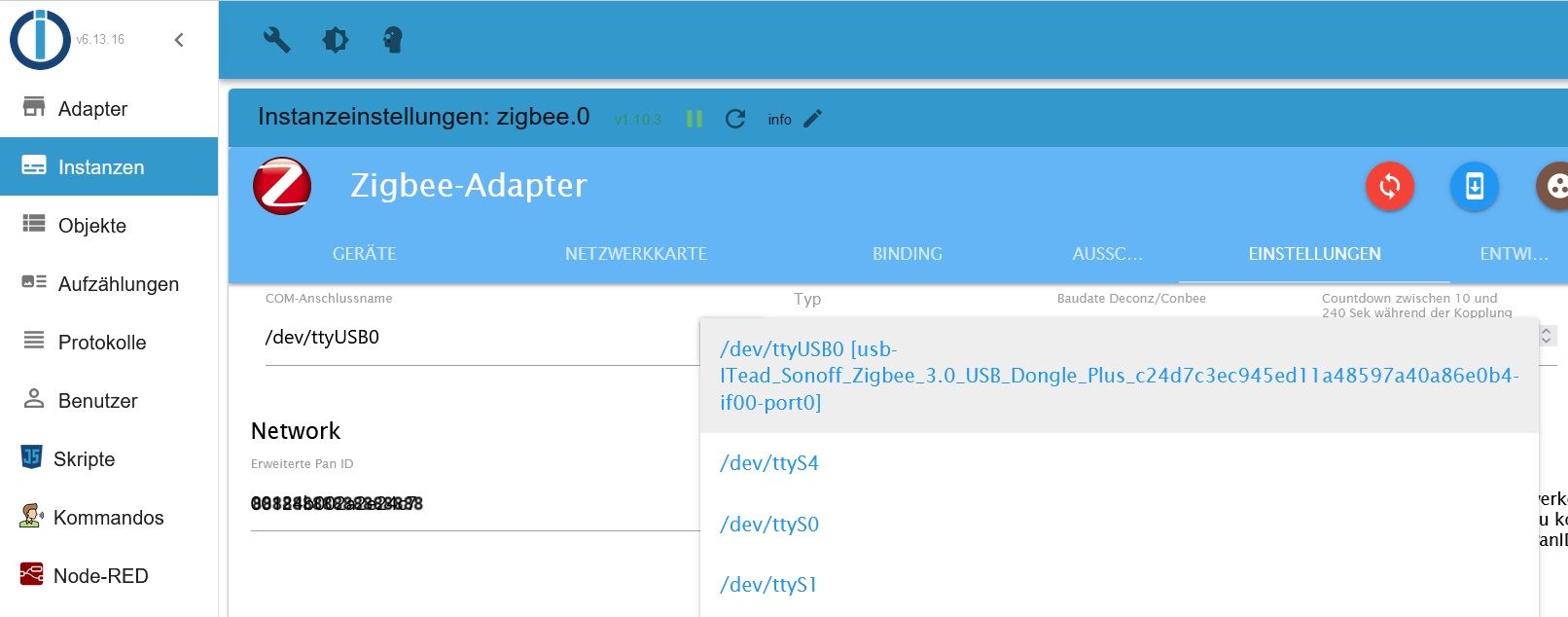
Nimm den doppelten Eintrag in der Datei raus:
configured multiple times in /etc/apt/sources.list.d/webmin.list:1 and /etc/apt/sources.list.d/webmin.list:2wie mache ich das?
1 Error habe ich aber noch gesehen:
Errors in npm tree: 107*** ioBroker-Installation ***Da ist kein Fehler. Die 107 kommt aus deinem Terminal 'falsch' raus. Welches verwendest du da?
normalerweise mit Putty. Gestern war ich unterwegs und habe das Terminal aus ioBroker genutzt.
Aber heute wieder PuttyIch habe gerade festgestellt, dass der Befehl
iob diagnicht mehr funktioniert. Nach dem Befehl wird das Passwort abgefragt und dann ist ende:
Last login: Thu Jun 6 05:22:06 2024 from 192.168.20.176 tobi@ubuntu:~$ iob diag [sudo] password for tobi: tobi@ubuntu:~$ -
@stfan1409 sagte in [gelöst] Namen defekt -> anstatt Unterstrich Minus:
dieser Port ist auf der Weboberfläche in ioB bereits ausgewählt:
Nein, trag da statt /dev/GERAET den by-id-Link ein.
Zu den Doubletten:
Dateien bearbeitet man mit einem Editor, z.B. nano. -
@thomas-braun sagte in [gelöst] Namen defekt -> anstatt Unterstrich Minus:
@stfan1409 sagte in [gelöst] Namen defekt -> anstatt Unterstrich Minus:
Boot Target: graphical.target
Stell das um auf
sudo systemctl set-default multi-user.targeterledigt
Und log dich nicht mit dem user ioBroker sondern mit dem offenbar ja auch vorhandenen user mit der uid=1000 ein.
Pending OS-Updates: 5
sudo apt update
sudo apt full-upgrade
erledigt
tobi@ubuntu:~$ sudo systemctl set-default multi-user.target
[sudo] password for tobi:
Created symlink /etc/systemd/system/default.target → /lib/systemd/system/multi-u        ser.target.
tobi@ubuntu:~$ sudo apt update
OK:1 http://de.archive.ubuntu.com/ubuntu jammy InRelease
Holen:2 http://de.archive.ubuntu.com/ubuntu jammy-updates InRelease [128 kB]
OK:3 https://deb.nodesource.com/node_20.x nodistro InRelease
OK:4 http://de.archive.ubuntu.com/ubuntu jammy-backports InRelease
Holen:5 http://de.archive.ubuntu.com/ubuntu jammy-security InRelease [129 kB]
Holen:6 http://de.archive.ubuntu.com/ubuntu jammy-updates/main amd64 Packages [1.687 kB]
Holen:7 http://de.archive.ubuntu.com/ubuntu jammy-updates/universe amd64 Packages [1.084 kB]
Holen:8 http://de.archive.ubuntu.com/ubuntu jammy-updates/universe Translation-en [250 kB]
Holen:9 http://de.archive.ubuntu.com/ubuntu jammy-updates/multiverse amd64 Packages [43,0 kB]
Ign:10 https://download.webmin.com/download/newkey/repository stable InRelease
OK:11 https://download.webmin.com/download/newkey/repository stable Release
Es wurden 3.322 kB in 5 s geholt (707 kB/s).
Paketlisten werden gelesen… Fertig
Abhängigkeitsbaum wird aufgebaut… Fertig
Statusinformationen werden eingelesen… Fertig
Aktualisierung für 1 Paket verfügbar. Führen Sie »apt list --upgradable« aus, um es anzuzeigen.
W: Ziel Packages (contrib/binary-amd64/Packages) ist mehrfach konfiguriert in /etc/apt/sources.list.d/webmin.list:1 und /etc/apt/sources.list.d/webmin.list:2
W: Ziel Packages (contrib/binary-all/Packages) ist mehrfach konfiguriert in /etc/apt/sources.list.d/webmin.list:1 und /etc/apt/sources.list.d/webmin.list:2
W: Ziel Translations (contrib/i18n/Translation-de_DE) ist mehrfach konfiguriert in /etc/apt/sources.list.d/webmin.list:1 und /etc/apt/sources.list.d/webmin.list:2
W: Ziel Translations (contrib/i18n/Translation-de) ist mehrfach konfiguriert in /etc/apt/sources.list.d/webmin.list:1 und /etc/apt/sources.list.d/webmin.list:2
W: Ziel Translations (contrib/i18n/Translation-en) ist mehrfach konfiguriert in /etc/apt/sources.list.d/webmin.list:1 und /etc/apt/sources.list.d/webmin.list:2
W: Ziel CNF (contrib/cnf/Commands-amd64) ist mehrfach konfiguriert in /etc/apt/sources.list.d/webmin.list:1 und /etc/apt/sources.list.d/webmin.list:2
W: Ziel CNF (contrib/cnf/Commands-all) ist mehrfach konfiguriert in /etc/apt/sources.list.d/webmin.list:1 und /etc/apt/sources.list.d/webmin.list:2
W: Ziel Packages (contrib/binary-amd64/Packages) ist mehrfach konfiguriert in /etc/apt/sources.list.d/webmin.list:1 und /etc/apt/sources.list.d/webmin.list:2
W: Ziel Packages (contrib/binary-all/Packages) ist mehrfach konfiguriert in /etc/apt/sources.list.d/webmin.list:1 und /etc/apt/sources.list.d/webmin.list:2
W: Ziel Translations (contrib/i18n/Translation-de_DE) ist mehrfach konfiguriert in /etc/apt/sources.list.d/webmin.list:1 und /etc/apt/sources.list.d/webmin.list:2
W: Ziel Translations (contrib/i18n/Translation-de) ist mehrfach konfiguriert in /etc/apt/sources.list.d/webmin.list:1 und /etc/apt/sources.list.d/webmin.list:2
W: Ziel Translations (contrib/i18n/Translation-en) ist mehrfach konfiguriert in /etc/apt/sources.list.d/webmin.list:1 und /etc/apt/sources.list.d/webmin.list:2
W: Ziel CNF (contrib/cnf/Commands-amd64) ist mehrfach konfiguriert in /etc/apt/sources.list.d/webmin.list:1 und /etc/apt/sources.list.d/webmin.list:2
W: Ziel CNF (contrib/cnf/Commands-all) ist mehrfach konfiguriert in /etc/apt/sources.list.d/webmin.list:1 und /etc/apt/sources.list.d/webmin.list:2
tobi@ubuntu:~$ sudo apt full-upgrade
Paketlisten werden gelesen… Fertig
Abhängigkeitsbaum wird aufgebaut… Fertig
Statusinformationen werden eingelesen… Fertig
Paketaktualisierung (Upgrade) wird berechnet… Fertig
Die folgenden Pakete wurden automatisch installiert und werden nicht mehr benötigt:
  libflashrom1 libftdi1-2
Verwenden Sie »sudo apt autoremove«, um sie zu entfernen.
Die folgenden Pakete sind zurückgehalten worden:
  cloud-init
0 aktualisiert, 0 neu installiert, 0 zu entfernen und 1 nicht aktualisiert.
tobi@ubuntu:~$ sudo systemctl set-default multi-user.target
[sudo] password for tobi:
Created symlink /etc/systemd/system/default.target → /lib/systemd/system/multi-u        ser.target.
tobi@ubuntu:~$ sudo apt update
OK:1 http://de.archive.ubuntu.com/ubuntu jammy InRelease
Holen:2 http://de.archive.ubuntu.com/ubuntu jammy-updates InRelease [128 kB]
OK:3 https://deb.nodesource.com/node_20.x nodistro InRelease
OK:4 http://de.archive.ubuntu.com/ubuntu jammy-backports InRelease
Holen:5 http://de.archive.ubuntu.com/ubuntu jammy-security InRelease [129 kB]
Holen:6 http://de.archive.ubuntu.com/ubuntu jammy-updates/main amd64 Packages [1.687 kB]
Holen:7 http://de.archive.ubuntu.com/ubuntu jammy-updates/universe amd64 Packages [1.084 kB]
Holen:8 http://de.archive.ubuntu.com/ubuntu jammy-updates/universe Translation-en [250 kB]
Holen:9 http://de.archive.ubuntu.com/ubuntu jammy-updates/multiverse amd64 Packages [43,0 kB]
Ign:10 https://download.webmin.com/download/newkey/repository stable InRelease
OK:11 https://download.webmin.com/download/newkey/repository stable Release
Es wurden 3.322 kB in 5 s geholt (707 kB/s).
Paketlisten werden gelesen… Fertig
Abhängigkeitsbaum wird aufgebaut… Fertig
Statusinformationen werden eingelesen… Fertig
Aktualisierung für 1 Paket verfügbar. Führen Sie »apt list --upgradable« aus, um es anzuzeigen.
W: Ziel Packages (contrib/binary-amd64/Packages) ist mehrfach konfiguriert in /etc/apt/sources.list.d/webmin.list:1 und /etc/apt/sources.list.d/webmin.list:2
W: Ziel Packages (contrib/binary-all/Packages) ist mehrfach konfiguriert in /etc/apt/sources.list.d/webmin.list:1 und /etc/apt/sources.list.d/webmin.list:2
W: Ziel Translations (contrib/i18n/Translation-de_DE) ist mehrfach konfiguriert in /etc/apt/sources.list.d/webmin.list:1 und /etc/apt/sources.list.d/webmin.list:2
W: Ziel Translations (contrib/i18n/Translation-de) ist mehrfach konfiguriert in /etc/apt/sources.list.d/webmin.list:1 und /etc/apt/sources.list.d/webmin.list:2
W: Ziel Translations (contrib/i18n/Translation-en) ist mehrfach konfiguriert in /etc/apt/sources.list.d/webmin.list:1 und /etc/apt/sources.list.d/webmin.list:2
W: Ziel CNF (contrib/cnf/Commands-amd64) ist mehrfach konfiguriert in /etc/apt/sources.l/sources.list.d/webmin.list:1 und /e^Cnslation-de) ist mehrfach konfiguriert in /etc/apt
tobi@ubuntu:~$
Kann aber auch sein, dass das diese 'staged updates' bei Schnubbibuntu sind.
sudo: a terminal is required to read the password
Wie gehst du denn auf die Kiste drauf?
normalerweise mit Putty. Gestern war ich unterwegs und habe das Terminal aus ioBroker genutzt.
HINT:
Your zigbee.0 COM-Port is NOT matching 'by-id'. Please check your setting:
/dev/ttyUSB0Setz den COM-Port im Zigbee-Adapter auf
/dev/serial/by-id/usb-ITead_Sonoff_Zigbee_3.0_USB_Dongle_Plus_c24d7c3ec945ed11a48597a40a86e0b4-if00-port0dieser Port ist auf der Weboberfläche in ioB bereits ausgewählt:
Nimm den doppelten Eintrag in der Datei raus:
configured multiple times in /etc/apt/sources.list.d/webmin.list:1 and /etc/apt/sources.list.d/webmin.list:2wie mache ich das?
1 Error habe ich aber noch gesehen:
Errors in npm tree: 107*** ioBroker-Installation ***Da ist kein Fehler. Die 107 kommt aus deinem Terminal 'falsch' raus. Welches verwendest du da?
normalerweise mit Putty. Gestern war ich unterwegs und habe das Terminal aus ioBroker genutzt.
Aber heute wieder PuttyIch habe gerade festgestellt, dass der Befehl
iob diagnicht mehr funktioniert. Nach dem Befehl wird das Passwort abgefragt und dann ist ende:
Last login: Thu Jun 6 05:22:06 2024 from 192.168.20.176 tobi@ubuntu:~$ iob diag [sudo] password for tobi: tobi@ubuntu:~$ -
@thomas-braun sagte in [gelöst] Namen defekt -> anstatt Unterstrich Minus:
Ruf iob diag mal so auf:
curl -L -o diag.sh https://iobroker.net/diag.sh && bash diag.shdas sieht dann so aus:
tobi@ubuntu:~$ curl -L -o diag.sh https://iobroker.net/diag.sh && bash diag.sh % Total % Received % Xferd Average Speed Time Time Time Current Dload Upload Total Spent Left Speed 0 0 0 0 0 0 0 0 --:--:-- --:--:-- --:--:-- 0 curl: (7) Failed to connect to iobroker.net port 443 after 22 ms: Connection ref used tobi@ubuntu:~$ -
@thomas-braun sagte in [gelöst] Namen defekt -> anstatt Unterstrich Minus:
Ruf iob diag mal so auf:
curl -L -o diag.sh https://iobroker.net/diag.sh && bash diag.shdas sieht dann so aus:
tobi@ubuntu:~$ curl -L -o diag.sh https://iobroker.net/diag.sh && bash diag.sh % Total % Received % Xferd Average Speed Time Time Time Current Dload Upload Total Spent Left Speed 0 0 0 0 0 0 0 0 --:--:-- --:--:-- --:--:-- 0 curl: (7) Failed to connect to iobroker.net port 443 after 22 ms: Connection ref used tobi@ubuntu:~$Der Server iobroker.net ist gerade nicht zu erreichen.
-
Der Server iobroker.net ist gerade nicht zu erreichen.
-
@thomas-braun
also mein eigener?Nein, iobroker.net
-
Nein, iobroker.net
curl -L -o diag.sh https://iobroker.net/diag.sh && bash diag.shok nun funktioniert es: (die Fehler muss ich noch beheben. ic hhoffe ich schaffe das zeitlich am Wochenende)
Skript v.2024-05-22 *** BASE SYSTEM *** Static hostname: ubuntu Icon name: computer-desktop Chassis: desktop Operating System: Ubuntu 22.04.4 LTS Kernel: Linux 5.15.0-107-generic Architecture: x86-64 Hardware Vendor: Lenovo Hardware Model: ThinkCentre M910q model name : Intel(R) Core(TM) i5-7500T CPU @ 2.70GHz Docker : false Virtualization : none Kernel : x86_64 Userland : 64 bit Systemuptime and Load: 05:25:04 up 23:51, 1 user, load average: 0.06, 0.11, 0.09 CPU threads: 4 *** Time and Time Zones *** Local time: Fri 2024-06-07 05:25:04 CEST Universal time: Fri 2024-06-07 03:25:04 UTC RTC time: Fri 2024-06-07 03:25:04 Time zone: Europe/Berlin (CEST, +0200) System clock synchronized: yes NTP service: active RTC in local TZ: no *** Users and Groups *** User that called 'iob diag': tobi HOME=/home/tobi GROUPS=tobi adm cdrom sudo dip plugdev lxd iobroker User that is running 'js-controller': iobroker [sudo] password for tobi: HOME=/home/iobroker GROUPS=iobroker tty dialout audio video plugdev *** Display-Server-Setup *** Display-Server: false Desktop: Terminal: tty Boot Target: multi-user.target *** MEMORY *** total used free shared buff/cache available Mem: 15G 2.1G 12G 1.0M 926M 13G Swap: 4.1G 0B 4.1G Total: 19G 2.1G 16G Active iob-Instances: 28 15877 M total memory 2085 M used memory 466 M active memory 2235 M inactive memory 12865 M free memory 220 M buffer memory 705 M swap cache 4095 M total swap 0 M used swap 4095 M free swap *** top - Table Of Processes *** top - 05:25:15 up 23:51, 1 user, load average: 0.22, 0.14, 0.10 Tasks: 178 total, 1 running, 177 sleeping, 0 stopped, 0 zombie %Cpu(s): 1.6 us, 0.0 sy, 0.0 ni, 98.4 id, 0.0 wa, 0.0 hi, 0.0 si, 0.0 st MiB Mem : 15877.8 total, 12865.7 free, 2085.7 used, 926.3 buff/cache MiB Swap: 4096.0 total, 4096.0 free, 0.0 used. 13499.7 avail Mem *** FAILED SERVICES *** UNIT LOAD ACTIVE SUB DESCRIPTION 0 loaded units listed. *** FILESYSTEM *** Filesystem Type Size Used Avail Use% Mounted on tmpfs tmpfs 1.6G 1.5M 1.6G 1% /run /dev/mapper/ubuntu--vg-ubuntu--lv ext4 98G 14G 80G 15% / tmpfs tmpfs 7.8G 0 7.8G 0% /dev/shm tmpfs tmpfs 5.0M 0 5.0M 0% /run/lock /dev/nvme0n1p2 ext4 2.0G 254M 1.6G 14% /boot /dev/nvme0n1p1 vfat 1.1G 6.1M 1.1G 1% /boot/efi tmpfs tmpfs 1.6G 4.0K 1.6G 1% /run/user/1000 Messages concerning ext4 filesystem in dmesg: [Thu Jun 6 05:33:46 2024] EXT4-fs (dm-0): mounted filesystem with ordered data mode. Opts: (null). Quota mode: none. [Thu Jun 6 05:33:46 2024] EXT4-fs (dm-0): re-mounted. Opts: (null). Quota mode: none. [Thu Jun 6 05:33:47 2024] EXT4-fs (nvme0n1p2): mounted filesystem with ordered data mode. Opts: (null). Quota mode: none. Show mounted filesystems: TARGET SOURCE FSTYPE OPTIONS / /dev/mapper/ubuntu--vg-ubuntu--lv | ext4 rw,relatime |-/sys sysfs sysfs rw,nosuid,nodev,noexec,r | |-/sys/kernel/security securityfs securit rw,nosuid,nodev,noexec,r | |-/sys/fs/cgroup cgroup2 cgroup2 rw,nosuid,nodev,noexec,r | |-/sys/fs/pstore pstore pstore rw,nosuid,nodev,noexec,r | |-/sys/firmware/efi/efivars efivarfs efivarf rw,nosuid,nodev,noexec,r | |-/sys/fs/bpf bpf bpf rw,nosuid,nodev,noexec,r | |-/sys/kernel/debug debugfs debugfs rw,nosuid,nodev,noexec,r | |-/sys/kernel/tracing tracefs tracefs rw,nosuid,nodev,noexec,r | |-/sys/fs/fuse/connections fusectl fusectl rw,nosuid,nodev,noexec,r | `-/sys/kernel/config configfs configf rw,nosuid,nodev,noexec,r |-/proc proc proc rw,nosuid,nodev,noexec,r | `-/proc/sys/fs/binfmt_misc systemd-1 autofs rw,relatime,fd=29,pgrp=1 | `-/proc/sys/fs/binfmt_misc binfmt_misc binfmt_ rw,nosuid,nodev,noexec,r |-/dev udev devtmpf rw,nosuid,relatime,size= | |-/dev/pts devpts devpts rw,nosuid,noexec,relatim | |-/dev/shm tmpfs tmpfs rw,nosuid,nodev,inode64 | |-/dev/hugepages hugetlbfs hugetlb rw,relatime,pagesize=2M | `-/dev/mqueue mqueue mqueue rw,nosuid,nodev,noexec,r |-/run tmpfs tmpfs rw,nosuid,nodev,noexec,r | |-/run/lock tmpfs tmpfs rw,nosuid,nodev,noexec,r | |-/run/credentials/systemd-sysusers.service | | none ramfs ro,nosuid,nodev,noexec,r | |-/run/rpc_pipefs sunrpc rpc_pip rw,relatime | |-/run/snapd/ns tmpfs[/snapd/ns] tmpfs rw,nosuid,nodev,noexec,r | | `-/run/snapd/ns/lxd.mnt nsfs[mnt:[4026532431]] | | nsfs rw | `-/run/user/1000 tmpfs tmpfs rw,nosuid,nodev,relatime |-/snap/core20/2264 /dev/loop0 squashf ro,nodev,relatime,errors |-/snap/lxd/27948 /dev/loop1 squashf ro,nodev,relatime,errors |-/snap/snapd/21465 /dev/loop2 squashf ro,nodev,relatime,errors |-/snap/lxd/28373 /dev/loop3 squashf ro,nodev,relatime,errors |-/snap/core20/2318 /dev/loop4 squashf ro,nodev,relatime,errors |-/snap/snapd/21759 /dev/loop5 squashf ro,nodev,relatime,errors `-/boot /dev/nvme0n1p2 ext4 rw,relatime `-/boot/efi /dev/nvme0n1p1 vfat rw,relatime,fmask=0022,d Files in neuralgic directories: /var: 2.1G /var/ 816M /var/lib 759M /var/log 753M /var/log/journal/855baa55560646729ffa74c22b1a720b 753M /var/log/journal Archived and active journals take up 752.1M in the file system. /opt/iobroker/backups: 4.0K /opt/iobroker/backups/ /opt/iobroker/iobroker-data: 514M /opt/iobroker/iobroker-data/ 396M /opt/iobroker/iobroker-data/files 138M /opt/iobroker/iobroker-data/files/javascript.admin 118M /opt/iobroker/iobroker-data/files/javascript.admin/static 117M /opt/iobroker/iobroker-data/files/javascript.admin/static/js The five largest files in iobroker-data are: 27M /opt/iobroker/iobroker-data/files/tankerkoenig.admin/build/index.js.map 24M /opt/iobroker/iobroker-data/files/web.admin/static/js/main.135279a0.js.m ap 22M /opt/iobroker/iobroker-data/files/modbus.admin/static/js/main.578d79d9.j s.map 21M /opt/iobroker/iobroker-data/files/s7.admin/static/js/main.9f443724.js.ma p 19M /opt/iobroker/iobroker-data/files/text2command.admin/static/js/main.02fc 3820.js.map USB-Devices by-id: USB-Sticks - Avoid direct links to /dev/tty* in your adapter setups, please alw ays prefer the links 'by-id': /dev/serial/by-id/usb-ITead_Sonoff_Zigbee_3.0_USB_Dongle_Plus_c24d7c3ec945ed11a4 8597a40a86e0b4-if00-port0 HINT: Your zigbee.0 COM-Port is NOT matching 'by-id'. Please check your setting: /dev/ttyUSB0 *** NodeJS-Installation *** /usr/bin/nodejs v20.14.0 /usr/bin/node v20.14.0 /usr/bin/npm 10.7.0 /usr/bin/npx 10.7.0 /usr/bin/corepack 0.28.1 nodejs: Installed: 20.14.0-1nodesource1 Candidate: 20.14.0-1nodesource1 Version table: *** 20.14.0-1nodesource1 1001 500 https://deb.nodesource.com/node_20.x nodistro/main amd64 Packages 100 /var/lib/dpkg/status 20.13.1-1nodesource1 1001 500 https://deb.nodesource.com/node_20.x nodistro/main amd64 Packages 20.13.0-1nodesource1 1001 500 https://deb.nodesource.com/node_20.x nodistro/main amd64 Packages 20.12.2-1nodesource1 1001 500 https://deb.nodesource.com/node_20.x nodistro/main amd64 Packages 20.12.1-1nodesource1 1001 500 https://deb.nodesource.com/node_20.x nodistro/main amd64 Packages 20.12.0-1nodesource1 1001 500 https://deb.nodesource.com/node_20.x nodistro/main amd64 Packages 20.11.1-1nodesource1 1001 500 https://deb.nodesource.com/node_20.x nodistro/main amd64 Packages 20.11.0-1nodesource1 1001 500 https://deb.nodesource.com/node_20.x nodistro/main amd64 Packages 20.10.0-1nodesource1 1001 500 https://deb.nodesource.com/node_20.x nodistro/main amd64 Packages 20.9.0-1nodesource1 1001 500 https://deb.nodesource.com/node_20.x nodistro/main amd64 Packages 20.8.1-1nodesource1 1001 500 https://deb.nodesource.com/node_20.x nodistro/main amd64 Packages 20.8.0-1nodesource1 1001 500 https://deb.nodesource.com/node_20.x nodistro/main amd64 Packages 20.7.0-1nodesource1 1001 500 https://deb.nodesource.com/node_20.x nodistro/main amd64 Packages 20.6.1-1nodesource1 1001 500 https://deb.nodesource.com/node_20.x nodistro/main amd64 Packages 20.6.0-1nodesource1 1001 500 https://deb.nodesource.com/node_20.x nodistro/main amd64 Packages 20.5.1-1nodesource1 1001 500 https://deb.nodesource.com/node_20.x nodistro/main amd64 Packages 20.5.0-1nodesource1 1001 500 https://deb.nodesource.com/node_20.x nodistro/main amd64 Packages 20.4.0-1nodesource1 1001 500 https://deb.nodesource.com/node_20.x nodistro/main amd64 Packages 20.3.1-1nodesource1 1001 500 https://deb.nodesource.com/node_20.x nodistro/main amd64 Packages 20.3.0-1nodesource1 1001 500 https://deb.nodesource.com/node_20.x nodistro/main amd64 Packages 20.2.0-1nodesource1 1001 500 https://deb.nodesource.com/node_20.x nodistro/main amd64 Packages 20.1.0-1nodesource1 1001 500 https://deb.nodesource.com/node_20.x nodistro/main amd64 Packages 20.0.0-1nodesource1 1001 500 https://deb.nodesource.com/node_20.x nodistro/main amd64 Packages 12.22.9~dfsg-1ubuntu3.5 500 500 http://de.archive.ubuntu.com/ubuntu jammy-updates/universe amd64 Pac kages 500 http://de.archive.ubuntu.com/ubuntu jammy-security/universe amd64 Pa ckages 12.22.9~dfsg-1ubuntu3 500 500 http://de.archive.ubuntu.com/ubuntu jammy/universe amd64 Packages Temp directories causing npm8 problem: 0 No problems detected Errors in npm tree: *** ioBroker-Installation *** ioBroker Status iobroker is running on this host. Objects type: jsonl States type: jsonl Core adapters versions js-controller: 5.0.19 admin: 6.13.16 javascript: 8.3.1 nodejs modules from github: 2 | `-- kodi-ws@2.4.4 (git+https://git@github.com/iobroker-community-adapters/kodi -ws.git#ad5a1fdc5cd0a282e6818ff152594b5d32535103) | +-- onvif@0.7.0 (git+ssh://git@github.com/agsh/onvif.git#74c21e63f4f8c3db19c5e 529842af361050138cf) Adapter State + system.adapter.admin.0 : admin : ubuntu - enabled, port: 8081, bind: 0.0.0.0, run as: admi n + system.adapter.alexa2.0 : alexa2 : ubuntu - enabled + system.adapter.artnet.0 : artnet : ubuntu - enabled, port: 6454 + system.adapter.backitup.0 : backitup : ubuntu - enabled system.adapter.denon.0 : denon : ubuntu - disabled + system.adapter.device-reminder.0 : device-reminder : ubuntu - enabled system.adapter.discovery.0 : discovery : ubuntu - disabled system.adapter.flot.0 : flot : ubuntu - disabled system.adapter.fritzdect.0 : fritzdect : ubuntu - disabled system.adapter.hue.0 : hue : ubuntu - disabled, port: 80 system.adapter.icons-mfd-png.0 : icons-mfd-png : ubuntu - disabled + system.adapter.info.0 : info : ubuntu - enabled + system.adapter.iqontrol.0 : iqontrol : ubuntu - enabled + system.adapter.iqontrol.1 : iqontrol : ubuntu - enabled + system.adapter.javascript.0 : javascript : ubuntu - enabled system.adapter.kodi.0 : kodi : ubuntu - disabled, port: 9090 system.adapter.logparser.0 : logparser : ubuntu - disabled + system.adapter.milight.0 : milight : ubuntu - enabled, port: 5987 system.adapter.mobile.0 : mobile : ubuntu - disabled + system.adapter.modbus.0 : modbus : ubuntu - enabled + system.adapter.modbus.1 : modbus : ubuntu - enabled + system.adapter.mqtt.0 : mqtt : ubuntu - enabled, port: 1883, bind: 0.0.0.0 + system.adapter.node-red.0 : node-red : ubuntu - enabled, port: 1880, bind: 0.0.0.0 system.adapter.parser.0 : parser : ubuntu - disabled system.adapter.ping.0 : ping : ubuntu - disabled + system.adapter.s7.0 : s7 : ubuntu - enabled + system.adapter.scenes.0 : scenes : ubuntu - enabled system.adapter.shelly.0 : shelly : ubuntu - disabled, port: 1882, bind: 0.0.0.0 + system.adapter.signal-cmb.0 : signal-cmb : ubuntu - enabled + system.adapter.signal-cmb.1 : signal-cmb : ubuntu - enabled + system.adapter.sql.0 : sql : ubuntu - enabled, port: 3307 + system.adapter.tankerkoenig.0 : tankerkoenig : ubuntu - enabled + system.adapter.telegram.0 : telegram : ubuntu - enabled, port: 8443, bind: 0.0.0.0 + system.adapter.terminal.0 : terminal : ubuntu - enabled, port: 8088, bind: 0.0.0.0, run as: admi n + system.adapter.text2command.0 : text2command : ubuntu - enabled + system.adapter.time-switch.0 : time-switch : ubuntu - enabled + system.adapter.viessmannapi.1 : viessmannapi : ubuntu - enabled system.adapter.vis-colorpicker.0 : vis-colorpicker : ubuntu - disabled system.adapter.vis-history.0 : vis-history : ubuntu - disabled system.adapter.vis-hqwidgets.0 : vis-hqwidgets : ubuntu - disabled system.adapter.vis-justgage.0 : vis-justgage : ubuntu - disabled system.adapter.vis-timeandweather.0 : vis-timeandweather : ubuntu - disabled system.adapter.vis.0 : vis : ubuntu - enabled + system.adapter.web.0 : web : ubuntu - enabled, port: 8082, bind: 0.0.0.0, run as: admi n + system.adapter.zigbee.0 : zigbee : ubuntu - enabled, port: /dev/ttyUSB0 + instance is alive Enabled adapters with bindings + system.adapter.admin.0 : admin : ubuntu - enabled, port: 8081, bind: 0.0.0.0, run as: admi n + system.adapter.artnet.0 : artnet : ubuntu - enabled, port: 6454 + system.adapter.milight.0 : milight : ubuntu - enabled, port: 5987 + system.adapter.mqtt.0 : mqtt : ubuntu - enabled, port: 1883, bind: 0.0.0.0 + system.adapter.node-red.0 : node-red : ubuntu - enabled, port: 1880, bind: 0.0.0.0 + system.adapter.sql.0 : sql : ubuntu - enabled, port: 3307 + system.adapter.telegram.0 : telegram : ubuntu - enabled, port: 8443, bind: 0.0.0.0 + system.adapter.terminal.0 : terminal : ubuntu - enabled, port: 8088, bind: 0.0.0.0, run as: admi n + system.adapter.web.0 : web : ubuntu - enabled, port: 8082, bind: 0.0.0.0, run as: admi n + system.adapter.zigbee.0 : zigbee : ubuntu - enabled, port: /dev/ttyUSB0 ioBroker-Repositories stable : http://download.iobroker.net/sources-dist.json beta : http://download.iobroker.net/sources-dist-latest.json Active repo(s): stable Installed ioBroker-Instances Used repository: stable Adapter "admin" : 6.13.16 , installed 6.13.16 Adapter "alexa2" : 3.26.5 , installed 3.26.5 Adapter "artnet" : 1.2.2 , installed 1.2.2 Adapter "backitup" : 2.11.0 , installed 2.11.0 Adapter "denon" : 1.15.5 , installed 1.15.5 Adapter "device-reminder": 3.1.2 , installed 3.1.2 Adapter "discovery" : 4.4.0 , installed 4.4.0 Adapter "flot" : 1.12.0 , installed 1.12.0 Adapter "fritzdect" : 2.5.9 , installed 2.5.9 Adapter "hue" : 3.11.0 , installed 3.11.0 Adapter "icons-mfd-png": 1.2.1 , installed 1.2.1 Adapter "iqontrol" : 2.3.0 , installed 2.3.0 Adapter "javascript" : 8.3.1 , installed 8.3.1 Controller "js-controller": 5.0.19 , installed 5.0.19 Adapter "kodi" : 3.1.0 , installed 3.1.0 Adapter "logparser" : 2.2.2 , installed 2.2.2 Adapter "milight" : 0.4.0 , installed 0.4.0 Adapter "mobile" : 1.0.1 , installed 1.0.1 Adapter "modbus" : 6.1.0 , installed 6.1.0 Adapter "mqtt" : 5.2.0 , installed 5.2.0 Adapter "node-red" : 5.2.1 , installed 5.2.1 Adapter "onvif" : 1.1.3 , installed 1.1.3 Adapter "parser" : 2.1.0 , installed 2.1.0 Adapter "ping" : 1.6.2 , installed 1.6.2 Adapter "s7" : 1.4.3 , installed 1.4.3 Adapter "scenes" : 2.3.9 , installed 2.3.9 Adapter "shelly" : 6.9.0 , installed 6.9.0 Adapter "signal-cmb" : 0.3.0 , installed 0.3.0 Adapter "simple-api" : 2.8.0 , installed 2.8.0 Adapter "smartmeter" : 3.4.0 , installed 3.4.0 Adapter "socketio" : 6.7.0 , installed 6.7.0 Adapter "sql" : 2.2.0 , installed 2.2.0 Adapter "tankerkoenig" : 3.4.0 , installed 3.4.0 Adapter "telegram" : 3.3.2 , installed 3.3.2 Adapter "terminal" : 1.0.0 , installed 1.0.0 Adapter "text2command" : 3.0.3 , installed 3.0.3 Adapter "viessmannapi" : 2.3.0 , installed 2.3.0 Adapter "vis" : 1.5.4 , installed 1.5.4 Adapter "vis-colorpicker": 2.0.3 , installed 2.0.3 Adapter "vis-history" : 1.0.0 , installed 1.0.0 Adapter "vis-hqwidgets": 1.5.1 , installed 1.5.1 Adapter "vis-justgage" : 2.1.7 , installed 2.1.7 Adapter "vis-timeandweather": 1.2.2, installed 1.2.2 Adapter "web" : 6.2.5 , installed 6.2.5 Adapter "ws" : 2.6.1 , installed 2.6.1 Adapter "zigbee" : 1.10.3 , installed 1.10.3 Objects and States Please stand by - This may take a while Objects: 11076 States: 9032 *** OS-Repositories and Updates *** W: Target Packages (contrib/binary-amd64/Packages) is configured multiple times in /etc/apt/sources.list.d/webmin.list:1 and /etc/apt/sources.list.d/webmin.list :2 W: Target Packages (contrib/binary-all/Packages) is configured multiple times in /etc/apt/sources.list.d/webmin.list:1 and /etc/apt/sources.list.d/webmin.list:2 W: Target Translations (contrib/i18n/Translation-en) is configured multiple time s in /etc/apt/sources.list.d/webmin.list:1 and /etc/apt/sources.list.d/webmin.li st:2 W: Target Translations (contrib/i18n/Translation-de) is configured multiple time s in /etc/apt/sources.list.d/webmin.list:1 and /etc/apt/sources.list.d/webmin.li st:2 W: Target CNF (contrib/cnf/Commands-amd64) is configured multiple times in /etc/ apt/sources.list.d/webmin.list:1 and /etc/apt/sources.list.d/webmin.list:2 W: Target CNF (contrib/cnf/Commands-all) is configured multiple times in /etc/ap t/sources.list.d/webmin.list:1 and /etc/apt/sources.list.d/webmin.list:2 W: Target Packages (contrib/binary-amd64/Packages) is configured multiple times in /etc/apt/sources.list.d/webmin.list:1 and /etc/apt/sources.list.d/webmin.list :2 W: Target Packages (contrib/binary-all/Packages) is configured multiple times in /etc/apt/sources.list.d/webmin.list:1 and /etc/apt/sources.list.d/webmin.list:2 W: Target Translations (contrib/i18n/Translation-en) is configured multiple time s in /etc/apt/sources.list.d/webmin.list:1 and /etc/apt/sources.list.d/webmin.li st:2 W: Target Translations (contrib/i18n/Translation-de) is configured multiple time s in /etc/apt/sources.list.d/webmin.list:1 and /etc/apt/sources.list.d/webmin.li st:2 W: Target CNF (contrib/cnf/Commands-amd64) is configured multiple times in /etc/ apt/sources.list.d/webmin.list:1 and /etc/apt/sources.list.d/webmin.list:2 W: Target CNF (contrib/cnf/Commands-all) is configured multiple times in /etc/ap t/sources.list.d/webmin.list:1 and /etc/apt/sources.list.d/webmin.list:2 Hit:1 http://de.archive.ubuntu.com/ubuntu jammy InRelease Hit:2 http://de.archive.ubuntu.com/ubuntu jammy-updates InRelease Hit:3 https://deb.nodesource.com/node_20.x nodistro InRelease Hit:4 http://de.archive.ubuntu.com/ubuntu jammy-backports InRelease Hit:5 http://de.archive.ubuntu.com/ubuntu jammy-security InRelease Ign:6 https://download.webmin.com/download/newkey/repository stable InRelease Hit:7 https://download.webmin.com/download/newkey/repository stable Release Reading package lists... Done W: Target Packages (contrib/binary-amd64/Packages) is configured multiple times in /etc/apt/sources.list.d/webmin.list:1 and /etc/apt/sources.list.d/webmin.list :2 W: Target Packages (contrib/binary-all/Packages) is configured multiple times in /etc/apt/sources.list.d/webmin.list:1 and /etc/apt/sources.list.d/webmin.list:2 W: Target Translations (contrib/i18n/Translation-en) is configured multiple time s in /etc/apt/sources.list.d/webmin.list:1 and /etc/apt/sources.list.d/webmin.li st:2 W: Target Translations (contrib/i18n/Translation-de) is configured multiple time s in /etc/apt/sources.list.d/webmin.list:1 and /etc/apt/sources.list.d/webmin.li st:2 W: Target CNF (contrib/cnf/Commands-amd64) is configured multiple times in /etc/ apt/sources.list.d/webmin.list:1 and /etc/apt/sources.list.d/webmin.list:2 W: Target CNF (contrib/cnf/Commands-all) is configured multiple times in /etc/ap t/sources.list.d/webmin.list:1 and /etc/apt/sources.list.d/webmin.list:2 W: Target Packages (contrib/binary-amd64/Packages) is configured multiple times in /etc/apt/sources.list.d/webmin.list:1 and /etc/apt/sources.list.d/webmin.list :2 W: Target Packages (contrib/binary-all/Packages) is configured multiple times in /etc/apt/sources.list.d/webmin.list:1 and /etc/apt/sources.list.d/webmin.list:2 W: Target Translations (contrib/i18n/Translation-en) is configured multiple time s in /etc/apt/sources.list.d/webmin.list:1 and /etc/apt/sources.list.d/webmin.li st:2 W: Target Translations (contrib/i18n/Translation-de) is configured multiple time s in /etc/apt/sources.list.d/webmin.list:1 and /etc/apt/sources.list.d/webmin.li st:2 W: Target CNF (contrib/cnf/Commands-amd64) is configured multiple times in /etc/ apt/sources.list.d/webmin.list:1 and /etc/apt/sources.list.d/webmin.list:2 W: Target CNF (contrib/cnf/Commands-all) is configured multiple times in /etc/ap t/sources.list.d/webmin.list:1 and /etc/apt/sources.list.d/webmin.list:2 Pending Updates: 1 *** Listening Ports *** Active Internet connections (only servers) Proto Recv-Q Send-Q Local Address Foreign Address State User Inode PID/Program name tcp 0 0 0.0.0.0:10000 0.0.0.0:* LISTEN 0 28007 796/perl tcp 0 0 0.0.0.0:1880 0.0.0.0:* LISTEN 1001 30823 1321/node-red tcp 0 0 0.0.0.0:1883 0.0.0.0:* LISTEN 1001 29296 1649/io.mqtt.0 tcp 0 0 0.0.0.0:22 0.0.0.0:* LISTEN 0 26074 727/sshd: /usr/sbin tcp 0 0 0.0.0.0:111 0.0.0.0:* LISTEN 0 19385 1/init tcp 0 0 127.0.0.53:53 0.0.0.0:* LISTEN 102 25870 652/systemd-resolve tcp 0 0 127.0.0.1:9001 0.0.0.0:* LISTEN 1001 26148 700/iobroker.js-con tcp 0 0 127.0.0.1:9000 0.0.0.0:* LISTEN 1001 27985 700/iobroker.js-con tcp6 0 0 :::22 :::* LISTEN 0 26076 727/sshd: /usr/sbin tcp6 0 0 :::111 :::* LISTEN 0 15483 1/init tcp6 0 0 :::8088 :::* LISTEN 1001 33197 2659/io.terminal.0 tcp6 0 0 :::8081 :::* LISTEN 1001 26421 789/io.admin.0 tcp6 0 0 :::8082 :::* LISTEN 1001 35993 2857/io.web.0 udp 0 0 127.0.0.53:53 0.0.0.0:* 102 25869 652/systemd-resolve udp 0 0 0.0.0.0:111 0.0.0.0:* 0 19905 1/init udp 0 0 0.0.0.0:10000 0.0.0.0:* 0 28008 796/perl udp6 0 0 :::111 :::* 0 19386 1/init *** Log File - Last 25 Lines *** 2024-06-07 04:44:41.106 - info: mqtt.0 (1649) Client [ESP_Mama_0] connected wit h secret 1717728281106_4664 2024-06-07 04:44:41.136 - info: mqtt.0 (1649) Client [ESP_Mama_0] subscribes on "ESP_Mama/#" with regex /^ESP_Mama\..*/ 2024-06-07 04:44:41.136 - info: mqtt.0 (1649) Client [ESP_Mama_0] subscribes on "ESP_Mama/#" with regex /^mqtt\.0\.ESP_Mama\..*/ 2024-06-07 04:44:41.336 - info: mqtt.0 (1649) Client [ESP_Mama_0] publishOnSubs cribe send all known states 2024-06-07 04:45:59.846 - info: mqtt.0 (1649) Client [ESP_Mama_0] connection cl osed: timeout 2024-06-07 04:46:00.110 - info: mqtt.0 (1649) Client [ESP_Mama_0] connected wit h secret 1717728360110_6451 2024-06-07 04:46:00.137 - info: mqtt.0 (1649) Client [ESP_Mama_0] subscribes on "ESP_Mama/#" with regex /^ESP_Mama\..*/ 2024-06-07 04:46:00.137 - info: mqtt.0 (1649) Client [ESP_Mama_0] subscribes on "ESP_Mama/#" with regex /^mqtt\.0\.ESP_Mama\..*/ 2024-06-07 04:46:00.337 - info: mqtt.0 (1649) Client [ESP_Mama_0] publishOnSubs cribe send all known states 2024-06-07 04:48:07.802 - info: mqtt.0 (1649) Client [ESP_Mama_0] connection cl osed: timeout 2024-06-07 04:48:38.390 - info: mqtt.0 (1649) Client [ESP_Mama_0] connected wit h secret 1717728518389_344 2024-06-07 04:48:38.412 - info: mqtt.0 (1649) Client [ESP_Mama_0] subscribes on "ESP_Mama/#" with regex /^ESP_Mama\..*/ 2024-06-07 04:48:38.413 - info: mqtt.0 (1649) Client [ESP_Mama_0] subscribes on "ESP_Mama/#" with regex /^mqtt\.0\.ESP_Mama\..*/ 2024-06-07 04:48:38.614 - info: mqtt.0 (1649) Client [ESP_Mama_0] publishOnSubs cribe send all known states 2024-06-07 04:48:39.219 - warn: javascript.0 (1247) State "0_userdata.0.Datenpu nkte.test.WasserSpeicherDiff" not found 2024-06-07 04:48:39.223 - warn: javascript.0 (1247) at setState (/opt/iobro ker/node_modules/iobroker.javascript/lib/sandbox.js:1975:20) 2024-06-07 04:48:39.223 - warn: javascript.0 (1247) at Object.<anonymous> ( script.js.common.Heizungswerte:142:5) 2024-06-07 04:48:39.223 - warn: javascript.0 (1247) at Object.callback (/op t/iobroker/node_modules/iobroker.javascript/lib/sandbox.js:1396:38) 2024-06-07 04:48:39.223 - warn: javascript.0 (1247) at Object.stateChange ( /opt/iobroker/node_modules/iobroker.javascript/main.js:641:29) 2024-06-07 04:48:39.224 - warn: javascript.0 (1247) at Immediate._onImmedia te (/opt/iobroker/node_modules/@iobroker/js-controller-adapter/src/lib/adapter/a dapter.ts:11200:62) 2024-06-07 04:48:39.224 - warn: javascript.0 (1247) at processImmediate (no de:internal/timers:478:21) 2024-06-07 05:24:08.056 - info: admin.0 (789) ==> Connected system.user.admin f rom ::ffff:192.168.20.176 2024-06-07 05:24:10.471 - info: admin.0 (789) ==> Connected system.user.admin f rom ::ffff:192.168.20.176 2024-06-07 05:24:10.684 - info: zigbee.0 (1750) List of port: [{"path":"/dev/tt yUSB0","manufacturer":"ITead","serialNumber":"c24d7c3ec945ed11a48597a40a86e0b4", "pnpId":"usb-ITead_Sonoff_Zigbee_3.0_USB_Dongle_Plus_c24d7c3ec945ed11a48597a40a8 6e0b4-if00-port0","vendorId":"10c4","productId":"ea60"},{"path":"/dev/ttyS4","ve ndorId":"8086","productId":"a2bd"},{"path":"/dev/ttyS0"},{"path":"/dev/ttyS1"},{ "path":"/dev/ttyS10"},{"path":"/dev/ttyS11"},{"path":"/dev/ttyS12"},{"path":"/de v/ttyS13"},{"path":"/dev/ttyS14"},{"path":"/dev/ttyS15"},{"path":"/dev/ttyS16"}, {"path":"/dev/ttyS17"},{"path":"/dev/ttyS18"},{"path":"/dev/ttyS19"},{"path":"/d ev/ttyS2"},{"path":"/dev/ttyS20"},{"path":"/dev/ttyS21"},{"path":"/dev/ttyS22"}, {"path":"/dev/ttyS23"},{"path":"/dev/ttyS24"},{"path":"/dev/ttyS25"},{"path":"/d ev/ttyS26"},{"path":"/dev/ttyS27"},{"path":"/dev/ttyS28"},{"path":"/dev/ttyS29"} ,{"path":"/dev/ttyS3"},{"path":"/dev/ttyS30"},{"path":"/dev/ttyS31"},{"path":"/d ev/ttyS5"},{"path":"/dev/ttyS6"},{"path":"/dev/ttyS7"},{"path":"/dev/ttyS8"},{"p ath":"/dev/ttyS9"}] 2024-06-07 05:24:18.541 - info: admin.0 (789) <== Disconnect system.user.admin from ::ffff:192.168.20.176 iob diag has finished.


Hey! Du scheinst an dieser Unterhaltung interessiert zu sein, hast aber noch kein Konto.
Hast du es satt, bei jedem Besuch durch die gleichen Beiträge zu scrollen? Wenn du dich für ein Konto anmeldest, kommst du immer genau dorthin zurück, wo du zuvor warst, und kannst dich über neue Antworten benachrichtigen lassen (entweder per E-Mail oder Push-Benachrichtigung). Du kannst auch Lesezeichen speichern und Beiträge positiv bewerten, um anderen Community-Mitgliedern deine Wertschätzung zu zeigen.
Mit deinem Input könnte dieser Beitrag noch besser werden 💗
Registrieren Anmelden368
Online33.0k
Benutzende83.7k
Themen1.3m
Beiträge