Weiter zum Inhalt
  • Home
  • Aktuell
  • Tags
  • 0 Ungelesen 0
  • Kategorien
  • Unreplied
  • Beliebt
  • GitHub
  • Docu
  • Hilfe
Skins
  • Hell
  • Brite
  • Cerulean
  • Cosmo
  • Flatly
  • Journal
  • Litera
  • Lumen
  • Lux
  • Materia
  • Minty
  • Morph
  • Pulse
  • Sandstone
  • Simplex
  • Sketchy
  • Spacelab
  • United
  • Yeti
  • Zephyr
  • Dunkel
  • Cyborg
  • Darkly
  • Quartz
  • Slate
  • Solar
  • Superhero
  • Vapor

  • Standard: (Kein Skin)
  • Kein Skin
Einklappen
ioBroker Logo

Community Forum

donate donate
  1. ioBroker Community Home
  2. Deutsch
  3. Hardware
  4. SONOFF NSPanel mit Lovelace UI (TypeScript Version)
NEWS

  • Monatsrückblick Januar/Februar 2026 ist online!
    BluefoxB
    Bluefox
    18
    1
    762

  • Jahresrückblick 2025 – unser neuer Blogbeitrag ist online! ✨
    BluefoxB
    Bluefox
    18
    1
    6.1k

  • Neuer Blogbeitrag: Monatsrückblick - Dezember 2025 🎄
    BluefoxB
    Bluefox
    13
    1
    1.5k

SONOFF NSPanel mit Lovelace UI (TypeScript Version)
Geplant Angeheftet Gesperrt Verschoben Hardware
lovelace uinspanelsonoff
8.1k Beiträge 278 Kommentatoren 7.3m Aufrufe 261 Beobachtet
  • Älteste zuerst
  • Neuste zuerst
  • Meiste Stimmen
Antworten
  • In einem neuen Thema antworten
Anmelden zum Antworten
Dieses Thema wurde gelöscht. Nur Nutzer mit entsprechenden Rechten können es sehen.
  • ArmilarA Armilar

    @superdad

    sicher??? Oder hast du nodeJS in zwei Versionen? Das Script holt sich eigentlich die nodeJS-Version mit dem der ioBroker arbeitet.

    iob diag oder node -v gibt dir in der Linux-Console Auskunft...

    Oder führe gleich die neue empfohlene Version 20 durch...

    iob nodejs-update 20

    https://forum.iobroker.net/topic/74832/empfehlung-zu-node-js-20

    S Offline
    S Offline
    Superdad
    schrieb am zuletzt editiert von
    #5742

    @armilar
    Sorry für die späte Rückmeldung.
    Habe einen kranken Enkel zu Hause.

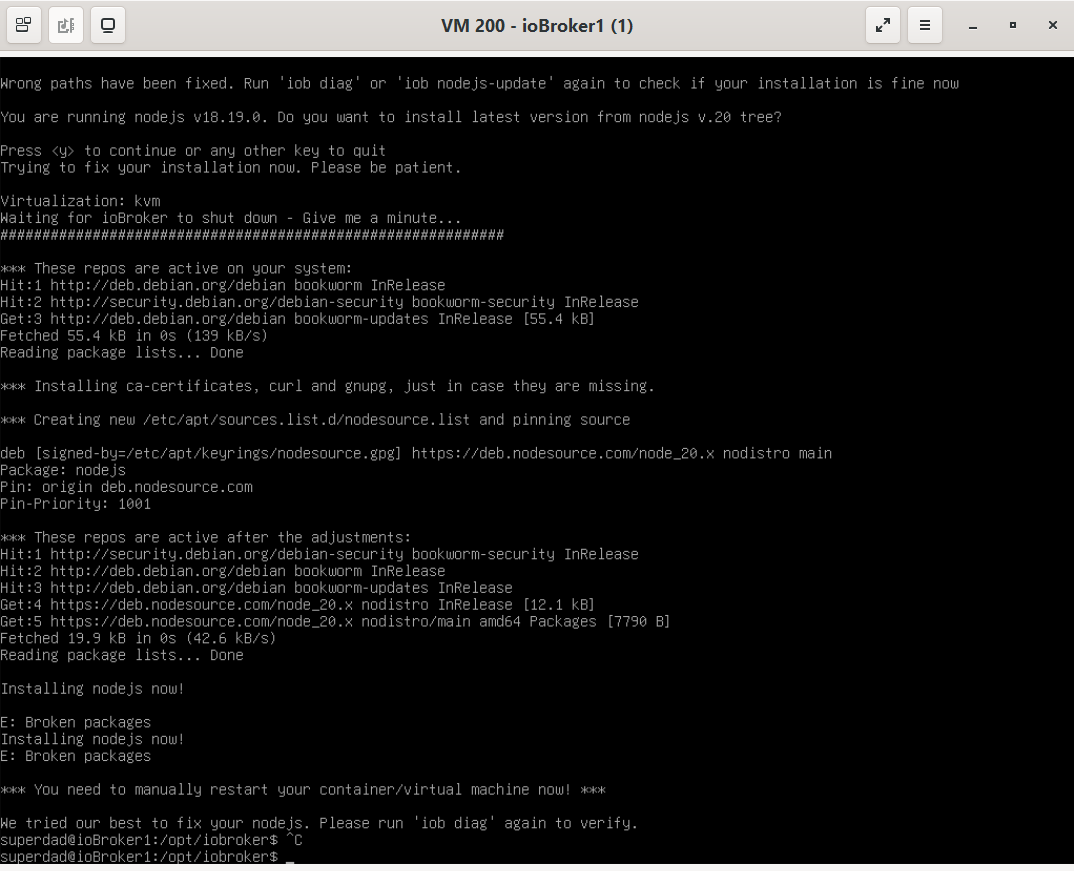
    Habe iob nodejs-update 20 probiert.
    Das kommt als Meldung.
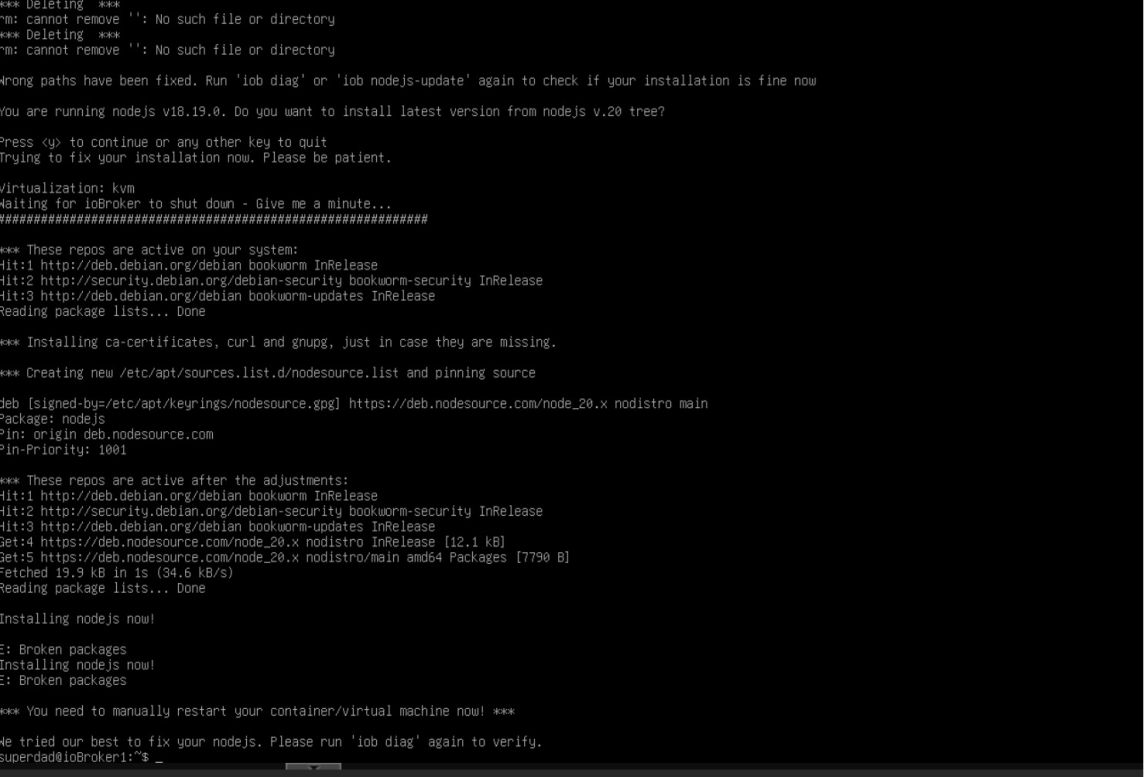
    174c11eb-7584-4037-b443-4a7463e08ea5-image.png

    CCU3

    iOBroker auf IntelNUC Proxmox

    ? Thomas BraunT 2 Antworten Letzte Antwort
    0
    • ArmilarA Offline
      ArmilarA Offline
      Armilar
      Most Active Forum Testing
      schrieb am zuletzt editiert von
      #5743

      @superdad

      Das kann wahrscheinlich nur ein Linux-Experte wie z.B. @Thomas-Braun beantworten.

      Installationsanleitung, Tipps, Alias-Definitionen, FAQ für das Sonoff NSPanel mit lovelace UI unter ioBroker
      https://github.com/joBr99/nspanel-lovelace-ui/wiki

      Benutzt das Voting rechts unten im Beitrag wenn er euch geholfen hat.

      Thomas BraunT 1 Antwort Letzte Antwort
      0
      • ArmilarA Armilar

        @superdad

        Das kann wahrscheinlich nur ein Linux-Experte wie z.B. @Thomas-Braun beantworten.

        Thomas BraunT Online
        Thomas BraunT Online
        Thomas Braun
        Most Active
        schrieb am zuletzt editiert von
        #5744

        @armilar

        Der 'liest' aber keine Screenshots sondern nur Text in CodeTags eingebettet.

        Linux-Werkzeugkasten:
        https://forum.iobroker.net/topic/42952/der-kleine-iobroker-linux-werkzeugkasten
        NodeJS Fixer Skript:
        https://forum.iobroker.net/topic/68035/iob-node-fix-skript
        iob_diag: curl -sLf -o diag.sh https://iobroker.net/diag.sh && bash diag.sh

        1 Antwort Letzte Antwort
        2
        • S Superdad

          @armilar
          Sorry für die späte Rückmeldung.
          Habe einen kranken Enkel zu Hause.

          Habe iob nodejs-update 20 probiert.
          Das kommt als Meldung.

          174c11eb-7584-4037-b443-4a7463e08ea5-image.png

          ? Offline
          ? Offline
          Ein ehemaliger Benutzer
          schrieb am zuletzt editiert von
          #5745

          @superdad

          erstmal system rebooten, wie da steht, dann auch mal system updates fahren, und wenn alles aktuell, dann nochmal ein
          " iob nodejs 20" eingeben, warten, bis er fertig ist, und falls noch Fehler da sind, dann in Code-Tags hier posten, und zwar die gesamte eingabe mit dem kommando bis zum schluss.

          S 1 Antwort Letzte Antwort
          2
          • ? Ein ehemaliger Benutzer

            @superdad

            erstmal system rebooten, wie da steht, dann auch mal system updates fahren, und wenn alles aktuell, dann nochmal ein
            " iob nodejs 20" eingeben, warten, bis er fertig ist, und falls noch Fehler da sind, dann in Code-Tags hier posten, und zwar die gesamte eingabe mit dem kommando bis zum schluss.

            S Offline
            S Offline
            Superdad
            schrieb am zuletzt editiert von
            #5746

            @ilovegym

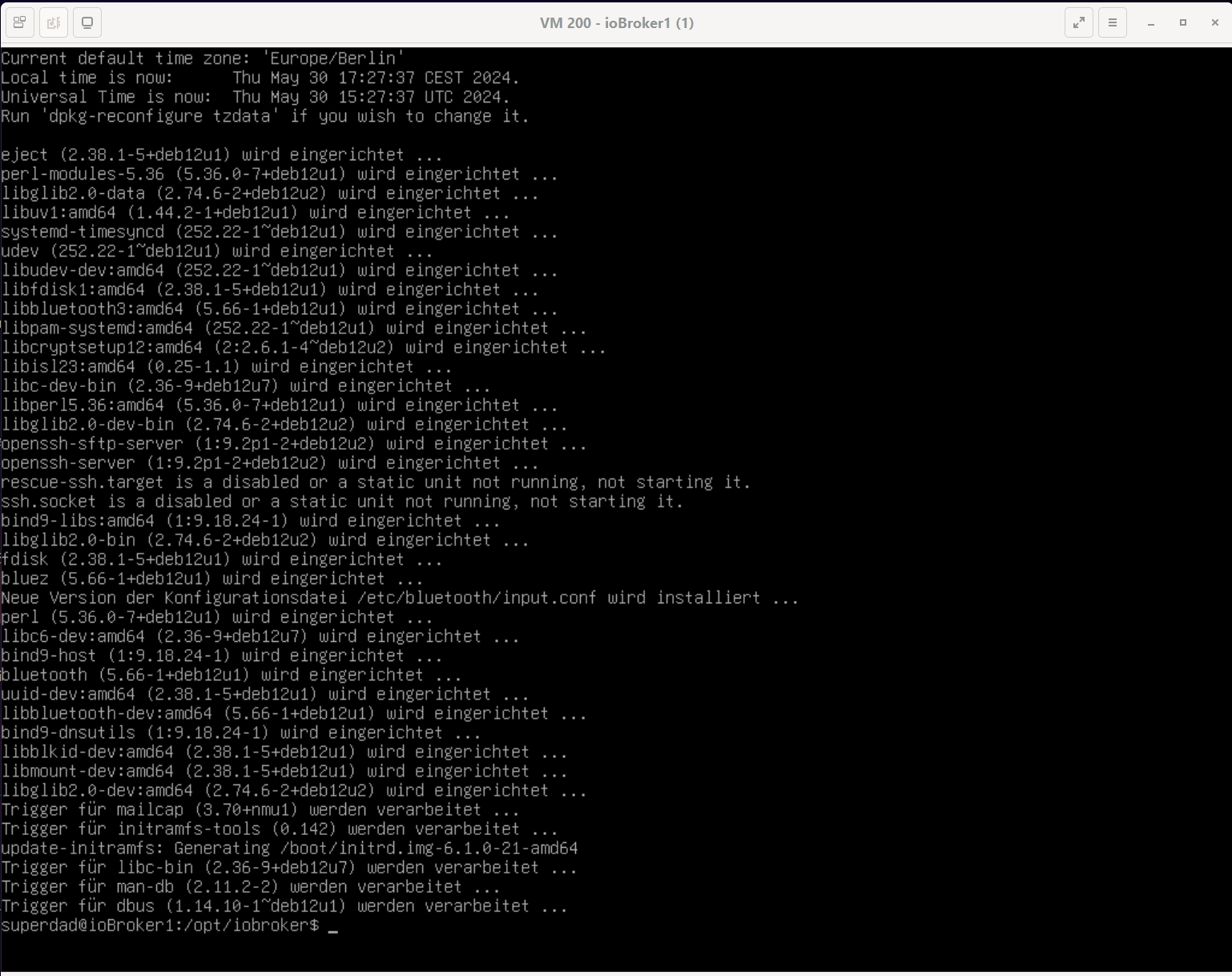
            So sieht es jetzt bei mir aus.

            f8a111af-9e83-4fdf-8d04-912776dadb2f-image.png

            CCU3

            iOBroker auf IntelNUC Proxmox

            1 Antwort Letzte Antwort
            0
            • S Superdad

              @armilar
              Sorry für die späte Rückmeldung.
              Habe einen kranken Enkel zu Hause.

              Habe iob nodejs-update 20 probiert.
              Das kommt als Meldung.

              174c11eb-7584-4037-b443-4a7463e08ea5-image.png

              Thomas BraunT Online
              Thomas BraunT Online
              Thomas Braun
              Most Active
              schrieb am zuletzt editiert von
              #5747

              @superdad

              sudo apt update
              sudo apt full-upgrade
              

              sagt? Da scheint mir in der Paket-Datenbank was zu klemmen.

              Linux-Werkzeugkasten:
              https://forum.iobroker.net/topic/42952/der-kleine-iobroker-linux-werkzeugkasten
              NodeJS Fixer Skript:
              https://forum.iobroker.net/topic/68035/iob-node-fix-skript
              iob_diag: curl -sLf -o diag.sh https://iobroker.net/diag.sh && bash diag.sh

              S 1 Antwort Letzte Antwort
              0
              • Thomas BraunT Thomas Braun

                @superdad

                sudo apt update
                sudo apt full-upgrade
                

                sagt? Da scheint mir in der Paket-Datenbank was zu klemmen.

                S Offline
                S Offline
                Superdad
                schrieb am zuletzt editiert von
                #5748

                @thomas-braun

                94b5e55c-c74d-4b95-9524-7ce00f316a39-image.png

                CCU3

                iOBroker auf IntelNUC Proxmox

                Thomas BraunT 1 Antwort Letzte Antwort
                0
                • S Superdad

                  @thomas-braun

                  94b5e55c-c74d-4b95-9524-7ce00f316a39-image.png

                  Thomas BraunT Online
                  Thomas BraunT Online
                  Thomas Braun
                  Most Active
                  schrieb am zuletzt editiert von
                  #5749

                  @superdad

                  Hatten wir das Thema '
                  KEINE BILDCHEN
                  von Text nicht gerade?

                  Linux-Werkzeugkasten:
                  https://forum.iobroker.net/topic/42952/der-kleine-iobroker-linux-werkzeugkasten
                  NodeJS Fixer Skript:
                  https://forum.iobroker.net/topic/68035/iob-node-fix-skript
                  iob_diag: curl -sLf -o diag.sh https://iobroker.net/diag.sh && bash diag.sh

                  S 1 Antwort Letzte Antwort
                  0
                  • Thomas BraunT Thomas Braun

                    @superdad

                    Hatten wir das Thema '
                    KEINE BILDCHEN
                    von Text nicht gerade?

                    S Offline
                    S Offline
                    Superdad
                    schrieb am zuletzt editiert von
                    #5750

                    @thomas-braun
                    Ich würde dir ja gern den ganzen Text einfügen, wenn ich wüsste, wie das im virt-viewer geht?
                    Sorry!
                    Vielleicht kannst du mir ja helfen?

                    CCU3

                    iOBroker auf IntelNUC Proxmox

                    Thomas BraunT ? 2 Antworten Letzte Antwort
                    0
                    • S Superdad

                      @thomas-braun
                      Ich würde dir ja gern den ganzen Text einfügen, wenn ich wüsste, wie das im virt-viewer geht?
                      Sorry!
                      Vielleicht kannst du mir ja helfen?

                      Thomas BraunT Online
                      Thomas BraunT Online
                      Thomas Braun
                      Most Active
                      schrieb am zuletzt editiert von
                      #5751

                      @superdad

                      So wie man jeden anderen Text auch kopiert. Jedenfalls in gescheiten Terminals. Was du da verwendest kenn ich nicht.

                      Linux-Werkzeugkasten:
                      https://forum.iobroker.net/topic/42952/der-kleine-iobroker-linux-werkzeugkasten
                      NodeJS Fixer Skript:
                      https://forum.iobroker.net/topic/68035/iob-node-fix-skript
                      iob_diag: curl -sLf -o diag.sh https://iobroker.net/diag.sh && bash diag.sh

                      1 Antwort Letzte Antwort
                      0
                      • S Superdad

                        @thomas-braun
                        Ich würde dir ja gern den ganzen Text einfügen, wenn ich wüsste, wie das im virt-viewer geht?
                        Sorry!
                        Vielleicht kannst du mir ja helfen?

                        ? Offline
                        ? Offline
                        Ein ehemaliger Benutzer
                        schrieb am zuletzt editiert von
                        #5752

                        @superdad

                        Einfach per ssh mit putty oder was auch immer auf den iobroker einloggen.

                        S 1 Antwort Letzte Antwort
                        0
                        • ? Ein ehemaliger Benutzer

                          @superdad

                          Einfach per ssh mit putty oder was auch immer auf den iobroker einloggen.

                          S Offline
                          S Offline
                          Superdad
                          schrieb am zuletzt editiert von
                          #5753

                          @ilovegym

                          ~~login as: superdad
                          superdad@192.168.1.141's password:
                          Linux ioBroker1 6.1.0-21-amd64 #1 SMP PREEMPT_DYNAMIC Debian 6.1.90-1 (2024-05-03) x86_64

                          The programs included with the Debian GNU/Linux system are free software;
                          the exact distribution terms for each program are described in the
                          individual files in /usr/share/doc/*/copyright.

                          Debian GNU/Linux comes with ABSOLUTELY NO WARRANTY, to the extent
                          permitted by applicable law.
                          Last login: Thu May 30 18:16:09 2024 from 192.168.1.192
                          superdad@ioBroker1:~$ sudo apt update
                          [sudo] Passwort für superdad:
                          OK:1 http://deb.debian.org/debian bookworm InRelease
                          OK:2 http://security.debian.org/debian-security bookworm-security InRelease
                          OK:3 http://deb.debian.org/debian bookworm-updates InRelease
                          OK:4 https://deb.nodesource.com/node_20.x nodistro InRelease
                          Paketlisten werden gelesen… Fertig
                          Abhängigkeitsbaum wird aufgebaut… Fertig
                          Statusinformationen werden eingelesen… Fertig
                          Alle Pakete sind aktuell.
                          superdad@ioBroker1:~$ sudo apt full-upgrade
                          Paketlisten werden gelesen… Fertig
                          Abhängigkeitsbaum wird aufgebaut… Fertig
                          Statusinformationen werden eingelesen… Fertig
                          Paketaktualisierung (Upgrade) wird berechnet… Fertig
                          Die folgenden Pakete wurden automatisch installiert und werden nicht mehr benötigt:
                          libc-ares2 node-busboy node-cjs-module-lexer node-undici node-xtend
                          Verwenden Sie »sudo apt autoremove«, um sie zu entfernen.
                          Die folgenden Pakete werden ENTFERNT:
                          linux-image-6.1.0-10-amd64
                          0 aktualisiert, 0 neu installiert, 1 zu entfernen und 0 nicht aktualisiert.
                          Nach dieser Operation werden 408 MB Plattenplatz freigegeben.
                          Möchten Sie fortfahren? [J/n] j
                          (Lese Datenbank ... 58344 Dateien und Verzeichnisse sind derzeit installiert.)
                          Entfernen von linux-image-6.1.0-10-amd64 (6.1.38-2) ...
                          /etc/kernel/postrm.d/initramfs-tools:
                          update-initramfs: Deleting /boot/initrd.img-6.1.0-10-amd64
                          /etc/kernel/postrm.d/zz-update-grub:
                          Generating grub configuration file ...
                          Found linux image: /boot/vmlinuz-6.1.0-21-amd64
                          Found initrd image: /boot/initrd.img-6.1.0-21-amd64
                          Found linux image: /boot/vmlinuz-6.1.0-13-amd64
                          Found initrd image: /boot/initrd.img-6.1.0-13-amd64
                          Warning: os-prober will not be executed to detect other bootable partitions.
                          Systems on them will not be added to the GRUB boot configuration.
                          Check GRUB_DISABLE_OS_PROBER documentation entry.
                          done
                          superdad@ioBroker1:~$ login as: superdad
                          superdad@192.168.1.141's password:
                          Linux ioBroker1 6.1.0-21-amd64 #1 SMP PREEMPT_DYNAMIC Debian 6.1.90-1 (2024-05-03) x86_64

                          The programs included with the Debian GNU/Linux system are free software;
                          the exact distribution terms for each program are described in the
                          individual files in /usr/share/doc/*/copyright.

                          Debian GNU/Linux comes with ABSOLUTELY NO WARRANTY, to the extent
                          permitted by applicable law.
                          Last login: Thu May 30 18:16:09 2024 from 192.168.1.192
                          superdad@ioBroker1:~$ sudo apt update
                          [sudo] Passwort für superdad:
                          OK:1 http://deb.debian.org/debian bookworm InRelease
                          OK:2 http://security.debian.org/debian-security bookworm-security InRelease
                          OK:3 http://deb.debian.org/debian bookworm-updates InRelease
                          OK:4 https://deb.nodesource.com/node_20.x nodistro InRelease
                          Paketlisten werden gelesen… Fertig
                          Abhängigkeitsbaum wird aufgebaut… Fertig
                          Statusinformationen werden eingelesen… Fertig
                          Alle Pakete sind aktuell.
                          superdad@ioBroker1:~$ sudo apt full-upgrade
                          Paketlisten werden gelesen… Fertig
                          superdad@ioBroker1:~$_PROBER documentation entry.t configuration.partitions..)ti~~

                          CCU3

                          iOBroker auf IntelNUC Proxmox

                          Thomas BraunT 1 Antwort Letzte Antwort
                          0
                          • S Superdad

                            @ilovegym

                            ~~login as: superdad
                            superdad@192.168.1.141's password:
                            Linux ioBroker1 6.1.0-21-amd64 #1 SMP PREEMPT_DYNAMIC Debian 6.1.90-1 (2024-05-03) x86_64

                            The programs included with the Debian GNU/Linux system are free software;
                            the exact distribution terms for each program are described in the
                            individual files in /usr/share/doc/*/copyright.

                            Debian GNU/Linux comes with ABSOLUTELY NO WARRANTY, to the extent
                            permitted by applicable law.
                            Last login: Thu May 30 18:16:09 2024 from 192.168.1.192
                            superdad@ioBroker1:~$ sudo apt update
                            [sudo] Passwort für superdad:
                            OK:1 http://deb.debian.org/debian bookworm InRelease
                            OK:2 http://security.debian.org/debian-security bookworm-security InRelease
                            OK:3 http://deb.debian.org/debian bookworm-updates InRelease
                            OK:4 https://deb.nodesource.com/node_20.x nodistro InRelease
                            Paketlisten werden gelesen… Fertig
                            Abhängigkeitsbaum wird aufgebaut… Fertig
                            Statusinformationen werden eingelesen… Fertig
                            Alle Pakete sind aktuell.
                            superdad@ioBroker1:~$ sudo apt full-upgrade
                            Paketlisten werden gelesen… Fertig
                            Abhängigkeitsbaum wird aufgebaut… Fertig
                            Statusinformationen werden eingelesen… Fertig
                            Paketaktualisierung (Upgrade) wird berechnet… Fertig
                            Die folgenden Pakete wurden automatisch installiert und werden nicht mehr benötigt:
                            libc-ares2 node-busboy node-cjs-module-lexer node-undici node-xtend
                            Verwenden Sie »sudo apt autoremove«, um sie zu entfernen.
                            Die folgenden Pakete werden ENTFERNT:
                            linux-image-6.1.0-10-amd64
                            0 aktualisiert, 0 neu installiert, 1 zu entfernen und 0 nicht aktualisiert.
                            Nach dieser Operation werden 408 MB Plattenplatz freigegeben.
                            Möchten Sie fortfahren? [J/n] j
                            (Lese Datenbank ... 58344 Dateien und Verzeichnisse sind derzeit installiert.)
                            Entfernen von linux-image-6.1.0-10-amd64 (6.1.38-2) ...
                            /etc/kernel/postrm.d/initramfs-tools:
                            update-initramfs: Deleting /boot/initrd.img-6.1.0-10-amd64
                            /etc/kernel/postrm.d/zz-update-grub:
                            Generating grub configuration file ...
                            Found linux image: /boot/vmlinuz-6.1.0-21-amd64
                            Found initrd image: /boot/initrd.img-6.1.0-21-amd64
                            Found linux image: /boot/vmlinuz-6.1.0-13-amd64
                            Found initrd image: /boot/initrd.img-6.1.0-13-amd64
                            Warning: os-prober will not be executed to detect other bootable partitions.
                            Systems on them will not be added to the GRUB boot configuration.
                            Check GRUB_DISABLE_OS_PROBER documentation entry.
                            done
                            superdad@ioBroker1:~$ login as: superdad
                            superdad@192.168.1.141's password:
                            Linux ioBroker1 6.1.0-21-amd64 #1 SMP PREEMPT_DYNAMIC Debian 6.1.90-1 (2024-05-03) x86_64

                            The programs included with the Debian GNU/Linux system are free software;
                            the exact distribution terms for each program are described in the
                            individual files in /usr/share/doc/*/copyright.

                            Debian GNU/Linux comes with ABSOLUTELY NO WARRANTY, to the extent
                            permitted by applicable law.
                            Last login: Thu May 30 18:16:09 2024 from 192.168.1.192
                            superdad@ioBroker1:~$ sudo apt update
                            [sudo] Passwort für superdad:
                            OK:1 http://deb.debian.org/debian bookworm InRelease
                            OK:2 http://security.debian.org/debian-security bookworm-security InRelease
                            OK:3 http://deb.debian.org/debian bookworm-updates InRelease
                            OK:4 https://deb.nodesource.com/node_20.x nodistro InRelease
                            Paketlisten werden gelesen… Fertig
                            Abhängigkeitsbaum wird aufgebaut… Fertig
                            Statusinformationen werden eingelesen… Fertig
                            Alle Pakete sind aktuell.
                            superdad@ioBroker1:~$ sudo apt full-upgrade
                            Paketlisten werden gelesen… Fertig
                            superdad@ioBroker1:~$_PROBER documentation entry.t configuration.partitions..)ti~~

                            Thomas BraunT Online
                            Thomas BraunT Online
                            Thomas Braun
                            Most Active
                            schrieb am zuletzt editiert von
                            #5754

                            @superdad sagte in SONOFF NSPanel mit Lovelace UI:

                            node-

                            sudo apt remove node-*
                            sudo apt autoremove
                            

                            Und dann bitte die Zusammenfassung / Summary von

                            iob diag
                            

                            Linux-Werkzeugkasten:
                            https://forum.iobroker.net/topic/42952/der-kleine-iobroker-linux-werkzeugkasten
                            NodeJS Fixer Skript:
                            https://forum.iobroker.net/topic/68035/iob-node-fix-skript
                            iob_diag: curl -sLf -o diag.sh https://iobroker.net/diag.sh && bash diag.sh

                            S 1 Antwort Letzte Antwort
                            0
                            • Thomas BraunT Thomas Braun

                              @superdad sagte in SONOFF NSPanel mit Lovelace UI:

                              node-

                              sudo apt remove node-*
                              sudo apt autoremove
                              

                              Und dann bitte die Zusammenfassung / Summary von

                              iob diag
                              
                              S Offline
                              S Offline
                              Superdad
                              schrieb am zuletzt editiert von
                              #5755

                              @thomas-braun

                              ~~Copy text starting here:

                              ======================= SUMMARY =======================
                                                      v.2024-05-22
                              
                              
                               Static hostname: ioBroker1
                                     Icon name: computer-vm
                                       Chassis: vm 🖴
                                Virtualization: kvm
                              Operating System: Debian GNU/Linux 12 (bookworm)
                                        Kernel: Linux 6.1.0-21-amd64
                                  Architecture: x86-64
                               Hardware Vendor: QEMU
                                Hardware Model: Standard PC _i440FX + PIIX, 1996_
                              Firmware Version: rel-1.16.2-0-gea1b7a073390-prebuilt.qemu.org
                              
                              Installation:           kvm
                              Kernel:                 x86_64
                              Userland:               64 bit
                              Timezone:               Europe/Berlin (CEST, +0200)
                              User-ID:                1000
                              Display-Server:         false
                              Boot Target:            graphical.target
                              
                              Pending OS-Updates:     0
                              Pending iob updates:    4
                              
                              Nodejs-Installation:
                              /usr/bin/nodejs         v20.14.0
                              /usr/bin/node           v20.14.0
                              /usr/bin/npm            10.7.0
                              /usr/bin/npx            10.7.0
                              /usr/bin/corepack       0.28.1
                              
                              Recommended versions are nodejs 18.20.3 and npm 10.7.0
                              Your nodejs installation is correct
                              
                              MEMORY:
                                             total        used        free      shared  buff/cache   available
                              Mem:            8.3G        3.3G        4.3G        614K        1.1G        5.0G
                              Swap:           1.0G          0B        1.0G
                              Total:          9.3G        3.3G        5.3G
                              
                              Active iob-Instances:   31
                              Active repo(s): stable
                              
                              ioBroker Core:          js-controller           5.0.19
                                                      admin                   6.13.16
                              
                              ioBroker Status:        iobroker is running on this host.
                              
                              
                              Objects type: jsonl
                              States  type: jsonl
                              
                              Status admin and web instance:
                              + system.adapter.admin.0                  : admin                 : ioBroker1                                -  enabled, port: 8081, bind: 0.0.0.0, run as: admin
                              + system.adapter.web.0                    : web                   : ioBroker1                                -  enabled, port: 8082, bind: 0.0.0.0, run as: admin
                              
                              Objects:                48759
                              States:                 46425
                              
                              Size of iob-Database:
                              
                              75M     /opt/iobroker/iobroker-data/objects.jsonl
                              74M     /opt/iobroker/iobroker-data/states.jsonl


                              =================== END OF SUMMARY ====================
                              

                              === Mark text until here for copying ===
                              superdad@ioBroker1:~$
                              ~~

                              CCU3

                              iOBroker auf IntelNUC Proxmox

                              Thomas BraunT 1 Antwort Letzte Antwort
                              0
                              • S Superdad

                                @thomas-braun

                                ~~Copy text starting here:

                                ======================= SUMMARY =======================
                                                        v.2024-05-22
                                
                                
                                 Static hostname: ioBroker1
                                       Icon name: computer-vm
                                         Chassis: vm 🖴
                                  Virtualization: kvm
                                Operating System: Debian GNU/Linux 12 (bookworm)
                                          Kernel: Linux 6.1.0-21-amd64
                                    Architecture: x86-64
                                 Hardware Vendor: QEMU
                                  Hardware Model: Standard PC _i440FX + PIIX, 1996_
                                Firmware Version: rel-1.16.2-0-gea1b7a073390-prebuilt.qemu.org
                                
                                Installation:           kvm
                                Kernel:                 x86_64
                                Userland:               64 bit
                                Timezone:               Europe/Berlin (CEST, +0200)
                                User-ID:                1000
                                Display-Server:         false
                                Boot Target:            graphical.target
                                
                                Pending OS-Updates:     0
                                Pending iob updates:    4
                                
                                Nodejs-Installation:
                                /usr/bin/nodejs         v20.14.0
                                /usr/bin/node           v20.14.0
                                /usr/bin/npm            10.7.0
                                /usr/bin/npx            10.7.0
                                /usr/bin/corepack       0.28.1
                                
                                Recommended versions are nodejs 18.20.3 and npm 10.7.0
                                Your nodejs installation is correct
                                
                                MEMORY:
                                               total        used        free      shared  buff/cache   available
                                Mem:            8.3G        3.3G        4.3G        614K        1.1G        5.0G
                                Swap:           1.0G          0B        1.0G
                                Total:          9.3G        3.3G        5.3G
                                
                                Active iob-Instances:   31
                                Active repo(s): stable
                                
                                ioBroker Core:          js-controller           5.0.19
                                                        admin                   6.13.16
                                
                                ioBroker Status:        iobroker is running on this host.
                                
                                
                                Objects type: jsonl
                                States  type: jsonl
                                
                                Status admin and web instance:
                                + system.adapter.admin.0                  : admin                 : ioBroker1                                -  enabled, port: 8081, bind: 0.0.0.0, run as: admin
                                + system.adapter.web.0                    : web                   : ioBroker1                                -  enabled, port: 8082, bind: 0.0.0.0, run as: admin
                                
                                Objects:                48759
                                States:                 46425
                                
                                Size of iob-Database:
                                
                                75M     /opt/iobroker/iobroker-data/objects.jsonl
                                74M     /opt/iobroker/iobroker-data/states.jsonl


                                =================== END OF SUMMARY ====================
                                

                                === Mark text until here for copying ===
                                superdad@ioBroker1:~$
                                ~~

                                Thomas BraunT Online
                                Thomas BraunT Online
                                Thomas Braun
                                Most Active
                                schrieb am zuletzt editiert von
                                #5756

                                @superdad sagte in SONOFF NSPanel mit Lovelace UI:

                                Pending iob updates: 4

                                Sollte jetzt soweit passen. Da war wohl mal eine falsche Version von nodejs installiert.
                                Schaufel die 4 ioBroker-Updates noch rein.

                                Linux-Werkzeugkasten:
                                https://forum.iobroker.net/topic/42952/der-kleine-iobroker-linux-werkzeugkasten
                                NodeJS Fixer Skript:
                                https://forum.iobroker.net/topic/68035/iob-node-fix-skript
                                iob_diag: curl -sLf -o diag.sh https://iobroker.net/diag.sh && bash diag.sh

                                S 1 Antwort Letzte Antwort
                                0
                                • Thomas BraunT Thomas Braun

                                  @superdad sagte in SONOFF NSPanel mit Lovelace UI:

                                  Pending iob updates: 4

                                  Sollte jetzt soweit passen. Da war wohl mal eine falsche Version von nodejs installiert.
                                  Schaufel die 4 ioBroker-Updates noch rein.

                                  S Offline
                                  S Offline
                                  Superdad
                                  schrieb am zuletzt editiert von
                                  #5757

                                  @thomas-braun

                                  Vielen Dank für eure Hilfe!

                                  Ich werde das Script von LoveLace noch einmal starten und schauen ob noch eine Meldung kommt.

                                  Vielen Dank!

                                  CCU3

                                  iOBroker auf IntelNUC Proxmox

                                  1 Antwort Letzte Antwort
                                  0
                                  • S Offline
                                    S Offline
                                    Superdad
                                    schrieb am zuletzt editiert von Superdad
                                    #5758

                                    @thomas-braun

                                    Also, die Info kommt immer noch:

                                    script.js.NSPanel_offen.NsPanelTs2: nodeJS must be at least v18.X.X. Currently: v16.19.0! Please Update your System! --> iob nodejs-update 18
                                    

                                    Funktioniert ja trotzdem.

                                    CCU3

                                    iOBroker auf IntelNUC Proxmox

                                    Thomas BraunT T 2 Antworten Letzte Antwort
                                    0
                                    • S Superdad

                                      @thomas-braun

                                      Also, die Info kommt immer noch:

                                      script.js.NSPanel_offen.NsPanelTs2: nodeJS must be at least v18.X.X. Currently: v16.19.0! Please Update your System! --> iob nodejs-update 18
                                      

                                      Funktioniert ja trotzdem.

                                      Thomas BraunT Online
                                      Thomas BraunT Online
                                      Thomas Braun
                                      Most Active
                                      schrieb am zuletzt editiert von
                                      #5759

                                      @superdad

                                      Dann starte die Kiste sauber durch, wenn das noch nicht geschehen ist.
                                      Und dann die Langfassung von

                                      iob diag
                                      

                                      Linux-Werkzeugkasten:
                                      https://forum.iobroker.net/topic/42952/der-kleine-iobroker-linux-werkzeugkasten
                                      NodeJS Fixer Skript:
                                      https://forum.iobroker.net/topic/68035/iob-node-fix-skript
                                      iob_diag: curl -sLf -o diag.sh https://iobroker.net/diag.sh && bash diag.sh

                                      S 1 Antwort Letzte Antwort
                                      0
                                      • Thomas BraunT Thomas Braun

                                        @superdad

                                        Dann starte die Kiste sauber durch, wenn das noch nicht geschehen ist.
                                        Und dann die Langfassung von

                                        iob diag
                                        
                                        S Offline
                                        S Offline
                                        Superdad
                                        schrieb am zuletzt editiert von
                                        #5760

                                        @thomas-braun sagte in SONOFF NSPanel mit Lovelace UI:

                                        iob diag

                                        
                                        ======== Start marking the full check here ========
                                        Skript v.2024-05-22
                                        
                                        *** BASE SYSTEM ***
                                         Static hostname: ioBroker1
                                               Icon name: computer-vm
                                                 Chassis: vm 🖴
                                          Virtualization: kvm
                                        Operating System: Debian GNU/Linux 12 (bookworm)
                                                  Kernel: Linux 6.1.0-21-amd64
                                            Architecture: x86-64
                                         Hardware Vendor: QEMU
                                          Hardware Model: Standard PC _i440FX + PIIX, 1996_
                                        Firmware Version: rel-1.16.2-0-gea1b7a073390-prebuilt.qemu.org
                                        
                                        model name      : QEMU Virtual CPU version 2.5+
                                        Docker          : false
                                        Virtualization  : kvm
                                        Kernel          : x86_64
                                        Userland        : 64 bit
                                        
                                        Systemuptime and Load:
                                         19:31:20 up 9 min,  2 users,  load average: 0.29, 0.45, 0.35
                                        CPU threads: 4
                                        
                                        
                                        *** Time and Time Zones ***
                                                       Local time: Thu 2024-05-30 19:31:20 CEST
                                                   Universal time: Thu 2024-05-30 17:31:20 UTC
                                                         RTC time: Thu 2024-05-30 17:31:20
                                                        Time zone: Europe/Berlin (CEST, +0200)
                                        System clock synchronized: yes
                                                      NTP service: active
                                                  RTC in local TZ: no
                                        
                                        *** Users and Groups ***
                                        User that called 'iob diag':
                                        superdad
                                        HOME=/home/superdad
                                        GROUPS=superdad cdrom floppy sudo audio dip video plugdev users netdev
                                        
                                        User that is running 'js-controller':
                                        iobroker
                                        HOME=/home/iobroker
                                        GROUPS=iobroker tty dialout audio video plugdev bluetooth
                                        
                                        *** Display-Server-Setup ***
                                        Display-Server: false
                                        Desktop:
                                        Terminal:       tty
                                        Boot Target:    graphical.target
                                        
                                        *** MEMORY ***
                                                       total        used        free      shared  buff/cache   available
                                        Mem:            8.3G        3.1G        4.7G        614K        755M        5.2G
                                        Swap:           1.0G          0B        1.0G
                                        Total:          9.3G        3.1G        5.7G
                                        
                                        Active iob-Instances:   30
                                        
                                                 7940 M total memory
                                                 2988 M used memory
                                                  268 M active memory
                                                 2957 M inactive memory
                                                 4478 M free memory
                                                   90 M buffer memory
                                                  630 M swap cache
                                                  974 M total swap
                                                    0 M used swap
                                                  974 M free swap
                                        
                                        *** top - Table Of Processes  ***
                                        top - 19:31:20 up 9 min,  2 users,  load average: 0.29, 0.45, 0.35
                                        Tasks: 135 total,   1 running, 134 sleeping,   0 stopped,   0 zombie
                                        %Cpu(s):  0.0 us,  0.0 sy,  0.0 ni,100.0 id,  0.0 wa,  0.0 hi,  0.0 si,  0.0 st
                                        MiB Mem :   7940.7 total,   4478.7 free,   2988.0 used,    721.2 buff/cache
                                        MiB Swap:    975.0 total,    975.0 free,      0.0 used.   4952.7 avail Mem
                                        
                                        *** FAILED SERVICES ***
                                        
                                          UNIT LOAD ACTIVE SUB DESCRIPTION
                                        0 loaded units listed.
                                        
                                        *** FILESYSTEM ***
                                        Filesystem     Type      Size  Used Avail Use% Mounted on
                                        udev           devtmpfs  3.9G     0  3.9G   0% /dev
                                        tmpfs          tmpfs     795M  600K  794M   1% /run
                                        /dev/sda1      ext4       31G   13G   17G  44% /
                                        tmpfs          tmpfs     3.9G     0  3.9G   0% /dev/shm
                                        tmpfs          tmpfs     5.0M     0  5.0M   0% /run/lock
                                        tmpfs          tmpfs     795M     0  795M   0% /run/user/1000
                                        
                                        Messages concerning ext4 filesystem in dmesg:
                                        [Thu May 30 19:22:01 2024] EXT4-fs (sda1): mounted filesystem with ordered data mode. Quota mode: none.
                                        [Thu May 30 19:22:02 2024] EXT4-fs (sda1): re-mounted. Quota mode: none.
                                        
                                        Show mounted filesystems:
                                        TARGET                                                  SOURCE      FSTYPE      OPTIONS
                                        /                                                       /dev/sda1   ext4        rw,relatime,errors=remount-ro
                                        |-/sys                                                  sysfs       sysfs       rw,nosuid,nodev,noexec,relatime
                                        | |-/sys/kernel/security                                securityfs  securityfs  rw,nosuid,nodev,noexec,relatime
                                        | |-/sys/fs/cgroup                                      cgroup2     cgroup2     rw,nosuid,nodev,noexec,relatime,nsdelegate,memory_recursiveprot
                                        | |-/sys/fs/pstore                                      pstore      pstore      rw,nosuid,nodev,noexec,relatime
                                        | |-/sys/fs/bpf                                         bpf         bpf         rw,nosuid,nodev,noexec,relatime,mode=700
                                        | |-/sys/kernel/debug                                   debugfs     debugfs     rw,nosuid,nodev,noexec,relatime
                                        | |-/sys/kernel/tracing                                 tracefs     tracefs     rw,nosuid,nodev,noexec,relatime
                                        | |-/sys/fs/fuse/connections                            fusectl     fusectl     rw,nosuid,nodev,noexec,relatime
                                        | `-/sys/kernel/config                                  configfs    configfs    rw,nosuid,nodev,noexec,relatime
                                        |-/proc                                                 proc        proc        rw,nosuid,nodev,noexec,relatime
                                        | `-/proc/sys/fs/binfmt_misc                            systemd-1   autofs      rw,relatime,fd=30,pgrp=1,timeout=0,minproto=5,maxproto=5,direct,pipe_ino=1629
                                        |   `-/proc/sys/fs/binfmt_misc                          binfmt_misc binfmt_misc rw,nosuid,nodev,noexec,relatime
                                        |-/dev                                                  udev        devtmpfs    rw,nosuid,relatime,size=4042840k,nr_inodes=1010710,mode=755,inode64
                                        | |-/dev/pts                                            devpts      devpts      rw,nosuid,noexec,relatime,gid=5,mode=620,ptmxmode=000
                                        | |-/dev/shm                                            tmpfs       tmpfs       rw,nosuid,nodev,inode64
                                        | |-/dev/mqueue                                         mqueue      mqueue      rw,nosuid,nodev,noexec,relatime
                                        | `-/dev/hugepages                                      hugetlbfs   hugetlbfs   rw,relatime,pagesize=2M
                                        `-/run                                                  tmpfs       tmpfs       rw,nosuid,nodev,noexec,relatime,size=813132k,mode=755,inode64
                                          |-/run/lock                                           tmpfs       tmpfs       rw,nosuid,nodev,noexec,relatime,size=5120k,inode64
                                          |-/run/credentials/systemd-sysctl.service             ramfs       ramfs       ro,nosuid,nodev,noexec,relatime,mode=700
                                          |-/run/credentials/systemd-sysusers.service           ramfs       ramfs       ro,nosuid,nodev,noexec,relatime,mode=700
                                          |-/run/credentials/systemd-tmpfiles-setup-dev.service ramfs       ramfs       ro,nosuid,nodev,noexec,relatime,mode=700
                                          |-/run/credentials/systemd-tmpfiles-setup.service     ramfs       ramfs       ro,nosuid,nodev,noexec,relatime,mode=700
                                          |-/run/rpc_pipefs                                     sunrpc      rpc_pipefs  rw,relatime
                                          `-/run/user/1000                                      tmpfs       tmpfs       rw,nosuid,nodev,relatime,size=813128k,nr_inodes=203282,mode=700,uid=1000,gid=1000,inode64
                                        
                                        Files in neuralgic directories:
                                        
                                        /var:
                                        3.4G    /var/
                                        3.0G    /var/log/journal/9f50a08134ec40bc946eb7bd2355e6a1
                                        3.0G    /var/log/journal
                                        3.0G    /var/log
                                        250M    /var/cache
                                        
                                        Hint: You are currently not seeing messages from other users and the system.
                                              Users in groups 'adm', 'systemd-journal' can see all messages.
                                              Pass -q to turn off this notice.
                                        Archived and active journals take up 8.0M in the file system.
                                        
                                        /opt/iobroker/backups:
                                        1.4G    /opt/iobroker/backups/
                                        
                                        /opt/iobroker/iobroker-data:
                                        1.3G    /opt/iobroker/iobroker-data/
                                        805M    /opt/iobroker/iobroker-data/files
                                        218M    /opt/iobroker/iobroker-data/backup-objects
                                        204M    /opt/iobroker/iobroker-data/Daten
                                        138M    /opt/iobroker/iobroker-data/files/javascript.admin
                                        
                                        The five largest files in iobroker-data are:
                                        62M     /opt/iobroker/iobroker-data/objects.jsonl
                                        35M     /opt/iobroker/iobroker-data/files/devices.admin/static/js/main.24f2bb56.js.map
                                        24M     /opt/iobroker/iobroker-data/files/web.admin/static/js/main.135279a0.js.map
                                        24M     /opt/iobroker/iobroker-data/files/echarts/static/js/main.2b7495c2.js.map
                                        24M     /opt/iobroker/iobroker-data/files/echarts.admin/chart/static/js/main.2b7495c2.js.map
                                        
                                        USB-Devices by-id:
                                        USB-Sticks -  Avoid direct links to /dev/tty* in your adapter setups, please always prefer the links 'by-id':
                                        
                                        /dev/serial/by-id/usb-Silicon_Labs_Sonoff_Zigbee_3.0_USB_Dongle_Plus_0001-if00-port0
                                        
                                        HINT:
                                        Your zigbee.0 COM-Port is NOT matching 'by-id'. Please check your setting:
                                        /dev/ttyUSB0


                                        *** NodeJS-Installation ***
                                        
                                        /usr/bin/nodejs         v20.14.0
                                        /usr/bin/node           v20.14.0
                                        /usr/bin/npm            10.7.0
                                        /usr/bin/npx            10.7.0
                                        /usr/bin/corepack       0.28.1
                                        
                                        
                                        nodejs:
                                          Installed: 20.14.0-1nodesource1
                                          Candidate: 20.14.0-1nodesource1
                                          Version table:
                                         *** 20.14.0-1nodesource1 1001
                                                500 https://deb.nodesource.com/node_20.x nodistro/main amd64 Packages
                                                100 /var/lib/dpkg/status
                                             20.13.1-1nodesource1 1001
                                                500 https://deb.nodesource.com/node_20.x nodistro/main amd64 Packages
                                             20.13.0-1nodesource1 1001
                                                500 https://deb.nodesource.com/node_20.x nodistro/main amd64 Packages
                                             20.12.2-1nodesource1 1001
                                                500 https://deb.nodesource.com/node_20.x nodistro/main amd64 Packages
                                             20.12.1-1nodesource1 1001
                                                500 https://deb.nodesource.com/node_20.x nodistro/main amd64 Packages
                                             20.12.0-1nodesource1 1001
                                                500 https://deb.nodesource.com/node_20.x nodistro/main amd64 Packages
                                             20.11.1-1nodesource1 1001
                                                500 https://deb.nodesource.com/node_20.x nodistro/main amd64 Packages
                                             20.11.0-1nodesource1 1001
                                                500 https://deb.nodesource.com/node_20.x nodistro/main amd64 Packages
                                             20.10.0-1nodesource1 1001
                                                500 https://deb.nodesource.com/node_20.x nodistro/main amd64 Packages
                                             20.9.0-1nodesource1 1001
                                                500 https://deb.nodesource.com/node_20.x nodistro/main amd64 Packages
                                             20.8.1-1nodesource1 1001
                                                500 https://deb.nodesource.com/node_20.x nodistro/main amd64 Packages
                                             20.8.0-1nodesource1 1001
                                                500 https://deb.nodesource.com/node_20.x nodistro/main amd64 Packages
                                             20.7.0-1nodesource1 1001
                                                500 https://deb.nodesource.com/node_20.x nodistro/main amd64 Packages
                                             20.6.1-1nodesource1 1001
                                                500 https://deb.nodesource.com/node_20.x nodistro/main amd64 Packages
                                             20.6.0-1nodesource1 1001
                                                500 https://deb.nodesource.com/node_20.x nodistro/main amd64 Packages
                                             20.5.1-1nodesource1 1001
                                                500 https://deb.nodesource.com/node_20.x nodistro/main amd64 Packages
                                             20.5.0-1nodesource1 1001
                                                500 https://deb.nodesource.com/node_20.x nodistro/main amd64 Packages
                                             20.4.0-1nodesource1 1001
                                                500 https://deb.nodesource.com/node_20.x nodistro/main amd64 Packages
                                             20.3.1-1nodesource1 1001
                                                500 https://deb.nodesource.com/node_20.x nodistro/main amd64 Packages
                                             20.3.0-1nodesource1 1001
                                                500 https://deb.nodesource.com/node_20.x nodistro/main amd64 Packages
                                             20.2.0-1nodesource1 1001
                                                500 https://deb.nodesource.com/node_20.x nodistro/main amd64 Packages
                                             20.1.0-1nodesource1 1001
                                                500 https://deb.nodesource.com/node_20.x nodistro/main amd64 Packages
                                             20.0.0-1nodesource1 1001
                                                500 https://deb.nodesource.com/node_20.x nodistro/main amd64 Packages
                                             18.19.0+dfsg-6~deb12u1 500
                                                500 http://security.debian.org/debian-security bookworm-security/main amd64 Packages
                                             18.13.0+dfsg1-1 500
                                                500 http://deb.debian.org/debian bookworm/main amd64 Packages
                                        
                                        Temp directories causing npm8 problem: 0
                                        No problems detected
                                        
                                        Errors in npm tree:
                                        
                                        *** ioBroker-Installation ***
                                        
                                        ioBroker Status
                                        iobroker is running on this host.
                                        
                                        
                                        Objects type: jsonl
                                        States  type: jsonl
                                        
                                        Core adapters versions
                                        js-controller:  5.0.19
                                        admin:          6.13.16
                                        javascript:     8.3.1
                                        
                                        nodejs modules from github:     4
                                        +-- iobroker.icons-open-icon-library-png@0.1.3 (git+ssh://git@github.com/ioBroker/ioBroker.icons-open-icon-library-png.git#0847a79d713ee6725ccb6ccfb044c025b73ec946)
                                        +-- iobroker.life360@0.2.11 (git+ssh://git@github.com/MiGoller/ioBroker.life360.git#c2c3353ad27ca108869e1049dfbe361468983dab)
                                        +-- iobroker.mihome-cloud@0.1.0 (git+ssh://git@github.com/TA2k/ioBroker.mihome-cloud.git#e61a4947290515407844b7677d83457f7ca0c77f)
                                        +-- iobroker.sourceanalytix@0.4.14 (git+ssh://git@github.com/DrozmotiX/ioBroker.sourceanalytix.git#9c4635239c7b9321601dcf0fcdd8677a55a8b13f)
                                        
                                        Adapter State
                                        + system.adapter.accuweather.0            : accuweather           : ioBroker1                                -  enabled
                                        + system.adapter.admin.0                  : admin                 : ioBroker1                                -  enabled, port: 8081, bind: 0.0.0.0, run as: admin
                                          system.adapter.alarm.0                  : alarm                 : ioBroker1                                - disabled
                                        + system.adapter.backitup.0               : backitup              : ioBroker1                                -  enabled
                                          system.adapter.ble.0                    : ble                   : ioBroker1                                - disabled
                                        + system.adapter.cloud.0                  : cloud                 : ioBroker1                                -  enabled
                                          system.adapter.daswetter.0              : daswetter             : ioBroker1                                -  enabled
                                          system.adapter.device-watcher.0         : device-watcher        : ioBroker1                                - disabled
                                          system.adapter.devices.0                : devices               : ioBroker1                                -  enabled
                                          system.adapter.discovery.0              : discovery             : ioBroker1                                - disabled
                                          system.adapter.dwd.0                    : dwd                   : ioBroker1                                -  enabled
                                          system.adapter.echarts.0                : echarts               : ioBroker1                                - disabled
                                          system.adapter.email.0                  : email                 : ioBroker1                                - disabled
                                          system.adapter.feiertage.0              : feiertage             : ioBroker1                                -  enabled
                                          system.adapter.flot.0                   : flot                  : ioBroker1                                - disabled
                                          system.adapter.fullcalendar.0           : fullcalendar          : ioBroker1                                - disabled
                                        + system.adapter.fullybrowser.0           : fullybrowser          : ioBroker1                                -  enabled
                                          system.adapter.geofency.0               : geofency              : ioBroker1                                - disabled, port: 7999, bind: 0.0.0.0
                                          system.adapter.heatingcontrol.0         : heatingcontrol        : ioBroker1                                - disabled
                                        + system.adapter.history.0                : history               : ioBroker1                                -  enabled
                                        + system.adapter.hm-rega.0                : hm-rega               : ioBroker1                                -  enabled
                                        + system.adapter.hm-rpc.0                 : hm-rpc                : ioBroker1                                -  enabled, port: 0
                                        + system.adapter.hm-rpc.1                 : hm-rpc                : ioBroker1                                -  enabled, port: 0
                                        + system.adapter.hm-rpc.2                 : hm-rpc                : ioBroker1                                -  enabled, port: 0
                                          system.adapter.homekit-controller.0     : homekit-controller    : ioBroker1                                - disabled
                                          system.adapter.ical.0                   : ical                  : ioBroker1                                -  enabled
                                          system.adapter.ical.1                   : ical                  : ioBroker1                                -  enabled
                                          system.adapter.icons-addictive-flavour-png.0: icons-addictive-flavour-png: ioBroker1                                - disabled
                                          system.adapter.icons-fatcow-hosting.0   : icons-fatcow-hosting  : ioBroker1                                - disabled
                                          system.adapter.icons-icons8.0           : icons-icons8          : ioBroker1                                - disabled
                                          system.adapter.icons-material-png.0     : icons-material-png    : ioBroker1                                - disabled
                                          system.adapter.icons-material-svg.0     : icons-material-svg    : ioBroker1                                - disabled
                                          system.adapter.icons-mfd-png.0          : icons-mfd-png         : ioBroker1                                - disabled
                                          system.adapter.icons-mfd-svg.0          : icons-mfd-svg         : ioBroker1                                - disabled
                                          system.adapter.icons-open-icon-library-png.0: icons-open-icon-library-png: ioBroker1                                - disabled
                                          system.adapter.icons-ultimate-png.0     : icons-ultimate-png    : ioBroker1                                - disabled
                                        + system.adapter.influxdb.0               : influxdb              : ioBroker1                                -  enabled, port: 8086
                                          system.adapter.info.0                   : info                  : ioBroker1                                - disabled
                                        + system.adapter.javascript.0             : javascript            : ioBroker1                                -  enabled
                                          system.adapter.life360.0                : life360               : ioBroker1                                - disabled
                                          system.adapter.logparser.0              : logparser             : ioBroker1                                - disabled
                                        + system.adapter.mihome-cloud.0           : mihome-cloud          : ioBroker1                                -  enabled
                                          system.adapter.mihome-vacuum.0          : mihome-vacuum         : ioBroker1                                - disabled, port: 54321
                                        + system.adapter.mihome.0                 : mihome                : ioBroker1                                -  enabled, port: 9898, bind: 0.0.0.0
                                          system.adapter.mobile.0                 : mobile                : ioBroker1                                - disabled
                                          system.adapter.mqtt-client.0            : mqtt-client           : ioBroker1                                - disabled, port: 1886
                                          system.adapter.mqtt-client.1            : mqtt-client           : ioBroker1                                - disabled, port: 1886
                                          system.adapter.mqtt-client.2            : mqtt-client           : ioBroker1                                - disabled, port: 1886
                                        + system.adapter.mqtt.0                   : mqtt                  : ioBroker1                                -  enabled, port: 1886, bind: 192.168.1.141
                                        + system.adapter.nina.0                   : nina                  : ioBroker1                                -  enabled
                                          system.adapter.node-red.0               : node-red              : ioBroker1                                - disabled, port: 1880, bind: 0.0.0.0
                                          system.adapter.onvif.0                  : onvif                 : ioBroker1                                - disabled, port: 80, 7575, 8000, 8080, 8081, 8899
                                          system.adapter.places.0                 : places                : ioBroker1                                - disabled
                                        + system.adapter.pollenflug.0             : pollenflug            : ioBroker1                                -  enabled
                                          system.adapter.pushover.0               : pushover              : ioBroker1                                - disabled
                                        + system.adapter.sayit.0                  : sayit                 : ioBroker1                                -  enabled
                                        + system.adapter.sayit.1                  : sayit                 : ioBroker1                                -  enabled
                                          system.adapter.schoolfree.0             : schoolfree            : ioBroker1                                -  enabled
                                        + system.adapter.shelly.0                 : shelly                : ioBroker1                                -  enabled, port: 1882, bind: 0.0.0.0
                                          system.adapter.simple-api.0             : simple-api            : ioBroker1                                - disabled, port: 8087, bind: 0.0.0.0, run as: admin
                                        + system.adapter.sonoff.0                 : sonoff                : ioBroker1                                -  enabled, port: 1883, bind: 0.0.0.0
                                          system.adapter.sonos.0                  : sonos                 : ioBroker1                                - disabled
                                        + system.adapter.sourceanalytix.0         : sourceanalytix        : ioBroker1                                -  enabled
                                          system.adapter.sprinklecontrol.0        : sprinklecontrol       : ioBroker1                                - disabled
                                        + system.adapter.sql.0                    : sql                   : ioBroker1                                -  enabled, port: 3306
                                        + system.adapter.telegram.0               : telegram              : ioBroker1                                -  enabled, port: 8443, bind: 0.0.0.0
                                        + system.adapter.trashschedule.0          : trashschedule         : ioBroker1                                -  enabled
                                          system.adapter.tuya.0                   : tuya                  : ioBroker1                                - disabled
                                          system.adapter.unifi-protect.0          : unifi-protect         : ioBroker1                                - disabled
                                          system.adapter.unifi.0                  : unifi                 : ioBroker1                                - disabled
                                        + system.adapter.virtualpowermeter.0      : virtualpowermeter     : ioBroker1                                -  enabled
                                          system.adapter.vis-bars.0               : vis-bars              : ioBroker1                                - disabled
                                          system.adapter.vis-canvas-gauges.0      : vis-canvas-gauges     : ioBroker1                                - disabled
                                          system.adapter.vis-colorpicker.0        : vis-colorpicker       : ioBroker1                                - disabled
                                          system.adapter.vis-fancyswitch.0        : vis-fancyswitch       : ioBroker1                                - disabled
                                          system.adapter.vis-google-fonts.0       : vis-google-fonts      : ioBroker1                                -  enabled
                                          system.adapter.vis-history.0            : vis-history           : ioBroker1                                - disabled
                                          system.adapter.vis-hqwidgets.0          : vis-hqwidgets         : ioBroker1                                - disabled
                                          system.adapter.vis-icontwo.0            : vis-icontwo           : ioBroker1                                - disabled
                                        + system.adapter.vis-inventwo.0           : vis-inventwo          : ioBroker1                                -  enabled
                                          system.adapter.vis-jqui-mfd.0           : vis-jqui-mfd          : ioBroker1                                - disabled
                                          system.adapter.vis-justgage.0           : vis-justgage          : ioBroker1                                - disabled
                                          system.adapter.vis-keyboard.0           : vis-keyboard          : ioBroker1                                - disabled
                                          system.adapter.vis-lcars.0              : vis-lcars             : ioBroker1                                - disabled
                                          system.adapter.vis-map.0                : vis-map               : ioBroker1                                - disabled
                                          system.adapter.vis-material-advanced.0  : vis-material-advanced : ioBroker1                                - disabled
                                          system.adapter.vis-metro.0              : vis-metro             : ioBroker1                                - disabled
                                          system.adapter.vis-players.0            : vis-players           : ioBroker1                                - disabled
                                          system.adapter.vis-plumb.0              : vis-plumb             : ioBroker1                                - disabled
                                          system.adapter.vis-rgraph.0             : vis-rgraph            : ioBroker1                                - disabled
                                          system.adapter.vis-timeandweather.0     : vis-timeandweather    : ioBroker1                                - disabled
                                          system.adapter.vis-weather.0            : vis-weather           : ioBroker1                                - disabled
                                          system.adapter.vis.0                    : vis                   : ioBroker1                                -  enabled
                                          system.adapter.weatherunderground.0     : weatherunderground    : ioBroker1                                - disabled
                                        + system.adapter.web.0                    : web                   : ioBroker1                                -  enabled, port: 8082, bind: 0.0.0.0, run as: admin
                                          system.adapter.yahka.0                  : yahka                 : ioBroker1                                - disabled
                                        + system.adapter.zigbee.0                 : zigbee                : ioBroker1                                -  enabled, port: /dev/ttyUSB0
                                          system.adapter.zigbee2mqtt.0            : zigbee2mqtt           : ioBroker1                                - disabled
                                        
                                        + instance is alive
                                        
                                        Enabled adapters with bindings
                                        + system.adapter.admin.0                  : admin                 : ioBroker1                                -  enabled, port: 8081, bind: 0.0.0.0, run as: admin
                                        + system.adapter.hm-rpc.0                 : hm-rpc                : ioBroker1                                -  enabled, port: 0
                                        + system.adapter.hm-rpc.1                 : hm-rpc                : ioBroker1                                -  enabled, port: 0
                                        + system.adapter.hm-rpc.2                 : hm-rpc                : ioBroker1                                -  enabled, port: 0
                                        + system.adapter.influxdb.0               : influxdb              : ioBroker1                                -  enabled, port: 8086
                                        + system.adapter.mihome.0                 : mihome                : ioBroker1                                -  enabled, port: 9898, bind: 0.0.0.0
                                        + system.adapter.mqtt.0                   : mqtt                  : ioBroker1                                -  enabled, port: 1886, bind: 192.168.1.141
                                        + system.adapter.shelly.0                 : shelly                : ioBroker1                                -  enabled, port: 1882, bind: 0.0.0.0
                                        + system.adapter.sonoff.0                 : sonoff                : ioBroker1                                -  enabled, port: 1883, bind: 0.0.0.0
                                        + system.adapter.sql.0                    : sql                   : ioBroker1                                -  enabled, port: 3306
                                        + system.adapter.telegram.0               : telegram              : ioBroker1                                -  enabled, port: 8443, bind: 0.0.0.0
                                        + system.adapter.web.0                    : web                   : ioBroker1                                -  enabled, port: 8082, bind: 0.0.0.0, run as: admin
                                        + system.adapter.zigbee.0                 : zigbee                : ioBroker1                                -  enabled, port: /dev/ttyUSB0
                                        
                                        ioBroker-Repositories
                                        stable        : http://download.iobroker.net/sources-dist.json
                                        beta          : http://download.iobroker.net/sources-dist-latest.json
                                        
                                        Active repo(s): stable
                                        
                                        Installed ioBroker-Instances
                                        Used repository: stable
                                        Adapter    "accuweather"  : 1.4.0    , installed 1.4.0
                                        Adapter    "admin"        : 6.13.16  , installed 6.13.16
                                        Adapter    "alarm"        : 3.6.0    , installed 3.6.0
                                        Adapter    "backitup"     : 2.11.0   , installed 2.11.0
                                        Adapter    "ble"          : 0.14.0   , installed 0.14.0
                                        Adapter    "cloud"        : 5.0.1    , installed 5.0.1
                                        Adapter    "daswetter"    : 3.1.13   , installed 3.1.13
                                        Adapter    "device-watcher": 2.12.1  , installed 2.12.1
                                        Adapter    "devices"      : 1.1.5    , installed 1.1.5
                                        Adapter    "discovery"    : 4.4.0    , installed 4.4.0
                                        Adapter    "dwd"          : 2.8.5    , installed 2.8.5
                                        Adapter    "echarts"      : 1.7.2    , installed 1.7.2
                                        Adapter    "email"        : 1.3.0    , installed 1.3.0
                                        Adapter    "feiertage"    : 1.2.0    , installed 1.2.0
                                        Adapter    "flot"         : 1.12.0   , installed 1.12.0
                                        Adapter    "fullcalendar" : 2.3.4    , installed 2.3.4
                                        Adapter    "fullybrowser" : 3.0.12   , installed 3.0.12
                                        Adapter    "geofency"     : 1.2.4    , installed 1.2.4
                                        Adapter    "heatingcontrol": 2.12.5  , installed 2.12.5
                                        Adapter    "history"      : 3.0.1    , installed 3.0.1
                                        Adapter    "hm-rega"      : 4.0.0    , installed 4.0.0
                                        Adapter    "hm-rpc"       : 1.17.0   , installed 1.17.0
                                        Adapter    "homekit-controller": 0.5.10, installed 0.5.10
                                        Adapter    "ical"         : 1.15.0   , installed 1.14.3 [Updatable]
                                        Adapter    "icons-addictive-flavour-png": 0.1.0, installed 0.1.0
                                        Adapter    "icons-fatcow-hosting": 0.1.0, installed 0.1.0
                                        Adapter    "icons-icons8" : 0.0.1    , installed 0.0.1
                                        Adapter    "icons-material-png": 0.1.0, installed 0.1.0
                                        Adapter    "icons-material-svg": 0.1.0, installed 0.1.0
                                        Adapter    "icons-mfd-png": 1.2.1    , installed 1.2.1
                                        Adapter    "icons-mfd-svg": 1.2.0    , installed 1.2.0
                                        Adapter    "icons-open-icon-library-png": 0.1.2, installed 0.1.3
                                        Adapter    "icons-ultimate-png": 1.0.1, installed 1.0.1
                                        Adapter    "influxdb"     : 4.0.2    , installed 4.0.2
                                        Adapter    "javascript"   : 8.3.1    , installed 8.3.1
                                        Controller "js-controller": 5.0.19   , installed 5.0.19
                                        Adapter    "logparser"    : 2.2.2    , installed 2.2.2
                                        Adapter    "mihome"       : 1.4.0    , installed 1.4.0
                                        Adapter    "mihome-cloud" : 0.1.0    , installed 0.1.0
                                        Adapter    "mihome-vacuum": 4.2.0    , installed 4.2.0
                                        Adapter    "mobile"       : 1.0.1    , installed 1.0.1
                                        Adapter    "mqtt"         : 5.2.0    , installed 5.2.0
                                        Adapter    "mqtt-client"  : 1.8.0    , installed 1.8.0
                                        Adapter    "nina"         : 0.0.25   , installed 0.0.25
                                        Adapter    "node-red"     : 5.2.1    , installed 5.2.1
                                        Adapter    "onvif"        : 1.1.3    , installed 1.1.3
                                        Adapter    "places"       : 1.2.0    , installed 1.2.0
                                        Adapter    "pollenflug"   : 1.0.6    , installed 1.0.6
                                        Adapter    "pushover"     : 3.0.6    , installed 3.0.6
                                        Adapter    "sayit"        : 3.0.5    , installed 3.0.0  [Updatable]
                                        Adapter    "schoolfree"   : 1.1.4    , installed 1.1.4
                                        Adapter    "shelly"       : 6.9.0    , installed 6.9.0
                                        Adapter    "simple-api"   : 2.8.0    , installed 2.8.0
                                        Adapter    "socketio"     : 6.7.0    , installed 6.7.0
                                        Adapter    "sonoff"       : 3.0.3    , installed 3.0.3
                                        Adapter    "sonos"        : 3.0.0    , installed 3.0.0
                                        Adapter    "sprinklecontrol": 0.2.13 , installed 0.2.13
                                        Adapter    "sql"          : 2.2.0    , installed 2.2.0
                                        Adapter    "telegram"     : 3.2.1    , installed 3.2.1
                                        Adapter    "trashschedule": 3.3.0    , installed 3.3.0
                                        Adapter    "tuya"         : 3.15.0   , installed 3.15.0
                                        Adapter    "unifi"        : 0.7.0    , installed 0.7.0
                                        Adapter    "unifi-protect": 1.0.0    , installed 1.0.0
                                        Adapter    "virtualpowermeter": 1.4.6, installed 1.4.6
                                        Adapter    "vis"          : 1.5.4    , installed 1.5.4
                                        Adapter    "vis-bars"     : 0.1.4    , installed 0.1.4
                                        Adapter    "vis-canvas-gauges": 1.0.1, installed 1.0.1
                                        Adapter    "vis-colorpicker": 2.0.3  , installed 2.0.3
                                        Adapter    "vis-fancyswitch": 1.1.0  , installed 1.1.0
                                        Adapter    "vis-google-fonts": 1.0.4 , installed 1.0.4
                                        Adapter    "vis-history"  : 1.0.0    , installed 1.0.0
                                        Adapter    "vis-hqwidgets": 1.5.1    , installed 1.5.1
                                        Adapter    "vis-icontwo"  : 1.5.0    , installed 1.5.0
                                        Adapter    "vis-inventwo" : 3.3.4    , installed 3.3.4
                                        Adapter    "vis-jqui-mfd" : 1.1.1    , installed 1.1.1
                                        Adapter    "vis-justgage" : 2.1.7    , installed 2.1.7
                                        Adapter    "vis-keyboard" : 0.0.2    , installed 0.0.2
                                        Adapter    "vis-lcars"    : 1.1.1    , installed 1.1.1
                                        Adapter    "vis-map"      : 1.0.5    , installed 1.0.5
                                        Adapter    "vis-material-advanced": 1.7.4, installed 1.7.4
                                        Adapter    "vis-metro"    : 1.2.0    , installed 1.2.0
                                        Adapter    "vis-players"  : 0.1.6    , installed 0.1.6
                                        Adapter    "vis-plumb"    : 1.0.2    , installed 1.0.2
                                        Adapter    "vis-rgraph"   : 0.0.2    , installed 0.0.2
                                        Adapter    "vis-timeandweather": 1.2.2, installed 1.2.2
                                        Adapter    "vis-weather"  : 2.5.9    , installed 2.5.9
                                        Adapter    "weatherunderground": 3.7.0, installed 3.7.0
                                        Adapter    "web"          : 6.2.5    , installed 6.2.5
                                        Adapter    "ws"           : 2.6.1    , installed 2.6.1
                                        Adapter    "yahka"        : 1.0.3    , installed 0.17.0 [Updatable]
                                        Adapter    "zigbee"       : 1.10.3   , installed 1.10.1 [Updatable]
                                        Adapter    "zigbee2mqtt"  : 2.13.6   , installed 2.13.6
                                        
                                        Objects and States
                                        Please stand by - This may take a while
                                        Objects:        48733
                                        States:         46544
                                        
                                        *** OS-Repositories and Updates ***
                                        Hit:1 http://deb.debian.org/debian bookworm InRelease
                                        Hit:2 http://security.debian.org/debian-security bookworm-security InRelease
                                        Hit:3 http://deb.debian.org/debian bookworm-updates InRelease
                                        Hit:4 https://deb.nodesource.com/node_20.x nodistro InRelease
                                        Reading package lists...
                                        Pending Updates: 0
                                        
                                        *** Listening Ports ***
                                        Active Internet connections (only servers)
                                        Proto Recv-Q Send-Q Local Address           Foreign Address         State       User       Inode      PID/Program name
                                        tcp        0      0 0.0.0.0:1883            0.0.0.0:*               LISTEN      1001       17918      1636/io.sonoff.0
                                        tcp        0      0 0.0.0.0:22              0.0.0.0:*               LISTEN      0          15624      583/sshd: /usr/sbin
                                        tcp        0      0 0.0.0.0:111             0.0.0.0:*               LISTEN      0          13022      1/init
                                        tcp        0      0 192.168.1.141:8701      0.0.0.0:*               LISTEN      1001       19630      1506/io.hm-rpc.1
                                        tcp        0      0 192.168.1.141:1886      0.0.0.0:*               LISTEN      1001       18937      1591/io.mqtt.0
                                        tcp        0      0 192.168.1.141:2010      0.0.0.0:*               LISTEN      1001       16005      1521/io.hm-rpc.2
                                        tcp        0      0 192.168.1.141:2001      0.0.0.0:*               LISTEN      1001       17734      1491/io.hm-rpc.0
                                        tcp        0      0 127.0.0.1:9001          0.0.0.0:*               LISTEN      1001       15646      573/iobroker.js-con
                                        tcp        0      0 127.0.0.1:9000          0.0.0.0:*               LISTEN      1001       18481      573/iobroker.js-con
                                        tcp6       0      0 :::22                   :::*                    LISTEN      0          15626      583/sshd: /usr/sbin
                                        tcp6       0      0 :::111                  :::*                    LISTEN      0          15029      1/init
                                        tcp6       0      0 :::8082                 :::*                    LISTEN      1001       18355      1910/io.web.0
                                        tcp6       0      0 :::8081                 :::*                    LISTEN      1001       15664      618/io.admin.0
                                        udp        0      0 0.0.0.0:5683            0.0.0.0:*                           1001       18985      1621/io.shelly.0
                                        udp        0      0 0.0.0.0:9898            0.0.0.0:*                           1001       19673      1566/io.mihome.0
                                        udp        0      0 0.0.0.0:68              0.0.0.0:*                           0          15514      508/dhclient
                                        udp        0      0 0.0.0.0:111             0.0.0.0:*                           0          1636       1/init
                                        udp6       0      0 :::111                  :::*                                0          396        1/init
                                        
                                        *** Log File - Last 25 Lines ***
                                        
                                        2024-05-30 19:30:53.100  - debug: daswetter.0 (1984) insert NextDaysDetailed.Location_1.Day_5.Hour_8.pressure_value with 1014 mb
                                        2024-05-30 19:30:53.143  - debug: daswetter.0 (1984) insert NextDaysDetailed.Location_1.Day_5.Hour_8.clouds_value with 21%
                                        2024-05-30 19:30:53.187  - debug: daswetter.0 (1984) insert NextDaysDetailed.Location_1.Day_5.Hour_8.snowline_value with 2800 m
                                        2024-05-30 19:30:53.231  - debug: daswetter.0 (1984) insert NextDaysDetailed.Location_1.Day_5.Hour_8.windchill_value with 15 °C
                                        2024-05-30 19:30:53.275  - debug: daswetter.0 (1984) insert NextDaysDetailed.Location_1.Day_5.Hour_8.uv_index_value with 0
                                        2024-05-30 19:30:53.319  - debug: daswetter.0 (1984) 5 days forecast done
                                        2024-05-30 19:30:53.321  - debug: daswetter.0 (1984) exit, all done
                                        2024-05-30 19:30:53.321  - debug: daswetter.0 (1984) timer killed
                                        2024-05-30 19:30:53.321  - debug: daswetter.0 (1984) Plugin sentry destroyed
                                        2024-05-30 19:30:53.321  - info: daswetter.0 (1984) Terminated (ADAPTER_REQUESTED_TERMINATION): All data handled, adapter stopped until next scheduled moment
                                        2024-05-30 19:30:53.827  - info: daswetter.0 (1984) cleaned everything up...
                                        2024-05-30 19:30:53.833  - info: host.ioBroker1 instance system.adapter.daswetter.0 terminated with code 11 (ADAPTER_REQUESTED_TERMINATION)
                                        2024-05-30 19:30:59.982  - info: javascript.0 (675) script.js.Garten.Pegelsensor_Fuellhoehe_cm_neu: 84
                                        2024-05-30 19:30:59.983  - info: javascript.0 (675) script.js.Garten.Pegelsensor_Fuellhoehe_cm_neu: 270.90000000000003
                                        2024-05-30 19:30:59.983  - info: javascript.0 (675) script.js.Garten.Pegelsensor_Fuellhoehe_cm_neu: 8511.678000000002
                                        2024-05-30 19:31:14.924  - info: javascript.0 (675) script.js.Garten.Pegelsensor_Fuellhoehe_cm_neu: 84
                                        2024-05-30 19:31:14.924  - info: javascript.0 (675) script.js.Garten.Pegelsensor_Fuellhoehe_cm_neu: 270.90000000000003
                                        2024-05-30 19:31:14.924  - info: javascript.0 (675) script.js.Garten.Pegelsensor_Fuellhoehe_cm_neu: 8511.678000000002
                                        2024-05-30 19:31:15.683  - warn: sourceanalytix.0 (1802) Object of state "sourceanalytix.0.sourceanalytix__0__sonoff__0__Stromzaehler Licht__ENERGY_Total__currentYear__consumed__05_currentYear.currentYear.consumed.05_currentYear" is missing the required property "common.type"
                                        2024-05-30 19:31:29.944  - info: javascript.0 (675) script.js.Garten.Pegelsensor_Fuellhoehe_cm_neu: 84
                                        2024-05-30 19:31:29.944  - info: javascript.0 (675) script.js.Garten.Pegelsensor_Fuellhoehe_cm_neu: 270.90000000000003
                                        2024-05-30 19:31:29.944  - info: javascript.0 (675) script.js.Garten.Pegelsensor_Fuellhoehe_cm_neu: 8511.678000000002
                                        2024-05-30 19:31:46.407  - info: javascript.0 (675) script.js.Garten.Pegelsensor_Fuellhoehe_cm_neu: 84
                                        2024-05-30 19:31:46.407  - info: javascript.0 (675) script.js.Garten.Pegelsensor_Fuellhoehe_cm_neu: 270.90000000000003
                                        2024-05-30 19:31:46.407  - info: javascript.0 (675) script.js.Garten.Pegelsensor_Fuellhoehe_cm_neu: 8511.678000000002


                                        ============ Mark until here for C&P =============
                                        
                                        iob diag has finished.
                                        
                                        
                                        Press any key for a summary


                                        CCU3

                                        iOBroker auf IntelNUC Proxmox

                                        Thomas BraunT 1 Antwort Letzte Antwort
                                        0
                                        • S Superdad

                                          @thomas-braun

                                          Also, die Info kommt immer noch:

                                          script.js.NSPanel_offen.NsPanelTs2: nodeJS must be at least v18.X.X. Currently: v16.19.0! Please Update your System! --> iob nodejs-update 18
                                          

                                          Funktioniert ja trotzdem.

                                          T Offline
                                          T Offline
                                          TT-Tom
                                          schrieb am zuletzt editiert von TT-Tom
                                          #5761

                                          @superdad

                                          schau mal bitte was in diesem Datenpunkt steht. Den siehst du, wenn du in den Expertenmodus wechselst.

                                          system.host.xx.versions.nodeCurrent
                                          

                                          Gruß Tom
                                          https://github.com/tt-tom17
                                          Wenn meine Hilfe erfolgreich war, benutze bitte das Voting unten rechts im Beitrag

                                          NSPanel Script Wiki
                                          https://github.com/joBr99/nspanel-lovelace-ui/wiki

                                          NSPanel Adapter Wiki
                                          https://github.com/ticaki/ioBroker.nspanel-lovelace-ui/wiki

                                          S 1 Antwort Letzte Antwort
                                          0

                                          Hey! Du scheinst an dieser Unterhaltung interessiert zu sein, hast aber noch kein Konto.

                                          Hast du es satt, bei jedem Besuch durch die gleichen Beiträge zu scrollen? Wenn du dich für ein Konto anmeldest, kommst du immer genau dorthin zurück, wo du zuvor warst, und kannst dich über neue Antworten benachrichtigen lassen (entweder per E-Mail oder Push-Benachrichtigung). Du kannst auch Lesezeichen speichern und Beiträge positiv bewerten, um anderen Community-Mitgliedern deine Wertschätzung zu zeigen.

                                          Mit deinem Input könnte dieser Beitrag noch besser werden 💗

                                          Registrieren Anmelden
                                          Antworten
                                          • In einem neuen Thema antworten
                                          Anmelden zum Antworten
                                          • Älteste zuerst
                                          • Neuste zuerst
                                          • Meiste Stimmen


                                          Support us

                                          ioBroker
                                          Community Adapters
                                          Donate

                                          459

                                          Online

                                          32.8k

                                          Benutzer

                                          82.7k

                                          Themen

                                          1.3m

                                          Beiträge
                                          Community
                                          Impressum | Datenschutz-Bestimmungen | Nutzungsbedingungen | Einwilligungseinstellungen
                                          ioBroker Community 2014-2025
                                          logo
                                          • Anmelden

                                          • Du hast noch kein Konto? Registrieren

                                          • Anmelden oder registrieren, um zu suchen
                                          • Erster Beitrag
                                            Letzter Beitrag
                                          0
                                          • Home
                                          • Aktuell
                                          • Tags
                                          • Ungelesen 0
                                          • Kategorien
                                          • Unreplied
                                          • Beliebt
                                          • GitHub
                                          • Docu
                                          • Hilfe