Weiter zum Inhalt
  • Home
  • Aktuell
  • Tags
  • 0 Ungelesen 0
  • Kategorien
  • Unreplied
  • Beliebt
  • GitHub
  • Docu
  • Hilfe
Skins
  • Hell
  • Brite
  • Cerulean
  • Cosmo
  • Flatly
  • Journal
  • Litera
  • Lumen
  • Lux
  • Materia
  • Minty
  • Morph
  • Pulse
  • Sandstone
  • Simplex
  • Sketchy
  • Spacelab
  • United
  • Yeti
  • Zephyr
  • Dunkel
  • Cyborg
  • Darkly
  • Quartz
  • Slate
  • Solar
  • Superhero
  • Vapor

  • Standard: (Kein Skin)
  • Kein Skin
Einklappen
ioBroker Logo

Community Forum

donate donate
  1. ioBroker Community Home
  2. Deutsch
  3. Hardware
  4. SONOFF NSPanel mit Lovelace UI (TypeScript Version)
NEWS

  • Neuer ioBroker-Blog online: Monatsrückblick März/April 2026
    BluefoxB
    Bluefox
    5
    1
    155

  • Verwendung von KI bitte immer deutlich kennzeichnen
    HomoranH
    Homoran
    8
    1
    180

  • Monatsrückblick Januar/Februar 2026 ist online!
    BluefoxB
    Bluefox
    18
    1
    877

SONOFF NSPanel mit Lovelace UI (TypeScript Version)
Geplant Angeheftet Gesperrt Verschoben Hardware
lovelace uinspanelsonoff
8.1k Beiträge 278 Kommentatoren 7.3m Aufrufe 261 Beobachtet
  • Älteste zuerst
  • Neuste zuerst
  • Meiste Stimmen
Antworten
  • In einem neuen Thema antworten
Anmelden zum Antworten
Dieses Thema wurde gelöscht. Nur Nutzer mit entsprechenden Rechten können es sehen.
  • S Offline
    S Offline
    Superdad
    schrieb am zuletzt editiert von
    #5740

    Ich habe da mal noch eine Frage.
    Im Log steht drin:

    script.js.NSPanel_offen.NsPanelTs2: nodeJS must be at least v18.X.X. Currently: v16.19.0! Please Update your System! --> iob nodejs-update 18
    

    Ich habe aber im iOBroker 18.19.0 drin.

    Wieso kommt die Meldung?

    CCU3

    iOBroker auf IntelNUC Proxmox

    ArmilarA 1 Antwort Letzte Antwort
    0
    • S Superdad

      Ich habe da mal noch eine Frage.
      Im Log steht drin:

      script.js.NSPanel_offen.NsPanelTs2: nodeJS must be at least v18.X.X. Currently: v16.19.0! Please Update your System! --> iob nodejs-update 18
      

      Ich habe aber im iOBroker 18.19.0 drin.

      Wieso kommt die Meldung?

      ArmilarA Offline
      ArmilarA Offline
      Armilar
      Most Active Forum Testing
      schrieb am zuletzt editiert von Armilar
      #5741

      @superdad

      sicher??? Oder hast du nodeJS in zwei Versionen? Das Script holt sich eigentlich die nodeJS-Version mit dem der ioBroker arbeitet.

      iob diag oder node -v gibt dir in der Linux-Console Auskunft...

      Oder führe gleich die neue empfohlene Version 20 durch...

      iob nodejs-update 20

      https://forum.iobroker.net/topic/74832/empfehlung-zu-node-js-20

      Installationsanleitung, Tipps, Alias-Definitionen, FAQ für das Sonoff NSPanel mit lovelace UI unter ioBroker
      https://github.com/joBr99/nspanel-lovelace-ui/wiki

      Benutzt das Voting rechts unten im Beitrag wenn er euch geholfen hat.

      S 1 Antwort Letzte Antwort
      0
      • ArmilarA Armilar

        @superdad

        sicher??? Oder hast du nodeJS in zwei Versionen? Das Script holt sich eigentlich die nodeJS-Version mit dem der ioBroker arbeitet.

        iob diag oder node -v gibt dir in der Linux-Console Auskunft...

        Oder führe gleich die neue empfohlene Version 20 durch...

        iob nodejs-update 20

        https://forum.iobroker.net/topic/74832/empfehlung-zu-node-js-20

        S Offline
        S Offline
        Superdad
        schrieb am zuletzt editiert von
        #5742

        @armilar
        Sorry für die späte Rückmeldung.
        Habe einen kranken Enkel zu Hause.

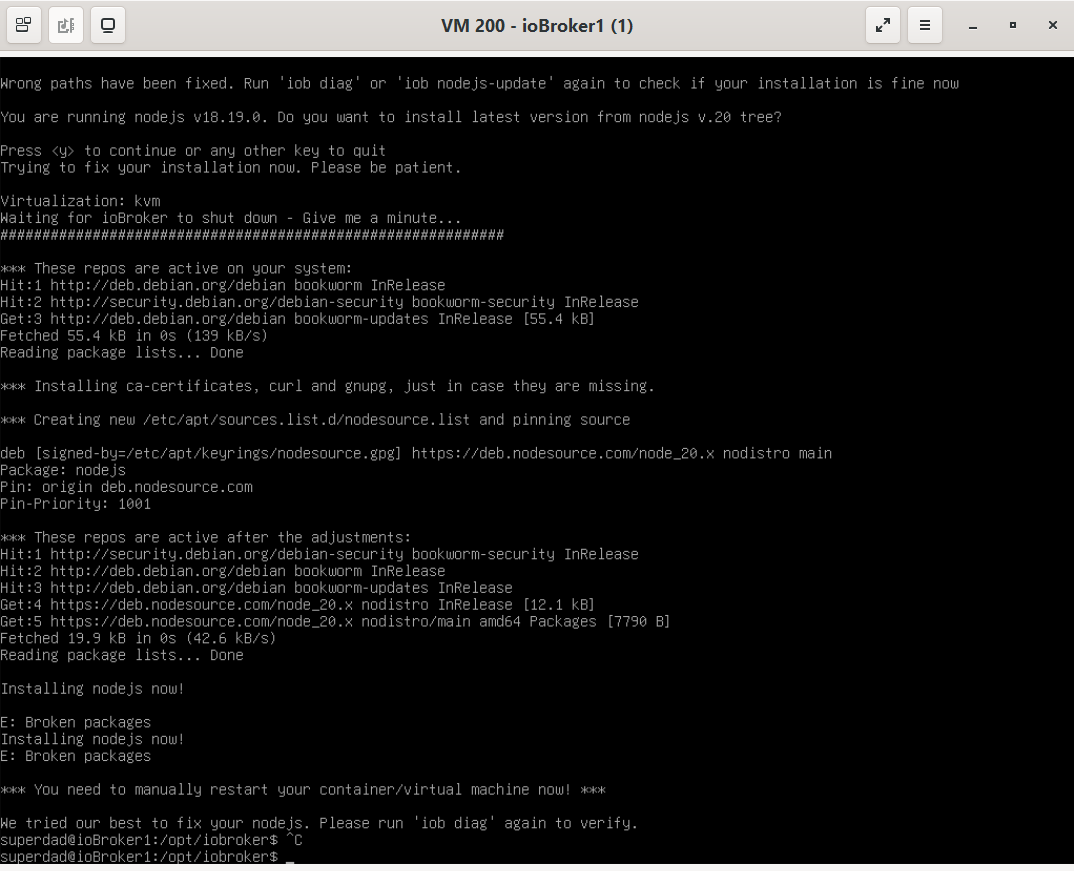
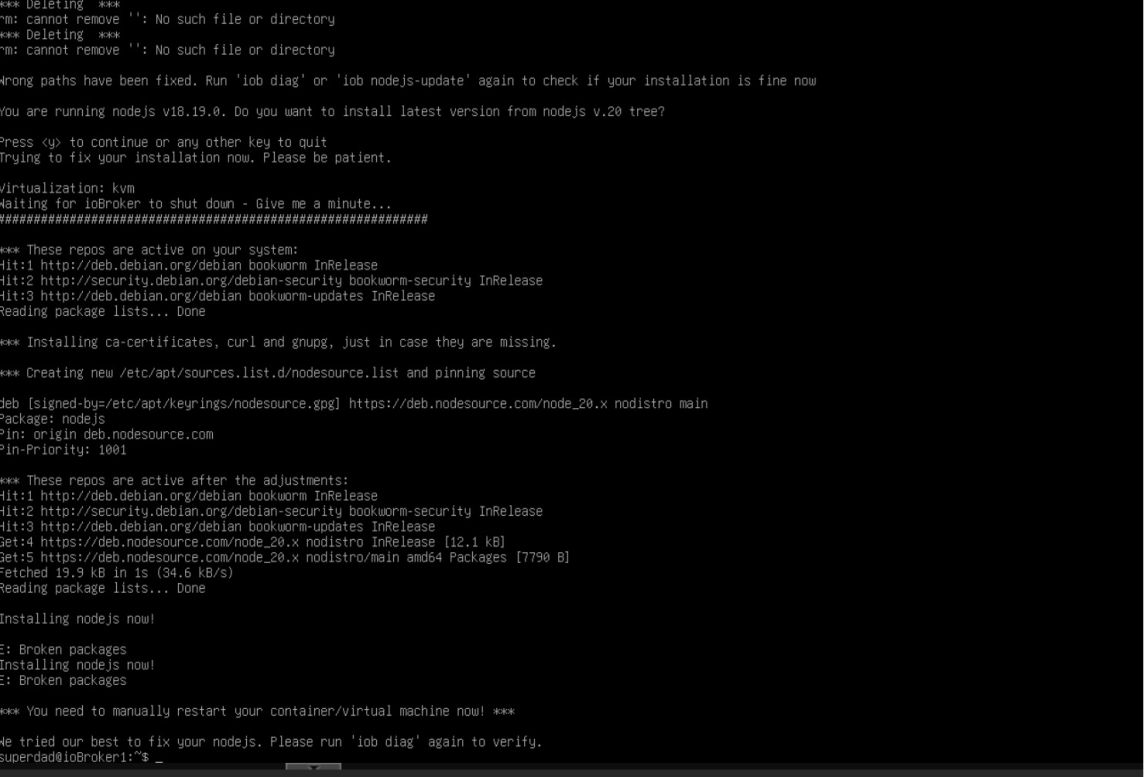
        Habe iob nodejs-update 20 probiert.
        Das kommt als Meldung.
        174c11eb-7584-4037-b443-4a7463e08ea5-image.png

        CCU3

        iOBroker auf IntelNUC Proxmox

        ? Thomas BraunT 2 Antworten Letzte Antwort
        0
        • ArmilarA Offline
          ArmilarA Offline
          Armilar
          Most Active Forum Testing
          schrieb am zuletzt editiert von
          #5743

          @superdad

          Das kann wahrscheinlich nur ein Linux-Experte wie z.B. @Thomas-Braun beantworten.

          Installationsanleitung, Tipps, Alias-Definitionen, FAQ für das Sonoff NSPanel mit lovelace UI unter ioBroker
          https://github.com/joBr99/nspanel-lovelace-ui/wiki

          Benutzt das Voting rechts unten im Beitrag wenn er euch geholfen hat.

          Thomas BraunT 1 Antwort Letzte Antwort
          0
          • ArmilarA Armilar

            @superdad

            Das kann wahrscheinlich nur ein Linux-Experte wie z.B. @Thomas-Braun beantworten.

            Thomas BraunT Online
            Thomas BraunT Online
            Thomas Braun
            Most Active
            schrieb am zuletzt editiert von
            #5744

            @armilar

            Der 'liest' aber keine Screenshots sondern nur Text in CodeTags eingebettet.

            Linux-Werkzeugkasten:
            https://forum.iobroker.net/topic/42952/der-kleine-iobroker-linux-werkzeugkasten
            NodeJS Fixer Skript:
            https://forum.iobroker.net/topic/68035/iob-node-fix-skript
            iob_diag: curl -sLf -o diag.sh https://iobroker.net/diag.sh && bash diag.sh

            1 Antwort Letzte Antwort
            2
            • S Superdad

              @armilar
              Sorry für die späte Rückmeldung.
              Habe einen kranken Enkel zu Hause.

              Habe iob nodejs-update 20 probiert.
              Das kommt als Meldung.

              174c11eb-7584-4037-b443-4a7463e08ea5-image.png

              ? Offline
              ? Offline
              Ein ehemaliger Benutzer
              schrieb am zuletzt editiert von
              #5745

              @superdad

              erstmal system rebooten, wie da steht, dann auch mal system updates fahren, und wenn alles aktuell, dann nochmal ein
              " iob nodejs 20" eingeben, warten, bis er fertig ist, und falls noch Fehler da sind, dann in Code-Tags hier posten, und zwar die gesamte eingabe mit dem kommando bis zum schluss.

              S 1 Antwort Letzte Antwort
              2
              • ? Ein ehemaliger Benutzer

                @superdad

                erstmal system rebooten, wie da steht, dann auch mal system updates fahren, und wenn alles aktuell, dann nochmal ein
                " iob nodejs 20" eingeben, warten, bis er fertig ist, und falls noch Fehler da sind, dann in Code-Tags hier posten, und zwar die gesamte eingabe mit dem kommando bis zum schluss.

                S Offline
                S Offline
                Superdad
                schrieb am zuletzt editiert von
                #5746

                @ilovegym

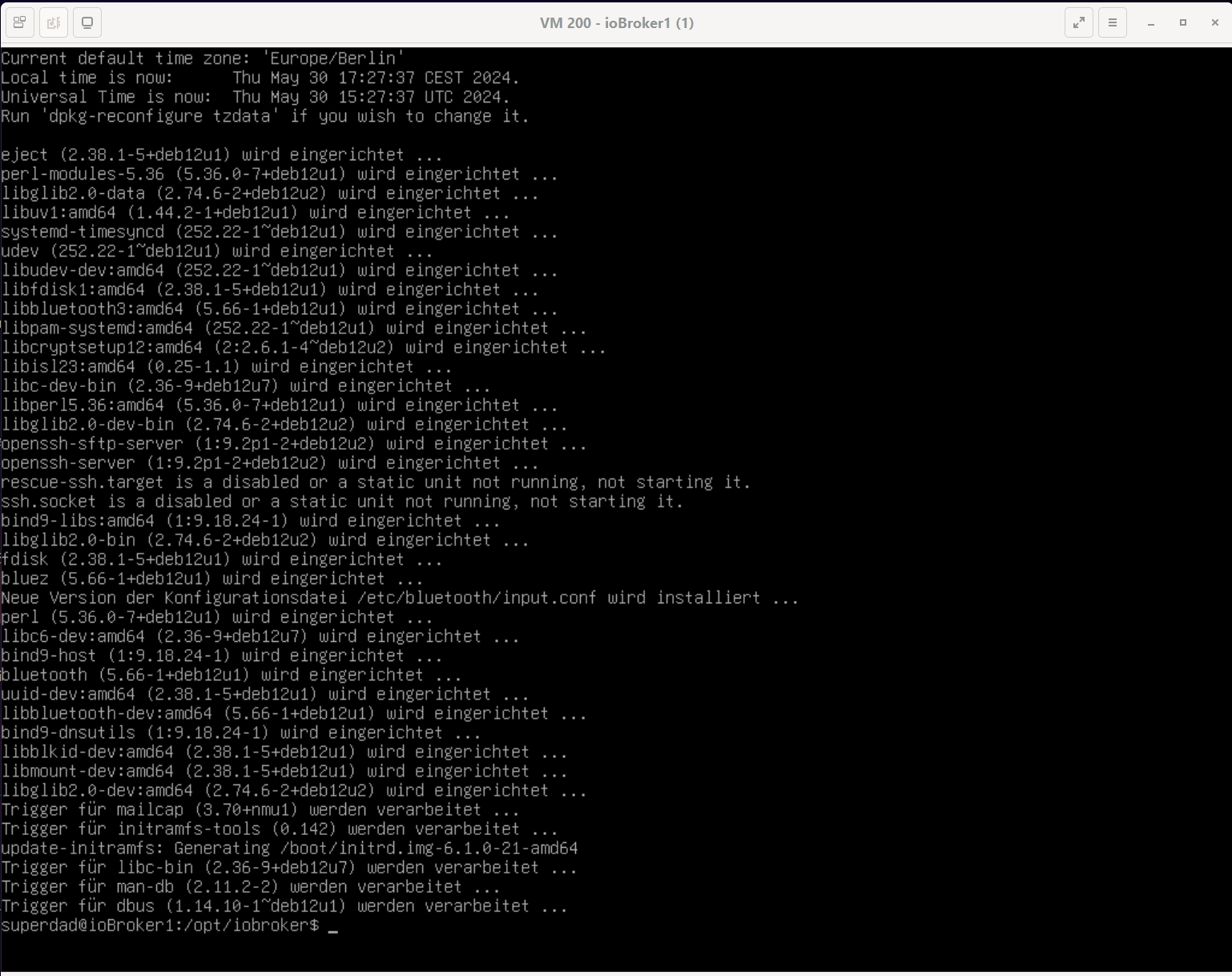
                So sieht es jetzt bei mir aus.

                f8a111af-9e83-4fdf-8d04-912776dadb2f-image.png

                CCU3

                iOBroker auf IntelNUC Proxmox

                1 Antwort Letzte Antwort
                0
                • S Superdad

                  @armilar
                  Sorry für die späte Rückmeldung.
                  Habe einen kranken Enkel zu Hause.

                  Habe iob nodejs-update 20 probiert.
                  Das kommt als Meldung.

                  174c11eb-7584-4037-b443-4a7463e08ea5-image.png

                  Thomas BraunT Online
                  Thomas BraunT Online
                  Thomas Braun
                  Most Active
                  schrieb am zuletzt editiert von
                  #5747

                  @superdad

                  sudo apt update
                  sudo apt full-upgrade
                  

                  sagt? Da scheint mir in der Paket-Datenbank was zu klemmen.

                  Linux-Werkzeugkasten:
                  https://forum.iobroker.net/topic/42952/der-kleine-iobroker-linux-werkzeugkasten
                  NodeJS Fixer Skript:
                  https://forum.iobroker.net/topic/68035/iob-node-fix-skript
                  iob_diag: curl -sLf -o diag.sh https://iobroker.net/diag.sh && bash diag.sh

                  S 1 Antwort Letzte Antwort
                  0
                  • Thomas BraunT Thomas Braun

                    @superdad

                    sudo apt update
                    sudo apt full-upgrade
                    

                    sagt? Da scheint mir in der Paket-Datenbank was zu klemmen.

                    S Offline
                    S Offline
                    Superdad
                    schrieb am zuletzt editiert von
                    #5748

                    @thomas-braun

                    94b5e55c-c74d-4b95-9524-7ce00f316a39-image.png

                    CCU3

                    iOBroker auf IntelNUC Proxmox

                    Thomas BraunT 1 Antwort Letzte Antwort
                    0
                    • S Superdad

                      @thomas-braun

                      94b5e55c-c74d-4b95-9524-7ce00f316a39-image.png

                      Thomas BraunT Online
                      Thomas BraunT Online
                      Thomas Braun
                      Most Active
                      schrieb am zuletzt editiert von
                      #5749

                      @superdad

                      Hatten wir das Thema '
                      KEINE BILDCHEN
                      von Text nicht gerade?

                      Linux-Werkzeugkasten:
                      https://forum.iobroker.net/topic/42952/der-kleine-iobroker-linux-werkzeugkasten
                      NodeJS Fixer Skript:
                      https://forum.iobroker.net/topic/68035/iob-node-fix-skript
                      iob_diag: curl -sLf -o diag.sh https://iobroker.net/diag.sh && bash diag.sh

                      S 1 Antwort Letzte Antwort
                      0
                      • Thomas BraunT Thomas Braun

                        @superdad

                        Hatten wir das Thema '
                        KEINE BILDCHEN
                        von Text nicht gerade?

                        S Offline
                        S Offline
                        Superdad
                        schrieb am zuletzt editiert von
                        #5750

                        @thomas-braun
                        Ich würde dir ja gern den ganzen Text einfügen, wenn ich wüsste, wie das im virt-viewer geht?
                        Sorry!
                        Vielleicht kannst du mir ja helfen?

                        CCU3

                        iOBroker auf IntelNUC Proxmox

                        Thomas BraunT ? 2 Antworten Letzte Antwort
                        0
                        • S Superdad

                          @thomas-braun
                          Ich würde dir ja gern den ganzen Text einfügen, wenn ich wüsste, wie das im virt-viewer geht?
                          Sorry!
                          Vielleicht kannst du mir ja helfen?

                          Thomas BraunT Online
                          Thomas BraunT Online
                          Thomas Braun
                          Most Active
                          schrieb am zuletzt editiert von
                          #5751

                          @superdad

                          So wie man jeden anderen Text auch kopiert. Jedenfalls in gescheiten Terminals. Was du da verwendest kenn ich nicht.

                          Linux-Werkzeugkasten:
                          https://forum.iobroker.net/topic/42952/der-kleine-iobroker-linux-werkzeugkasten
                          NodeJS Fixer Skript:
                          https://forum.iobroker.net/topic/68035/iob-node-fix-skript
                          iob_diag: curl -sLf -o diag.sh https://iobroker.net/diag.sh && bash diag.sh

                          1 Antwort Letzte Antwort
                          0
                          • S Superdad

                            @thomas-braun
                            Ich würde dir ja gern den ganzen Text einfügen, wenn ich wüsste, wie das im virt-viewer geht?
                            Sorry!
                            Vielleicht kannst du mir ja helfen?

                            ? Offline
                            ? Offline
                            Ein ehemaliger Benutzer
                            schrieb am zuletzt editiert von
                            #5752

                            @superdad

                            Einfach per ssh mit putty oder was auch immer auf den iobroker einloggen.

                            S 1 Antwort Letzte Antwort
                            0
                            • ? Ein ehemaliger Benutzer

                              @superdad

                              Einfach per ssh mit putty oder was auch immer auf den iobroker einloggen.

                              S Offline
                              S Offline
                              Superdad
                              schrieb am zuletzt editiert von
                              #5753

                              @ilovegym

                              ~~login as: superdad
                              superdad@192.168.1.141's password:
                              Linux ioBroker1 6.1.0-21-amd64 #1 SMP PREEMPT_DYNAMIC Debian 6.1.90-1 (2024-05-03) x86_64

                              The programs included with the Debian GNU/Linux system are free software;
                              the exact distribution terms for each program are described in the
                              individual files in /usr/share/doc/*/copyright.

                              Debian GNU/Linux comes with ABSOLUTELY NO WARRANTY, to the extent
                              permitted by applicable law.
                              Last login: Thu May 30 18:16:09 2024 from 192.168.1.192
                              superdad@ioBroker1:~$ sudo apt update
                              [sudo] Passwort für superdad:
                              OK:1 http://deb.debian.org/debian bookworm InRelease
                              OK:2 http://security.debian.org/debian-security bookworm-security InRelease
                              OK:3 http://deb.debian.org/debian bookworm-updates InRelease
                              OK:4 https://deb.nodesource.com/node_20.x nodistro InRelease
                              Paketlisten werden gelesen… Fertig
                              Abhängigkeitsbaum wird aufgebaut… Fertig
                              Statusinformationen werden eingelesen… Fertig
                              Alle Pakete sind aktuell.
                              superdad@ioBroker1:~$ sudo apt full-upgrade
                              Paketlisten werden gelesen… Fertig
                              Abhängigkeitsbaum wird aufgebaut… Fertig
                              Statusinformationen werden eingelesen… Fertig
                              Paketaktualisierung (Upgrade) wird berechnet… Fertig
                              Die folgenden Pakete wurden automatisch installiert und werden nicht mehr benötigt:
                              libc-ares2 node-busboy node-cjs-module-lexer node-undici node-xtend
                              Verwenden Sie »sudo apt autoremove«, um sie zu entfernen.
                              Die folgenden Pakete werden ENTFERNT:
                              linux-image-6.1.0-10-amd64
                              0 aktualisiert, 0 neu installiert, 1 zu entfernen und 0 nicht aktualisiert.
                              Nach dieser Operation werden 408 MB Plattenplatz freigegeben.
                              Möchten Sie fortfahren? [J/n] j
                              (Lese Datenbank ... 58344 Dateien und Verzeichnisse sind derzeit installiert.)
                              Entfernen von linux-image-6.1.0-10-amd64 (6.1.38-2) ...
                              /etc/kernel/postrm.d/initramfs-tools:
                              update-initramfs: Deleting /boot/initrd.img-6.1.0-10-amd64
                              /etc/kernel/postrm.d/zz-update-grub:
                              Generating grub configuration file ...
                              Found linux image: /boot/vmlinuz-6.1.0-21-amd64
                              Found initrd image: /boot/initrd.img-6.1.0-21-amd64
                              Found linux image: /boot/vmlinuz-6.1.0-13-amd64
                              Found initrd image: /boot/initrd.img-6.1.0-13-amd64
                              Warning: os-prober will not be executed to detect other bootable partitions.
                              Systems on them will not be added to the GRUB boot configuration.
                              Check GRUB_DISABLE_OS_PROBER documentation entry.
                              done
                              superdad@ioBroker1:~$ login as: superdad
                              superdad@192.168.1.141's password:
                              Linux ioBroker1 6.1.0-21-amd64 #1 SMP PREEMPT_DYNAMIC Debian 6.1.90-1 (2024-05-03) x86_64

                              The programs included with the Debian GNU/Linux system are free software;
                              the exact distribution terms for each program are described in the
                              individual files in /usr/share/doc/*/copyright.

                              Debian GNU/Linux comes with ABSOLUTELY NO WARRANTY, to the extent
                              permitted by applicable law.
                              Last login: Thu May 30 18:16:09 2024 from 192.168.1.192
                              superdad@ioBroker1:~$ sudo apt update
                              [sudo] Passwort für superdad:
                              OK:1 http://deb.debian.org/debian bookworm InRelease
                              OK:2 http://security.debian.org/debian-security bookworm-security InRelease
                              OK:3 http://deb.debian.org/debian bookworm-updates InRelease
                              OK:4 https://deb.nodesource.com/node_20.x nodistro InRelease
                              Paketlisten werden gelesen… Fertig
                              Abhängigkeitsbaum wird aufgebaut… Fertig
                              Statusinformationen werden eingelesen… Fertig
                              Alle Pakete sind aktuell.
                              superdad@ioBroker1:~$ sudo apt full-upgrade
                              Paketlisten werden gelesen… Fertig
                              superdad@ioBroker1:~$_PROBER documentation entry.t configuration.partitions..)ti~~

                              CCU3

                              iOBroker auf IntelNUC Proxmox

                              Thomas BraunT 1 Antwort Letzte Antwort
                              0
                              • S Superdad

                                @ilovegym

                                ~~login as: superdad
                                superdad@192.168.1.141's password:
                                Linux ioBroker1 6.1.0-21-amd64 #1 SMP PREEMPT_DYNAMIC Debian 6.1.90-1 (2024-05-03) x86_64

                                The programs included with the Debian GNU/Linux system are free software;
                                the exact distribution terms for each program are described in the
                                individual files in /usr/share/doc/*/copyright.

                                Debian GNU/Linux comes with ABSOLUTELY NO WARRANTY, to the extent
                                permitted by applicable law.
                                Last login: Thu May 30 18:16:09 2024 from 192.168.1.192
                                superdad@ioBroker1:~$ sudo apt update
                                [sudo] Passwort für superdad:
                                OK:1 http://deb.debian.org/debian bookworm InRelease
                                OK:2 http://security.debian.org/debian-security bookworm-security InRelease
                                OK:3 http://deb.debian.org/debian bookworm-updates InRelease
                                OK:4 https://deb.nodesource.com/node_20.x nodistro InRelease
                                Paketlisten werden gelesen… Fertig
                                Abhängigkeitsbaum wird aufgebaut… Fertig
                                Statusinformationen werden eingelesen… Fertig
                                Alle Pakete sind aktuell.
                                superdad@ioBroker1:~$ sudo apt full-upgrade
                                Paketlisten werden gelesen… Fertig
                                Abhängigkeitsbaum wird aufgebaut… Fertig
                                Statusinformationen werden eingelesen… Fertig
                                Paketaktualisierung (Upgrade) wird berechnet… Fertig
                                Die folgenden Pakete wurden automatisch installiert und werden nicht mehr benötigt:
                                libc-ares2 node-busboy node-cjs-module-lexer node-undici node-xtend
                                Verwenden Sie »sudo apt autoremove«, um sie zu entfernen.
                                Die folgenden Pakete werden ENTFERNT:
                                linux-image-6.1.0-10-amd64
                                0 aktualisiert, 0 neu installiert, 1 zu entfernen und 0 nicht aktualisiert.
                                Nach dieser Operation werden 408 MB Plattenplatz freigegeben.
                                Möchten Sie fortfahren? [J/n] j
                                (Lese Datenbank ... 58344 Dateien und Verzeichnisse sind derzeit installiert.)
                                Entfernen von linux-image-6.1.0-10-amd64 (6.1.38-2) ...
                                /etc/kernel/postrm.d/initramfs-tools:
                                update-initramfs: Deleting /boot/initrd.img-6.1.0-10-amd64
                                /etc/kernel/postrm.d/zz-update-grub:
                                Generating grub configuration file ...
                                Found linux image: /boot/vmlinuz-6.1.0-21-amd64
                                Found initrd image: /boot/initrd.img-6.1.0-21-amd64
                                Found linux image: /boot/vmlinuz-6.1.0-13-amd64
                                Found initrd image: /boot/initrd.img-6.1.0-13-amd64
                                Warning: os-prober will not be executed to detect other bootable partitions.
                                Systems on them will not be added to the GRUB boot configuration.
                                Check GRUB_DISABLE_OS_PROBER documentation entry.
                                done
                                superdad@ioBroker1:~$ login as: superdad
                                superdad@192.168.1.141's password:
                                Linux ioBroker1 6.1.0-21-amd64 #1 SMP PREEMPT_DYNAMIC Debian 6.1.90-1 (2024-05-03) x86_64

                                The programs included with the Debian GNU/Linux system are free software;
                                the exact distribution terms for each program are described in the
                                individual files in /usr/share/doc/*/copyright.

                                Debian GNU/Linux comes with ABSOLUTELY NO WARRANTY, to the extent
                                permitted by applicable law.
                                Last login: Thu May 30 18:16:09 2024 from 192.168.1.192
                                superdad@ioBroker1:~$ sudo apt update
                                [sudo] Passwort für superdad:
                                OK:1 http://deb.debian.org/debian bookworm InRelease
                                OK:2 http://security.debian.org/debian-security bookworm-security InRelease
                                OK:3 http://deb.debian.org/debian bookworm-updates InRelease
                                OK:4 https://deb.nodesource.com/node_20.x nodistro InRelease
                                Paketlisten werden gelesen… Fertig
                                Abhängigkeitsbaum wird aufgebaut… Fertig
                                Statusinformationen werden eingelesen… Fertig
                                Alle Pakete sind aktuell.
                                superdad@ioBroker1:~$ sudo apt full-upgrade
                                Paketlisten werden gelesen… Fertig
                                superdad@ioBroker1:~$_PROBER documentation entry.t configuration.partitions..)ti~~

                                Thomas BraunT Online
                                Thomas BraunT Online
                                Thomas Braun
                                Most Active
                                schrieb am zuletzt editiert von
                                #5754

                                @superdad sagte in SONOFF NSPanel mit Lovelace UI:

                                node-

                                sudo apt remove node-*
                                sudo apt autoremove
                                

                                Und dann bitte die Zusammenfassung / Summary von

                                iob diag
                                

                                Linux-Werkzeugkasten:
                                https://forum.iobroker.net/topic/42952/der-kleine-iobroker-linux-werkzeugkasten
                                NodeJS Fixer Skript:
                                https://forum.iobroker.net/topic/68035/iob-node-fix-skript
                                iob_diag: curl -sLf -o diag.sh https://iobroker.net/diag.sh && bash diag.sh

                                S 1 Antwort Letzte Antwort
                                0
                                • Thomas BraunT Thomas Braun

                                  @superdad sagte in SONOFF NSPanel mit Lovelace UI:

                                  node-

                                  sudo apt remove node-*
                                  sudo apt autoremove
                                  

                                  Und dann bitte die Zusammenfassung / Summary von

                                  iob diag
                                  
                                  S Offline
                                  S Offline
                                  Superdad
                                  schrieb am zuletzt editiert von
                                  #5755

                                  @thomas-braun

                                  ~~Copy text starting here:

                                  ======================= SUMMARY =======================
                                                          v.2024-05-22
                                  
                                  
                                   Static hostname: ioBroker1
                                         Icon name: computer-vm
                                           Chassis: vm 🖴
                                    Virtualization: kvm
                                  Operating System: Debian GNU/Linux 12 (bookworm)
                                            Kernel: Linux 6.1.0-21-amd64
                                      Architecture: x86-64
                                   Hardware Vendor: QEMU
                                    Hardware Model: Standard PC _i440FX + PIIX, 1996_
                                  Firmware Version: rel-1.16.2-0-gea1b7a073390-prebuilt.qemu.org
                                  
                                  Installation:           kvm
                                  Kernel:                 x86_64
                                  Userland:               64 bit
                                  Timezone:               Europe/Berlin (CEST, +0200)
                                  User-ID:                1000
                                  Display-Server:         false
                                  Boot Target:            graphical.target
                                  
                                  Pending OS-Updates:     0
                                  Pending iob updates:    4
                                  
                                  Nodejs-Installation:
                                  /usr/bin/nodejs         v20.14.0
                                  /usr/bin/node           v20.14.0
                                  /usr/bin/npm            10.7.0
                                  /usr/bin/npx            10.7.0
                                  /usr/bin/corepack       0.28.1
                                  
                                  Recommended versions are nodejs 18.20.3 and npm 10.7.0
                                  Your nodejs installation is correct
                                  
                                  MEMORY:
                                                 total        used        free      shared  buff/cache   available
                                  Mem:            8.3G        3.3G        4.3G        614K        1.1G        5.0G
                                  Swap:           1.0G          0B        1.0G
                                  Total:          9.3G        3.3G        5.3G
                                  
                                  Active iob-Instances:   31
                                  Active repo(s): stable
                                  
                                  ioBroker Core:          js-controller           5.0.19
                                                          admin                   6.13.16
                                  
                                  ioBroker Status:        iobroker is running on this host.
                                  
                                  
                                  Objects type: jsonl
                                  States  type: jsonl
                                  
                                  Status admin and web instance:
                                  + system.adapter.admin.0                  : admin                 : ioBroker1                                -  enabled, port: 8081, bind: 0.0.0.0, run as: admin
                                  + system.adapter.web.0                    : web                   : ioBroker1                                -  enabled, port: 8082, bind: 0.0.0.0, run as: admin
                                  
                                  Objects:                48759
                                  States:                 46425
                                  
                                  Size of iob-Database:
                                  
                                  75M     /opt/iobroker/iobroker-data/objects.jsonl
                                  74M     /opt/iobroker/iobroker-data/states.jsonl


                                  =================== END OF SUMMARY ====================
                                  

                                  === Mark text until here for copying ===
                                  superdad@ioBroker1:~$
                                  ~~

                                  CCU3

                                  iOBroker auf IntelNUC Proxmox

                                  Thomas BraunT 1 Antwort Letzte Antwort
                                  0
                                  • S Superdad

                                    @thomas-braun

                                    ~~Copy text starting here:

                                    ======================= SUMMARY =======================
                                                            v.2024-05-22
                                    
                                    
                                     Static hostname: ioBroker1
                                           Icon name: computer-vm
                                             Chassis: vm 🖴
                                      Virtualization: kvm
                                    Operating System: Debian GNU/Linux 12 (bookworm)
                                              Kernel: Linux 6.1.0-21-amd64
                                        Architecture: x86-64
                                     Hardware Vendor: QEMU
                                      Hardware Model: Standard PC _i440FX + PIIX, 1996_
                                    Firmware Version: rel-1.16.2-0-gea1b7a073390-prebuilt.qemu.org
                                    
                                    Installation:           kvm
                                    Kernel:                 x86_64
                                    Userland:               64 bit
                                    Timezone:               Europe/Berlin (CEST, +0200)
                                    User-ID:                1000
                                    Display-Server:         false
                                    Boot Target:            graphical.target
                                    
                                    Pending OS-Updates:     0
                                    Pending iob updates:    4
                                    
                                    Nodejs-Installation:
                                    /usr/bin/nodejs         v20.14.0
                                    /usr/bin/node           v20.14.0
                                    /usr/bin/npm            10.7.0
                                    /usr/bin/npx            10.7.0
                                    /usr/bin/corepack       0.28.1
                                    
                                    Recommended versions are nodejs 18.20.3 and npm 10.7.0
                                    Your nodejs installation is correct
                                    
                                    MEMORY:
                                                   total        used        free      shared  buff/cache   available
                                    Mem:            8.3G        3.3G        4.3G        614K        1.1G        5.0G
                                    Swap:           1.0G          0B        1.0G
                                    Total:          9.3G        3.3G        5.3G
                                    
                                    Active iob-Instances:   31
                                    Active repo(s): stable
                                    
                                    ioBroker Core:          js-controller           5.0.19
                                                            admin                   6.13.16
                                    
                                    ioBroker Status:        iobroker is running on this host.
                                    
                                    
                                    Objects type: jsonl
                                    States  type: jsonl
                                    
                                    Status admin and web instance:
                                    + system.adapter.admin.0                  : admin                 : ioBroker1                                -  enabled, port: 8081, bind: 0.0.0.0, run as: admin
                                    + system.adapter.web.0                    : web                   : ioBroker1                                -  enabled, port: 8082, bind: 0.0.0.0, run as: admin
                                    
                                    Objects:                48759
                                    States:                 46425
                                    
                                    Size of iob-Database:
                                    
                                    75M     /opt/iobroker/iobroker-data/objects.jsonl
                                    74M     /opt/iobroker/iobroker-data/states.jsonl


                                    =================== END OF SUMMARY ====================
                                    

                                    === Mark text until here for copying ===
                                    superdad@ioBroker1:~$
                                    ~~

                                    Thomas BraunT Online
                                    Thomas BraunT Online
                                    Thomas Braun
                                    Most Active
                                    schrieb am zuletzt editiert von
                                    #5756

                                    @superdad sagte in SONOFF NSPanel mit Lovelace UI:

                                    Pending iob updates: 4

                                    Sollte jetzt soweit passen. Da war wohl mal eine falsche Version von nodejs installiert.
                                    Schaufel die 4 ioBroker-Updates noch rein.

                                    Linux-Werkzeugkasten:
                                    https://forum.iobroker.net/topic/42952/der-kleine-iobroker-linux-werkzeugkasten
                                    NodeJS Fixer Skript:
                                    https://forum.iobroker.net/topic/68035/iob-node-fix-skript
                                    iob_diag: curl -sLf -o diag.sh https://iobroker.net/diag.sh && bash diag.sh

                                    S 1 Antwort Letzte Antwort
                                    0
                                    • Thomas BraunT Thomas Braun

                                      @superdad sagte in SONOFF NSPanel mit Lovelace UI:

                                      Pending iob updates: 4

                                      Sollte jetzt soweit passen. Da war wohl mal eine falsche Version von nodejs installiert.
                                      Schaufel die 4 ioBroker-Updates noch rein.

                                      S Offline
                                      S Offline
                                      Superdad
                                      schrieb am zuletzt editiert von
                                      #5757

                                      @thomas-braun

                                      Vielen Dank für eure Hilfe!

                                      Ich werde das Script von LoveLace noch einmal starten und schauen ob noch eine Meldung kommt.

                                      Vielen Dank!

                                      CCU3

                                      iOBroker auf IntelNUC Proxmox

                                      1 Antwort Letzte Antwort
                                      0
                                      • S Offline
                                        S Offline
                                        Superdad
                                        schrieb am zuletzt editiert von Superdad
                                        #5758

                                        @thomas-braun

                                        Also, die Info kommt immer noch:

                                        script.js.NSPanel_offen.NsPanelTs2: nodeJS must be at least v18.X.X. Currently: v16.19.0! Please Update your System! --> iob nodejs-update 18
                                        

                                        Funktioniert ja trotzdem.

                                        CCU3

                                        iOBroker auf IntelNUC Proxmox

                                        Thomas BraunT T 2 Antworten Letzte Antwort
                                        0
                                        • S Superdad

                                          @thomas-braun

                                          Also, die Info kommt immer noch:

                                          script.js.NSPanel_offen.NsPanelTs2: nodeJS must be at least v18.X.X. Currently: v16.19.0! Please Update your System! --> iob nodejs-update 18
                                          

                                          Funktioniert ja trotzdem.

                                          Thomas BraunT Online
                                          Thomas BraunT Online
                                          Thomas Braun
                                          Most Active
                                          schrieb am zuletzt editiert von
                                          #5759

                                          @superdad

                                          Dann starte die Kiste sauber durch, wenn das noch nicht geschehen ist.
                                          Und dann die Langfassung von

                                          iob diag
                                          

                                          Linux-Werkzeugkasten:
                                          https://forum.iobroker.net/topic/42952/der-kleine-iobroker-linux-werkzeugkasten
                                          NodeJS Fixer Skript:
                                          https://forum.iobroker.net/topic/68035/iob-node-fix-skript
                                          iob_diag: curl -sLf -o diag.sh https://iobroker.net/diag.sh && bash diag.sh

                                          S 1 Antwort Letzte Antwort
                                          0

                                          Hey! Du scheinst an dieser Unterhaltung interessiert zu sein, hast aber noch kein Konto.

                                          Hast du es satt, bei jedem Besuch durch die gleichen Beiträge zu scrollen? Wenn du dich für ein Konto anmeldest, kommst du immer genau dorthin zurück, wo du zuvor warst, und kannst dich über neue Antworten benachrichtigen lassen (entweder per E-Mail oder Push-Benachrichtigung). Du kannst auch Lesezeichen speichern und Beiträge positiv bewerten, um anderen Community-Mitgliedern deine Wertschätzung zu zeigen.

                                          Mit deinem Input könnte dieser Beitrag noch besser werden 💗

                                          Registrieren Anmelden
                                          Antworten
                                          • In einem neuen Thema antworten
                                          Anmelden zum Antworten
                                          • Älteste zuerst
                                          • Neuste zuerst
                                          • Meiste Stimmen


                                          Support us

                                          ioBroker
                                          Community Adapters
                                          Donate

                                          542

                                          Online

                                          32.8k

                                          Benutzer

                                          82.7k

                                          Themen

                                          1.3m

                                          Beiträge
                                          Community
                                          Impressum | Datenschutz-Bestimmungen | Nutzungsbedingungen | Einwilligungseinstellungen
                                          ioBroker Community 2014-2025
                                          logo
                                          • Anmelden

                                          • Du hast noch kein Konto? Registrieren

                                          • Anmelden oder registrieren, um zu suchen
                                          • Erster Beitrag
                                            Letzter Beitrag
                                          0
                                          • Home
                                          • Aktuell
                                          • Tags
                                          • Ungelesen 0
                                          • Kategorien
                                          • Unreplied
                                          • Beliebt
                                          • GitHub
                                          • Docu
                                          • Hilfe