




Instanz "Javascript" funktioniert nicht mehr
-
@mcm57 said in Instanz "Javascript" funktioniert nicht mehr:
Versionen ?
Logfile Inhalt?Version ist die 6.1.4
Entschuldigt bitte. Hier das Logfile, was mir auch nicht weiterhilft...
2024-04-22 04:04:28.931 - info: host.raspberrypi stopInstance system.adapter.javascript.0 (force=false, process=true) 2024-04-22 04:04:28.943 - info: javascript.0 (4638) Got terminate signal TERMINATE_YOURSELF 2024-04-22 04:04:28.957 - info: javascript.0 (4638) terminating 2024-04-22 04:04:28.959 - info: javascript.0 (4638) Terminated (ADAPTER_REQUESTED_TERMINATION): Without reason 2024-04-22 04:04:28.990 - info: host.raspberrypi stopInstance system.adapter.javascript.0 send kill signal 2024-04-22 04:04:29.544 - info: host.raspberrypi instance system.adapter.javascript.0 terminated with code 11 (ADAPTER_REQUESTED_TERMINATION) 2024-04-22 04:04:32.091 - info: host.raspberrypi instance system.adapter.javascript.0 started with pid 4664 2024-04-22 04:04:35.356 - info: javascript.0 (4664) starting. Version 6.1.4 in /opt/iobroker/node_modules/iobroker.javascript, node: v18.12.1, js-controller: 4.0.23 2024-04-22 04:04:35.678 - info: javascript.0 (4664) requesting all states 2024-04-22 04:04:35.680 - info: javascript.0 (4664) requesting all objects 2024-04-22 04:04:36.414 - info: javascript.0 (4664) received all objects 2024-04-22 04:04:36.495 - info: javascript.0 (4664) received all states -
@mcm57 said in Instanz "Javascript" funktioniert nicht mehr:
Versionen ?
Logfile Inhalt?Version ist die 6.1.4
Entschuldigt bitte. Hier das Logfile, was mir auch nicht weiterhilft...
2024-04-22 04:04:28.931 - info: host.raspberrypi stopInstance system.adapter.javascript.0 (force=false, process=true) 2024-04-22 04:04:28.943 - info: javascript.0 (4638) Got terminate signal TERMINATE_YOURSELF 2024-04-22 04:04:28.957 - info: javascript.0 (4638) terminating 2024-04-22 04:04:28.959 - info: javascript.0 (4638) Terminated (ADAPTER_REQUESTED_TERMINATION): Without reason 2024-04-22 04:04:28.990 - info: host.raspberrypi stopInstance system.adapter.javascript.0 send kill signal 2024-04-22 04:04:29.544 - info: host.raspberrypi instance system.adapter.javascript.0 terminated with code 11 (ADAPTER_REQUESTED_TERMINATION) 2024-04-22 04:04:32.091 - info: host.raspberrypi instance system.adapter.javascript.0 started with pid 4664 2024-04-22 04:04:35.356 - info: javascript.0 (4664) starting. Version 6.1.4 in /opt/iobroker/node_modules/iobroker.javascript, node: v18.12.1, js-controller: 4.0.23 2024-04-22 04:04:35.678 - info: javascript.0 (4664) requesting all states 2024-04-22 04:04:35.680 - info: javascript.0 (4664) requesting all objects 2024-04-22 04:04:36.414 - info: javascript.0 (4664) received all objects 2024-04-22 04:04:36.495 - info: javascript.0 (4664) received all states@ingo-2
Was ich daranVersion 6.1.4 in /opt/iobroker/node_modules/iobroker.javascript, node: v18.12.1, js-controller: 4.0.23Schon sehe ist das du einen Massiven Update-Stau hast zeig mal bitte
iob diagin der Langfassung ob das ganze System so aussieht... -
@ingo-2
Was ich daranVersion 6.1.4 in /opt/iobroker/node_modules/iobroker.javascript, node: v18.12.1, js-controller: 4.0.23Schon sehe ist das du einen Massiven Update-Stau hast zeig mal bitte
iob diagin der Langfassung ob das ganze System so aussieht...@frank579 said in Instanz "Javascript" funktioniert nicht mehr:
@ingo-2
Was ich daranVersion 6.1.4 in /opt/iobroker/node_modules/iobroker.javascript, node: v18.12.1, js-controller: 4.0.23Schon sehe ist das du einen Massiven Update-Stau hast zeig mal bitte
iob diagin der Langfassung ob das ganze System so aussieht...Hallo zusammen,
jetzt hat es ein wenig gedauert und ja, ich war nicht up to date.
Habe jetzt alles auf aktuellen Stand gebracht aber trotzdem komme ich nicht weiter. Kein Blocklyskript läuft mehr. Habe auch schon einige gestoppt.
Habt ihr noch eine Idee?2024-04-22 18:25:50.398 - warn: openknx.0 (18750) Ignoring GroupValue_Write of of unknown GA 10/5/16 2024-04-22 18:25:51.955 - info: admin.0 (18660) ==> Connected system.user.admin from ::ffff:192.168.178.22 2024-04-22 18:26:55.281 - info: admin.0 (18660) <== Disconnect system.user.admin from ::ffff:192.168.178.22 javascript 2024-04-22 18:27:04.412 - info: admin.0 (18660) <== Disconnect system.user.admin from ::ffff:192.168.178.22 2024-04-22 18:27:07.664 - info: host.raspberrypi stopInstance system.adapter.javascript.0 (force=false, process=true) 2024-04-22 18:27:07.673 - info: javascript.0 (18683) Got terminate signal TERMINATE_YOURSELF 2024-04-22 18:27:07.689 - info: javascript.0 (18683) terminating 2024-04-22 18:27:07.691 - info: javascript.0 (18683) Terminated (ADAPTER_REQUESTED_TERMINATION): Without reason 2024-04-22 18:27:07.751 - info: host.raspberrypi stopInstance system.adapter.javascript.0 send kill signal 2024-04-22 18:27:08.184 - info: javascript.0 (18683) terminating 2024-04-22 18:27:08.266 - info: host.raspberrypi instance system.adapter.javascript.0 terminated with code 11 (ADAPTER_REQUESTED_TERMINATION) 2024-04-22 18:27:10.856 - info: host.raspberrypi instance system.adapter.javascript.0 started with pid 18988 2024-04-22 18:27:14.441 - info: javascript.0 (18988) starting. Version 7.8.0 in /opt/iobroker/node_modules/iobroker.javascript, node: v18.12.1, js-controller: 5.0.19 2024-04-22 18:27:14.794 - info: javascript.0 (18988) requesting all states 2024-04-22 18:27:14.796 - info: javascript.0 (18988) requesting all objects 2024-04-22 18:27:15.539 - info: javascript.0 (18988) received all objects 2024-04-22 18:27:15.615 - info: javascript.0 (18988) received all states!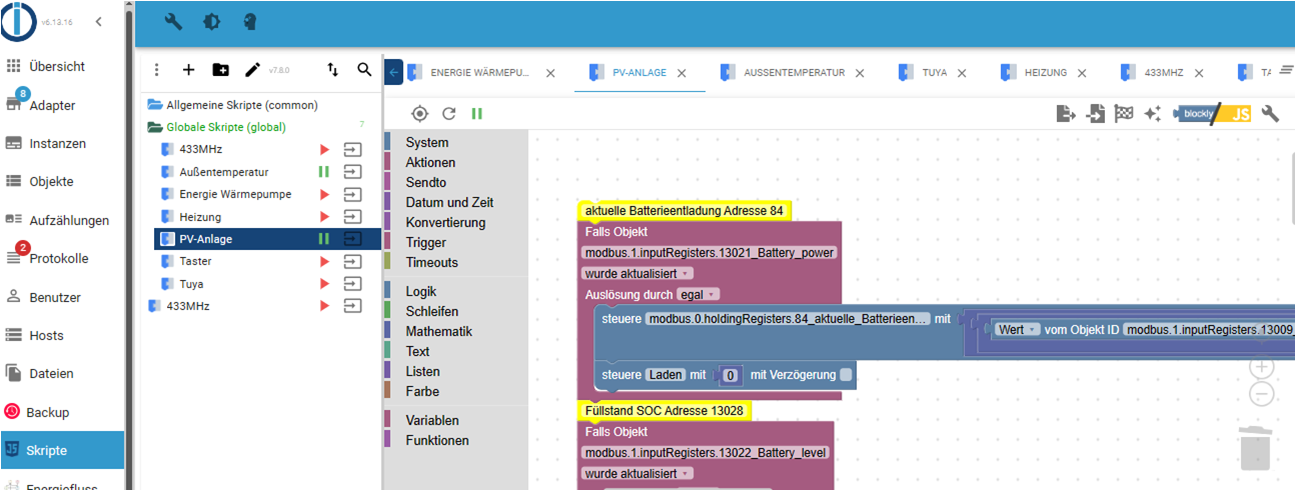
-
@frank579 said in Instanz "Javascript" funktioniert nicht mehr:
@ingo-2
Was ich daranVersion 6.1.4 in /opt/iobroker/node_modules/iobroker.javascript, node: v18.12.1, js-controller: 4.0.23Schon sehe ist das du einen Massiven Update-Stau hast zeig mal bitte
iob diagin der Langfassung ob das ganze System so aussieht...Hallo zusammen,
jetzt hat es ein wenig gedauert und ja, ich war nicht up to date.
Habe jetzt alles auf aktuellen Stand gebracht aber trotzdem komme ich nicht weiter. Kein Blocklyskript läuft mehr. Habe auch schon einige gestoppt.
Habt ihr noch eine Idee?2024-04-22 18:25:50.398 - warn: openknx.0 (18750) Ignoring GroupValue_Write of of unknown GA 10/5/16 2024-04-22 18:25:51.955 - info: admin.0 (18660) ==> Connected system.user.admin from ::ffff:192.168.178.22 2024-04-22 18:26:55.281 - info: admin.0 (18660) <== Disconnect system.user.admin from ::ffff:192.168.178.22 javascript 2024-04-22 18:27:04.412 - info: admin.0 (18660) <== Disconnect system.user.admin from ::ffff:192.168.178.22 2024-04-22 18:27:07.664 - info: host.raspberrypi stopInstance system.adapter.javascript.0 (force=false, process=true) 2024-04-22 18:27:07.673 - info: javascript.0 (18683) Got terminate signal TERMINATE_YOURSELF 2024-04-22 18:27:07.689 - info: javascript.0 (18683) terminating 2024-04-22 18:27:07.691 - info: javascript.0 (18683) Terminated (ADAPTER_REQUESTED_TERMINATION): Without reason 2024-04-22 18:27:07.751 - info: host.raspberrypi stopInstance system.adapter.javascript.0 send kill signal 2024-04-22 18:27:08.184 - info: javascript.0 (18683) terminating 2024-04-22 18:27:08.266 - info: host.raspberrypi instance system.adapter.javascript.0 terminated with code 11 (ADAPTER_REQUESTED_TERMINATION) 2024-04-22 18:27:10.856 - info: host.raspberrypi instance system.adapter.javascript.0 started with pid 18988 2024-04-22 18:27:14.441 - info: javascript.0 (18988) starting. Version 7.8.0 in /opt/iobroker/node_modules/iobroker.javascript, node: v18.12.1, js-controller: 5.0.19 2024-04-22 18:27:14.794 - info: javascript.0 (18988) requesting all states 2024-04-22 18:27:14.796 - info: javascript.0 (18988) requesting all objects 2024-04-22 18:27:15.539 - info: javascript.0 (18988) received all objects 2024-04-22 18:27:15.615 - info: javascript.0 (18988) received all states!@ingo-2 sagte in Instanz "Javascript" funktioniert nicht mehr:
node: v18.12.1
ist doch nicht aktuell!
bitte mal
iob diagin der Langfassung -
oh Sorry, stimmt. Habe jetzt den JS initialisiert und hier nun das diag-log.
Skripte funktionieren immer noch nicht...======================= SUMMARY ======================= v.2023-10-10 Static hostname: raspberrypi Icon name: computer Operating System: Raspbian GNU/Linux 11 (bullseye) Kernel: Linux 6.1.21-v8+ Architecture: arm64 Installation: native Kernel: aarch64 Userland: armhf Timezone: Europe/London (BST, +0100) User-ID: 1000 X-Server: true Boot Target: graphical.target Pending OS-Updates: 0 Pending iob updates: 8 Nodejs-Installation: /usr/bin/nodejs v18.20.2 /usr/bin/node v18.20.2 /usr/bin/npm 10.5.0 /usr/bin/npx 10.5.0 /usr/bin/corepack 0.25.2 Recommended versions are nodejs 18.20.2 and npm 10.5.0 Your nodejs installation is correct MEMORY: total used free shared buff/cache available Mem: 3.8G 838M 2.3G 36M 693M 2.8G Swap: 99M 0B 99M Total: 3.9G 838M 2.4G Active iob-Instances: 15 Active repo(s): stable ioBroker Core: js-controller 5.0.19 admin 6.13.16 ioBroker Status: iobroker is running on this host. Objects type: jsonl States type: jsonl Status admin and web instance: + system.adapter.admin.0 : admin : raspberrypi - enabled, port: 8081, bind: 0.0.0.0, run as: admin + system.adapter.web.0 : web : raspberrypi - enabled, port: 8082, bind: 0.0.0.0, run as: admin Objects: 1930 States: 1114 Size of iob-Database: 6.8M /opt/iobroker/iobroker-data/objects.jsonl 3.4M /opt/iobroker/iobroker-data/states.jsonl =================== END OF SUMMARY ====================Hier der komplette log
======== Start marking the full check here =========
Skript v.2023-10-10 *** BASE SYSTEM *** Static hostname: raspberrypi Icon name: computer Operating System: Raspbian GNU/Linux 11 (bullseye) Kernel: Linux 6.1.21-v8+ Architecture: arm64 Model : Raspberry Pi 4 Model B Rev 1.5 Docker : false Virtualization : none Kernel : aarch64 Userland : armhf Systemuptime and Load: 19:14:18 up 2 min, 3 users, load average: 1.88, 0.89, 0.34 CPU threads: 4 *** RASPBERRY THROTTLING *** Current issues: No throttling issues detected. Previously detected issues: No throttling issues detected. *** Time and Time Zones *** Local time: Mon 2024-04-22 19:14:18 BST Universal time: Mon 2024-04-22 18:14:18 UTC RTC time: n/a Time zone: Europe/London (BST, +0100) System clock synchronized: yes NTP service: active RTC in local TZ: no *** User and Groups *** pi /home/pi pi adm dialout cdrom sudo audio video plugdev games users input render netdev lpadmin gpio i2c spi iobroker *** X-Server-Setup *** X-Server: true Desktop: Terminal: tty Boot Target: graphical.target *** MEMORY *** total used free shared buff/cache available Mem: 3.8G 780M 2.4G 36M 597M 2.9G Swap: 99M 0B 99M Total: 3.9G 780M 2.5G 3794 M total memory 780 M used memory 915 M active memory 295 M inactive memory 2416 M free memory 46 M buffer memory 551 M swap cache 99 M total swap 0 M used swap 99 M free swap Raspberry only: oom events: 0 lifetime oom required: 0 Mbytes total time in oom handler: 0 ms max time spent in oom handler: 0 ms *** FAILED SERVICES *** UNIT LOAD ACTIVE SUB DESCRIPTION 0 loaded units listed. *** FILESYSTEM *** Filesystem Type Size Used Avail Use% Mounted on /dev/root ext4 59G 19G 37G 34% / devtmpfs devtmpfs 1.7G 0 1.7G 0% /dev tmpfs tmpfs 1.9G 0 1.9G 0% /dev/shm tmpfs tmpfs 759M 1.2M 758M 1% /run tmpfs tmpfs 5.0M 4.0K 5.0M 1% /run/lock /dev/mmcblk0p1 vfat 255M 51M 205M 20% /boot tmpfs tmpfs 380M 20K 380M 1% /run/user/1000 Messages concerning ext4 filesystem in dmesg: [Mon Apr 22 19:12:09 2024] Kernel command line: coherent_pool=1M 8250.nr_uarts=0 snd_bcm2835.enable_headphones=0 snd_bcm2835.enable_headphones=1 snd_bcm2835.enable_hdmi=1 snd_bcm2835.enable_hdmi=0 smsc95xx.macaddr=E4:5F:01:F7:1C:FF vc_mem.mem_base=0x3ec00000 vc_mem.mem_size=0x40000000 console=ttyS0,115200 console=tty1 root=PARTUUID=55807cd8-02 rootfstype=ext4 fsck.repair=yes rootwait [Mon Apr 22 19:12:10 2024] EXT4-fs (mmcblk0p2): mounted filesystem with ordered data mode. Quota mode: none. [Mon Apr 22 19:12:10 2024] VFS: Mounted root (ext4 filesystem) readonly on device 179:2. [Mon Apr 22 19:12:13 2024] EXT4-fs (mmcblk0p2): re-mounted. Quota mode: none. Show mounted filesystems \(real ones only\): TARGET SOURCE FSTYPE OPTIONS / /dev/mmcblk0p2 ext4 rw,noatime `-/boot /dev/mmcblk0p1 vfat rw,relatime,fmask=0022,dmask=0022,codepage=437,iocharset=ascii,shortname=mixed,errors=remount-ro Files in neuralgic directories: /var: 2.1G /var/ 964M /var/log 961M /var/log/journal/28df742458b34197828384c97c30b5b8 961M /var/log/journal 873M /var/cache Archived and active journals take up 960.1M in the file system. /opt/iobroker/backups: 87M /opt/iobroker/backups/ /opt/iobroker/iobroker-data: 13G /opt/iobroker/iobroker-data/ 12G /opt/iobroker/iobroker-data/history 390M /opt/iobroker/iobroker-data/files 90M /opt/iobroker/iobroker-data/files/echarts.admin 69M /opt/iobroker/iobroker-data/history/20240207 The five largest files in iobroker-data are: 35M /opt/iobroker/iobroker-data/files/devices.admin/static/js/main.24f2bb56.js.map 24M /opt/iobroker/iobroker-data/files/web.admin/static/js/main.135279a0.js.map 24M /opt/iobroker/iobroker-data/files/echarts/static/js/main.5f66c5d9.js.map 24M /opt/iobroker/iobroker-data/files/echarts.admin/static/js/main.9f2a6569.js.map 24M /opt/iobroker/iobroker-data/files/echarts.admin/chart/static/js/main.5f66c5d9.js.map USB-Devices by-id: USB-Sticks - Avoid direct links to /dev/* in your adapter setups, please always prefer the links 'by-id': find: '/dev/serial/by-id/': No such file or directory *** NodeJS-Installation *** /usr/bin/nodejs v18.20.2 /usr/bin/node v18.20.2 /usr/bin/npm 10.5.0 /usr/bin/npx 10.5.0 /usr/bin/corepack 0.25.2 nodejs: Installed: 18.20.2-1nodesource1 Candidate: 18.20.2-1nodesource1 Version table: *** 18.20.2-1nodesource1 1001 500 https://deb.nodesource.com/node_18.x nodistro/main armhf Packages 100 /var/lib/dpkg/status 18.20.1-1nodesource1 1001 500 https://deb.nodesource.com/node_18.x nodistro/main armhf Packages 18.20.0-1nodesource1 1001 500 https://deb.nodesource.com/node_18.x nodistro/main armhf Packages 18.19.1-1nodesource1 1001 500 https://deb.nodesource.com/node_18.x nodistro/main armhf Packages 18.19.0-1nodesource1 1001 500 https://deb.nodesource.com/node_18.x nodistro/main armhf Packages 18.18.2-1nodesource1 1001 500 https://deb.nodesource.com/node_18.x nodistro/main armhf Packages 18.18.1-1nodesource1 1001 500 https://deb.nodesource.com/node_18.x nodistro/main armhf Packages 18.18.0-1nodesource1 1001 500 https://deb.nodesource.com/node_18.x nodistro/main armhf Packages 18.17.1-1nodesource1 1001 500 https://deb.nodesource.com/node_18.x nodistro/main armhf Packages 18.17.0-1nodesource1 1001 500 https://deb.nodesource.com/node_18.x nodistro/main armhf Packages 18.16.1-1nodesource1 1001 500 https://deb.nodesource.com/node_18.x nodistro/main armhf Packages 18.16.0-1nodesource1 1001 500 https://deb.nodesource.com/node_18.x nodistro/main armhf Packages 18.15.0-1nodesource1 1001 500 https://deb.nodesource.com/node_18.x nodistro/main armhf Packages 18.14.2-1nodesource1 1001 500 https://deb.nodesource.com/node_18.x nodistro/main armhf Packages 18.14.1-1nodesource1 1001 500 https://deb.nodesource.com/node_18.x nodistro/main armhf Packages 18.14.0-1nodesource1 1001 500 https://deb.nodesource.com/node_18.x nodistro/main armhf Packages 18.13.0-1nodesource1 1001 500 https://deb.nodesource.com/node_18.x nodistro/main armhf Packages 18.12.0-1nodesource1 1001 500 https://deb.nodesource.com/node_18.x nodistro/main armhf Packages 18.11.0-1nodesource1 1001 500 https://deb.nodesource.com/node_18.x nodistro/main armhf Packages 18.10.0-1nodesource1 1001 500 https://deb.nodesource.com/node_18.x nodistro/main armhf Packages 18.9.1-1nodesource1 1001 500 https://deb.nodesource.com/node_18.x nodistro/main armhf Packages 18.9.0-1nodesource1 1001 500 https://deb.nodesource.com/node_18.x nodistro/main armhf Packages 18.8.0-1nodesource1 1001 500 https://deb.nodesource.com/node_18.x nodistro/main armhf Packages 18.7.0-1nodesource1 1001 500 https://deb.nodesource.com/node_18.x nodistro/main armhf Packages 18.6.0-1nodesource1 1001 500 https://deb.nodesource.com/node_18.x nodistro/main armhf Packages 18.5.0-1nodesource1 1001 500 https://deb.nodesource.com/node_18.x nodistro/main armhf Packages 18.4.0-1nodesource1 1001 500 https://deb.nodesource.com/node_18.x nodistro/main armhf Packages 18.3.0-1nodesource1 1001 500 https://deb.nodesource.com/node_18.x nodistro/main armhf Packages 18.2.0-1nodesource1 1001 500 https://deb.nodesource.com/node_18.x nodistro/main armhf Packages 18.1.0-1nodesource1 1001 500 https://deb.nodesource.com/node_18.x nodistro/main armhf Packages 18.0.0-1nodesource1 1001 500 https://deb.nodesource.com/node_18.x nodistro/main armhf Packages 12.22.12~dfsg-1~deb11u4 500 500 http://raspbian.raspberrypi.org/raspbian bullseye/main armhf Packages Temp directories causing npm8 problem: 0 No problems detected Errors in npm tree: *** ioBroker-Installation *** ioBroker Status iobroker is running on this host. Objects type: jsonl States type: jsonl Core adapters versions js-controller: 5.0.19 admin: 6.13.16 javascript: 7.8.0 Adapters from github: 1 Adapter State + system.adapter.admin.0 : admin : raspberrypi - enabled, port: 8081, bind: 0.0.0.0, run as: admin + system.adapter.backitup.0 : backitup : raspberrypi - enabled + system.adapter.cloud.0 : cloud : raspberrypi - enabled system.adapter.devices.0 : devices : raspberrypi - disabled system.adapter.discovery.0 : discovery : raspberrypi - disabled system.adapter.echarts.0 : echarts : raspberrypi - disabled + system.adapter.energiefluss.0 : energiefluss : raspberrypi - enabled system.adapter.flot.0 : flot : raspberrypi - disabled system.adapter.fritzdect.0 : fritzdect : raspberrypi - disabled + system.adapter.history.0 : history : raspberrypi - enabled system.adapter.icons-mfd-svg.0 : icons-mfd-svg : raspberrypi - disabled + system.adapter.javascript.0 : javascript : raspberrypi - enabled + system.adapter.modbus.0 : modbus : raspberrypi - enabled + system.adapter.modbus.1 : modbus : raspberrypi - enabled + system.adapter.mqtt.0 : mqtt : raspberrypi - enabled, port: 1883, bind: 192.168.178.43 + system.adapter.openknx.0 : openknx : raspberrypi - enabled + system.adapter.ping.0 : ping : raspberrypi - enabled system.adapter.tr-064.0 : tr-064 : raspberrypi - disabled + system.adapter.tuya.0 : tuya : raspberrypi - enabled system.adapter.vis-hqwidgets.0 : vis-hqwidgets : raspberrypi - disabled + system.adapter.vis-inventwo.0 : vis-inventwo : raspberrypi - enabled system.adapter.vis-timeandweather.0 : vis-timeandweather : raspberrypi - disabled system.adapter.vis.0 : vis : raspberrypi - enabled system.adapter.weatherunderground.0 : weatherunderground : raspberrypi - disabled + system.adapter.web.0 : web : raspberrypi - enabled, port: 8082, bind: 0.0.0.0, run as: admin + instance is alive Enabled adapters with bindings + system.adapter.admin.0 : admin : raspberrypi - enabled, port: 8081, bind: 0.0.0.0, run as: admin + system.adapter.mqtt.0 : mqtt : raspberrypi - enabled, port: 1883, bind: 192.168.178.43 + system.adapter.web.0 : web : raspberrypi - enabled, port: 8082, bind: 0.0.0.0, run as: admin ioBroker-Repositories stable : http://download.iobroker.net/sources-dist.json beta : http://download.iobroker.net/sources-dist-latest.json Active repo(s): stable Installed ioBroker-Instances Used repository: stable Adapter "admin" : 6.13.16 , installed 6.13.16 Adapter "backitup" : 2.11.0 , installed 2.11.0 Adapter "cloud" : 5.0.1 , installed 5.0.1 Adapter "devices" : 1.1.5 , installed 1.1.5 Adapter "discovery" : 4.4.0 , installed 3.1.0 [Updatable] Adapter "echarts" : 1.7.2 , installed 1.5.4 [Updatable] Adapter "energiefluss" : 3.6.0 , installed 3.6.0 Adapter "flot" : 1.12.0 , installed 1.12.0 Adapter "fritzdect" : 2.5.9 , installed 2.2.6 [Updatable] Adapter "history" : 3.0.1 , installed 3.0.1 Adapter "icons-mfd-svg": 1.2.0 , installed 1.1.0 [Updatable] Adapter "javascript" : 7.8.0 , installed 7.8.0 Controller "js-controller": 5.0.19 , installed 5.0.19 Adapter "modbus" : 6.1.0 , installed 6.1.0 Adapter "mqtt" : 5.2.0 , installed 5.2.0 Adapter "openknx" : 0.7.2 , installed 0.7.2 Adapter "ping" : 1.6.2 , installed 1.5.3 [Updatable] Adapter "simple-api" : 2.7.2 , installed 2.7.2 Adapter "socketio" : 6.6.1 , installed 6.6.1 Adapter "tr-064" : 4.2.18 , installed 4.2.17 [Updatable] Adapter "tuya" : 3.15.0 , installed 3.15.0 Adapter "vis" : 1.5.4 , installed 1.4.15 [Updatable] Adapter "vis-hqwidgets": 1.5.1 , installed 1.4.0 [Updatable] Adapter "vis-inventwo" : 3.3.3 , installed 3.3.3 Adapter "vis-timeandweather": 1.2.2, installed 1.2.2 Adapter "weatherunderground": 3.6.0, installed 3.6.0 Adapter "web" : 6.2.5 , installed 6.2.5 Adapter "ws" : 2.5.11 , installed 2.5.11 Objects and States Please stand by - This may take a while Objects: 1930 States: 1114 *** OS-Repositories and Updates *** Hit:1 http://raspbian.raspberrypi.org/raspbian bullseye InRelease Hit:2 http://archive.raspberrypi.org/debian bullseye InRelease Hit:3 https://deb.nodesource.com/node_18.x nodistro InRelease Reading package lists... Pending Updates: 0 *** Listening Ports *** Active Internet connections (only servers) Proto Recv-Q Send-Q Local Address Foreign Address State User Inode PID/Program name tcp 0 0 0.0.0.0:22 0.0.0.0:* LISTEN 0 14997 582/sshd: /usr/sbin tcp 0 0 127.0.0.1:9000 0.0.0.0:* LISTEN 1001 16698 533/iobroker.js-con tcp 0 0 127.0.0.1:9001 0.0.0.0:* LISTEN 1001 17837 533/iobroker.js-con tcp 0 0 192.168.178.43:1883 0.0.0.0:* LISTEN 1001 19256 1534/io.mqtt.0 tcp 0 0 127.0.0.1:631 0.0.0.0:* LISTEN 0 12109 532/cupsd tcp6 0 0 :::3389 :::* LISTEN 116 15116 593/xrdp tcp6 0 0 :::8081 :::* LISTEN 1001 19093 1235/io.admin.0 tcp6 0 0 :::8082 :::* LISTEN 1001 17268 1586/io.web.0 tcp6 0 0 ::1:3350 :::* LISTEN 0 15497 553/xrdp-sesman tcp6 0 0 ::1:631 :::* LISTEN 0 12108 532/cupsd tcp6 0 0 :::22 :::* LISTEN 0 14999 582/sshd: /usr/sbin udp 0 0 0.0.0.0:6666 0.0.0.0:* 1001 17248 1579/io.tuya.0 udp 0 0 0.0.0.0:6667 0.0.0.0:* 1001 17249 1579/io.tuya.0 udp 0 0 0.0.0.0:631 0.0.0.0:* 0 14217 602/cups-browsed udp 0 0 0.0.0.0:35863 0.0.0.0:* 108 13303 395/avahi-daemon: r udp 0 0 0.0.0.0:5353 0.0.0.0:* 108 13301 395/avahi-daemon: r udp 0 0 0.0.0.0:46978 0.0.0.0:* 1001 19219 1495/io.openknx.0 udp 0 0 0.0.0.0:68 0.0.0.0:* 0 12146 481/dhcpcd udp6 0 0 :::546 :::* 0 12157 481/dhcpcd udp6 0 0 :::5353 :::* 108 13302 395/avahi-daemon: r udp6 0 0 :::55307 :::* 108 13304 395/avahi-daemon: r *** Log File - Last 25 Lines *** 2024-04-22 19:13:20.577 - info: tuya.0 (1579) bf81180b2006a4e3f6vjir Init with IP=192.168.178.32, Key=9a4ba9ea708d54b6, Version=3.3 2024-04-22 19:13:21.479 - info: vis.0 (1609) Terminated (NO_ERROR): Without reason 2024-04-22 19:13:21.485 - info: host.raspberrypi instance system.adapter.energiefluss.0 started with pid 1624 2024-04-22 19:13:22.146 - info: host.raspberrypi instance system.adapter.vis.0 terminated while should be started once 2024-04-22 19:13:23.591 - info: energiefluss.0 (1624) starting. Version 3.6.0 (non-npm: SKB-CGN/ioBroker.energiefluss#8afa48ebada70c772c98508f53857ed94c7601a7) in /opt/iobroker/node_modules/iobroker.energiefluss, node: v18.20.2, js-controller: 5.0.19 2024-04-22 19:13:23.617 - info: energiefluss.0 (1624) Starting Energiefluss Adapter 2024-04-22 19:13:23.672 - warn: energiefluss.0 (1624) The adapter could not find the state javascript.0.variables.Leistung_PV_Süd! Please review your configuration of the adapter! 2024-04-22 19:13:23.682 - warn: energiefluss.0 (1624) The adapter could not find the state javascript.0.variables.Leistung_PV_West! Please review your configuration of the adapter! 2024-04-22 19:13:23.747 - info: energiefluss.0 (1624) Adapter started and listening to 8 States 2024-04-22 19:13:25.557 - info: host.raspberrypi instance system.adapter.vis-inventwo.0 started with pid 1639 2024-04-22 19:13:27.703 - info: vis-inventwo.0 (1639) starting. Version 3.3.3 in /opt/iobroker/node_modules/iobroker.vis-inventwo, node: v18.20.2, js-controller: 5.0.19 2024-04-22 19:13:38.997 - info: mqtt.0 (1534) Client [192.168.178.27] connected with secret 1713809618988_2810 2024-04-22 19:13:39.154 - info: mqtt.0 (1534) Client [192.168.178.27] subscribes on "cmnd/tasmota_84925E/#" with regex /^cmnd\.tasmota_84925E\..*/ 2024-04-22 19:13:39.155 - info: mqtt.0 (1534) Client [192.168.178.27] subscribes on "cmnd/tasmota_84925E/#" with regex /^mqtt\.0\.cmnd\.tasmota_84925E\..*/ 2024-04-22 19:13:39.157 - info: mqtt.0 (1534) Client [192.168.178.27] subscribes on "cmnd/tasmotas/#" with regex /^cmnd\.tasmotas\..*/ 2024-04-22 19:13:39.158 - info: mqtt.0 (1534) Client [192.168.178.27] subscribes on "cmnd/tasmotas/#" with regex /^mqtt\.0\.cmnd\.tasmotas\..*/ 2024-04-22 19:13:39.161 - info: mqtt.0 (1534) Client [192.168.178.27] subscribes on "cmnd/192.168.178.27_fb/#" with regex /^cmnd\.192\.168\.178\.27_fb\..*/ 2024-04-22 19:13:39.162 - info: mqtt.0 (1534) Client [192.168.178.27] subscribes on "cmnd/192.168.178.27_fb/#" with regex /^mqtt\.0\.cmnd\.192\.168\.178\.27_fb\..*/ 2024-04-22 19:13:39.356 - info: mqtt.0 (1534) Client [192.168.178.27] publishOnSubscribe send all known states 2024-04-22 19:13:39.358 - info: mqtt.0 (1534) Client [192.168.178.27] publishOnSubscribe send all known states 2024-04-22 19:13:39.365 - info: mqtt.0 (1534) Client [192.168.178.27] publishOnSubscribe send all known states 2024-04-22 19:13:59.189 - info: tuya.0 (1579) 01412780ecfabc489b53: Error on Reconnect (5): connect EHOSTUNREACH 192.168.178.33:6668 2024-04-22 19:14:11.709 - info: cloud.0 (1564) Trying to connect as system.user.admin to cloud 2024-04-22 19:14:11.821 - info: cloud.0 (1564) Connection changed: connect 2024-04-22 19:15:02.261 - info: tuya.0 (1579) 01412780ecfabc489b53: Error on Reconnect (7): connect EHOSTUNREACH 192.168.178.33:6668 ''' -
oh Sorry, stimmt. Habe jetzt den JS initialisiert und hier nun das diag-log.
Skripte funktionieren immer noch nicht...======================= SUMMARY ======================= v.2023-10-10 Static hostname: raspberrypi Icon name: computer Operating System: Raspbian GNU/Linux 11 (bullseye) Kernel: Linux 6.1.21-v8+ Architecture: arm64 Installation: native Kernel: aarch64 Userland: armhf Timezone: Europe/London (BST, +0100) User-ID: 1000 X-Server: true Boot Target: graphical.target Pending OS-Updates: 0 Pending iob updates: 8 Nodejs-Installation: /usr/bin/nodejs v18.20.2 /usr/bin/node v18.20.2 /usr/bin/npm 10.5.0 /usr/bin/npx 10.5.0 /usr/bin/corepack 0.25.2 Recommended versions are nodejs 18.20.2 and npm 10.5.0 Your nodejs installation is correct MEMORY: total used free shared buff/cache available Mem: 3.8G 838M 2.3G 36M 693M 2.8G Swap: 99M 0B 99M Total: 3.9G 838M 2.4G Active iob-Instances: 15 Active repo(s): stable ioBroker Core: js-controller 5.0.19 admin 6.13.16 ioBroker Status: iobroker is running on this host. Objects type: jsonl States type: jsonl Status admin and web instance: + system.adapter.admin.0 : admin : raspberrypi - enabled, port: 8081, bind: 0.0.0.0, run as: admin + system.adapter.web.0 : web : raspberrypi - enabled, port: 8082, bind: 0.0.0.0, run as: admin Objects: 1930 States: 1114 Size of iob-Database: 6.8M /opt/iobroker/iobroker-data/objects.jsonl 3.4M /opt/iobroker/iobroker-data/states.jsonl =================== END OF SUMMARY ====================Hier der komplette log
======== Start marking the full check here =========
Skript v.2023-10-10 *** BASE SYSTEM *** Static hostname: raspberrypi Icon name: computer Operating System: Raspbian GNU/Linux 11 (bullseye) Kernel: Linux 6.1.21-v8+ Architecture: arm64 Model : Raspberry Pi 4 Model B Rev 1.5 Docker : false Virtualization : none Kernel : aarch64 Userland : armhf Systemuptime and Load: 19:14:18 up 2 min, 3 users, load average: 1.88, 0.89, 0.34 CPU threads: 4 *** RASPBERRY THROTTLING *** Current issues: No throttling issues detected. Previously detected issues: No throttling issues detected. *** Time and Time Zones *** Local time: Mon 2024-04-22 19:14:18 BST Universal time: Mon 2024-04-22 18:14:18 UTC RTC time: n/a Time zone: Europe/London (BST, +0100) System clock synchronized: yes NTP service: active RTC in local TZ: no *** User and Groups *** pi /home/pi pi adm dialout cdrom sudo audio video plugdev games users input render netdev lpadmin gpio i2c spi iobroker *** X-Server-Setup *** X-Server: true Desktop: Terminal: tty Boot Target: graphical.target *** MEMORY *** total used free shared buff/cache available Mem: 3.8G 780M 2.4G 36M 597M 2.9G Swap: 99M 0B 99M Total: 3.9G 780M 2.5G 3794 M total memory 780 M used memory 915 M active memory 295 M inactive memory 2416 M free memory 46 M buffer memory 551 M swap cache 99 M total swap 0 M used swap 99 M free swap Raspberry only: oom events: 0 lifetime oom required: 0 Mbytes total time in oom handler: 0 ms max time spent in oom handler: 0 ms *** FAILED SERVICES *** UNIT LOAD ACTIVE SUB DESCRIPTION 0 loaded units listed. *** FILESYSTEM *** Filesystem Type Size Used Avail Use% Mounted on /dev/root ext4 59G 19G 37G 34% / devtmpfs devtmpfs 1.7G 0 1.7G 0% /dev tmpfs tmpfs 1.9G 0 1.9G 0% /dev/shm tmpfs tmpfs 759M 1.2M 758M 1% /run tmpfs tmpfs 5.0M 4.0K 5.0M 1% /run/lock /dev/mmcblk0p1 vfat 255M 51M 205M 20% /boot tmpfs tmpfs 380M 20K 380M 1% /run/user/1000 Messages concerning ext4 filesystem in dmesg: [Mon Apr 22 19:12:09 2024] Kernel command line: coherent_pool=1M 8250.nr_uarts=0 snd_bcm2835.enable_headphones=0 snd_bcm2835.enable_headphones=1 snd_bcm2835.enable_hdmi=1 snd_bcm2835.enable_hdmi=0 smsc95xx.macaddr=E4:5F:01:F7:1C:FF vc_mem.mem_base=0x3ec00000 vc_mem.mem_size=0x40000000 console=ttyS0,115200 console=tty1 root=PARTUUID=55807cd8-02 rootfstype=ext4 fsck.repair=yes rootwait [Mon Apr 22 19:12:10 2024] EXT4-fs (mmcblk0p2): mounted filesystem with ordered data mode. Quota mode: none. [Mon Apr 22 19:12:10 2024] VFS: Mounted root (ext4 filesystem) readonly on device 179:2. [Mon Apr 22 19:12:13 2024] EXT4-fs (mmcblk0p2): re-mounted. Quota mode: none. Show mounted filesystems \(real ones only\): TARGET SOURCE FSTYPE OPTIONS / /dev/mmcblk0p2 ext4 rw,noatime `-/boot /dev/mmcblk0p1 vfat rw,relatime,fmask=0022,dmask=0022,codepage=437,iocharset=ascii,shortname=mixed,errors=remount-ro Files in neuralgic directories: /var: 2.1G /var/ 964M /var/log 961M /var/log/journal/28df742458b34197828384c97c30b5b8 961M /var/log/journal 873M /var/cache Archived and active journals take up 960.1M in the file system. /opt/iobroker/backups: 87M /opt/iobroker/backups/ /opt/iobroker/iobroker-data: 13G /opt/iobroker/iobroker-data/ 12G /opt/iobroker/iobroker-data/history 390M /opt/iobroker/iobroker-data/files 90M /opt/iobroker/iobroker-data/files/echarts.admin 69M /opt/iobroker/iobroker-data/history/20240207 The five largest files in iobroker-data are: 35M /opt/iobroker/iobroker-data/files/devices.admin/static/js/main.24f2bb56.js.map 24M /opt/iobroker/iobroker-data/files/web.admin/static/js/main.135279a0.js.map 24M /opt/iobroker/iobroker-data/files/echarts/static/js/main.5f66c5d9.js.map 24M /opt/iobroker/iobroker-data/files/echarts.admin/static/js/main.9f2a6569.js.map 24M /opt/iobroker/iobroker-data/files/echarts.admin/chart/static/js/main.5f66c5d9.js.map USB-Devices by-id: USB-Sticks - Avoid direct links to /dev/* in your adapter setups, please always prefer the links 'by-id': find: '/dev/serial/by-id/': No such file or directory *** NodeJS-Installation *** /usr/bin/nodejs v18.20.2 /usr/bin/node v18.20.2 /usr/bin/npm 10.5.0 /usr/bin/npx 10.5.0 /usr/bin/corepack 0.25.2 nodejs: Installed: 18.20.2-1nodesource1 Candidate: 18.20.2-1nodesource1 Version table: *** 18.20.2-1nodesource1 1001 500 https://deb.nodesource.com/node_18.x nodistro/main armhf Packages 100 /var/lib/dpkg/status 18.20.1-1nodesource1 1001 500 https://deb.nodesource.com/node_18.x nodistro/main armhf Packages 18.20.0-1nodesource1 1001 500 https://deb.nodesource.com/node_18.x nodistro/main armhf Packages 18.19.1-1nodesource1 1001 500 https://deb.nodesource.com/node_18.x nodistro/main armhf Packages 18.19.0-1nodesource1 1001 500 https://deb.nodesource.com/node_18.x nodistro/main armhf Packages 18.18.2-1nodesource1 1001 500 https://deb.nodesource.com/node_18.x nodistro/main armhf Packages 18.18.1-1nodesource1 1001 500 https://deb.nodesource.com/node_18.x nodistro/main armhf Packages 18.18.0-1nodesource1 1001 500 https://deb.nodesource.com/node_18.x nodistro/main armhf Packages 18.17.1-1nodesource1 1001 500 https://deb.nodesource.com/node_18.x nodistro/main armhf Packages 18.17.0-1nodesource1 1001 500 https://deb.nodesource.com/node_18.x nodistro/main armhf Packages 18.16.1-1nodesource1 1001 500 https://deb.nodesource.com/node_18.x nodistro/main armhf Packages 18.16.0-1nodesource1 1001 500 https://deb.nodesource.com/node_18.x nodistro/main armhf Packages 18.15.0-1nodesource1 1001 500 https://deb.nodesource.com/node_18.x nodistro/main armhf Packages 18.14.2-1nodesource1 1001 500 https://deb.nodesource.com/node_18.x nodistro/main armhf Packages 18.14.1-1nodesource1 1001 500 https://deb.nodesource.com/node_18.x nodistro/main armhf Packages 18.14.0-1nodesource1 1001 500 https://deb.nodesource.com/node_18.x nodistro/main armhf Packages 18.13.0-1nodesource1 1001 500 https://deb.nodesource.com/node_18.x nodistro/main armhf Packages 18.12.0-1nodesource1 1001 500 https://deb.nodesource.com/node_18.x nodistro/main armhf Packages 18.11.0-1nodesource1 1001 500 https://deb.nodesource.com/node_18.x nodistro/main armhf Packages 18.10.0-1nodesource1 1001 500 https://deb.nodesource.com/node_18.x nodistro/main armhf Packages 18.9.1-1nodesource1 1001 500 https://deb.nodesource.com/node_18.x nodistro/main armhf Packages 18.9.0-1nodesource1 1001 500 https://deb.nodesource.com/node_18.x nodistro/main armhf Packages 18.8.0-1nodesource1 1001 500 https://deb.nodesource.com/node_18.x nodistro/main armhf Packages 18.7.0-1nodesource1 1001 500 https://deb.nodesource.com/node_18.x nodistro/main armhf Packages 18.6.0-1nodesource1 1001 500 https://deb.nodesource.com/node_18.x nodistro/main armhf Packages 18.5.0-1nodesource1 1001 500 https://deb.nodesource.com/node_18.x nodistro/main armhf Packages 18.4.0-1nodesource1 1001 500 https://deb.nodesource.com/node_18.x nodistro/main armhf Packages 18.3.0-1nodesource1 1001 500 https://deb.nodesource.com/node_18.x nodistro/main armhf Packages 18.2.0-1nodesource1 1001 500 https://deb.nodesource.com/node_18.x nodistro/main armhf Packages 18.1.0-1nodesource1 1001 500 https://deb.nodesource.com/node_18.x nodistro/main armhf Packages 18.0.0-1nodesource1 1001 500 https://deb.nodesource.com/node_18.x nodistro/main armhf Packages 12.22.12~dfsg-1~deb11u4 500 500 http://raspbian.raspberrypi.org/raspbian bullseye/main armhf Packages Temp directories causing npm8 problem: 0 No problems detected Errors in npm tree: *** ioBroker-Installation *** ioBroker Status iobroker is running on this host. Objects type: jsonl States type: jsonl Core adapters versions js-controller: 5.0.19 admin: 6.13.16 javascript: 7.8.0 Adapters from github: 1 Adapter State + system.adapter.admin.0 : admin : raspberrypi - enabled, port: 8081, bind: 0.0.0.0, run as: admin + system.adapter.backitup.0 : backitup : raspberrypi - enabled + system.adapter.cloud.0 : cloud : raspberrypi - enabled system.adapter.devices.0 : devices : raspberrypi - disabled system.adapter.discovery.0 : discovery : raspberrypi - disabled system.adapter.echarts.0 : echarts : raspberrypi - disabled + system.adapter.energiefluss.0 : energiefluss : raspberrypi - enabled system.adapter.flot.0 : flot : raspberrypi - disabled system.adapter.fritzdect.0 : fritzdect : raspberrypi - disabled + system.adapter.history.0 : history : raspberrypi - enabled system.adapter.icons-mfd-svg.0 : icons-mfd-svg : raspberrypi - disabled + system.adapter.javascript.0 : javascript : raspberrypi - enabled + system.adapter.modbus.0 : modbus : raspberrypi - enabled + system.adapter.modbus.1 : modbus : raspberrypi - enabled + system.adapter.mqtt.0 : mqtt : raspberrypi - enabled, port: 1883, bind: 192.168.178.43 + system.adapter.openknx.0 : openknx : raspberrypi - enabled + system.adapter.ping.0 : ping : raspberrypi - enabled system.adapter.tr-064.0 : tr-064 : raspberrypi - disabled + system.adapter.tuya.0 : tuya : raspberrypi - enabled system.adapter.vis-hqwidgets.0 : vis-hqwidgets : raspberrypi - disabled + system.adapter.vis-inventwo.0 : vis-inventwo : raspberrypi - enabled system.adapter.vis-timeandweather.0 : vis-timeandweather : raspberrypi - disabled system.adapter.vis.0 : vis : raspberrypi - enabled system.adapter.weatherunderground.0 : weatherunderground : raspberrypi - disabled + system.adapter.web.0 : web : raspberrypi - enabled, port: 8082, bind: 0.0.0.0, run as: admin + instance is alive Enabled adapters with bindings + system.adapter.admin.0 : admin : raspberrypi - enabled, port: 8081, bind: 0.0.0.0, run as: admin + system.adapter.mqtt.0 : mqtt : raspberrypi - enabled, port: 1883, bind: 192.168.178.43 + system.adapter.web.0 : web : raspberrypi - enabled, port: 8082, bind: 0.0.0.0, run as: admin ioBroker-Repositories stable : http://download.iobroker.net/sources-dist.json beta : http://download.iobroker.net/sources-dist-latest.json Active repo(s): stable Installed ioBroker-Instances Used repository: stable Adapter "admin" : 6.13.16 , installed 6.13.16 Adapter "backitup" : 2.11.0 , installed 2.11.0 Adapter "cloud" : 5.0.1 , installed 5.0.1 Adapter "devices" : 1.1.5 , installed 1.1.5 Adapter "discovery" : 4.4.0 , installed 3.1.0 [Updatable] Adapter "echarts" : 1.7.2 , installed 1.5.4 [Updatable] Adapter "energiefluss" : 3.6.0 , installed 3.6.0 Adapter "flot" : 1.12.0 , installed 1.12.0 Adapter "fritzdect" : 2.5.9 , installed 2.2.6 [Updatable] Adapter "history" : 3.0.1 , installed 3.0.1 Adapter "icons-mfd-svg": 1.2.0 , installed 1.1.0 [Updatable] Adapter "javascript" : 7.8.0 , installed 7.8.0 Controller "js-controller": 5.0.19 , installed 5.0.19 Adapter "modbus" : 6.1.0 , installed 6.1.0 Adapter "mqtt" : 5.2.0 , installed 5.2.0 Adapter "openknx" : 0.7.2 , installed 0.7.2 Adapter "ping" : 1.6.2 , installed 1.5.3 [Updatable] Adapter "simple-api" : 2.7.2 , installed 2.7.2 Adapter "socketio" : 6.6.1 , installed 6.6.1 Adapter "tr-064" : 4.2.18 , installed 4.2.17 [Updatable] Adapter "tuya" : 3.15.0 , installed 3.15.0 Adapter "vis" : 1.5.4 , installed 1.4.15 [Updatable] Adapter "vis-hqwidgets": 1.5.1 , installed 1.4.0 [Updatable] Adapter "vis-inventwo" : 3.3.3 , installed 3.3.3 Adapter "vis-timeandweather": 1.2.2, installed 1.2.2 Adapter "weatherunderground": 3.6.0, installed 3.6.0 Adapter "web" : 6.2.5 , installed 6.2.5 Adapter "ws" : 2.5.11 , installed 2.5.11 Objects and States Please stand by - This may take a while Objects: 1930 States: 1114 *** OS-Repositories and Updates *** Hit:1 http://raspbian.raspberrypi.org/raspbian bullseye InRelease Hit:2 http://archive.raspberrypi.org/debian bullseye InRelease Hit:3 https://deb.nodesource.com/node_18.x nodistro InRelease Reading package lists... Pending Updates: 0 *** Listening Ports *** Active Internet connections (only servers) Proto Recv-Q Send-Q Local Address Foreign Address State User Inode PID/Program name tcp 0 0 0.0.0.0:22 0.0.0.0:* LISTEN 0 14997 582/sshd: /usr/sbin tcp 0 0 127.0.0.1:9000 0.0.0.0:* LISTEN 1001 16698 533/iobroker.js-con tcp 0 0 127.0.0.1:9001 0.0.0.0:* LISTEN 1001 17837 533/iobroker.js-con tcp 0 0 192.168.178.43:1883 0.0.0.0:* LISTEN 1001 19256 1534/io.mqtt.0 tcp 0 0 127.0.0.1:631 0.0.0.0:* LISTEN 0 12109 532/cupsd tcp6 0 0 :::3389 :::* LISTEN 116 15116 593/xrdp tcp6 0 0 :::8081 :::* LISTEN 1001 19093 1235/io.admin.0 tcp6 0 0 :::8082 :::* LISTEN 1001 17268 1586/io.web.0 tcp6 0 0 ::1:3350 :::* LISTEN 0 15497 553/xrdp-sesman tcp6 0 0 ::1:631 :::* LISTEN 0 12108 532/cupsd tcp6 0 0 :::22 :::* LISTEN 0 14999 582/sshd: /usr/sbin udp 0 0 0.0.0.0:6666 0.0.0.0:* 1001 17248 1579/io.tuya.0 udp 0 0 0.0.0.0:6667 0.0.0.0:* 1001 17249 1579/io.tuya.0 udp 0 0 0.0.0.0:631 0.0.0.0:* 0 14217 602/cups-browsed udp 0 0 0.0.0.0:35863 0.0.0.0:* 108 13303 395/avahi-daemon: r udp 0 0 0.0.0.0:5353 0.0.0.0:* 108 13301 395/avahi-daemon: r udp 0 0 0.0.0.0:46978 0.0.0.0:* 1001 19219 1495/io.openknx.0 udp 0 0 0.0.0.0:68 0.0.0.0:* 0 12146 481/dhcpcd udp6 0 0 :::546 :::* 0 12157 481/dhcpcd udp6 0 0 :::5353 :::* 108 13302 395/avahi-daemon: r udp6 0 0 :::55307 :::* 108 13304 395/avahi-daemon: r *** Log File - Last 25 Lines *** 2024-04-22 19:13:20.577 - info: tuya.0 (1579) bf81180b2006a4e3f6vjir Init with IP=192.168.178.32, Key=9a4ba9ea708d54b6, Version=3.3 2024-04-22 19:13:21.479 - info: vis.0 (1609) Terminated (NO_ERROR): Without reason 2024-04-22 19:13:21.485 - info: host.raspberrypi instance system.adapter.energiefluss.0 started with pid 1624 2024-04-22 19:13:22.146 - info: host.raspberrypi instance system.adapter.vis.0 terminated while should be started once 2024-04-22 19:13:23.591 - info: energiefluss.0 (1624) starting. Version 3.6.0 (non-npm: SKB-CGN/ioBroker.energiefluss#8afa48ebada70c772c98508f53857ed94c7601a7) in /opt/iobroker/node_modules/iobroker.energiefluss, node: v18.20.2, js-controller: 5.0.19 2024-04-22 19:13:23.617 - info: energiefluss.0 (1624) Starting Energiefluss Adapter 2024-04-22 19:13:23.672 - warn: energiefluss.0 (1624) The adapter could not find the state javascript.0.variables.Leistung_PV_Süd! Please review your configuration of the adapter! 2024-04-22 19:13:23.682 - warn: energiefluss.0 (1624) The adapter could not find the state javascript.0.variables.Leistung_PV_West! Please review your configuration of the adapter! 2024-04-22 19:13:23.747 - info: energiefluss.0 (1624) Adapter started and listening to 8 States 2024-04-22 19:13:25.557 - info: host.raspberrypi instance system.adapter.vis-inventwo.0 started with pid 1639 2024-04-22 19:13:27.703 - info: vis-inventwo.0 (1639) starting. Version 3.3.3 in /opt/iobroker/node_modules/iobroker.vis-inventwo, node: v18.20.2, js-controller: 5.0.19 2024-04-22 19:13:38.997 - info: mqtt.0 (1534) Client [192.168.178.27] connected with secret 1713809618988_2810 2024-04-22 19:13:39.154 - info: mqtt.0 (1534) Client [192.168.178.27] subscribes on "cmnd/tasmota_84925E/#" with regex /^cmnd\.tasmota_84925E\..*/ 2024-04-22 19:13:39.155 - info: mqtt.0 (1534) Client [192.168.178.27] subscribes on "cmnd/tasmota_84925E/#" with regex /^mqtt\.0\.cmnd\.tasmota_84925E\..*/ 2024-04-22 19:13:39.157 - info: mqtt.0 (1534) Client [192.168.178.27] subscribes on "cmnd/tasmotas/#" with regex /^cmnd\.tasmotas\..*/ 2024-04-22 19:13:39.158 - info: mqtt.0 (1534) Client [192.168.178.27] subscribes on "cmnd/tasmotas/#" with regex /^mqtt\.0\.cmnd\.tasmotas\..*/ 2024-04-22 19:13:39.161 - info: mqtt.0 (1534) Client [192.168.178.27] subscribes on "cmnd/192.168.178.27_fb/#" with regex /^cmnd\.192\.168\.178\.27_fb\..*/ 2024-04-22 19:13:39.162 - info: mqtt.0 (1534) Client [192.168.178.27] subscribes on "cmnd/192.168.178.27_fb/#" with regex /^mqtt\.0\.cmnd\.192\.168\.178\.27_fb\..*/ 2024-04-22 19:13:39.356 - info: mqtt.0 (1534) Client [192.168.178.27] publishOnSubscribe send all known states 2024-04-22 19:13:39.358 - info: mqtt.0 (1534) Client [192.168.178.27] publishOnSubscribe send all known states 2024-04-22 19:13:39.365 - info: mqtt.0 (1534) Client [192.168.178.27] publishOnSubscribe send all known states 2024-04-22 19:13:59.189 - info: tuya.0 (1579) 01412780ecfabc489b53: Error on Reconnect (5): connect EHOSTUNREACH 192.168.178.33:6668 2024-04-22 19:14:11.709 - info: cloud.0 (1564) Trying to connect as system.user.admin to cloud 2024-04-22 19:14:11.821 - info: cloud.0 (1564) Connection changed: connect 2024-04-22 19:15:02.261 - info: tuya.0 (1579) 01412780ecfabc489b53: Error on Reconnect (7): connect EHOSTUNREACH 192.168.178.33:6668 '''@ingo-2 sagte in Instanz "Javascript" funktioniert nicht mehr:
Operating System: Raspbian GNU/Linux 11 (bullseye)
Installier da in nächster Zeit 12 'Bookworm' NEU.
So von Grund auf NEU. In der 64Bit-Version.Timezone: Europe/London (BST, +0100)
Vermutlich falsch. Stell das auf deine richtige Zeitzone um.
X-Server: true
Boot Target: graphical.targetFür Server falsch. Knipps den Desktop aus.
Pending iob updates: 8
8 Updates zu viel im Stau.
-
oh Sorry, stimmt. Habe jetzt den JS initialisiert und hier nun das diag-log.
Skripte funktionieren immer noch nicht...======================= SUMMARY ======================= v.2023-10-10 Static hostname: raspberrypi Icon name: computer Operating System: Raspbian GNU/Linux 11 (bullseye) Kernel: Linux 6.1.21-v8+ Architecture: arm64 Installation: native Kernel: aarch64 Userland: armhf Timezone: Europe/London (BST, +0100) User-ID: 1000 X-Server: true Boot Target: graphical.target Pending OS-Updates: 0 Pending iob updates: 8 Nodejs-Installation: /usr/bin/nodejs v18.20.2 /usr/bin/node v18.20.2 /usr/bin/npm 10.5.0 /usr/bin/npx 10.5.0 /usr/bin/corepack 0.25.2 Recommended versions are nodejs 18.20.2 and npm 10.5.0 Your nodejs installation is correct MEMORY: total used free shared buff/cache available Mem: 3.8G 838M 2.3G 36M 693M 2.8G Swap: 99M 0B 99M Total: 3.9G 838M 2.4G Active iob-Instances: 15 Active repo(s): stable ioBroker Core: js-controller 5.0.19 admin 6.13.16 ioBroker Status: iobroker is running on this host. Objects type: jsonl States type: jsonl Status admin and web instance: + system.adapter.admin.0 : admin : raspberrypi - enabled, port: 8081, bind: 0.0.0.0, run as: admin + system.adapter.web.0 : web : raspberrypi - enabled, port: 8082, bind: 0.0.0.0, run as: admin Objects: 1930 States: 1114 Size of iob-Database: 6.8M /opt/iobroker/iobroker-data/objects.jsonl 3.4M /opt/iobroker/iobroker-data/states.jsonl =================== END OF SUMMARY ====================Hier der komplette log
======== Start marking the full check here =========
Skript v.2023-10-10 *** BASE SYSTEM *** Static hostname: raspberrypi Icon name: computer Operating System: Raspbian GNU/Linux 11 (bullseye) Kernel: Linux 6.1.21-v8+ Architecture: arm64 Model : Raspberry Pi 4 Model B Rev 1.5 Docker : false Virtualization : none Kernel : aarch64 Userland : armhf Systemuptime and Load: 19:14:18 up 2 min, 3 users, load average: 1.88, 0.89, 0.34 CPU threads: 4 *** RASPBERRY THROTTLING *** Current issues: No throttling issues detected. Previously detected issues: No throttling issues detected. *** Time and Time Zones *** Local time: Mon 2024-04-22 19:14:18 BST Universal time: Mon 2024-04-22 18:14:18 UTC RTC time: n/a Time zone: Europe/London (BST, +0100) System clock synchronized: yes NTP service: active RTC in local TZ: no *** User and Groups *** pi /home/pi pi adm dialout cdrom sudo audio video plugdev games users input render netdev lpadmin gpio i2c spi iobroker *** X-Server-Setup *** X-Server: true Desktop: Terminal: tty Boot Target: graphical.target *** MEMORY *** total used free shared buff/cache available Mem: 3.8G 780M 2.4G 36M 597M 2.9G Swap: 99M 0B 99M Total: 3.9G 780M 2.5G 3794 M total memory 780 M used memory 915 M active memory 295 M inactive memory 2416 M free memory 46 M buffer memory 551 M swap cache 99 M total swap 0 M used swap 99 M free swap Raspberry only: oom events: 0 lifetime oom required: 0 Mbytes total time in oom handler: 0 ms max time spent in oom handler: 0 ms *** FAILED SERVICES *** UNIT LOAD ACTIVE SUB DESCRIPTION 0 loaded units listed. *** FILESYSTEM *** Filesystem Type Size Used Avail Use% Mounted on /dev/root ext4 59G 19G 37G 34% / devtmpfs devtmpfs 1.7G 0 1.7G 0% /dev tmpfs tmpfs 1.9G 0 1.9G 0% /dev/shm tmpfs tmpfs 759M 1.2M 758M 1% /run tmpfs tmpfs 5.0M 4.0K 5.0M 1% /run/lock /dev/mmcblk0p1 vfat 255M 51M 205M 20% /boot tmpfs tmpfs 380M 20K 380M 1% /run/user/1000 Messages concerning ext4 filesystem in dmesg: [Mon Apr 22 19:12:09 2024] Kernel command line: coherent_pool=1M 8250.nr_uarts=0 snd_bcm2835.enable_headphones=0 snd_bcm2835.enable_headphones=1 snd_bcm2835.enable_hdmi=1 snd_bcm2835.enable_hdmi=0 smsc95xx.macaddr=E4:5F:01:F7:1C:FF vc_mem.mem_base=0x3ec00000 vc_mem.mem_size=0x40000000 console=ttyS0,115200 console=tty1 root=PARTUUID=55807cd8-02 rootfstype=ext4 fsck.repair=yes rootwait [Mon Apr 22 19:12:10 2024] EXT4-fs (mmcblk0p2): mounted filesystem with ordered data mode. Quota mode: none. [Mon Apr 22 19:12:10 2024] VFS: Mounted root (ext4 filesystem) readonly on device 179:2. [Mon Apr 22 19:12:13 2024] EXT4-fs (mmcblk0p2): re-mounted. Quota mode: none. Show mounted filesystems \(real ones only\): TARGET SOURCE FSTYPE OPTIONS / /dev/mmcblk0p2 ext4 rw,noatime `-/boot /dev/mmcblk0p1 vfat rw,relatime,fmask=0022,dmask=0022,codepage=437,iocharset=ascii,shortname=mixed,errors=remount-ro Files in neuralgic directories: /var: 2.1G /var/ 964M /var/log 961M /var/log/journal/28df742458b34197828384c97c30b5b8 961M /var/log/journal 873M /var/cache Archived and active journals take up 960.1M in the file system. /opt/iobroker/backups: 87M /opt/iobroker/backups/ /opt/iobroker/iobroker-data: 13G /opt/iobroker/iobroker-data/ 12G /opt/iobroker/iobroker-data/history 390M /opt/iobroker/iobroker-data/files 90M /opt/iobroker/iobroker-data/files/echarts.admin 69M /opt/iobroker/iobroker-data/history/20240207 The five largest files in iobroker-data are: 35M /opt/iobroker/iobroker-data/files/devices.admin/static/js/main.24f2bb56.js.map 24M /opt/iobroker/iobroker-data/files/web.admin/static/js/main.135279a0.js.map 24M /opt/iobroker/iobroker-data/files/echarts/static/js/main.5f66c5d9.js.map 24M /opt/iobroker/iobroker-data/files/echarts.admin/static/js/main.9f2a6569.js.map 24M /opt/iobroker/iobroker-data/files/echarts.admin/chart/static/js/main.5f66c5d9.js.map USB-Devices by-id: USB-Sticks - Avoid direct links to /dev/* in your adapter setups, please always prefer the links 'by-id': find: '/dev/serial/by-id/': No such file or directory *** NodeJS-Installation *** /usr/bin/nodejs v18.20.2 /usr/bin/node v18.20.2 /usr/bin/npm 10.5.0 /usr/bin/npx 10.5.0 /usr/bin/corepack 0.25.2 nodejs: Installed: 18.20.2-1nodesource1 Candidate: 18.20.2-1nodesource1 Version table: *** 18.20.2-1nodesource1 1001 500 https://deb.nodesource.com/node_18.x nodistro/main armhf Packages 100 /var/lib/dpkg/status 18.20.1-1nodesource1 1001 500 https://deb.nodesource.com/node_18.x nodistro/main armhf Packages 18.20.0-1nodesource1 1001 500 https://deb.nodesource.com/node_18.x nodistro/main armhf Packages 18.19.1-1nodesource1 1001 500 https://deb.nodesource.com/node_18.x nodistro/main armhf Packages 18.19.0-1nodesource1 1001 500 https://deb.nodesource.com/node_18.x nodistro/main armhf Packages 18.18.2-1nodesource1 1001 500 https://deb.nodesource.com/node_18.x nodistro/main armhf Packages 18.18.1-1nodesource1 1001 500 https://deb.nodesource.com/node_18.x nodistro/main armhf Packages 18.18.0-1nodesource1 1001 500 https://deb.nodesource.com/node_18.x nodistro/main armhf Packages 18.17.1-1nodesource1 1001 500 https://deb.nodesource.com/node_18.x nodistro/main armhf Packages 18.17.0-1nodesource1 1001 500 https://deb.nodesource.com/node_18.x nodistro/main armhf Packages 18.16.1-1nodesource1 1001 500 https://deb.nodesource.com/node_18.x nodistro/main armhf Packages 18.16.0-1nodesource1 1001 500 https://deb.nodesource.com/node_18.x nodistro/main armhf Packages 18.15.0-1nodesource1 1001 500 https://deb.nodesource.com/node_18.x nodistro/main armhf Packages 18.14.2-1nodesource1 1001 500 https://deb.nodesource.com/node_18.x nodistro/main armhf Packages 18.14.1-1nodesource1 1001 500 https://deb.nodesource.com/node_18.x nodistro/main armhf Packages 18.14.0-1nodesource1 1001 500 https://deb.nodesource.com/node_18.x nodistro/main armhf Packages 18.13.0-1nodesource1 1001 500 https://deb.nodesource.com/node_18.x nodistro/main armhf Packages 18.12.0-1nodesource1 1001 500 https://deb.nodesource.com/node_18.x nodistro/main armhf Packages 18.11.0-1nodesource1 1001 500 https://deb.nodesource.com/node_18.x nodistro/main armhf Packages 18.10.0-1nodesource1 1001 500 https://deb.nodesource.com/node_18.x nodistro/main armhf Packages 18.9.1-1nodesource1 1001 500 https://deb.nodesource.com/node_18.x nodistro/main armhf Packages 18.9.0-1nodesource1 1001 500 https://deb.nodesource.com/node_18.x nodistro/main armhf Packages 18.8.0-1nodesource1 1001 500 https://deb.nodesource.com/node_18.x nodistro/main armhf Packages 18.7.0-1nodesource1 1001 500 https://deb.nodesource.com/node_18.x nodistro/main armhf Packages 18.6.0-1nodesource1 1001 500 https://deb.nodesource.com/node_18.x nodistro/main armhf Packages 18.5.0-1nodesource1 1001 500 https://deb.nodesource.com/node_18.x nodistro/main armhf Packages 18.4.0-1nodesource1 1001 500 https://deb.nodesource.com/node_18.x nodistro/main armhf Packages 18.3.0-1nodesource1 1001 500 https://deb.nodesource.com/node_18.x nodistro/main armhf Packages 18.2.0-1nodesource1 1001 500 https://deb.nodesource.com/node_18.x nodistro/main armhf Packages 18.1.0-1nodesource1 1001 500 https://deb.nodesource.com/node_18.x nodistro/main armhf Packages 18.0.0-1nodesource1 1001 500 https://deb.nodesource.com/node_18.x nodistro/main armhf Packages 12.22.12~dfsg-1~deb11u4 500 500 http://raspbian.raspberrypi.org/raspbian bullseye/main armhf Packages Temp directories causing npm8 problem: 0 No problems detected Errors in npm tree: *** ioBroker-Installation *** ioBroker Status iobroker is running on this host. Objects type: jsonl States type: jsonl Core adapters versions js-controller: 5.0.19 admin: 6.13.16 javascript: 7.8.0 Adapters from github: 1 Adapter State + system.adapter.admin.0 : admin : raspberrypi - enabled, port: 8081, bind: 0.0.0.0, run as: admin + system.adapter.backitup.0 : backitup : raspberrypi - enabled + system.adapter.cloud.0 : cloud : raspberrypi - enabled system.adapter.devices.0 : devices : raspberrypi - disabled system.adapter.discovery.0 : discovery : raspberrypi - disabled system.adapter.echarts.0 : echarts : raspberrypi - disabled + system.adapter.energiefluss.0 : energiefluss : raspberrypi - enabled system.adapter.flot.0 : flot : raspberrypi - disabled system.adapter.fritzdect.0 : fritzdect : raspberrypi - disabled + system.adapter.history.0 : history : raspberrypi - enabled system.adapter.icons-mfd-svg.0 : icons-mfd-svg : raspberrypi - disabled + system.adapter.javascript.0 : javascript : raspberrypi - enabled + system.adapter.modbus.0 : modbus : raspberrypi - enabled + system.adapter.modbus.1 : modbus : raspberrypi - enabled + system.adapter.mqtt.0 : mqtt : raspberrypi - enabled, port: 1883, bind: 192.168.178.43 + system.adapter.openknx.0 : openknx : raspberrypi - enabled + system.adapter.ping.0 : ping : raspberrypi - enabled system.adapter.tr-064.0 : tr-064 : raspberrypi - disabled + system.adapter.tuya.0 : tuya : raspberrypi - enabled system.adapter.vis-hqwidgets.0 : vis-hqwidgets : raspberrypi - disabled + system.adapter.vis-inventwo.0 : vis-inventwo : raspberrypi - enabled system.adapter.vis-timeandweather.0 : vis-timeandweather : raspberrypi - disabled system.adapter.vis.0 : vis : raspberrypi - enabled system.adapter.weatherunderground.0 : weatherunderground : raspberrypi - disabled + system.adapter.web.0 : web : raspberrypi - enabled, port: 8082, bind: 0.0.0.0, run as: admin + instance is alive Enabled adapters with bindings + system.adapter.admin.0 : admin : raspberrypi - enabled, port: 8081, bind: 0.0.0.0, run as: admin + system.adapter.mqtt.0 : mqtt : raspberrypi - enabled, port: 1883, bind: 192.168.178.43 + system.adapter.web.0 : web : raspberrypi - enabled, port: 8082, bind: 0.0.0.0, run as: admin ioBroker-Repositories stable : http://download.iobroker.net/sources-dist.json beta : http://download.iobroker.net/sources-dist-latest.json Active repo(s): stable Installed ioBroker-Instances Used repository: stable Adapter "admin" : 6.13.16 , installed 6.13.16 Adapter "backitup" : 2.11.0 , installed 2.11.0 Adapter "cloud" : 5.0.1 , installed 5.0.1 Adapter "devices" : 1.1.5 , installed 1.1.5 Adapter "discovery" : 4.4.0 , installed 3.1.0 [Updatable] Adapter "echarts" : 1.7.2 , installed 1.5.4 [Updatable] Adapter "energiefluss" : 3.6.0 , installed 3.6.0 Adapter "flot" : 1.12.0 , installed 1.12.0 Adapter "fritzdect" : 2.5.9 , installed 2.2.6 [Updatable] Adapter "history" : 3.0.1 , installed 3.0.1 Adapter "icons-mfd-svg": 1.2.0 , installed 1.1.0 [Updatable] Adapter "javascript" : 7.8.0 , installed 7.8.0 Controller "js-controller": 5.0.19 , installed 5.0.19 Adapter "modbus" : 6.1.0 , installed 6.1.0 Adapter "mqtt" : 5.2.0 , installed 5.2.0 Adapter "openknx" : 0.7.2 , installed 0.7.2 Adapter "ping" : 1.6.2 , installed 1.5.3 [Updatable] Adapter "simple-api" : 2.7.2 , installed 2.7.2 Adapter "socketio" : 6.6.1 , installed 6.6.1 Adapter "tr-064" : 4.2.18 , installed 4.2.17 [Updatable] Adapter "tuya" : 3.15.0 , installed 3.15.0 Adapter "vis" : 1.5.4 , installed 1.4.15 [Updatable] Adapter "vis-hqwidgets": 1.5.1 , installed 1.4.0 [Updatable] Adapter "vis-inventwo" : 3.3.3 , installed 3.3.3 Adapter "vis-timeandweather": 1.2.2, installed 1.2.2 Adapter "weatherunderground": 3.6.0, installed 3.6.0 Adapter "web" : 6.2.5 , installed 6.2.5 Adapter "ws" : 2.5.11 , installed 2.5.11 Objects and States Please stand by - This may take a while Objects: 1930 States: 1114 *** OS-Repositories and Updates *** Hit:1 http://raspbian.raspberrypi.org/raspbian bullseye InRelease Hit:2 http://archive.raspberrypi.org/debian bullseye InRelease Hit:3 https://deb.nodesource.com/node_18.x nodistro InRelease Reading package lists... Pending Updates: 0 *** Listening Ports *** Active Internet connections (only servers) Proto Recv-Q Send-Q Local Address Foreign Address State User Inode PID/Program name tcp 0 0 0.0.0.0:22 0.0.0.0:* LISTEN 0 14997 582/sshd: /usr/sbin tcp 0 0 127.0.0.1:9000 0.0.0.0:* LISTEN 1001 16698 533/iobroker.js-con tcp 0 0 127.0.0.1:9001 0.0.0.0:* LISTEN 1001 17837 533/iobroker.js-con tcp 0 0 192.168.178.43:1883 0.0.0.0:* LISTEN 1001 19256 1534/io.mqtt.0 tcp 0 0 127.0.0.1:631 0.0.0.0:* LISTEN 0 12109 532/cupsd tcp6 0 0 :::3389 :::* LISTEN 116 15116 593/xrdp tcp6 0 0 :::8081 :::* LISTEN 1001 19093 1235/io.admin.0 tcp6 0 0 :::8082 :::* LISTEN 1001 17268 1586/io.web.0 tcp6 0 0 ::1:3350 :::* LISTEN 0 15497 553/xrdp-sesman tcp6 0 0 ::1:631 :::* LISTEN 0 12108 532/cupsd tcp6 0 0 :::22 :::* LISTEN 0 14999 582/sshd: /usr/sbin udp 0 0 0.0.0.0:6666 0.0.0.0:* 1001 17248 1579/io.tuya.0 udp 0 0 0.0.0.0:6667 0.0.0.0:* 1001 17249 1579/io.tuya.0 udp 0 0 0.0.0.0:631 0.0.0.0:* 0 14217 602/cups-browsed udp 0 0 0.0.0.0:35863 0.0.0.0:* 108 13303 395/avahi-daemon: r udp 0 0 0.0.0.0:5353 0.0.0.0:* 108 13301 395/avahi-daemon: r udp 0 0 0.0.0.0:46978 0.0.0.0:* 1001 19219 1495/io.openknx.0 udp 0 0 0.0.0.0:68 0.0.0.0:* 0 12146 481/dhcpcd udp6 0 0 :::546 :::* 0 12157 481/dhcpcd udp6 0 0 :::5353 :::* 108 13302 395/avahi-daemon: r udp6 0 0 :::55307 :::* 108 13304 395/avahi-daemon: r *** Log File - Last 25 Lines *** 2024-04-22 19:13:20.577 - info: tuya.0 (1579) bf81180b2006a4e3f6vjir Init with IP=192.168.178.32, Key=9a4ba9ea708d54b6, Version=3.3 2024-04-22 19:13:21.479 - info: vis.0 (1609) Terminated (NO_ERROR): Without reason 2024-04-22 19:13:21.485 - info: host.raspberrypi instance system.adapter.energiefluss.0 started with pid 1624 2024-04-22 19:13:22.146 - info: host.raspberrypi instance system.adapter.vis.0 terminated while should be started once 2024-04-22 19:13:23.591 - info: energiefluss.0 (1624) starting. Version 3.6.0 (non-npm: SKB-CGN/ioBroker.energiefluss#8afa48ebada70c772c98508f53857ed94c7601a7) in /opt/iobroker/node_modules/iobroker.energiefluss, node: v18.20.2, js-controller: 5.0.19 2024-04-22 19:13:23.617 - info: energiefluss.0 (1624) Starting Energiefluss Adapter 2024-04-22 19:13:23.672 - warn: energiefluss.0 (1624) The adapter could not find the state javascript.0.variables.Leistung_PV_Süd! Please review your configuration of the adapter! 2024-04-22 19:13:23.682 - warn: energiefluss.0 (1624) The adapter could not find the state javascript.0.variables.Leistung_PV_West! Please review your configuration of the adapter! 2024-04-22 19:13:23.747 - info: energiefluss.0 (1624) Adapter started and listening to 8 States 2024-04-22 19:13:25.557 - info: host.raspberrypi instance system.adapter.vis-inventwo.0 started with pid 1639 2024-04-22 19:13:27.703 - info: vis-inventwo.0 (1639) starting. Version 3.3.3 in /opt/iobroker/node_modules/iobroker.vis-inventwo, node: v18.20.2, js-controller: 5.0.19 2024-04-22 19:13:38.997 - info: mqtt.0 (1534) Client [192.168.178.27] connected with secret 1713809618988_2810 2024-04-22 19:13:39.154 - info: mqtt.0 (1534) Client [192.168.178.27] subscribes on "cmnd/tasmota_84925E/#" with regex /^cmnd\.tasmota_84925E\..*/ 2024-04-22 19:13:39.155 - info: mqtt.0 (1534) Client [192.168.178.27] subscribes on "cmnd/tasmota_84925E/#" with regex /^mqtt\.0\.cmnd\.tasmota_84925E\..*/ 2024-04-22 19:13:39.157 - info: mqtt.0 (1534) Client [192.168.178.27] subscribes on "cmnd/tasmotas/#" with regex /^cmnd\.tasmotas\..*/ 2024-04-22 19:13:39.158 - info: mqtt.0 (1534) Client [192.168.178.27] subscribes on "cmnd/tasmotas/#" with regex /^mqtt\.0\.cmnd\.tasmotas\..*/ 2024-04-22 19:13:39.161 - info: mqtt.0 (1534) Client [192.168.178.27] subscribes on "cmnd/192.168.178.27_fb/#" with regex /^cmnd\.192\.168\.178\.27_fb\..*/ 2024-04-22 19:13:39.162 - info: mqtt.0 (1534) Client [192.168.178.27] subscribes on "cmnd/192.168.178.27_fb/#" with regex /^mqtt\.0\.cmnd\.192\.168\.178\.27_fb\..*/ 2024-04-22 19:13:39.356 - info: mqtt.0 (1534) Client [192.168.178.27] publishOnSubscribe send all known states 2024-04-22 19:13:39.358 - info: mqtt.0 (1534) Client [192.168.178.27] publishOnSubscribe send all known states 2024-04-22 19:13:39.365 - info: mqtt.0 (1534) Client [192.168.178.27] publishOnSubscribe send all known states 2024-04-22 19:13:59.189 - info: tuya.0 (1579) 01412780ecfabc489b53: Error on Reconnect (5): connect EHOSTUNREACH 192.168.178.33:6668 2024-04-22 19:14:11.709 - info: cloud.0 (1564) Trying to connect as system.user.admin to cloud 2024-04-22 19:14:11.821 - info: cloud.0 (1564) Connection changed: connect 2024-04-22 19:15:02.261 - info: tuya.0 (1579) 01412780ecfabc489b53: Error on Reconnect (7): connect EHOSTUNREACH 192.168.178.33:6668 '''@ingo-2 sagte in Instanz "Javascript" funktioniert nicht mehr:
Skripte funktionieren immer noch nicht...
dazu finde 7ch nichts, aber du hast immer noch updatefähige Adapter
-
@ingo-2 sagte in Instanz "Javascript" funktioniert nicht mehr:
Skripte funktionieren immer noch nicht...
dazu finde 7ch nichts, aber du hast immer noch updatefähige Adapter
-
@ingo-2 sagte in Instanz "Javascript" funktioniert nicht mehr:
Die waren da aber alle eher unwichtig.
Im stable bekommst du keine unwichtigen Updates serviert. Schon gar keine 8 an der Zahl.
Hast du die anderen Hinweise zu deiner Mühle umgesetzt?
-
@ingo-2 sagte in Instanz "Javascript" funktioniert nicht mehr:
Die waren da aber alle eher unwichtig.
Im stable bekommst du keine unwichtigen Updates serviert. Schon gar keine 8 an der Zahl.
Hast du die anderen Hinweise zu deiner Mühle umgesetzt?
Das sind alle super Tipps die ich noch umsetzen werde. Heute jedoch nicht mehr.
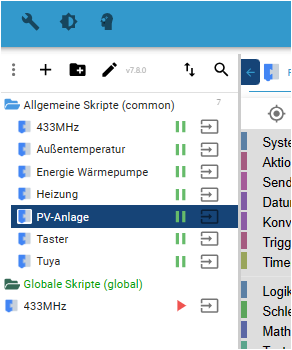
Habe den Pfad der Skripte mal geändert und auf einmal funktioniert es! Also von "Globale Skripte" auf "Allgemeine Skripte".
Das ergibt für mich gerade keinen Sinn und wer eher Zufall.Nichts desto trotz vielen Dank für eure Unterstützung und die vielen Hinweise. Das ist jetzt das was ich morgen aktualisieren werde.
Schönen Abend
-
Das sind alle super Tipps die ich noch umsetzen werde. Heute jedoch nicht mehr.
Habe den Pfad der Skripte mal geändert und auf einmal funktioniert es! Also von "Globale Skripte" auf "Allgemeine Skripte".
Das ergibt für mich gerade keinen Sinn und wer eher Zufall.Nichts desto trotz vielen Dank für eure Unterstützung und die vielen Hinweise. Das ist jetzt das was ich morgen aktualisieren werde.
Schönen Abend
@ingo-2
In Global sollte eigentlich eh nix liegen.
Hattest du die etwa alle in global liegen? -
Das sind alle super Tipps die ich noch umsetzen werde. Heute jedoch nicht mehr.
Habe den Pfad der Skripte mal geändert und auf einmal funktioniert es! Also von "Globale Skripte" auf "Allgemeine Skripte".
Das ergibt für mich gerade keinen Sinn und wer eher Zufall.Nichts desto trotz vielen Dank für eure Unterstützung und die vielen Hinweise. Das ist jetzt das was ich morgen aktualisieren werde.
Schönen Abend
@ingo-2 sagte in Instanz "Javascript" funktioniert nicht mehr:
Das ergibt für mich gerade keinen Sinn und wer eher Zufall.
und was für einen!
du bist doch Experte, dann weisst du ja auch warum.
-
Das sind alle super Tipps die ich noch umsetzen werde. Heute jedoch nicht mehr.
Habe den Pfad der Skripte mal geändert und auf einmal funktioniert es! Also von "Globale Skripte" auf "Allgemeine Skripte".
Das ergibt für mich gerade keinen Sinn und wer eher Zufall.Nichts desto trotz vielen Dank für eure Unterstützung und die vielen Hinweise. Das ist jetzt das was ich morgen aktualisieren werde.
Schönen Abend
@ingo-2 sagte in Instanz "Javascript" funktioniert nicht mehr:
Habe den Pfad der Skripte mal geändert und auf einmal funktioniert es! Also von "Globale Skripte" auf "Allgemeine Skripte".
Globale Scripts sind ja auch eine Sonderlocke und nur für Experten gedacht. Das sind keine eigenständigen Scripts, sondern der Inhalt der Scripts wird quasi vor jedes andere Script "kopiert". Der Ordner sollte generell nur im Expertenmodus sichtbar sein (aus Gründen).
Am besten: Einfach nicht verwenden :)



Hey! Du scheinst an dieser Unterhaltung interessiert zu sein, hast aber noch kein Konto.
Hast du es satt, bei jedem Besuch durch die gleichen Beiträge zu scrollen? Wenn du dich für ein Konto anmeldest, kommst du immer genau dorthin zurück, wo du zuvor warst, und kannst dich über neue Antworten benachrichtigen lassen (entweder per E-Mail oder Push-Benachrichtigung). Du kannst auch Lesezeichen speichern und Beiträge positiv bewerten, um anderen Community-Mitgliedern deine Wertschätzung zu zeigen.
Mit deinem Input könnte dieser Beitrag noch besser werden 💗
Registrieren AnmeldenSupport us
416
Online33.1k
Benutzende83.7k
Themen1.3m
Beiträge