




Aus Blockly's sind Rules geworden - Warum?


-
Skript v.2023-10-10 *** BASE SYSTEM *** Static hostname: ioBroker Icon name: computer-container Chassis: container Virtualization: lxc Operating System: Debian GNU/Linux 11 (bullseye) Kernel: Linux 6.5.13-5-pve Architecture: x86-64 model name : Intel(R) Core(TM) i5-7500T CPU @ 2.70GHz Docker : false Virtualization : lxc Kernel : x86_64 Userland : amd64 Systemuptime and Load: 19:58:59 up 12 days, 6:24, 1 user, load average: 0.22, 0.34, 0.35 CPU threads: 2 *** Time and Time Zones *** Local time: Sun 2024-04-21 19:58:59 CEST Universal time: Sun 2024-04-21 17:58:59 UTC RTC time: n/a Time zone: Europe/Berlin (CEST, +0200) System clock synchronized: yes NTP service: inactive RTC in local TZ: no *** User and Groups *** olli /home/olli olli sudo iobroker *** X-Server-Setup *** X-Server: false Desktop: Terminal: Boot Target: graphical.target *** MEMORY *** total used free shared buff/cache available Mem: 8.2G 3.9G 2.6G 0.0K 1.7G 4.3G Swap: 512M 0B 512M Total: 8.7G 3.9G 3.1G 8192 M total memory 3894 M used memory 3613 M active memory 1682 M inactive memory 2577 M free memory 0 M buffer memory 1719 M swap cache 512 M total swap 0 M used swap 512 M free swap *** FAILED SERVICES *** UNIT LOAD ACTIVE SUB DESCRIPTION * run-rpc_pipefs.mount loaded failed failed RPC Pipe File System * sys-kernel-config.mount loaded failed failed Kernel Configuration File System * systemd-journald-audit.socket loaded failed failed Journal Audit Socket LOAD = Reflects whether the unit definition was properly loaded. ACTIVE = The high-level unit activation state, i.e. generalization of SUB. SUB = The low-level unit activation state, values depend on unit type. 3 loaded units listed. *** FILESYSTEM *** Filesystem Type Size Used Avail Use% Mounted on /dev/loop1 ext4 8.8G 6.3G 2.1G 76% / none tmpfs 492K 4.0K 488K 1% /dev udev devtmpfs 7.8G 0 7.8G 0% /dev/tty tmpfs tmpfs 7.8G 0 7.8G 0% /dev/shm tmpfs tmpfs 3.2G 108K 3.2G 1% /run tmpfs tmpfs 5.0M 0 5.0M 0% /run/lock Messages concerning ext4 filesystem in dmesg: dmesg: read kernel buffer failed: Operation not permitted Show mounted filesystems \(real ones only\): TARGET SOURCE FSTYPE OPTIONS / /dev/loop1 ext4 rw,relatime Files in neuralgic directories: /var: 840M /var/ 604M /var/log 597M /var/log/journal/096f475719974738990de8370ea361d9 597M /var/log/journal 136M /var/lib Hint: You are currently not seeing messages from other users and the system. Users in groups 'adm', 'systemd-journal' can see all messages. Pass -q to turn off this notice. Archived and active journals take up 325.5M in the file system. /opt/iobroker/backups: 317M /opt/iobroker/backups/ /opt/iobroker/iobroker-data: 928M /opt/iobroker/iobroker-data/ 770M /opt/iobroker/iobroker-data/files 164M /opt/iobroker/iobroker-data/files/vis-2 114M /opt/iobroker/iobroker-data/backup-objects 89M /opt/iobroker/iobroker-data/files/echarts.admin The five largest files in iobroker-data are: 35M /opt/iobroker/iobroker-data/files/devices.admin/static/js/main.24f2bb56.js.map 33M /opt/iobroker/iobroker-data/files/iot.admin/static/js/main.1797d034.js.map 30M /opt/iobroker/iobroker-data/objects.jsonl 24M /opt/iobroker/iobroker-data/files/web.admin/static/js/main.135279a0.js.map 24M /opt/iobroker/iobroker-data/files/echarts/static/js/main.2b7495c2.js.map USB-Devices by-id: USB-Sticks - Avoid direct links to /dev/* in your adapter setups, please always prefer the links 'by-id': find: '/dev/serial/by-id/': No such file or directory *** NodeJS-Installation *** /usr/bin/nodejs v18.20.2 /usr/bin/node v18.20.2 /usr/bin/npm 10.5.0 /usr/bin/npx 10.5.0 /usr/bin/corepack 0.25.2 nodejs: Installed: 18.20.2-1nodesource1 Candidate: 18.20.2-1nodesource1 Version table: *** 18.20.2-1nodesource1 1001 500 https://deb.nodesource.com/node_18.x nodistro/main amd64 Packages 100 /var/lib/dpkg/status 18.20.1-1nodesource1 1001 500 https://deb.nodesource.com/node_18.x nodistro/main amd64 Packages 18.20.0-1nodesource1 1001 500 https://deb.nodesource.com/node_18.x nodistro/main amd64 Packages 18.19.1-1nodesource1 1001 500 https://deb.nodesource.com/node_18.x nodistro/main amd64 Packages 18.19.0-1nodesource1 1001 500 https://deb.nodesource.com/node_18.x nodistro/main amd64 Packages 18.18.2-1nodesource1 1001 500 https://deb.nodesource.com/node_18.x nodistro/main amd64 Packages 18.18.1-1nodesource1 1001 500 https://deb.nodesource.com/node_18.x nodistro/main amd64 Packages 18.18.0-1nodesource1 1001 500 https://deb.nodesource.com/node_18.x nodistro/main amd64 Packages 18.17.1-1nodesource1 1001 500 https://deb.nodesource.com/node_18.x nodistro/main amd64 Packages 18.17.0-1nodesource1 1001 500 https://deb.nodesource.com/node_18.x nodistro/main amd64 Packages 18.16.1-1nodesource1 1001 500 https://deb.nodesource.com/node_18.x nodistro/main amd64 Packages 18.16.0-1nodesource1 1001 500 https://deb.nodesource.com/node_18.x nodistro/main amd64 Packages 18.15.0-1nodesource1 1001 500 https://deb.nodesource.com/node_18.x nodistro/main amd64 Packages 18.14.2-1nodesource1 1001 500 https://deb.nodesource.com/node_18.x nodistro/main amd64 Packages 18.14.1-1nodesource1 1001 500 https://deb.nodesource.com/node_18.x nodistro/main amd64 Packages 18.14.0-1nodesource1 1001 500 https://deb.nodesource.com/node_18.x nodistro/main amd64 Packages 18.13.0-1nodesource1 1001 500 https://deb.nodesource.com/node_18.x nodistro/main amd64 Packages 18.12.0-1nodesource1 1001 500 https://deb.nodesource.com/node_18.x nodistro/main amd64 Packages 18.11.0-1nodesource1 1001 500 https://deb.nodesource.com/node_18.x nodistro/main amd64 Packages 18.10.0-1nodesource1 1001 500 https://deb.nodesource.com/node_18.x nodistro/main amd64 Packages 18.9.1-1nodesource1 1001 500 https://deb.nodesource.com/node_18.x nodistro/main amd64 Packages 18.9.0-1nodesource1 1001 500 https://deb.nodesource.com/node_18.x nodistro/main amd64 Packages 18.8.0-1nodesource1 1001 500 https://deb.nodesource.com/node_18.x nodistro/main amd64 Packages 18.7.0-1nodesource1 1001 500 https://deb.nodesource.com/node_18.x nodistro/main amd64 Packages 18.6.0-1nodesource1 1001 500 https://deb.nodesource.com/node_18.x nodistro/main amd64 Packages 18.5.0-1nodesource1 1001 500 https://deb.nodesource.com/node_18.x nodistro/main amd64 Packages 18.4.0-1nodesource1 1001 500 https://deb.nodesource.com/node_18.x nodistro/main amd64 Packages 18.3.0-1nodesource1 1001 500 https://deb.nodesource.com/node_18.x nodistro/main amd64 Packages 18.2.0-1nodesource1 1001 500 https://deb.nodesource.com/node_18.x nodistro/main amd64 Packages 18.1.0-1nodesource1 1001 500 https://deb.nodesource.com/node_18.x nodistro/main amd64 Packages 18.0.0-1nodesource1 1001 500 https://deb.nodesource.com/node_18.x nodistro/main amd64 Packages 12.22.12~dfsg-1~deb11u4 500 500 http://ftp.debian.org/debian bullseye/main amd64 Packages 500 http://security.debian.org bullseye-security/main amd64 Packages Temp directories causing npm8 problem: 0 No problems detected Errors in npm tree: npm ERR! code ELSPROBLEMS npm ERR! invalid: moment@2.29.4 /opt/iobroker/node_modules/moment npm ERR! missing: chroma-js@^2.4.2, required by iobroker.javascript@7.8.0 npm ERR! missing: mathjs@^12.3.2, required by iobroker.javascript@7.8.0 npm ERR! missing: moment-duration-format@^2.3.2, required by iobroker.javascript@7.8.0 npm ERR! A complete log of this run can be found in: /home/olli/.npm/_logs/2024-04-21T17_59_01_762Z-debug-0.log *** ioBroker-Installation *** ioBroker Status iobroker is running on this host. Objects type: jsonl States type: jsonl Core adapters versions js-controller: 5.0.19 admin: 6.13.16 javascript: 7.8.0 Adapters from github: 2 Adapter State + system.adapter.admin.0 : admin : ioBroker - enabled, port: 8081, bind: 0.0.0.0, run as: admin + system.adapter.alexa2.0 : alexa2 : ioBroker - enabled + system.adapter.backitup.0 : backitup : ioBroker - enabled + system.adapter.bydhvs.0 : bydhvs : ioBroker - enabled + system.adapter.cloud.0 : cloud : ioBroker - enabled + system.adapter.countdown.0 : countdown : ioBroker - enabled system.adapter.devices.0 : devices : ioBroker - disabled + system.adapter.discovery.0 : discovery : ioBroker - enabled system.adapter.dwd.0 : dwd : ioBroker - enabled + system.adapter.echarts.0 : echarts : ioBroker - enabled + system.adapter.energiefluss.0 : energiefluss : ioBroker - enabled + system.adapter.eusec.0 : eusec : ioBroker - enabled system.adapter.feiertage.0 : feiertage : ioBroker - enabled + system.adapter.fritzdect.0 : fritzdect : ioBroker - enabled + system.adapter.fronius-wattpilot.0 : fronius-wattpilot : ioBroker - enabled + system.adapter.fronius.0 : fronius : ioBroker - enabled + system.adapter.fully-tablet-control.0 : fully-tablet-control : ioBroker - enabled + system.adapter.fullybrowser.0 : fullybrowser : ioBroker - enabled + system.adapter.history.0 : history : ioBroker - enabled + system.adapter.hm-rega.0 : hm-rega : ioBroker - enabled + system.adapter.hm-rpc.0 : hm-rpc : ioBroker - enabled, port: 18701 + system.adapter.hm-rpc.1 : hm-rpc : ioBroker - enabled, port: 12001 + system.adapter.hm-rpc.2 : hm-rpc : ioBroker - enabled, port: 12010 system.adapter.ical.0 : ical : ioBroker - enabled system.adapter.icons-mfd-png.0 : icons-mfd-png : ioBroker - disabled system.adapter.icons-mfd-svg.0 : icons-mfd-svg : ioBroker - disabled system.adapter.icons-open-icon-library-png.0: icons-open-icon-library-png: ioBroker - disabled + system.adapter.influxdb.0 : influxdb : ioBroker - enabled, port: 8086 + system.adapter.iot.0 : iot : ioBroker - enabled + system.adapter.javascript.0 : javascript : ioBroker - enabled + system.adapter.mqtt.0 : mqtt : ioBroker - enabled, port: 1886, bind: 0.0.0.0 + system.adapter.nut.0 : nut : ioBroker - enabled + system.adapter.octoprint.0 : octoprint : ioBroker - enabled + system.adapter.ping.0 : ping : ioBroker - enabled + system.adapter.proxmox.0 : proxmox : ioBroker - enabled, port: 8006 + system.adapter.pushover.0 : pushover : ioBroker - enabled + system.adapter.reolink.0 : reolink : ioBroker - enabled + system.adapter.reolink.1 : reolink : ioBroker - enabled + system.adapter.shelly.0 : shelly : ioBroker - enabled, port: 1882, bind: 0.0.0.0 + system.adapter.simple-api.0 : simple-api : ioBroker - enabled, port: 8087, bind: 192.168.178.104, run as: admin + system.adapter.sonoff.0 : sonoff : ioBroker - enabled, port: 1883, bind: 0.0.0.0 + system.adapter.synology.0 : synology : ioBroker - enabled, port: 5001 + system.adapter.telegram.0 : telegram : ioBroker - enabled, port: 8443, bind: 0.0.0.0 + system.adapter.text2command.0 : text2command : ioBroker - enabled + system.adapter.trashschedule.0 : trashschedule : ioBroker - enabled system.adapter.vis-2.0 : vis-2 : ioBroker - disabled system.adapter.vis-bars.0 : vis-bars : ioBroker - disabled system.adapter.vis-canvas-gauges.0 : vis-canvas-gauges : ioBroker - disabled system.adapter.vis-colorpicker.0 : vis-colorpicker : ioBroker - disabled system.adapter.vis-google-fonts.0 : vis-google-fonts : ioBroker - enabled system.adapter.vis-hqwidgets.0 : vis-hqwidgets : ioBroker - disabled system.adapter.vis-icontwo.0 : vis-icontwo : ioBroker - disabled system.adapter.vis-jqui-mfd.0 : vis-jqui-mfd : ioBroker - disabled system.adapter.vis-justgage.0 : vis-justgage : ioBroker - disabled system.adapter.vis-keyboard.0 : vis-keyboard : ioBroker - disabled system.adapter.vis-map.0 : vis-map : ioBroker - disabled system.adapter.vis-material-advanced.0 : vis-material-advanced : ioBroker - disabled system.adapter.vis-plumb.0 : vis-plumb : ioBroker - disabled system.adapter.vis-timeandweather.0 : vis-timeandweather : ioBroker - disabled system.adapter.vis-weather.0 : vis-weather : ioBroker - disabled system.adapter.vis.0 : vis : ioBroker - enabled system.adapter.weatherunderground.0 : weatherunderground : ioBroker - enabled + system.adapter.web.0 : web : ioBroker - enabled, port: 8082, bind: 0.0.0.0, run as: admin + system.adapter.web.1 : web : ioBroker - enabled, port: 20002, bind: 0.0.0.0, run as: admin + system.adapter.yahka.0 : yahka : ioBroker - enabled + system.adapter.yeelight-2.0 : yeelight-2 : ioBroker - enabled + system.adapter.zigbee.0 : zigbee : ioBroker - enabled, port: tcp://192.168.178.90:6638 + instance is alive Enabled adapters with bindings + system.adapter.admin.0 : admin : ioBroker - enabled, port: 8081, bind: 0.0.0.0, run as: admin + system.adapter.hm-rpc.0 : hm-rpc : ioBroker - enabled, port: 18701 + system.adapter.hm-rpc.1 : hm-rpc : ioBroker - enabled, port: 12001 + system.adapter.hm-rpc.2 : hm-rpc : ioBroker - enabled, port: 12010 + system.adapter.influxdb.0 : influxdb : ioBroker - enabled, port: 8086 + system.adapter.mqtt.0 : mqtt : ioBroker - enabled, port: 1886, bind: 0.0.0.0 + system.adapter.proxmox.0 : proxmox : ioBroker - enabled, port: 8006 + system.adapter.shelly.0 : shelly : ioBroker - enabled, port: 1882, bind: 0.0.0.0 + system.adapter.simple-api.0 : simple-api : ioBroker - enabled, port: 8087, bind: 192.168.178.104, run as: admin + system.adapter.sonoff.0 : sonoff : ioBroker - enabled, port: 1883, bind: 0.0.0.0 + system.adapter.synology.0 : synology : ioBroker - enabled, port: 5001 + system.adapter.telegram.0 : telegram : ioBroker - enabled, port: 8443, bind: 0.0.0.0 + system.adapter.web.0 : web : ioBroker - enabled, port: 8082, bind: 0.0.0.0, run as: admin + system.adapter.web.1 : web : ioBroker - enabled, port: 20002, bind: 0.0.0.0, run as: admin + system.adapter.zigbee.0 : zigbee : ioBroker - enabled, port: tcp://192.168.178.90:6638 ioBroker-Repositories Stable (default): http://download.iobroker.net/sources-dist.json Beta (latest) : http://download.iobroker.net/sources-dist-latest.json Active repo(s): Stable (default) Installed ioBroker-Instances Used repository: Stable (default) Adapter "admin" : 6.13.16 , installed 6.13.16 Adapter "alexa2" : 3.26.5 , installed 3.26.5 Adapter "backitup" : 2.11.0 , installed 2.11.0 Adapter "bydhvs" : 1.5.0 , installed 1.5.0 Adapter "cloud" : 5.0.1 , installed 5.0.1 Adapter "countdown" : 2.2.0 , installed 2.2.0 Adapter "devices" : 1.1.5 , installed 1.1.5 Adapter "discovery" : 4.4.0 , installed 4.4.0 Adapter "dwd" : 2.8.5 , installed 2.8.5 Adapter "echarts" : 1.7.2 , installed 1.7.2 Adapter "energiefluss" : 3.6.0 , installed 3.6.0 Adapter "eusec" : 1.2.1 , installed 1.2.1 Adapter "feiertage" : 1.2.0 , installed 1.2.0 Adapter "fritzdect" : 2.5.9 , installed 2.5.9 Adapter "fronius" : 2.0.2 , installed 2.0.2 Adapter "fronius-solarweb": 0.0.3 , installed 0.1.0 Adapter "fronius-wattpilot": 4.6.3, installed 4.6.3 Adapter "fullybrowser" : 3.0.11 , installed 3.0.11 Adapter "history" : 3.0.1 , installed 3.0.1 Adapter "hm-rega" : 4.0.0 , installed 4.0.0 Adapter "hm-rpc" : 1.17.0 , installed 1.17.0 Adapter "ical" : 1.14.3 , installed 1.14.3 Adapter "icons-mfd-png": 1.2.1 , installed 1.2.1 Adapter "icons-mfd-svg": 1.2.0 , installed 1.2.0 Adapter "icons-open-icon-library-png": 0.1.2, installed 0.1.2 Adapter "influxdb" : 4.0.2 , installed 4.0.2 Adapter "iot" : 2.0.11 , installed 2.0.11 Adapter "javascript" : 7.8.0 , installed 7.8.0 Controller "js-controller": 5.0.19 , installed 5.0.19 Adapter "mqtt" : 5.2.0 , installed 5.2.0 Adapter "nut" : 1.6.0 , installed 1.6.0 Adapter "octoprint" : 5.1.0 , installed 5.1.0 Adapter "ping" : 1.6.2 , installed 1.6.2 Adapter "proxmox" : 2.2.3 , installed 2.2.3 Adapter "pushover" : 3.0.6 , installed 3.0.6 Adapter "reolink" : 1.0.3 , installed 1.0.3 Adapter "shelly" : 6.8.0 , installed 6.8.0 Adapter "simple-api" : 2.7.2 , installed 2.7.2 Adapter "socketio" : 6.6.1 , installed 6.6.1 Adapter "sonoff" : 3.0.3 , installed 3.0.3 Adapter "synology" : 3.0.1 , installed 3.0.1 Adapter "telegram" : 3.2.1 , installed 3.2.1 Adapter "text2command" : 3.0.3 , installed 3.0.3 Adapter "trashschedule": 3.2.0 , installed 3.2.0 Adapter "vis" : 1.5.4 , installed 1.5.4 Adapter "vis-2" : 2.9.32 , installed 2.9.32 Adapter "vis-bars" : 0.1.4 , installed 0.1.4 Adapter "vis-canvas-gauges": 1.0.1, installed 1.0.1 Adapter "vis-colorpicker": 2.0.3 , installed 2.0.3 Adapter "vis-google-fonts": 1.0.4 , installed 1.0.4 Adapter "vis-hqwidgets": 1.5.1 , installed 1.5.1 Adapter "vis-icontwo" : 1.5.0 , installed 1.5.0 Adapter "vis-jqui-mfd" : 1.1.1 , installed 1.1.1 Adapter "vis-justgage" : 2.1.7 , installed 2.1.7 Adapter "vis-keyboard" : 0.0.2 , installed 0.0.2 Adapter "vis-map" : 1.0.5 , installed 1.0.5 Adapter "vis-material-advanced": 1.7.4, installed 1.7.4 Adapter "vis-plumb" : 1.0.2 , installed 1.0.2 Adapter "vis-timeandweather": 1.2.2, installed 1.2.2 Adapter "vis-weather" : 2.5.9 , installed 2.5.9 Adapter "weatherunderground": 3.6.0, installed 3.6.0 Adapter "web" : 6.2.5 , installed 6.2.5 Adapter "wled" : 0.7.2 , installed 0.7.2 Adapter "ws" : 2.5.11 , installed 2.5.11 Adapter "yahka" : 1.0.3 , installed 1.0.3 Adapter "yeelight-2" : 1.3.1 , installed 1.3.1 Adapter "zigbee" : 1.10.3 , installed 1.10.3 Objects and States Please stand by - This may take a while Objects: 12629 States: 11483 *** OS-Repositories and Updates *** Hit:1 http://security.debian.org bullseye-security InRelease Hit:2 http://ftp.debian.org/debian bullseye InRelease Hit:3 http://ftp.debian.org/debian bullseye-updates InRelease Hit:4 https://deb.nodesource.com/node_18.x nodistro InRelease Hit:5 https://packagecloud.io/ookla/speedtest-cli/debian bullseye InRelease Reading package lists... Pending Updates: 0 *** Listening Ports *** Active Internet connections (only servers) Proto Recv-Q Send-Q Local Address Foreign Address State User Inode PID/Program name tcp 0 0 0.0.0.0:111 0.0.0.0:* LISTEN 0 33314 1/init tcp 0 0 0.0.0.0:8555 0.0.0.0:* LISTEN 1001 57322877 599236/go2rtc tcp 0 0 0.0.0.0:1886 0.0.0.0:* LISTEN 1001 57318074 599047/io.mqtt.0 tcp 0 0 0.0.0.0:1887 0.0.0.0:* LISTEN 1001 57318075 599047/io.mqtt.0 tcp 0 0 0.0.0.0:1882 0.0.0.0:* LISTEN 1001 57318365 599102/io.shelly.0 tcp 0 0 0.0.0.0:1883 0.0.0.0:* LISTEN 1001 57321514 599118/io.sonoff.0 tcp 0 0 0.0.0.0:1080 0.0.0.0:* LISTEN 1000 59013813 620010/nc tcp 0 0 192.168.178.104:12001 0.0.0.0:* LISTEN 1001 58273969 610840/io.hm-rpc.1 tcp 0 0 192.168.178.104:12010 0.0.0.0:* LISTEN 1001 58273974 610847/io.hm-rpc.2 tcp 0 0 192.168.178.104:18701 0.0.0.0:* LISTEN 1001 58273971 610833/io.hm-rpc.0 tcp 0 0 127.0.0.1:9000 0.0.0.0:* LISTEN 1001 57315067 598764/iobroker.js- tcp 0 0 127.0.0.1:9001 0.0.0.0:* LISTEN 1001 57317094 598764/iobroker.js- tcp 0 0 127.0.0.1:25 0.0.0.0:* LISTEN 0 33785 328/master tcp 0 0 0.0.0.0:5355 0.0.0.0:* LISTEN 104 34277 128/systemd-resolve tcp 0 0 192.168.178.104:8087 0.0.0.0:* LISTEN 1001 57322358 599357/io.simple-ap tcp 0 0 0.0.0.0:39321 0.0.0.0:* LISTEN 1001 57327259 599586/io.yahka.0 tcp 0 0 127.0.0.53:53 0.0.0.0:* LISTEN 104 34283 128/systemd-resolve tcp6 0 0 :::111 :::* LISTEN 0 33316 1/init tcp6 0 0 :::22 :::* LISTEN 0 34172 1/init tcp6 0 0 :::8554 :::* LISTEN 1001 57322872 599236/go2rtc tcp6 0 0 :::1984 :::* LISTEN 1001 57322871 599236/go2rtc tcp6 0 0 :::20002 :::* LISTEN 1001 57327069 599538/io.web.1 tcp6 0 0 :::5355 :::* LISTEN 104 34280 128/systemd-resolve tcp6 0 0 ::1:25 :::* LISTEN 0 33786 328/master tcp6 0 0 :::8081 :::* LISTEN 1001 57317158 598785/io.admin.0 tcp6 0 0 :::8082 :::* LISTEN 1001 57326707 599434/io.web.0 udp 0 0 0.0.0.0:5353 0.0.0.0:* 1001 57327256 599586/io.yahka.0 udp 0 0 0.0.0.0:5355 0.0.0.0:* 104 34276 128/systemd-resolve udp 0 0 0.0.0.0:39438 0.0.0.0:* 1001 57321869 599208/io.eusec.0 udp 0 0 0.0.0.0:48422 0.0.0.0:* 1001 57321874 599208/io.eusec.0 udp 0 0 127.0.0.53:53 0.0.0.0:* 104 34282 128/systemd-resolve udp 0 0 0.0.0.0:111 0.0.0.0:* 0 33315 1/init udp 0 0 0.0.0.0:8555 0.0.0.0:* 1001 57322873 599236/go2rtc udp6 0 0 :::5355 :::* 104 34279 128/systemd-resolve udp6 0 0 :::111 :::* 0 33317 1/init *** Log File - Last 25 Lines *** 2024-04-21 19:56:55.548 - debug: yeelight-2.0 (599449) DEVICE FOUND IN CONFIG: {"name":"color-0x00000000036d9805","ip":"192.168.178.125","port":"55443","smart_name":"Schlafzimmerlicht","type":"color","id":"0x000000000000000","supports":["get_prop","set_default","set_power","toggle","set_bright","start_cf","stop_cf","set_scene","cron_add","cron_get","cron_del","set_ct_abx","set_rgb","set_hsv","set_adjust","adjust_bright","adjust_ct","adjust_color","set_music","set_name"]} 2024-04-21 19:56:57.352 - info: fully-tablet-control.0 (599288) State value to set for "fully-tablet-control.0.device.kg_fire_hd_7.device_info.displayHeightPixels" has to be type "string" but received type "number" 2024-04-21 19:56:57.352 - info: fully-tablet-control.0 (599288) State value to set for "fully-tablet-control.0.device.kg_fire_hd_7.device_info.displayWidthPixels" has to be type "string" but received type "number" 2024-04-21 19:57:25.551 - debug: yeelight-2.0 (599449) RESPONSE MESSAGE: from: 0x000000000000000, id: 1137, result:[off,25,16711680,2,3030]} 2024-04-21 19:57:25.551 - debug: yeelight-2.0 (599449) DEVICE FOUND IN CONFIG: {"name":"color-0x00000000036d9805","ip":"192.168.178.125","port":"55443","smart_name":"Schlafzimmerlicht","type":"color","id":"0x000000000000000","supports":["get_prop","set_default","set_power","toggle","set_bright","start_cf","stop_cf","set_scene","cron_add","cron_get","cron_del","set_ct_abx","set_rgb","set_hsv","set_adjust","adjust_bright","adjust_ct","adjust_color","set_music","set_name"]} 2024-04-21 19:57:27.631 - info: fully-tablet-control.0 (599288) State value to set for "fully-tablet-control.0.device.kg_fire_hd_7.device_info.displayHeightPixels" has to be type "string" but received type "number" 2024-04-21 19:57:27.632 - info: fully-tablet-control.0 (599288) State value to set for "fully-tablet-control.0.device.kg_fire_hd_7.device_info.displayWidthPixels" has to be type "string" but received type "number" 2024-04-21 19:57:42.954 - info: admin.0 (598785) ==> Connected system.user.admin from ::ffff:192.168.178.49 2024-04-21 19:57:55.555 - debug: yeelight-2.0 (599449) RESPONSE MESSAGE: from: 0x000000000000000, id: 1138, result:[off,25,16711680,2,3030]} 2024-04-21 19:57:55.555 - debug: yeelight-2.0 (599449) DEVICE FOUND IN CONFIG: {"name":"color-0x00000000036d9805","ip":"192.168.178.125","port":"55443","smart_name":"Schlafzimmerlicht","type":"color","id":"0x000000000000000","supports":["get_prop","set_default","set_power","toggle","set_bright","start_cf","stop_cf","set_scene","cron_add","cron_get","cron_del","set_ct_abx","set_rgb","set_hsv","set_adjust","adjust_bright","adjust_ct","adjust_color","set_music","set_name"]} 2024-04-21 19:57:57.899 - info: fully-tablet-control.0 (599288) State value to set for "fully-tablet-control.0.device.kg_fire_hd_7.device_info.displayHeightPixels" has to be type "string" but received type "number" 2024-04-21 19:57:57.900 - info: fully-tablet-control.0 (599288) State value to set for "fully-tablet-control.0.device.kg_fire_hd_7.device_info.displayWidthPixels" has to be type "string" but received type "number" 2024-04-21 19:58:25.557 - debug: yeelight-2.0 (599449) RESPONSE MESSAGE: from: 0x000000000000000, id: 1139, result:[off,25,16711680,2,3030]} 2024-04-21 19:58:25.559 - debug: yeelight-2.0 (599449) DEVICE FOUND IN CONFIG: {"name":"color-0x00000000036d9805","ip":"192.168.178.125","port":"55443","smart_name":"Schlafzimmerlicht","type":"color","id":"0x000000000000000","supports":["get_prop","set_default","set_power","toggle","set_bright","start_cf","stop_cf","set_scene","cron_add","cron_get","cron_del","set_ct_abx","set_rgb","set_hsv","set_adjust","adjust_bright","adjust_ct","adjust_color","set_music","set_name"]} 2024-04-21 19:58:26.422 - error: eusec.0 (599208) Station: T8030P23225109DD command CMD_SDINFO_EX failed with error: undefined (-148) 2024-04-21 19:58:29.140 - info: fully-tablet-control.0 (599288) State value to set for "fully-tablet-control.0.device.kg_fire_hd_7.device_info.displayHeightPixels" has to be type "string" but received type "number" 2024-04-21 19:58:29.140 - info: fully-tablet-control.0 (599288) State value to set for "fully-tablet-control.0.device.kg_fire_hd_7.device_info.displayWidthPixels" has to be type "string" but received type "number" 2024-04-21 19:58:55.561 - debug: yeelight-2.0 (599449) RESPONSE MESSAGE: from: 0x000000000000000, id: 1140, result:[off,25,16711680,2,3030]} 2024-04-21 19:58:55.561 - debug: yeelight-2.0 (599449) DEVICE FOUND IN CONFIG: {"name":"color-0x00000000036d9805","ip":"192.168.178.125","port":"55443","smart_name":"Schlafzimmerlicht","type":"color","id":"0x000000000000000","supports":["get_prop","set_default","set_power","toggle","set_bright","start_cf","stop_cf","set_scene","cron_add","cron_get","cron_del","set_ct_abx","set_rgb","set_hsv","set_adjust","adjust_bright","adjust_ct","adjust_color","set_music","set_name"]} 2024-04-21 19:58:59.356 - info: fully-tablet-control.0 (599288) State value to set for "fully-tablet-control.0.device.kg_fire_hd_7.device_info.displayHeightPixels" has to be type "string" but received type "number" 2024-04-21 19:58:59.357 - info: fully-tablet-control.0 (599288) State value to set for "fully-tablet-control.0.device.kg_fire_hd_7.device_info.displayWidthPixels" has to be type "string" but received type "number" 2024-04-21 19:59:25.568 - debug: yeelight-2.0 (599449) RESPONSE MESSAGE: from: 0x000000000000000, id: 1141, result:[off,25,16711680,2,3030]} 2024-04-21 19:59:25.569 - debug: yeelight-2.0 (599449) DEVICE FOUND IN CONFIG: {"name":"color-0x00000000036d9805","ip":"192.168.178.125","port":"55443","smart_name":"Schlafzimmerlicht","type":"color","id":"0x000000000000000","supports":["get_prop","set_default","set_power","toggle","set_bright","start_cf","stop_cf","set_scene","cron_add","cron_get","cron_del","set_ct_abx","set_rgb","set_hsv","set_adjust","adjust_bright","adjust_ct","adjust_color","set_music","set_name"]} 2024-04-21 19:59:29.732 - info: fully-tablet-control.0 (599288) State value to set for "fully-tablet-control.0.device.kg_fire_hd_7.device_info.displayHeightPixels" has to be type "string" but received type "number" 2024-04-21 19:59:29.732 - info: fully-tablet-control.0 (599288) State value to set for "fully-tablet-control.0.device.kg_fire_hd_7.device_info.displayWidthPixels" has to be type "string" but received type "number"@qqolli Danke!
Da läuft es nicht ganz rund
da:
@qqolli sagte in Aus Blockly's sind Rules geworden - Warum?:
*** FAILED SERVICES ***
und da:
@qqolli sagte in Aus Blockly's sind Rules geworden - Warum?:
Errors in npm tree:
hier ist js mit betroffen.
Was dagegen zu tun ist kann ich dir leider nicht sagen, das übersteigt mein Können.
Vielleicht kann da @thomas-braun helfenkein Support per PN! - Fragen im Forum stellen - Benutzt das Voting rechts unten im Beitrag wenn er euch geholfen hat.
Das Forum freut sich über eine Spende. Benutzt dazu den Spendenbutton oben rechts. Danke!
der Installationsfixer: curl -fsL https://iobroker.net/fix.sh | bash - -
@qqolli Danke!
Da läuft es nicht ganz rund
da:
@qqolli sagte in Aus Blockly's sind Rules geworden - Warum?:
*** FAILED SERVICES ***
und da:
@qqolli sagte in Aus Blockly's sind Rules geworden - Warum?:
Errors in npm tree:
hier ist js mit betroffen.
Was dagegen zu tun ist kann ich dir leider nicht sagen, das übersteigt mein Können.
Vielleicht kann da @thomas-braun helfen -
@homoran Vielen Dank erstmal für deine Hilfe und deine Zeit!
@thomas-braun Hättest du vielleicht noch eine Idee?Zu LXCs fällt mir nix ein, nutze die Dinger nicht.
Errors in npm tree:
npm ERR! code ELSPROBLEMS
npm ERR! invalid: moment@2.29.4 /opt/iobroker/node_modules/moment
npm ERR! missing: chroma-js@^2.4.2, required by iobroker.javascript@7.8.0
npm ERR! missing: mathjs@^12.3.2, required by iobroker.javascript@7.8.0
npm ERR! missing: moment-duration-format@^2.3.2, required by iobroker.javascript@7.8.0
Da scheint mir das Modul 'moment' im Javascript-Adapter nicht mit um's Eck zu kommen. Leg das nochmal an. Und/oder schau, wo es genau klemmt:
cd /opt/iobroker && npm ls momentBullsyeye läuft auch in ein paar Wochen aus. Kümmer dich um den Absprung.
-
Zu LXCs fällt mir nix ein, nutze die Dinger nicht.
Errors in npm tree:
npm ERR! code ELSPROBLEMS
npm ERR! invalid: moment@2.29.4 /opt/iobroker/node_modules/moment
npm ERR! missing: chroma-js@^2.4.2, required by iobroker.javascript@7.8.0
npm ERR! missing: mathjs@^12.3.2, required by iobroker.javascript@7.8.0
npm ERR! missing: moment-duration-format@^2.3.2, required by iobroker.javascript@7.8.0
Da scheint mir das Modul 'moment' im Javascript-Adapter nicht mit um's Eck zu kommen. Leg das nochmal an. Und/oder schau, wo es genau klemmt:
cd /opt/iobroker && npm ls momentBullsyeye läuft auch in ein paar Wochen aus. Kümmer dich um den Absprung.
olli@ioBroker:~$ cd /opt/iobroker && npm ls moment
[sudo] password for olli:
npm ERR! code ELSPROBLEMS
npm ERR! invalid: moment@2.29.4 /opt/iobroker/node_modules/moment
iobroker.inst@3.0.0 /opt/iobroker
+-- iobroker.countdown@2.2.0
| `-- moment@2.29.4 invalid: "^2.30.1" from node_modules/iobroker.javascript
+-- iobroker.echarts@1.7.2
| `-- moment@2.29.4 deduped
+-- iobroker.javascript@7.8.0
| +-- moment-timezone@0.5.45
| | `-- moment@2.29.4 deduped invalid: "^2.30.1" from node_modules/iobroker.javascript
| `-- moment@2.29.4 deduped invalid: "^2.30.1" from node_modules/iobroker.javascript
+-- iobroker.js-controller@5.0.19
| `-- @iobroker/js-controller-common@5.0.19
|   `-- winston-daily-rotate-file@4.7.1
|     `-- file-stream-rotator@0.6.1
|       `-- moment@2.29.4 deduped invalid: "^2.30.1" from node_modules/iobroker.javascript
`-- iobroker.synology@3.0.1
  `-- moment@2.29.4 deduped invalid: "^2.30.1" from node_modules/iobroker.javascript
Was ist dieses moment und wie kann ich es neu installieren/reparieren? Javascript-Adapter löschen und neu installieren?
-
olli@ioBroker:~$ cd /opt/iobroker && npm ls moment
[sudo] password for olli:
npm ERR! code ELSPROBLEMS
npm ERR! invalid: moment@2.29.4 /opt/iobroker/node_modules/moment
iobroker.inst@3.0.0 /opt/iobroker
+-- iobroker.countdown@2.2.0
| `-- moment@2.29.4 invalid: "^2.30.1" from node_modules/iobroker.javascript
+-- iobroker.echarts@1.7.2
| `-- moment@2.29.4 deduped
+-- iobroker.javascript@7.8.0
| +-- moment-timezone@0.5.45
| | `-- moment@2.29.4 deduped invalid: "^2.30.1" from node_modules/iobroker.javascript
| `-- moment@2.29.4 deduped invalid: "^2.30.1" from node_modules/iobroker.javascript
+-- iobroker.js-controller@5.0.19
| `-- @iobroker/js-controller-common@5.0.19
|   `-- winston-daily-rotate-file@4.7.1
|     `-- file-stream-rotator@0.6.1
|       `-- moment@2.29.4 deduped invalid: "^2.30.1" from node_modules/iobroker.javascript
`-- iobroker.synology@3.0.1
  `-- moment@2.29.4 deduped invalid: "^2.30.1" from node_modules/iobroker.javascript
Was ist dieses moment und wie kann ich es neu installieren/reparieren? Javascript-Adapter löschen und neu installieren?
@qqolli sagte in Aus Blockly's sind Rules geworden - Warum?:
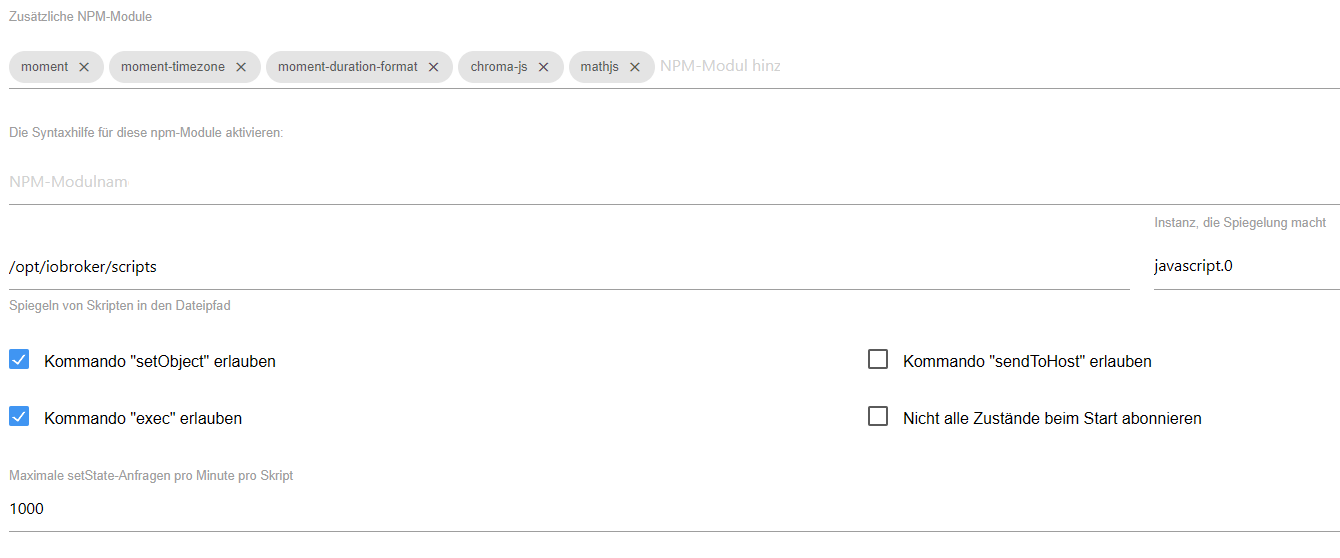
Da klemmt es:+-- iobroker.javascript@7.8.0 | +-- moment-timezone@0.5.45 | | `-- moment@2.29.4 deduped invalid: "^2.30.1" from node_modules/iobroker.javascript | `-- moment@2.29.4 deduped invalid: "^2.30.1" from node_modules/iobroker.javascriptSchau in die Einstellunge des javascript-Adapters. Hast du da 'moment' als zusätzliches Modul eingetragen?
-
@qqolli sagte in Aus Blockly's sind Rules geworden - Warum?:
Da klemmt es:+-- iobroker.javascript@7.8.0 | +-- moment-timezone@0.5.45 | | `-- moment@2.29.4 deduped invalid: "^2.30.1" from node_modules/iobroker.javascript | `-- moment@2.29.4 deduped invalid: "^2.30.1" from node_modules/iobroker.javascriptSchau in die Einstellunge des javascript-Adapters. Hast du da 'moment' als zusätzliches Modul eingetragen?
-
Hab ich tatsächlich, wobei, wenn ich ehrlich bin, gar nicht mehr weiß warum und wofür :-(
Soll ich die drei moment- ... rauswerfen? Oder wie kann man die ggf. updaten (wenn das möglich ist)?
@qqolli sagte in Aus Blockly's sind Rules geworden - Warum?:
Soll ich die drei moment- ... rauswerfen?
Ich würde mein System da 'sauber halten wollen'.
Btw ist ein Spiegel innerhalb von /opt/iobroker wenig sinnvoll. Ich würde (bzw. habe) das bei mir nach /home/iobroker/ spiegeln. -
@qqolli sagte in Aus Blockly's sind Rules geworden - Warum?:
Soll ich die drei moment- ... rauswerfen?
Ich würde mein System da 'sauber halten wollen'.
Btw ist ein Spiegel innerhalb von /opt/iobroker wenig sinnvoll. Ich würde (bzw. habe) das bei mir nach /home/iobroker/ spiegeln.@thomas-braun
Ok, d. h. ich würde den bestehenden Eintrag von/opt/iobroker/scriptsnach
/opt/iobroker/ändern und die 3 moment-Einträge löschen, zumal ich nicht mehr weiß, wozu die gut waren?
Kann ich das "umspiegeln" :-) so machen, oder muss ich dabei noch etwas beachten? Sorry schon mal für all die nervigen Fragen.
-
@thomas-braun
Ok, d. h. ich würde den bestehenden Eintrag von/opt/iobroker/scriptsnach
/opt/iobroker/ändern und die 3 moment-Einträge löschen, zumal ich nicht mehr weiß, wozu die gut waren?
Kann ich das "umspiegeln" :-) so machen, oder muss ich dabei noch etwas beachten? Sorry schon mal für all die nervigen Fragen.
Nein, nach
Ich würde (bzw. habe) das bei mir nach /home/iobroker/ spiegeln.
Ich schrieb doch, das macht keinen Sinn das nach /opt zu schreiben.
-
Nein, nach
Ich würde (bzw. habe) das bei mir nach /home/iobroker/ spiegeln.
Ich schrieb doch, das macht keinen Sinn das nach /opt zu schreiben.
-
@thomas-braun
Ja, stimmt allerdings. Wer lesen kann, ist da deutlich im Vorteil, sorry :-)Dann werde ich das mal ändern. Aber Probleme wird es dann hoffentlich keine geben oder?
@qqolli sagte in Aus Blockly's sind Rules geworden - Warum?:
Aber Probleme wird es dann hoffentlich keine geben oder?
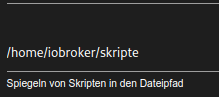
Hier nicht.
-
@qqolli sagte in Aus Blockly's sind Rules geworden - Warum?:
Aber Probleme wird es dann hoffentlich keine geben oder?
Hier nicht.
@thomas-braun
Mit/home/iobroker/skripteund ohne die moment-Einträge läuft
iob diagjetzt auch ohne "Errors in npm tree" durch, aber jetzt bekomme ich den folgenden für "Failed Services":
*** FAILED SERVICES *** UNIT LOAD ACTIVE SUB DESCRIPTION * run-rpc_pipefs.mount loaded failed failed RPC Pipe File System * sys-kernel-config.mount loaded failed failed Kernel Configuration File System * systemd-journald-audit.socket loaded failed failed Journal Audit Socket LOAD = Reflects whether the unit definition was properly loaded. ACTIVE = The high-level unit activation state, i.e. generalization of SUB. SUB = The low-level unit activation state, values depend on unit type. 3 loaded units listed. -
@thomas-braun
Mit/home/iobroker/skripteund ohne die moment-Einträge läuft
iob diagjetzt auch ohne "Errors in npm tree" durch, aber jetzt bekomme ich den folgenden für "Failed Services":
*** FAILED SERVICES *** UNIT LOAD ACTIVE SUB DESCRIPTION * run-rpc_pipefs.mount loaded failed failed RPC Pipe File System * sys-kernel-config.mount loaded failed failed Kernel Configuration File System * systemd-journald-audit.socket loaded failed failed Journal Audit Socket LOAD = Reflects whether the unit definition was properly loaded. ACTIVE = The high-level unit activation state, i.e. generalization of SUB. SUB = The low-level unit activation state, values depend on unit type. 3 loaded units listed.Zu den failed services kann ich dir nix sagen. Hat mit dem LXC Krams zu tun. Ich hab keine Ahnung ob die laufen müssten.
-
Zu den failed services kann ich dir nix sagen. Hat mit dem LXC Krams zu tun. Ich hab keine Ahnung ob die laufen müssten.
@thomas-braun
Ich habe gerade gesehen, das doch wieder Fehler im npm tree aufgetreten sind:Errors in npm tree: npm ERR! code ELSPROBLEMS npm ERR! invalid: moment@2.29.4 /opt/iobroker/node_modules/moment npm ERR! missing: chroma-js@^2.4.2, required by iobroker.javascript@7.8.0 npm ERR! missing: mathjs@^12.3.2, required by iobroker.javascript@7.8.0 npm ERR! missing: moment-duration-format@^2.3.2, required by iobroker.javascript@7.8.0Hättest du eine Idee, warum und wie ich das ggf. wieder i. O. bringen könnte?
-
@thomas-braun
Ich habe gerade gesehen, das doch wieder Fehler im npm tree aufgetreten sind:Errors in npm tree: npm ERR! code ELSPROBLEMS npm ERR! invalid: moment@2.29.4 /opt/iobroker/node_modules/moment npm ERR! missing: chroma-js@^2.4.2, required by iobroker.javascript@7.8.0 npm ERR! missing: mathjs@^12.3.2, required by iobroker.javascript@7.8.0 npm ERR! missing: moment-duration-format@^2.3.2, required by iobroker.javascript@7.8.0Hättest du eine Idee, warum und wie ich das ggf. wieder i. O. bringen könnte?
@qqolli sagte in Aus Blockly's sind Rules geworden - Warum?:
npm ERR! invalid: moment@2.29.4 /opt/iobroker/node_modules/moment
Der muss in einer validen Version installiert werden/sein.
Schau dircd /opt/iobroker/ && npm ls momentan.
-
@qqolli sagte in Aus Blockly's sind Rules geworden - Warum?:
npm ERR! invalid: moment@2.29.4 /opt/iobroker/node_modules/moment
Der muss in einer validen Version installiert werden/sein.
Schau dircd /opt/iobroker/ && npm ls momentan.
cd /opt/iobroker/ && npm ls momentzeigt folgendes an:
npm ERR! code ELSPROBLEMS
npm ERR! invalid: moment@2.29.4 /opt/iobroker/node_modules/moment
iobroker.inst@3.0.0 /opt/iobroker
+-- iobroker.countdown@2.2.0
| `-- moment@2.29.4 invalid: "^2.30.1" from node_modules/iobroker.javascript
+-- iobroker.echarts@1.7.2
| `-- moment@2.29.4 deduped
+-- iobroker.javascript@7.8.0
| +-- moment-timezone@0.5.45
| | `-- moment@2.29.4 deduped invalid: "^2.30.1" from node_modules/iobroker.javascript
| `-- moment@2.29.4 deduped invalid: "^2.30.1" from node_modules/iobroker.javascript
+-- iobroker.js-controller@5.0.19
| `-- @iobroker/js-controller-common@5.0.19
|   `-- winston-daily-rotate-file@4.7.1
|     `-- file-stream-rotator@0.6.1
|       `-- moment@2.29.4 deduped invalid: "^2.30.1" from node_modules/iobroker.javascript
`-- iobroker.synology@3.1.0
  `-- moment@2.30.1
Wie kann ich den in einer validen Version re-installieren oder ganz entfernen?
-
cd /opt/iobroker/ && npm ls momentzeigt folgendes an:
npm ERR! code ELSPROBLEMS
npm ERR! invalid: moment@2.29.4 /opt/iobroker/node_modules/moment
iobroker.inst@3.0.0 /opt/iobroker
+-- iobroker.countdown@2.2.0
| `-- moment@2.29.4 invalid: "^2.30.1" from node_modules/iobroker.javascript
+-- iobroker.echarts@1.7.2
| `-- moment@2.29.4 deduped
+-- iobroker.javascript@7.8.0
| +-- moment-timezone@0.5.45
| | `-- moment@2.29.4 deduped invalid: "^2.30.1" from node_modules/iobroker.javascript
| `-- moment@2.29.4 deduped invalid: "^2.30.1" from node_modules/iobroker.javascript
+-- iobroker.js-controller@5.0.19
| `-- @iobroker/js-controller-common@5.0.19
|   `-- winston-daily-rotate-file@4.7.1
|     `-- file-stream-rotator@0.6.1
|       `-- moment@2.29.4 deduped invalid: "^2.30.1" from node_modules/iobroker.javascript
`-- iobroker.synology@3.1.0
  `-- moment@2.30.1
Wie kann ich den in einer validen Version re-installieren oder ganz entfernen?
Hast du moment im Javascript-Adapter als zusätzliches Modul eingetragen?
Auf der HP von moment steht auch:
Moment.js is a legacy project, now in maintenance mode. In most cases, you should choose a different library.
-
Hast du moment im Javascript-Adapter als zusätzliches Modul eingetragen?
Auf der HP von moment steht auch:
Moment.js is a legacy project, now in maintenance mode. In most cases, you should choose a different library.
-
@thomas-braun
Der war bis vor kurzem im Javascript-Adapter eingetragen. Zur Zeit sind dort nur noch diese zwei eingetragen: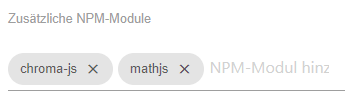
Wie könnte ich denn dieses Modul (moment) komplett entfernen? -
@thomas-braun
Oh la la:olli@ioBroker:~$ cd /opt/iobroker/node_modules/moment olli@ioBroker:/opt/iobroker/node_modules/moment$ ls -al total 328 drwxrwxr-x+ 7 iobroker iobroker 4096 Jul 15 2022 . drwxrwxr-x+ 1171 iobroker iobroker 36864 Apr 23 19:15 .. -rw-rwxr--+ 1 iobroker iobroker 45726 Jul 15 2022 CHANGELOG.md -rw-rwxr--+ 1 iobroker iobroker 1075 Jul 15 2022 LICENSE -rw-rwxr--+ 1 iobroker iobroker 2468 Jul 15 2022 README.md drwxrwxr-x+ 3 iobroker iobroker 4096 Jul 15 2022 dist -rw-rwxr--+ 1 iobroker iobroker 39 Jul 15 2022 ender.js drwxrwxr-x+ 2 iobroker iobroker 4096 Jul 15 2022 locale drwxrwxr-x+ 2 iobroker iobroker 4096 Jul 15 2022 min -rw-rwxr--+ 1 iobroker iobroker 23820 Jul 15 2022 moment.d.ts -rw-rwxr--+ 1 iobroker iobroker 174604 Jul 15 2022 moment.js -rw-rwxr--+ 1 iobroker iobroker 273 Jul 15 2022 package.js -rw-rwxr--+ 1 iobroker iobroker 3418 Jul 15 2022 package.json drwxrwxr-x+ 4 iobroker iobroker 4096 Jul 15 2022 src drwxrwxr-x+ 2 iobroker iobroker 4096 Jul 15 2022 ts3.1-typings olli@ioBroker:/opt/iobroker/node_modules/moment$ npm prune [sudo] password for olli: npm WARN deprecated har-validator@5.1.5: this library is no longer supported npm WARN deprecated uuid@3.4.0: Please upgrade to version 7 or higher. Older versions may use Math.random() in certain circumstances, which is known to be problematic. See https://v8.dev/blog/math-random for details. npm WARN deprecated request@2.88.2: request has been deprecated, see https://github.com/request/request/issues/3142 npm WARN deprecated grunt-string-replace@1.3.3: Package no longer supported. Contact Support at https://www.npmjs.com/support for more info. npm WARN deprecated istanbul@0.4.5: This module is no longer maintained, try this instead: npm WARN deprecated npm i nyc npm WARN deprecated Visit https://istanbul.js.org/integrations for other alternatives. added 639 packages, and audited 640 packages in 1m 52 packages are looking for funding run `npm fund` for details 3 moderate severity vulnerabilities Some issues need review, and may require choosing a different dependency. Run `npm audit` for details.Und das npm audit wirft dann folgendes aus:
olli@ioBroker:/opt/iobroker/node_modules/moment$ npm audit
# npm audit report

request  *
Severity: moderate
Server-Side Request Forgery in Request - https://github.com/advisories/GHSA-p8p7-x288-28g6
Depends on vulnerable versions of tough-cookie
No fix available
node_modules/request
  coveralls  *
  Depends on vulnerable versions of request
  node_modules/coveralls

tough-cookie  <4.1.3
Severity: moderate
tough-cookie Prototype Pollution vulnerability - https://github.com/advisories/GHSA-72xf-g2v4-qvf3
No fix available
node_modules/tough-cookie

3 moderate severity vulnerabilities

Some issues need review, and may require choosing
a different dependency.
Ehrlich gesagt, sind das alles Böhmische Dörfer für mich :-(


Hey! Du scheinst an dieser Unterhaltung interessiert zu sein, hast aber noch kein Konto.
Hast du es satt, bei jedem Besuch durch die gleichen Beiträge zu scrollen? Wenn du dich für ein Konto anmeldest, kommst du immer genau dorthin zurück, wo du zuvor warst, und kannst dich über neue Antworten benachrichtigen lassen (entweder per E-Mail oder Push-Benachrichtigung). Du kannst auch Lesezeichen speichern und Beiträge positiv bewerten, um anderen Community-Mitgliedern deine Wertschätzung zu zeigen.
Mit deinem Input könnte dieser Beitrag noch besser werden 💗
Registrieren AnmeldenSupport us
517
Online33.0k
Benutzer83.6k
Themen1.3m
Beiträge