




IoB startet nicht mit Fehlermeldung zu JSONL
-
@final sagte in IoB startet nicht mit Fehlermeldung zu JSONL:
Die größeren Backups sind glaube ich über backitup gemacht worden aus iobroker heraus. Macht das einen Unterschied?
Jein. Kommt darauf an wie genau der backitup-Adapter eingestellt ist.
Der macht im Grunde erstmal das gleiche wie einiobroker backup, kann aber dann auch noch weitere Dinge veranstalten.aha.
ich zieh mir jetzt zur Sicherheit einfach mal den iobroker-data Ordner noch rüber.
Soll ich dann jetzt noch mal den iobroker fix laufen lassen?
Dann könnte ich eventuell ja wieder ins Webinterface kommen?Neu installieren wird dann eh nix vor dem Wochenende....
-
aha.
ich zieh mir jetzt zur Sicherheit einfach mal den iobroker-data Ordner noch rüber.
Soll ich dann jetzt noch mal den iobroker fix laufen lassen?
Dann könnte ich eventuell ja wieder ins Webinterface kommen?Neu installieren wird dann eh nix vor dem Wochenende....
@final sagte in IoB startet nicht mit Fehlermeldung zu JSONL:
Soll ich dann jetzt noch mal den iobroker fix laufen lassen?
Damit macht man nie was verkehrt.
Kannst auch jetzt mal mitiob diagdein Glück versuchen.
-
@final sagte in IoB startet nicht mit Fehlermeldung zu JSONL:
Soll ich dann jetzt noch mal den iobroker fix laufen lassen?
Damit macht man nie was verkehrt.
Kannst auch jetzt mal mitiob diagdein Glück versuchen.
Moin.
iob fixist sauber durchgelaufen.
Hier mal das summary sowie der komplette diag output======================= SUMMARY ======================= v.2023-10-10 Static hostname: raspberrypi Icon name: computer Operating System: Raspbian GNU/Linux 11 (bullseye) Kernel: Linux 6.1.21-v7+ Architecture: arm Installation: native Kernel: armv7l Userland: armhf Timezone: Europe/Berlin (CET, +0100) User-ID: 1000 X-Server: false Boot Target: multi-user.target Pending OS-Updates: 123 Error: Object "system.repositories" not found Pending iob updates: 0 /home/iobroker/.diag.sh: line 486: nodejs: command not found Nodejs-Installation: /usr/bin/node v14.21.3 /usr/bin/npm 6.14.18 /usr/bin/npx 6.14.18 /usr/bin/corepack 0.15.1 Recommended versions are nodejs and npm *** nodejs is NOT correctly installed *** Wrong installation path detected. This needs to be fixed. Please check https://forum.iobroker.net/topic/35090/howto-nodejs-installation-und-upgrades-unter-debian for more information on how to fix these errors. MEMORY: total used free shared buff/cache available Mem: 965M 280M 110M 0.0K 574M 661M Swap: 18M 14M 4.0M Total: 984M 295M 115M Active iob-Instances: 9 List is empty ioBroker Core: js-controller 4.0.24 admin 6.3.5 ioBroker Status: No connection to databases possible ... Status admin and web instance: + system.adapter.admin.0 : admin : raspberrypi - enabled, port: 8081, bind: 0.0.0.0, run as: admin + system.adapter.web.0 : web : raspberrypi - enabled, port: 8082, bind: 0.0.0.0, run as: admin Objects: 381 States: 258 Size of iob-Database: 696K /opt/iobroker/iobroker-data/objects.jsonl 260K /opt/iobroker/iobroker-data/states.jsonl =================== END OF SUMMARY ============================ Start marking the full check here ========= Skript v.2023-10-10 *** BASE SYSTEM *** Static hostname: raspberrypi Icon name: computer Operating System: Raspbian GNU/Linux 11 (bullseye) Kernel: Linux 6.1.21-v7+ Architecture: arm Model : Raspberry Pi 2 Model B Rev 1.1 Docker : false Virtualization : none Kernel : armv7l Userland : armhf Systemuptime and Load: 09:17:01 up 3 days, 13:00, 1 user, load average: 6.63, 2.85, 1.17 CPU threads: 4 *** RASPBERRY THROTTLING *** Current issues: No throttling issues detected. Previously detected issues: No throttling issues detected. *** Time and Time Zones *** Local time: Wed 2024-02-14 09:17:02 CET Universal time: Wed 2024-02-14 08:17:02 UTC RTC time: n/a Time zone: Europe/Berlin (CET, +0100) System clock synchronized: yes NTP service: active RTC in local TZ: no *** User and Groups *** fluki /home/fluki fluki adm dialout cdrom sudo audio video plugdev games users input render netdev lpadmin gpio i2c spi iobroker *** X-Server-Setup *** X-Server: false Desktop: Terminal: tty Boot Target: multi-user.target *** MEMORY *** total used free shared buff/cache available Mem: 965M 260M 89M 0.0K 615M 666M Swap: 18M 14M 4.0M Total: 984M 275M 94M 965 M total memory 260 M used memory 198 M active memory 583 M inactive memory 89 M free memory 59 M buffer memory 555 M swap cache 18 M total swap 14 M used swap 4 M free swap Raspberry only: oom events: 0 lifetime oom required: 0 Mbytes total time in oom handler: 0 ms max time spent in oom handler: 0 ms *** FAILED SERVICES *** UNIT LOAD ACTIVE SUB DESCRIPTION * plymouth-start.service loaded failed failed Show Plymouth Boot Screen LOAD = Reflects whether the unit definition was properly loaded. ACTIVE = The high-level unit activation state, i.e. generalization of SUB. SUB = The low-level unit activation state, values depend on unit type. 1 loaded units listed. *** FILESYSTEM *** Filesystem Type Size Used Avail Use% Mounted on /dev/root ext4 7.1G 6.1G 647M 91% / devtmpfs devtmpfs 355M 0 355M 0% /dev tmpfs tmpfs 483M 0 483M 0% /dev/shm tmpfs tmpfs 194M 1000K 193M 1% /run tmpfs tmpfs 5.0M 4.0K 5.0M 1% /run/lock /dev/mmcblk0p1 vfat 253M 51M 202M 20% /boot tmpfs tmpfs 97M 16K 97M 1% /run/user/1000 Messages concerning ext4 filesystem in dmesg: [Sat Feb 10 20:16:14 2024] Kernel command line: coherent_pool=1M snd_bcm2835.enable_headphones=0 snd_bcm2835.enable_headphones=1 snd_bcm2835.enable_hdmi=1 snd_bcm2835.enable_hdmi=0 video=Composite-1:720x480@60i vc_mem.mem_base=0x3ec00000 vc_mem.mem_size=0x40000000 console=ttyAMA0,115200 console=tty1 root=PARTUUID=546c575a-02 rootfstype=ext4 fsck.repair=yes rootwait quiet splash plymouth.ignore-serial-consoles [Sat Feb 10 20:16:17 2024] EXT4-fs (mmcblk0p2): INFO: recovery required on readonly filesystem [Sat Feb 10 20:16:17 2024] EXT4-fs (mmcblk0p2): write access will be enabled during recovery [Sat Feb 10 20:16:23 2024] EXT4-fs (mmcblk0p2): recovery complete [Sat Feb 10 20:16:23 2024] EXT4-fs (mmcblk0p2): mounted filesystem with ordered data mode. Quota mode: none. [Sat Feb 10 20:16:23 2024] VFS: Mounted root (ext4 filesystem) readonly on device 179:2. [Sat Feb 10 20:16:27 2024] EXT4-fs (mmcblk0p2): re-mounted. Quota mode: none. Show mounted filesystems \(real ones only\): TARGET SOURCE FSTYPE OPTIONS / /dev/mmcblk0p2 ext4 rw,noatime `-/boot /dev/mmcblk0p1 vfat rw,relatime,fmask=0022,dmask=0022,codepage=437,iocharset=ascii,shortname=mixed,flush,errors=remount-ro Files in neuralgic directories: /var: 1.1G /var/ 851M /var/log 737M /var/log/journal/950dd453666d4683931d61dc521788f5 737M /var/log/journal 122M /var/lib Archived and active journals take up 736.3M in the file system. /opt/iobroker/backups: 122M /opt/iobroker/backups/ /opt/iobroker/iobroker-data: 1.4G /opt/iobroker/iobroker-data/history 1.4G /opt/iobroker/iobroker-data/ 54M /opt/iobroker/iobroker-data/files 23M /opt/iobroker/iobroker-data/history/20221118 22M /opt/iobroker/iobroker-data/history/20221117 The five largest files in iobroker-data are: 6.3M /opt/iobroker/iobroker-data/files/admin.admin/custom/static/js/vendors-node_modules_iobroker_adapter-react-v5_assets_devices_parseNames_js-node_modules_iobr-99c23e.847b8ad9.chunk.js.map 4.6M /opt/iobroker/iobroker-data/history/20221118/history.smartmeter.0.1-0~1_8_0__255.value.json 4.6M /opt/iobroker/iobroker-data/history/20221115/history.smartmeter.0.1-0~1_8_0__255.value.json 4.6M /opt/iobroker/iobroker-data/history/20221101/history.smartmeter.0.1-0~1_8_0__255.value.json 4.5M /opt/iobroker/iobroker-data/files/web.admin/static/js/2.b1d56998.chunk.js.map USB-Devices by-id: USB-Sticks - Avoid direct links to /dev/* in your adapter setups, please always prefer the links 'by-id': /dev/serial/by-id/usb-Silicon_Labs_CP2102_USB_to_UART_Bridge_Controller_0069-if00-port0 *** NodeJS-Installation *** /home/iobroker/.diag.sh: line 277: nodejs: command not found /usr/bin/node v14.21.3 /usr/bin/npm 6.14.18 /usr/bin/npx 6.14.18 /usr/bin/corepack 0.15.1 /home/iobroker/.diag.sh: line 288: nodejs: command not found *** nodejs is NOT correctly installed *** nodejs: Installed: 14.21.3-deb-1nodesource1 Candidate: 14.21.3-deb-1nodesource1 Version table: *** 14.21.3-deb-1nodesource1 500 500 https://deb.nodesource.com/node_14.x bullseye/main armhf Packages 100 /var/lib/dpkg/status 12.22.12~dfsg-1~deb11u4 500 500 http://raspbian.raspberrypi.org/raspbian bullseye/main armhf Packages Temp directories causing npm8 problem: 0 No problems detected Errors in npm tree: *** ioBroker-Installation *** ioBroker Status iobroker is running on this host. Objects type: jsonl States type: jsonl Core adapters versions js-controller: 4.0.24 admin: 6.3.5 javascript: "javascript" not found Adapters from github: 0 Adapter State + system.adapter.admin.0 : admin : raspberrypi - enabled, port: 8081, bind: 0.0.0.0, run as: admin + system.adapter.backitup.0 : backitup : raspberrypi - enabled + system.adapter.discovery.0 : discovery : raspberrypi - enabled system.adapter.flot.0 : flot : raspberrypi - enabled + system.adapter.history.0 : history : raspberrypi - enabled + system.adapter.iqontrol.0 : iqontrol : raspberrypi - enabled + system.adapter.shelly.0 : shelly : raspberrypi - enabled, port: 1882, bind: 0.0.0.0 + system.adapter.smartmeter.0 : smartmeter : raspberrypi - enabled + system.adapter.web.0 : web : raspberrypi - enabled, port: 8082, bind: 0.0.0.0, run as: admin + instance is alive Enabled adapters with bindings + system.adapter.admin.0 : admin : raspberrypi - enabled, port: 8081, bind: 0.0.0.0, run as: admin + system.adapter.shelly.0 : shelly : raspberrypi - enabled, port: 1882, bind: 0.0.0.0 + system.adapter.web.0 : web : raspberrypi - enabled, port: 8082, bind: 0.0.0.0, run as: admin ioBroker-Repositories List is empty Installed ioBroker-Instances Error: Object "system.repositories" not found Objects and States Please stand by - This may take a while Objects: 381 States: 258 *** OS-Repositories and Updates *** Hit:1 http://raspbian.raspberrypi.org/raspbian bullseye InRelease Hit:2 http://archive.raspberrypi.org/debian bullseye InRelease Get:3 https://deb.nodesource.com/node_14.x bullseye InRelease [4586 B] Fetched 4586 B in 2s (1941 B/s) Reading package lists... Pending Updates: 123 *** Listening Ports *** Active Internet connections (only servers) Proto Recv-Q Send-Q Local Address Foreign Address State User Inode PID/Program name tcp 0 0 0.0.0.0:22 0.0.0.0:* LISTEN 0 14921 487/sshd: /usr/sbin tcp 0 0 127.0.0.1:631 0.0.0.0:* LISTEN 0 908457 20021/cupsd tcp 0 0 0.0.0.0:1882 0.0.0.0:* LISTEN 1001 927182 29914/io.shelly.0 tcp 0 0 127.0.0.1:9001 0.0.0.0:* LISTEN 1001 927760 29843/iobroker.js-c tcp 0 0 127.0.0.1:9000 0.0.0.0:* LISTEN 1001 927767 29843/iobroker.js-c tcp6 0 0 :::22 :::* LISTEN 0 14923 487/sshd: /usr/sbin tcp6 0 0 ::1:631 :::* LISTEN 0 908456 20021/cupsd tcp6 0 0 :::8082 :::* LISTEN 1001 927360 29982/io.web.0 tcp6 0 0 :::8081 :::* LISTEN 1001 927945 29863/io.admin.0 udp 0 0 0.0.0.0:68 0.0.0.0:* 0 3755 407/dhcpcd udp 0 0 0.0.0.0:631 0.0.0.0:* 0 907073 20024/cups-browsed udp 0 0 0.0.0.0:5353 0.0.0.0:* 108 14865 342/avahi-daemon: r udp 0 0 0.0.0.0:41712 0.0.0.0:* 108 14867 342/avahi-daemon: r udp6 0 0 :::41430 :::* 108 14868 342/avahi-daemon: r udp6 0 0 :::546 :::* 0 249137 407/dhcpcd udp6 0 0 :::5353 :::* 108 14866 342/avahi-daemon: r *** Log File - Last 25 Lines *** 2024-02-14 09:17:00.364 - info: shelly.0 (29914) Starting in MQTT mode. Listening on 0.0.0.0:1882 (QoS 0) 2024-02-14 09:17:00.715 - info: iqontrol.0 (29994) systemLanguage = de 2024-02-14 09:17:00.717 - info: iqontrol.0 (29994) Creating Passphrase... 2024-02-14 09:17:00.758 - info: iqontrol.0 (29994) Creating Popup States... 2024-02-14 09:17:01.057 - info: iqontrol.0 (29994) Creating Widget States... 2024-02-14 09:17:01.061 - info: iqontrol.0 (29994) Lists deactivated. 2024-02-14 09:17:01.063 - info: iqontrol.0 (29994) Deleting unused Objects... 2024-02-14 09:17:01.067 - info: iqontrol.0 (29994) Subscribing to states... 2024-02-14 09:17:01.071 - info: iqontrol.0 (29994) iQontrol ready. 2024-02-14 09:16:35.506 - info: admin.0 (29863) Repository received successfully. 2024-02-14 09:17:04.966 - info: backitup.0 (29955) starting. Version 2.6.19 in /opt/iobroker/node_modules/iobroker.backitup, node: v14.21.3, js-controller: 4.0.24 2024-02-14 09:17:06.213 - info: backitup.0 (29955) [iobroker] backup will be activated at 02:40 every 1 day(s) 2024-02-14 09:17:07.452 - info: smartmeter.0 (29892) Received 19 values, 9 updated 2024-02-14 09:17:07.936 - info: web.0 (29982) Plugin sentry Sentry Plugin disabled for this process because sending of statistic data is disabled for the system 2024-02-14 09:17:08.533 - info: web.0 (29982) starting. Version 4.3.0 in /opt/iobroker/node_modules/iobroker.web, node: v14.21.3, js-controller: 4.0.24 2024-02-14 09:17:09.888 - info: web.0 (29982) socket.io server listening on port 8082 2024-02-14 09:17:09.927 - info: web.0 (29982) http server listening on port 8082 2024-02-14 09:17:15.484 - info: shelly.0 (29914) [MQTT] Device with client id "shelly1pm-349454789E40" connected! 2024-02-14 09:17:39.788 - info: smartmeter.0 (29892) Received 19 values, 8 updated 2024-02-14 09:18:09.359 - info: smartmeter.0 (29892) Received 19 values, 8 updated 2024-02-14 09:18:46.843 - info: smartmeter.0 (29892) Received 19 values, 4 updated 2024-02-14 09:19:11.313 - info: smartmeter.0 (29892) Received 19 values, 5 updated 2024-02-14 09:19:42.309 - info: smartmeter.0 (29892) Received 19 values, 4 updated 2024-02-14 09:20:13.350 - info: smartmeter.0 (29892) Received 19 values, 9 updated 2024-02-14 09:20:44.802 - info: smartmeter.0 (29892) Received 19 values, 6 updated ============ Mark until here for C&P ============= -
Moin.
iob fixist sauber durchgelaufen.
Hier mal das summary sowie der komplette diag output======================= SUMMARY ======================= v.2023-10-10 Static hostname: raspberrypi Icon name: computer Operating System: Raspbian GNU/Linux 11 (bullseye) Kernel: Linux 6.1.21-v7+ Architecture: arm Installation: native Kernel: armv7l Userland: armhf Timezone: Europe/Berlin (CET, +0100) User-ID: 1000 X-Server: false Boot Target: multi-user.target Pending OS-Updates: 123 Error: Object "system.repositories" not found Pending iob updates: 0 /home/iobroker/.diag.sh: line 486: nodejs: command not found Nodejs-Installation: /usr/bin/node v14.21.3 /usr/bin/npm 6.14.18 /usr/bin/npx 6.14.18 /usr/bin/corepack 0.15.1 Recommended versions are nodejs and npm *** nodejs is NOT correctly installed *** Wrong installation path detected. This needs to be fixed. Please check https://forum.iobroker.net/topic/35090/howto-nodejs-installation-und-upgrades-unter-debian for more information on how to fix these errors. MEMORY: total used free shared buff/cache available Mem: 965M 280M 110M 0.0K 574M 661M Swap: 18M 14M 4.0M Total: 984M 295M 115M Active iob-Instances: 9 List is empty ioBroker Core: js-controller 4.0.24 admin 6.3.5 ioBroker Status: No connection to databases possible ... Status admin and web instance: + system.adapter.admin.0 : admin : raspberrypi - enabled, port: 8081, bind: 0.0.0.0, run as: admin + system.adapter.web.0 : web : raspberrypi - enabled, port: 8082, bind: 0.0.0.0, run as: admin Objects: 381 States: 258 Size of iob-Database: 696K /opt/iobroker/iobroker-data/objects.jsonl 260K /opt/iobroker/iobroker-data/states.jsonl =================== END OF SUMMARY ============================ Start marking the full check here ========= Skript v.2023-10-10 *** BASE SYSTEM *** Static hostname: raspberrypi Icon name: computer Operating System: Raspbian GNU/Linux 11 (bullseye) Kernel: Linux 6.1.21-v7+ Architecture: arm Model : Raspberry Pi 2 Model B Rev 1.1 Docker : false Virtualization : none Kernel : armv7l Userland : armhf Systemuptime and Load: 09:17:01 up 3 days, 13:00, 1 user, load average: 6.63, 2.85, 1.17 CPU threads: 4 *** RASPBERRY THROTTLING *** Current issues: No throttling issues detected. Previously detected issues: No throttling issues detected. *** Time and Time Zones *** Local time: Wed 2024-02-14 09:17:02 CET Universal time: Wed 2024-02-14 08:17:02 UTC RTC time: n/a Time zone: Europe/Berlin (CET, +0100) System clock synchronized: yes NTP service: active RTC in local TZ: no *** User and Groups *** fluki /home/fluki fluki adm dialout cdrom sudo audio video plugdev games users input render netdev lpadmin gpio i2c spi iobroker *** X-Server-Setup *** X-Server: false Desktop: Terminal: tty Boot Target: multi-user.target *** MEMORY *** total used free shared buff/cache available Mem: 965M 260M 89M 0.0K 615M 666M Swap: 18M 14M 4.0M Total: 984M 275M 94M 965 M total memory 260 M used memory 198 M active memory 583 M inactive memory 89 M free memory 59 M buffer memory 555 M swap cache 18 M total swap 14 M used swap 4 M free swap Raspberry only: oom events: 0 lifetime oom required: 0 Mbytes total time in oom handler: 0 ms max time spent in oom handler: 0 ms *** FAILED SERVICES *** UNIT LOAD ACTIVE SUB DESCRIPTION * plymouth-start.service loaded failed failed Show Plymouth Boot Screen LOAD = Reflects whether the unit definition was properly loaded. ACTIVE = The high-level unit activation state, i.e. generalization of SUB. SUB = The low-level unit activation state, values depend on unit type. 1 loaded units listed. *** FILESYSTEM *** Filesystem Type Size Used Avail Use% Mounted on /dev/root ext4 7.1G 6.1G 647M 91% / devtmpfs devtmpfs 355M 0 355M 0% /dev tmpfs tmpfs 483M 0 483M 0% /dev/shm tmpfs tmpfs 194M 1000K 193M 1% /run tmpfs tmpfs 5.0M 4.0K 5.0M 1% /run/lock /dev/mmcblk0p1 vfat 253M 51M 202M 20% /boot tmpfs tmpfs 97M 16K 97M 1% /run/user/1000 Messages concerning ext4 filesystem in dmesg: [Sat Feb 10 20:16:14 2024] Kernel command line: coherent_pool=1M snd_bcm2835.enable_headphones=0 snd_bcm2835.enable_headphones=1 snd_bcm2835.enable_hdmi=1 snd_bcm2835.enable_hdmi=0 video=Composite-1:720x480@60i vc_mem.mem_base=0x3ec00000 vc_mem.mem_size=0x40000000 console=ttyAMA0,115200 console=tty1 root=PARTUUID=546c575a-02 rootfstype=ext4 fsck.repair=yes rootwait quiet splash plymouth.ignore-serial-consoles [Sat Feb 10 20:16:17 2024] EXT4-fs (mmcblk0p2): INFO: recovery required on readonly filesystem [Sat Feb 10 20:16:17 2024] EXT4-fs (mmcblk0p2): write access will be enabled during recovery [Sat Feb 10 20:16:23 2024] EXT4-fs (mmcblk0p2): recovery complete [Sat Feb 10 20:16:23 2024] EXT4-fs (mmcblk0p2): mounted filesystem with ordered data mode. Quota mode: none. [Sat Feb 10 20:16:23 2024] VFS: Mounted root (ext4 filesystem) readonly on device 179:2. [Sat Feb 10 20:16:27 2024] EXT4-fs (mmcblk0p2): re-mounted. Quota mode: none. Show mounted filesystems \(real ones only\): TARGET SOURCE FSTYPE OPTIONS / /dev/mmcblk0p2 ext4 rw,noatime `-/boot /dev/mmcblk0p1 vfat rw,relatime,fmask=0022,dmask=0022,codepage=437,iocharset=ascii,shortname=mixed,flush,errors=remount-ro Files in neuralgic directories: /var: 1.1G /var/ 851M /var/log 737M /var/log/journal/950dd453666d4683931d61dc521788f5 737M /var/log/journal 122M /var/lib Archived and active journals take up 736.3M in the file system. /opt/iobroker/backups: 122M /opt/iobroker/backups/ /opt/iobroker/iobroker-data: 1.4G /opt/iobroker/iobroker-data/history 1.4G /opt/iobroker/iobroker-data/ 54M /opt/iobroker/iobroker-data/files 23M /opt/iobroker/iobroker-data/history/20221118 22M /opt/iobroker/iobroker-data/history/20221117 The five largest files in iobroker-data are: 6.3M /opt/iobroker/iobroker-data/files/admin.admin/custom/static/js/vendors-node_modules_iobroker_adapter-react-v5_assets_devices_parseNames_js-node_modules_iobr-99c23e.847b8ad9.chunk.js.map 4.6M /opt/iobroker/iobroker-data/history/20221118/history.smartmeter.0.1-0~1_8_0__255.value.json 4.6M /opt/iobroker/iobroker-data/history/20221115/history.smartmeter.0.1-0~1_8_0__255.value.json 4.6M /opt/iobroker/iobroker-data/history/20221101/history.smartmeter.0.1-0~1_8_0__255.value.json 4.5M /opt/iobroker/iobroker-data/files/web.admin/static/js/2.b1d56998.chunk.js.map USB-Devices by-id: USB-Sticks - Avoid direct links to /dev/* in your adapter setups, please always prefer the links 'by-id': /dev/serial/by-id/usb-Silicon_Labs_CP2102_USB_to_UART_Bridge_Controller_0069-if00-port0 *** NodeJS-Installation *** /home/iobroker/.diag.sh: line 277: nodejs: command not found /usr/bin/node v14.21.3 /usr/bin/npm 6.14.18 /usr/bin/npx 6.14.18 /usr/bin/corepack 0.15.1 /home/iobroker/.diag.sh: line 288: nodejs: command not found *** nodejs is NOT correctly installed *** nodejs: Installed: 14.21.3-deb-1nodesource1 Candidate: 14.21.3-deb-1nodesource1 Version table: *** 14.21.3-deb-1nodesource1 500 500 https://deb.nodesource.com/node_14.x bullseye/main armhf Packages 100 /var/lib/dpkg/status 12.22.12~dfsg-1~deb11u4 500 500 http://raspbian.raspberrypi.org/raspbian bullseye/main armhf Packages Temp directories causing npm8 problem: 0 No problems detected Errors in npm tree: *** ioBroker-Installation *** ioBroker Status iobroker is running on this host. Objects type: jsonl States type: jsonl Core adapters versions js-controller: 4.0.24 admin: 6.3.5 javascript: "javascript" not found Adapters from github: 0 Adapter State + system.adapter.admin.0 : admin : raspberrypi - enabled, port: 8081, bind: 0.0.0.0, run as: admin + system.adapter.backitup.0 : backitup : raspberrypi - enabled + system.adapter.discovery.0 : discovery : raspberrypi - enabled system.adapter.flot.0 : flot : raspberrypi - enabled + system.adapter.history.0 : history : raspberrypi - enabled + system.adapter.iqontrol.0 : iqontrol : raspberrypi - enabled + system.adapter.shelly.0 : shelly : raspberrypi - enabled, port: 1882, bind: 0.0.0.0 + system.adapter.smartmeter.0 : smartmeter : raspberrypi - enabled + system.adapter.web.0 : web : raspberrypi - enabled, port: 8082, bind: 0.0.0.0, run as: admin + instance is alive Enabled adapters with bindings + system.adapter.admin.0 : admin : raspberrypi - enabled, port: 8081, bind: 0.0.0.0, run as: admin + system.adapter.shelly.0 : shelly : raspberrypi - enabled, port: 1882, bind: 0.0.0.0 + system.adapter.web.0 : web : raspberrypi - enabled, port: 8082, bind: 0.0.0.0, run as: admin ioBroker-Repositories List is empty Installed ioBroker-Instances Error: Object "system.repositories" not found Objects and States Please stand by - This may take a while Objects: 381 States: 258 *** OS-Repositories and Updates *** Hit:1 http://raspbian.raspberrypi.org/raspbian bullseye InRelease Hit:2 http://archive.raspberrypi.org/debian bullseye InRelease Get:3 https://deb.nodesource.com/node_14.x bullseye InRelease [4586 B] Fetched 4586 B in 2s (1941 B/s) Reading package lists... Pending Updates: 123 *** Listening Ports *** Active Internet connections (only servers) Proto Recv-Q Send-Q Local Address Foreign Address State User Inode PID/Program name tcp 0 0 0.0.0.0:22 0.0.0.0:* LISTEN 0 14921 487/sshd: /usr/sbin tcp 0 0 127.0.0.1:631 0.0.0.0:* LISTEN 0 908457 20021/cupsd tcp 0 0 0.0.0.0:1882 0.0.0.0:* LISTEN 1001 927182 29914/io.shelly.0 tcp 0 0 127.0.0.1:9001 0.0.0.0:* LISTEN 1001 927760 29843/iobroker.js-c tcp 0 0 127.0.0.1:9000 0.0.0.0:* LISTEN 1001 927767 29843/iobroker.js-c tcp6 0 0 :::22 :::* LISTEN 0 14923 487/sshd: /usr/sbin tcp6 0 0 ::1:631 :::* LISTEN 0 908456 20021/cupsd tcp6 0 0 :::8082 :::* LISTEN 1001 927360 29982/io.web.0 tcp6 0 0 :::8081 :::* LISTEN 1001 927945 29863/io.admin.0 udp 0 0 0.0.0.0:68 0.0.0.0:* 0 3755 407/dhcpcd udp 0 0 0.0.0.0:631 0.0.0.0:* 0 907073 20024/cups-browsed udp 0 0 0.0.0.0:5353 0.0.0.0:* 108 14865 342/avahi-daemon: r udp 0 0 0.0.0.0:41712 0.0.0.0:* 108 14867 342/avahi-daemon: r udp6 0 0 :::41430 :::* 108 14868 342/avahi-daemon: r udp6 0 0 :::546 :::* 0 249137 407/dhcpcd udp6 0 0 :::5353 :::* 108 14866 342/avahi-daemon: r *** Log File - Last 25 Lines *** 2024-02-14 09:17:00.364 - info: shelly.0 (29914) Starting in MQTT mode. Listening on 0.0.0.0:1882 (QoS 0) 2024-02-14 09:17:00.715 - info: iqontrol.0 (29994) systemLanguage = de 2024-02-14 09:17:00.717 - info: iqontrol.0 (29994) Creating Passphrase... 2024-02-14 09:17:00.758 - info: iqontrol.0 (29994) Creating Popup States... 2024-02-14 09:17:01.057 - info: iqontrol.0 (29994) Creating Widget States... 2024-02-14 09:17:01.061 - info: iqontrol.0 (29994) Lists deactivated. 2024-02-14 09:17:01.063 - info: iqontrol.0 (29994) Deleting unused Objects... 2024-02-14 09:17:01.067 - info: iqontrol.0 (29994) Subscribing to states... 2024-02-14 09:17:01.071 - info: iqontrol.0 (29994) iQontrol ready. 2024-02-14 09:16:35.506 - info: admin.0 (29863) Repository received successfully. 2024-02-14 09:17:04.966 - info: backitup.0 (29955) starting. Version 2.6.19 in /opt/iobroker/node_modules/iobroker.backitup, node: v14.21.3, js-controller: 4.0.24 2024-02-14 09:17:06.213 - info: backitup.0 (29955) [iobroker] backup will be activated at 02:40 every 1 day(s) 2024-02-14 09:17:07.452 - info: smartmeter.0 (29892) Received 19 values, 9 updated 2024-02-14 09:17:07.936 - info: web.0 (29982) Plugin sentry Sentry Plugin disabled for this process because sending of statistic data is disabled for the system 2024-02-14 09:17:08.533 - info: web.0 (29982) starting. Version 4.3.0 in /opt/iobroker/node_modules/iobroker.web, node: v14.21.3, js-controller: 4.0.24 2024-02-14 09:17:09.888 - info: web.0 (29982) socket.io server listening on port 8082 2024-02-14 09:17:09.927 - info: web.0 (29982) http server listening on port 8082 2024-02-14 09:17:15.484 - info: shelly.0 (29914) [MQTT] Device with client id "shelly1pm-349454789E40" connected! 2024-02-14 09:17:39.788 - info: smartmeter.0 (29892) Received 19 values, 8 updated 2024-02-14 09:18:09.359 - info: smartmeter.0 (29892) Received 19 values, 8 updated 2024-02-14 09:18:46.843 - info: smartmeter.0 (29892) Received 19 values, 4 updated 2024-02-14 09:19:11.313 - info: smartmeter.0 (29892) Received 19 values, 5 updated 2024-02-14 09:19:42.309 - info: smartmeter.0 (29892) Received 19 values, 4 updated 2024-02-14 09:20:13.350 - info: smartmeter.0 (29892) Received 19 values, 9 updated 2024-02-14 09:20:44.802 - info: smartmeter.0 (29892) Received 19 values, 6 updated ============ Mark until here for C&P =============@final
Dann würde ich jetzt nodejs auf Stand bringen, den ioBroker auf Stand bringen, davon ein Backup ziehen und dann mit diesem Backup auf ein neues, frisches System umziehen. (Raspberry OS 12 'Bookworm' 32Bit - Lite) -
@final
Dann würde ich jetzt nodejs auf Stand bringen, den ioBroker auf Stand bringen, davon ein Backup ziehen und dann mit diesem Backup auf ein neues, frisches System umziehen. (Raspberry OS 12 'Bookworm' 32Bit - Lite)das nodejs ein Problem hat, hat mich überrascht. Hatte letztes Jahr nach Anleitung installiert. Strange.
Was wäre jetzt der richtige Weg für nodejs und iobroker? Das nodejs fixer skript aus deiner Signatur?
Nicht dass ich da noch mehr zerschieße... -
das nodejs ein Problem hat, hat mich überrascht. Hatte letztes Jahr nach Anleitung installiert. Strange.
Was wäre jetzt der richtige Weg für nodejs und iobroker? Das nodejs fixer skript aus deiner Signatur?
Nicht dass ich da noch mehr zerschieße...nodejs14 ist schon 'ewig' abgekündigt. Wie auch 16 schon...
Auch da muss man am Ball bleiben.iob nodejs-updatesollte das aber hochziehen.
Danniob stop iob setup first iob update iob upgrade all iob upgrade selfUnd dabei immer die Kapazität des Datenträgers im Blick halten.
-
das nodejs ein Problem hat, hat mich überrascht. Hatte letztes Jahr nach Anleitung installiert. Strange.
Was wäre jetzt der richtige Weg für nodejs und iobroker? Das nodejs fixer skript aus deiner Signatur?
Nicht dass ich da noch mehr zerschieße...Insgesamt würde ich aber überlegen, den Raspberry2 mit mageren 1GB in Rente zu schicken. Damit kommst du nicht mehr weit.
-
Insgesamt würde ich aber überlegen, den Raspberry2 mit mageren 1GB in Rente zu schicken. Damit kommst du nicht mehr weit.
@thomas-braun said in IoB startet nicht mit Fehlermeldung zu JSONL:
Insgesamt würde ich aber überlegen, den Raspberry2 mit mageren 1GB in Rente zu schicken.
Ich hab schon ne Weile so einen HP Minirechner hier stehen, und will eigentlich auf Proxmox umsteigen.
Bin am überlegen, den Raspi dann nur als Slave zu nutzen - das sollte doch eigentlich passen?
Muss ich nur Zeit für finden.... -
nodejs14 ist schon 'ewig' abgekündigt. Wie auch 16 schon...
Auch da muss man am Ball bleiben.iob nodejs-updatesollte das aber hochziehen.
Danniob stop iob setup first iob update iob upgrade all iob upgrade selfUnd dabei immer die Kapazität des Datenträgers im Blick halten.
@thomas-braun said in IoB startet nicht mit Fehlermeldung zu JSONL:
Und dabei immer die Kapazität des Datenträgers im Blick halten.
Ich habe jetzt nach dem nodejs update und einem sudo apt clean noch 420MB frei.
Macht da ein iob update Sinn?
Was passiert, wenn mittendrin der Platz ausgeht? -
@thomas-braun said in IoB startet nicht mit Fehlermeldung zu JSONL:
Und dabei immer die Kapazität des Datenträgers im Blick halten.
Ich habe jetzt nach dem nodejs update und einem sudo apt clean noch 420MB frei.
Macht da ein iob update Sinn?
Was passiert, wenn mittendrin der Platz ausgeht?@final sagte in IoB startet nicht mit Fehlermeldung zu JSONL:
Was passiert, wenn mittendrin der Platz ausgeht?
Dann bricht es wohl ab. Probier es aus.
-
@final sagte in IoB startet nicht mit Fehlermeldung zu JSONL:
Was passiert, wenn mittendrin der Platz ausgeht?
Dann bricht es wohl ab. Probier es aus.
so, alles gut durchgelaufen, und laut der Weboberfläche sind noch 500MB Platz auf der SD.
Hab gerade noch mal auf der Weboberfläche mit backitup ein Backup gemacht, das kopiere ich mir gleich noch rüber auf den PC.Dann werde ich als nächstes Mal am WE auf eine größere SD installieren und versuchen das backup einzuspielen.
Danach als nächster Schritt stände Proxmox und Multihost auf dem Plan.
Herzlichsten Dank für die Schritt-für-Schritt Unterstützung!!!!! :)
-
so, alles gut durchgelaufen, und laut der Weboberfläche sind noch 500MB Platz auf der SD.
Hab gerade noch mal auf der Weboberfläche mit backitup ein Backup gemacht, das kopiere ich mir gleich noch rüber auf den PC.Dann werde ich als nächstes Mal am WE auf eine größere SD installieren und versuchen das backup einzuspielen.
Danach als nächster Schritt stände Proxmox und Multihost auf dem Plan.
Herzlichsten Dank für die Schritt-für-Schritt Unterstützung!!!!! :)
-
so, alles gut durchgelaufen, und laut der Weboberfläche sind noch 500MB Platz auf der SD.
Hab gerade noch mal auf der Weboberfläche mit backitup ein Backup gemacht, das kopiere ich mir gleich noch rüber auf den PC.Dann werde ich als nächstes Mal am WE auf eine größere SD installieren und versuchen das backup einzuspielen.
Danach als nächster Schritt stände Proxmox und Multihost auf dem Plan.
Herzlichsten Dank für die Schritt-für-Schritt Unterstützung!!!!! :)
-
======================= SUMMARY =======================
                        v.2023-10-10


   Static hostname: raspberrypi
         Icon name: computer
  Operating System: Raspbian GNU/Linux 11 (bullseye)
            Kernel: Linux 6.1.21-v7+
      Architecture: arm

Installation:           native
Kernel:                 armv7l
Userland:               armhf
Timezone:               Europe/Berlin (CET, +0100)
User-ID:                1000
X-Server:               false
Boot Target:            multi-user.target

Pending OS-Updates:     3
Pending iob updates:    0

Nodejs-Installation:    /usr/bin/nodejs         v18.19.0
                        /usr/bin/node           v18.19.0
                        /usr/bin/npm            10.2.3
                        /usr/bin/npx            10.2.3
                        /usr/bin/corepack       0.22.0

Recommended versions are nodejs 18.19.0 and npm Server Cannot start inMem-states on port 9000: Failed to lock DB file "/opt/iobroker/iobroker-data/states.jsonl"!
Your nodejs installation is correct

MEMORY:
               total        used        free      shared  buff/cache   available
Mem:            965M        414M        161M        0.0K        389M        491M
Swap:            99M         22M         77M
Total:          1.1G        437M        238M

Active iob-Instances:   9
Active repo(s): stable

ioBroker Core:          js-controller           5.0.17
                        admin                   6.13.16

ioBroker Status:        iobroker is running on this host.


Objects type: jsonl
States  type: jsonl

Status admin and web instance:
+ system.adapter.admin.0                  : admin                 : raspberrypi                              -  enabled, port: 8081, bind: 0.0.0.0, run as: admin
+ system.adapter.web.0                    : web                   : raspberrypi                              -  enabled, port: 8082, bind: 0.0.0.0, run as: admin

Objects:                398
States:                 260

Size of iob-Database:

9.5M    /opt/iobroker/iobroker-data/objects.jsonl
2.0M    /opt/iobroker/iobroker-data/states.jsonl


=================== END OF SUMMARY ====================
=== Mark text until here for copying ===
-
======================= SUMMARY =======================
                        v.2023-10-10


   Static hostname: raspberrypi
         Icon name: computer
  Operating System: Raspbian GNU/Linux 11 (bullseye)
            Kernel: Linux 6.1.21-v7+
      Architecture: arm

Installation:           native
Kernel:                 armv7l
Userland:               armhf
Timezone:               Europe/Berlin (CET, +0100)
User-ID:                1000
X-Server:               false
Boot Target:            multi-user.target

Pending OS-Updates:     3
Pending iob updates:    0

Nodejs-Installation:    /usr/bin/nodejs         v18.19.0
                        /usr/bin/node           v18.19.0
                        /usr/bin/npm            10.2.3
                        /usr/bin/npx            10.2.3
                        /usr/bin/corepack       0.22.0

Recommended versions are nodejs 18.19.0 and npm Server Cannot start inMem-states on port 9000: Failed to lock DB file "/opt/iobroker/iobroker-data/states.jsonl"!
Your nodejs installation is correct

MEMORY:
               total        used        free      shared  buff/cache   available
Mem:            965M        414M        161M        0.0K        389M        491M
Swap:            99M         22M         77M
Total:          1.1G        437M        238M

Active iob-Instances:   9
Active repo(s): stable

ioBroker Core:          js-controller           5.0.17
                        admin                   6.13.16

ioBroker Status:        iobroker is running on this host.


Objects type: jsonl
States  type: jsonl

Status admin and web instance:
+ system.adapter.admin.0                  : admin                 : raspberrypi                              -  enabled, port: 8081, bind: 0.0.0.0, run as: admin
+ system.adapter.web.0                    : web                   : raspberrypi                              -  enabled, port: 8082, bind: 0.0.0.0, run as: admin

Objects:                398
States:                 260

Size of iob-Database:

9.5M    /opt/iobroker/iobroker-data/objects.jsonl
2.0M    /opt/iobroker/iobroker-data/states.jsonl


=================== END OF SUMMARY ====================
=== Mark text until here for copying ===
@final sagte in IoB startet nicht mit Fehlermeldung zu JSONL:
Pending OS-Updates: 3
Hau die noch drauf:
sudo apt update
sudo apt full-upgrade
Und
Server Cannot start inMem-states on port 9000: Failed to lock DB file "/opt/iobroker/iobroker-data/states.jsonl"
sollte eigentlich auch nicht gemeldet werden. Kann aber sein, dass deine Kiste an der Stelle auch einfach zu langsam ist.
-
@final sagte in IoB startet nicht mit Fehlermeldung zu JSONL:
Pending OS-Updates: 3
Hau die noch drauf:
sudo apt update
sudo apt full-upgrade
Und
Server Cannot start inMem-states on port 9000: Failed to lock DB file "/opt/iobroker/iobroker-data/states.jsonl"
sollte eigentlich auch nicht gemeldet werden. Kann aber sein, dass deine Kiste an der Stelle auch einfach zu langsam ist.
wahrscheinlich wieder Speicher knapp?
Ich lass es jetzt erstmal so laufen und steck da keine Arbeit mehr rein.
Neues System am WE.
Installieren würde ich anhand IOB Installation.
Du hast ja eine Anleitung für den PI dort verlinkt. Da steht als OS Empfehlung Raspberry Pi OS Lite (64-bit) drin. Gilt das noch / auch für meinen PI? -
wahrscheinlich wieder Speicher knapp?
Ich lass es jetzt erstmal so laufen und steck da keine Arbeit mehr rein.
Neues System am WE.
Installieren würde ich anhand IOB Installation.
Du hast ja eine Anleitung für den PI dort verlinkt. Da steht als OS Empfehlung Raspberry Pi OS Lite (64-bit) drin. Gilt das noch / auch für meinen PI?@final sagte in IoB startet nicht mit Fehlermeldung zu JSONL:
Installieren würde ich anhand IOB Installation.
such mal hier Im Forum nach "einfacher geht's nicht"
kein Support per PN! - Fragen im Forum stellen - Benutzt das Voting rechts unten im Beitrag wenn er euch geholfen hat.
Das Forum freut sich über eine Spende. Benutzt dazu den Spendenbutton oben rechts. Danke!
der Installationsfixer: curl -fsL https://iobroker.net/fix.sh | bash - -
wahrscheinlich wieder Speicher knapp?
Ich lass es jetzt erstmal so laufen und steck da keine Arbeit mehr rein.
Neues System am WE.
Installieren würde ich anhand IOB Installation.
Du hast ja eine Anleitung für den PI dort verlinkt. Da steht als OS Empfehlung Raspberry Pi OS Lite (64-bit) drin. Gilt das noch / auch für meinen PI?@final sagte in IoB startet nicht mit Fehlermeldung zu JSONL:
Da steht als OS Empfehlung Raspberry Pi OS Lite (64-bit) drin. Gilt das noch / auch für meinen PI?
Nein, dein RPi2 kann mit 64Bit nix anfangen, der braucht die 32Bit-Version.
64Bit steht da drin, weil die entsprechende Basis mittlerweile die überwiegend in der freien Wildbahn anzutreffende ist. Auf älteren Kistlein ist ein 'ordentlicher Dauerbetrieb' des ioBroker eh nicht mehr zu empfehlen. -
@final sagte in IoB startet nicht mit Fehlermeldung zu JSONL:
Installieren würde ich anhand IOB Installation.
such mal hier Im Forum nach "einfacher geht's nicht"
@homoran said in IoB startet nicht mit Fehlermeldung zu JSONL:
@final sagte in IoB startet nicht mit Fehlermeldung zu JSONL:
Installieren würde ich anhand IOB Installation.
such mal hier Im Forum nach "einfacher geht's nicht"
Einfacher als das hier geht es nicht. Nur Achtung deinen richtigen Pi wählen
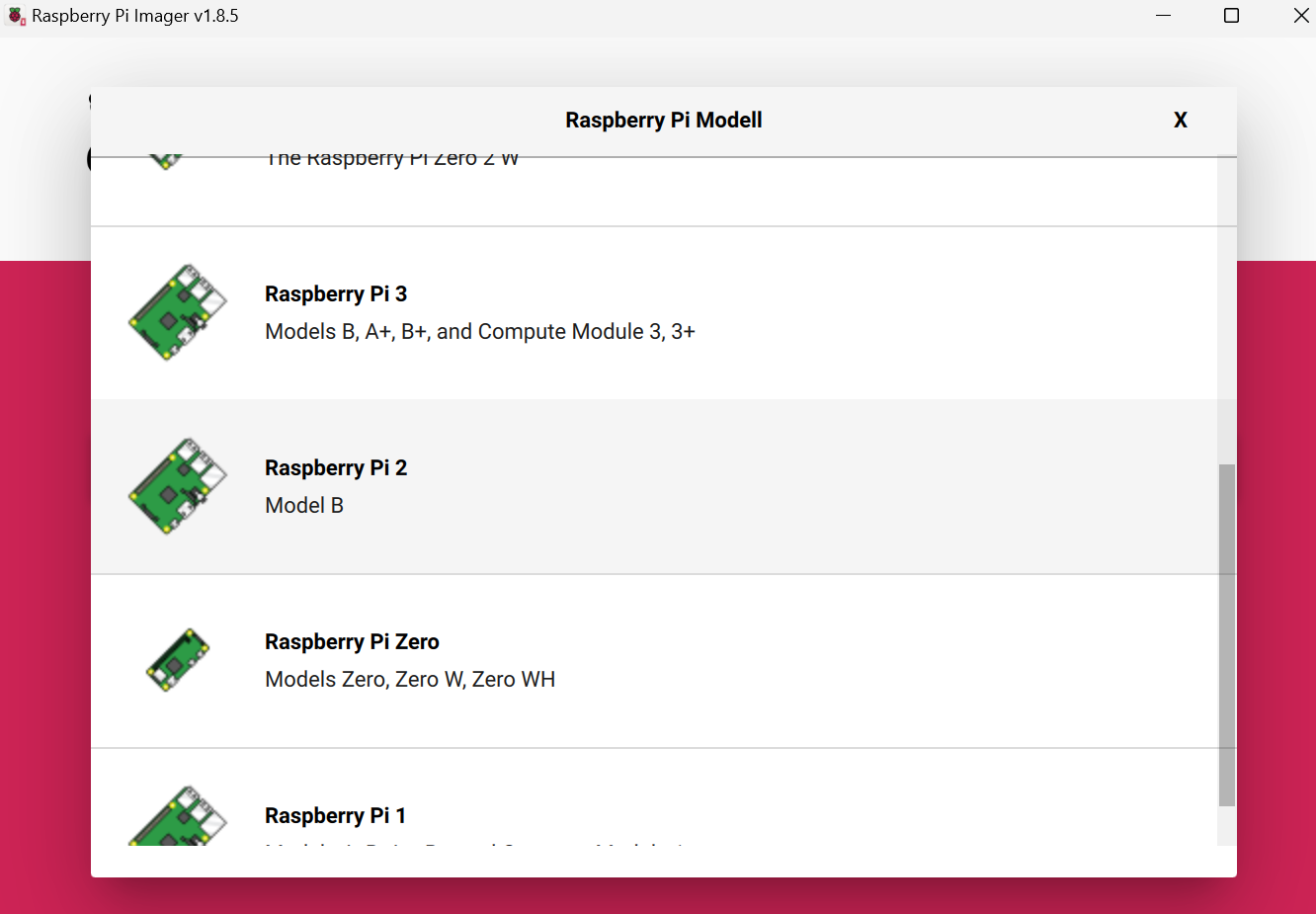
Gruß Udo
-
@homoran said in IoB startet nicht mit Fehlermeldung zu JSONL:
@final sagte in IoB startet nicht mit Fehlermeldung zu JSONL:
Installieren würde ich anhand IOB Installation.
such mal hier Im Forum nach "einfacher geht's nicht"
Einfacher als das hier geht es nicht. Nur Achtung deinen richtigen Pi wählen


Hey! Du scheinst an dieser Unterhaltung interessiert zu sein, hast aber noch kein Konto.
Hast du es satt, bei jedem Besuch durch die gleichen Beiträge zu scrollen? Wenn du dich für ein Konto anmeldest, kommst du immer genau dorthin zurück, wo du zuvor warst, und kannst dich über neue Antworten benachrichtigen lassen (entweder per E-Mail oder Push-Benachrichtigung). Du kannst auch Lesezeichen speichern und Beiträge positiv bewerten, um anderen Community-Mitgliedern deine Wertschätzung zu zeigen.
Mit deinem Input könnte dieser Beitrag noch besser werden 💗
Registrieren Anmelden343
Online33.0k
Benutzende83.7k
Themen1.3m
Beiträge