




ioBroker / Raspi plötzlich nicht mehr erreichbar
-
Guten Morgen zusammen,
ich hatte in der Vergangenheit öfter mal das Problem, dass der Raspi, auf dem der ioBroker läuft plötzlich per SSH nicht mehr erreichbar war. Ebenso konnte man ioBroker und Grafana nicht mehr per Weboberfläche erreichen. Nach einem Neustart ging es wieder eine Weile. Seit gestern ist es extrem. Ein Neustart hilft nur für ein paar Minuten, dann ist er wieder weg. Ich kann den Raspi anpingen aber alles andere ist tot. Wenn ich per SSH mit PuTTy drauf will, kommt die Fehlermeldung "Network Error. Connection refused". Hat jemand eine Ahnung, woran das liegen könnte und wie ich das Problem beheben kann?Hier noch ein paar Infos zum System:
-
Raspberry Pi 4 Model B
-
Im Netzwerk per LAN Kabel
-
Gebootet wird von SSD (keine SD Karte installiert)
Danke für eure Hilfe!
-
-
Guten Morgen zusammen,
ich hatte in der Vergangenheit öfter mal das Problem, dass der Raspi, auf dem der ioBroker läuft plötzlich per SSH nicht mehr erreichbar war. Ebenso konnte man ioBroker und Grafana nicht mehr per Weboberfläche erreichen. Nach einem Neustart ging es wieder eine Weile. Seit gestern ist es extrem. Ein Neustart hilft nur für ein paar Minuten, dann ist er wieder weg. Ich kann den Raspi anpingen aber alles andere ist tot. Wenn ich per SSH mit PuTTy drauf will, kommt die Fehlermeldung "Network Error. Connection refused". Hat jemand eine Ahnung, woran das liegen könnte und wie ich das Problem beheben kann?Hier noch ein paar Infos zum System:
-
Raspberry Pi 4 Model B
-
Im Netzwerk per LAN Kabel
-
Gebootet wird von SSD (keine SD Karte installiert)
Danke für eure Hilfe!
@xxx_turbo_xxx sagte in ioBroker / Raspi plötzlich nicht mehr erreichbar:
Nach einem Neustart ging es wieder eine Weile.
Wie genau sind diese Neustarts initiiert worden? Wenn das über stumpfes Strom aus/an erfolgt ist, dann ist vermutlich das Dateisystem beschädigt.
Markus
Bitte beachten:
Hinweise für gute Forenbeiträge
Maßnahmen zum Schutz des Forums -
-
@xxx_turbo_xxx sagte in ioBroker / Raspi plötzlich nicht mehr erreichbar:
Nach einem Neustart ging es wieder eine Weile.
Wie genau sind diese Neustarts initiiert worden? Wenn das über stumpfes Strom aus/an erfolgt ist, dann ist vermutlich das Dateisystem beschädigt.
@samson71 ja, Neustart über Stromversorgung. Anders ist der Raspi ja nicht mehr erreichbar. Gibt es da na Lösung das Dateisystem zu reparieren?
Aber... Wenn das Dateisystem kaputt wäre, dann könnte ich wahrscheinlich gar nix mehr machen? Er läuft ja dann wieder für ne halbe Stunde und ist dann erst wieder tot?! -
@samson71 ja, Neustart über Stromversorgung. Anders ist der Raspi ja nicht mehr erreichbar. Gibt es da na Lösung das Dateisystem zu reparieren?
Aber... Wenn das Dateisystem kaputt wäre, dann könnte ich wahrscheinlich gar nix mehr machen? Er läuft ja dann wieder für ne halbe Stunde und ist dann erst wieder tot?!@xxx_turbo_xxx
Ich habe von Linux wenig Ahnung. Da gibt es bessere Helfer. Häng mal ein vollständigesiob diagin Code Tags hier rein für potentielle Helfer.
Markus
Bitte beachten:
Hinweise für gute Forenbeiträge
Maßnahmen zum Schutz des Forums -
@xxx_turbo_xxx
Ich habe von Linux wenig Ahnung. Da gibt es bessere Helfer. Häng mal ein vollständigesiob diagin Code Tags hier rein für potentielle Helfer.
@samson71 Ich bin eben auch leider linuxtechnisch nicht die hellste Kerze auf der Torte :-)
Hab allerdings folgendes gefunden, was in meinen Augen durchaus Sinn machen könnte...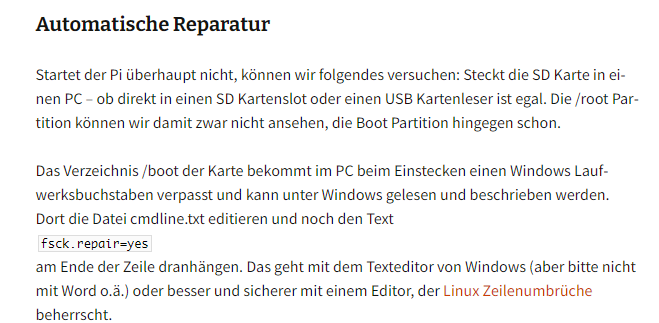
Glaube nicht, dass es am ioBroker liegt, denn auf Grafana komm ich ja auch nicht drauf. Und SSH ist ja auch unabhängig vom ioBroker?! Dennoch hier der das Diagfeedback
======== Start marking the full check here ========= Skript v.2023-10-10 *** BASE SYSTEM *** Static hostname: raspberrypi Icon name: computer Operating System: Debian GNU/Linux 11 (bullseye) Kernel: Linux 6.1.21-v8+ Architecture: arm64 Model : Raspberry Pi 4 Model B Rev 1.1 Docker : false Virtualization : none Kernel : aarch64 Userland : arm64 Systemuptime and Load: 08:33:27 up 3 min, 1 user, load average: 4.46, 2.38, 0.97 CPU threads: 4 *** RASPBERRY THROTTLING *** Current issues: No throttling issues detected. Previously detected issues: No throttling issues detected. *** Time and Time Zones *** Local time: Mon 2024-02-12 08:33:27 CET Universal time: Mon 2024-02-12 07:33:27 UTC RTC time: n/a Time zone: Europe/Berlin (CET, +0100) System clock synchronized: yes NTP service: active RTC in local TZ: no *** User and Groups *** pi /home/pi pi adm dialout cdrom sudo audio video plugdev games users input render netdev gpio i2c spi iobroker *** X-Server-Setup *** X-Server: false Desktop: Terminal: tty Boot Target: multi-user.target *** MEMORY *** total used free shared buff/cache available Mem: 3.8G 2.3G 279M 1.0M 1.3G 1.5G Swap: 99M 8.0M 91M Total: 3.9G 2.3G 371M 3793 M total memory 2261 M used memory 2260 M active memory 1115 M inactive memory 279 M free memory 23 M buffer memory 1229 M swap cache 99 M total swap 8 M used swap 91 M free swap Raspberry only: oom events: 0 lifetime oom required: 0 Mbytes total time in oom handler: 0 ms max time spent in oom handler: 0 ms *** FAILED SERVICES *** UNIT LOAD ACTIVE SUB DESCRIPTION 0 loaded units listed. *** FILESYSTEM *** Filesystem Type Size Used Avail Use% Mounted on /dev/root ext4 29G 13G 16G 46% / devtmpfs devtmpfs 1.7G 0 1.7G 0% /dev tmpfs tmpfs 1.9G 0 1.9G 0% /dev/shm tmpfs tmpfs 759M 2.8M 756M 1% /run tmpfs tmpfs 5.0M 4.0K 5.0M 1% /run/lock /dev/sda1 vfat 255M 31M 225M 13% /boot tmpfs tmpfs 380M 0 380M 0% /run/user/1000 Messages concerning ext4 filesystem in dmesg: [Mon Feb 12 08:29:52 2024] Kernel command line: coherent_pool=1M 8250.nr_uarts=0 snd_bcm2835.enable_headphones=0 snd_bcm2835.enable_headphones=1 snd_bcm2835.enable_hdmi=1 snd_bcm2835.enable_hdmi=0 smsc95xx.macaddr=DC:A6:32:61:3D:A3 vc_mem.mem_base=0x3eb00000 vc_mem.mem_size=0x3ff00000 console=ttyS0,115200 console=tty1 root=PARTUUID=0653b15a-02 rootfstype=ext4 fsck.repair=yes rootwait [Mon Feb 12 08:29:54 2024] EXT4-fs (sda2): mounted filesystem with ordered data mode. Quota mode: none. [Mon Feb 12 08:29:54 2024] VFS: Mounted root (ext4 filesystem) readonly on device 8:2. [Mon Feb 12 08:29:55 2024] EXT4-fs (sda2): re-mounted. Quota mode: none. Show mounted filesystems \(real ones only\): TARGET SOURCE FSTYPE OPTIONS / /dev/sda2 ext4 rw,noatime `-/boot /dev/sda1 vfat rw,relatime,fmask=0022,dmask=0022,codepage=437,iocharset=ascii,shortname=mixed,errors=remount-ro Files in neuralgic directories: /var: 8.7G /var/ 4.3G /var/log 3.0G /var/log/journal/e0861a26638647d99394b16663d4302a 3.0G /var/log/journal 2.8G /var/lib Archived and active journals take up 2.9G in the file system. /opt/iobroker/backups: 4.0K /opt/iobroker/backups/ /opt/iobroker/iobroker-data: 404M /opt/iobroker/iobroker-data/ 235M /opt/iobroker/iobroker-data/files 78M /opt/iobroker/iobroker-data/backup-objects 67M /opt/iobroker/iobroker-data/files/javascript.admin 48M /opt/iobroker/iobroker-data/files/javascript.admin/static The five largest files in iobroker-data are: 58M /opt/iobroker/iobroker-data/states.jsonl 34M /opt/iobroker/iobroker-data/objects.jsonl 33M /opt/iobroker/iobroker-data/files/iot.admin/static/js/main.1797d034.js.map 22M /opt/iobroker/iobroker-data/files/web.admin/static/js/main.c05ba1d3.js.map 22M /opt/iobroker/iobroker-data/files/modbus.admin/static/js/main.578d79d9.js.map USB-Devices by-id: USB-Sticks - Avoid direct links to /dev/* in your adapter setups, please always prefer the links 'by-id': /dev/serial/by-id/usb-FTDI_FT230X_Basic_UART_D306Z6KP-if00-port0 /dev/serial/by-id/usb-FTDI_FT230X_Basic_UART_D306YVGN-if00-port0 *** NodeJS-Installation *** /usr/bin/nodejs v18.19.0 /usr/bin/node v18.19.0 /usr/bin/npm 10.2.3 /usr/bin/npx 10.2.3 /usr/bin/corepack 0.22.0 nodejs: Installed: 18.19.0-1nodesource1 Candidate: 18.19.0-1nodesource1 Version table: *** 18.19.0-1nodesource1 1001 500 https://deb.nodesource.com/node_18.x nodistro/main arm64 Packages 100 /var/lib/dpkg/status 18.18.2-1nodesource1 1001 500 https://deb.nodesource.com/node_18.x nodistro/main arm64 Packages 18.18.1-1nodesource1 1001 500 https://deb.nodesource.com/node_18.x nodistro/main arm64 Packages 18.18.0-1nodesource1 1001 500 https://deb.nodesource.com/node_18.x nodistro/main arm64 Packages 18.17.1-1nodesource1 1001 500 https://deb.nodesource.com/node_18.x nodistro/main arm64 Packages 18.17.0-1nodesource1 1001 500 https://deb.nodesource.com/node_18.x nodistro/main arm64 Packages 18.16.1-1nodesource1 1001 500 https://deb.nodesource.com/node_18.x nodistro/main arm64 Packages 18.16.0-1nodesource1 1001 500 https://deb.nodesource.com/node_18.x nodistro/main arm64 Packages 18.15.0-1nodesource1 1001 500 https://deb.nodesource.com/node_18.x nodistro/main arm64 Packages 18.14.2-1nodesource1 1001 500 https://deb.nodesource.com/node_18.x nodistro/main arm64 Packages 18.14.1-1nodesource1 1001 500 https://deb.nodesource.com/node_18.x nodistro/main arm64 Packages 18.14.0-1nodesource1 1001 500 https://deb.nodesource.com/node_18.x nodistro/main arm64 Packages 18.13.0-1nodesource1 1001 500 https://deb.nodesource.com/node_18.x nodistro/main arm64 Packages 18.12.0-1nodesource1 1001 500 https://deb.nodesource.com/node_18.x nodistro/main arm64 Packages 18.11.0-1nodesource1 1001 500 https://deb.nodesource.com/node_18.x nodistro/main arm64 Packages 18.10.0-1nodesource1 1001 500 https://deb.nodesource.com/node_18.x nodistro/main arm64 Packages 18.9.1-1nodesource1 1001 500 https://deb.nodesource.com/node_18.x nodistro/main arm64 Packages 18.9.0-1nodesource1 1001 500 https://deb.nodesource.com/node_18.x nodistro/main arm64 Packages 18.8.0-1nodesource1 1001 500 https://deb.nodesource.com/node_18.x nodistro/main arm64 Packages 18.7.0-1nodesource1 1001 500 https://deb.nodesource.com/node_18.x nodistro/main arm64 Packages 18.6.0-1nodesource1 1001 500 https://deb.nodesource.com/node_18.x nodistro/main arm64 Packages 18.5.0-1nodesource1 1001 500 https://deb.nodesource.com/node_18.x nodistro/main arm64 Packages 18.4.0-1nodesource1 1001 500 https://deb.nodesource.com/node_18.x nodistro/main arm64 Packages 18.3.0-1nodesource1 1001 500 https://deb.nodesource.com/node_18.x nodistro/main arm64 Packages 18.2.0-1nodesource1 1001 500 https://deb.nodesource.com/node_18.x nodistro/main arm64 Packages 18.1.0-1nodesource1 1001 500 https://deb.nodesource.com/node_18.x nodistro/main arm64 Packages 18.0.0-1nodesource1 1001 500 https://deb.nodesource.com/node_18.x nodistro/main arm64 Packages 12.22.12~dfsg-1~deb11u4 500 500 http://deb.debian.org/debian bullseye/main arm64 Packages 500 http://security.debian.org/debian-security bullseye-security/main arm64 Packages Temp directories causing npm8 problem: 0 No problems detected Errors in npm tree: *** ioBroker-Installation *** ioBroker Status iobroker is running on this host. Objects type: jsonl States type: jsonl Core adapters versions js-controller: 5.0.17 admin: 6.13.16 javascript: 7.1.6 Adapters from github: 4 Adapter State + system.adapter.admin.0 : admin : raspberrypi - enabled, port: 8081, bind: 0.0.0.0 (SSL), run as: admin + system.adapter.alexa2.0 : alexa2 : raspberrypi - enabled + system.adapter.apsystems-ecu.0 : apsystems-ecu : raspberrypi - enabled + system.adapter.backitup.0 : backitup : raspberrypi - enabled system.adapter.benchmark.0 : benchmark : raspberrypi - disabled system.adapter.canbus.0 : canbus : raspberrypi - disabled + system.adapter.discovery.0 : discovery : raspberrypi - enabled + system.adapter.ds18b20.0 : ds18b20 : raspberrypi - enabled system.adapter.dwd.0 : dwd : raspberrypi - enabled + system.adapter.ebus.0 : ebus : raspberrypi - enabled system.adapter.flot.0 : flot : raspberrypi - disabled + system.adapter.followthesun.0 : followthesun : raspberrypi - enabled + system.adapter.fritzdect.0 : fritzdect : raspberrypi - enabled system.adapter.garmin.0 : garmin : raspberrypi - disabled + system.adapter.hue-extended.0 : hue-extended : raspberrypi - enabled + system.adapter.influxdb.0 : influxdb : raspberrypi - enabled, port: 8086 + system.adapter.iot.0 : iot : raspberrypi - enabled + system.adapter.javascript.0 : javascript : raspberrypi - enabled system.adapter.mobile.0 : mobile : raspberrypi - disabled + system.adapter.modbus.0 : modbus : raspberrypi - enabled + system.adapter.mqtt.0 : mqtt : raspberrypi - enabled, port: 1883, bind: 0.0.0.0 + system.adapter.octoprint.0 : octoprint : raspberrypi - enabled system.adapter.openweathermap.0 : openweathermap : raspberrypi - enabled + system.adapter.ping.0 : ping : raspberrypi - enabled + system.adapter.pollenflug.0 : pollenflug : raspberrypi - enabled + system.adapter.pushover.0 : pushover : raspberrypi - enabled system.adapter.samsung.0 : samsung : raspberrypi - disabled + system.adapter.shelly.0 : shelly : raspberrypi - enabled, port: 1883, bind: 0.0.0.0 + system.adapter.smartmeter.0 : smartmeter : raspberrypi - enabled + system.adapter.smartmeter.1 : smartmeter : raspberrypi - enabled + system.adapter.tado.0 : tado : raspberrypi - enabled + system.adapter.tankerkoenig.0 : tankerkoenig : raspberrypi - enabled + system.adapter.upnp.0 : upnp : raspberrypi - enabled + system.adapter.vaillant.0 : vaillant : raspberrypi - enabled system.adapter.vis.0 : vis : raspberrypi - disabled + system.adapter.vw-connect.0 : vw-connect : raspberrypi - enabled + system.adapter.web.0 : web : raspberrypi - enabled, port: 8082, bind: 0.0.0.0, run as: admin system.adapter.whatsapp-cmb.0 : whatsapp-cmb : raspberrypi - disabled + system.adapter.yahka.0 : yahka : raspberrypi - enabled + instance is alive Enabled adapters with bindings + system.adapter.admin.0 : admin : raspberrypi - enabled, port: 8081, bind: 0.0.0.0 (SSL), run as: admin + system.adapter.influxdb.0 : influxdb : raspberrypi - enabled, port: 8086 + system.adapter.mqtt.0 : mqtt : raspberrypi - enabled, port: 1883, bind: 0.0.0.0 + system.adapter.shelly.0 : shelly : raspberrypi - enabled, port: 1883, bind: 0.0.0.0 + system.adapter.web.0 : web : raspberrypi - enabled, port: 8082, bind: 0.0.0.0, run as: admin ioBroker-Repositories stable : http://download.iobroker.net/sources-dist.json beta : http://download.iobroker.net/sources-dist-latest.json Active repo(s): stable Installed ioBroker-Instances Used repository: stable Adapter "admin" : 6.13.16 , installed 6.13.16 Adapter "alexa2" : 3.26.4 , installed 3.26.4 Adapter "backitup" : 2.9.8 , installed 2.9.8 Adapter "benchmark" : 1.1.4 , installed 1.1.4 Adapter "canbus" : 1.3.1 , installed 1.3.1 Adapter "discovery" : 4.2.0 , installed 4.2.0 Adapter "ds18b20" : 2.0.5 , installed 2.0.5 Adapter "dwd" : 2.8.5 , installed 2.8.5 Adapter "ebus" : 3.2.5 , installed 3.2.5 Adapter "flot" : 1.12.0 , installed 1.12.0 Adapter "followthesun" : 0.5.0 , installed 0.5.0 Adapter "fritzdect" : 2.5.9 , installed 2.5.9 Adapter "garmin" : 0.0.3 , installed 0.1.0 Adapter "influxdb" : 3.2.0 , installed 3.2.0 Adapter "iot" : 2.0.11 , installed 2.0.11 Adapter "javascript" : 7.1.6 , installed 7.1.6 Controller "js-controller": 5.0.17 , installed 5.0.17 Adapter "mobile" : 1.0.1 , installed 1.0.1 Adapter "modbus" : 6.1.0 , installed 6.1.0 Adapter "mqtt" : 5.1.0 , installed 5.1.0 Adapter "octoprint" : 5.1.0 , installed 5.1.0 Adapter "openweathermap": 1.0.4 , installed 1.0.4 Adapter "ping" : 1.6.2 , installed 1.6.2 Adapter "pollenflug" : 1.0.6 , installed 1.0.6 Adapter "pushover" : 3.0.6 , installed 3.0.6 Adapter "samsung" : 0.5.11 , installed 0.5.11 Adapter "shelly" : 6.6.1 , installed 6.6.1 Adapter "simple-api" : 2.7.2 , installed 2.7.2 Adapter "smartmeter" : 3.4.0 , installed 3.4.0 Adapter "socketio" : 6.6.0 , installed 6.6.0 Adapter "tado" : 0.5.3 , installed 0.5.3 Adapter "tankerkoenig" : 3.3.7 , installed 3.3.7 Adapter "upnp" : 1.0.21 , installed 1.0.21 Adapter "vaillant" : 0.1.2 , installed 0.2.0 Adapter "vis" : 1.5.4 , installed 1.5.4 Adapter "vw-connect" : 0.0.67 , installed 0.1.3 Adapter "web" : 6.2.3 , installed 6.2.3 Adapter "whatsapp-cmb" : 0.2.3 , installed 0.2.3 Adapter "ws" : 2.5.10 , installed 2.5.10 Adapter "yahka" : 1.0.3 , installed 1.0.3 Objects and States Please stand by - This may take a while Objects: 38899 States: 30939 *** OS-Repositories and Updates *** W: An error occurred during the signature verification. The repository is not updated and the previous index files will be used. GPG error: https://apt.grafana.com stable InRelease: The following signatures couldn't be verified because the public key is not available: NO_PUBKEY 963FA27710458545 W: Failed to fetch https://apt.grafana.com/dists/stable/InRelease The following signatures couldn't be verified because the public key is not available: NO_PUBKEY 963FA27710458545 W: Some index files failed to download. They have been ignored, or old ones used instead. Hit:1 http://deb.debian.org/debian bullseye InRelease Hit:2 http://archive.raspberrypi.org/debian bullseye InRelease Hit:3 http://deb.debian.org/debian bullseye-updates InRelease Hit:4 http://security.debian.org/debian-security bullseye-security InRelease Hit:5 https://repos.influxdata.com/debian stable InRelease Get:6 https://apt.grafana.com stable InRelease [5984 B] Hit:7 https://repo.ebusd.eu/apt/nomqtt/bullseye bullseye InRelease Hit:8 https://deb.nodesource.com/node_18.x nodistro InRelease Err:6 https://apt.grafana.com stable InRelease The following signatures couldn't be verified because the public key is not available: NO_PUBKEY 963FA27710458545 Reading package lists... W: An error occurred during the signature verification. The repository is not updated and the previous index files will be used. GPG error: https://apt.grafana.com stable InRelease: The following signatures couldn't be verified because the public key is not available: NO_PUBKEY 963FA27710458545 W: Failed to fetch https://apt.grafana.com/dists/stable/InRelease The following signatures couldn't be verified because the public key is not available: NO_PUBKEY 963FA27710458545 W: Some index files failed to download. They have been ignored, or old ones used instead. Pending Updates: 0 *** Listening Ports *** Active Internet connections (only servers) Proto Recv-Q Send-Q Local Address Foreign Address State User Inode PID/Program name tcp 0 0 127.0.0.1:9000 0.0.0.0:* LISTEN 1001 12218 843/iobroker.js-con tcp 0 0 127.0.0.1:9001 0.0.0.0:* LISTEN 1001 13787 843/iobroker.js-con tcp 0 0 0.0.0.0:1883 0.0.0.0:* LISTEN 1001 14005 996/io.mqtt.0 tcp 0 0 0.0.0.0:8889 0.0.0.0:* LISTEN 0 14873 774/ebusd tcp 0 0 0.0.0.0:8888 0.0.0.0:* LISTEN 0 14872 774/ebusd tcp 0 0 0.0.0.0:39623 0.0.0.0:* LISTEN 1001 19223 1488/io.yahka.0 tcp 0 0 127.0.0.1:8088 0.0.0.0:* LISTEN 999 11219 695/influxd tcp 0 0 0.0.0.0:22 0.0.0.0:* LISTEN 0 14688 558/sshd: /usr/sbin tcp 0 0 0.0.0.0:139 0.0.0.0:* LISTEN 0 15388 798/smbd tcp 0 0 0.0.0.0:445 0.0.0.0:* LISTEN 0 15387 798/smbd tcp6 0 0 :::8086 :::* LISTEN 999 13740 695/influxd tcp6 0 0 :::8082 :::* LISTEN 1001 19185 1475/io.web.0 tcp6 0 0 :::8081 :::* LISTEN 1001 12259 877/io.admin.0 tcp6 0 0 :::3000 :::* LISTEN 110 13807 842/grafana tcp6 0 0 :::22 :::* LISTEN 0 11146 558/sshd: /usr/sbin tcp6 0 0 :::38977 :::* LISTEN 1001 19220 1488/io.yahka.0 tcp6 0 0 :::139 :::* LISTEN 0 15386 798/smbd tcp6 0 0 :::445 :::* LISTEN 0 15385 798/smbd udp 0 0 0.0.0.0:44088 0.0.0.0:* 1001 19008 1416/io.upnp.0 udp 0 0 0.0.0.0:5353 0.0.0.0:* 108 11048 446/avahi-daemon: r udp 0 0 0.0.0.0:5683 0.0.0.0:* 1001 14090 1037/io.shelly.0 udp 0 0 0.0.0.0:1900 0.0.0.0:* 1001 19180 1416/io.upnp.0 udp 0 0 0.0.0.0:43025 0.0.0.0:* 108 11050 446/avahi-daemon: r udp 0 0 0.0.0.0:68 0.0.0.0:* 0 13593 689/dhcpcd udp 0 0 192.168.1.255:137 0.0.0.0:* 0 11245 692/nmbd udp 0 0 192.168.1.77:137 0.0.0.0:* 0 11244 692/nmbd udp 0 0 0.0.0.0:137 0.0.0.0:* 0 11228 692/nmbd udp 0 0 192.168.1.255:138 0.0.0.0:* 0 11247 692/nmbd udp 0 0 192.168.1.77:138 0.0.0.0:* 0 11246 692/nmbd udp 0 0 0.0.0.0:138 0.0.0.0:* 0 11229 692/nmbd udp6 0 0 :::5353 :::* 108 11049 446/avahi-daemon: r udp6 0 0 :::57572 :::* 108 11051 446/avahi-daemon: r *** Log File - Last 25 Lines *** 2024-02-12 08:35:16.765 - info: smartmeter.0 (1044) Received 7 values, 3 updated 2024-02-12 08:35:18.533 - debug: apsystems-ecu.0 (1524) Ecu.ecuStateMachine(evCycleTimer) stWaitForNextCycle -> stWaitForConnect 2024-02-12 08:35:18.534 - debug: apsystems-ecu.0 (1524) Ecu.trConnect() hide=true, ip=192.168.1.149 port=8899 2024-02-12 08:35:18.627 - debug: apsystems-ecu.0 (1524) Ecu.ecuStateMachine(evConnected) stWaitForConnect -> stWaitForResponse 2024-02-12 08:35:18.628 - debug: apsystems-ecu.0 (1524) Ecu.trServiceSM2(evRepeatService) stPowerOfDay->stEnergyOfWeek 2024-02-12 08:35:18.629 - debug: apsystems-ecu.0 (1524) Ecu.trServiceSM2(recursion) stEnergyOfWeek->stEnergyOfMonth 2024-02-12 08:35:18.630 - debug: apsystems-ecu.0 (1524) Ecu.trServiceSM2(recursion) stEnergyOfMonth->stEnergyOfYear 2024-02-12 08:35:18.630 - debug: apsystems-ecu.0 (1524) Ecu.trServiceSM2(recursion) stEnergyOfYear->stSystemInfo 2024-02-12 08:35:18.631 - debug: apsystems-ecu.0 (1524) Ecu.trServiceSM2(recursion/216300149895) stSystemInfo->stSystemInfo 2024-02-12 08:35:18.632 - debug: apsystems-ecu.0 (1524) Ecu.reqService(SYSTEMINFO req:APS1100160001END) 2024-02-12 08:35:18.633 - debug: apsystems-ecu.0 (1524) Ecu.trServiceSM2(recursion) stSystemInfo->stRealTimeData 2024-02-12 08:35:18.656 - debug: apsystems-ecu.0 (1524) Ecu.decodeRsp() 24ms - 41,50,53,31,31,30,30,39,34,30,30,30,31,32,31,36,33,30,30,30,30,30,30,30,30,30,31,0,0,2,5a,0,0,0,0,0,0,0,0,d0,d0,d0,d0,d0,d0,d0,0,1,0,0,31,30,30,31,32,45,43,55,5f,42,5f,31,2e,32,2e,32,39,30,30,39,45,74,63,2f,47,4d,54,2d,38,80,97,1b,c,24,15,0,0,0,0,0,0,45,4e,44 2024-02-12 08:35:18.658 - debug: apsystems-ecu.0 (1524) Ecu.decodeAndProcessSystemInfo() - version: ECU_B_1.2.29 - done 2024-02-12 08:35:18.659 - debug: apsystems-ecu.0 (1524) Ecu.ecuStateMachine(evResponseOk) stWaitForResponse -> stWaitForDisconnected 2024-02-12 08:35:18.660 - debug: apsystems-ecu.0 (1524) Ecu.trDisconnect() - done 2024-02-12 08:35:18.660 - debug: apsystems-ecu.0 (1524) Ecu.ecuStateMachine(evDisconnected) stWaitForDisconnected -> stWaitForNextCycle 2024-02-12 08:35:18.661 - debug: apsystems-ecu.0 (1524) Ecu.trNextCycle() 15sec delay 2024-02-12 08:35:23.772 - info: javascript.0 (917) script.js.common.Solar.Tag_Nacht: Tag 2024-02-12 08:35:23.773 - info: javascript.0 (917) script.js.common.Solar.Tag_Nacht: 07:32 2024-02-12 08:35:23.773 - info: javascript.0 (917) script.js.common.Solar.Tag_Nacht: 18:09 2024-02-12 08:35:23.919 - info: smartmeter.1 (1055) Received 9 values, 6 updated 2024-02-12 08:35:28.586 - info: javascript.0 (917) script.js.common.Solar.Tag_Nacht: Tag 2024-02-12 08:35:28.587 - info: javascript.0 (917) script.js.common.Solar.Tag_Nacht: 07:32 2024-02-12 08:35:28.588 - info: javascript.0 (917) script.js.common.Solar.Tag_Nacht: 18:09 2024-02-12 08:35:28.612 - info: smartmeter.0 (1044) Received 7 values, 3 updated ======================= SUMMARY ======================= v.2023-10-10 Static hostname: raspberrypi Icon name: computer Operating System: Debian GNU/Linux 11 (bullseye) Kernel: Linux 6.1.21-v8+ Architecture: arm64 Installation: native Kernel: aarch64 Userland: arm64 Timezone: Europe/Berlin (CET, +0100) User-ID: 1000 X-Server: false Boot Target: multi-user.target Pending OS-Updates: 0 Pending iob updates: 0 Nodejs-Installation: /usr/bin/nodejs v18.19.0 /usr/bin/node v18.19.0 /usr/bin/npm 10.2.3 /usr/bin/npx 10.2.3 /usr/bin/corepack 0.22.0 Recommended versions are nodejs 18.19.0 and npm 10.2.3 Your nodejs installation is correct MEMORY: total used free shared buff/cache available Mem: 3.8G 2.2G 142M 0.0K 1.5G 1.6G Swap: 99M 99M 0.0K Total: 3.9G 2.3G 142M Active iob-Instances: 30 Active repo(s): stable ioBroker Core: js-controller 5.0.17 admin 6.13.16 ioBroker Status: iobroker is running on this host. Objects type: jsonl States type: jsonl Status admin and web instance: + system.adapter.admin.0 : admin : raspberrypi - enabled, port: 8081, bind: 0.0.0.0 (SSL), run as: admin + system.adapter.web.0 : web : raspberrypi - enabled, port: 8082, bind: 0.0.0.0, run as: admin Objects: 38899 States: 30939 Size of iob-Database: 38M /opt/iobroker/iobroker-data/objects.jsonl 61M /opt/iobroker/iobroker-data/states.jsonl =================== END OF SUMMARY ==================== -
@samson71 Ich bin eben auch leider linuxtechnisch nicht die hellste Kerze auf der Torte :-)
Hab allerdings folgendes gefunden, was in meinen Augen durchaus Sinn machen könnte...Glaube nicht, dass es am ioBroker liegt, denn auf Grafana komm ich ja auch nicht drauf. Und SSH ist ja auch unabhängig vom ioBroker?! Dennoch hier der das Diagfeedback
======== Start marking the full check here ========= Skript v.2023-10-10 *** BASE SYSTEM *** Static hostname: raspberrypi Icon name: computer Operating System: Debian GNU/Linux 11 (bullseye) Kernel: Linux 6.1.21-v8+ Architecture: arm64 Model : Raspberry Pi 4 Model B Rev 1.1 Docker : false Virtualization : none Kernel : aarch64 Userland : arm64 Systemuptime and Load: 08:33:27 up 3 min, 1 user, load average: 4.46, 2.38, 0.97 CPU threads: 4 *** RASPBERRY THROTTLING *** Current issues: No throttling issues detected. Previously detected issues: No throttling issues detected. *** Time and Time Zones *** Local time: Mon 2024-02-12 08:33:27 CET Universal time: Mon 2024-02-12 07:33:27 UTC RTC time: n/a Time zone: Europe/Berlin (CET, +0100) System clock synchronized: yes NTP service: active RTC in local TZ: no *** User and Groups *** pi /home/pi pi adm dialout cdrom sudo audio video plugdev games users input render netdev gpio i2c spi iobroker *** X-Server-Setup *** X-Server: false Desktop: Terminal: tty Boot Target: multi-user.target *** MEMORY *** total used free shared buff/cache available Mem: 3.8G 2.3G 279M 1.0M 1.3G 1.5G Swap: 99M 8.0M 91M Total: 3.9G 2.3G 371M 3793 M total memory 2261 M used memory 2260 M active memory 1115 M inactive memory 279 M free memory 23 M buffer memory 1229 M swap cache 99 M total swap 8 M used swap 91 M free swap Raspberry only: oom events: 0 lifetime oom required: 0 Mbytes total time in oom handler: 0 ms max time spent in oom handler: 0 ms *** FAILED SERVICES *** UNIT LOAD ACTIVE SUB DESCRIPTION 0 loaded units listed. *** FILESYSTEM *** Filesystem Type Size Used Avail Use% Mounted on /dev/root ext4 29G 13G 16G 46% / devtmpfs devtmpfs 1.7G 0 1.7G 0% /dev tmpfs tmpfs 1.9G 0 1.9G 0% /dev/shm tmpfs tmpfs 759M 2.8M 756M 1% /run tmpfs tmpfs 5.0M 4.0K 5.0M 1% /run/lock /dev/sda1 vfat 255M 31M 225M 13% /boot tmpfs tmpfs 380M 0 380M 0% /run/user/1000 Messages concerning ext4 filesystem in dmesg: [Mon Feb 12 08:29:52 2024] Kernel command line: coherent_pool=1M 8250.nr_uarts=0 snd_bcm2835.enable_headphones=0 snd_bcm2835.enable_headphones=1 snd_bcm2835.enable_hdmi=1 snd_bcm2835.enable_hdmi=0 smsc95xx.macaddr=DC:A6:32:61:3D:A3 vc_mem.mem_base=0x3eb00000 vc_mem.mem_size=0x3ff00000 console=ttyS0,115200 console=tty1 root=PARTUUID=0653b15a-02 rootfstype=ext4 fsck.repair=yes rootwait [Mon Feb 12 08:29:54 2024] EXT4-fs (sda2): mounted filesystem with ordered data mode. Quota mode: none. [Mon Feb 12 08:29:54 2024] VFS: Mounted root (ext4 filesystem) readonly on device 8:2. [Mon Feb 12 08:29:55 2024] EXT4-fs (sda2): re-mounted. Quota mode: none. Show mounted filesystems \(real ones only\): TARGET SOURCE FSTYPE OPTIONS / /dev/sda2 ext4 rw,noatime `-/boot /dev/sda1 vfat rw,relatime,fmask=0022,dmask=0022,codepage=437,iocharset=ascii,shortname=mixed,errors=remount-ro Files in neuralgic directories: /var: 8.7G /var/ 4.3G /var/log 3.0G /var/log/journal/e0861a26638647d99394b16663d4302a 3.0G /var/log/journal 2.8G /var/lib Archived and active journals take up 2.9G in the file system. /opt/iobroker/backups: 4.0K /opt/iobroker/backups/ /opt/iobroker/iobroker-data: 404M /opt/iobroker/iobroker-data/ 235M /opt/iobroker/iobroker-data/files 78M /opt/iobroker/iobroker-data/backup-objects 67M /opt/iobroker/iobroker-data/files/javascript.admin 48M /opt/iobroker/iobroker-data/files/javascript.admin/static The five largest files in iobroker-data are: 58M /opt/iobroker/iobroker-data/states.jsonl 34M /opt/iobroker/iobroker-data/objects.jsonl 33M /opt/iobroker/iobroker-data/files/iot.admin/static/js/main.1797d034.js.map 22M /opt/iobroker/iobroker-data/files/web.admin/static/js/main.c05ba1d3.js.map 22M /opt/iobroker/iobroker-data/files/modbus.admin/static/js/main.578d79d9.js.map USB-Devices by-id: USB-Sticks - Avoid direct links to /dev/* in your adapter setups, please always prefer the links 'by-id': /dev/serial/by-id/usb-FTDI_FT230X_Basic_UART_D306Z6KP-if00-port0 /dev/serial/by-id/usb-FTDI_FT230X_Basic_UART_D306YVGN-if00-port0 *** NodeJS-Installation *** /usr/bin/nodejs v18.19.0 /usr/bin/node v18.19.0 /usr/bin/npm 10.2.3 /usr/bin/npx 10.2.3 /usr/bin/corepack 0.22.0 nodejs: Installed: 18.19.0-1nodesource1 Candidate: 18.19.0-1nodesource1 Version table: *** 18.19.0-1nodesource1 1001 500 https://deb.nodesource.com/node_18.x nodistro/main arm64 Packages 100 /var/lib/dpkg/status 18.18.2-1nodesource1 1001 500 https://deb.nodesource.com/node_18.x nodistro/main arm64 Packages 18.18.1-1nodesource1 1001 500 https://deb.nodesource.com/node_18.x nodistro/main arm64 Packages 18.18.0-1nodesource1 1001 500 https://deb.nodesource.com/node_18.x nodistro/main arm64 Packages 18.17.1-1nodesource1 1001 500 https://deb.nodesource.com/node_18.x nodistro/main arm64 Packages 18.17.0-1nodesource1 1001 500 https://deb.nodesource.com/node_18.x nodistro/main arm64 Packages 18.16.1-1nodesource1 1001 500 https://deb.nodesource.com/node_18.x nodistro/main arm64 Packages 18.16.0-1nodesource1 1001 500 https://deb.nodesource.com/node_18.x nodistro/main arm64 Packages 18.15.0-1nodesource1 1001 500 https://deb.nodesource.com/node_18.x nodistro/main arm64 Packages 18.14.2-1nodesource1 1001 500 https://deb.nodesource.com/node_18.x nodistro/main arm64 Packages 18.14.1-1nodesource1 1001 500 https://deb.nodesource.com/node_18.x nodistro/main arm64 Packages 18.14.0-1nodesource1 1001 500 https://deb.nodesource.com/node_18.x nodistro/main arm64 Packages 18.13.0-1nodesource1 1001 500 https://deb.nodesource.com/node_18.x nodistro/main arm64 Packages 18.12.0-1nodesource1 1001 500 https://deb.nodesource.com/node_18.x nodistro/main arm64 Packages 18.11.0-1nodesource1 1001 500 https://deb.nodesource.com/node_18.x nodistro/main arm64 Packages 18.10.0-1nodesource1 1001 500 https://deb.nodesource.com/node_18.x nodistro/main arm64 Packages 18.9.1-1nodesource1 1001 500 https://deb.nodesource.com/node_18.x nodistro/main arm64 Packages 18.9.0-1nodesource1 1001 500 https://deb.nodesource.com/node_18.x nodistro/main arm64 Packages 18.8.0-1nodesource1 1001 500 https://deb.nodesource.com/node_18.x nodistro/main arm64 Packages 18.7.0-1nodesource1 1001 500 https://deb.nodesource.com/node_18.x nodistro/main arm64 Packages 18.6.0-1nodesource1 1001 500 https://deb.nodesource.com/node_18.x nodistro/main arm64 Packages 18.5.0-1nodesource1 1001 500 https://deb.nodesource.com/node_18.x nodistro/main arm64 Packages 18.4.0-1nodesource1 1001 500 https://deb.nodesource.com/node_18.x nodistro/main arm64 Packages 18.3.0-1nodesource1 1001 500 https://deb.nodesource.com/node_18.x nodistro/main arm64 Packages 18.2.0-1nodesource1 1001 500 https://deb.nodesource.com/node_18.x nodistro/main arm64 Packages 18.1.0-1nodesource1 1001 500 https://deb.nodesource.com/node_18.x nodistro/main arm64 Packages 18.0.0-1nodesource1 1001 500 https://deb.nodesource.com/node_18.x nodistro/main arm64 Packages 12.22.12~dfsg-1~deb11u4 500 500 http://deb.debian.org/debian bullseye/main arm64 Packages 500 http://security.debian.org/debian-security bullseye-security/main arm64 Packages Temp directories causing npm8 problem: 0 No problems detected Errors in npm tree: *** ioBroker-Installation *** ioBroker Status iobroker is running on this host. Objects type: jsonl States type: jsonl Core adapters versions js-controller: 5.0.17 admin: 6.13.16 javascript: 7.1.6 Adapters from github: 4 Adapter State + system.adapter.admin.0 : admin : raspberrypi - enabled, port: 8081, bind: 0.0.0.0 (SSL), run as: admin + system.adapter.alexa2.0 : alexa2 : raspberrypi - enabled + system.adapter.apsystems-ecu.0 : apsystems-ecu : raspberrypi - enabled + system.adapter.backitup.0 : backitup : raspberrypi - enabled system.adapter.benchmark.0 : benchmark : raspberrypi - disabled system.adapter.canbus.0 : canbus : raspberrypi - disabled + system.adapter.discovery.0 : discovery : raspberrypi - enabled + system.adapter.ds18b20.0 : ds18b20 : raspberrypi - enabled system.adapter.dwd.0 : dwd : raspberrypi - enabled + system.adapter.ebus.0 : ebus : raspberrypi - enabled system.adapter.flot.0 : flot : raspberrypi - disabled + system.adapter.followthesun.0 : followthesun : raspberrypi - enabled + system.adapter.fritzdect.0 : fritzdect : raspberrypi - enabled system.adapter.garmin.0 : garmin : raspberrypi - disabled + system.adapter.hue-extended.0 : hue-extended : raspberrypi - enabled + system.adapter.influxdb.0 : influxdb : raspberrypi - enabled, port: 8086 + system.adapter.iot.0 : iot : raspberrypi - enabled + system.adapter.javascript.0 : javascript : raspberrypi - enabled system.adapter.mobile.0 : mobile : raspberrypi - disabled + system.adapter.modbus.0 : modbus : raspberrypi - enabled + system.adapter.mqtt.0 : mqtt : raspberrypi - enabled, port: 1883, bind: 0.0.0.0 + system.adapter.octoprint.0 : octoprint : raspberrypi - enabled system.adapter.openweathermap.0 : openweathermap : raspberrypi - enabled + system.adapter.ping.0 : ping : raspberrypi - enabled + system.adapter.pollenflug.0 : pollenflug : raspberrypi - enabled + system.adapter.pushover.0 : pushover : raspberrypi - enabled system.adapter.samsung.0 : samsung : raspberrypi - disabled + system.adapter.shelly.0 : shelly : raspberrypi - enabled, port: 1883, bind: 0.0.0.0 + system.adapter.smartmeter.0 : smartmeter : raspberrypi - enabled + system.adapter.smartmeter.1 : smartmeter : raspberrypi - enabled + system.adapter.tado.0 : tado : raspberrypi - enabled + system.adapter.tankerkoenig.0 : tankerkoenig : raspberrypi - enabled + system.adapter.upnp.0 : upnp : raspberrypi - enabled + system.adapter.vaillant.0 : vaillant : raspberrypi - enabled system.adapter.vis.0 : vis : raspberrypi - disabled + system.adapter.vw-connect.0 : vw-connect : raspberrypi - enabled + system.adapter.web.0 : web : raspberrypi - enabled, port: 8082, bind: 0.0.0.0, run as: admin system.adapter.whatsapp-cmb.0 : whatsapp-cmb : raspberrypi - disabled + system.adapter.yahka.0 : yahka : raspberrypi - enabled + instance is alive Enabled adapters with bindings + system.adapter.admin.0 : admin : raspberrypi - enabled, port: 8081, bind: 0.0.0.0 (SSL), run as: admin + system.adapter.influxdb.0 : influxdb : raspberrypi - enabled, port: 8086 + system.adapter.mqtt.0 : mqtt : raspberrypi - enabled, port: 1883, bind: 0.0.0.0 + system.adapter.shelly.0 : shelly : raspberrypi - enabled, port: 1883, bind: 0.0.0.0 + system.adapter.web.0 : web : raspberrypi - enabled, port: 8082, bind: 0.0.0.0, run as: admin ioBroker-Repositories stable : http://download.iobroker.net/sources-dist.json beta : http://download.iobroker.net/sources-dist-latest.json Active repo(s): stable Installed ioBroker-Instances Used repository: stable Adapter "admin" : 6.13.16 , installed 6.13.16 Adapter "alexa2" : 3.26.4 , installed 3.26.4 Adapter "backitup" : 2.9.8 , installed 2.9.8 Adapter "benchmark" : 1.1.4 , installed 1.1.4 Adapter "canbus" : 1.3.1 , installed 1.3.1 Adapter "discovery" : 4.2.0 , installed 4.2.0 Adapter "ds18b20" : 2.0.5 , installed 2.0.5 Adapter "dwd" : 2.8.5 , installed 2.8.5 Adapter "ebus" : 3.2.5 , installed 3.2.5 Adapter "flot" : 1.12.0 , installed 1.12.0 Adapter "followthesun" : 0.5.0 , installed 0.5.0 Adapter "fritzdect" : 2.5.9 , installed 2.5.9 Adapter "garmin" : 0.0.3 , installed 0.1.0 Adapter "influxdb" : 3.2.0 , installed 3.2.0 Adapter "iot" : 2.0.11 , installed 2.0.11 Adapter "javascript" : 7.1.6 , installed 7.1.6 Controller "js-controller": 5.0.17 , installed 5.0.17 Adapter "mobile" : 1.0.1 , installed 1.0.1 Adapter "modbus" : 6.1.0 , installed 6.1.0 Adapter "mqtt" : 5.1.0 , installed 5.1.0 Adapter "octoprint" : 5.1.0 , installed 5.1.0 Adapter "openweathermap": 1.0.4 , installed 1.0.4 Adapter "ping" : 1.6.2 , installed 1.6.2 Adapter "pollenflug" : 1.0.6 , installed 1.0.6 Adapter "pushover" : 3.0.6 , installed 3.0.6 Adapter "samsung" : 0.5.11 , installed 0.5.11 Adapter "shelly" : 6.6.1 , installed 6.6.1 Adapter "simple-api" : 2.7.2 , installed 2.7.2 Adapter "smartmeter" : 3.4.0 , installed 3.4.0 Adapter "socketio" : 6.6.0 , installed 6.6.0 Adapter "tado" : 0.5.3 , installed 0.5.3 Adapter "tankerkoenig" : 3.3.7 , installed 3.3.7 Adapter "upnp" : 1.0.21 , installed 1.0.21 Adapter "vaillant" : 0.1.2 , installed 0.2.0 Adapter "vis" : 1.5.4 , installed 1.5.4 Adapter "vw-connect" : 0.0.67 , installed 0.1.3 Adapter "web" : 6.2.3 , installed 6.2.3 Adapter "whatsapp-cmb" : 0.2.3 , installed 0.2.3 Adapter "ws" : 2.5.10 , installed 2.5.10 Adapter "yahka" : 1.0.3 , installed 1.0.3 Objects and States Please stand by - This may take a while Objects: 38899 States: 30939 *** OS-Repositories and Updates *** W: An error occurred during the signature verification. The repository is not updated and the previous index files will be used. GPG error: https://apt.grafana.com stable InRelease: The following signatures couldn't be verified because the public key is not available: NO_PUBKEY 963FA27710458545 W: Failed to fetch https://apt.grafana.com/dists/stable/InRelease The following signatures couldn't be verified because the public key is not available: NO_PUBKEY 963FA27710458545 W: Some index files failed to download. They have been ignored, or old ones used instead. Hit:1 http://deb.debian.org/debian bullseye InRelease Hit:2 http://archive.raspberrypi.org/debian bullseye InRelease Hit:3 http://deb.debian.org/debian bullseye-updates InRelease Hit:4 http://security.debian.org/debian-security bullseye-security InRelease Hit:5 https://repos.influxdata.com/debian stable InRelease Get:6 https://apt.grafana.com stable InRelease [5984 B] Hit:7 https://repo.ebusd.eu/apt/nomqtt/bullseye bullseye InRelease Hit:8 https://deb.nodesource.com/node_18.x nodistro InRelease Err:6 https://apt.grafana.com stable InRelease The following signatures couldn't be verified because the public key is not available: NO_PUBKEY 963FA27710458545 Reading package lists... W: An error occurred during the signature verification. The repository is not updated and the previous index files will be used. GPG error: https://apt.grafana.com stable InRelease: The following signatures couldn't be verified because the public key is not available: NO_PUBKEY 963FA27710458545 W: Failed to fetch https://apt.grafana.com/dists/stable/InRelease The following signatures couldn't be verified because the public key is not available: NO_PUBKEY 963FA27710458545 W: Some index files failed to download. They have been ignored, or old ones used instead. Pending Updates: 0 *** Listening Ports *** Active Internet connections (only servers) Proto Recv-Q Send-Q Local Address Foreign Address State User Inode PID/Program name tcp 0 0 127.0.0.1:9000 0.0.0.0:* LISTEN 1001 12218 843/iobroker.js-con tcp 0 0 127.0.0.1:9001 0.0.0.0:* LISTEN 1001 13787 843/iobroker.js-con tcp 0 0 0.0.0.0:1883 0.0.0.0:* LISTEN 1001 14005 996/io.mqtt.0 tcp 0 0 0.0.0.0:8889 0.0.0.0:* LISTEN 0 14873 774/ebusd tcp 0 0 0.0.0.0:8888 0.0.0.0:* LISTEN 0 14872 774/ebusd tcp 0 0 0.0.0.0:39623 0.0.0.0:* LISTEN 1001 19223 1488/io.yahka.0 tcp 0 0 127.0.0.1:8088 0.0.0.0:* LISTEN 999 11219 695/influxd tcp 0 0 0.0.0.0:22 0.0.0.0:* LISTEN 0 14688 558/sshd: /usr/sbin tcp 0 0 0.0.0.0:139 0.0.0.0:* LISTEN 0 15388 798/smbd tcp 0 0 0.0.0.0:445 0.0.0.0:* LISTEN 0 15387 798/smbd tcp6 0 0 :::8086 :::* LISTEN 999 13740 695/influxd tcp6 0 0 :::8082 :::* LISTEN 1001 19185 1475/io.web.0 tcp6 0 0 :::8081 :::* LISTEN 1001 12259 877/io.admin.0 tcp6 0 0 :::3000 :::* LISTEN 110 13807 842/grafana tcp6 0 0 :::22 :::* LISTEN 0 11146 558/sshd: /usr/sbin tcp6 0 0 :::38977 :::* LISTEN 1001 19220 1488/io.yahka.0 tcp6 0 0 :::139 :::* LISTEN 0 15386 798/smbd tcp6 0 0 :::445 :::* LISTEN 0 15385 798/smbd udp 0 0 0.0.0.0:44088 0.0.0.0:* 1001 19008 1416/io.upnp.0 udp 0 0 0.0.0.0:5353 0.0.0.0:* 108 11048 446/avahi-daemon: r udp 0 0 0.0.0.0:5683 0.0.0.0:* 1001 14090 1037/io.shelly.0 udp 0 0 0.0.0.0:1900 0.0.0.0:* 1001 19180 1416/io.upnp.0 udp 0 0 0.0.0.0:43025 0.0.0.0:* 108 11050 446/avahi-daemon: r udp 0 0 0.0.0.0:68 0.0.0.0:* 0 13593 689/dhcpcd udp 0 0 192.168.1.255:137 0.0.0.0:* 0 11245 692/nmbd udp 0 0 192.168.1.77:137 0.0.0.0:* 0 11244 692/nmbd udp 0 0 0.0.0.0:137 0.0.0.0:* 0 11228 692/nmbd udp 0 0 192.168.1.255:138 0.0.0.0:* 0 11247 692/nmbd udp 0 0 192.168.1.77:138 0.0.0.0:* 0 11246 692/nmbd udp 0 0 0.0.0.0:138 0.0.0.0:* 0 11229 692/nmbd udp6 0 0 :::5353 :::* 108 11049 446/avahi-daemon: r udp6 0 0 :::57572 :::* 108 11051 446/avahi-daemon: r *** Log File - Last 25 Lines *** 2024-02-12 08:35:16.765 - info: smartmeter.0 (1044) Received 7 values, 3 updated 2024-02-12 08:35:18.533 - debug: apsystems-ecu.0 (1524) Ecu.ecuStateMachine(evCycleTimer) stWaitForNextCycle -> stWaitForConnect 2024-02-12 08:35:18.534 - debug: apsystems-ecu.0 (1524) Ecu.trConnect() hide=true, ip=192.168.1.149 port=8899 2024-02-12 08:35:18.627 - debug: apsystems-ecu.0 (1524) Ecu.ecuStateMachine(evConnected) stWaitForConnect -> stWaitForResponse 2024-02-12 08:35:18.628 - debug: apsystems-ecu.0 (1524) Ecu.trServiceSM2(evRepeatService) stPowerOfDay->stEnergyOfWeek 2024-02-12 08:35:18.629 - debug: apsystems-ecu.0 (1524) Ecu.trServiceSM2(recursion) stEnergyOfWeek->stEnergyOfMonth 2024-02-12 08:35:18.630 - debug: apsystems-ecu.0 (1524) Ecu.trServiceSM2(recursion) stEnergyOfMonth->stEnergyOfYear 2024-02-12 08:35:18.630 - debug: apsystems-ecu.0 (1524) Ecu.trServiceSM2(recursion) stEnergyOfYear->stSystemInfo 2024-02-12 08:35:18.631 - debug: apsystems-ecu.0 (1524) Ecu.trServiceSM2(recursion/216300149895) stSystemInfo->stSystemInfo 2024-02-12 08:35:18.632 - debug: apsystems-ecu.0 (1524) Ecu.reqService(SYSTEMINFO req:APS1100160001END) 2024-02-12 08:35:18.633 - debug: apsystems-ecu.0 (1524) Ecu.trServiceSM2(recursion) stSystemInfo->stRealTimeData 2024-02-12 08:35:18.656 - debug: apsystems-ecu.0 (1524) Ecu.decodeRsp() 24ms - 41,50,53,31,31,30,30,39,34,30,30,30,31,32,31,36,33,30,30,30,30,30,30,30,30,30,31,0,0,2,5a,0,0,0,0,0,0,0,0,d0,d0,d0,d0,d0,d0,d0,0,1,0,0,31,30,30,31,32,45,43,55,5f,42,5f,31,2e,32,2e,32,39,30,30,39,45,74,63,2f,47,4d,54,2d,38,80,97,1b,c,24,15,0,0,0,0,0,0,45,4e,44 2024-02-12 08:35:18.658 - debug: apsystems-ecu.0 (1524) Ecu.decodeAndProcessSystemInfo() - version: ECU_B_1.2.29 - done 2024-02-12 08:35:18.659 - debug: apsystems-ecu.0 (1524) Ecu.ecuStateMachine(evResponseOk) stWaitForResponse -> stWaitForDisconnected 2024-02-12 08:35:18.660 - debug: apsystems-ecu.0 (1524) Ecu.trDisconnect() - done 2024-02-12 08:35:18.660 - debug: apsystems-ecu.0 (1524) Ecu.ecuStateMachine(evDisconnected) stWaitForDisconnected -> stWaitForNextCycle 2024-02-12 08:35:18.661 - debug: apsystems-ecu.0 (1524) Ecu.trNextCycle() 15sec delay 2024-02-12 08:35:23.772 - info: javascript.0 (917) script.js.common.Solar.Tag_Nacht: Tag 2024-02-12 08:35:23.773 - info: javascript.0 (917) script.js.common.Solar.Tag_Nacht: 07:32 2024-02-12 08:35:23.773 - info: javascript.0 (917) script.js.common.Solar.Tag_Nacht: 18:09 2024-02-12 08:35:23.919 - info: smartmeter.1 (1055) Received 9 values, 6 updated 2024-02-12 08:35:28.586 - info: javascript.0 (917) script.js.common.Solar.Tag_Nacht: Tag 2024-02-12 08:35:28.587 - info: javascript.0 (917) script.js.common.Solar.Tag_Nacht: 07:32 2024-02-12 08:35:28.588 - info: javascript.0 (917) script.js.common.Solar.Tag_Nacht: 18:09 2024-02-12 08:35:28.612 - info: smartmeter.0 (1044) Received 7 values, 3 updated ======================= SUMMARY ======================= v.2023-10-10 Static hostname: raspberrypi Icon name: computer Operating System: Debian GNU/Linux 11 (bullseye) Kernel: Linux 6.1.21-v8+ Architecture: arm64 Installation: native Kernel: aarch64 Userland: arm64 Timezone: Europe/Berlin (CET, +0100) User-ID: 1000 X-Server: false Boot Target: multi-user.target Pending OS-Updates: 0 Pending iob updates: 0 Nodejs-Installation: /usr/bin/nodejs v18.19.0 /usr/bin/node v18.19.0 /usr/bin/npm 10.2.3 /usr/bin/npx 10.2.3 /usr/bin/corepack 0.22.0 Recommended versions are nodejs 18.19.0 and npm 10.2.3 Your nodejs installation is correct MEMORY: total used free shared buff/cache available Mem: 3.8G 2.2G 142M 0.0K 1.5G 1.6G Swap: 99M 99M 0.0K Total: 3.9G 2.3G 142M Active iob-Instances: 30 Active repo(s): stable ioBroker Core: js-controller 5.0.17 admin 6.13.16 ioBroker Status: iobroker is running on this host. Objects type: jsonl States type: jsonl Status admin and web instance: + system.adapter.admin.0 : admin : raspberrypi - enabled, port: 8081, bind: 0.0.0.0 (SSL), run as: admin + system.adapter.web.0 : web : raspberrypi - enabled, port: 8082, bind: 0.0.0.0, run as: admin Objects: 38899 States: 30939 Size of iob-Database: 38M /opt/iobroker/iobroker-data/objects.jsonl 61M /opt/iobroker/iobroker-data/states.jsonl =================== END OF SUMMARY ====================@xxx_turbo_xxx schau dir mal
htopan, welche Adapter da u.U. auffällig sind.
Könnte z.B. auch ein Skript/Blockly sein welches Amok läuft.
Lehrling seit 1975 !!!
Beitrag geholfen ? dann gerne ein upvote rechts unten im Beitrag klicken ;)
https://forum.iobroker.net/topic/51555/hinweise-für-gute-forenbeiträge -
@xxx_turbo_xxx schau dir mal
htopan, welche Adapter da u.U. auffällig sind.
Könnte z.B. auch ein Skript/Blockly sein welches Amok läuft.
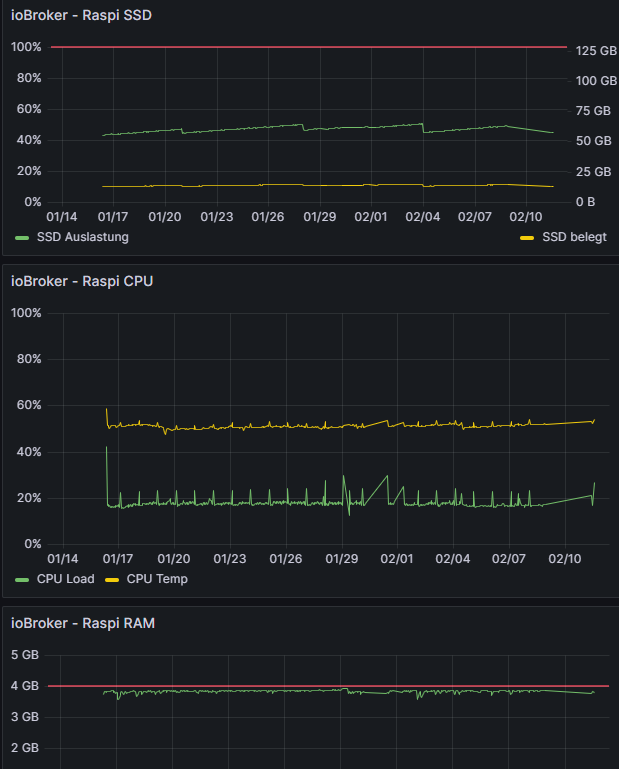
@djmarc75 Da sehe ich auf den ersten Blick keine Auffälligkeiten. Aber ich schätze, die würde ich dann auch nur sehen, wenn es soweit ist. In dem Fall könnte ich ja wieder nicht auf da System zugreifen!?
Hab aber auch die Systemdaten geloggt und da springt mir jetzt auch nichts ins Auge, was schief laufen könnte...
-
@djmarc75 Da sehe ich auf den ersten Blick keine Auffälligkeiten. Aber ich schätze, die würde ich dann auch nur sehen, wenn es soweit ist. In dem Fall könnte ich ja wieder nicht auf da System zugreifen!?
Hab aber auch die Systemdaten geloggt und da springt mir jetzt auch nichts ins Auge, was schief laufen könnte...
Lehrling seit 1975 !!!
Beitrag geholfen ? dann gerne ein upvote rechts unten im Beitrag klicken ;)
https://forum.iobroker.net/topic/51555/hinweise-für-gute-forenbeiträge -
@djmarc75 said in ioBroker / Raspi plötzlich nicht mehr erreichbar:
free -h
pi@raspberrypi:~ $ free -h total used free shared buff/cache available Mem: 3.7Gi 2.3Gi 90Mi 0.0Ki 1.3Gi 1.4Gi Swap: 99Mi 99Mi 0.0Ki -
@djmarc75 said in ioBroker / Raspi plötzlich nicht mehr erreichbar:
free -h
pi@raspberrypi:~ $ free -h total used free shared buff/cache available Mem: 3.7Gi 2.3Gi 90Mi 0.0Ki 1.3Gi 1.4Gi Swap: 99Mi 99Mi 0.0Kidenn auf Grafana komm ich ja auch nicht drauf
Wenn das zusätzlich zu den ganzen Adaptern auch noch auf dem armen kleinen Pi läuft, würde es mich nicht wundern wenn der einfach komplett ausgelastet ist.
Ein komplett genutzter Swap deutet für mich schon mal in diese Richtung.Ich würde mal testweise einige nicht lebenswichtige Instanzen stoppen.
"Any fool can write code that a computer can understand. Good programmers write code that humans can understand." (Martin Fowler, "Refactoring")
Proxmox 9.1.1 LXC|8 GB|Core i7-6700
HmIP|ZigBee|Tasmota|Unifi
Zabbix Certified Specialist
Konnte ich Dir helfen? Dann benutze bitte das Voting unten rechts im Beitrag -
denn auf Grafana komm ich ja auch nicht drauf
Wenn das zusätzlich zu den ganzen Adaptern auch noch auf dem armen kleinen Pi läuft, würde es mich nicht wundern wenn der einfach komplett ausgelastet ist.
Ein komplett genutzter Swap deutet für mich schon mal in diese Richtung.Ich würde mal testweise einige nicht lebenswichtige Instanzen stoppen.
@codierknecht Danke euch alen für euer Feedback und die Hilfe!
Aber... da der Arbeitsspeicher nicht voll ausgelastet ist, sollte der Swap da kaum Einfluss haben, zumal die Maschine ja in dieser Konfiguration und der Anzahl der aktiven Instanzen seit 3 Jahren stabil lief. Das Problem ist, dass wir hier auf dem Land öfter mal nen Stromausfall haben. Ich fürchte der Grund liegt eher an dem angesprochenen Dateisystem.
Ich habe den Raspi gestern komplett neu aufgesetzt (mit einer anderen SSD) und seitdem läuft er wieder stabil. Meine langfristige Lösung wäre nun das Verwenden eine UPS, sodass der Raspi im Idealfall immer sauber herunter gefahren werden kann. Werde dann weiter verfolgen, ob das Problem weiterhin besteht. Falls ja, muss ich über einen Wechsel zu eine leistungsstärkeren Hardware suchen.




Hey! Du scheinst an dieser Unterhaltung interessiert zu sein, hast aber noch kein Konto.
Hast du es satt, bei jedem Besuch durch die gleichen Beiträge zu scrollen? Wenn du dich für ein Konto anmeldest, kommst du immer genau dorthin zurück, wo du zuvor warst, und kannst dich über neue Antworten benachrichtigen lassen (entweder per E-Mail oder Push-Benachrichtigung). Du kannst auch Lesezeichen speichern und Beiträge positiv bewerten, um anderen Community-Mitgliedern deine Wertschätzung zu zeigen.
Mit deinem Input könnte dieser Beitrag noch besser werden 💗
Registrieren Anmelden395
Online33.0k
Benutzende83.7k
Themen1.3m
Beiträge