




vis Editor "Verbindungsfehler"
-
@thomas-braun sagte in vis Editor "Verbindungsfehler":
Hast du denn den LXC gescheit eingerichtet? Mit einem user? Siehe:
https://www.iobroker.net/#de/documentation/install/proxmox.md
Eher nicht gescheit eingerichtet. Damals gab's dieses praktische Tutorial nocht nicht. Das hatte mein "Linux-Kumpel" eingerichtet.
Ist immer noch meine erste ioBroker Installation von vor Jahren. Als man z.B. noch Datenpunkte direkt im Javascript-Adapter erstellt hatte.Was muss ich tun? Alles nochmal neu machen, diese mal nach Anleitung und dann Backup aus dem Backitup-Adapter einspielen? Hab ganz doll Angst. Willst Du das nicht für mich machen? 100€/h? (ich arbeite nämlich schon 12h/Tag von Montags-Sonntags) Ich hab heute so viele Lichtschalter manuell! betätigt wie noch nie. :-) Ging früher irgenwie alles automatisch. ;-)
@roelli sagte in vis Editor "Verbindungsfehler":
Was muss ich tun? Alles nochmal neu machen, diese mal nach Anleitung und dann Backup aus dem Backitup-Adapter einspielen?
Wäre ein Ansatz.
Willst Du das nicht für mich machen?
Nein.
-
@roelli sagte in vis Editor "Verbindungsfehler":
Ich hab so ein Problemchen mit dem VIS Editor.
und warum nicht in deinem Thread weiter gemacht !?
https://forum.iobroker.net/topic/71386/gelöst-vis-kaputt-verbindungsfehler
Auch nochmal gleicher Hinweis .. von
@wendy2702 sagte in vis Editor "Verbindungsfehler":
Das VIS Problem lässt sich vermutlich durch eine zweite WEB Instanz lösen.
-
Skript v.2023-10-10 *** BASE SYSTEM *** Static hostname: iobroker-lxc Icon name: computer-container Chassis: container Virtualization: lxc Operating System: Debian GNU/Linux 11 (bullseye) Kernel: Linux 5.15.126-1-pve Architecture: x86-64 model name : AMD Ryzen 9 4900H with Radeon Graphics Docker : false Virtualization : lxc Kernel : x86_64 Userland : amd64 Systemuptime and Load: 16:16:47 up 24 min, 1 user, load average: 4.91, 4.50, 3.92 CPU threads: 16 *** Time and Time Zones *** Local time: Sat 2024-02-10 16:16:47 CET Universal time: Sat 2024-02-10 15:16:47 UTC RTC time: n/a Time zone: Europe/Berlin (CET, +0100) System clock synchronized: yes NTP service: inactive RTC in local TZ: no *** User and Groups *** iobroker /home/iobroker iobroker tty dialout audio video redis *** X-Server-Setup *** X-Server: false Desktop: Terminal: tty Boot Target: graphical.target *** MEMORY *** total used free shared buff/cache available Mem: 16G 7.9G 6.9G 0.0K 1.6G 8.5G Swap: 8.2G 0B 8.2G Total: 24G 7.9G 15G 16384 M total memory 7898 M used memory 669 M active memory 8309 M inactive memory 6890 M free memory 0 M buffer memory 1594 M swap cache 8191 M total swap 0 M used swap 8191 M free swap *** FAILED SERVICES *** UNIT LOAD ACTIVE SUB DESCRIPTION * run-rpc_pipefs.mount loaded failed failed RPC Pipe File System * sys-kernel-config.mount loaded failed failed Kernel Configuration File System * nut-driver.service loaded failed failed Network UPS Tools - power device driver controller * nut-monitor.service loaded failed failed Network UPS Tools - power device monitor and shutdown controller * systemd-journald-audit.socket loaded failed failed Journal Audit Socket LOAD = Reflects whether the unit definition was properly loaded. ACTIVE = The high-level unit activation state, i.e. generalization of SUB. SUB = The low-level unit activation state, values depend on unit type. 5 loaded units listed. *** FILESYSTEM *** Filesystem Type Size Used Avail Use% Mounted on /dev/mapper/pve-vm--201--disk--1 ext4 63G 24G 36G 40% / none tmpfs 492K 4.0K 488K 1% /dev udev devtmpfs 16G 0 16G 0% /dev/tty tmpfs tmpfs 16G 0 16G 0% /dev/shm tmpfs tmpfs 6.2G 488K 6.2G 1% /run tmpfs tmpfs 5.0M 0 5.0M 0% /run/lock tmpfs tmpfs 3.1G 0 3.1G 0% /run/user/0 tmpfs tmpfs 3.1G 0 3.1G 0% /run/user/1000 Messages concerning ext4 filesystem in dmesg: [sudo] password for iobroker: Sorry, try again. [sudo] password for iobroker: dmesg: read kernel buffer failed: Operation not permitted Show mounted filesystems \(real ones only\): TARGET SOURCE FSTYPE OPTIONS / /dev/mapper/pve-vm--201--disk--1 ext4 rw,relatime,stripe=16 Files in neuralgic directories: /var: 15G /var/ 14G /var/lib 13G /var/lib/docker 9.0G /var/lib/docker/containers/66af97a102d568e200f457413a4542fc75b1add1081eb2cd0a8d88ba309befcd 9.0G /var/lib/docker/containers Hint: You are currently not seeing messages from other users and the system. Users in groups 'adm', 'systemd-journal' can see all messages. Pass -q to turn off this notice. Archived and active journals take up 93.4M in the file system. /opt/iobroker/backups: 2.7G /opt/iobroker/backups/ /opt/iobroker/iobroker-data: 1.1G /opt/iobroker/iobroker-data/ 546M /opt/iobroker/iobroker-data/files 190M /opt/iobroker/iobroker-data/backup-objects 156M /opt/iobroker/iobroker-data/esphome.0/.esphome 156M /opt/iobroker/iobroker-data/esphome.0 The five largest files in iobroker-data are: find: Failed to change directory: /root: Permission denied find: Failed to change directory: /root: Permission denied find: Failed to change directory: /root: Permission denied find: Failed to change directory: /root: Permission denied find: Failed to change directory: /root: Permission denied find: Failed to change directory: /root: Permission denied find: Failed to change directory: /root: Permission denied find: Failed to change directory: /root: Permission denied find: Failed to change directory: /root: Permission denied find: Failed to change directory: /root: Permission denied find: Failed to change directory: /root: Permission denied find: Failed to change directory: /root: Permission denied find: Failed to change directory: /root: Permission denied find: Failed to change directory: /root: Permission denied find: Failed to restore initial working directory: /root: Permission denied USB-Devices by-id: USB-Sticks - Avoid direct links to /dev/* in your adapter setups, please always prefer the links 'by-id': find: '/dev/serial/by-id/': No such file or directory find: Failed to restore initial working directory: /root: Permission denied *** NodeJS-Installation *** /usr/bin/nodejs v18.19.0 /usr/bin/node v18.19.0 /usr/bin/npm 10.2.3 /usr/bin/npx 10.2.3 /usr/bin/corepack 0.22.0 nodejs: Installed: 18.19.0-1nodesource1 Candidate: 18.19.0-1nodesource1 Version table: *** 18.19.0-1nodesource1 1001 500 https://deb.nodesource.com/node_18.x nodistro/main amd64 Packages 100 /var/lib/dpkg/status 18.18.2-1nodesource1 1001 500 https://deb.nodesource.com/node_18.x nodistro/main amd64 Packages 18.18.1-1nodesource1 1001 500 https://deb.nodesource.com/node_18.x nodistro/main amd64 Packages 18.18.0-1nodesource1 1001 500 https://deb.nodesource.com/node_18.x nodistro/main amd64 Packages 18.17.1-1nodesource1 1001 500 https://deb.nodesource.com/node_18.x nodistro/main amd64 Packages 18.17.0-1nodesource1 1001 500 https://deb.nodesource.com/node_18.x nodistro/main amd64 Packages 18.16.1-1nodesource1 1001 500 https://deb.nodesource.com/node_18.x nodistro/main amd64 Packages 18.16.0-1nodesource1 1001 500 https://deb.nodesource.com/node_18.x nodistro/main amd64 Packages 18.15.0-1nodesource1 1001 500 https://deb.nodesource.com/node_18.x nodistro/main amd64 Packages 18.14.2-1nodesource1 1001 500 https://deb.nodesource.com/node_18.x nodistro/main amd64 Packages 18.14.1-1nodesource1 1001 500 https://deb.nodesource.com/node_18.x nodistro/main amd64 Packages 18.14.0-1nodesource1 1001 500 https://deb.nodesource.com/node_18.x nodistro/main amd64 Packages 18.13.0-1nodesource1 1001 500 https://deb.nodesource.com/node_18.x nodistro/main amd64 Packages 18.12.0-1nodesource1 1001 500 https://deb.nodesource.com/node_18.x nodistro/main amd64 Packages 18.11.0-1nodesource1 1001 500 https://deb.nodesource.com/node_18.x nodistro/main amd64 Packages 18.10.0-1nodesource1 1001 500 https://deb.nodesource.com/node_18.x nodistro/main amd64 Packages 18.9.1-1nodesource1 1001 500 https://deb.nodesource.com/node_18.x nodistro/main amd64 Packages 18.9.0-1nodesource1 1001 500 https://deb.nodesource.com/node_18.x nodistro/main amd64 Packages 18.8.0-1nodesource1 1001 500 https://deb.nodesource.com/node_18.x nodistro/main amd64 Packages 18.7.0-1nodesource1 1001 500 https://deb.nodesource.com/node_18.x nodistro/main amd64 Packages 18.6.0-1nodesource1 1001 500 https://deb.nodesource.com/node_18.x nodistro/main amd64 Packages 18.5.0-1nodesource1 1001 500 https://deb.nodesource.com/node_18.x nodistro/main amd64 Packages 18.4.0-1nodesource1 1001 500 https://deb.nodesource.com/node_18.x nodistro/main amd64 Packages 18.3.0-1nodesource1 1001 500 https://deb.nodesource.com/node_18.x nodistro/main amd64 Packages 18.2.0-1nodesource1 1001 500 https://deb.nodesource.com/node_18.x nodistro/main amd64 Packages 18.1.0-1nodesource1 1001 500 https://deb.nodesource.com/node_18.x nodistro/main amd64 Packages 18.0.0-1nodesource1 1001 500 https://deb.nodesource.com/node_18.x nodistro/main amd64 Packages 12.22.12~dfsg-1~deb11u4 500 500 http://ftp.debian.org/debian bullseye/main amd64 Packages 500 http://security.debian.org bullseye-security/main amd64 Packages find: Failed to restore initial working directory: /root: Permission denied Temp directories causing npm8 problem: 0 No problems detected Errors in npm tree: *** ioBroker-Installation *** ioBroker Status iobroker is running on this host. At least one iobroker host is running. Objects type: redis States type: redis Core adapters versions js-controller: 5.0.17 admin: 6.13.16 javascript: 7.1.6 Adapters from github: 5 Adapter State + system.adapter.admin.0 : admin : iobroker-lxc - enabled, port: 7777, bind: 0.0.0.0, run as: admin + system.adapter.alexa2.0 : alexa2 : iobroker-lxc - enabled + system.adapter.artnet.0 : artnet : iobroker-lxc - enabled, port: 6454 + system.adapter.backitup.0 : backitup : iobroker-lxc - enabled + system.adapter.bring.0 : bring : iobroker-lxc - enabled + system.adapter.cloud.0 : cloud : iobroker-lxc - enabled + system.adapter.countdown.0 : countdown : iobroker-lxc - enabled + system.adapter.daikin-cloud.0 : daikin-cloud : iobroker-lxc - enabled + system.adapter.daikin.0 : daikin : iobroker-lxc - enabled + system.adapter.daikin.1 : daikin : iobroker-lxc - enabled + system.adapter.daikin.2 : daikin : iobroker-lxc - enabled + system.adapter.daikin.3 : daikin : iobroker-lxc - enabled + system.adapter.daikin.4 : daikin : iobroker-lxc - enabled system.adapter.daswetter.0 : daswetter : iobroker-lxc - enabled + system.adapter.device-reminder.0 : device-reminder : iobroker-lxc - enabled + system.adapter.device-watcher.0 : device-watcher : iobroker-lxc - enabled + system.adapter.discovery.0 : discovery : iobroker-lxc - enabled + system.adapter.ecovacs-deebot.0 : ecovacs-deebot : iobroker-lxc - enabled + system.adapter.email.0 : email : iobroker-lxc - enabled + system.adapter.fakeroku.0 : fakeroku : iobroker-lxc - enabled + system.adapter.followthesun.0 : followthesun : iobroker-lxc - enabled + system.adapter.fullybrowser.0 : fullybrowser : iobroker-lxc - enabled + system.adapter.geofency.0 : geofency : iobroker-lxc - enabled, port: 7999, bind: 0.0.0.0 + system.adapter.geofency.1 : geofency : iobroker-lxc - enabled, port: 7999, bind: 0.0.0.0 + system.adapter.harmony.0 : harmony : iobroker-lxc - enabled + system.adapter.hass.0 : hass : iobroker-lxc - enabled, port: 8123 + system.adapter.heatingcontrol.0 : heatingcontrol : iobroker-lxc - enabled + system.adapter.hikvision-alarmserver.0 : hikvision-alarmserver : iobroker-lxc - enabled, port: 8089, bind: 192.168.64.3 + system.adapter.history.0 : history : iobroker-lxc - enabled system.adapter.ical.0 : ical : iobroker-lxc - enabled system.adapter.iceroad.0 : iceroad : iobroker-lxc - enabled system.adapter.icons-ultimate-png.0 : icons-ultimate-png : iobroker-lxc - disabled + system.adapter.influxdb.0 : influxdb : iobroker-lxc - enabled, port: 8086 + system.adapter.info.0 : info : iobroker-lxc - enabled + system.adapter.iot.0 : iot : iobroker-lxc - enabled system.adapter.javascript.0 : javascript : iobroker-lxc - enabled system.adapter.javascript.1 : javascript : iobroker-lxc - enabled system.adapter.life360.0 : life360 : iobroker-lxc - disabled + system.adapter.mielecloudservice.0 : mielecloudservice : iobroker-lxc - enabled + system.adapter.modbus.0 : modbus : iobroker-lxc - enabled + system.adapter.mqtt.0 : mqtt : iobroker-lxc - enabled, port: 1882, bind: 0.0.0.0 + system.adapter.net-tools.0 : net-tools : iobroker-lxc - enabled system.adapter.netatmo-crawler.0 : netatmo-crawler : iobroker-lxc - enabled + system.adapter.netatmo-energy.0 : netatmo-energy : iobroker-lxc - enabled + system.adapter.netatmo-energy.1 : netatmo-energy : iobroker-lxc - enabled + system.adapter.netatmo-energy.2 : netatmo-energy : iobroker-lxc - enabled + system.adapter.netatmo-energy.3 : netatmo-energy : iobroker-lxc - enabled + system.adapter.nina.0 : nina : iobroker-lxc - enabled system.adapter.odl.0 : odl : iobroker-lxc - enabled + system.adapter.onvif.0 : onvif : iobroker-lxc - enabled, port: 80, 7575, 8000, 8080, 8081, 8899 system.adapter.owntracks.0 : owntracks : iobroker-lxc - disabled, port: 1883, bind: 127.0.0.1 + system.adapter.parser.1 : parser : iobroker-lxc - enabled + system.adapter.ping.0 : ping : iobroker-lxc - enabled + system.adapter.proxmox.0 : proxmox : iobroker-lxc - enabled, port: 8006 + system.adapter.proxmox.1 : proxmox : iobroker-lxc - enabled, port: 8006 + system.adapter.radar2.0 : radar2 : iobroker-lxc - enabled + system.adapter.scenes.0 : scenes : iobroker-lxc - enabled system.adapter.schoolfree.0 : schoolfree : iobroker-lxc - enabled + system.adapter.shelly.0 : shelly : iobroker-lxc - enabled, port: 1882, bind: 0.0.0.0 + system.adapter.shuttercontrol.0 : shuttercontrol : iobroker-lxc - enabled + system.adapter.simple-api.0 : simple-api : iobroker-lxc - enabled, port: 8087, bind: 0.0.0.0, run as: admin + system.adapter.sonoff.0 : sonoff : iobroker-lxc - enabled, port: 1883, bind: 0.0.0.0 + system.adapter.sourceanalytix.0 : sourceanalytix : iobroker-lxc - enabled + system.adapter.telegram.0 : telegram : iobroker-lxc - enabled, port: 8443, bind: 0.0.0.0 + system.adapter.text2command.0 : text2command : iobroker-lxc - enabled + system.adapter.time-switch.0 : time-switch : iobroker-lxc - enabled + system.adapter.tr-064.0 : tr-064 : iobroker-lxc - enabled + system.adapter.tractive-gps.0 : tractive-gps : iobroker-lxc - enabled + system.adapter.trashschedule.0 : trashschedule : iobroker-lxc - enabled + system.adapter.tuya.0 : tuya : iobroker-lxc - enabled + system.adapter.unifi.0 : unifi : iobroker-lxc - enabled + system.adapter.vds2465-server.0 : vds2465-server : iobroker-lxc - enabled system.adapter.vis-icontwo.0 : vis-icontwo : iobroker-lxc - enabled + system.adapter.vis-inventwo.0 : vis-inventwo : iobroker-lxc - enabled system.adapter.vis.0 : vis : iobroker-lxc - enabled + system.adapter.web.0 : web : iobroker-lxc - enabled, port: 8082, bind: 0.0.0.0, run as: admin + system.adapter.windows-control.0 : windows-control : iobroker-lxc - enabled + system.adapter.wled.0 : wled : iobroker-lxc - enabled + system.adapter.ws.0 : ws : iobroker-lxc - enabled, port: 8084, bind: 0.0.0.0, run as: admin + system.adapter.yahka.1 : yahka : iobroker-lxc - enabled system.adapter.yr.0 : yr : iobroker-lxc - enabled + system.adapter.zigbee.0 : zigbee : iobroker-lxc - enabled, port: tcp://192.168.64.6:20108 + instance is alive Enabled adapters with bindings + system.adapter.admin.0 : admin : iobroker-lxc - enabled, port: 7777, bind: 0.0.0.0, run as: admin + system.adapter.artnet.0 : artnet : iobroker-lxc - enabled, port: 6454 + system.adapter.geofency.0 : geofency : iobroker-lxc - enabled, port: 7999, bind: 0.0.0.0 + system.adapter.geofency.1 : geofency : iobroker-lxc - enabled, port: 7999, bind: 0.0.0.0 + system.adapter.hass.0 : hass : iobroker-lxc - enabled, port: 8123 + system.adapter.hikvision-alarmserver.0 : hikvision-alarmserver : iobroker-lxc - enabled, port: 8089, bind: 192.168.64.3 + system.adapter.influxdb.0 : influxdb : iobroker-lxc - enabled, port: 8086 + system.adapter.mqtt.0 : mqtt : iobroker-lxc - enabled, port: 1882, bind: 0.0.0.0 + system.adapter.onvif.0 : onvif : iobroker-lxc - enabled, port: 80, 7575, 8000, 8080, 8081, 8899 + system.adapter.proxmox.0 : proxmox : iobroker-lxc - enabled, port: 8006 + system.adapter.proxmox.1 : proxmox : iobroker-lxc - enabled, port: 8006 + system.adapter.shelly.0 : shelly : iobroker-lxc - enabled, port: 1882, bind: 0.0.0.0 + system.adapter.simple-api.0 : simple-api : iobroker-lxc - enabled, port: 8087, bind: 0.0.0.0, run as: admin + system.adapter.sonoff.0 : sonoff : iobroker-lxc - enabled, port: 1883, bind: 0.0.0.0 + system.adapter.telegram.0 : telegram : iobroker-lxc - enabled, port: 8443, bind: 0.0.0.0 + system.adapter.web.0 : web : iobroker-lxc - enabled, port: 8082, bind: 0.0.0.0, run as: admin + system.adapter.ws.0 : ws : iobroker-lxc - enabled, port: 8084, bind: 0.0.0.0, run as: admin + system.adapter.zigbee.0 : zigbee : iobroker-lxc - enabled, port: tcp://192.168.64.6:20108 ioBroker-Repositories stable : http://download.iobroker.net/sources-dist.json beta : http://download.iobroker.net/sources-dist-latest.json Active repo(s): stable Installed ioBroker-Instances Used repository: stable Adapter "adguard" : 0.0.8 , installed 0.0.8 Adapter "admin" : 6.13.16 , installed 6.13.16 Adapter "alexa2" : 3.26.4 , installed 3.26.4 Adapter "artnet" : 1.2.2 , installed 1.2.2 Adapter "backitup" : 2.9.8 , installed 2.9.8 Adapter "ble" : 0.14.0 , installed 0.14.0 Adapter "bring" : 1.8.4 , installed 1.8.4 Adapter "cloud" : 4.4.1 , installed 4.4.1 Adapter "coronavirus-statistics": 0.9.0, installed 0.9.0 Adapter "countdown" : 2.2.0 , installed 2.2.0 Adapter "daikin" : 1.4.2 , installed 1.4.2 Adapter "daikin-cloud" : 0.3.0 , installed 0.3.0 Adapter "daswetter" : 3.1.13 , installed 3.1.13 Adapter "device-reminder": 3.1.2 , installed 3.1.2 Adapter "device-watcher": 2.9.6 , installed 2.9.14 Adapter "devices" : 1.1.5 , installed 1.1.5 Adapter "discovery" : 4.2.0 , installed 4.2.0 Adapter "doorio" : 2.1.4 , installed 2.1.4 Adapter "drag-indicator": 2.1.4 , installed 2.1.4 Adapter "ecovacs-deebot": 1.4.13 , installed 1.4.13 Adapter "email" : 1.2.2 , installed 1.2.2 Adapter "fakeroku" : 0.2.2 , installed 0.2.2 Adapter "flot" : 1.12.0 , installed 1.12.0 Adapter "followthesun" : 0.5.0 , installed 0.5.0 Adapter "fullybrowser" : 3.0.9 , installed 3.0.9 Adapter "geofency" : 1.2.4 , installed 1.2.4 Adapter "habpanel" : 0.5.0 , installed 0.5.0 Adapter "harmony" : 1.3.0 , installed 1.3.0 Adapter "hass" : 1.4.0 , installed 1.4.0 Adapter "heatingcontrol": 2.12.3 , installed 2.12.3 Adapter "hikvision-alarmserver": 0.1.0, installed 0.1.0 Adapter "history" : 3.0.1 , installed 3.0.1 Adapter "ical" : 1.13.3 , installed 1.13.3 Adapter "iceroad" : 1.2.1 , installed 1.2.1 Adapter "icons-ultimate-png": 1.0.1, installed 1.0.1 Adapter "imap" : 0.1.1 , installed 0.1.1 Adapter "influxdb" : 3.2.0 , installed 3.2.0 Adapter "iot" : 2.0.11 , installed 2.0.11 Adapter "javascript" : 7.1.6 , installed 7.1.6 Controller "js-controller": 5.0.17 , installed 5.0.17 Adapter "material" : 1.3.1 , installed 1.3.1 Adapter "mielecloudservice": 6.5.4, installed 6.5.4 Adapter "modbus" : 6.1.0 , installed 6.1.0 Adapter "mqtt" : 5.1.0 , installed 5.1.0 Adapter "net-tools" : 0.2.0 , installed 0.2.0 Adapter "netatmo-crawler": 0.8.1 , installed 0.8.1 Adapter "netatmo-energy": 2.7.3 , installed 2.7.3 Adapter "nina" : 0.0.25 , installed 0.0.25 Adapter "nut" : 1.6.0 , installed 1.6.0 Adapter "odl" : 3.0.1 , installed 3.0.1 Adapter "onvif" : 1.1.1 , installed 1.1.1 Adapter "owntracks" : 1.0.5 , installed 1.0.5 Adapter "parcel" : 0.0.27 , installed 0.0.27 Adapter "parser" : 2.1.0 , installed 2.1.0 Adapter "pegelalarm" : 1.3.2 , installed 1.3.2 Adapter "ping" : 1.6.2 , installed 1.6.2 Adapter "proxmox" : 2.2.2 , installed 2.2.2 Adapter "radar2" : 2.1.0 , installed 2.1.0 Adapter "scenes" : 2.3.9 , installed 2.3.9 Adapter "schoolfree" : 1.1.3 , installed 1.1.3 Adapter "shelly" : 6.6.1 , installed 6.6.1 Adapter "shuttercontrol": 1.6.3 , installed 1.6.3 Adapter "simple-api" : 2.7.2 , installed 2.7.2 Adapter "socketio" : 6.6.0 , installed 6.6.0 Adapter "sonoff" : 3.0.3 , installed 3.0.3 Adapter "telegram" : 3.0.1 , installed 3.0.1 Adapter "terminal" : 1.0.0 , installed 1.0.0 Adapter "text2command" : 3.0.3 , installed 3.0.3 Adapter "tr-064" : 4.2.18 , installed 4.2.18 Adapter "traccar" : 1.1.4 , installed 1.1.4 Adapter "tractive-gps" : 1.1.0 , installed 1.1.0 Adapter "trashschedule": 2.3.0 , installed 2.3.0 Adapter "tuya" : 3.15.0 , installed 3.15.0 Adapter "tvprogram" : 1.1.2 , installed 1.1.2 Adapter "tvspielfilm" : 2.0.5 , installed 2.0.5 Adapter "unifi" : 0.6.7 , installed 0.6.7 Adapter "upnp" : 1.0.21 , installed 1.0.21 Adapter "vds2465-server": 0.1.10 , installed 0.1.10 Adapter "vis" : 1.5.4 , installed 1.5.4 Adapter "vis-colorpicker": 2.0.3 , installed 2.0.3 Adapter "vis-hqwidgets": 1.4.0 , installed 1.4.0 Adapter "vis-icontwo" : 1.3.0 , installed 1.3.0 Adapter "vis-inventwo" : 3.3.3 , installed 3.3.3 Adapter "vis-jqui-mfd" : 1.0.12 , installed 1.0.12 Adapter "vis-map" : 1.0.4 , installed 1.0.4 Adapter "vis-metro" : 1.2.0 , installed 1.2.0 Adapter "vis-timeandweather": 1.2.2, installed 1.2.2 Adapter "web" : 6.2.3 , installed 6.2.3 Adapter "windows-control": 0.1.5 , installed 0.1.5 Adapter "wled" : 0.7.2 , installed 0.7.2 Adapter "ws" : 2.5.10 , installed 2.5.10 Adapter "yahka" : 1.0.3 , installed 1.0.3 Adapter "yr" : 5.3.0 , installed 5.3.0 Adapter "zigbee" : 1.10.1 , installed 1.10.1 Adapter "zwave2" : 3.1.0 , installed 3.1.0 Objects and States Please stand by - This may take a while Objects: 340478 States: 199813 *** OS-Repositories and Updates *** Hit:1 http://security.debian.org bullseye-security InRelease Hit:2 http://ftp.debian.org/debian bullseye InRelease Hit:3 https://download.docker.com/linux/debian bullseye InRelease Hit:4 http://ftp.debian.org/debian bullseye-updates InRelease Hit:5 https://deb.nodesource.com/node_18.x nodistro InRelease Hit:6 https://packages.redis.io/deb bullseye InRelease Reading package lists... Pending Updates: 0 *** Listening Ports *** Active Internet connections (only servers) Proto Recv-Q Send-Q Local Address Foreign Address State User Inode PID/Program name tcp 0 0 127.0.0.1:3493 0.0.0.0:* LISTEN 0 24912460 2251/upsd tcp 0 0 127.0.0.1:33305 0.0.0.0:* LISTEN 1000 24932911 5470/io.yahka.1 tcp 0 0 127.0.0.1:25 0.0.0.0:* LISTEN 0 25137443 42131/master tcp 0 0 0.0.0.0:8765 0.0.0.0:* LISTEN 0 25128734 43521/docker-proxy tcp 0 0 127.0.0.1:6379 0.0.0.0:* LISTEN 110 25137584 42449/redis-server tcp 0 0 0.0.0.0:10001 0.0.0.0:* LISTEN 0 25136625 43495/docker-proxy tcp 0 0 0.0.0.0:10003 0.0.0.0:* LISTEN 0 25136601 43429/docker-proxy tcp 0 0 0.0.0.0:10002 0.0.0.0:* LISTEN 0 25142292 43449/docker-proxy tcp 0 0 0.0.0.0:10005 0.0.0.0:* LISTEN 0 25132519 43381/docker-proxy tcp 0 0 0.0.0.0:10004 0.0.0.0:* LISTEN 0 25136584 43409/docker-proxy tcp 0 0 192.168.64.3:8089 0.0.0.0:* LISTEN 1000 24917524 2383/io.hikvision-a tcp 0 0 0.0.0.0:4100 0.0.0.0:* LISTEN 1000 24912194 1867/io.vds2465-ser tcp 0 0 0.0.0.0:5355 0.0.0.0:* LISTEN 104 24896898 110/systemd-resolve tcp 0 0 192.168.64.3:9093 0.0.0.0:* LISTEN 1000 24939777 5941/io.fakeroku.0 tcp 0 0 0.0.0.0:8086 0.0.0.0:* LISTEN 0 25135939 43320/docker-proxy tcp 0 0 0.0.0.0:111 0.0.0.0:* LISTEN 0 24902935 1/init tcp 0 0 0.0.0.0:22 0.0.0.0:* LISTEN 0 25124645 42354/sshd: /usr/sb tcp 0 0 127.0.0.53:53 0.0.0.0:* LISTEN 104 24896904 110/systemd-resolve tcp 0 0 0.0.0.0:1883 0.0.0.0:* LISTEN 1000 24901378 1814/io.sonoff.0 tcp 0 0 0.0.0.0:1882 0.0.0.0:* LISTEN 1000 24898331 1582/io.mqtt.0 tcp 0 0 0.0.0.0:34027 0.0.0.0:* LISTEN 1000 24925114 5470/io.yahka.1 tcp 0 0 0.0.0.0:3000 0.0.0.0:* LISTEN 0 25132495 43277/docker-proxy tcp6 0 0 :::61991 :::* LISTEN 1000 24918297 2359/io.harmony.0 tcp6 0 0 :::8765 :::* LISTEN 0 25128739 43528/docker-proxy tcp6 0 0 :::10001 :::* LISTEN 0 25135952 43502/docker-proxy tcp6 0 0 :::10003 :::* LISTEN 0 25132529 43435/docker-proxy tcp6 0 0 :::10002 :::* LISTEN 0 25137746 43457/docker-proxy tcp6 0 0 :::10005 :::* LISTEN 0 25135943 43394/docker-proxy tcp6 0 0 :::10004 :::* LISTEN 0 25142283 43417/docker-proxy tcp6 0 0 :::9443 :::* LISTEN 0 25128700 43291/portainer tcp6 0 0 ::1:25 :::* LISTEN 0 25137444 42131/master tcp6 0 0 :::5355 :::* LISTEN 104 24896901 110/systemd-resolve tcp6 0 0 :::7777 :::* LISTEN 1000 24902118 1009/io.admin.0 tcp6 0 0 :::8082 :::* LISTEN 1000 24935725 5167/io.web.0 tcp6 0 0 :::8084 :::* LISTEN 1000 24934282 5731/io.ws.0 tcp6 0 0 :::8087 :::* LISTEN 1000 24922647 4237/io.simple-api. tcp6 0 0 :::8086 :::* LISTEN 0 25136573 43328/docker-proxy tcp6 0 0 :::8000 :::* LISTEN 0 25137740 43291/portainer tcp6 0 0 :::7999 :::* LISTEN 1000 24897177 1465/io.geofency.0 tcp6 0 0 ::1:3493 :::* LISTEN 0 24912461 2251/upsd tcp6 0 0 :::33673 :::* LISTEN 1000 24925115 5470/io.yahka.1 tcp6 0 0 :::111 :::* LISTEN 0 24902937 1/init tcp6 0 0 :::22 :::* LISTEN 0 25124647 42354/sshd: /usr/sb tcp6 0 0 :::3000 :::* LISTEN 0 25136558 43283/docker-proxy tcp6 0 0 ::1:6379 :::* LISTEN 110 25137585 42449/redis-server udp 0 0 0.0.0.0:1900 0.0.0.0:* 1000 24939778 5941/io.fakeroku.0 udp 0 0 0.0.0.0:5353 0.0.0.0:* 1000 24925116 5470/io.yahka.1 udp 0 0 0.0.0.0:5353 0.0.0.0:* 1000 24925111 5470/io.yahka.1 udp 0 0 0.0.0.0:5353 0.0.0.0:* 1000 24925070 5411/io.wled.0 udp 0 0 0.0.0.0:5355 0.0.0.0:* 104 24896897 110/systemd-resolve udp 0 1280 0.0.0.0:38293 0.0.0.0:* 1000 24992278 2073/io.artnet.0 udp 0 0 0.0.0.0:5683 0.0.0.0:* 1000 24905690 1786/io.shelly.0 udp 0 0 0.0.0.0:6666 0.0.0.0:* 1000 24898507 1840/io.tuya.0 udp 0 0 0.0.0.0:6667 0.0.0.0:* 1000 24898508 1840/io.tuya.0 udp 0 0 0.0.0.0:61991 0.0.0.0:* 1000 24918298 2359/io.harmony.0 udp 0 0 127.0.0.53:53 0.0.0.0:* 104 24896903 110/systemd-resolve udp 0 0 0.0.0.0:67 0.0.0.0:* 1000 24910383 1746/io.radar2.0 udp 0 0 0.0.0.0:111 0.0.0.0:* 0 24902936 1/init udp6 0 0 :::5355 :::* 104 24896900 110/systemd-resolve udp6 0 0 :::111 :::* 0 24902938 1/init *** Log File - Last 25 Lines *** 2024-02-10 16:15:24.043 - warn: influxdb.0 (1098) Error on writePoint("{"value":3738,"time":"2024-02-10T15:15:23.994Z","from":"system.adapter.mqtt.0","q":0,"ack":true}): Error: connect ECONNREFUSED 127.0.0.1:8086 / "connect ECONNREFUSED 127.0.0.1:8086"" 2024-02-10 16:15:25.576 - warn: shelly.0 (1786) Cannot get view: NOSCRIPT No matching script. Please use EVAL. 2024-02-10 16:15:25.577 - error: shelly.0 (1786) ReplyError: NOSCRIPT No matching script. Please use EVAL. 2024-02-10 16:15:34.045 - info: influxdb.0 (1098) Connecting http://localhost:8086/ ... 2024-02-10 16:15:34.045 - info: influxdb.0 (1098) Influx DB Version used: 1.x 2024-02-10 16:15:34.049 - error: influxdb.0 (1098) Error: socket hang up 2024-02-10 16:15:37.256 - error: host.iobroker-lxc Could not execute primary host determination: NOSCRIPT No matching script. Please use EVAL. 2024-02-10 16:15:44.049 - info: influxdb.0 (1098) Connecting http://localhost:8086/ ... 2024-02-10 16:15:44.050 - info: influxdb.0 (1098) Influx DB Version used: 1.x 2024-02-10 16:15:47.514 - error: javascript.0 (1135) Objects database error: write EPIPE 2024-02-10 16:15:47.533 - error: javascript.0 (1135) States database error: write EPIPE 2024-02-10 16:16:00.012 - info: host.iobroker-lxc instance system.adapter.yr.0 started with pid 46200 2024-02-10 16:16:01.506 - info: yr.0 (46200) starting. Version 5.3.0 in /opt/iobroker/node_modules/iobroker.yr, node: v18.19.0, js-controller: 5.0.17 2024-02-10 16:16:01.513 - info: yr.0 (46200) longitude/longitude not set, get data from system 2024-02-10 16:16:01.523 - info: yr.0 (46200) system latitude: 51.2374097 longitude: 6.4129197 2024-02-10 16:16:11.537 - info: yr.0 (46200) Data updated. 2024-02-10 16:16:11.538 - info: yr.0 (46200) Terminated (ADAPTER_REQUESTED_TERMINATION): Without reason 2024-02-10 16:16:12.049 - info: host.iobroker-lxc instance system.adapter.yr.0 terminated with code 11 (ADAPTER_REQUESTED_TERMINATION) 2024-02-10 16:16:20.977 - info: influxdb.0 (1098) Store 29 buffered influxDB history points 2024-02-10 16:16:21.027 - warn: fullybrowser.0 (2333) [REST] 192.168.77.128: Sending command get axiosGetDevicesInfo failed: No response 2024-02-10 16:16:48.013 - info: host.iobroker-lxc instance system.adapter.odl.0 started with pid 47702 2024-02-10 16:16:49.745 - info: odl.0 (47702) starting. Version 3.0.1 in /opt/iobroker/node_modules/iobroker.odl, node: v18.19.0, js-controller: 5.0.17 2024-02-10 16:16:51.174 - info: odl.0 (47702) Terminated (NO_ERROR): Without reason 2024-02-10 16:16:51.687 - info: host.iobroker-lxc instance system.adapter.odl.0 terminated with code 0 (NO_ERROR) 2024-02-10 16:17:21.027 - warn: fullybrowser.0 (2333) [REST] 192.168.77.128: Sending command get axiosGetDevicesInfo failed: No response@roelli sagte in vis Editor "Verbindungsfehler":
cp 0 0 0.0.0.0:8765 0.0.0.0:* LISTEN 0 25128734 43521/docker-proxy
tcp 0 0 0.0.0.0:4100 0.0.0.0:* LISTEN 1000 24912194 1867/io.vds2465-server
tcp 0 0 127.0.0.1:6379 0.0.0.0:* LISTEN 110 25137584 42449/redis-server
Schon sehr Profihaft aufgebaut ... !
-
@roelli sagte in vis Editor "Verbindungsfehler":
Ich hab so ein Problemchen mit dem VIS Editor.
und warum nicht in deinem Thread weiter gemacht !?
https://forum.iobroker.net/topic/71386/gelöst-vis-kaputt-verbindungsfehler
Auch nochmal gleicher Hinweis .. von
@wendy2702 sagte in vis Editor "Verbindungsfehler":
Das VIS Problem lässt sich vermutlich durch eine zweite WEB Instanz lösen.
@glasfaser sagte in vis Editor "Verbindungsfehler":
und warum nicht in deinem Thread weiter gemacht !?
https://forum.iobroker.net/topic/71386/gelöst-vis-kaputt-verbindungsfehler
Weil der Fehler danach erstmal weg war. Hat auch ein paar Wochen funktioniert.
@glasfaser sagte in vis Editor "Verbindungsfehler":
Auch nochmal gleicher Hinweis .. von
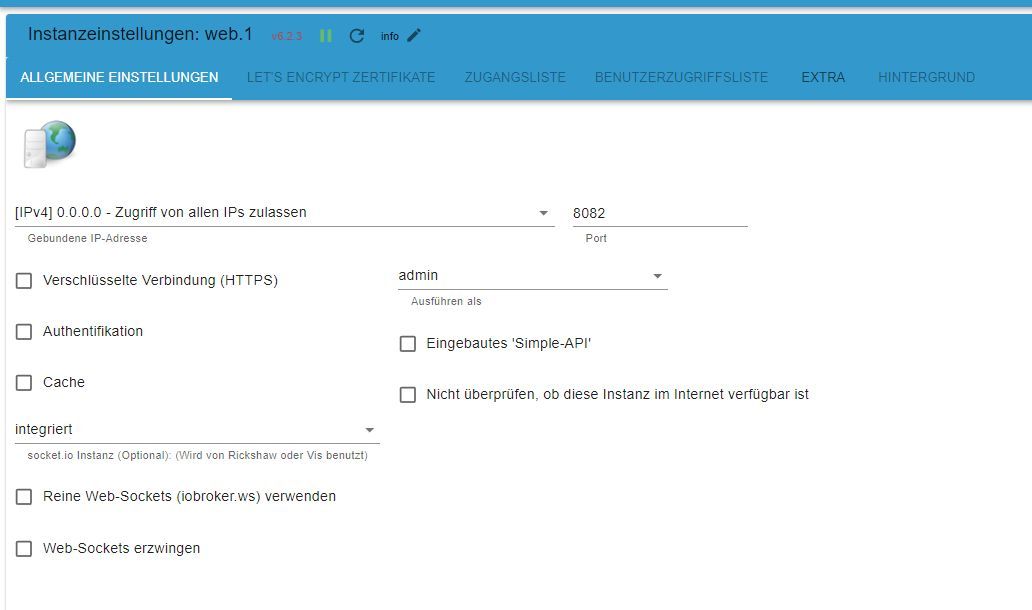
Das VIS Problem lässt sich vermutlich durch eine zweite WEB Instanz lösen.Installieren kann ich! :-) Aber... warum hilft ein zweiter Web Adapter? Egal.
Was muss einstellen? Nix? Nirgendwo ein Haken machen? Port auch 8082?
-
@roelli sagte in vis Editor "Verbindungsfehler":
cp 0 0 0.0.0.0:8765 0.0.0.0:* LISTEN 0 25128734 43521/docker-proxy
tcp 0 0 0.0.0.0:4100 0.0.0.0:* LISTEN 1000 24912194 1867/io.vds2465-server
tcp 0 0 127.0.0.1:6379 0.0.0.0:* LISTEN 110 25137584 42449/redis-server
Schon sehr Profihaft aufgebaut ... !
@glasfaser sagte in vis Editor "Verbindungsfehler":
Schon sehr Profihaft aufgebaut ... !
Und was noch schlimmer ist... ich weis nicht mal was falsch ist und/oder wie ich's verbessern kann oder wonach ich googeln müsste. Deswegen wäre es besser wenn's mal jemand macht der weis wie's geht. ;-)
NUC6i7KYK M.2 32GB RAM mit Proxmox
14 AccessPoints, 5 Switches 115 Adapter, 67913 Objekte, 57954 Zustände,126x Shelly, 26 Thermostate, Fire Tablets, DMX, USV, 18x echodot, 9xKlima, 4x heizung, beamer, 6x IP Speed dome, AiOnTheEdge, Tasmota Wemos, Fingerabdrucksensoren, VOIP TFE, Türsteuerung, BMZ,EMA -
@glasfaser sagte in vis Editor "Verbindungsfehler":
Schon sehr Profihaft aufgebaut ... !
Und was noch schlimmer ist... ich weis nicht mal was falsch ist und/oder wie ich's verbessern kann oder wonach ich googeln müsste. Deswegen wäre es besser wenn's mal jemand macht der weis wie's geht. ;-)
-
Und dann?
Lebenslanger personal Support?
:man-facepalming:Befasse Dich einfach damit.
Wir können nur UNTERSTÜTZEND helfen.@haselchen sagte in vis Editor "Verbindungsfehler":
Und dann?
Lebenslanger personal Support?
:man-facepalming:Am liebsten! Vielleicht finde ich ja jemand der Zeit gegen Geld tauschen will.
@haselchen sagte in vis Editor "Verbindungsfehler":
Befasse Dich einfach damit.
Wir können nur UNTERSTÜTZEND helfen.Ich versuche!
Aber, ein vernünftig installierter LXC Container den ich nur importieren müsste wäre einfacher für jemanden wie mich der zeitlich und know-how-technisch eingeschränkt ist. ;-)NUC6i7KYK M.2 32GB RAM mit Proxmox
14 AccessPoints, 5 Switches 115 Adapter, 67913 Objekte, 57954 Zustände,126x Shelly, 26 Thermostate, Fire Tablets, DMX, USV, 18x echodot, 9xKlima, 4x heizung, beamer, 6x IP Speed dome, AiOnTheEdge, Tasmota Wemos, Fingerabdrucksensoren, VOIP TFE, Türsteuerung, BMZ,EMA -
Hallo.
Ich hab so ein Problemchen mit dem VIS Editor. Wenn ich ein Objekt anklicke um einen Datenpunkt auszuwählen dann dauert es immer 1 Minute und 45 Sekunden bis sich das Fenster öffnet.
Und danach kommt "Verbindungsfehler" und man kann garnix mehr machen, weil nichts mehr gespeichert wird.
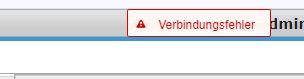
Ich hatte den Fehler schon öfter, konnte es mit "Browser Cache löschen" und/oder "Cache" in der "web" Instanz deaktivieren beheben. Irgendwann hatte ich den Tip bekommen den Adapter "ws" zu installieren und nach Redis umzustellen, danach ging eigentlich alles erstmal super. Jetzt aber nicht mehr.
Ich habe auch mal alle Instanzen außer admin, vis, vis-inventwo, web und ws deaktiviert, Fehler bleibt.
Ich habe 339544 Objekte, 202389 Zustände, 103 Adapter, 12 Core AMD Ryzen Rechner, läuft unter Proxmox 7.4-17. CPU Last ist bei ca. 4% und 3GB RAM laut Proxmox. Host in iobroker sagt überwiegend unter 1% Last.
Was kann ich tun?
Danke!
iob diag sagt das hier:
======================= SUMMARY ======================= v.2023-10-10 Static hostname: iobroker-lxc Icon name: computer-container Chassis: container Virtualization: lxc Operating System: Debian GNU/Linux 11 (bullseye) Kernel: Linux 5.15.126-1-pve Architecture: x86-64 Installation: lxc Kernel: x86_64 Userland: amd64 Timezone: Europe/Berlin (CET, +0100) User-ID: 1000 X-Server: false Boot Target: graphical.target Pending OS-Updates: 42 Pending iob updates: 0 Nodejs-Installation: /usr/bin/nodejs v18.19.0 /usr/bin/node v18.19.0 /usr/bin/npm 10.2.3 /usr/bin/npx 10.2.3 /usr/bin/corepack 0.22.0 Recommended versions are nodejs 18.19.0 and npm 10.2.3 Your nodejs installation is correct MEMORY: total used free shared buff/cache available Mem: 16G 2.8G 12G 0.0K 1.1G 13G Swap: 8.2G 1.0M 8.2G Total: 24G 2.8G 20G Active iob-Instances: 5 Active repo(s): stable ioBroker Core: js-controller 5.0.17 admin 6.13.16 ioBroker Status: iobroker is running on this host. At least one iobroker host is running. Objects type: redis States type: redis Status admin and web instance: + system.adapter.admin.0 : admin : iobroker-lxc - enabled, port: 7777, bind: 0.0.0.0, run as: admin + system.adapter.web.0 : web : iobroker-lxc - enabled, port: 8082, bind: 0.0.0.0, run as: admin Objects: 339541 States: 199015 Size of iob-Database: 76M /opt/iobroker/iobroker-data/objects.jsonl 134M /opt/iobroker/iobroker-data/states.jsonl =================== END OF SUMMARY ====================@roelli sagte in vis Editor "Verbindungsfehler":
Wenn ich ein Objekt anklicke um einen Datenpunkt auszuwählen dann dauert es immer 1 Minute und 45 Sekunden bis sich das Fenster öffnet.
Und danach kommt "Verbindungsfehler" und man kann garnix mehr machen, weil nichts mehr gespeichert wird.Ich habe 339544 Objekte, 202389 Zustände
und deshalb dauert es ..... so lange
Erlich gesagt , hab ich so etwas noch nie gesehn an eine Rekordhöhe
Du mußt doch auch beim Admin Probleme haben ( Objekte ) !?
-
@roelli sagte in vis Editor "Verbindungsfehler":
Wenn ich ein Objekt anklicke um einen Datenpunkt auszuwählen dann dauert es immer 1 Minute und 45 Sekunden bis sich das Fenster öffnet.
Und danach kommt "Verbindungsfehler" und man kann garnix mehr machen, weil nichts mehr gespeichert wird.Ich habe 339544 Objekte, 202389 Zustände
und deshalb dauert es ..... so lange
Erlich gesagt , hab ich so etwas noch nie gesehn an eine Rekordhöhe
Du mußt doch auch beim Admin Probleme haben ( Objekte ) !?
@glasfaser sagte in vis Editor "Verbindungsfehler":
Du mußt doch auch beim Admin Probleme haben ( Objekte ) !?
Och... geht eigentlich. https://www.youtube.com/watch?v=isvm2fStHGA
Wenn ich auf Objekte klicken dann dauert's 10 Sekunden. Kann man mit leben.
Aber VIS editieren geht halt nicht mehr. -
@haselchen sagte in vis Editor "Verbindungsfehler":
Und dann?
Lebenslanger personal Support?
:man-facepalming:Am liebsten! Vielleicht finde ich ja jemand der Zeit gegen Geld tauschen will.
@haselchen sagte in vis Editor "Verbindungsfehler":
Befasse Dich einfach damit.
Wir können nur UNTERSTÜTZEND helfen.Ich versuche!
Aber, ein vernünftig installierter LXC Container den ich nur importieren müsste wäre einfacher für jemanden wie mich der zeitlich und know-how-technisch eingeschränkt ist. ;-) -
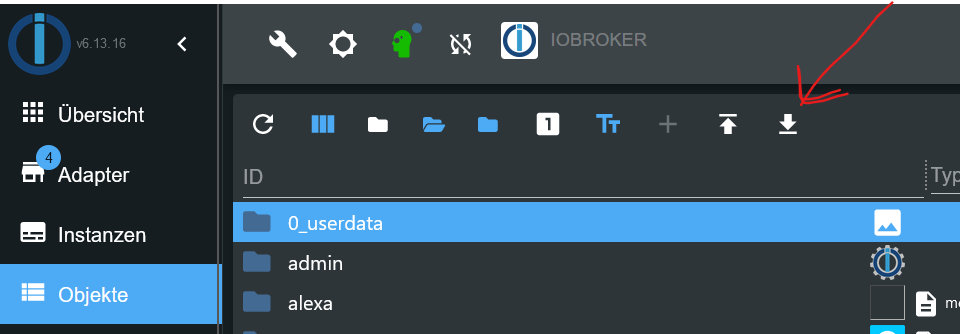
Du kannst mal nachschauen , welcher Ordner wieviel enthält !
Ordner makieren , dann auf "Objektbaum als JSON-Datei speichern"
.
.
Dann kommt dieser Popup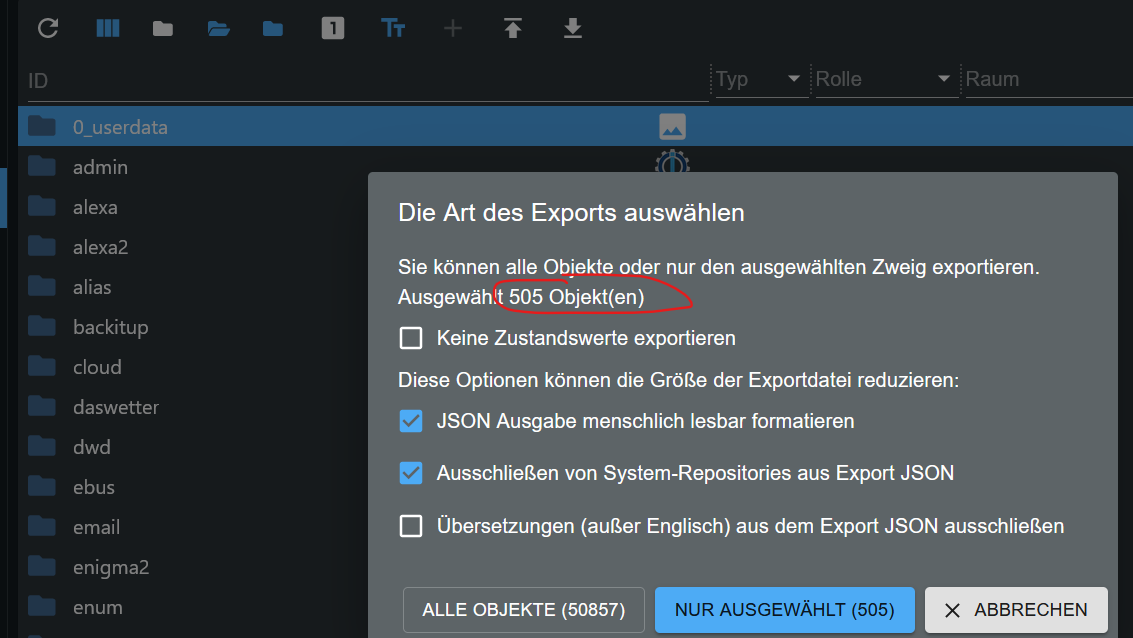
mqtt flippt aus glaube ich
Cooler tip mit den json export-trick, hab mal ne komplette Liste gemacht:
Adapter / Objekte
mqtt 280036
unifi 14909
hass 9003
shelly 7015
alexa 6350
netatmo energy 4677
yr 3204
onviv 2916
sourceanalytix 2228
javascript 1498
sonoff 747
info 669
daikin cloud 619
harmony 580
wled 509
daikin 451
zigbee 420
life360 406
script 376
proxmox 327
ecovacs 287
vds2465-server 279
tuya 233
userdata 213
folow the sun 202
ical 159
fullykioskbrower 110
das wetter 108
bring 84
miele cloud 64
trashschedule 57
radar2 55
netatmo crawler 48
tr-064 47
shuttercontrol 43
nina 36
vis 32
iot 31
device watcher 30
heatingcontrol 25
modbus 20
vis inventwo 19
artnet 18
telegram 18
backitup 17
windows control 17
admin 16
odl 16
schoolfre 16
cloud 15
parser 15
iceroad 14
device reminder 13
fakrouk 12
net-tools 12
alias 11
web 11
geofency 9
time switch 8
disocergy 7
hikvision alarmserver 7
yahka 6
text2command 5
countdown 4
owntracks 4
ping 4
scene 4
tractive gps 4
ws 4
influxdb 3
material 3
variables 3
email 2
find my iphoene 2
flot 2
habpanel 2
history 2
icon ultimate png 2
netatmo 2
scenes 2
simpleapi 2
socketio 2
terminal 2
upnp 2
vis icontwo 2
vis jqui mfd 2
adguard 1
apcups 1
apple find me 1
ble 1
corona dings 1
devices 1
doorio 1
drag indictator 1
esphome 1
espresence 1
hueemu 1
imap 1
linux control 1
middea 1
mobnile alerts 1
nut 1
onviv-alt 1
parcel 1
pegelalarm 1
sia 1
smartmeter 1
traccar 1
tvprogramm 1
tvspielfilm 1
vis-colorpicker 1
vis hq widgets 1
vis map 1
vis material advanced 1
vis material design 1
vis metro 1
vis time weather 1
zwve 2 1339478NUC6i7KYK M.2 32GB RAM mit Proxmox
14 AccessPoints, 5 Switches 115 Adapter, 67913 Objekte, 57954 Zustände,126x Shelly, 26 Thermostate, Fire Tablets, DMX, USV, 18x echodot, 9xKlima, 4x heizung, beamer, 6x IP Speed dome, AiOnTheEdge, Tasmota Wemos, Fingerabdrucksensoren, VOIP TFE, Türsteuerung, BMZ,EMA -
mqtt flippt aus glaube ich
Cooler tip mit den json export-trick, hab mal ne komplette Liste gemacht:
Adapter / Objekte
mqtt 280036
unifi 14909
hass 9003
shelly 7015
alexa 6350
netatmo energy 4677
yr 3204
onviv 2916
sourceanalytix 2228
javascript 1498
sonoff 747
info 669
daikin cloud 619
harmony 580
wled 509
daikin 451
zigbee 420
life360 406
script 376
proxmox 327
ecovacs 287
vds2465-server 279
tuya 233
userdata 213
folow the sun 202
ical 159
fullykioskbrower 110
das wetter 108
bring 84
miele cloud 64
trashschedule 57
radar2 55
netatmo crawler 48
tr-064 47
shuttercontrol 43
nina 36
vis 32
iot 31
device watcher 30
heatingcontrol 25
modbus 20
vis inventwo 19
artnet 18
telegram 18
backitup 17
windows control 17
admin 16
odl 16
schoolfre 16
cloud 15
parser 15
iceroad 14
device reminder 13
fakrouk 12
net-tools 12
alias 11
web 11
geofency 9
time switch 8
disocergy 7
hikvision alarmserver 7
yahka 6
text2command 5
countdown 4
owntracks 4
ping 4
scene 4
tractive gps 4
ws 4
influxdb 3
material 3
variables 3
email 2
find my iphoene 2
flot 2
habpanel 2
history 2
icon ultimate png 2
netatmo 2
scenes 2
simpleapi 2
socketio 2
terminal 2
upnp 2
vis icontwo 2
vis jqui mfd 2
adguard 1
apcups 1
apple find me 1
ble 1
corona dings 1
devices 1
doorio 1
drag indictator 1
esphome 1
espresence 1
hueemu 1
imap 1
linux control 1
middea 1
mobnile alerts 1
nut 1
onviv-alt 1
parcel 1
pegelalarm 1
sia 1
smartmeter 1
traccar 1
tvprogramm 1
tvspielfilm 1
vis-colorpicker 1
vis hq widgets 1
vis map 1
vis material advanced 1
vis material design 1
vis metro 1
vis time weather 1
zwve 2 1339478 -
mqtt flippt aus glaube ich
Cooler tip mit den json export-trick, hab mal ne komplette Liste gemacht:
Adapter / Objekte
mqtt 280036
unifi 14909
hass 9003
shelly 7015
alexa 6350
netatmo energy 4677
yr 3204
onviv 2916
sourceanalytix 2228
javascript 1498
sonoff 747
info 669
daikin cloud 619
harmony 580
wled 509
daikin 451
zigbee 420
life360 406
script 376
proxmox 327
ecovacs 287
vds2465-server 279
tuya 233
userdata 213
folow the sun 202
ical 159
fullykioskbrower 110
das wetter 108
bring 84
miele cloud 64
trashschedule 57
radar2 55
netatmo crawler 48
tr-064 47
shuttercontrol 43
nina 36
vis 32
iot 31
device watcher 30
heatingcontrol 25
modbus 20
vis inventwo 19
artnet 18
telegram 18
backitup 17
windows control 17
admin 16
odl 16
schoolfre 16
cloud 15
parser 15
iceroad 14
device reminder 13
fakrouk 12
net-tools 12
alias 11
web 11
geofency 9
time switch 8
disocergy 7
hikvision alarmserver 7
yahka 6
text2command 5
countdown 4
owntracks 4
ping 4
scene 4
tractive gps 4
ws 4
influxdb 3
material 3
variables 3
email 2
find my iphoene 2
flot 2
habpanel 2
history 2
icon ultimate png 2
netatmo 2
scenes 2
simpleapi 2
socketio 2
terminal 2
upnp 2
vis icontwo 2
vis jqui mfd 2
adguard 1
apcups 1
apple find me 1
ble 1
corona dings 1
devices 1
doorio 1
drag indictator 1
esphome 1
espresence 1
hueemu 1
imap 1
linux control 1
middea 1
mobnile alerts 1
nut 1
onviv-alt 1
parcel 1
pegelalarm 1
sia 1
smartmeter 1
traccar 1
tvprogramm 1
tvspielfilm 1
vis-colorpicker 1
vis hq widgets 1
vis map 1
vis material advanced 1
vis material design 1
vis metro 1
vis time weather 1
zwve 2 1339478Aha... "espresence" Adapter macht 279444 Objekte. Nojo.. war ja auch ein Adapter aus Github... den ich wieder gelöscht hatte. Aber die Objekte habe ich wohl als Geschenk behalten dürfen. :-)
NUC6i7KYK M.2 32GB RAM mit Proxmox
14 AccessPoints, 5 Switches 115 Adapter, 67913 Objekte, 57954 Zustände,126x Shelly, 26 Thermostate, Fire Tablets, DMX, USV, 18x echodot, 9xKlima, 4x heizung, beamer, 6x IP Speed dome, AiOnTheEdge, Tasmota Wemos, Fingerabdrucksensoren, VOIP TFE, Türsteuerung, BMZ,EMA -
Aha... "espresence" Adapter macht 279444 Objekte. Nojo.. war ja auch ein Adapter aus Github... den ich wieder gelöscht hatte. Aber die Objekte habe ich wohl als Geschenk behalten dürfen. :-)
-
@roelli sagte in vis Editor "Verbindungsfehler":
war ja auch ein Adapter aus Github
damit spielst du auf Messers Schneide ... mit so dingen aus GitHub auf deinem Produktiven System !!
Joa, war garkeine gute Idee.
Hab mal versucht alle Objekte zu löschen... iobroker ist direkt abgeschmiert.
Ich geb dem noch 5 Minuten, dann mal neu starten.NUC6i7KYK M.2 32GB RAM mit Proxmox
14 AccessPoints, 5 Switches 115 Adapter, 67913 Objekte, 57954 Zustände,126x Shelly, 26 Thermostate, Fire Tablets, DMX, USV, 18x echodot, 9xKlima, 4x heizung, beamer, 6x IP Speed dome, AiOnTheEdge, Tasmota Wemos, Fingerabdrucksensoren, VOIP TFE, Türsteuerung, BMZ,EMA -
Joa, war garkeine gute Idee.
Hab mal versucht alle Objekte zu löschen... iobroker ist direkt abgeschmiert.
Ich geb dem noch 5 Minuten, dann mal neu starten.



Hey! Du scheinst an dieser Unterhaltung interessiert zu sein, hast aber noch kein Konto.
Hast du es satt, bei jedem Besuch durch die gleichen Beiträge zu scrollen? Wenn du dich für ein Konto anmeldest, kommst du immer genau dorthin zurück, wo du zuvor warst, und kannst dich über neue Antworten benachrichtigen lassen (entweder per E-Mail oder Push-Benachrichtigung). Du kannst auch Lesezeichen speichern und Beiträge positiv bewerten, um anderen Community-Mitgliedern deine Wertschätzung zu zeigen.
Mit deinem Input könnte dieser Beitrag noch besser werden 💗
Registrieren Anmelden419
Online33.0k
Benutzende83.7k
Themen1.3m
Beiträge