




LG TV schalten direkt oder über iobroker
-
@spaddel Ich muss doch noch mal um Hilfe bitten. Leider funktioniert das Ganz doch noch nicht. Wenn ich die Taste in der HM drücke. Kommt zwar was im iobroker an aber leider bleibt der Fernseher an.
Hier das was unter Protokoll ankommt:

Scheinbar wird also was von der HM empfangen aber keine Ahnung, ob es das richtige ist.Ich habe auch das Debug Element hinzugefügt aber in dem Protokoll taucht nichts auf.
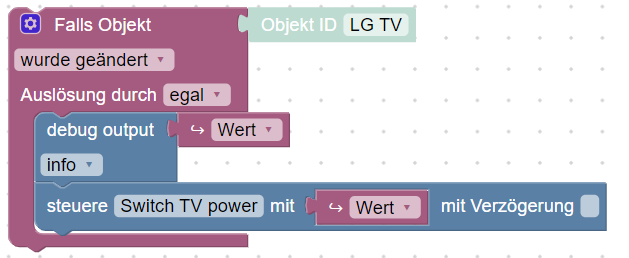
Wie kann ich am besten vorgehen, um das Problem zu finden?Gruß
Ch@spaddel sagte in LG TV schalten direkt oder über iobroker:
Ich habe auch das Debug Element hinzugefügt aber in dem Protokoll taucht nichts auf.
wenn dein Blockly so aussieht wie du es hier gezeigt hast, muss der WERT im log stehen, wenn sichvder Schaltzustand ändert
-
@spaddel sagte in LG TV schalten direkt oder über iobroker:
Die Zeit auf dem Pi habe ich gecheckt. Die passt.
was sagt
iob diag?@homoran ```
======== Start marking the full check here =========


Skript v.2023-10-10

*** BASE SYSTEM ***
 Static hostname: raspberrypi
       Icon name: computer
Operating System: Debian GNU/Linux 12 (bookworm)
          Kernel: Linux 6.1.0-rpi8-rpi-v8
    Architecture: arm64

Model           : Raspberry Pi 4 Model B Rev 1.2
Docker          : false
Virtualization  : none
Kernel          : aarch64
Userland        : arm64

Systemuptime and Load:
 21:36:59 up 3 days, 57 min,  2 users,  load average: 0.17, 0.12, 0.10
CPU threads: 4


*** RASPBERRY THROTTLING ***
Current issues:
No throttling issues detected.

Previously detected issues:
No throttling issues detected.

*** Time and Time Zones ***
               Local time: Thu 2024-02-08 21:36:59 CET
           Universal time: Thu 2024-02-08 20:36:59 UTC
                 RTC time: n/a
                Time zone: Europe/Berlin (CET, +0100)
System clock synchronized: yes
              NTP service: active
          RTC in local TZ: no

*** User and Groups ***
homematic
/home/homematic
homematic adm dialout cdrom sudo audio video plugdev games users input render netdev gpio i2c spi iobroker

*** X-Server-Setup ***
X-Server:       false
Desktop:
Terminal:       tty
Boot Target:    multi-user.target

*** MEMORY ***
               total        used        free      shared  buff/cache   available
Mem:            4.0G        2.3G        912M        1.4M        894M        1.7G
Swap:           2.3G          0B        2.3G
Total:          6.2G        2.3G        3.2G

         3793 M total memory
         2178 M used memory
         2304 M active memory
          470 M inactive memory
          870 M free memory
           98 M buffer memory
          754 M swap cache
         2147 M total swap
            0 M used swap
         2147 M free swap

Raspberry only:
oom events: 0
lifetime oom required: 0 Mbytes
total time in oom handler: 0 ms
max time spent in oom handler: 0 ms


*** FAILED SERVICES ***

  UNIT LOAD ACTIVE SUB DESCRIPTION
0 loaded units listed.

*** FILESYSTEM ***
Filesystem     Type      Size  Used Avail Use% Mounted on
udev           devtmpfs  1.6G     0  1.6G   0% /dev
tmpfs          tmpfs     380M  1.2M  379M   1% /run
/dev/mmcblk0p2 ext4       29G  8.1G   20G  30% /
tmpfs          tmpfs     1.9G     0  1.9G   0% /dev/shm
tmpfs          tmpfs     5.0M   16K  5.0M   1% /run/lock
/dev/mmcblk0p1 vfat      510M   62M  449M  13% /boot/firmware
tmpfs          tmpfs     380M     0  380M   0% /run/user/1000

Messages concerning ext4 filesystem in dmesg:
[Mon Feb  5 20:39:03 2024] Kernel command line: coherent_pool=1M 8250.nr_uarts=1 snd_bcm2835.enable_headphones=0 snd_bcm2835.enable_headphones=1 snd_bcm2835.enable_hdmi=1 snd_bcm2835.enable_hdmi=0  smsc95xx.macaddr=DC:A6:32:58:37:7E vc_mem.mem_base=0x3ec00000 vc_mem.mem_size=0x40000000  console=tty1 root=PARTUUID=e1f515ee-02 rootfstype=ext4 fsck.repair=yes rootwait cfg80211.ieee80211_regdom=DE
[Mon Feb  5 20:39:05 2024] EXT4-fs (mmcblk0p2): mounted filesystem with ordered data mode. Quota mode: none.
[Mon Feb  5 20:39:07 2024] EXT4-fs (mmcblk0p2): re-mounted. Quota mode: none.
[Tue Feb  6 23:01:48 2024] EXT4-fs (mmcblk0p2): re-mounted. Quota mode: none.

Show mounted filesystems \(real ones only\):
TARGET           SOURCE         FSTYPE OPTIONS
/                /dev/mmcblk0p2 ext4   rw,noatime
`-/boot/firmware /dev/mmcblk0p1 vfat   rw,relatime,fmask=0022,dmask=0022,codepage=437,iocharset=ascii,shortname=mixed,errors=remount-ro

Files in neuralgic directories:

/var:
2.1G    /var/
1.3G    /var/lib
673M    /var/lib/piVCCU3
604M    /var/lib/piVCCU3/rootfs
535M    /var/cache

Archived and active journals take up 111.7M in the file system.

/opt/iobroker/backups:
5.5M    /opt/iobroker/backups/

/opt/iobroker/iobroker-data:
189M    /opt/iobroker/iobroker-data/
140M    /opt/iobroker/iobroker-data/files
67M     /opt/iobroker/iobroker-data/files/javascript.admin
48M     /opt/iobroker/iobroker-data/files/javascript.admin/static
47M     /opt/iobroker/iobroker-data/files/javascript.admin/static/js

The five largest files in iobroker-data are:
22M     /opt/iobroker/iobroker-data/files/web.admin/static/js/main.c05ba1d3.js.map
9.4M    /opt/iobroker/iobroker-data/objects.jsonl
8.3M    /opt/iobroker/iobroker-data/files/web.admin/static/js/main.c05ba1d3.js
7.5M    /opt/iobroker/iobroker-data/files/javascript.admin/static/js/691.26ff76ce.chunk.js.map
7.1M    /opt/iobroker/iobroker-data/files/javascript.admin/static/js/610.d3cce782.chunk.js.map

USB-Devices by-id:
USB-Sticks -  Avoid direct links to /dev/* in your adapter setups, please always prefer the links 'by-id':

find: '/dev/serial/by-id/': No such file or directory

*** NodeJS-Installation ***

/usr/bin/nodejs         v18.19.0
/usr/bin/node           v18.19.0
/usr/bin/npm            10.2.3
/usr/bin/npx            10.2.3
/usr/bin/corepack       0.22.0


nodejs:
  Installed: 18.19.0-1nodesource1
  Candidate: 18.19.0-1nodesource1
  Version table:
     18.19.0+dfsg-6~deb12u1 500
        500 http://deb.debian.org/debian-security bookworm-security/main arm64 Packages
 *** 18.19.0-1nodesource1 600
        500 https://deb.nodesource.com/node_18.x nodistro/main arm64 Packages
        100 /var/lib/dpkg/status
     18.18.2-1nodesource1 600
        500 https://deb.nodesource.com/node_18.x nodistro/main arm64 Packages
     18.18.1-1nodesource1 600
        500 https://deb.nodesource.com/node_18.x nodistro/main arm64 Packages
     18.18.0-1nodesource1 600
        500 https://deb.nodesource.com/node_18.x nodistro/main arm64 Packages
     18.17.1-1nodesource1 600
        500 https://deb.nodesource.com/node_18.x nodistro/main arm64 Packages
     18.17.0-1nodesource1 600
        500 https://deb.nodesource.com/node_18.x nodistro/main arm64 Packages
     18.16.1-1nodesource1 600
        500 https://deb.nodesource.com/node_18.x nodistro/main arm64 Packages
     18.16.0-1nodesource1 600
        500 https://deb.nodesource.com/node_18.x nodistro/main arm64 Packages
     18.15.0-1nodesource1 600
        500 https://deb.nodesource.com/node_18.x nodistro/main arm64 Packages
     18.14.2-1nodesource1 600
        500 https://deb.nodesource.com/node_18.x nodistro/main arm64 Packages
     18.14.1-1nodesource1 600
        500 https://deb.nodesource.com/node_18.x nodistro/main arm64 Packages
     18.14.0-1nodesource1 600
        500 https://deb.nodesource.com/node_18.x nodistro/main arm64 Packages
     18.13.0+dfsg1-1 500
        500 http://deb.debian.org/debian bookworm/main arm64 Packages
        500 https://ftp.debian.org/debian bookworm/main arm64 Packages
     18.13.0-1nodesource1 600
        500 https://deb.nodesource.com/node_18.x nodistro/main arm64 Packages
     18.12.0-1nodesource1 600
        500 https://deb.nodesource.com/node_18.x nodistro/main arm64 Packages
     18.11.0-1nodesource1 600
        500 https://deb.nodesource.com/node_18.x nodistro/main arm64 Packages
     18.10.0-1nodesource1 600
        500 https://deb.nodesource.com/node_18.x nodistro/main arm64 Packages
     18.9.1-1nodesource1 600
        500 https://deb.nodesource.com/node_18.x nodistro/main arm64 Packages
     18.9.0-1nodesource1 600
        500 https://deb.nodesource.com/node_18.x nodistro/main arm64 Packages
     18.8.0-1nodesource1 600
        500 https://deb.nodesource.com/node_18.x nodistro/main arm64 Packages
     18.7.0-1nodesource1 600
        500 https://deb.nodesource.com/node_18.x nodistro/main arm64 Packages
     18.6.0-1nodesource1 600
        500 https://deb.nodesource.com/node_18.x nodistro/main arm64 Packages
     18.5.0-1nodesource1 600
        500 https://deb.nodesource.com/node_18.x nodistro/main arm64 Packages
     18.4.0-1nodesource1 600
        500 https://deb.nodesource.com/node_18.x nodistro/main arm64 Packages
     18.3.0-1nodesource1 600
        500 https://deb.nodesource.com/node_18.x nodistro/main arm64 Packages
     18.2.0-1nodesource1 600
        500 https://deb.nodesource.com/node_18.x nodistro/main arm64 Packages
     18.1.0-1nodesource1 600
        500 https://deb.nodesource.com/node_18.x nodistro/main arm64 Packages
     18.0.0-1nodesource1 600
        500 https://deb.nodesource.com/node_18.x nodistro/main arm64 Packages

Temp directories causing npm8 problem: 0
No problems detected

Errors in npm tree:

*** ioBroker-Installation ***

ioBroker Status
iobroker is running on this host.


Objects type: jsonl
States  type: jsonl

Core adapters versions
js-controller:  5.0.17
admin:          6.13.16
javascript:     7.1.6

Adapters from github:   0

Adapter State
+ system.adapter.admin.0                  : admin                 : raspberrypi                              -  enabled, port: 8081, bind: 0.0.0.0, run as: admin
+ system.adapter.broadlink2.0             : broadlink2            : raspberrypi                              -  enabled
+ system.adapter.discovery.0              : discovery             : raspberrypi                              -  enabled
+ system.adapter.hm-rega.0                : hm-rega               : raspberrypi                              -  enabled
+ system.adapter.hm-rpc.0                 : hm-rpc                : raspberrypi                              -  enabled, port: 0
+ system.adapter.javascript.0             : javascript            : raspberrypi                              -  enabled
+ system.adapter.lgtv.0                   : lgtv                  : raspberrypi                              -  enabled
+ system.adapter.onvif.0                  : onvif                 : raspberrypi                              -  enabled
+ system.adapter.simple-api.0             : simple-api            : raspberrypi                              -  enabled, port: 8087, bind: 0.0.0.0, run as: admin
+ system.adapter.sonos.0                  : sonos                 : raspberrypi                              -  enabled
  system.adapter.vis-bars.0               : vis-bars              : raspberrypi                              -  enabled
  system.adapter.vis-fancyswitch.0        : vis-fancyswitch       : raspberrypi                              -  enabled
  system.adapter.vis-hqwidgets.0          : vis-hqwidgets         : raspberrypi                              -  enabled
  system.adapter.vis-jqui-mfd.0           : vis-jqui-mfd          : raspberrypi                              -  enabled
  system.adapter.vis-keyboard.0           : vis-keyboard          : raspberrypi                              -  enabled
  system.adapter.vis-metro.0              : vis-metro             : raspberrypi                              -  enabled
  system.adapter.vis-players.0            : vis-players           : raspberrypi                              -  enabled
  system.adapter.vis.0                    : vis                   : raspberrypi                              -  enabled
+ system.adapter.web.0                    : web                   : raspberrypi                              -  enabled, port: 8082, bind: 0.0.0.0, run as: admin

+ instance is alive

Enabled adapters with bindings
+ system.adapter.admin.0                  : admin                 : raspberrypi                              -  enabled, port: 8081, bind: 0.0.0.0, run as: admin
+ system.adapter.hm-rpc.0                 : hm-rpc                : raspberrypi                              -  enabled, port: 0
+ system.adapter.simple-api.0             : simple-api            : raspberrypi                              -  enabled, port: 8087, bind: 0.0.0.0, run as: admin
+ system.adapter.web.0                    : web                   : raspberrypi                              -  enabled, port: 8082, bind: 0.0.0.0, run as: admin

ioBroker-Repositories
stable        : http://download.iobroker.net/sources-dist.json
beta          : http://download.iobroker.net/sources-dist-latest.json

Active repo(s): stable

Installed ioBroker-Instances
Used repository: stable
Adapter    "admin"        : 6.13.16  , installed 6.13.16
Adapter    "broadlink2"   : 2.1.5    , installed 2.1.5
Adapter    "discovery"    : 4.2.0    , installed 4.2.0
Adapter    "hm-rega"      : 4.0.0    , installed 4.0.0
Adapter    "hm-rpc"       : 1.16.0   , installed 1.16.0
Adapter    "javascript"   : 7.1.6    , installed 7.1.6
Controller "js-controller": 5.0.17   , installed 5.0.17
Adapter    "lgtv"         : 2.1.2    , installed 2.1.2
Adapter    "onvif"        : 1.1.1    , installed 1.1.1
Adapter    "simple-api"   : 2.7.2    , installed 2.7.2
Adapter    "socketio"     : 6.6.0    , installed 6.6.0
Adapter    "sonos"        : 3.0.0    , installed 3.0.0
Adapter    "vis"          : 1.5.4    , installed 1.5.4
Adapter    "vis-bars"     : 0.1.4    , installed 0.1.4
Adapter    "vis-fancyswitch": 1.1.0  , installed 1.1.0
Adapter    "vis-hqwidgets": 1.4.0    , installed 1.4.0
Adapter    "vis-jqui-mfd" : 1.0.12   , installed 1.0.12
Adapter    "vis-keyboard" : 0.0.2    , installed 0.0.2
Adapter    "vis-metro"    : 1.2.0    , installed 1.2.0
Adapter    "vis-players"  : 0.1.6    , installed 0.1.6
Adapter    "web"          : 6.2.3    , installed 6.2.3
Adapter    "ws"           : 2.5.10   , installed 2.5.10

Objects and States
Please stand by - This may take a while
Objects:        1724
States:         1352

*** OS-Repositories and Updates ***
W: GPG error: https://repo.mongodb.org/apt/ubuntu xenial/mongodb-org/3.6 Release: The following signatures were invalid: EXPKEYSIG 58712A2291FA4AD5 MongoDB 3.6 Release Signing Key <packaging@mongodb.com>
Hit:1 http://deb.debian.org/debian bookworm InRelease
Hit:2 http://deb.debian.org/debian-security bookworm-security InRelease
Hit:3 http://archive.raspberrypi.com/debian bookworm InRelease
Hit:4 http://deb.debian.org/debian bookworm-updates InRelease
Ign:5 https://repo.mongodb.org/apt/ubuntu xenial/mongodb-org/3.6 InRelease
Hit:6 https://ftp.debian.org/debian bookworm InRelease
Hit:7 https://apt.pivccu.de/piVCCU stable InRelease
Hit:8 https://deb.nodesource.com/node_18.x nodistro InRelease
Hit:9 https://repo.mongodb.org/apt/ubuntu xenial/mongodb-org/3.6 Release
Get:10 https://packages.adoptium.net/artifactory/deb bookworm InRelease [6641 B]
Get:11 https://repo.mongodb.org/apt/ubuntu xenial/mongodb-org/3.6 Release.gpg [801 B]
Ign:11 https://repo.mongodb.org/apt/ubuntu xenial/mongodb-org/3.6 Release.gpg
Fetched 7442 B in 2s (3767 B/s)
Reading package lists...
W: GPG error: https://repo.mongodb.org/apt/ubuntu xenial/mongodb-org/3.6 Release: The following signatures were invalid: EXPKEYSIG 58712A2291FA4AD5 MongoDB 3.6 Release Signing Key <packaging@mongodb.com>
Pending Updates: 1

*** Listening Ports ***
Active Internet connections (only servers)
Proto Recv-Q Send-Q Local Address           Foreign Address         State       User       Inode      PID/Program name
tcp        0      0 0.0.0.0:22              0.0.0.0:*               LISTEN      0          15667      1020/sshd: /usr/sbi
tcp        0      0 127.0.0.1:9001          0.0.0.0:*               LISTEN      1001       13095      977/iobroker.js-con
tcp        0      0 127.0.0.1:9000          0.0.0.0:*               LISTEN      1001       17548      977/iobroker.js-con
tcp        0      0 10.0.3.1:53             0.0.0.0:*               LISTEN      0          15755      1182/dnsmasq
tcp        0      0 127.0.0.1:27117         0.0.0.0:*               LISTEN      108        18766      2364/bin/mongod
tcp        0      0 192.168.2.56:2001       0.0.0.0:*               LISTEN      1001       17041      1888/io.hm-rpc.0
tcp6       0      0 :::6789                 :::*                    LISTEN      108        19056      1029/java
tcp6       0      0 :::8843                 :::*                    LISTEN      108        16829      1029/java
tcp6       0      0 :::8880                 :::*                    LISTEN      108        16818      1029/java
tcp6       0      0 :::8443                 :::*                    LISTEN      108        16823      1029/java
tcp6       0      0 :::22                   :::*                    LISTEN      0          15669      1020/sshd: /usr/sbi
tcp6       0      0 :::8087                 :::*                    LISTEN      1001       18848      2436/io.simple-api.
tcp6       0      0 :::8082                 :::*                    LISTEN      1001       17149      2228/io.web.0
tcp6       0      0 :::8081                 :::*                    LISTEN      1001       16017      1828/io.admin.0
tcp6       0      0 :::8080                 :::*                    LISTEN      108        15987      1029/java
tcp6       0      0 :::3500                 :::*                    LISTEN      1001       18537      2149/io.sonos.0
udp        0      0 10.0.3.1:53             0.0.0.0:*                           0          15754      1182/dnsmasq
udp        0      0 0.0.0.0:67              0.0.0.0:*                           0          15751      1182/dnsmasq
udp        0      0 0.0.0.0:68              0.0.0.0:*                           0          12871      912/dhclient
udp        0      0 0.0.0.0:15001           0.0.0.0:*                           1001       17165      2271/io.broadlink2.
udp        0      0 0.0.0.0:56523           0.0.0.0:*                           1001       17209      2271/io.broadlink2.
udp        0      0 0.0.0.0:5353            0.0.0.0:*                           104        12649      459/avahi-daemon: r
udp        0      0 0.0.0.0:34154           0.0.0.0:*                           104        12651      459/avahi-daemon: r
udp6       0      0 192.168.2.55:37093      :::*                                108        19068      1029/java
udp6       0      0 10.0.3.1:55643          :::*                                108        19066      1029/java
udp6       0      0 :::5353                 :::*                                104        12650      459/avahi-daemon: r
udp6       0      0 :::3478                 :::*                                108        17345      1029/java
udp6       0      0 :::10001                :::*                                108        19069      1029/java
udp6       0      0 192.168.2.56:50966      :::*                                108        19067      1029/java
udp6       0      0 :::46902                :::*                                104        12652      459/avahi-daemon: r

*** Log File - Last 25 Lines ***

2024-02-08 20:08:30.436  - info: admin.0 (1828) <== Disconnect system.user.admin from ::ffff:192.168.2.31 javascript
2024-02-08 20:13:45.832  - info: web.0 (2228) <== Disconnect system.user.admin from ::ffff:192.168.2.31 vis.0
2024-02-08 20:15:33.100  - info: admin.0 (1828) ==> Connected system.user.admin from ::ffff:192.168.2.31
2024-02-08 20:15:51.994  - info: javascript.0 (1849) Stop script script.js.LG_TV_aus
2024-02-08 20:15:52.096  - info: javascript.0 (1849) Start javascript script.js.LG_TV_aus
2024-02-08 20:15:52.107  - info: javascript.0 (1849) script.js.LG_TV_aus: registered 1 subscription, 0 schedules, 0 messages, 0 logs and 0 file subscriptions
2024-02-08 20:15:55.332  - info: admin.0 (1828) <== Disconnect system.user.admin from ::ffff:192.168.2.31 javascript
2024-02-08 20:16:42.054  - info: hm-rega.0 (828459) pollingTrigger
2024-02-08 20:16:55.388  - info: admin.0 (1828) ==> Connected system.user.admin from ::ffff:192.168.2.31
2024-02-08 20:17:00.177  - info: admin.0 (1828) <== Disconnect system.user.admin from ::ffff:192.168.2.31 javascript
2024-02-08 20:26:03.768  - info: hm-rega.0 (828459) pollingTrigger
2024-02-08 20:30:38.763  - info: admin.0 (1828) ==> Connected system.user.admin from ::ffff:192.168.2.31
2024-02-08 20:30:59.508  - info: admin.0 (1828) <== Disconnect system.user.admin from ::ffff:192.168.2.31 javascript
2024-02-08 20:31:06.579  - info: admin.0 (1828) ==> Connected system.user.admin from ::ffff:192.168.2.31
2024-02-08 20:31:46.602  - info: javascript.0 (1849) Stop script script.js.LG_TV_aus
2024-02-08 20:31:46.698  - info: javascript.0 (1849) Start javascript script.js.LG_TV_aus
2024-02-08 20:31:46.709  - info: javascript.0 (1849) script.js.LG_TV_aus: registered 1 subscription, 0 schedules, 0 messages, 0 logs and 0 file subscriptions
2024-02-08 20:32:02.038  - info: admin.0 (1828) <== Disconnect system.user.admin from ::ffff:192.168.2.31 javascript
2024-02-08 20:33:29.566  - info: admin.0 (1828) ==> Connected system.user.admin from ::ffff:192.168.2.31
2024-02-08 20:35:30.080  - info: admin.0 (1828) <== Disconnect system.user.admin from ::ffff:192.168.2.31 javascript
2024-02-08 20:35:33.156  - info: admin.0 (1828) ==> Connected system.user.admin from ::ffff:192.168.2.31
2024-02-08 20:35:37.705  - info: javascript.0 (1849) Stop script script.js.LG_TV_aus
2024-02-08 20:35:37.798  - info: javascript.0 (1849) Start javascript script.js.LG_TV_aus
2024-02-08 20:35:37.804  - info: javascript.0 (1849) script.js.LG_TV_aus: registered 1 subscription, 0 schedules, 0 messages, 0 logs and 0 file subscriptions
2024-02-08 20:35:40.010  - info: admin.0 (1828) <== Disconnect system.user.admin from ::ffff:192.168.2.31 javascript


============ Mark until here for C&P =============

iob diag has finished.
======================= SUMMARY ======================= v.2023-10-10 Static hostname: raspberrypi Icon name: computer Operating System: Debian GNU/Linux 12 (bookworm) Kernel: Linux 6.1.0-rpi8-rpi-v8 Architecture: arm64 Installation: native Kernel: aarch64 Userland: arm64 Timezone: Europe/Berlin (CET, +0100) User-ID: 1000 X-Server: false Boot Target: multi-user.target Pending OS-Updates: 1 Pending iob updates: 0 Nodejs-Installation: /usr/bin/nodejs v18.19.0 /usr/bin/node v18.19.0 /usr/bin/npm 10.2.3 /usr/bin/npx 10.2.3 /usr/bin/corepack 0.22.0 Recommended versions are nodejs 18.19.0 and npm 10.2.3 Your nodejs installation is correct MEMORY: total used free shared buff/cache available Mem: 4.0G 2.3G 464M 1.4M 1.3G 1.7G Swap: 2.3G 0B 2.3G Total: 6.2G 2.3G 2.7G Active iob-Instances: 12 Active repo(s): stable ioBroker Core: js-controller 5.0.17 admin 6.13.16 ioBroker Status: iobroker is running on this host. Objects type: jsonl States type: jsonl Status admin and web instance: + system.adapter.admin.0 : admin : raspberrypi - enabled, port: 8081, bind: 0.0.0.0, run as: admin + system.adapter.web.0 : web : raspberrypi - enabled, port: 8082, bind: 0.0.0.0, run as: admin Objects: 1724 States: 1352 Size of iob-Database: 9.4M /opt/iobroker/iobroker-data/objects.jsonl 1.6M /opt/iobroker/iobroker-data/states.jsonl =================== END OF SUMMARY ==================== -
@homoran ```
======== Start marking the full check here =========


Skript v.2023-10-10

*** BASE SYSTEM ***
 Static hostname: raspberrypi
       Icon name: computer
Operating System: Debian GNU/Linux 12 (bookworm)
          Kernel: Linux 6.1.0-rpi8-rpi-v8
    Architecture: arm64

Model           : Raspberry Pi 4 Model B Rev 1.2
Docker          : false
Virtualization  : none
Kernel          : aarch64
Userland        : arm64

Systemuptime and Load:
 21:36:59 up 3 days, 57 min,  2 users,  load average: 0.17, 0.12, 0.10
CPU threads: 4


*** RASPBERRY THROTTLING ***
Current issues:
No throttling issues detected.

Previously detected issues:
No throttling issues detected.

*** Time and Time Zones ***
               Local time: Thu 2024-02-08 21:36:59 CET
           Universal time: Thu 2024-02-08 20:36:59 UTC
                 RTC time: n/a
                Time zone: Europe/Berlin (CET, +0100)
System clock synchronized: yes
              NTP service: active
          RTC in local TZ: no

*** User and Groups ***
homematic
/home/homematic
homematic adm dialout cdrom sudo audio video plugdev games users input render netdev gpio i2c spi iobroker

*** X-Server-Setup ***
X-Server:       false
Desktop:
Terminal:       tty
Boot Target:    multi-user.target

*** MEMORY ***
               total        used        free      shared  buff/cache   available
Mem:            4.0G        2.3G        912M        1.4M        894M        1.7G
Swap:           2.3G          0B        2.3G
Total:          6.2G        2.3G        3.2G

         3793 M total memory
         2178 M used memory
         2304 M active memory
          470 M inactive memory
          870 M free memory
           98 M buffer memory
          754 M swap cache
         2147 M total swap
            0 M used swap
         2147 M free swap

Raspberry only:
oom events: 0
lifetime oom required: 0 Mbytes
total time in oom handler: 0 ms
max time spent in oom handler: 0 ms


*** FAILED SERVICES ***

  UNIT LOAD ACTIVE SUB DESCRIPTION
0 loaded units listed.

*** FILESYSTEM ***
Filesystem     Type      Size  Used Avail Use% Mounted on
udev           devtmpfs  1.6G     0  1.6G   0% /dev
tmpfs          tmpfs     380M  1.2M  379M   1% /run
/dev/mmcblk0p2 ext4       29G  8.1G   20G  30% /
tmpfs          tmpfs     1.9G     0  1.9G   0% /dev/shm
tmpfs          tmpfs     5.0M   16K  5.0M   1% /run/lock
/dev/mmcblk0p1 vfat      510M   62M  449M  13% /boot/firmware
tmpfs          tmpfs     380M     0  380M   0% /run/user/1000

Messages concerning ext4 filesystem in dmesg:
[Mon Feb  5 20:39:03 2024] Kernel command line: coherent_pool=1M 8250.nr_uarts=1 snd_bcm2835.enable_headphones=0 snd_bcm2835.enable_headphones=1 snd_bcm2835.enable_hdmi=1 snd_bcm2835.enable_hdmi=0  smsc95xx.macaddr=DC:A6:32:58:37:7E vc_mem.mem_base=0x3ec00000 vc_mem.mem_size=0x40000000  console=tty1 root=PARTUUID=e1f515ee-02 rootfstype=ext4 fsck.repair=yes rootwait cfg80211.ieee80211_regdom=DE
[Mon Feb  5 20:39:05 2024] EXT4-fs (mmcblk0p2): mounted filesystem with ordered data mode. Quota mode: none.
[Mon Feb  5 20:39:07 2024] EXT4-fs (mmcblk0p2): re-mounted. Quota mode: none.
[Tue Feb  6 23:01:48 2024] EXT4-fs (mmcblk0p2): re-mounted. Quota mode: none.

Show mounted filesystems \(real ones only\):
TARGET           SOURCE         FSTYPE OPTIONS
/                /dev/mmcblk0p2 ext4   rw,noatime
`-/boot/firmware /dev/mmcblk0p1 vfat   rw,relatime,fmask=0022,dmask=0022,codepage=437,iocharset=ascii,shortname=mixed,errors=remount-ro

Files in neuralgic directories:

/var:
2.1G    /var/
1.3G    /var/lib
673M    /var/lib/piVCCU3
604M    /var/lib/piVCCU3/rootfs
535M    /var/cache

Archived and active journals take up 111.7M in the file system.

/opt/iobroker/backups:
5.5M    /opt/iobroker/backups/

/opt/iobroker/iobroker-data:
189M    /opt/iobroker/iobroker-data/
140M    /opt/iobroker/iobroker-data/files
67M     /opt/iobroker/iobroker-data/files/javascript.admin
48M     /opt/iobroker/iobroker-data/files/javascript.admin/static
47M     /opt/iobroker/iobroker-data/files/javascript.admin/static/js

The five largest files in iobroker-data are:
22M     /opt/iobroker/iobroker-data/files/web.admin/static/js/main.c05ba1d3.js.map
9.4M    /opt/iobroker/iobroker-data/objects.jsonl
8.3M    /opt/iobroker/iobroker-data/files/web.admin/static/js/main.c05ba1d3.js
7.5M    /opt/iobroker/iobroker-data/files/javascript.admin/static/js/691.26ff76ce.chunk.js.map
7.1M    /opt/iobroker/iobroker-data/files/javascript.admin/static/js/610.d3cce782.chunk.js.map

USB-Devices by-id:
USB-Sticks -  Avoid direct links to /dev/* in your adapter setups, please always prefer the links 'by-id':

find: '/dev/serial/by-id/': No such file or directory

*** NodeJS-Installation ***

/usr/bin/nodejs         v18.19.0
/usr/bin/node           v18.19.0
/usr/bin/npm            10.2.3
/usr/bin/npx            10.2.3
/usr/bin/corepack       0.22.0


nodejs:
  Installed: 18.19.0-1nodesource1
  Candidate: 18.19.0-1nodesource1
  Version table:
     18.19.0+dfsg-6~deb12u1 500
        500 http://deb.debian.org/debian-security bookworm-security/main arm64 Packages
 *** 18.19.0-1nodesource1 600
        500 https://deb.nodesource.com/node_18.x nodistro/main arm64 Packages
        100 /var/lib/dpkg/status
     18.18.2-1nodesource1 600
        500 https://deb.nodesource.com/node_18.x nodistro/main arm64 Packages
     18.18.1-1nodesource1 600
        500 https://deb.nodesource.com/node_18.x nodistro/main arm64 Packages
     18.18.0-1nodesource1 600
        500 https://deb.nodesource.com/node_18.x nodistro/main arm64 Packages
     18.17.1-1nodesource1 600
        500 https://deb.nodesource.com/node_18.x nodistro/main arm64 Packages
     18.17.0-1nodesource1 600
        500 https://deb.nodesource.com/node_18.x nodistro/main arm64 Packages
     18.16.1-1nodesource1 600
        500 https://deb.nodesource.com/node_18.x nodistro/main arm64 Packages
     18.16.0-1nodesource1 600
        500 https://deb.nodesource.com/node_18.x nodistro/main arm64 Packages
     18.15.0-1nodesource1 600
        500 https://deb.nodesource.com/node_18.x nodistro/main arm64 Packages
     18.14.2-1nodesource1 600
        500 https://deb.nodesource.com/node_18.x nodistro/main arm64 Packages
     18.14.1-1nodesource1 600
        500 https://deb.nodesource.com/node_18.x nodistro/main arm64 Packages
     18.14.0-1nodesource1 600
        500 https://deb.nodesource.com/node_18.x nodistro/main arm64 Packages
     18.13.0+dfsg1-1 500
        500 http://deb.debian.org/debian bookworm/main arm64 Packages
        500 https://ftp.debian.org/debian bookworm/main arm64 Packages
     18.13.0-1nodesource1 600
        500 https://deb.nodesource.com/node_18.x nodistro/main arm64 Packages
     18.12.0-1nodesource1 600
        500 https://deb.nodesource.com/node_18.x nodistro/main arm64 Packages
     18.11.0-1nodesource1 600
        500 https://deb.nodesource.com/node_18.x nodistro/main arm64 Packages
     18.10.0-1nodesource1 600
        500 https://deb.nodesource.com/node_18.x nodistro/main arm64 Packages
     18.9.1-1nodesource1 600
        500 https://deb.nodesource.com/node_18.x nodistro/main arm64 Packages
     18.9.0-1nodesource1 600
        500 https://deb.nodesource.com/node_18.x nodistro/main arm64 Packages
     18.8.0-1nodesource1 600
        500 https://deb.nodesource.com/node_18.x nodistro/main arm64 Packages
     18.7.0-1nodesource1 600
        500 https://deb.nodesource.com/node_18.x nodistro/main arm64 Packages
     18.6.0-1nodesource1 600
        500 https://deb.nodesource.com/node_18.x nodistro/main arm64 Packages
     18.5.0-1nodesource1 600
        500 https://deb.nodesource.com/node_18.x nodistro/main arm64 Packages
     18.4.0-1nodesource1 600
        500 https://deb.nodesource.com/node_18.x nodistro/main arm64 Packages
     18.3.0-1nodesource1 600
        500 https://deb.nodesource.com/node_18.x nodistro/main arm64 Packages
     18.2.0-1nodesource1 600
        500 https://deb.nodesource.com/node_18.x nodistro/main arm64 Packages
     18.1.0-1nodesource1 600
        500 https://deb.nodesource.com/node_18.x nodistro/main arm64 Packages
     18.0.0-1nodesource1 600
        500 https://deb.nodesource.com/node_18.x nodistro/main arm64 Packages

Temp directories causing npm8 problem: 0
No problems detected

Errors in npm tree:

*** ioBroker-Installation ***

ioBroker Status
iobroker is running on this host.


Objects type: jsonl
States  type: jsonl

Core adapters versions
js-controller:  5.0.17
admin:          6.13.16
javascript:     7.1.6

Adapters from github:   0

Adapter State
+ system.adapter.admin.0                  : admin                 : raspberrypi                              -  enabled, port: 8081, bind: 0.0.0.0, run as: admin
+ system.adapter.broadlink2.0             : broadlink2            : raspberrypi                              -  enabled
+ system.adapter.discovery.0              : discovery             : raspberrypi                              -  enabled
+ system.adapter.hm-rega.0                : hm-rega               : raspberrypi                              -  enabled
+ system.adapter.hm-rpc.0                 : hm-rpc                : raspberrypi                              -  enabled, port: 0
+ system.adapter.javascript.0             : javascript            : raspberrypi                              -  enabled
+ system.adapter.lgtv.0                   : lgtv                  : raspberrypi                              -  enabled
+ system.adapter.onvif.0                  : onvif                 : raspberrypi                              -  enabled
+ system.adapter.simple-api.0             : simple-api            : raspberrypi                              -  enabled, port: 8087, bind: 0.0.0.0, run as: admin
+ system.adapter.sonos.0                  : sonos                 : raspberrypi                              -  enabled
  system.adapter.vis-bars.0               : vis-bars              : raspberrypi                              -  enabled
  system.adapter.vis-fancyswitch.0        : vis-fancyswitch       : raspberrypi                              -  enabled
  system.adapter.vis-hqwidgets.0          : vis-hqwidgets         : raspberrypi                              -  enabled
  system.adapter.vis-jqui-mfd.0           : vis-jqui-mfd          : raspberrypi                              -  enabled
  system.adapter.vis-keyboard.0           : vis-keyboard          : raspberrypi                              -  enabled
  system.adapter.vis-metro.0              : vis-metro             : raspberrypi                              -  enabled
  system.adapter.vis-players.0            : vis-players           : raspberrypi                              -  enabled
  system.adapter.vis.0                    : vis                   : raspberrypi                              -  enabled
+ system.adapter.web.0                    : web                   : raspberrypi                              -  enabled, port: 8082, bind: 0.0.0.0, run as: admin

+ instance is alive

Enabled adapters with bindings
+ system.adapter.admin.0                  : admin                 : raspberrypi                              -  enabled, port: 8081, bind: 0.0.0.0, run as: admin
+ system.adapter.hm-rpc.0                 : hm-rpc                : raspberrypi                              -  enabled, port: 0
+ system.adapter.simple-api.0             : simple-api            : raspberrypi                              -  enabled, port: 8087, bind: 0.0.0.0, run as: admin
+ system.adapter.web.0                    : web                   : raspberrypi                              -  enabled, port: 8082, bind: 0.0.0.0, run as: admin

ioBroker-Repositories
stable        : http://download.iobroker.net/sources-dist.json
beta          : http://download.iobroker.net/sources-dist-latest.json

Active repo(s): stable

Installed ioBroker-Instances
Used repository: stable
Adapter    "admin"        : 6.13.16  , installed 6.13.16
Adapter    "broadlink2"   : 2.1.5    , installed 2.1.5
Adapter    "discovery"    : 4.2.0    , installed 4.2.0
Adapter    "hm-rega"      : 4.0.0    , installed 4.0.0
Adapter    "hm-rpc"       : 1.16.0   , installed 1.16.0
Adapter    "javascript"   : 7.1.6    , installed 7.1.6
Controller "js-controller": 5.0.17   , installed 5.0.17
Adapter    "lgtv"         : 2.1.2    , installed 2.1.2
Adapter    "onvif"        : 1.1.1    , installed 1.1.1
Adapter    "simple-api"   : 2.7.2    , installed 2.7.2
Adapter    "socketio"     : 6.6.0    , installed 6.6.0
Adapter    "sonos"        : 3.0.0    , installed 3.0.0
Adapter    "vis"          : 1.5.4    , installed 1.5.4
Adapter    "vis-bars"     : 0.1.4    , installed 0.1.4
Adapter    "vis-fancyswitch": 1.1.0  , installed 1.1.0
Adapter    "vis-hqwidgets": 1.4.0    , installed 1.4.0
Adapter    "vis-jqui-mfd" : 1.0.12   , installed 1.0.12
Adapter    "vis-keyboard" : 0.0.2    , installed 0.0.2
Adapter    "vis-metro"    : 1.2.0    , installed 1.2.0
Adapter    "vis-players"  : 0.1.6    , installed 0.1.6
Adapter    "web"          : 6.2.3    , installed 6.2.3
Adapter    "ws"           : 2.5.10   , installed 2.5.10

Objects and States
Please stand by - This may take a while
Objects:        1724
States:         1352

*** OS-Repositories and Updates ***
W: GPG error: https://repo.mongodb.org/apt/ubuntu xenial/mongodb-org/3.6 Release: The following signatures were invalid: EXPKEYSIG 58712A2291FA4AD5 MongoDB 3.6 Release Signing Key <packaging@mongodb.com>
Hit:1 http://deb.debian.org/debian bookworm InRelease
Hit:2 http://deb.debian.org/debian-security bookworm-security InRelease
Hit:3 http://archive.raspberrypi.com/debian bookworm InRelease
Hit:4 http://deb.debian.org/debian bookworm-updates InRelease
Ign:5 https://repo.mongodb.org/apt/ubuntu xenial/mongodb-org/3.6 InRelease
Hit:6 https://ftp.debian.org/debian bookworm InRelease
Hit:7 https://apt.pivccu.de/piVCCU stable InRelease
Hit:8 https://deb.nodesource.com/node_18.x nodistro InRelease
Hit:9 https://repo.mongodb.org/apt/ubuntu xenial/mongodb-org/3.6 Release
Get:10 https://packages.adoptium.net/artifactory/deb bookworm InRelease [6641 B]
Get:11 https://repo.mongodb.org/apt/ubuntu xenial/mongodb-org/3.6 Release.gpg [801 B]
Ign:11 https://repo.mongodb.org/apt/ubuntu xenial/mongodb-org/3.6 Release.gpg
Fetched 7442 B in 2s (3767 B/s)
Reading package lists...
W: GPG error: https://repo.mongodb.org/apt/ubuntu xenial/mongodb-org/3.6 Release: The following signatures were invalid: EXPKEYSIG 58712A2291FA4AD5 MongoDB 3.6 Release Signing Key <packaging@mongodb.com>
Pending Updates: 1

*** Listening Ports ***
Active Internet connections (only servers)
Proto Recv-Q Send-Q Local Address           Foreign Address         State       User       Inode      PID/Program name
tcp        0      0 0.0.0.0:22              0.0.0.0:*               LISTEN      0          15667      1020/sshd: /usr/sbi
tcp        0      0 127.0.0.1:9001          0.0.0.0:*               LISTEN      1001       13095      977/iobroker.js-con
tcp        0      0 127.0.0.1:9000          0.0.0.0:*               LISTEN      1001       17548      977/iobroker.js-con
tcp        0      0 10.0.3.1:53             0.0.0.0:*               LISTEN      0          15755      1182/dnsmasq
tcp        0      0 127.0.0.1:27117         0.0.0.0:*               LISTEN      108        18766      2364/bin/mongod
tcp        0      0 192.168.2.56:2001       0.0.0.0:*               LISTEN      1001       17041      1888/io.hm-rpc.0
tcp6       0      0 :::6789                 :::*                    LISTEN      108        19056      1029/java
tcp6       0      0 :::8843                 :::*                    LISTEN      108        16829      1029/java
tcp6       0      0 :::8880                 :::*                    LISTEN      108        16818      1029/java
tcp6       0      0 :::8443                 :::*                    LISTEN      108        16823      1029/java
tcp6       0      0 :::22                   :::*                    LISTEN      0          15669      1020/sshd: /usr/sbi
tcp6       0      0 :::8087                 :::*                    LISTEN      1001       18848      2436/io.simple-api.
tcp6       0      0 :::8082                 :::*                    LISTEN      1001       17149      2228/io.web.0
tcp6       0      0 :::8081                 :::*                    LISTEN      1001       16017      1828/io.admin.0
tcp6       0      0 :::8080                 :::*                    LISTEN      108        15987      1029/java
tcp6       0      0 :::3500                 :::*                    LISTEN      1001       18537      2149/io.sonos.0
udp        0      0 10.0.3.1:53             0.0.0.0:*                           0          15754      1182/dnsmasq
udp        0      0 0.0.0.0:67              0.0.0.0:*                           0          15751      1182/dnsmasq
udp        0      0 0.0.0.0:68              0.0.0.0:*                           0          12871      912/dhclient
udp        0      0 0.0.0.0:15001           0.0.0.0:*                           1001       17165      2271/io.broadlink2.
udp        0      0 0.0.0.0:56523           0.0.0.0:*                           1001       17209      2271/io.broadlink2.
udp        0      0 0.0.0.0:5353            0.0.0.0:*                           104        12649      459/avahi-daemon: r
udp        0      0 0.0.0.0:34154           0.0.0.0:*                           104        12651      459/avahi-daemon: r
udp6       0      0 192.168.2.55:37093      :::*                                108        19068      1029/java
udp6       0      0 10.0.3.1:55643          :::*                                108        19066      1029/java
udp6       0      0 :::5353                 :::*                                104        12650      459/avahi-daemon: r
udp6       0      0 :::3478                 :::*                                108        17345      1029/java
udp6       0      0 :::10001                :::*                                108        19069      1029/java
udp6       0      0 192.168.2.56:50966      :::*                                108        19067      1029/java
udp6       0      0 :::46902                :::*                                104        12652      459/avahi-daemon: r

*** Log File - Last 25 Lines ***

2024-02-08 20:08:30.436  - info: admin.0 (1828) <== Disconnect system.user.admin from ::ffff:192.168.2.31 javascript
2024-02-08 20:13:45.832  - info: web.0 (2228) <== Disconnect system.user.admin from ::ffff:192.168.2.31 vis.0
2024-02-08 20:15:33.100  - info: admin.0 (1828) ==> Connected system.user.admin from ::ffff:192.168.2.31
2024-02-08 20:15:51.994  - info: javascript.0 (1849) Stop script script.js.LG_TV_aus
2024-02-08 20:15:52.096  - info: javascript.0 (1849) Start javascript script.js.LG_TV_aus
2024-02-08 20:15:52.107  - info: javascript.0 (1849) script.js.LG_TV_aus: registered 1 subscription, 0 schedules, 0 messages, 0 logs and 0 file subscriptions
2024-02-08 20:15:55.332  - info: admin.0 (1828) <== Disconnect system.user.admin from ::ffff:192.168.2.31 javascript
2024-02-08 20:16:42.054  - info: hm-rega.0 (828459) pollingTrigger
2024-02-08 20:16:55.388  - info: admin.0 (1828) ==> Connected system.user.admin from ::ffff:192.168.2.31
2024-02-08 20:17:00.177  - info: admin.0 (1828) <== Disconnect system.user.admin from ::ffff:192.168.2.31 javascript
2024-02-08 20:26:03.768  - info: hm-rega.0 (828459) pollingTrigger
2024-02-08 20:30:38.763  - info: admin.0 (1828) ==> Connected system.user.admin from ::ffff:192.168.2.31
2024-02-08 20:30:59.508  - info: admin.0 (1828) <== Disconnect system.user.admin from ::ffff:192.168.2.31 javascript
2024-02-08 20:31:06.579  - info: admin.0 (1828) ==> Connected system.user.admin from ::ffff:192.168.2.31
2024-02-08 20:31:46.602  - info: javascript.0 (1849) Stop script script.js.LG_TV_aus
2024-02-08 20:31:46.698  - info: javascript.0 (1849) Start javascript script.js.LG_TV_aus
2024-02-08 20:31:46.709  - info: javascript.0 (1849) script.js.LG_TV_aus: registered 1 subscription, 0 schedules, 0 messages, 0 logs and 0 file subscriptions
2024-02-08 20:32:02.038  - info: admin.0 (1828) <== Disconnect system.user.admin from ::ffff:192.168.2.31 javascript
2024-02-08 20:33:29.566  - info: admin.0 (1828) ==> Connected system.user.admin from ::ffff:192.168.2.31
2024-02-08 20:35:30.080  - info: admin.0 (1828) <== Disconnect system.user.admin from ::ffff:192.168.2.31 javascript
2024-02-08 20:35:33.156  - info: admin.0 (1828) ==> Connected system.user.admin from ::ffff:192.168.2.31
2024-02-08 20:35:37.705  - info: javascript.0 (1849) Stop script script.js.LG_TV_aus
2024-02-08 20:35:37.798  - info: javascript.0 (1849) Start javascript script.js.LG_TV_aus
2024-02-08 20:35:37.804  - info: javascript.0 (1849) script.js.LG_TV_aus: registered 1 subscription, 0 schedules, 0 messages, 0 logs and 0 file subscriptions
2024-02-08 20:35:40.010  - info: admin.0 (1828) <== Disconnect system.user.admin from ::ffff:192.168.2.31 javascript


============ Mark until here for C&P =============

iob diag has finished.
======================= SUMMARY ======================= v.2023-10-10 Static hostname: raspberrypi Icon name: computer Operating System: Debian GNU/Linux 12 (bookworm) Kernel: Linux 6.1.0-rpi8-rpi-v8 Architecture: arm64 Installation: native Kernel: aarch64 Userland: arm64 Timezone: Europe/Berlin (CET, +0100) User-ID: 1000 X-Server: false Boot Target: multi-user.target Pending OS-Updates: 1 Pending iob updates: 0 Nodejs-Installation: /usr/bin/nodejs v18.19.0 /usr/bin/node v18.19.0 /usr/bin/npm 10.2.3 /usr/bin/npx 10.2.3 /usr/bin/corepack 0.22.0 Recommended versions are nodejs 18.19.0 and npm 10.2.3 Your nodejs installation is correct MEMORY: total used free shared buff/cache available Mem: 4.0G 2.3G 464M 1.4M 1.3G 1.7G Swap: 2.3G 0B 2.3G Total: 6.2G 2.3G 2.7G Active iob-Instances: 12 Active repo(s): stable ioBroker Core: js-controller 5.0.17 admin 6.13.16 ioBroker Status: iobroker is running on this host. Objects type: jsonl States type: jsonl Status admin and web instance: + system.adapter.admin.0 : admin : raspberrypi - enabled, port: 8081, bind: 0.0.0.0, run as: admin + system.adapter.web.0 : web : raspberrypi - enabled, port: 8082, bind: 0.0.0.0, run as: admin Objects: 1724 States: 1352 Size of iob-Database: 9.4M /opt/iobroker/iobroker-data/objects.jsonl 1.6M /opt/iobroker/iobroker-data/states.jsonl =================== END OF SUMMARY ==================== -
@spaddel oder machst du da ne Änderung und speicherst es?
Halt das mal im Auge, das Blockly sollte durchlaufen.
und wenn der debug Baustein noch drin ist sollte bei jedem Zustandswechsel (on/off) etwas im log stehen@homoran Ich lasse es erstmal mit dem Debug und gucke regelmäßig in das Protokoll. Wenn sich dort was findet würde ich es noch mal posten.
Oder kann das zu Problemen führen?
Das Blockly habe ich heute nur einmal gespeichert, als ich das Debug Element eingefügt habe.
Gruß
-
@homoran Ich lasse es erstmal mit dem Debug und gucke regelmäßig in das Protokoll. Wenn sich dort was findet würde ich es noch mal posten.
Oder kann das zu Problemen führen?
Das Blockly habe ich heute nur einmal gespeichert, als ich das Debug Element eingefügt habe.
Gruß
-
@spaddel sagte in LG TV schalten direkt oder über iobroker:
Oder kann das zu Problemen führen?
Wenn ein Programm nicht macht was es soll, ist das ein Problem!
-
@homoran Es macht aus meiner Sicht aber was es soll. Wenn ich in der HM auf aus klicke, geht der Fernseher aus und bei an geht er an. Oder durchblicke ich die Logik mal wieder nicht.
Ch@spaddel sagte in LG TV schalten direkt oder über iobroker:
Oder durchblicke ich die Logik mal wieder nicht.
möglich!
@spaddel sagte in LG TV schalten direkt oder über iobroker:
macht aus meiner Sicht aber was es soll. Wenn ich in der HM auf aus klicke, geht der Fernseher aus und bei an geht er an.
bei jedem mal soll er aber den Wert aus der rega-Sysvar im log anzeigen, oder hast du den Baustein wieder raus?
-
@spaddel sagte in LG TV schalten direkt oder über iobroker:
Oder durchblicke ich die Logik mal wieder nicht.
möglich!
@spaddel sagte in LG TV schalten direkt oder über iobroker:
macht aus meiner Sicht aber was es soll. Wenn ich in der HM auf aus klicke, geht der Fernseher aus und bei an geht er an.
bei jedem mal soll er aber den Wert aus der rega-Sysvar im log anzeigen, oder hast du den Baustein wieder raus?
-
@homoran Ich weiß nicht genau welchen Baustein zu meinst. Deswegen hier noch mal mein Blockly Aufbau
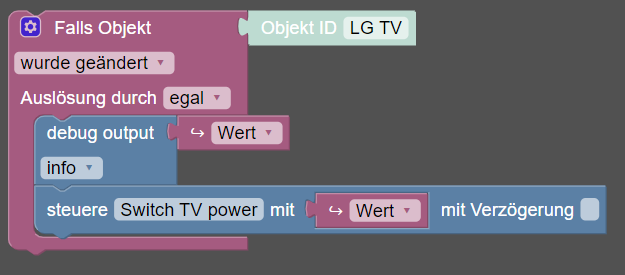
und das HM programm
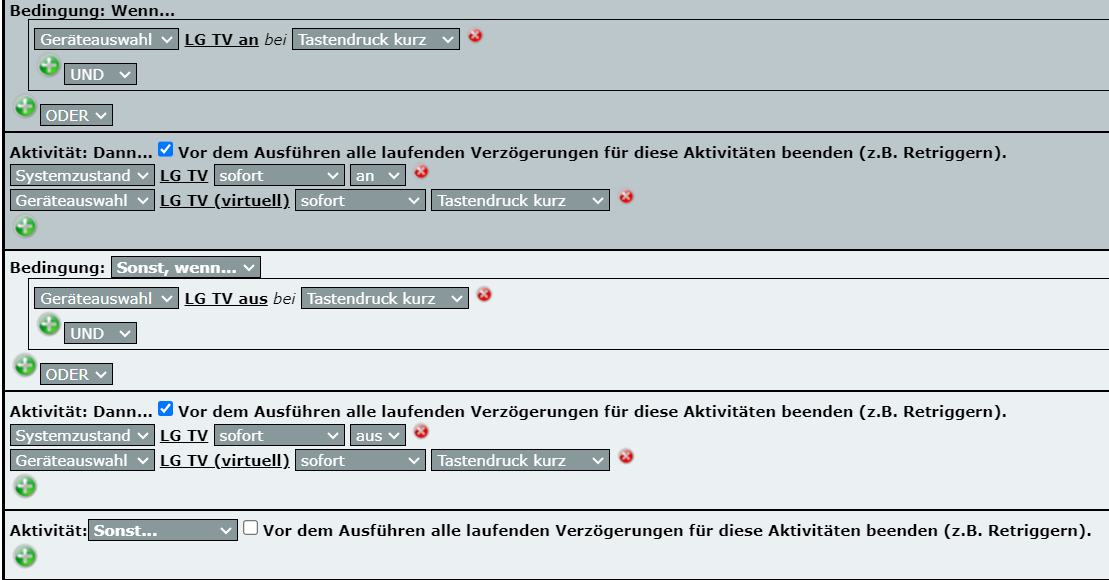
@spaddel sagte in LG TV schalten direkt oder über iobroker:
Ich weiß nicht genau welchen Baustein zu meinst.
der debug Baustein der direkt nach dem Trigger kommt gibt den WERT des Triggers im log aus. und zwar in der Logstufe info.
Sollte also in deinem Log zu sehen sein.
Stell die Logstufe mal aufcWARN, dann sollte der WERT im log orange erscheinen -
@spaddel sagte in LG TV schalten direkt oder über iobroker:
Ich weiß nicht genau welchen Baustein zu meinst.
der debug Baustein der direkt nach dem Trigger kommt gibt den WERT des Triggers im log aus. und zwar in der Logstufe info.
Sollte also in deinem Log zu sehen sein.
Stell die Logstufe mal aufcWARN, dann sollte der WERT im log orange erscheinen -
@spaddel sagte in LG TV schalten direkt oder über iobroker:
hast du noch eine Idee?
nein.
@spaddel sagte in LG TV schalten direkt oder über iobroker:
ch beobachte das Ganze und melde mich.
gut.
-
@spaddel sagte in LG TV schalten direkt oder über iobroker:
hast du noch eine Idee?
nein.
@spaddel sagte in LG TV schalten direkt oder über iobroker:
ch beobachte das Ganze und melde mich.
gut.
@homoran Leider habe ich mich wohl zu früh gefreut. Ich habe das Testprogramm in das richtige Programm, in dem ua. auch Lichter ausgeschaltet werden, übertragen. Leider funktionierte die Schaltung auch hier nur einmal. An den Programmen an sich (HM und ioBroker) habe ich nichts geändert.
Auch wenn ich diverse Kombinationen ohne Erfolg durchgespielt habe, noch eine Frage: Welchen Teil dieses Test Programms muss ich in mein richtiges übernehmen, damit nur der Fernseher ausgeschaltet wird? Ich habe es schon mit dem komplette Programm versuch (rot) und auch nur dem dem Teil für das Ausschalten (blau). Leider passiert nichts.
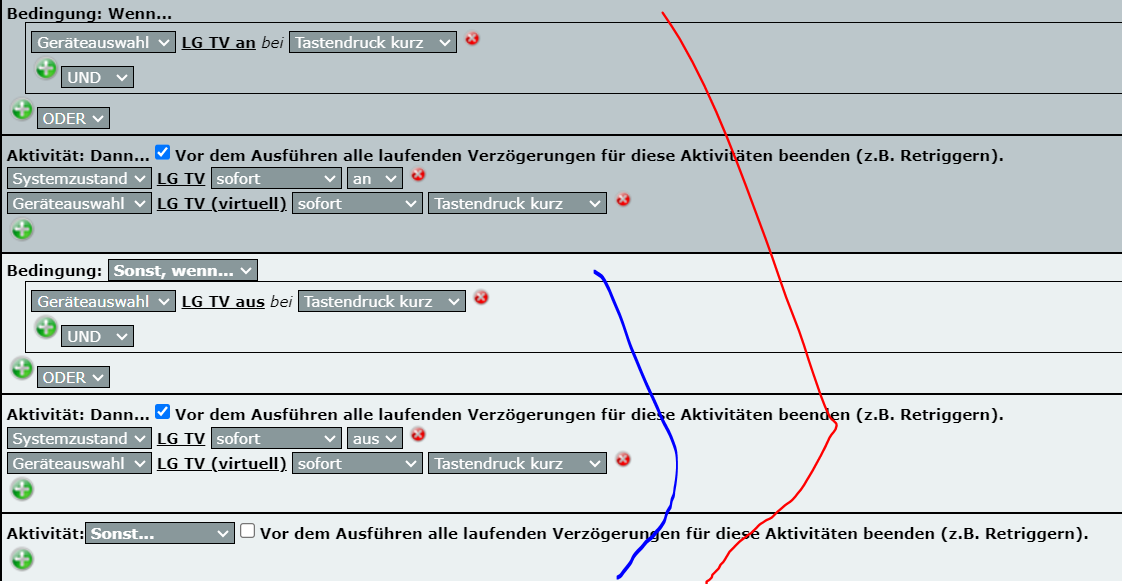
Auch im Log vom iobroker finde ich nur die Info Polling Trigger. Nach wie vor kein Status über den Zustand der Variable.Ich habe keine Ahnung, wie ich jetzt am besten vorgehen, um das Problem zu finden. Kann mir jemand helfen?
Danke und Gruß
Ch -
@homoran Leider habe ich mich wohl zu früh gefreut. Ich habe das Testprogramm in das richtige Programm, in dem ua. auch Lichter ausgeschaltet werden, übertragen. Leider funktionierte die Schaltung auch hier nur einmal. An den Programmen an sich (HM und ioBroker) habe ich nichts geändert.
Auch wenn ich diverse Kombinationen ohne Erfolg durchgespielt habe, noch eine Frage: Welchen Teil dieses Test Programms muss ich in mein richtiges übernehmen, damit nur der Fernseher ausgeschaltet wird? Ich habe es schon mit dem komplette Programm versuch (rot) und auch nur dem dem Teil für das Ausschalten (blau). Leider passiert nichts.
Auch im Log vom iobroker finde ich nur die Info Polling Trigger. Nach wie vor kein Status über den Zustand der Variable.Ich habe keine Ahnung, wie ich jetzt am besten vorgehen, um das Problem zu finden. Kann mir jemand helfen?
Danke und Gruß
Ch@spaddel sagte in LG TV schalten direkt oder über iobroker:
damit nur der Fernseher ausgeschaltet wird?
dann musst du wahrscheinlich das was bei sonstwenn steht in ein wenn umformulieren.
ohne Kenntnis des "richtigen" Programms ist Helfen unmöglich.@spaddel sagte in LG TV schalten direkt oder über iobroker:
Auch im Log vom iobroker finde ich nur die Info Polling Trigger. Nach wie vor kein Status über den Zustand der Variable.
da hätten wir von vornherein nach suchen müssen.
-
@spaddel sagte in LG TV schalten direkt oder über iobroker:
damit nur der Fernseher ausgeschaltet wird?
dann musst du wahrscheinlich das was bei sonstwenn steht in ein wenn umformulieren.
ohne Kenntnis des "richtigen" Programms ist Helfen unmöglich.@spaddel sagte in LG TV schalten direkt oder über iobroker:
Auch im Log vom iobroker finde ich nur die Info Polling Trigger. Nach wie vor kein Status über den Zustand der Variable.
da hätten wir von vornherein nach suchen müssen.
-
@homoran Den Screenshot von den Programm hatte ich vergessen:
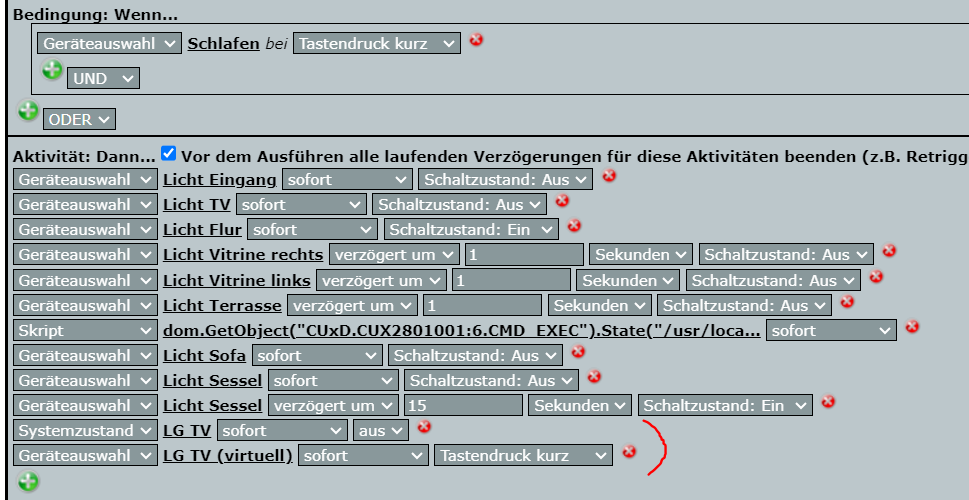
In diesem Fall habe ich nur den Teil zum Ausschalten übernommen.
Gruß
@spaddel sagte in LG TV schalten direkt oder über iobroker:
In diesem Fall habe ich nur den Teil zum Ausschalten übernommen.
müsste passen wenn das die relevanten Datenpunkte sind.
Das Blockly wird aber nicht reagieren wenn die Variable vorher nicht auf an stand -
@spaddel sagte in LG TV schalten direkt oder über iobroker:
In diesem Fall habe ich nur den Teil zum Ausschalten übernommen.
müsste passen wenn das die relevanten Datenpunkte sind.
Das Blockly wird aber nicht reagieren wenn die Variable vorher nicht auf an stand@homoran Die Datenpunkte passen, das habe ich geprüft.
Wie du oben geschrieben hast, löst das Programm nur aus, wenn die Variable auf an steht. Jetzt habe ich die Programme noch mal ausgeführt und festgestellt, dass die Variable aber auf aus bleibt und somit eine weitere Ausführung nicht erfolgt. Wenn ich den Aufbau deines HM Programms
WENN Taste_An press_short
DANN SysVar an(wahr)
VirtTast:50 press_short
SONSTWENN Taste_aus press_short
DANN SysVar aus(falsch)
VirtTast:50 press_short
richtig verstehe, soll das aber über die sonst/wenn Abfrage vermieden werden. Oder verstehe ich mal wieder alles falsch? Demnach müsste ich doch nicht nur den Teil zum Ausschalten in mein richtiges Programm einfügen, sondern auch den Rest oder?
Gruß -
@homoran Die Datenpunkte passen, das habe ich geprüft.
Wie du oben geschrieben hast, löst das Programm nur aus, wenn die Variable auf an steht. Jetzt habe ich die Programme noch mal ausgeführt und festgestellt, dass die Variable aber auf aus bleibt und somit eine weitere Ausführung nicht erfolgt. Wenn ich den Aufbau deines HM Programms
WENN Taste_An press_short
DANN SysVar an(wahr)
VirtTast:50 press_short
SONSTWENN Taste_aus press_short
DANN SysVar aus(falsch)
VirtTast:50 press_short
richtig verstehe, soll das aber über die sonst/wenn Abfrage vermieden werden. Oder verstehe ich mal wieder alles falsch? Demnach müsste ich doch nicht nur den Teil zum Ausschalten in mein richtiges Programm einfügen, sondern auch den Rest oder?
Gruß@spaddel Noch ein Nachtrag bzw. eine Frage. Das Blockly Programm reagiert darauf, wenn eine Änderung der Variable erfolgt. Dh. es ist egal, ob es von An auf Aus oder umgekehrt erfolgt, oder? Da die Variable aber nicht automatisch auf An gesetzt wird, wenn der Fernseher eingeschaltet wird, müsste dort doch das Problem liegen.
Wenn das o.g. stimmt, könnte man es doch so lösen, dass die Homematic über ping testet, ob der Fernseher An ist und wenn ja wird die Variable entsprechend gesetzt. Aktuell hätte das aber die Folge, dass Blockly das als Veränderung der Variable ansieht und den TV wieder ausschaltet. Also müsste man Blockly anpassen, dass es nur schaltet, wenn die Variable auf An steht.
Vielleicht macht das der aktuelle Aufbau auch schon, nur dass ich die Zusammenhänge nicht kapiere. -
@spaddel Noch ein Nachtrag bzw. eine Frage. Das Blockly Programm reagiert darauf, wenn eine Änderung der Variable erfolgt. Dh. es ist egal, ob es von An auf Aus oder umgekehrt erfolgt, oder? Da die Variable aber nicht automatisch auf An gesetzt wird, wenn der Fernseher eingeschaltet wird, müsste dort doch das Problem liegen.
Wenn das o.g. stimmt, könnte man es doch so lösen, dass die Homematic über ping testet, ob der Fernseher An ist und wenn ja wird die Variable entsprechend gesetzt. Aktuell hätte das aber die Folge, dass Blockly das als Veränderung der Variable ansieht und den TV wieder ausschaltet. Also müsste man Blockly anpassen, dass es nur schaltet, wenn die Variable auf An steht.
Vielleicht macht das der aktuelle Aufbau auch schon, nur dass ich die Zusammenhänge nicht kapiere.
Hey! Du scheinst an dieser Unterhaltung interessiert zu sein, hast aber noch kein Konto.
Hast du es satt, bei jedem Besuch durch die gleichen Beiträge zu scrollen? Wenn du dich für ein Konto anmeldest, kommst du immer genau dorthin zurück, wo du zuvor warst, und kannst dich über neue Antworten benachrichtigen lassen (entweder per E-Mail oder Push-Benachrichtigung). Du kannst auch Lesezeichen speichern und Beiträge positiv bewerten, um anderen Community-Mitgliedern deine Wertschätzung zu zeigen.
Mit deinem Input könnte dieser Beitrag noch besser werden 💗
Registrieren Anmelden350
Online33.0k
Benutzende83.7k
Themen1.3m
Beiträge