




Zigbee macht immer mal wieder schlapp - findet Adapter nicht
-
zigbee.0
2024-02-07 21:37:03.669	info	cleaned everything up...

zigbee.0
2024-02-07 21:37:03.653	error	SRSP - SYS - version after 6000ms

zigbee.0
2024-02-07 21:37:03.653	error	Error: SRSP - SYS - version after 6000ms at Object.start (/opt/iobroker/node_modules/zigbee-herdsman/src/utils/waitress.ts:63:23) at /opt/iobroker/node_modules/zigbee-herdsman/src/adapter/z-stack/znp/znp.ts:312:45 at Queue.execute (/opt/iobroker/node_modules/zigbee-herdsman/src/utils/queue.ts:35:26) at Znp.request (/opt/iobroker/node_modules/zigbee-herdsman/src/adapter/z-stack/znp/znp.ts:300:27) at AdapterBackup.getAdapterVersion (/opt/iobroker/node_modules/zigbee-herdsman/src/adapter/z-stack/adapter/adapter-backup.ts:403:48) at AdapterBackup.createBackup (/opt/iobroker/node_modules/zigbee-herdsman/src/adapter/z-stack/adapter/adapter-backup.ts:63:48) at ZStackAdapter.backup (/opt/iobroker/node_modules/zigbee-herdsman/src/adapter/z-stack/adapter/zStackAdapter.ts:860:43) at Controller.backup (/opt/iobroker/node_modules/zigbee-herdsman/src/controller/controller.ts:330:47)

zigbee.0
2024-02-07 21:37:03.490	error	unhandled promise rejection: SRSP - SYS - version after 6000ms

zigbee.0
2024-02-07 21:37:03.489	error	Unhandled promise rejection. This error originated either by throwing inside of an async function without a catch block, or by rejecting a promise which was not handled with .catch().
und dann:
zigbee.0
Zeit
info
Nachricht

zigbee.0
2024-02-07 22:04:08.662	info	List of port: [{"path":"/dev/ttyACM0","manufacturer":"Texas Instruments","serialNumber":"L1100GB8","pnpId":"usb-Texas_Instruments_XDS110__03.00.00.26__Embed_with_CMSIS-DAP_L1100GB8-if00","vendorId":"0451","productId":"bef3"},{"path":"/dev/ttyACM1","manufacturer":"Texas Instruments","serialNumber":"L1100GB8","pnpId":"usb-Texas_Instruments_XDS110__03.00.00.26__Embed_with_CMSIS-DAP_L1100GB8-if03","vendorId":"0451","productId":"bef3"},{"path":"/dev/ttyAMA0"},{"path":"/dev/ttyS0"}]

zigbee.0
2024-02-07 22:04:08.425	error	getGroups: caught error: TypeError: Cannot read properties of undefined (reading 'getGroups')

zigbee.0
2024-02-07 22:04:08.662	info	List of port: [{"path":"/dev/ttyACM0","manufacturer":"Texas Instruments","serialNumber":"L1100GB8","pnpId":"usb-Texas_Instruments_XDS110__03.00.00.26__Embed_with_CMSIS-DAP_L1100GB8-if00","vendorId":"0451","productId":"bef3"},{"path":"/dev/ttyACM1","manufacturer":"Texas Instruments","serialNumber":"L1100GB8","pnpId":"usb-Texas_Instruments_XDS110__03.00.00.26__Embed_with_CMSIS-DAP_L1100GB8-if03","vendorId":"0451","productId":"bef3"},{"path":"/dev/ttyAMA0"},{"path":"/dev/ttyS0"}]

zigbee.0
2024-02-07 22:04:08.425	error	getGroups: caught error: TypeError: Cannot read properties of undefined (reading 'getGroups')

zigbee.0
2024-02-07 21:38:15.516	error	Error herdsman start

zigbee.0
2024-02-07 21:38:15.515	error	Failed to start Zigbee

zigbee.0
2024-02-07 21:38:15.509	error	Starting zigbee-herdsman problem : "Error while opening serialport 'Error: Error Resource temporarily unavailable Cannot lock port'"

zigbee.0
2024-02-07 21:38:15.188	info	Installed Version: iobroker.zigbee@1.10.1

zigbee.0
2024-02-07 21:38:13.150	info	Starting Zigbee npm ...

zigbee.0
2024-02-07 21:38:13.149	info	Try to reconnect. 1 attempts left

zigbee.0
2024-02-07 21:38:03.142	error	Error herdsman start

zigbee.0
2024-02-07 21:38:03.142	error	Failed to start Zigbee

zigbee.0
2024-02-07 21:38:03.140	error	Starting zigbee-herdsman problem : "Failed to connect to the adapter (Error: SRSP - SYS - ping after 6000ms)"

zigbee.0
2024-02-07 21:37:42.696	info	Installed Version: iobroker.zigbee@1.10.1

zigbee
Ich verwende den usb Adpater: /dev/serial/by-id/usb-Texas_Instruments_XDS110__03.00.00.26__Embed_with_CMSIS-DAP_L1100GB8-if00
Zigbee will in dem Zustand auch nicht wieder starten. Dazu muss ich USB ein/ausstecken bzw. den raspberry mal wieder ganz aus/anschalten. Dann läuft es wieder - ggf. auch viele Tage wieder durch. Aber so ab und an kommt dann wieder der Fehler!
Was kann da denn sein? -
======== Start marking the full check here ========= Skript v.2023-10-10 *** BASE SYSTEM *** Static hostname: raspi Icon name: computer Operating System: Raspbian GNU/Linux 11 (bullseye) Kernel: Linux 5.10.103-v7l+ Architecture: arm Model : Raspberry Pi 4 Model B Rev 1.1 Docker : false Virtualization : none Kernel : armv7l Userland : armhf Systemuptime and Load: 22:30:26 up 6 days, 54 min, 1 user, load average: 2.77, 1.76, 1.26 CPU threads: 4 *** RASPBERRY THROTTLING *** Current issues: No throttling issues detected. Previously detected issues: No throttling issues detected. *** Time and Time Zones *** Local time: Wed 2024-02-07 22:30:26 CET Universal time: Wed 2024-02-07 21:30:26 UTC RTC time: n/a Time zone: Europe/Berlin (CET, +0100) System clock synchronized: yes NTP service: active RTC in local TZ: no *** User and Groups *** pi /home/pi pi adm dialout cdrom sudo audio video plugdev games users input netdev lpadmin gpio i2c spi iobroker *** X-Server-Setup *** X-Server: false Desktop: Terminal: tty Boot Target: multi-user.target *** MEMORY *** total used free shared buff/cache available Mem: 3.8G 2.2G 298M 0.0K 1.2G 1.4G Swap: 99M 99M 0B Total: 3.9G 2.3G 298M 3786 M total memory 2238 M used memory 758 M active memory 2588 M inactive memory 297 M free memory 201 M buffer memory 1049 M swap cache 99 M total swap 99 M used swap 0 M free swap Raspberry only: oom events: 0 lifetime oom required: 0 Mbytes total time in oom handler: 0 ms max time spent in oom handler: 0 ms *** FAILED SERVICES *** UNIT LOAD ACTIVE SUB DESCRIPTION * bthelper@hci0.service loaded failed failed Raspberry Pi bluetooth helper LOAD = Reflects whether the unit definition was properly loaded. ACTIVE = The high-level unit activation state, i.e. generalization of SUB. SUB = The low-level unit activation state, values depend on unit type. 1 loaded units listed. *** FILESYSTEM *** Filesystem Type Size Used Avail Use% Mounted on /dev/root ext4 117G 20G 92G 18% / devtmpfs devtmpfs 1.7G 0 1.7G 0% /dev tmpfs tmpfs 1.9G 0 1.9G 0% /dev/shm tmpfs tmpfs 758M 864K 757M 1% /run tmpfs tmpfs 5.0M 4.0K 5.0M 1% /run/lock /dev/sdb1 ext4 113G 79G 29G 74% /backup /dev/sda1 vfat 253M 49M 204M 20% /boot tmpfs tmpfs 379M 16K 379M 1% /run/user/1000 Messages concerning ext4 filesystem in dmesg: [Thu Feb 1 21:36:05 2024] Kernel command line: coherent_pool=1M 8250.nr_uarts=1 snd_bcm2835.enable_compat_alsa=0 snd_bcm2835.enable_hdmi=1 smsc95xx.macaddr=DC:A6:32:40:0F:7D vc_mem.mem_base=0x3eb00000 vc_mem.mem_size=0x3ff00000 console=tty1 root=PARTUUID=6c586e13-02 rootfstype=ext4 elevator=deadline fsck.repair=yes rootwait quiet splash plymouth.ignore-serial-consoles [Thu Feb 1 21:36:07 2024] EXT4-fs (sda2): mounted filesystem with ordered data mode. Opts: (null) [Thu Feb 1 21:36:07 2024] VFS: Mounted root (ext4 filesystem) readonly on device 8:2. [Thu Feb 1 21:36:08 2024] EXT4-fs (sda2): re-mounted. Opts: (null) [Thu Feb 1 21:36:10 2024] EXT4-fs (sdb1): mounted filesystem with ordered data mode. Opts: (null) Show mounted filesystems \(real ones only\): TARGET SOURCE FSTYPE OPTIONS / /dev/sda2 ext4 rw,noatime,stripe=8191 |-/backup /dev/sdb1 ext4 ro,noatime `-/boot /dev/sda1 vfat rw,relatime,fmask=0022,dmask=0022,codepage=437,iocharset=ascii,shortname=mixed,flush,errors=remount-ro Files in neuralgic directories: /var: 7.0G /var/ 3.4G /var/cache/apt 3.4G /var/cache 3.3G /var/cache/apt/archives 3.0G /var/lib Archived and active journals take up 528.1M in the file system. /opt/iobroker/backups: 3.7G /opt/iobroker/backups/ /opt/iobroker/iobroker-data: 1.1G /opt/iobroker/iobroker-data/ 553M /opt/iobroker/iobroker-data/backup-objects 354M /opt/iobroker/iobroker-data/files 78M /opt/iobroker/iobroker-data/files/icons-open-icon-library-png 67M /opt/iobroker/iobroker-data/files/javascript.admin The five largest files in iobroker-data are: 41M /opt/iobroker/iobroker-data/states.json.old 41M /opt/iobroker/iobroker-data/states.json.bak 25M /opt/iobroker/iobroker-data/objects.jsonl 22M /opt/iobroker/iobroker-data/files/web.admin/static/js/main.c05ba1d3.js.map 18M /opt/iobroker/iobroker-data/files/text2command.admin/static/js/main.274a4d8d.js.map USB-Devices by-id: USB-Sticks - Avoid direct links to /dev/* in your adapter setups, please always prefer the links 'by-id': /dev/serial/by-id/usb-Texas_Instruments_XDS110__03.00.00.26__Embed_with_CMSIS-DAP_L1100GB8-if03 /dev/serial/by-id/usb-Texas_Instruments_XDS110__03.00.00.26__Embed_with_CMSIS-DAP_L1100GB8-if00 *** NodeJS-Installation *** /usr/bin/nodejs v18.19.0 /usr/bin/node v18.19.0 /usr/bin/npm 10.2.3 /usr/bin/npx 10.2.3 /usr/bin/corepack 0.22.0 nodejs: Installed: 18.19.0-1nodesource1 Candidate: 18.19.0-1nodesource1 Version table: *** 18.19.0-1nodesource1 1001 500 https://deb.nodesource.com/node_18.x nodistro/main armhf Packages 100 /var/lib/dpkg/status 18.18.2-1nodesource1 1001 500 https://deb.nodesource.com/node_18.x nodistro/main armhf Packages 18.18.1-1nodesource1 1001 500 https://deb.nodesource.com/node_18.x nodistro/main armhf Packages 18.18.0-1nodesource1 1001 500 https://deb.nodesource.com/node_18.x nodistro/main armhf Packages 18.17.1-1nodesource1 1001 500 https://deb.nodesource.com/node_18.x nodistro/main armhf Packages 18.17.0-1nodesource1 1001 500 https://deb.nodesource.com/node_18.x nodistro/main armhf Packages 18.16.1-1nodesource1 1001 500 https://deb.nodesource.com/node_18.x nodistro/main armhf Packages 18.16.0-1nodesource1 1001 500 https://deb.nodesource.com/node_18.x nodistro/main armhf Packages 18.15.0-1nodesource1 1001 500 https://deb.nodesource.com/node_18.x nodistro/main armhf Packages 18.14.2-1nodesource1 1001 500 https://deb.nodesource.com/node_18.x nodistro/main armhf Packages 18.14.1-1nodesource1 1001 500 https://deb.nodesource.com/node_18.x nodistro/main armhf Packages 18.14.0-1nodesource1 1001 500 https://deb.nodesource.com/node_18.x nodistro/main armhf Packages 18.13.0-1nodesource1 1001 500 https://deb.nodesource.com/node_18.x nodistro/main armhf Packages 18.12.0-1nodesource1 1001 500 https://deb.nodesource.com/node_18.x nodistro/main armhf Packages 18.11.0-1nodesource1 1001 500 https://deb.nodesource.com/node_18.x nodistro/main armhf Packages 18.10.0-1nodesource1 1001 500 https://deb.nodesource.com/node_18.x nodistro/main armhf Packages 18.9.1-1nodesource1 1001 500 https://deb.nodesource.com/node_18.x nodistro/main armhf Packages 18.9.0-1nodesource1 1001 500 https://deb.nodesource.com/node_18.x nodistro/main armhf Packages 18.8.0-1nodesource1 1001 500 https://deb.nodesource.com/node_18.x nodistro/main armhf Packages 18.7.0-1nodesource1 1001 500 https://deb.nodesource.com/node_18.x nodistro/main armhf Packages 18.6.0-1nodesource1 1001 500 https://deb.nodesource.com/node_18.x nodistro/main armhf Packages 18.5.0-1nodesource1 1001 500 https://deb.nodesource.com/node_18.x nodistro/main armhf Packages 18.4.0-1nodesource1 1001 500 https://deb.nodesource.com/node_18.x nodistro/main armhf Packages 18.3.0-1nodesource1 1001 500 https://deb.nodesource.com/node_18.x nodistro/main armhf Packages 18.2.0-1nodesource1 1001 500 https://deb.nodesource.com/node_18.x nodistro/main armhf Packages 18.1.0-1nodesource1 1001 500 https://deb.nodesource.com/node_18.x nodistro/main armhf Packages 18.0.0-1nodesource1 1001 500 https://deb.nodesource.com/node_18.x nodistro/main armhf Packages 12.22.12~dfsg-1~deb11u4 500 500 http://raspbian.raspberrypi.org/raspbian bullseye/main armhf Packages Temp directories causing npm8 problem: 0 No problems detected Errors in npm tree: *** ioBroker-Installation *** ioBroker Status iobroker is running on this host. Objects type: jsonl States type: redis Core adapters versions js-controller: 5.0.17 admin: 6.13.15 javascript: 7.1.6 Adapters from github: 0 Adapter State + system.adapter.admin.1 : admin : raspi - enabled, port: 8081, bind: 0.0.0.0, run as: admin system.adapter.alias-manager.0 : alias-manager : raspi - enabled + system.adapter.backitup.0 : backitup : raspi - enabled + system.adapter.chromecast.0 : chromecast : raspi - enabled + system.adapter.cloud.0 : cloud : raspi - enabled system.adapter.deconz.0 : deconz : raspi - disabled, port: 80 + system.adapter.discovery.0 : discovery : raspi - enabled system.adapter.feiertage.0 : feiertage : raspi - enabled system.adapter.flot.0 : flot : raspi - enabled system.adapter.fritzdect.0 : fritzdect : raspi - disabled system.adapter.hue-extended.0 : hue-extended : raspi - disabled system.adapter.hue.0 : hue : raspi - disabled, port: 443 system.adapter.ical.0 : ical : raspi - enabled system.adapter.icons-icons8.0 : icons-icons8 : raspi - enabled system.adapter.icons-mfd-svg.0 : icons-mfd-svg : raspi - enabled system.adapter.icons-open-icon-library-png.0: icons-open-icon-library-png: raspi - enabled system.adapter.iqontrol.0 : iqontrol : raspi - disabled + system.adapter.javascript.0 : javascript : raspi - enabled system.adapter.luftdaten.0 : luftdaten : raspi - enabled system.adapter.luftdaten.1 : luftdaten : raspi - enabled system.adapter.mqtt.0 : mqtt : raspi - disabled, port: 1884, bind: 0.0.0.0 + system.adapter.net-tools.0 : net-tools : raspi - enabled system.adapter.netatmo-crawler.0 : netatmo-crawler : raspi - enabled + system.adapter.nuki.0 : nuki : raspi - enabled + system.adapter.ping.0 : ping : raspi - enabled + system.adapter.pushover.0 : pushover : raspi - enabled + system.adapter.reolink.0 : reolink : raspi - enabled + system.adapter.reolink.1 : reolink : raspi - enabled + system.adapter.reolink.2 : reolink : raspi - enabled + system.adapter.reolink.3 : reolink : raspi - enabled system.adapter.reolink.4 : reolink : raspi - disabled + system.adapter.samsung_tizen.0 : samsung_tizen : raspi - enabled, port: 8002 + system.adapter.sayit.0 : sayit : raspi - enabled + system.adapter.sayit.1 : sayit : raspi - enabled + system.adapter.sayit.2 : sayit : raspi - enabled + system.adapter.sayit.3 : sayit : raspi - enabled + system.adapter.sayit.4 : sayit : raspi - enabled + system.adapter.sayit.5 : sayit : raspi - enabled + system.adapter.shelly.0 : shelly : raspi - enabled, port: 1885, bind: 0.0.0.0 system.adapter.shelly.1 : shelly : raspi - disabled, port: 1882, bind: 0.0.0.0 + system.adapter.signal-cmb.0 : signal-cmb : raspi - enabled + system.adapter.simple-api.0 : simple-api : raspi - enabled, port: 8087, bind: 0.0.0.0, run as: admin system.adapter.smartcontrol.0 : smartcontrol : raspi - disabled + system.adapter.sonoff.0 : sonoff : raspi - enabled, port: 1883, bind: 0.0.0.0 + system.adapter.sourceanalytix.2 : sourceanalytix : raspi - enabled system.adapter.spotify-premium.0 : spotify-premium : raspi - disabled + system.adapter.sql.0 : sql : raspi - enabled, port: 0 system.adapter.statistics.0 : statistics : raspi - disabled + system.adapter.telegram.0 : telegram : raspi - enabled, port: 8443, bind: 0.0.0.0 system.adapter.text2command.0 : text2command : raspi - disabled system.adapter.vis-colorpicker.0 : vis-colorpicker : raspi - enabled system.adapter.vis-fancyswitch.0 : vis-fancyswitch : raspi - enabled system.adapter.vis-google-fonts.0 : vis-google-fonts : raspi - enabled system.adapter.vis-history.0 : vis-history : raspi - enabled system.adapter.vis-hqwidgets.0 : vis-hqwidgets : raspi - enabled system.adapter.vis-icontwo.0 : vis-icontwo : raspi - enabled system.adapter.vis-jqui-mfd.0 : vis-jqui-mfd : raspi - enabled system.adapter.vis-justgage.0 : vis-justgage : raspi - enabled system.adapter.vis-material-advanced.0 : vis-material-advanced : raspi - enabled system.adapter.vis-metro.0 : vis-metro : raspi - enabled system.adapter.vis-rgraph.0 : vis-rgraph : raspi - enabled system.adapter.vis-timeandweather.0 : vis-timeandweather : raspi - enabled system.adapter.vis.0 : vis : raspi - enabled + system.adapter.web.0 : web : raspi - enabled, port: 8082, bind: 0.0.0.0, run as: admin system.adapter.whatsapp-cmb.0 : whatsapp-cmb : raspi - disabled + system.adapter.zigbee.0 : zigbee : raspi - enabled, port: /dev/serial/by-id/usb-Texas_Instruments_XDS110__03.00.00.26__Embed_with_CMSIS-DAP_L1100GB8-if00 + instance is alive Enabled adapters with bindings + system.adapter.admin.1 : admin : raspi - enabled, port: 8081, bind: 0.0.0.0, run as: admin + system.adapter.samsung_tizen.0 : samsung_tizen : raspi - enabled, port: 8002 + system.adapter.shelly.0 : shelly : raspi - enabled, port: 1885, bind: 0.0.0.0 + system.adapter.simple-api.0 : simple-api : raspi - enabled, port: 8087, bind: 0.0.0.0, run as: admin + system.adapter.sonoff.0 : sonoff : raspi - enabled, port: 1883, bind: 0.0.0.0 + system.adapter.sql.0 : sql : raspi - enabled, port: 0 + system.adapter.telegram.0 : telegram : raspi - enabled, port: 8443, bind: 0.0.0.0 + system.adapter.web.0 : web : raspi - enabled, port: 8082, bind: 0.0.0.0, run as: admin + system.adapter.zigbee.0 : zigbee : raspi - enabled, port: /dev/serial/by-id/usb-Texas_Instruments_XDS110__03.00.00.26__Embed_with_CMSIS-DAP_L1100GB8-if00 ioBroker-Repositories stable : http://download.iobroker.net/sources-dist.json beta : http://download.iobroker.net/sources-dist-latest.json Active repo(s): stable Installed ioBroker-Instances Used repository: stable Adapter "admin" : 6.13.16 , installed 6.13.15 [Updatable] Adapter "alias-manager": 1.2.6 , installed 1.2.6 Adapter "backitup" : 2.9.8 , installed 2.9.8 Adapter "chromecast" : 3.0.3 , installed 3.0.3 Adapter "cloud" : 4.4.1 , installed 4.4.1 Adapter "deconz" : 1.3.23 , installed 1.3.23 Adapter "discovery" : 4.2.0 , installed 4.2.0 Adapter "fb-checkpresence": 1.2.3 , installed 1.2.3 Adapter "feiertage" : 1.1.4 , installed 1.1.4 Adapter "flot" : 1.12.0 , installed 1.12.0 Adapter "fritzdect" : 2.5.9 , installed 2.5.9 Adapter "fullybrowser" : 3.0.9 , installed 3.0.9 Adapter "hue" : 3.10.2 , installed 3.10.1 [Updatable] Adapter "ical" : 1.13.3 , installed 1.13.3 Adapter "icons-icons8" : 0.0.1 , installed 0.0.1 Adapter "icons-mfd-svg": 1.2.0 , installed 1.2.0 Adapter "icons-open-icon-library-png": 0.1.2, installed 0.1.2 Adapter "iqontrol" : 2.3.0 , installed 2.3.0 Adapter "javascript" : 7.1.6 , installed 7.1.6 Controller "js-controller": 5.0.17 , installed 5.0.17 Adapter "luftdaten" : 3.1.0 , installed 3.1.0 Adapter "moma" : 1.2.9 , installed 1.2.9 Adapter "mqtt" : 5.1.0 , installed 5.1.0 Adapter "net-tools" : 0.2.0 , installed 0.2.0 Adapter "netatmo-crawler": 0.8.1 , installed 0.8.1 Adapter "nuki" : 1.6.0 , installed 1.6.0 Adapter "nuki-extended": 2.6.5 , installed 2.6.5 Adapter "owntracks" : 1.0.5 , installed 1.0.5 Adapter "paw" : 0.3.2 , installed 0.3.2 Adapter "ping" : 1.6.2 , installed 1.6.2 Adapter "pushover" : 3.0.6 , installed 3.0.6 Adapter "reolink" : 1.0.3 , installed 1.0.3 Adapter "samsung_tizen": 1.0.0 , installed 1.0.0 Adapter "sayit" : 3.0.5 , installed 3.0.0 [Updatable] Adapter "shelly" : 6.6.1 , installed 6.6.1 Adapter "signal-cmb" : 0.3.0 , installed 0.3.0 Adapter "simple-api" : 2.7.2 , installed 2.7.2 Adapter "smartcontrol" : 2.0.1 , installed 2.0.1 Adapter "socketio" : 6.6.0 , installed 6.6.0 Adapter "sonoff" : 3.0.3 , installed 3.0.3 Adapter "spotify-premium": 1.3.1 , installed 1.3.1 Adapter "sql" : 2.2.0 , installed 2.2.0 Adapter "statistics" : 2.4.0 , installed 2.4.0 Adapter "telegram" : 3.0.1 , installed 3.0.1 Adapter "text2command" : 3.0.3 , installed 3.0.2 [Updatable] Adapter "tr-064" : 4.2.18 , installed 4.2.18 Adapter "vis" : 1.5.4 , installed 1.5.4 Adapter "vis-colorpicker": 2.0.3 , installed 2.0.3 Adapter "vis-fancyswitch": 1.1.0 , installed 1.1.0 Adapter "vis-google-fonts": 1.0.4 , installed 1.0.4 Adapter "vis-history" : 1.0.0 , installed 1.0.0 Adapter "vis-hqwidgets": 1.4.0 , installed 1.4.0 Adapter "vis-icontwo" : 1.3.0 , installed 1.3.0 Adapter "vis-jqui-mfd" : 1.0.12 , installed 1.0.12 Adapter "vis-justgage" : 2.1.0 , installed 2.1.0 Adapter "vis-material-advanced": 1.7.4, installed 1.7.4 Adapter "vis-metro" : 1.2.0 , installed 1.2.0 Adapter "vis-rgraph" : 0.0.2 , installed 0.0.2 Adapter "vis-timeandweather": 1.2.2, installed 1.2.2 Adapter "web" : 6.2.3 , installed 6.2.3 Adapter "whatsapp-cmb" : 0.2.3 , installed 0.2.3 Adapter "wiobrowser" : 2.0.2 , installed 2.0.2 Adapter "ws" : 2.5.10 , installed 2.5.10 Adapter "zigbee" : 1.10.1 , installed 1.10.1 Objects and States Please stand by - This may take a while Objects: 10127 States: 7782 *** OS-Repositories and Updates *** Hit:1 http://phoscon.de/apt/deconz bullseye InRelease Hit:2 http://raspbian.raspberrypi.org/raspbian bullseye InRelease Hit:3 http://archive.raspberrypi.org/debian bullseye InRelease Hit:4 https://deb.nodesource.com/node_18.x nodistro InRelease Reading package lists... Pending Updates: 2 *** Listening Ports *** Active Internet connections (only servers) Proto Recv-Q Send-Q Local Address Foreign Address State User Inode PID/Program name tcp 0 0 0.0.0.0:80 0.0.0.0:* LISTEN 1000 11784 350/deCONZ tcp 0 0 0.0.0.0:22 0.0.0.0:* LISTEN 0 13876 508/sshd: /usr/sbin tcp 0 0 127.0.0.1:631 0.0.0.0:* LISTEN 0 30611392 20791/cupsd tcp 0 0 0.0.0.0:1883 0.0.0.0:* LISTEN 1001 19029 2034/io.sonoff.0 tcp 0 0 0.0.0.0:443 0.0.0.0:* LISTEN 1000 14038 350/deCONZ tcp 0 0 0.0.0.0:1885 0.0.0.0:* LISTEN 1001 21677 2409/io.shelly.0 tcp 0 0 192.168.178.53:9092 0.0.0.0:* LISTEN 1001 20456 2699/io.nuki.0 tcp 0 0 127.0.0.1:9001 0.0.0.0:* LISTEN 1001 14121 586/iobroker.js-con tcp 0 0 127.0.0.1:3306 0.0.0.0:* LISTEN 110 11801 588/mariadbd tcp 0 0 127.0.0.1:6379 0.0.0.0:* LISTEN 118 13901 498/redis-server 12 tcp6 0 0 :::8081 :::* LISTEN 1001 15655 1018/io.admin.1 tcp6 0 0 :::8082 :::* LISTEN 1001 20060 2483/io.web.0 tcp6 0 0 :::22 :::* LISTEN 0 13878 508/sshd: /usr/sbin tcp6 0 0 ::1:631 :::* LISTEN 0 30611391 20791/cupsd tcp6 0 0 :::8087 :::* LISTEN 1001 25459 3468/io.simple-api. tcp6 0 0 ::1:6379 :::* LISTEN 118 13902 498/redis-server 12 udp 0 0 0.0.0.0:50173 0.0.0.0:* 108 14434 343/avahi-daemon: r udp 0 0 0.0.0.0:68 0.0.0.0:* 0 13967 816/dhcpcd udp 0 0 0.0.0.0:631 0.0.0.0:* 0 30613852 20799/cups-browsed udp 0 0 0.0.0.0:5353 0.0.0.0:* 1001 21341 2223/io.chromecast. udp 0 0 0.0.0.0:5353 0.0.0.0:* 108 14432 343/avahi-daemon: r udp 0 0 0.0.0.0:1900 0.0.0.0:* 1000 15422 350/deCONZ udp6 0 0 :::546 :::* 0 15138 816/dhcpcd udp6 0 0 :::5353 :::* 108 14433 343/avahi-daemon: r udp6 0 0 :::42734 :::* 108 14435 343/avahi-daemon: r *** Log File - Last 25 Lines *** 2024-02-07 22:30:23.183 - info: host.raspi instance system.adapter.ical.0 terminated with code 0 (NO_ERROR) 2024-02-07 22:30:32.880 - warn: sql.0 (1947) Cannot get index of "zigbee.0.00158d0005422cc0.contact": id not found 2024-02-07 22:30:32.880 - info: sql.0 (1947) No Data 2024-02-07 22:30:33.403 - warn: sql.0 (1947) getOneCachedData: got null states 1 times for zigbee.0.0015bc0031015219.temperature 2024-02-07 22:30:33.414 - warn: sql.0 (1947) getOneCachedData: got null states 1 times for zigbee.0.54ef4410000345bd.illuminance 2024-02-07 22:30:42.959 - warn: sql.0 (1947) Cannot get index of "zigbee.0.00158d0005422cc0.contact": id not found 2024-02-07 22:30:42.959 - info: sql.0 (1947) No Data 2024-02-07 22:30:52.884 - warn: sql.0 (1947) Cannot get index of "zigbee.0.00158d0005422cc0.contact": id not found 2024-02-07 22:30:52.885 - info: sql.0 (1947) No Data 2024-02-07 22:31:02.890 - warn: sql.0 (1947) Cannot get index of "zigbee.0.00158d0005422cc0.contact": id not found 2024-02-07 22:31:02.891 - info: sql.0 (1947) No Data 2024-02-07 22:31:12.919 - warn: sql.0 (1947) Cannot get index of "zigbee.0.00158d0005422cc0.contact": id not found 2024-02-07 22:31:12.919 - info: sql.0 (1947) No Data 2024-02-07 22:31:22.898 - warn: sql.0 (1947) Cannot get index of "zigbee.0.00158d0005422cc0.contact": id not found 2024-02-07 22:31:22.899 - info: sql.0 (1947) No Data 2024-02-07 22:31:32.887 - warn: sql.0 (1947) Cannot get index of "zigbee.0.00158d0005422cc0.contact": id not found 2024-02-07 22:31:32.888 - info: sql.0 (1947) No Data 2024-02-07 22:31:33.393 - warn: sql.0 (1947) getOneCachedData: got null states 1 times for zigbee.0.0015bc0031015219.temperature 2024-02-07 22:31:33.402 - warn: sql.0 (1947) getOneCachedData: got null states 1 times for zigbee.0.54ef4410000345bd.illuminance 2024-02-07 22:31:42.726 - info: sql.0 (1947) Do not store value "NULL" for PM10 Outdoor because no number 2024-02-07 22:31:42.728 - info: sql.0 (1947) Do not store value "NULL" for PM25 Outdoor because no number 2024-02-07 22:31:42.890 - warn: sql.0 (1947) Cannot get index of "zigbee.0.00158d0005422cc0.contact": id not found 2024-02-07 22:31:42.890 - info: sql.0 (1947) No Data 2024-02-07 22:31:52.885 - warn: sql.0 (1947) Cannot get index of "zigbee.0.00158d0005422cc0.contact": id not found 2024-02-07 22:31:52.885 - info: sql.0 (1947) No Data -
zigbee.0
2024-02-07 21:37:03.669	info	cleaned everything up...

zigbee.0
2024-02-07 21:37:03.653	error	SRSP - SYS - version after 6000ms

zigbee.0
2024-02-07 21:37:03.653	error	Error: SRSP - SYS - version after 6000ms at Object.start (/opt/iobroker/node_modules/zigbee-herdsman/src/utils/waitress.ts:63:23) at /opt/iobroker/node_modules/zigbee-herdsman/src/adapter/z-stack/znp/znp.ts:312:45 at Queue.execute (/opt/iobroker/node_modules/zigbee-herdsman/src/utils/queue.ts:35:26) at Znp.request (/opt/iobroker/node_modules/zigbee-herdsman/src/adapter/z-stack/znp/znp.ts:300:27) at AdapterBackup.getAdapterVersion (/opt/iobroker/node_modules/zigbee-herdsman/src/adapter/z-stack/adapter/adapter-backup.ts:403:48) at AdapterBackup.createBackup (/opt/iobroker/node_modules/zigbee-herdsman/src/adapter/z-stack/adapter/adapter-backup.ts:63:48) at ZStackAdapter.backup (/opt/iobroker/node_modules/zigbee-herdsman/src/adapter/z-stack/adapter/zStackAdapter.ts:860:43) at Controller.backup (/opt/iobroker/node_modules/zigbee-herdsman/src/controller/controller.ts:330:47)

zigbee.0
2024-02-07 21:37:03.490	error	unhandled promise rejection: SRSP - SYS - version after 6000ms

zigbee.0
2024-02-07 21:37:03.489	error	Unhandled promise rejection. This error originated either by throwing inside of an async function without a catch block, or by rejecting a promise which was not handled with .catch().
und dann:
zigbee.0
Zeit
info
Nachricht

zigbee.0
2024-02-07 22:04:08.662	info	List of port: [{"path":"/dev/ttyACM0","manufacturer":"Texas Instruments","serialNumber":"L1100GB8","pnpId":"usb-Texas_Instruments_XDS110__03.00.00.26__Embed_with_CMSIS-DAP_L1100GB8-if00","vendorId":"0451","productId":"bef3"},{"path":"/dev/ttyACM1","manufacturer":"Texas Instruments","serialNumber":"L1100GB8","pnpId":"usb-Texas_Instruments_XDS110__03.00.00.26__Embed_with_CMSIS-DAP_L1100GB8-if03","vendorId":"0451","productId":"bef3"},{"path":"/dev/ttyAMA0"},{"path":"/dev/ttyS0"}]

zigbee.0
2024-02-07 22:04:08.425	error	getGroups: caught error: TypeError: Cannot read properties of undefined (reading 'getGroups')

zigbee.0
2024-02-07 22:04:08.662	info	List of port: [{"path":"/dev/ttyACM0","manufacturer":"Texas Instruments","serialNumber":"L1100GB8","pnpId":"usb-Texas_Instruments_XDS110__03.00.00.26__Embed_with_CMSIS-DAP_L1100GB8-if00","vendorId":"0451","productId":"bef3"},{"path":"/dev/ttyACM1","manufacturer":"Texas Instruments","serialNumber":"L1100GB8","pnpId":"usb-Texas_Instruments_XDS110__03.00.00.26__Embed_with_CMSIS-DAP_L1100GB8-if03","vendorId":"0451","productId":"bef3"},{"path":"/dev/ttyAMA0"},{"path":"/dev/ttyS0"}]

zigbee.0
2024-02-07 22:04:08.425	error	getGroups: caught error: TypeError: Cannot read properties of undefined (reading 'getGroups')

zigbee.0
2024-02-07 21:38:15.516	error	Error herdsman start

zigbee.0
2024-02-07 21:38:15.515	error	Failed to start Zigbee

zigbee.0
2024-02-07 21:38:15.509	error	Starting zigbee-herdsman problem : "Error while opening serialport 'Error: Error Resource temporarily unavailable Cannot lock port'"

zigbee.0
2024-02-07 21:38:15.188	info	Installed Version: iobroker.zigbee@1.10.1

zigbee.0
2024-02-07 21:38:13.150	info	Starting Zigbee npm ...

zigbee.0
2024-02-07 21:38:13.149	info	Try to reconnect. 1 attempts left

zigbee.0
2024-02-07 21:38:03.142	error	Error herdsman start

zigbee.0
2024-02-07 21:38:03.142	error	Failed to start Zigbee

zigbee.0
2024-02-07 21:38:03.140	error	Starting zigbee-herdsman problem : "Failed to connect to the adapter (Error: SRSP - SYS - ping after 6000ms)"

zigbee.0
2024-02-07 21:37:42.696	info	Installed Version: iobroker.zigbee@1.10.1

zigbee
Ich verwende den usb Adpater: /dev/serial/by-id/usb-Texas_Instruments_XDS110__03.00.00.26__Embed_with_CMSIS-DAP_L1100GB8-if00
Zigbee will in dem Zustand auch nicht wieder starten. Dazu muss ich USB ein/ausstecken bzw. den raspberry mal wieder ganz aus/anschalten. Dann läuft es wieder - ggf. auch viele Tage wieder durch. Aber so ab und an kommt dann wieder der Fehler!
Was kann da denn sein?@brokeling sagte in [Zigbee macht immer mal wieder schlapp - findet Adapter nicht]
Zigbee will in dem Zustand auch nicht wieder starten. Dazu muss ich USB ein/ausstecken bzw. den raspberry mal wieder ganz aus/anschalten. Dann läuft es wieder - ggf. auch viele Tage wieder durch. Aber so ab und an kommt dann wieder der Fehler!
Was kann da denn sein?Da stürzt die Firmware auf dem Stick ab.
- Versuch: Neu Flashen
- Versuch: Andere Hardware benutzen
Vorsicht - es gibt in der ZStack Firmware aktuell Probleme - (zumindest hatte @arteck das zuletzt im Forum erwähnt - find das gerade nicht)
A.
-
@asgothian
Danke für deine Einschätzung.
Wie sicher ist die Diagnose?
Ich nehme an bei beiden Varianten (1. und 2.) muss ich alle Geräte neu anlernen???
Was natürlich sehr schlecht wäre.
Aber wie gesagt, es läuft z. T. auch Tage bzw. Wochen-lang unauffällig durch ... -
@asgothian
Danke für deine Einschätzung.
Wie sicher ist die Diagnose?
Ich nehme an bei beiden Varianten (1. und 2.) muss ich alle Geräte neu anlernen???
Was natürlich sehr schlecht wäre.
Aber wie gesagt, es läuft z. T. auch Tage bzw. Wochen-lang unauffällig durch ...@brokeling sagte in Zigbee macht immer mal wieder schlapp - findet Adapter nicht:
@asgothian
Danke für deine Einschätzung.
Wie sicher ist die Diagnose?99.9%
Ich nehme an bei beiden Varianten (1. und 2.) muss ich alle Geräte neu anlernen???
Variante 1; sicher nicht. Variante 2; wahrscheinlich nicht
Was natürlich sehr schlecht wäre.
Aber wie gesagt, es läuft z. T. auch Tage bzw. Wochen-lang unauffällig durch ...Es gibt noch eine Variante 3:
- eine WLan schaltbare Steckdose
- ein usb-hub mit eigener Stromversorgung
- ein Skript den Stick darüber neu zu booten wenn der Zigbee-adapter nicht will.
Auch ein um positionieren vom Koordinator relativ zu anderen 2.4gHz Quellen kann helfen (wlan, dect, aber auch 2.4gHz Tastaturen, Kopfhörern und so weiter sowie USB3 Festplatten am Pi.)
A.
-
======== Start marking the full check here ========= Skript v.2023-10-10 *** BASE SYSTEM *** Static hostname: raspi Icon name: computer Operating System: Raspbian GNU/Linux 11 (bullseye) Kernel: Linux 5.10.103-v7l+ Architecture: arm Model : Raspberry Pi 4 Model B Rev 1.1 Docker : false Virtualization : none Kernel : armv7l Userland : armhf Systemuptime and Load: 22:30:26 up 6 days, 54 min, 1 user, load average: 2.77, 1.76, 1.26 CPU threads: 4 *** RASPBERRY THROTTLING *** Current issues: No throttling issues detected. Previously detected issues: No throttling issues detected. *** Time and Time Zones *** Local time: Wed 2024-02-07 22:30:26 CET Universal time: Wed 2024-02-07 21:30:26 UTC RTC time: n/a Time zone: Europe/Berlin (CET, +0100) System clock synchronized: yes NTP service: active RTC in local TZ: no *** User and Groups *** pi /home/pi pi adm dialout cdrom sudo audio video plugdev games users input netdev lpadmin gpio i2c spi iobroker *** X-Server-Setup *** X-Server: false Desktop: Terminal: tty Boot Target: multi-user.target *** MEMORY *** total used free shared buff/cache available Mem: 3.8G 2.2G 298M 0.0K 1.2G 1.4G Swap: 99M 99M 0B Total: 3.9G 2.3G 298M 3786 M total memory 2238 M used memory 758 M active memory 2588 M inactive memory 297 M free memory 201 M buffer memory 1049 M swap cache 99 M total swap 99 M used swap 0 M free swap Raspberry only: oom events: 0 lifetime oom required: 0 Mbytes total time in oom handler: 0 ms max time spent in oom handler: 0 ms *** FAILED SERVICES *** UNIT LOAD ACTIVE SUB DESCRIPTION * bthelper@hci0.service loaded failed failed Raspberry Pi bluetooth helper LOAD = Reflects whether the unit definition was properly loaded. ACTIVE = The high-level unit activation state, i.e. generalization of SUB. SUB = The low-level unit activation state, values depend on unit type. 1 loaded units listed. *** FILESYSTEM *** Filesystem Type Size Used Avail Use% Mounted on /dev/root ext4 117G 20G 92G 18% / devtmpfs devtmpfs 1.7G 0 1.7G 0% /dev tmpfs tmpfs 1.9G 0 1.9G 0% /dev/shm tmpfs tmpfs 758M 864K 757M 1% /run tmpfs tmpfs 5.0M 4.0K 5.0M 1% /run/lock /dev/sdb1 ext4 113G 79G 29G 74% /backup /dev/sda1 vfat 253M 49M 204M 20% /boot tmpfs tmpfs 379M 16K 379M 1% /run/user/1000 Messages concerning ext4 filesystem in dmesg: [Thu Feb 1 21:36:05 2024] Kernel command line: coherent_pool=1M 8250.nr_uarts=1 snd_bcm2835.enable_compat_alsa=0 snd_bcm2835.enable_hdmi=1 smsc95xx.macaddr=DC:A6:32:40:0F:7D vc_mem.mem_base=0x3eb00000 vc_mem.mem_size=0x3ff00000 console=tty1 root=PARTUUID=6c586e13-02 rootfstype=ext4 elevator=deadline fsck.repair=yes rootwait quiet splash plymouth.ignore-serial-consoles [Thu Feb 1 21:36:07 2024] EXT4-fs (sda2): mounted filesystem with ordered data mode. Opts: (null) [Thu Feb 1 21:36:07 2024] VFS: Mounted root (ext4 filesystem) readonly on device 8:2. [Thu Feb 1 21:36:08 2024] EXT4-fs (sda2): re-mounted. Opts: (null) [Thu Feb 1 21:36:10 2024] EXT4-fs (sdb1): mounted filesystem with ordered data mode. Opts: (null) Show mounted filesystems \(real ones only\): TARGET SOURCE FSTYPE OPTIONS / /dev/sda2 ext4 rw,noatime,stripe=8191 |-/backup /dev/sdb1 ext4 ro,noatime `-/boot /dev/sda1 vfat rw,relatime,fmask=0022,dmask=0022,codepage=437,iocharset=ascii,shortname=mixed,flush,errors=remount-ro Files in neuralgic directories: /var: 7.0G /var/ 3.4G /var/cache/apt 3.4G /var/cache 3.3G /var/cache/apt/archives 3.0G /var/lib Archived and active journals take up 528.1M in the file system. /opt/iobroker/backups: 3.7G /opt/iobroker/backups/ /opt/iobroker/iobroker-data: 1.1G /opt/iobroker/iobroker-data/ 553M /opt/iobroker/iobroker-data/backup-objects 354M /opt/iobroker/iobroker-data/files 78M /opt/iobroker/iobroker-data/files/icons-open-icon-library-png 67M /opt/iobroker/iobroker-data/files/javascript.admin The five largest files in iobroker-data are: 41M /opt/iobroker/iobroker-data/states.json.old 41M /opt/iobroker/iobroker-data/states.json.bak 25M /opt/iobroker/iobroker-data/objects.jsonl 22M /opt/iobroker/iobroker-data/files/web.admin/static/js/main.c05ba1d3.js.map 18M /opt/iobroker/iobroker-data/files/text2command.admin/static/js/main.274a4d8d.js.map USB-Devices by-id: USB-Sticks - Avoid direct links to /dev/* in your adapter setups, please always prefer the links 'by-id': /dev/serial/by-id/usb-Texas_Instruments_XDS110__03.00.00.26__Embed_with_CMSIS-DAP_L1100GB8-if03 /dev/serial/by-id/usb-Texas_Instruments_XDS110__03.00.00.26__Embed_with_CMSIS-DAP_L1100GB8-if00 *** NodeJS-Installation *** /usr/bin/nodejs v18.19.0 /usr/bin/node v18.19.0 /usr/bin/npm 10.2.3 /usr/bin/npx 10.2.3 /usr/bin/corepack 0.22.0 nodejs: Installed: 18.19.0-1nodesource1 Candidate: 18.19.0-1nodesource1 Version table: *** 18.19.0-1nodesource1 1001 500 https://deb.nodesource.com/node_18.x nodistro/main armhf Packages 100 /var/lib/dpkg/status 18.18.2-1nodesource1 1001 500 https://deb.nodesource.com/node_18.x nodistro/main armhf Packages 18.18.1-1nodesource1 1001 500 https://deb.nodesource.com/node_18.x nodistro/main armhf Packages 18.18.0-1nodesource1 1001 500 https://deb.nodesource.com/node_18.x nodistro/main armhf Packages 18.17.1-1nodesource1 1001 500 https://deb.nodesource.com/node_18.x nodistro/main armhf Packages 18.17.0-1nodesource1 1001 500 https://deb.nodesource.com/node_18.x nodistro/main armhf Packages 18.16.1-1nodesource1 1001 500 https://deb.nodesource.com/node_18.x nodistro/main armhf Packages 18.16.0-1nodesource1 1001 500 https://deb.nodesource.com/node_18.x nodistro/main armhf Packages 18.15.0-1nodesource1 1001 500 https://deb.nodesource.com/node_18.x nodistro/main armhf Packages 18.14.2-1nodesource1 1001 500 https://deb.nodesource.com/node_18.x nodistro/main armhf Packages 18.14.1-1nodesource1 1001 500 https://deb.nodesource.com/node_18.x nodistro/main armhf Packages 18.14.0-1nodesource1 1001 500 https://deb.nodesource.com/node_18.x nodistro/main armhf Packages 18.13.0-1nodesource1 1001 500 https://deb.nodesource.com/node_18.x nodistro/main armhf Packages 18.12.0-1nodesource1 1001 500 https://deb.nodesource.com/node_18.x nodistro/main armhf Packages 18.11.0-1nodesource1 1001 500 https://deb.nodesource.com/node_18.x nodistro/main armhf Packages 18.10.0-1nodesource1 1001 500 https://deb.nodesource.com/node_18.x nodistro/main armhf Packages 18.9.1-1nodesource1 1001 500 https://deb.nodesource.com/node_18.x nodistro/main armhf Packages 18.9.0-1nodesource1 1001 500 https://deb.nodesource.com/node_18.x nodistro/main armhf Packages 18.8.0-1nodesource1 1001 500 https://deb.nodesource.com/node_18.x nodistro/main armhf Packages 18.7.0-1nodesource1 1001 500 https://deb.nodesource.com/node_18.x nodistro/main armhf Packages 18.6.0-1nodesource1 1001 500 https://deb.nodesource.com/node_18.x nodistro/main armhf Packages 18.5.0-1nodesource1 1001 500 https://deb.nodesource.com/node_18.x nodistro/main armhf Packages 18.4.0-1nodesource1 1001 500 https://deb.nodesource.com/node_18.x nodistro/main armhf Packages 18.3.0-1nodesource1 1001 500 https://deb.nodesource.com/node_18.x nodistro/main armhf Packages 18.2.0-1nodesource1 1001 500 https://deb.nodesource.com/node_18.x nodistro/main armhf Packages 18.1.0-1nodesource1 1001 500 https://deb.nodesource.com/node_18.x nodistro/main armhf Packages 18.0.0-1nodesource1 1001 500 https://deb.nodesource.com/node_18.x nodistro/main armhf Packages 12.22.12~dfsg-1~deb11u4 500 500 http://raspbian.raspberrypi.org/raspbian bullseye/main armhf Packages Temp directories causing npm8 problem: 0 No problems detected Errors in npm tree: *** ioBroker-Installation *** ioBroker Status iobroker is running on this host. Objects type: jsonl States type: redis Core adapters versions js-controller: 5.0.17 admin: 6.13.15 javascript: 7.1.6 Adapters from github: 0 Adapter State + system.adapter.admin.1 : admin : raspi - enabled, port: 8081, bind: 0.0.0.0, run as: admin system.adapter.alias-manager.0 : alias-manager : raspi - enabled + system.adapter.backitup.0 : backitup : raspi - enabled + system.adapter.chromecast.0 : chromecast : raspi - enabled + system.adapter.cloud.0 : cloud : raspi - enabled system.adapter.deconz.0 : deconz : raspi - disabled, port: 80 + system.adapter.discovery.0 : discovery : raspi - enabled system.adapter.feiertage.0 : feiertage : raspi - enabled system.adapter.flot.0 : flot : raspi - enabled system.adapter.fritzdect.0 : fritzdect : raspi - disabled system.adapter.hue-extended.0 : hue-extended : raspi - disabled system.adapter.hue.0 : hue : raspi - disabled, port: 443 system.adapter.ical.0 : ical : raspi - enabled system.adapter.icons-icons8.0 : icons-icons8 : raspi - enabled system.adapter.icons-mfd-svg.0 : icons-mfd-svg : raspi - enabled system.adapter.icons-open-icon-library-png.0: icons-open-icon-library-png: raspi - enabled system.adapter.iqontrol.0 : iqontrol : raspi - disabled + system.adapter.javascript.0 : javascript : raspi - enabled system.adapter.luftdaten.0 : luftdaten : raspi - enabled system.adapter.luftdaten.1 : luftdaten : raspi - enabled system.adapter.mqtt.0 : mqtt : raspi - disabled, port: 1884, bind: 0.0.0.0 + system.adapter.net-tools.0 : net-tools : raspi - enabled system.adapter.netatmo-crawler.0 : netatmo-crawler : raspi - enabled + system.adapter.nuki.0 : nuki : raspi - enabled + system.adapter.ping.0 : ping : raspi - enabled + system.adapter.pushover.0 : pushover : raspi - enabled + system.adapter.reolink.0 : reolink : raspi - enabled + system.adapter.reolink.1 : reolink : raspi - enabled + system.adapter.reolink.2 : reolink : raspi - enabled + system.adapter.reolink.3 : reolink : raspi - enabled system.adapter.reolink.4 : reolink : raspi - disabled + system.adapter.samsung_tizen.0 : samsung_tizen : raspi - enabled, port: 8002 + system.adapter.sayit.0 : sayit : raspi - enabled + system.adapter.sayit.1 : sayit : raspi - enabled + system.adapter.sayit.2 : sayit : raspi - enabled + system.adapter.sayit.3 : sayit : raspi - enabled + system.adapter.sayit.4 : sayit : raspi - enabled + system.adapter.sayit.5 : sayit : raspi - enabled + system.adapter.shelly.0 : shelly : raspi - enabled, port: 1885, bind: 0.0.0.0 system.adapter.shelly.1 : shelly : raspi - disabled, port: 1882, bind: 0.0.0.0 + system.adapter.signal-cmb.0 : signal-cmb : raspi - enabled + system.adapter.simple-api.0 : simple-api : raspi - enabled, port: 8087, bind: 0.0.0.0, run as: admin system.adapter.smartcontrol.0 : smartcontrol : raspi - disabled + system.adapter.sonoff.0 : sonoff : raspi - enabled, port: 1883, bind: 0.0.0.0 + system.adapter.sourceanalytix.2 : sourceanalytix : raspi - enabled system.adapter.spotify-premium.0 : spotify-premium : raspi - disabled + system.adapter.sql.0 : sql : raspi - enabled, port: 0 system.adapter.statistics.0 : statistics : raspi - disabled + system.adapter.telegram.0 : telegram : raspi - enabled, port: 8443, bind: 0.0.0.0 system.adapter.text2command.0 : text2command : raspi - disabled system.adapter.vis-colorpicker.0 : vis-colorpicker : raspi - enabled system.adapter.vis-fancyswitch.0 : vis-fancyswitch : raspi - enabled system.adapter.vis-google-fonts.0 : vis-google-fonts : raspi - enabled system.adapter.vis-history.0 : vis-history : raspi - enabled system.adapter.vis-hqwidgets.0 : vis-hqwidgets : raspi - enabled system.adapter.vis-icontwo.0 : vis-icontwo : raspi - enabled system.adapter.vis-jqui-mfd.0 : vis-jqui-mfd : raspi - enabled system.adapter.vis-justgage.0 : vis-justgage : raspi - enabled system.adapter.vis-material-advanced.0 : vis-material-advanced : raspi - enabled system.adapter.vis-metro.0 : vis-metro : raspi - enabled system.adapter.vis-rgraph.0 : vis-rgraph : raspi - enabled system.adapter.vis-timeandweather.0 : vis-timeandweather : raspi - enabled system.adapter.vis.0 : vis : raspi - enabled + system.adapter.web.0 : web : raspi - enabled, port: 8082, bind: 0.0.0.0, run as: admin system.adapter.whatsapp-cmb.0 : whatsapp-cmb : raspi - disabled + system.adapter.zigbee.0 : zigbee : raspi - enabled, port: /dev/serial/by-id/usb-Texas_Instruments_XDS110__03.00.00.26__Embed_with_CMSIS-DAP_L1100GB8-if00 + instance is alive Enabled adapters with bindings + system.adapter.admin.1 : admin : raspi - enabled, port: 8081, bind: 0.0.0.0, run as: admin + system.adapter.samsung_tizen.0 : samsung_tizen : raspi - enabled, port: 8002 + system.adapter.shelly.0 : shelly : raspi - enabled, port: 1885, bind: 0.0.0.0 + system.adapter.simple-api.0 : simple-api : raspi - enabled, port: 8087, bind: 0.0.0.0, run as: admin + system.adapter.sonoff.0 : sonoff : raspi - enabled, port: 1883, bind: 0.0.0.0 + system.adapter.sql.0 : sql : raspi - enabled, port: 0 + system.adapter.telegram.0 : telegram : raspi - enabled, port: 8443, bind: 0.0.0.0 + system.adapter.web.0 : web : raspi - enabled, port: 8082, bind: 0.0.0.0, run as: admin + system.adapter.zigbee.0 : zigbee : raspi - enabled, port: /dev/serial/by-id/usb-Texas_Instruments_XDS110__03.00.00.26__Embed_with_CMSIS-DAP_L1100GB8-if00 ioBroker-Repositories stable : http://download.iobroker.net/sources-dist.json beta : http://download.iobroker.net/sources-dist-latest.json Active repo(s): stable Installed ioBroker-Instances Used repository: stable Adapter "admin" : 6.13.16 , installed 6.13.15 [Updatable] Adapter "alias-manager": 1.2.6 , installed 1.2.6 Adapter "backitup" : 2.9.8 , installed 2.9.8 Adapter "chromecast" : 3.0.3 , installed 3.0.3 Adapter "cloud" : 4.4.1 , installed 4.4.1 Adapter "deconz" : 1.3.23 , installed 1.3.23 Adapter "discovery" : 4.2.0 , installed 4.2.0 Adapter "fb-checkpresence": 1.2.3 , installed 1.2.3 Adapter "feiertage" : 1.1.4 , installed 1.1.4 Adapter "flot" : 1.12.0 , installed 1.12.0 Adapter "fritzdect" : 2.5.9 , installed 2.5.9 Adapter "fullybrowser" : 3.0.9 , installed 3.0.9 Adapter "hue" : 3.10.2 , installed 3.10.1 [Updatable] Adapter "ical" : 1.13.3 , installed 1.13.3 Adapter "icons-icons8" : 0.0.1 , installed 0.0.1 Adapter "icons-mfd-svg": 1.2.0 , installed 1.2.0 Adapter "icons-open-icon-library-png": 0.1.2, installed 0.1.2 Adapter "iqontrol" : 2.3.0 , installed 2.3.0 Adapter "javascript" : 7.1.6 , installed 7.1.6 Controller "js-controller": 5.0.17 , installed 5.0.17 Adapter "luftdaten" : 3.1.0 , installed 3.1.0 Adapter "moma" : 1.2.9 , installed 1.2.9 Adapter "mqtt" : 5.1.0 , installed 5.1.0 Adapter "net-tools" : 0.2.0 , installed 0.2.0 Adapter "netatmo-crawler": 0.8.1 , installed 0.8.1 Adapter "nuki" : 1.6.0 , installed 1.6.0 Adapter "nuki-extended": 2.6.5 , installed 2.6.5 Adapter "owntracks" : 1.0.5 , installed 1.0.5 Adapter "paw" : 0.3.2 , installed 0.3.2 Adapter "ping" : 1.6.2 , installed 1.6.2 Adapter "pushover" : 3.0.6 , installed 3.0.6 Adapter "reolink" : 1.0.3 , installed 1.0.3 Adapter "samsung_tizen": 1.0.0 , installed 1.0.0 Adapter "sayit" : 3.0.5 , installed 3.0.0 [Updatable] Adapter "shelly" : 6.6.1 , installed 6.6.1 Adapter "signal-cmb" : 0.3.0 , installed 0.3.0 Adapter "simple-api" : 2.7.2 , installed 2.7.2 Adapter "smartcontrol" : 2.0.1 , installed 2.0.1 Adapter "socketio" : 6.6.0 , installed 6.6.0 Adapter "sonoff" : 3.0.3 , installed 3.0.3 Adapter "spotify-premium": 1.3.1 , installed 1.3.1 Adapter "sql" : 2.2.0 , installed 2.2.0 Adapter "statistics" : 2.4.0 , installed 2.4.0 Adapter "telegram" : 3.0.1 , installed 3.0.1 Adapter "text2command" : 3.0.3 , installed 3.0.2 [Updatable] Adapter "tr-064" : 4.2.18 , installed 4.2.18 Adapter "vis" : 1.5.4 , installed 1.5.4 Adapter "vis-colorpicker": 2.0.3 , installed 2.0.3 Adapter "vis-fancyswitch": 1.1.0 , installed 1.1.0 Adapter "vis-google-fonts": 1.0.4 , installed 1.0.4 Adapter "vis-history" : 1.0.0 , installed 1.0.0 Adapter "vis-hqwidgets": 1.4.0 , installed 1.4.0 Adapter "vis-icontwo" : 1.3.0 , installed 1.3.0 Adapter "vis-jqui-mfd" : 1.0.12 , installed 1.0.12 Adapter "vis-justgage" : 2.1.0 , installed 2.1.0 Adapter "vis-material-advanced": 1.7.4, installed 1.7.4 Adapter "vis-metro" : 1.2.0 , installed 1.2.0 Adapter "vis-rgraph" : 0.0.2 , installed 0.0.2 Adapter "vis-timeandweather": 1.2.2, installed 1.2.2 Adapter "web" : 6.2.3 , installed 6.2.3 Adapter "whatsapp-cmb" : 0.2.3 , installed 0.2.3 Adapter "wiobrowser" : 2.0.2 , installed 2.0.2 Adapter "ws" : 2.5.10 , installed 2.5.10 Adapter "zigbee" : 1.10.1 , installed 1.10.1 Objects and States Please stand by - This may take a while Objects: 10127 States: 7782 *** OS-Repositories and Updates *** Hit:1 http://phoscon.de/apt/deconz bullseye InRelease Hit:2 http://raspbian.raspberrypi.org/raspbian bullseye InRelease Hit:3 http://archive.raspberrypi.org/debian bullseye InRelease Hit:4 https://deb.nodesource.com/node_18.x nodistro InRelease Reading package lists... Pending Updates: 2 *** Listening Ports *** Active Internet connections (only servers) Proto Recv-Q Send-Q Local Address Foreign Address State User Inode PID/Program name tcp 0 0 0.0.0.0:80 0.0.0.0:* LISTEN 1000 11784 350/deCONZ tcp 0 0 0.0.0.0:22 0.0.0.0:* LISTEN 0 13876 508/sshd: /usr/sbin tcp 0 0 127.0.0.1:631 0.0.0.0:* LISTEN 0 30611392 20791/cupsd tcp 0 0 0.0.0.0:1883 0.0.0.0:* LISTEN 1001 19029 2034/io.sonoff.0 tcp 0 0 0.0.0.0:443 0.0.0.0:* LISTEN 1000 14038 350/deCONZ tcp 0 0 0.0.0.0:1885 0.0.0.0:* LISTEN 1001 21677 2409/io.shelly.0 tcp 0 0 192.168.178.53:9092 0.0.0.0:* LISTEN 1001 20456 2699/io.nuki.0 tcp 0 0 127.0.0.1:9001 0.0.0.0:* LISTEN 1001 14121 586/iobroker.js-con tcp 0 0 127.0.0.1:3306 0.0.0.0:* LISTEN 110 11801 588/mariadbd tcp 0 0 127.0.0.1:6379 0.0.0.0:* LISTEN 118 13901 498/redis-server 12 tcp6 0 0 :::8081 :::* LISTEN 1001 15655 1018/io.admin.1 tcp6 0 0 :::8082 :::* LISTEN 1001 20060 2483/io.web.0 tcp6 0 0 :::22 :::* LISTEN 0 13878 508/sshd: /usr/sbin tcp6 0 0 ::1:631 :::* LISTEN 0 30611391 20791/cupsd tcp6 0 0 :::8087 :::* LISTEN 1001 25459 3468/io.simple-api. tcp6 0 0 ::1:6379 :::* LISTEN 118 13902 498/redis-server 12 udp 0 0 0.0.0.0:50173 0.0.0.0:* 108 14434 343/avahi-daemon: r udp 0 0 0.0.0.0:68 0.0.0.0:* 0 13967 816/dhcpcd udp 0 0 0.0.0.0:631 0.0.0.0:* 0 30613852 20799/cups-browsed udp 0 0 0.0.0.0:5353 0.0.0.0:* 1001 21341 2223/io.chromecast. udp 0 0 0.0.0.0:5353 0.0.0.0:* 108 14432 343/avahi-daemon: r udp 0 0 0.0.0.0:1900 0.0.0.0:* 1000 15422 350/deCONZ udp6 0 0 :::546 :::* 0 15138 816/dhcpcd udp6 0 0 :::5353 :::* 108 14433 343/avahi-daemon: r udp6 0 0 :::42734 :::* 108 14435 343/avahi-daemon: r *** Log File - Last 25 Lines *** 2024-02-07 22:30:23.183 - info: host.raspi instance system.adapter.ical.0 terminated with code 0 (NO_ERROR) 2024-02-07 22:30:32.880 - warn: sql.0 (1947) Cannot get index of "zigbee.0.00158d0005422cc0.contact": id not found 2024-02-07 22:30:32.880 - info: sql.0 (1947) No Data 2024-02-07 22:30:33.403 - warn: sql.0 (1947) getOneCachedData: got null states 1 times for zigbee.0.0015bc0031015219.temperature 2024-02-07 22:30:33.414 - warn: sql.0 (1947) getOneCachedData: got null states 1 times for zigbee.0.54ef4410000345bd.illuminance 2024-02-07 22:30:42.959 - warn: sql.0 (1947) Cannot get index of "zigbee.0.00158d0005422cc0.contact": id not found 2024-02-07 22:30:42.959 - info: sql.0 (1947) No Data 2024-02-07 22:30:52.884 - warn: sql.0 (1947) Cannot get index of "zigbee.0.00158d0005422cc0.contact": id not found 2024-02-07 22:30:52.885 - info: sql.0 (1947) No Data 2024-02-07 22:31:02.890 - warn: sql.0 (1947) Cannot get index of "zigbee.0.00158d0005422cc0.contact": id not found 2024-02-07 22:31:02.891 - info: sql.0 (1947) No Data 2024-02-07 22:31:12.919 - warn: sql.0 (1947) Cannot get index of "zigbee.0.00158d0005422cc0.contact": id not found 2024-02-07 22:31:12.919 - info: sql.0 (1947) No Data 2024-02-07 22:31:22.898 - warn: sql.0 (1947) Cannot get index of "zigbee.0.00158d0005422cc0.contact": id not found 2024-02-07 22:31:22.899 - info: sql.0 (1947) No Data 2024-02-07 22:31:32.887 - warn: sql.0 (1947) Cannot get index of "zigbee.0.00158d0005422cc0.contact": id not found 2024-02-07 22:31:32.888 - info: sql.0 (1947) No Data 2024-02-07 22:31:33.393 - warn: sql.0 (1947) getOneCachedData: got null states 1 times for zigbee.0.0015bc0031015219.temperature 2024-02-07 22:31:33.402 - warn: sql.0 (1947) getOneCachedData: got null states 1 times for zigbee.0.54ef4410000345bd.illuminance 2024-02-07 22:31:42.726 - info: sql.0 (1947) Do not store value "NULL" for PM10 Outdoor because no number 2024-02-07 22:31:42.728 - info: sql.0 (1947) Do not store value "NULL" for PM25 Outdoor because no number 2024-02-07 22:31:42.890 - warn: sql.0 (1947) Cannot get index of "zigbee.0.00158d0005422cc0.contact": id not found 2024-02-07 22:31:42.890 - info: sql.0 (1947) No Data 2024-02-07 22:31:52.885 - warn: sql.0 (1947) Cannot get index of "zigbee.0.00158d0005422cc0.contact": id not found 2024-02-07 22:31:52.885 - info: sql.0 (1947) No Data@brokeling
Ganz schön viel installiert auf der kleinen Kiste.
Könnte auch einfach sein, dass ihr der Speicher ausgeht.Die teils mehrfachen Instanzen (luftdaten, reolink, sayit) sind notwendig?
Discovery-Adapter kann man in der Regel schon mal rauswerfen. Braucht man nach der Ersteinrichtung eigentlich nicht.
Telegram und Signal parallel?
Iqontrol und vis parallel? -
@brokeling sagte in Zigbee macht immer mal wieder schlapp - findet Adapter nicht:
@asgothian
Danke für deine Einschätzung.
Wie sicher ist die Diagnose?99.9%
Ich nehme an bei beiden Varianten (1. und 2.) muss ich alle Geräte neu anlernen???
Variante 1; sicher nicht. Variante 2; wahrscheinlich nicht
Was natürlich sehr schlecht wäre.
Aber wie gesagt, es läuft z. T. auch Tage bzw. Wochen-lang unauffällig durch ...Es gibt noch eine Variante 3:
- eine WLan schaltbare Steckdose
- ein usb-hub mit eigener Stromversorgung
- ein Skript den Stick darüber neu zu booten wenn der Zigbee-adapter nicht will.
Auch ein um positionieren vom Koordinator relativ zu anderen 2.4gHz Quellen kann helfen (wlan, dect, aber auch 2.4gHz Tastaturen, Kopfhörern und so weiter sowie USB3 Festplatten am Pi.)
A.
@asgothian
Dann könnte ich auf alle Fälle Variante 1 mal probieren.
Die ZSTack Firmware muss ich dann noch schauen, welche Probleme da gerade bestehen.
Und für Variante 2 - welche Hardware ist empfehlenswert(er)?Variante 3 könnte ich natürlich auch noch probieren, ist als Dauerlösung halt nicht so befriedigend.
Abstand zu potenziellen Störgeräten hab ich schon über 1m. Ich könnte das auch mal drehen oder anders kippen, wenn du meinst das könnte auch was bringen. -
@brokeling
Ganz schön viel installiert auf der kleinen Kiste.
Könnte auch einfach sein, dass ihr der Speicher ausgeht.Die teils mehrfachen Instanzen (luftdaten, reolink, sayit) sind notwendig?
Discovery-Adapter kann man in der Regel schon mal rauswerfen. Braucht man nach der Ersteinrichtung eigentlich nicht.
Telegram und Signal parallel?
Iqontrol und vis parallel?@codierknecht
Alle Adapter laufen nicht drauf.
Aber da miste ich jetzt auch etwas aus...
Die mehrfachen Adapter sind leider in Benutzung. Da muss man für jedes Gerät leider einen eigenen Adapter installieren!Aber danke für den Hinweis.
-
@codierknecht
Alle Adapter laufen nicht drauf.
Aber da miste ich jetzt auch etwas aus...
Die mehrfachen Adapter sind leider in Benutzung. Da muss man für jedes Gerät leider einen eigenen Adapter installieren!Aber danke für den Hinweis.
@brokeling sagte in Zigbee macht immer mal wieder schlapp - findet Adapter nicht:
Alle Adapter laufen nicht drauf.
Ja - wenn man richtig hinguckt, sieht man's auch
Aber da miste ich jetzt auch etwas aus...
Ist meistens 'ne gute Idee.
MariaDB läuft da ja auch noch still und heimlich auf der Kiste.
Und Redis auch.Mit nur noch < 300 MB freiem Speicher könnte es schon ganz schön eng werden, wenn nachts das Backup läuft.
"Any fool can write code that a computer can understand. Good programmers write code that humans can understand." (Martin Fowler, "Refactoring")
Proxmox 9.1.1 LXC|8 GB|Core i7-6700
HmIP|ZigBee|Tasmota|Unifi
Zabbix Certified Specialist
Konnte ich Dir helfen? Dann benutze bitte das Voting unten rechts im Beitrag -
@brokeling sagte in Zigbee macht immer mal wieder schlapp - findet Adapter nicht:
Alle Adapter laufen nicht drauf.
Ja - wenn man richtig hinguckt, sieht man's auch
Aber da miste ich jetzt auch etwas aus...
Ist meistens 'ne gute Idee.
MariaDB läuft da ja auch noch still und heimlich auf der Kiste.
Und Redis auch.Mit nur noch < 300 MB freiem Speicher könnte es schon ganz schön eng werden, wenn nachts das Backup läuft.
Ich habe das auch sporadisch mit meinem TI-Board und TCP Anbindung.
Hier hilft ein kurzer PowerCycle des POE-Ports, an welchem das TI-Board hängt.Ich vermute, es liegt an einer buggy ZStack Firmware. Dazu gibt es auch eine Diskussion: https://github.com/Koenkk/Z-Stack-firmware/discussions/483.
Ich muss es jetzt auch mal die Version
20231112testen. -
@brokeling sagte in Zigbee macht immer mal wieder schlapp - findet Adapter nicht:
Alle Adapter laufen nicht drauf.
Ja - wenn man richtig hinguckt, sieht man's auch
Aber da miste ich jetzt auch etwas aus...
Ist meistens 'ne gute Idee.
MariaDB läuft da ja auch noch still und heimlich auf der Kiste.
Und Redis auch.Mit nur noch < 300 MB freiem Speicher könnte es schon ganz schön eng werden, wenn nachts das Backup läuft.
@codierknecht said in Zigbee macht immer mal wieder schlapp - findet Adapter nicht:
@brokeling sagte in Zigbee macht immer mal wieder schlapp - findet Adapter nicht:
Alle Adapter laufen nicht drauf.
Ja - wenn man richtig hinguckt, sieht man's auch
Aber da miste ich jetzt auch etwas aus...
Ist meistens 'ne gute Idee.
MariaDB läuft da ja auch noch still und heimlich auf der Kiste.
Und Redis auch.Mit nur noch < 300 MB freiem Speicher könnte es schon ganz schön eng werden, wenn nachts das Backup läuft.
Der Speicher ist aber nicht immer so belegt, jetzt z. B.
*** MEMORY ***
               total        used        free      shared  buff/cache   available
Mem:            3.8G        1.8G        1.0G        0.0K        924M        1.8G
Swap:            99M          0B         99M
Total:          3.9G        1.8G        1.1G

         3786 M total memory
         1813 M used memory
          217 M active memory
         2415 M inactive memory
         1048 M free memory
          104 M buffer memory
          819 M swap cache
           99 M total swap
            0 M used swap
           99 M free swap
Und am Handy kann ich die Daten auch kontrollieren, auch die CPU ist immer relativ gering belastet, meistens im 1-stelligen Bereich, und springt manchmal auf max. 60-70% hoch um dann wieder gleich runter zu gehen:

-
Ich habe das auch sporadisch mit meinem TI-Board und TCP Anbindung.
Hier hilft ein kurzer PowerCycle des POE-Ports, an welchem das TI-Board hängt.Ich vermute, es liegt an einer buggy ZStack Firmware. Dazu gibt es auch eine Diskussion: https://github.com/Koenkk/Z-Stack-firmware/discussions/483.
Ich muss es jetzt auch mal die Version
20231112testen.@schmakus said in Zigbee macht immer mal wieder schlapp - findet Adapter nicht:
Ich habe das auch sporadisch mit meinem TI-Board und TCP Anbindung.
Hier hilft ein kurzer PowerCycle des POE-Ports, an welchem das TI-Board hängt.Ich vermute, es liegt an einer buggy ZStack Firmware. Dazu gibt es auch eine Diskussion: https://github.com/Koenkk/Z-Stack-firmware/discussions/483.
Ich muss es jetzt auch mal die Version
20231112testen.Bei mir zickt zigbee (bzw. das TI-Board) allerdings länger rum.
Zunächst, wenn das problem auftritt USB ein/ausstecken, Adapter neu starten.
Dann geht er auf grün, funktioniert aber nicht richtig.
Bei mir muss ich wie ich das sehe tatsächlich den ganzen raspi rebooten, dass ich da richtig Erfolg kriege. Und jetzt hält er derzeit nicht so lange durch...er stieg schon wieder aus!?!
Vielleicht doch den Adapter wechseln. Wenn das nicht mit Neu-Anlernen verbunden wäre, dann hätte ich kein Problem damit.
Welcher Adapter ist der beste? -
@schmakus said in Zigbee macht immer mal wieder schlapp - findet Adapter nicht:
Ich habe das auch sporadisch mit meinem TI-Board und TCP Anbindung.
Hier hilft ein kurzer PowerCycle des POE-Ports, an welchem das TI-Board hängt.Ich vermute, es liegt an einer buggy ZStack Firmware. Dazu gibt es auch eine Diskussion: https://github.com/Koenkk/Z-Stack-firmware/discussions/483.
Ich muss es jetzt auch mal die Version
20231112testen.Bei mir zickt zigbee (bzw. das TI-Board) allerdings länger rum.
Zunächst, wenn das problem auftritt USB ein/ausstecken, Adapter neu starten.
Dann geht er auf grün, funktioniert aber nicht richtig.
Bei mir muss ich wie ich das sehe tatsächlich den ganzen raspi rebooten, dass ich da richtig Erfolg kriege. Und jetzt hält er derzeit nicht so lange durch...er stieg schon wieder aus!?!
Vielleicht doch den Adapter wechseln. Wenn das nicht mit Neu-Anlernen verbunden wäre, dann hätte ich kein Problem damit.
Welcher Adapter ist der beste? -
Habe das device jetzt von
CC2652R_coordinator_20230507
auf
CC2652R_coordinator_20231112
upgedated.
Es läuft jetzt. Mal sehen wie lange!...nicht sehr lange!
Leider stürzte er immer wieder ab.
Gestern hab ich dann einen nagelneuen USB Adapter installiert:
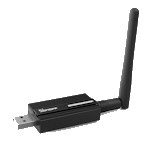
es ist der Sonoff ZIGBEE 3.0 USB-STICK CC2652P.
Doch nach fast 24 Stunden perfektem Lauf - ich habe mich schon gefreut - habe ich jetzt wieder diese Aussetzer.
Oh nein!
Also wahrscheinlich lag es jetzt doch nicht an einer abgestürzten Firmware.
Kann mir da jemand helfen und der Sache endgültig auf den Grund gehen?
Es ist wirklich sehr übel dass Zigbee bei mir immer wieder ausfällt :(
Eigentlich sind es meine wichtigsten Geräte. -
...nicht sehr lange!
Leider stürzte er immer wieder ab.
Gestern hab ich dann einen nagelneuen USB Adapter installiert:
es ist der Sonoff ZIGBEE 3.0 USB-STICK CC2652P.
Doch nach fast 24 Stunden perfektem Lauf - ich habe mich schon gefreut - habe ich jetzt wieder diese Aussetzer.
Oh nein!
Also wahrscheinlich lag es jetzt doch nicht an einer abgestürzten Firmware.
Kann mir da jemand helfen und der Sache endgültig auf den Grund gehen?
Es ist wirklich sehr übel dass Zigbee bei mir immer wieder ausfällt :(
Eigentlich sind es meine wichtigsten Geräte.@brokeling Hast du den Stick denn auch über eine USB-Verlängerung eingesteckt? Die Dinger sind sehr empfindlich. Ich hatte anfangs nur eine sehr kurze Verlängerung und auch damit hatte ich dann schon Probleme. Du solltest den Stick mindestens so 50-100cm vom Raspi weg positionieren und auch schauen, dass nicht unmittelbar daneben ein Router oder sonstige Störquellen sind.
Ich bin kein Experte, ob dies zu genau deinen Problemen führen könnte. Soll nur ein Hinweis am Rande sein.
-
...nicht sehr lange!
Leider stürzte er immer wieder ab.
Gestern hab ich dann einen nagelneuen USB Adapter installiert:
es ist der Sonoff ZIGBEE 3.0 USB-STICK CC2652P.
Doch nach fast 24 Stunden perfektem Lauf - ich habe mich schon gefreut - habe ich jetzt wieder diese Aussetzer.
Oh nein!
Also wahrscheinlich lag es jetzt doch nicht an einer abgestürzten Firmware.
Kann mir da jemand helfen und der Sache endgültig auf den Grund gehen?
Es ist wirklich sehr übel dass Zigbee bei mir immer wieder ausfällt :(
Eigentlich sind es meine wichtigsten Geräte.Du musst nach störquellen im 2.4 GHz Band schauen
- wifi
- dect
- proprietäre funkstrecken für Tastaturen, Mäuse und Kopfhörer
- usb3 Störungen durch Festplatten / ssd / Hubs
Auch: USB Verlängerungskabel auf Qualität prüfen
Koordinator an USB 2 anschließen, nicht USB3A.
-
Du musst nach störquellen im 2.4 GHz Band schauen
- wifi
- dect
- proprietäre funkstrecken für Tastaturen, Mäuse und Kopfhörer
- usb3 Störungen durch Festplatten / ssd / Hubs
Auch: USB Verlängerungskabel auf Qualität prüfen
Koordinator an USB 2 anschließen, nicht USB3A.
@asgothian
Danke für die Hinweise!
Ich habe die Verlängerung gleich im Bundle mitbestellt, müsste also passen.Mit den Abständen zu Wlan usw. hab ich jetzt weiter optimiert.
Und von USB 3.0 in USB 2.0 umgesteckt.
Mal sehen wie es weitergeht. -
@asgothian
Danke für die Hinweise!
Ich habe die Verlängerung gleich im Bundle mitbestellt, müsste also passen.Mit den Abständen zu Wlan usw. hab ich jetzt weiter optimiert.
Und von USB 3.0 in USB 2.0 umgesteckt.
Mal sehen wie es weitergeht.@brokeling sagte in Zigbee macht immer mal wieder schlapp - findet Adapter nicht:
@asgothian
Danke für die Hinweise!
Ich habe die Verlängerung gleich im Bundle mitbestellt, müsste also passen.Es geht nicht nur um passen, sondern um Qualität - USb3 streut gerne in 2.4 ghz band - da kann eine schlechte Abschirmung schon zu Problemen führen.
Mit den Abständen zu Wlan usw. hab ich jetzt weiter optimiert.
Und von USB 3.0 in USB 2.0 umgesteckt.
Mal sehen wie es weitergeht. -
@brokeling sagte in Zigbee macht immer mal wieder schlapp - findet Adapter nicht:
@asgothian
Danke für die Hinweise!
Ich habe die Verlängerung gleich im Bundle mitbestellt, müsste also passen.Es geht nicht nur um passen, sondern um Qualität - USb3 streut gerne in 2.4 ghz band - da kann eine schlechte Abschirmung schon zu Problemen führen.
Mit den Abständen zu Wlan usw. hab ich jetzt weiter optimiert.
Und von USB 3.0 in USB 2.0 umgesteckt.
Mal sehen wie es weitergeht. -
@asgothian
Ich gehe davon aus, dass das mitgelieferte Kabel den optimalen Betrieb gewährleistet.Aber wie kann man das Kabel prüfen?
@brokeling sagte in Zigbee macht immer mal wieder schlapp - findet Adapter nicht:
mitgelieferte Kabel den optimalen Betrieb gewährleistet
warum.. wie kommst du daadrauf.. ist NUR ein Kabel..
@brokeling sagte in Zigbee macht immer mal wieder schlapp - findet Adapter nicht:
Aber wie kann man das Kabel prüfen?
austauschen vielleicht ?






Hey! Du scheinst an dieser Unterhaltung interessiert zu sein, hast aber noch kein Konto.
Hast du es satt, bei jedem Besuch durch die gleichen Beiträge zu scrollen? Wenn du dich für ein Konto anmeldest, kommst du immer genau dorthin zurück, wo du zuvor warst, und kannst dich über neue Antworten benachrichtigen lassen (entweder per E-Mail oder Push-Benachrichtigung). Du kannst auch Lesezeichen speichern und Beiträge positiv bewerten, um anderen Community-Mitgliedern deine Wertschätzung zu zeigen.
Mit deinem Input könnte dieser Beitrag noch besser werden 💗
Registrieren Anmelden397
Online33.0k
Benutzende83.7k
Themen1.3m
Beiträge