Skip to content
  • Home
  • Aktuell
  • Tags
  • 0 Ungelesen 0
  • Kategorien
  • Unreplied
  • Beliebt
  • GitHub
  • Docu
  • Hilfe
Skins
  • Light
  • Brite
  • Cerulean
  • Cosmo
  • Flatly
  • Journal
  • Litera
  • Lumen
  • Lux
  • Materia
  • Minty
  • Morph
  • Pulse
  • Sandstone
  • Simplex
  • Sketchy
  • Spacelab
  • United
  • Yeti
  • Zephyr
  • Dark
  • Cyborg
  • Darkly
  • Quartz
  • Slate
  • Solar
  • Superhero
  • Vapor

  • Standard: (Kein Skin)
  • Kein Skin
Einklappen
ioBroker Logo

Community Forum

donate donate
  1. ioBroker Community Home
  2. Deutsch
  3. Error/Bug
  4. KNX-Adapter - keine UDP-Verbindung - OpenKNX-Adapter i.O.

NEWS

  • UPDATE 31.10.: Amazon Alexa - ioBroker Skill läuft aus ?
    apollon77A
    apollon77
    48
    3
    8.7k

  • Monatsrückblick – September 2025
    BluefoxB
    Bluefox
    13
    1
    2.2k

  • Neues Video "KI im Smart Home" - ioBroker plus n8n
    BluefoxB
    Bluefox
    16
    1
    3.2k

KNX-Adapter - keine UDP-Verbindung - OpenKNX-Adapter i.O.

Geplant Angeheftet Gesperrt Verschoben Error/Bug
43 Beiträge 2 Kommentatoren 3.7k Aufrufe 2 Watching
  • Älteste zuerst
  • Neuste zuerst
  • Meiste Stimmen
Antworten
  • In einem neuen Thema antworten
Anmelden zum Antworten
Dieses Thema wurde gelöscht. Nur Nutzer mit entsprechenden Rechten können es sehen.
  • GlasfaserG Glasfaser

    @nubbbi sagte in KNX-Adapter - keine UDP-Verbindung - OpenKNX-Adapter i.O.:

    Buanet Docker v 9.0.1

    Würde ich dann auch noch gleichzeit auf die neue Image Version aktualisieren !

    N Offline
    N Offline
    Nubbbi
    schrieb am zuletzt editiert von
    #26

    @glasfaser Das habe ich gemacht.
    Müssen dann neben dem Mounting von /docker/iobroker zu /opt/fhem noch Ports zugewiesen werden?
    Ich habe 3671-3671-udp und 7234-8081-tcp eingestellt, aber der Container bricht beim Start bei Schritt 3 ab.

    GlasfaserG 3 Antworten Letzte Antwort
    0
    • N Nubbbi

      @glasfaser Das habe ich gemacht.
      Müssen dann neben dem Mounting von /docker/iobroker zu /opt/fhem noch Ports zugewiesen werden?
      Ich habe 3671-3671-udp und 7234-8081-tcp eingestellt, aber der Container bricht beim Start bei Schritt 3 ab.

      GlasfaserG Offline
      GlasfaserG Offline
      Glasfaser
      schrieb am zuletzt editiert von
      #27

      @nubbbi sagte in KNX-Adapter - keine UDP-Verbindung - OpenKNX-Adapter i.O.:

      Ich habe 3671-3671-udp und 7234-8081-tcp eingestellt, aber der Container bricht beim Start bei Schritt 3 ab.

      Warum soll er abbrechen !?

      Bei Host brauchen keine Ports gemappt werden .

      Zeige mal das LOG , so kann ich nur raten

      Synology 918+ 16GB - ioBroker in Docker v9 , VISO auf Trekstor Primebook C13 13,3" , Hikvision Domkameras mit Surveillance Station .. CCU RaspberryMatic in Synology VM .. Zigbee CC2538+CC2592 .. Sonoff .. KNX .. Modbus ..

      1 Antwort Letzte Antwort
      0
      • N Nubbbi

        @glasfaser Das habe ich gemacht.
        Müssen dann neben dem Mounting von /docker/iobroker zu /opt/fhem noch Ports zugewiesen werden?
        Ich habe 3671-3671-udp und 7234-8081-tcp eingestellt, aber der Container bricht beim Start bei Schritt 3 ab.

        GlasfaserG Offline
        GlasfaserG Offline
        Glasfaser
        schrieb am zuletzt editiert von Glasfaser
        #28

        @nubbbi sagte in KNX-Adapter - keine UDP-Verbindung - OpenKNX-Adapter i.O.:

        Müssen dann neben dem Mounting von /docker/iobroker zu /opt/fhem noch Ports zugewiesen werden?

        Das gleiche wie deine Einstellungen im alten Container , zu Ordner Mounts !

        Synology 918+ 16GB - ioBroker in Docker v9 , VISO auf Trekstor Primebook C13 13,3" , Hikvision Domkameras mit Surveillance Station .. CCU RaspberryMatic in Synology VM .. Zigbee CC2538+CC2592 .. Sonoff .. KNX .. Modbus ..

        1 Antwort Letzte Antwort
        0
        • N Nubbbi

          @glasfaser Das habe ich gemacht.
          Müssen dann neben dem Mounting von /docker/iobroker zu /opt/fhem noch Ports zugewiesen werden?
          Ich habe 3671-3671-udp und 7234-8081-tcp eingestellt, aber der Container bricht beim Start bei Schritt 3 ab.

          GlasfaserG Offline
          GlasfaserG Offline
          Glasfaser
          schrieb am zuletzt editiert von
          #29

          @nubbbi sagte in KNX-Adapter - keine UDP-Verbindung - OpenKNX-Adapter i.O.:

          bricht beim Start bei Schritt 3 ab.

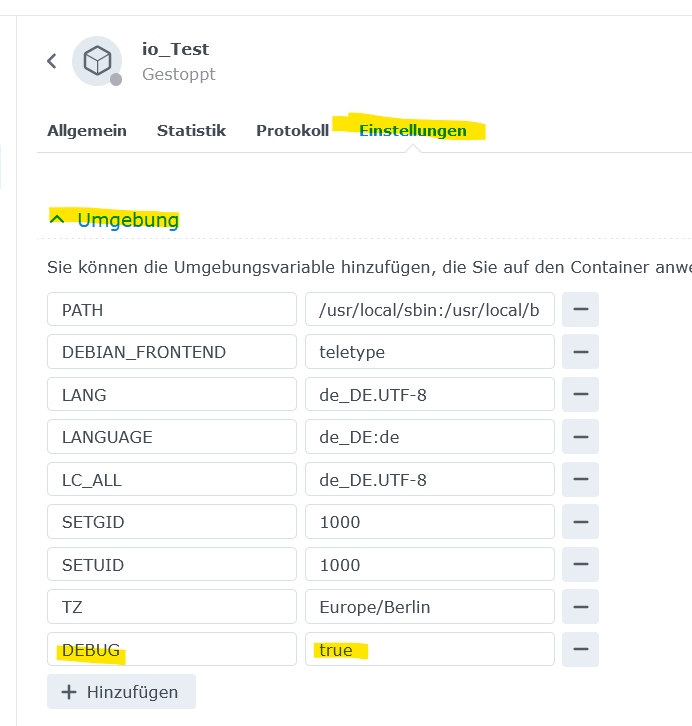
          zusätzlich ... kann man hiermit mehr sehen :

          Trage in der ENV ein

          DEBUG = true
          

          .
          b9e43157-85a5-4714-9f62-bff5376f6e35-grafik.png

          Synology 918+ 16GB - ioBroker in Docker v9 , VISO auf Trekstor Primebook C13 13,3" , Hikvision Domkameras mit Surveillance Station .. CCU RaspberryMatic in Synology VM .. Zigbee CC2538+CC2592 .. Sonoff .. KNX .. Modbus ..

          N 1 Antwort Letzte Antwort
          0
          • GlasfaserG Glasfaser

            @nubbbi sagte in KNX-Adapter - keine UDP-Verbindung - OpenKNX-Adapter i.O.:

            bricht beim Start bei Schritt 3 ab.

            zusätzlich ... kann man hiermit mehr sehen :

            Trage in der ENV ein

            DEBUG = true
            

            .
            b9e43157-85a5-4714-9f62-bff5376f6e35-grafik.png

            N Offline
            N Offline
            Nubbbi
            schrieb am zuletzt editiert von
            #30

            @glasfaser

            ![85b79597-054d-4765-be09-13b9ebbf71d3-image.png](/assets/uploads/files/1706468856325-85b79597-054d-4765-be09-13b9ebbf71d3-image.png) code_text
            ```iobroker
            date,stream,content
            2024/01/28 19:33:12,stdout,This Script will exit now.
            
            2024/01/28 19:33:12,stdout, 
            
            2024/01/28 19:31:23,stdout,[DEBUG] IoBroker is not running!
            
            2024/01/28 19:31:23,stdout,[DEBUG] If you want to stop or restart your container you have to do it manually.
            
            2024/01/28 19:31:23,stdout,[DEBUG] This enables you to investigate or fix your issue on the command line.
            
            2024/01/28 19:31:23,stdout,[DEBUG] Debug mode prevents the container from exiting on errors.
            
            2024/01/28 19:31:23,stdout, 
            
            2024/01/28 19:31:23,stdout,For more information see ioBroker Docker image docs (https://docs.buanet.de/iobroker-docker-image/docs).
            
            2024/01/28 19:31:23,stdout,Please check your configuration and try again.
            
            2024/01/28 19:31:23,stdout,[DEBUG] No connection to databases possible ...
            
            2024/01/28 19:31:23,stdout,[DEBUG]  Could not connect to states database at 127.0.0.1:9000 (invalid protocol). Please make sure the configured IP and port points to a host running JS-Controller >= 2.0. and that the port is not occupied by other software!
            
            2024/01/28 19:31:23,stdout,[DEBUG]  Could not connect to states database at 127.0.0.1:9000 (invalid protocol). Please make sure the configured IP and port points to a host running JS-Controller >= 2.0. and that the port is not occupied by other software!
            
            2024/01/28 19:31:23,stdout,[DEBUG] Error message: 
            
            2024/01/28 19:31:23,stdout,Checking database connection... Failed.
            
            2024/01/28 19:30:30,stdout, 
            
            2024/01/28 19:30:30,stdout,[DEBUG] Done.
            
            2024/01/28 19:30:30,stdout,[DEBUG] No custom states db settings detected.
            
            2024/01/28 19:30:30,stdout,[DEBUG] Checking custom states db settings... 
            
            2024/01/28 19:30:30,stdout, 
            
            2024/01/28 19:30:30,stdout,[DEBUG] Done.
            
            2024/01/28 19:30:30,stdout,[DEBUG] No custom objects db settings detected.
            
            2024/01/28 19:30:30,stdout,[DEBUG] Checking custom objects db settings... 
            
            2024/01/28 19:30:30,stdout, 
            
            2024/01/28 19:30:30,stdout,[DEBUG] Done.
            
            2024/01/28 19:30:30,stdout,[DEBUG] No multihost settings detected.
            
            2024/01/28 19:30:30,stdout,[DEBUG] Checking multihost settings... 
            
            2024/01/28 19:30:30,stdout, 
            
            2024/01/28 19:30:30,stdout,(Re)setting permissions (This might take a while! Please be patient!)... Done.
            
            2024/01/28 19:30:30,stdout, 
            
            2024/01/28 19:30:30,stdout,--------------------------------------------------------------------------------
            
            2024/01/28 19:30:30,stdout,-----             Step 3 of 5: Checking ioBroker Installation              -----
            
            2024/01/28 19:30:30,stdout,--------------------------------------------------------------------------------
            
            2024/01/28 19:30:30,stdout, 
            
            2024/01/28 19:30:30,stdout,Existing installation of ioBroker detected in "/opt/iobroker".
            
            2024/01/28 19:30:30,stdout, 
            
            2024/01/28 19:30:30,stdout,--------------------------------------------------------------------------------
            
            2024/01/28 19:30:30,stdout,-----             Step 2 of 5: Detecting ioBroker Installation             -----
            
            2024/01/28 19:30:30,stdout,--------------------------------------------------------------------------------
            
            2024/01/28 19:30:30,stdout, 
            
            2024/01/28 19:30:30,stdout, 
            
            2024/01/28 19:30:30,stdout, 
            
            2024/01/28 19:30:30,stdout,--------------------------------------------------------------------------------
            
            2024/01/28 19:30:30,stdout,-----                   Step 1 of 5: Preparing Container                   -----
            
            2024/01/28 19:30:30,stdout,--------------------------------------------------------------------------------
            
            2024/01/28 19:30:30,stdout, 
            
            2024/01/28 19:30:30,stdout,!!!!!!!!!!!!!!!!!!!!!!!!!!!!!!!!!!!!!!!!!!!!!!!!!!!!!!!!!!!!!!!!!!!!!!!!!!!!!!!!
            
            2024/01/28 19:30:30,stdout,!!!!           https://docs.buanet.de/iobroker-docker-image/docs/           !!!!
            
            2024/01/28 19:30:30,stdout,!!!!     For more information see ioBroker Docker image documentation:      !!!!
            
            2024/01/28 19:30:30,stdout,!!!!          Please make sure to deactivate if no longer needed.           !!!!
            
            2024/01/28 19:30:30,stdout,!!!! This will extend the logging output and may slow down container start. !!!!
            
            2024/01/28 19:30:30,stdout,!!!!               Environment variable DEBUG is set to true.               !!!!
            
            2024/01/28 19:30:30,stdout,!!!!                            DEBUG LOG ACTIVE                            !!!!
            
            2024/01/28 19:30:30,stdout,!!!!!!!!!!!!!!!!!!!!!!!!!!!!!!!!!!!!!!!!!!!!!!!!!!!!!!!!!!!!!!!!!!!!!!!!!!!!!!!!
            
            2024/01/28 19:30:30,stdout, 
            
            2024/01/28 19:30:30,stdout,--------------------------------------------------------------------------------
            N GlasfaserG 2 Antworten Letzte Antwort
            0
            • N Nubbbi

              @glasfaser

              ![85b79597-054d-4765-be09-13b9ebbf71d3-image.png](/assets/uploads/files/1706468856325-85b79597-054d-4765-be09-13b9ebbf71d3-image.png) code_text
              ```iobroker
              date,stream,content
              2024/01/28 19:33:12,stdout,This Script will exit now.
              
              2024/01/28 19:33:12,stdout, 
              
              2024/01/28 19:31:23,stdout,[DEBUG] IoBroker is not running!
              
              2024/01/28 19:31:23,stdout,[DEBUG] If you want to stop or restart your container you have to do it manually.
              
              2024/01/28 19:31:23,stdout,[DEBUG] This enables you to investigate or fix your issue on the command line.
              
              2024/01/28 19:31:23,stdout,[DEBUG] Debug mode prevents the container from exiting on errors.
              
              2024/01/28 19:31:23,stdout, 
              
              2024/01/28 19:31:23,stdout,For more information see ioBroker Docker image docs (https://docs.buanet.de/iobroker-docker-image/docs).
              
              2024/01/28 19:31:23,stdout,Please check your configuration and try again.
              
              2024/01/28 19:31:23,stdout,[DEBUG] No connection to databases possible ...
              
              2024/01/28 19:31:23,stdout,[DEBUG]  Could not connect to states database at 127.0.0.1:9000 (invalid protocol). Please make sure the configured IP and port points to a host running JS-Controller >= 2.0. and that the port is not occupied by other software!
              
              2024/01/28 19:31:23,stdout,[DEBUG]  Could not connect to states database at 127.0.0.1:9000 (invalid protocol). Please make sure the configured IP and port points to a host running JS-Controller >= 2.0. and that the port is not occupied by other software!
              
              2024/01/28 19:31:23,stdout,[DEBUG] Error message: 
              
              2024/01/28 19:31:23,stdout,Checking database connection... Failed.
              
              2024/01/28 19:30:30,stdout, 
              
              2024/01/28 19:30:30,stdout,[DEBUG] Done.
              
              2024/01/28 19:30:30,stdout,[DEBUG] No custom states db settings detected.
              
              2024/01/28 19:30:30,stdout,[DEBUG] Checking custom states db settings... 
              
              2024/01/28 19:30:30,stdout, 
              
              2024/01/28 19:30:30,stdout,[DEBUG] Done.
              
              2024/01/28 19:30:30,stdout,[DEBUG] No custom objects db settings detected.
              
              2024/01/28 19:30:30,stdout,[DEBUG] Checking custom objects db settings... 
              
              2024/01/28 19:30:30,stdout, 
              
              2024/01/28 19:30:30,stdout,[DEBUG] Done.
              
              2024/01/28 19:30:30,stdout,[DEBUG] No multihost settings detected.
              
              2024/01/28 19:30:30,stdout,[DEBUG] Checking multihost settings... 
              
              2024/01/28 19:30:30,stdout, 
              
              2024/01/28 19:30:30,stdout,(Re)setting permissions (This might take a while! Please be patient!)... Done.
              
              2024/01/28 19:30:30,stdout, 
              
              2024/01/28 19:30:30,stdout,--------------------------------------------------------------------------------
              
              2024/01/28 19:30:30,stdout,-----             Step 3 of 5: Checking ioBroker Installation              -----
              
              2024/01/28 19:30:30,stdout,--------------------------------------------------------------------------------
              
              2024/01/28 19:30:30,stdout, 
              
              2024/01/28 19:30:30,stdout,Existing installation of ioBroker detected in "/opt/iobroker".
              
              2024/01/28 19:30:30,stdout, 
              
              2024/01/28 19:30:30,stdout,--------------------------------------------------------------------------------
              
              2024/01/28 19:30:30,stdout,-----             Step 2 of 5: Detecting ioBroker Installation             -----
              
              2024/01/28 19:30:30,stdout,--------------------------------------------------------------------------------
              
              2024/01/28 19:30:30,stdout, 
              
              2024/01/28 19:30:30,stdout, 
              
              2024/01/28 19:30:30,stdout, 
              
              2024/01/28 19:30:30,stdout,--------------------------------------------------------------------------------
              
              2024/01/28 19:30:30,stdout,-----                   Step 1 of 5: Preparing Container                   -----
              
              2024/01/28 19:30:30,stdout,--------------------------------------------------------------------------------
              
              2024/01/28 19:30:30,stdout, 
              
              2024/01/28 19:30:30,stdout,!!!!!!!!!!!!!!!!!!!!!!!!!!!!!!!!!!!!!!!!!!!!!!!!!!!!!!!!!!!!!!!!!!!!!!!!!!!!!!!!
              
              2024/01/28 19:30:30,stdout,!!!!           https://docs.buanet.de/iobroker-docker-image/docs/           !!!!
              
              2024/01/28 19:30:30,stdout,!!!!     For more information see ioBroker Docker image documentation:      !!!!
              
              2024/01/28 19:30:30,stdout,!!!!          Please make sure to deactivate if no longer needed.           !!!!
              
              2024/01/28 19:30:30,stdout,!!!! This will extend the logging output and may slow down container start. !!!!
              
              2024/01/28 19:30:30,stdout,!!!!               Environment variable DEBUG is set to true.               !!!!
              
              2024/01/28 19:30:30,stdout,!!!!                            DEBUG LOG ACTIVE                            !!!!
              
              2024/01/28 19:30:30,stdout,!!!!!!!!!!!!!!!!!!!!!!!!!!!!!!!!!!!!!!!!!!!!!!!!!!!!!!!!!!!!!!!!!!!!!!!!!!!!!!!!
              
              2024/01/28 19:30:30,stdout, 
              
              2024/01/28 19:30:30,stdout,--------------------------------------------------------------------------------
              N Offline
              N Offline
              Nubbbi
              schrieb am zuletzt editiert von
              #31

              @nubbbi
              Kann es sein, dass der Port 9000, der hier erwartet wird, bereits anders genutzt wird? Nämlich bei mir von Portainer?

              GlasfaserG 1 Antwort Letzte Antwort
              0
              • N Nubbbi

                @glasfaser

                ![85b79597-054d-4765-be09-13b9ebbf71d3-image.png](/assets/uploads/files/1706468856325-85b79597-054d-4765-be09-13b9ebbf71d3-image.png) code_text
                ```iobroker
                date,stream,content
                2024/01/28 19:33:12,stdout,This Script will exit now.
                
                2024/01/28 19:33:12,stdout, 
                
                2024/01/28 19:31:23,stdout,[DEBUG] IoBroker is not running!
                
                2024/01/28 19:31:23,stdout,[DEBUG] If you want to stop or restart your container you have to do it manually.
                
                2024/01/28 19:31:23,stdout,[DEBUG] This enables you to investigate or fix your issue on the command line.
                
                2024/01/28 19:31:23,stdout,[DEBUG] Debug mode prevents the container from exiting on errors.
                
                2024/01/28 19:31:23,stdout, 
                
                2024/01/28 19:31:23,stdout,For more information see ioBroker Docker image docs (https://docs.buanet.de/iobroker-docker-image/docs).
                
                2024/01/28 19:31:23,stdout,Please check your configuration and try again.
                
                2024/01/28 19:31:23,stdout,[DEBUG] No connection to databases possible ...
                
                2024/01/28 19:31:23,stdout,[DEBUG]  Could not connect to states database at 127.0.0.1:9000 (invalid protocol). Please make sure the configured IP and port points to a host running JS-Controller >= 2.0. and that the port is not occupied by other software!
                
                2024/01/28 19:31:23,stdout,[DEBUG]  Could not connect to states database at 127.0.0.1:9000 (invalid protocol). Please make sure the configured IP and port points to a host running JS-Controller >= 2.0. and that the port is not occupied by other software!
                
                2024/01/28 19:31:23,stdout,[DEBUG] Error message: 
                
                2024/01/28 19:31:23,stdout,Checking database connection... Failed.
                
                2024/01/28 19:30:30,stdout, 
                
                2024/01/28 19:30:30,stdout,[DEBUG] Done.
                
                2024/01/28 19:30:30,stdout,[DEBUG] No custom states db settings detected.
                
                2024/01/28 19:30:30,stdout,[DEBUG] Checking custom states db settings... 
                
                2024/01/28 19:30:30,stdout, 
                
                2024/01/28 19:30:30,stdout,[DEBUG] Done.
                
                2024/01/28 19:30:30,stdout,[DEBUG] No custom objects db settings detected.
                
                2024/01/28 19:30:30,stdout,[DEBUG] Checking custom objects db settings... 
                
                2024/01/28 19:30:30,stdout, 
                
                2024/01/28 19:30:30,stdout,[DEBUG] Done.
                
                2024/01/28 19:30:30,stdout,[DEBUG] No multihost settings detected.
                
                2024/01/28 19:30:30,stdout,[DEBUG] Checking multihost settings... 
                
                2024/01/28 19:30:30,stdout, 
                
                2024/01/28 19:30:30,stdout,(Re)setting permissions (This might take a while! Please be patient!)... Done.
                
                2024/01/28 19:30:30,stdout, 
                
                2024/01/28 19:30:30,stdout,--------------------------------------------------------------------------------
                
                2024/01/28 19:30:30,stdout,-----             Step 3 of 5: Checking ioBroker Installation              -----
                
                2024/01/28 19:30:30,stdout,--------------------------------------------------------------------------------
                
                2024/01/28 19:30:30,stdout, 
                
                2024/01/28 19:30:30,stdout,Existing installation of ioBroker detected in "/opt/iobroker".
                
                2024/01/28 19:30:30,stdout, 
                
                2024/01/28 19:30:30,stdout,--------------------------------------------------------------------------------
                
                2024/01/28 19:30:30,stdout,-----             Step 2 of 5: Detecting ioBroker Installation             -----
                
                2024/01/28 19:30:30,stdout,--------------------------------------------------------------------------------
                
                2024/01/28 19:30:30,stdout, 
                
                2024/01/28 19:30:30,stdout, 
                
                2024/01/28 19:30:30,stdout, 
                
                2024/01/28 19:30:30,stdout,--------------------------------------------------------------------------------
                
                2024/01/28 19:30:30,stdout,-----                   Step 1 of 5: Preparing Container                   -----
                
                2024/01/28 19:30:30,stdout,--------------------------------------------------------------------------------
                
                2024/01/28 19:30:30,stdout, 
                
                2024/01/28 19:30:30,stdout,!!!!!!!!!!!!!!!!!!!!!!!!!!!!!!!!!!!!!!!!!!!!!!!!!!!!!!!!!!!!!!!!!!!!!!!!!!!!!!!!
                
                2024/01/28 19:30:30,stdout,!!!!           https://docs.buanet.de/iobroker-docker-image/docs/           !!!!
                
                2024/01/28 19:30:30,stdout,!!!!     For more information see ioBroker Docker image documentation:      !!!!
                
                2024/01/28 19:30:30,stdout,!!!!          Please make sure to deactivate if no longer needed.           !!!!
                
                2024/01/28 19:30:30,stdout,!!!! This will extend the logging output and may slow down container start. !!!!
                
                2024/01/28 19:30:30,stdout,!!!!               Environment variable DEBUG is set to true.               !!!!
                
                2024/01/28 19:30:30,stdout,!!!!                            DEBUG LOG ACTIVE                            !!!!
                
                2024/01/28 19:30:30,stdout,!!!!!!!!!!!!!!!!!!!!!!!!!!!!!!!!!!!!!!!!!!!!!!!!!!!!!!!!!!!!!!!!!!!!!!!!!!!!!!!!
                
                2024/01/28 19:30:30,stdout, 
                
                2024/01/28 19:30:30,stdout,--------------------------------------------------------------------------------
                GlasfaserG Offline
                GlasfaserG Offline
                Glasfaser
                schrieb am zuletzt editiert von
                #32

                @nubbbi sagte in KNX-Adapter - keine UDP-Verbindung - OpenKNX-Adapter i.O.:

                Please make sure the configured IP and port points to a host running JS-Controller >= 2.0. and that the port is not occupied by other software!

                Zeige mal vom vorhanden Container , die Full Ausgabe von

                iob diag
                

                Synology 918+ 16GB - ioBroker in Docker v9 , VISO auf Trekstor Primebook C13 13,3" , Hikvision Domkameras mit Surveillance Station .. CCU RaspberryMatic in Synology VM .. Zigbee CC2538+CC2592 .. Sonoff .. KNX .. Modbus ..

                1 Antwort Letzte Antwort
                0
                • N Nubbbi

                  @nubbbi
                  Kann es sein, dass der Port 9000, der hier erwartet wird, bereits anders genutzt wird? Nämlich bei mir von Portainer?

                  GlasfaserG Offline
                  GlasfaserG Offline
                  Glasfaser
                  schrieb am zuletzt editiert von Glasfaser
                  #33

                  @nubbbi sagte in KNX-Adapter - keine UDP-Verbindung - OpenKNX-Adapter i.O.:

                  Nämlich bei mir von Portainer?

                  Richtig , den mußt du ändern !!!

                  Synology 918+ 16GB - ioBroker in Docker v9 , VISO auf Trekstor Primebook C13 13,3" , Hikvision Domkameras mit Surveillance Station .. CCU RaspberryMatic in Synology VM .. Zigbee CC2538+CC2592 .. Sonoff .. KNX .. Modbus ..

                  N 1 Antwort Letzte Antwort
                  0
                  • GlasfaserG Glasfaser

                    @nubbbi sagte in KNX-Adapter - keine UDP-Verbindung - OpenKNX-Adapter i.O.:

                    Nämlich bei mir von Portainer?

                    Richtig , den mußt du ändern !!!

                    N Offline
                    N Offline
                    Nubbbi
                    schrieb am zuletzt editiert von
                    #34

                    @glasfaser Wenn ich den Port 9000 für den Container Portainer ändere, komme ich aber nicht mehr auf dessen Weboberfläche.

                    GlasfaserG 1 Antwort Letzte Antwort
                    0
                    • N Nubbbi

                      @glasfaser Wenn ich den Port 9000 für den Container Portainer ändere, komme ich aber nicht mehr auf dessen Weboberfläche.

                      GlasfaserG Offline
                      GlasfaserG Offline
                      Glasfaser
                      schrieb am zuletzt editiert von
                      #35

                      @nubbbi

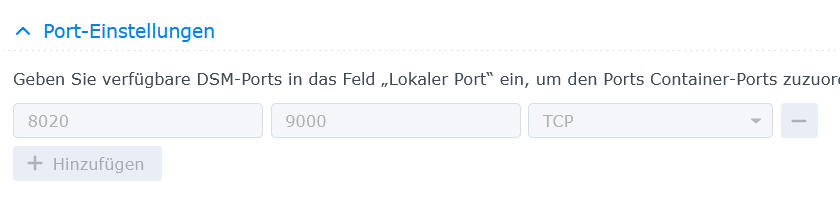
                      sieht dann so aus , also über den Port 8020 erreichbar :

                      Portainer ist im Bridge Modus :

                      .7572cd39-5cd1-482a-bf59-91ed9a451831-grafik.png .

                      1759362b-8e9a-4b7c-b183-a070e171bf16-grafik.png

                      Synology 918+ 16GB - ioBroker in Docker v9 , VISO auf Trekstor Primebook C13 13,3" , Hikvision Domkameras mit Surveillance Station .. CCU RaspberryMatic in Synology VM .. Zigbee CC2538+CC2592 .. Sonoff .. KNX .. Modbus ..

                      N 1 Antwort Letzte Antwort
                      0
                      • GlasfaserG Glasfaser

                        @nubbbi

                        sieht dann so aus , also über den Port 8020 erreichbar :

                        Portainer ist im Bridge Modus :

                        .7572cd39-5cd1-482a-bf59-91ed9a451831-grafik.png .

                        1759362b-8e9a-4b7c-b183-a070e171bf16-grafik.png

                        N Offline
                        N Offline
                        Nubbbi
                        schrieb am zuletzt editiert von
                        #36

                        @glasfaser

                                                                                                         
                        *** ioBroker-Installation ***                                                    
                                                                                                         
                        ioBroker Status                                                                  
                         Could not connect to objects database at 127.0.0.1:9001 (invalid protocol). Plea
                        se make sure the configured IP and port points to a host running JS-Controller >=
                         2.0. and that the port is not occupied by other software!                       
                         Could not connect to objects database at 127.0.0.1:9001 (invalid protocol). Plea
                        se make sure the configured IP and port points to a host running JS-Controller >=
                         2.0. and that the port is not occupied by other software!                       
                        No connection to databases possible ...                                          
                                                                                                         
                        Core adapters versions                                                           
                        js-controller:  5.0.17                                                           
                        admin:          6.12.0                                                           
                        javascript:     "javascript" not found                                           
                                                                                                         
                        Adapters from github:   0                                                        
                                                                                                         
                        Adapter State                                                                    
                         Could not connect to objects database at 127.0.0.1:9001 (invalid protocol). Plea
                        se make sure the configured IP and port points to a host running JS-Controller >=
                         2.0. and that the port is not occupied by other software!                       
                         Could not connect to objects database at 127.0.0.1:9001 (invalid protocol). Plea
                        se make sure the configured IP and port points to a host running JS-Controller >=
                         2.0. and that the port is not occupied by other software!                       
                        
                        
                        GlasfaserG 1 Antwort Letzte Antwort
                        0
                        • N Nubbbi

                          @glasfaser

                                                                                                           
                          *** ioBroker-Installation ***                                                    
                                                                                                           
                          ioBroker Status                                                                  
                           Could not connect to objects database at 127.0.0.1:9001 (invalid protocol). Plea
                          se make sure the configured IP and port points to a host running JS-Controller >=
                           2.0. and that the port is not occupied by other software!                       
                           Could not connect to objects database at 127.0.0.1:9001 (invalid protocol). Plea
                          se make sure the configured IP and port points to a host running JS-Controller >=
                           2.0. and that the port is not occupied by other software!                       
                          No connection to databases possible ...                                          
                                                                                                           
                          Core adapters versions                                                           
                          js-controller:  5.0.17                                                           
                          admin:          6.12.0                                                           
                          javascript:     "javascript" not found                                           
                                                                                                           
                          Adapters from github:   0                                                        
                                                                                                           
                          Adapter State                                                                    
                           Could not connect to objects database at 127.0.0.1:9001 (invalid protocol). Plea
                          se make sure the configured IP and port points to a host running JS-Controller >=
                           2.0. and that the port is not occupied by other software!                       
                           Could not connect to objects database at 127.0.0.1:9001 (invalid protocol). Plea
                          se make sure the configured IP and port points to a host running JS-Controller >=
                           2.0. and that the port is not occupied by other software!                       
                          
                          
                          GlasfaserG Offline
                          GlasfaserG Offline
                          Glasfaser
                          schrieb am zuletzt editiert von
                          #37

                          @nubbbi

                          was hast du denn noch auf 9001

                          Synology 918+ 16GB - ioBroker in Docker v9 , VISO auf Trekstor Primebook C13 13,3" , Hikvision Domkameras mit Surveillance Station .. CCU RaspberryMatic in Synology VM .. Zigbee CC2538+CC2592 .. Sonoff .. KNX .. Modbus ..

                          N 1 Antwort Letzte Antwort
                          0
                          • GlasfaserG Glasfaser

                            @nubbbi

                            was hast du denn noch auf 9001

                            N Offline
                            N Offline
                            Nubbbi
                            schrieb am zuletzt editiert von
                            #38

                            @glasfaser Also, ich öffne die Einstellungen zum Container, gehe auf "Terminalfenster öffnen" und dann "Mit Befehl starten" und da gebe ich "iob diag" ein - soweit richtig?

                            Mir gelingt es aber nicht, das Ergebnis per STRG-C zu kopieren.

                            1 Antwort Letzte Antwort
                            0
                            • GlasfaserG Offline
                              GlasfaserG Offline
                              Glasfaser
                              schrieb am zuletzt editiert von
                              #39

                              @nubbbi sagte in KNX-Adapter - keine UDP-Verbindung - OpenKNX-Adapter i.O.:

                              Mir gelingt es aber nicht, das Ergebnis per STRG-C zu kopieren.

                              Steht in der Beschreibung !!

                              vorher STRG-A dann STRG-C

                              Synology 918+ 16GB - ioBroker in Docker v9 , VISO auf Trekstor Primebook C13 13,3" , Hikvision Domkameras mit Surveillance Station .. CCU RaspberryMatic in Synology VM .. Zigbee CC2538+CC2592 .. Sonoff .. KNX .. Modbus ..

                              N 1 Antwort Letzte Antwort
                              0
                              • GlasfaserG Glasfaser

                                @nubbbi sagte in KNX-Adapter - keine UDP-Verbindung - OpenKNX-Adapter i.O.:

                                Mir gelingt es aber nicht, das Ergebnis per STRG-C zu kopieren.

                                Steht in der Beschreibung !!

                                vorher STRG-A dann STRG-C

                                N Offline
                                N Offline
                                Nubbbi
                                schrieb am zuletzt editiert von
                                #40

                                @glasfaser vorher heißt, wenn da steht "drücke eine Taste, um Summary zu erstellen"?

                                GlasfaserG 1 Antwort Letzte Antwort
                                0
                                • N Nubbbi

                                  @glasfaser vorher heißt, wenn da steht "drücke eine Taste, um Summary zu erstellen"?

                                  GlasfaserG Offline
                                  GlasfaserG Offline
                                  Glasfaser
                                  schrieb am zuletzt editiert von
                                  #41

                                  @nubbbi
                                  dort abbrechen , brauche die Summary nicht , nur die Full Ausgabe davor

                                  Synology 918+ 16GB - ioBroker in Docker v9 , VISO auf Trekstor Primebook C13 13,3" , Hikvision Domkameras mit Surveillance Station .. CCU RaspberryMatic in Synology VM .. Zigbee CC2538+CC2592 .. Sonoff .. KNX .. Modbus ..

                                  N 1 Antwort Letzte Antwort
                                  0
                                  • GlasfaserG Glasfaser

                                    @nubbbi
                                    dort abbrechen , brauche die Summary nicht , nur die Full Ausgabe davor

                                    N Offline
                                    N Offline
                                    Nubbbi
                                    schrieb am zuletzt editiert von
                                    #42

                                    @glasfaser ```

                                                        admin                   6.12.0                           
                                    

                                    ioBroker Status: iobroker is not running on this host.

                                    Objects type: jsonl
                                    States type: jsonl

                                    Status admin and web instance:
                                    system.adapter.admin.0 : admin : buildkitsandb
                                    ox - enabled, port: 8081, bind: 0.0.0.0, run as: admin

                                    Objects: 96
                                    States: 22

                                    Size of iob-Database:

                                    4.1M /opt/iobroker/iobroker-data/objects.jsonl
                                    12K /opt/iobroker/iobroker-data/states.jsonl

                                    =================== END OF SUMMARY ====================

                                                                                                                     
                                    === Mark text until here for copying ===                                         

                                                                                                                     
                                    
                                    N 1 Antwort Letzte Antwort
                                    0
                                    • N Nubbbi

                                      @glasfaser ```

                                                          admin                   6.12.0                           
                                      

                                      ioBroker Status: iobroker is not running on this host.

                                      Objects type: jsonl
                                      States type: jsonl

                                      Status admin and web instance:
                                      system.adapter.admin.0 : admin : buildkitsandb
                                      ox - enabled, port: 8081, bind: 0.0.0.0, run as: admin

                                      Objects: 96
                                      States: 22

                                      Size of iob-Database:

                                      4.1M /opt/iobroker/iobroker-data/objects.jsonl
                                      12K /opt/iobroker/iobroker-data/states.jsonl

                                      =================== END OF SUMMARY ====================

                                                                                                                       
                                      === Mark text until here for copying ===                                         
                                                                                                                       
                                      
                                      N Offline
                                      N Offline
                                      Nubbbi
                                      schrieb am zuletzt editiert von
                                      #43

                                      @nubbbi Ich bekomme immer nur die letzte sichtbare Seite in die Zwischenablage kopiert, ich kapiere das mit STRG-A nicht.

                                      1 Antwort Letzte Antwort
                                      0
                                      Antworten
                                      • In einem neuen Thema antworten
                                      Anmelden zum Antworten
                                      • Älteste zuerst
                                      • Neuste zuerst
                                      • Meiste Stimmen


                                      Support us

                                      ioBroker
                                      Community Adapters
                                      Donate

                                      785

                                      Online

                                      32.4k

                                      Benutzer

                                      81.5k

                                      Themen

                                      1.3m

                                      Beiträge
                                      Community
                                      Impressum | Datenschutz-Bestimmungen | Nutzungsbedingungen | Einwilligungseinstellungen
                                      ioBroker Community 2014-2025
                                      logo
                                      • Anmelden

                                      • Du hast noch kein Konto? Registrieren

                                      • Anmelden oder registrieren, um zu suchen
                                      • Erster Beitrag
                                        Letzter Beitrag
                                      0
                                      • Home
                                      • Aktuell
                                      • Tags
                                      • Ungelesen 0
                                      • Kategorien
                                      • Unreplied
                                      • Beliebt
                                      • GitHub
                                      • Docu
                                      • Hilfe