




KNX-Adapter - keine UDP-Verbindung - OpenKNX-Adapter i.O.
-
@glasfaser
Danke.
So eingestellt: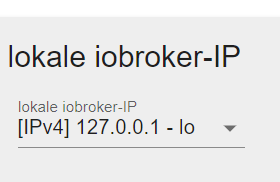
kommt:knx.0 2024-01-21 17:15:10.769 info Send : UDP Connection State Request : 06 10 02 07 00 10 00 00 08 01 00 00 00 00 95 30 sent from Port: to 192.168.178.50:3671 knx.0 2024-01-21 17:15:08.767 info Send : UDP Connection State Request : 06 10 02 07 00 10 00 00 08 01 00 00 00 00 95 30 sent from Port: to 192.168.178.50:3671 knx.0 2024-01-21 17:15:06.766 info Send : UDP Connection State Request : 06 10 02 07 00 10 00 00 08 01 00 00 00 00 95 30 sent from Port: to 192.168.178.50:3671 knx.0 2024-01-21 17:15:04.765 info Send : UDP Connection State Request : 06 10 02 07 00 10 00 00 08 01 00 00 00 00 95 30 sent from Port: to 192.168.178.50:3671 knx.0 2024-01-21 17:15:02.763 info Send : UDP Connection State Request : 06 10 02 07 00 10 00 00 08 01 00 00 00 00 95 30 sent from Port: to 192.168.178.50:3671 knx.0 2024-01-21 17:15:00.763 info Send : UDP Connection State Request : 06 10 02 07 00 10 00 00 08 01 00 00 00 00 95 30 sent from Port: to 192.168.178.50:3671 knx.0 2024-01-21 17:14:58.761 info Send : UDP Connection State Request : 06 10 02 07 00 10 00 00 08 01 00 00 00 00 95 30 sent from Port: to 192.168.178.50:3671 knx.0 2024-01-21 17:14:56.759 info Send : UDP Connection State Request : 06 10 02 07 00 10 00 00 08 01 00 00 00 00 95 30 sent from Port: to 192.168.178.50:3671 knx.0 2024-01-21 17:14:54.758 info Send : UDP Connection State Request : 06 10 02 07 00 10 00 00 08 01 00 00 00 00 95 30 sent from Port: to 192.168.178.50:3671 knx.0 2024-01-21 17:14:52.756 info Send : UDP Connection State Request : 06 10 02 07 00 10 00 00 08 01 00 00 00 00 95 30 sent from Port: to 192.168.178.50:3671 knx.0 2024-01-21 17:14:50.755 info Send : UDP Connection State Request : 06 10 02 07 00 10 00 00 08 01 00 00 00 00 95 30 sent from Port: to 192.168.178.50:3671 knx.0 2024-01-21 17:14:48.753 info Send : UDP Connection State Request : 06 10 02 07 00 10 00 00 08 01 00 00 00 00 95 30 sent from Port: to 192.168.178.50:3671 knx.0 2024-01-21 17:14:46.753 info Send : UDP Connection State Request : 06 10 02 07 00 10 00 00 08 01 00 00 00 00 95 30 sent from Port: to 192.168.178.50:3671 knx.0 2024-01-21 17:14:44.751 info Send : UDP Connection State Request : 06 10 02 07 00 10 00 00 08 01 00 00 00 00 95 30 sent from Port: to 192.168.178.50:3671 knx.0 2024-01-21 17:14:42.749 info Send : UDP Connection State Request : 06 10 02 07 00 10 00 00 08 01 00 00 00 00 95 30 sent from Port: to 192.168.178.50:3671 knx.0 2024-01-21 17:14:40.748 info Send : UDP Connection State Request : 06 10 02 07 00 10 00 00 08 01 00 00 00 00 95 30 sent from Port: to 192.168.178.50:3671 knx.0 2024-01-21 17:14:38.746 info Send : UDP Connection State Request : 06 10 02 07 00 10 00 00 08 01 00 00 00 00 95 30 sent from Port: to 192.168.178.50:3671 knx.0 2024-01-21 17:14:36.744 info Send : UDP Connection State Request : 06 10 02 07 00 10 00 00 08 01 00 00 00 00 95 30 sent from Port: to 192.168.178.50:3671 knx.0 2024-01-21 17:14:34.742 info Send : UDP Connection State Request : 06 10 02 07 00 10 00 00 08 01 00 00 00 00 95 30 sent from Port: to 192.168.178.50:3671 knx.0 2024-01-21 17:14:32.741 info Send : UDP Connection State Request : 06 10 02 07 00 10 00 00 08 01 00 00 00 00 95 30 sent from Port: to 192.168.178.50:3671 knx.0 2024-01-21 17:14:30.741 info STATE_CONNECTION_STATE_REQUEST : no defined handling for transition from State: STATE_DESCRIPTION_REQUEST(17) to STATE_CONNECTION_STATE_REQUEST(5). knx.0 2024-01-21 17:14:30.740 info Send : UDP Connection State Request : 06 10 02 07 00 10 00 00 08 01 00 00 00 00 95 30 sent from Port: to 192.168.178.50:3671 knx.0 2024-01-21 17:14:28.740 info STATE_DESCRIPTION_REQUEST : no defined handling for transition from State: STATE_NOT_CONNECTED(0) to STATE_DESCRIPTION_REQUEST(17). knx.0 2024-01-21 17:14:28.739 info Send : description Request : 06 10 02 03 00 0e 08 01 7f 00 00 01 95 30 sent to 192.168.178.50:3671 knx.0 2024-01-21 17:14:28.739 info STATE_NOT_CONNECTED : Try to connect / reconnect : STATE_PORT_OPENED(2) to STATE_NOT_CONNECTED(0). knx.0 2024-01-21 17:14:28.739 info ... not able to close connection, because already closed knx.0 2024-01-21 17:14:28.738 info Connection persists.....closing now knx.0 2024-01-21 17:14:28.737 info Connected - local UDP Server listening on 127.0.0.1:38192 knx.0 2024-01-21 17:14:28.734 info Event : UDP - listening knx.0 2024-01-21 17:14:28.733 info Debuglevel: 2 3 knx.0 2024-01-21 17:14:28.729 info Connecting to knx GW: 192.168.178.50:3671 with phy. Adr: 15.15.245 knx.0 2024-01-21 17:14:28.727 info knx license is OK. knx.0 2024-01-21 17:14:24.901 info starting. Version 2.0.24 in /opt/iobroker/node_modules/iobroker.knx, node: v18.19.0, js-controller: 5.0.17 knx.0 2024-01-21 17:14:24.749 debug Plugin sentry Initialize Plugin (enabled=true) knx.0 2024-01-21 17:14:24.729 debug States connected to redis: 127.0.0.1:9000 knx.0 2024-01-21 17:14:24.669 debug States create User PubSub Client knx.0 2024-01-21 17:14:24.668 debug States create System PubSub Client knx.0 2024-01-21 17:14:24.618 debug Redis States: Use Redis connection: 127.0.0.1:9000 knx.0 2024-01-21 17:14:24.596 debug Objects connected to redis: 127.0.0.1:9001 knx.0 2024-01-21 17:14:24.593 debug Objects client initialize lua scripts knx.0 2024-01-21 17:14:24.568 debug Objects create User PubSub Client knx.0 2024-01-21 17:14:24.568 debug Objects create System PubSub Client knx.0 2024-01-21 17:14:24.567 debug Objects client ready ... initialize now knx.0 2024-01-21 17:14:24.548 debug Redis Objects: Use Redis connection: 127.0.0.1:9001 knx.0 2024-01-21 17:14:21.106 info terminating knx.0 2024-01-21 17:14:20.690 info Send : description Request : 06 10 02 03 00 0e 08 01 ac 11 00 02 d5 72 sent to 192.168.178.50:3671 knx.0So eingestellt:
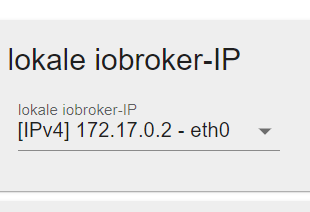
kommt:
knx.0 2024-01-21 17:13:08.601 info Using UDP with local IP: 172.17.0.2 knx.0 2024-01-21 17:13:07.602 info STATE_NOT_CONNECTED : Stop connection : STATE_NOT_CONNECTED(0) to STATE_NOT_CONNECTED(0). knx.0 2024-01-21 17:13:07.602 info ... not able to close connection, because already closed knx.0 2024-01-21 17:13:07.601 info Connection persists.....closing now knx.0 2024-01-21 17:13:07.601 info ...set STATE-NOT-CONNECTED knx.0 2024-01-21 17:13:06.600 info STATE_NOT_CONNECTED : Try to connect / reconnect : STATE_DISCONNECT_REQUEST(15) to STATE_NOT_CONNECTED(0). knx.0 2024-01-21 17:13:06.600 info ... not able to close connection, because already closed knx.0 2024-01-21 17:13:06.600 info Connection persists.....closing now knx.0 2024-01-21 17:13:06.599 info STATE_DISCONNECT_REQUEST : no defined handling for transition from State: STATE_CONNECTION_STATE_RESPONSE(6) to STATE_DISCONNECT_REQUEST(15). knx.0 2024-01-21 17:13:06.599 info Received CONNECTIONSTATE_RESPONSE : 06 10 02 08 00 08 00 21 192.168.178.50:3671 ChID : 0 SeqCntIN : 0 SeqCntOUT : 0 msgCode : [object Object] knx.0 2024-01-21 17:13:06.599 info STATE_CONNECTION_STATE_REQUEST : no defined handling for transition from State: STATE_DESCRIPTION_REQUEST(17) to STATE_CONNECTION_STATE_REQUEST(5). knx.0 2024-01-21 17:13:06.598 info Send : UDP Connection State Request : 06 10 02 07 00 10 00 00 08 01 00 00 00 00 b3 bc sent from Port: to 192.168.178.50:3671 knx.0 2024-01-21 17:13:04.598 info Send : description Request : 06 10 02 03 00 0e 08 01 ac 11 00 02 b3 bc sent to 192.168.178.50:3671 knx.0 2024-01-21 17:13:04.597 info Connected - local UDP Server listening on 172.17.0.2:46012 knx.0 2024-01-21 17:13:04.597 info Event : UDP - listening knx.0 2024-01-21 17:13:04.596 info Using UDP with local IP: 172.17.0.2 knx.0 2024-01-21 17:13:03.598 info STATE_NOT_CONNECTED : Stop connection : STATE_NOT_CONNECTED(0) to STATE_NOT_CONNECTED(0). knx.0 2024-01-21 17:13:03.598 info ... not able to close connection, because already closed knx.0 2024-01-21 17:13:03.598 info Connection persists.....closing now knx.0 2024-01-21 17:13:03.597 info ...set STATE-NOT-CONNECTED knx.0 2024-01-21 17:13:02.597 info STATE_NOT_CONNECTED : Try to connect / reconnect : STATE_DISCONNECT_REQUEST(15) to STATE_NOT_CONNECTED(0). knx.0 2024-01-21 17:13:02.597 info ... not able to close connection, because already closed knx.0 2024-01-21 17:13:02.596 info Connection persists.....closing now knx.0 2024-01-21 17:13:02.596 info STATE_DISCONNECT_REQUEST : no defined handling for transition from State: STATE_CONNECTION_STATE_RESPONSE(6) to STATE_DISCONNECT_REQUEST(15). knx.0 2024-01-21 17:13:02.596 info Received CONNECTIONSTATE_RESPONSE : 06 10 02 08 00 08 00 21 192.168.178.50:3671 ChID : 0 SeqCntIN : 0 SeqCntOUT : 0 msgCode : [object Object] knx.0 2024-01-21 17:13:02.595 info STATE_CONNECTION_STATE_REQUEST : no defined handling for transition from State: STATE_DESCRIPTION_REQUEST(17) to STATE_CONNECTION_STATE_REQUEST(5). knx.0 2024-01-21 17:13:02.595 info Send : UDP Connection State Request : 06 10 02 07 00 10 00 00 08 01 00 00 00 00 af be sent from Port: to 192.168.178.50:3671 knx.0 2024-01-21 17:13:00.594 info Send : description Request : 06 10 02 03 00 0e 08 01 ac 11 00 02 af be sent to 192.168.178.50:3671 knx.0 2024-01-21 17:13:00.593 info Connected - local UDP Server listening on 172.17.0.2:44990 knx.0 2024-01-21 17:13:00.593 info Event : UDP - listening knx.0 2024-01-21 17:13:00.592 info Using UDP with local IP: 172.17.0.2 knx.0 2024-01-21 17:12:59.594 info STATE_NOT_CONNECTED : Stop connection : STATE_NOT_CONNECTED(0) to STATE_NOT_CONNECTED(0). knx.0 2024-01-21 17:12:59.594 info ... not able to close connection, because already closed knx.0 2024-01-21 17:12:59.594 info Connection persists.....closing now knx.0 2024-01-21 17:12:59.593 info ...set STATE-NOT-CONNECTED knx.0 2024-01-21 17:12:58.593 info STATE_NOT_CONNECTED : Try to connect / reconnect : STATE_DISCONNECT_REQUEST(15) to STATE_NOT_CONNECTED(0). knx.0 2024-01-21 17:12:58.593 info ... not able to close connection, because already closed knx.0 2024-01-21 17:12:58.592 info Connection persists.....closing now knx.0 2024-01-21 17:12:58.592 info STATE_DISCONNECT_REQUEST : no defined handling for transition from State: STATE_CONNECTION_STATE_RESPONSE(6) to STATE_DISCONNECT_REQUEST(15). knx.0 2024-01-21 17:12:58.591 info Received CONNECTIONSTATE_RESPONSE : 06 10 02 08 00 08 00 21 192.168.178.50:3671 ChID : 0 SeqCntIN : 0 SeqCntOUT : 0 msgCode : [object Object] knx.0 2024-01-21 17:12:58.591 info STATE_CONNECTION_STATE_REQUEST : no defined handling for transition from State: STATE_DESCRIPTION_REQUEST(17) to STATE_CONNECTION_STATE_REQUEST(5). knx.0 2024-01-21 17:12:58.591 info Send : UDP Connection State Request : 06 10 02 07 00 10 00 00 08 01 00 00 00 00 cd 1f sent from Port: to 192.168.178.50:3671 knx.0 2024-01-21 17:12:56.589 info Send : description Request : 06 10 02 03 00 0e 08 01 ac 11 00 02 cd 1f sent to 192.168.178.50:3671 knx.0 2024-01-21 17:12:56.588 info Connected - local UDP Server listening on 172.17.0.2:52511 knx.0 2024-01-21 17:12:56.588 info Event : UDP - listening knx.0 2024-01-21 17:12:56.588 info Using UDP with local IP: 172.17.0.2 knx.0 2024-01-21 17:12:55.589 info STATE_NOT_CONNECTED : Stop connection : STATE_NOT_CONNECTED(0) to STATE_NOT_CONNECTED(0). knx.0 2024-01-21 17:12:55.589 info ... not able to close connection, because already closed knx.0 2024-01-21 17:12:55.589 info Connection persists.....closing now knx.0 2024-01-21 17:12:55.588 info ...set STATE-NOT-CONNECTED knx.0 2024-01-21 17:12:54.588 info STATE_NOT_CONNECTED : Try to connect / reconnect : STATE_DISCONNECT_REQUEST(15) to STATE_NOT_CONNECTED(0). knx.0 2024-01-21 17:12:54.588 info ... not able to close connection, because already closed knx.0 2024-01-21 17:12:54.587 info Connection persists.....closing now knx.0 2024-01-21 17:12:54.587 info STATE_DISCONNECT_REQUEST : no defined handling for transition from State: STATE_CONNECTION_STATE_RESPONSE(6) to STATE_DISCONNECT_REQUEST(15). knx.0 2024-01-21 17:12:54.587 info Received CONNECTIONSTATE_RESPONSE : 06 10 02 08 00 08 00 21 192.168.178.50:3671 ChID : 0 SeqCntIN : 0 SeqCntOUT : 0 msgCode : [object Object] knx.0 2024-01-21 17:12:54.586 info STATE_CONNECTION_STATE_REQUEST : no defined handling for transition from State: STATE_DESCRIPTION_REQUEST(17) to STATE_CONNECTION_STATE_REQUEST(5). knx.0 2024-01-21 17:12:54.586 info Send : UDP Connection State Request : 06 10 02 07 00 10 00 00 08 01 00 00 00 00 e8 f2 sent from Port: to 192.168.178.50:3671 knx.0 2024-01-21 17:12:52.584 info Send : description Request : 06 10 02 03 00 0e 08 01 ac 11 00 02 e8 f2 sent to 192.168.178.50:3671 knx.0 2024-01-21 17:12:52.584 info Connected - local UDP Server listening on 172.17.0.2:59634 knx.0 2024-01-21 17:12:52.584 info Event : UDP - listening knx.0 2024-01-21 17:12:52.582 info Using UDP with local IP: 172.17.0.2 knx.0 2024-01-21 17:12:51.585 info STATE_NOT_CONNECTED : Stop connection : STATE_NOT_CONNECTED(0) to STATE_NOT_CONNECTED(0). knx.0 2024-01-21 17:12:51.585 info ... not able to close connection, because already closed knx.0 2024-01-21 17:12:51.584 info Connection persists.....closing now knx.0 2024-01-21 17:12:51.583 info ...set STATE-NOT-CONNECTED knx.0 2024-01-21 17:12:50.582 info STATE_NOT_CONNECTED : Try to connect / reconnect : STATE_DISCONNECT_REQUEST(15) to STATE_NOT_CONNECTED(0). knx.0 2024-01-21 17:12:50.582 info ... not able to close connection, because already closed knx.0 2024-01-21 17:12:50.582 info Connection persists.....closing now knx.0 2024-01-21 17:12:50.582 info STATE_DISCONNECT_REQUEST : no defined handling for transition from State: STATE_CONNECTION_STATE_RESPONSE(6) to STATE_DISCONNECT_REQUEST(15). knx.0 2024-01-21 17:12:50.581 info Received CONNECTIONSTATE_RESPONSE : 06 10 02 08 00 08 00 21 192.168.178.50:3671 ChID : 0 SeqCntIN : 0 SeqCntOUT : 0 msgCode : [object Object] knx.0 2024-01-21 17:12:50.581 info STATE_CONNECTION_STATE_REQUEST : no defined handling for transition from State: STATE_DESCRIPTION_REQUEST(17) to STATE_CONNECTION_STATE_REQUEST(5). knx.0 2024-01-21 17:12:50.581 info Send : UDP Connection State Request : 06 10 02 07 00 10 00 00 08 01 00 00 00 00 ca 18 sent from Port: to 192.168.178.50:3671 knx.0 2024-01-21 17:12:48.580 info Send : description Request : 06 10 02 03 00 0e 08 01 ac 11 00 02 ca 18 sent to 192.168.178.50:3671 knx.0 2024-01-21 17:12:48.579 info Connected - local UDP Server listening on 172.17.0.2:51736 knx.0 2024-01-21 17:12:48.579 info Event : UDP - listening knx.0 2024-01-21 17:12:48.578 info Using UDP with local IP: 172.17.0.2 knx.0 2024-01-21 17:12:47.580 info STATE_NOT_CONNECTED : Stop connection : STATE_NOT_CONNECTED(0) to STATE_NOT_CONNECTED(0). knx.0 2024-01-21 17:12:47.580 info ... not able to close connection, because already closed knx.0 2024-01-21 17:12:47.579 info Connection persists.....closing now knx.0 2024-01-21 17:12:47.579 info ...set STATE-NOT-CONNECTED knx.0 2024-01-21 17:12:46.578 info STATE_NOT_CONNECTED : Try to connect / reconnect : STATE_DISCONNECT_REQUEST(15) to STATE_NOT_CONNECTED(0). knx.0 2024-01-21 17:12:46.577 info ... not able to close connection, because already closed knx.0 2024-01-21 17:12:46.577 info Connection persists.....closing now knx.0 2024-01-21 17:12:46.577 info STATE_DISCONNECT_REQUEST : no defined handling for transition from State: STATE_CONNECTION_STATE_RESPONSE(6) to STATE_DISCONNECT_REQUEST(15). knx.0 2024-01-21 17:12:46.576 info Received CONNECTIONSTATE_RESPONSE : 06 10 02 08 00 08 00 21 192.168.178.50:3671 ChID : 0 SeqCntIN : 0 SeqCntOUT : 0 msgCode : [object Object] knx.0 2024-01-21 17:12:46.576 info STATE_CONNECTION_STATE_REQUEST : no defined handling for transition from State: STATE_DESCRIPTION_REQUEST(17) to STATE_CONNECTION_STATE_REQUEST(5). knx.0 2024-01-21 17:12:46.576 info Send : UDP Connection State Request : 06 10 02 07 00 10 00 00 08 01 00 00 00 00 8e a7 sent from Port: to 192.168.178.50:3671 knx.0 2024-01-21 17:12:44.575 info Send : description Request : 06 10 02 03 00 0e 08 01 ac 11 00 02 8e a7 sent to 192.168.178.50:3671 knx.0 2024-01-21 17:12:44.574 info Connected - local UDP Server listening on 172.17.0.2:36519 knx.0 2024-01-21 17:12:44.574 info Event : UDP - listening knx.0 2024-01-21 17:12:44.573 info Using UDP with local IP: 172.17.0.2 knx.0 2024-01-21 17:12:43.576 info STATE_NOT_CONNECTED : Stop connection : STATE_NOT_CONNECTED(0) to STATE_NOT_CONNECTED(0). knx.0 2024-01-21 17:12:43.575 info ... not able to close connection, because already closed knx.0 2024-01-21 17:12:43.575 info Connection persists.....closing now knx.0 2024-01-21 17:12:43.575 info ...set STATE-NOT-CONNECTED knx.0 2024-01-21 17:12:42.574 info STATE_NOT_CONNECTED : Try to connect / reconnect : STATE_DISCONNECT_REQUEST(15) to STATE_NOT_CONNECTED(0). knx.0 2024-01-21 17:12:42.574 info ... not able to close connection, because already closed knx.0 2024-01-21 17:12:42.573 info Connection persists.....closing now knx.0 2024-01-21 17:12:42.573 info STATE_DISCONNECT_REQUEST : no defined handling for transition from State: STATE_CONNECTION_STATE_RESPONSE(6) to STATE_DISCONNECT_REQUEST(15). knx.0 2024-01-21 17:12:42.573 info Received CONNECTIONSTATE_RESPONSE : 06 10 02 08 00 08 00 21 192.168.178.50:3671 ChID : 0 SeqCntIN : 0 SeqCntOUT : 0 msgCode : [object Object] knx.0 2024-01-21 17:12:42.572 info STATE_CONNECTION_STATE_REQUEST : no defined handling for transition from State: STATE_DESCRIPTION_REQUEST(17) to STATE_CONNECTION_STATE_REQUEST(5). knx.0 2024-01-21 17:12:42.572 info Send : UDP Connection State Request : 06 10 02 07 00 10 00 00 08 01 00 00 00 00 a0 d3 sent from Port: to 192.168.178.50:3671 knx.0 2024-01-21 17:12:40.571 info Send : description Request : 06 10 02 03 00 0e 08 01 ac 11 00 02 a0 d3 sent to 192.168.178.50:3671 knx.0 2024-01-21 17:12:40.571 info Connected - local UDP Server listening on 172.17.0.2:41171 knx.0 2024-01-21 17:12:40.570 info Event : UDP - listening knx.0 2024-01-21 17:12:40.570 info Using UDP with local IP: 172.17.0.2 knx.0 2024-01-21 17:12:39.568 info STATE_NOT_CONNECTED : Stop connection : STATE_NOT_CONNECTED(0) to STATE_NOT_CONNECTED(0). knx.0 2024-01-21 17:12:39.568 info ... not able to close connection, because already closed knx.0 2024-01-21 17:12:39.567 info Connection persists.....closing now knx.0 2024-01-21 17:12:39.566 info ...set STATE-NOT-CONNECTED knx.0 2024-01-21 17:12:38.565 info STATE_NOT_CONNECTED : Try to connect / reconnect : STATE_DISCONNECT_REQUEST(15) to STATE_NOT_CONNECTED(0). knx.0 2024-01-21 17:12:38.565 info ... not able to close connection, because already closed knx.0 2024-01-21 17:12:38.564 info Connection persists.....closing now knx.0 2024-01-21 17:12:38.564 info STATE_DISCONNECT_REQUEST : no defined handling for transition from State: STATE_CONNECTION_STATE_RESPONSE(6) to STATE_DISCONNECT_REQUEST(15). knx.0 2024-01-21 17:12:38.564 info Received CONNECTIONSTATE_RESPONSE : 06 10 02 08 00 08 00 21 192.168.178.50:3671 ChID : 0 SeqCntIN : 0 SeqCntOUT : 0 msgCode : [object Object] knx.0 2024-01-21 17:12:38.563 info STATE_CONNECTION_STATE_REQUEST : no defined handling for transition from State: STATE_DESCRIPTION_REQUEST(17) to STATE_CONNECTION_STATE_REQUEST(5). knx.0 2024-01-21 17:12:38.563 info Send : UDP Connection State Request : 06 10 02 07 00 10 00 00 08 01 00 00 00 00 81 8f sent from Port: to 192.168.178.50:3671 knx.0 2024-01-21 17:12:36.562 info Send : description Request : 06 10 02 03 00 0e 08 01 ac 11 00 02 81 8f sent to 192.168.178.50:3671 knx.0 2024-01-21 17:12:36.561 info Connected - local UDP Server listening on 172.17.0.2:33167 knx.0 2024-01-21 17:12:36.561 info Event : UDP - listening knx.0 2024-01-21 17:12:36.560 info Using UDP with local IP: 172.17.0.2 knx.0 2024-01-21 17:12:35.563 info STATE_NOT_CONNECTED : Stop connection : STATE_NOT_CONNECTED(0) to STATE_NOT_CONNECTED(0). knx.0 2024-01-21 17:12:35.562 info ... not able to close connection, because already closed knx.0 2024-01-21 17:12:35.562 info Connection persists.....closing now knx.0 2024-01-21 17:12:35.561 info ...set STATE-NOT-CONNECTED knx.0 2024-01-21 17:12:34.560 info STATE_NOT_CONNECTED : Try to connect / reconnect : STATE_DISCONNECT_REQUEST(15) to STATE_NOT_CONNECTED(0). knx.0 2024-01-21 17:12:34.560 info ... not able to close connection, because already closed knx.0 2024-01-21 17:12:34.559 info Connection persists.....closing now knx.0 2024-01-21 17:12:34.559 info STATE_DISCONNECT_REQUEST : no defined handling for transition from State: STATE_CONNECTION_STATE_RESPONSE(6) to STATE_DISCONNECT_REQUEST(15). knx.0 2024-01-21 17:12:34.559 info Received CONNECTIONSTATE_RESPONSE : 06 10 02 08 00 08 00 21 192.168.178.50:3671 ChID : 0 SeqCntIN : 0 SeqCntOUT : 0 msgCode : [object Object] knx.0 2024-01-21 17:12:34.558 info STATE_CONNECTION_STATE_REQUEST : no defined handling for transition from State: STATE_DESCRIPTION_REQUEST(17) to STATE_CONNECTION_STATE_REQUEST(5). knx.0 2024-01-21 17:12:34.558 info Send : UDP Connection State Request : 06 10 02 07 00 10 00 00 08 01 00 00 00 00 9e 59 sent from Port: to 192.168.178.50:3671 knx.0 2024-01-21 17:12:32.557 info Send : description Request : 06 10 02 03 00 0e 08 01 ac 11 00 02 9e 59 sent to 192.168.178.50:3671 knx.0 2024-01-21 17:12:32.557 info Connected - local UDP Server listening on 172.17.0.2:40537 knx.0 2024-01-21 17:12:32.556 info Event : UDP - listening knx.0 2024-01-21 17:12:32.555 info Using UDP with local IP: 172.17.0.2 knx.0 2024-01-21 17:12:31.558 info STATE_NOT_CONNECTED : Stop connection : STATE_NOT_CONNECTED(0) to STATE_NOT_CONNECTED(0). knx.0 2024-01-21 17:12:31.558 info ... not able to close connection, because already closed knx.0 2024-01-21 17:12:31.557 info Connection persists.....closing now knx.0 2024-01-21 17:12:31.556 info ...set STATE-NOT-CONNECTED knx.0 2024-01-21 17:12:30.556 info STATE_NOT_CONNECTED : Try to connect / reconnect : STATE_DISCONNECT_REQUEST(15) to STATE_NOT_CONNECTED(0). knx.0 2024-01-21 17:12:30.555 info ... not able to close connection, because already closed knx.0 2024-01-21 17:12:30.555 info Connection persists.....closing now knx.0 2024-01-21 17:12:30.554 info STATE_DISCONNECT_REQUEST : no defined handling for transition from State: STATE_CONNECTION_STATE_RESPONSE(6) to STATE_DISCONNECT_REQUEST(15). knx.0 2024-01-21 17:12:30.554 info Received CONNECTIONSTATE_RESPONSE : 06 10 02 08 00 08 00 21 192.168.178.50:3671 ChID : 0 SeqCntIN : 0 SeqCntOUT : 0 msgCode : [object Object] knx.0 2024-01-21 17:12:30.552 info STATE_CONNECTION_STATE_REQUEST : no defined handling for transition from State: STATE_DESCRIPTION_REQUEST(17) to STATE_CONNECTION_STATE_REQUEST(5). knx.0 2024-01-21 17:12:30.551 info Send : UDP Connection State Request : 06 10 02 07 00 10 00 00 08 01 00 00 00 00 b5 64 sent from Port: to 192.168.178.50:3671 knx.0 2024-01-21 17:12:28.550 info Send : description Request : 06 10 02 03 00 0e 08 01 ac 11 00 02 b5 64 sent to 192.168.178.50:3671 knx.0 2024-01-21 17:12:28.549 info Connected - local UDP Server listening on 172.17.0.2:46436 knx.0 2024-01-21 17:12:28.546 info Event : UDP - listening knx.0 2024-01-21 17:12:28.545 info Debuglevel: 2 3 knx.0 2024-01-21 17:12:28.541 info Connecting to knx GW: 192.168.178.50:3671 with phy. Adr: 15.15.245 knx.0 2024-01-21 17:12:28.539 info knx license is OK. knx.0 2024-01-21 17:12:24.719 info starting. Version 2.0.24 in /opt/iobroker/node_modules/iobroker.knx, node: v18.19.0, js-controller: 5.0.17 knx.0 2024-01-21 17:12:24.559 debug Plugin sentry Initialize Plugin (enabled=true) knx.0 2024-01-21 17:12:24.538 debug States connected to redis: 127.0.0.1:9000 knx.0 2024-01-21 17:12:24.482 debug States create User PubSub Client knx.0 2024-01-21 17:12:24.481 debug States create System PubSub Client knx.0 2024-01-21 17:12:24.427 debug Redis States: Use Redis connection: 127.0.0.1:9000 knx.0 2024-01-21 17:12:24.402 debug Objects connected to redis: 127.0.0.1:9001 knx.0 2024-01-21 17:12:24.399 debug Objects client initialize lua scripts knx.0 2024-01-21 17:12:24.370 debug Objects create User PubSub Client knx.0 2024-01-21 17:12:24.369 debug Objects create System PubSub Client knx.0 2024-01-21 17:12:24.368 debug Objects client ready ... initialize now knx.0 2024-01-21 17:12:24.351 debug Redis Objects: Use Redis connection: 127.0.0.1:9001 knx.0 2024-01-21 17:12:20.885 info terminating knx.0 2024-01-21 17:12:20.386 info STATE_NOT_CONNECTED : Stop connection : STATE_DISCONNECT_REQUEST(15) to STATE_NOT_CONNECTED(0). knx.0 2024-01-21 17:12:20.386 info ... not able to close connection, because already closed knx.0 2024-01-21 17:12:20.386 info Connection persists.....closing now knx.0 2024-01-21 17:12:20.386 info STATE_DISCONNECT_REQUEST : Transition from State: STATE_NOT_CONNECTED(0) to STATE_DISCONNECT_REQUEST(15) not possible because of cancelled connection. knx.0 2024-01-21 17:12:20.385 info ( END ) Sending DISCONNECT_REQUEST : 06 10 02 09 00 10 00 00 08 01 7f 00 00 01 d4 f6 ChID : 0 SeqCntIN : 0 SeqCntOUT : 0 msgCode : [object Object] knx.0 2024-01-21 17:12:20.384 info STATE_NOT_CONNECTED : Stop connection : STATE_NOT_CONNECTED(0) to STATE_NOT_CONNECTED(0). knx.0 2024-01-21 17:12:20.384 info ... not able to close connection, because already closed knx.0 2024-01-21 17:12:20.384 info Connection persists.....closing now knx.0 2024-01-21 17:12:20.383 info Terminated (ADAPTER_REQUESTED_TERMINATION): Without reason knx.0 2024-01-21 17:12:20.383 debug Plugin sentry destroyed knx.0 2024-01-21 17:12:20.383 info terminating knx.0 2024-01-21 17:12:20.383 debug Adapter close k -
@Glasfaser
Anscheinend gibt es hierzu keine Lösung?
Da der OpenKNX-Adapter mit den gleichen Einstellungen läuft, kann ich den KNX-Adapter damit also nicht mehr betreiben.
Schade um das Geld für die Lizenz. -
@glasfaser Welche Einstellungen muss ich dazu bitte ändern im Container?
Also Container anhalten, und dann etwas ändern und neu starten?
Oder Container löschen und neu erstellen? -
Systemdata Bitte Ausfüllen Hardwaresystem: Synology DS723+ Arbeitsspeicher: 34GB Festplattenart: 4 TB HDD Betriebssystem: Buanet Docker v 9.0.1 Node-Version: Nodejs-Version: 18.19.0 NPM-Version: 10.2.3 Installationsart: Docker Image genutzt: Docker official image v 9.0.1 Ort/Name der Imagedatei: Buanet iobroker Nach Restore über das Backup-Tool läuft die KNX-Adapter-Instanz nicht mehr, udp bekommt keine Verbindung.
Bei gleichen Einstellungen bekommt der openKNX-Adapter jedoch eine Verbindung.
KNX-Lizenz ist gültig (grün), ETS-Datei konnte auch erfolgreich eingelesen werden, nur udp läuft im Gegensatz zum openKNX-Adapter nicht.knx.0 Zeit debug Nachricht knx.0 2024-01-20 06:35:27.266 info Send : description Request : 06 10 02 03 00 0e 08 01 ac 11 00 02 90 1d sent to 192.168.178.50:3671 knx.0 2024-01-20 06:35:27.266 info Connected - local UDP Server listening on 172.17.0.2:36893 knx.0 2024-01-20 06:35:27.265 info Event : UDP - listening knx.0 2024-01-20 06:35:27.265 info Using UDP with local IP: 172.17.0.2 knx.0 2024-01-20 06:35:26.266 info STATE_NOT_CONNECTED : Stop connection : STATE_NOT_CONNECTED(0) to STATE_NOT_CONNECTED(0). knx.0 2024-01-20 06:35:26.266 info ... not able to close connection, because already closed knx.0 2024-01-20 06:35:26.265 info Connection persists.....closing now knx.0 2024-01-20 06:35:26.265 info ...set STATE-NOT-CONNECTED knx.0 2024-01-20 06:35:25.264 info STATE_NOT_CONNECTED : Try to connect / reconnect : STATE_DISCONNECT_REQUEST(15) to STATE_NOT_CONNECTED(0). knx.0 2024-01-20 06:35:25.264 info ... not able to close connection, because already closed knx.0 2024-01-20 06:35:25.263 info Connection persists.....closing now knx.0 2024-01-20 06:35:25.263 info STATE_DISCONNECT_REQUEST : no defined handling for transition from State: STATE_CONNECTION_STATE_RESPONSE(6) to STATE_DISCONNECT_REQUEST(15). knx.0 2024-01-20 06:35:25.263 info Received CONNECTIONSTATE_RESPONSE : 06 10 02 08 00 08 00 21 192.168.178.50:3671 ChID : 0 SeqCntIN : 0 SeqCntOUT : 0 msgCode : [object Object] knx.0 2024-01-20 06:35:25.263 info STATE_CONNECTION_STATE_REQUEST : no defined handling for transition from State: STATE_DESCRIPTION_REQUEST(17) to STATE_CONNECTION_STATE_REQUEST(5). knx.0 2024-01-20 06:35:25.263 info Send : UDP Connection State Request : 06 10 02 07 00 10 00 00 08 01 00 00 00 00 92 b4 sent from Port: to 192.168.178.50:3671 knx.0 2024-01-20 06:35:23.262 info Send : description Request : 06 10 02 03 00 0e 08 01 ac 11 00 02 92 b4 sent to 192.168.178.50:3671 knx.0 2024-01-20 06:35:23.261 info Connected - local UDP Server listening on 172.17.0.2:37556 knx.0 2024-01-20 06:35:23.261 info Event : UDP - listening knx.0 2024-01-20 06:35:23.261 info Using UDP with local IP: 172.17.0.2 knx.0 2024-01-20 06:35:22.262 info STATE_NOT_CONNECTED : Stop connection : STATE_NOT_CONNECTED(0) to STATE_NOT_CONNECTED(0). knx.0 2024-01-20 06:35:22.262 info ... not able to close connection, because already closed knx.0 2024-01-20 06:35:22.261 info Connection persists.....closing now knx.0 2024-01-20 06:35:22.261 info ...set STATE-NOT-CONNECTED knx.0 2024-01-20 06:35:21.260 info STATE_NOT_CONNECTED : Try to connect / reconnect : STATE_DISCONNECT_REQUEST(15) to STATE_NOT_CONNECTED(0). knx.0 2024-01-20 06:35:21.260 info ... not able to close connection, because already closed knx.0 2024-01-20 06:35:21.259 info Connection persists.....closing now knx.0 -
@nubbbi sagte in KNX-Adapter - keine UDP-Verbindung - OpenKNX-Adapter i.O.:
Buanet Docker v 9.0.1
Würde ich dann auch noch gleichzeit auf die neue Image Version aktualisieren !
@glasfaser Das habe ich gemacht.
Müssen dann neben dem Mounting von /docker/iobroker zu /opt/fhem noch Ports zugewiesen werden?
Ich habe 3671-3671-udp und 7234-8081-tcp eingestellt, aber der Container bricht beim Start bei Schritt 3 ab. -
@glasfaser Das habe ich gemacht.
Müssen dann neben dem Mounting von /docker/iobroker zu /opt/fhem noch Ports zugewiesen werden?
Ich habe 3671-3671-udp und 7234-8081-tcp eingestellt, aber der Container bricht beim Start bei Schritt 3 ab.@nubbbi sagte in KNX-Adapter - keine UDP-Verbindung - OpenKNX-Adapter i.O.:
Ich habe 3671-3671-udp und 7234-8081-tcp eingestellt, aber der Container bricht beim Start bei Schritt 3 ab.
Warum soll er abbrechen !?
Bei Host brauchen keine Ports gemappt werden .
Zeige mal das LOG , so kann ich nur raten
-
@glasfaser Das habe ich gemacht.
Müssen dann neben dem Mounting von /docker/iobroker zu /opt/fhem noch Ports zugewiesen werden?
Ich habe 3671-3671-udp und 7234-8081-tcp eingestellt, aber der Container bricht beim Start bei Schritt 3 ab.@nubbbi sagte in KNX-Adapter - keine UDP-Verbindung - OpenKNX-Adapter i.O.:
Müssen dann neben dem Mounting von /docker/iobroker zu /opt/fhem
noch Ports zugewiesen werden?Das gleiche wie deine Einstellungen im alten Container , zu Ordner Mounts !
-
@glasfaser Das habe ich gemacht.
Müssen dann neben dem Mounting von /docker/iobroker zu /opt/fhem noch Ports zugewiesen werden?
Ich habe 3671-3671-udp und 7234-8081-tcp eingestellt, aber der Container bricht beim Start bei Schritt 3 ab. -
@nubbbi sagte in KNX-Adapter - keine UDP-Verbindung - OpenKNX-Adapter i.O.:
bricht beim Start bei Schritt 3 ab.
zusätzlich ... kann man hiermit mehr sehen :
Trage in der ENV ein
DEBUG = true.
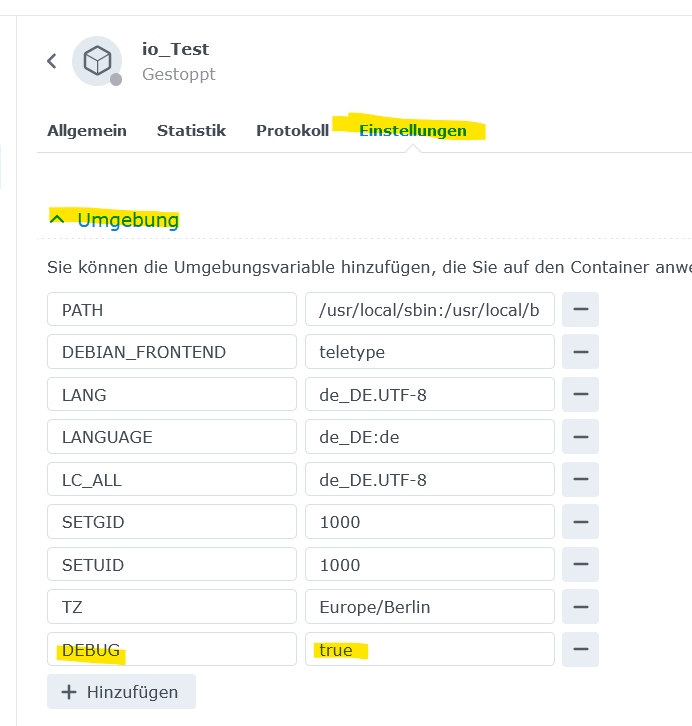
 code_text ```iobroker date,stream,content 2024/01/28 19:33:12,stdout,This Script will exit now. 2024/01/28 19:33:12,stdout, 2024/01/28 19:31:23,stdout,[DEBUG] IoBroker is not running! 2024/01/28 19:31:23,stdout,[DEBUG] If you want to stop or restart your container you have to do it manually. 2024/01/28 19:31:23,stdout,[DEBUG] This enables you to investigate or fix your issue on the command line. 2024/01/28 19:31:23,stdout,[DEBUG] Debug mode prevents the container from exiting on errors. 2024/01/28 19:31:23,stdout, 2024/01/28 19:31:23,stdout,For more information see ioBroker Docker image docs (https://docs.buanet.de/iobroker-docker-image/docs). 2024/01/28 19:31:23,stdout,Please check your configuration and try again. 2024/01/28 19:31:23,stdout,[DEBUG] No connection to databases possible ... 2024/01/28 19:31:23,stdout,[DEBUG] Could not connect to states database at 127.0.0.1:9000 (invalid protocol). Please make sure the configured IP and port points to a host running JS-Controller >= 2.0. and that the port is not occupied by other software! 2024/01/28 19:31:23,stdout,[DEBUG] Could not connect to states database at 127.0.0.1:9000 (invalid protocol). Please make sure the configured IP and port points to a host running JS-Controller >= 2.0. and that the port is not occupied by other software! 2024/01/28 19:31:23,stdout,[DEBUG] Error message: 2024/01/28 19:31:23,stdout,Checking database connection... Failed. 2024/01/28 19:30:30,stdout, 2024/01/28 19:30:30,stdout,[DEBUG] Done. 2024/01/28 19:30:30,stdout,[DEBUG] No custom states db settings detected. 2024/01/28 19:30:30,stdout,[DEBUG] Checking custom states db settings... 2024/01/28 19:30:30,stdout, 2024/01/28 19:30:30,stdout,[DEBUG] Done. 2024/01/28 19:30:30,stdout,[DEBUG] No custom objects db settings detected. 2024/01/28 19:30:30,stdout,[DEBUG] Checking custom objects db settings... 2024/01/28 19:30:30,stdout, 2024/01/28 19:30:30,stdout,[DEBUG] Done. 2024/01/28 19:30:30,stdout,[DEBUG] No multihost settings detected. 2024/01/28 19:30:30,stdout,[DEBUG] Checking multihost settings... 2024/01/28 19:30:30,stdout, 2024/01/28 19:30:30,stdout,(Re)setting permissions (This might take a while! Please be patient!)... Done. 2024/01/28 19:30:30,stdout, 2024/01/28 19:30:30,stdout,-------------------------------------------------------------------------------- 2024/01/28 19:30:30,stdout,----- Step 3 of 5: Checking ioBroker Installation ----- 2024/01/28 19:30:30,stdout,-------------------------------------------------------------------------------- 2024/01/28 19:30:30,stdout, 2024/01/28 19:30:30,stdout,Existing installation of ioBroker detected in "/opt/iobroker". 2024/01/28 19:30:30,stdout, 2024/01/28 19:30:30,stdout,-------------------------------------------------------------------------------- 2024/01/28 19:30:30,stdout,----- Step 2 of 5: Detecting ioBroker Installation ----- 2024/01/28 19:30:30,stdout,-------------------------------------------------------------------------------- 2024/01/28 19:30:30,stdout, 2024/01/28 19:30:30,stdout, 2024/01/28 19:30:30,stdout, 2024/01/28 19:30:30,stdout,-------------------------------------------------------------------------------- 2024/01/28 19:30:30,stdout,----- Step 1 of 5: Preparing Container ----- 2024/01/28 19:30:30,stdout,-------------------------------------------------------------------------------- 2024/01/28 19:30:30,stdout, 2024/01/28 19:30:30,stdout,!!!!!!!!!!!!!!!!!!!!!!!!!!!!!!!!!!!!!!!!!!!!!!!!!!!!!!!!!!!!!!!!!!!!!!!!!!!!!!!! 2024/01/28 19:30:30,stdout,!!!! https://docs.buanet.de/iobroker-docker-image/docs/ !!!! 2024/01/28 19:30:30,stdout,!!!! For more information see ioBroker Docker image documentation: !!!! 2024/01/28 19:30:30,stdout,!!!! Please make sure to deactivate if no longer needed. !!!! 2024/01/28 19:30:30,stdout,!!!! This will extend the logging output and may slow down container start. !!!! 2024/01/28 19:30:30,stdout,!!!! Environment variable DEBUG is set to true. !!!! 2024/01/28 19:30:30,stdout,!!!! DEBUG LOG ACTIVE !!!! 2024/01/28 19:30:30,stdout,!!!!!!!!!!!!!!!!!!!!!!!!!!!!!!!!!!!!!!!!!!!!!!!!!!!!!!!!!!!!!!!!!!!!!!!!!!!!!!!! 2024/01/28 19:30:30,stdout, 2024/01/28 19:30:30,stdout,-------------------------------------------------------------------------------- -
 code_text ```iobroker date,stream,content 2024/01/28 19:33:12,stdout,This Script will exit now. 2024/01/28 19:33:12,stdout, 2024/01/28 19:31:23,stdout,[DEBUG] IoBroker is not running! 2024/01/28 19:31:23,stdout,[DEBUG] If you want to stop or restart your container you have to do it manually. 2024/01/28 19:31:23,stdout,[DEBUG] This enables you to investigate or fix your issue on the command line. 2024/01/28 19:31:23,stdout,[DEBUG] Debug mode prevents the container from exiting on errors. 2024/01/28 19:31:23,stdout, 2024/01/28 19:31:23,stdout,For more information see ioBroker Docker image docs (https://docs.buanet.de/iobroker-docker-image/docs). 2024/01/28 19:31:23,stdout,Please check your configuration and try again. 2024/01/28 19:31:23,stdout,[DEBUG] No connection to databases possible ... 2024/01/28 19:31:23,stdout,[DEBUG] Could not connect to states database at 127.0.0.1:9000 (invalid protocol). Please make sure the configured IP and port points to a host running JS-Controller >= 2.0. and that the port is not occupied by other software! 2024/01/28 19:31:23,stdout,[DEBUG] Could not connect to states database at 127.0.0.1:9000 (invalid protocol). Please make sure the configured IP and port points to a host running JS-Controller >= 2.0. and that the port is not occupied by other software! 2024/01/28 19:31:23,stdout,[DEBUG] Error message: 2024/01/28 19:31:23,stdout,Checking database connection... Failed. 2024/01/28 19:30:30,stdout, 2024/01/28 19:30:30,stdout,[DEBUG] Done. 2024/01/28 19:30:30,stdout,[DEBUG] No custom states db settings detected. 2024/01/28 19:30:30,stdout,[DEBUG] Checking custom states db settings... 2024/01/28 19:30:30,stdout, 2024/01/28 19:30:30,stdout,[DEBUG] Done. 2024/01/28 19:30:30,stdout,[DEBUG] No custom objects db settings detected. 2024/01/28 19:30:30,stdout,[DEBUG] Checking custom objects db settings... 2024/01/28 19:30:30,stdout, 2024/01/28 19:30:30,stdout,[DEBUG] Done. 2024/01/28 19:30:30,stdout,[DEBUG] No multihost settings detected. 2024/01/28 19:30:30,stdout,[DEBUG] Checking multihost settings... 2024/01/28 19:30:30,stdout, 2024/01/28 19:30:30,stdout,(Re)setting permissions (This might take a while! Please be patient!)... Done. 2024/01/28 19:30:30,stdout, 2024/01/28 19:30:30,stdout,-------------------------------------------------------------------------------- 2024/01/28 19:30:30,stdout,----- Step 3 of 5: Checking ioBroker Installation ----- 2024/01/28 19:30:30,stdout,-------------------------------------------------------------------------------- 2024/01/28 19:30:30,stdout, 2024/01/28 19:30:30,stdout,Existing installation of ioBroker detected in "/opt/iobroker". 2024/01/28 19:30:30,stdout, 2024/01/28 19:30:30,stdout,-------------------------------------------------------------------------------- 2024/01/28 19:30:30,stdout,----- Step 2 of 5: Detecting ioBroker Installation ----- 2024/01/28 19:30:30,stdout,-------------------------------------------------------------------------------- 2024/01/28 19:30:30,stdout, 2024/01/28 19:30:30,stdout, 2024/01/28 19:30:30,stdout, 2024/01/28 19:30:30,stdout,-------------------------------------------------------------------------------- 2024/01/28 19:30:30,stdout,----- Step 1 of 5: Preparing Container ----- 2024/01/28 19:30:30,stdout,-------------------------------------------------------------------------------- 2024/01/28 19:30:30,stdout, 2024/01/28 19:30:30,stdout,!!!!!!!!!!!!!!!!!!!!!!!!!!!!!!!!!!!!!!!!!!!!!!!!!!!!!!!!!!!!!!!!!!!!!!!!!!!!!!!! 2024/01/28 19:30:30,stdout,!!!! https://docs.buanet.de/iobroker-docker-image/docs/ !!!! 2024/01/28 19:30:30,stdout,!!!! For more information see ioBroker Docker image documentation: !!!! 2024/01/28 19:30:30,stdout,!!!! Please make sure to deactivate if no longer needed. !!!! 2024/01/28 19:30:30,stdout,!!!! This will extend the logging output and may slow down container start. !!!! 2024/01/28 19:30:30,stdout,!!!! Environment variable DEBUG is set to true. !!!! 2024/01/28 19:30:30,stdout,!!!! DEBUG LOG ACTIVE !!!! 2024/01/28 19:30:30,stdout,!!!!!!!!!!!!!!!!!!!!!!!!!!!!!!!!!!!!!!!!!!!!!!!!!!!!!!!!!!!!!!!!!!!!!!!!!!!!!!!! 2024/01/28 19:30:30,stdout, 2024/01/28 19:30:30,stdout,-------------------------------------------------------------------------------- -
 code_text ```iobroker date,stream,content 2024/01/28 19:33:12,stdout,This Script will exit now. 2024/01/28 19:33:12,stdout, 2024/01/28 19:31:23,stdout,[DEBUG] IoBroker is not running! 2024/01/28 19:31:23,stdout,[DEBUG] If you want to stop or restart your container you have to do it manually. 2024/01/28 19:31:23,stdout,[DEBUG] This enables you to investigate or fix your issue on the command line. 2024/01/28 19:31:23,stdout,[DEBUG] Debug mode prevents the container from exiting on errors. 2024/01/28 19:31:23,stdout, 2024/01/28 19:31:23,stdout,For more information see ioBroker Docker image docs (https://docs.buanet.de/iobroker-docker-image/docs). 2024/01/28 19:31:23,stdout,Please check your configuration and try again. 2024/01/28 19:31:23,stdout,[DEBUG] No connection to databases possible ... 2024/01/28 19:31:23,stdout,[DEBUG] Could not connect to states database at 127.0.0.1:9000 (invalid protocol). Please make sure the configured IP and port points to a host running JS-Controller >= 2.0. and that the port is not occupied by other software! 2024/01/28 19:31:23,stdout,[DEBUG] Could not connect to states database at 127.0.0.1:9000 (invalid protocol). Please make sure the configured IP and port points to a host running JS-Controller >= 2.0. and that the port is not occupied by other software! 2024/01/28 19:31:23,stdout,[DEBUG] Error message: 2024/01/28 19:31:23,stdout,Checking database connection... Failed. 2024/01/28 19:30:30,stdout, 2024/01/28 19:30:30,stdout,[DEBUG] Done. 2024/01/28 19:30:30,stdout,[DEBUG] No custom states db settings detected. 2024/01/28 19:30:30,stdout,[DEBUG] Checking custom states db settings... 2024/01/28 19:30:30,stdout, 2024/01/28 19:30:30,stdout,[DEBUG] Done. 2024/01/28 19:30:30,stdout,[DEBUG] No custom objects db settings detected. 2024/01/28 19:30:30,stdout,[DEBUG] Checking custom objects db settings... 2024/01/28 19:30:30,stdout, 2024/01/28 19:30:30,stdout,[DEBUG] Done. 2024/01/28 19:30:30,stdout,[DEBUG] No multihost settings detected. 2024/01/28 19:30:30,stdout,[DEBUG] Checking multihost settings... 2024/01/28 19:30:30,stdout, 2024/01/28 19:30:30,stdout,(Re)setting permissions (This might take a while! Please be patient!)... Done. 2024/01/28 19:30:30,stdout, 2024/01/28 19:30:30,stdout,-------------------------------------------------------------------------------- 2024/01/28 19:30:30,stdout,----- Step 3 of 5: Checking ioBroker Installation ----- 2024/01/28 19:30:30,stdout,-------------------------------------------------------------------------------- 2024/01/28 19:30:30,stdout, 2024/01/28 19:30:30,stdout,Existing installation of ioBroker detected in "/opt/iobroker". 2024/01/28 19:30:30,stdout, 2024/01/28 19:30:30,stdout,-------------------------------------------------------------------------------- 2024/01/28 19:30:30,stdout,----- Step 2 of 5: Detecting ioBroker Installation ----- 2024/01/28 19:30:30,stdout,-------------------------------------------------------------------------------- 2024/01/28 19:30:30,stdout, 2024/01/28 19:30:30,stdout, 2024/01/28 19:30:30,stdout, 2024/01/28 19:30:30,stdout,-------------------------------------------------------------------------------- 2024/01/28 19:30:30,stdout,----- Step 1 of 5: Preparing Container ----- 2024/01/28 19:30:30,stdout,-------------------------------------------------------------------------------- 2024/01/28 19:30:30,stdout, 2024/01/28 19:30:30,stdout,!!!!!!!!!!!!!!!!!!!!!!!!!!!!!!!!!!!!!!!!!!!!!!!!!!!!!!!!!!!!!!!!!!!!!!!!!!!!!!!! 2024/01/28 19:30:30,stdout,!!!! https://docs.buanet.de/iobroker-docker-image/docs/ !!!! 2024/01/28 19:30:30,stdout,!!!! For more information see ioBroker Docker image documentation: !!!! 2024/01/28 19:30:30,stdout,!!!! Please make sure to deactivate if no longer needed. !!!! 2024/01/28 19:30:30,stdout,!!!! This will extend the logging output and may slow down container start. !!!! 2024/01/28 19:30:30,stdout,!!!! Environment variable DEBUG is set to true. !!!! 2024/01/28 19:30:30,stdout,!!!! DEBUG LOG ACTIVE !!!! 2024/01/28 19:30:30,stdout,!!!!!!!!!!!!!!!!!!!!!!!!!!!!!!!!!!!!!!!!!!!!!!!!!!!!!!!!!!!!!!!!!!!!!!!!!!!!!!!! 2024/01/28 19:30:30,stdout, 2024/01/28 19:30:30,stdout,--------------------------------------------------------------------------------@nubbbi sagte in KNX-Adapter - keine UDP-Verbindung - OpenKNX-Adapter i.O.:
Please make sure the configured IP and port points to a host running JS-Controller >= 2.0. and that the port is not occupied by other software!
Zeige mal vom vorhanden Container , die Full Ausgabe von
iob diag -
@nubbbi
Kann es sein, dass der Port 9000, der hier erwartet wird, bereits anders genutzt wird? Nämlich bei mir von Portainer? -
@nubbbi sagte in KNX-Adapter - keine UDP-Verbindung - OpenKNX-Adapter i.O.:
Nämlich bei mir von Portainer?
Richtig , den mußt du ändern !!!
-
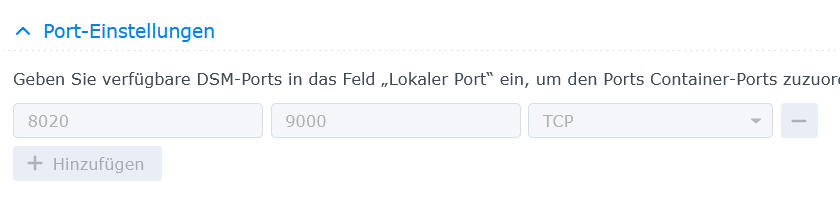
@glasfaser Wenn ich den Port 9000 für den Container Portainer ändere, komme ich aber nicht mehr auf dessen Weboberfläche.
-
sieht dann so aus , also über den Port 8020 erreichbar :
Portainer ist im Bridge Modus :
.
 .
.
*** ioBroker-Installation *** ioBroker Status Could not connect to objects database at 127.0.0.1:9001 (invalid protocol). Plea se make sure the configured IP and port points to a host running JS-Controller >= 2.0. and that the port is not occupied by other software! Could not connect to objects database at 127.0.0.1:9001 (invalid protocol). Plea se make sure the configured IP and port points to a host running JS-Controller >= 2.0. and that the port is not occupied by other software! No connection to databases possible ... Core adapters versions js-controller: 5.0.17 admin: 6.12.0 javascript: "javascript" not found Adapters from github: 0 Adapter State Could not connect to objects database at 127.0.0.1:9001 (invalid protocol). Plea se make sure the configured IP and port points to a host running JS-Controller >= 2.0. and that the port is not occupied by other software! Could not connect to objects database at 127.0.0.1:9001 (invalid protocol). Plea se make sure the configured IP and port points to a host running JS-Controller >= 2.0. and that the port is not occupied by other software! -
*** ioBroker-Installation *** ioBroker Status Could not connect to objects database at 127.0.0.1:9001 (invalid protocol). Plea se make sure the configured IP and port points to a host running JS-Controller >= 2.0. and that the port is not occupied by other software! Could not connect to objects database at 127.0.0.1:9001 (invalid protocol). Plea se make sure the configured IP and port points to a host running JS-Controller >= 2.0. and that the port is not occupied by other software! No connection to databases possible ... Core adapters versions js-controller: 5.0.17 admin: 6.12.0 javascript: "javascript" not found Adapters from github: 0 Adapter State Could not connect to objects database at 127.0.0.1:9001 (invalid protocol). Plea se make sure the configured IP and port points to a host running JS-Controller >= 2.0. and that the port is not occupied by other software! Could not connect to objects database at 127.0.0.1:9001 (invalid protocol). Plea se make sure the configured IP and port points to a host running JS-Controller >= 2.0. and that the port is not occupied by other software! -
@glasfaser Also, ich öffne die Einstellungen zum Container, gehe auf "Terminalfenster öffnen" und dann "Mit Befehl starten" und da gebe ich "iob diag" ein - soweit richtig?
Mir gelingt es aber nicht, das Ergebnis per STRG-C zu kopieren.
-
@nubbbi sagte in KNX-Adapter - keine UDP-Verbindung - OpenKNX-Adapter i.O.:
Mir gelingt es aber nicht, das Ergebnis per STRG-C zu kopieren.
Steht in der Beschreibung !!
vorher STRG-A dann STRG-C

Hey! Du scheinst an dieser Unterhaltung interessiert zu sein, hast aber noch kein Konto.
Hast du es satt, bei jedem Besuch durch die gleichen Beiträge zu scrollen? Wenn du dich für ein Konto anmeldest, kommst du immer genau dorthin zurück, wo du zuvor warst, und kannst dich über neue Antworten benachrichtigen lassen (entweder per E-Mail oder Push-Benachrichtigung). Du kannst auch Lesezeichen speichern und Beiträge positiv bewerten, um anderen Community-Mitgliedern deine Wertschätzung zu zeigen.
Mit deinem Input könnte dieser Beitrag noch besser werden 💗
Registrieren AnmeldenSupport us
394
Online33.0k
Benutzer83.6k
Themen1.3m
Beiträge