Skip to content
  • Home
  • Aktuell
  • Tags
  • 0 Ungelesen 0
  • Kategorien
  • Unreplied
  • Beliebt
  • GitHub
  • Docu
  • Hilfe
Skins
  • Light
  • Brite
  • Cerulean
  • Cosmo
  • Flatly
  • Journal
  • Litera
  • Lumen
  • Lux
  • Materia
  • Minty
  • Morph
  • Pulse
  • Sandstone
  • Simplex
  • Sketchy
  • Spacelab
  • United
  • Yeti
  • Zephyr
  • Dark
  • Cyborg
  • Darkly
  • Quartz
  • Slate
  • Solar
  • Superhero
  • Vapor

  • Standard: (Kein Skin)
  • Kein Skin
Einklappen
ioBroker Logo

Community Forum

donate donate
  1. ioBroker Community Home
  2. Deutsch
  3. Error/Bug
  4. KNX-Adapter - keine UDP-Verbindung - OpenKNX-Adapter i.O.

NEWS

  • UPDATE 31.10.: Amazon Alexa - ioBroker Skill läuft aus ?
    apollon77A
    apollon77
    48
    3
    8.7k

  • Monatsrückblick – September 2025
    BluefoxB
    Bluefox
    13
    1
    2.2k

  • Neues Video "KI im Smart Home" - ioBroker plus n8n
    BluefoxB
    Bluefox
    16
    1
    3.2k

KNX-Adapter - keine UDP-Verbindung - OpenKNX-Adapter i.O.

Geplant Angeheftet Gesperrt Verschoben Error/Bug
43 Beiträge 2 Kommentatoren 3.7k Aufrufe 2 Watching
  • Älteste zuerst
  • Neuste zuerst
  • Meiste Stimmen
Antworten
  • In einem neuen Thema antworten
Anmelden zum Antworten
Dieses Thema wurde gelöscht. Nur Nutzer mit entsprechenden Rechten können es sehen.
  • GlasfaserG Glasfaser

    @nubbbi sagte in KNX-Adapter - keine UDP-Verbindung - OpenKNX-Adapter i.O.:

    Nämlich bei mir von Portainer?

    Richtig , den mußt du ändern !!!

    N Offline
    N Offline
    Nubbbi
    schrieb am zuletzt editiert von
    #34

    @glasfaser Wenn ich den Port 9000 für den Container Portainer ändere, komme ich aber nicht mehr auf dessen Weboberfläche.

    GlasfaserG 1 Antwort Letzte Antwort
    0
    • N Nubbbi

      @glasfaser Wenn ich den Port 9000 für den Container Portainer ändere, komme ich aber nicht mehr auf dessen Weboberfläche.

      GlasfaserG Offline
      GlasfaserG Offline
      Glasfaser
      schrieb am zuletzt editiert von
      #35

      @nubbbi

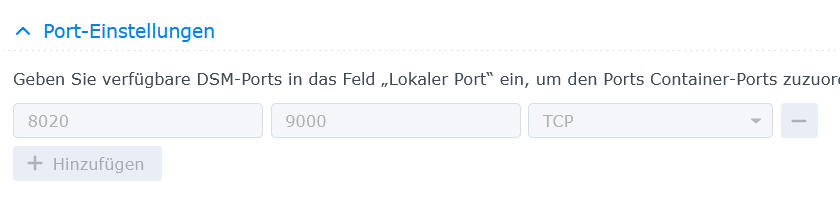
      sieht dann so aus , also über den Port 8020 erreichbar :

      Portainer ist im Bridge Modus :

      .7572cd39-5cd1-482a-bf59-91ed9a451831-grafik.png .

      1759362b-8e9a-4b7c-b183-a070e171bf16-grafik.png

      Synology 918+ 16GB - ioBroker in Docker v9 , VISO auf Trekstor Primebook C13 13,3" , Hikvision Domkameras mit Surveillance Station .. CCU RaspberryMatic in Synology VM .. Zigbee CC2538+CC2592 .. Sonoff .. KNX .. Modbus ..

      N 1 Antwort Letzte Antwort
      0
      • GlasfaserG Glasfaser

        @nubbbi

        sieht dann so aus , also über den Port 8020 erreichbar :

        Portainer ist im Bridge Modus :

        .7572cd39-5cd1-482a-bf59-91ed9a451831-grafik.png .

        1759362b-8e9a-4b7c-b183-a070e171bf16-grafik.png

        N Offline
        N Offline
        Nubbbi
        schrieb am zuletzt editiert von
        #36

        @glasfaser

                                                                                         
        *** ioBroker-Installation ***                                                    
                                                                                         
        ioBroker Status                                                                  
         Could not connect to objects database at 127.0.0.1:9001 (invalid protocol). Plea
        se make sure the configured IP and port points to a host running JS-Controller >=
         2.0. and that the port is not occupied by other software!                       
         Could not connect to objects database at 127.0.0.1:9001 (invalid protocol). Plea
        se make sure the configured IP and port points to a host running JS-Controller >=
         2.0. and that the port is not occupied by other software!                       
        No connection to databases possible ...                                          
                                                                                         
        Core adapters versions                                                           
        js-controller:  5.0.17                                                           
        admin:          6.12.0                                                           
        javascript:     "javascript" not found                                           
                                                                                         
        Adapters from github:   0                                                        
                                                                                         
        Adapter State                                                                    
         Could not connect to objects database at 127.0.0.1:9001 (invalid protocol). Plea
        se make sure the configured IP and port points to a host running JS-Controller >=
         2.0. and that the port is not occupied by other software!                       
         Could not connect to objects database at 127.0.0.1:9001 (invalid protocol). Plea
        se make sure the configured IP and port points to a host running JS-Controller >=
         2.0. and that the port is not occupied by other software!                       
        
        
        GlasfaserG 1 Antwort Letzte Antwort
        0
        • N Nubbbi

          @glasfaser

                                                                                           
          *** ioBroker-Installation ***                                                    
                                                                                           
          ioBroker Status                                                                  
           Could not connect to objects database at 127.0.0.1:9001 (invalid protocol). Plea
          se make sure the configured IP and port points to a host running JS-Controller >=
           2.0. and that the port is not occupied by other software!                       
           Could not connect to objects database at 127.0.0.1:9001 (invalid protocol). Plea
          se make sure the configured IP and port points to a host running JS-Controller >=
           2.0. and that the port is not occupied by other software!                       
          No connection to databases possible ...                                          
                                                                                           
          Core adapters versions                                                           
          js-controller:  5.0.17                                                           
          admin:          6.12.0                                                           
          javascript:     "javascript" not found                                           
                                                                                           
          Adapters from github:   0                                                        
                                                                                           
          Adapter State                                                                    
           Could not connect to objects database at 127.0.0.1:9001 (invalid protocol). Plea
          se make sure the configured IP and port points to a host running JS-Controller >=
           2.0. and that the port is not occupied by other software!                       
           Could not connect to objects database at 127.0.0.1:9001 (invalid protocol). Plea
          se make sure the configured IP and port points to a host running JS-Controller >=
           2.0. and that the port is not occupied by other software!                       
          
          
          GlasfaserG Offline
          GlasfaserG Offline
          Glasfaser
          schrieb am zuletzt editiert von
          #37

          @nubbbi

          was hast du denn noch auf 9001

          Synology 918+ 16GB - ioBroker in Docker v9 , VISO auf Trekstor Primebook C13 13,3" , Hikvision Domkameras mit Surveillance Station .. CCU RaspberryMatic in Synology VM .. Zigbee CC2538+CC2592 .. Sonoff .. KNX .. Modbus ..

          N 1 Antwort Letzte Antwort
          0
          • GlasfaserG Glasfaser

            @nubbbi

            was hast du denn noch auf 9001

            N Offline
            N Offline
            Nubbbi
            schrieb am zuletzt editiert von
            #38

            @glasfaser Also, ich öffne die Einstellungen zum Container, gehe auf "Terminalfenster öffnen" und dann "Mit Befehl starten" und da gebe ich "iob diag" ein - soweit richtig?

            Mir gelingt es aber nicht, das Ergebnis per STRG-C zu kopieren.

            1 Antwort Letzte Antwort
            0
            • GlasfaserG Offline
              GlasfaserG Offline
              Glasfaser
              schrieb am zuletzt editiert von
              #39

              @nubbbi sagte in KNX-Adapter - keine UDP-Verbindung - OpenKNX-Adapter i.O.:

              Mir gelingt es aber nicht, das Ergebnis per STRG-C zu kopieren.

              Steht in der Beschreibung !!

              vorher STRG-A dann STRG-C

              Synology 918+ 16GB - ioBroker in Docker v9 , VISO auf Trekstor Primebook C13 13,3" , Hikvision Domkameras mit Surveillance Station .. CCU RaspberryMatic in Synology VM .. Zigbee CC2538+CC2592 .. Sonoff .. KNX .. Modbus ..

              N 1 Antwort Letzte Antwort
              0
              • GlasfaserG Glasfaser

                @nubbbi sagte in KNX-Adapter - keine UDP-Verbindung - OpenKNX-Adapter i.O.:

                Mir gelingt es aber nicht, das Ergebnis per STRG-C zu kopieren.

                Steht in der Beschreibung !!

                vorher STRG-A dann STRG-C

                N Offline
                N Offline
                Nubbbi
                schrieb am zuletzt editiert von
                #40

                @glasfaser vorher heißt, wenn da steht "drücke eine Taste, um Summary zu erstellen"?

                GlasfaserG 1 Antwort Letzte Antwort
                0
                • N Nubbbi

                  @glasfaser vorher heißt, wenn da steht "drücke eine Taste, um Summary zu erstellen"?

                  GlasfaserG Offline
                  GlasfaserG Offline
                  Glasfaser
                  schrieb am zuletzt editiert von
                  #41

                  @nubbbi
                  dort abbrechen , brauche die Summary nicht , nur die Full Ausgabe davor

                  Synology 918+ 16GB - ioBroker in Docker v9 , VISO auf Trekstor Primebook C13 13,3" , Hikvision Domkameras mit Surveillance Station .. CCU RaspberryMatic in Synology VM .. Zigbee CC2538+CC2592 .. Sonoff .. KNX .. Modbus ..

                  N 1 Antwort Letzte Antwort
                  0
                  • GlasfaserG Glasfaser

                    @nubbbi
                    dort abbrechen , brauche die Summary nicht , nur die Full Ausgabe davor

                    N Offline
                    N Offline
                    Nubbbi
                    schrieb am zuletzt editiert von
                    #42

                    @glasfaser ```

                                        admin                   6.12.0                           
                    

                    ioBroker Status: iobroker is not running on this host.

                    Objects type: jsonl
                    States type: jsonl

                    Status admin and web instance:
                    system.adapter.admin.0 : admin : buildkitsandb
                    ox - enabled, port: 8081, bind: 0.0.0.0, run as: admin

                    Objects: 96
                    States: 22

                    Size of iob-Database:

                    4.1M /opt/iobroker/iobroker-data/objects.jsonl
                    12K /opt/iobroker/iobroker-data/states.jsonl

                    =================== END OF SUMMARY ====================

                                                                                                     
                    === Mark text until here for copying ===                                         

                                                                                                     
                    
                    N 1 Antwort Letzte Antwort
                    0
                    • N Nubbbi

                      @glasfaser ```

                                          admin                   6.12.0                           
                      

                      ioBroker Status: iobroker is not running on this host.

                      Objects type: jsonl
                      States type: jsonl

                      Status admin and web instance:
                      system.adapter.admin.0 : admin : buildkitsandb
                      ox - enabled, port: 8081, bind: 0.0.0.0, run as: admin

                      Objects: 96
                      States: 22

                      Size of iob-Database:

                      4.1M /opt/iobroker/iobroker-data/objects.jsonl
                      12K /opt/iobroker/iobroker-data/states.jsonl

                      =================== END OF SUMMARY ====================

                                                                                                       
                      === Mark text until here for copying ===                                         
                                                                                                       
                      
                      N Offline
                      N Offline
                      Nubbbi
                      schrieb am zuletzt editiert von
                      #43

                      @nubbbi Ich bekomme immer nur die letzte sichtbare Seite in die Zwischenablage kopiert, ich kapiere das mit STRG-A nicht.

                      1 Antwort Letzte Antwort
                      0
                      Antworten
                      • In einem neuen Thema antworten
                      Anmelden zum Antworten
                      • Älteste zuerst
                      • Neuste zuerst
                      • Meiste Stimmen


                      Support us

                      ioBroker
                      Community Adapters
                      Donate

                      765

                      Online

                      32.4k

                      Benutzer

                      81.5k

                      Themen

                      1.3m

                      Beiträge
                      Community
                      Impressum | Datenschutz-Bestimmungen | Nutzungsbedingungen | Einwilligungseinstellungen
                      ioBroker Community 2014-2025
                      logo
                      • Anmelden

                      • Du hast noch kein Konto? Registrieren

                      • Anmelden oder registrieren, um zu suchen
                      • Erster Beitrag
                        Letzter Beitrag
                      0
                      • Home
                      • Aktuell
                      • Tags
                      • Ungelesen 0
                      • Kategorien
                      • Unreplied
                      • Beliebt
                      • GitHub
                      • Docu
                      • Hilfe