




Admin über iobroker.pro nicht aufrufbar?
-
@docsnyder7
Bitteiob stop iob fix iob start iob diagin codetags

hier als neuen Beitrag hinein kopieren. Dann guckt mal jemand drauf.
======================= SUMMARY ======================= v.2023-10-10 Static hostname: evccpi Icon name: computer Operating System: Debian GNU/Linux 11 (bullseye) Kernel: Linux 6.1.21-v8+ Architecture: arm64 Installation: native Kernel: aarch64 Userland: arm64 Timezone: Europe/Berlin (CET, +0100) igured to read the RTC time in the local time zone. nges and daylight saving time adjustments. The RTC User-ID: 1000 X-Server: true Boot Target: graphical.target Pending OS-Updates: 0 Pending iob updates: 0 Nodejs-Installation: /usr/bin/nodejs v18.19.0 /usr/bin/node v18.19.0 /usr/bin/npm 10.2.3 /usr/bin/npx 10.2.3 /usr/bin/corepack 0.22.0 Recommended versions are nodejs 18.19.0 and npm 10.2.3 Your nodejs installation is correct MEMORY: total used free shared buff/cache available Mem: 7.8G 2.4G 4.1G 21M 1.3G 5.3G Swap: 99M 0B 99M Total: 7.9G 2.4G 4.2G Active iob-Instances: 36 Active repo(s): stable ioBroker Core: js-controller 5.0.17 admin 6.12.0 ioBroker Status: iobroker is running on this host. Objects type: jsonl States type: jsonl Status admin and web instance: + system.adapter.admin.0 : admin : evccpi - enabled, port: 8081, bind: 0.0.0.0, run as: admin + system.adapter.web.0 : web : evccpi - enabled, port: 8082, bind: 0.0.0.0, run as: admin Objects: 9093 States: 7052 Size of iob-Database: 18M /opt/iobroker/iobroker-data/objects.jsonl 7.1M /opt/iobroker/iobroker-data/states.jsonl -
======================= SUMMARY ======================= v.2023-10-10 Static hostname: evccpi Icon name: computer Operating System: Debian GNU/Linux 11 (bullseye) Kernel: Linux 6.1.21-v8+ Architecture: arm64 Installation: native Kernel: aarch64 Userland: arm64 Timezone: Europe/Berlin (CET, +0100) igured to read the RTC time in the local time zone. nges and daylight saving time adjustments. The RTC User-ID: 1000 X-Server: true Boot Target: graphical.target Pending OS-Updates: 0 Pending iob updates: 0 Nodejs-Installation: /usr/bin/nodejs v18.19.0 /usr/bin/node v18.19.0 /usr/bin/npm 10.2.3 /usr/bin/npx 10.2.3 /usr/bin/corepack 0.22.0 Recommended versions are nodejs 18.19.0 and npm 10.2.3 Your nodejs installation is correct MEMORY: total used free shared buff/cache available Mem: 7.8G 2.4G 4.1G 21M 1.3G 5.3G Swap: 99M 0B 99M Total: 7.9G 2.4G 4.2G Active iob-Instances: 36 Active repo(s): stable ioBroker Core: js-controller 5.0.17 admin 6.12.0 ioBroker Status: iobroker is running on this host. Objects type: jsonl States type: jsonl Status admin and web instance: + system.adapter.admin.0 : admin : evccpi - enabled, port: 8081, bind: 0.0.0.0, run as: admin + system.adapter.web.0 : web : evccpi - enabled, port: 8082, bind: 0.0.0.0, run as: admin Objects: 9093 States: 7052 Size of iob-Database: 18M /opt/iobroker/iobroker-data/objects.jsonl 7.1M /opt/iobroker/iobroker-data/states.jsonl======== Start marking the full check here ========= Skript v.2023-10-10 *** BASE SYSTEM *** Static hostname: evccpi Icon name: computer Operating System: Debian GNU/Linux 11 (bullseye) Kernel: Linux 6.1.21-v8+ Architecture: arm64 Model : Raspberry Pi 4 Model B Rev 1.5 Docker : false Virtualization : none Kernel : aarch64 Userland : arm64 Systemuptime and Load: 19:19:33 up 1:43, 3 users, load average: 1.99, 1.34, 1.05 CPU threads: 4 *** RASPBERRY THROTTLING *** Current issues: No throttling issues detected. Previously detected issues: No throttling issues detected. *** Time and Time Zones *** Local time: Thu 2024-01-18 19:19:33 CET Universal time: Thu 2024-01-18 18:19:33 UTC RTC time: n/a Time zone: Europe/Berlin (CET, +0100) System clock synchronized: yes NTP service: active RTC in local TZ: yes Warning: The system is configured to read the RTC time in the local time zone. This mode cannot be fully supported. It will create various problems with time zone changes and daylight saving time adjustments. The RTC time is never updated, it relies on external facilities to maintain it. If at all possible, use RTC in UTC by calling 'timedatectl set-local-rtc 0'. *** User and Groups *** docsn /home/docsn docsn adm dialout cdrom sudo audio video plugdev games users input render netdev lpadmin gpio i2c spi iobroker *** X-Server-Setup *** X-Server: true Desktop: Terminal: tty Boot Target: graphical.target *** MEMORY *** total used free shared buff/cache available Mem: 7.8G 2.3G 4.2G 21M 1.3G 5.4G Swap: 99M 0B 99M Total: 7.9G 2.3G 4.3G 7811 M total memory 2304 M used memory 2734 M active memory 572 M inactive memory 4196 M free memory 137 M buffer memory 1171 M swap cache 99 M total swap 0 M used swap 99 M free swap Raspberry only: oom events: 0 lifetime oom required: 0 Mbytes total time in oom handler: 0 ms max time spent in oom handler: 0 ms *** FAILED SERVICES *** UNIT LOAD ACTIVE SUB DESCRIPTION * deconz-init.service loaded failed failed deCONZ: ZigBee gateway -- Initialisation * deconz-update.service loaded failed failed deCONZ: ZigBee gateway -- Update Service LOAD = Reflects whether the unit definition was properly loaded. ACTIVE = The high-level unit activation state, i.e. generalization of SUB. SUB = The low-level unit activation state, values depend on unit type. 2 loaded units listed. *** FILESYSTEM *** Filesystem Type Size Used Avail Use% Mounted on /dev/root ext4 459G 12G 428G 3% / devtmpfs devtmpfs 3.6G 0 3.6G 0% /dev tmpfs tmpfs 3.9G 0 3.9G 0% /dev/shm tmpfs tmpfs 1.6G 1.3M 1.6G 1% /run tmpfs tmpfs 5.0M 4.0K 5.0M 1% /run/lock /dev/sda1 vfat 255M 31M 225M 13% /boot tmpfs tmpfs 782M 20K 782M 1% /run/user/1000 Messages concerning ext4 filesystem in dmesg: [Thu Jan 18 17:36:05 2024] Kernel command line: coherent_pool=1M 8250.nr_uarts=1 snd_bcm2835.enable_headphones=0 snd_bcm2835.enable_headphones=1 snd_bcm2835.enable_hdmi=1 snd_bcm2835.enable_hdmi=0 smsc95xx.macaddr=E4:5F:01:98:BE:6A vc_mem.mem_base=0x3eb00000 vc_mem.mem_size=0x3ff00000 console=ttyS0,115200 console=tty1 root=PARTUUID=5f70fa40-02 rootfstype=ext4 fsck.repair=yes rootwait quiet splash plymouth.ignore-serial-consoles [Thu Jan 18 17:36:08 2024] EXT4-fs (sda2): INFO: recovery required on readonly filesystem [Thu Jan 18 17:36:08 2024] EXT4-fs (sda2): write access will be enabled during recovery [Thu Jan 18 17:36:09 2024] EXT4-fs (sda2): recovery complete [Thu Jan 18 17:36:09 2024] EXT4-fs (sda2): mounted filesystem with ordered data mode. Quota mode: none. [Thu Jan 18 17:36:09 2024] VFS: Mounted root (ext4 filesystem) readonly on device 8:2. [Thu Jan 18 17:36:11 2024] EXT4-fs (sda2): re-mounted. Quota mode: none. Show mounted filesystems \(real ones only\): TARGET SOURCE FSTYPE OPTIONS / /dev/sda2 ext4 rw,noatime `-/boot /dev/sda1 vfat rw,relatime,fmask=0022,dmask=0022,codepage=437,iocharset=ascii,shortname=mixed,errors=remount-ro Files in neuralgic directories: /var: 5.3G /var/ 4.4G /var/log 4.1G /var/log/journal/82971e2b59e04cc6823b9b47e5bb8656 4.1G /var/log/journal 619M /var/cache Archived and active journals take up 4.0G in the file system. /opt/iobroker/backups: 107M /opt/iobroker/backups/ /opt/iobroker/iobroker-data: 405M /opt/iobroker/iobroker-data/ 333M /opt/iobroker/iobroker-data/files 67M /opt/iobroker/iobroker-data/files/javascript.admin 48M /opt/iobroker/iobroker-data/files/javascript.admin/static 48M /opt/iobroker/iobroker-data/backup-objects The five largest files in iobroker-data are: 35M /opt/iobroker/iobroker-data/files/devices.admin/static/js/main.24f2bb56.js.map 33M /opt/iobroker/iobroker-data/files/iot.admin/static/js/main.1797d034.js.map 22M /opt/iobroker/iobroker-data/files/modbus.admin/static/js/main.b5f6766c.js.map 21M /opt/iobroker/iobroker-data/files/web.admin/static/js/main.aaea95f8.js.map 18M /opt/iobroker/iobroker-data/objects.jsonl USB-Devices by-id: USB-Sticks - Avoid direct links to /dev/* in your adapter setups, please always prefer the links 'by-id': /dev/serial/by-id/usb-FTDI_FT232R_USB_UART_A10MKTHB-if00-port0 /dev/serial/by-id/usb-dresden_elektronik_ingenieurtechnik_GmbH_ConBee_II_DE2598659-if00 *** NodeJS-Installation *** /usr/bin/nodejs v18.19.0 /usr/bin/node v18.19.0 /usr/bin/npm 10.2.3 /usr/bin/npx 10.2.3 /usr/bin/corepack 0.22.0 nodejs: Installed: 18.19.0-1nodesource1 Candidate: 18.19.0-1nodesource1 Version table: *** 18.19.0-1nodesource1 1001 500 https://deb.nodesource.com/node_18.x nodistro/main arm64 Packages 100 /var/lib/dpkg/status 18.18.2-1nodesource1 1001 500 https://deb.nodesource.com/node_18.x nodistro/main arm64 Packages 18.18.1-1nodesource1 1001 500 https://deb.nodesource.com/node_18.x nodistro/main arm64 Packages 18.18.0-1nodesource1 1001 500 https://deb.nodesource.com/node_18.x nodistro/main arm64 Packages 18.17.1-1nodesource1 1001 500 https://deb.nodesource.com/node_18.x nodistro/main arm64 Packages 18.17.0-1nodesource1 1001 500 https://deb.nodesource.com/node_18.x nodistro/main arm64 Packages 18.16.1-1nodesource1 1001 500 https://deb.nodesource.com/node_18.x nodistro/main arm64 Packages 18.16.0-1nodesource1 1001 500 https://deb.nodesource.com/node_18.x nodistro/main arm64 Packages 18.15.0-1nodesource1 1001 500 https://deb.nodesource.com/node_18.x nodistro/main arm64 Packages 18.14.2-1nodesource1 1001 500 https://deb.nodesource.com/node_18.x nodistro/main arm64 Packages 18.14.1-1nodesource1 1001 500 https://deb.nodesource.com/node_18.x nodistro/main arm64 Packages 18.14.0-1nodesource1 1001 500 https://deb.nodesource.com/node_18.x nodistro/main arm64 Packages 18.13.0-1nodesource1 1001 500 https://deb.nodesource.com/node_18.x nodistro/main arm64 Packages 18.12.0-1nodesource1 1001 500 https://deb.nodesource.com/node_18.x nodistro/main arm64 Packages 18.11.0-1nodesource1 1001 500 https://deb.nodesource.com/node_18.x nodistro/main arm64 Packages 18.10.0-1nodesource1 1001 500 https://deb.nodesource.com/node_18.x nodistro/main arm64 Packages 18.9.1-1nodesource1 1001 500 https://deb.nodesource.com/node_18.x nodistro/main arm64 Packages 18.9.0-1nodesource1 1001 500 https://deb.nodesource.com/node_18.x nodistro/main arm64 Packages 18.8.0-1nodesource1 1001 500 https://deb.nodesource.com/node_18.x nodistro/main arm64 Packages 18.7.0-1nodesource1 1001 500 https://deb.nodesource.com/node_18.x nodistro/main arm64 Packages 18.6.0-1nodesource1 1001 500 https://deb.nodesource.com/node_18.x nodistro/main arm64 Packages 18.5.0-1nodesource1 1001 500 https://deb.nodesource.com/node_18.x nodistro/main arm64 Packages 18.4.0-1nodesource1 1001 500 https://deb.nodesource.com/node_18.x nodistro/main arm64 Packages 18.3.0-1nodesource1 1001 500 https://deb.nodesource.com/node_18.x nodistro/main arm64 Packages 18.2.0-1nodesource1 1001 500 https://deb.nodesource.com/node_18.x nodistro/main arm64 Packages 18.1.0-1nodesource1 1001 500 https://deb.nodesource.com/node_18.x nodistro/main arm64 Packages 18.0.0-1nodesource1 1001 500 https://deb.nodesource.com/node_18.x nodistro/main arm64 Packages 12.22.12~dfsg-1~deb11u4 500 500 http://deb.debian.org/debian bullseye/main arm64 Packages 500 http://security.debian.org/debian-security bullseye-security/main arm64 Packages Temp directories causing npm8 problem: 0 No problems detected Errors in npm tree: *** ioBroker-Installation *** ioBroker Status iobroker is running on this host. Objects type: jsonl States type: jsonl Core adapters versions js-controller: 5.0.17 admin: 6.12.0 javascript: 7.1.6 Adapters from github: 4 Adapter State + system.adapter.admin.0 : admin : evccpi - enabled, port: 8081, bind: 0.0.0.0, run as: admin + system.adapter.alexa2.0 : alexa2 : evccpi - enabled system.adapter.awattar.0 : awattar : evccpi - enabled + system.adapter.backitup.0 : backitup : evccpi - enabled + system.adapter.cloud.0 : cloud : evccpi - enabled system.adapter.daswetter.0 : daswetter : evccpi - enabled + system.adapter.deconz.0 : deconz : evccpi - enabled, port: 80 system.adapter.devices.0 : devices : evccpi - enabled + system.adapter.discovery.0 : discovery : evccpi - enabled system.adapter.dwd.0 : dwd : evccpi - enabled + system.adapter.email.0 : email : evccpi - enabled + system.adapter.evcc.0 : evcc : evccpi - enabled, port: 7070 system.adapter.feiertage.0 : feiertage : evccpi - enabled + system.adapter.fritzdect.0 : fritzdect : evccpi - enabled system.adapter.fullybrowser.0 : fullybrowser : evccpi - disabled + system.adapter.geofency.0 : geofency : evccpi - enabled, port: 7999, bind: 0.0.0.0 + system.adapter.history.0 : history : evccpi - enabled + system.adapter.homee.0 : homee : evccpi - enabled system.adapter.ical.0 : ical : evccpi - enabled system.adapter.icons-fatcow-hosting.0 : icons-fatcow-hosting : evccpi - enabled system.adapter.icons-mfd-svg.0 : icons-mfd-svg : evccpi - enabled + system.adapter.iot.0 : iot : evccpi - enabled + system.adapter.javascript.0 : javascript : evccpi - enabled + system.adapter.modbus.0 : modbus : evccpi - enabled + system.adapter.mqtt.0 : mqtt : evccpi - enabled, port: 1883, bind: 0.0.0.0 system.adapter.net-tools.0 : net-tools : evccpi - disabled system.adapter.ocpp.0 : ocpp : evccpi - disabled, port: 8887 + system.adapter.onvif.0 : onvif : evccpi - enabled, port: 80, 7575, 8000, 8080, 8081, 8899 system.adapter.openweathermap.0 : openweathermap : evccpi - enabled system.adapter.ping.0 : ping : evccpi - disabled system.adapter.psa.0 : psa : evccpi - disabled system.adapter.pushover.0 : pushover : evccpi - disabled + system.adapter.pvforecast.0 : pvforecast : evccpi - enabled + system.adapter.rpi2.0 : rpi2 : evccpi - enabled + system.adapter.scenes.0 : scenes : evccpi - enabled system.adapter.schoolfree.0 : schoolfree : evccpi - enabled + system.adapter.shelly.0 : shelly : evccpi - enabled, port: 1882, bind: 0.0.0.0 + system.adapter.shelly.1 : shelly : evccpi - enabled, port: 1882, bind: 0.0.0.0 + system.adapter.shuttercontrol.0 : shuttercontrol : evccpi - enabled system.adapter.telegram.0 : telegram : evccpi - disabled, port: 8443, bind: 0.0.0.0 + system.adapter.time-switch.0 : time-switch : evccpi - enabled + system.adapter.tr-064.0 : tr-064 : evccpi - enabled + system.adapter.tr-064.1 : tr-064 : evccpi - enabled + system.adapter.tr-064.2 : tr-064 : evccpi - enabled + system.adapter.tr-064.3 : tr-064 : evccpi - enabled + system.adapter.tr-064.5 : tr-064 : evccpi - enabled + system.adapter.tr-064.6 : tr-064 : evccpi - enabled + system.adapter.tr-064.7 : tr-064 : evccpi - enabled + system.adapter.tr-064.8 : tr-064 : evccpi - enabled + system.adapter.trashschedule.0 : trashschedule : evccpi - enabled system.adapter.vis-canvas-gauges.0 : vis-canvas-gauges : evccpi - enabled system.adapter.vis-hqwidgets.0 : vis-hqwidgets : evccpi - enabled system.adapter.vis-icontwo.0 : vis-icontwo : evccpi - enabled + system.adapter.vis-inventwo.0 : vis-inventwo : evccpi - enabled system.adapter.vis-timeandweather.0 : vis-timeandweather : evccpi - enabled system.adapter.vis-weather.0 : vis-weather : evccpi - enabled system.adapter.vis.0 : vis : evccpi - enabled + system.adapter.web.0 : web : evccpi - enabled, port: 8082, bind: 0.0.0.0, run as: admin + instance is alive Enabled adapters with bindings + system.adapter.admin.0 : admin : evccpi - enabled, port: 8081, bind: 0.0.0.0, run as: admin + system.adapter.deconz.0 : deconz : evccpi - enabled, port: 80 + system.adapter.evcc.0 : evcc : evccpi - enabled, port: 7070 + system.adapter.geofency.0 : geofency : evccpi - enabled, port: 7999, bind: 0.0.0.0 + system.adapter.mqtt.0 : mqtt : evccpi - enabled, port: 1883, bind: 0.0.0.0 + system.adapter.onvif.0 : onvif : evccpi - enabled, port: 80, 7575, 8000, 8080, 8081, 8899 + system.adapter.shelly.0 : shelly : evccpi - enabled, port: 1882, bind: 0.0.0.0 + system.adapter.shelly.1 : shelly : evccpi - enabled, port: 1882, bind: 0.0.0.0 + system.adapter.web.0 : web : evccpi - enabled, port: 8082, bind: 0.0.0.0, run as: admin ioBroker-Repositories stable : http://download.iobroker.net/sources-dist.json beta : http://download.iobroker.net/sources-dist-latest.json Active repo(s): stable Installed ioBroker-Instances Used repository: stable Adapter "admin" : 6.12.0 , installed 6.12.0 Adapter "alexa2" : 3.26.3 , installed 3.26.3 Adapter "awattar" : 1.0.6 , installed 1.0.6 Adapter "backitup" : 2.9.8 , installed 2.9.8 Adapter "cloud" : 4.4.1 , installed 4.4.1 Adapter "daswetter" : 3.1.12 , installed 3.1.12 Adapter "deconz" : 1.3.23 , installed 1.3.23 Adapter "devices" : 1.1.5 , installed 1.1.5 Adapter "discovery" : 4.2.0 , installed 4.2.0 Adapter "dwd" : 2.8.5 , installed 2.8.5 Adapter "email" : 1.2.1 , installed 1.2.1 Adapter "evcc" : 0.1.1 , installed 0.1.1 Adapter "feiertage" : 1.1.4 , installed 1.1.4 Adapter "fritzdect" : 2.5.9 , installed 2.5.9 Adapter "fullybrowser" : 3.0.9 , installed 3.0.9 Adapter "geofency" : 1.2.4 , installed 1.2.4 Adapter "history" : 3.0.1 , installed 3.0.1 Adapter "homee" : 1.2.0 , installed 1.2.0 Adapter "ical" : 1.13.3 , installed 1.13.3 Adapter "icons-fatcow-hosting": 0.1.0, installed 0.1.0 Adapter "icons-mfd-svg": 1.2.0 , installed 1.2.0 Adapter "iot" : 2.0.11 , installed 2.0.11 Adapter "javascript" : 7.1.6 , installed 7.1.6 Controller "js-controller": 5.0.17 , installed 5.0.17 Adapter "modbus" : 6.0.1 , installed 6.0.1 Adapter "mqtt" : 5.1.0 , installed 5.1.0 Adapter "net-tools" : 0.2.0 , installed 0.2.0 Adapter "ocpp" : 0.12.5 , installed 0.12.5 Adapter "onvif" : 1.1.1 , installed 1.1.1 Adapter "openweathermap": 0.4.5 , installed 0.4.5 Adapter "ping" : 1.6.2 , installed 1.6.2 Adapter "psa" : 0.0.11 , installed 0.0.11 Adapter "pushover" : 3.0.6 , installed 3.0.6 Adapter "pvforecast" : 2.9.1 , installed 2.9.1 Adapter "rpi2" : 1.3.2 , installed 1.3.2 Adapter "scenes" : 2.3.9 , installed 2.3.9 Adapter "schoolfree" : 1.1.3 , installed 1.1.3 Adapter "shelly" : 6.6.1 , installed 6.6.1 Adapter "shuttercontrol": 1.6.3 , installed 1.6.3 Adapter "simple-api" : 2.7.2 , installed 2.7.2 Adapter "socketio" : 6.6.0 , installed 6.6.0 Adapter "telegram" : 3.0.1 , installed 3.0.1 Adapter "tr-064" : 4.2.18 , installed 4.2.18 Adapter "trashschedule": 2.3.0 , installed 2.3.0 Adapter "vis" : 1.5.4 , installed 1.5.4 Adapter "vis-canvas-gauges": 1.0.1, installed 1.0.1 Adapter "vis-hqwidgets": 1.4.0 , installed 1.4.0 Adapter "vis-icontwo" : 1.3.0 , installed 1.3.0 Adapter "vis-inventwo" : 3.3.3 , installed 3.3.3 Adapter "vis-jqui-mfd" : 1.0.12 , installed 1.0.12 Adapter "vis-materialdesign": 0.5.9, installed 0.5.94 Adapter "vis-timeandweather": 1.2.2, installed 1.2.2 Adapter "vis-weather" : 2.5.6 , installed 2.5.6 Adapter "web" : 6.1.10 , installed 6.1.10 Adapter "ws" : 2.5.8 , installed 2.5.8 Objects and States Please stand by - This may take a while Objects: 9093 States: 7052 *** OS-Repositories and Updates *** Hit:1 http://deb.debian.org/debian bullseye InRelease Hit:2 http://deb.debian.org/debian bullseye-updates InRelease Hit:3 http://security.debian.org/debian-security bullseye-security InRelease Hit:4 http://archive.raspberrypi.org/debian bullseye InRelease Hit:5 https://apt.grafana.com stable InRelease Hit:6 http://phoscon.de/apt/deconz bullseye InRelease Get:7 https://dl.cloudsmith.io/public/evcc/stable/deb/debian bullseye InRelease [5127 B] Hit:8 https://deb.nodesource.com/node_18.x nodistro InRelease Fetched 5127 B in 2s (2236 B/s) Reading package lists... Pending Updates: 0 *** Listening Ports *** Active Internet connections (only servers) Proto Recv-Q Send-Q Local Address Foreign Address State User Inode PID/Program name tcp 0 0 0.0.0.0:80 0.0.0.0:* LISTEN 1000 13901 437/deCONZ tcp 0 0 0.0.0.0:22 0.0.0.0:* LISTEN 0 3684 615/sshd: /usr/sbin tcp 0 0 127.0.0.1:631 0.0.0.0:* LISTEN 0 977 585/cupsd tcp 0 0 0.0.0.0:443 0.0.0.0:* LISTEN 1000 15856 437/deCONZ tcp 0 0 127.0.0.1:9001 0.0.0.0:* LISTEN 1001 87708 7448/iobroker.js-co tcp 0 0 127.0.0.1:9000 0.0.0.0:* LISTEN 1001 87715 7448/iobroker.js-co tcp 0 0 127.0.0.1:6010 0.0.0.0:* LISTEN 1000 21093 2542/sshd: docsn@pt tcp 0 0 0.0.0.0:1884 0.0.0.0:* LISTEN 1001 91169 7755/io.mqtt.0 tcp 0 0 0.0.0.0:1883 0.0.0.0:* LISTEN 1001 91168 7755/io.mqtt.0 tcp 0 0 0.0.0.0:1882 0.0.0.0:* LISTEN 1001 86999 7614/io.shelly.0 tcp 0 0 0.0.0.0:5900 0.0.0.0:* LISTEN 0 3758 614/vncserver-x11-c tcp6 0 0 :::7070 :::* LISTEN 116 24628 2604/evcc tcp6 0 0 :::8086 :::* LISTEN 999 15664 595/influxd tcp6 0 0 :::8081 :::* LISTEN 1001 88186 7467/io.admin.0 tcp6 0 0 :::8082 :::* LISTEN 1001 89461 7906/io.web.0 tcp6 0 0 :::22 :::* LISTEN 0 3686 615/sshd: /usr/sbin tcp6 0 0 ::1:6010 :::* LISTEN 1000 21092 2542/sshd: docsn@pt tcp6 0 0 :::8887 :::* LISTEN 116 23142 2604/evcc tcp6 0 0 :::5021 :::* LISTEN 116 23141 2604/evcc tcp6 0 0 ::1:631 :::* LISTEN 0 976 585/cupsd tcp6 0 0 :::5900 :::* LISTEN 0 3757 614/vncserver-x11-c udp 0 0 0.0.0.0:68 0.0.0.0:* 0 15555 494/dhcpcd udp 0 0 0.0.0.0:631 0.0.0.0:* 0 15538 639/cups-browsed udp 0 0 192.168.178.57:5353 0.0.0.0:* 1001 85920 7554/io.tr-064.0 udp 0 0 0.0.0.0:5353 0.0.0.0:* 116 23484 2604/evcc udp 0 0 0.0.0.0:5353 0.0.0.0:* 108 879 432/avahi-daemon: r udp 0 0 0.0.0.0:5683 0.0.0.0:* 1001 87964 7629/io.shelly.1 udp 0 0 0.0.0.0:1900 0.0.0.0:* 1001 91616 8104/io.deconz.0 udp 0 0 0.0.0.0:1900 0.0.0.0:* 1000 15871 437/deCONZ udp 0 0 0.0.0.0:55503 0.0.0.0:* 108 881 432/avahi-daemon: r udp6 0 0 :::546 :::* 0 15567 494/dhcpcd udp6 0 0 :::5353 :::* 116 23485 2604/evcc udp6 0 0 :::5353 :::* 108 880 432/avahi-daemon: r udp6 0 0 :::50542 :::* 108 882 432/avahi-daemon: r udp6 0 0 :::1900 :::* 1001 91618 8104/io.deconz.0 udp6 0 0 :::1900 :::* 1001 91617 8104/io.deconz.0 *** Log File - Last 25 Lines *** 2024-01-18 19:16:17.662 - info: shelly.1 (7629) [CoAP Server] Device is blacklisted: SHPLG-S#3CE90EC7EC37#2 2024-01-18 19:16:32.662 - info: shelly.1 (7629) [CoAP Server] Device is blacklisted: SHPLG-S#3CE90EC7EC37#2 2024-01-18 19:16:47.667 - info: shelly.1 (7629) [CoAP Server] Device is blacklisted: SHPLG-S#3CE90EC7EC37#2 2024-01-18 19:17:02.664 - info: shelly.1 (7629) [CoAP Server] Device is blacklisted: SHPLG-S#3CE90EC7EC37#2 2024-01-18 19:17:17.675 - info: shelly.1 (7629) [CoAP Server] Device is blacklisted: SHPLG-S#3CE90EC7EC37#2 2024-01-18 19:17:32.676 - info: shelly.1 (7629) [CoAP Server] Device is blacklisted: SHPLG-S#3CE90EC7EC37#2 2024-01-18 19:17:47.673 - info: shelly.1 (7629) [CoAP Server] Device is blacklisted: SHPLG-S#3CE90EC7EC37#2 2024-01-18 19:18:02.674 - info: shelly.1 (7629) [CoAP Server] Device is blacklisted: SHPLG-S#3CE90EC7EC37#2 2024-01-18 19:18:17.670 - info: shelly.1 (7629) [CoAP Server] Device is blacklisted: SHPLG-S#3CE90EC7EC37#2 2024-01-18 19:18:32.672 - info: shelly.1 (7629) [CoAP Server] Device is blacklisted: SHPLG-S#3CE90EC7EC37#2 2024-01-18 19:18:47.671 - info: shelly.1 (7629) [CoAP Server] Device is blacklisted: SHPLG-S#3CE90EC7EC37#2 2024-01-18 19:19:02.670 - info: shelly.1 (7629) [CoAP Server] Device is blacklisted: SHPLG-S#3CE90EC7EC37#2 2024-01-18 19:19:17.674 - info: shelly.1 (7629) [CoAP Server] Device is blacklisted: SHPLG-S#3CE90EC7EC37#2 2024-01-18 19:19:32.677 - info: shelly.1 (7629) [CoAP Server] Device is blacklisted: SHPLG-S#3CE90EC7EC37#2 2024-01-18 19:20:00.018 - debug: shuttercontrol.0 (7937) calculate astrodata ... 2024-01-18 19:20:00.019 - debug: shuttercontrol.0 (7937) Sun Azimut: 266.5° 2024-01-18 19:20:00.019 - debug: shuttercontrol.0 (7937) Sun Elevation: -23.7° 2024-01-18 19:20:00.072 - info: host.evccpi instance system.adapter.dwd.0 started with pid 10883 2024-01-18 19:20:02.691 - info: shelly.1 (7629) [CoAP Server] Device is blacklisted: SHPLG-S#3CE90EC7EC37#2 2024-01-18 19:20:03.931 - info: dwd.0 (10883) starting. Version 2.8.5 in /opt/iobroker/node_modules/iobroker.dwd, node: v18.19.0, js-controller: 5.0.17 2024-01-18 19:20:08.035 - info: dwd.0 (10883) Terminated (ADAPTER_REQUESTED_TERMINATION): Without reason 2024-01-18 19:20:08.667 - info: host.evccpi instance system.adapter.dwd.0 terminated with code 11 (ADAPTER_REQUESTED_TERMINATION) 2024-01-18 19:20:17.697 - info: shelly.1 (7629) [CoAP Server] Device is blacklisted: SHPLG-S#3CE90EC7EC37#2 2024-01-18 19:20:32.695 - info: shelly.1 (7629) [CoAP Server] Device is blacklisted: SHPLG-S#3CE90EC7EC37#2 2024-01-18 19:20:47.709 - info: shelly.1 (7629) [CoAP Server] Device is blacklisted: SHPLG-S#3CE90EC7EC37#2 ============ Mark until here for C&P ============= -
======== Start marking the full check here ========= Skript v.2023-10-10 *** BASE SYSTEM *** Static hostname: evccpi Icon name: computer Operating System: Debian GNU/Linux 11 (bullseye) Kernel: Linux 6.1.21-v8+ Architecture: arm64 Model : Raspberry Pi 4 Model B Rev 1.5 Docker : false Virtualization : none Kernel : aarch64 Userland : arm64 Systemuptime and Load: 19:19:33 up 1:43, 3 users, load average: 1.99, 1.34, 1.05 CPU threads: 4 *** RASPBERRY THROTTLING *** Current issues: No throttling issues detected. Previously detected issues: No throttling issues detected. *** Time and Time Zones *** Local time: Thu 2024-01-18 19:19:33 CET Universal time: Thu 2024-01-18 18:19:33 UTC RTC time: n/a Time zone: Europe/Berlin (CET, +0100) System clock synchronized: yes NTP service: active RTC in local TZ: yes Warning: The system is configured to read the RTC time in the local time zone. This mode cannot be fully supported. It will create various problems with time zone changes and daylight saving time adjustments. The RTC time is never updated, it relies on external facilities to maintain it. If at all possible, use RTC in UTC by calling 'timedatectl set-local-rtc 0'. *** User and Groups *** docsn /home/docsn docsn adm dialout cdrom sudo audio video plugdev games users input render netdev lpadmin gpio i2c spi iobroker *** X-Server-Setup *** X-Server: true Desktop: Terminal: tty Boot Target: graphical.target *** MEMORY *** total used free shared buff/cache available Mem: 7.8G 2.3G 4.2G 21M 1.3G 5.4G Swap: 99M 0B 99M Total: 7.9G 2.3G 4.3G 7811 M total memory 2304 M used memory 2734 M active memory 572 M inactive memory 4196 M free memory 137 M buffer memory 1171 M swap cache 99 M total swap 0 M used swap 99 M free swap Raspberry only: oom events: 0 lifetime oom required: 0 Mbytes total time in oom handler: 0 ms max time spent in oom handler: 0 ms *** FAILED SERVICES *** UNIT LOAD ACTIVE SUB DESCRIPTION * deconz-init.service loaded failed failed deCONZ: ZigBee gateway -- Initialisation * deconz-update.service loaded failed failed deCONZ: ZigBee gateway -- Update Service LOAD = Reflects whether the unit definition was properly loaded. ACTIVE = The high-level unit activation state, i.e. generalization of SUB. SUB = The low-level unit activation state, values depend on unit type. 2 loaded units listed. *** FILESYSTEM *** Filesystem Type Size Used Avail Use% Mounted on /dev/root ext4 459G 12G 428G 3% / devtmpfs devtmpfs 3.6G 0 3.6G 0% /dev tmpfs tmpfs 3.9G 0 3.9G 0% /dev/shm tmpfs tmpfs 1.6G 1.3M 1.6G 1% /run tmpfs tmpfs 5.0M 4.0K 5.0M 1% /run/lock /dev/sda1 vfat 255M 31M 225M 13% /boot tmpfs tmpfs 782M 20K 782M 1% /run/user/1000 Messages concerning ext4 filesystem in dmesg: [Thu Jan 18 17:36:05 2024] Kernel command line: coherent_pool=1M 8250.nr_uarts=1 snd_bcm2835.enable_headphones=0 snd_bcm2835.enable_headphones=1 snd_bcm2835.enable_hdmi=1 snd_bcm2835.enable_hdmi=0 smsc95xx.macaddr=E4:5F:01:98:BE:6A vc_mem.mem_base=0x3eb00000 vc_mem.mem_size=0x3ff00000 console=ttyS0,115200 console=tty1 root=PARTUUID=5f70fa40-02 rootfstype=ext4 fsck.repair=yes rootwait quiet splash plymouth.ignore-serial-consoles [Thu Jan 18 17:36:08 2024] EXT4-fs (sda2): INFO: recovery required on readonly filesystem [Thu Jan 18 17:36:08 2024] EXT4-fs (sda2): write access will be enabled during recovery [Thu Jan 18 17:36:09 2024] EXT4-fs (sda2): recovery complete [Thu Jan 18 17:36:09 2024] EXT4-fs (sda2): mounted filesystem with ordered data mode. Quota mode: none. [Thu Jan 18 17:36:09 2024] VFS: Mounted root (ext4 filesystem) readonly on device 8:2. [Thu Jan 18 17:36:11 2024] EXT4-fs (sda2): re-mounted. Quota mode: none. Show mounted filesystems \(real ones only\): TARGET SOURCE FSTYPE OPTIONS / /dev/sda2 ext4 rw,noatime `-/boot /dev/sda1 vfat rw,relatime,fmask=0022,dmask=0022,codepage=437,iocharset=ascii,shortname=mixed,errors=remount-ro Files in neuralgic directories: /var: 5.3G /var/ 4.4G /var/log 4.1G /var/log/journal/82971e2b59e04cc6823b9b47e5bb8656 4.1G /var/log/journal 619M /var/cache Archived and active journals take up 4.0G in the file system. /opt/iobroker/backups: 107M /opt/iobroker/backups/ /opt/iobroker/iobroker-data: 405M /opt/iobroker/iobroker-data/ 333M /opt/iobroker/iobroker-data/files 67M /opt/iobroker/iobroker-data/files/javascript.admin 48M /opt/iobroker/iobroker-data/files/javascript.admin/static 48M /opt/iobroker/iobroker-data/backup-objects The five largest files in iobroker-data are: 35M /opt/iobroker/iobroker-data/files/devices.admin/static/js/main.24f2bb56.js.map 33M /opt/iobroker/iobroker-data/files/iot.admin/static/js/main.1797d034.js.map 22M /opt/iobroker/iobroker-data/files/modbus.admin/static/js/main.b5f6766c.js.map 21M /opt/iobroker/iobroker-data/files/web.admin/static/js/main.aaea95f8.js.map 18M /opt/iobroker/iobroker-data/objects.jsonl USB-Devices by-id: USB-Sticks - Avoid direct links to /dev/* in your adapter setups, please always prefer the links 'by-id': /dev/serial/by-id/usb-FTDI_FT232R_USB_UART_A10MKTHB-if00-port0 /dev/serial/by-id/usb-dresden_elektronik_ingenieurtechnik_GmbH_ConBee_II_DE2598659-if00 *** NodeJS-Installation *** /usr/bin/nodejs v18.19.0 /usr/bin/node v18.19.0 /usr/bin/npm 10.2.3 /usr/bin/npx 10.2.3 /usr/bin/corepack 0.22.0 nodejs: Installed: 18.19.0-1nodesource1 Candidate: 18.19.0-1nodesource1 Version table: *** 18.19.0-1nodesource1 1001 500 https://deb.nodesource.com/node_18.x nodistro/main arm64 Packages 100 /var/lib/dpkg/status 18.18.2-1nodesource1 1001 500 https://deb.nodesource.com/node_18.x nodistro/main arm64 Packages 18.18.1-1nodesource1 1001 500 https://deb.nodesource.com/node_18.x nodistro/main arm64 Packages 18.18.0-1nodesource1 1001 500 https://deb.nodesource.com/node_18.x nodistro/main arm64 Packages 18.17.1-1nodesource1 1001 500 https://deb.nodesource.com/node_18.x nodistro/main arm64 Packages 18.17.0-1nodesource1 1001 500 https://deb.nodesource.com/node_18.x nodistro/main arm64 Packages 18.16.1-1nodesource1 1001 500 https://deb.nodesource.com/node_18.x nodistro/main arm64 Packages 18.16.0-1nodesource1 1001 500 https://deb.nodesource.com/node_18.x nodistro/main arm64 Packages 18.15.0-1nodesource1 1001 500 https://deb.nodesource.com/node_18.x nodistro/main arm64 Packages 18.14.2-1nodesource1 1001 500 https://deb.nodesource.com/node_18.x nodistro/main arm64 Packages 18.14.1-1nodesource1 1001 500 https://deb.nodesource.com/node_18.x nodistro/main arm64 Packages 18.14.0-1nodesource1 1001 500 https://deb.nodesource.com/node_18.x nodistro/main arm64 Packages 18.13.0-1nodesource1 1001 500 https://deb.nodesource.com/node_18.x nodistro/main arm64 Packages 18.12.0-1nodesource1 1001 500 https://deb.nodesource.com/node_18.x nodistro/main arm64 Packages 18.11.0-1nodesource1 1001 500 https://deb.nodesource.com/node_18.x nodistro/main arm64 Packages 18.10.0-1nodesource1 1001 500 https://deb.nodesource.com/node_18.x nodistro/main arm64 Packages 18.9.1-1nodesource1 1001 500 https://deb.nodesource.com/node_18.x nodistro/main arm64 Packages 18.9.0-1nodesource1 1001 500 https://deb.nodesource.com/node_18.x nodistro/main arm64 Packages 18.8.0-1nodesource1 1001 500 https://deb.nodesource.com/node_18.x nodistro/main arm64 Packages 18.7.0-1nodesource1 1001 500 https://deb.nodesource.com/node_18.x nodistro/main arm64 Packages 18.6.0-1nodesource1 1001 500 https://deb.nodesource.com/node_18.x nodistro/main arm64 Packages 18.5.0-1nodesource1 1001 500 https://deb.nodesource.com/node_18.x nodistro/main arm64 Packages 18.4.0-1nodesource1 1001 500 https://deb.nodesource.com/node_18.x nodistro/main arm64 Packages 18.3.0-1nodesource1 1001 500 https://deb.nodesource.com/node_18.x nodistro/main arm64 Packages 18.2.0-1nodesource1 1001 500 https://deb.nodesource.com/node_18.x nodistro/main arm64 Packages 18.1.0-1nodesource1 1001 500 https://deb.nodesource.com/node_18.x nodistro/main arm64 Packages 18.0.0-1nodesource1 1001 500 https://deb.nodesource.com/node_18.x nodistro/main arm64 Packages 12.22.12~dfsg-1~deb11u4 500 500 http://deb.debian.org/debian bullseye/main arm64 Packages 500 http://security.debian.org/debian-security bullseye-security/main arm64 Packages Temp directories causing npm8 problem: 0 No problems detected Errors in npm tree: *** ioBroker-Installation *** ioBroker Status iobroker is running on this host. Objects type: jsonl States type: jsonl Core adapters versions js-controller: 5.0.17 admin: 6.12.0 javascript: 7.1.6 Adapters from github: 4 Adapter State + system.adapter.admin.0 : admin : evccpi - enabled, port: 8081, bind: 0.0.0.0, run as: admin + system.adapter.alexa2.0 : alexa2 : evccpi - enabled system.adapter.awattar.0 : awattar : evccpi - enabled + system.adapter.backitup.0 : backitup : evccpi - enabled + system.adapter.cloud.0 : cloud : evccpi - enabled system.adapter.daswetter.0 : daswetter : evccpi - enabled + system.adapter.deconz.0 : deconz : evccpi - enabled, port: 80 system.adapter.devices.0 : devices : evccpi - enabled + system.adapter.discovery.0 : discovery : evccpi - enabled system.adapter.dwd.0 : dwd : evccpi - enabled + system.adapter.email.0 : email : evccpi - enabled + system.adapter.evcc.0 : evcc : evccpi - enabled, port: 7070 system.adapter.feiertage.0 : feiertage : evccpi - enabled + system.adapter.fritzdect.0 : fritzdect : evccpi - enabled system.adapter.fullybrowser.0 : fullybrowser : evccpi - disabled + system.adapter.geofency.0 : geofency : evccpi - enabled, port: 7999, bind: 0.0.0.0 + system.adapter.history.0 : history : evccpi - enabled + system.adapter.homee.0 : homee : evccpi - enabled system.adapter.ical.0 : ical : evccpi - enabled system.adapter.icons-fatcow-hosting.0 : icons-fatcow-hosting : evccpi - enabled system.adapter.icons-mfd-svg.0 : icons-mfd-svg : evccpi - enabled + system.adapter.iot.0 : iot : evccpi - enabled + system.adapter.javascript.0 : javascript : evccpi - enabled + system.adapter.modbus.0 : modbus : evccpi - enabled + system.adapter.mqtt.0 : mqtt : evccpi - enabled, port: 1883, bind: 0.0.0.0 system.adapter.net-tools.0 : net-tools : evccpi - disabled system.adapter.ocpp.0 : ocpp : evccpi - disabled, port: 8887 + system.adapter.onvif.0 : onvif : evccpi - enabled, port: 80, 7575, 8000, 8080, 8081, 8899 system.adapter.openweathermap.0 : openweathermap : evccpi - enabled system.adapter.ping.0 : ping : evccpi - disabled system.adapter.psa.0 : psa : evccpi - disabled system.adapter.pushover.0 : pushover : evccpi - disabled + system.adapter.pvforecast.0 : pvforecast : evccpi - enabled + system.adapter.rpi2.0 : rpi2 : evccpi - enabled + system.adapter.scenes.0 : scenes : evccpi - enabled system.adapter.schoolfree.0 : schoolfree : evccpi - enabled + system.adapter.shelly.0 : shelly : evccpi - enabled, port: 1882, bind: 0.0.0.0 + system.adapter.shelly.1 : shelly : evccpi - enabled, port: 1882, bind: 0.0.0.0 + system.adapter.shuttercontrol.0 : shuttercontrol : evccpi - enabled system.adapter.telegram.0 : telegram : evccpi - disabled, port: 8443, bind: 0.0.0.0 + system.adapter.time-switch.0 : time-switch : evccpi - enabled + system.adapter.tr-064.0 : tr-064 : evccpi - enabled + system.adapter.tr-064.1 : tr-064 : evccpi - enabled + system.adapter.tr-064.2 : tr-064 : evccpi - enabled + system.adapter.tr-064.3 : tr-064 : evccpi - enabled + system.adapter.tr-064.5 : tr-064 : evccpi - enabled + system.adapter.tr-064.6 : tr-064 : evccpi - enabled + system.adapter.tr-064.7 : tr-064 : evccpi - enabled + system.adapter.tr-064.8 : tr-064 : evccpi - enabled + system.adapter.trashschedule.0 : trashschedule : evccpi - enabled system.adapter.vis-canvas-gauges.0 : vis-canvas-gauges : evccpi - enabled system.adapter.vis-hqwidgets.0 : vis-hqwidgets : evccpi - enabled system.adapter.vis-icontwo.0 : vis-icontwo : evccpi - enabled + system.adapter.vis-inventwo.0 : vis-inventwo : evccpi - enabled system.adapter.vis-timeandweather.0 : vis-timeandweather : evccpi - enabled system.adapter.vis-weather.0 : vis-weather : evccpi - enabled system.adapter.vis.0 : vis : evccpi - enabled + system.adapter.web.0 : web : evccpi - enabled, port: 8082, bind: 0.0.0.0, run as: admin + instance is alive Enabled adapters with bindings + system.adapter.admin.0 : admin : evccpi - enabled, port: 8081, bind: 0.0.0.0, run as: admin + system.adapter.deconz.0 : deconz : evccpi - enabled, port: 80 + system.adapter.evcc.0 : evcc : evccpi - enabled, port: 7070 + system.adapter.geofency.0 : geofency : evccpi - enabled, port: 7999, bind: 0.0.0.0 + system.adapter.mqtt.0 : mqtt : evccpi - enabled, port: 1883, bind: 0.0.0.0 + system.adapter.onvif.0 : onvif : evccpi - enabled, port: 80, 7575, 8000, 8080, 8081, 8899 + system.adapter.shelly.0 : shelly : evccpi - enabled, port: 1882, bind: 0.0.0.0 + system.adapter.shelly.1 : shelly : evccpi - enabled, port: 1882, bind: 0.0.0.0 + system.adapter.web.0 : web : evccpi - enabled, port: 8082, bind: 0.0.0.0, run as: admin ioBroker-Repositories stable : http://download.iobroker.net/sources-dist.json beta : http://download.iobroker.net/sources-dist-latest.json Active repo(s): stable Installed ioBroker-Instances Used repository: stable Adapter "admin" : 6.12.0 , installed 6.12.0 Adapter "alexa2" : 3.26.3 , installed 3.26.3 Adapter "awattar" : 1.0.6 , installed 1.0.6 Adapter "backitup" : 2.9.8 , installed 2.9.8 Adapter "cloud" : 4.4.1 , installed 4.4.1 Adapter "daswetter" : 3.1.12 , installed 3.1.12 Adapter "deconz" : 1.3.23 , installed 1.3.23 Adapter "devices" : 1.1.5 , installed 1.1.5 Adapter "discovery" : 4.2.0 , installed 4.2.0 Adapter "dwd" : 2.8.5 , installed 2.8.5 Adapter "email" : 1.2.1 , installed 1.2.1 Adapter "evcc" : 0.1.1 , installed 0.1.1 Adapter "feiertage" : 1.1.4 , installed 1.1.4 Adapter "fritzdect" : 2.5.9 , installed 2.5.9 Adapter "fullybrowser" : 3.0.9 , installed 3.0.9 Adapter "geofency" : 1.2.4 , installed 1.2.4 Adapter "history" : 3.0.1 , installed 3.0.1 Adapter "homee" : 1.2.0 , installed 1.2.0 Adapter "ical" : 1.13.3 , installed 1.13.3 Adapter "icons-fatcow-hosting": 0.1.0, installed 0.1.0 Adapter "icons-mfd-svg": 1.2.0 , installed 1.2.0 Adapter "iot" : 2.0.11 , installed 2.0.11 Adapter "javascript" : 7.1.6 , installed 7.1.6 Controller "js-controller": 5.0.17 , installed 5.0.17 Adapter "modbus" : 6.0.1 , installed 6.0.1 Adapter "mqtt" : 5.1.0 , installed 5.1.0 Adapter "net-tools" : 0.2.0 , installed 0.2.0 Adapter "ocpp" : 0.12.5 , installed 0.12.5 Adapter "onvif" : 1.1.1 , installed 1.1.1 Adapter "openweathermap": 0.4.5 , installed 0.4.5 Adapter "ping" : 1.6.2 , installed 1.6.2 Adapter "psa" : 0.0.11 , installed 0.0.11 Adapter "pushover" : 3.0.6 , installed 3.0.6 Adapter "pvforecast" : 2.9.1 , installed 2.9.1 Adapter "rpi2" : 1.3.2 , installed 1.3.2 Adapter "scenes" : 2.3.9 , installed 2.3.9 Adapter "schoolfree" : 1.1.3 , installed 1.1.3 Adapter "shelly" : 6.6.1 , installed 6.6.1 Adapter "shuttercontrol": 1.6.3 , installed 1.6.3 Adapter "simple-api" : 2.7.2 , installed 2.7.2 Adapter "socketio" : 6.6.0 , installed 6.6.0 Adapter "telegram" : 3.0.1 , installed 3.0.1 Adapter "tr-064" : 4.2.18 , installed 4.2.18 Adapter "trashschedule": 2.3.0 , installed 2.3.0 Adapter "vis" : 1.5.4 , installed 1.5.4 Adapter "vis-canvas-gauges": 1.0.1, installed 1.0.1 Adapter "vis-hqwidgets": 1.4.0 , installed 1.4.0 Adapter "vis-icontwo" : 1.3.0 , installed 1.3.0 Adapter "vis-inventwo" : 3.3.3 , installed 3.3.3 Adapter "vis-jqui-mfd" : 1.0.12 , installed 1.0.12 Adapter "vis-materialdesign": 0.5.9, installed 0.5.94 Adapter "vis-timeandweather": 1.2.2, installed 1.2.2 Adapter "vis-weather" : 2.5.6 , installed 2.5.6 Adapter "web" : 6.1.10 , installed 6.1.10 Adapter "ws" : 2.5.8 , installed 2.5.8 Objects and States Please stand by - This may take a while Objects: 9093 States: 7052 *** OS-Repositories and Updates *** Hit:1 http://deb.debian.org/debian bullseye InRelease Hit:2 http://deb.debian.org/debian bullseye-updates InRelease Hit:3 http://security.debian.org/debian-security bullseye-security InRelease Hit:4 http://archive.raspberrypi.org/debian bullseye InRelease Hit:5 https://apt.grafana.com stable InRelease Hit:6 http://phoscon.de/apt/deconz bullseye InRelease Get:7 https://dl.cloudsmith.io/public/evcc/stable/deb/debian bullseye InRelease [5127 B] Hit:8 https://deb.nodesource.com/node_18.x nodistro InRelease Fetched 5127 B in 2s (2236 B/s) Reading package lists... Pending Updates: 0 *** Listening Ports *** Active Internet connections (only servers) Proto Recv-Q Send-Q Local Address Foreign Address State User Inode PID/Program name tcp 0 0 0.0.0.0:80 0.0.0.0:* LISTEN 1000 13901 437/deCONZ tcp 0 0 0.0.0.0:22 0.0.0.0:* LISTEN 0 3684 615/sshd: /usr/sbin tcp 0 0 127.0.0.1:631 0.0.0.0:* LISTEN 0 977 585/cupsd tcp 0 0 0.0.0.0:443 0.0.0.0:* LISTEN 1000 15856 437/deCONZ tcp 0 0 127.0.0.1:9001 0.0.0.0:* LISTEN 1001 87708 7448/iobroker.js-co tcp 0 0 127.0.0.1:9000 0.0.0.0:* LISTEN 1001 87715 7448/iobroker.js-co tcp 0 0 127.0.0.1:6010 0.0.0.0:* LISTEN 1000 21093 2542/sshd: docsn@pt tcp 0 0 0.0.0.0:1884 0.0.0.0:* LISTEN 1001 91169 7755/io.mqtt.0 tcp 0 0 0.0.0.0:1883 0.0.0.0:* LISTEN 1001 91168 7755/io.mqtt.0 tcp 0 0 0.0.0.0:1882 0.0.0.0:* LISTEN 1001 86999 7614/io.shelly.0 tcp 0 0 0.0.0.0:5900 0.0.0.0:* LISTEN 0 3758 614/vncserver-x11-c tcp6 0 0 :::7070 :::* LISTEN 116 24628 2604/evcc tcp6 0 0 :::8086 :::* LISTEN 999 15664 595/influxd tcp6 0 0 :::8081 :::* LISTEN 1001 88186 7467/io.admin.0 tcp6 0 0 :::8082 :::* LISTEN 1001 89461 7906/io.web.0 tcp6 0 0 :::22 :::* LISTEN 0 3686 615/sshd: /usr/sbin tcp6 0 0 ::1:6010 :::* LISTEN 1000 21092 2542/sshd: docsn@pt tcp6 0 0 :::8887 :::* LISTEN 116 23142 2604/evcc tcp6 0 0 :::5021 :::* LISTEN 116 23141 2604/evcc tcp6 0 0 ::1:631 :::* LISTEN 0 976 585/cupsd tcp6 0 0 :::5900 :::* LISTEN 0 3757 614/vncserver-x11-c udp 0 0 0.0.0.0:68 0.0.0.0:* 0 15555 494/dhcpcd udp 0 0 0.0.0.0:631 0.0.0.0:* 0 15538 639/cups-browsed udp 0 0 192.168.178.57:5353 0.0.0.0:* 1001 85920 7554/io.tr-064.0 udp 0 0 0.0.0.0:5353 0.0.0.0:* 116 23484 2604/evcc udp 0 0 0.0.0.0:5353 0.0.0.0:* 108 879 432/avahi-daemon: r udp 0 0 0.0.0.0:5683 0.0.0.0:* 1001 87964 7629/io.shelly.1 udp 0 0 0.0.0.0:1900 0.0.0.0:* 1001 91616 8104/io.deconz.0 udp 0 0 0.0.0.0:1900 0.0.0.0:* 1000 15871 437/deCONZ udp 0 0 0.0.0.0:55503 0.0.0.0:* 108 881 432/avahi-daemon: r udp6 0 0 :::546 :::* 0 15567 494/dhcpcd udp6 0 0 :::5353 :::* 116 23485 2604/evcc udp6 0 0 :::5353 :::* 108 880 432/avahi-daemon: r udp6 0 0 :::50542 :::* 108 882 432/avahi-daemon: r udp6 0 0 :::1900 :::* 1001 91618 8104/io.deconz.0 udp6 0 0 :::1900 :::* 1001 91617 8104/io.deconz.0 *** Log File - Last 25 Lines *** 2024-01-18 19:16:17.662 - info: shelly.1 (7629) [CoAP Server] Device is blacklisted: SHPLG-S#3CE90EC7EC37#2 2024-01-18 19:16:32.662 - info: shelly.1 (7629) [CoAP Server] Device is blacklisted: SHPLG-S#3CE90EC7EC37#2 2024-01-18 19:16:47.667 - info: shelly.1 (7629) [CoAP Server] Device is blacklisted: SHPLG-S#3CE90EC7EC37#2 2024-01-18 19:17:02.664 - info: shelly.1 (7629) [CoAP Server] Device is blacklisted: SHPLG-S#3CE90EC7EC37#2 2024-01-18 19:17:17.675 - info: shelly.1 (7629) [CoAP Server] Device is blacklisted: SHPLG-S#3CE90EC7EC37#2 2024-01-18 19:17:32.676 - info: shelly.1 (7629) [CoAP Server] Device is blacklisted: SHPLG-S#3CE90EC7EC37#2 2024-01-18 19:17:47.673 - info: shelly.1 (7629) [CoAP Server] Device is blacklisted: SHPLG-S#3CE90EC7EC37#2 2024-01-18 19:18:02.674 - info: shelly.1 (7629) [CoAP Server] Device is blacklisted: SHPLG-S#3CE90EC7EC37#2 2024-01-18 19:18:17.670 - info: shelly.1 (7629) [CoAP Server] Device is blacklisted: SHPLG-S#3CE90EC7EC37#2 2024-01-18 19:18:32.672 - info: shelly.1 (7629) [CoAP Server] Device is blacklisted: SHPLG-S#3CE90EC7EC37#2 2024-01-18 19:18:47.671 - info: shelly.1 (7629) [CoAP Server] Device is blacklisted: SHPLG-S#3CE90EC7EC37#2 2024-01-18 19:19:02.670 - info: shelly.1 (7629) [CoAP Server] Device is blacklisted: SHPLG-S#3CE90EC7EC37#2 2024-01-18 19:19:17.674 - info: shelly.1 (7629) [CoAP Server] Device is blacklisted: SHPLG-S#3CE90EC7EC37#2 2024-01-18 19:19:32.677 - info: shelly.1 (7629) [CoAP Server] Device is blacklisted: SHPLG-S#3CE90EC7EC37#2 2024-01-18 19:20:00.018 - debug: shuttercontrol.0 (7937) calculate astrodata ... 2024-01-18 19:20:00.019 - debug: shuttercontrol.0 (7937) Sun Azimut: 266.5° 2024-01-18 19:20:00.019 - debug: shuttercontrol.0 (7937) Sun Elevation: -23.7° 2024-01-18 19:20:00.072 - info: host.evccpi instance system.adapter.dwd.0 started with pid 10883 2024-01-18 19:20:02.691 - info: shelly.1 (7629) [CoAP Server] Device is blacklisted: SHPLG-S#3CE90EC7EC37#2 2024-01-18 19:20:03.931 - info: dwd.0 (10883) starting. Version 2.8.5 in /opt/iobroker/node_modules/iobroker.dwd, node: v18.19.0, js-controller: 5.0.17 2024-01-18 19:20:08.035 - info: dwd.0 (10883) Terminated (ADAPTER_REQUESTED_TERMINATION): Without reason 2024-01-18 19:20:08.667 - info: host.evccpi instance system.adapter.dwd.0 terminated with code 11 (ADAPTER_REQUESTED_TERMINATION) 2024-01-18 19:20:17.697 - info: shelly.1 (7629) [CoAP Server] Device is blacklisted: SHPLG-S#3CE90EC7EC37#2 2024-01-18 19:20:32.695 - info: shelly.1 (7629) [CoAP Server] Device is blacklisted: SHPLG-S#3CE90EC7EC37#2 2024-01-18 19:20:47.709 - info: shelly.1 (7629) [CoAP Server] Device is blacklisted: SHPLG-S#3CE90EC7EC37#2 ============ Mark until here for C&P =============X-Server: true Boot Target: graphical.targetDesktop ausschalten.
RTC in local TZ: yesDie Echtzeituhr stellt man nicht auf die Lokalzeit sondern auf die Z-Zeit ein. Im Winter eine Stunde zurück.
-
X-Server:               true
Boot Target:            graphical.target
Desktop ausschalten.
RTC in local TZ: yesDie Echtzeituhr stellt man nicht auf die Lokalzeit sondern auf die Z-Zeit ein. Im Winter eine Stunde zurück.
@thomas-braun said in Admin über iobroker.pro nicht aufrufbar?:
Desktop ausschalten.
>sudo systemctl set-default multi-user.targetDamit?
RTC in local TZ: yes
Die Echtzeituhr stellt man nicht auf die Lokalzeit sondern auf die Z-Zeit ein. Im Winter eine Stunde zurück.
sudo timedatectl set-local-rtc 0Damit?
-
@thomas-braun said in Admin über iobroker.pro nicht aufrufbar?:
Desktop ausschalten.
>sudo systemctl set-default multi-user.targetDamit?
RTC in local TZ: yes
Die Echtzeituhr stellt man nicht auf die Lokalzeit sondern auf die Z-Zeit ein. Im Winter eine Stunde zurück.
sudo timedatectl set-local-rtc 0Damit?
Ich denke ja. timectl müsste ich jetzt aber auch nachschauen. Kann man in der Regel auch irgendwo im BIOS/UEFI setzen.
Edith! Das ist ein Pi mit Echtzeit? Keine Ahnung, hatte ich noch nicht unter den Fingern.
-
Ich denke ja. timectl müsste ich jetzt aber auch nachschauen. Kann man in der Regel auch irgendwo im BIOS/UEFI setzen.
Edith! Das ist ein Pi mit Echtzeit? Keine Ahnung, hatte ich noch nicht unter den Fingern.
Hab ich alles erledigt... zugriff über iobroker.pro weiterhin nicht möglich mit og Meldung
bekomme aber diese meldung im iobroker
Admin instance not defined. Please specify the lovelace instance in settings -
Hab ich alles erledigt... zugriff über iobroker.pro weiterhin nicht möglich mit og Meldung
bekomme aber diese meldung im iobroker
Admin instance not defined. Please specify the lovelace instance in settings@docsnyder7 sagte in Admin über iobroker.pro nicht aufrufbar?:
Please specify the lovelace instance in settings
von lovelace war bisher nicht die Rede.
Wo spielt das denn mit? -
@docsnyder7 sagte in Admin über iobroker.pro nicht aufrufbar?:
Please specify the lovelace instance in settings
von lovelace war bisher nicht die Rede.
Wo spielt das denn mit? -
@homoran
das weiß ich nicht.. hab mit loveace nicht annähernd was im Schilde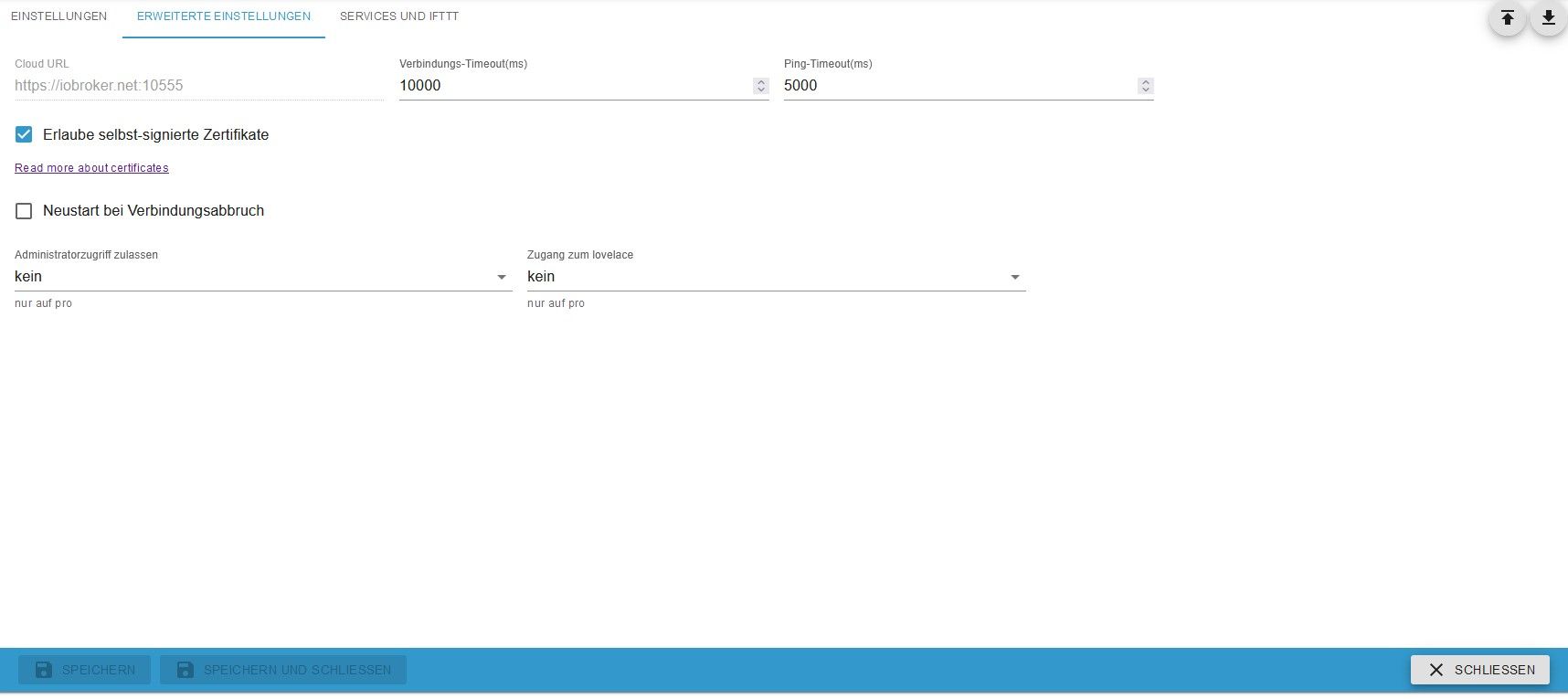
das sind die cloud einstellung die ich zu loveace gefunden habe
@docsnyder7 sagte in Admin über iobroker.pro nicht aufrufbar?:
das sind die cloud einstellung die ich zu loveace gefunden habe
und da ist der zugriff auf admin verboten
-
@docsnyder7 sagte in Admin über iobroker.pro nicht aufrufbar?:
das sind die cloud einstellung die ich zu loveace gefunden habe
und da ist der zugriff auf admin verboten
-
Ok.. hab ich erlaubt...
Resultat:
Cannot activate admin.0 for cloud, because authentication is enabled. Please create extra instance for cloudgab es da ne Veränderung?
@docsnyder7 sagte in Admin über iobroker.pro nicht aufrufbar?:
gab es da ne Veränderung?
nein, das war schon immer so.
die verwendete web Instanz darf kein https sein -
@docsnyder7 sagte in Admin über iobroker.pro nicht aufrufbar?:
gab es da ne Veränderung?
nein, das war schon immer so.
die verwendete web Instanz darf kein https seindh in den Einstellungen der Instanz muss noch wie webinstanz angegeben werden?
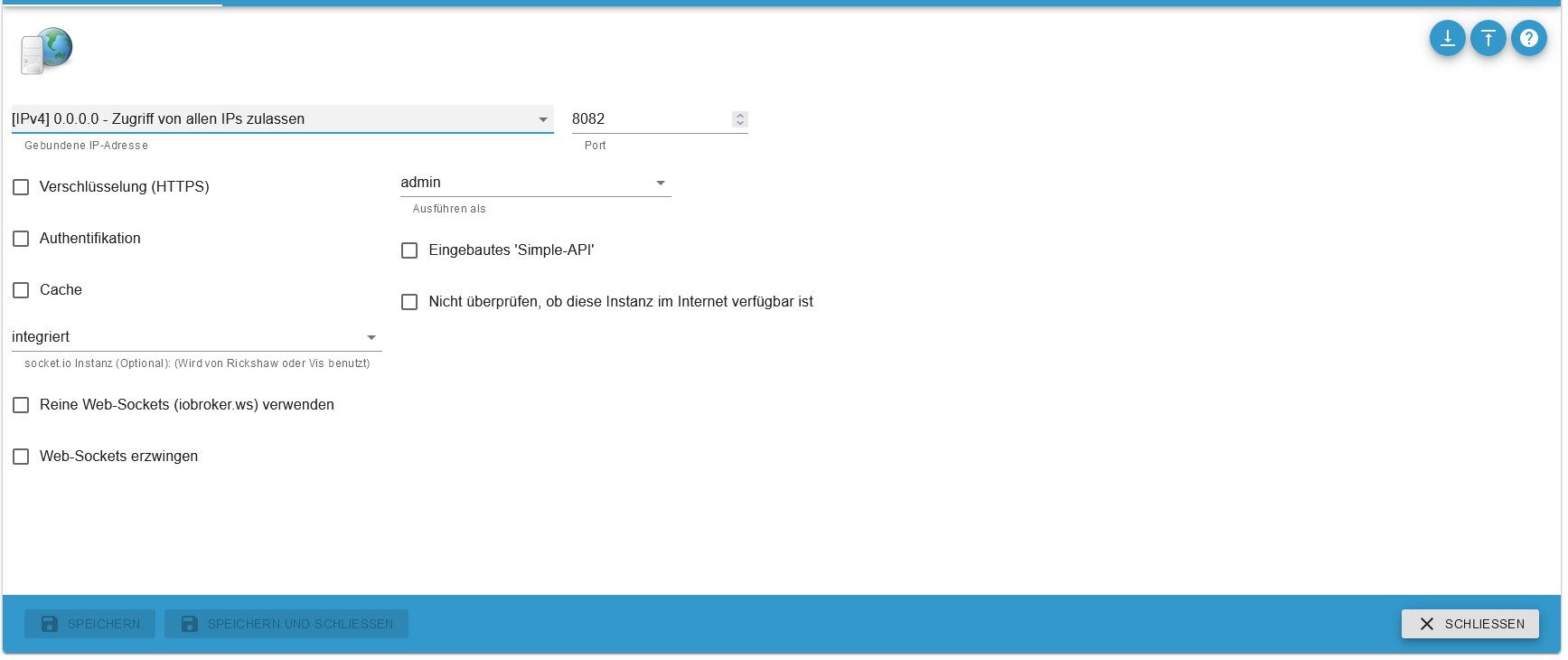
muss da noch was geändert werden?
danke schonmal bis hierher @Homoran
soll es an der eingeschalteten authentification liegen? in der Admin instanz?
-
@docsnyder7 sagte in Admin über iobroker.pro nicht aufrufbar?:
eingeschalteten authentification liegen
ja!
@docsnyder7 sagte in Admin über iobroker.pro nicht aufrufbar?:
in der Admin instanz?
nein!
@docsnyder7 sagte in Admin über iobroker.pro nicht aufrufbar?:
in den Einstellungen der Instanz muss noch wie webinstanz angegeben werden?
???
und nicht die wichtigsten Infos abschneiden!
Was steht in der Titelzeile? -
@docsnyder7 sagte in Admin über iobroker.pro nicht aufrufbar?:
eingeschalteten authentification liegen
ja!
@docsnyder7 sagte in Admin über iobroker.pro nicht aufrufbar?:
in der Admin instanz?
nein!
@docsnyder7 sagte in Admin über iobroker.pro nicht aufrufbar?:
in den Einstellungen der Instanz muss noch wie webinstanz angegeben werden?
???
und nicht die wichtigsten Infos abschneiden!
Was steht in der Titelzeile? -
@docsnyder7 sagte in Admin über iobroker.pro nicht aufrufbar?:
was meinst du mit wichtigen Infos?
@homoran sagte in Admin über iobroker.pro nicht aufrufbar?:
Was steht in der Titelzeile?
jetzt ist es vollständig!
es geht um web! nicht um admin
-
Ich würde mich hier gerne anhängen.
Kann kein admin über die Iobroker Cloud mit Pro Zugang öffnen.
Vis Editor und Float gehen nur bei Admin kommt Fehler 404.
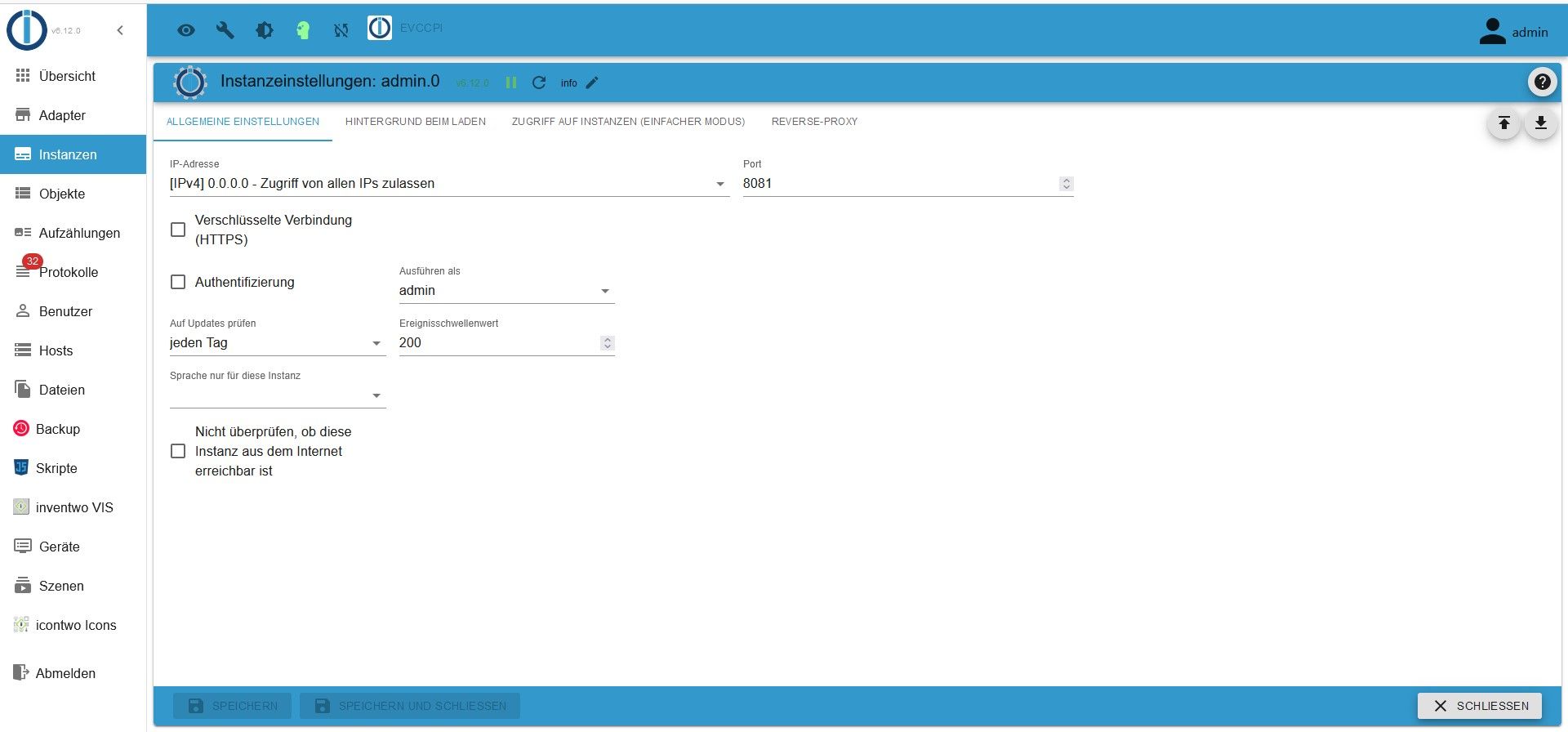
Gibt es hier mittlerweile eine Lösung?Edit: Lösung gefunden: Bei den Adpater Einstellungen von Admin Hacken bei
Authentifizierung entfernen, Benutzer auswählen (nicht den Admin Benutzer) dann gings bei mir =) -
Ich würde mich hier gerne anhängen.
Kann kein admin über die Iobroker Cloud mit Pro Zugang öffnen.
Vis Editor und Float gehen nur bei Admin kommt Fehler 404.
Gibt es hier mittlerweile eine Lösung?Edit: Lösung gefunden: Bei den Adpater Einstellungen von Admin Hacken bei
Authentifizierung entfernen, Benutzer auswählen (nicht den Admin Benutzer) dann gings bei mir =)@saar1and
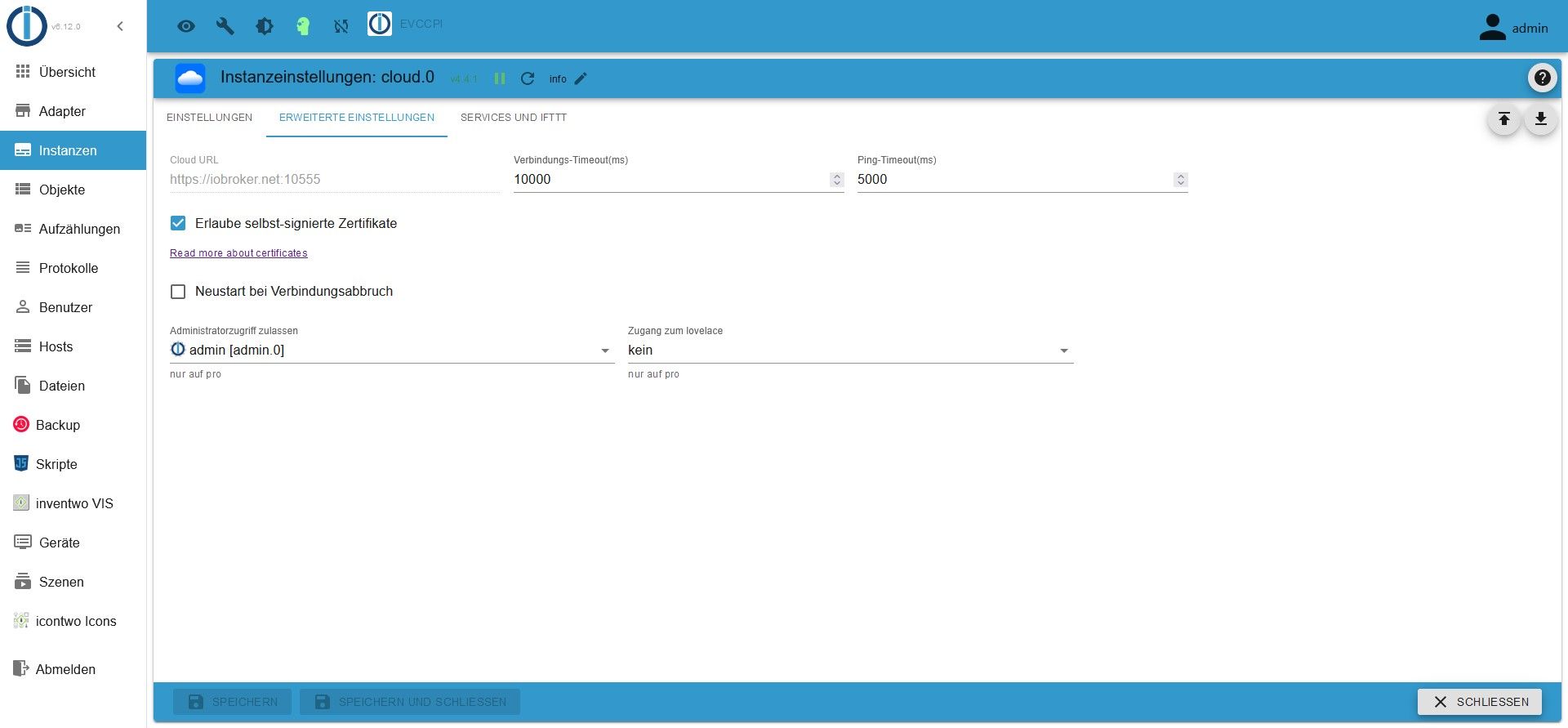
Jepp... genau das war der Haken zuviel


Hey! Du scheinst an dieser Unterhaltung interessiert zu sein, hast aber noch kein Konto.
Hast du es satt, bei jedem Besuch durch die gleichen Beiträge zu scrollen? Wenn du dich für ein Konto anmeldest, kommst du immer genau dorthin zurück, wo du zuvor warst, und kannst dich über neue Antworten benachrichtigen lassen (entweder per E-Mail oder Push-Benachrichtigung). Du kannst auch Lesezeichen speichern und Beiträge positiv bewerten, um anderen Community-Mitgliedern deine Wertschätzung zu zeigen.
Mit deinem Input könnte dieser Beitrag noch besser werden 💗
Registrieren Anmelden426
Online33.0k
Benutzende83.7k
Themen1.3m
Beiträge