




[Aufruf] TP-Link HS100 HS110 Adapter Testen

-
Hi zusammen,
hab den Adapter jetzt auch mal getestet, erstmal danke dafür.
Einbindung ging bei mir ohne Probleme mit dem HS110 und Version 0.0.18 ,
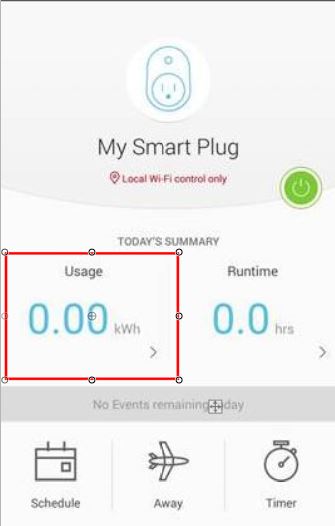
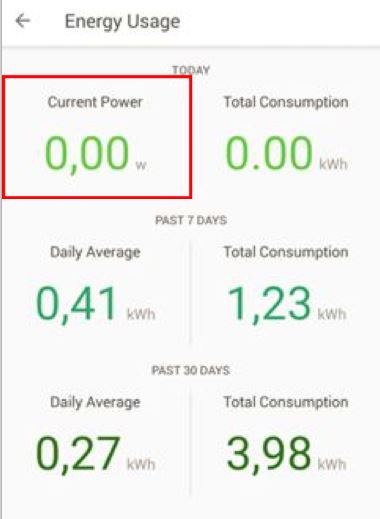
nur passt bei mir der Wert des Datenpunktes total nicht, laut Kasa App liegt der Wert Gesamtverbrauch bei 0,06kwh im broker zeigt der Datenpunkt mir aber 0,02 an…
Was ich auch nicht verstehe ist der Datenpunkt Current was genau wird dort angezeigt?
State wird bei mir auch nicht Aktualisiert wenn ich per App oder Manuell Schalte.
Gruß Christian
Edit: Current ist wohl Ampere :)
-
neue Version verfügbar 0.0.21 basierend auf https://github.com/plasticrake/tplink-smarthome-api
allerdings habe ich ein Problem mit dem Powermanagement von HS110.. Bekomme die Verbrauchsdaten nicht ausgelesen..
Polling sollte jetzt klappen
-
Hallo arteck,
habe die Version 0.0.21 installiert - Herzlichen Dank dafür - leider startet der Adpater nicht.
Die vorher installierte Version 0.0.18 lief.
host.ioBroker-RasPi 2017-12-03 20:07:30.058 info Do not restart adapter system.adapter.hs100.0 because disabled or deleted
host.ioBroker-RasPi 2017-12-03 20:07:30.057 error instance system.adapter.hs100.0 terminated with code 3 (Adapter disabled or invalid config)
host.ioBroker-RasPi 2017-12-03 20:07:30.057 error Caught by controller[0]: at Function.Module._load (module.js:438:3) code: 'MODULE_NOT_FOUND' }
host.ioBroker-RasPi 2017-12-03 20:07:30.056 error Caught by controller[0]: at tryModuleLoad (module.js:446:12)
host.ioBroker-RasPi 2017-12-03 20:07:30.056 error Caught by controller[0]: at Module.load (module.js:487:32)
host.ioBroker-RasPi 2017-12-03 20:07:30.056 error Caught by controller[0]: at Object.Module._extensions..js (module.js:579:10)
host.ioBroker-RasPi 2017-12-03 20:07:30.055 error Caught by controller[0]: at Module._compile (module.js:570:32)
host.ioBroker-RasPi 2017-12-03 20:07:30.053 error Caught by controller[0]: at Object. (/opt/iobroker/node_modules/iobroker.hs100/lib/tplink-smarthome-api/lib/client.js:3:18)
host.ioBroker-RasPi 2017-12-03 20:07:30.052 error Caught by controller[0]: at require (internal/module.js:20:19)
host.ioBroker-RasPi 2017-12-03 20:07:30.050 error Caught by controller[0]: at Module.require (module.js:497:17)
host.ioBroker-RasPi 2017-12-03 20:07:30.049 error Caught by controller[0]: at Function.Module._load (module.js:417:25)
host.ioBroker-RasPi 2017-12-03 20:07:30.047 error Caught by controller[0]: at Function.Module._resolveFilename (module.js:469:15)
host.ioBroker-RasPi 2017-12-03 20:07:30.045 error Caught by controller[0]: { Error: Cannot find module 'babel-runtime/core-js/json/stringify'
hs100.0 2017-12-03 20:07:29.966 error adapter disabled
host.ioBroker-RasPi 2017-12-03 20:07:06.090 info object change system.adapter.hs100.0
host.ioBroker-RasPi 2017-12-03 20:06:57.987 info Restart adapter system.adapter.hs100.0 because enabled
host.ioBroker-RasPi 2017-12-03 20:06:57.987 error instance system.adapter.hs100.0 terminated with code 0 (OK)
Caught 2017-12-03 20:06:57.987 error by controller[0]: at Function.Module._load (module.js:438:3) code: 'MODULE_NOT_FOUND' }
Caught 2017-12-03 20:06:57.986 error by controller[0]: at tryModuleLoad (module.js:446:12)
Caught 2017-12-03 20:06:57.986 error by controller[0]: at Module.load (module.js:487:32)
Caught 2017-12-03 20:06:57.986 error by controller[0]: at Object.Module._extensions..js (module.js:579:10)
Caught 2017-12-03 20:06:57.982 error by controller[0]: at Module._compile (module.js:570:32)
Caught 2017-12-03 20:06:57.981 error by controller[0]: at Object. (/opt/iobroker/node_modules/iobroker.hs100/lib/tplink-smarthome-api/lib/client.js:3:18)
Caught 2017-12-03 20:06:57.981 error by controller[0]: at require (internal/module.js:20:19)
Caught 2017-12-03 20:06:57.981 error by controller[0]: at Module.require (module.js:497:17)
Caught 2017-12-03 20:06:57.980 error by controller[0]: at Function.Module._load (module.js:417:25)
Caught 2017-12-03 20:06:57.980 error by controller[0]: at Function.Module._resolveFilename (module.js:469:15)
Caught 2017-12-03 20:06:57.979 error by controller[0]: { Error: Cannot find module 'babel-runtime/core-js/json/stringify'
hs100.0 2017-12-03 20:06:57.938 info terminating
hs100.0 2017-12-03 20:06:57.758 info starting. Version 0.0.21 in /opt/iobroker/node_modules/iobroker.hs100, node: v6.10.0
hs100.0 2017-12-03 20:06:57.701 info States connected to redis: 127.0.0.1:6379
hs100.0 2017-12-03 20:06:57.433 error at Function.Module._load (module.js:438:3)
hs100.0 2017-12-03 20:06:57.433 error at tryModuleLoad (module.js:446:12)
hs100.0 2017-12-03 20:06:57.433 error at Module.load (module.js:487:32)
hs100.0 2017-12-03 20:06:57.433 error at Object.Module._extensions..js (module.js:579:10)
hs100.0 2017-12-03 20:06:57.433 error at Module._compile (module.js:570:32)
hs100.0 2017-12-03 20:06:57.433 error at Object. (/opt/iobroker/node_modules/iobroker.hs100/lib/tplink-smarthome-api/lib/client.js:3:18)
hs100.0 2017-12-03 20:06:57.433 error at require (internal/module.js:20:19)
hs100.0 2017-12-03 20:06:57.433 error at Module.require (module.js:497:17)
hs100.0 2017-12-03 20:06:57.433 error at Function.Module._load (module.js:417:25)
hs100.0 2017-12-03 20:06:57.433 error at Function.Module._resolveFilename (module.js:469:15)
hs100.0 2017-12-03 20:06:57.433 error Error: Cannot find module 'babel-runtime/core-js/json/stringify'
hs100.0 2017-12-03 20:06:57.418 error uncaught exception: Cannot find module 'babel-runtime/core-js/json/stringify'
host.ioBroker-RasPi 2017-12-03 20:06:56.080 info instance system.adapter.hs100.0 started with pid 10170
host.ioBroker-RasPi 2017-12-03 20:06:56.007 info object change system.adapter.hs100.0
LG
Thomas
-
Hallo arteck,
habe die Version 0.0.21 installiert - Herzlichen Dank dafür - leider startet der Adpater nicht.
Die vorher installierte Version 0.0.18 lief.
host.ioBroker-RasPi 2017-12-03 20:07:30.058 info Do not restart adapter system.adapter.hs100.0 because disabled or deleted
host.ioBroker-RasPi 2017-12-03 20:07:30.057 error instance system.adapter.hs100.0 terminated with code 3 (Adapter disabled or invalid config)
host.ioBroker-RasPi 2017-12-03 20:07:30.057 error Caught by controller[0]: at Function.Module._load (module.js:438:3) code: 'MODULE_NOT_FOUND' }
host.ioBroker-RasPi 2017-12-03 20:07:30.056 error Caught by controller[0]: at tryModuleLoad (module.js:446:12)
host.ioBroker-RasPi 2017-12-03 20:07:30.056 error Caught by controller[0]: at Module.load (module.js:487:32)
host.ioBroker-RasPi 2017-12-03 20:07:30.056 error Caught by controller[0]: at Object.Module._extensions..js (module.js:579:10)
host.ioBroker-RasPi 2017-12-03 20:07:30.055 error Caught by controller[0]: at Module._compile (module.js:570:32)
host.ioBroker-RasPi 2017-12-03 20:07:30.053 error Caught by controller[0]: at Object. (/opt/iobroker/node_modules/iobroker.hs100/lib/tplink-smarthome-api/lib/client.js:3:18)
host.ioBroker-RasPi 2017-12-03 20:07:30.052 error Caught by controller[0]: at require (internal/module.js:20:19)
host.ioBroker-RasPi 2017-12-03 20:07:30.050 error Caught by controller[0]: at Module.require (module.js:497:17)
host.ioBroker-RasPi 2017-12-03 20:07:30.049 error Caught by controller[0]: at Function.Module._load (module.js:417:25)
host.ioBroker-RasPi 2017-12-03 20:07:30.047 error Caught by controller[0]: at Function.Module._resolveFilename (module.js:469:15)
host.ioBroker-RasPi 2017-12-03 20:07:30.045 error Caught by controller[0]: { Error: Cannot find module 'babel-runtime/core-js/json/stringify'
hs100.0 2017-12-03 20:07:29.966 error adapter disabled
host.ioBroker-RasPi 2017-12-03 20:07:06.090 info object change system.adapter.hs100.0
host.ioBroker-RasPi 2017-12-03 20:06:57.987 info Restart adapter system.adapter.hs100.0 because enabled
host.ioBroker-RasPi 2017-12-03 20:06:57.987 error instance system.adapter.hs100.0 terminated with code 0 (OK)
Caught 2017-12-03 20:06:57.987 error by controller[0]: at Function.Module._load (module.js:438:3) code: 'MODULE_NOT_FOUND' }
Caught 2017-12-03 20:06:57.986 error by controller[0]: at tryModuleLoad (module.js:446:12)
Caught 2017-12-03 20:06:57.986 error by controller[0]: at Module.load (module.js:487:32)
Caught 2017-12-03 20:06:57.986 error by controller[0]: at Object.Module._extensions..js (module.js:579:10)
Caught 2017-12-03 20:06:57.982 error by controller[0]: at Module._compile (module.js:570:32)
Caught 2017-12-03 20:06:57.981 error by controller[0]: at Object. (/opt/iobroker/node_modules/iobroker.hs100/lib/tplink-smarthome-api/lib/client.js:3:18)
Caught 2017-12-03 20:06:57.981 error by controller[0]: at require (internal/module.js:20:19)
Caught 2017-12-03 20:06:57.981 error by controller[0]: at Module.require (module.js:497:17)
Caught 2017-12-03 20:06:57.980 error by controller[0]: at Function.Module._load (module.js:417:25)
Caught 2017-12-03 20:06:57.980 error by controller[0]: at Function.Module._resolveFilename (module.js:469:15)
Caught 2017-12-03 20:06:57.979 error by controller[0]: { Error: Cannot find module 'babel-runtime/core-js/json/stringify'
hs100.0 2017-12-03 20:06:57.938 info terminating
hs100.0 2017-12-03 20:06:57.758 info starting. Version 0.0.21 in /opt/iobroker/node_modules/iobroker.hs100, node: v6.10.0
hs100.0 2017-12-03 20:06:57.701 info States connected to redis: 127.0.0.1:6379
hs100.0 2017-12-03 20:06:57.433 error at Function.Module._load (module.js:438:3)
hs100.0 2017-12-03 20:06:57.433 error at tryModuleLoad (module.js:446:12)
hs100.0 2017-12-03 20:06:57.433 error at Module.load (module.js:487:32)
hs100.0 2017-12-03 20:06:57.433 error at Object.Module._extensions..js (module.js:579:10)
hs100.0 2017-12-03 20:06:57.433 error at Module._compile (module.js:570:32)
hs100.0 2017-12-03 20:06:57.433 error at Object. (/opt/iobroker/node_modules/iobroker.hs100/lib/tplink-smarthome-api/lib/client.js:3:18)
hs100.0 2017-12-03 20:06:57.433 error at require (internal/module.js:20:19)
hs100.0 2017-12-03 20:06:57.433 error at Module.require (module.js:497:17)
hs100.0 2017-12-03 20:06:57.433 error at Function.Module._load (module.js:417:25)
hs100.0 2017-12-03 20:06:57.433 error at Function.Module._resolveFilename (module.js:469:15)
hs100.0 2017-12-03 20:06:57.433 error Error: Cannot find module 'babel-runtime/core-js/json/stringify'
hs100.0 2017-12-03 20:06:57.418 error uncaught exception: Cannot find module 'babel-runtime/core-js/json/stringify'
host.ioBroker-RasPi 2017-12-03 20:06:56.080 info instance system.adapter.hs100.0 started with pid 10170
host.ioBroker-RasPi 2017-12-03 20:06:56.007 info object change system.adapter.hs100.0
LG
Thomas `
ok schmal bitte nach ob du unter /opt/iobroker/node_modules/iobroker.hs100/lib/tplink-smarthome-api/node_modules babel-runtime findest
es scheint als ob irgendwas nicht mit installiert wurde
-
Die Installation lief bei mir problemlos und der Adapter startet auch ohne Fehler im Log. Aber nach wie vor wird der Status nicht aktualisiert. `
stoppe den adapter
lösche unter objekte hs100.0
starte den adapter.. die objekte sollten jetzt neu erzeugt worden sein..
-
neue Version verfügbar 0.0.21 basierend auf https://github.com/plasticrake/tplink-smarthome-api
allerdings habe ich ein Problem mit dem Powermanagement von HS110.. Bekomme die Verbrauchsdaten nicht ausgelesen..
Polling sollte jetzt klappen `
Ja Rückmeldung funtioniert jetzt, Danke für deine Mühe
Ich werde aber erst mal zu 0.0.18 zurückkehren denn das Powermanagment nutze ich gerade in der Vis.App.
Könntest du mir vielleicht sagen warum die Verbrauchsdaten im Broker anderes als in der Kasa App sind bzw. bin ich der einzige mit dem Problem?
Gruß Christian
-
Hallo arteck,
unter /opt/iobroker/node_modules/iobroker.hs100/lib/tplink-smarthome-api# ls
befindet sich nur:
CHANGELOG.md lib LICENSE package.json README.md
Der Ordner node_modules ist nicht vorhanden.
Ich habe den Adapter 0.0.21 über den 0.0.18, wie folgt manuell installiert:
cd /opt/iobroker
iobroker stop
npm install iobroker.hs100@0.0.21 –production
iobroker upload hs100
iobroker start
LG
Thomas
-
Hallo arteck,
ich hatte auch eine Menge Fehlermeldungen
host.raspi3	2017-12-04 20:41:24.027	error	instance system.adapter.hs100.0 terminated with code 1 ()
Caught	2017-12-04 20:41:24.027	error	by controller[0]: at node.js:1043:3
Caught	2017-12-04 20:41:24.026	error	by controller[0]: at startup (node.js:140:18)
Caught	2017-12-04 20:41:24.026	error	by controller[0]: at Function.Module.runMain (module.js:441:10)
Caught	2017-12-04 20:41:24.026	error	by controller[0]: at Function.Module._load (module.js:300:12)
Caught	2017-12-04 20:41:24.026	error	by controller[0]: at Module.load (module.js:343:32)
Caught	2017-12-04 20:41:24.026	error	by controller[0]: at Object.Module._extensions..js (module.js:416:10)
Caught	2017-12-04 20:41:24.026	error	by controller[0]: at Module._compile (module.js:373:25)
Caught	2017-12-04 20:41:24.025	error	by controller[0]: at exports.runInThisContext (vm.js:53:16)
Caught	2017-12-04 20:41:24.025	error	by controller[0]: SyntaxError: Unexpected token {
Caught	2017-12-04 20:41:24.025	error	by controller[0]: ^
Caught	2017-12-04 20:41:24.024	error	by controller[0]: const { Client } = require('./lib/tplink-smarthome-api/lib/index');
Caught	2017-12-04 20:41:24.024	error	by controller[0]: /opt/iobroker/node_modules/iobroker.hs100/main.js:14
Unter /opt/iobroker/node_modules/iobroker.hs100/lib/tplink-smarthome-api/node_modules babel-runtime habe ich die Verzeichnisse
core-js
helpers
regenerator
und noch 4 Dateien
Bin momentan zurück auf 0.0.18, die einwandfrei läuft. Der Trockner wird momentan geloggt. :)
Gruß
Dolomiti
-
schon komisch .bei euch beiden.. es ist als ob nicht alles von GIT gezogen wurde..
so die hs110 liefert jetzt auch daten.. version 0.22
und die restlichen tp-link derivate sollten auch laufen.. (so hoffe ich :oops: )
-
Hallo,
ich hatte auch das Problem, dass der State nicht übergeben wurde, entsprechendes UpDate steht ja zur Verfügung.
Also Adapter gestoppt, Unter Objekte HS100 alles gelöscht, UpDate gemacht -> Adapter startet
Adapter komplett deinstalliert und wieder installiert -> Adapter startet nicht.
Ideen?
Gruß
-
> const { Client } = require('./lib/tplink-smarthome-api/lib/index');
Ist da nicht-transpilierter Code auf NPM gelandet? Die Syntax ist relativ neu und wird aktuell nur von Babel/TypeScript unterstützt, evtl auch Node 8+ `ich hab node 6.12 .. auf dem Pi und 6 nochwas auf dem Win Entwickler System
ich check mal ob auf NPM alles gelandet ist .. da kann das Problem sein
installier es bitte nur vom GIT..
über admin
-
Node 8 war geraten, aber Node 4 kann es definitiv nicht und davon sind hier noch einige im Umlauf.
Lässt sich aber relativ einfach fixen:
const Client = require('./lib/tplink-smarthome-api/lib/index').Client;
```` `
ok… ich check das mal
wobei mit node 4 läuft der adapter nicht
-
Hi,
also ich habe die Version 6.10.0 im Einsatz:
->
hs100.0 2017-12-03 20:06:57.758 info starting. Version 0.0.21 in /opt/iobroker/node_modules/iobroker.hs100, node: v6.10.0
Was ist mit
-installier es bitte nur vom GIT..
-über admin
gemeint?
cd /opt/iobroker
npm install https://github.com/arteck/ioBroker.hs10 … ll/master/
??
LG
Thomas
-
So 0.0.22 Läuft Instaliert habe ich über Admin Octocat Symbol siehe Bild…
!
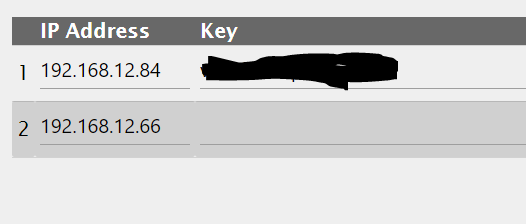
Läuft erstmal soweit sehr gut der Adapter, danke dafür.
Einzig der Datenpunkt Total gibt mir immer noch Rätsel auf, was soll der überhaupt ausgeben? Verbrauch Heute, Vergangene 7 Tage oder Vergangene 30 Tage kann das nicht sein denn die Kasa App zeigt einen völlig anderen Wert an…
Gruß Christian




Hey! Du scheinst an dieser Unterhaltung interessiert zu sein, hast aber noch kein Konto.
Hast du es satt, bei jedem Besuch durch die gleichen Beiträge zu scrollen? Wenn du dich für ein Konto anmeldest, kommst du immer genau dorthin zurück, wo du zuvor warst, und kannst dich über neue Antworten benachrichtigen lassen (entweder per E-Mail oder Push-Benachrichtigung). Du kannst auch Lesezeichen speichern und Beiträge positiv bewerten, um anderen Community-Mitgliedern deine Wertschätzung zu zeigen.
Mit deinem Input könnte dieser Beitrag noch besser werden 💗
Registrieren AnmeldenSupport us
262
Online33.0k
Benutzer83.7k
Themen1.3m
Beiträge