



Skip to content
  • Home
  • Aktuell
  • Tags
  • 0 Ungelesen 0
  • Kategorien
  • Unreplied
  • Beliebt
  • GitHub
  • Docu
  • Hilfe
Skins
  • Light
  • Brite
  • Cerulean
  • Cosmo
  • Flatly
  • Journal
  • Litera
  • Lumen
  • Lux
  • Materia
  • Minty
  • Morph
  • Pulse
  • Sandstone
  • Simplex
  • Sketchy
  • Spacelab
  • United
  • Yeti
  • Zephyr
  • Dark
  • Cyborg
  • Darkly
  • Quartz
  • Slate
  • Solar
  • Superhero
  • Vapor

  • Standard: (Kein Skin)
  • Kein Skin
Einklappen
ioBroker Logo

Community Forum

donate donate
  1. ioBroker Community Home
  2. Deutsch
  3. ioBroker Allgemein
  4. IOB keine Weboberfläche für Zigbee oder Objekte

NEWS

  • Jahresrückblick 2025 – unser neuer Blogbeitrag ist online! ✨
    BluefoxB
    Bluefox
    14
    1
    283

  • Neuer Blogbeitrag: Monatsrückblick - Dezember 2025 🎄
    BluefoxB
    Bluefox
    13
    1
    591

  • Weihnachtsangebot 2025! 🎄
    BluefoxB
    Bluefox
    25
    1
    1.8k

IOB keine Weboberfläche für Zigbee oder Objekte

Geplant Angeheftet Gesperrt Verschoben ioBroker Allgemein
20 Beiträge 3 Kommentatoren 1.2k Aufrufe 3 Watching
  • Älteste zuerst
  • Neuste zuerst
  • Meiste Stimmen
Antworten
  • In einem neuen Thema antworten
Anmelden zum Antworten
Dieses Thema wurde gelöscht. Nur Nutzer mit entsprechenden Rechten können es sehen.
  • W wolkenloser

    @thomas-braun Du weist doch, wei hatten vor ca 4 Wochen mal alles geupdatet.
    Das ist doch nicht normal, das man so schnell "veraltert" ist ?
    Wenn ich sehe das Adapter ein update haben wollen, mach ich das ja schon immer sofort.

    Kürzlich habe ich den Device-Reminder für Zigbee installiert und kurz danach war wieder alles kaputt, so das ich auf ein Backup gegangen bin.
    Das war bisher eigendlich nie ein Problem, aber seit ein paar Monaten hab ich andauernd irgendwas...

    npm ERR! invalid: eiscp@0.0.1 /opt/iobroker/node_modules/eiscp
    npm ERR! invalid: buffer@5.7.1 /opt/iobroker/node_modules/buffer
    

    ich weiss nicht was das sein soll.... schon gar nicht, wie ich das entfernen kann

    GlasfaserG Online
    GlasfaserG Online
    Glasfaser
    schrieb am zuletzt editiert von Glasfaser
    #9

    @wolkenloser

    einer kommt vom ( eventuell eine anhängigkeit )

    + system.adapter.onkyo.0                  : onkyo                 : iobroker                                 -  enabled
    

    Adapter

    der andere sagt mir gerade nichts

    Synology 918+ 16GB - ioBroker in Docker v9 , VISO auf Trekstor Primebook C13 13,3" , Hikvision Domkameras mit Surveillance Station .. CCU RaspberryMatic in Synology VM .. Zigbee CC2538+CC2592 .. Sonoff .. KNX .. Modbus ..

    1 Antwort Letzte Antwort
    0
    • W wolkenloser

      @thomas-braun Du weist doch, wei hatten vor ca 4 Wochen mal alles geupdatet.
      Das ist doch nicht normal, das man so schnell "veraltert" ist ?
      Wenn ich sehe das Adapter ein update haben wollen, mach ich das ja schon immer sofort.

      Kürzlich habe ich den Device-Reminder für Zigbee installiert und kurz danach war wieder alles kaputt, so das ich auf ein Backup gegangen bin.
      Das war bisher eigendlich nie ein Problem, aber seit ein paar Monaten hab ich andauernd irgendwas...

      npm ERR! invalid: eiscp@0.0.1 /opt/iobroker/node_modules/eiscp
      npm ERR! invalid: buffer@5.7.1 /opt/iobroker/node_modules/buffer
      

      ich weiss nicht was das sein soll.... schon gar nicht, wie ich das entfernen kann

      Thomas BraunT Online
      Thomas BraunT Online
      Thomas Braun
      Most Active
      schrieb am zuletzt editiert von
      #10

      @wolkenloser

      Man hält das Zeug ja auch laufend aktuell.

      Linux-Werkzeugkasten:
      https://forum.iobroker.net/topic/42952/der-kleine-iobroker-linux-werkzeugkasten
      NodeJS Fixer Skript:
      https://forum.iobroker.net/topic/68035/iob-node-fix-skript
      iob_diag: curl -sLf -o diag.sh https://iobroker.net/diag.sh && bash diag.sh

      W 1 Antwort Letzte Antwort
      0
      • Thomas BraunT Thomas Braun

        @wolkenloser

        Man hält das Zeug ja auch laufend aktuell.

        W Offline
        W Offline
        wolkenloser
        schrieb am zuletzt editiert von
        #11

        @thomas-braun
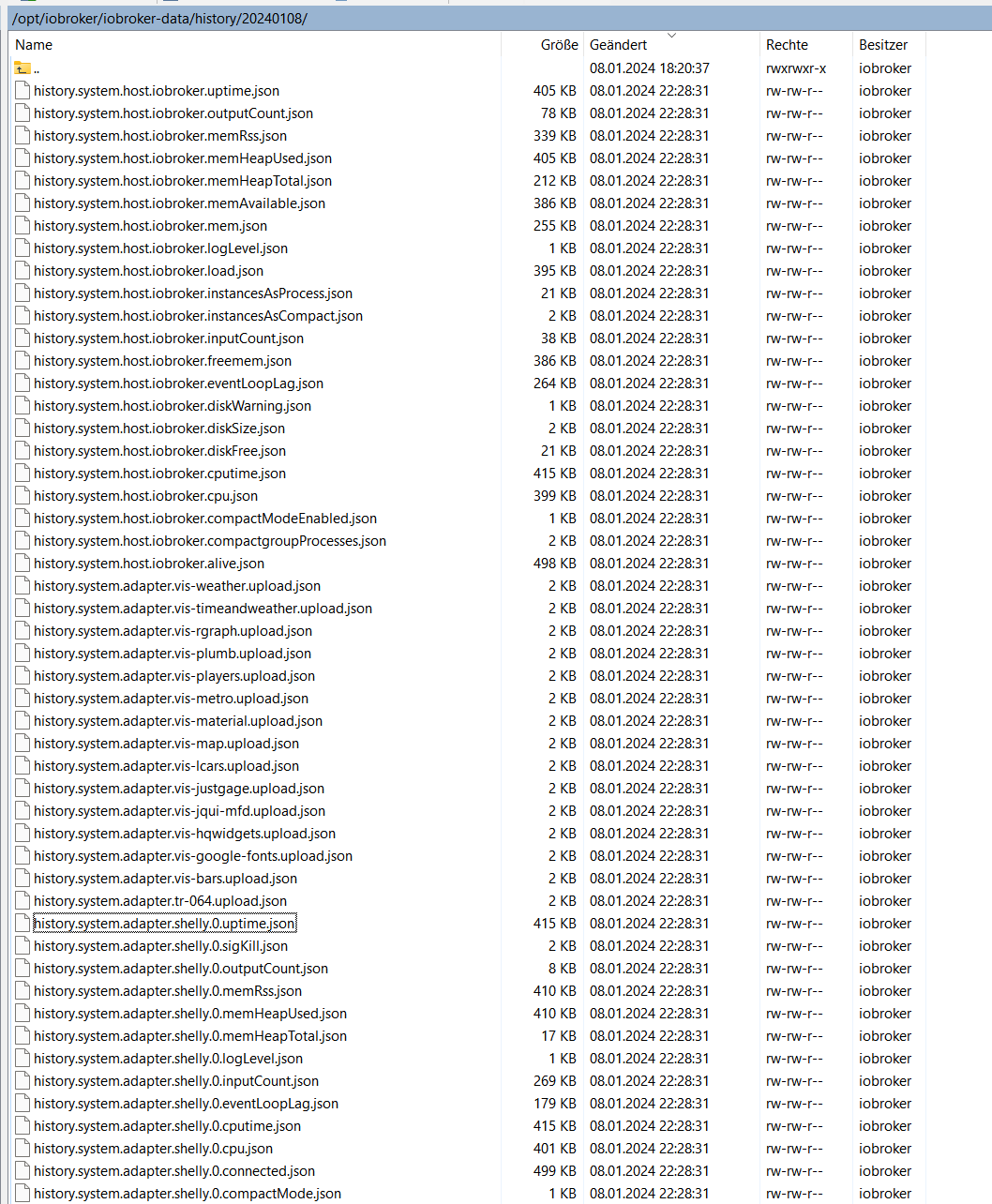
        Ich habe mal in meine History Ordner geschaut was da überhaupt mitgeloggt wird.
        Ich bin irgendwie irritiert.
        Was ist das ?
        Ich finde keine Objekte wo die History aktiviert ist.ich hab das früher mal für Temperaturen gemacht. Das mache ich jetzt aber alles über Influx.
        Hier ein Beispiel:
        2024-01-08 22_33_18-20240108 - iobroker@iobroker - WinSCP.png

        GlasfaserG 1 Antwort Letzte Antwort
        0
        • W wolkenloser

          @thomas-braun
          Ich habe mal in meine History Ordner geschaut was da überhaupt mitgeloggt wird.
          Ich bin irgendwie irritiert.
          Was ist das ?
          Ich finde keine Objekte wo die History aktiviert ist.ich hab das früher mal für Temperaturen gemacht. Das mache ich jetzt aber alles über Influx.
          Hier ein Beispiel:
          2024-01-08 22_33_18-20240108 - iobroker@iobroker - WinSCP.png

          GlasfaserG Online
          GlasfaserG Online
          Glasfaser
          schrieb am zuletzt editiert von
          #12

          @wolkenloser sagte in IOB keine Weboberfläche für Zigbee oder Objekte:

          Ich finde keine Objekte wo die History aktiviert ist

          Filtere danach .. was zeigt er an :
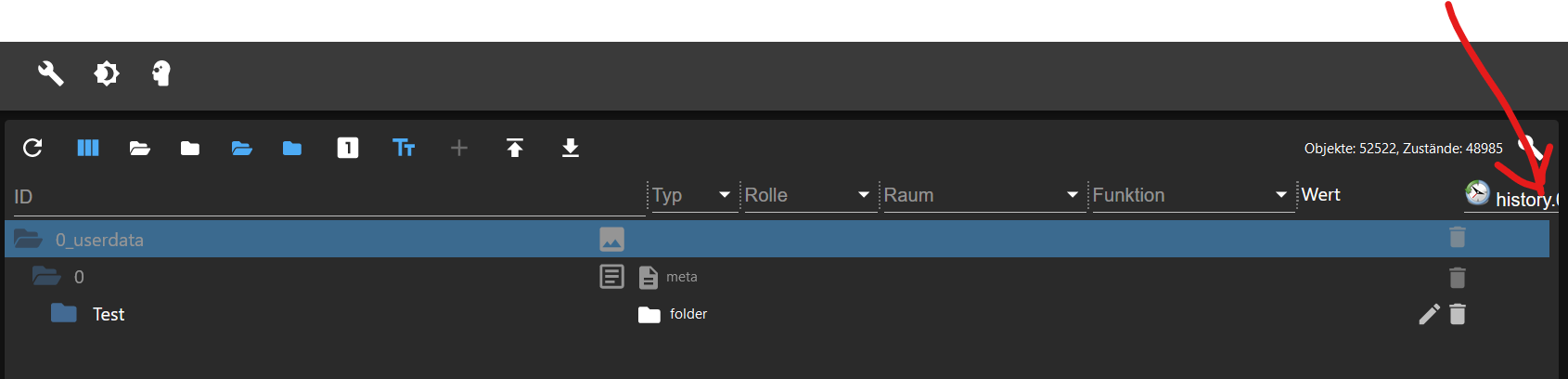
          ded3b8d4-9345-410b-a75d-e250bb90d5c3-grafik.png

          Synology 918+ 16GB - ioBroker in Docker v9 , VISO auf Trekstor Primebook C13 13,3" , Hikvision Domkameras mit Surveillance Station .. CCU RaspberryMatic in Synology VM .. Zigbee CC2538+CC2592 .. Sonoff .. KNX .. Modbus ..

          1 Antwort Letzte Antwort
          0
          • W Offline
            W Offline
            wolkenloser
            schrieb am zuletzt editiert von wolkenloser
            #13

            @glasfaser

            gesehn ... sportliche Nummer :

            /opt/iobroker/iobroker-data:
            16G /opt/iobroker/iobroker-data/
            15G /opt/iobroker/iobroker-data/history

            /opt/iobroker/iobroker-data:
            3.9G    /opt/iobroker/iobroker-data/
            3.0G    /opt/iobroker/iobroker-data/history
            

            hab viel gelöscht :-)

            npm ERR! invalid: eiscp@0.0.1 /opt/iobroker/node_modules/eiscp
            npm ERR! invalid: buffer@5.7.1 /opt/iobroker/node_modules/buffer


            wegen dem NPN Error: Ich habe den Onkyo Adapter der anscheinend EISCP benutzt einmal entfernt und neu intalliert, aber das hat nichts gebracht.

            Thomas BraunT 1 Antwort Letzte Antwort
            0
            • W wolkenloser

              @glasfaser

              gesehn ... sportliche Nummer :

              /opt/iobroker/iobroker-data:
              16G /opt/iobroker/iobroker-data/
              15G /opt/iobroker/iobroker-data/history

              /opt/iobroker/iobroker-data:
              3.9G    /opt/iobroker/iobroker-data/
              3.0G    /opt/iobroker/iobroker-data/history
              

              hab viel gelöscht :-)

              npm ERR! invalid: eiscp@0.0.1 /opt/iobroker/node_modules/eiscp
              npm ERR! invalid: buffer@5.7.1 /opt/iobroker/node_modules/buffer


              wegen dem NPN Error: Ich habe den Onkyo Adapter der anscheinend EISCP benutzt einmal entfernt und neu intalliert, aber das hat nichts gebracht.

              Thomas BraunT Online
              Thomas BraunT Online
              Thomas Braun
              Most Active
              schrieb am zuletzt editiert von
              #14

              @wolkenloser

              cd /opt/iobroker && npm ls buffer eiscp
              

              Linux-Werkzeugkasten:
              https://forum.iobroker.net/topic/42952/der-kleine-iobroker-linux-werkzeugkasten
              NodeJS Fixer Skript:
              https://forum.iobroker.net/topic/68035/iob-node-fix-skript
              iob_diag: curl -sLf -o diag.sh https://iobroker.net/diag.sh && bash diag.sh

              W 1 Antwort Letzte Antwort
              0
              • Thomas BraunT Thomas Braun

                @wolkenloser

                cd /opt/iobroker && npm ls buffer eiscp
                
                W Offline
                W Offline
                wolkenloser
                schrieb am zuletzt editiert von
                #15

                @thomas-braun sagte in IOB keine Weboberfläche für Zigbee oder Objekte:

                cd /opt/iobroker && npm ls buffer eiscp

                npm ERR! code ELSPROBLEMS
                npm ERR! invalid: eiscp@0.0.1 /opt/iobroker/node_modules/eiscp
                npm ERR! invalid: buffer@5.7.1 /opt/iobroker/node_modules/buffer
                iobroker.inst@2.0.3 /opt/iobroker
                ├─┬ iobroker.bydhvs@1.5.0
                │ └─┬ crc@4.3.2
                │   └── buffer@5.7.1 invalid: ">=6.0.3" from node_modules/crc
                ├─┬ iobroker.onkyo@2.1.2
                │ └── eiscp@0.0.1 invalid: "https://github.com/GermanBluefox/node-eiscp/tarball/master/" from node_modules/iobroker.onkyo
                └─┬ iobroker.shelly@6.6.1
                  ├─┬ mqtt-connection@4.1.0
                  │ └─┬ mqtt-packet@6.10.0
                  │   └─┬ bl@4.1.0
                  │     └── buffer@5.7.1 deduped invalid: ">=6.0.3" from node_modules/crc
                  └─┬ shelly-iot@1.1.2
                    └─┬ coap@0.26.0
                      └─┬ bl@5.1.0
                        └── buffer@6.0.3
                
                
                npm ERR! A complete log of this run can be found in: /home/iobroker/.npm/_logs/2024-01-09T19_16_09_037Z-debug-0.log
                
                
                Thomas BraunT 2 Antworten Letzte Antwort
                0
                • W wolkenloser

                  @thomas-braun sagte in IOB keine Weboberfläche für Zigbee oder Objekte:

                  cd /opt/iobroker && npm ls buffer eiscp

                  npm ERR! code ELSPROBLEMS
                  npm ERR! invalid: eiscp@0.0.1 /opt/iobroker/node_modules/eiscp
                  npm ERR! invalid: buffer@5.7.1 /opt/iobroker/node_modules/buffer
                  iobroker.inst@2.0.3 /opt/iobroker
                  ├─┬ iobroker.bydhvs@1.5.0
                  │ └─┬ crc@4.3.2
                  │   └── buffer@5.7.1 invalid: ">=6.0.3" from node_modules/crc
                  ├─┬ iobroker.onkyo@2.1.2
                  │ └── eiscp@0.0.1 invalid: "https://github.com/GermanBluefox/node-eiscp/tarball/master/" from node_modules/iobroker.onkyo
                  └─┬ iobroker.shelly@6.6.1
                    ├─┬ mqtt-connection@4.1.0
                    │ └─┬ mqtt-packet@6.10.0
                    │   └─┬ bl@4.1.0
                    │     └── buffer@5.7.1 deduped invalid: ">=6.0.3" from node_modules/crc
                    └─┬ shelly-iot@1.1.2
                      └─┬ coap@0.26.0
                        └─┬ bl@5.1.0
                          └── buffer@6.0.3
                  
                  
                  npm ERR! A complete log of this run can be found in: /home/iobroker/.npm/_logs/2024-01-09T19_16_09_037Z-debug-0.log
                  
                  
                  Thomas BraunT Online
                  Thomas BraunT Online
                  Thomas Braun
                  Most Active
                  schrieb am zuletzt editiert von
                  #16

                  @wolkenloser

                  Da siehst du wo es klemmt.

                  Linux-Werkzeugkasten:
                  https://forum.iobroker.net/topic/42952/der-kleine-iobroker-linux-werkzeugkasten
                  NodeJS Fixer Skript:
                  https://forum.iobroker.net/topic/68035/iob-node-fix-skript
                  iob_diag: curl -sLf -o diag.sh https://iobroker.net/diag.sh && bash diag.sh

                  W 1 Antwort Letzte Antwort
                  0
                  • W wolkenloser

                    @thomas-braun sagte in IOB keine Weboberfläche für Zigbee oder Objekte:

                    cd /opt/iobroker && npm ls buffer eiscp

                    npm ERR! code ELSPROBLEMS
                    npm ERR! invalid: eiscp@0.0.1 /opt/iobroker/node_modules/eiscp
                    npm ERR! invalid: buffer@5.7.1 /opt/iobroker/node_modules/buffer
                    iobroker.inst@2.0.3 /opt/iobroker
                    ├─┬ iobroker.bydhvs@1.5.0
                    │ └─┬ crc@4.3.2
                    │   └── buffer@5.7.1 invalid: ">=6.0.3" from node_modules/crc
                    ├─┬ iobroker.onkyo@2.1.2
                    │ └── eiscp@0.0.1 invalid: "https://github.com/GermanBluefox/node-eiscp/tarball/master/" from node_modules/iobroker.onkyo
                    └─┬ iobroker.shelly@6.6.1
                      ├─┬ mqtt-connection@4.1.0
                      │ └─┬ mqtt-packet@6.10.0
                      │   └─┬ bl@4.1.0
                      │     └── buffer@5.7.1 deduped invalid: ">=6.0.3" from node_modules/crc
                      └─┬ shelly-iot@1.1.2
                        └─┬ coap@0.26.0
                          └─┬ bl@5.1.0
                            └── buffer@6.0.3
                    
                    
                    npm ERR! A complete log of this run can be found in: /home/iobroker/.npm/_logs/2024-01-09T19_16_09_037Z-debug-0.log
                    
                    
                    Thomas BraunT Online
                    Thomas BraunT Online
                    Thomas Braun
                    Most Active
                    schrieb am zuletzt editiert von
                    #17

                    @wolkenloser

                    Installier den nochmal. Hier wird der nämlich dann richtig reingeholt:

                    ├─┬ iobroker.bydhvs@1.5.0
                    │ └─┬ crc@4.3.2
                    │   └── buffer@6.0.3
                    

                    Linux-Werkzeugkasten:
                    https://forum.iobroker.net/topic/42952/der-kleine-iobroker-linux-werkzeugkasten
                    NodeJS Fixer Skript:
                    https://forum.iobroker.net/topic/68035/iob-node-fix-skript
                    iob_diag: curl -sLf -o diag.sh https://iobroker.net/diag.sh && bash diag.sh

                    1 Antwort Letzte Antwort
                    0
                    • Thomas BraunT Thomas Braun

                      @wolkenloser

                      Da siehst du wo es klemmt.

                      W Offline
                      W Offline
                      wolkenloser
                      schrieb am zuletzt editiert von wolkenloser
                      #18

                      @thomas-braun

                      Ich versuch es mal

                      Thomas BraunT 1 Antwort Letzte Antwort
                      0
                      • W wolkenloser

                        @thomas-braun

                        Ich versuch es mal

                        Thomas BraunT Online
                        Thomas BraunT Online
                        Thomas Braun
                        Most Active
                        schrieb am zuletzt editiert von
                        #19

                        @wolkenloser

                        Gleiches gilt für den:

                        └─┬ iobroker.onkyo@2.1.2
                          └── eiscp@0.0.1
                        

                        Linux-Werkzeugkasten:
                        https://forum.iobroker.net/topic/42952/der-kleine-iobroker-linux-werkzeugkasten
                        NodeJS Fixer Skript:
                        https://forum.iobroker.net/topic/68035/iob-node-fix-skript
                        iob_diag: curl -sLf -o diag.sh https://iobroker.net/diag.sh && bash diag.sh

                        W 1 Antwort Letzte Antwort
                        0
                        • Thomas BraunT Thomas Braun

                          @wolkenloser

                          Gleiches gilt für den:

                          └─┬ iobroker.onkyo@2.1.2
                            └── eiscp@0.0.1
                          
                          W Offline
                          W Offline
                          wolkenloser
                          schrieb am zuletzt editiert von
                          #20

                          @thomas-braun

                          Ich habe den BYD Adaper deinstalliert und neuinstalliert und nochmal deinstalliert, auch den Onkyo Adapter.

                          Das Ergebnis ist folgendes

                          :/opt/iobroker$ cd /opt/iobroker && npm ls buffer eiscp
                          npm ERR! code ELSPROBLEMS
                          npm ERR! invalid: eiscp@0.0.1 /opt/iobroker/node_modules/eiscp
                          iobroker.inst@2.0.3 /opt/iobroker
                          ├─┬ iobroker.onkyo@2.1.2
                          │ └── eiscp@0.0.1 invalid: "https://github.com/GermanBluefox/node-eiscp/tarball/master/" from node_modules/iobroker.onkyo
                          └─┬ iobroker.shelly@6.6.1
                            ├─┬ mqtt-connection@4.1.0
                            │ └─┬ mqtt-packet@6.10.0
                            │   └─┬ bl@4.1.0
                            │     └── buffer@5.7.1
                            └─┬ shelly-iot@1.1.2
                              └─┬ coap@0.26.0
                                └─┬ bl@5.1.0
                                  └── buffer@6.0.3
                          
                          
                          npm ERR! A complete log of this run can be found in: /home/iobroker/.npm/_logs/2024-01-09T20_08_08_522Z-debug-0.log

                          
                          1 Antwort Letzte Antwort
                          0
                          Antworten
                          • In einem neuen Thema antworten
                          Anmelden zum Antworten
                          • Älteste zuerst
                          • Neuste zuerst
                          • Meiste Stimmen


                          Support us

                          ioBroker
                          Community Adapters
                          Donate
                          FAQ Cloud / IOT
                          HowTo: Node.js-Update
                          HowTo: Backup/Restore
                          Downloads
                          BLOG

                          433

                          Online

                          32.5k

                          Benutzer

                          81.9k

                          Themen

                          1.3m

                          Beiträge
                          Community
                          Impressum | Datenschutz-Bestimmungen | Nutzungsbedingungen | Einwilligungseinstellungen
                          ioBroker Community 2014-2025
                          logo
                          • Anmelden

                          • Du hast noch kein Konto? Registrieren

                          • Anmelden oder registrieren, um zu suchen
                          • Erster Beitrag
                            Letzter Beitrag
                          0
                          • Home
                          • Aktuell
                          • Tags
                          • Ungelesen 0
                          • Kategorien
                          • Unreplied
                          • Beliebt
                          • GitHub
                          • Docu
                          • Hilfe