




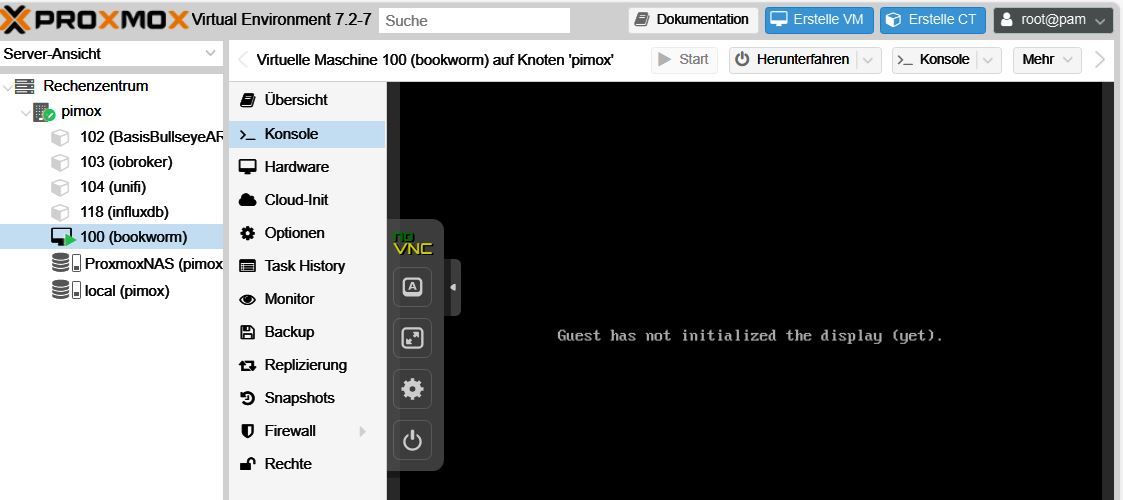
Proxmox - keine Konsole möglich in VM
-
@snopy_16 Frage: Ist er installiert? Der QEMU Guest Agent.
https://pve.proxmox.com/wiki/Qemu-guest-agentsudo apt-get install qemu-guest-agent@kalle-blomquist sagte in Proxmox - keine Konsole möglich in VM:
Hätte ich schon probiert - leider irgendwo ist der Wurm drin
root@pimox:~# apt-get install qemu-guest-agent Reading package lists... Done Building dependency tree... Done Reading state information... Done The following packages were automatically installed and are no longer required: ceph-common ceph-dkms ceph-fuse corosync criu cstream dctrl-tools dkms dmeventd dtach ebtables faketime fontconfig fontconfig-config fonts-dejavu-core fonts-font-awesome fonts-glyphicons-halflings genisoimage glusterfs-client glusterfs-common hdparm ipset ksmtuned libaio1 libanyevent-http-perl libanyevent-perl libappconfig-perl libapt-pkg-perl libasyncns0 libauthen-pam-perl libc-devtools libcairo2 libcephfs2 libcfg7 libcmap4 libcorosync-common4 libcpg4 libcrypt-openssl-bignum-perl libcrypt-openssl-random-perl libcrypt-openssl-rsa-perl libdatrie1 libdbi1 libdevel-cycle-perl libdevmapper-event1.02.1 libepoxy0 libfaketime libfile-chdir-perl libfile-readbackwards-perl libfilesys-df-perl libfontconfig1 libfuse3-3 libgbm1 libgd3 libgfapi0 libgfchangelog0 libgfrpc0 libgfxdr0 libglusterd0 libglusterfs0 libgoogle-perftools4 libgraphite2-3 libharfbuzz0b libibverbs1 libio-multiplex-perl libio-stringy-perl libipset13 libiscsi7 libjaeger libjemalloc2 libjs-bootstrap libjs-extjs libjs-jquery libjs-qrcodejs libknet1 libleveldb1d liblinux-inotify2-perl liblttng-ust-ctl4 liblttng-ust0 liblua5.3-0 liblvm2cmd2.03 liblzo2-2 libmime-base32-perl libnet-dbus-perl libnet-dns-perl libnet-ip-perl libnet1 libnetaddr-ip-perl libnetfilter-log1 libnozzle1 libnvpair3linux liboath0 libopus0 libpango-1.0-0 libpangocairo-1.0-0 libpangoft2-1.0-0 libpixman-1-0 libposix-strptime-perl libprotobuf23 libproxmox-acme-perl libproxmox-acme-plugins libproxmox-backup-qemu0 libproxmox-rs-perl libpulse0 libpve-access-control libpve-apiclient-perl libpve-cluster-api-perl libpve-cluster-perl libpve-common-perl libpve-guest-common-perl libpve-http-server-perl libpve-rs-perl libpve-storage-perl libpve-u2f-server-perl libqb100 libqrencode4 libquorum5 librabbitmq4 librados2 librados2-perl libradosstriper1 librbd1 librdkafka1 librdmacm1 librgw2 librrd8 librrds-perl libsnappy1v5 libsndfile1 libspice-server1 libstatgrab10 libstring-shellquote-perl libtcmalloc-minimal4 libtemplate-perl libthai-data libthai0 libu2f-server0 liburcu6 liburing1 libusbredirparser1 libuuid-perl libuutil3linux libvirglrenderer1 libvorbisenc2 libvotequorum8 libwayland-server0 libxcb-render0 libxcb-shm0 libxml-libxml-perl libxml-twig-perl libxpm4 libxrender1 libxslt1.1 libyaml-libyaml-perl libzfs4linux libzpool5linux linux-headers-5.10.0-25-arm64 linux-headers-5.10.0-25-common linux-headers-5.10.0-26-arm64 linux-headers-5.10.0-26-common linux-headers-arm64 linux-kbuild-5.10 lvm2 lxcfs lzop novnc-pve pigz proxmox-archive-keyring proxmox-backup-client proxmox-backup-file-restore proxmox-mini-journalreader proxmox-websocket-tunnel proxmox-widget-toolkit pve-cluster pve-docs pve-edk2-firmware pve-firewall pve-i18n pve-lxc-syscalld pve-qemu-kvm pve-xtermjs python3-ceph-argparse python3-ceph-common python3-cephfs python3-distutils python3-jwt python3-lib2to3 python3-prettytable python3-protobuf python3-rados python3-rbd python3-rgw python3-spidev python3-wcwidth python3-yaml qrencode rrdcached sgml-base smartmontools socat spiceterm sqlite3 thin-provisioning-tools uidmap vncterm xsltproc zfs-dkms zfs-zed zfsutils-linux Use 'apt autoremove' to remove them. The following additional packages will be installed: binutils binutils-aarch64-linux-gnu binutils-common chrony libbinutils libc-bin libc-dev-bin libc6 libc6-dbg libc6-dev libctf0 libgnutls30 libgprofng0 liburing2 libzstd1 locales rpcsvc-proto Suggested packages: binutils-doc dnsutils networkd-dispatcher glibc-doc libnss-nis libnss-nisplus gnutls-bin Recommended packages: libc-devtools The following packages will be REMOVED: libgnutlsxx28 lxc-pve proxmox-ve pve-container pve-ha-manager pve-manager qemu-server The following NEW packages will be installed: libgprofng0 liburing2 qemu-guest-agent rpcsvc-proto The following packages will be upgraded: binutils binutils-aarch64-linux-gnu binutils-common chrony libbinutils libc-bin libc-dev-bin libc6 libc6-dbg libc6-dev libctf0 libgnutls30 libzstd1 locales 14 upgraded, 4 newly installed, 7 to remove and 435 not upgraded. Need to get 0 B/23.6 MB of archives. After this operation, 27.6 MB disk space will be freed. Do you want to continue? [Y/n] W: (pve-apt-hook) !! WARNING !! W: (pve-apt-hook) You are attempting to remove the meta-package 'proxmox-ve'! W: (pve-apt-hook) W: (pve-apt-hook) If you really want to permanently remove 'proxmox-ve' from your system, run the following command W: (pve-apt-hook) touch '/please-remove-proxmox-ve' W: (pve-apt-hook) run apt purge proxmox-ve to remove the meta-package W: (pve-apt-hook) and repeat your apt invocation. W: (pve-apt-hook) W: (pve-apt-hook) If you are unsure why 'proxmox-ve' would be removed, please verify W: (pve-apt-hook) - your APT repository settings W: (pve-apt-hook) - that you are using 'apt full-upgrade' to upgrade your system E: Sub-process /usr/share/proxmox-ve/pve-apt-hook returned an error code (1) E: Failure running script /usr/share/proxmox-ve/pve-apt-hook root@pimox:~# systemctl start qemu-guest-agent Failed to start qemu-guest-agent.service: Unit qemu-guest-agent.service not found. root@pimox:~# -
@kalle-blomquist sagte in Proxmox - keine Konsole möglich in VM:
Hätte ich schon probiert - leider irgendwo ist der Wurm drin
root@pimox:~# apt-get install qemu-guest-agent Reading package lists... Done Building dependency tree... Done Reading state information... Done The following packages were automatically installed and are no longer required: ceph-common ceph-dkms ceph-fuse corosync criu cstream dctrl-tools dkms dmeventd dtach ebtables faketime fontconfig fontconfig-config fonts-dejavu-core fonts-font-awesome fonts-glyphicons-halflings genisoimage glusterfs-client glusterfs-common hdparm ipset ksmtuned libaio1 libanyevent-http-perl libanyevent-perl libappconfig-perl libapt-pkg-perl libasyncns0 libauthen-pam-perl libc-devtools libcairo2 libcephfs2 libcfg7 libcmap4 libcorosync-common4 libcpg4 libcrypt-openssl-bignum-perl libcrypt-openssl-random-perl libcrypt-openssl-rsa-perl libdatrie1 libdbi1 libdevel-cycle-perl libdevmapper-event1.02.1 libepoxy0 libfaketime libfile-chdir-perl libfile-readbackwards-perl libfilesys-df-perl libfontconfig1 libfuse3-3 libgbm1 libgd3 libgfapi0 libgfchangelog0 libgfrpc0 libgfxdr0 libglusterd0 libglusterfs0 libgoogle-perftools4 libgraphite2-3 libharfbuzz0b libibverbs1 libio-multiplex-perl libio-stringy-perl libipset13 libiscsi7 libjaeger libjemalloc2 libjs-bootstrap libjs-extjs libjs-jquery libjs-qrcodejs libknet1 libleveldb1d liblinux-inotify2-perl liblttng-ust-ctl4 liblttng-ust0 liblua5.3-0 liblvm2cmd2.03 liblzo2-2 libmime-base32-perl libnet-dbus-perl libnet-dns-perl libnet-ip-perl libnet1 libnetaddr-ip-perl libnetfilter-log1 libnozzle1 libnvpair3linux liboath0 libopus0 libpango-1.0-0 libpangocairo-1.0-0 libpangoft2-1.0-0 libpixman-1-0 libposix-strptime-perl libprotobuf23 libproxmox-acme-perl libproxmox-acme-plugins libproxmox-backup-qemu0 libproxmox-rs-perl libpulse0 libpve-access-control libpve-apiclient-perl libpve-cluster-api-perl libpve-cluster-perl libpve-common-perl libpve-guest-common-perl libpve-http-server-perl libpve-rs-perl libpve-storage-perl libpve-u2f-server-perl libqb100 libqrencode4 libquorum5 librabbitmq4 librados2 librados2-perl libradosstriper1 librbd1 librdkafka1 librdmacm1 librgw2 librrd8 librrds-perl libsnappy1v5 libsndfile1 libspice-server1 libstatgrab10 libstring-shellquote-perl libtcmalloc-minimal4 libtemplate-perl libthai-data libthai0 libu2f-server0 liburcu6 liburing1 libusbredirparser1 libuuid-perl libuutil3linux libvirglrenderer1 libvorbisenc2 libvotequorum8 libwayland-server0 libxcb-render0 libxcb-shm0 libxml-libxml-perl libxml-twig-perl libxpm4 libxrender1 libxslt1.1 libyaml-libyaml-perl libzfs4linux libzpool5linux linux-headers-5.10.0-25-arm64 linux-headers-5.10.0-25-common linux-headers-5.10.0-26-arm64 linux-headers-5.10.0-26-common linux-headers-arm64 linux-kbuild-5.10 lvm2 lxcfs lzop novnc-pve pigz proxmox-archive-keyring proxmox-backup-client proxmox-backup-file-restore proxmox-mini-journalreader proxmox-websocket-tunnel proxmox-widget-toolkit pve-cluster pve-docs pve-edk2-firmware pve-firewall pve-i18n pve-lxc-syscalld pve-qemu-kvm pve-xtermjs python3-ceph-argparse python3-ceph-common python3-cephfs python3-distutils python3-jwt python3-lib2to3 python3-prettytable python3-protobuf python3-rados python3-rbd python3-rgw python3-spidev python3-wcwidth python3-yaml qrencode rrdcached sgml-base smartmontools socat spiceterm sqlite3 thin-provisioning-tools uidmap vncterm xsltproc zfs-dkms zfs-zed zfsutils-linux Use 'apt autoremove' to remove them. The following additional packages will be installed: binutils binutils-aarch64-linux-gnu binutils-common chrony libbinutils libc-bin libc-dev-bin libc6 libc6-dbg libc6-dev libctf0 libgnutls30 libgprofng0 liburing2 libzstd1 locales rpcsvc-proto Suggested packages: binutils-doc dnsutils networkd-dispatcher glibc-doc libnss-nis libnss-nisplus gnutls-bin Recommended packages: libc-devtools The following packages will be REMOVED: libgnutlsxx28 lxc-pve proxmox-ve pve-container pve-ha-manager pve-manager qemu-server The following NEW packages will be installed: libgprofng0 liburing2 qemu-guest-agent rpcsvc-proto The following packages will be upgraded: binutils binutils-aarch64-linux-gnu binutils-common chrony libbinutils libc-bin libc-dev-bin libc6 libc6-dbg libc6-dev libctf0 libgnutls30 libzstd1 locales 14 upgraded, 4 newly installed, 7 to remove and 435 not upgraded. Need to get 0 B/23.6 MB of archives. After this operation, 27.6 MB disk space will be freed. Do you want to continue? [Y/n] W: (pve-apt-hook) !! WARNING !! W: (pve-apt-hook) You are attempting to remove the meta-package 'proxmox-ve'! W: (pve-apt-hook) W: (pve-apt-hook) If you really want to permanently remove 'proxmox-ve' from your system, run the following command W: (pve-apt-hook) touch '/please-remove-proxmox-ve' W: (pve-apt-hook) run apt purge proxmox-ve to remove the meta-package W: (pve-apt-hook) and repeat your apt invocation. W: (pve-apt-hook) W: (pve-apt-hook) If you are unsure why 'proxmox-ve' would be removed, please verify W: (pve-apt-hook) - your APT repository settings W: (pve-apt-hook) - that you are using 'apt full-upgrade' to upgrade your system E: Sub-process /usr/share/proxmox-ve/pve-apt-hook returned an error code (1) E: Failure running script /usr/share/proxmox-ve/pve-apt-hook root@pimox:~# systemctl start qemu-guest-agent Failed to start qemu-guest-agent.service: Unit qemu-guest-agent.service not found. root@pimox:~#@snopy_16 sagte in Proxmox - keine Konsole möglich in VM:
du bist als root unterwegs! Also neuen benutzer anlegen und den zur Gruppe sudo hinzu fügen.
usermod -aG sudo <benutzer>Dann liegen da " 14 upgraded, 4 newly installed, 7 to remove and 435 not upgraded ".
Mir ist nicht so ganz klar wie du das installiert hast. Liegen deine VM´s etc auf einem NAS und kannst du schnell darauf zugreifen? Wenn ja, würde ich Proxmox neu installieren und gleich die neue Version nehmen. Dauert ja höchsten 5 Min. und Backup zurück spielen vielleicht noch mal 2 MIn.und
sudo apt update && sudo apt ugrade -y && sudo apt autoremovehast du ja auch schon gemacht?
-
@kalle-blomquist sagte in Proxmox - keine Konsole möglich in VM:
Hätte ich schon probiert - leider irgendwo ist der Wurm drin
root@pimox:~# apt-get install qemu-guest-agent Reading package lists... Done Building dependency tree... Done Reading state information... Done The following packages were automatically installed and are no longer required: ceph-common ceph-dkms ceph-fuse corosync criu cstream dctrl-tools dkms dmeventd dtach ebtables faketime fontconfig fontconfig-config fonts-dejavu-core fonts-font-awesome fonts-glyphicons-halflings genisoimage glusterfs-client glusterfs-common hdparm ipset ksmtuned libaio1 libanyevent-http-perl libanyevent-perl libappconfig-perl libapt-pkg-perl libasyncns0 libauthen-pam-perl libc-devtools libcairo2 libcephfs2 libcfg7 libcmap4 libcorosync-common4 libcpg4 libcrypt-openssl-bignum-perl libcrypt-openssl-random-perl libcrypt-openssl-rsa-perl libdatrie1 libdbi1 libdevel-cycle-perl libdevmapper-event1.02.1 libepoxy0 libfaketime libfile-chdir-perl libfile-readbackwards-perl libfilesys-df-perl libfontconfig1 libfuse3-3 libgbm1 libgd3 libgfapi0 libgfchangelog0 libgfrpc0 libgfxdr0 libglusterd0 libglusterfs0 libgoogle-perftools4 libgraphite2-3 libharfbuzz0b libibverbs1 libio-multiplex-perl libio-stringy-perl libipset13 libiscsi7 libjaeger libjemalloc2 libjs-bootstrap libjs-extjs libjs-jquery libjs-qrcodejs libknet1 libleveldb1d liblinux-inotify2-perl liblttng-ust-ctl4 liblttng-ust0 liblua5.3-0 liblvm2cmd2.03 liblzo2-2 libmime-base32-perl libnet-dbus-perl libnet-dns-perl libnet-ip-perl libnet1 libnetaddr-ip-perl libnetfilter-log1 libnozzle1 libnvpair3linux liboath0 libopus0 libpango-1.0-0 libpangocairo-1.0-0 libpangoft2-1.0-0 libpixman-1-0 libposix-strptime-perl libprotobuf23 libproxmox-acme-perl libproxmox-acme-plugins libproxmox-backup-qemu0 libproxmox-rs-perl libpulse0 libpve-access-control libpve-apiclient-perl libpve-cluster-api-perl libpve-cluster-perl libpve-common-perl libpve-guest-common-perl libpve-http-server-perl libpve-rs-perl libpve-storage-perl libpve-u2f-server-perl libqb100 libqrencode4 libquorum5 librabbitmq4 librados2 librados2-perl libradosstriper1 librbd1 librdkafka1 librdmacm1 librgw2 librrd8 librrds-perl libsnappy1v5 libsndfile1 libspice-server1 libstatgrab10 libstring-shellquote-perl libtcmalloc-minimal4 libtemplate-perl libthai-data libthai0 libu2f-server0 liburcu6 liburing1 libusbredirparser1 libuuid-perl libuutil3linux libvirglrenderer1 libvorbisenc2 libvotequorum8 libwayland-server0 libxcb-render0 libxcb-shm0 libxml-libxml-perl libxml-twig-perl libxpm4 libxrender1 libxslt1.1 libyaml-libyaml-perl libzfs4linux libzpool5linux linux-headers-5.10.0-25-arm64 linux-headers-5.10.0-25-common linux-headers-5.10.0-26-arm64 linux-headers-5.10.0-26-common linux-headers-arm64 linux-kbuild-5.10 lvm2 lxcfs lzop novnc-pve pigz proxmox-archive-keyring proxmox-backup-client proxmox-backup-file-restore proxmox-mini-journalreader proxmox-websocket-tunnel proxmox-widget-toolkit pve-cluster pve-docs pve-edk2-firmware pve-firewall pve-i18n pve-lxc-syscalld pve-qemu-kvm pve-xtermjs python3-ceph-argparse python3-ceph-common python3-cephfs python3-distutils python3-jwt python3-lib2to3 python3-prettytable python3-protobuf python3-rados python3-rbd python3-rgw python3-spidev python3-wcwidth python3-yaml qrencode rrdcached sgml-base smartmontools socat spiceterm sqlite3 thin-provisioning-tools uidmap vncterm xsltproc zfs-dkms zfs-zed zfsutils-linux Use 'apt autoremove' to remove them. The following additional packages will be installed: binutils binutils-aarch64-linux-gnu binutils-common chrony libbinutils libc-bin libc-dev-bin libc6 libc6-dbg libc6-dev libctf0 libgnutls30 libgprofng0 liburing2 libzstd1 locales rpcsvc-proto Suggested packages: binutils-doc dnsutils networkd-dispatcher glibc-doc libnss-nis libnss-nisplus gnutls-bin Recommended packages: libc-devtools The following packages will be REMOVED: libgnutlsxx28 lxc-pve proxmox-ve pve-container pve-ha-manager pve-manager qemu-server The following NEW packages will be installed: libgprofng0 liburing2 qemu-guest-agent rpcsvc-proto The following packages will be upgraded: binutils binutils-aarch64-linux-gnu binutils-common chrony libbinutils libc-bin libc-dev-bin libc6 libc6-dbg libc6-dev libctf0 libgnutls30 libzstd1 locales 14 upgraded, 4 newly installed, 7 to remove and 435 not upgraded. Need to get 0 B/23.6 MB of archives. After this operation, 27.6 MB disk space will be freed. Do you want to continue? [Y/n] W: (pve-apt-hook) !! WARNING !! W: (pve-apt-hook) You are attempting to remove the meta-package 'proxmox-ve'! W: (pve-apt-hook) W: (pve-apt-hook) If you really want to permanently remove 'proxmox-ve' from your system, run the following command W: (pve-apt-hook) touch '/please-remove-proxmox-ve' W: (pve-apt-hook) run apt purge proxmox-ve to remove the meta-package W: (pve-apt-hook) and repeat your apt invocation. W: (pve-apt-hook) W: (pve-apt-hook) If you are unsure why 'proxmox-ve' would be removed, please verify W: (pve-apt-hook) - your APT repository settings W: (pve-apt-hook) - that you are using 'apt full-upgrade' to upgrade your system E: Sub-process /usr/share/proxmox-ve/pve-apt-hook returned an error code (1) E: Failure running script /usr/share/proxmox-ve/pve-apt-hook root@pimox:~# systemctl start qemu-guest-agent Failed to start qemu-guest-agent.service: Unit qemu-guest-agent.service not found. root@pimox:~#@snopy_16 Mal abgesehen davon, dass ich die Installation von Proxmox auf dem Raspi auf Grund seiner eingeschränkten Ressourcen nicht für besonders sinvoll halte: Warum eine alte Version des Proxmox?
Nach dieser Anleitung gibt es ein einigermaßen aktuelles Proxmox auf dem Pi. Ob du damit deine aktuellen Probleme gelöst bekommst, weiß ich allerdings auch nicht. -
@snopy_16 Mal abgesehen davon, dass ich die Installation von Proxmox auf dem Raspi auf Grund seiner eingeschränkten Ressourcen nicht für besonders sinvoll halte: Warum eine alte Version des Proxmox?
Nach dieser Anleitung gibt es ein einigermaßen aktuelles Proxmox auf dem Pi. Ob du damit deine aktuellen Probleme gelöst bekommst, weiß ich allerdings auch nicht.@radi Oh, installation von Proxmox auf einem PI habe ich glatt überlesen. Bin dann raus!
-
@radi Oh, installation von Proxmox auf einem PI habe ich glatt überlesen. Bin dann raus!
@kalle-blomquist Das ging mir erst auch so, hatte erst später noch mal den ersten Artikel genauer gelesen. Bei Pimox bin ich dann auch raus.
-
@snopy_16 Mal abgesehen davon, dass ich die Installation von Proxmox auf dem Raspi auf Grund seiner eingeschränkten Ressourcen nicht für besonders sinvoll halte: Warum eine alte Version des Proxmox?
Nach dieser Anleitung gibt es ein einigermaßen aktuelles Proxmox auf dem Pi. Ob du damit deine aktuellen Probleme gelöst bekommst, weiß ich allerdings auch nicht.@radi @Kalle-Blomquist
OK - Danke für Eure Hilfe
Das sind meine 1. Gehversuche mit Proxmox mittels learning bei doing (darum auf PI)

Werds aber nochmal mit einer Neuinstallation versuchen, man lernt ja immer dazu
Entgültig will ich sowie so auf ein stärkeres System umstellen (NUC, .... oder ähnliches). Vielleicht gehts auch mit dem neuen PI5 ???
Zumindest mein Echtsystem auf einem anderen Raspi 4 läuft zufriedenstellend.
Es laufen halt schon viele verschiedene Services drauf (Influxdb, grafana, mosquitto, unifi-controller, Wireguard,..).
Das will ich in Zukunft mit Proxmox trennen.
Iobroker als VM, alles andere dann in Container.Man kann nicht alle Probleme lösen, aber wenigstens verursachen.
LenovoThinkCentre M900 Tiny | i5-T6500 | 16 GB | 256 SSD
iobroker auf Proxmox VM
Node.js: v22.22.3 - NPM: 10.9.8 - js-controller: 7.0.6 - admin: v7.8.23
FritzBox-7530TX hinter Glasfasermodem, WiFi mit Unifi -
@radi @Kalle-Blomquist
OK - Danke für Eure HilfeDas sind meine 1. Gehversuche mit Proxmox mittels learning bei doing (darum auf PI)
Werds aber nochmal mit einer Neuinstallation versuchen, man lernt ja immer dazuEntgültig will ich sowie so auf ein stärkeres System umstellen (NUC, .... oder ähnliches). Vielleicht gehts auch mit dem neuen PI5 ???
Zumindest mein Echtsystem auf einem anderen Raspi 4 läuft zufriedenstellend.
Es laufen halt schon viele verschiedene Services drauf (Influxdb, grafana, mosquitto, unifi-controller, Wireguard,..).
Das will ich in Zukunft mit Proxmox trennen.
Iobroker als VM, alles andere dann in Container.@snopy_16 Na was hast Du denn für eine Anzeige in deiner virtuellen Maschinenkonfiguration eingestellt? Und wie hast Du denn überhaupt Deine virutelle Maschine installiert wenn Du keine Anzeige hast?
Und warum verschlüsselst Du irgendwas?
-
Wo kann man die Anzeige inder Maschinenkonfiguration einstellen?
Die VM hab ich auf der Desktop-Oberfläche von Proxmox installiert. IP:8006
Was sollte ich verschlüsselt haben?Sorry, bin noch sehr unerfahren
Man kann nicht alle Probleme lösen, aber wenigstens verursachen.
LenovoThinkCentre M900 Tiny | i5-T6500 | 16 GB | 256 SSD
iobroker auf Proxmox VM
Node.js: v22.22.3 - NPM: 10.9.8 - js-controller: 7.0.6 - admin: v7.8.23
FritzBox-7530TX hinter Glasfasermodem, WiFi mit Unifi -
Wo kann man die Anzeige inder Maschinenkonfiguration einstellen?
Die VM hab ich auf der Desktop-Oberfläche von Proxmox installiert. IP:8006
Was sollte ich verschlüsselt haben?Sorry, bin noch sehr unerfahren
-
Wo kann man die Anzeige inder Maschinenkonfiguration einstellen?
Die VM hab ich auf der Desktop-Oberfläche von Proxmox installiert. IP:8006
Was sollte ich verschlüsselt haben?Sorry, bin noch sehr unerfahren
-
@snopy_16 sagte in Proxmox - keine Konsole möglich in VM:
Hätte ich schon probiert
nur so nebenbei,
Befehle dazu:

sudo apt-get install qemu-guest-agent
sudo systemctl start qemu-guest-agent
allerdings nicht wie du auf dem Host, sondern in der VM muss das installiert werden und das auch nur bei ubuntu, bei debian ist das schon dabei.
da allerdings bei dir pimox läuft kann ich zu deinem ....display Problem nix sagen
-
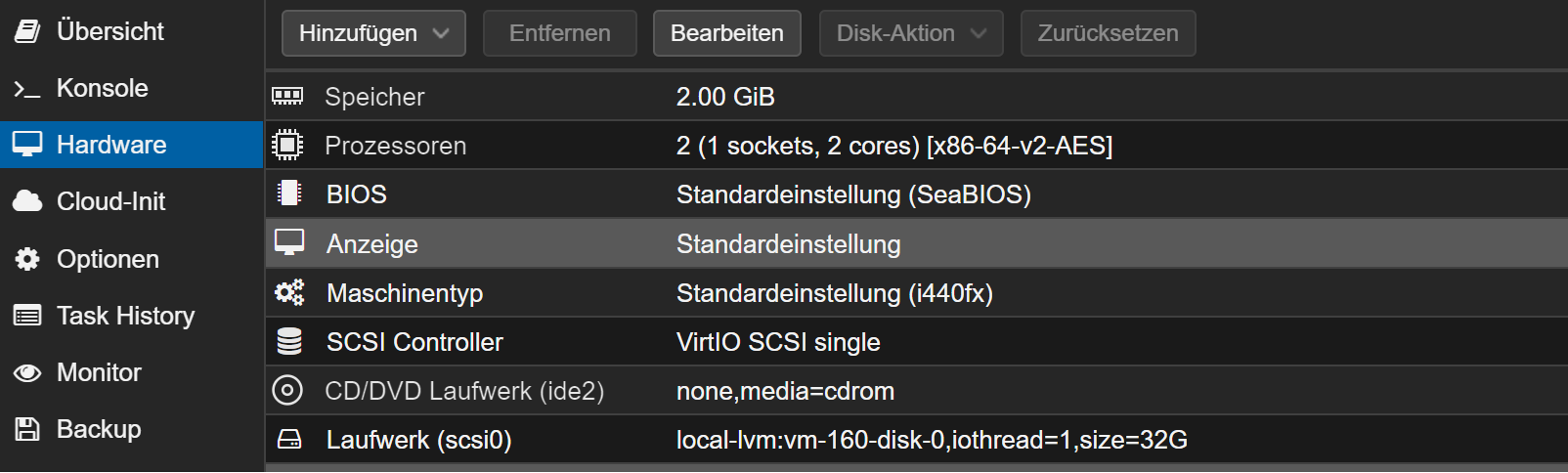
Bei Anzeige und Hardware kannst Du was einstellen.
und wie hast Du installiert mit einem offiziellen Debian ISO?
-
@snopy_16 Kommst du über Putty in deine VM.
Du mußt doch die IP kennen - von deiner VM bitte!Ha, Sorry, war ein Denkfehler von mir. Vergiss es
-
@snopy_16 Schau mal hier: https://github.com/pimox/pimox7/issues/32. Der Artikel ist zwar schon zwei Jahre alt, aber das scheint auf deine Symptomatic zu passen. Du brauchst für die VM offensichtlich ein passendes ISO-file für die Installation der VM.
-
Bei heise gibt es aktuell einen Artikel zu proxmox auf dem Raspi: https://www.heise.de/ratgeber/Drei-Virtualisierer-fuer-den-Raspberry-Pi-im-Ueberblick-9586052.html



Hey! Du scheinst an dieser Unterhaltung interessiert zu sein, hast aber noch kein Konto.
Hast du es satt, bei jedem Besuch durch die gleichen Beiträge zu scrollen? Wenn du dich für ein Konto anmeldest, kommst du immer genau dorthin zurück, wo du zuvor warst, und kannst dich über neue Antworten benachrichtigen lassen (entweder per E-Mail oder Push-Benachrichtigung). Du kannst auch Lesezeichen speichern und Beiträge positiv bewerten, um anderen Community-Mitgliedern deine Wertschätzung zu zeigen.
Mit deinem Input könnte dieser Beitrag noch besser werden 💗
Registrieren AnmeldenSupport us
262
Online33.0k
Benutzer83.4k
Themen1.3m
Beiträge