Weiter zum Inhalt
  • Home
  • Aktuell
  • Tags
  • 0 Ungelesen 0
  • Kategorien
  • Unreplied
  • Beliebt
  • GitHub
  • Docu
  • Hilfe
Skins
  • Hell
  • Brite
  • Cerulean
  • Cosmo
  • Flatly
  • Journal
  • Litera
  • Lumen
  • Lux
  • Materia
  • Minty
  • Morph
  • Pulse
  • Sandstone
  • Simplex
  • Sketchy
  • Spacelab
  • United
  • Yeti
  • Zephyr
  • Dunkel
  • Cyborg
  • Darkly
  • Quartz
  • Slate
  • Solar
  • Superhero
  • Vapor

  • Standard: (Kein Skin)
  • Kein Skin
Einklappen
ioBroker Logo

Community Forum

donate donate
  1. ioBroker Community Home
  2. Deutsch
  3. Hardware
  4. Zigbee Stick spinnt *gelöst*
NEWS

  • Monatsrückblick Januar/Februar 2026 ist online!
    BluefoxB
    Bluefox
    18
    1
    703

  • Jahresrückblick 2025 – unser neuer Blogbeitrag ist online! ✨
    BluefoxB
    Bluefox
    18
    1
    5.8k

  • Neuer Blogbeitrag: Monatsrückblick - Dezember 2025 🎄
    BluefoxB
    Bluefox
    13
    1
    1.5k

Zigbee Stick spinnt *gelöst*

Geplant Angeheftet Gesperrt Verschoben Hardware
78 Beiträge 8 Kommentatoren 6.7k Aufrufe 8 Beobachtet
  • Älteste zuerst
  • Neuste zuerst
  • Meiste Stimmen
Antworten
  • In einem neuen Thema antworten
Anmelden zum Antworten
Dieses Thema wurde gelöscht. Nur Nutzer mit entsprechenden Rechten können es sehen.
  • G gluecksmann

    @reutli

    bcc319fb-9ed8-47db-a1a7-cdb22c1d7b8b-grafik.png

    F Offline
    F Offline
    Frank579
    schrieb am zuletzt editiert von
    #53

    @gluecksmann welche Version vom Zigbee Adapter hast du denn jetzt drauf ?

    1 Antwort Letzte Antwort
    0
    • G Offline
      G Offline
      gluecksmann
      schrieb am zuletzt editiert von
      #54

      @frank579

      wieder 1.8.25 :-(

      F R 2 Antworten Letzte Antwort
      0
      • G gluecksmann

        @frank579

        wieder 1.8.25 :-(

        F Offline
        F Offline
        Frank579
        schrieb am zuletzt editiert von Frank579
        #55

        @gluecksmann dann geh mal auf die 1.8.24 nicht das es nur noch daran liegt ..
        Und bitte nochmal iob diag Komplett
        Der Rest läuft wieder ?

        G 1 Antwort Letzte Antwort
        0
        • G gluecksmann

          @frank579

          wieder 1.8.25 :-(

          R Online
          R Online
          reutli
          schrieb am zuletzt editiert von
          #56

          @gluecksmann sagte in Zigbee Stick spinnt:

          wieder 1.8.25

          dann wieder zurück!
          Bitte in diesem Zuge bzw. danach genau COM-Anschluss prüfen, hattest Du tatsächlich diese erweiterte PAN-ID und PAN-ID bisher auch?

          iobroker in Debian-VM auf Proxmox Server (Ryzen 7 / 32GB / 1TB NVMe SSD) als Master - mehrere Raspberry Pis (3+4) als Slaves. InfluxDB V2 und Grafana auf LXC.

          *Wer freundlich ist, dem wird freundlich geholfen *

          G 2 Antworten Letzte Antwort
          0
          • R reutli

            @gluecksmann sagte in Zigbee Stick spinnt:

            wieder 1.8.25

            dann wieder zurück!
            Bitte in diesem Zuge bzw. danach genau COM-Anschluss prüfen, hattest Du tatsächlich diese erweiterte PAN-ID und PAN-ID bisher auch?

            G Offline
            G Offline
            gluecksmann
            schrieb am zuletzt editiert von
            #57

            @reutli

            Du, frag mich nicht... also aktiv habe ich nix geändert...ggf. hat das Update was verbogen?

            1 Antwort Letzte Antwort
            0
            • F Frank579

              @gluecksmann dann geh mal auf die 1.8.24 nicht das es nur noch daran liegt ..
              Und bitte nochmal iob diag Komplett
              Der Rest läuft wieder ?

              G Offline
              G Offline
              gluecksmann
              schrieb am zuletzt editiert von
              #58

              @frank579

              pi@raspberrypi:~ $ iobroker upgrade zigbee@1.8.24
              
              This downgrade of "zigbee" will remove the following changes:
              ==========================================================================
              -> 1.8.25
              zhc 16.x
              corr group from exclude dialog
              ==========================================================================
              
              Would you like to downgrade zigbee from @1.8.25 to @1.8.24 now? [(y)es, (n)o]: y
              Update zigbee from @1.8.25 to @1.8.24
              host.raspberrypi Adapter "system.adapter.zigbee.0" is stopped.
              NPM version: 10.2.3
              Installing iobroker.zigbee@1.8.24... (System call)


              seitdem ruht der See...mal sehen ob da noch was passiert...

              1 Antwort Letzte Antwort
              0
              • R reutli

                @gluecksmann sagte in Zigbee Stick spinnt:

                wieder 1.8.25

                dann wieder zurück!
                Bitte in diesem Zuge bzw. danach genau COM-Anschluss prüfen, hattest Du tatsächlich diese erweiterte PAN-ID und PAN-ID bisher auch?

                G Offline
                G Offline
                gluecksmann
                schrieb am zuletzt editiert von
                #59

                @reutli

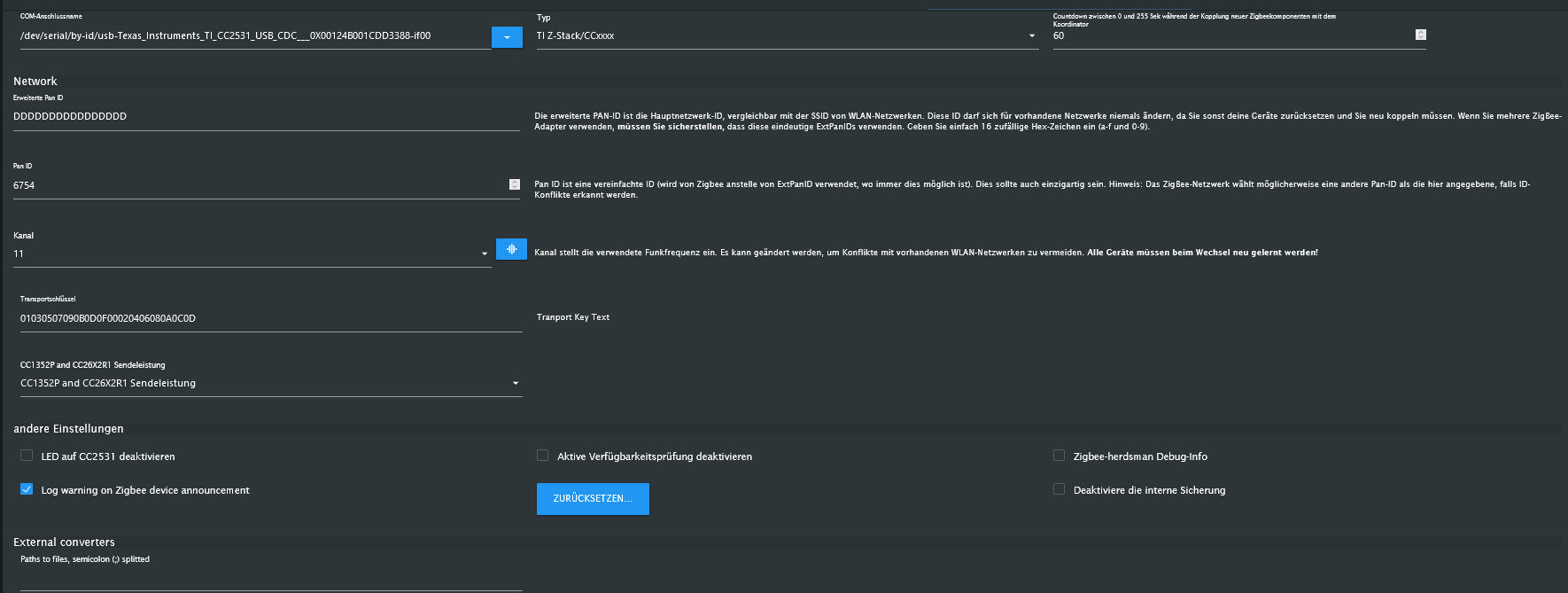
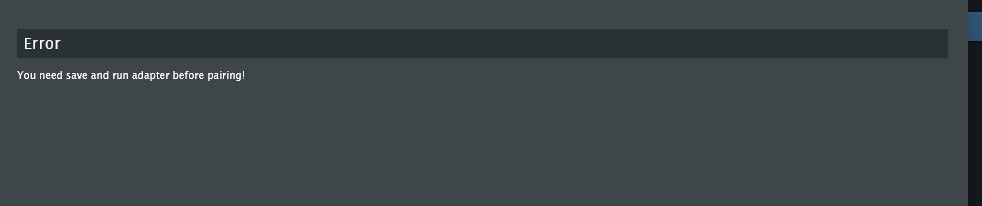
                So, jetzt wieder die früherer Version drauf... aber kommt immer noch die Fehlermeldung wie ganz am Anfang... Einstellungen SInd...
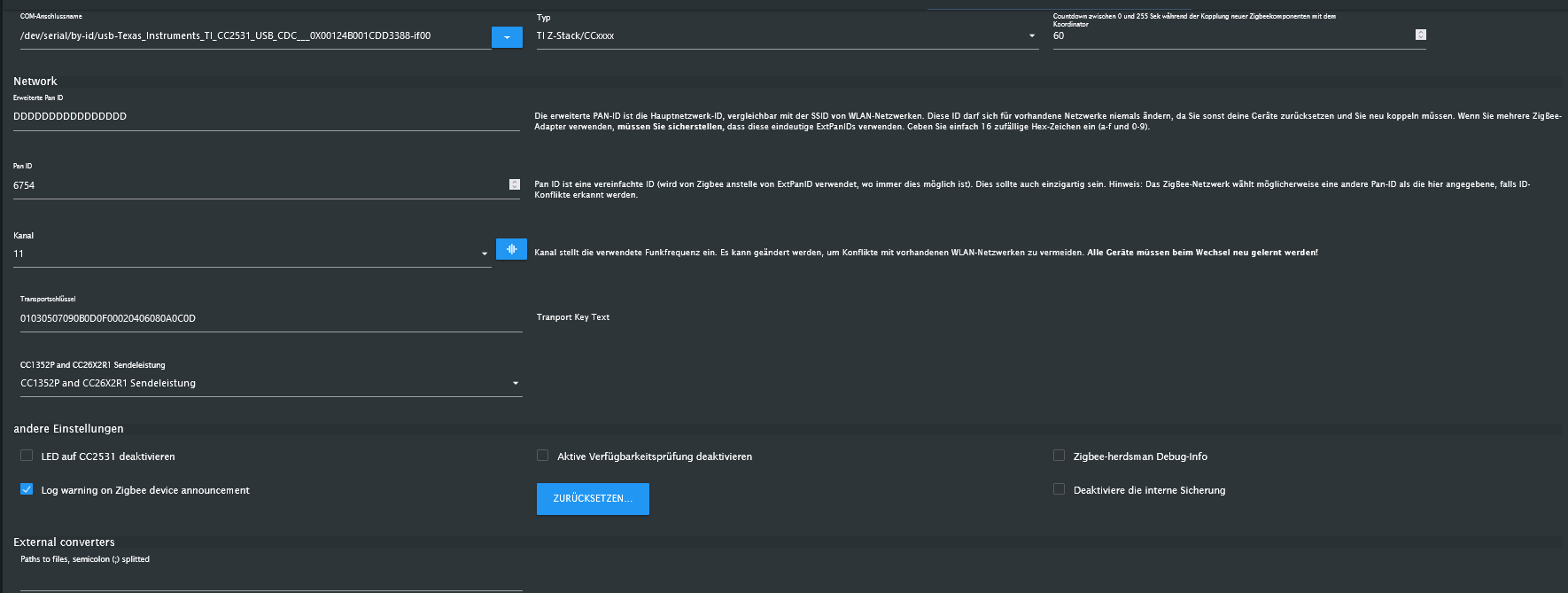
                d7704ac8-c27a-49af-9395-2061addfc502-grafik.png ```
                3deeb232-5f57-4a77-a09a-429d8b588aa3-grafik.png code_text

                F 1 Antwort Letzte Antwort
                0
                • G gluecksmann

                  @reutli

                  So, jetzt wieder die früherer Version drauf... aber kommt immer noch die Fehlermeldung wie ganz am Anfang... Einstellungen SInd...

                  d7704ac8-c27a-49af-9395-2061addfc502-grafik.png ```
                  3deeb232-5f57-4a77-a09a-429d8b588aa3-grafik.png code_text

                  F Offline
                  F Offline
                  Frank579
                  schrieb am zuletzt editiert von
                  #60

                  @gluecksmann jetzt nochmal komplett iob diag

                  R G 2 Antworten Letzte Antwort
                  0
                  • F Frank579

                    @gluecksmann jetzt nochmal komplett iob diag

                    R Online
                    R Online
                    reutli
                    schrieb am zuletzt editiert von reutli
                    #61

                    @gluecksmann
                    davor auch mal reboot gemacht???

                    debug modus im Adapter aktivieren...
                    und dann den Adapter nochmals neustarten

                    und dann
                    @frank579 sagte in Zigbee Stick spinnt:

                    @gluecksmann jetzt nochmal komplett iob diag

                    iobroker in Debian-VM auf Proxmox Server (Ryzen 7 / 32GB / 1TB NVMe SSD) als Master - mehrere Raspberry Pis (3+4) als Slaves. InfluxDB V2 und Grafana auf LXC.

                    *Wer freundlich ist, dem wird freundlich geholfen *

                    1 Antwort Letzte Antwort
                    0
                    • F Frank579

                      @gluecksmann jetzt nochmal komplett iob diag

                      G Offline
                      G Offline
                      gluecksmann
                      schrieb am zuletzt editiert von
                      #62

                      @frank579

                      
                      *** BASE SYSTEM ***
                        Static hostname: raspberrypi
                              Icon name: computer
                       Operating System: Raspbian GNU/Linux 10 (buster)
                                 Kernel: Linux 5.10.103-v7l+
                           Architecture: arm
                      
                      Model           : Raspberry Pi 4 Model B Rev 1.4
                      Docker          : false
                      Virtualization  : none
                      Kernel          : armv7l
                      Userland        : armhf
                      
                      Systemuptime and Load:
                      17:33:54 up  3:22,  1 user,  load average: 0.68, 3.79, 4.41
                      CPU threads: 4
                      
                      
                      *** RASPBERRY THROTTLING ***
                      Current issues:
                      No throttling issues detected.
                      
                      Previously detected issues:
                      No throttling issues detected.
                      
                      *** Time and Time Zones ***
                                    Local time: Thu 2023-12-28 17:33:54 CET
                                Universal time: Thu 2023-12-28 16:33:54 UTC
                                      RTC time: n/a
                                     Time zone: Europe/Berlin (CET, +0100)
                      System clock synchronized: yes
                                   NTP service: active
                               RTC in local TZ: no
                      
                      *** User and Groups ***
                      pi
                      /home/pi
                      pi adm dialout cdrom sudo audio video plugdev games users input netdev lpadmin gpio i2c spi iobroker
                      
                      *** X-Server-Setup ***
                      X-Server:       false
                      Desktop:
                      Terminal:       tty
                      Boot Target:    multi-user.target
                      
                      *** MEMORY ***
                                   total        used        free      shared  buff/cache   available
                      Mem:           7.9G        1.6G        4.9G        8.0M        1.5G        6.1G
                      Swap:           99M          0B         99M
                      Total:         8.0G        1.6G        5.0G
                      
                              7898 M total memory
                              1554 M used memory
                               300 M active memory
                              2506 M inactive memory
                              4885 M free memory
                               184 M buffer memory
                              1273 M swap cache
                                99 M total swap
                                 0 M used swap
                                99 M free swap
                      
                      Raspberry only:
                      oom events: 0
                      lifetime oom required: 0 Mbytes
                      total time in oom handler: 0 ms
                      max time spent in oom handler: 0 ms
                      
                      *** FAILED SERVICES ***
                      
                       UNIT            LOAD   ACTIVE SUB    DESCRIPTION
                      * lightdm.service loaded failed failed Light Display Manager
                      
                      LOAD   = Reflects whether the unit definition was properly loaded.
                      ACTIVE = The high-level unit activation state, i.e. generalization of SUB.
                      SUB    = The low-level unit activation state, values depend on unit type.
                      
                      1 loaded units listed. Pass --all to see loaded but inactive units, too.
                      To show all installed unit files use 'systemctl list-unit-files'.
                      
                      *** FILESYSTEM ***
                      Filesystem     Type      Size  Used Avail Use% Mounted on
                      /dev/root      ext4       29G   14G   15G  50% /
                      devtmpfs       devtmpfs  3.7G     0  3.7G   0% /dev
                      tmpfs          tmpfs     3.9G     0  3.9G   0% /dev/shm
                      tmpfs          tmpfs     3.9G  8.5M  3.9G   1% /run
                      tmpfs          tmpfs     5.0M  4.0K  5.0M   1% /run/lock
                      tmpfs          tmpfs     3.9G     0  3.9G   0% /sys/fs/cgroup
                      /dev/mmcblk0p1 vfat      253M   49M  204M  20% /boot
                      tmpfs          tmpfs     790M     0  790M   0% /run/user/1000
                      
                      Messages concerning ext4 filesystem in dmesg:
                      [Thu Dec 28 14:11:43 2023] Kernel command line: coherent_pool=1M 8250.nr_uarts=0 snd_bcm2835.enable_compat_alsa=0 snd_bcm2835.enable_hdmi=1  smsc95xx.macaddr=E4:5F:01:3D:9B:6E vc_mem.mem_base=0x3ec00000 vc_mem.mem_size=0x40000000  dwc_otg.lpm_enable=0 console=ttyS0,115200 console=tty1 root=PARTUUID=a372f35c-02 rootfstype=ext4 elevator=deadline fsck.repair=yes rootwait quiet splash plymouth.ignore-serial-consoles
                      [Thu Dec 28 14:11:44 2023] EXT4-fs (mmcblk0p2): mounted filesystem with ordered data mode. Opts: (null)
                      [Thu Dec 28 14:11:44 2023] VFS: Mounted root (ext4 filesystem) readonly on device 179:2.
                      [Thu Dec 28 14:11:46 2023] EXT4-fs (mmcblk0p2): re-mounted. Opts: (null)
                      
                      Show mounted filesystems \(real ones only\):
                      TARGET        SOURCE         FSTYPE OPTIONS
                      /             /dev/mmcblk0p2 ext4   rw,noatime
                      |-/sys/fs/bpf none           bpf    rw,nosuid,nodev,noexec,relatime,mode=700
                      `-/boot       /dev/mmcblk0p1 vfat   rw,relatime,fmask=0022,dmask=0022,codepage=437,iocharset=ascii,shortname=mixed,errors=remount-ro
                      
                      Files in neuralgic directories:
                      
                      /var:
                      413M    /var/
                      118M    /var/lib
                      102M    /var/cache
                      91M     /var/log
                      90M     /var/cache/apt
                      
                      Archived and active journals take up 8.0M in the file system.
                      
                      /opt/iobroker/backups:
                      63M     /opt/iobroker/backups/
                      
                      /opt/iobroker/iobroker-data:
                      621M    /opt/iobroker/iobroker-data/
                      322M    /opt/iobroker/iobroker-data/files
                      143M    /opt/iobroker/iobroker-data/backup-objects
                      93M     /opt/iobroker/iobroker-data/sonosCache
                      67M     /opt/iobroker/iobroker-data/files/javascript.admin
                      
                      The five largest files in iobroker-data are:
                      35M     /opt/iobroker/iobroker-data/files/devices.admin/static/js/main.24f2bb56.js.map
                      33M     /opt/iobroker/iobroker-data/files/iot.admin/static/js/main.1797d034.js.map
                      30M     /opt/iobroker/iobroker-data/objects.jsonl
                      21M     /opt/iobroker/iobroker-data/files/web.admin/static/js/main.aaea95f8.js.map
                      12M     /opt/iobroker/iobroker-data/objects.json.migrated
                      
                      USB-Devices by-id:
                      USB-Sticks -  Avoid direct links to /dev/* in your adapter setups, please always prefer the links 'by-id':
                      
                      /dev/serial/by-id/usb-Texas_Instruments_TI_CC2531_USB_CDC___0X00124B001CDD3388-if00
                      
                      *** NodeJS-Installation ***
                      
                      /usr/bin/nodejs         v18.19.0
                      /usr/bin/node           v18.19.0
                      /usr/bin/npm            10.2.3
                      /usr/bin/npx            10.2.3
                      /usr/bin/corepack       0.22.0
                      
                      
                      nodejs:
                       Installed: 18.19.0-1nodesource1
                       Candidate: 18.19.0-1nodesource1
                       Version table:
                      *** 18.19.0-1nodesource1 1001
                             500 https://deb.nodesource.com/node_18.x nodistro/main armhf Packages
                             100 /var/lib/dpkg/status
                          18.18.2-1nodesource1 1001
                             500 https://deb.nodesource.com/node_18.x nodistro/main armhf Packages
                          18.18.1-1nodesource1 1001
                             500 https://deb.nodesource.com/node_18.x nodistro/main armhf Packages
                          18.18.0-1nodesource1 1001
                             500 https://deb.nodesource.com/node_18.x nodistro/main armhf Packages
                          18.17.1-1nodesource1 1001
                             500 https://deb.nodesource.com/node_18.x nodistro/main armhf Packages
                          18.17.0-1nodesource1 1001
                             500 https://deb.nodesource.com/node_18.x nodistro/main armhf Packages
                          18.16.1-1nodesource1 1001
                             500 https://deb.nodesource.com/node_18.x nodistro/main armhf Packages
                          18.16.0-1nodesource1 1001
                             500 https://deb.nodesource.com/node_18.x nodistro/main armhf Packages
                          18.15.0-1nodesource1 1001
                             500 https://deb.nodesource.com/node_18.x nodistro/main armhf Packages
                          18.14.2-1nodesource1 1001
                             500 https://deb.nodesource.com/node_18.x nodistro/main armhf Packages
                          18.14.1-1nodesource1 1001
                             500 https://deb.nodesource.com/node_18.x nodistro/main armhf Packages
                          18.14.0-1nodesource1 1001
                             500 https://deb.nodesource.com/node_18.x nodistro/main armhf Packages
                          18.13.0-1nodesource1 1001
                             500 https://deb.nodesource.com/node_18.x nodistro/main armhf Packages
                          18.12.0-1nodesource1 1001
                             500 https://deb.nodesource.com/node_18.x nodistro/main armhf Packages
                          18.11.0-1nodesource1 1001
                             500 https://deb.nodesource.com/node_18.x nodistro/main armhf Packages
                          18.10.0-1nodesource1 1001
                             500 https://deb.nodesource.com/node_18.x nodistro/main armhf Packages
                          18.9.1-1nodesource1 1001
                             500 https://deb.nodesource.com/node_18.x nodistro/main armhf Packages
                          18.9.0-1nodesource1 1001
                             500 https://deb.nodesource.com/node_18.x nodistro/main armhf Packages
                          18.8.0-1nodesource1 1001
                             500 https://deb.nodesource.com/node_18.x nodistro/main armhf Packages
                          18.7.0-1nodesource1 1001
                             500 https://deb.nodesource.com/node_18.x nodistro/main armhf Packages
                          18.6.0-1nodesource1 1001
                             500 https://deb.nodesource.com/node_18.x nodistro/main armhf Packages
                          18.5.0-1nodesource1 1001
                             500 https://deb.nodesource.com/node_18.x nodistro/main armhf Packages
                          18.4.0-1nodesource1 1001
                             500 https://deb.nodesource.com/node_18.x nodistro/main armhf Packages
                          18.3.0-1nodesource1 1001
                             500 https://deb.nodesource.com/node_18.x nodistro/main armhf Packages
                          18.2.0-1nodesource1 1001
                             500 https://deb.nodesource.com/node_18.x nodistro/main armhf Packages
                          18.1.0-1nodesource1 1001
                             500 https://deb.nodesource.com/node_18.x nodistro/main armhf Packages
                          18.0.0-1nodesource1 1001
                             500 https://deb.nodesource.com/node_18.x nodistro/main armhf Packages
                          10.24.0~dfsg-1~deb10u3 500
                             500 http://raspbian.raspberrypi.org/raspbian buster/main armhf Packages
                      
                      Temp directories causing npm8 problem: 0
                      No problems detected
                      
                      Errors in npm tree:
                      npm ERR! code ELSPROBLEMS
                      npm ERR! invalid: iobroker.govee@0.0.5 /opt/iobroker/node_modules/iobroker.govee
                      
                      npm ERR! A complete log of this run can be found in: /home/pi/.npm/_logs/2023-12-28T16_34_03_703Z-debug-0.log
                      
                      *** ioBroker-Installation ***
                      
                      ioBroker Status
                      iobroker is running on this host.
                      
                      
                      Objects type: jsonl
                      States  type: jsonl
                      
                      Core adapters versions
                      js-controller:  5.0.17
                      admin:          6.12.0
                      javascript:     7.1.6
                      
                      npm ERR! code ELSPROBLEMS
                      npm ERR! invalid: iobroker.govee@0.0.5 /opt/iobroker/node_modules/iobroker.govee
                      
                      npm ERR! A complete log of this run can be found in: /home/pi/.npm/_logs/2023-12-28T16_34_25_768Z-debug-0.log
                      Adapters from github:   1
                      
                      Adapter State
                      + system.adapter.admin.0                  : admin                 : raspberrypi                              -  enabled, port: 8081, bind: 0.0.0.0, run as: admin
                      + system.adapter.alexa2.0                 : alexa2                : raspberrypi                              -  enabled
                       system.adapter.alias-manager.0          : alias-manager         : raspberrypi                              - disabled
                       system.adapter.awtrix-light.0           : awtrix-light          : raspberrypi                              - disabled
                      + system.adapter.backitup.0               : backitup              : raspberrypi                              -  enabled
                      + system.adapter.ble.0                    : ble                   : raspberrypi                              -  enabled
                       system.adapter.chromecast.0             : chromecast            : raspberrypi                              - disabled
                       system.adapter.daswetter.0              : daswetter             : raspberrypi                              -  enabled
                       system.adapter.devices.0                : devices               : raspberrypi                              - disabled
                      + system.adapter.discovery.0              : discovery             : raspberrypi                              -  enabled
                       system.adapter.dwd.0                    : dwd                   : raspberrypi                              -  enabled
                      + system.adapter.fullybrowser.0           : fullybrowser          : raspberrypi                              -  enabled
                      + system.adapter.govee.0                  : govee                 : raspberrypi                              -  enabled
                      + system.adapter.gruenbeck.0              : gruenbeck             : raspberrypi                              -  enabled
                       system.adapter.history.0                : history               : raspberrypi                              - disabled
                      + system.adapter.hue.0                    : hue                   : raspberrypi                              -  enabled, port: 443
                       system.adapter.ical.0                   : ical                  : raspberrypi                              -  enabled
                       system.adapter.icons-mfd-png.0          : icons-mfd-png         : raspberrypi                              - disabled
                       system.adapter.icons-mfd-svg.0          : icons-mfd-svg         : raspberrypi                              - disabled
                      + system.adapter.info.0                   : info                  : raspberrypi                              -  enabled
                      + system.adapter.iot.0                    : iot                   : raspberrypi                              -  enabled
                      + system.adapter.javascript.0             : javascript            : raspberrypi                              -  enabled
                      + system.adapter.meross.0                 : meross                : raspberrypi                              -  enabled
                      + system.adapter.mielecloudservice.0      : mielecloudservice     : raspberrypi                              -  enabled
                      + system.adapter.musiccast.0              : musiccast             : raspberrypi                              -  enabled
                      + system.adapter.net-tools.0              : net-tools             : raspberrypi                              -  enabled
                      + system.adapter.netatmo.0                : netatmo               : raspberrypi                              -  enabled
                      + system.adapter.philips-air.0            : philips-air           : raspberrypi                              -  enabled
                      + system.adapter.philips-air.1            : philips-air           : raspberrypi                              -  enabled
                      + system.adapter.ping.0                   : ping                  : raspberrypi                              -  enabled
                      + system.adapter.pollenflug.0             : pollenflug            : raspberrypi                              -  enabled
                      + system.adapter.scenes.0                 : scenes                : raspberrypi                              -  enabled
                      + system.adapter.shelly.0                 : shelly                : raspberrypi                              -  enabled, port: 1882, bind: 0.0.0.0
                       system.adapter.shuttercontrol.0         : shuttercontrol        : raspberrypi                              - disabled
                      + system.adapter.smartcontrol.0           : smartcontrol          : raspberrypi                              -  enabled
                      + system.adapter.sonoff.0                 : sonoff                : raspberrypi                              -  enabled, port: 1883, bind: 0.0.0.0
                      + system.adapter.sonos.0                  : sonos                 : raspberrypi                              -  enabled
                      + system.adapter.trashschedule.0          : trashschedule         : raspberrypi                              -  enabled
                      + system.adapter.tuya.0                   : tuya                  : raspberrypi                              -  enabled
                       system.adapter.vis-colorpicker.0        : vis-colorpicker       : raspberrypi                              -  enabled
                       system.adapter.vis-hqwidgets.0          : vis-hqwidgets         : raspberrypi                              -  enabled
                       system.adapter.vis-icontwo.0            : vis-icontwo           : raspberrypi                              -  enabled
                      + system.adapter.vis-inventwo.0           : vis-inventwo          : raspberrypi                              -  enabled
                       system.adapter.vis-material-advanced.0  : vis-material-advanced : raspberrypi                              -  enabled
                       system.adapter.vis-metro.0              : vis-metro             : raspberrypi                              -  enabled
                       system.adapter.vis-players.0            : vis-players           : raspberrypi                              -  enabled
                       system.adapter.vis-timeandweather.0     : vis-timeandweather    : raspberrypi                              -  enabled
                       system.adapter.vis.0                    : vis                   : raspberrypi                              -  enabled
                       system.adapter.weatherunderground.0     : weatherunderground    : raspberrypi                              -  enabled
                      + system.adapter.web.0                    : web                   : raspberrypi                              -  enabled, port: 8082, bind: 0.0.0.0, run as: admin
                      + system.adapter.zigbee.0                 : zigbee                : raspberrypi                              -  enabled, port: /dev/serial/by-id/usb-Texas_Instruments_TI_CC2531_USB_CDC___0X00124B001CDD3388-if00
                      
                      + instance is alive
                      
                      Enabled adapters with bindings
                      + system.adapter.admin.0                  : admin                 : raspberrypi                              -  enabled, port: 8081, bind: 0.0.0.0, run as: admin
                      + system.adapter.hue.0                    : hue                   : raspberrypi                              -  enabled, port: 443
                      + system.adapter.shelly.0                 : shelly                : raspberrypi                              -  enabled, port: 1882, bind: 0.0.0.0
                      + system.adapter.sonoff.0                 : sonoff                : raspberrypi                              -  enabled, port: 1883, bind: 0.0.0.0
                      + system.adapter.web.0                    : web                   : raspberrypi                              -  enabled, port: 8082, bind: 0.0.0.0, run as: admin
                      + system.adapter.zigbee.0                 : zigbee                : raspberrypi                              -  enabled, port: /dev/serial/by-id/usb-Texas_Instruments_TI_CC2531_USB_CDC___0X00124B001CDD3388-if00
                      
                      ioBroker-Repositories
                      stable        : http://download.iobroker.net/sources-dist.json
                      beta          : http://download.iobroker.net/sources-dist-latest.json
                      
                      Active repo(s): stable
                      
                      Installed ioBroker-Instances
                      Used repository: stable
                      Adapter    "admin"        : 6.12.0   , installed 6.12.0
                      Adapter    "alexa2"       : 3.26.3   , installed 3.26.3
                      Adapter    "alias-manager": 1.2.6    , installed 1.2.6
                      Adapter    "awtrix-light" : 0.10.0   , installed 0.10.0
                      Adapter    "backitup"     : 2.9.8    , installed 2.9.8
                      Adapter    "ble"          : 0.13.4   , installed 0.13.4
                      Adapter    "chromecast"   : 3.0.3    , installed 3.0.3
                      Adapter    "daswetter"    : 3.1.11   , installed 3.1.11
                      Adapter    "devices"      : 1.1.5    , installed 1.1.5
                      Adapter    "discovery"    : 4.2.0    , installed 4.2.0
                      Adapter    "dwd"          : 2.8.5    , installed 2.8.5
                      Adapter    "fullybrowser" : 3.0.6    , installed 3.0.6
                      Adapter    "gruenbeck"    : 0.0.42   , installed 0.0.42
                      Adapter    "history"      : 3.0.1    , installed 3.0.1
                      Adapter    "hue"          : 3.10.1   , installed 3.10.1
                      Adapter    "ical"         : 1.13.3   , installed 1.13.3
                      Adapter    "icons-mfd-png": 1.1.0    , installed 1.1.0
                      Adapter    "icons-mfd-svg": 1.1.0    , installed 1.1.0
                      Adapter    "info"         : 2.0.0    , installed 2.0.0
                      Adapter    "iot"          : 2.0.11   , installed 2.0.11
                      Adapter    "javascript"   : 7.1.6    , installed 7.1.6
                      Controller "js-controller": 5.0.17   , installed 5.0.17
                      Adapter    "meross"       : 1.15.1   , installed 1.15.1
                      Adapter    "mielecloudservice": 6.5.4, installed 6.5.4
                      Adapter    "mihome-vacuum": 4.1.0    , installed 4.1.0
                      Adapter    "musiccast"    : 1.1.3    , installed 1.1.3
                      Adapter    "net-tools"    : 0.2.0    , installed 0.2.0
                      Adapter    "netatmo"      : 3.1.0    , installed 3.1.0
                      Adapter    "philips-air"  : 1.0.3    , installed 1.0.3
                      Adapter    "ping"         : 1.6.2    , installed 1.6.2
                      Adapter    "pollenflug"   : 1.0.6    , installed 1.0.6
                      Adapter    "scenes"       : 2.3.9    , installed 2.3.9
                      Adapter    "shelly"       : 6.6.1    , installed 6.6.1
                      Adapter    "shuttercontrol": 1.6.3   , installed 1.6.3
                      Adapter    "simple-api"   : 2.7.2    , installed 2.7.2
                      Adapter    "smartcontrol" : 2.0.1    , installed 2.0.1
                      Adapter    "socketio"     : 6.6.0    , installed 6.6.0
                      Adapter    "sonoff"       : 3.0.3    , installed 3.0.3
                      Adapter    "sonos"        : 3.0.0    , installed 3.0.0
                      Adapter    "trashschedule": 2.3.0    , installed 2.3.0
                      Adapter    "tuya"         : 3.14.2   , installed 3.14.2
                      Adapter    "vis"          : 1.5.4    , installed 1.5.4
                      Adapter    "vis-colorpicker": 2.0.3  , installed 2.0.3
                      Adapter    "vis-hqwidgets": 1.4.0    , installed 1.4.0
                      Adapter    "vis-icontwo"  : 1.0.0    , installed 1.0.0
                      Adapter    "vis-inventwo" : 3.3.3    , installed 3.3.3
                      Adapter    "vis-material-advanced": 1.7.4, installed 1.7.4
                      Adapter    "vis-metro"    : 1.2.0    , installed 1.2.0
                      Adapter    "vis-players"  : 0.1.6    , installed 0.1.6
                      Adapter    "vis-timeandweather": 1.2.2, installed 1.2.2
                      Adapter    "weatherunderground": 3.6.0, installed 3.6.0
                      Adapter    "web"          : 6.1.10   , installed 6.1.10
                      Adapter    "ws"           : 2.5.8    , installed 2.5.8
                      Adapter    "zigbee"       : 1.8.25   , installed 1.8.24 [Updatable]
                      
                      Objects and States
                      Please stand by - This may take a while
                      Objects:        11296
                      States:         9373
                      
                      *** OS-Repositories and Updates ***
                      Hit:1 http://archive.raspberrypi.org/debian buster InRelease
                      Hit:2 http://raspbian.raspberrypi.org/raspbian buster InRelease
                      Hit:3 https://deb.nodesource.com/node_18.x nodistro InRelease
                      Reading package lists...
                      Pending Updates: 0
                      
                      *** Listening Ports ***
                      Active Internet connections (only servers)
                      Proto Recv-Q Send-Q Local Address           Foreign Address         State       User       Inode      PID/Program name
                      tcp        0      0 0.0.0.0:22              0.0.0.0:*               LISTEN      0          18008      642/sshd
                      tcp        0      0 127.0.0.1:631           0.0.0.0:*               LISTEN      0          14831      363/cupsd
                      tcp        0      0 0.0.0.0:1883            0.0.0.0:*               LISTEN      1001       20705      999/io.sonoff.0
                      tcp        0      0 127.0.0.1:9000          0.0.0.0:*               LISTEN      1001       18400      632/iobroker.js-con
                      tcp        0      0 127.0.0.1:9001          0.0.0.0:*               LISTEN      1001       19317      632/iobroker.js-con
                      tcp6       0      0 :::8081                 :::*                    LISTEN      1001       178386     15017/io.admin.0
                      tcp6       0      0 :::8082                 :::*                    LISTEN      1001       363390     9027/io.web.0
                      tcp6       0      0 :::22                   :::*                    LISTEN      0          18010      642/sshd
                      tcp6       0      0 ::1:631                 :::*                    LISTEN      0          14830      363/cupsd
                      tcp6       0      0 :::3500                 :::*                    LISTEN      1001       21820      980/io.sonos.0
                      udp        0      0 0.0.0.0:6666            0.0.0.0:*                           1001       19741      1036/io.tuya.0
                      udp        0      0 0.0.0.0:6667            0.0.0.0:*                           1001       19742      1036/io.tuya.0
                      udp        0      0 0.0.0.0:37928           0.0.0.0:*                           1001       21652      911/io.philips-air.
                      udp        0      0 0.0.0.0:5683            0.0.0.0:*                           1001       21575      856/io.shelly.0
                      udp        0      0 0.0.0.0:68              0.0.0.0:*                           0          18449      631/dhcpcd
                      udp        0      0 0.0.0.0:631             0.0.0.0:*                           0          16300      460/cups-browsed
                      udp        0      0 0.0.0.0:41100           0.0.0.0:*                           1001       24005      1320/io.musiccast.0
                      udp        0      0 0.0.0.0:60062           0.0.0.0:*                           108        17435      356/avahi-daemon: r
                      udp        0      0 0.0.0.0:5353            0.0.0.0:*                           108        17433      356/avahi-daemon: r
                      udp        0      0 0.0.0.0:48886           0.0.0.0:*                           1001       21952      1017/io.philips-air
                      udp6       0      0 :::546                  :::*                                0          18466      631/dhcpcd
                      udp6       0      0 :::5353                 :::*                                108        17434      356/avahi-daemon: r
                      udp6       0      0 :::39823                :::*                                108        17436      356/avahi-daemon: r
                      
                      *** Log File - Last 25 Lines ***
                      
                      2023-12-28 17:33:48.594  - info: philips-air.0 (911) State value to set for "philips-air.0.filter.hepaFilterReplaceInHours" has to be type "number" but received type "string"
                      2023-12-28 17:33:48.644  - info: philips-air.0 (911) State value to set for "philips-air.0.filter.activeCarbonFilterReplaceInHours" has to be type "number" but received type "string"
                      2023-12-28 17:33:52.420  - info: philips-air.0 (911) State value to set for "philips-air.0.control.lightBrightness" has to be type "number" but received type "string"
                      2023-12-28 17:33:52.429  - info: philips-air.0 (911) State value to set for "philips-air.0.control.airQualityNotificationThreshold" has to be type "number" but received type "string"
                      2023-12-28 17:33:52.481  - info: philips-air.0 (911) State value to set for "philips-air.0.status.allergenIndex" has to be type "number" but received type "string"
                      2023-12-28 17:33:52.493  - info: philips-air.0 (911) State value to set for "philips-air.0.control.childLock" has to be type "boolean" but received type "string"
                      2023-12-28 17:33:52.542  - info: philips-air.0 (911) State value to set for "philips-air.0.device.uptime" has to be type "number" but received type "string"
                      2023-12-28 17:33:52.600  - info: philips-air.0 (911) State value to set for "philips-air.0.status.pm25" has to be type "number" but received type "string"
                      2023-12-28 17:33:52.618  - info: philips-air.0 (911) State value to set for "philips-air.0.control.timerHours" has to be type "number" but received type "string"
                      2023-12-28 17:33:52.625  - info: philips-air.0 (911) State value to set for "philips-air.0.status.timerMinutes" has to be type "number" but received type "string"
                      2023-12-28 17:33:52.640  - info: philips-air.0 (911) State value to set for "philips-air.0.filter.preFilterCleanInHours" has to be type "number" but received type "string"
                      2023-12-28 17:33:52.695  - info: philips-air.0 (911) State value to set for "philips-air.0.filter.hepaFilterReplaceInHours" has to be type "number" but received type "string"
                      2023-12-28 17:33:52.701  - info: philips-air.0 (911) State value to set for "philips-air.0.filter.activeCarbonFilterReplaceInHours" has to be type "number" but received type "string"
                      2023-12-28 17:34:18.240  - error: philips-air.1 (1017) Error by sending: Error: No reply in 247 seconds.
                      2023-12-28 17:34:24.323  - warn: sonoff.0 (999) Client [tasmota2] has invalid password or username
                      2023-12-28 17:34:38.463  - warn: sonos.0 (980) State "sonos.0.root.192_168_2_145.queue_html" has no existing object, this might lead to an error in future versions
                      2023-12-28 17:34:38.598  - warn: sonos.0 (980) State "sonos.0.root.192_168_2_145.queue_html" has no existing object, this might lead to an error in future versions
                      2023-12-28 17:34:48.242  - error: philips-air.1 (1017) Error by sending: Error: No reply in 247 seconds.
                      2023-12-28 17:35:00.048  - info: host.raspberrypi instance system.adapter.dwd.0 started with pid 303
                      2023-12-28 17:35:04.662  - info: dwd.0 (303) starting. Version 2.8.5 in /opt/iobroker/node_modules/iobroker.dwd, node: v18.19.0, js-controller: 5.0.17
                      2023-12-28 17:35:05.205  - info: web.0 (9027) ==> Connected system.user.admin from ::ffff:192.168.2.148
                      2023-12-28 17:35:07.075  - info: dwd.0 (303) Terminated (ADAPTER_REQUESTED_TERMINATION): Without reason
                      2023-12-28 17:35:07.617  - info: host.raspberrypi instance system.adapter.dwd.0 terminated with code 11 (ADAPTER_REQUESTED_TERMINATION)
                      2023-12-28 17:35:15.042  - info: web.0 (9027) ==> Connected system.user.admin from ::ffff:192.168.2.148
                      2023-12-28 17:35:18.242  - error: philips-air.1 (1017) Error by sending: Error: No reply in 247 seconds.
                      
                      Thomas BraunT 1 Antwort Letzte Antwort
                      0
                      • G gluecksmann

                        @frank579

                        
                        *** BASE SYSTEM ***
                          Static hostname: raspberrypi
                                Icon name: computer
                         Operating System: Raspbian GNU/Linux 10 (buster)
                                   Kernel: Linux 5.10.103-v7l+
                             Architecture: arm
                        
                        Model           : Raspberry Pi 4 Model B Rev 1.4
                        Docker          : false
                        Virtualization  : none
                        Kernel          : armv7l
                        Userland        : armhf
                        
                        Systemuptime and Load:
                        17:33:54 up  3:22,  1 user,  load average: 0.68, 3.79, 4.41
                        CPU threads: 4
                        
                        
                        *** RASPBERRY THROTTLING ***
                        Current issues:
                        No throttling issues detected.
                        
                        Previously detected issues:
                        No throttling issues detected.
                        
                        *** Time and Time Zones ***
                                      Local time: Thu 2023-12-28 17:33:54 CET
                                  Universal time: Thu 2023-12-28 16:33:54 UTC
                                        RTC time: n/a
                                       Time zone: Europe/Berlin (CET, +0100)
                        System clock synchronized: yes
                                     NTP service: active
                                 RTC in local TZ: no
                        
                        *** User and Groups ***
                        pi
                        /home/pi
                        pi adm dialout cdrom sudo audio video plugdev games users input netdev lpadmin gpio i2c spi iobroker
                        
                        *** X-Server-Setup ***
                        X-Server:       false
                        Desktop:
                        Terminal:       tty
                        Boot Target:    multi-user.target
                        
                        *** MEMORY ***
                                     total        used        free      shared  buff/cache   available
                        Mem:           7.9G        1.6G        4.9G        8.0M        1.5G        6.1G
                        Swap:           99M          0B         99M
                        Total:         8.0G        1.6G        5.0G
                        
                                7898 M total memory
                                1554 M used memory
                                 300 M active memory
                                2506 M inactive memory
                                4885 M free memory
                                 184 M buffer memory
                                1273 M swap cache
                                  99 M total swap
                                   0 M used swap
                                  99 M free swap
                        
                        Raspberry only:
                        oom events: 0
                        lifetime oom required: 0 Mbytes
                        total time in oom handler: 0 ms
                        max time spent in oom handler: 0 ms
                        
                        *** FAILED SERVICES ***
                        
                         UNIT            LOAD   ACTIVE SUB    DESCRIPTION
                        * lightdm.service loaded failed failed Light Display Manager
                        
                        LOAD   = Reflects whether the unit definition was properly loaded.
                        ACTIVE = The high-level unit activation state, i.e. generalization of SUB.
                        SUB    = The low-level unit activation state, values depend on unit type.
                        
                        1 loaded units listed. Pass --all to see loaded but inactive units, too.
                        To show all installed unit files use 'systemctl list-unit-files'.
                        
                        *** FILESYSTEM ***
                        Filesystem     Type      Size  Used Avail Use% Mounted on
                        /dev/root      ext4       29G   14G   15G  50% /
                        devtmpfs       devtmpfs  3.7G     0  3.7G   0% /dev
                        tmpfs          tmpfs     3.9G     0  3.9G   0% /dev/shm
                        tmpfs          tmpfs     3.9G  8.5M  3.9G   1% /run
                        tmpfs          tmpfs     5.0M  4.0K  5.0M   1% /run/lock
                        tmpfs          tmpfs     3.9G     0  3.9G   0% /sys/fs/cgroup
                        /dev/mmcblk0p1 vfat      253M   49M  204M  20% /boot
                        tmpfs          tmpfs     790M     0  790M   0% /run/user/1000
                        
                        Messages concerning ext4 filesystem in dmesg:
                        [Thu Dec 28 14:11:43 2023] Kernel command line: coherent_pool=1M 8250.nr_uarts=0 snd_bcm2835.enable_compat_alsa=0 snd_bcm2835.enable_hdmi=1  smsc95xx.macaddr=E4:5F:01:3D:9B:6E vc_mem.mem_base=0x3ec00000 vc_mem.mem_size=0x40000000  dwc_otg.lpm_enable=0 console=ttyS0,115200 console=tty1 root=PARTUUID=a372f35c-02 rootfstype=ext4 elevator=deadline fsck.repair=yes rootwait quiet splash plymouth.ignore-serial-consoles
                        [Thu Dec 28 14:11:44 2023] EXT4-fs (mmcblk0p2): mounted filesystem with ordered data mode. Opts: (null)
                        [Thu Dec 28 14:11:44 2023] VFS: Mounted root (ext4 filesystem) readonly on device 179:2.
                        [Thu Dec 28 14:11:46 2023] EXT4-fs (mmcblk0p2): re-mounted. Opts: (null)
                        
                        Show mounted filesystems \(real ones only\):
                        TARGET        SOURCE         FSTYPE OPTIONS
                        /             /dev/mmcblk0p2 ext4   rw,noatime
                        |-/sys/fs/bpf none           bpf    rw,nosuid,nodev,noexec,relatime,mode=700
                        `-/boot       /dev/mmcblk0p1 vfat   rw,relatime,fmask=0022,dmask=0022,codepage=437,iocharset=ascii,shortname=mixed,errors=remount-ro
                        
                        Files in neuralgic directories:
                        
                        /var:
                        413M    /var/
                        118M    /var/lib
                        102M    /var/cache
                        91M     /var/log
                        90M     /var/cache/apt
                        
                        Archived and active journals take up 8.0M in the file system.
                        
                        /opt/iobroker/backups:
                        63M     /opt/iobroker/backups/
                        
                        /opt/iobroker/iobroker-data:
                        621M    /opt/iobroker/iobroker-data/
                        322M    /opt/iobroker/iobroker-data/files
                        143M    /opt/iobroker/iobroker-data/backup-objects
                        93M     /opt/iobroker/iobroker-data/sonosCache
                        67M     /opt/iobroker/iobroker-data/files/javascript.admin
                        
                        The five largest files in iobroker-data are:
                        35M     /opt/iobroker/iobroker-data/files/devices.admin/static/js/main.24f2bb56.js.map
                        33M     /opt/iobroker/iobroker-data/files/iot.admin/static/js/main.1797d034.js.map
                        30M     /opt/iobroker/iobroker-data/objects.jsonl
                        21M     /opt/iobroker/iobroker-data/files/web.admin/static/js/main.aaea95f8.js.map
                        12M     /opt/iobroker/iobroker-data/objects.json.migrated
                        
                        USB-Devices by-id:
                        USB-Sticks -  Avoid direct links to /dev/* in your adapter setups, please always prefer the links 'by-id':
                        
                        /dev/serial/by-id/usb-Texas_Instruments_TI_CC2531_USB_CDC___0X00124B001CDD3388-if00
                        
                        *** NodeJS-Installation ***
                        
                        /usr/bin/nodejs         v18.19.0
                        /usr/bin/node           v18.19.0
                        /usr/bin/npm            10.2.3
                        /usr/bin/npx            10.2.3
                        /usr/bin/corepack       0.22.0
                        
                        
                        nodejs:
                         Installed: 18.19.0-1nodesource1
                         Candidate: 18.19.0-1nodesource1
                         Version table:
                        *** 18.19.0-1nodesource1 1001
                               500 https://deb.nodesource.com/node_18.x nodistro/main armhf Packages
                               100 /var/lib/dpkg/status
                            18.18.2-1nodesource1 1001
                               500 https://deb.nodesource.com/node_18.x nodistro/main armhf Packages
                            18.18.1-1nodesource1 1001
                               500 https://deb.nodesource.com/node_18.x nodistro/main armhf Packages
                            18.18.0-1nodesource1 1001
                               500 https://deb.nodesource.com/node_18.x nodistro/main armhf Packages
                            18.17.1-1nodesource1 1001
                               500 https://deb.nodesource.com/node_18.x nodistro/main armhf Packages
                            18.17.0-1nodesource1 1001
                               500 https://deb.nodesource.com/node_18.x nodistro/main armhf Packages
                            18.16.1-1nodesource1 1001
                               500 https://deb.nodesource.com/node_18.x nodistro/main armhf Packages
                            18.16.0-1nodesource1 1001
                               500 https://deb.nodesource.com/node_18.x nodistro/main armhf Packages
                            18.15.0-1nodesource1 1001
                               500 https://deb.nodesource.com/node_18.x nodistro/main armhf Packages
                            18.14.2-1nodesource1 1001
                               500 https://deb.nodesource.com/node_18.x nodistro/main armhf Packages
                            18.14.1-1nodesource1 1001
                               500 https://deb.nodesource.com/node_18.x nodistro/main armhf Packages
                            18.14.0-1nodesource1 1001
                               500 https://deb.nodesource.com/node_18.x nodistro/main armhf Packages
                            18.13.0-1nodesource1 1001
                               500 https://deb.nodesource.com/node_18.x nodistro/main armhf Packages
                            18.12.0-1nodesource1 1001
                               500 https://deb.nodesource.com/node_18.x nodistro/main armhf Packages
                            18.11.0-1nodesource1 1001
                               500 https://deb.nodesource.com/node_18.x nodistro/main armhf Packages
                            18.10.0-1nodesource1 1001
                               500 https://deb.nodesource.com/node_18.x nodistro/main armhf Packages
                            18.9.1-1nodesource1 1001
                               500 https://deb.nodesource.com/node_18.x nodistro/main armhf Packages
                            18.9.0-1nodesource1 1001
                               500 https://deb.nodesource.com/node_18.x nodistro/main armhf Packages
                            18.8.0-1nodesource1 1001
                               500 https://deb.nodesource.com/node_18.x nodistro/main armhf Packages
                            18.7.0-1nodesource1 1001
                               500 https://deb.nodesource.com/node_18.x nodistro/main armhf Packages
                            18.6.0-1nodesource1 1001
                               500 https://deb.nodesource.com/node_18.x nodistro/main armhf Packages
                            18.5.0-1nodesource1 1001
                               500 https://deb.nodesource.com/node_18.x nodistro/main armhf Packages
                            18.4.0-1nodesource1 1001
                               500 https://deb.nodesource.com/node_18.x nodistro/main armhf Packages
                            18.3.0-1nodesource1 1001
                               500 https://deb.nodesource.com/node_18.x nodistro/main armhf Packages
                            18.2.0-1nodesource1 1001
                               500 https://deb.nodesource.com/node_18.x nodistro/main armhf Packages
                            18.1.0-1nodesource1 1001
                               500 https://deb.nodesource.com/node_18.x nodistro/main armhf Packages
                            18.0.0-1nodesource1 1001
                               500 https://deb.nodesource.com/node_18.x nodistro/main armhf Packages
                            10.24.0~dfsg-1~deb10u3 500
                               500 http://raspbian.raspberrypi.org/raspbian buster/main armhf Packages
                        
                        Temp directories causing npm8 problem: 0
                        No problems detected
                        
                        Errors in npm tree:
                        npm ERR! code ELSPROBLEMS
                        npm ERR! invalid: iobroker.govee@0.0.5 /opt/iobroker/node_modules/iobroker.govee
                        
                        npm ERR! A complete log of this run can be found in: /home/pi/.npm/_logs/2023-12-28T16_34_03_703Z-debug-0.log
                        
                        *** ioBroker-Installation ***
                        
                        ioBroker Status
                        iobroker is running on this host.
                        
                        
                        Objects type: jsonl
                        States  type: jsonl
                        
                        Core adapters versions
                        js-controller:  5.0.17
                        admin:          6.12.0
                        javascript:     7.1.6
                        
                        npm ERR! code ELSPROBLEMS
                        npm ERR! invalid: iobroker.govee@0.0.5 /opt/iobroker/node_modules/iobroker.govee
                        
                        npm ERR! A complete log of this run can be found in: /home/pi/.npm/_logs/2023-12-28T16_34_25_768Z-debug-0.log
                        Adapters from github:   1
                        
                        Adapter State
                        + system.adapter.admin.0                  : admin                 : raspberrypi                              -  enabled, port: 8081, bind: 0.0.0.0, run as: admin
                        + system.adapter.alexa2.0                 : alexa2                : raspberrypi                              -  enabled
                         system.adapter.alias-manager.0          : alias-manager         : raspberrypi                              - disabled
                         system.adapter.awtrix-light.0           : awtrix-light          : raspberrypi                              - disabled
                        + system.adapter.backitup.0               : backitup              : raspberrypi                              -  enabled
                        + system.adapter.ble.0                    : ble                   : raspberrypi                              -  enabled
                         system.adapter.chromecast.0             : chromecast            : raspberrypi                              - disabled
                         system.adapter.daswetter.0              : daswetter             : raspberrypi                              -  enabled
                         system.adapter.devices.0                : devices               : raspberrypi                              - disabled
                        + system.adapter.discovery.0              : discovery             : raspberrypi                              -  enabled
                         system.adapter.dwd.0                    : dwd                   : raspberrypi                              -  enabled
                        + system.adapter.fullybrowser.0           : fullybrowser          : raspberrypi                              -  enabled
                        + system.adapter.govee.0                  : govee                 : raspberrypi                              -  enabled
                        + system.adapter.gruenbeck.0              : gruenbeck             : raspberrypi                              -  enabled
                         system.adapter.history.0                : history               : raspberrypi                              - disabled
                        + system.adapter.hue.0                    : hue                   : raspberrypi                              -  enabled, port: 443
                         system.adapter.ical.0                   : ical                  : raspberrypi                              -  enabled
                         system.adapter.icons-mfd-png.0          : icons-mfd-png         : raspberrypi                              - disabled
                         system.adapter.icons-mfd-svg.0          : icons-mfd-svg         : raspberrypi                              - disabled
                        + system.adapter.info.0                   : info                  : raspberrypi                              -  enabled
                        + system.adapter.iot.0                    : iot                   : raspberrypi                              -  enabled
                        + system.adapter.javascript.0             : javascript            : raspberrypi                              -  enabled
                        + system.adapter.meross.0                 : meross                : raspberrypi                              -  enabled
                        + system.adapter.mielecloudservice.0      : mielecloudservice     : raspberrypi                              -  enabled
                        + system.adapter.musiccast.0              : musiccast             : raspberrypi                              -  enabled
                        + system.adapter.net-tools.0              : net-tools             : raspberrypi                              -  enabled
                        + system.adapter.netatmo.0                : netatmo               : raspberrypi                              -  enabled
                        + system.adapter.philips-air.0            : philips-air           : raspberrypi                              -  enabled
                        + system.adapter.philips-air.1            : philips-air           : raspberrypi                              -  enabled
                        + system.adapter.ping.0                   : ping                  : raspberrypi                              -  enabled
                        + system.adapter.pollenflug.0             : pollenflug            : raspberrypi                              -  enabled
                        + system.adapter.scenes.0                 : scenes                : raspberrypi                              -  enabled
                        + system.adapter.shelly.0                 : shelly                : raspberrypi                              -  enabled, port: 1882, bind: 0.0.0.0
                         system.adapter.shuttercontrol.0         : shuttercontrol        : raspberrypi                              - disabled
                        + system.adapter.smartcontrol.0           : smartcontrol          : raspberrypi                              -  enabled
                        + system.adapter.sonoff.0                 : sonoff                : raspberrypi                              -  enabled, port: 1883, bind: 0.0.0.0
                        + system.adapter.sonos.0                  : sonos                 : raspberrypi                              -  enabled
                        + system.adapter.trashschedule.0          : trashschedule         : raspberrypi                              -  enabled
                        + system.adapter.tuya.0                   : tuya                  : raspberrypi                              -  enabled
                         system.adapter.vis-colorpicker.0        : vis-colorpicker       : raspberrypi                              -  enabled
                         system.adapter.vis-hqwidgets.0          : vis-hqwidgets         : raspberrypi                              -  enabled
                         system.adapter.vis-icontwo.0            : vis-icontwo           : raspberrypi                              -  enabled
                        + system.adapter.vis-inventwo.0           : vis-inventwo          : raspberrypi                              -  enabled
                         system.adapter.vis-material-advanced.0  : vis-material-advanced : raspberrypi                              -  enabled
                         system.adapter.vis-metro.0              : vis-metro             : raspberrypi                              -  enabled
                         system.adapter.vis-players.0            : vis-players           : raspberrypi                              -  enabled
                         system.adapter.vis-timeandweather.0     : vis-timeandweather    : raspberrypi                              -  enabled
                         system.adapter.vis.0                    : vis                   : raspberrypi                              -  enabled
                         system.adapter.weatherunderground.0     : weatherunderground    : raspberrypi                              -  enabled
                        + system.adapter.web.0                    : web                   : raspberrypi                              -  enabled, port: 8082, bind: 0.0.0.0, run as: admin
                        + system.adapter.zigbee.0                 : zigbee                : raspberrypi                              -  enabled, port: /dev/serial/by-id/usb-Texas_Instruments_TI_CC2531_USB_CDC___0X00124B001CDD3388-if00
                        
                        + instance is alive
                        
                        Enabled adapters with bindings
                        + system.adapter.admin.0                  : admin                 : raspberrypi                              -  enabled, port: 8081, bind: 0.0.0.0, run as: admin
                        + system.adapter.hue.0                    : hue                   : raspberrypi                              -  enabled, port: 443
                        + system.adapter.shelly.0                 : shelly                : raspberrypi                              -  enabled, port: 1882, bind: 0.0.0.0
                        + system.adapter.sonoff.0                 : sonoff                : raspberrypi                              -  enabled, port: 1883, bind: 0.0.0.0
                        + system.adapter.web.0                    : web                   : raspberrypi                              -  enabled, port: 8082, bind: 0.0.0.0, run as: admin
                        + system.adapter.zigbee.0                 : zigbee                : raspberrypi                              -  enabled, port: /dev/serial/by-id/usb-Texas_Instruments_TI_CC2531_USB_CDC___0X00124B001CDD3388-if00
                        
                        ioBroker-Repositories
                        stable        : http://download.iobroker.net/sources-dist.json
                        beta          : http://download.iobroker.net/sources-dist-latest.json
                        
                        Active repo(s): stable
                        
                        Installed ioBroker-Instances
                        Used repository: stable
                        Adapter    "admin"        : 6.12.0   , installed 6.12.0
                        Adapter    "alexa2"       : 3.26.3   , installed 3.26.3
                        Adapter    "alias-manager": 1.2.6    , installed 1.2.6
                        Adapter    "awtrix-light" : 0.10.0   , installed 0.10.0
                        Adapter    "backitup"     : 2.9.8    , installed 2.9.8
                        Adapter    "ble"          : 0.13.4   , installed 0.13.4
                        Adapter    "chromecast"   : 3.0.3    , installed 3.0.3
                        Adapter    "daswetter"    : 3.1.11   , installed 3.1.11
                        Adapter    "devices"      : 1.1.5    , installed 1.1.5
                        Adapter    "discovery"    : 4.2.0    , installed 4.2.0
                        Adapter    "dwd"          : 2.8.5    , installed 2.8.5
                        Adapter    "fullybrowser" : 3.0.6    , installed 3.0.6
                        Adapter    "gruenbeck"    : 0.0.42   , installed 0.0.42
                        Adapter    "history"      : 3.0.1    , installed 3.0.1
                        Adapter    "hue"          : 3.10.1   , installed 3.10.1
                        Adapter    "ical"         : 1.13.3   , installed 1.13.3
                        Adapter    "icons-mfd-png": 1.1.0    , installed 1.1.0
                        Adapter    "icons-mfd-svg": 1.1.0    , installed 1.1.0
                        Adapter    "info"         : 2.0.0    , installed 2.0.0
                        Adapter    "iot"          : 2.0.11   , installed 2.0.11
                        Adapter    "javascript"   : 7.1.6    , installed 7.1.6
                        Controller "js-controller": 5.0.17   , installed 5.0.17
                        Adapter    "meross"       : 1.15.1   , installed 1.15.1
                        Adapter    "mielecloudservice": 6.5.4, installed 6.5.4
                        Adapter    "mihome-vacuum": 4.1.0    , installed 4.1.0
                        Adapter    "musiccast"    : 1.1.3    , installed 1.1.3
                        Adapter    "net-tools"    : 0.2.0    , installed 0.2.0
                        Adapter    "netatmo"      : 3.1.0    , installed 3.1.0
                        Adapter    "philips-air"  : 1.0.3    , installed 1.0.3
                        Adapter    "ping"         : 1.6.2    , installed 1.6.2
                        Adapter    "pollenflug"   : 1.0.6    , installed 1.0.6
                        Adapter    "scenes"       : 2.3.9    , installed 2.3.9
                        Adapter    "shelly"       : 6.6.1    , installed 6.6.1
                        Adapter    "shuttercontrol": 1.6.3   , installed 1.6.3
                        Adapter    "simple-api"   : 2.7.2    , installed 2.7.2
                        Adapter    "smartcontrol" : 2.0.1    , installed 2.0.1
                        Adapter    "socketio"     : 6.6.0    , installed 6.6.0
                        Adapter    "sonoff"       : 3.0.3    , installed 3.0.3
                        Adapter    "sonos"        : 3.0.0    , installed 3.0.0
                        Adapter    "trashschedule": 2.3.0    , installed 2.3.0
                        Adapter    "tuya"         : 3.14.2   , installed 3.14.2
                        Adapter    "vis"          : 1.5.4    , installed 1.5.4
                        Adapter    "vis-colorpicker": 2.0.3  , installed 2.0.3
                        Adapter    "vis-hqwidgets": 1.4.0    , installed 1.4.0
                        Adapter    "vis-icontwo"  : 1.0.0    , installed 1.0.0
                        Adapter    "vis-inventwo" : 3.3.3    , installed 3.3.3
                        Adapter    "vis-material-advanced": 1.7.4, installed 1.7.4
                        Adapter    "vis-metro"    : 1.2.0    , installed 1.2.0
                        Adapter    "vis-players"  : 0.1.6    , installed 0.1.6
                        Adapter    "vis-timeandweather": 1.2.2, installed 1.2.2
                        Adapter    "weatherunderground": 3.6.0, installed 3.6.0
                        Adapter    "web"          : 6.1.10   , installed 6.1.10
                        Adapter    "ws"           : 2.5.8    , installed 2.5.8
                        Adapter    "zigbee"       : 1.8.25   , installed 1.8.24 [Updatable]
                        
                        Objects and States
                        Please stand by - This may take a while
                        Objects:        11296
                        States:         9373
                        
                        *** OS-Repositories and Updates ***
                        Hit:1 http://archive.raspberrypi.org/debian buster InRelease
                        Hit:2 http://raspbian.raspberrypi.org/raspbian buster InRelease
                        Hit:3 https://deb.nodesource.com/node_18.x nodistro InRelease
                        Reading package lists...
                        Pending Updates: 0
                        
                        *** Listening Ports ***
                        Active Internet connections (only servers)
                        Proto Recv-Q Send-Q Local Address           Foreign Address         State       User       Inode      PID/Program name
                        tcp        0      0 0.0.0.0:22              0.0.0.0:*               LISTEN      0          18008      642/sshd
                        tcp        0      0 127.0.0.1:631           0.0.0.0:*               LISTEN      0          14831      363/cupsd
                        tcp        0      0 0.0.0.0:1883            0.0.0.0:*               LISTEN      1001       20705      999/io.sonoff.0
                        tcp        0      0 127.0.0.1:9000          0.0.0.0:*               LISTEN      1001       18400      632/iobroker.js-con
                        tcp        0      0 127.0.0.1:9001          0.0.0.0:*               LISTEN      1001       19317      632/iobroker.js-con
                        tcp6       0      0 :::8081                 :::*                    LISTEN      1001       178386     15017/io.admin.0
                        tcp6       0      0 :::8082                 :::*                    LISTEN      1001       363390     9027/io.web.0
                        tcp6       0      0 :::22                   :::*                    LISTEN      0          18010      642/sshd
                        tcp6       0      0 ::1:631                 :::*                    LISTEN      0          14830      363/cupsd
                        tcp6       0      0 :::3500                 :::*                    LISTEN      1001       21820      980/io.sonos.0
                        udp        0      0 0.0.0.0:6666            0.0.0.0:*                           1001       19741      1036/io.tuya.0
                        udp        0      0 0.0.0.0:6667            0.0.0.0:*                           1001       19742      1036/io.tuya.0
                        udp        0      0 0.0.0.0:37928           0.0.0.0:*                           1001       21652      911/io.philips-air.
                        udp        0      0 0.0.0.0:5683            0.0.0.0:*                           1001       21575      856/io.shelly.0
                        udp        0      0 0.0.0.0:68              0.0.0.0:*                           0          18449      631/dhcpcd
                        udp        0      0 0.0.0.0:631             0.0.0.0:*                           0          16300      460/cups-browsed
                        udp        0      0 0.0.0.0:41100           0.0.0.0:*                           1001       24005      1320/io.musiccast.0
                        udp        0      0 0.0.0.0:60062           0.0.0.0:*                           108        17435      356/avahi-daemon: r
                        udp        0      0 0.0.0.0:5353            0.0.0.0:*                           108        17433      356/avahi-daemon: r
                        udp        0      0 0.0.0.0:48886           0.0.0.0:*                           1001       21952      1017/io.philips-air
                        udp6       0      0 :::546                  :::*                                0          18466      631/dhcpcd
                        udp6       0      0 :::5353                 :::*                                108        17434      356/avahi-daemon: r
                        udp6       0      0 :::39823                :::*                                108        17436      356/avahi-daemon: r
                        
                        *** Log File - Last 25 Lines ***
                        
                        2023-12-28 17:33:48.594  - info: philips-air.0 (911) State value to set for "philips-air.0.filter.hepaFilterReplaceInHours" has to be type "number" but received type "string"
                        2023-12-28 17:33:48.644  - info: philips-air.0 (911) State value to set for "philips-air.0.filter.activeCarbonFilterReplaceInHours" has to be type "number" but received type "string"
                        2023-12-28 17:33:52.420  - info: philips-air.0 (911) State value to set for "philips-air.0.control.lightBrightness" has to be type "number" but received type "string"
                        2023-12-28 17:33:52.429  - info: philips-air.0 (911) State value to set for "philips-air.0.control.airQualityNotificationThreshold" has to be type "number" but received type "string"
                        2023-12-28 17:33:52.481  - info: philips-air.0 (911) State value to set for "philips-air.0.status.allergenIndex" has to be type "number" but received type "string"
                        2023-12-28 17:33:52.493  - info: philips-air.0 (911) State value to set for "philips-air.0.control.childLock" has to be type "boolean" but received type "string"
                        2023-12-28 17:33:52.542  - info: philips-air.0 (911) State value to set for "philips-air.0.device.uptime" has to be type "number" but received type "string"
                        2023-12-28 17:33:52.600  - info: philips-air.0 (911) State value to set for "philips-air.0.status.pm25" has to be type "number" but received type "string"
                        2023-12-28 17:33:52.618  - info: philips-air.0 (911) State value to set for "philips-air.0.control.timerHours" has to be type "number" but received type "string"
                        2023-12-28 17:33:52.625  - info: philips-air.0 (911) State value to set for "philips-air.0.status.timerMinutes" has to be type "number" but received type "string"
                        2023-12-28 17:33:52.640  - info: philips-air.0 (911) State value to set for "philips-air.0.filter.preFilterCleanInHours" has to be type "number" but received type "string"
                        2023-12-28 17:33:52.695  - info: philips-air.0 (911) State value to set for "philips-air.0.filter.hepaFilterReplaceInHours" has to be type "number" but received type "string"
                        2023-12-28 17:33:52.701  - info: philips-air.0 (911) State value to set for "philips-air.0.filter.activeCarbonFilterReplaceInHours" has to be type "number" but received type "string"
                        2023-12-28 17:34:18.240  - error: philips-air.1 (1017) Error by sending: Error: No reply in 247 seconds.
                        2023-12-28 17:34:24.323  - warn: sonoff.0 (999) Client [tasmota2] has invalid password or username
                        2023-12-28 17:34:38.463  - warn: sonos.0 (980) State "sonos.0.root.192_168_2_145.queue_html" has no existing object, this might lead to an error in future versions
                        2023-12-28 17:34:38.598  - warn: sonos.0 (980) State "sonos.0.root.192_168_2_145.queue_html" has no existing object, this might lead to an error in future versions
                        2023-12-28 17:34:48.242  - error: philips-air.1 (1017) Error by sending: Error: No reply in 247 seconds.
                        2023-12-28 17:35:00.048  - info: host.raspberrypi instance system.adapter.dwd.0 started with pid 303
                        2023-12-28 17:35:04.662  - info: dwd.0 (303) starting. Version 2.8.5 in /opt/iobroker/node_modules/iobroker.dwd, node: v18.19.0, js-controller: 5.0.17
                        2023-12-28 17:35:05.205  - info: web.0 (9027) ==> Connected system.user.admin from ::ffff:192.168.2.148
                        2023-12-28 17:35:07.075  - info: dwd.0 (303) Terminated (ADAPTER_REQUESTED_TERMINATION): Without reason
                        2023-12-28 17:35:07.617  - info: host.raspberrypi instance system.adapter.dwd.0 terminated with code 11 (ADAPTER_REQUESTED_TERMINATION)
                        2023-12-28 17:35:15.042  - info: web.0 (9027) ==> Connected system.user.admin from ::ffff:192.168.2.148
                        2023-12-28 17:35:18.242  - error: philips-air.1 (1017) Error by sending: Error: No reply in 247 seconds.
                        
                        Thomas BraunT Online
                        Thomas BraunT Online
                        Thomas Braun
                        Most Active
                        schrieb am zuletzt editiert von
                        #63

                        @gluecksmann

                        iobroker.govee

                        nochmal installieren.

                        Linux-Werkzeugkasten:
                        https://forum.iobroker.net/topic/42952/der-kleine-iobroker-linux-werkzeugkasten
                        NodeJS Fixer Skript:
                        https://forum.iobroker.net/topic/68035/iob-node-fix-skript
                        iob_diag: curl -sLf -o diag.sh https://iobroker.net/diag.sh && bash diag.sh

                        R G 3 Antworten Letzte Antwort
                        0
                        • Thomas BraunT Thomas Braun

                          @gluecksmann

                          iobroker.govee

                          nochmal installieren.

                          R Online
                          R Online
                          reutli
                          schrieb am zuletzt editiert von
                          #64

                          @gluecksmann

                          reboot gemacht?
                          debug modus im Adapter aktiviert?
                          Adapter neu gestartet?

                          Wenn ja: zeigen
                          Wenn nein: machen und dann zeigen

                          Sonst kann hier wahrscheinlich keiner mehr weiter helfen...

                          iobroker in Debian-VM auf Proxmox Server (Ryzen 7 / 32GB / 1TB NVMe SSD) als Master - mehrere Raspberry Pis (3+4) als Slaves. InfluxDB V2 und Grafana auf LXC.

                          *Wer freundlich ist, dem wird freundlich geholfen *

                          G 1 Antwort Letzte Antwort
                          0
                          • Thomas BraunT Thomas Braun

                            @gluecksmann

                            iobroker.govee

                            nochmal installieren.

                            G Offline
                            G Offline
                            gluecksmann
                            schrieb am zuletzt editiert von
                            #65

                            @thomas-braun

                            der ist aktuell nicht das Problem...glaub den werfe ich erst mal raus...

                            1 Antwort Letzte Antwort
                            0
                            • R reutli

                              @gluecksmann

                              reboot gemacht?
                              debug modus im Adapter aktiviert?
                              Adapter neu gestartet?

                              Wenn ja: zeigen
                              Wenn nein: machen und dann zeigen

                              Sonst kann hier wahrscheinlich keiner mehr weiter helfen...

                              G Offline
                              G Offline
                              gluecksmann
                              schrieb am zuletzt editiert von
                              #66

                              @reutli

                              Reboot und Adapter neu starten kann ich... Debug Modus ist wo?

                              F 1 Antwort Letzte Antwort
                              0
                              • G gluecksmann

                                @reutli

                                Reboot und Adapter neu starten kann ich... Debug Modus ist wo?

                                F Offline
                                F Offline
                                Frank579
                                schrieb am zuletzt editiert von
                                #67

                                @gluecksmann
                                @gluecksmann sagte in Zigbee Stick spinnt:

                                Debug Modus ist wo?

                                Auf dem IOBroker im Expertenmodus auf Instanzen Zigbee aufklappen
                                mit Bleistift umstellen

                                debug.PNG

                                Dann mal den ganzen Start aus dem log

                                G 1 Antwort Letzte Antwort
                                0
                                • F Frank579

                                  @gluecksmann
                                  @gluecksmann sagte in Zigbee Stick spinnt:

                                  Debug Modus ist wo?

                                  Auf dem IOBroker im Expertenmodus auf Instanzen Zigbee aufklappen
                                  mit Bleistift umstellen
                                  debug.PNG

                                  Dann mal den ganzen Start aus dem log

                                  G Offline
                                  G Offline
                                  gluecksmann
                                  schrieb am zuletzt editiert von
                                  #68

                                  @frank579

                                  Hallo, habe den Adapter neu gestartet...jetzt läuft es wieder... komisch...

                                  F R 2 Antworten Letzte Antwort
                                  0
                                  • Thomas BraunT Thomas Braun

                                    @gluecksmann

                                    iobroker.govee

                                    nochmal installieren.

                                    G Offline
                                    G Offline
                                    gluecksmann
                                    schrieb am zuletzt editiert von
                                    #69

                                    @thomas-braun

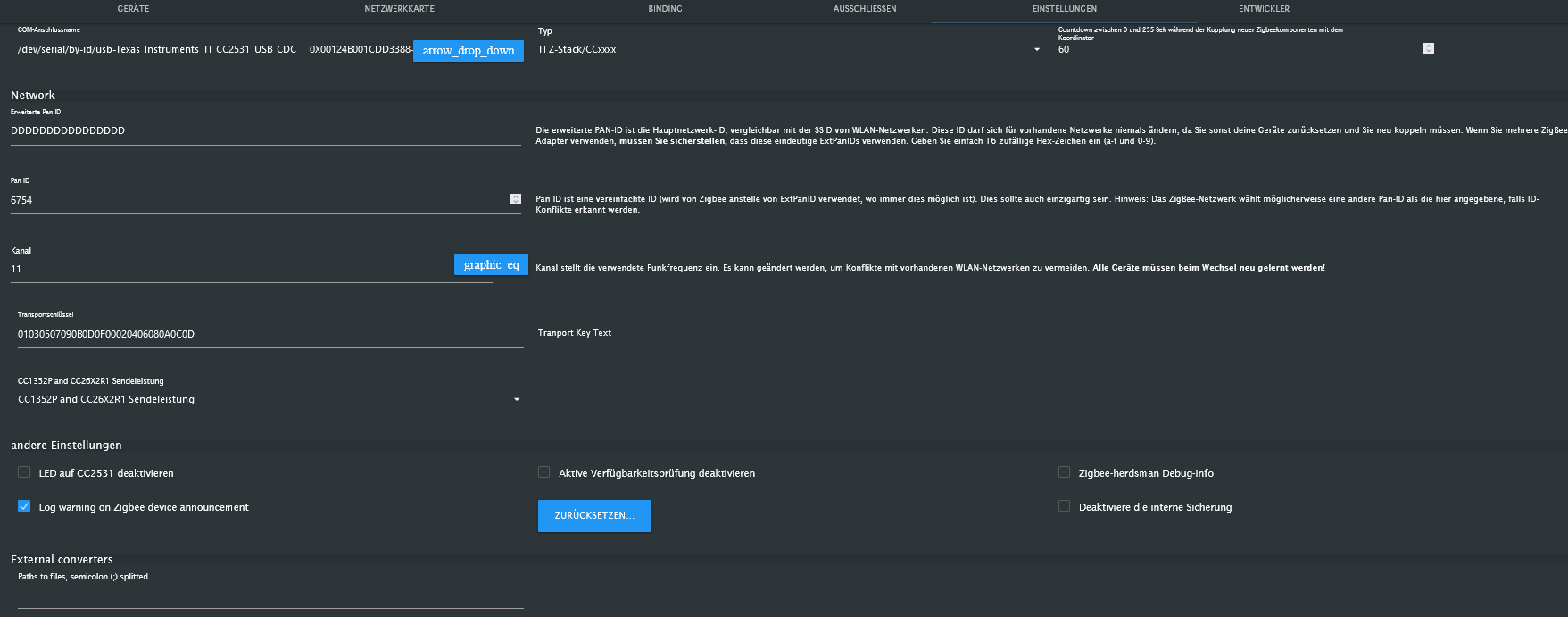
                                    Da wir gerade so plaudern... welchen Zigbee Stick könnt Ihr empfehlen? Gibt da ja den Sonoff ZBDongle ...aber den wohl mit zwei verschiedenen Chipsätzen..
                                    F 1 Antwort Letzte Antwort
                                    0
                                    • G gluecksmann

                                      @frank579

                                      Hallo, habe den Adapter neu gestartet...jetzt läuft es wieder... komisch...

                                      F Offline
                                      F Offline
                                      Frank579
                                      schrieb am zuletzt editiert von
                                      #70

                                      @gluecksmann Okay dann bleib trotzdem erst mal auf der Version, bis es was neues gibt :)

                                      @thomas-braun sagte in Zigbee Stick spinnt:

                                      @gluecksmann

                                      iobroker.govee

                                      nochmal installieren.

                                      Hast du das gemacht einfach nochmal drüber, das alles sauber ist, dann sollte bei iob diag auch nichts auffällige mehr sein ...

                                      G 1 Antwort Letzte Antwort
                                      0
                                      • F Frank579

                                        @gluecksmann Okay dann bleib trotzdem erst mal auf der Version, bis es was neues gibt :)

                                        @thomas-braun sagte in Zigbee Stick spinnt:

                                        @gluecksmann

                                        iobroker.govee

                                        nochmal installieren.

                                        Hast du das gemacht einfach nochmal drüber, das alles sauber ist, dann sollte bei iob diag auch nichts auffällige mehr sein ...

                                        G Offline
                                        G Offline
                                        gluecksmann
                                        schrieb am zuletzt editiert von
                                        #71

                                        @frank579

                                        Traue mich das kaum... jetzt wo es so schön läuft..

                                        F 1 Antwort Letzte Antwort
                                        0
                                        • G gluecksmann

                                          @thomas-braun

                                          Da wir gerade so plaudern... welchen Zigbee Stick könnt Ihr empfehlen? Gibt da ja den Sonoff ZBDongle ...aber den wohl mit zwei verschiedenen Chipsätzen..

                                          F Offline
                                          F Offline
                                          Frank579
                                          schrieb am zuletzt editiert von
                                          #72

                                          @gluecksmann
                                          Ich hab Hier den von @dimaiv aber als LAN Version. und super Zufrieden, klarer Vorteil ist der LAN Anschluss, muss also nicht im Netzwerkschrank liegen, Liegt bei mir im Büro (zentral) auf dem Schrank

                                          1 Antwort Letzte Antwort
                                          0

                                          Hey! Du scheinst an dieser Unterhaltung interessiert zu sein, hast aber noch kein Konto.

                                          Hast du es satt, bei jedem Besuch durch die gleichen Beiträge zu scrollen? Wenn du dich für ein Konto anmeldest, kommst du immer genau dorthin zurück, wo du zuvor warst, und kannst dich über neue Antworten benachrichtigen lassen (entweder per E-Mail oder Push-Benachrichtigung). Du kannst auch Lesezeichen speichern und Beiträge positiv bewerten, um anderen Community-Mitgliedern deine Wertschätzung zu zeigen.

                                          Mit deinem Input könnte dieser Beitrag noch besser werden 💗

                                          Registrieren Anmelden
                                          Antworten
                                          • In einem neuen Thema antworten
                                          Anmelden zum Antworten
                                          • Älteste zuerst
                                          • Neuste zuerst
                                          • Meiste Stimmen


                                          Support us

                                          ioBroker
                                          Community Adapters
                                          Donate

                                          568

                                          Online

                                          32.7k

                                          Benutzer

                                          82.6k

                                          Themen

                                          1.3m

                                          Beiträge
                                          Community
                                          Impressum | Datenschutz-Bestimmungen | Nutzungsbedingungen | Einwilligungseinstellungen
                                          ioBroker Community 2014-2025
                                          logo
                                          • Anmelden

                                          • Du hast noch kein Konto? Registrieren

                                          • Anmelden oder registrieren, um zu suchen
                                          • Erster Beitrag
                                            Letzter Beitrag
                                          0
                                          • Home
                                          • Aktuell
                                          • Tags
                                          • Ungelesen 0
                                          • Kategorien
                                          • Unreplied
                                          • Beliebt
                                          • GitHub
                                          • Docu
                                          • Hilfe